JP6767799B2 - Information processing program, information processing device, control method of information processing device and information processing system - Google Patents
Information processing program, information processing device, control method of information processing device and information processing system Download PDFInfo
- Publication number
- JP6767799B2 JP6767799B2 JP2016137808A JP2016137808A JP6767799B2 JP 6767799 B2 JP6767799 B2 JP 6767799B2 JP 2016137808 A JP2016137808 A JP 2016137808A JP 2016137808 A JP2016137808 A JP 2016137808A JP 6767799 B2 JP6767799 B2 JP 6767799B2
- Authority
- JP
- Japan
- Prior art keywords
- unit
- arrangement order
- contents
- information processing
- game
- Prior art date
- Legal status (The legal status is an assumption and is not a legal conclusion. Google has not performed a legal analysis and makes no representation as to the accuracy of the status listed.)
- Active
Links
Images




Classifications
-
- G—PHYSICS
- G06—COMPUTING OR CALCULATING; COUNTING
- G06F—ELECTRIC DIGITAL DATA PROCESSING
- G06F3/00—Input arrangements for transferring data to be processed into a form capable of being handled by the computer; Output arrangements for transferring data from processing unit to output unit, e.g. interface arrangements
- G06F3/01—Input arrangements or combined input and output arrangements for interaction between user and computer
- G06F3/048—Interaction techniques based on graphical user interfaces [GUI]
- G06F3/0481—Interaction techniques based on graphical user interfaces [GUI] based on specific properties of the displayed interaction object or a metaphor-based environment, e.g. interaction with desktop elements like windows or icons, or assisted by a cursor's changing behaviour or appearance
- G06F3/04817—Interaction techniques based on graphical user interfaces [GUI] based on specific properties of the displayed interaction object or a metaphor-based environment, e.g. interaction with desktop elements like windows or icons, or assisted by a cursor's changing behaviour or appearance using icons
-
- A—HUMAN NECESSITIES
- A63—SPORTS; GAMES; AMUSEMENTS
- A63F—CARD, BOARD, OR ROULETTE GAMES; INDOOR GAMES USING SMALL MOVING PLAYING BODIES; VIDEO GAMES; GAMES NOT OTHERWISE PROVIDED FOR
- A63F13/00—Video games, i.e. games using an electronically generated display having two or more dimensions
-
- A—HUMAN NECESSITIES
- A63—SPORTS; GAMES; AMUSEMENTS
- A63F—CARD, BOARD, OR ROULETTE GAMES; INDOOR GAMES USING SMALL MOVING PLAYING BODIES; VIDEO GAMES; GAMES NOT OTHERWISE PROVIDED FOR
- A63F13/00—Video games, i.e. games using an electronically generated display having two or more dimensions
- A63F13/20—Input arrangements for video game devices
- A63F13/21—Input arrangements for video game devices characterised by their sensors, purposes or types
- A63F13/214—Input arrangements for video game devices characterised by their sensors, purposes or types for locating contacts on a surface, e.g. floor mats or touch pads
- A63F13/2145—Input arrangements for video game devices characterised by their sensors, purposes or types for locating contacts on a surface, e.g. floor mats or touch pads the surface being also a display device, e.g. touch screens
-
- A—HUMAN NECESSITIES
- A63—SPORTS; GAMES; AMUSEMENTS
- A63F—CARD, BOARD, OR ROULETTE GAMES; INDOOR GAMES USING SMALL MOVING PLAYING BODIES; VIDEO GAMES; GAMES NOT OTHERWISE PROVIDED FOR
- A63F13/00—Video games, i.e. games using an electronically generated display having two or more dimensions
- A63F13/50—Controlling the output signals based on the game progress
- A63F13/53—Controlling the output signals based on the game progress involving additional visual information provided to the game scene, e.g. by overlay to simulate a head-up display [HUD] or displaying a laser sight in a shooting game
- A63F13/533—Controlling the output signals based on the game progress involving additional visual information provided to the game scene, e.g. by overlay to simulate a head-up display [HUD] or displaying a laser sight in a shooting game for prompting the player, e.g. by displaying a game menu
-
- G—PHYSICS
- G06—COMPUTING OR CALCULATING; COUNTING
- G06F—ELECTRIC DIGITAL DATA PROCESSING
- G06F3/00—Input arrangements for transferring data to be processed into a form capable of being handled by the computer; Output arrangements for transferring data from processing unit to output unit, e.g. interface arrangements
- G06F3/01—Input arrangements or combined input and output arrangements for interaction between user and computer
- G06F3/048—Interaction techniques based on graphical user interfaces [GUI]
- G06F3/0481—Interaction techniques based on graphical user interfaces [GUI] based on specific properties of the displayed interaction object or a metaphor-based environment, e.g. interaction with desktop elements like windows or icons, or assisted by a cursor's changing behaviour or appearance
- G06F3/04812—Interaction techniques based on cursor appearance or behaviour, e.g. being affected by the presence of displayed objects
-
- G—PHYSICS
- G06—COMPUTING OR CALCULATING; COUNTING
- G06F—ELECTRIC DIGITAL DATA PROCESSING
- G06F3/00—Input arrangements for transferring data to be processed into a form capable of being handled by the computer; Output arrangements for transferring data from processing unit to output unit, e.g. interface arrangements
- G06F3/01—Input arrangements or combined input and output arrangements for interaction between user and computer
- G06F3/048—Interaction techniques based on graphical user interfaces [GUI]
- G06F3/0481—Interaction techniques based on graphical user interfaces [GUI] based on specific properties of the displayed interaction object or a metaphor-based environment, e.g. interaction with desktop elements like windows or icons, or assisted by a cursor's changing behaviour or appearance
- G06F3/0482—Interaction with lists of selectable items, e.g. menus
-
- G—PHYSICS
- G06—COMPUTING OR CALCULATING; COUNTING
- G06F—ELECTRIC DIGITAL DATA PROCESSING
- G06F3/00—Input arrangements for transferring data to be processed into a form capable of being handled by the computer; Output arrangements for transferring data from processing unit to output unit, e.g. interface arrangements
- G06F3/01—Input arrangements or combined input and output arrangements for interaction between user and computer
- G06F3/048—Interaction techniques based on graphical user interfaces [GUI]
- G06F3/0484—Interaction techniques based on graphical user interfaces [GUI] for the control of specific functions or operations, e.g. selecting or manipulating an object, an image or a displayed text element, setting a parameter value or selecting a range
- G06F3/0485—Scrolling or panning
-
- G—PHYSICS
- G09—EDUCATION; CRYPTOGRAPHY; DISPLAY; ADVERTISING; SEALS
- G09G—ARRANGEMENTS OR CIRCUITS FOR CONTROL OF INDICATING DEVICES USING STATIC MEANS TO PRESENT VARIABLE INFORMATION
- G09G5/00—Control arrangements or circuits for visual indicators common to cathode-ray tube indicators and other visual indicators
- G09G5/14—Display of multiple viewports
-
- G—PHYSICS
- G09—EDUCATION; CRYPTOGRAPHY; DISPLAY; ADVERTISING; SEALS
- G09G—ARRANGEMENTS OR CIRCUITS FOR CONTROL OF INDICATING DEVICES USING STATIC MEANS TO PRESENT VARIABLE INFORMATION
- G09G5/00—Control arrangements or circuits for visual indicators common to cathode-ray tube indicators and other visual indicators
- G09G5/34—Control arrangements or circuits for visual indicators common to cathode-ray tube indicators and other visual indicators for rolling or scrolling
Landscapes
- Engineering & Computer Science (AREA)
- Theoretical Computer Science (AREA)
- General Engineering & Computer Science (AREA)
- Physics & Mathematics (AREA)
- Human Computer Interaction (AREA)
- General Physics & Mathematics (AREA)
- Multimedia (AREA)
- Computer Hardware Design (AREA)
- Optics & Photonics (AREA)
- User Interface Of Digital Computer (AREA)
Description
本開示は、情報処理装置の表示制御処理に関する。 The present disclosure relates to a display control process of an information processing device.
従来、サムネイル画像やアイコン等の複数のオブジェクトが配列された一覧画面において、その配列順序を変更する方式が提案されている。 Conventionally, a method of changing the arrangement order of a list screen in which a plurality of objects such as thumbnail images and icons are arranged has been proposed.
例えば、ユーザがスティックを画面にタッチしたまま垂直方向にスライドさせることで、そのスティックによって指示されたアイコンのみを移動させたり、そのアイコンを他の2つのアイコンの間に挿入させたりする方式が開示されている。 For example, a method is disclosed in which a user slides a stick vertically while touching the screen to move only the icon indicated by the stick or insert the icon between two other icons. Has been done.
しかしながら、上記の方式では、ユーザの好みの配列順序をスライド操作によってアイコンを移動させることにより実現する必要があり、煩雑な手順となっていた。 However, in the above method, it is necessary to realize the user's favorite arrangement order by moving the icons by a slide operation, which is a complicated procedure.
上記のような問題を解決するためになされたものであって、簡易な方式でユーザの好みの配列順序に変更可能な情報処理プログラム、情報処理装置、情報処理装置の制御方法および情報処理システムを提供することである。 An information processing program, an information processing device, an information processing device control method, and an information processing system that can be changed to the user's favorite arrangement order by a simple method, which was made to solve the above problems. Is to provide.
ある局面に従う表示装置と接続された情報処理装置のコンピュータにおいて実行される情報処理プログラムであって、コンピュータを、情報処理プログラムにより、所定の操作を受け付ける操作受付部と、操作受付部で受け付けた所定の操作の入力に従って、複数のコンテンツに対する配列順序を変更するソート部と、ソート部により配列順序が変更された複数のコンテンツを表示装置に表示する表示制御部として機能させる。表示制御部は、変更された配列順序の内容を示す情報を所定期間表示する。 An information processing program executed by a computer of an information processing device connected to a display device according to a certain aspect, in which an operation reception unit accepts a predetermined operation by the information processing program and a predetermined operation reception unit receives the computer. It functions as a sort unit that changes the arrangement order for a plurality of contents according to the input of the operation of, and a display control unit that displays a plurality of contents whose arrangement order has been changed by the sort unit on the display device. The display control unit displays information indicating the contents of the changed arrangement order for a predetermined period.
好ましくは、表示制御部は、操作受付部で受け付けた所定の操作から所定期間経過後に変更された配列順序の内容を示す情報を非表示にする。 Preferably, the display control unit hides the information indicating the contents of the arrangement order changed after the lapse of a predetermined period from the predetermined operation received by the operation reception unit.
好ましくは、表示制御部は、複数のコンテンツの少なくとも一部と重なるように、変更された配列順序の内容を示す情報を所定期間表示する。 Preferably, the display control unit displays information indicating the contents of the changed arrangement order for a predetermined period so as to overlap with at least a part of the plurality of contents.
好ましくは、ソート部は、操作受付部で受け付けた所定の操作の入力に従って、複数種類の配列順序を順番に選択して、選択された配列順序に従って複数のコンテンツに対する配列順序を変更する。 Preferably, the sort unit sequentially selects a plurality of types of arrangement order according to the input of a predetermined operation received by the operation reception unit, and changes the arrangement order for the plurality of contents according to the selected arrangement order.
好ましくは、ソート部は、複数種類の配列順序のうちの最後の配列順序が選択された後に、操作受付部により所定の操作の入力を受け付けた場合には、複数種類の配列順序のうちの最初の配列順序を選択する。 Preferably, the sort unit is the first of the plurality of types of sequence order when the operation reception unit receives the input of a predetermined operation after the last sequence order of the plurality of types of array order is selected. Select the array order of.
好ましくは、表示制御部は、表示装置に表示された複数のコンテンツに対して、各々を指示に従って選択可能な選択カーソルを表示装置にさらに表示する。表示制御部は、ソート部により配列された複数のコンテンツのうちの先頭のコンテンツに対応して選択カーソルを表示する。 Preferably, the display control unit further displays a selection cursor on the display device, which can select each of the plurality of contents displayed on the display device according to the instruction. The display control unit displays the selection cursor corresponding to the first content among the plurality of contents arranged by the sort unit.
好ましくは、複数のコンテンツは、メニューの複数のアイコンに相当する。
ある局面に従う表示装置と接続された情報処理装置であって、所定の操作を受け付ける操作受付部と、操作受付部で受け付けた所定の操作の入力に従って、複数のコンテンツに対する配列順序を変更するソート部と、ソート部により配列順序が変更された複数のコンテンツを表示装置に表示する表示制御部とを備える。表示制御部は、変更された配列順序の内容を示す情報を所定期間表示する。
Preferably, the plurality of contents corresponds to a plurality of icons in the menu.
An information processing device connected to a display device that follows a certain aspect, and is an operation reception unit that accepts a predetermined operation, and a sort unit that changes the arrangement order for a plurality of contents according to the input of a predetermined operation received by the operation reception unit. And a display control unit that displays a plurality of contents whose arrangement order has been changed by the sort unit on the display device. The display control unit displays information indicating the contents of the changed arrangement order for a predetermined period.
ある局面に従う表示装置と接続された情報処理装置の制御方法であって、所定の操作を受け付けるステップと、受け付けた所定の操作の入力に従って、複数のコンテンツに対する配列順序を変更するステップと、配列順序が変更された複数のコンテンツを表示装置に表示するステップとを備える。表示するステップは、変更された配列順序の内容を示す情報を所定期間表示するステップを含む。 A control method of an information processing device connected to a display device according to a certain aspect, which includes a step of accepting a predetermined operation, a step of changing the arrangement order for a plurality of contents according to the input of the received predetermined operation, and an arrangement order. It comprises a step of displaying a plurality of changed contents on a display device. The display step includes displaying information indicating the contents of the changed sequence order for a predetermined period of time.
ある局面に従う情報処理システムであって、所定の操作を受け付ける操作受付部と、操作受付部で受け付けた所定の操作の入力に従って、複数のコンテンツに対する配列順序を変更するソート部と、ソート部により配列順序が変更された複数のコンテンツを表示部に表示する表示制御部とを備える。表示制御部は、変更された配列順序の内容を示す情報を所定期間表示する。 An information processing system that follows a certain aspect, and is arranged by an operation reception unit that accepts a predetermined operation, a sort unit that changes the arrangement order for a plurality of contents according to the input of a predetermined operation received by the operation reception unit, and a sort unit. It includes a display control unit that displays a plurality of contents whose order has been changed on the display unit. The display control unit displays information indicating the contents of the changed arrangement order for a predetermined period.
上記によれば、簡易な方式でユーザの好みの配列順序に変更することが可能であり、また、変更した配列順序の内容を容易に把握することが可能である。 According to the above, it is possible to change the arrangement order to the user's preference by a simple method, and it is possible to easily grasp the contents of the changed arrangement order.
この実施の形態について、図面を参照しながら詳細に説明する。なお、図中の同一または相当部分については、同一符号を付してその説明は繰返さない。 This embodiment will be described in detail with reference to the drawings. The same or corresponding parts in the drawings are designated by the same reference numerals and the description thereof will not be repeated.
本実施形態における情報処理装置は、例えば携帯型ゲーム装置、携帯電話、あるいはスマートフォン等といった、携帯型(可搬型とも言う)の装置であってもよいし、パーソナルコンピュータや家庭用ゲーム機等といった据置型の装置であってもよいし、業務用のアーケードゲーム装置のような大型の装置であってもよい。本例においては、一例として情報処理装置の一例としてゲーム装置について説明する。 The information processing device in the present embodiment may be a portable device (also referred to as a portable device) such as a portable game device, a mobile phone, or a smartphone, or a stationary device such as a personal computer or a home-use game machine. It may be a type device, or it may be a large device such as a commercial arcade game device. In this example, a game device will be described as an example of an information processing device.
(実施形態1)
<ゲーム装置の構成>
図1は、実施形態1に基づくゲーム装置1の構成の概略ブロック図である。
(Embodiment 1)
<Game device configuration>
FIG. 1 is a schematic block diagram of the configuration of the
図1に示されるように、ゲーム装置1は、ゲーム装置本体10と、操作部12とを含む。
As shown in FIG. 1, the
ゲーム装置本体10は、表示部2と、CPU20と、メモリ30とを含む。
CPU20は、ゲーム装置1で実行される各種の情報処理を実行するための情報処理部である。CPU20は、メモリ30を用いて上記各種の情報処理を実行する。メモリ30は、ゲーム装置1において実行される各種プログラム(ゲームプログラムおよび本体プログラムを含む)を記憶する。メモリ30は、ゲーム装置1に内蔵される記憶部である場合について説明するが、例えば光ディスクやカートリッジ等の、ゲーム装置1に着脱可能な記憶媒体であってもよいし、これらの記憶部および記憶媒体の両方であってもよい。
The game device
The
本実施形態においては、ゲーム装置1では、少なくともゲームプログラムおよび本体プログラムという2種類のプログラムがメモリ30に記憶される。
In the present embodiment, in the
ゲームプログラムは、例えば、ゲームデータを読み出して当該ゲームデータを用いてゲーム処理を行うゲームプログラムであってもよい。 The game program may be, for example, a game program that reads out game data and performs game processing using the game data.
本体プログラムは、ゲームプログラムを制御するためのプログラムである。また、ゲームプログラムに対する所定の操作を実行するためのインタフェース画面等を提供する。 The main body program is a program for controlling a game program. It also provides an interface screen or the like for executing a predetermined operation on the game program.
CPU20は、メモリ30に格納されている本体プログラムに基づいて各種機能ブロックを実現する。
The
CPU20は、操作受付部22と、ソート部26と、表示制御部28とを含む。
操作受付部22は、操作部12からの所定の操作を受け付ける。
The
The operation reception unit 22 receives a predetermined operation from the
ソート部26は、複数のコンテンツ(アイコン)に対する配列順序を設定する。また、ソート部26は、操作受付部22で受け付けた操作部12からの所定の操作の入力に従って、複数のコンテンツ(アイコン)に対する配列順序を変更する。コンテンツの一例として、本例においては、ゲームアイコン(単にアイコンとも称する)について説明する。ゲームアイコンは、選択することにより対応するゲームプログラムの実行が可能なアイコンである。
The
表示制御部28は、ソート部26により設定あるいは変更された複数のコンテンツ(アイコン)を表示部2に表示する。また、表示制御部28は、変更された配列順序を示す情報を表示部2に表示する。
The
表示部2は、表示制御部28の情報処理によって生成される画像を表示する。
操作部12は、ボタン入力やキー入力等、ユーザによる操作指示を受け付ける。
The
The
操作部12で受け付けた操作指示は、CPU20に出力される。
操作部12は、入力装置として十字キー14と、Aボタン13Aと、Bボタン13Bと、選択(SELECT)ボタン15とを含む。
The operation instruction received by the
The
ゲーム装置1は、複数の装置によって構成されてもよい。例えば、ゲーム装置1は、CPU20を有する本体装置と、操作部12および/または表示部2を有する装置とが別体である構成であってもよい。例えば、他の実施形態において、ゲーム装置1は、本体装置と、操作部12および表示部2を有するゲーム装置とによって構成されてもよいし、本体装置と、操作部12を有する操作装置とによって構成されてもよい。また、ゲーム装置1は、表示部2を備えず、テレビを表示装置として用いる構成であってもよい。
The
<ゲームプログラムのリスト構成>
図2は、メモリ30に格納されているゲームプログラムのリストLSについて説明する図である。
<List structure of game programs>
FIG. 2 is a diagram illustrating a list LS of game programs stored in the
図2に示されるように、メモリ30には、複数のゲームプログラムの属性情報がそれぞれ予めリストLSとして登録されている。
As shown in FIG. 2, attribute information of a plurality of game programs is registered in advance as a list LS in the
ゲームプログラムには、ゲームIDがそれぞれ割り当てられている。ゲームIDにそれぞれ対応して、「タイトル名」、「2P対応」、「遊んだ回数」、「発売日」、「発売元名」が関連付けられて登録されている。 A game ID is assigned to each game program. Corresponding to each game ID, "title name", "2P compatible", "number of times played", "release date", and "release source name" are associated and registered.
本例においては、ゲームID1に対応して、「タイトル名」が「AAA」、ゲームID2に対応して、「タイトル名」が「BBB」、ゲームID3に対応して、「タイトル名」が「CCC」が、ゲームID4に対応して、「タイトル名」が「DDD」、ゲームID5に対応して、「タイトル名」が「EEE」が登録されている場合が示されている。
In this example, the "title name" corresponds to "AAA" for the game ID1, the "title name" corresponds to "BBB" for the game ID2, and the "title name" corresponds to the game ID3. It is shown that the "CCC" corresponds to the
また、ゲームID1,ID2,ID3にそれぞれ対応して、「2P対応」の項目に関して、「1P」、「1P」、「1P」が登録されている場合が示されている。また、ゲームID4、ID5にそれぞれ対応して、「2P対応」の項目に関して、「2P」、「2P」が登録されている場合が示されている。ここで「2P対応」の項目において、「2P」とは一人プレイおよび二人プレイが可能であることを意味する。「1P」とは一人プレイのみが可能であることを意味する。 Further, it is shown that "1P", "1P", and "1P" are registered for the item of "2P correspondence" corresponding to each of the game ID1, ID2, and ID3. Further, it is shown that "2P" and "2P" are registered for the item of "2P correspondence" corresponding to the game ID4 and ID5, respectively. Here, in the item of "2P correspondence", "2P" means that one-player play and two-player play are possible. "1P" means that only one player can play.
本例のリスト項目において、「遊んだ回数」は、ゲームプログラムを実行した回数値であり、ゲームプログラムの実行に従って随時更新されるものとする。その他の「発売日」、「発売元名」等のデータについては予め登録されており、「遊んだ回数」以外は更新されないものとする。なお、更新されるようにしても良い。 In the list item of this example, the "number of times played" is the number of times the game program is executed, and is updated at any time according to the execution of the game program. Other data such as "release date" and "release source name" are registered in advance, and are not updated except for "number of times played". In addition, it may be updated.
<配列順序の方式の説明>
図3は、配列順序の方式リストを説明する図である。
<Explanation of array order method>
FIG. 3 is a diagram illustrating a method list of array order.
図3に示されるように、複数の配列順序の方式が設けられている。
具体的には、識別子C1〜C5にそれぞれ対応して「タイトル名順」、「2P対応ゲーム順」、「最近遊んだ回数順」、「発売日順」、「発売元順」の配列順序の方式が示されている。
As shown in FIG. 3, a plurality of arrangement order methods are provided.
Specifically, the arrangement order of "title name order", "2P compatible game order", "recently played number of times", "release date order", and "release source order" corresponding to identifiers C1 to C5, respectively. The method is shown.
「タイトル名順」は、例えば、先頭の文字の優先度に従って配列順序を設定する方式である。具体的には、「A」・・・「Z」の優先度順にアイコンを配列する。 The "title name order" is, for example, a method of setting the arrangement order according to the priority of the first character. Specifically, the icons are arranged in the order of priority of "A" ... "Z".
「2P対応ゲーム順」は、「2P対応(二人プレイが可能)」のゲームの優先度を高くして配列順序を設定する方式である。具体的には、「2P対応」、「1P対応」の優先度順にアイコンを配列する。 The "2P compatible game order" is a method of setting the arrangement order by raising the priority of the "2P compatible (two-player play possible)" game. Specifically, the icons are arranged in the order of priority of "2P compatible" and "1P compatible".
「最近遊んだ回数順」は、ゲームプログラムを実行した回数をカウントし、カウントした回数値の多いゲームの優先度を高くして配列順序を設定する方式である。具体的には、回数値の多い順にアイコンを配列する。 The "order of the number of times played recently" is a method of counting the number of times the game program is executed and setting the arrangement order by giving priority to the game having the most counted number of times. Specifically, the icons are arranged in descending order of the number of times.
「発売日順」は、発売日が近いゲームの優先度を高くして配列順序を設定する方式である。具体的には、現在の日付に近い順にアイコンを配列する。 "Release date order" is a method of setting the arrangement order by giving priority to games with close release dates. Specifically, the icons are arranged in order of proximity to the current date.
「発売元順」は、発売元の名前の文字の先頭の優先度に従って配列順序を設定する方式である。具体的には、「A」・・・「Z」の優先度順にアイコンを配列する。 "Sales source order" is a method of setting the arrangement order according to the priority of the first character of the name of the selling source. Specifically, the icons are arranged in the order of priority of "A" ... "Z".
なお、1つの配列順序の方式に限られず、複数の配列順序の方式を組み合わせるようにしても良い。 Note that the method is not limited to one sequence order method, and a plurality of sequence order methods may be combined.
本体プログラムには、当該配列順序の方式を実行するプログラムが含まれている。本例においては、5つの配列順序の方式について説明しているが、特にこれに限られず、さらに複数の配列順序の方式を実行することも可能である。 The main program includes a program that executes the method of the array order. In this example, the five sequence order methods are described, but the present invention is not limited to this, and a plurality of sequence order methods can be further executed.
<メニュー画面>
図4は、実施形態1に基づくメニュー画面100を説明する図である。
<Menu screen>
FIG. 4 is a diagram illustrating a
図4に示されるように、メニュー画面100には、ゲームタイトルリスト104が設けられている。
As shown in FIG. 4, the
ゲームタイトルリスト104には、複数のゲームプログラムにそれぞれ対応する複数のアイコン102のうちの一部のアイコン102が設けられている。本例においては、一例として、ゲームタイトルリスト104に5つのアイコン102が設けられている。
The
また、本例においては、左右方向に複数のアイコンが所定の配列順序に従って配列されている場合が示されている。初期状態としては、所定の配列順序として「タイトル名順」が選択され、当該配列順序に従って配列されている。 Further, in this example, a case where a plurality of icons are arranged in a predetermined arrangement order in the left-right direction is shown. As an initial state, "title name order" is selected as a predetermined arrangement order, and the sequences are arranged according to the sequence order.
したがって、ゲームプログラムのリストLSに基づいて、「AAA」、「BBB」、「CCC」、「DDD」、「EEE」のタイトル名にそれぞれ対応するゲームプログラムのアイコン102が順番に配列されて表示されている。
Therefore, based on the game program list LS, the
なお、本例においては、一例として複数のゲームプログラムにそれぞれ対応する複数のアイコン102については、左方向から右方向に進むに従って優先度が低下するように配列されている。
In this example, as an example, the plurality of
また、複数のアイコンのうちの1つに選択カーソル103が設けられている。操作部12の十字キー14の左右方向の操作指示に従って選択カーソル103を左右方向に移動(左右スクロール)させることが可能である。本例においては、「CCC」のタイトル名に対応するゲームプログラムのアイコン102に選択カーソル103が位置する(選択状態である)場合が示されている。
Further, a
また、画面右端のアイコン102に選択カーソル103が位置する場合、操作部12の十字キー14の右方向の操作指示に従ってアイコン102が左方向に移動し、次の順番のアイコン102と選択カーソル103とが重なって表示される。なお、所定の配列順序に従って配列された複数のアイコンのうちの最後のアイコンの次の順番のアイコンは先頭のアイコンとなるように無端状に配列されている。操作部12の十字キー14の左方向の操作指示の場合についても同様の方式であるのでその詳細な説明については繰り返さない。
When the
また、ゲームタイトルリスト104には、複数のアイコン102の下部において、複数のゲームプログラムにそれぞれ対応する複数のサムネイル画像のリスト106が直線状に設けられている。当該サムネイル画像の個数はゲームプログラムの個数と一致している。複数のサムネイル画像のリスト106の1つに対して、選択カーソル103に対応するサムネイル画像の位置に対応する強調枠105が付されて表示されている。これにより、全体の複数のゲームプログラムの配列順序のうちの何番目のゲームプログラムに対応するアイコン102が選択カーソル103により選択されているかを容易に把握することが可能である。
Further, in the
操作部12の十字キー14の所定(下方向)の操作指示に従って後述する中断ポイントリストがさらに表示される。
A list of interruption points, which will be described later, is further displayed according to a predetermined (downward) operation instruction of the
本例において、操作部12の選択ボタン15は、配列変更の操作ボタンに割り当てられている。操作部12の選択ボタン15の操作指示に従ってソート処理が実行される。また、操作部12の選択ボタン15を押すたびに複数の配列順序が順次選択されてソート処理が繰り返し実行される。
In this example, the
また、操作部12のAボタン13Aの操作指示に従って選択カーソル103に対応するゲームプログラムの実行(起動)が指示されて、当該ゲームプログラムが実行(起動)される。また、後述するが操作部12のAボタン13Aの操作指示に従って中断ポイントアイコンがスロットに登録される。
Further, the execution (start) of the game program corresponding to the
<ソート画面>
図5は、実施形態1に基づくソート処理後のメニュー画面110を説明する図である。
<Sort screen>
FIG. 5 is a diagram illustrating the
図5に示されるように、メニュー画面110は、メニュー画面100と比較して、ソート処理の内容を示す情報112が表示される。複数のアイコン102と重なるようにしてソート処理の内容を示す情報112が表示される。本例においては、「2P対応ゲーム順」と表示されている場合が示されている。「2P対応ゲーム」の優先度が高いものから配列される。
As shown in FIG. 5, the
したがって、ゲームプログラムのリストLSに基づいて、「DDD」、「EEE」、「AAA」、「BBB」、「CCC」のタイトル名にそれぞれ対応するゲームプログラムのアイコン102が順番に配列されて表示されている。
Therefore, based on the game program list LS, the
なお、ソート処理の内容を示す情報112は、操作部12の選択ボタン15の操作指示に従ってソート処理が実行されてから所定期間経過後に非表示となる。
The
また、選択カーソル103は、ソート処理後において、配列された複数のアイコン102のうちの先頭のアイコン102に対応した位置に配置される。したがって、複数のサムネイル画像のリスト106の先頭位置のサムネイル画像の位置に強調枠105が付されて表示されている。
Further, the
<フロー処理>
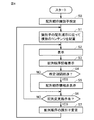
図6は、実施形態1に基づくゲーム装置1のソート処理のフローを説明する図である。
<Flow processing>
FIG. 6 is a diagram illustrating a flow of sorting processing of the
主にCPU20における処理である。
図6に示されるように、CPU20は、配列順序の識別子を設定する(ステップS0)。具体的には、ソート部26は、配列順序の識別子の初期状態として、識別子「C1」に設定する。
This is mainly processing in the
As shown in FIG. 6, the
次に、CPU20は、設定された配列順序の識別子に従って複数のコンテンツ(アイコン)を配列する(ステップS1)。ソート部26は、リストLSに基づいて、配列順序の識別子C1に従って「タイトル名順」の配列順序に基づいて複数のコンテンツ(アイコン)を配列する。
Next, the
次に、CPU20は、配列した複数のコンテンツ(アイコン)を表示する(ステップS2)。表示制御部28は、図4で説明したようにゲームタイトルリスト104として、ソート部26によりリストLSに基づいて配列されたタイトル名順の複数のコンテンツ(アイコン)の一部を表示部2に表示する。また、表示制御部28は、図4で説明したようにゲームタイトルリスト104として、複数のゲームプログラムにそれぞれ対応する複数のサムネイル画像のリスト106を表示する。
Next, the
次に、CPU20は、識別子に従って配列順序の内容を示す情報を表示する(ステップS3)。表示制御部28は、図5と同様に配列順序の識別子C1に従って「タイトル名順」の情報112を複数のアイコン102と重なるようにして表示する。
Next, the
次に、CPU20は、所定期間が経過したかどうかを判断する(ステップS4)。表示制御部28は、所定期間、配列順序の内容を示す情報が表示されたか否かを判断する。
Next, the
CPU20は、所定期間が経過したと判断した場合(ステップS4においてYES)には、配列順序の内容を示す情報を非表示にする(ステップS5)。表示制御部28は、所定期間、配列順序の内容を示す情報が表示されたと判断した場合には、配列順序の内容を示す情報を非表示にする。表示制御部28は、情報112を非表示にする際には、情報112の表示をフェードアウトして非表示にするようにしても良い。
When the
一方、CPU20は、所定期間が経過していないと判断した場合(ステップS4においてNO)には、ステップS5をスキップして、ステップS6に進む。
On the other hand, when the
次に、CPU20は、配列変更指示があるかどうかを判断する(ステップS6)。具体的には、操作受付部22は、操作部12の選択ボタン15の操作指示があるかどうかを判断する。
Next, the
ステップS6において、CPU20は、配列変更指示がないと判断した場合(ステップS6においてNO)には、ステップS2に戻り、配列した複数のコンテンツの表示を維持し、上記処理を繰り返す。
If the
一方、ステップS6において、CPU20は、配列変更指示があると判断した場合(ステップS6においてYES)には、配列順序の識別子を変更する(ステップS7)。具体的には、操作受付部22は、操作部12の選択ボタン15の操作指示があると判断した場合には、ソート部26に通知する。ソート部26は、操作受付部22からの通知に従って配列順序の識別子を変更する。例えば、識別子C1を識別子C2に変更する。識別子は操作部12の選択ボタン15の操作指示が行われる毎に順番にC1→C2→C3→C4→C5→C1と変更される。なお、最後の識別子C5の次は、最初の識別子C1に戻る。以降の処理は同様である。
On the other hand, in step S6, when the
次に、ステップS1に戻り、CPU20は、変更された配列順序の識別子に従って複数のコンテンツを配列する。ソート部26は、リストLSに基づいて、配列順序の識別子C2に従って「2P対応ゲーム順」の配列順序に基づいて複数のコンテンツ(アイコン)を配列する。
Next, returning to step S1, the
そして、ステップS2において、CPU20は、配列した複数のコンテンツ(アイコン)を表示する。表示制御部28は、図5で説明したようにゲームタイトルリスト104として、ソート部26により配列された2P対応順の複数のコンテンツ(アイコン)の一部を表示部2に表示する。また、表示制御部28は、図5で説明したようにゲームタイトルリスト104として、複数のゲームプログラムにそれぞれ対応する複数のサムネイル画像のリスト106を表示する。そして、ステップS3において、CPU20は、識別子に従って配列順序の内容を示す情報を表示する。表示制御部28は、図5で説明したように、配列順序の識別子C2に従って「2P対応ゲーム順」の情報112を複数のアイコン102と重なるようにして表示する。そして、表示制御部28は、操作部12の選択ボタン15の操作指示が行われてから所定期間経過後に当該情報112は非表示にする。
Then, in step S2, the
以降の処理については同様であるのでその詳細な説明については繰り返さない。
本例においては、操作部12の選択ボタン15の操作指示に従って簡易な方式で配列順序を変更することが可能である。また、変更された際に、配列順序の内容を示す情報が所定期間表示されて、所定期間経過後、非表示となる。したがって、配列順序を変更した際にはどのような配列順序であるかを容易に把握することが可能となる。また、所定期間経過後に当該情報は非表示とされるため当該表示が邪魔になることもなく、ユーザの好みの配列順序に簡易な方式で変更することが可能である。
Since the subsequent processing is the same, the detailed explanation will not be repeated.
In this example, the arrangement order can be changed by a simple method according to the operation instruction of the
なお、本例においては、コンテンツの一例として、ゲームアイコン(単にアイコンとも称する)の配列順序を変更する場合について説明したが、これに限られず、複数のコマンドをそれぞれ実行する複数のアイコンの配列順序を変更するようにしても良い。また、コンテンツとして表やリストのデータの配列順序を変更する場合にも同様に適用可能である。 In this example, as an example of the content, the case of changing the arrangement order of game icons (also simply referred to as icons) has been described, but the present invention is not limited to this, and the arrangement order of a plurality of icons for executing a plurality of commands is not limited to this. May be changed. It is also applicable when changing the arrangement order of data in a table or list as content.
(実施形態2)
実施形態2においては、ゲーム装置におけるリセット処理を実行した場合の情報処理について説明する。
(Embodiment 2)
In the second embodiment, information processing when the reset process in the game device is executed will be described.
図7は、実施形態2に基づくゲーム装置の画面遷移の概念について説明する図である。
図7に示されるように、ゲーム装置は、電源を投入(ON)する(シーケンスsq0)と、メニュー画面を表示する。ゲーム装置は、メニュー画面において、ゲームプログラムに対応するアイコンを選択してゲームを起動する(シーケンスsq1)と、ゲーム画面を表示する。
FIG. 7 is a diagram illustrating a concept of screen transition of a game device based on the second embodiment.
As shown in FIG. 7, the game device displays a menu screen when the power is turned on (ON) (sequence sq0). The game device displays the game screen when the game is started by selecting the icon corresponding to the game program on the menu screen (sequence sq1).
ゲーム装置は、ゲーム処理中に、リセットボタンを選択する(シーケンスsq2)と、ゲーム処理を中断して中断ポイントデータを生成する(シーケンスsq3)。中断ポイントデータとは、当該ゲーム処理の中断状態から再度ゲームの再開あるいは復帰が可能なバックアップデータである。そして、ゲーム装置は、中断ポイントアイコンを含むメニュー画面を表示する。ゲーム装置は、当該メニュー画面において、ゲームプログラムに対応するアイコンを選択してゲームを起動する(シーケンスsq4)と、ゲーム画面を表示する。 When the reset button is selected during the game processing (sequence sq2), the game device interrupts the game processing and generates interruption point data (sequence sq3). The interruption point data is backup data capable of restarting or returning the game from the interrupted state of the game processing. Then, the game device displays a menu screen including the interruption point icon. The game device displays the game screen when the game is started by selecting the icon corresponding to the game program on the menu screen (sequence sq4).
また、ゲーム装置は、中断ポイントアイコンを含むメニュー画面において、中断ポイント編集を指示する(シーケンスsq5)と、中断ポイントリスト画面を含むメニュー画面を表示する。 Further, when the game device instructs the interruption point edit (sequence sq5) on the menu screen including the interruption point icon, the game device displays the menu screen including the interruption point list screen.
ゲーム装置は、メニュー画面において、中断ポイント編集を指示する(シーケンスsq6)と、中断ポイントリスト画面を表示する。ゲーム装置は、中断ポイントリスト画面を含むメニュー画面において、ゲームプログラムに対応するアイコンを選択してゲームを起動する(シーケンスsq7)と、ゲーム画面を表示する。 When the game device instructs the interruption point edit (sequence sq6) on the menu screen, the interruption point list screen is displayed. The game device displays the game screen when the game is started by selecting the icon corresponding to the game program on the menu screen including the interruption point list screen (sequence sq7).
通常、メニュー画面のゲームを起動する場合には、ゲームタイトルリスト104のアイコン102を選択し、当該アイコンに対応するゲームプログラムが起動すると、タイトルを表示した後にゲームを開始するか否かや、プレイヤ数、難易度等をユーザに選択させる画面等が表示され、当該選択の後にゲームが開始される。したがって、ゲームを開始するまでにある程度の時間と手間がかかっていた。
Normally, when starting a game on the menu screen, the
一方、例えばゲームを開始した直後のリセット処理に基づく中断ポイントデータを作成しておけば、その中断ポイントデータからすぐにゲームを開始することが可能であり、プレイヤ数、難易度等の設定も不要であり時間も手間もかけることなくすぐにゲームを開始することが可能である。 On the other hand, for example, if interrupt point data is created based on the reset process immediately after starting the game, the game can be started immediately from the interrupt point data, and there is no need to set the number of players, difficulty level, etc. Therefore, it is possible to start the game immediately without spending time and effort.
以下、上記処理について具体的に説明する。
図8は、実施形態2に基づくゲーム装置1#の構成の概略ブロック図である。
Hereinafter, the above processing will be specifically described.
FIG. 8 is a schematic block diagram of the configuration of the
図8に示されるように、ゲーム装置1#は、ゲーム装置本体10#と、操作部12とを含む。
As shown in FIG. 8, the
ゲーム装置本体10#は、ゲーム装置本体10と比較して、CPU20をCPU20#に置換した点と、リセットボタン16をさらに設けた点とが異なる。
The game device
CPU20#は、メモリ30に格納されている本体プログラムに基づいて各種機能ブロックを実現する。
The
CPU20#は、操作受付部42と、データ生成部44と、表示制御部46と、データ編集部48と、データ実行部50と、ロック設定/解除部52とを含む。
The
操作受付部42は、操作部12およびリセットボタン16からの操作を受け付ける。
データ生成部44は、操作受付部42で受け付けたリセットボタン16からの指示に従って中断ポイントデータを生成する。
The
The
表示制御部46は、表示部2におけるメニュー画面における各種の表示を制御する。
データ編集部48は、中断ポイントデータの登録、編集等の処理を実行する。
The
The
データ実行部50は、ゲームプログラム等の実行を処理する。
ロック設定/解除部52は、中断ポイントデータのロック(編集禁止)設定あるいはロック解除の処理を実行する。
The
The lock setting /
<メニュー画面>
図9は、実施形態2に基づくメニュー画面200を説明する図である。
<Menu screen>
FIG. 9 is a diagram illustrating a
図9に示されるように、メニュー画面200は、メニュー画面100と比較して、中断ポイントアイコン202がさらに設けられている。当該中断ポイントアイコン202は、中断ポイントデータに基づくものである。ゲーム処理中にリセットボタン16を選択した場合に、ゲーム処理は中断処理される。CPU20#は、当該ゲーム処理の中断処理の際に、当該中断位置からのゲームの再開あるいは復帰が可能な中断ポイントデータ(バックアップデータ)を自動的に生成する。そして、生成された中断ポイントデータに従って中断ポイントアイコン202が表示される。一例として、「CCC」のタイトル名のゲームプログラムのゲーム処理の中断が実行されて、当該「CCC」のタイトル名のゲームプログラムにおける中断ポイントアイコン202が設けられている。
As shown in FIG. 9, the
なお、当該中断ポイントアイコン202は未登録状態であり、そのことが分かるような形態で表示される。例えば、ふわふわと動いて安定していないようなアニメーション表示等により表示するようにしても良い。登録する前に例えばアイコン102が選択されてゲーム起動指示された場合には、当該中断ポイントデータは消去される。なお、当該状態から所定の指示に従って中断ポイントデータに基づくゲームプログラムの起動処理を実行するようにしても良い。
The
図10は、実施形態2に基づくメニュー画面210を説明する図である。
図10に示されるように、メニュー画面210は、メニュー画面200と比較して、中断ポイントリスト画面212がさらに表示されている場合が示されている。
FIG. 10 is a diagram illustrating a
As shown in FIG. 10, the
中断ポイントリスト画面212は、中断ポイントデータのリストを表示するとともに当該中断ポイントデータの編集等が可能な画面である。中断ポイントリスト画面212は、複数のゲームタイトルのアイコン102毎にそれぞれ用意されている。メニュー画面200において、いずれかのアイコン102を選択状態(選択カーソル103が重なっている状態)にして、操作部12の十字キー14の所定(下方向)の操作指示に従って当該アイコン102に対応する中断ポイントリスト画面212が表示される。
The interruption
一例として、中断ポイントリスト画面212には、4つのスロット(格納領域)214が設けられている。各スロット214に対して、中断ポイントデータの格納が可能である。
As an example, the interruption
ここでは、2番目のスロット214に中断ポイントデータが格納されている場合が示されている。
Here, the case where the interruption point data is stored in the
また、中断ポイントアイコン202は、選択状態(選択カーソル103が重なっている状態)である。この場合、中断ポイントアイコン202は、中断ポイントリスト画面212の上面側に位置するように表示されている。
Further, the
また、中断ポイントアイコン202を各スロットに対して格納可能な場合が示されている。中断ポイントアイコン202を選択状態(選択カーソル103が重なっている状態)にして、操作部12の十字キー14の左右の操作指示に従って、4つのスロット214のうちの空きスロットに中断ポイントアイコン202を合わせる(スロット214の上の位置に移動させる)ことが可能である。
Further, the case where the
当該状態で、操作部12のAボタン13Aの操作指示を選択することにより空きスロット214に中断ポイントアイコン202を格納(登録)することが可能である。
In this state, the
また、空きスロット214に限らず、既に格納されているスロット214に対しても中断ポイントアイコン202を格納(上書き)することが可能である。
Further, the
例えば、2番目のスロット214の上の位置に中断ポイントアイコン202に移動させて、操作部12のAボタン13Aの操作指示を選択することにより2番目のスロット214に中断ポイントアイコン202を格納(上書き)することも可能である。
For example, the
一方で、上書きの誤操作を抑制するために上書き指示の確認画面を表示するようにしても良い。また、誤操作を抑制するために操作部12のAボタン13Aの長押し(所定期間以上の選択)の操作指示により2番目のスロット214に中断ポイントアイコン202を格納(上書き)することを可能としても良い。あるいは、スロット214に格納されている中断ポイントデータと、選択カーソル103により選択されている中断ポイントアイコン202の中断ポイントデータとを入れ替えるようにしても良い。入れ替えることによりデータは消去されず、誤操作である場合には再度入れ替えることにより元に戻すことも容易である。
On the other hand, in order to suppress an erroneous operation of overwriting, a confirmation screen for overwriting instructions may be displayed. Further, in order to suppress erroneous operation, it is possible to store (overwrite) the
なお、中断ポイントアイコン202を選択状態(選択カーソル103が重なっている状態)にして、操作部12の所定の操作指示(例えば選択ボタン15を選択)をすることにより当該中断ポイントデータを利用したゲームプログラムを実行するようにしても良い。
A game using the interruption point data by setting the
なお、中断ポイントアイコン202をスロット214に格納(登録)する前にゲーム起動指示された場合には、当該中断ポイントデータは消去される。なお、本例においては、スロット214に格納する前にゲーム起動指示した場合には、中断ポイントデータが消去される場合について説明するが、消去しないようにしても良い。
If the game start instruction is given before the
図11は、実施形態2に基づくメニュー画面220を説明する図である。
図11には、メニュー画面220が示されており、メニュー画面210の中断ポイントアイコン202が選択状態である場合に操作部12のAボタン13Aの操作指示を選択した状態である。これに伴い、メニュー画面220には、中断ポイントリスト画面212において、1番目のスロット214に中断ポイントアイコン202に対応する中断ポイントデータが格納(登録)された状態が示されている。
FIG. 11 is a diagram illustrating a
FIG. 11 shows the
また、2番目のスロット214にも中断ポイントデータが格納された状態が示されている。
Further, the state in which the interruption point data is stored is also shown in the
スロット214に選択カーソル103を合わせてAボタン13Aを選択することにより当該中断ポイントデータを利用したゲームプログラムの起動処理が実行される。ここで、スロットに格納された中断ポイントアイコンには、時間表示が示されており、例えば、「3:20」は、ゲーム処理を3分20秒実行したところで、リセット処理が実行された中断ポイントデータであることを意味する。また、「1:30」は、ゲーム処理を1分30秒実行したところで、リセット処理が実行された中断ポイントデータであることを意味する。当該時間表示により、どの中断ポイントデータをユーザが利用するかを容易に識別し、選択することが可能である。
By moving the
中断ポイントデータを利用したゲームプログラムの起動処理により、リセット処理したポイント(位置)からゲームプログラムを再開することが可能である。 By starting the game program using the interruption point data, it is possible to restart the game program from the reset processed point (position).
なお、操作部12の十字キー14の所定(上方向)の操作指示がある場合には、図9で説明したのと同様に複数のゲームタイトルのアイコン102に選択カーソル103が移動し、中断ポイントリスト画面212の表示が終了する。
When there is a predetermined (upward) operation instruction of the
図12は、実施形態2に基づくメニュー画面230を説明する図である。
図12に示されるように、メニュー画面230は、中断ポイントリスト画面212において、操作部12の十字キー14の操作指示により2番目のスロット214に選択カーソル103が重なっている状態が示されている。
FIG. 12 is a diagram illustrating a
As shown in FIG. 12, the
例えば、メニュー画面210において、操作部12の十字キー14の下方向の操作指示に従って、中断ポイントリスト画面212に選択カーソル103が移動する。そして、さらに操作部12の十字キー14の右方向の操作指示により2番目のスロット214に選択カーソル103を重ねた状態にすることが可能である。
For example, on the
この場合、中断ポイントアイコン202には選択カーソルが重なっていない状態である。この場合には、中断ポイントアイコン202は、中断ポイントリスト画面212の背面側に位置するように表示されている。したがって、中断ポイントアイコン202が中断ポイントリスト画面212の背面側に位置する位置に表示されることにより、中断ポイントアイコン202が選択されていない状態であることを強調表示することが可能である。なお、当該表示は、一例であり、アニメーションにより強調表示するようにしても良い。
In this case, the selection cursor does not overlap the
また、中断ポイントリスト画面212の各スロットに格納されている中断ポイントデータに選択カーソル103を合わせてBボタン13Bを選択することにより、当該中断ポイントデータを選択状態にして編集等の処理を実行することが可能である。たとえば、2番目のスロット214に格納されている中断ポイントデータに選択カーソル103を合わせてBボタン13Bを押し、操作部12の十字キー14の右方向の操作指示に従って選択カーソル103を4番目のスロット214の位置に移動させて再度Bボタン13Bを押すと、2番目のスロット214に格納されている中断ポイントデータを4番目のスロット214に移動させることができる。
Further, by moving the
なお、メニュー画面230のように中断ポイントアイコン202がある状態で、操作部12の十字キー14の所定(上方向)の操作指示がある場合には、再び図10に示されるように中断ポイントアイコン202に選択カーソル103が重なった状態となる。そして、さらに操作部12の十字キー14の所定(上方向)の操作指示に従って中断ポイントリスト画面212の表示が終了し、図9で説明したメニュー画面200が表示される。
If there is a
図13は、実施形態2に基づくメニュー画面240を説明する図である。
図13に示されるように、メニュー画面240は、2番目のスロット214にロックを掛けた状態が示されている。
FIG. 13 is a diagram illustrating a
As shown in FIG. 13, the
スロット214に中断ポイントデータが格納されている状態において、選択カーソル103を合わせて選択ボタン15を選択した場合には当該中断ポイントデータに対してロック(編集禁止)設定される。本例においては、錠のアイコンが付加された状態が示されている。また、ロック設定された中断ポイントデータに対して、選択カーソル103を合わせて選択ボタン15を選択した場合にはロック解除される。ロック設定された場合には、当該スロット214の中断ポイントデータの編集(削除)が禁止される。また、当該スロット214の編集(上書き)も禁止される。
When the
図14は、実施形態2に基づくメニュー画面250を説明する図である。
図14に示されるように、中断ポイントリスト画面212において、2番目のスロット214に格納された中断ポイントデータを削除する場合が示されている。中断ポイントリスト画面212の右側にはごみ箱アイコン215が設けられている。スロット214に選択カーソル103を合わせてBボタン13Bを押すと中断ポイントアイコン213を掴む操作を行い、Bボタン13Bを押したままの状態で十字キー14の所定(右方向)の操作指示に従って、掴んだ中断ポイントアイコン213をごみ箱アイコン215の位置まで移動させ、ごみ箱アイコン215に中断ポイントアイコン213を合わせた状態でBボタン13Bを離すことにより中断ポイントデータを削除することが可能である。なお、ごみ箱アイコン215は、Bボタン13Bを押している間だけ表示されるようにしてもよい。
FIG. 14 is a diagram illustrating a
As shown in FIG. 14, on the interruption
また、2番目のスロット214に格納された中断ポイントデータに選択カーソル103を合わせて操作部12のBボタン13Bを押して選択肢、中断ポイントアイコン213を1番目のスロット214の上の位置に移動させて、操作部12のBボタン13Bを再度押すことにより1番目のスロット214に中断ポイントアイコン213を格納(上書き)することも可能である。なお、上記したように上書きの誤操作を抑制するために上書き指示の確認画面を表示するようにしても良い。また、誤操作を抑制するために操作部12のBボタン13Bの長押し(所定期間以上の選択)の操作指示により1番目のスロット214に中断ポイントアイコン213を格納(上書き)することを可能としても良い。あるいは、1番目のスロット214に格納されている中断ポイントデータと、中断ポイントアイコン213の中断ポイントデータ(2番目のスロット214に格納されていた中断ポイントデータ)とを入れ替えるようにしても良い。入れ替えることによりデータは消去されず、誤操作である場合には再度入れ替えることにより元に戻すことも容易である。
Further, the
図15は、実施形態2に基づくメニュー画面260を説明する図である。
図15に示されるように、メニュー画面260は、メニュー画面100と比較して、選択カーソル103を操作部12の十字キー14の所定(左右方向)の操作指示に従って、移動させた場合が示されている。具体的には、「CCC」のタイトル名のアイコン102から「EEE」のタイトル名のアイコン102に選択カーソル103を移動させた場合が示されている。
FIG. 15 is a diagram illustrating a
As shown in FIG. 15, the
中断ポイントアイコン202Aは、「CCC」のタイトル名のゲームプログラムに対応する中断ポイントデータに対応している。したがって、「EEE」のタイトル名のアイコン102とは関連しないため、本例においては、中断ポイントアイコン202Aは、小さく表示されている場合が示されている。
The
また、中断ポイントアイコン202Aと関連するアイコン102であることを強調表示するためにサブカーソル103#が「CCC」のタイトル名のアイコン102に付加された状態が示されている。サブカーソル103#が付加されることにより、中断ポイントアイコン202Aに対応するアイコン102がどのアイコンであるかを容易に識別することが可能である。なお、サブカーソル103#と選択カーソル103とは、形状あるいは色等を変更することにより区別するようにしても良い。
Further, a state in which the sub-cursor 103 # is added to the
なお、当該表示は、一例であり、アニメーションにより種々の表示を実行するようにしても良い。 The display is an example, and various displays may be executed by animation.
また、「CCC」のタイトル名のアイコン102と異なるアイコン102に選択カーソル103が移動している場合において、操作部12の十字キー14を操作して、サブカーソル103#が付加されているアイコン102に戻るように操作指示することも可能であるが、ショートカット機能を用いるようにしても良い。たとえば、操作部12のBボタン13Bの選択指示によりサブカーソル103#が付加されたアイコン102の位置に選択カーソル103が戻るようにしても良い。これにより簡易な操作で中断ポイントアイコン202Aに対応するアイコン102に選択カーソル103を合わせることが可能となる。
<フロー処理>
図16は、実施形態2に基づくゲーム装置1のリセット処理の概要を説明するフロー図である。
Further, when the
<Flow processing>
FIG. 16 is a flow chart illustrating an outline of the reset process of the
主にCPU20#における処理である。
図16に示されるように、CPU20#は、ゲーム処理を実行する(ステップS22)。具体的には、データ実行部50は、起動されたゲームプログラムに基づくゲーム処理を実行する。一例として、「CCC」のタイトル名のゲームプログラムが起動されている場合について説明する。
This is mainly processing in
As shown in FIG. 16, the
次に、CPU20#は、リセットの操作が有るかどうかを判断する(ステップS24)。
Next, the
具体的には、操作受付部42は、リセットボタン16の選択(操作)が有ったかどうかを判断する。
Specifically, the
CPU20#は、リセットの操作が無いと判断した場合(ステップS24においてNO)には、ステップS22に戻り、上記処理を繰り返す。
When the
一方、CPU20#は、リセットの操作が有ると判断した場合(ステップS24においてYES)には、ゲームを中断する(ステップS26)。具体的には、操作受付部42は、リセットボタン16の選択が有ったと判断した場合には、データ実行部50に指示する。これに伴い、データ実行部50は、ゲーム処理を中断する。
On the other hand, when the
次に、CPU20#は、中断ポイントデータを生成する(ステップS28)。具体的には、データ実行部50は、データ生成部44に対して指示し、データ生成部44は、中断した位置でゲーム処理を再開することが可能な中断ポイントデータを生成する。
Next, the
次に、CPU20#は、メニュー画面表示処理を実行する(ステップS30)。メニュー画面表示処理の詳細については後述する。
Next, the
そして、処理を終了する(エンド)。
図17は、実施形態2に基づくメニュー画面表示処理について説明するフロー図である。
Then, the process ends (end).
FIG. 17 is a flow chart for explaining the menu screen display process based on the second embodiment.
図17に示されるように、CPU20#は、中断ポイントデータが有るかどうかを判断する(ステップS32)。表示制御部46は、データ生成部44により生成された中断ポイントデータが有るか否かを判断する。
As shown in FIG. 17, the
CPU20#は、中断ポイントデータが有ると判断した場合(ステップS32においてYES)には、中断ポイントアイコンを含むメニュー画面を表示する(ステップS34)。表示制御部46は、図9で説明したように、データ生成部44により生成された中断ポイントデータがあると判断した場合には中断ポイントアイコンを含むメニュー画面を表示する。
When the
一方、CPU20#は、中断ポイントデータが無いと判断した場合(ステップS32においてNO)には、通常のメニュー画面を表示する(ステップS42)。
On the other hand, when the
次に、CPU20#は、中断ポイントデータのリストを表示する指示が有るかどうかを判断する(ステップS36)。具体的には、操作受付部42は、メニュー画面の複数のゲームタイトルのいずれかのアイコン102を選択状態にして、操作部12の十字キー14の下方向の操作指示を受け付けたかどうかを判断する。
Next, the
ステップS36において、CPU20#は、中断ポイントデータのリストを表示する指示が有ると判断した場合(ステップS36においてYES)には、リスト画面表示処理を実行する(ステップS38)。表示制御部46は、操作受付部42からの指示に従ってリスト画面を表示する。リスト画面表示処理の詳細については後述する。
In step S36, when the
そして、CPU20#は、処理が終了したか否かを判断する(ステップS40)。
ステップS40において、CPU20#は、処理が終了したと判断した場合(ステップS40においてYES)には、処理を終了する(エンド)。
Then, the
In step S40, when the
一方、ステップS40において、CPU20#は、処理が終了していないと判断した場合(ステップS40においてNO)には、ステップS32に戻り、上記処理を繰り返す。
On the other hand, in step S40, when the
一方、CPU20#は、中断ポイントデータのリストを表示する指示が無いと判断した場合(ステップS36においてNO)には、配列変更の指示が有るかどうかを判断する(ステップS44)。具体的には、操作受付部42は、操作部12の選択ボタン15の選択を受け付けたかどうかを判断する。
On the other hand, when the
ステップS44において、CPU20#は、配列変更の指示が有ると判断した場合(ステップS44においてYES)には、ソート処理を実行する。具体的には、実施形態1で説明した処理を実行する。そして、ステップS40に進む。
In step S44, when the
ステップS44において、CPU20#は、配列変更の指示が無いと判断した場合(ステップS44においてNO)には、ゲーム起動指示が有るかどうかを判断する(ステップS48)。具体的には、操作受付部42は、アイコン102に選択カーソル103が重なっている状態において、操作部12のAボタン13Aの選択を受け付けたかどうかを判断する。
In step S44, when it is determined that there is no instruction to change the arrangement (NO in step S44), the
ステップS48において、CPU20#は、ゲーム起動指示が有ると判断した場合(ステップS48においてYES)には、処理「P」に進み、図16のステップS22に進む。すなわち、操作受付部42からの指示に従って、データ実行部50は、選択されたアイコン102に対応するゲームプログラムを起動して、ゲーム処理を実行する。以降の処理は同様である。
If the
ステップS48において、CPU20#は、ゲーム起動指示が無いと判断した場合(ステップS48においてNO)には、カーソル指示が有るかどうかを判断する(ステップS50)。具体的には、操作受付部42は、十字キー14の左右方向の操作指示を受け付けたか否かを判断する。
In step S48, when the
ステップS50において、CPU20#は、カーソル指示が有ると判断した場合(ステップS50においてYES)には、カーソル移動処理を実行する(ステップS52)。操作受付部42からの指示(十字キー14の左右方向の操作指示)に従って、表示制御部46は、選択カーソル103を移動させる。
If the
そして、ステップS40に進む。
ステップS50において、CPU20#は、カーソル操作が無いと判断した場合(ステップS50においてNO)には、ステップS40に進む。
Then, the process proceeds to step S40.
If the
図18は、実施形態2に基づくリスト画面表示処理を説明するフロー図である。
図18に示されるように、CPU20#は、中断ポイントリスト画面の表示処理を実行する(ステップS60)。具体的には、表示制御部46は、図10で説明したように中断ポイントリスト画面212を追加して表示する。
FIG. 18 is a flow chart illustrating a list screen display process based on the second embodiment.
As shown in FIG. 18, the
次に、CPU20#は、登録指示が有るかどうかを判断する(ステップS62)。具体的には、図10で説明したように操作受付部42は、中断ポイントアイコン202が選択状態である場合に、操作部12のAボタン13Aの操作指示を受け付けたかどうかを判断する。
Next, the
ステップS62において、CPU20#は、登録指示が有ると判断した場合(ステップS62においてYES)には、登録処理を実行する(ステップS64)。具体的には、操作受付部42は、操作部12のAボタン13Aの操作指示を受け付けた場合には登録指示が有ると判断して、データ編集部48に指示する。データ編集部48は、図11で説明したようにスロット214に中断ポイントデータを格納する処理を実行する。
If the
そして、CPU20#は、リスト画面が終了したかどうかを判断する(ステップS66)。CPU20#は、リスト画面の表示処理を終了する指示をしたかどうかを判断する。具体的には、操作受付部42は、中断ポイントリスト画面212のスロット214に選択カーソル103が重なっている状態において、十字キー14の所定(上方向)の操作指示を受け付けたかどうかを判断する。当該場合に、操作受付部42は、表示制御部46に指示し、表示制御部46は、中断ポイントリスト画面の表示を終了する。
Then, the
ステップS66において、CPU20#は、リスト画面の表示処理が終了したと判断した場合には、処理を終了する(リターン)。
In step S66, when the
一方、ステップS66において、CPU20#は、処理が終了していないと判断した場合(ステップS66においてNO)には、ステップS60に戻る。
On the other hand, in step S66, when the
一方、ステップS62において、CPU20#は、登録指示が無いと判断した場合(ステップS62においてNO)には、編集指示が有るかどうかを判断する(ステップS68)。具体的には、操作受付部42は、中断ポイントリスト画面212のスロット214に選択カーソル103が重なっている状態において、Bボタン13Bの操作指示を受け付けたかどうかを判断する。
On the other hand, in step S62, when the
ステップS68において、CPU20#は、編集指示が有ると判断した場合(ステップS68においてYES)には、編集処理を実行する(ステップS70)。具体的には、操作受付部42からの指示に従って、データ編集部48は、選択カーソル103が重なっているスロット214に格納されている中断ポイントデータを選択状態にして編集処理を実行する。たとえば、図14に示されるように中断ポイントアイコン213をごみ箱アイコン215に合わせることにより中断ポイントデータを削除することが可能である。また、空きスロット214に中断ポイントアイコン213を合わせることにより中断ポイントアイコン213の位置を変更することが可能である。また、中断ポイントデータが格納されたスロット214に中断ポイントアイコン213を合わせることにより、スロット214のデータを上書きまたは入れ替えるようにしても良い。
In step S68, when the
そして、ステップS66に進む。
ステップS68において、CPU20#は、編集指示が無いと判断した場合(ステップS68においてNO)には、ロック設定/解除指示が有るかどうかを判断する(ステップS72)。具体的には、操作受付部42は、中断ポイントデータが格納されているスロット214に選択カーソル103が合わせられた状態で、選択ボタン15の操作指示があったかどうかを判断する。操作受付部42は、選択ボタン15の操作指示があった場合にはロック設定/解除指示が有ると判断し、ロック設定/解除部52に指示する。
Then, the process proceeds to step S66.
In step S68, when it is determined that there is no edit instruction (NO in step S68), the
ステップS72において、CPU20#は、ロック設定/解除指示が有ると判断した場合(ステップS72においてYES)には、ロック設定/解除処理を実行する(ステップS74)。
If the
ロック設定/解除部52は、操作受付部42からの指示に従って、当該中断ポイントデータに対してロック(編集禁止)設定する。図13に示されるように、錠のアイコンが付加された状態が表示される。また、ロック設定/解除部52は、ロック設定された中断ポイントデータに対して、操作受付部42により選択カーソル103を合わせて選択ボタン15の選択を受け付けた場合にはロック解除する。
The lock setting /
ロック設定/解除部52によるロック設定が実行された場合には、当該スロット214の中断ポイントデータの編集(削除)が禁止される。また、当該スロット214の編集(上書き)も禁止される。そして、ステップS66に進む。
When the lock setting by the lock setting /
ステップS72において、CPU20#は、ロック設定/解除指示が無いと判断した場合(ステップS72においてNO)には、ゲーム起動指示が有るかどうかを判断する(ステップS76)。操作受付部42は、中断ポイントリスト画面212のスロット214に選択カーソル103が重なった状態において、操作部12のAボタン13Aの選択を受け付けたかどうかを判断する。
In step S72, when the
ステップS76において、ゲーム起動指示が有ると判断した場合(ステップS76においてYES)には、処理「P」に進み、図16のステップS22に進む。すなわち、操作受付部42からの指示に従って、データ実行部50は、選択されたスロット214に対応する中断ポイントデータを利用したゲームプログラムを起動して、ゲーム処理を実行する。以降の処理は同様である。
If it is determined in step S76 that there is a game start instruction (YES in step S76), the process proceeds to “P”, and the process proceeds to step S22 in FIG. That is, according to the instruction from the
ステップS76において、ゲーム起動指示が無いと判断した場合(ステップS76においてNO)には、ステップS66に進む。 If it is determined in step S76 that there is no game start instruction (NO in step S76), the process proceeds to step S66.
<作用効果>
次に、本実施形態の作用効果について説明する。
<Effect>
Next, the action and effect of this embodiment will be described.
本実施形態の情報処理プログラムは、表示装置と接続されたゲーム装置1のCPU20において実行される情報処理プログラムである。CPU20は、情報処理プログラムにより、操作部12の選択ボタン15の操作を受け付ける操作受付部22と、操作受付部22に対する操作部12の選択ボタン15の操作に従って、複数のコンテンツ(アイコン)に対する配列順序を変更するソート部26と、ソート部26により配列順序が変更された複数のコンテンツ(アイコン)を表示装置に表示する表示制御部28として機能する。表示制御部28は、変更された配列順序の内容を示す情報112を所定期間表示する。したがって、配列順序を変更した際にはどのような配列順序であるかを容易に把握することが可能となり、ユーザの好みの配列順序に簡易な方式で変更することが可能である。
The information processing program of the present embodiment is an information processing program executed by the
表示制御部28は、図5に示されるように操作受付部22で受け付けた操作部12の選択ボタン15の操作から所定期間経過後に変更された配列順序の内容を示す情報112を非表示にする。所定期間経過後に情報112を非表示にするため当該表示が邪魔になることがない。
As shown in FIG. 5, the
表示制御部28は、図5に示されるように複数のコンテンツ(アイコン)の少なくとも一部と重なるように、変更された配列順序の内容を示す情報を所定期間表示する。配列順序の内容を示す情報112を複数のコンテンツ(アイコン)の少なくとも一部と重なるようにすることにより配列順序を変更した内容をユーザが容易に把握することが可能である。
As shown in FIG. 5, the
ソート部26は、操作受付部22で受け付けた操作部12の選択ボタン15の操作に従って、複数種類の配列順序を順番に選択して、選択された配列順序に従って複数のコンテンツ(アイコン)に対する配列順序を変更する。選択ボタン15の操作に従って複数の配列順序が順番に選択されるため、簡易な方式で配列順序を変更することが可能である。
The
ソート部26は、複数種類の配列順序のうちの最後の配列順序が選択された後に、操作受付部22により操作部12の選択ボタン15の操作の入力を受け付けた場合には、複数種類の配列順序のうちの最初の配列順序を選択する。操作部12の選択ボタン15の操作に従って最後の配列順序から最初の配列順序に簡易な方式で配列順序を変更することが可能である。
When the operation reception unit 22 receives the input of the operation of the
表示制御部28は、図5に示されるように表示装置に表示された複数のコンテンツに対して、各々を指示に従って選択可能な選択カーソル103を表示装置にさらに表示する。表示制御部28は、ソート部26により配列された複数のコンテンツのうちの先頭のコンテンツに対応して選択カーソル103を表示する。表示制御部28は、ソート部26により配列された複数のコンテンツ(アイコン)のうちの先頭のコンテンツ(アイコン)に対応して選択カーソル103を表示するため、変更された先頭のコンテンツ(アイコン)を容易に選択することが可能である。
The
複数のコンテンツは、図4に示されるようにメニューの複数のアイコンに相当する。したがって、複数のアイコンの配列順序をユーザの好みに合わせた配列順序に変更することによりユーザの利便性を向上させることが可能である。 The plurality of contents correspond to the plurality of icons of the menu as shown in FIG. Therefore, it is possible to improve the convenience of the user by changing the arrangement order of the plurality of icons to the arrangement order according to the user's preference.
本実施形態のゲーム装置1は、表示装置と接続される。ゲーム装置1には、操作部12の選択ボタン15の操作を受け付ける操作受付部22と、操作受付部22に対する操作部12の選択ボタン15の操作に従って、複数のコンテンツ(アイコン)の配列順序を変更するソート部26と、ソート部26により配列順序が変更された複数のコンテンツ(アイコン)を表示装置に表示する表示制御部28とが設けられる。表示制御部28は、変更された配列順序の内容を示す情報112を所定期間表示する。したがって、配列順序を変更した際にはどのような配列順序であるかを容易に把握することが可能となり、ユーザの好みの配列順序に簡易な方式で変更することが可能である。
The
本実施形態のゲーム装置1は、表示装置と接続される。図6に示されるように、ゲーム装置1は、ステップS6において、操作部12の選択ボタン15の操作を受け付け、ステップS1において、受け付けた操作部12の選択ボタン15の入力に従って、複数のコンテンツに対する配列順序を変更する。ゲーム装置1は、ステップS2およびS3において、配列順序が変更された複数のコンテンツを表示装置に表示する。ゲーム装置1は、ステップS4およびS5において、変更された配列順序の内容を示す情報112を所定期間表示する。したがって、配列順序を変更した際にはどのような配列順序であるかを容易に把握することが可能となり、ユーザの好みの配列順序に簡易な方式で変更することが可能である。
The
本実施形態のゲームシステムには、表示部2と、操作部12の選択ボタン15の操作を受け付ける操作受付部22と、操作受付部22に対する操作部12の選択ボタン15の操作に従って、複数のコンテンツ(アイコン)の配列順序を変更するソート部26と、ソート部26により配列順序が変更された複数のコンテンツ(アイコン)を表示装置に表示する表示制御部28とが設けられる。表示制御部28は、変更された配列順序の内容を示す情報112を所定期間表示する。したがって、配列順序を変更した際にはどのような配列順序であるかを容易に把握することが可能となり、ユーザの好みの配列順序に簡易な方式で変更することが可能である。
In the game system of the present embodiment, a plurality of contents are provided according to the operation of the
また、本実施形態におけるプログラムとして、パーソナルコンピュータで実行可能なアプリケーションを提供してもよい。このとき、本実施の形態に係るプログラムは、パーソナルコンピュータ上で実行される各種アプリケーションの一部の機能として組み込まれてもよい。 Further, as the program in this embodiment, an application that can be executed on a personal computer may be provided. At this time, the program according to the present embodiment may be incorporated as a part of the functions of various applications executed on the personal computer.
今回開示された実施の形態はすべての点で例示であって制限的なものではないと考えられるべきである。本発明の範囲は、上記した説明ではなく、特許請求の範囲によって示され、特許請求の範囲と均等の意味および範囲内でのすべての変更が含まれることが意図される。 It should be considered that the embodiments disclosed this time are exemplary in all respects and not restrictive. The scope of the present invention is indicated by the scope of claims, not the above description, and is intended to include all modifications within the meaning and scope equivalent to the scope of claims.
1 ゲーム装置、2 表示部、10 ゲーム装置本体、12 操作部、13A Aボタン、13B Bボタン、14 十字キー、15 選択ボタン、16 リセットボタン、22,42 操作受付部、26 ソート部、28,46 表示制御部、30 メモリ、44 データ生成部、48 データ編集部、50 データ実行部、52 ロック設定/解除部。 1 game device, 2 display unit, 10 game unit main unit, 12 operation unit, 13AA button, 13BB button, 14 cross key, 15 selection button, 16 reset button, 22,42 operation reception unit, 26 sort unit, 28, 46 Display control unit, 30 memory, 44 data generation unit, 48 data editing unit, 50 data execution unit, 52 lock setting / release unit.
Claims (10)
前記コンピュータを、前記情報処理プログラムにより、
所定の操作を受け付ける操作受付部と、
前記操作受付部で受け付けた前記所定の操作の入力に従って、複数のコンテンツに対する配列順序を変更するソート部と、
前記ソート部により配列順序が変更された前記複数のコンテンツを前記表示装置に表示する表示制御部として機能させ、
前記表示制御部は、変更された配列順序の内容を示す情報を所定期間表示する、情報処理プログラム。 An information processing program that is executed on the computer of the information processing device connected to the display device.
The computer by the information processing program
An operation reception unit that accepts predetermined operations and
A sort unit that changes the arrangement order for a plurality of contents according to the input of the predetermined operation received by the operation reception unit, and
The plurality of contents whose arrangement order has been changed by the sort unit are made to function as a display control unit for displaying on the display device.
The display control unit is an information processing program that displays information indicating the contents of the changed arrangement order for a predetermined period of time.
前記表示制御部は、前記ソート部により配列された前記複数のコンテンツのうちの先頭のコンテンツに対応して前記選択カーソルを表示する、請求項1記載の情報処理プログラム。 The display control unit further displays a selection cursor on the display device, which can select each of the plurality of contents displayed on the display device according to an instruction.
The information processing program according to claim 1, wherein the display control unit displays the selection cursor corresponding to the first content among the plurality of contents arranged by the sort unit.
所定の操作を受け付ける操作受付部と、
前記操作受付部で受け付けた前記所定の操作の入力に従って、複数のコンテンツに対する配列順序を変更するソート部と、
前記ソート部により配列順序が変更された前記複数のコンテンツを前記表示装置に表示する表示制御部とを備え、
前記表示制御部は、変更された配列順序の内容を示す情報を所定期間表示する、情報処理装置。 An information processing device connected to a display device
An operation reception unit that accepts predetermined operations and
A sort unit that changes the arrangement order for a plurality of contents according to the input of the predetermined operation received by the operation reception unit, and
A display control unit for displaying the plurality of contents whose arrangement order has been changed by the sort unit on the display device is provided.
The display control unit is an information processing device that displays information indicating the contents of the changed arrangement order for a predetermined period of time.
所定の操作を受け付けるステップと、
受け付けた前記所定の操作の入力に従って、複数のコンテンツに対する配列順序を変更するステップと、
配列順序が変更された前記複数のコンテンツを前記表示装置に表示するステップとを備え、
前記表示するステップは、変更された配列順序の内容を示す情報を所定期間表示するステップを含む、情報処理装置の制御方法。 It is a control method of the information processing device connected to the display device.
Steps to accept a given operation and
A step of changing the arrangement order for a plurality of contents according to the input of the predetermined operation received, and
A step of displaying the plurality of contents whose arrangement order has been changed on the display device is provided.
The display step is a control method of an information processing apparatus including a step of displaying information indicating the contents of the changed arrangement order for a predetermined period.
所定の操作を受け付ける操作受付部と、
前記操作受付部で受け付けた前記所定の操作の入力に従って、複数のコンテンツに対する配列順序を変更するソート部と、
前記ソート部により配列順序が変更された前記複数のコンテンツを前記表示部に表示する表示制御部とを備え、
前記表示制御部は、変更された配列順序の内容を示す情報を所定期間表示する、情報処理システム。 Display and
An operation reception unit that accepts predetermined operations and
A sort unit that changes the arrangement order for a plurality of contents according to the input of the predetermined operation received by the operation reception unit, and
A display control unit for displaying the plurality of contents whose arrangement order has been changed by the sort unit on the display unit is provided.
The display control unit is an information processing system that displays information indicating the contents of the changed arrangement order for a predetermined period of time.
Priority Applications (2)
| Application Number | Priority Date | Filing Date | Title |
|---|---|---|---|
| JP2016137808A JP6767799B2 (en) | 2016-07-12 | 2016-07-12 | Information processing program, information processing device, control method of information processing device and information processing system |
| US15/408,764 US20180018077A1 (en) | 2016-07-12 | 2017-01-18 | Non-transitory storage medium encoded with computer readable information processing program allowing change to order of arrangement preferred by user with simplified scheme, information processing apparatus, method of controlling information processing apparatus, and information processing system |
Applications Claiming Priority (1)
| Application Number | Priority Date | Filing Date | Title |
|---|---|---|---|
| JP2016137808A JP6767799B2 (en) | 2016-07-12 | 2016-07-12 | Information processing program, information processing device, control method of information processing device and information processing system |
Publications (2)
| Publication Number | Publication Date |
|---|---|
| JP2018010427A JP2018010427A (en) | 2018-01-18 |
| JP6767799B2 true JP6767799B2 (en) | 2020-10-14 |
Family
ID=60940531
Family Applications (1)
| Application Number | Title | Priority Date | Filing Date |
|---|---|---|---|
| JP2016137808A Active JP6767799B2 (en) | 2016-07-12 | 2016-07-12 | Information processing program, information processing device, control method of information processing device and information processing system |
Country Status (2)
| Country | Link |
|---|---|
| US (1) | US20180018077A1 (en) |
| JP (1) | JP6767799B2 (en) |
Families Citing this family (4)
| Publication number | Priority date | Publication date | Assignee | Title |
|---|---|---|---|---|
| JP6865721B2 (en) | 2018-07-27 | 2021-04-28 | 任天堂株式会社 | Programs, information processing devices, information processing methods, and information processing systems |
| US11756376B2 (en) * | 2020-09-29 | 2023-09-12 | Universal City Studios Llc | Guest-facing game information management systems and methods |
| JP7721875B2 (en) * | 2021-09-06 | 2025-08-13 | 株式会社カプコン | Program and information processing device |
| CN115212556B (en) * | 2022-07-25 | 2024-08-09 | 北京字跳网络技术有限公司 | Method, device, equipment and storage medium for interacting with virtual object |
Family Cites Families (15)
| Publication number | Priority date | Publication date | Assignee | Title |
|---|---|---|---|---|
| US20020019774A1 (en) * | 2000-08-02 | 2002-02-14 | Kanter Andrew S. | Internet advertising |
| JP2005018454A (en) * | 2003-06-26 | 2005-01-20 | Fujitsu Ltd | Table output program |
| US20050193015A1 (en) * | 2004-02-19 | 2005-09-01 | Sandraic Logic, Llc A California Limited Liability Company | Method and apparatus for organizing, sorting and navigating multimedia content |
| US20060294069A1 (en) * | 2005-06-27 | 2006-12-28 | Microsoft Corporation | Sorting and filtering in an interactive report |
| AU2006202063B2 (en) * | 2006-05-16 | 2009-03-12 | Canon Kabushiki Kaisha | Method for navigating large image sets using sort orders |
| JP4844270B2 (en) * | 2006-07-21 | 2011-12-28 | ソニー株式会社 | Display control apparatus, recording medium, display control method, and display control program |
| JP5057563B2 (en) * | 2007-02-06 | 2012-10-24 | キヤノン株式会社 | Display image control apparatus and control method thereof |
| JP4171770B1 (en) * | 2008-04-24 | 2008-10-29 | 任天堂株式会社 | Object display order changing program and apparatus |
| US9237296B2 (en) * | 2009-06-01 | 2016-01-12 | Lg Electronics Inc. | Image display apparatus and operating method thereof |
| JP5806973B2 (en) * | 2012-05-08 | 2015-11-10 | ソフトバンク株式会社 | Information terminal equipment |
| DE202014011411U1 (en) * | 2013-02-19 | 2020-05-04 | Sony Interactive Entertainment Inc. | Information processing device |
| JP6171635B2 (en) * | 2013-07-04 | 2017-08-02 | ティアック株式会社 | Editing processing apparatus and editing processing program |
| JP5914442B2 (en) * | 2013-09-30 | 2016-05-11 | 株式会社沖データ | Data processing apparatus and method, and image processing apparatus |
| JP2015188598A (en) * | 2014-03-28 | 2015-11-02 | 株式会社バンダイナムコエンターテインメント | program and server |
| JP2016122428A (en) * | 2014-12-25 | 2016-07-07 | 株式会社寺岡精工 | Paper issuing device |
-
2016
- 2016-07-12 JP JP2016137808A patent/JP6767799B2/en active Active
-
2017
- 2017-01-18 US US15/408,764 patent/US20180018077A1/en not_active Abandoned
Also Published As
| Publication number | Publication date |
|---|---|
| US20180018077A1 (en) | 2018-01-18 |
| JP2018010427A (en) | 2018-01-18 |
Similar Documents
| Publication | Publication Date | Title |
|---|---|---|
| CN102933268B (en) | Game device | |
| US7844916B2 (en) | Multimedia reproducing apparatus and menu screen display method | |
| JP6767799B2 (en) | Information processing program, information processing device, control method of information processing device and information processing system | |
| JP2016137106A (en) | Construction method, program, information processing system, and information processing device | |
| JP7457771B2 (en) | GAME PROGRAM, GAME SYSTEM, GAME DEVICE CONTROL METHOD, AND GAME DEVICE | |
| KR20110028581A (en) | Apparatus and Method for Generating Character Display Data | |
| TW201142691A (en) | Systems and methods for providing a game center having player specific achievement data | |
| JP6679659B2 (en) | Program, recording medium and control method | |
| JP2023539025A (en) | Viewing and editing recent content within a running window of a content application | |
| CN105324160A (en) | Electronic game machine, electronic game processing method, and electronic game program | |
| JP2014102815A (en) | Display terminal device, display screen sharing system, and display screen sharing method | |
| JP2025181974A (en) | Game system, control program and control method | |
| JP5325248B2 (en) | Video game processing apparatus and video game processing program | |
| JP4229066B2 (en) | Game control method | |
| JP6944296B2 (en) | Game programs, game devices, game device control methods and game systems | |
| CN115671742A (en) | Game scenario editing method and device, computer equipment and storage medium | |
| JP2020124529A (en) | Construction method, program, information processing system and information processing device | |
| JP5992085B2 (en) | Construction method, program, information processing system, and information processing apparatus | |
| JP6033268B2 (en) | Program and information processing apparatus | |
| CN113384871A (en) | A simulation mobile operating system platform built into a game system | |
| JP5382880B2 (en) | GAME PROGRAM, GAME DEVICE, GAME CONTROL METHOD | |
| JP5757064B2 (en) | Game shooting device, game shooting method, and game shooting program | |
| JP7328640B2 (en) | CONSTRUCTION METHOD, PROGRAM, INFORMATION PROCESSING SYSTEM AND INFORMATION PROCESSING APPARATUS | |
| CN119861857B (en) | Control editing methods, devices and electronic devices | |
| JP7163467B2 (en) | Information processing method, program, information processing device |
Legal Events
| Date | Code | Title | Description |
|---|---|---|---|
| A621 | Written request for application examination |
Free format text: JAPANESE INTERMEDIATE CODE: A621 Effective date: 20190529 |
|
| A977 | Report on retrieval |
Free format text: JAPANESE INTERMEDIATE CODE: A971007 Effective date: 20200115 |
|
| A131 | Notification of reasons for refusal |
Free format text: JAPANESE INTERMEDIATE CODE: A131 Effective date: 20200212 |
|
| TRDD | Decision of grant or rejection written | ||
| A01 | Written decision to grant a patent or to grant a registration (utility model) |
Free format text: JAPANESE INTERMEDIATE CODE: A01 Effective date: 20200901 |
|
| A61 | First payment of annual fees (during grant procedure) |
Free format text: JAPANESE INTERMEDIATE CODE: A61 Effective date: 20200918 |
|
| R150 | Certificate of patent or registration of utility model |
Ref document number: 6767799 Country of ref document: JP Free format text: JAPANESE INTERMEDIATE CODE: R150 |
|
| R250 | Receipt of annual fees |
Free format text: JAPANESE INTERMEDIATE CODE: R250 |
|
| R250 | Receipt of annual fees |
Free format text: JAPANESE INTERMEDIATE CODE: R250 |
|
| R250 | Receipt of annual fees |
Free format text: JAPANESE INTERMEDIATE CODE: R250 |