JP2005018454A - Table output program - Google Patents
Table output program Download PDFInfo
- Publication number
- JP2005018454A JP2005018454A JP2003183002A JP2003183002A JP2005018454A JP 2005018454 A JP2005018454 A JP 2005018454A JP 2003183002 A JP2003183002 A JP 2003183002A JP 2003183002 A JP2003183002 A JP 2003183002A JP 2005018454 A JP2005018454 A JP 2005018454A
- Authority
- JP
- Japan
- Prior art keywords
- data
- item
- sort
- condition
- items
- Prior art date
- Legal status (The legal status is an assumption and is not a legal conclusion. Google has not performed a legal analysis and makes no representation as to the accuracy of the status listed.)
- Pending
Links
Images


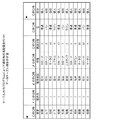


Landscapes
- User Interface Of Digital Computer (AREA)
- Information Retrieval, Db Structures And Fs Structures Therefor (AREA)
Abstract
【課題】データベース等の表示方法において、参照項目列の泣き別れを防止し、項目分析を容易に行うことができるテーブル出力プログラムを提供する。
【解決手段】データテーブルを取得するデータ抽出部1300と、ソート指定された複数の項目情報を有する入力指示を取得する入出力部1100と、前記入力指示にしたがって前記データテーブルの並び順を入れ替える制御処理部1400と、を備え、ソート順に項目の列順序を入れ替えて作成されたデータテーブルを入出力部1100から表示出力することにより、比較対照項目列が見やすくなり、データ分析を容易に行うことができる。
【選択図】 図1In a display method for a database or the like, there is provided a table output program capable of preventing crying of reference item strings and easily performing item analysis.
A data extraction unit 1300 for acquiring a data table, an input / output unit 1100 for acquiring an input instruction having a plurality of items of items specified for sorting, and a control for changing the order of the data tables according to the input instruction. And a processing unit 1400. By displaying and outputting from the input / output unit 1100 a data table created by changing the column order of the items in the sort order, the comparison item column can be easily viewed and the data analysis can be easily performed. it can.
[Selection] Figure 1
Description
【0001】
【発明の属する技術分野】
本発明は、データベース等の表示方法の変更を行うテーブル出力プログラムに関するものである。
【0002】
【従来の技術】
従来、データベースに格納された大量のデータを表示し、分析する際には、複数の関連項目を順に横に並べ、各項目のデータを縦に並べた2次元テーブルの一覧表を用いて、データの比較検討、分析を行うことができる表計算プログラムがある。
【0003】
このような表計算プログラムでは、例えば、公開特許公報の書誌的事項を一覧表にして、書誌的事項の出願日、IPC(国際特許分類)、出願人などの項目を列方向に並列に表示し、1行ごとに1データを表示するようにして、競合他社の技術分野、技術動向、特許出願動向、特定技術の進捗の先後などの検討に使用されている。
【0004】
さらに、上記のような表計算プログラムでは、上記一覧表の列項目である出願日、IPC、出願人などにより、データの行方向の並べ替え、例えば出願日順にソートを行い、上記検討をしやすくしている。
【0005】
ところが、このような一覧表では、検討対象の項目が1つの項目である場合には、並べ替えができるものの、複数の項目に注目する場合には、他の項目については1つずつ拾い出さなければならず、この作業は煩雑であるとともに、一見しても判りづらい。
【0006】
そのため、2つの項目に注目する場合には、その注目する項目の1つを列項目とし、もう1つの注目項目を行項目とした2次元表の作成を行っている(例えば、特許文献1参照)。
【0007】
このような表作成システムの構成図を図22に示し、説明する。図22に示すように、従来の表作成システムは、入力部1、指示テーブル2、多次元表作成部3を備えている。
【0008】
ユーザーは入力部1に対し、指示テーブル2のn次元エリア、列見出しエリア、行見出しエリア、データエリアへデータベース4に格納されているオブジェクトを配置することを指示する。入力部1は、オブジェクトが配置された指示テーブル2から表作成の指示データを生成し、多次元表作成部3に送る。多次元表作成部3は、入力部1から与えられる表作成の指示データにしたがってデータベース4を検索し、その検索結果を表作成の指示データに基づいて処理し、多次元表を生成して出力する。
【0009】
この従来の表作成システムにより生成された多次元表を、図23に示す。図23に示すように、この多次元表は、列見出しとして、販売エリアの項目があらわされ、行見出しとして、商品名、月度の項目があらわされている。したがって、行項目としては、商品別月度が1行の項目としてあらわされ、列項目との交点に売り上げ数が表示されている。
【0010】
【特許文献1】
特開平10−040050号公報
【0011】
【発明が解決しようとする課題】
しかしながら、このような従来の表作成システムは、条件指定をデータテーブルとは別のインターフェース画面で入力し、多次元表を作成しているので、操作が分かり難い上、レイアウトの設計が難しいという問題があった。
【0012】
また、従来の多次元表では、複数の項目を行と列で表示することにより、見やすくしているだけなので、指定できる項目は3つ、すなわち、列の項目と、行の1つまたは複数の項目と、その交点の項目と、の3つであり、比較できるのは、交点の項目の1つだけであるという問題があった。さらに、行の項目の中の項目数が増えてくると、その効果が薄れるばかりではなく、比較がしづらくなってしまうという問題があった。
【0013】
例えば、作成したテーブルを多次元表と表記していても、実体は2次元のテーブルであるので、上記のように、3つ以上の比較項目がある場合には、行項目または列項目の中に項目が入れ子になっているため、項目数が増すにつれてどんどん見にくくなってしまうという問題があった。
【0014】
また、従来の列項目のみを設定する一覧表においても、プログラム作成時に設計された固定レイアウトで表示されるため、複数の項目を指定してソートすると、指定した項目によっては項目が離れたままで表示され、参照したいデータ列の泣き別れが発生してしまい、重要なデータ列を横スクロール操作などをしなければ参照することができないという問題があった。
【0015】
そこで、本発明は、指定した項目の項目列順序を変更して、使用目的にあったレイアウト変更を行い、結果表示を行うことにより、分析対象項目を見やすく表示することができ、対象の分析が容易にできるテーブル出力プログラムを提供することを課題とする。
【0016】
【課題を解決するための手段】
本発明は、上記課題を解決するため、複数のデータ項目を有するデータテーブルを取得するデータテーブル取得ステップと、前記データ項目の中から配置位置変更を行うデータ項目の指定情報を有する再配置条件を取得する再配置条件取得ステップと、前記取得した再配置条件にしたがって前記データテーブルの並び順を入れ替えるデータテーブル更新ステップと、前記更新されたデータテーブルを出力するデータテーブル出力ステップと、を備えたことを特徴とするものである。
【0017】
これにより、指定された配置条件にしたがってデータテーブルのレイアウト変更を行うことができるので、所望の順序で表示された結果表を出力し、参照したい項目列の泣き別れを防止することができ、出力されたデータテーブルから項目分析を容易に行うことができることとなる。
【0018】
また、本発明は、上記課題を解決するため、前記再配置条件取得ステップが、前記再配置条件として複数の前記データ項目指定情報および該データ項目の配置順位を取得し、前記データテーブル更新ステップが、前記再配置順位にしたがって前記指定されたデータ項目を隣り合うように配置し、前記データテーブルを更新することを特徴とするものである。
【0019】
これにより、前記再配置条件として複数の前記データ項目指定情報および該データ項目の配置順位を取得し、前記データ項目の配置順位にしたがって前記データ項目を隣り合うように配置するので、複数のデータ項目を所望の配置順に表示させることができ、データ分析に適した項目配置としてデータ分析を容易に行うことができることとなる。
【0020】
また、本発明は、上記課題を解決するため、前記再配置条件である複数のデータ項目指定情報および前記データ項目の配置順位は、ソート条件として設定されたデータ項目指定情報およびソート優先順位であり、前記データテーブル更新ステップが、前記配置順位にしたがって前記指定されたデータ項目を隣り合うように配置するとともに、前記ソート優先順位にしたがって前記指定されたデータ項目でソートを行い、前記データテーブルを更新することを特徴とするものである。
【0021】
これにより、ソート優先順位にしたがってソートを行いつつ、ソートの優先順位でデータ項目の再配置を行うので、項目のソートを行いつつソートに適した項目列の配置変更を行うことができ、ソート項目列と比較対照項目列を見やすい位置に変更することができることとなる。
【0022】
また、本発明は、上記課題を解決するため、前記再配置条件取得ステップが、前記ソート優先順位が設定された再配置条件を取得する優先順位取得ステップと、前記取得した再配置条件からソート条件を記憶する再配置条件記憶ステップと、再配置条件の条件確定判定を行う条件確定判定ステップと、前記再配置条件を再設定するときには、前記優先順位取得ステップと前記再配置条件記憶ステップと前記条件確定判定ステップとを繰り返す再設定条件取得ステップと、前記再配置条件の設定が確定したときには、前記記憶された再配置条件を前記データテーブル更新ステップに受け渡す再配置条件受け渡しステップと、を備え、前記再配置条件記憶ステップが、すでに再配置条件を記憶しているときには、新たに取得した再配置条件で指定されたデータ項目のソート優先順位以上のソート優先順位が設定されている記憶済みのデータ項目のソート優先順位を繰り下げるとともに、前記取得した再配置条件のデータ項目に指定されたソート優先順位を含むソート条件を記憶することを特徴とするテーブル出力プログラム。
ものである。
【0023】
これにより、ソート条件設定済みの状態で、新たにソート優先順位を付けて項目を指定すると、新たな指定項目が設定済みの項目の間に挿入されるので、ソート項目を追加したい場合に、項目設定やソート条件の設定をはじめからやり直さずに追加分だけ入力することで再設定することができ、設定項目の追加を容易に行うことができることとなる。
【0024】
また、本発明は、上記課題を解決するため、前記再配置条件取得ステップが、前記ソート優先順位が設定された再配置条件を取得する優先順位取得ステップと、前記取得した再配置条件からソート条件を記憶する再配置条件記憶ステップと、再配置条件の条件確定判定を行う条件確定判定ステップと、前記再配置条件を再設定するときには、前記優先順位取得ステップと前記再配置条件記憶ステップと前記条件確定判定ステップとを繰り返す再設定条件取得ステップと、前記再配置条件の設定が確定したときには、前記記憶された再配置条件を前記データテーブル更新ステップに受け渡す再配置条件受け渡しステップと、を備え、前記優先順位取得ステップが、前記データ項目のソート指定解除が設定された再配置条件を取得し、前記再配置条件記憶ステップが、前記ソート指定解除を取得したときには、取得したソート指定解除が指定されたデータ項目のソート優先順位より大きなソート優先順位が設定されている記憶済みのデータ項目のソート優先順位を繰り上げるとともに、前記取得したソート指定解除が指定されたデータ項目のソート優先順位を含むソート条件を初期値に戻し、前記ソート条件を記憶することを特徴とするものである。
【0025】
これにより、ソート条件設定済みの状態から、ソート指定解除の項目を指定すると、解除が指定された項目だけソート項目から削除されて、他の項目が繰り上がるので、特定の項目だけソート指定項目からはずしたい場合に、項目設定やソート条件の設定をはじめからやり直さずに削除項目を指定するだけで再設定することができ、設定項目の削除を容易に行うことができることとなる。
【0026】
さらに、本発明は、上記課題を解決するため、前記再配置条件取得ステップが、前記データ項目の指定情報とこのデータ項目の再配置位置として前記データテーブル内の左側または右側の指定を行った再配置条件を取得し、前記データテーブル更新ステップが、前記取得した再配置条件にしたがって指定された前記データ項目を前記データテーブル内の左側または右側に寄せて再配置し、前記データテーブルを更新することを特徴とするものである。
【0027】
これにより、指定の項目をデータテーブル内の左側または右側に寄せて再配置するので、注目したいあるいは注目しない項目を、よく見えるあるいは見ない位置に配置させることができ、よりデータ分析を行いやすくすることができることとなる。
【0028】
さらに、本発明のテーブル出力方法は、上記課題を解決するため、複数のデータ項目を有するデータテーブルを取得するデータテーブル取得ステップと、前記データ項目の中から配置位置変更を行うデータ項目の指定情報を有する再配置条件を取得する再配置条件取得ステップと、前記取得した再配置条件にしたがって前記データテーブルの並び順を入れ替えるデータテーブル更新ステップと、前記更新されたデータテーブルを出力するデータテーブル出力ステップと、を備えたことを特徴とするものである。
【0029】
この方法により、指定された配置条件にしたがってデータテーブルのレイアウト変更を行うことができるので、所望の順序で表示された結果表を出力し、参照したい項目列の泣き別れを防止することができ、出力されたデータテーブルから項目分析を容易に行うことができることとなる。
【0030】
また、本発明のテーブル出力方法は、上記課題を解決するため、前記再配置条件取得ステップが、前記再配置条件として複数の前記データ項目指定情報および該データ項目の配置順位を取得し、前記データテーブル更新ステップが、前記データ項目の配置順位にしたがって前記指定されたデータ項目を隣り合うように配置し、前記データテーブルを更新することを特徴とするものである。
【0031】
この方法により、前記再配置条件として複数の前記データ項目指定情報および該データ項目の配置順位を取得し、前記データ項目の配置順位にしたがって前記データ項目を隣り合うように配置するので、複数のデータ項目を所望の配置順に表示させることができ、データ分析に適した項目配置としてデータ分析を容易に行うことができることとなる。
【0032】
【発明の実施の形態】
以下、本発明の実施の形態について添付図面を参照しつつ説明する。
【0033】
本発明に係るテーブル出力プログラムを実現するテーブル出力システムの構成図を、図1に示す。図1に示すように、テーブル出力システム1000は、入出力部1100、データ抽出部1300、制御処理部1400および記憶部1500を備えている。
【0034】
また、テーブル出力システム1000は、データベース2000と接続され、ユーザーの入力指示にしたがってデータベース2000から所望のデータテーブルを取得し、更新処理を行って、表示出力するものである。
【0035】
また、本実施の形態においては、データベース2000を、本テーブル出力システム1000の外部としたが、テーブル出力システム1000の内部に持っていても良い。
【0036】
テーブル出力システム1000の入出力部1100は、ユーザーの入力指示を受け付けるとともに、テーブル出力システム1000の出力結果および補足情報の表示出力を行うものである。
【0037】
データ抽出部1300は、入出力部1100に入力されたユーザーの入力指示にしたがってデータベース2000から所望のデータテーブルを抽出するものである。
【0038】
制御処理部1400は、テーブル出力システム1000の全体の制御を行う桃であり、特に、入出力部1100に入力されたユーザーの入力指示にしたがい、後述する記憶部1500に記憶された重み付けテーブルで、データテーブルの更新処理を行うものである。
【0039】
記憶部1500は、データ抽出部1300に抽出されたデータテーブル、前述の重み付けテーブル(詳細は後述)および各種必要なデータを記憶するものである。
【0040】
ここで、本実施の形態で使用するデータテーブルを図2に示し、説明する。
【0041】
ここでは、データテーブルとして、自動車の販売店における販売状況のデータをあらわす販売データ2100を示す。販売データ2100は、データベース2000に記憶されている。
【0042】
また、図2に示すように、販売データ2100は、販売担当者名である営業、商談日数、販売地区、自動車を販売した顧客が個人か会社かをあらわす区分、自動車を販売した販売月、販売した車種、型等を項目として有している。
【0043】
このようなテーブル出力システム1000における動作処理を図3に示し、説明する。
【0044】
図3に示すように、テーブル出力システム1000では、まず、ユーザーから入力指示を取得する(s110)。入力指示取得では、入出力部1100が、ユーザーの操作情報を取得し、制御処理部1400に伝達し、制御処理部1400が、この操作情報から入力指示を解釈する。
【0045】
次に、制御処理部1400で解釈された入力指示にしたがって、初期設計SQL文の読み込みを行う(s120)。次に、読み込んだSQL文にしたがってデータの抽出を行う(s130:データテーブル取得ステップ)。データ抽出処理では、制御処理部1400の指示にしたがって、データ抽出部1300が、データベース2000から所望のデータを抽出し、記憶部1500に記憶させる。ここでは、販売データ2100を読み込み、記憶部1500に、販売データ1510として記憶させる。
【0046】
次に、重み付けテーブル初期設定処理を行う(s140)。ここで、重み付けテーブルとは、データテーブルの項目の再配置を行う際に、項目の配置替えを容易に行うため、記憶部1500に作成する作業用のテーブル1520である。
【0047】
次に、記憶部1500に記憶されたデータテーブル、ここでは、販売データ1510および設定情報を画面表示させる(s150:データテーブル出力ステップ)。この画面表示では、制御処理部1400が、記憶部1500に記憶された販売データ1510を、入出力部1100を介して、表示画面に表示させる。また、ソート優先順位や再配置指定の補助情報などが、すでに設定されていれば、それらもあわせて表示する。
【0048】
図4に、表示画面例を示す。図4に示す表示画面にしたがって、ユーザーは後述する入力指示を入力する。具体的には、項目名の表示の上にある「昇」または「降」をマウスでクリックして、ソート順位の指定を行う、あるいは、「ピン置き場」にある「左優先ピン」または「右優先ピン」をドラッグしてきて目的の列でドロップする。
【0049】
「昇」または「降」が指定された場合には、その指定された項目のソート優先順位と昇順か降順かが決定し、「ピン置き場」の「優先ピン」がドラッグアンドドロップされた場合には、指定された項目の再配置後の位置が、左寄せまたは右寄せに決定する。
【0050】
次に、ユーザーから入力指示を取得し(s160:再配置条件取得ステップ)、結果表示の変更が必要か否かを判定する(s170)。結果表示の変更が必要な場合には、以下の処理を行い、結果表示の変更が必要ない場合には、本処理を終了する。
【0051】
結果表示の変更が必要な場合には、重み・ソート指定処理を行う(s180)。重み・ソート指定処理では、ソート条件、配置位置の設定を重み付けテーブル1520に対して行う。
【0052】
次に、表示定義再構成処理を行う(s190:データテーブル更新ステップ)。表示定義再構成処理では、重み付けテーブル1520に設定された条件にしたがって項目の配置変更を行い、SQL文の生成を行う。
【0053】
次に、再構成した表示定義のSQL文にしたがってデータの抽出を行う(s200)。このデータ抽出処理では、制御処理部1400の指示にしたがって、記憶部1500に記憶された重み付けテーブル1520にしたがってデータを抽出する。
【0054】
次に、画面表示処理(s150:データテーブル出力ステップ)に戻り、更新された販売データ1510を表示して、上記処理を繰り返す。
【0055】
次に、上記処理について詳しく説明する。
【0056】
はじめに、重み付けテーブル初期設定処理(s140)について、フローチャートを図5に示し、説明する。また、重み付けテーブル1520のデータ構造図を、図6に示す。
【0057】
図6に示すように、重み付けテーブル1520は、現表示順位、項目、ソート優先順位、ソート方向、ピンという項目を有している。現表示順位は、表示する列位置を左からの項目数で示すものであり、項目は、該当する表示項目名を示すものである。ソート優先順位は、該当項目でソート(並べ替え)を行う優先順位であり、数値の小さいものから第1キー、第2キー・・・となる。ソート方向は、対象となる項目列を昇順に並べるのか、降順に並べるのかを示すものであり、ピンは、列位置並べ替えから除外するかどうか、左右のどちらかに固定するかどうかを示すフラグである。
【0058】
重み付けテーブル初期設定処理(s140)では、まず、読み込んだデータテーブル、すなわち、記憶部1500に記憶された販売データ1510から列項目を読み込み、1項目につき1行のデータを、重み付けテーブル1520として作成する(s310)。また、上記販売データ1510の設計時の表示順序を、重み付けテーブル1520の現表示順位に格納する(s320)。
【0059】
次に、重み付けテーブル1520のソート優先順位に、“HIGH−VALUE”(該当項目内で最も大きな値として扱われる)を格納する(s330)。次に、ピンに“0”を格納する。ここで、ピンの“0”とは、後で説明するソート項目とは別に、配置位置変更を行う項目との区別を行うための、中立位置を示すものである。
【0060】
以上の処理で、重み付けテーブル初期設定処理(s140)が終了する。
【0061】
次に、重み・ソート指定処理(s180)について、フローチャートを図7に示し、説明する。この処理では、ユーザーからの入力指示にしたがってソート条件の設定か、優先配置位置の設定か、を判断して、それぞれの処理に振り分け、重み付けテーブル1520の設定を行う。
【0062】
まず、重み・ソート指定処理(s180)では、ユーザーからの入力指示が、項目名の表示の上にある「昇」または「降」が指定されたのか、あるいは、「ピン置き場」にある「左優先ピン」または「右優先ピン」がドラッグアンドドロップされたのかにより、「ソート優先順位の指定」か、「優先配置位置の指定」かを、判断する(s410)。
【0063】
「昇」または「降」が指定された場合には、「ソート優先順位の指定」であるので、ソート項目設定処理(s420)を行い、「左優先ピン」または「右優先ピン」がドラッグアンドドロップされた場合には、「優先配置位置の指定」であるので、優先配置項目設定処理(s430)を行う。
【0064】
次に、ソート項目設定処理(s420)について、フローチャートを図8、図9に示し、説明する。この処理では、ソート条件の設定を重み付けテーブル1520に対して行う。
【0065】
ソート項目設定処理(s420)では、まず、ユーザーからの入力指示により、「昇」または「降」が指定された“指定項目”と、昇順か降順かを区別する“昇降区分”と、を設定する(s510)。次に、重み付けテーブル1520から指定されている全てのソート優先順位を読み込む(s520)。
【0066】
次に、読み込んだ設定済みの「ソート優先順位」とともに、ソート優先順位が設定されている「項目名」およびその項目のソート条件である「昇順・降順の区別」をポップアップ表示する。また、この表示の一番下に、読み込んだ“ソート優先順位の最大値”+“1”の「値」と、「後ろに追加」という項目をポップアップ表示する(s530)。
【0067】
ここで、このソート優先順位指定(ソート項目追加)画面例を図10に示す。この画面例は、すでに販売月、販売地区、車種が、それぞれソート優先順位の1番目、2番目、3番目として設定されており、ユーザーの指定により、商談日数が降順としてソート項目に指定された場合の表示例を示している。これにより、指定列(ここでは、商談日数)を新規にソート項目に追加することができる。
【0068】
次に、ユーザーの指定項目は、すでにソート優先順位が設定されているか否かを判定する(s540)。指定項目にソート優先順位が設定されている場合には、指定項目の覧に、読み込んだ設定済みの「ソート優先順位」とともに、“指定項目”の「項目名」+「を解除」という項目をポップアップ表示する(s550)。
【0069】
また、このソート優先順位指定(ソート指定解除)画面例を図11に示す。この画面例は、すでに販売月、販売地区、車種が、それぞれソート優先順位の1番目、2番目、3番目として設定されており、ユーザーの指定により、販売地区が指定された場合の表示例を示している。これにより、指定列(ここでは、販売地区)をソート項目から解除することができる。
【0070】
次に、上記ソート優先順位指定(ソート項目追加またはソート指定解除)画面にしたがってユーザーが選択するポップアップ内のソート優先順位を、“更新項目”として取得する(s560)。
【0071】
次に、上記取得した“更新項目”が、「後ろに追加」の項目か否かを判定し(s570)、「後ろに追加」であれば、重み付けテーブル1520の上記指定項目のソート優先順位に、ソート優先順位の最大値+1の値を格納する。また、ソート方向には、上記昇降区分により、「昇順」または「降順」を格納する(s580)。“更新項目”が「後ろに追加」の場合には、この重み付けテーブル1520の更新処理(s580)で、本ソート指定処理(s420)を終了する。
【0072】
次に、上記取得した“更新項目”が、「後ろに追加」でなければ、重み付けテーブル1520の上記指定項目のソート優先順位より大きな値を持つ行のソート優先順位をデクリメント(−1)する(s610)。さらに、重み付けテーブル1520の指定項目のソート優先順位およびソート方向を、初期化(ソート優先順位に“HIGH−VALUE”、ソート方向をクリア)する(s620)。ここで、ソート項目追加の場合には、指定項目のソート優先順位およびソート方向はすでに初期化されているので、何も変更されない。
【0073】
また、図12に、上記指定項目初期化処理(s610、s620)により、販売地区がソート指定項目から解除されたときの重み付けテーブル1520の変化を示す。図12に示すように、販売地区のソート優先順位とソート方向が初期化され、車種のソート優先順位が上がっている。
【0074】
次に、上記取得した“更新項目”が、“指定項目”と一致するか否かを判定し(s630)、一致すれば、本ソート項目設定処理(s420)を終了する。
【0075】
次に、上記取得した“更新項目”が、“指定項目”と一致しなければ、“更新項目”のソート優先順位を待避する(s640)。次に、重み付けテーブル1520の上記更新項目のソート優先順位以上の値を持つ行のソート優先順位をインクリメント(+1)する(s650)。さらに、重み付けテーブル1520の指定項目のソート優先順位に、待避していたソート優先順位を格納するともに、ソート方向に、上記“昇降区分”にしたがった「昇順」または「降順」を格納する(s660)。
【0076】
また、図13に、上記更新項目追加処理(s650、s660)により、商談日数がソート優先順位3番目で追加指定されたときの重み付けテーブル1520の変化を示す。図13に示すように、商談日数のソート優先順位とソート方向が設定され、車種のソート優先順位が下がっている。
【0077】
以上の処理により、本ソート項目設定処理(s420)を終了する。
【0078】
次に、優先配置項目設定処理(s430)について、フローチャートを図14に示し、説明する。この処理では、優先的に配置位置を決める項目の優先配置設定を重み付けテーブル1520に対して行う。
【0079】
また、図15に、優先配置位置指定時の画面例を示す。図15に示すように、ここでは、営業に左優先を、区分に右優先を、指定したものとなっている。
【0080】
優先配置項目設定処理(s430)では、まず、ユーザーからの入力指示により、指定されたものが「左優先ピン」か「右優先ピン」かを区別する“優先ピン区分”と、ドロップされた項目を示す“指定項目”と、を設定する(s710)。次に、“優先ピン区分”にしたがって、「左優先ピン」か「右優先ピン」かを判定する(s720)。
【0081】
「左優先ピン」である場合には、重み付けテーブル1520の上記指定項目のピン指定に、“LOW−VALUE”(左優先)を格納する(s730)。「右優先ピン」である場合には、重み付けテーブル1520の上記指定項目のピン指定に、“HIGH−VALUE”(右優先)を格納する(s740)。ここで、LOW−VALUEは、該当項目内で最小値をとる値であり、HIGH−VALUEは、該当項目内で最大値をとる値である。したがって、ここでのピン指定の大小関係は、“LOW−VALUE”<“0”<“HIGH−VALUE”となる。
【0082】
また、図16に、上記優先配置項目設定処理により、営業に左優先を、区分に右優先を、指定したときの重み付けテーブル1520の変化を示す。図16に示すように、営業のピン指定に“LOW−VALUE(左優先)”が設定され、区分のピン指定に“HIGH−VALUE(右優先)”が設定されている。
【0083】
以上の処理により、優先配置項目設定処理(s430)が終了する。また、上記ソート項目設定処理(s420)および優先配置項目設定処理(s430)により、重み・ソート指定処理(s180)も終了する。
【0084】
次に、表示定義再構成処理(s190)について、フローチャートを図17に示し、説明する。この処理では、上記重み・ソート指定処理(s180)で設定された重み付けテーブル1520の条件にしたがって項目の配置変更を行って、SQL文の生成を行う。
【0085】
まず、表示定義再構成処理(s190)では、重み付けテーブル1520を、設定されたピン指定、ソート優先順位、現表示順位でソートする(s810)。
【0086】
図18に、ピン指定、ソート優先順位、現表示順位でソートされたときの重み付けテーブル1520の変化を示す。図18に示すように、ピン指定のソートにより、「営業」が1番目に、「区分」が最後の項目となっている。また、ソート優先順位により、「営業」の次に、「販売月」、「販売地区」、「車種」と並び、以下、現表示順位により、「商談日数」、「型」と続いて、最後が「区分」となっている。
【0087】
次に、重み付けテーブル1520の現表示順位を上から順に採番し直し(s820)、重み付けテーブル1520を読み込む(s830)。次に、SELECT句の出力並びに現表示順位の小さいものから順に並べてSQL文を生成し(s840)、ORDER BY句にソート優先順位の小さいものから順にソート方向(DESC)と組み合わせてSQL文を生成する(s850)。
【0088】
以上の処理により、表示定義再構成処理(s190)が終了する。
【0089】
このようにして、表定義再構成後、データを抽出し、画面表示して、必要があれば再度再配置条件を入力する。したがって、所望の項目列を指定の位置に移動させることができ、データテーブルが見やすくなり、データ分析を容易に行うことができる。例えば、ソート優先順位にしたがって左から順に並べることができるので、参照したいデータ列の泣き別れがなく、重要なデータ列を横スクロール操作などをせずに、容易に比較参照することができる。
【0090】
また、図19、図20に、本テーブル出力プログラムによって項目列の再配置を行ったデータテーブル例を示す。
【0091】
図19に示すデータテーブル例は、販売データ2100に対して、「販売月」、「販売地区」、「車種」のそれぞれの項目を、ソート優先順位に1番目、2番目、3番目を設定し、ソート優先順位順に再配置したものである。
【0092】
また、図20に示すデータテーブル例は、上記条件に加え、「営業」に左優先、「区分」に右優先設定を行った場合の再配置データテーブル例を示すものである。
【0093】
また、上記説明では、はじめにデータベース2000から販売データ2100のデータを読み込み、テーブル出力システム1000の記憶部1500に販売データ1510として全てのデータを記憶するようにしたが、はじめは販売データ2100の項目情報のみを読み込み、配置条件等を設定した後、データの表示が必要になったときに直接データベース2000から販売データ2100を読み込むようにしても良い。
【0094】
さらに、上記実施の形態では、データテーブルの表示の上に各項目名表示を行うようにしているが、項目名表示は行わなくても良い。また、上記実施の形態では、ソート項目設定処理と優先配置項目設定処理との両方を行うようにしているが、どちらか片方ずつでも当然構わない。
【0095】
ここで、図21に、データテーブルの項目名表示無し、ソート項目設定処理のみのときのテーブル出力プログラムにおける再配置指示を入力させるための入力画面例を示す。
【0096】
以上のように、本発明によれば、ソート指定された複数の項目情報を有する入力指示を取得し、この入力指示にしたがってデータテーブルの並び順を入れ替えるので、ソート順に項目の列順序を入れ替えて作成されたデータテーブルを表示出力することができ、比較対照項目列が見やすくなり、データ分析を容易に行うことができる。
【0097】
さらに、本発明に関して以下を付記する。
【0098】
(付記1)
複数のデータ項目を有するデータテーブルを取得するデータテーブル取得ステップと、
前記データテーブルのデータ項目の中から配置位置変更を行うデータ項目の指定情報を有する再配置条件を取得する再配置条件取得ステップと、
前記取得した再配置条件にしたがって指定された前記データ項目を所定位置に配置し、前記データテーブルの並び順を入れ替えるデータテーブル更新ステップと、
前記更新されたデータテーブルを出力するデータテーブル出力ステップと、を備えたことを特徴とするテーブル出力プログラム。
【0099】
(付記2)
付記1に記載のテーブル出力プログラムにおいて、
前記再配置条件取得ステップが、前記再配置条件として複数の前記データ項目指定情報および該データ項目の配置順位を取得し、
前記データテーブル更新ステップが、前記データ項目の配置順位にしたがって前記指定されたデータ項目を隣り合うように配置し、前記データテーブルを更新することを特徴とするテーブル出力プログラム。
【0100】
(付記3)
付記2に記載のテーブル出力プログラムにおいて、
前記再配置条件である複数のデータ項目指定情報および前記データ項目の配置順位は、ソート条件として設定されたデータ項目指定情報およびソート優先順位であり、
前記データテーブル更新ステップが、前記配置順位にしたがって前記指定されたデータ項目を隣り合うように配置するとともに、前記ソート優先順位にしたがって前記指定されたデータ項目でソートを行い、前記データテーブルを更新することを特徴とするテーブル出力プログラム。
【0101】
(付記4)
付記3に記載のテーブル出力プログラムにおいて、
前記再配置条件取得ステップが、
前記ソート優先順位が設定された再配置条件を取得する優先順位取得ステップと、
前記取得した再配置条件から、前記指定されたデータ項目情報およびソート優先順位を含むソート条件を記憶する再配置条件記憶ステップと、
再配置条件の設定が確定したか否かの判定を行う条件確定判定情報を取得し、条件確定判定を行う条件確定判定ステップと、
前記条件確定判定ステップで再配置条件を再設定するという前記条件確定判定情報を取得したときには、前記優先順位取得ステップと、前記再配置条件記憶ステップと、前記条件確定判定ステップと、を繰り返す再設定条件取得ステップと、
前記条件確定判定ステップで再配置条件の設定が確定したという前記条件確定判定情報を取得したときには、前記記憶された再配置条件を前記データテーブル更新ステップに受け渡す再配置条件受け渡しステップと、を備え、
前記再配置条件記憶ステップが、すでに再配置条件を記憶しているときには、新たに取得した再配置条件で指定されたデータ項目のソート優先順位以上のソート優先順位が設定されている記憶済みのデータ項目のソート優先順位を繰り下げるとともに、前記取得した再配置条件のデータ項目に指定されたソート優先順位を含むソート条件を記憶することを特徴とするテーブル出力プログラム。
【0102】
(付記5)
付記3に記載のテーブル出力プログラムにおいて、
前記再配置条件取得ステップが、
前記ソート優先順位が設定された再配置条件を取得する優先順位取得ステップと、
前記取得した再配置条件から、前記指定されたデータ項目情報およびソート優先順位を含むソート条件を記憶する再配置条件記憶ステップと、
再配置条件の設定が確定したか否かの判定を行う条件確定判定情報を取得し、条件確定判定を行う条件確定判定ステップと、
前記条件確定判定ステップで再配置条件を再設定するという前記条件確定判定情報を取得したときには、前記優先順位取得ステップと、前記再配置条件記憶ステップと、前記条件確定判定ステップと、を繰り返す再設定条件取得ステップと、
前記条件確定判定ステップで再配置条件の設定が確定したという前記条件確定判定情報を取得したときには、前記記憶された再配置条件を前記データテーブル更新ステップに受け渡す再配置条件受け渡しステップと、を備え、
前記優先順位取得ステップが、前記データ項目のソート指定解除が設定された再配置条件を取得し、
前記再配置条件記憶ステップが、前記ソート指定解除を取得したときには、取得したソート指定解除が指定されたデータ項目のソート優先順位より大きなソート優先順位が設定されている記憶済みのデータ項目のソート優先順位を繰り上げるとともに、前記取得したソート指定解除が指定されたデータ項目のソート優先順位を含むソート条件を初期値に戻し、前記ソート条件を記憶することを特徴とするテーブル出力プログラム。
【0103】
(付記6)
付記1に記載のテーブル出力プログラムにおいて、
前記再配置条件取得ステップが、前記データ項目の指定情報とこのデータ項目の再配置位置として前記データテーブル内の左側または右側の指定を行った再配置条件を取得し、
前記データテーブル更新ステップが、前記取得した再配置条件にしたがって指定された前記データ項目を前記データテーブル内の左側または右側に寄せて再配置し、前記データテーブルを更新することを特徴とするテーブル出力プログラム。
【0104】
(付記7)
複数のデータ項目を有するデータテーブルを取得するデータテーブル取得ステップと、
前記データテーブルのデータ項目の中から配置位置変更を行うデータ項目の指定情報を有する再配置条件を取得する再配置条件取得ステップと、
前記取得した再配置条件にしたがって指定された前記データ項目を所定位置に配置し、前記データテーブルの並び順を入れ替えるデータテーブル更新ステップと、
前記更新されたデータテーブルを出力するデータテーブル出力ステップと、を備えたことを特徴とするテーブル出力方法。
【0105】
(付記8)
付記7に記載のテーブル出力方法において、
前記再配置条件取得ステップが、前記再配置条件として複数の前記データ項目指定情報および該データ項目の配置順位を取得し、
前記データテーブル更新ステップが、前記データ項目の配置順位にしたがって前記指定されたデータ項目を隣り合うように配置し、前記データテーブルを更新することを特徴とするテーブル出力方法。
【0106】
【発明の効果】
本発明によれば、データテーブルを取得し、再配置条件を取得し、前記再配置条件にしたがって前記データテーブルの並び順を入れ替え、更新されたデータテーブルを出力することにより、指定された配置条件にしたがってデータテーブルのレイアウト変更を行うことができるので、所望の順序で表示された結果表を出力し、参照したい項目列の泣き別れを防止することができ、出力されたデータテーブルから項目分析を容易に行うことができる。
【0107】
また、本発明によれば、前記再配置条件として複数の前記データ項目指定情報および該データ項目の配置順位を取得し、前記再配置順位にしたがって前記指定されたデータ項目を隣り合うように配置し、前記データテーブルを更新するので、前記再配置条件として複数の前記データ項目指定情報および該データ項目の配置順位を取得し、前記データ項目の配置順位にしたがって前記データ項目を隣り合うように配置するので、複数のデータ項目を所望の配置順に表示させることができ、データ分析に適した項目配置としてデータ分析を容易に行うことができる。
【0108】
また、本発明によれば、前記再配置条件である複数のデータ項目指定情報および前記データ項目の配置順位は、ソート条件として設定されたデータ項目指定情報およびソート優先順位であり、前記配置順位にしたがって前記指定されたデータ項目を隣り合うように配置するとともに、前記ソート優先順位にしたがって前記指定されたデータ項目でソートを行い、前記データテーブルを更新するので、項目のソートを行いつつソートに適した項目列の配置変更を行うことができ、ソート項目列と比較対照項目列を見やすい位置に変更することができる。
【0109】
また、本発明によれば、すでに再配置条件を記憶しているときには、新たに取得した再配置条件で指定されたデータ項目のソート優先順位以上のソート優先順位が設定されている記憶済みのデータ項目のソート優先順位を繰り下げるとともに、前記取得した再配置条件のデータ項目に指定されたソート優先順位を含むソート条件を記憶することにより、ソート条件設定済みの状態で、新たにソート優先順位を付けて項目を指定すると、新たな指定項目が設定済みの項目の間に挿入されるので、ソート項目を追加したい場合に、項目設定やソート条件の設定をはじめからやり直さずに追加分だけ入力することで再設定することができ、設定項目の追加を容易に行うことができる。
【0110】
また、本発明によれば、ソート指定解除を取得したときには、取得したソート指定解除が指定されたデータ項目のソート優先順位より大きなソート優先順位が設定されている記憶済みのデータ項目のソート優先順位を繰り上げるとともに、前記取得したソート指定解除が指定されたデータ項目のソート優先順位を含むソート条件を初期値に戻し、前記ソート条件を記憶することにより、ソート条件設定済みの状態から、ソート指定解除の項目を指定すると、解除が指定された項目だけソート項目から削除されて、他の項目が繰り上がるので、特定の項目だけソート指定項目からはずしたい場合に、項目設定やソート条件の設定をはじめからやり直さずに削除項目を指定するだけで再設定することができ、設定項目の削除を容易に行うことができる。
【0111】
さらに、本発明によれば、前記データ項目の指定情報とこのデータ項目の再配置位置として前記データテーブル内の左側または右側の指定を行った再配置条件を取得し、前記取得した再配置条件にしたがって指定された前記データ項目を前記データテーブル内の左側または右側に寄せて再配置し、前記データテーブルを更新するので、注目したいあるいは注目しない項目を、よく見えるあるいは見ない位置に配置させることができ、よりデータ分析を行いやすくすることができる。
【0112】
さらに、本データ出力方法によれば、データテーブルを取得し、再配置条件を取得し、前記再配置条件にしたがって前記データテーブルの並び順を入れ替え、更新されたデータテーブルを出力することにより、指定された配置条件にしたがってデータテーブルのレイアウト変更を行うことができるので、所望の順序で表示された結果表を出力し、参照したい項目列の泣き別れを防止することができ、出力されたデータテーブルから項目分析を容易に行うことができる。
【0113】
また、本データ出力方法によれば、前記再配置条件として複数の前記指定されたデータ項目指定情報および該データ項目の配置順位を取得し、前記データ項目の配置順位にしたがって前記指定されたデータ項目を隣り合うように配置し、前記データテーブルを更新するので、複数のデータ項目を所望の配置順に表示させることができ、データ分析に適した項目配置としてデータ分析を容易に行うことができる。
【図面の簡単な説明】
【図1】本発明に係るテーブル出力システムを示す構成図である。
【図2】販売データのデータ構造図である。
【図3】テーブル出力システムの動作処理を示すフローチャートである。
【図4】再配置指示を入力させるための入力画面例である。
【図5】重み付けテーブル初期設定処理の動作処理を示すフローチャートである。
【図6】重み付けテーブルのデータ構造図である。
【図7】重み・ソート指定処理の動作処理を示すフローチャートである。
【図8】ソート項目設定処理の動作処理を示すフローチャートである。
【図9】ソート項目設定処理の動作処理を示すフローチャートである。
【図10】ソート優先順位指定(ソート項目追加)の画面例である。
【図11】ソート優先順位指定(ソート指定解除)の画面例である。
【図12】ソート項目解除による重み付けテーブルの変化を示す図である。
【図13】ソート項目追加による重み付けテーブルの変化を示す図である。
【図14】優先配置項目設定処理を示すフローチャートである。
【図15】優先配置位置指定時の画面例である。
【図16】優先配置項目設定処理による重み付けテーブルの変化を示す図である。
【図17】表示定義再構成処理を示すフローチャートである。
【図18】ピン指定、ソート優先順位、現表示順位でソート処理を行った重み付けテーブルの変化を示す図である。
【図19】テーブル出力プログラムによって項目列の再配置を行ったデータテーブル例を示す図である。
【図20】テーブル出力プログラムによって項目列の再配置を行ったデータテーブル例を示す図である。
【図21】項目名表示無しの再配置指示を入力させるための入力画面例である。
【図22】従来の表作成システムの構成図である。
【図23】従来の表作成システムにより作成される多次元表を示す図である。
【符号の説明】
1 入力部
2 指示テーブル
3 多次元表作成部
4 データベース
1000 テーブル出力システム
1100 入出力部
1300 データ抽出部
1400 制御処理部
1500 記憶部
1510 販売データ
1520 重み付けテーブル
2000 データベース
2100 販売データ[0001]
BACKGROUND OF THE INVENTION
The present invention relates to a table output program for changing a display method of a database or the like.
[0002]
[Prior art]
Conventionally, when a large amount of data stored in a database is displayed and analyzed, a list of two-dimensional tables in which a plurality of related items are arranged in a row and the data of each item are arranged vertically is used. There is a spreadsheet program that can perform comparative examination and analysis.
[0003]
In such a spreadsheet program, for example, bibliographic items of published patent gazettes are listed, and items such as the application date, IPC (international patent classification), and applicant of bibliographic items are displayed in parallel in the column direction. One data is displayed for each line, and it is used for examining the technical fields of competitors, technological trends, patent application trends, and progress of specific technologies.
[0004]
Furthermore, in the spreadsheet program as described above, the column items of the above list are sorted by application date, IPC, applicant, etc., in the row direction of the data, for example, in order of application date, so that the above examination can be easily performed. is doing.
[0005]
However, in such a list, if the item to be examined is a single item, it can be rearranged, but when focusing on multiple items, the other items must be picked up one by one. This work is complicated and difficult to understand at first glance.
[0006]
Therefore, when focusing on two items, a two-dimensional table is created in which one of the focused items is a column item and the other focused item is a row item (see, for example, Patent Document 1). ).
[0007]
A configuration diagram of such a table creation system will be described with reference to FIG. As shown in FIG. 22, the conventional table creation system includes an
[0008]
The user instructs the
[0009]
FIG. 23 shows a multidimensional table generated by this conventional table creation system. As shown in FIG. 23, in this multi-dimensional table, sales area items are shown as column headings, and product name and monthly items are shown as row headings. Therefore, as the row item, the monthly degree by product is represented as an item of one row, and the number of sales is displayed at the intersection with the column item.
[0010]
[Patent Document 1]
Japanese Patent Laid-Open No. 10-040050
[0011]
[Problems to be solved by the invention]
However, in such a conventional table creation system, since the multi-dimensional table is created by inputting the condition specification on the interface screen different from the data table, the operation is difficult to understand and the layout design is difficult. was there.
[0012]
In addition, in the conventional multidimensional table, it is easy to see by displaying a plurality of items in rows and columns. Therefore, there are three items that can be specified, that is, a column item and one or more items in a row. There is a problem that there are three items, that is, an item at the intersection and only one item at the intersection can be compared. Furthermore, when the number of items in the line item increases, the effect is not only diminished, but it is also difficult to make a comparison.
[0013]
For example, even if the created table is expressed as a multidimensional table, the entity is a two-dimensional table. Therefore, if there are three or more comparison items as described above, the row item or the column item Since items are nested, there is a problem that it becomes harder to see as the number of items increases.
[0014]
Also, even in a list that sets only conventional column items, it is displayed in a fixed layout designed at the time of creating the program, so if you sort by specifying multiple items, depending on the specified item, the items will remain separated As a result, there is a problem that the data string to be referred to breaks up, and the important data string cannot be referred to unless the horizontal scroll operation is performed.
[0015]
Therefore, the present invention can display the analysis target items in an easy-to-view manner by changing the item sequence order of the specified items, changing the layout according to the purpose of use, and displaying the results. It is an object to provide a table output program that can be easily provided.
[0016]
[Means for Solving the Problems]
In order to solve the above problems, the present invention provides a data table acquisition step for acquiring a data table having a plurality of data items, and a rearrangement condition having designation information of a data item for changing the arrangement position from the data items. A rearrangement condition acquisition step for acquiring, a data table update step for changing the order of the data tables in accordance with the acquired rearrangement condition, and a data table output step for outputting the updated data table It is characterized by.
[0017]
As a result, the layout of the data table can be changed in accordance with the specified arrangement conditions, so that the result table displayed in the desired order can be output, and the item sequence to be referred to can be prevented from crying and output. This makes it possible to easily analyze items from the data table.
[0018]
In the present invention, in order to solve the above problem, the rearrangement condition acquisition step acquires a plurality of the data item designation information and the arrangement order of the data items as the rearrangement condition, and the data table update step includes According to the rearrangement order, the designated data items are arranged adjacent to each other, and the data table is updated.
[0019]
Thereby, a plurality of the data item designation information and the arrangement order of the data items are acquired as the rearrangement condition, and the data items are arranged adjacent to each other according to the arrangement order of the data items. Can be displayed in a desired arrangement order, and data analysis can be easily performed as an item arrangement suitable for data analysis.
[0020]
Further, in order to solve the above-described problem, the present invention provides a plurality of data item designation information as the rearrangement condition and an arrangement order of the data items as the data item designation information and the sort priority set as the sort condition. The data table updating step arranges the designated data items so as to be adjacent to each other according to the arrangement order, and sorts the designated data items according to the sort priority order to update the data table. It is characterized by doing.
[0021]
As a result, the data items are rearranged in the sort priority order while sorting according to the sort priority order, so that the arrangement of the item columns suitable for sorting can be changed while sorting the items. Thus, the column and the comparison item column can be changed to an easily viewable position.
[0022]
In order to solve the above problem, the present invention provides a rearrangement condition acquisition step in which a priority order acquisition step for acquiring a rearrangement condition in which the sort priority is set, and a sort condition from the acquired rearrangement condition. A rearrangement condition storage step for storing the condition, a condition confirmation determination step for determining the condition of the rearrangement condition, and when resetting the rearrangement condition, the priority order acquisition step, the rearrangement condition storage step, and the condition A reconfiguration condition acquisition step that repeats the confirmation determination step, and a relocation condition delivery step that delivers the stored relocation condition to the data table update step when the setting of the relocation condition is confirmed, When the rearrangement condition storing step has already stored the rearrangement condition, it is designated by the newly acquired rearrangement condition. Sort that includes the sort priority specified for the data item of the relocation condition acquired and lowering the sort priority of the stored data item for which the sort priority higher than the sort priority of the selected data item is set A table output program for storing conditions.
Is.
[0023]
With this, if you specify a new sort priority item with a sort condition already set, a new specified item is inserted between the set items, so if you want to add a sort item, Setting and sorting conditions can be re-set by inputting only the added amount without starting again, and setting items can be easily added.
[0024]
In order to solve the above problem, the present invention provides a rearrangement condition acquisition step in which a priority order acquisition step for acquiring a rearrangement condition in which the sort priority is set, and a sort condition from the acquired rearrangement condition. A rearrangement condition storage step for storing the condition, a condition confirmation determination step for determining the condition of the rearrangement condition, and when resetting the rearrangement condition, the priority order acquisition step, the rearrangement condition storage step, and the condition A reconfiguration condition acquisition step that repeats the confirmation determination step, and a relocation condition delivery step that delivers the stored relocation condition to the data table update step when the setting of the relocation condition is confirmed, The priority order acquisition step acquires the rearrangement condition in which the sort specification cancellation of the data item is set, and the rearrangement When the record storage step acquires the sort specification cancellation, the sort priority of the stored data item having a higher sort priority than the sort priority of the data item for which the acquired sort specification cancellation is specified is increased. At the same time, the sorting condition including the sorting priority of the data item for which the obtained sort designation cancellation is designated is returned to an initial value, and the sorting condition is stored.
[0025]
As a result, if you specify an item for canceling the sort specification after the sort condition has been set, only the item for which the cancellation is specified is deleted from the sort item, and other items are carried forward, so only a specific item is selected from the sort specification item. When it is desired to remove the setting item, it is possible to reset the item by simply specifying the item to be deleted without re-setting the item and setting the sorting condition from the beginning, and the setting item can be easily deleted.
[0026]
Furthermore, in order to solve the above-described problem, the present invention provides that the rearrangement condition obtaining step performs the rearrangement in which the left or right side designation in the data table is designated as the data item designation information and the data item rearrangement position. Obtaining an arrangement condition, and the data table updating step relocates the data item designated according to the obtained rearrangement condition to the left or right side in the data table, and updates the data table. It is characterized by.
[0027]
As a result, the specified items are moved to the left or right side of the data table and rearranged, so that items that you want to focus on or do not focus on can be placed in a position where you can see or not see them, making data analysis easier. Will be able to.
[0028]
Furthermore, in order to solve the above problems, the table output method of the present invention includes a data table acquisition step for acquiring a data table having a plurality of data items, and data item designation information for changing the arrangement position from the data items. A rearrangement condition obtaining step for obtaining a rearrangement condition, a data table updating step for changing the arrangement order of the data tables according to the obtained rearrangement condition, and a data table output step for outputting the updated data table It is characterized by comprising.
[0029]
By this method, the layout of the data table can be changed according to the specified arrangement conditions, so that the result table displayed in the desired order can be output, and the item column to be referred to can be prevented from crying and output The item analysis can be easily performed from the data table.
[0030]
Further, in the table output method of the present invention, in order to solve the above problem, the rearrangement condition acquisition step acquires a plurality of the data item designation information and the arrangement order of the data items as the rearrangement condition, and the data The table updating step arranges the designated data items so as to be adjacent to each other according to the arrangement order of the data items, and updates the data table.
[0031]
According to this method, a plurality of the data item designation information and the arrangement order of the data items are acquired as the rearrangement condition, and the data items are arranged adjacent to each other according to the arrangement order of the data items. The items can be displayed in the desired arrangement order, and the data analysis can be easily performed as the item arrangement suitable for the data analysis.
[0032]
DETAILED DESCRIPTION OF THE INVENTION
Hereinafter, embodiments of the present invention will be described with reference to the accompanying drawings.
[0033]
FIG. 1 shows a configuration diagram of a table output system for realizing a table output program according to the present invention. As illustrated in FIG. 1, the
[0034]
The
[0035]
In this embodiment, the
[0036]
The input /
[0037]
The
[0038]
The
[0039]
The
[0040]
Here, the data table used in the present embodiment is shown in FIG. 2 and described.
[0041]
Here, as the data table,
[0042]
As shown in FIG. 2, the
[0043]
The operation processing in such a
[0044]
As shown in FIG. 3, in the
[0045]
Next, the initial design SQL statement is read according to the input instruction interpreted by the control processing unit 1400 (s120). Next, data is extracted according to the read SQL sentence (s130: data table acquisition step). In the data extraction process, the
[0046]
Next, a weighting table initial setting process is performed (s140). Here, the weighting table is a work table 1520 created in the
[0047]
Next, the data table stored in the
[0048]
FIG. 4 shows a display screen example. In accordance with the display screen shown in FIG. 4, the user inputs an input instruction to be described later. To be specific, click on the “up” or “down” on the item name display with the mouse to specify the sort order, or select “Left priority pin” or “Right” in the “Pin area”. Drag the “priority pin” and drop it in the desired column.
[0049]
When “ascending” or “descending” is specified, the sorting priority of the specified item and whether ascending or descending order is determined, and when “priority pin” of “pin storage” is dragged and dropped Determines the position of the specified item after rearrangement to be left-justified or right-justified.
[0050]
Next, an input instruction is acquired from the user (s160: rearrangement condition acquisition step), and it is determined whether or not the result display needs to be changed (s170). If the result display needs to be changed, the following process is performed. If the result display does not need to be changed, the process is terminated.
[0051]
If the result display needs to be changed, a weight / sort designation process is performed (s180). In the weight / sort designation process, the sort condition and the arrangement position are set for the weighting table 1520.
[0052]
Next, display definition reconstruction processing is performed (s190: data table update step). In the display definition reconstruction process, the arrangement of items is changed according to the conditions set in the weighting table 1520, and an SQL sentence is generated.
[0053]
Next, data extraction is performed according to the reconstructed SQL statement of the display definition (s200). In this data extraction process, data is extracted according to a weighting table 1520 stored in the
[0054]
Next, returning to the screen display process (s150: data table output step), the updated
[0055]
Next, the above process will be described in detail.
[0056]
First, the weighting table initial setting process (s140) will be described with reference to a flowchart shown in FIG. A data structure diagram of the weighting table 1520 is shown in FIG.
[0057]
As shown in FIG. 6, the weighting table 1520 has items of current display order, item, sort priority, sort direction, and pin. The current display order indicates the column position to be displayed by the number of items from the left, and the item indicates the corresponding display item name. The sort priority order is a priority order for sorting (rearranging) by the corresponding item, and the first key, the second key,... The sort direction indicates whether the target item column is arranged in ascending order or descending order, and the pin is a flag that indicates whether to exclude from column position rearrangement or whether to fix it to the left or right It is.
[0058]
In the weighting table initial setting process (s140), first, column items are read from the read data table, that is, the
[0059]
Next, “HIGH-VALUE” (handled as the largest value in the corresponding item) is stored in the sorting priority of the weighting table 1520 (s330). Next, “0” is stored in the pin. Here, “0” of the pin indicates a neutral position for distinguishing from an item whose arrangement position is changed, in addition to a sort item described later.
[0060]
With the above processing, the weighting table initial setting processing (s140) is completed.
[0061]
Next, the weight / sort designation processing (s180) will be described with reference to a flowchart shown in FIG. In this process, it is determined whether the sort condition is set or the priority placement position is set in accordance with an input instruction from the user, and the process is distributed to each process and the weighting table 1520 is set.
[0062]
First, in the weight / sort designation processing (s180), whether the input instruction from the user has designated “rising” or “falling” above the display of the item name, or “left” in the “pin storage” Depending on whether the “priority pin” or the “right priority pin” has been dragged and dropped, it is determined whether it is “designation of sort priority” or “designation of priority arrangement position” (s410).
[0063]
When “ascending” or “descending” is designated, it is “specifying sort priority”, so sort item setting processing (s420) is performed, and “left priority pin” or “right priority pin” is dragged and dragged. If it has been dropped, it is “priority placement position designation”, so priority placement item setting processing (s430) is performed.
[0064]
Next, the sort item setting process (s420) will be described with reference to flowcharts shown in FIGS. In this process, the sort condition is set for the weighting table 1520.
[0065]
In the sort item setting process (s420), first, according to an input instruction from the user, a “specified item” in which “ascending” or “descending” is specified and an “elevating / lowering category” that distinguishes between ascending or descending order are set. (S510). Next, all sort priorities designated from the weighting table 1520 are read (s520).
[0066]
Next, along with the read “sort priority” that has been read, “item name” for which the sort priority is set and “distinguishment between ascending / descending order” that is the sorting condition for the item are displayed in a pop-up. Further, at the bottom of this display, the read “maximum value of sorting priority” + “value” of “1” and the item “added behind” are displayed in a pop-up (s530).
[0067]
Here, FIG. 10 shows an example of this sort priority designation (sort item addition) screen. In this screen example, the sales month, sales district, and vehicle type have already been set as the first, second, and third sort priority, respectively, and the number of business days is specified as the sort item in descending order by the user's specification. The example of a display is shown. As a result, a specified column (here, the number of negotiation days) can be newly added to the sort item.
[0068]
Next, it is determined whether or not the sort priority is already set for the user-specified item (s540). When the sort priority is set for the specified item, the item “name” + “cancel” of “specified item” is displayed in the list of the specified item together with the read “sort priority” that has been read. Pop-up display is performed (s550).
[0069]
FIG. 11 shows an example of this sort priority designation (sort designation release) screen. In this screen example, the sales month, sales district, and vehicle type have already been set as the first, second, and third sort priority, respectively, and the display example when the sales district is specified by the user's specification Show. Thereby, the designated column (here, the sales district) can be released from the sort item.
[0070]
Next, the sort priority in the popup selected by the user in accordance with the sort priority designation (sort item addition or sort designation cancellation) screen is acquired as an “update item” (s560).
[0071]
Next, it is determined whether or not the acquired “update item” is an item “added behind” (s570). If it is “added behind”, the sorting priority of the specified item in the weighting table 1520 is set. , The value of the sort priority maximum value + 1 is stored. In the sort direction, “ascending order” or “descending order” is stored according to the ascending / descending division (s580). When the “update item” is “added behind”, the sort specification process (s420) is terminated in the update process (s580) of the weighting table 1520.
[0072]
Next, if the acquired “update item” is not “added after”, the sort priority of a row having a value larger than the sort priority of the specified item in the weighting table 1520 is decremented (−1) ( s610). Furthermore, the sorting priority and sorting direction of the designated item in the weighting table 1520 are initialized (the sorting priority is “HIGH-VALUE”, and the sorting direction is cleared) (s620). Here, in the case of adding a sort item, the sort priority and sort direction of the designated item have already been initialized, so nothing is changed.
[0073]
FIG. 12 shows changes in the weighting table 1520 when the sales district is released from the sort designation item by the designated item initialization process (s610, s620). As shown in FIG. 12, the sorting priority of the sales district and the sorting direction are initialized, and the sorting priority of the vehicle type is increased.
[0074]
Next, it is determined whether or not the acquired “update item” matches the “specified item” (s630), and if it matches, the sort item setting process (s420) is terminated.
[0075]
Next, if the acquired “update item” does not match the “specified item”, the sort priority of “update item” is saved (s640). Next, the sort priority of a row having a value equal to or higher than the sort priority of the update item in the weighting table 1520 is incremented (+1) (s650). Further, the saved sort priority order is stored in the sort priority order of the designated item of the weighting table 1520, and “ascending order” or “descending order” according to the “elevation category” is stored in the sort direction (s660). ).
[0076]
FIG. 13 shows a change in the weighting table 1520 when the number of negotiation days is additionally specified with the third sort priority in the update item addition processing (s650, s660). As shown in FIG. 13, the sorting priority of the negotiation days and the sorting direction are set, and the sorting priority of the vehicle type is lowered.
[0077]
With the above processing, this sort item setting processing (s420) is completed.
[0078]
Next, the priority arrangement item setting process (s430) will be described with reference to a flowchart shown in FIG. In this process, priority placement setting of items for preferentially determining the placement position is performed on the weighting table 1520.
[0079]
FIG. 15 shows an example of a screen when the priority arrangement position is designated. As shown in FIG. 15, here, the left priority is specified for the sales and the right priority is specified for the division.
[0080]
In the priority arrangement item setting process (s430), first, according to an input instruction from the user, the “priority pin classification” for distinguishing whether the designated one is the “left priority pin” or the “right priority pin”, and the dropped item “Designated item” indicating “” is set (s710). Next, according to the “priority pin classification”, it is determined whether it is a “left priority pin” or a “right priority pin” (s720).
[0081]
If it is a “left priority pin”, “LOW-VALUE” (left priority) is stored in the pin designation of the designation item of the weighting table 1520 (s730). If it is a “right priority pin”, “HIGH-VALUE” (right priority) is stored in the pin designation of the designation item of the weighting table 1520 (s740). Here, LOW-VALUE is a value that takes the minimum value in the corresponding item, and HIGH-VALUE is a value that takes the maximum value in the corresponding item. Accordingly, the pin designation size relationship here is “LOW-VALUE” <“0” <“HIGH-VALUE”.
[0082]
FIG. 16 shows a change in the weighting table 1520 when the left priority is set for sales and the right priority is specified for the division by the priority arrangement item setting process. As shown in FIG. 16, “LOW-VALUE (left priority)” is set for the business pin designation, and “HIGH-VALUE (right priority)” is set for the segment pin designation.
[0083]
With the above processing, the priority arrangement item setting processing (s430) is completed. The weight / sort designation process (s180) is also terminated by the sort item setting process (s420) and the priority arrangement item setting process (s430).
[0084]
Next, the display definition reconstruction process (s190) will be described with reference to a flowchart shown in FIG. In this process, the arrangement of items is changed according to the conditions of the weighting table 1520 set in the weight / sort designation process (s180), and the SQL sentence is generated.
[0085]
First, in the display definition reconstruction process (s190), the weighting table 1520 is sorted by the set pin designation, sort priority, and current display order (s810).
[0086]
FIG. 18 shows changes in the weighting table 1520 when sorting is performed according to pin designation, sorting priority, and current display order. As shown in FIG. 18, “sales” is the first item and “category” is the last item according to the pin designation sort. In addition, according to the sort priority, “Sales” is followed by “Sales Month”, “Sales District”, “Vehicle Type”, and the current display order is followed by “Negotiation Days”, “Type”, and finally Is "category".
[0087]
Next, the current display order of the weighting table 1520 is renumbered in order from the top (s820), and the weighting table 1520 is read (s830). Next, the SQL statement is generated by arranging the output of the SELECT phrase and the current display order in ascending order (s 840), and the SQL statement is generated by combining the ORDER BY phrase with the sort direction (DESC) in order from the lowest sort priority. (S850).
[0088]
With the above processing, the display definition reconstruction processing (s190) ends.
[0089]
In this way, after reorganizing the table definition, data is extracted, displayed on the screen, and relocation conditions are input again if necessary. Therefore, a desired item string can be moved to a specified position, the data table can be easily viewed, and data analysis can be easily performed. For example, since the data can be arranged in order from the left according to the sorting priority, there is no crying of the data string to be referred to, and an important data string can be easily compared and referenced without performing a horizontal scroll operation or the like.
[0090]
FIGS. 19 and 20 show examples of data tables in which item strings are rearranged by the table output program.
[0091]
In the example of the data table shown in FIG. 19, for the
[0092]
The example of the data table shown in FIG. 20 shows an example of the rearrangement data table when the left priority is set for “sales” and the right priority is set for “category” in addition to the above conditions.
[0093]
In the above description, the
[0094]
Furthermore, in the above embodiment, each item name is displayed on the data table display, but the item name display may not be performed. In the above-described embodiment, both the sort item setting process and the priority placement item setting process are performed.
[0095]
Here, FIG. 21 shows an example of an input screen for inputting a rearrangement instruction in the table output program when no item name is displayed in the data table and only the sort item setting process is performed.
[0096]
As described above, according to the present invention, an input instruction having a plurality of items of information specified for sorting is acquired, and the data table is rearranged according to the input instructions. The created data table can be displayed and output, the comparison item column can be easily seen, and data analysis can be easily performed.
[0097]
Furthermore, the following is added to the present invention.
[0098]
(Appendix 1)
A data table acquisition step of acquiring a data table having a plurality of data items;
A rearrangement condition acquisition step for acquiring a rearrangement condition having designation information of a data item for changing the arrangement position from among the data items of the data table;
A data table update step of arranging the data items designated according to the acquired rearrangement condition at a predetermined position and changing the order of arrangement of the data tables;
A table output program comprising: a data table output step for outputting the updated data table.
[0099]
(Appendix 2)
In the table output program described in
The relocation condition acquisition step acquires a plurality of the data item designation information and the arrangement order of the data items as the relocation condition,
The table output program wherein the data table updating step arranges the designated data items so as to be adjacent to each other according to the arrangement order of the data items, and updates the data table.
[0100]
(Appendix 3)
In the table output program described in
The plurality of data item designation information as the rearrangement condition and the arrangement order of the data items are the data item designation information and the sort priority set as the sort condition,
The data table updating step arranges the designated data items so as to be adjacent to each other according to the arrangement order, and sorts the designated data items according to the sort priority order to update the data table. A table output program characterized by that.
[0101]
(Appendix 4)
In the table output program described in
The rearrangement condition acquisition step includes
A priority acquisition step of acquiring a rearrangement condition in which the sort priority is set;
A rearrangement condition storing step for storing a sort condition including the designated data item information and sort priority from the acquired rearrangement condition;
Condition determination determination step for acquiring condition determination determination information for determining whether or not the setting of the rearrangement condition is fixed, and performing condition determination determination;
When the condition determination determination information for resetting the rearrangement condition in the condition determination step is acquired, the priority setting step, the rearrangement condition storage step, and the condition determination step are repeated. A condition acquisition step;
A relocation condition transfer step of transferring the stored relocation condition to the data table update step when acquiring the condition determination determination information that the setting of the relocation condition is fixed in the condition determination step ,
When the rearrangement condition storing step has already stored the rearrangement condition, stored data in which the sort priority higher than the sort priority of the data item specified by the newly acquired rearrangement condition is set A table output program for lowering the sorting priority of an item and storing a sorting condition including a sorting priority designated in the data item of the acquired rearrangement condition.
[0102]
(Appendix 5)
In the table output program described in
The rearrangement condition acquisition step includes
A priority acquisition step of acquiring a rearrangement condition in which the sort priority is set;
A rearrangement condition storing step for storing a sort condition including the designated data item information and sort priority from the acquired rearrangement condition;
Condition determination determination step for acquiring condition determination determination information for determining whether or not the setting of the rearrangement condition is fixed, and performing condition determination determination;
When the condition determination determination information for resetting the rearrangement condition in the condition determination step is acquired, the priority setting step, the rearrangement condition storage step, and the condition determination step are repeated. A condition acquisition step;
A relocation condition transfer step of transferring the stored relocation condition to the data table update step when acquiring the condition determination determination information that the setting of the relocation condition is fixed in the condition determination step ,
The priority order acquisition step acquires a rearrangement condition in which the sort designation cancellation of the data item is set,
When the rearrangement condition storing step acquires the sort designation cancellation, the sort priority of the stored data item in which the sort priority higher than the sort priority of the data item for which the acquired sort specification cancellation is specified is set. A table output program which raises the rank, returns the sort condition including the sort priority of the data item for which the obtained sort designation cancellation is designated to an initial value, and stores the sort condition.
[0103]
(Appendix 6)
In the table output program described in
The rearrangement condition acquisition step acquires the rearrangement condition in which designation on the left side or the right side in the data table is performed as the designation information of the data item and the rearrangement position of the data item,
The data table updating step updates the data table by moving the data item specified according to the acquired rearrangement condition to the left or right side of the data table and rearranging the data table. program.
[0104]
(Appendix 7)
A data table acquisition step of acquiring a data table having a plurality of data items;
A rearrangement condition acquisition step for acquiring a rearrangement condition having designation information of a data item for changing the arrangement position from among the data items of the data table;
A data table update step of arranging the data items designated according to the acquired rearrangement condition at a predetermined position and changing the order of arrangement of the data tables;
And a data table output step for outputting the updated data table.
[0105]
(Appendix 8)
In the table output method according to
The relocation condition acquisition step acquires a plurality of the data item designation information and the arrangement order of the data items as the relocation condition,
The table output method, wherein the data table update step arranges the designated data items adjacent to each other according to the arrangement order of the data items, and updates the data table.
[0106]
【The invention's effect】
According to the present invention, a specified arrangement condition is obtained by acquiring a data table, acquiring a rearrangement condition, changing the arrangement order of the data tables according to the rearrangement condition, and outputting an updated data table. Because the data table layout can be changed according to the data table, the result table displayed in the desired order can be output to prevent the item string you want to refer to from crying, making it easy to analyze items from the output data table Can be done.
[0107]
According to the present invention, a plurality of the data item designation information and the arrangement order of the data items are acquired as the rearrangement condition, and the designated data items are arranged adjacent to each other according to the rearrangement order. Since the data table is updated, a plurality of the data item designation information and the arrangement order of the data items are acquired as the rearrangement condition, and the data items are arranged adjacent to each other according to the arrangement order of the data items. Therefore, a plurality of data items can be displayed in a desired arrangement order, and data analysis can be easily performed as an item arrangement suitable for data analysis.
[0108]
Further, according to the present invention, the plurality of data item designation information as the rearrangement condition and the arrangement order of the data items are the data item designation information set as the sort condition and the sort priority, and the arrangement order includes Therefore, the specified data items are arranged adjacent to each other, and the specified data items are sorted according to the sort priority order, and the data table is updated. Therefore, it is suitable for sorting while sorting items. The arrangement of the selected item string can be changed, and the sort item string and the comparison item string can be changed to a position that is easy to see.
[0109]
According to the present invention, when the rearrangement condition is already stored, the stored data in which the sort priority higher than the sort priority of the data item specified by the newly acquired rearrangement condition is set By lowering the sorting priority of the item and storing the sorting condition including the sorting priority specified in the data item of the acquired rearrangement condition, a new sorting priority is assigned with the sorting condition already set. If you specify an item, a new specified item is inserted between the set items, so if you want to add a sort item, enter only the added amount without starting the item setting and sort condition setting from the beginning. The setting item can be reset and the setting item can be easily added.
[0110]
Further, according to the present invention, when the sort designation cancellation is acquired, the sort priority of the stored data item in which the sort priority higher than the sort priority of the data item for which the acquired sort specification cancellation is specified is set. The sort condition including the sort priority of the data item for which the acquired sort specification cancellation is specified is returned to the initial value, and the sort condition is stored, so that the sort specification is canceled from the state where the sort condition has been set. If an item is specified, only the item for which cancellation is specified is deleted from the sort item, and other items are moved forward, so if you want to remove only a specific item from the sort specification item, you can start item settings and sort condition settings. It is possible to set again by simply specifying the item to be deleted without having to start again. That.
[0111]
Further, according to the present invention, the rearrangement condition that designates the left or right side in the data table as the designation information of the data item and the rearrangement position of the data item is acquired, and the acquired rearrangement condition is included in the acquired rearrangement condition. Therefore, the designated data item is moved to the left or right side in the data table and rearranged, and the data table is updated. This can make data analysis easier.
[0112]
Furthermore, according to this data output method, the data table is acquired, the rearrangement condition is acquired, the arrangement order of the data table is changed according to the rearrangement condition, and the updated data table is output, thereby specifying Since the layout of the data table can be changed according to the arranged conditions, it is possible to output the result table displayed in the desired order and prevent tearing off of the item sequence to be referred to. From the output data table Item analysis can be easily performed.
[0113]
According to the present data output method, a plurality of the designated data item designation information and the arrangement order of the data items are acquired as the rearrangement condition, and the designated data item is obtained according to the arrangement order of the data items. Are arranged adjacent to each other and the data table is updated, so that a plurality of data items can be displayed in a desired arrangement order, and data analysis can be easily performed as an item arrangement suitable for data analysis.
[Brief description of the drawings]
FIG. 1 is a configuration diagram showing a table output system according to the present invention.
FIG. 2 is a data structure diagram of sales data.
FIG. 3 is a flowchart showing an operation process of the table output system.
FIG. 4 is an example of an input screen for inputting a rearrangement instruction.
FIG. 5 is a flowchart showing an operation process of a weighting table initial setting process.
FIG. 6 is a data structure diagram of a weighting table.
FIG. 7 is a flowchart showing an operation process of a weight / sort designation process.
FIG. 8 is a flowchart showing an operation process of a sort item setting process.
FIG. 9 is a flowchart showing an operation process of a sort item setting process.
FIG. 10 is a screen example of sorting priority designation (sort item addition);
FIG. 11 is a screen example of sort priority designation (sort designation cancellation);
FIG. 12 is a diagram illustrating a change in a weighting table due to release of a sort item.
FIG. 13 is a diagram showing changes in the weighting table due to the addition of sort items.
FIG. 14 is a flowchart illustrating a priority arrangement item setting process.
FIG. 15 is an example of a screen when a priority arrangement position is designated.
FIG. 16 is a diagram illustrating a change in the weighting table by the priority arrangement item setting process.
FIG. 17 is a flowchart showing display definition reconstruction processing;
FIG. 18 is a diagram showing a change in a weighting table in which sorting processing is performed by pin designation, sorting priority, and current display ranking.
FIG. 19 is a diagram illustrating an example of a data table in which item strings are rearranged by a table output program.
FIG. 20 is a diagram illustrating an example of a data table in which item strings are rearranged by a table output program.
FIG. 21 is an example of an input screen for inputting a rearrangement instruction without item name display;
FIG. 22 is a configuration diagram of a conventional table creation system.
FIG. 23 is a diagram showing a multidimensional table created by a conventional table creation system.
[Explanation of symbols]
1 Input section
2 Instruction table
3 Multidimensional table creation part
4 Database
1000 table output system
1100 Input / output unit
1300 Data extraction unit
1400 Control processing unit
1500 storage unit
1510 Sales data
1520 Weighting table
2000 database
2100 Sales data
Claims (5)
前記データテーブルのデータ項目の中から配置位置変更を行うデータ項目の指定情報を有する再配置条件を取得する再配置条件取得ステップと、
前記取得した再配置条件にしたがって指定された前記データ項目を所定位置に配置し、前記データテーブルの並び順を入れ替えるデータテーブル更新ステップと、
前記更新されたデータテーブルを出力するデータテーブル出力ステップと、を備えたことを特徴とするテーブル出力プログラム。A data table acquisition step of acquiring a data table having a plurality of data items;
A rearrangement condition acquisition step for acquiring a rearrangement condition having designation information of a data item for changing the arrangement position from among the data items of the data table;
A data table update step of arranging the data items designated according to the acquired rearrangement condition at a predetermined position and changing the order of arrangement of the data tables;
A table output program comprising: a data table output step for outputting the updated data table.
前記再配置条件取得ステップが、前記再配置条件として複数の前記データ項目指定情報および該データ項目の配置順位を取得し、
前記データテーブル更新ステップが、前記データ項目の配置順位にしたがって前記指定されたデータ項目を隣り合うように配置し、前記データテーブルを更新することを特徴とするテーブル出力プログラム。In the table output program according to claim 1,
The relocation condition acquisition step acquires a plurality of the data item designation information and the arrangement order of the data items as the relocation condition,
The table output program wherein the data table updating step arranges the designated data items so as to be adjacent to each other according to the arrangement order of the data items, and updates the data table.
前記再配置条件である複数のデータ項目指定情報および前記データ項目の配置順位は、ソート条件として設定されたデータ項目指定情報およびソート優先順位であり、
前記データテーブル更新ステップが、前記配置順位にしたがって前記指定されたデータ項目を隣り合うように配置するとともに、前記ソート優先順位にしたがって前記指定されたデータ項目でソートを行い、前記データテーブルを更新することを特徴とするテーブル出力プログラム。In the table output program according to claim 2,
The plurality of data item designation information as the rearrangement condition and the arrangement order of the data items are the data item designation information and the sort priority set as the sort condition,
The data table updating step arranges the designated data items so as to be adjacent to each other according to the arrangement order, and sorts the designated data items according to the sort priority order to update the data table. A table output program characterized by that.
前記再配置条件取得ステップが、前記データ項目の指定情報とこのデータ項目の再配置位置として前記データテーブル内の左側または右側の指定を行った再配置条件を取得し、
前記データテーブル更新ステップが、前記取得した再配置条件にしたがって指定された前記データ項目を前記データテーブル内の左側または右側に寄せて再配置し、前記データテーブルを更新することを特徴とするテーブル出力プログラム。In the table output program according to claim 1,
The rearrangement condition acquisition step acquires the rearrangement condition in which designation on the left side or the right side in the data table is performed as the designation information of the data item and the rearrangement position of the data item,
The data table updating step updates the data table by moving the data item specified according to the acquired rearrangement condition to the left or right side of the data table and rearranging the data table. program.
前記データテーブルのデータ項目の中から配置位置変更を行うデータ項目の指定情報を有する再配置条件を取得する再配置条件取得ステップと、
前記取得した再配置条件にしたがって指定された前記データ項目を所定位置に配置し、前記データテーブルの並び順を入れ替えるデータテーブル更新ステップと、
前記更新されたデータテーブルを出力するデータテーブル出力ステップと、を備えたことを特徴とするテーブル出力方法。A data table acquisition step of acquiring a data table having a plurality of data items;
A rearrangement condition acquisition step for acquiring a rearrangement condition having designation information of a data item for changing the arrangement position from among the data items of the data table;
A data table update step of arranging the data items designated according to the acquired rearrangement condition at a predetermined position and changing the order of arrangement of the data tables;
And a data table output step for outputting the updated data table.
Priority Applications (1)
| Application Number | Priority Date | Filing Date | Title |
|---|---|---|---|
| JP2003183002A JP2005018454A (en) | 2003-06-26 | 2003-06-26 | Table output program |
Applications Claiming Priority (1)
| Application Number | Priority Date | Filing Date | Title |
|---|---|---|---|
| JP2003183002A JP2005018454A (en) | 2003-06-26 | 2003-06-26 | Table output program |
Publications (1)
| Publication Number | Publication Date |
|---|---|
| JP2005018454A true JP2005018454A (en) | 2005-01-20 |
Family
ID=34183228
Family Applications (1)
| Application Number | Title | Priority Date | Filing Date |
|---|---|---|---|
| JP2003183002A Pending JP2005018454A (en) | 2003-06-26 | 2003-06-26 | Table output program |
Country Status (1)
| Country | Link |
|---|---|
| JP (1) | JP2005018454A (en) |
Cited By (4)
| Publication number | Priority date | Publication date | Assignee | Title |
|---|---|---|---|---|
| JP2006235928A (en) * | 2005-02-24 | 2006-09-07 | Hitachi Ltd | Document search method, document search apparatus, and storage medium storing document search program |
| WO2007088576A1 (en) * | 2006-01-31 | 2007-08-09 | Fujitsu Limited | File search program, method, and device |
| JP2018010427A (en) * | 2016-07-12 | 2018-01-18 | 任天堂株式会社 | Information processing program, information processing device, method for controlling information processing device and information processing system |
| JP2021184221A (en) * | 2020-05-22 | 2021-12-02 | 富士通株式会社 | Information processing program, information processor, and information processing method |
-
2003
- 2003-06-26 JP JP2003183002A patent/JP2005018454A/en active Pending
Cited By (5)
| Publication number | Priority date | Publication date | Assignee | Title |
|---|---|---|---|---|
| JP2006235928A (en) * | 2005-02-24 | 2006-09-07 | Hitachi Ltd | Document search method, document search apparatus, and storage medium storing document search program |
| WO2007088576A1 (en) * | 2006-01-31 | 2007-08-09 | Fujitsu Limited | File search program, method, and device |
| JP4973503B2 (en) * | 2006-01-31 | 2012-07-11 | 富士通株式会社 | File search program, method and apparatus |
| JP2018010427A (en) * | 2016-07-12 | 2018-01-18 | 任天堂株式会社 | Information processing program, information processing device, method for controlling information processing device and information processing system |
| JP2021184221A (en) * | 2020-05-22 | 2021-12-02 | 富士通株式会社 | Information processing program, information processor, and information processing method |
Similar Documents
| Publication | Publication Date | Title |
|---|---|---|
| JP4364317B2 (en) | Method and system for selecting items in information processing system | |
| US7092961B2 (en) | Data map forming system and method of forming a data map based on evaluation values | |
| US20090083230A1 (en) | Apparatus and method for supporting information searches | |
| US8555182B2 (en) | Interface for managing search term importance relationships | |
| JPH10320411A (en) | Document sorting device, method therefor and recording medium recorded with document storing program | |
| US20120159304A1 (en) | System and method for contextual data modeling utilizing tags | |
| US20090198725A1 (en) | Visualizing tree structures with different edge lengths | |
| JPH08190564A (en) | Information retrieval method and system | |
| TW200805095A (en) | Data product search using related concepts | |
| US20080022216A1 (en) | Method and system for obtaining primary search terms for use in conducting an internet search | |
| JPH1115835A (en) | Sorting information presenting device and medium recording sorting information presenting program | |
| JP2005018454A (en) | Table output program | |
| JP5950357B2 (en) | Information management apparatus, information management method and program | |
| US8266160B2 (en) | Computer-aided morphological analysis of data items | |
| JP4116601B2 (en) | Taxonomy display device, taxonomy display method, and taxonomy display program | |
| JP5298616B2 (en) | Information presenting apparatus, information presenting method, and information presenting program | |
| JP2005063428A (en) | Information display apparatus, method and program | |
| US8255416B2 (en) | System and method for contextual data modeling utilizing tags | |
| US5781898A (en) | Data retrieval condition setting method | |
| JP2001134586A (en) | Database search processing method and system by computer | |
| WO2024222357A1 (en) | Information presentation method and apparatus, and computer device and storage medium | |
| JP2009294723A (en) | Search result display method, search device and computer program | |
| JPH08320881A (en) | Document search system | |
| JP2004139150A (en) | Document search device, program and storage medium | |
| KR100852174B1 (en) | Method and apparatus for displaying information by hierarchical classification |
Legal Events
| Date | Code | Title | Description |
|---|---|---|---|
| A131 | Notification of reasons for refusal |
Free format text: JAPANESE INTERMEDIATE CODE: A131 Effective date: 20071127 |
|
| A02 | Decision of refusal |
Free format text: JAPANESE INTERMEDIATE CODE: A02 Effective date: 20080325 |