JP2007109308A - Content recording medium control method - Google Patents
Content recording medium control method Download PDFInfo
- Publication number
- JP2007109308A JP2007109308A JP2005298909A JP2005298909A JP2007109308A JP 2007109308 A JP2007109308 A JP 2007109308A JP 2005298909 A JP2005298909 A JP 2005298909A JP 2005298909 A JP2005298909 A JP 2005298909A JP 2007109308 A JP2007109308 A JP 2007109308A
- Authority
- JP
- Japan
- Prior art keywords
- recording medium
- chapter
- program
- control method
- content recording
- Prior art date
- Legal status (The legal status is an assumption and is not a legal conclusion. Google has not performed a legal analysis and makes no representation as to the accuracy of the status listed.)
- Pending
Links
Images




Landscapes
- Indexing, Searching, Synchronizing, And The Amount Of Synchronization Travel Of Record Carriers (AREA)
- Management Or Editing Of Information On Record Carriers (AREA)
Abstract
Description
本発明は、DVD−Video等のコンテンツ記録媒体に記録されたチャプタをプログラム再生する際におけるコンテンツ記録媒体制御方法に関するものである。 The present invention relates to a content recording medium control method for program reproduction of chapters recorded on a content recording medium such as DVD-Video.
従来より、DVD−Video等のコンテンツ記録媒体をDVDプレイヤ等の光ディスク再生装置で再生する際に、記録媒体に記録されている複数のコンテンツのタイトルやチャプターのうち、ユーザーが再生を希望するものを選択してリスト化し、そのリスト順に再生していくプログラム機能が知られている。 Conventionally, when a content recording medium such as DVD-Video is played back by an optical disc playback device such as a DVD player, among the titles and chapters of a plurality of contents recorded on the recording medium, what the user desires to play back A program function is known in which a list is selected and played back in the order of the list.
図1は、従来の光ディスク再生装置の構造を示すブロック図である。図1において、12は光ディスク11から管理情報及びデータを読み取るためのデータ読み取り装置であり、読み込まれた管理情報が管理情報記憶装置13に出力され、読み込まれたデータがデータ復号装置15に出力される。
FIG. 1 is a block diagram showing the structure of a conventional optical disk reproducing apparatus. In FIG. 1,
前記管理情報記憶装置13に記憶された前記管理情報は、制御装置16により読み出され、制御装置16において管理情報が解析される。
The management information stored in the management
前記制御装置16は、解析したデータに基づいて前記データ読み取り装置12を制御し、読み取るべきデータを指定する。
The
前記データ復号装置15は、データ分別機能を有しており、光ディスク11から読み出されたデータは画像データと音声データとに分別される。分別されたデータは、データ格納装置14に出力され、それぞれ画像データ格納領域と音声データ格納領域とに格納される。
The
また、前記データ復号装置15は、データ復号機能を有しており、前記データ格納装置14の画像データ格納領域に格納された画像データを取り出して、モニタ表示するためのデータに変換すべく画像データ復号処理を行い、復号後のデータをモニタ出力する。
The
さらに、前記データ格納装置14の音声データ格納領域に格納された音声データを取り出して、スピーカ出力するためのデータに変換すべく音声データ復号処理を行い、復号後のデータをスピーカ出力する。
Further, the audio data stored in the audio data storage area of the
このような画像データ及び音声データの復号処理を並列して行うことでコンテンツの再生を実現している。 Content reproduction is realized by performing such decoding processing of image data and audio data in parallel.
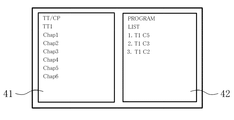
以下、プログラム再生機能について説明する。図4は、従来のチャプタプログラムメニューの表示例を示す図である。停止状態におけるプログラム機能では、まず、プログラム選択可能なチャプタ番号表示枠41にあらかじめ再生装置に保持しておいたメディアのタイトルやチャプタ番号を表示して、表示された中からプログラム再生させるタイトル、チャプタ番号をユーザーに選択させ、プログラム選択されたリストをリスト表示枠42に表示させて、このリスト順に再生を行っていた。
しかしながら、プログラム選択する際に表示できるデータは、光ディスクから読み取った管理情報に含まれるタイトルやチャプタ番号のみであるため、ユーザーにとって使い勝手が悪いものであった。具体的には、選択したタイトルやチャプタがどのような内容であるのかは分かりづらく、意図しないものが再生されてしまうことがあった。そのため、チャプタの情報が分かるような情報の表示が望まれていた。 However, the data that can be displayed when selecting a program is only the title and chapter number included in the management information read from the optical disc, which is inconvenient for the user. Specifically, it is difficult to understand the content of the selected title or chapter, and an unintended one may be reproduced. Therefore, it has been desired to display information so that chapter information can be understood.
本発明は、かかる点に鑑みてなされたものであり、その目的とするところは、チャプタの内容が分かりやすい状態で、ユーザーがプログラム選択を実行できるようにすることにある。 The present invention has been made in view of this point, and an object of the present invention is to allow a user to execute program selection in a state where the contents of chapters are easy to understand.
すなわち、本発明は、コンテンツが記録された記録媒体を再生可能なコンテンツ再生装置を用いたコンテンツ記録媒体制御方法であって、
前記記録媒体に記録されたチャプタメニューの表示中に、所定のチャプタを示す識別情報(例えば、チャプタ番号等)をリスト化したプログラムリストを作成するためのプログラム機能を起動する手順と、
前記チャプタメニュー上に表示された複数のチャプタのうち1つを選択することで、該選択されたチャプタの識別情報を前記プログラムリストに登録する手順とを備えたことを特徴とするものである。
That is, the present invention is a content recording medium control method using a content reproducing apparatus capable of reproducing a recording medium on which content is recorded,
A procedure for activating a program function for creating a program list in which identification information (for example, chapter numbers) indicating a predetermined chapter is listed while displaying a chapter menu recorded on the recording medium;
And selecting one of a plurality of chapters displayed on the chapter menu to register the identification information of the selected chapter in the program list.
以上のように、本発明によれば、DVD−Videoディスクのチャプタメニュー表示中にプログラム機能を起動させることで、ユーザーは自分が順番にプログラム再生させたいチャプタを選択する際に、チャプタの内容が分かりやすい状態でチャプタ選択をすることができ、利便性が向上する。 As described above, according to the present invention, by activating the program function while the chapter menu of the DVD-Video disc is displayed, the user can select the chapters that the user wants to play back in sequence. Chapters can be selected in an easy-to-understand state, improving convenience.
例えば、DVD−Videoメディアによっては、チャプタメニュー上にサブピクチャ情報を表示し、チャプタの再生画像を見せることでユーザーにチャプタの内容が分かり易い状態でチャプタ選択をさせることができるようになっている。この場合、メニュー中にプログラム選択をできるようにすれば、チャプタの最初の画像データをサムネイル表示した場合と同様の機能をユーザーに提供することが可能となる。 For example, depending on the DVD-Video media, sub-picture information is displayed on the chapter menu, and a chapter playback image can be displayed so that the user can select a chapter in a state in which the chapter contents are easily understood. . In this case, if the program can be selected in the menu, it is possible to provide the user with the same function as when the first image data of the chapter is displayed as a thumbnail.
また、チャプタメニュー中にサブピクチャ表示がないDVD−Videoディスクであっても、チャプタメニューにはチャプタ毎の名前が表示されており、例えば音楽のコンサート映像のDVDであれば、曲名等が選択できるようになっているため、ユーザーが意図しない映像をプログラム再生してしまうといった状況は回避され、見たい映像をプログラム再生できることとなる。 Also, even if the DVD-Video disc has no sub-picture display in the chapter menu, the name of each chapter is displayed in the chapter menu. For example, if the DVD is a concert video of music, the title of the song can be selected. Therefore, a situation in which a video unintended by the user is reproduced by program can be avoided, and a desired video can be reproduced by program.
このように、光ディスク再生装置内に膨大な記憶装置を追加する必要がなく、チャプタの内容が分かりやすい状態でプログラム選択、再生が可能となり、光ディスク再生装置におけるDVD−Videoディスクのより使いやすいプログラム機能が可能となる。 Thus, it is not necessary to add an enormous storage device in the optical disc playback device, and program selection and playback can be performed in a state where the contents of the chapters are easy to understand, and the program function that is easier to use for DVD-Video discs in the optical disc playback device. Is possible.
以下、本発明の実施形態を図面に基づいて詳細に説明する。以下の好ましい実施形態の説明は、本質的に例示に過ぎず、本発明、その適用物或いはその用途を制限することを意図するものでは全くない。 Hereinafter, embodiments of the present invention will be described in detail with reference to the drawings. The following description of the preferred embodiments is merely exemplary in nature and is in no way intended to limit the invention, its application, or its application.
図2は、本発明の実施形態に係る光ディスク再生装置31の構成を示すブロック図である。図2において、22は光ディスク21から管理情報及びデータを読み取るためのデータ読み取り装置であり、読み込まれた管理情報が管理情報記憶装置23に出力され、読み込まれたデータがデータ復号装置25に出力される。
FIG. 2 is a block diagram showing a configuration of the optical
前記管理情報記憶装置23に記憶された前記管理情報は、制御装置26により読み出され、制御装置26において管理情報が解析される。
The management information stored in the management
前記データ復号装置25は、データ分別機能を有しており、光ディスク21から読み出したデータは画像データと音声データとに分別される。分別されたデータは、データ格納装置24に出力され、それぞれ画像データ格納領域と音声データ格納領域とに格納される。
The
前記データ格納装置24は、画像データ格納領域、音声データ格納領域の他にも、プログラム再生データ格納領域を有しており、このプログラム再生データ格納領域には、後述するプログラム機能により作成されたプログラムリストが格納されている。
The
前記制御装置26は、解析したデータに基づいて前記データ読み取り装置22を制御し、読み取るべきデータを指定する。さらに、制御装置26は、前記データ格納装置24のプログラム再生データ格納領域からプログラムリストを読み取り、このリストに基づいたデータを読み取るように制御している。
The
前記データ復号装置25は、データ復号機能を有しており、前記データ格納装置24の画像データ格納領域に格納された画像データを取り出して、モニタ表示するためのデータに変換すべく画像データ復号処理を行い、復号後のデータをモニタ出力する。
The
さらに、前記データ格納装置24の音声データ格納領域に格納された音声データを取り出して、スピーカ出力するためのデータに変換すべく音声データ復号処理を行い、復号後のデータをスピーカ出力する。
Further, the audio data stored in the audio data storage area of the
このような画像データ及び音声データの復号処理を並列して行うことでコンテンツの再生を実現している。 Content reproduction is realized by performing such decoding processing of image data and audio data in parallel.
図3は、本発明の実施形態に係るコンテンツ記録媒体制御方法を実施するために用いる光ディスク再生装置とユーザーが操作するためのリモコン装置とを示す図である。 FIG. 3 is a diagram showing an optical disc playback apparatus used for carrying out the content recording medium control method according to the embodiment of the present invention and a remote control apparatus operated by the user.
前記光ディスク再生装置31の構成は上述した通りであり、前記リモコン装置32は、この光ディスク再生装置31をユーザーが遠隔操作するためのものである。
The configuration of the optical
前記リモコン装置32は、電源ON/OFFや音量調整等のボタンの他にも、少なくとも本発明を実施するために必要となる、DVD−Videoディスクのメニューを表示するためのメニューキー33と、本発明におけるプログラム機能を起動させるためのプログラムキー34とを備えている。
The
図5は、DVD−Videoディスクのチャプタメニューの一例を示す図である。図5に示すように、チャプタメニューには、選択可能なチャプタのチャプタ番号及びサブピクチャがサムネイル表示されたチャプタボタン51が表示されている。
FIG. 5 is a diagram showing an example of a chapter menu of a DVD-Video disc. As shown in FIG. 5, in the chapter menu, a
また、サムネイル表示されたチャプタの下側位置には、チャプタメニューが複数ページにわたって存在している場合に、そのメニュー画面を切り換えるためのPrev(戻る)ボタン52、Next(進む)ボタン54、及びメインメニュー等に戻るためのExitボタン53が表示されている。
In addition, when a chapter menu exists over a plurality of pages at the lower position of the chapter displayed as a thumbnail, a
そして、図5に示すチャプタメニューが表示された状態で、ユーザーがリモコン装置32のプログラムキー34を押すことによりプログラム機能が起動され、図6に示すようなプログラムリストが画面に表示されるようになっている。
Then, in the state where the chapter menu shown in FIG. 5 is displayed, the program function is activated when the user presses the
図6は、プログラム機能を実行してプログラムリストを表示した状態を示す図である。図6に示すように、プログラムリストは、チャプタメニュー上に表示されているチャプタボタン51の一部とオーバーラップするように表示されている。このプログラムリストの表示枠は半透明に表示されており、オーバーラップしているチャプタボタン51が識別できるようになっている。また、このプログラムリストには、再生順序を示す番号が表示されている。図6では、未だチャプタ番号がプログラム選択されていないため、リストが空白となっている。
FIG. 6 is a diagram showing a state in which the program function is executed and the program list is displayed. As shown in FIG. 6, the program list is displayed so as to overlap with a part of the
図7は、チャプタメニューにおけるプログラム選択中の表示例を示す図である。図7に示すように、ユーザーは、通常のチャプタメニューを選択するときの要領で、チャプタメニュー中のチャプタボタン51を選択することで、選択したチャプタがチャプタリストに反映されて表示されるようになっている。
FIG. 7 is a diagram showing a display example during program selection in the chapter menu. As shown in FIG. 7, the user selects a
なお、本実施形態では、選択したチャプタの表示方法として選択したチャプタ番号を表示するようにしたが、この形態に限定するものではなく、例えば、メニュー中のサブピクチャをコピーして表示するようにしても構わない。 In the present embodiment, the selected chapter number is displayed as the selected chapter display method. However, the present invention is not limited to this mode. For example, the sub-picture in the menu is copied and displayed. It doesn't matter.
次に、ディスクの挿入からメニュー再生開始までの処理手順について、図8に示すフローチャート図を用いて説明する。 Next, the processing procedure from the insertion of the disc to the start of menu reproduction will be described with reference to the flowchart shown in FIG.
まず、ステップS101では、ディスクを挿入して、続くステップS102に進む。ステップS102では、ディスクの管理情報を取得して、続くステップS103に進む。 First, in step S101, a disc is inserted, and the process proceeds to subsequent step S102. In step S102, the disk management information is acquired, and the process proceeds to subsequent step S103.
ステップS103では、ユーザーの指示又はディスクの管理情報による再生指示があるか否かを判定する。ステップS103での判定が「YES」の場合には、ステップS104に分岐する。ステップS103での判定が「NO」の場合には、指示があるまで待機する。 In step S103, it is determined whether or not there is a reproduction instruction based on a user instruction or disc management information. If “YES” at step S103, the process branches to step S104. If the determination in step S103 is “NO”, the process waits until an instruction is given.
ステップS104では、ユーザーの指示又はディスクの管理情報による指示の内容が、メニューの再生表示であるか否かを判定する。ステップS104での判定が「YES」の場合には、ステップS107に分岐する。ステップS104での判定が「NO」の場合には、ステップS105に分岐する。 In step S104, it is determined whether or not the content of the user instruction or the instruction by the disc management information is a menu reproduction display. If “YES” at step S104, the process branches to step S107. If “NO” at step S104, the process branches to step S105.
ステップS105では、本編の再生を行い、続くステップS106に進む。ステップS106では、再生状態からユーザー又はディスクの管理情報によるメニューへの指示があるかを判定する。 In step S105, the main part is reproduced, and the process proceeds to subsequent step S106. In step S106, it is determined whether there is an instruction to the menu based on the user or disc management information from the playback state.
ステップS106での判定が「YES」の場合には、ステップS107に分岐する。ステップS106での判定が「NO」の場合には、指示があるまで本編の再生を続ける。 If “YES” at step S106, the process branches to step S107. If the determination in step S106 is “NO”, reproduction of the main part is continued until an instruction is given.
ステップS107では、プログラム機能起動用フラグ1をセットして、続くステップS108に進む。ステップS108では、メニュー再生処理を実行する。
In step S107, the program
次に、メニュー再生開始からプログラム機能起動までの処理手順について、図9のフローチャート図を用いて説明する。 Next, a processing procedure from the start of menu reproduction to the start of the program function will be described with reference to the flowchart of FIG.
まず、ステップS201では、メニュー上のボタンコマンドを保存して、続くステップS202に進む。ステップS202では、メニュー上ボタンの解析を行い、続くステップS203に進む。 First, in step S201, the button command on the menu is saved, and the process proceeds to subsequent step S202. In step S202, the menu upper button is analyzed, and the process proceeds to step S203.
ステップS203では、プログラムキーの受付け有効判断として、保存したメニューの全ボタンコマンド中に、チャプタを指定したLinkかJumpコマンドがあるかを判定する。 In step S203, it is determined whether there is a Link or Jump command specifying a chapter among all the button commands of the saved menu, as a determination of acceptance of the program key.
ステップS203での判定が「YES」の場合には、ステップS204に分岐して、ステップS204で、プログラム機能起動用フラグ2をセットして、続くステップS205に進む。ステップS203での判定が「NO」の場合には、ステップS205に分岐する。
If “YES” at step S203, the process branches to step S204, the program
ステップS205では、メニューの再生を行い、続くステップS206に進む。ステップS206では、ユーザーからのキー入力があったかを判定する。 In step S205, the menu is reproduced, and the process proceeds to subsequent step S206. In step S206, it is determined whether there is a key input from the user.
ステップS206での判定が「YES」の場合には、ステップS207に分岐する。ステップS206での判定が「NO」の場合には、キー入力があるまで待機する。 If “YES” at step S206, the process branches to step S207. If the determination in step S206 is “NO”, the process waits until there is a key input.
ステップS207では、入力されたキーがプログラムキーであるかを判定する。ステップS207での判定が「YES」の場合には、ステップS209に分岐する。ステップS207での判定が「NO」の場合には、ステップS208に分岐する。 In step S207, it is determined whether the input key is a program key. If “YES” at step S207, the process branches to step S209. If “NO” at step S207, the process branches to step S208.
ステップS208では、ディスク管理情報による処理を行い、処理を終了する。ステップS209では、入力されたプログラムキーに基づくプログラム機能処理を実行する。 In step S208, the process based on the disk management information is performed, and the process ends. In step S209, program function processing based on the input program key is executed.
次に、チャプタメニュー中におけるプログラム情報の選択処理手順について、図10のフローチャート図を用いて説明する。 Next, the program information selection processing procedure in the chapter menu will be described with reference to the flowchart of FIG.
まず、ステップS301では、プログラムモード起動用フラグ1,2がセットされているかを判定する。ステップS301での判定が「YES」の場合には、ステップS302に分岐する。ステップS301での判定が「NO」の場合には、プログラムモードを起動せずに処理を終了する。
First, in step S301, it is determined whether the program mode start
ステップS302では、メニュー上にあるボタンのナビゲーションコマンドを全て取り出し、続くステップS303に進む。 In step S302, all navigation commands of buttons on the menu are extracted, and the process proceeds to subsequent step S303.
ステップS303では、その中にチャプタを指定したLinkかJumpのコマンドを持ったボタンがあるかを判定する。ステップS303での判定が「YES」の場合には、ステップS304に分岐する。ステップS303での判定が「NO」の場合には、プログラムモードを起動せずに処理を終了する。 In step S303, it is determined whether there is a button having a Link or Jump command specifying a chapter. If “YES” at step S303, the process branches to step S304. If the determination in step S303 is “NO”, the process ends without starting the program mode.
ステップS304では、プログラムモード中の処理としてメニュー画面上のボタンが指定されたかを判定する。ステップS304での判定が「YES」の場合には、ステップS305に分岐する。ステップS304での判定が「NO」の場合には、ボタンが選択されるまで待機する。 In step S304, it is determined whether a button on the menu screen has been designated as processing in the program mode. If “YES” at step S304, the process branches to step S305. If the determination in step S304 is “NO”, the process waits until the button is selected.
ステップS305では、指定されたボタン情報からナビゲーションコマンドを取り出し、続くステップS306に進む。 In step S305, the navigation command is extracted from the designated button information, and the process proceeds to subsequent step S306.
ステップS306では、取り出したナビゲーションコマンドがLinkかJumpであるか否かを判定する。ステップS306での判定が「YES」の場合には、ステップS307に分岐する。ステップS306での判定が「NO」の場合には、ステップS311に分岐し、ステップS311で、コマンドの実行を行わず、そのまま処理を終了する。 In step S306, it is determined whether or not the extracted navigation command is Link or Jump. If “YES” at step S306, the process branches to step S307. If “NO” at step S306, the process branches to step S311, and the process is terminated without executing the command at step S311.
ステップS307では、選択されたボタンのコマンドがLinkであるか否かを判定する。ステップS307での判定が「YES」の場合には、ステップS308に分岐する。ステップS307での判定が「NO」の場合には、ステップS312に分岐する。 In step S307, it is determined whether or not the command of the selected button is Link. If “YES” at step S307, the process branches to step S308. If “NO” at step S307, the process branches to step S312.
ステップS308では、Linkコマンドに対してサブインストラクション指定であるか否かを判定する。ステップS308での判定が「YES」の場合には、ステップS309に分岐する。ステップS308での判定が「NO」の場合には、ステップS313に分岐する。 In step S308, it is determined whether or not a sub instruction is designated for the Link command. If “YES” at step S308, the process branches to step S309. If “NO” at step S308, the process branches to step S313.
ステップS309では、Linkコマンドのサブインストラクション指定がRSMであるか否かを判定する。ステップS309での判定が「YES」の場合には、ステップS310に分岐し、ステップS310で、プログラム再生用の情報は破棄し、プログラムモードを解除して、選択されたボタンのコマンドを実行して、処理を終了する。 In step S309, it is determined whether or not the sub instruction designation of the Link command is RSM. If “YES” in step S309, the process branches to step S310. In step S310, the program playback information is discarded, the program mode is canceled, and the command of the selected button is executed. The process is terminated.
ステップS310での判定が「NO」の場合には、ボタンのナビゲーションコマンドをそのまま実行し、処理を終了する。 If the determination in step S310 is “NO”, the button navigation command is executed as is, and the process is terminated.
一方、ステップS312では、JumpコマンドのサブインストラクションがJumpVTS_PTTであるか否かを判定する。ステップS312での判定が「YES」の場合には、ステップS313に分岐し、ステップS313で、ボタンのナビゲーションコマンドに再生順番号を付加してメモリに保存し、続くステップS314に進む。ステップS314では、ハイライト、サブピクチャ色の変更処理を実行する。 On the other hand, in step S312, it is determined whether or not the sub instruction of the Jump command is JumpVTS_PTT. If “YES” at step S312, the process branches to step S313. At step S313, a playback order number is added to the navigation command of the button and stored in the memory, and the process proceeds to subsequent step S314. In step S314, highlight / sub-picture color change processing is executed.
また、ステップS312での判定が「NO」の場合には、ステップS315に分岐し、ステップS315で、JumpコマンドのサブインストラクションはExitであるか否かを判定する。 If the determination in step S312 is “NO”, the process branches to step S315. In step S315, it is determined whether the sub instruction of the Jump command is Exit.
ステップS315での判定が「YES」の場合には、ステップS316に分岐し、ステップS316で、プログラム再生用の情報は破棄し、プログラムモードを解除して、選択されたボタンコマンドを実行して、処理を終了する。 If the determination in step S315 is “YES”, the process branches to step S316. In step S316, the program playback information is discarded, the program mode is canceled, and the selected button command is executed. The process ends.
ステップS315での判定が「NO」の場合には、ステップS317に分岐し、ステップS317で、ボタンコマンドを実行せずに処理を終了する。 If “NO” at step S315, the process branches to step S317, and the process ends without executing the button command at step S317.
次に、ハイライト、サブピクチャ色の変更処理手順について、図11のフローチャート図を用いて説明する。具体的には、チャプタメニュー再生中でのプログラムモードにおいて、チャプタの選択をした場合には、通常のハイライト色、サブピクチャ背景色から色を変化させることで、プログラム選択済みであることを表示するための制御方法である。 Next, the procedure for changing highlight and sub-picture colors will be described with reference to the flowchart of FIG. Specifically, when a chapter is selected in the program mode during chapter menu playback, the program is selected by changing the color from the normal highlight color and sub-picture background color. It is the control method for doing.
まず、ステップS401では、選択されたボタンのBTN_COLIT1〜3の中で、メニュー用の色情報として未使用のBTN_COLITがあるか否かを判定する。
First, in step S401, it is determined whether or not there is an unused BTN_COLOR as menu color information among
ステップS401での判定が「YES」の場合には、ステップS402に分岐する。ステップS401での判定が「NO」の場合には、ハイライト、サブピクチャの色変化の機能を行うことなく処理を終了する。 If “YES” at step S401, the process branches to step S402. If the determination in step S401 is “NO”, the process ends without performing the function of highlight and sub-picture color change.
ステップS402では、未使用のBTN_COLITの色情報を変化させ、色情報を変化させたBTN_COLITを選択色として使用し、続くステップS403に進む。 In step S402, the color information of unused BTN_COLOR is changed, the changed BTN_COLOR is used as the selected color, and the process proceeds to the subsequent step S403.
ステップS403では、選択したボタンにはサブピクチャ情報があるかを判定する。ステップS403での判定が「YES」の場合には、ステップS404に分岐し、ステップS404で、サブピクチャの背景色を変更し、処理を終了する。ステップS403での判定が「NO」の場合には、サブピクチャ背景色変更を行うことなく処理を終了する。 In step S403, it is determined whether the selected button has sub-picture information. If “YES” at step S403, the process branches to step S404, and the background color of the sub-picture is changed at step S404, and the process ends. If “NO” in step S403, the process ends without changing the sub-picture background color.
図12は、プログラムモード起動用フラグ、メニュー上ボタンコマンド情報、プログラム再生用情報を記憶するためのメモリの構成例を示す図である。 FIG. 12 is a diagram showing a configuration example of a memory for storing a program mode start flag, menu button command information, and program reproduction information.
図12に示すように、メモリ領域は、プログラム機能起動用フラグ領域と、メニュー上ボタンコマンド情報領域と、プログラム再生用情報領域との3つの領域に分けられている。 As shown in FIG. 12, the memory area is divided into three areas: a program function activation flag area, an on-menu button command information area, and a program reproduction information area.
図13は、プログラム機能起動用フラグ領域のメモリ構成を示す図であり、図14は、プログラム再生用情報領域のメモリ構成を示す図である。図14に示すように、プログラム再生用情報領域は、プログラムしたメニュー上ボタンの再生順番号61と、そのボタンのナビゲーションコマンド62とにより構成されている。
FIG. 13 is a diagram showing a memory configuration of the program function activation flag area, and FIG. 14 is a diagram showing a memory configuration of the program reproduction information area. As shown in FIG. 14, the program reproduction information area is composed of a
なお、前記メニュー上ボタンコマンド情報領域は、各ボタンのナビゲーションコマンドを保存する領域であり、メニュー上のボタン数×1つのボタンが持つナビゲーションコマンド8バイトの領域が必要となる。 The menu upper button command information area is an area for storing the navigation command of each button, and an area of 8 bytes of navigation command for each button on the menu × 1 button is required.
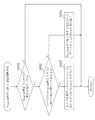
図15は、プログラム再生用情報記憶領域に保存された情報に基づいてチャプタの再生を開始する処理手順を示すフローチャート図である。 FIG. 15 is a flowchart showing a processing procedure for starting chapter reproduction based on information stored in the program reproduction information storage area.
図15に示すように、まず、ステップS501では、プログラムされたチャプタ再生情報の再生を開始すべく、メニュー再生時のプログラムモード中にユーザーからプログラム再生開始指示がされたかを判定する。 As shown in FIG. 15, first, in step S501, it is determined whether or not a user has instructed to start program playback during the program mode during menu playback in order to start playback of programmed chapter playback information.
ステップS501での判定が「YES」の場合には、ステップS502に分岐する。ステップS501での判定が「NO」の場合には、プログラムモードにおけるチャプタ選択状態であると判断され、何も行うことなく処理を終了する。 If “YES” at step S501, the process branches to step S502. If the determination in step S501 is “NO”, it is determined that the chapter is selected in the program mode, and the process ends without performing anything.
ステップS502では、プログラム再生データ格納領域の格納情報をチェックして、プログラムされた情報を持っているかを判定する。ステップS502での判定が「YES」の場合には、ステップS503に分岐する。ステップS502での判定が「NO」の場合には、処理を終了する。 In step S502, the storage information in the program reproduction data storage area is checked to determine whether it has programmed information. If “YES” at step S502, the process branches to step S503. If the determination in step S502 is “NO”, the process ends.
ステップS503では、プログラム再生完了番号と、プログラム再生完了時にメニューに戻るためのメニューのTTN、VTS_TTN、TT_PGCN、PTTNをプログラム再生データ格納領域に保存して、続くステップS504に進む。 In step S503, the program reproduction completion number and the menu TTN, VTS_TTN, TT_PGCN, and PTTN for returning to the menu when the program reproduction is completed are stored in the program reproduction data storage area, and the process proceeds to the next step S504.
ステップS504では、プログラム再生番号1で指示されたプログラム再生用情報からコマンドを発行して再生を開始し、処理を終了する。
In step S504, a command is issued from the program reproduction information designated by the
図16は、プログラム情報の順次再生とプログラム再生終了時の処理手順を示すフローチャート図である。 FIG. 16 is a flowchart showing a processing procedure when program information is sequentially reproduced and when program reproduction ends.
図16に示すように、まず、ステップS601では、プログラム再生中においてプログラム選択されたチャプタの再生完了を判断するために、プログラム再生中にPTTNの変化を検出したかを判定する。 As shown in FIG. 16, first, in step S601, it is determined whether a change in PTTN has been detected during program playback in order to determine the completion of playback of a chapter selected during program playback.
ステップS601での判定が「YES」の場合には、ステップS602に分岐する。ステップS601での判定が「NO」の場合には、そのままチャプタ再生を継続し、処理を終了する。 If “YES” at step S601, the process branches to step S602. If the determination in step S601 is “NO”, the chapter reproduction is continued and the process is terminated.
ステップS602では、プログラム再生データ格納領域のプログラム再生リストに残りの再生用データがあるか否かを判定する。ステップS602での判定が「YES」の場合には、ステップS603に分岐し、ステップS603で、次の再生番号のチャプタ再生用データからコマンドを実行させてチャプタの再生を行い、処理を終了する。 In step S602, it is determined whether or not there is remaining reproduction data in the program reproduction list in the program reproduction data storage area. If “YES” in step S602, the process branches to step S603. In step S603, a command is executed from the chapter reproduction data of the next reproduction number to reproduce the chapter, and the process ends.
ステップS602での判定が「NO」の場合には、ステップS604に分岐し、ステップS604で、プログラム再生完了番号で指定されたデータから元のメニューの呼び出しを行い、処理を終了する。 If the determination in step S602 is “NO”, the process branches to step S604. In step S604, the original menu is called from the data designated by the program reproduction completion number, and the process ends.
以上説明したように、本発明は、チャプタメニュー再生中にチャプタの詳しい内容を見ながらプログラム選択を行うことができるという実用性の高い効果が得られることから、きわめて有用で産業上の利用可能性は高い。特に、チャプタメニューを提供することの可能なコンテンツ再生装置に適用可能である。 As described above, the present invention provides a highly practical effect that the program can be selected while viewing the detailed contents of the chapter during chapter menu playback. Is expensive. In particular, the present invention can be applied to a content playback apparatus that can provide a chapter menu.
21 光ディスク
22 データ読み取り装置
23 管理情報記憶装置
24 データ格納装置
25 データ復号装置
26 制御装置
31 光ディスク再生装置
32 リモコン装置
33 メニューボタン
34 プログラムボタン
51 チャプタボタン
52 Prevボタン
53 Exitボタン
54 Nextボタン
21
Claims (8)
前記記録媒体に記録されたチャプタメニューの表示中に、所定のチャプタを示す識別情報をリスト化したプログラムリストを作成するためのプログラム機能を起動する手順を備えたことを特徴とするコンテンツ記録媒体制御方法。 A content recording medium control method using a content reproducing apparatus capable of reproducing a recording medium on which content is recorded,
A content recording medium control comprising a procedure for starting a program function for creating a program list in which identification information indicating a predetermined chapter is listed while displaying a chapter menu recorded on the recording medium Method.
前記コンテンツの再生中に入力されたボタンコマンドの内容を解析する手順と、
前記解析されたボタンコマンドがチャプタメニュー表示コマンドであった場合にのみ、前記プログラム機能を起動可能な状態にする手順とをさらに備えたことを特徴とするコンテンツ記録媒体制御方法。 The content recording medium control method according to claim 1,
A procedure for analyzing the contents of a button command input during playback of the content;
The content recording medium control method further comprising: a procedure for enabling the program function to be activated only when the analyzed button command is a chapter menu display command.
前記チャプタメニュー上に表示された複数のチャプタのうち1つを選択することで、該選択されたチャプタを示す識別情報を前記プログラムリストに格納する手順をさらに備えたことを特徴とするコンテンツ記録媒体制御方法。 The content recording medium control method according to claim 1,
The content recording medium further comprising a procedure of storing identification information indicating the selected chapter in the program list by selecting one of the plurality of chapters displayed on the chapter menu. Control method.
前記プログラム機能の起動中に入力されたボタンコマンドの内容を解析する手順と、
前記解析されたボタンコマンドが、前記チャプタメニュー上のチャプタではない場合に、該ボタンコマンドで指示された制御処理をそのまま実行する手順とをさらに備えたことを特徴とするコンテンツ記録媒体制御方法。 The content recording medium control method according to claim 1,
A procedure for analyzing the contents of a button command input during the activation of the program function;
A content recording medium control method, further comprising: a procedure for directly executing the control process instructed by the button command when the analyzed button command is not a chapter on the chapter menu.
前記プログラム機能によるプログラムリストの作成完了後、ユーザーの操作に基づいてプログラム実行指示がなされた場合に、該プログラムリストに基づいてチャプタを順次再生する手順をさらに備えたことを特徴とするコンテンツ記録媒体制御方法。 The content recording medium control method according to claim 1,
A content recording medium further comprising: a procedure for sequentially reproducing chapters based on a program list when a program execution instruction is issued based on a user operation after completion of creation of the program list by the program function Control method.
前記プログラムリスト内の全チャプタの再生が終了した後、前記チャプタメニューの表示画面に戻る手順をさらに備えたことを特徴とするコンテンツ記録媒体制御方法。 The content recording medium control method according to claim 5,
The content recording medium control method further comprising a step of returning to the chapter menu display screen after the reproduction of all the chapters in the program list is completed.
前記チャプタメニューの表示中であってプログラム機能の起動時に、所定のチャプタが選択中であることを示すハイライトの色情報を変更する手順と、
前記チャプタメニュー上において選択されたチャプタのサブピクチャの背景色情報を変更する手順とをさらに備えたことを特徴とするコンテンツ記録媒体制御方法。 The content recording medium control method according to claim 1,
A procedure for changing highlight color information indicating that a predetermined chapter is being selected when the chapter function is being displayed and the program function is activated.
A method for controlling a content recording medium, further comprising: changing background color information of a sub-picture of a chapter selected on the chapter menu.
前記記録媒体は、DVD−Videoフォーマットでコンテンツが記録された光ディスクであることを特徴とするコンテンツ記録媒体制御方法。
The content recording medium control method according to any one of claims 1 to 7,
The content recording medium control method, wherein the recording medium is an optical disc on which content is recorded in a DVD-Video format.
Priority Applications (1)
| Application Number | Priority Date | Filing Date | Title |
|---|---|---|---|
| JP2005298909A JP2007109308A (en) | 2005-10-13 | 2005-10-13 | Content recording medium control method |
Applications Claiming Priority (1)
| Application Number | Priority Date | Filing Date | Title |
|---|---|---|---|
| JP2005298909A JP2007109308A (en) | 2005-10-13 | 2005-10-13 | Content recording medium control method |
Publications (1)
| Publication Number | Publication Date |
|---|---|
| JP2007109308A true JP2007109308A (en) | 2007-04-26 |
Family
ID=38035065
Family Applications (1)
| Application Number | Title | Priority Date | Filing Date |
|---|---|---|---|
| JP2005298909A Pending JP2007109308A (en) | 2005-10-13 | 2005-10-13 | Content recording medium control method |
Country Status (1)
| Country | Link |
|---|---|
| JP (1) | JP2007109308A (en) |
Cited By (1)
| Publication number | Priority date | Publication date | Assignee | Title |
|---|---|---|---|---|
| JP2009032358A (en) * | 2007-07-30 | 2009-02-12 | Toshiba Alpine Automotive Technology Corp | Disc playback apparatus and disc playback method |
-
2005
- 2005-10-13 JP JP2005298909A patent/JP2007109308A/en active Pending
Cited By (1)
| Publication number | Priority date | Publication date | Assignee | Title |
|---|---|---|---|---|
| JP2009032358A (en) * | 2007-07-30 | 2009-02-12 | Toshiba Alpine Automotive Technology Corp | Disc playback apparatus and disc playback method |
Similar Documents
| Publication | Publication Date | Title |
|---|---|---|
| CN1902705B (en) | Recording medium having a data structure for managing sound data and recording and reproducing methods and apparatus | |
| KR100387387B1 (en) | Method and apparatus for accessing content | |
| JPH11164258A (en) | Data recording medium and data reproducing device | |
| JPH11185463A (en) | Data recording medium and menu control method and apparatus | |
| JP4871839B2 (en) | Movie playback device | |
| JP2007109308A (en) | Content recording medium control method | |
| JP4425844B2 (en) | Video / audio format playback device, video / audio format playback method and program | |
| JP2006190385A (en) | Data reproducing device | |
| JP2004079085A (en) | Optical disc playback device | |
| JP2008301070A (en) | Video content playback apparatus and video content playback method | |
| JP4100307B2 (en) | Program, recording medium and playback apparatus | |
| KR100706506B1 (en) | Apparatus and method for copying media in a digital video recording and playback device | |
| JP4619317B2 (en) | Playback device | |
| JP5023136B2 (en) | Information playback device | |
| JP4557088B2 (en) | Program, recording medium, playback apparatus, and playback method | |
| JP4769825B2 (en) | Information playback device | |
| JP2008112495A (en) | Recording and reproducing device | |
| JP2005122893A (en) | Information playback device | |
| JP3917579B2 (en) | Electronic device and highlight display control method | |
| JP4379519B2 (en) | Program, recording medium, playback apparatus, and playback method | |
| JP2009093695A (en) | Information reproducing device | |
| JP2004272963A (en) | Signal reproducing device | |
| JP2002269959A (en) | Information reproducing device | |
| US20070071419A1 (en) | Reproducing device provided with resume function | |
| JP2004334955A (en) | Disk reproducing device |