TWI860789B - Display control method and electronic device using the same - Google Patents
Display control method and electronic device using the same Download PDFInfo
- Publication number
- TWI860789B TWI860789B TW112127247A TW112127247A TWI860789B TW I860789 B TWI860789 B TW I860789B TW 112127247 A TW112127247 A TW 112127247A TW 112127247 A TW112127247 A TW 112127247A TW I860789 B TWI860789 B TW I860789B
- Authority
- TW
- Taiwan
- Prior art keywords
- display
- application
- screen
- display area
- control method
- Prior art date
Links
Images




Classifications
-
- G—PHYSICS
- G06—COMPUTING OR CALCULATING; COUNTING
- G06F—ELECTRIC DIGITAL DATA PROCESSING
- G06F3/00—Input arrangements for transferring data to be processed into a form capable of being handled by the computer; Output arrangements for transferring data from processing unit to output unit, e.g. interface arrangements
- G06F3/01—Input arrangements or combined input and output arrangements for interaction between user and computer
- G06F3/048—Interaction techniques based on graphical user interfaces [GUI]
- G06F3/0487—Interaction techniques based on graphical user interfaces [GUI] using specific features provided by the input device, e.g. functions controlled by the rotation of a mouse with dual sensing arrangements, or of the nature of the input device, e.g. tap gestures based on pressure sensed by a digitiser
- G06F3/0488—Interaction techniques based on graphical user interfaces [GUI] using specific features provided by the input device, e.g. functions controlled by the rotation of a mouse with dual sensing arrangements, or of the nature of the input device, e.g. tap gestures based on pressure sensed by a digitiser using a touch-screen or digitiser, e.g. input of commands through traced gestures
- G06F3/04886—Interaction techniques based on graphical user interfaces [GUI] using specific features provided by the input device, e.g. functions controlled by the rotation of a mouse with dual sensing arrangements, or of the nature of the input device, e.g. tap gestures based on pressure sensed by a digitiser using a touch-screen or digitiser, e.g. input of commands through traced gestures by partitioning the display area of the touch-screen or the surface of the digitising tablet into independently controllable areas, e.g. virtual keyboards or menus
-
- G—PHYSICS
- G06—COMPUTING OR CALCULATING; COUNTING
- G06F—ELECTRIC DIGITAL DATA PROCESSING
- G06F1/00—Details not covered by groups G06F3/00 - G06F13/00 and G06F21/00
- G06F1/16—Constructional details or arrangements
- G06F1/1613—Constructional details or arrangements for portable computers
- G06F1/1633—Constructional details or arrangements of portable computers not specific to the type of enclosures covered by groups G06F1/1615 - G06F1/1626
- G06F1/1684—Constructional details or arrangements related to integrated I/O peripherals not covered by groups G06F1/1635 - G06F1/1675
- G06F1/1686—Constructional details or arrangements related to integrated I/O peripherals not covered by groups G06F1/1635 - G06F1/1675 the I/O peripheral being an integrated camera
-
- G—PHYSICS
- G06—COMPUTING OR CALCULATING; COUNTING
- G06F—ELECTRIC DIGITAL DATA PROCESSING
- G06F3/00—Input arrangements for transferring data to be processed into a form capable of being handled by the computer; Output arrangements for transferring data from processing unit to output unit, e.g. interface arrangements
- G06F3/01—Input arrangements or combined input and output arrangements for interaction between user and computer
- G06F3/048—Interaction techniques based on graphical user interfaces [GUI]
- G06F3/0481—Interaction techniques based on graphical user interfaces [GUI] based on specific properties of the displayed interaction object or a metaphor-based environment, e.g. interaction with desktop elements like windows or icons, or assisted by a cursor's changing behaviour or appearance
-
- G—PHYSICS
- G06—COMPUTING OR CALCULATING; COUNTING
- G06F—ELECTRIC DIGITAL DATA PROCESSING
- G06F3/00—Input arrangements for transferring data to be processed into a form capable of being handled by the computer; Output arrangements for transferring data from processing unit to output unit, e.g. interface arrangements
- G06F3/01—Input arrangements or combined input and output arrangements for interaction between user and computer
- G06F3/048—Interaction techniques based on graphical user interfaces [GUI]
- G06F3/0481—Interaction techniques based on graphical user interfaces [GUI] based on specific properties of the displayed interaction object or a metaphor-based environment, e.g. interaction with desktop elements like windows or icons, or assisted by a cursor's changing behaviour or appearance
- G06F3/0482—Interaction with lists of selectable items, e.g. menus
-
- G—PHYSICS
- G06—COMPUTING OR CALCULATING; COUNTING
- G06F—ELECTRIC DIGITAL DATA PROCESSING
- G06F2203/00—Indexing scheme relating to G06F3/00 - G06F3/048
- G06F2203/048—Indexing scheme relating to G06F3/048
- G06F2203/04803—Split screen, i.e. subdividing the display area or the window area into separate subareas
Landscapes
- Engineering & Computer Science (AREA)
- Theoretical Computer Science (AREA)
- General Engineering & Computer Science (AREA)
- Human Computer Interaction (AREA)
- Physics & Mathematics (AREA)
- General Physics & Mathematics (AREA)
- Computer Hardware Design (AREA)
- User Interface Of Digital Computer (AREA)
- Digital Computer Display Output (AREA)
- Controls And Circuits For Display Device (AREA)
Abstract
Description
本案是有關於一種顯示控制方法及使用該顯示控制方法電子裝置,尤其是關於一種適用於打孔螢幕之顯示控制方法及使用該顯示控制方法之電子裝置。The present invention relates to a display control method and an electronic device using the display control method, and more particularly to a display control method applicable to a perforated screen and an electronic device using the display control method.
因應電子裝置(特別是行動裝置)輕薄化的需求,部分電子裝置會使用打孔螢幕以容納前置鏡頭。孔洞的存在會影響顯示畫面的完整性,甚至遮蔽部分按鈕而導致顯示畫面上的按鈕無法檢視或無法操作。In response to the demand for electronic devices (especially mobile devices) to be thinner and lighter, some electronic devices use perforated screens to accommodate front cameras. The presence of the hole will affect the integrity of the display screen, and even cover some buttons, making the buttons on the display screen unable to be viewed or operated.
為了解決此問題,部分電子裝置會將顯示畫面縮小以避開孔洞。不過,此方法會在對應於孔洞的位置形成明顯的黑屏,影響畫面整體性,同時也造成畫面空間的浪費。To solve this problem, some electronic devices will reduce the display screen to avoid the hole. However, this method will form an obvious black screen at the position corresponding to the hole, affecting the integrity of the picture and also causing a waste of screen space.
本案提供一種顯示控制方法,適用於一電子裝置,電子裝置具有一系統、一監控元件以及一顯示螢幕,系統具有一程式清單,並適於執行一應用程式,監控元件監控系統之狀態以產生一系統資訊,顯示螢幕之顯示範圍具有相對之一第一側以及一第二側,且在鄰近於第一側的位置設有一開孔。此顯示控制方法包含:在應用程式啟動後,確認應用程式是否落入程式清單;若是應用程式落入程式清單,將應用程式所產生之畫面緊靠於第二側呈現,而在顯示範圍對應於開孔處產生一輔助顯示區域;以及將系統資訊之全部或一部分呈現於輔助顯示區域。The present invention provides a display control method, which is applicable to an electronic device. The electronic device has a system, a monitoring component and a display screen. The system has a program list and is suitable for executing an application. The monitoring component monitors the state of the system to generate system information. The display range of the display screen has a first side and a second side opposite to each other, and an opening is provided at a position adjacent to the first side. The display control method includes: after the application is started, confirming whether the application falls into the program list; if the application falls into the program list, presenting the screen generated by the application close to the second side, and generating an auxiliary display area in the display range corresponding to the opening; and presenting all or part of the system information in the auxiliary display area.
本案並提供一種電子裝置。此電子裝置包含一系統、一監控元件、一顯示螢幕以及一顯示控制單元。系統具有一程式清單,並適於執行一應用程式。監控元件監控系統之狀態以產生一系統資訊並回傳系統。顯示螢幕之顯示範圍具有相對之一第一側以及一第二側,且在鄰近於第一側的位置設有一開孔。顯示控制單元電性連接於系統以及顯示螢幕,用以在應用程式啟動後,確認應用程式是否落入程式清單,若是應用程式落入程式清單,將應用程式所產生之畫面緊靠於第二側呈現,而在顯示範圍對應於開孔處產生一輔助顯示區域,以及將系統資訊之全部或一部分呈現於輔助顯示區域。The case also provides an electronic device. The electronic device includes a system, a monitoring element, a display screen and a display control unit. The system has a program list and is suitable for executing an application program. The monitoring element monitors the state of the system to generate a system information and returns it to the system. The display range of the display screen has a first side and a second side opposite to each other, and an opening is provided at a position adjacent to the first side. The display control unit is electrically connected to the system and the display screen, and is used to confirm whether the application falls into the program list after the application is started. If the application falls into the program list, the screen generated by the application is displayed close to the second side, and an auxiliary display area is generated in the display range corresponding to the opening, and all or part of the system information is displayed in the auxiliary display area.
本案之顯示控制方法與電子裝置,可以針對容易因為孔洞存在而影響操作的應用程式,設定其顯示範圍以避開開孔,以改善傳統上因為孔洞存在而影響顯示畫面之完整性的問題。此外,本案並在對應於開孔的位置形成輔助顯示區域顯示相關的系統資訊,如此,除了可以避免產生黑屏而影響畫面整體性,同時也可以有效利用開孔處的顯示空間呈現系統資訊方便使用者進行檢視。The display control method and electronic device of this case can set the display range of applications that are easily affected by the presence of holes to avoid the openings, so as to improve the problem that the integrity of the display screen is affected by the presence of holes in the traditional way. In addition, this case also forms an auxiliary display area corresponding to the position of the opening to display related system information. In this way, in addition to avoiding the generation of a black screen that affects the integrity of the screen, the display space at the opening can also be effectively used to present system information for users to view.
下面將結合示意圖對本案的具體實施方式進行更詳細的描述。根據下列描述和申請專利範圍,本案的優點和特徵將更清楚。需說明的是,圖式均採用非常簡化的形式且均使用非精準的比例,僅用以方便、明晰地輔助說明本案實施例的目的。The specific implementation of the present invention will be described in more detail below in conjunction with the schematic diagram. The advantages and features of the present invention will become clearer based on the following description and the scope of the patent application. It should be noted that the diagrams are all in a very simplified form and are not in exact proportions, and are only used to conveniently and clearly assist in explaining the purpose of the present invention.
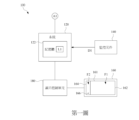
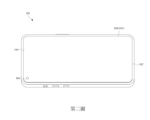
第一與二圖係依據本案一實施例所提供之電子裝置100之方塊示意圖以及立體示意圖。此電子裝置100係一手持式電子裝置,其顯示螢幕上設有開孔以設置鏡頭。The first and second figures are a block diagram and a three-dimensional diagram of an
如圖中所示,此電子裝置100包含一系統120、一監控元件140、一顯示螢幕160以及一顯示控制單元180。As shown in the figure, the
系統120具有一記憶體122,記憶體122內儲存一程式清單L1。此程式清單L1內列出需要因應調整顯示畫面之至少一預設應用程式。一實施例中,這些預設應用程式係為遊戲程式。一實施例中,此系統120係一電腦系統,其包含軟體與硬體。軟體部分即為作業系統。硬體部分包含中央處理器以及記憶體。The
監控元件140係適於監控系統120之狀態以產生系統資訊D1並回傳系統120。系統資訊D1可包含系統溫度、電池電量、網路狀態、平台類型、時間日期或上述之組合等。The
一實施例中,監控元件140可以是設置於主機板上的感測元件。系統120可包含主機板上的基本輸入輸出系統(BIOS),其可連線至監控元件140以取得系統資訊D1。In one embodiment, the
顯示螢幕160具有一顯示範圍161。顯示範圍161是顯示螢幕160能夠顯示畫面的區域。顯示範圍161係呈長方形,且具有相對之一第一側162以及一第二側164。顯示螢幕160在鄰近於第一側162的位置設有一開孔166,以利於設置鏡頭(圖未示)。The
一實施例中,如圖中所示,開孔166係位於顯示範圍161之一角落位置。不過本案不限於此。其他實施例中,開孔166的設置位置亦可以是對應於顯示範圍161之第一側162的中間位置。一實施例中,此開孔166係一圓形開孔。In one embodiment, as shown in the figure, the
顯示控制單元180係電性連接於系統120、監控元件140以及顯示螢幕160,用以控制顯示螢幕160之顯示畫面。本實施例中,顯示控制單元180是系統120外之一獨立元件,例如一顯示控制晶片,不過亦不限於此,其他實施例中,顯示控制單元180可以是系統120之一部分。The
在系統120接收執行指令以啟動一應用程式A1後,顯示控制單元180會確認應用程式A1是否落入程式清單L1。若是應用程式A1落入程式清單L1,顯示控制單元180隨即將應用程式A1所產生之畫面緊靠於第二側164呈現,而在顯示範圍161對應於開孔166處產生一輔助顯示區域F2。After the
一實施例中,顯示控制單元180會先確認應用程式A1所產生之畫面F1的長寬比例,將畫面F1之寬度設定為等同於顯示螢幕160之顯示範圍161的高度,並將畫面F1緊靠於第二側164呈現。顯示螢幕160之顯示範圍161內未被畫面F1佔據的位置即為輔助顯示區域F2。In one embodiment, the
一實施例中,顯示控制單元180會先依據開孔166在顯示範圍161上的位置,設定顯示範圍161所能呈現之完整畫面(也就是畫面內不具有開孔166)的最大寬度。然後再利用此最大寬度調整應用程式A1所產生之畫面F1的尺寸。顯示螢幕160之顯示範圍161內未被畫面F1佔據的位置即為輔助顯示區域F2。In one embodiment, the
顯示控制單元180並將系統資訊D1之全部或一部分呈現於輔助顯示區域F2。關於輔助顯示區域F2的細節再後續對應於第三圖的部分會有更詳細的說明。The
請一併參照第三圖所示,第三圖顯示本案輔助顯示區域F2之一實施例。Please refer to the third FIG. 3 , which shows an embodiment of the auxiliary display area F2 of the present invention.
如圖中所示,開孔166係位於顯示範圍161之一角落位置。輔助顯示區域F2係呈長方形,且輔助顯示區域F2係緊靠於顯示範圍161之短邊。As shown in the figure, the
輔助顯示區域F2內所呈現的系統資訊D1由上而下包含畫面每秒幀數、系統溫度、網路速度以及平台類型。The system information D1 presented in the auxiliary display area F2 includes, from top to bottom, the frame rate per second, the system temperature, the network speed, and the platform type.
一實施例中,輔助顯示區域F2之背景係為單色背景,且顯示控制單元180在產生輔助顯示區域F2時,會依據應用程式A1所產生之畫面F1來定義輔助顯示區域F2之一背景顏色。In one embodiment, the background of the auxiliary display area F2 is a monochrome background, and when the
一實施例中,顯示控制單元180可依據應用程式A1所產生之畫面F1的顏色來定義輔助顯示區域F2之背景顏色。舉例來說,顯示控制單元180可偵測畫面F1鄰近於輔助顯示區域F2之一範圍R之平均顏色值,並利用平均顏色值所對應之顏色作為輔助顯示區域F2之背景顏色。In one embodiment, the
一實施例中,顯示控制單元180在定義輔助顯示區域F2之背景顏色時,會同時定義系統資訊D1呈現於輔助顯示區域F2所使用之字體或符號的顏色。In one embodiment, when defining the background color of the auxiliary display area F2, the
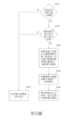
第四圖係依據本案第一實施例所提供之顯示控制方法之流程圖。此顯示控制方法適用於第一與二圖所示之電子裝置100,其包含以下步驟。FIG. 4 is a flow chart of a display control method provided according to the first embodiment of the present invention. The display control method is applicable to the
首先,如步驟S410所述,偵測是否有應用程式A1啟動。First, as described in step S410, it is detected whether the application A1 is started.
若是有應用程式A1啟動,此流程前進至步驟S420,確認應用程式A1是否落入程式清單L1。If application A1 is started, the process proceeds to step S420 to confirm whether application A1 falls into program list L1.
若是應用程式A1落入程式清單L1,此流程前進至步驟S440,將應用程式A1所產生之畫面F1緊靠於第二側164呈現,而在顯示範圍161對應於開孔166處產生一輔助顯示區域F2。接下來,如步驟S460所述,將系統資訊D1之全部或一部分呈現於輔助顯示區域F2。If the application A1 falls into the program list L1, the process proceeds to step S440, the screen F1 generated by the application A1 is displayed close to the
承接步驟S410,若是沒有應用程式A1啟動,此流程前進至步驟S480,維持顯示螢幕160原本的設定。承接步驟S420,若是應用程式A1未落入程式清單L1,此流程也是前進至步驟S480,維持顯示螢幕160原本的設定。一實施例中,顯示螢幕160原本的設定可以是在有應用程式A1執行時,將應用程式A1所產生的畫面F1以全螢幕方式呈現,而不會產生輔助顯示區域F2。Following step S410, if no application A1 is started, the process proceeds to step S480, and the original setting of the
第五圖係依據本案第二實施例所提供之顯示控制方法之流程圖。此顯示控制方法適用於第一與二圖所示之電子裝置100,其包含以下步驟。FIG5 is a flow chart of a display control method provided according to the second embodiment of the present invention. The display control method is applicable to the
首先,如步驟S510所述,偵測是否有應用程式A1啟動。First, as described in step S510, it is detected whether the application A1 is started.
若是有應用程式A1啟動,此流程前進至步驟S520,確認應用程式A1是否落入程式清單L1。If application A1 is started, the process proceeds to step S520 to confirm whether application A1 falls into program list L1.
若是應用程式A1落入程式清單L1,此流程前進至步驟S540,將應用程式A1所產生之畫面F1緊靠於第二側164呈現,而在顯示範圍161對應於開孔166處產生一輔助顯示區域F2。If the application A1 falls into the program list L1, the process proceeds to step S540, where the screen F1 generated by the application A1 is displayed close to the
接下來,如步驟S550所述,依據畫面F1定義輔助顯示區域F2之一背景顏色。舉例來說,若是畫面F1整體較暗,可將輔助顯示區域F2設定為黑色;若是畫面F1整體較亮,則可將輔助顯示區域F2設定為白色。Next, as described in step S550, a background color of the auxiliary display area F2 is defined according to the picture F1. For example, if the picture F1 is darker overall, the auxiliary display area F2 can be set to black; if the picture F1 is brighter overall, the auxiliary display area F2 can be set to white.
接下來,如步驟S560所述,將系統資訊D1之全部或一部分呈現於輔助顯示區域F2。Next, as described in step S560, all or part of the system information D1 is presented in the auxiliary display area F2.
承接步驟S510,若是沒有應用程式A1啟動,此流程前進至步驟S580,維持顯示螢幕160原本的設定。承接步驟S520,若是應用程式A1未落入程式清單L1,此流程也是前進至步驟S580,維持顯示螢幕160原本的設定。Following step S510, if no application A1 is started, the process proceeds to step S580 to maintain the original setting of the
第六圖係依據本案第三實施例所提供之顯示控制方法之流程圖。此顯示控制方法適用於第一與二圖所示之電子裝置100,其包含以下步驟。FIG6 is a flow chart of a display control method provided according to the third embodiment of the present invention. This display control method is applicable to the
首先,如步驟S610所述,偵測是否有應用程式A1啟動。First, as described in step S610, it is detected whether the application A1 is started.
若是有應用程式A1啟動,此流程前進至步驟S620,確認應用程式A1是否落入程式清單L1。If application A1 is started, the process proceeds to step S620 to confirm whether application A1 falls into program list L1.
若是應用程式A1落入程式清單L1,此流程前進至步驟S640,將應用程式A1所產生之畫面F1緊靠於第二側164呈現,而在顯示範圍161對應於開孔166處產生一輔助顯示區域F2。If the application A1 falls into the program list L1, the process proceeds to step S640, where the screen F1 generated by the application A1 is displayed close to the
接下來,如步驟S650所述,偵測畫面F1鄰近於輔助顯示區域F2之一範圍之平均顏色值,並利用平均顏色值所對應之顏色作為輔助顯示區域F2之背景顏色。舉例來說,可偵測畫面F1最靠近輔助顯示區域F2之一列或複數列畫素的平均顏色值,再以此平均顏色值所對應之顏色作為輔助顯示區域F2之背景顏色。Next, as described in step S650, the average color value of a range of the image F1 adjacent to the auxiliary display area F2 is detected, and the color corresponding to the average color value is used as the background color of the auxiliary display area F2. For example, the average color value of one or more rows of pixels closest to the auxiliary display area F2 of the image F1 can be detected, and the color corresponding to the average color value is used as the background color of the auxiliary display area F2.
接下來,如步驟S660所述,將系統資訊D1之全部或一部分呈現於輔助顯示區域F2。Next, as described in step S660, all or part of the system information D1 is presented in the auxiliary display area F2.
承接步驟S610,若是沒有應用程式A1啟動,此流程前進至步驟S680,維持顯示螢幕160原本的設定。承接步驟S620,若是應用程式A1未落入程式清單L1,此流程也是前進至步驟S680,維持顯示螢幕160原本的設定。Following step S610, if no application A1 is started, the process proceeds to step S680 to maintain the original setting of the
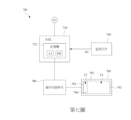
第七圖係依據本案另一實施例所提供之電子裝置700之方塊示意圖。FIG. 7 is a block diagram of an
相較於第一圖所示之電子裝置100,本實施例之系統720之記憶體722內除了儲存程式清單L1外,並儲存有對應於程式清單L1中之預設應用程式之顯示設定資料DS。類似於第一圖所示之電子裝置100,本實施例之電子裝置700亦具有監控元件740、顯示螢幕760以及顯示控制單元780。顯示螢幕760之顯示範圍761具有相對之第一側762以及第二側764,且在鄰近於第一側762的位置設有一開孔766。Compared to the
顯示控制單元780在確認應用程式A1落入程式清單L1後,會將應用程式A1所產生之畫面F1緊靠於第二側764呈現,而在顯示範圍761對應於開孔766處產生一輔助顯示區域F2;隨後,會依據顯示設定資料DS將系統資訊D1之全部或一部分呈現於輔助顯示區域F2。After confirming that application A1 falls into program list L1,
舉例來說,若是系統資訊D1包含系統溫度、電池電量、網路狀態、時間日期或上述之組合等;顯示設定資料DS只有系統溫度與電池電量,顯示控制單元780就只會將系統資訊D1中的系統溫度與電池電量顯示於輔助顯示區域F2。For example, if the system information D1 includes system temperature, battery power, network status, time and date, or a combination of the above; and the display setting data DS only includes system temperature and battery power, the
透過顯示設定資料DS之設定,可以確保呈現於輔助顯示區域F2內之系統資訊D1都是與正在執行的應用程式A1具有高度關聯性的系統資訊D1,同時也可以避免在輔助顯示區域F2中呈現太多不必要的系統資訊D1。舉例來說,若是所啟動的應用程式A1不需要連接網路即可執行,相對應之顯示設定資料DS中就可以設定為不需要呈現網路狀態。By setting the display setting data DS, it can be ensured that the system information D1 displayed in the auxiliary display area F2 is the system information D1 that is highly relevant to the application A1 being executed, and it can also be avoided that too much unnecessary system information D1 is displayed in the auxiliary display area F2. For example, if the activated application A1 does not need to be connected to the network to execute, the corresponding display setting data DS can be set to not need to display the network status.
另外,一實施例中,顯示控制單元780也可以偵測系統720當前的供電狀態,調整輔助顯示區域F2所顯示之系統資訊D1。具體來說,若是顯示控制單元780偵測到系統720已接上市電,而非由電池供電,顯示控制單元780就不會在輔助顯示區域F2呈現電池電量。In addition, in one embodiment, the
第八圖係依據本案第四實施例所提供之顯示控制方法之流程圖。此顯示控制方法適用於第七圖所示之電子裝置700,其包含以下步驟。FIG8 is a flow chart of a display control method provided according to the fourth embodiment of the present invention. The display control method is applicable to the
首先,如步驟S810所述,偵測是否有應用程式A1啟動。First, as described in step S810, it is detected whether the application A1 is started.
若是有應用程式A1啟動,此流程前進至步驟S820,確認應用程式A1是否落入程式清單L1。If application A1 is started, the process proceeds to step S820 to confirm whether application A1 falls into program list L1.
若是應用程式A1落入程式清單L1,此流程前進至步驟S840,將應用程式A1所產生之畫面F1緊靠於第二側764呈現,而在顯示畫面761對應於開孔766處產生一輔助顯示區域F2。If the application A1 falls into the program list L1, the process proceeds to step S840, the screen F1 generated by the application A1 is displayed close to the
接下來,如步驟S860所述,依據顯示設定資料DS將系統資訊D1之全部或一部分呈現於輔助顯示區域F2。Next, as described in step S860, all or part of the system information D1 is presented in the auxiliary display area F2 according to the display setting data DS.
承接步驟S810,若是沒有應用程式A1啟動,此流程前進至步驟S880,維持顯示螢幕760原本的設定。承接步驟S820,若是應用程式A1未落入程式清單L1,此流程也是前進至步驟S880,維持顯示螢幕760原本的設定。Following step S810, if no application A1 is started, the process proceeds to step S880, maintaining the original setting of the
本案之顯示控制方法與電子裝置100, 700,可以針對容易因為孔洞存在而影響操作的應用程式A1,設定其顯示範圍161, 761以避開開孔166, 766,以改善傳統上因為開孔166, 766存在而影響顯示畫面之完整性的問題。此外,本案並在對應於開孔166, 766的位置形成輔助顯示區域F2顯示相關的系統資訊D1,如此,除了可以避免產生黑屏而影響畫面整體性,同時也可以有效利用開孔166, 766處的顯示空間呈現系統資訊D1方便使用者進行檢視。The display control method and
上述僅為本案較佳之實施例而已,並不對本案進行任何限制。任何所屬技術領域的技術人員,在不脫離本案的技術手段的範圍內,對本案揭露的技術手段和技術內容做任何形式的等同替換或修改等變動,均屬未脫離本案的技術手段的內容,仍屬於本案的保護範圍之內。The above is only the preferred embodiment of this case and does not limit this case in any way. Any technical personnel in the relevant technical field, within the scope of the technical means of this case, make any form of equivalent replacement or modification to the technical means and technical content disclosed in this case, which is within the scope of the technical means of this case and still falls within the scope of protection of this case.
100, 700:電子裝置
120, 720:系統
122, 722:記憶體
140, 740:監控元件
160, 760:顯示螢幕
161, 761:顯示範圍
162, 762:第一側
164, 764:第二側
166, 766:開孔
180, 780:顯示控制單元
L1:程式清單
D1:系統資訊
A1:應用程式
F1:畫面
F2:輔助顯示區域
R:範圍
DS:顯示設定資料
S410, S420, S440, S460, S480, S510, S520, S540, S550, S560, S580, S610, S620, S640, S650, S660, S680, S810, S820, S840, S860, S880:步驟
100, 700:
第一與二圖係依據本案一實施例所提供之電子裝置之方塊示意圖以及立體示意圖; 第三圖顯示本案輔助顯示區域之一實施例; 第四圖係依據本案第一實施例所提供之顯示控制方法之流程圖; 第五圖係依據本案第二實施例所提供之顯示控制方法之流程圖; 第六圖係依據本案第三實施例所提供之顯示控制方法之流程圖; 第七圖係依據本案另一實施例所提供之電子裝置之方塊示意圖;以及 第八圖係依據本案第四實施例所提供之顯示控制方法之流程圖。 The first and second figures are a block diagram and a three-dimensional diagram of an electronic device provided according to an embodiment of the present invention; The third figure shows an embodiment of the auxiliary display area of the present invention; The fourth figure is a flow chart of a display control method provided according to the first embodiment of the present invention; The fifth figure is a flow chart of a display control method provided according to the second embodiment of the present invention; The sixth figure is a flow chart of a display control method provided according to the third embodiment of the present invention; The seventh figure is a block diagram of an electronic device provided according to another embodiment of the present invention; and The eighth figure is a flow chart of a display control method provided according to the fourth embodiment of the present invention.
100:電子裝置 100: Electronic devices
120:系統 120: System
122:記憶體 122: Memory
140:監控元件 140: Monitoring components
160:顯示螢幕 160: Display screen
161:顯示範圍 161: Display range
162:第一側 162: First side
164:第二側 164: Second side
166:開孔 166: Opening
180:顯示控制單元 180: Display control unit
L1:程式清單 L1: Program list
D1:系統資訊 D1: System information
A1:應用程式 A1: Application
F1:畫面 F1: Screen
F2:輔助顯示區域 F2: Auxiliary display area
Claims (11)
Priority Applications (2)
| Application Number | Priority Date | Filing Date | Title |
|---|---|---|---|
| TW112127247A TWI860789B (en) | 2023-07-21 | 2023-07-21 | Display control method and electronic device using the same |
| US18/487,450 US20250028427A1 (en) | 2023-07-21 | 2023-10-16 | Display control method and electronic device using the same |
Applications Claiming Priority (1)
| Application Number | Priority Date | Filing Date | Title |
|---|---|---|---|
| TW112127247A TWI860789B (en) | 2023-07-21 | 2023-07-21 | Display control method and electronic device using the same |
Publications (2)
| Publication Number | Publication Date |
|---|---|
| TWI860789B true TWI860789B (en) | 2024-11-01 |
| TW202505348A TW202505348A (en) | 2025-02-01 |
Family
ID=94259736
Family Applications (1)
| Application Number | Title | Priority Date | Filing Date |
|---|---|---|---|
| TW112127247A TWI860789B (en) | 2023-07-21 | 2023-07-21 | Display control method and electronic device using the same |
Country Status (2)
| Country | Link |
|---|---|
| US (1) | US20250028427A1 (en) |
| TW (1) | TWI860789B (en) |
Citations (5)
| Publication number | Priority date | Publication date | Assignee | Title |
|---|---|---|---|---|
| TWI691889B (en) * | 2017-12-05 | 2020-04-21 | 大陸商益富可視精密工業(深圳)有限公司 | Electronic device and method for displaying icons |
| CN111966237A (en) * | 2020-08-06 | 2020-11-20 | Tcl通讯(宁波)有限公司 | A touch compensation method, device and terminal for an aperture screen |
| TWI721243B (en) * | 2018-01-12 | 2021-03-11 | 富智捷股份有限公司 | Electronic device and assistant mehtod |
| US20210191552A1 (en) * | 2019-12-24 | 2021-06-24 | Samsung Display Co., Ltd. | Display panel and display apparatus including the same |
| CN113643438A (en) * | 2020-04-27 | 2021-11-12 | 北京七鑫易维信息技术有限公司 | A control method, device, control device, target device and storage medium |
Family Cites Families (10)
| Publication number | Priority date | Publication date | Assignee | Title |
|---|---|---|---|---|
| KR102135367B1 (en) * | 2014-01-23 | 2020-07-17 | 엘지전자 주식회사 | Mobile terminal and control method for the mobile terminal |
| KR102607564B1 (en) * | 2016-09-13 | 2023-11-30 | 삼성전자주식회사 | Method for displying soft key and electronic device thereof |
| JP2019070762A (en) * | 2017-10-10 | 2019-05-09 | シャープ株式会社 | Electronic apparatus, controller, method for controlling electronic apparatus, and control program |
| CN108089786B (en) * | 2017-12-14 | 2019-12-31 | Oppo广东移动通信有限公司 | User interface display method, device, device and storage medium |
| KR102266152B1 (en) * | 2018-02-22 | 2021-06-17 | 삼성전자주식회사 | Electronic device including flexible display and method for controlling thereof |
| EP3929715B1 (en) * | 2019-02-22 | 2024-02-07 | Sony Group Corporation | Information processing device and information processing method |
| CN110489043B (en) * | 2019-07-31 | 2023-03-24 | 华为技术有限公司 | Management method and related device for floating window |
| KR102930049B1 (en) * | 2020-03-19 | 2026-02-25 | 삼성전자주식회사 | Electronic device for providing execution screen of application and method for operating thereof |
| US12379822B2 (en) * | 2021-09-24 | 2025-08-05 | Apple Inc. | Devices, methods, and graphical user interfaces for displaying menus, windows, and cursors on a display with a notch |
| US11599599B1 (en) * | 2021-10-29 | 2023-03-07 | Microsoft Technology Licensing, Llc | Emulating a transparency effect for a display element |
-
2023
- 2023-07-21 TW TW112127247A patent/TWI860789B/en active
- 2023-10-16 US US18/487,450 patent/US20250028427A1/en active Pending
Patent Citations (5)
| Publication number | Priority date | Publication date | Assignee | Title |
|---|---|---|---|---|
| TWI691889B (en) * | 2017-12-05 | 2020-04-21 | 大陸商益富可視精密工業(深圳)有限公司 | Electronic device and method for displaying icons |
| TWI721243B (en) * | 2018-01-12 | 2021-03-11 | 富智捷股份有限公司 | Electronic device and assistant mehtod |
| US20210191552A1 (en) * | 2019-12-24 | 2021-06-24 | Samsung Display Co., Ltd. | Display panel and display apparatus including the same |
| CN113643438A (en) * | 2020-04-27 | 2021-11-12 | 北京七鑫易维信息技术有限公司 | A control method, device, control device, target device and storage medium |
| CN111966237A (en) * | 2020-08-06 | 2020-11-20 | Tcl通讯(宁波)有限公司 | A touch compensation method, device and terminal for an aperture screen |
Also Published As
| Publication number | Publication date |
|---|---|
| TW202505348A (en) | 2025-02-01 |
| US20250028427A1 (en) | 2025-01-23 |
Similar Documents
| Publication | Publication Date | Title |
|---|---|---|
| CN112367543B (en) | Display device, mobile terminal, screen projection method and screen projection system | |
| CN114296664B (en) | A method for adjusting brightness of a secondary screen and a display device | |
| JP7562887B2 (en) | Printing device | |
| US20120242500A1 (en) | Display device, energy display method and computer program | |
| CN112422365A (en) | Display device and method for automatically monitoring network status | |
| CN112087671B (en) | Display method and display equipment for control prompt information of input method control | |
| CN113781957B (en) | Method for preventing screen burn of display device and display device | |
| WO2022188680A1 (en) | Display device and display method | |
| US11343391B2 (en) | Image processing apparatus, control method for image processing apparatus, and storage medium | |
| CN114302131B (en) | Display device and black screen detection method | |
| TWI860789B (en) | Display control method and electronic device using the same | |
| CN101426106A (en) | Method for setting television startup picture and television capable of setting startup picture by user | |
| JP2000121224A (en) | Refrigerator with communication function | |
| WO2021008102A1 (en) | Display device, short circuit detection method and device for display panel | |
| CN111385631B (en) | Display device, communication method and storage medium | |
| JPH11167674A (en) | Image print generation device | |
| CN114915833B (en) | Display control method, display device and terminal device | |
| CN113766327B (en) | Display equipment state control method and display equipment | |
| CN112788387B (en) | Display device, method and storage medium | |
| JP2005165341A (en) | Display device and image display system | |
| CN114979735B (en) | A display device and an application startup method | |
| CN115086722B (en) | Display method and display device for secondary screen content | |
| CN117809592B (en) | Display device and layer refresh rate setting method | |
| CN114915820B (en) | Display devices and control methods | |
| CN118819699A (en) | Display device and control response method |