KR20240175381A - Display device - Google Patents
Display device Download PDFInfo
- Publication number
- KR20240175381A KR20240175381A KR1020230075257A KR20230075257A KR20240175381A KR 20240175381 A KR20240175381 A KR 20240175381A KR 1020230075257 A KR1020230075257 A KR 1020230075257A KR 20230075257 A KR20230075257 A KR 20230075257A KR 20240175381 A KR20240175381 A KR 20240175381A
- Authority
- KR
- South Korea
- Prior art keywords
- remote control
- control device
- display
- double
- display device
- Prior art date
- Legal status (The legal status is an assumption and is not a legal conclusion. Google has not performed a legal analysis and makes no representation as to the accuracy of the status listed.)
- Granted
Links
Images


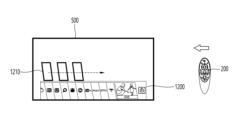


Classifications
-
- G—PHYSICS
- G09—EDUCATION; CRYPTOGRAPHY; DISPLAY; ADVERTISING; SEALS
- G09G—ARRANGEMENTS OR CIRCUITS FOR CONTROL OF INDICATING DEVICES USING STATIC MEANS TO PRESENT VARIABLE INFORMATION
- G09G5/00—Control arrangements or circuits for visual indicators common to cathode-ray tube indicators and other visual indicators
- G09G5/001—Arbitration of resources in a display system, e.g. control of access to frame buffer by video controller and/or main processor
-
- G—PHYSICS
- G06—COMPUTING OR CALCULATING; COUNTING
- G06F—ELECTRIC DIGITAL DATA PROCESSING
- G06F3/00—Input arrangements for transferring data to be processed into a form capable of being handled by the computer; Output arrangements for transferring data from processing unit to output unit, e.g. interface arrangements
- G06F3/002—Specific input/output arrangements not covered by G06F3/01 - G06F3/16
- G06F3/005—Input arrangements through a video camera
-
- G—PHYSICS
- G06—COMPUTING OR CALCULATING; COUNTING
- G06F—ELECTRIC DIGITAL DATA PROCESSING
- G06F3/00—Input arrangements for transferring data to be processed into a form capable of being handled by the computer; Output arrangements for transferring data from processing unit to output unit, e.g. interface arrangements
- G06F3/01—Input arrangements or combined input and output arrangements for interaction between user and computer
- G06F3/03—Arrangements for converting the position or the displacement of a member into a coded form
- G06F3/0304—Detection arrangements using opto-electronic means
-
- G—PHYSICS
- G06—COMPUTING OR CALCULATING; COUNTING
- G06F—ELECTRIC DIGITAL DATA PROCESSING
- G06F3/00—Input arrangements for transferring data to be processed into a form capable of being handled by the computer; Output arrangements for transferring data from processing unit to output unit, e.g. interface arrangements
- G06F3/01—Input arrangements or combined input and output arrangements for interaction between user and computer
- G06F3/03—Arrangements for converting the position or the displacement of a member into a coded form
- G06F3/033—Pointing devices displaced or positioned by the user, e.g. mice, trackballs, pens or joysticks; Accessories therefor
- G06F3/0346—Pointing devices displaced or positioned by the user, e.g. mice, trackballs, pens or joysticks; Accessories therefor with detection of the device orientation or free movement in a three-dimensional [3D] space, e.g. 3D mice, 6-DOF [six degrees of freedom] pointers using gyroscopes, accelerometers or tilt-sensors
-
- G—PHYSICS
- G06—COMPUTING OR CALCULATING; COUNTING
- G06F—ELECTRIC DIGITAL DATA PROCESSING
- G06F3/00—Input arrangements for transferring data to be processed into a form capable of being handled by the computer; Output arrangements for transferring data from processing unit to output unit, e.g. interface arrangements
- G06F3/01—Input arrangements or combined input and output arrangements for interaction between user and computer
- G06F3/03—Arrangements for converting the position or the displacement of a member into a coded form
- G06F3/033—Pointing devices displaced or positioned by the user, e.g. mice, trackballs, pens or joysticks; Accessories therefor
- G06F3/038—Control and interface arrangements therefor, e.g. drivers or device-embedded control circuitry
- G06F3/0383—Signal control means within the pointing device
-
- G—PHYSICS
- G06—COMPUTING OR CALCULATING; COUNTING
- G06F—ELECTRIC DIGITAL DATA PROCESSING
- G06F3/00—Input arrangements for transferring data to be processed into a form capable of being handled by the computer; Output arrangements for transferring data from processing unit to output unit, e.g. interface arrangements
- G06F3/01—Input arrangements or combined input and output arrangements for interaction between user and computer
- G06F3/048—Interaction techniques based on graphical user interfaces [GUI]
- G06F3/0481—Interaction techniques based on graphical user interfaces [GUI] based on specific properties of the displayed interaction object or a metaphor-based environment, e.g. interaction with desktop elements like windows or icons, or assisted by a cursor's changing behaviour or appearance
- G06F3/04812—Interaction techniques based on cursor appearance or behaviour, e.g. being affected by the presence of displayed objects
-
- G—PHYSICS
- G06—COMPUTING OR CALCULATING; COUNTING
- G06F—ELECTRIC DIGITAL DATA PROCESSING
- G06F3/00—Input arrangements for transferring data to be processed into a form capable of being handled by the computer; Output arrangements for transferring data from processing unit to output unit, e.g. interface arrangements
- G06F3/01—Input arrangements or combined input and output arrangements for interaction between user and computer
- G06F3/048—Interaction techniques based on graphical user interfaces [GUI]
- G06F3/0481—Interaction techniques based on graphical user interfaces [GUI] based on specific properties of the displayed interaction object or a metaphor-based environment, e.g. interaction with desktop elements like windows or icons, or assisted by a cursor's changing behaviour or appearance
- G06F3/0482—Interaction with lists of selectable items, e.g. menus
-
- G—PHYSICS
- G06—COMPUTING OR CALCULATING; COUNTING
- G06F—ELECTRIC DIGITAL DATA PROCESSING
- G06F3/00—Input arrangements for transferring data to be processed into a form capable of being handled by the computer; Output arrangements for transferring data from processing unit to output unit, e.g. interface arrangements
- G06F3/01—Input arrangements or combined input and output arrangements for interaction between user and computer
- G06F3/048—Interaction techniques based on graphical user interfaces [GUI]
- G06F3/0487—Interaction techniques based on graphical user interfaces [GUI] using specific features provided by the input device, e.g. functions controlled by the rotation of a mouse with dual sensing arrangements, or of the nature of the input device, e.g. tap gestures based on pressure sensed by a digitiser
-
- G—PHYSICS
- G06—COMPUTING OR CALCULATING; COUNTING
- G06F—ELECTRIC DIGITAL DATA PROCESSING
- G06F3/00—Input arrangements for transferring data to be processed into a form capable of being handled by the computer; Output arrangements for transferring data from processing unit to output unit, e.g. interface arrangements
- G06F3/14—Digital output to display device ; Cooperation and interconnection of the display device with other functional units
-
- G—PHYSICS
- G09—EDUCATION; CRYPTOGRAPHY; DISPLAY; ADVERTISING; SEALS
- G09G—ARRANGEMENTS OR CIRCUITS FOR CONTROL OF INDICATING DEVICES USING STATIC MEANS TO PRESENT VARIABLE INFORMATION
- G09G3/00—Control arrangements or circuits, of interest only in connection with visual indicators other than cathode-ray tubes
- G09G3/20—Control arrangements or circuits, of interest only in connection with visual indicators other than cathode-ray tubes for presentation of an assembly of a number of characters, e.g. a page, by composing the assembly by combination of individual elements arranged in a matrix no fixed position being assigned to or needed to be assigned to the individual characters or partial characters
- G09G3/22—Control arrangements or circuits, of interest only in connection with visual indicators other than cathode-ray tubes for presentation of an assembly of a number of characters, e.g. a page, by composing the assembly by combination of individual elements arranged in a matrix no fixed position being assigned to or needed to be assigned to the individual characters or partial characters using controlled light sources
- G09G3/30—Control arrangements or circuits, of interest only in connection with visual indicators other than cathode-ray tubes for presentation of an assembly of a number of characters, e.g. a page, by composing the assembly by combination of individual elements arranged in a matrix no fixed position being assigned to or needed to be assigned to the individual characters or partial characters using controlled light sources using electroluminescent panels
- G09G3/32—Control arrangements or circuits, of interest only in connection with visual indicators other than cathode-ray tubes for presentation of an assembly of a number of characters, e.g. a page, by composing the assembly by combination of individual elements arranged in a matrix no fixed position being assigned to or needed to be assigned to the individual characters or partial characters using controlled light sources using electroluminescent panels semiconductive, e.g. using light-emitting diodes [LED]
- G09G3/3208—Control arrangements or circuits, of interest only in connection with visual indicators other than cathode-ray tubes for presentation of an assembly of a number of characters, e.g. a page, by composing the assembly by combination of individual elements arranged in a matrix no fixed position being assigned to or needed to be assigned to the individual characters or partial characters using controlled light sources using electroluminescent panels semiconductive, e.g. using light-emitting diodes [LED] organic, e.g. using organic light-emitting diodes [OLED]
-
- G—PHYSICS
- G09—EDUCATION; CRYPTOGRAPHY; DISPLAY; ADVERTISING; SEALS
- G09G—ARRANGEMENTS OR CIRCUITS FOR CONTROL OF INDICATING DEVICES USING STATIC MEANS TO PRESENT VARIABLE INFORMATION
- G09G5/00—Control arrangements or circuits for visual indicators common to cathode-ray tube indicators and other visual indicators
- G09G5/003—Details of a display terminal, the details relating to the control arrangement of the display terminal and to the interfaces thereto
-
- G—PHYSICS
- G09—EDUCATION; CRYPTOGRAPHY; DISPLAY; ADVERTISING; SEALS
- G09G—ARRANGEMENTS OR CIRCUITS FOR CONTROL OF INDICATING DEVICES USING STATIC MEANS TO PRESENT VARIABLE INFORMATION
- G09G5/00—Control arrangements or circuits for visual indicators common to cathode-ray tube indicators and other visual indicators
- G09G5/003—Details of a display terminal, the details relating to the control arrangement of the display terminal and to the interfaces thereto
- G09G5/005—Adapting incoming signals to the display format of the display terminal
-
- G—PHYSICS
- G09—EDUCATION; CRYPTOGRAPHY; DISPLAY; ADVERTISING; SEALS
- G09G—ARRANGEMENTS OR CIRCUITS FOR CONTROL OF INDICATING DEVICES USING STATIC MEANS TO PRESENT VARIABLE INFORMATION
- G09G5/00—Control arrangements or circuits for visual indicators common to cathode-ray tube indicators and other visual indicators
- G09G5/003—Details of a display terminal, the details relating to the control arrangement of the display terminal and to the interfaces thereto
- G09G5/006—Details of the interface to the display terminal
-
- G—PHYSICS
- G09—EDUCATION; CRYPTOGRAPHY; DISPLAY; ADVERTISING; SEALS
- G09G—ARRANGEMENTS OR CIRCUITS FOR CONTROL OF INDICATING DEVICES USING STATIC MEANS TO PRESENT VARIABLE INFORMATION
- G09G5/00—Control arrangements or circuits for visual indicators common to cathode-ray tube indicators and other visual indicators
- G09G5/08—Cursor circuits
-
- H—ELECTRICITY
- H04—ELECTRIC COMMUNICATION TECHNIQUE
- H04B—TRANSMISSION
- H04B17/00—Monitoring; Testing
- H04B17/30—Monitoring; Testing of propagation channels
- H04B17/309—Measuring or estimating channel quality parameters
- H04B17/318—Received signal strength
-
- H—ELECTRICITY
- H04—ELECTRIC COMMUNICATION TECHNIQUE
- H04N—PICTORIAL COMMUNICATION, e.g. TELEVISION
- H04N21/00—Selective content distribution, e.g. interactive television or video on demand [VOD]
- H04N21/40—Client devices specifically adapted for the reception of or interaction with content, e.g. set-top-box [STB]; Operations thereof
- H04N21/41—Structure of client; Structure of client peripherals
- H04N21/4104—Peripherals receiving signals from specially adapted client devices
- H04N21/4126—The peripheral being portable, e.g. PDAs or mobile phones
- H04N21/41265—The peripheral being portable, e.g. PDAs or mobile phones having a remote control device for bidirectional communication between the remote control device and client device
-
- H—ELECTRICITY
- H04—ELECTRIC COMMUNICATION TECHNIQUE
- H04N—PICTORIAL COMMUNICATION, e.g. TELEVISION
- H04N21/00—Selective content distribution, e.g. interactive television or video on demand [VOD]
- H04N21/40—Client devices specifically adapted for the reception of or interaction with content, e.g. set-top-box [STB]; Operations thereof
- H04N21/41—Structure of client; Structure of client peripherals
- H04N21/422—Input-only peripherals, i.e. input devices connected to specially adapted client devices, e.g. global positioning system [GPS]
- H04N21/42201—Input-only peripherals, i.e. input devices connected to specially adapted client devices, e.g. global positioning system [GPS] biosensors, e.g. heat sensor for presence detection, EEG sensors or any limb activity sensors worn by the user
-
- H—ELECTRICITY
- H04—ELECTRIC COMMUNICATION TECHNIQUE
- H04N—PICTORIAL COMMUNICATION, e.g. TELEVISION
- H04N21/00—Selective content distribution, e.g. interactive television or video on demand [VOD]
- H04N21/40—Client devices specifically adapted for the reception of or interaction with content, e.g. set-top-box [STB]; Operations thereof
- H04N21/41—Structure of client; Structure of client peripherals
- H04N21/422—Input-only peripherals, i.e. input devices connected to specially adapted client devices, e.g. global positioning system [GPS]
- H04N21/42204—User interfaces specially adapted for controlling a client device through a remote control device; Remote control devices therefor
-
- H—ELECTRICITY
- H04—ELECTRIC COMMUNICATION TECHNIQUE
- H04N—PICTORIAL COMMUNICATION, e.g. TELEVISION
- H04N21/00—Selective content distribution, e.g. interactive television or video on demand [VOD]
- H04N21/40—Client devices specifically adapted for the reception of or interaction with content, e.g. set-top-box [STB]; Operations thereof
- H04N21/41—Structure of client; Structure of client peripherals
- H04N21/422—Input-only peripherals, i.e. input devices connected to specially adapted client devices, e.g. global positioning system [GPS]
- H04N21/42204—User interfaces specially adapted for controlling a client device through a remote control device; Remote control devices therefor
- H04N21/42206—User interfaces specially adapted for controlling a client device through a remote control device; Remote control devices therefor characterized by hardware details
- H04N21/42221—Transmission circuitry, e.g. infrared [IR] or radio frequency [RF]
-
- H—ELECTRICITY
- H04—ELECTRIC COMMUNICATION TECHNIQUE
- H04N—PICTORIAL COMMUNICATION, e.g. TELEVISION
- H04N21/00—Selective content distribution, e.g. interactive television or video on demand [VOD]
- H04N21/40—Client devices specifically adapted for the reception of or interaction with content, e.g. set-top-box [STB]; Operations thereof
- H04N21/41—Structure of client; Structure of client peripherals
- H04N21/422—Input-only peripherals, i.e. input devices connected to specially adapted client devices, e.g. global positioning system [GPS]
- H04N21/42204—User interfaces specially adapted for controlling a client device through a remote control device; Remote control devices therefor
- H04N21/42206—User interfaces specially adapted for controlling a client device through a remote control device; Remote control devices therefor characterized by hardware details
- H04N21/42222—Additional components integrated in the remote control device, e.g. timer, speaker, sensors for detecting position, direction or movement of the remote control, microphone or battery charging device
-
- H—ELECTRICITY
- H04—ELECTRIC COMMUNICATION TECHNIQUE
- H04N—PICTORIAL COMMUNICATION, e.g. TELEVISION
- H04N21/00—Selective content distribution, e.g. interactive television or video on demand [VOD]
- H04N21/40—Client devices specifically adapted for the reception of or interaction with content, e.g. set-top-box [STB]; Operations thereof
- H04N21/41—Structure of client; Structure of client peripherals
- H04N21/422—Input-only peripherals, i.e. input devices connected to specially adapted client devices, e.g. global positioning system [GPS]
- H04N21/42204—User interfaces specially adapted for controlling a client device through a remote control device; Remote control devices therefor
- H04N21/42206—User interfaces specially adapted for controlling a client device through a remote control device; Remote control devices therefor characterized by hardware details
- H04N21/42224—Touch pad or touch panel provided on the remote control
-
- H—ELECTRICITY
- H04—ELECTRIC COMMUNICATION TECHNIQUE
- H04N—PICTORIAL COMMUNICATION, e.g. TELEVISION
- H04N21/00—Selective content distribution, e.g. interactive television or video on demand [VOD]
- H04N21/40—Client devices specifically adapted for the reception of or interaction with content, e.g. set-top-box [STB]; Operations thereof
- H04N21/43—Processing of content or additional data, e.g. demultiplexing additional data from a digital video stream; Elementary client operations, e.g. monitoring of home network or synchronising decoder's clock; Client middleware
- H04N21/431—Generation of visual interfaces for content selection or interaction; Content or additional data rendering
- H04N21/4312—Generation of visual interfaces for content selection or interaction; Content or additional data rendering involving specific graphical features, e.g. screen layout, special fonts or colors, blinking icons, highlights or animations
- H04N21/4316—Generation of visual interfaces for content selection or interaction; Content or additional data rendering involving specific graphical features, e.g. screen layout, special fonts or colors, blinking icons, highlights or animations for displaying supplemental content in a region of the screen, e.g. an advertisement in a separate window
-
- H—ELECTRICITY
- H04—ELECTRIC COMMUNICATION TECHNIQUE
- H04N—PICTORIAL COMMUNICATION, e.g. TELEVISION
- H04N21/00—Selective content distribution, e.g. interactive television or video on demand [VOD]
- H04N21/40—Client devices specifically adapted for the reception of or interaction with content, e.g. set-top-box [STB]; Operations thereof
- H04N21/43—Processing of content or additional data, e.g. demultiplexing additional data from a digital video stream; Elementary client operations, e.g. monitoring of home network or synchronising decoder's clock; Client middleware
- H04N21/442—Monitoring of processes or resources, e.g. detecting the failure of a recording device, monitoring the downstream bandwidth, the number of times a movie has been viewed, the storage space available from the internal hard disk
- H04N21/44213—Monitoring of end-user related data
- H04N21/44218—Detecting physical presence or behaviour of the user, e.g. using sensors to detect if the user is leaving the room or changes his face expression during a TV programme
-
- H—ELECTRICITY
- H04—ELECTRIC COMMUNICATION TECHNIQUE
- H04N—PICTORIAL COMMUNICATION, e.g. TELEVISION
- H04N21/00—Selective content distribution, e.g. interactive television or video on demand [VOD]
- H04N21/40—Client devices specifically adapted for the reception of or interaction with content, e.g. set-top-box [STB]; Operations thereof
- H04N21/47—End-user applications
- H04N21/485—End-user interface for client configuration
-
- H—ELECTRICITY
- H04—ELECTRIC COMMUNICATION TECHNIQUE
- H04N—PICTORIAL COMMUNICATION, e.g. TELEVISION
- H04N21/00—Selective content distribution, e.g. interactive television or video on demand [VOD]
- H04N21/80—Generation or processing of content or additional data by content creator independently of the distribution process; Content per se
- H04N21/81—Monomedia components thereof
- H04N21/8146—Monomedia components thereof involving graphical data, e.g. 3D object, 2D graphics
-
- H—ELECTRICITY
- H04—ELECTRIC COMMUNICATION TECHNIQUE
- H04N—PICTORIAL COMMUNICATION, e.g. TELEVISION
- H04N5/00—Details of television systems
- H04N5/44—Receiver circuitry for the reception of television signals according to analogue transmission standards
- H04N5/445—Receiver circuitry for the reception of television signals according to analogue transmission standards for displaying additional information
- H04N5/45—Picture in picture, e.g. displaying simultaneously another television channel in a region of the screen
-
- G—PHYSICS
- G06—COMPUTING OR CALCULATING; COUNTING
- G06F—ELECTRIC DIGITAL DATA PROCESSING
- G06F2203/00—Indexing scheme relating to G06F3/00 - G06F3/048
- G06F2203/038—Indexing scheme relating to G06F3/038
- G06F2203/0384—Wireless input, i.e. hardware and software details of wireless interface arrangements for pointing devices
-
- G—PHYSICS
- G09—EDUCATION; CRYPTOGRAPHY; DISPLAY; ADVERTISING; SEALS
- G09G—ARRANGEMENTS OR CIRCUITS FOR CONTROL OF INDICATING DEVICES USING STATIC MEANS TO PRESENT VARIABLE INFORMATION
- G09G2300/00—Aspects of the constitution of display devices
- G09G2300/02—Composition of display devices
-
- G—PHYSICS
- G09—EDUCATION; CRYPTOGRAPHY; DISPLAY; ADVERTISING; SEALS
- G09G—ARRANGEMENTS OR CIRCUITS FOR CONTROL OF INDICATING DEVICES USING STATIC MEANS TO PRESENT VARIABLE INFORMATION
- G09G2340/00—Aspects of display data processing
- G09G2340/04—Changes in size, position or resolution of an image
- G09G2340/0492—Change of orientation of the displayed image, e.g. upside-down, mirrored
-
- G—PHYSICS
- G09—EDUCATION; CRYPTOGRAPHY; DISPLAY; ADVERTISING; SEALS
- G09G—ARRANGEMENTS OR CIRCUITS FOR CONTROL OF INDICATING DEVICES USING STATIC MEANS TO PRESENT VARIABLE INFORMATION
- G09G2340/00—Aspects of display data processing
- G09G2340/14—Solving problems related to the presentation of information to be displayed
-
- G—PHYSICS
- G09—EDUCATION; CRYPTOGRAPHY; DISPLAY; ADVERTISING; SEALS
- G09G—ARRANGEMENTS OR CIRCUITS FOR CONTROL OF INDICATING DEVICES USING STATIC MEANS TO PRESENT VARIABLE INFORMATION
- G09G2354/00—Aspects of interface with display user
-
- H—ELECTRICITY
- H04—ELECTRIC COMMUNICATION TECHNIQUE
- H04N—PICTORIAL COMMUNICATION, e.g. TELEVISION
- H04N21/00—Selective content distribution, e.g. interactive television or video on demand [VOD]
- H04N21/40—Client devices specifically adapted for the reception of or interaction with content, e.g. set-top-box [STB]; Operations thereof
- H04N21/41—Structure of client; Structure of client peripherals
- H04N21/422—Input-only peripherals, i.e. input devices connected to specially adapted client devices, e.g. global positioning system [GPS]
-
- H—ELECTRICITY
- H10—SEMICONDUCTOR DEVICES; ELECTRIC SOLID-STATE DEVICES NOT OTHERWISE PROVIDED FOR
- H10K—ORGANIC ELECTRIC SOLID-STATE DEVICES
- H10K2102/00—Constructional details relating to the organic devices covered by this subclass
- H10K2102/301—Details of OLEDs
- H10K2102/302—Details of OLEDs of OLED structures
- H10K2102/3023—Direction of light emission
- H10K2102/3031—Two-side emission, e.g. transparent OLEDs [TOLED]
Landscapes
- Engineering & Computer Science (AREA)
- Theoretical Computer Science (AREA)
- Multimedia (AREA)
- Signal Processing (AREA)
- Physics & Mathematics (AREA)
- General Engineering & Computer Science (AREA)
- Human Computer Interaction (AREA)
- General Physics & Mathematics (AREA)
- Computer Hardware Design (AREA)
- General Health & Medical Sciences (AREA)
- Health & Medical Sciences (AREA)
- Social Psychology (AREA)
- Computer Networks & Wireless Communication (AREA)
- Business, Economics & Management (AREA)
- Marketing (AREA)
- Computer Graphics (AREA)
- Electromagnetism (AREA)
- Quality & Reliability (AREA)
- Databases & Information Systems (AREA)
- Life Sciences & Earth Sciences (AREA)
- Chemical & Material Sciences (AREA)
- Analytical Chemistry (AREA)
- Biomedical Technology (AREA)
- Biophysics (AREA)
- Neurosurgery (AREA)
- Details Of Television Systems (AREA)
Abstract
Description
본 개시는 디스플레이 장치에 관한 것으로, 보다 상세하는 투명 디스플레이 패널을 구비한 디스플레이 장치에 관한 것이다.The present disclosure relates to a display device, and more particularly, to a display device having a transparent display panel.
정보 디스플레이는 기술의 발전에 따라 새로운 양상으로 발전하고 있다. 그 중에서 투명 디스플레이 장치는 정보를 배경과 같이 보여줄 수 있는 독특한 장점 이 있다.Information displays are evolving into new forms as technology advances. Among them, transparent display devices have the unique advantage of being able to display information as a background.
투명 디스플레이 장치는 빛을 투과하는 성질을 이용하여 투명한 양면 디스플레이를 통해 화면으로 정보를 표시하고, 양면을 통해 영상의 시청이 가능하다.A transparent display device uses the property of transmitting light to display information on a screen through a transparent double-sided display, allowing images to be viewed on both sides.
그러나, 종래에는 사용자가 양면 디스플레이의 전면에서 영상을 시청하다가, 후면으로 이동시, 사용자 입장에서 후면에서는 영상도 반대로 보이게 된다.However, conventionally, when a user watches a video on the front of a double-sided display and then moves to the back, the video on the back appears reversed from the user's perspective.
사용자가 후면으로 이동하는 상황에서 후면 방향에만 있는 상황에서는 계속해서 영상을 반대로 보게 되는 문제점이 있다.There is a problem that in situations where the user is moving backwards, the video will continue to be viewed in reverse if the user is only in the backward direction.
또한, 사용자가 후면에 있고, 리모컨과 같은 원격 제어 장치를 통해 양면 디스플레이를 조작할 시, 커서의 이동 방향, 컨텐트 영상 및 커서와 같은 그래픽 엘리먼트들의 표시 방향 또한 부자연스러워지는 문제가 있다.In addition, when the user is at the rear and operates the double-sided display via a remote control device such as a remote control, there is a problem that the movement direction of the cursor and the display direction of graphic elements such as content images and cursors become unnatural.
본 개시는 양면 디스플레이를 원격 제어 장치로 제어하는 경우, 원격 제어 장치의 위치에 따라 조작을 달리할 수 있는 디스플레이 장치의 제공을 목적으로 한다.The present disclosure aims to provide a display device capable of differentiating operations depending on the position of a remote control device when controlling a double-sided display with a remote control device.
본 개시는 원격 제어 장치가 양면 디스플레이의 후면에 위치한 경우라도, 자연스럽게 영상을 출력하고, 그래픽 엘리먼트들을 제어할 수 있는 디스플레이 장치의 제공을 목적으로 한다.The present disclosure aims to provide a display device capable of naturally outputting images and controlling graphic elements even when a remote control device is located at the rear of a double-sided display.
본 발명의 실시 예에 따른 디스플레이 장치는 투명 디스플레이 패널을 포함하는 양면 디스플레이, 원격 제어 장치로부터 제어 신호를 수신하는 사용자 인터페이스 및 상기 원격 제어 장치가 상기 양면 디스플레이의 전면 또는 후면에 중 어느 방향에 위치하는지를 판단하고, 판단 결과에 기초하여 상기 원격 제어 장치가 위치하는 방향에 맞게 상기 수신된 제어 신호에 따른 동작을 수행하는 컨트롤러를 포함할 수 있다.A display device according to an embodiment of the present invention may include a double-sided display including a transparent display panel, a user interface receiving a control signal from a remote control device, and a controller determining whether the remote control device is positioned in a front or rear direction of the double-sided display and performing an operation according to the received control signal according to the direction in which the remote control device is positioned based on the determination result.
본 발명의 실시 예에 따른 투명 디스플레이 패널을 포함하는 양면 디스플레이를 포함하는 디스플레이 장치의 동작 방법은 상기 원격 제어 장치가 상기 양면 디스플레이의 전면 또는 후면에 중 어느 방향에 위치하는지를 판단하는 단계, 상기 원격 제어 장치로부터 제어 신호를 수신하는 단계 및 판단 결과에 기초하여 상기 원격 제어 장치가 위치하는 방향에 맞게 상기 수신된 제어 신호에 따른 동작을 수행하는 단계를 포함할 수 있다.A method of operating a display device including a double-sided display including a transparent display panel according to an embodiment of the present invention may include a step of determining whether the remote control device is positioned in a front or rear direction of the double-sided display, a step of receiving a control signal from the remote control device, and a step of performing an operation according to the received control signal according to the direction in which the remote control device is positioned based on a result of the determination.
본 개시의 실시 예에 따르면, 양면 디스플레이를 원격 제어 장치로 제어하는 경우, 원격 제어 장치의 위치에 따라 제어를 달리할 수 있어 사용자의 향상된 경험을 가져올 수 있다.According to an embodiment of the present disclosure, when a double-sided display is controlled by a remote control device, control can be varied depending on the location of the remote control device, thereby bringing about an improved user experience.
또한, 원격 제어 장치가 양면 디스플레이의 후면에 위치한 경우라도, 자연스럽게 영상을 출력하고, 사용자는 그래픽 엘리먼트들을 용이하게 제어할 수 있는 Additionally, even if the remote control device is located at the rear of the double-sided display, the image is output naturally and the user can easily control the graphic elements.
도 1은 본 발명의 일 실시 예에 따른 디스플레이 장치의 구성을 블록도로 도시한 것이다.
도 2은 본 발명의 일 실시 예에 따른 원격제어장치의 블록도이다.
도 3은 본 발명의 일 실시 예에 따른 원격제어장치의 실제 구성 예를 보여준다.
도 4는 본 발명의 실시 예에 따라 원격 제어 장치를 활용하는 예를 보여준다.
도 5는 본 개시의 일 실시 예에 따른 투명 디스플레이 장치의 구성을 설명하기 위한 도면이다.
도 6은 본 개시의 일 실시 예에 따른 디스플레이 장치의 동작 방법을 설명하는 흐름도이다.
도 7 및 도 8은 본 개시의 실시 예에 따라 RSSI를 이용하여 원격 제어 장치가 위치한 방향을 검출하는 과정을 설명하는 도면이다.
도 9 및 도 10는 본 개시의 실시 예에 따라 모션 센서를 통해 원격 제어 장치가 위치한 방향을 검출하는 과정을 설명하는 도면들이다.
도 11a 내지 도 11d는 원격 제어 장치의 위치에 따라 원격 제어 장치의 이동에 의해 커서의 이동 방향이 달라지는 예들을 설명하는 도면이다.
도 12a 및 도 12b는 원격 제어 장치의 위치에 따라 원격 제어 장치의 이동에 의해 선택 창의 이동 방향이 달라지는 예를 설명하는 도면이다.
도 13a 및 도 13b는 양면 디스플레이의 후면에서 원격 제어 장치가 조작될 경우, 제공되는 시나리오를 설명하는 도면이다.
도 14는 본 개시의 일 실시 예에 따라 원격 제어 장치가 양면 디스플레이의 후면에 위치하는 경우, 메인 영상 및 그래픽 엘리먼트의 반전 여부를 설정하기 위한 메뉴 화면이다.
도 15는 모션 센서를 통해 미리 원격 제어 장치의 위치를 파악하고, 원격 제어 장치로부터 전원 온 신호를 수신한 경우의 시나리오를 설명하는 도면이다.
도 16은 본 개시의 일 실시 예에 따라 원격 제어 장치가 양면 디스플레이의 후면에 위치한 경우, IR 신호를 제어하는 구조를 설명하는 도면이다.FIG. 1 is a block diagram illustrating the configuration of a display device according to an embodiment of the present invention.
FIG. 2 is a block diagram of a remote control device according to an embodiment of the present invention.
Figure 3 shows an example of an actual configuration of a remote control device according to an embodiment of the present invention.
FIG. 4 shows an example of utilizing a remote control device according to an embodiment of the present invention.
FIG. 5 is a drawing for explaining the configuration of a transparent display device according to one embodiment of the present disclosure.
FIG. 6 is a flowchart illustrating a method of operating a display device according to an embodiment of the present disclosure.
FIG. 7 and FIG. 8 are diagrams illustrating a process of detecting the direction in which a remote control device is located using RSSI according to an embodiment of the present disclosure.
FIGS. 9 and 10 are drawings explaining a process of detecting the direction in which a remote control device is located through a motion sensor according to an embodiment of the present disclosure.
Figures 11a to 11d are drawings explaining examples in which the movement direction of the cursor changes by the movement of the remote control device depending on the position of the remote control device.
FIG. 12a and FIG. 12b are drawings explaining an example in which the movement direction of the selection window changes by the movement of the remote control device depending on the position of the remote control device.
FIGS. 13a and 13b are diagrams illustrating scenarios provided when a remote control device is operated from the rear of a double-sided display.
FIG. 14 is a menu screen for setting whether to invert the main image and graphic elements when the remote control device is located at the rear of a double-sided display according to one embodiment of the present disclosure.
Figure 15 is a drawing explaining a scenario in which the position of a remote control device is determined in advance through a motion sensor and a power-on signal is received from the remote control device.
FIG. 16 is a drawing illustrating a structure for controlling an IR signal when a remote control device is located at the rear of a double-sided display according to one embodiment of the present disclosure.
이하, 본 발명과 관련된 실시 예에 대하여 도면을 참조하여 보다 상세하게 설명한다. 이하의 설명에서 사용되는 구성요소에 대한 접미사 "모듈" 및 "부"는 명세서 작성의 용이함만이 고려되어 부여되거나 혼용되는 것으로서, 그 자체로 서로 구별되는 의미 또는 역할을 갖는 것은 아니다. Hereinafter, embodiments related to the present invention will be described in more detail with reference to the drawings. The suffixes "module" and "part" used for components in the following description are given or used interchangeably only for the convenience of writing the specification, and do not have distinct meanings or roles in themselves.
본 발명의 실시예에 따른 디스플레이 장치는, 예를 들어 방송 수신 기능에 컴퓨터 지원 기능을 추가한 지능형 디스플레이 장치로서, 방송 수신 기능에 충실하면서도 인터넷 기능 등이 추가되어, 수기 방식의 입력 장치, 터치 스크린 또는 공간 리모콘 등 보다 사용에 편리한 인터페이스를 갖출 수 있다. 그리고, 유선 또는 무선 인터넷 기능의 지원으로 인터넷 및 컴퓨터에 접속되어, 이메일, 웹브라우징, 뱅킹 또는 게임 등의 기능도 수행가능하다. 이러한 다양한 기능을 위해 표준화된 범용 OS가 사용될 수 있다.The display device according to an embodiment of the present invention is, for example, an intelligent display device that adds a computer support function to a broadcast reception function, and while remaining faithful to the broadcast reception function, it can have an Internet function, etc., and can have a more convenient interface such as a manual input device, a touch screen, or a space remote control. In addition, with the support of a wired or wireless Internet function, it can be connected to the Internet and a computer, and can also perform functions such as e-mail, web browsing, banking, or games. A standardized general-purpose OS can be used for these various functions.
따라서, 본 발명에서 기술되는 디스플레이 장치는, 예를 들어 범용의 OS 커널 상에, 다양한 애플리케이션이 자유롭게 추가되거나 삭제 가능하므로, 사용자 친화적인 다양한 기능이 수행될 수 있다. 상기 디스플레이 장치는, 보다 구체적으로 예를 들면, 네트워크 TV, HBBTV, 스마트 TV, LED TV, OLED TV 등이 될 수 있으며, 경우에 따라 스마트폰에도 적용 가능하다.Accordingly, the display device described in the present invention can perform various user-friendly functions since various applications can be freely added or deleted, for example, on a general-purpose OS kernel. More specifically, the display device can be, for example, a network TV, an HBBTV, a smart TV, an LED TV, an OLED TV, etc., and in some cases, can also be applied to a smartphone.
도 1은 본 발명의 일 실시예에 따른 디스플레이 장치의 구성을 블록도로 도시한 것이다.FIG. 1 is a block diagram illustrating the configuration of a display device according to one embodiment of the present invention.
도 1을 참조하면, 디스플레이 장치(100)는 방송 수신부(130), 외부장치 인터페이스(135), 메모리(140), 사용자입력 인터페이스(150), 컨트롤러(170), 무선 통신 인터페이스(173), 디스플레이(180), 스피커(185), 전원 공급 회로(190)를 포함할 수 있다. Referring to FIG. 1, the display device (100) may include a broadcast receiving unit (130), an external device interface (135), a memory (140), a user input interface (150), a controller (170), a wireless communication interface (173), a display (180), a speaker (185), and a power supply circuit (190).
방송 수신부(130)는 튜너(131), 복조기(132) 및 네트워크 인터페이스(133)를 포함할 수 있다. The broadcast receiving unit (130) may include a tuner (131), a demodulator (132), and a network interface (133).
튜너(131)는 채널 선국 명령에 따라 특정 방송 채널을 선국할 수 있다. 튜너(131)는 선국된 특정 방송 채널에 대한 방송 신호를 수신할 수 있다.The tuner (131) can select a specific broadcast channel according to a channel selection command. The tuner (131) can receive a broadcast signal for the selected specific broadcast channel.
복조기(132)는 수신한 방송 신호를 비디오 신호, 오디오 신호, 방송 프로그램과 관련된 데이터 신호로 분리할 수 있고, 분리된 비디오 신호, 오디오 신호 및 데이터 신호를 출력이 가능한 형태로 복원할 수 있다.A demodulator (132) can separate a received broadcast signal into a video signal, an audio signal, and a data signal related to a broadcast program, and can restore the separated video signal, audio signal, and data signal into a form that can be output.
외부장치 인터페이스(135)는 인접하는 외부 장치 내의 애플리케이션 또는 애플리케이션 목록을 수신하여, 컨트롤러(170) 또는 메모리(140)로 전달할 수 있다.The external device interface (135) can receive an application or a list of applications within an adjacent external device and transmit them to the controller (170) or memory (140).
외부장치 인터페이스(135)는 디스플레이 장치(100)와 외부 장치 간의 연결 경로를 제공할 수 있다. 외부장치 인터페이스(135)는 디스플레이 장치(100)에 무선 또는 유선으로 연결된 외부장치로부터 출력된 영상, 오디오 중 하나 이상을 수신하여, 컨트롤러(170)로 전달할 수 있다. 외부장치 인터페이스(135)는 복수의 외부 입력 단자들을 포함할 수 있다. 복수의 외부 입력 단자들은 RGB 단자, 하나 이상의 HDMI(High Definition Multimedia Interface) 단자, 컴포넌트(Component) 단자를 포함할 수 있다. The external device interface (135) can provide a connection path between the display device (100) and the external device. The external device interface (135) can receive one or more of images and audio output from an external device connected wirelessly or wiredly to the display device (100) and transmit them to the controller (170). The external device interface (135) can include a plurality of external input terminals. The plurality of external input terminals can include an RGB terminal, one or more HDMI (High Definition Multimedia Interface) terminals, and a component terminal.
외부장치 인터페이스(135)를 통해 입력된 외부장치의 영상 신호는 디스플레이(180)를 통해 출력될 수 있다. 외부장치 인터페이스(135)를 통해 입력된 외부장치의 음성 신호는 스피커(185)를 통해 출력될 수 있다. A video signal of an external device input through an external device interface (135) can be output through a display (180). A voice signal of an external device input through an external device interface (135) can be output through a speaker (185).
외부장치 인터페이스(135)에 연결 가능한 외부 장치는 셋톱박스, 블루레이 플레이어, DVD 플레이어, 게임기, 사운드 바, 스마트폰, PC, USB 메모리, 홈 씨어터 중 어느 하나일 수 있으나, 이는 예시에 불과하다.An external device that can be connected to the external device interface (135) may be any one of a set-top box, a Blu-ray player, a DVD player, a game console, a sound bar, a smartphone, a PC, a USB memory, and a home theater, but these are only examples.
네트워크 인터페이스(133)는 디스플레이 장치(100)를 인터넷망을 포함하는 유/무선 네트워크와 연결하기 위한 인터페이스를 제공할 수 있다. 네트워크 인터페이스(133)는 접속된 네트워크 또는 접속된 네트워크에 링크된 다른 네트워크를 통해, 다른 사용자 또는 다른 전자 기기와 데이터를 송신 또는 수신할 수 있다. The network interface (133) can provide an interface for connecting the display device (100) to a wired/wireless network including the Internet. The network interface (133) can transmit or receive data to or from another user or another electronic device through the connected network or another network linked to the connected network.
또한, 디스플레이 장치(100)에 미리 등록된 다른 사용자 또는 다른 전자 기기 중 선택된 사용자 또는 선택된 전자기기에, 디스플레이 장치(100)에 저장된 일부의 컨텐츠 데이터를 송신할 수 있다.In addition, some of the content data stored in the display device (100) can be transmitted to a selected user or electronic device among other users or other electronic devices pre-registered in the display device (100).
네트워크 인터페이스(133)는 접속된 네트워크 또는 접속된 네트워크에 링크된 다른 네트워크를 통해, 소정 웹 페이지에 접속할 수 있다. 즉, 네트워크를 통해 소정 웹 페이지에 접속하여, 해당 서버와 데이터를 송신 또는 수신할 수 있다.The network interface (133) can access a predetermined web page through a connected network or another network linked to the connected network. That is, it can access a predetermined web page through a network and transmit or receive data with the corresponding server.
그리고, 네트워크 인터페이스(133)는 컨텐츠 제공자 또는 네트워크 운영자가 제공하는 컨텐츠 또는 데이터들을 수신할 수 있다. 즉, 네트워크 인터페이스(133)는 네트워크를 통하여 컨텐츠 제공자 또는 네트워크 제공자로부터 제공되는 영화, 광고, 게임, VOD, 방송 신호 등의 컨텐츠 및 그와 관련된 정보를 수신할 수 있다.In addition, the network interface (133) can receive content or data provided by a content provider or a network operator. That is, the network interface (133) can receive content such as movies, advertisements, games, VOD, broadcast signals, etc., and information related thereto provided from a content provider or a network provider through a network.
또한, 네트워크 인터페이스(133)는 네트워크 운영자가 제공하는 펌웨어의 업데이트 정보 및 업데이트 파일을 수신할 수 있으며, 인터넷 또는 컨텐츠 제공자 또는 네트워크 운영자에게 데이터들을 송신할 수 있다.Additionally, the network interface (133) can receive firmware update information and update files provided by the network operator, and transmit data to the Internet or content provider or network operator.
네트워크 인터페이스(133)는 네트워크를 통해, 공중에 공개(open)된 애플리케이션들 중 원하는 애플리케이션을 선택하여 수신할 수 있다. The network interface (133) can select and receive a desired application from among applications open to the public via a network.
메모리(140)는 컨트롤러(170) 내의 각 신호 처리 및 제어를 위한 프로그램이 저장하고, 신호 처리된 영상, 음성 또는 데이터신호를 저장할 수 있다.The memory (140) stores programs for each signal processing and control within the controller (170) and can store processed images, voices, or data signals.
또한, 메모리(140)는 외부장치 인터페이스(135) 또는 네트워크 인터페이스(133)로부터 입력되는 영상, 음성, 또는 데이터 신호의 임시 저장을 위한 기능을 수행할 수도 있으며, 채널 기억 기능을 통하여 소정 이미지에 관한 정보를 저장할 수도 있다.In addition, the memory (140) may perform a function for temporary storage of image, voice, or data signals input from an external device interface (135) or a network interface (133), and may also store information about a specific image through a channel memory function.
메모리(140)는 외부장치 인터페이스(135) 또는 네트워크 인터페이스(133)로부터 입력되는 애플리케이션 또는 애플리케이션 목록을 저장할 수 있다.The memory (140) can store an application or a list of applications input from an external device interface (135) or a network interface (133).
디스플레이 장치(100)는 메모리(140) 내에 저장되어 있는 컨텐츠 파일(동영상 파일, 정지영상 파일, 음악 파일, 문서 파일, 애플리케이션 파일 등)을 재생하여 사용자에게 제공할 수 있다.The display device (100) can play content files (video files, still image files, music files, document files, application files, etc.) stored in the memory (140) and provide them to the user.
사용자입력 인터페이스(150)는 사용자가 입력한 신호를 컨트롤러(170)로 전달하거나, 컨트롤러(170)로부터의 신호를 사용자에게 전달할 수 있다. 예를 들어, 사용자입력 인터페이스(150)는 블루투스(Bluetooth), WB(Ultra Wideband), 지그비(ZigBee) 방식, RF(Radio Frequency) 통신 방식 또는 적외선(IR) 통신 방식 등 다양한 통신 방식에 따라, 원격제어장치(200)로부터 전원 온/오프, 채널 선택, 화면 설정 등의 제어 신호를 수신하여 처리하거나, 컨트롤러(170)로부터의 제어 신호를 원격제어장치(200)로 송신하도록 처리할 수 있다.The user input interface (150) can transmit a signal input by the user to the controller (170), or transmit a signal from the controller (170) to the user. For example, the user input interface (150) can receive and process control signals such as power on/off, channel selection, and screen setting from the remote control device (200) according to various communication methods such as Bluetooth, Ultra Wideband (WB), ZigBee, RF (Radio Frequency) communication, or infrared (IR) communication, or process control signals from the controller (170) to be transmitted to the remote control device (200).
또한, 사용자입력 인터페이스(150)는, 전원키, 채널키, 볼륨키, 설정치 등의 로컬키(미도시)에서 입력되는 제어 신호를 컨트롤러(170)에 전달할 수 있다.In addition, the user input interface (150) can transmit control signals input from local keys (not shown) such as a power key, channel key, volume key, and setting value to the controller (170).
컨트롤러(170)에서 영상 처리된 영상 신호는 디스플레이(180)로 입력되어 해당 영상 신호에 대응하는 영상으로 표시될 수 있다. 또한, 컨트롤러(170)에서 영상 처리된 영상 신호는 외부장치 인터페이스(135)를 통하여 외부 출력장치로 입력될 수 있다.An image signal processed by the controller (170) may be input to the display (180) and displayed as an image corresponding to the image signal. In addition, an image signal processed by the controller (170) may be input to an external output device through an external device interface (135).
컨트롤러(170)에서 처리된 음성 신호는 스피커(185)로 오디오 출력될 수 있다. 또한, 컨트롤러(170)에서 처리된 음성 신호는 외부장치 인터페이스(135)를 통하여 외부 출력장치로 입력될 수 있다. The voice signal processed in the controller (170) can be output as audio to the speaker (185). Additionally, the voice signal processed in the controller (170) can be input to an external output device through the external device interface (135).
그 외, 컨트롤러(170)는, 디스플레이 장치(100) 내의 전반적인 동작을 제어할 수 있다. In addition, the controller (170) can control the overall operation within the display device (100).
또한, 컨트롤러(170)는 사용자입력 인터페이스(150)를 통하여 입력된 사용자 명령 또는 내부 프로그램에 의하여 디스플레이 장치(100)를 제어할 수 있으며, 네트워크에 접속하여 사용자가 원하는 애플리케이션 또는 애플리케이션 목록을 디스플레이 장치(100) 내로 다운받을 수 있도록 할 수 있다.In addition, the controller (170) can control the display device (100) by a user command or an internal program input through the user input interface (150), and can connect to a network to allow the user to download a desired application or application list into the display device (100).
컨트롤러(170)는 사용자가 선택한 채널 정보 등이 처리한 영상 또는 음성신호와 함께 디스플레이(180) 또는 스피커(185)를 통하여 출력될 수 있도록 한다.The controller (170) enables the user-selected channel information, etc. to be output through the display (180) or speaker (185) together with the processed video or audio signal.
또한, 컨트롤러(170)는 사용자입력 인터페이스(150)를 통하여 수신한 외부장치 영상 재생 명령에 따라, 외부장치 인터페이스(135)를 통하여 입력되는 외부 장치, 예를 들어, 카메라 또는 캠코더로부터의, 영상 신호 또는 음성 신호가 디스플레이(180) 또는 스피커(185)를 통해 출력될 수 있도록 한다.In addition, the controller (170) allows a video signal or audio signal from an external device, for example, a camera or camcorder, input through the external device interface (135) to be output through the display (180) or speaker (185) in accordance with an external device video playback command received through the user input interface (150).
한편, 컨트롤러(170)는 영상을 표시하도록 디스플레이(180)를 제어할 수 있으며, 예를 들어 튜너(131)를 통해 입력되는 방송 영상, 또는 외부장치 인터페이스(135)를 통해 입력되는 외부 입력 영상, 또는 네트워크 인터페이스부를 통해 입력되는 영상, 또는 메모리(140)에 저장된 영상이 디스플레이(180)에서 표시되도록 제어할 수 있다. 이 경우, 디스플레이(180)에 표시되는 영상은 정지 영상 또는 동영상일 수 있으며, 2D 영상 또는 3D 영상일 수 있다.Meanwhile, the controller (170) can control the display (180) to display an image, for example, a broadcast image input through a tuner (131), an external input image input through an external device interface (135), an image input through a network interface unit, or an image stored in a memory (140) can be controlled to be displayed on the display (180). In this case, the image displayed on the display (180) can be a still image or a moving image, and can be a 2D image or a 3D image.
또한, 컨트롤러(170)는 디스플레이 장치(100) 내에 저장된 컨텐츠, 또는 수신된 방송 컨텐츠, 외부로 부터 입력되는 외부 입력 컨텐츠가 재생되도록 제어할 수 있으며, 상기 컨텐츠는 방송 영상, 외부 입력 영상, 오디오 파일, 정지 영상, 접속된 웹 화면, 및 문서 파일 등 다양한 형태일 수 있다.In addition, the controller (170) can control the playback of content stored in the display device (100), received broadcast content, or external input content input from the outside, and the content can be in various forms such as broadcast images, external input images, audio files, still images, connected web screens, and document files.
무선 통신 인터페이스(173)는 유선 또는 무선 통신을 통해 외부 기기와 통신을 수행할 수 있다. 무선 통신 인터페이스(173)는 외부 기기와 근거리 통신(Short range communication)을 수행할 수 있다. 이를 위해, 무선 통신 인터페이스(173)는 블루투스(Bluetooth™), RFID(Radio Frequency Identification), 적외선 통신(Infrared Data Association; IrDA), UWB(Ultra Wideband), ZigBee, NFC(Near Field Communication), Wi-Fi(Wireless-Fidelity), Wi-Fi Direct, Wireless USB(Wireless Universal Serial Bus) 기술 중 적어도 하나를 이용하여, 근거리 통신을 지원할 수 있다. 이러한, 무선 통신 인터페이스(173)는 근거리 무선 통신망(Wireless Area Networks)을 통해 디스플레이 장치(100)와 무선 통신 시스템 사이, 디스플레이 장치(100)와 다른 디스플레이 장치(100) 사이, 또는 디스플레이 장치(100)와 디스플레이 장치(100, 또는 외부서버)가 위치한 네트워크 사이의 무선 통신을 지원할 수 있다. 근거리 무선 통신망은 근거리 무선 개인 통신망(Wireless Personal Area Networks)일 수 있다.The wireless communication interface (173) can perform communication with an external device through wired or wireless communication. The wireless communication interface (173) can perform short range communication with an external device. To this end, the wireless communication interface (173) can support short range communication by using at least one of Bluetooth™, RFID (Radio Frequency Identification), Infrared Data Association (IrDA), UWB (Ultra Wideband), ZigBee, NFC (Near Field Communication), Wi-Fi (Wireless-Fidelity), Wi-Fi Direct, and Wireless USB (Wireless Universal Serial Bus) technologies. Such a wireless communication interface (173) can support wireless communication between the display device (100) and a wireless communication system, between the display device (100) and another display device (100), or between the display device (100) and a network where the display device (100, or an external server) is located via a wireless area network. The wireless area network can be a wireless personal area network.
여기에서, 다른 디스플레이 장치(100)는 본 발명에 따른 디스플레이 장치(100)와 데이터를 상호 교환하는 것이 가능한(또는 연동 가능한) 웨어러블 디바이스(wearable device, 예를 들어, 스마트워치(smartwatch), 스마트 글래스(smart glass), HMD(head mounted display)), 스마트 폰과 같은 이동 단말기가 될 수 있다. 무선 통신 인터페이스(173)는 디스플레이 장치(100) 주변에, 통신 가능한 웨어러블 디바이스를 감지(또는 인식)할 수 있다. Here, the other display device (100) may be a wearable device (e.g., a smartwatch, smart glass, HMD (head mounted display)), a mobile terminal such as a smart phone, etc., which can exchange data with (or be linked to) the display device (100) according to the present invention. The wireless communication interface (173) may detect (or recognize) a wearable device capable of communication around the display device (100).
나아가, 컨트롤러(170)는 감지된 웨어러블 디바이스가 본 발명에 따른 디스플레이 장치(100)와 통신하도록 인증된 디바이스인 경우, 디스플레이 장치(100)에서 처리되는 데이터의 적어도 일부를, 무선 통신 인터페이스(173)를 통해 웨어러블 디바이스로 송신할 수 있다. 따라서, 웨어러블 디바이스의 사용자는, 디스플레이 장치(100)에서 처리되는 데이터를, 웨어러블 디바이스를 통해 이용할 수 있다. Furthermore, if the detected wearable device is a device authenticated to communicate with the display device (100) according to the present invention, the controller (170) can transmit at least a portion of the data processed in the display device (100) to the wearable device via the wireless communication interface (173). Accordingly, a user of the wearable device can use the data processed in the display device (100) via the wearable device.
디스플레이(180)는 컨트롤러(170)에서 처리된 영상 신호, 데이터 신호, OSD 신호 또는 외부장치 인터페이스(135)에서 수신되는 영상 신호, 데이터 신호 등을 각각 R,G,B 신호로 변환하여 구동 신호를 생성할 수 있다.The display (180) can generate a driving signal by converting an image signal, data signal, OSD signal processed by the controller (170) or an image signal, data signal, etc. received from an external device interface (135) into R, G, and B signals, respectively.
한편, 도 1에 도시된 디스플레이 장치(100)는 본 발명의 일실시예에 불과하므로. 도시된 구성요소들 중 일부는 실제 구현되는 디스플레이 장치(100)의 사양에 따라 통합, 추가, 또는 생략될 수 있다.Meanwhile, since the display device (100) illustrated in FIG. 1 is only an embodiment of the present invention, some of the illustrated components may be integrated, added, or omitted depending on the specifications of the display device (100) actually implemented.
즉, 필요에 따라 2 이상의 구성요소가 하나의 구성요소로 합쳐지거나, 혹은 하나의 구성요소가 2 이상의 구성요소로 세분되어 구성될 수 있다. 또한, 각 블록에서 수행하는 기능은 본 발명의 실시예를 설명하기 위한 것이며, 그 구체적인 동작이나 장치는 본 발명의 권리범위를 제한하지 아니한다.That is, two or more components may be combined into one component, or one component may be divided into two or more components, as needed. In addition, the functions performed by each block are intended to explain an embodiment of the present invention, and the specific operations or devices thereof do not limit the scope of the present invention.
본 발명의 또 다른 실시예에 따르면, 디스플레이 장치(100)는 도 1에 도시된 바와 달리, 튜너(131)와 복조기(132)를 구비하지 않고 네트워크 인터페이스(133) 또는 외부장치 인터페이스(135)를 통해서 영상을 수신하여 재생할 수도 있다.According to another embodiment of the present invention, unlike as shown in FIG. 1, the display device (100) may receive and play back an image through a network interface (133) or an external device interface (135) without having a tuner (131) and a demodulator (132).
예를 들어, 디스플레이 장치(100)는 방송 신호 또는 다양한 네트워크 서비스에 따른 컨텐츠들을 수신하기 위한 등과 같은 셋탑 박스 등과 같은 영상 처리 장치와 상기 영상 처리 장치로부터 입력되는 컨텐츠를 재생하는 컨텐츠 재생 장치로 분리되어 구현될 수 있다.For example, the display device (100) may be implemented separately as an image processing device, such as a set-top box for receiving contents according to broadcast signals or various network services, and a content playback device for playing contents input from the image processing device.
이 경우, 이하에서 설명할 본 발명의 실시예에 따른 디스플레이 장치의 동작 방법은 도 1을 참조하여 설명한 바와 같은 디스플레이 장치(100)뿐 아니라, 상기 분리된 셋탑 박스 등과 같은 영상 처리 장치 또는 디스플레이(180) 및 오디오출력부(185)를 구비하는 컨텐츠 재생 장치 중 어느 하나에 의해 수행될 수도 있다.In this case, the operating method of the display device according to the embodiment of the present invention to be described below may be performed by any one of the display device (100) described with reference to FIG. 1, as well as an image processing device such as the separated set-top box, or a content playback device having a display (180) and an audio output unit (185).
다음으로, 도 2 내지 도 3을 참조하여, 본 발명의 일 실시 예에 따른 원격제어장치에 대해 설명한다.Next, a remote control device according to an embodiment of the present invention will be described with reference to FIGS. 2 and 3.
도 2은 본 발명의 일 실시 예에 따른 원격제어장치의 블록도이고, 도 3은 본발명의 일 실시 예에 따른 원격제어장치(200)의 실제 구성 예를 보여준다.FIG. 2 is a block diagram of a remote control device according to an embodiment of the present invention, and FIG. 3 shows an example of an actual configuration of a remote control device (200) according to an embodiment of the present invention.
먼저, 도 2를 참조하면, 원격제어장치(200)는 지문인식기(210), 무선통신회로(220), 사용자 입력 인터페이스(230), 센서(240), 출력 인터페이스(250), 전원공급회로(260), 메모리(270), 컨트롤러(280), 마이크로폰(290)를 포함할 수 있다. First, referring to FIG. 2, the remote control device (200) may include a fingerprint recognition device (210), a wireless communication circuit (220), a user input interface (230), a sensor (240), an output interface (250), a power supply circuit (260), a memory (270), a controller (280), and a microphone (290).
도 2을 참조하면, 무선통신회로(220)는 전술하여 설명한 본 발명의 실시 예들에 따른 디스플레이 장치 중 임의의 어느 하나와 신호를 송수신한다.Referring to FIG. 2, the wireless communication circuit (220) transmits and receives signals with any one of the display devices according to the embodiments of the present invention described above.
원격제어장치(200)는 RF 통신규격에 따라 디스플레이 장치(100)와 신호를 송수신할 수 있는 RF 회로(221)을 구비하며, IR 통신규격에 따라 디스플레이 장치(100)와 신호를 송수신할 수 있는 IR 회로(223)을 구비할 수 있다. 또한, 원격제어장치(200)는 블루투스 통신규격에 따라 디스플레이 장치(100)와 신호를 송수신할 수 있는 블루투스 회로(225)를 구비할 수 있다. 또한, 원격제어장치(200)는 NFC(Near Field Communication) 통신 규격에 따라 디스플레이 장치(100)와 신호를 송수할 수 있는 NFC 회로(227)을 구비하며, WLAN(Wireless LAN) 통신 규격에 따라 디스플레이 장치(100)와 신호를 송수신할 수 있는 WLAN 회로(229)을 구비할 수 있다.The remote control device (200) may be equipped with an RF circuit (221) capable of transmitting and receiving signals with the display device (100) in accordance with RF communication standards, and an IR circuit (223) capable of transmitting and receiving signals with the display device (100) in accordance with IR communication standards. In addition, the remote control device (200) may be equipped with a Bluetooth circuit (225) capable of transmitting and receiving signals with the display device (100) in accordance with Bluetooth communication standards. In addition, the remote control device (200) may be equipped with an NFC circuit (227) capable of transmitting and receiving signals with the display device (100) in accordance with NFC (Near Field Communication) communication standards, and a WLAN circuit (229) capable of transmitting and receiving signals with the display device (100) in accordance with WLAN (Wireless LAN) communication standards.
또한, 원격제어장치(200)는 디스플레이 장치(100)로 원격제어장치(200)의 움직임 등에 관한 정보가 담긴 신호를 무선통신회로(220)를 통해 전송한다. In addition, the remote control device (200) transmits a signal containing information about the movement of the remote control device (200) to the display device (100) through a wireless communication circuit (220).
한편, 원격제어장치(200)는 디스플레이 장치(100)가 전송한 신호를 RF 회로(221)을 통하여 수신할 수 있으며, 필요에 따라 IR 회로(223)을 통하여 디스플레이 장치(100)로 전원 온/오프, 채널 변경, 볼륨 변경 등에 관한 명령을 전송할 수 있다. Meanwhile, the remote control device (200) can receive a signal transmitted by the display device (100) through the RF circuit (221), and, if necessary, can transmit commands for turning the power on/off, changing the channel, changing the volume, etc. to the display device (100) through the IR circuit (223).
사용자 입력 인터페이스(230)는 키패드, 버튼, 터치 패드, 또는 터치 스크린 등으로 구성될 수 있다. 사용자는 사용자 입력 인터페이스(230)를 조작하여 원격제어장치(200)으로 디스플레이 장치(100)와 관련된 명령을 입력할 수 있다. 사용자 입력 인터페이스(230)가 하드키 버튼을 구비할 경우 사용자는 하드키 버튼의 푸쉬 동작을 통하여 원격제어장치(200)으로 디스플레이 장치(100)와 관련된 명령을 입력할 수 있다. 이에 대해서는 도 3을 참조하여 설명한다.The user input interface (230) may be composed of a keypad, a button, a touch pad, or a touch screen. The user may input a command related to the display device (100) to the remote control device (200) by operating the user input interface (230). If the user input interface (230) has a hard key button, the user may input a command related to the display device (100) to the remote control device (200) by pushing the hard key button. This will be described with reference to FIG. 3.
도 3을 참조하면, 원격제어장치(200)는 복수의 버튼을 포함할 수 있다. 복수의 버튼은 지문 인식 버튼(212), 전원 버튼(231), 홈 버튼(232), 라이브 버튼(233), 외부 입력 버튼(234), 음량 조절 버튼(235), 음성 인식 버튼(236), 채널 변경 버튼(237), 확인 버튼(238) 및 뒤로 가기 버튼(239)을 포함할 수 있다.Referring to FIG. 3, the remote control device (200) may include a plurality of buttons. The plurality of buttons may include a fingerprint recognition button (212), a power button (231), a home button (232), a live button (233), an external input button (234), a volume control button (235), a voice recognition button (236), a channel change button (237), a confirmation button (238), and a back button (239).
지문 인식 버튼(212)은 사용자의 지문을 인식하기 위한 버튼일 수 있다. 일 실시예로, 지문 인식 버튼(212)은 푸쉬 동작이 가능하여, 푸쉬 동작 및 지문 인식 동작을 수신할 수도 있다. The fingerprint recognition button (212) may be a button for recognizing a user's fingerprint. In one embodiment, the fingerprint recognition button (212) may be capable of a push operation, and may receive a push operation and a fingerprint recognition operation.
전원 버튼(231)은 디스플레이 장치(100)의 전원을 온/오프 하기 위한 버튼일 수 있다. The power button (231) may be a button for turning the power of the display device (100) on/off.
홈 버튼(232)은 디스플레이 장치(100)의 홈 화면으로 이동하기 위한 버튼일 수 있다. The home button (232) may be a button for moving to the home screen of the display device (100).
라이브 버튼(233)은 실시간 방송 프로그램을 디스플레이 하기 위한 버튼일 수 있다. The live button (233) may be a button for displaying a real-time broadcast program.
외부 입력 버튼(234)은 디스플레이 장치(100)에 연결된 외부 입력을 수신하기 위한 버튼일 수 있다. The external input button (234) may be a button for receiving an external input connected to the display device (100).
음량 조절 버튼(235)은 디스플레이 장치(100)가 출력하는 음량의 크기를 조절하기 위한 버튼일 수 있다. The volume control button (235) may be a button for adjusting the size of the volume output by the display device (100).
음성 인식 버튼(236)은 사용자의 음성을 수신하고, 수신된 음성을 인식하기 위한 버튼일 수 있다. The voice recognition button (236) may be a button for receiving a user's voice and recognizing the received voice.
채널 변경 버튼(237)은 특정 방송 채널의 방송 신호를 수신하기 위한 버튼일 수 있다. The channel change button (237) may be a button for receiving a broadcast signal of a specific broadcast channel.
확인 버튼(238)은 특정 기능을 선택하기 위한 버튼일 수 있고, 뒤로 가기 버튼(239)은 이전 화면으로 되돌아가기 위한 버튼일 수 있다.The confirmation button (238) may be a button for selecting a specific function, and the back button (239) may be a button for returning to the previous screen.
다시 도 2를 설명한다. Let's explain Figure 2 again.
사용자 입력 인터페이스(230)가 터치스크린을 구비할 경우 사용자는 터치스크린의 소프트키를 터치하여 원격제어장치(200)로 디스플레이 장치(100)와 관련된 명령을 입력할 수 있다. 또한, 사용자 입력 인터페이스(230)는 스크롤 키나, 조그 키 등 사용자가 조작할 수 있는 다양한 종류의 입력수단을 구비할 수 있으며 본 실시 예는 본 발명의 권리범위를 제한하지 아니한다.When the user input interface (230) is equipped with a touch screen, the user can input a command related to the display device (100) using the remote control device (200) by touching a soft key of the touch screen. In addition, the user input interface (230) may be equipped with various types of input means that can be operated by the user, such as a scroll key or a jog key, and this embodiment does not limit the scope of the rights of the present invention.
센서(240)는 자이로 센서(241) 또는 가속도 센서(243)를 구비할 수 있으며, 자이로 센서(241)는 원격제어장치(200)의 움직임에 관한 정보를 센싱할 수 있다. The sensor (240) may be equipped with a gyro sensor (241) or an acceleration sensor (243), and the gyro sensor (241) may sense information about the movement of the remote control device (200).
예를 들어, 자이로 센서(241)는 원격제어장치(200)의 동작에 관한 정보를 x,y,z 축을 기준으로 센싱할 수 있으며, 가속도 센서(243)는 원격제어장치(200)의 이동속도 등에 관한 정보를 센싱할 수 있다. 한편, 원격제어장치(200)는 거리측정센서를 더 구비할 수 있어, 디스플레이 장치(100)의 디스플레이(180)와의 거리를 센싱할 수 있다.For example, the gyro sensor (241) can sense information about the operation of the remote control device (200) based on the x, y, and z axes, and the acceleration sensor (243) can sense information about the movement speed of the remote control device (200). Meanwhile, the remote control device (200) can further be equipped with a distance measuring sensor, so as to sense the distance to the display (180) of the display device (100).
출력 인터페이스(250)는 사용자 입력 인터페이스(230)의 조작에 대응하거나 디스플레이 장치(100)에서 전송한 신호에 대응하는 영상 또는 음성 신호를 출력할 수 있다. The output interface (250) can output a video or audio signal corresponding to an operation of the user input interface (230) or a signal transmitted from the display device (100).
사용자는 출력 인터페이스(250)를 사용자 입력 인터페이스(230)의 조작 여부 또는 디스플레이 장치(100)의 제어 여부를 인지할 수 있다. The user can recognize whether the output interface (250) is manipulating the user input interface (230) or controlling the display device (100).
예를 들어, 출력 인터페이스(250)는 사용자 입력 인터페이스(230)가 조작되거나 무선 통신부(225)를 통하여 디스플레이 장치(100)와 신호가 송수신되면 점등되는 LED(251), 진동을 발생하는 진동기(253), 음향을 출력하는 스피커(255), 또는 영상을 출력하는 디스플레이(257)을 구비할 수 있다. For example, the output interface (250) may be equipped with an LED (251) that lights up when the user input interface (230) is operated or a signal is transmitted and received with the display device (100) via the wireless communication unit (225), a vibrator (253) that generates vibrations, a speaker (255) that outputs sound, or a display (257) that outputs images.
또한, 전원공급회로(260)는 원격제어장치(200)으로 전원을 공급하며, 원격제어장치(200)이 소정 시간 동안 움직이지 않은 경우 전원 공급을 중단함으로서 전원 낭비를 줄일 수 있다. In addition, the power supply circuit (260) supplies power to the remote control device (200), and reduces power waste by stopping the power supply when the remote control device (200) does not move for a predetermined period of time.
전원공급회로(260)는 원격제어장치(200)에 구비된 소정 키가 조작된 경우에 전원 공급을 재개할 수 있다.The power supply circuit (260) can resume power supply when a predetermined key provided in the remote control device (200) is operated.
메모리(270)는 원격제어장치(200)의 제어 또는 동작에 필요한 여러 종류의 프로그램, 애플리케이션 데이터 등이 저장될 수 있다. The memory (270) can store various types of programs, application data, etc. required for the control or operation of the remote control device (200).
원격제어장치(200)가 디스플레이 장치(100)와 RF 회로(221)을 통하여 무선으로 신호를 송수신할 경우, 원격제어장치(200)과 디스플레이 장치(100)는 소정 주파수 대역을 통하여 신호를 송수신한다.When the remote control device (200) wirelessly transmits and receives signals through the display device (100) and the RF circuit (221), the remote control device (200) and the display device (100) transmit and receive signals through a predetermined frequency band.
원격제어장치(200)의 컨트롤러(280)는 원격제어장치(200)과 페어링된 디스플레이 장치(100)와 신호를 무선으로 송수신할 수 있는 주파수 대역 등에 관한 정보를 메모리(270)에 저장하고 참조할 수 있다.The controller (280) of the remote control device (200) can store and reference information about the frequency band, etc., that can wirelessly transmit and receive signals with the display device (100) paired with the remote control device (200), in the memory (270).
컨트롤러(280)는 원격제어장치(200)의 제어에 관련된 제반사항을 제어한다. 컨트롤러(280)는 사용자 입력 인터페이스(230)의 소정 키 조작에 대응하는 신호 또는 센서(240)에서 센싱한 원격제어장치(200)의 움직임에 대응하는 신호를 무선 통신부(225)를 통하여 디스플레이 장치(100)로 전송할 수 있다.The controller (280) controls all matters related to the control of the remote control device (200). The controller (280) can transmit a signal corresponding to a predetermined key operation of the user input interface (230) or a signal corresponding to the movement of the remote control device (200) sensed by the sensor (240) to the display device (100) through the wireless communication unit (225).
또한, 원격제어장치(200)의 마이크로폰(290)은 음성을 획득할 수 있다.Additionally, the microphone (290) of the remote control device (200) can acquire voice.
마이크로폰(290)는 복수 개로 구비될 수 있다.A plurality of microphones (290) may be provided.
다음으로 도 4를 설명한다.Next, Figure 4 is described.
도 4는 본 발명의 실시 예에 따라 원격 제어 장치를 활용하는 예를 보여준다.FIG. 4 shows an example of utilizing a remote control device according to an embodiment of the present invention.
도 4의 (a)는 원격 제어 장치(200)에 대응하는 포인터(205)가 디스플레이(180)에 표시되는 것을 예시한다.Fig. 4 (a) illustrates that a pointer (205) corresponding to a remote control device (200) is displayed on a display (180).
사용자는 원격 제어 장치(200)를 상하, 좌우로 움직이거나 회전할 수 있다. 디스플레이 장치(100)의 디스플레이(180)에 표시된 포인터(205)는 원격 제어 장치(200)의 움직임에 대응한다. 이러한 원격 제어 장치(200)는, 도면과 같이, 3D 공간 상의 움직임에 따라 해당 포인터(205)가 이동되어 표시되므로, 공간 리모콘이라 명명할 수 있다. The user can move the remote control device (200) up and down, left and right, or rotate it. The pointer (205) displayed on the display (180) of the display device (100) corresponds to the movement of the remote control device (200). This remote control device (200) can be called a space remote control because, as shown in the drawing, the pointer (205) moves and is displayed according to the movement in 3D space.
도 4의 (b)는 사용자가 원격 제어 장치(200)를 왼쪽으로 이동하면, 디스플레이 장치(100)의 디스플레이(180)에 표시된 포인터(205)도 이에 대응하여 왼쪽으로 이동하는 것을 예시한다. Figure 4 (b) exemplifies that when a user moves the remote control device (200) to the left, the pointer (205) displayed on the display (180) of the display device (100) also moves to the left correspondingly.
원격 제어 장치(200)의 센서를 통하여 감지된 원격 제어 장치(200)의 움직임에 관한 정보는 디스플레이 장치(100)로 전송된다. 디스플레이 장치(100)는 원격 제어 장치(200)의 움직임에 관한 정보로부터 포인터(205)의 좌표를 산출할 수 있다. 디스플레이 장치(100)는 산출한 좌표에 대응하도록 포인터(205)를 표시할 수 있다.Information about the movement of the remote control device (200) detected through the sensor of the remote control device (200) is transmitted to the display device (100). The display device (100) can calculate the coordinates of the pointer (205) from the information about the movement of the remote control device (200). The display device (100) can display the pointer (205) to correspond to the calculated coordinates.
도 4의 (c)는, 원격 제어 장치(200) 내의 특정 버튼을 누른 상태에서, 사용자가 원격 제어 장치(200)를 디스플레이(180)에서 멀어지도록 이동하는 경우를 예시한다. 이에 의해, 포인터(205)에 대응하는 디스플레이(180) 내의 선택 영역이 줌인되어 확대 표시될 수 있다.Figure 4 (c) illustrates a case where a user moves the remote control device (200) away from the display (180) while pressing a specific button within the remote control device (200). As a result, a selection area within the display (180) corresponding to the pointer (205) can be zoomed in and displayed in an enlarged manner.
이와 반대로, 사용자가 원격 제어 장치(200)를 디스플레이(180)에 가까워지도록 이동하는 경우, 포인터(205)에 대응하는 디스플레이(180) 내의 선택 영역이 줌아웃되어 축소 표시될 수 있다.Conversely, when the user moves the remote control device (200) closer to the display (180), the selection area within the display (180) corresponding to the pointer (205) may be zoomed out and displayed in a reduced size.
한편, 원격 제어 장치(200)가 디스플레이(180)에서 멀어지는 경우, 선택 영역이 줌아웃되고, 원격 제어 장치(200)가 디스플레이(180)에 가까워지는 경우, 선택 영역이 줌인될 수도 있다.Meanwhile, when the remote control device (200) moves away from the display (180), the selection area may be zoomed out, and when the remote control device (200) moves closer to the display (180), the selection area may be zoomed in.
또한, 원격 제어 장치(200) 내의 특정 버튼을 누른 상태에서는 상하, 좌우 이동의 인식이 배제될 수 있다. 즉, 원격 제어 장치(200)가 디스플레이(180)에서 멀어지거나 접근하도록 이동하는 경우, 상, 하, 좌, 우 이동은 인식되지 않고, 앞뒤 이동만 인식되도록 할 수 있다. 원격 제어 장치(200) 내의 특정 버튼을 누르지 않은 상태에서는, 원격 제어 장치(200)의 상, 하, 좌, 우 이동에 따라 포인터(205)만 이동하게 된다. In addition, when a specific button within the remote control device (200) is pressed, recognition of up, down, left, and right movements can be excluded. That is, when the remote control device (200) moves away from or toward the display (180), up, down, left, and right movements are not recognized, and only forward and backward movements can be recognized. When a specific button within the remote control device (200) is not pressed, only the pointer (205) moves according to the up, down, left, and right movements of the remote control device (200).
한편, 포인터(205)의 이동속도나 이동방향은 원격 제어 장치(200)의 이동속도나 이동방향에 대응할 수 있다.Meanwhile, the movement speed or movement direction of the pointer (205) can correspond to the movement speed or movement direction of the remote control device (200).
한편, 본 명세서에서의 포인터는, 원격 제어 장치(200)의 동작에 대응하여, 디스플레이(180)에 표시되는 오브젝트를 의미한다. 따라서, 포인터(205)로 도면에 도시된 화살표 형상 외에 다양한 형상의 오브젝트가 가능하다. 예를 들어, 점, 커서, 프롬프트, 두꺼운 외곽선 등을 포함하는 개념일 수 있다. 그리고, 포인터(205)가 디스플레이(180) 상의 가로축과 세로축 중 어느 한 지점(point)에 대응하여 표시되는 것은 물론, 선(line), 면(surface) 등 복수 지점에 대응하여 표시되는 것도 가능하다.Meanwhile, the pointer in this specification means an object displayed on the display (180) in response to the operation of the remote control device (200). Accordingly, objects of various shapes other than the arrow shape illustrated in the drawing are possible as the pointer (205). For example, it may be a concept including a point, a cursor, a prompt, a thick outline, etc. In addition, the pointer (205) may be displayed corresponding to one point of the horizontal and vertical axes on the display (180), and may also be displayed corresponding to multiple points such as lines and surfaces.
도 5는 본 개시의 일 실시 예에 따른 투명 디스플레이 장치의 구성을 설명하기 위한 도면이다.FIG. 5 is a drawing for explaining the configuration of a transparent display device according to one embodiment of the present disclosure.
도 5를 참조하면, 투명 디스플레이 장치(100)는 투명 디스플레이(500) 및 본체(570)를 포함할 수 있다.Referring to FIG. 5, a transparent display device (100) may include a transparent display (500) and a main body (570).
본체(570)는 도 1에서 설명된 방송 수신부(130), 외부장치 인터페이스(135), 메모리(140), 사용자입력 인터페이스(150), 컨트롤러(170), 무선 통신 인터페이스(173), 스피커(185) 및 전원 공급 회로(190)를 포함할 수 있다.The main body (570) may include a broadcast receiving unit (130), an external device interface (135), a memory (140), a user input interface (150), a controller (170), a wireless communication interface (173), a speaker (185), and a power supply circuit (190) described in FIG. 1.
투명 디스플레이(500)는 도 1에서 설명된 디스플레이(180)가 수행하는 기능들을 모두 수행할 수 있다.The transparent display (500) can perform all the functions performed by the display (180) described in FIG. 1.
투명 디스플레이(500)는 투명 디스플레이 패널(510), 강화 유리 커버(530) 및 투명 백 커버(550)를 포함할 수 있다.A transparent display (500) may include a transparent display panel (510), a reinforced glass cover (530), and a transparent back cover (550).
투명 디스플레이 패널(510)은 투사형 디스플레이 타입 또는 투과형 디스플레이 타입 중 어느 하나의 타입일 수 있다.The transparent display panel (510) may be either a projection display type or a transmissive display type.
투사형 디스플레이 타입은 영상을 표현할 투명한 스크린에 빛을 투사하여 나타내는 기술을 이용하는 타입일 수 있다.Projection display type may be a type that uses technology to display images by projecting light onto a transparent screen.
투과형 디스플레이 타입은 빛을 발하는 OLED와 같은 소재 자체의 투과를 변화시키는 기술을 이용하는 타입일 수 있다.A transmissive display type may be one that uses technology to change the transmittance of the material itself, such as OLED, which emits light.
투명 디스플레이 패널(510)은 각 픽셀이 유기 발광 다이오드(OLED)를 포함하는 OLED 패널을 포함할 수 있다. 즉, 투명 디스플레이 패널(510)은 투과형 디스플레이 타입을 가질 수 있다.The transparent display panel (510) may include an OLED panel in which each pixel includes an organic light-emitting diode (OLED). That is, the transparent display panel (510) may have a transmissive display type.
투명 디스플레이 패널(510)은 전면 패널 및 후면 패널로 구비될 수 있고, 전면 패널을 통해 전면 영상을 표시하고, 후면 패널을 통해 후면 영상을 표시할 수 있다.The transparent display panel (510) can be provided with a front panel and a rear panel, and can display a front image through the front panel and a rear image through the rear panel.
또 다른 예로, 투명 디스플레이 패널(510)은 하나의 패널로 구비될 수 있고, 전면을 통해 전면 영상을 표시하고, 후면을 통해 후면 영상을 표시할 수 있다.As another example, the transparent display panel (510) may be provided as a single panel and may display a front image through the front side and a rear image through the rear side.
강화 유리 커버(530)는 투명 디스플레이 패널(510)의 전면에 부착되어 투명 디스플레이 패널(510)을 보호할 수 있다.A tempered glass cover (530) can be attached to the front of the transparent display panel (510) to protect the transparent display panel (510).
강화 유리 커버(530)는 투명 디스플레이 패널(510)을 외부의 충격으로부터 보호하기 위한 투명 재질의 유리로 구성될 수 있다.The tempered glass cover (530) may be made of transparent glass to protect the transparent display panel (510) from external impact.
투명 백 커버(550)는 투명 디스플레이 패널(510)의 후면에 부착된 커버일 수 있다.The transparent back cover (550) may be a cover attached to the back of the transparent display panel (510).
투명 백 커버(550)의 일정 영역에는 본체(570)가 장착될 수 있다. 일정 영역의 형상은 원형일 수 있으나, 이는 예시에 불과하고, 사각형 등의 형상을 가질 수 있다.A main body (570) may be mounted in a certain area of the transparent back cover (550). The shape of the certain area may be circular, but this is only an example, and may have a shape such as a square.
본체(570)는 투명 디스플레이(500)가 벽면에 고정되기 위한 브라켓과 연결될 수 있다.The main body (570) can be connected to a bracket for fixing the transparent display (500) to a wall.
본체(570)에 구비된 컨트롤러(170)는 투명 디스플레이 패널(510)에 전기 신호를 인가하여 투명 디스플레이 패널(510)의 투과율을 제어할 수 있다.A controller (170) provided in the main body (570) can control the transmittance of the transparent display panel (510) by applying an electric signal to the transparent display panel (510).
본체(570)는 투명 디스플레이(500)의 전체 영역 중 일부 영역에 위치할 수 있다.The main body (570) may be located in a portion of the entire area of the transparent display (500).
도 6은 본 개시의 일 실시 예에 따른 디스플레이 장치의 동작 방법을 설명하는 흐름도이다.FIG. 6 is a flowchart illustrating a method of operating a display device according to an embodiment of the present disclosure.
디스플레이 장치(100)는 투명 디스플레이(500)를 포함할 수 있다. 투명 디스플레이(500)는 전면 및 후면에서 영상을 출력하는 양면 디스플레이일 수 있다.The display device (100) may include a transparent display (500). The transparent display (500) may be a double-sided display that outputs images from the front and back.
투명 디스플레이(500)는 양면 디스플레이로 명명될 수 있다.The transparent display (500) may be referred to as a double-sided display.
디스플레이 장치(100)의 컨트롤러(170)는 원격 제어 장치(200)가 양면 디스플레이(500)의 전면 또는 후면 중 어느 위치에 있는지를 판단한다(S601).The controller (170) of the display device (100) determines whether the remote control device (200) is located at the front or rear of the double-sided display (500) (S601).
사용자는 양면 디스플레이(500)를 통해 영상을 시청할 시, 양면 디스플레이(500)의 전면 또는 후면 중 어느 하나의 방향에 위치할 수 있다. 이에 따라 사용자가 조작하는 원격 제어 장치(100) 또한, 양면 디스플레이(500)의 전면 또는 후면 방향 중 어느 하나의 방향에 위치할 수 있다.When a user watches a video through a double-sided display (500), the user can be positioned in either the front or rear direction of the double-sided display (500). Accordingly, the remote control device (100) operated by the user can also be positioned in either the front or rear direction of the double-sided display (500).
즉, 사용자와 원격 제어 장치(200)는 동일한 위치(전면 또는 후면)에 있을 수 있다.That is, the user and the remote control device (200) can be in the same position (front or rear).
일 실시 예에서 컨트롤러(170)는 수신된 신호 강도 지표(Received Signal Strength Indicator, RSSI)에 기초하여 원격 제어 장치(200)가 위치한 방향을 검출할 수 있다. 컨트롤러(170)는 액세스 포인트(Access Point, AP)와 원격 제어 장치(200) 간의 제1 RSSI 및 AP와 디스플레이 장치(100) 간 제2 RSSI에 기초하여, 원격 제어 장치(200)가 위치한 방향을 판단할 수 있다.In one embodiment, the controller (170) can detect the direction in which the remote control device (200) is located based on a Received Signal Strength Indicator (RSSI). The controller (170) can determine the direction in which the remote control device (200) is located based on a first RSSI between an access point (AP) and the remote control device (200) and a second RSSI between the AP and the display device (100).
도 7 및 도 8은 본 개시의 실시 예에 따라 RSSI를 이용하여 원격 제어 장치가 위치한 방향을 검출하는 과정을 설명하는 도면이다.FIG. 7 and FIG. 8 are diagrams illustrating a process of detecting the direction in which a remote control device is located using RSSI according to an embodiment of the present disclosure.
도 7 및 도 8은 도 6의 단계 S601의 일 실시 예일 수 있다.FIG. 7 and FIG. 8 may be examples of step S601 of FIG. 6.
도 7 및 도 8에서 액세스 포인트(800)는 양면 디스플레이(500)의 전면에 위치함을 가정한다. 액세스 포인트(800)는 인터넷 연결을 제공하는 공유기일 수 있다. 액세스 포인트(800)의 위치와 양면 디스플레이(500)의 위치는 초기 설치 시, 고정되어 있을 수 있다.In FIGS. 7 and 8, it is assumed that the access point (800) is located in front of the double-sided display (500). The access point (800) may be a router that provides Internet connection. The location of the access point (800) and the location of the double-sided display (500) may be fixed during initial installation.
액세스 포인트(800)는 원격 제어 장치(200) 또는 디스플레이 장치(100)와 와이 파이 규격을 통해 무선 통신을 수행할 수 있다.The access point (800) can perform wireless communication with a remote control device (200) or a display device (100) through a Wi-Fi standard.
도 7을 참조하면, 디스플레이 장치(100)의 컨트롤러(170)는 AP(800)와 원격 제어 장치(200) 간의 제1 RSSI 및 AP(800)와 디스플레이 장치(100) 간의 제2 RSSI를 획득할 수 있다(S701). Referring to FIG. 7, the controller (170) of the display device (100) can obtain the first RSSI between the AP (800) and the remote control device (200) and the second RSSI between the AP (800) and the display device (100) (S701).
일 실시 예에서 컨트롤러(170)는 AP(800)로부터 제1 RSSI 및 제2 RSSI를 수신할 수 있다. AP(800)는 제1 RSSI 및 제2 RSSI를 측정하고, 측정된 제1 RSSI 및 제2 RSSI를 디스플레이 장치(100)의 무선 통신 인터페이스(173)로 전송할 수 있다.In one embodiment, the controller (170) may receive the first RSSI and the second RSSI from the AP (800). The AP (800) may measure the first RSSI and the second RSSI, and transmit the measured first RSSI and the second RSSI to the wireless communication interface (173) of the display device (100).
무선 통신 인터페이스(173)는 와이 파이 회로를 포함할 수 있으나, 다른 무선 통신 규격에 따른 회로가 사용될 수도 있다.The wireless communication interface (173) may include a Wi-Fi circuit, but a circuit according to another wireless communication standard may also be used.
또 다른 실시 예에서, 컨트롤러(170)는 원격 제어 장치(200)로부터 제1 RSSI를 수신하고, 자신이 직접 제2 RSSI를 측정할 수도 있다.In another embodiment, the controller (170) may receive the first RSSI from the remote control device (200) and measure the second RSSI itself.
컨트롤러(170)는 제1 RSSI와 제2 RSSI 간의 차이가 양(+)의 값인지를 판단한다(S703).The controller (170) determines whether the difference between the first RSSI and the second RSSI is a positive (+) value (S703).
AP(800)와 디스플레이 장치(100) 각각의 위치가 고정되어 있는 경우, 제2 RSSI는 원격 제어 장치(200)가 위치한 방향을 판단하는데 기준이 되는 값일 수 있다. 즉, 제2 RSSI는 고정된 값일 수 있다.When the positions of the AP (800) and the display device (100) are fixed, the second RSSI may be a value that serves as a reference for determining the direction in which the remote control device (200) is located. That is, the second RSSI may be a fixed value.
컨트롤러(170)는 제1 RSSI와 제2 RSSI 간의 차이가 양(+)의 값인 경우, 원격 제어 장치(200)가 양면 디스플레이(500)의 전면에 위치한 것으로 판단할 수 있다(S705).The controller (170) can determine that the remote control device (200) is located in front of the double-sided display (500) if the difference between the first RSSI and the second RSSI is a positive (+) value (S705).
도 8에서, 원격 제어 장치(200)가 양면 디스플레이(500)의 전면에 위치한 경우, 원격 제어 장치(200)와 AP(800) 간 거리는 디스플레이 장치(100)와 AP(800) 간 거리보다 가까우므로, 제1 RSSI는 제2 RSSI 보다 더 클 수 있다.In FIG. 8, when the remote control device (200) is located in front of the double-sided display (500), the distance between the remote control device (200) and the AP (800) is closer than the distance between the display device (100) and the AP (800), so the first RSSI may be larger than the second RSSI.
제1 RSSI는 제2 RSSI 보다 더 큰 경우, 원격 제어 장치(200)는 양면 디스플레이(500)의 전면에 위치한 것으로 판단될 수 있다.If the first RSSI is greater than the second RSSI, the remote control device (200) may be determined to be located in front of the double-sided display (500).
한편, AP(800)와 디스플레이 장치(100) 간의 상대적 위치에 따라 제1 RSSI와 제2 RSSI 간의 차이가 음(-)의 값인 경우, 원격 제어 장치(200)가 양면 디스플레이(500)의 전면에 위치한 것으로 판단될 수도 있다.Meanwhile, if the difference between the first RSSI and the second RSSI is a negative value depending on the relative position between the AP (800) and the display device (100), it may be determined that the remote control device (200) is located in front of the double-sided display (500).
컨트롤러(170)는 제1 RSSI와 제2 RSSI 간의 차이가 양(+)의 값이 아닌 경우, 원격 제어 장치(200)가 양면 디스플레이(500)의 후면에 위치한 것으로 판단할 수 있다(S705).The controller (170) can determine that the remote control device (200) is located at the rear of the double-sided display (500) if the difference between the first RSSI and the second RSSI is not a positive (+) value (S705).
이 상태에서, 컨트롤러(170)는 제1 RSSI와 제2 RSSI 간의 차이가 양의 값에서 음의 값으로 변경됨을 감지할 수 있다.In this state, the controller (170) can detect that the difference between the first RSSI and the second RSSI changes from a positive value to a negative value.
이 경우, 컨트롤러(170)는 원격 제어 장치(200)가 양면 디스플레이(500)의 전면에서 후면으로 이동한 것으로 판단할 수 있다.In this case, the controller (170) can determine that the remote control device (200) has moved from the front to the back of the double-sided display (500).
컨트롤러(170)는 제1 RSSI와 제2 RSSI 간의 차이가 양의 값에서 음의 값으로 변경됨을 감지하고, 일정 시간 동안 음의 값이 유지되는 경우, 원격 제어 장치(200)가 양면 디스플레이(500)의 전면에서 후면으로 이동한 것으로 판단할 수 있다.The controller (170) detects that the difference between the first RSSI and the second RSSI changes from a positive value to a negative value, and if the negative value is maintained for a certain period of time, it can determine that the remote control device (200) has moved from the front to the back of the double-sided display (500).
이와 같이, 본 개시의 실시 예에 따르면, 사용자의 복잡한 조작 없이 원격 제어 장치(200)가 위치한 방향이 감지될 수 있다.In this way, according to an embodiment of the present disclosure, the direction in which the remote control device (200) is located can be detected without complex manipulation by the user.
한편, 디스플레이 장치(100)는 전원이 온 될 시, 원격 제어 장치(200)가 위치한 방향을 획득할 수 있다.Meanwhile, when the display device (100) is powered on, it can obtain the direction in which the remote control device (200) is located.
디스플레이 장치(100)의 컨트롤러(170)는 사용자 인터페이스(150)의 IR 회로(151, 또는 IR 모듈)를 통해 원격 제어 장치(200)로부터 전원 온을 위한 IR 신호를 수신할 수 있다.The controller (170) of the display device (100) can receive an IR signal for power-on from a remote control device (200) through the IR circuit (151, or IR module) of the user interface (150).
IR 신호는 AP(800)와 원격 제어 장치(200) 간의 제1 RSSI를 포함할 수 있다.The IR signal may include a first RSSI between the AP (800) and the remote control device (200).
즉, 원격 제어 장치(200)는 전원 온을 위한 IR 신호의 reserved 필드에 미리 획득한 제1 RSSI를 포함시킬 수 있다.That is, the remote control device (200) can include the first RSSI acquired in advance in the reserved field of the IR signal for power-on.
원격 제어 장치(200)는 전원 온을 위한 IR 신호를 전송하기 전에, 자신이 직접 제1 RSSI를 측정하거나, AP(800)로부터 제1 RSSI를 수신하고, 제1 RSSI를 IR 신호에 삽입시킬 수 있다.The remote control device (200) can measure the first RSSI directly or receive the first RSSI from the AP (800) and insert the first RSSI into the IR signal before transmitting the IR signal for power-on.
디스플레이 장치(100)는 전원 온을 위한 IR 신호를 파싱하여, IR 신호에 포함된 제1 RSSI를 획득할 수 있다.The display device (100) can parse an IR signal for power-on and obtain a first RSSI included in the IR signal.
디스플레이 장치(100)는 제1 RSSI와 미리 측정된 제2 RSSI 간의 차이를 이용하여 원격 제어 장치(100)가 양면 디스플레이(500)의 전면 또는 후면에 위치하는지를 판단할 수 있다.The display device (100) can use the difference between the first RSSI and the pre-measured second RSSI to determine whether the remote control device (100) is located at the front or back of the double-sided display (500).
디스플레이 장치(100)는 원격 제어 장치(200)로부터 전원 온을 위한 IR 신호를 수신함에 따라 전원을 온 시킴과 동시에 원격 제어 장치(200)가 위치한 방향을 인식할 수 있다.The display device (100) can turn on the power by receiving an IR signal for power-on from the remote control device (200) and recognize the direction in which the remote control device (200) is located.
이와 같이, 본 개시의 실시 예에 따르면, 사용자가 원격 제어 장치(200)를 통해 전원 온을 위한 버튼을 선택하는 동작만으로 원격 제어 장치(200)가 위치한 방향이 손쉽게 얻어질 수 있다.In this way, according to the embodiment of the present disclosure, the direction in which the remote control device (200) is located can be easily obtained simply by the user selecting a button for power-on via the remote control device (200).
다시, 도 6을 설명한다.Again, Figure 6 is explained.
또 다른 실시 예에서 컨트롤러(170)는 디스플레이 장치(100)에 구비된 모션 센서를 통해 측정된 센싱 정보에 기반하여 원격 제어 장치(200)가 위치한 방향을 획득할 수 있다.In another embodiment, the controller (170) can obtain the direction in which the remote control device (200) is located based on sensing information measured through a motion sensor equipped in the display device (100).
도 9 및 도 10는 본 개시의 실시 예에 따라 모션 센서를 통해 원격 제어 장치가 위치한 방향을 검출하는 과정을 설명하는 도면들이다.FIGS. 9 and 10 are drawings explaining a process of detecting the direction in which a remote control device is located through a motion sensor according to an embodiment of the present disclosure.
도 9를 참조하면, 디스플레이 장치(100)의 컨트롤러(170)는 원격 제어 장치(200)의 사용 시작을 감지할 수 있다(S900). Referring to FIG. 9, the controller (170) of the display device (100) can detect the start of use of the remote control device (200) (S900).
일 실시 예에서 컨트롤러(170)는 원격 제어 장치(200)에 구비된 자이로 센서(241)의 센싱 값이 변경됨이 원격 제어 장치(200)로부터 수신된 경우, 원격 제어 장치(200)의 사용이 시작된 것으로 감지할 수 있다.In one embodiment, the controller (170) can detect that use of the remote control device (200) has begun when a change in the sensing value of the gyro sensor (241) equipped in the remote control device (200) is received from the remote control device (200).
컨트롤러(170)는 양면 디스플레이(500)의 전면에 배치된 모션 센서(1000)를 통해 센싱 정보를 획득할 수 있다(S901).The controller (170) can obtain sensing information through a motion sensor (1000) placed on the front of the double-sided display (500) (S901).
모션 센서(1000)는 양면 디스플레이(500)의 전면에 배치될 수 있다. 모션 센서(1000)는 양면 디스플레이(500)의 전면 상단 또는 전면 하단에 배치될 수 있다.The motion sensor (1000) may be placed on the front of the double-sided display (500). The motion sensor (1000) may be placed on the upper front or lower front of the double-sided display (500).
모션 센서(1000)는 양면 디스플레이(500)의 전면에 위치한 사용자가 발산하는 적외선을 감지하고, 감지된 적외선에 기반하여 사용자의 모션을 나타내는 센싱 정보를 생성할 수 있다.A motion sensor (1000) can detect infrared rays emitted by a user located in front of a double-sided display (500) and generate sensing information indicating the user's motion based on the detected infrared rays.
센싱 정보는 사용자의 모션을 나타내는 사용자 이미지를 포함할 수 있다.The sensing information may include user images representing the user's motions.
컨트롤러(170)는 센싱 정보와 기 저장된 동작 정보를 비교할 수 있다(S903).The controller (170) can compare sensing information with previously stored motion information (S903).
컨트롤러(170)는 센싱 정보와 메모리(140)에 저장된 복수의 모션들을 나타내는 동작 정보를 포함할 수 있다. 동작 정보는 사용자가 원격 제어 장치(200)를 조작하는 복수의 모션들에 상응하는 모션 이미지들을 포함할 수 있다.The controller (170) may include sensing information and motion information representing a plurality of motions stored in the memory (140). The motion information may include motion images corresponding to a plurality of motions by which a user operates the remote control device (200).
컨트롤러(170)는 비교 결과에 따라 원격 제어 장치(200)의 사용 동작이 인식되었는지를 판단할 수 있다(S905).The controller (170) can determine whether the use operation of the remote control device (200) has been recognized based on the comparison result (S905).
컨트롤러(170)는 사용자 이미지와 모션 이미지들을 비교하고, 사용자 이미지와 유사도가 일정 값 이상인 모션 이미지가 존재하는 경우, 원격 제어 장치(200)의 사용 동작이 인식된 것으로 판단할 수 있다.The controller (170) compares the user image and the motion images, and if there is a motion image whose similarity to the user image is greater than a certain value, it can determine that the use operation of the remote control device (200) has been recognized.
도 10을 참조하면, 컨트롤러(170)는 모션 센서(1000)를 통해 사용자(1010)가 원격 제어 장치(200)를 조작하고 있는 사용자 이미지를 획득할 수 있다.Referring to FIG. 10, the controller (170) can obtain a user image of a user (1010) operating a remote control device (200) through a motion sensor (1000).
컨트롤러(170)는 획득된 사용자 이미지와 메모리(140)에 기 저장된 모션 이미지들(1031, 1033)을 비교할 수 있다.The controller (170) can compare the acquired user image with motion images (1031, 1033) previously stored in the memory (140).
컨트롤러(170)는 모션 이미지들(1031, 1033) 중 어느 하나와 사용자 이미지 간의 유사도가 일정 값 이상인 경우, 사용자 이미지를 원격 제어 장치(200)를 조작하는 이미지로 판단할 수 있다.The controller (170) can determine the user image as an image for operating the remote control device (200) if the similarity between one of the motion images (1031, 1033) and the user image is greater than a certain value.
컨트롤러(170)는 원격 제어 장치(200)의 사용 동작이 인식된 것으로 판단된 경우, 원격 제어 장치(200)가 양면 디스플레이(500)의 전면 방향에 위치한 것으로 판단할 수 있다(S907).If the controller (170) determines that the use operation of the remote control device (200) has been recognized, it can determine that the remote control device (200) is located in the front direction of the double-sided display (500) (S907).
컨트롤러(170)는 원격 제어 장치(200)의 사용 동작이 인식되고, 원격 제어 장치(200)로부터 수신된 자이로 센서의 값이 변경되는 경우, 원격 제어 장치(200)가 양면 디스플레이(500)의 전면 방향에 위치한 것으로 판단할 수 있다.The controller (170) can determine that the remote control device (200) is located in the front direction of the double-sided display (500) when the operation of the remote control device (200) is recognized and the value of the gyro sensor received from the remote control device (200) changes.
컨트롤러(170)는 원격 제어 장치(200)가 전면에 위치한 것으로 판단한 후, 원격 제어 장치(200)로부터 수신된 자이로 센서 값이 변경되지 않을 때까지, 원격 제어 장치(200)의 사용을 주기적으로 체크할 수 있다.The controller (170) can periodically check the use of the remote control device (200) until the gyro sensor value received from the remote control device (200) does not change after determining that the remote control device (200) is located in front.
컨트롤러(170)는 원격 제어 장치(200)의 사용 동작이 인식되지 않은 것으로 판단된 경우, 원격 제어 장치(200)가 양면 디스플레이(500)의 후면 방향에 위치한 것으로 판단할 수 있다(S909).If the controller (170) determines that the operation of the remote control device (200) is not recognized, it may determine that the remote control device (200) is located toward the rear of the double-sided display (500) (S909).
컨트롤러(170)는 원격 제어 장치(200)의 사용 동작이 인식되지 않고, 원격 제어 장치(200)로부터 수신된 자이로 센서의 값이 변경되는 경우, 원격 제어 장치(200)가 양면 디스플레이(500)의 후면 방향에 위치한 것으로 판단할 수 있다.The controller (170) can determine that the remote control device (200) is located toward the rear of the double-sided display (500) when the operation of the remote control device (200) is not recognized and the value of the gyro sensor received from the remote control device (200) changes.
다시, 도 6을 설명한다.Again, Figure 6 is explained.
컨트롤러(170)는 원격 제어 장치(200)로부터 제어 신호를 수신하고(S603), 판단된 원격 제어 장치(200)가 위치한 방향에 맞게 제어 신호에 따른 동작을 수행한다(S605).The controller (170) receives a control signal from a remote control device (200) (S603) and performs an operation according to the control signal according to the direction in which the determined remote control device (200) is located (S605).
일 실시 예에서, 컨트롤러(170)는 원격 제어 장치(200)가 양면 디스플레이(500)의 전면에 위치하고, 원격 제어 장치(200)의 이동을 나타내는 제어 신호를 수신한 경우, 원격 제어 장치(200)의 이동 방향과 동일한 방향으로 포인터(205, 또는 커서)를 이동시킬 수 있다.In one embodiment, the controller (170) may move the pointer (205, or cursor) in the same direction as the direction of movement of the remote control device (200) when the remote control device (200) is positioned in front of the double-sided display (500) and a control signal indicating movement of the remote control device (200) is received.
컨트롤러(170)는 원격 제어 장치(200)가 양면 디스플레이(500)의 후면에 위치한 것으로 판단되고, 원격 제어 장치(200)의 이동을 나타내는 제어 신호를 수신한 경우, 원격 제어 장치(200)의 이동 방향과 반대 방향으로 포인터(205, 또는 커서)를 이동시킬 수 있다. If the controller (170) determines that the remote control device (200) is located at the rear of the double-sided display (500) and receives a control signal indicating movement of the remote control device (200), the controller can move the pointer (205, or cursor) in the opposite direction to the movement direction of the remote control device (200).
컨트롤러(170)는 원격 제어 장치(200)가 양면 디스플레이(500)의 후면에 위치한 것으로 판단된 경우, 그래픽 엘리먼트들의 표시 방향을 기존의 방향과 반대 방향으로 전환할 수 있다.If the controller (170) determines that the remote control device (200) is located at the rear of the double-sided display (500), it can change the display direction of the graphic elements to the opposite direction from the existing direction.
이하에서는 원격 제어 장치(200)가 위치한 방향에 맞게 디스플레이 장치(100)의 동작을 제어하는 예들을 설명한다.Below, examples of controlling the operation of the display device (100) according to the direction in which the remote control device (200) is located are described.
도 11a 내지 도 11d는 원격 제어 장치의 위치에 따라 원격 제어 장치의 이동에 의해 커서의 이동 방향이 달라지는 예들을 설명하는 도면이다.Figures 11a to 11d are drawings explaining examples in which the movement direction of the cursor changes by the movement of the remote control device depending on the position of the remote control device.
도 11a에서 원격 제어 장치(200)는 양면 디스플레이(500)의 전면에 위치하고, 도 11b 내지 도 11d에서 원격 제어 장치(200)는 양면 디스플레이(500)의 후면에 위치한다.In Fig. 11a, the remote control device (200) is located at the front of the double-sided display (500), and in Figs. 11b to 11d, the remote control device (200) is located at the rear of the double-sided display (500).
도 11a 내지 도 11d에서 디스플레이 장치(100)는 무선 통신을 통해 원격 제어 장치(200)로부터 이동 신호를 수신할 수 있고, 커서(205) 및 영상(1110)을 양면 디스플레이(500) 상에 표시할 수 있다.In FIGS. 11A to 11D, the display device (100) can receive a movement signal from a remote control device (200) via wireless communication, and display a cursor (205) and an image (1110) on a double-sided display (500).
무선 통신은 블루투스 통신일 수 있으나, 예시에 불과하다.The wireless communication could be Bluetooth communication, but this is only an example.
영상(1110)은 텍스트를 포함하는 텍스트 영상일 수 있다.The image (1110) may be a text image containing text.
도 11a를 참조하면, 컨트롤러(170)는 원격 제어 장치(200)가 우 방향에서 좌 방향으로 이동하는 이동 신호를 원격 제어 장치(200)로부터 수신하는 경우, 원격 제어 장치(200)의 이동에 따라 움직이는 커서(205)를 우방향에서 좌방향으로 이동시킬 수 있다.Referring to FIG. 11a, when the controller (170) receives a movement signal from the remote control device (200) to move from right to left, the controller (170) can move the cursor (205) from right to left according to the movement of the remote control device (200).
도 11b를 참조하면, 컨트롤러(170)는 원격 제어 장치(200)가 양면 디스플레이(500)의 후면에 위치하고, 원격 제어 장치(200)가 우 방향에서 좌 방향으로 이동하는 이동 신호를 수신하는 경우, 커서(205)를 좌 방향에서 우 방형으로 이동시킬 수 있다.Referring to FIG. 11b, the controller (170) can move the cursor (205) from left to right when the remote control device (200) is positioned at the rear of the double-sided display (500) and the remote control device (200) receives a movement signal moving from right to left.
후면에 위치한 사용자는 좌우 반전된 상태의 텍스트 영상(1110)을 시청할 수 있다.A user located at the rear can view a text image (1110) in a left-right inverted state.
컨트롤러(170)는 원격 제어 장치(200)가 양면 디스플레이(500)의 후면에 위치하는 경우, 커서(205)의 표시 방향, 커서(205)의 모양, 커서(205)의 컬러 중 하나 이상을 변경할 수 있다.The controller (170) can change one or more of the display direction of the cursor (205), the shape of the cursor (205), and the color of the cursor (205) when the remote control device (200) is located at the rear of the double-sided display (500).
컨트롤러(170)는 원격 제어 장치(200)가 양면 디스플레이(500)의 전면에서 후면으로 이동된 경우, 커서(205)의 표시 방향, 커서(205)의 모양, 커서(205)의 컬러 중 하나 이상을 변경할 수 있다.The controller (170) can change one or more of the display direction of the cursor (205), the shape of the cursor (205), and the color of the cursor (205) when the remote control device (200) is moved from the front to the back of the double-sided display (500).
컨트롤러(170)는 원격 제어 장치(200)가 양면 디스플레이(500)의 전면에서 후면으로 이동된 경우, 영상, 그래픽 엘리먼트들의 표시 방향, 그래픽 엘리멘트들의 표시 위치를 변경할 수 있다. 그래픽 엘리먼트들은 아이콘, 메뉴, 커서(205), OSD(On Screen Display) 중 하나 이상을 포함할 수 있다.The controller (170) can change the display direction of images and graphic elements and the display position of graphic elements when the remote control device (200) is moved from the front to the back of the double-sided display (500). The graphic elements can include one or more of icons, menus, cursors (205), and OSD (On Screen Display).
도 11c를 참조하면, 컨트롤러(170)는 원격 제어 장치(200)가 양면 디스플레이(500)의 후면에 위치하고, 원격 제어 장치(200)가 우 방향에서 좌 방향으로 이동하는 이동 신호를 수신하는 경우, 커서(205)를 좌 방향에서 우 방향으로 이동시킴과 동시에, 커서(205)를 좌우 반전하여 표시할 수 있다.Referring to FIG. 11c, when the remote control device (200) is located at the rear of the double-sided display (500) and the remote control device (200) receives a movement signal for moving from the right to the left, the controller (170) can move the cursor (205) from the left to the right and simultaneously display the cursor (205) by reversing it left and right.
컨트롤러(170)는 원격 제어 장치(200)가 양면 디스플레이(500)의 후면에 위치하는 경우, 도 11b와는 달리 커서(205)의 표시 방향을 좌우로 반전시킬 수 있다. The controller (170) can reverse the display direction of the cursor (205) left and right, unlike in FIG. 11b, when the remote control device (200) is located at the rear of the double-sided display (500).
컨트롤러(170)는 원격 제어 장치(200)가 양면 디스플레이(500)의 후면에 위치하는 경우, 커서(205)의 표시 방향을 좌우로 반전시키고, 좌우 반전된 커서(205)를 좌 방향에서 우 방향으로 이동시킬 수 있다.The controller (170) can reverse the display direction of the cursor (205) left and right when the remote control device (200) is located at the rear of the double-sided display (500), and move the reversed cursor (205) from left to right.
이에 따라 후면에 위치한 사용자는 좌우로 반전된 자연스러운 커서(205)의 움직임을 볼 수 있다.Accordingly, the user located at the rear can see the natural movement of the cursor (205) reversed left and right.
도 11d를 참조하면, 컨트롤러(170)는 원격 제어 장치(200)가 양면 디스플레이(500)의 후면에 위치하고, 원격 제어 장치(200)가 우 방향에서 좌 방향으로 이동하는 이동 신호를 수신하는 경우, 좌우 반전된 커서(205)를 좌 방향에서 우 방형으로 이동시킴과 동시에, 텍스트 영상(1110)을 좌우 반전시킬 수 있다.Referring to FIG. 11d, when the remote control device (200) is positioned at the rear of the double-sided display (500) and the remote control device (200) receives a movement signal moving from the right to the left, the controller (170) can move the left-right inverted cursor (205) from the left to the right, and at the same time invert the text image (1110) left-right.
이에 따라 후면에 위치한 사용자는 좌우로 반전된 자연스러운 커서(205)의 움직임 및 텍스트 영상(1110)을 볼 수 있다.Accordingly, the user located at the rear can see the natural movement of the cursor (205) and the text image (1110) reversed left and right.
한편, 컨트롤러(170)는 원격 제어 장치(200)가 후면에 위치하고, 사용자가 양면 디스플레이(500)의 후면에서만 감지된 경우, 메인 영상 및 그래픽 엘리먼트를 모두 좌우 반전시켜 표시할 수도 있다.Meanwhile, the controller (170) may display both the main image and graphic elements inverted left and right when the remote control device (200) is located at the rear and the user is detected only at the rear of the double-sided display (500).
도 12a 및 도 12b는 원격 제어 장치의 위치에 따라 원격 제어 장치의 이동에 의해 선택 창의 이동 방향이 달라지는 예를 설명하는 도면이다.FIG. 12a and FIG. 12b are drawings explaining an example in which the movement direction of the selection window changes by the movement of the remote control device depending on the position of the remote control device.
도 12a 및 도 12b에서 양면 디스플레이(500)는 복수의 메뉴 아이콘들을 포함하는 메뉴 리스트(1200) 및 메뉴 아이콘의 선택을 위한 선택 창(1210)을 표시하고 있다.In FIGS. 12a and 12b, the double-sided display (500) displays a menu list (1200) including a plurality of menu icons and a selection window (1210) for selecting the menu icons.
도 12a에서 원격 제어 장치(200)는 양면 디스플레이(500)의 전면에 위치하고, 도 12b에서 원격 제어 장치(200)는 양면 디스플레이(500)의 후면에 위치한다.In Fig. 12a, the remote control device (200) is located at the front of the double-sided display (500), and in Fig. 12b, the remote control device (200) is located at the rear of the double-sided display (500).
도 12a를 참조하면, 컨트롤러(170)는 원격 제어 장치(200)가 우 방향에서 좌 방향으로 이동됨을 나타내는 제어 신호를 원격 제어 장치(200)로부터 수신하는 경우, 선택 창(1210)을 우 방향에서 좌 방향으로 이동시킬 수 있다.Referring to FIG. 12a, when the controller (170) receives a control signal from the remote control device (200) indicating that the remote control device (200) is moved from the right direction to the left direction, the controller (170) can move the selection window (1210) from the right direction to the left direction.
도 12b를 참조하면, 컨트롤러(170)는 원격 제어 장치(200)가 우 방향에서 좌 방향으로 이동됨을 나타내는 제어 신호를 원격 제어 장치(200)로부터 수신하는 경우, 선택 창(1210)을 좌 방향에서 우 방향으로 이동시킬 수 있다.Referring to FIG. 12b, when the controller (170) receives a control signal from the remote control device (200) indicating that the remote control device (200) is moved from the right direction to the left direction, the controller (170) can move the selection window (1210) from the left direction to the right direction.
즉, 양면 디스플레이(500)의 후면에서 원격 제어 장치(200)의 조작 시, 좌/우 움직임은 원격 제어 장치(200)의 키 조작과 반대로 동작하게 된다.That is, when operating the remote control device (200) from the rear of the double-sided display (500), the left/right movement operates in the opposite direction to the key operation of the remote control device (200).
도 13a 및 도 13b는 양면 디스플레이의 후면에서 원격 제어 장치가 조작될 경우, 제공되는 시나리오를 설명하는 도면이다.FIGS. 13a and 13b are diagrams illustrating scenarios provided when a remote control device is operated from the rear of a double-sided display.
도 13a를 참조하면, 양면 디스플레이(500)는 컨텐트 영상(1300)을 표시하고 있다. 양면 디스플레이(500)의 후면에서 사용자는 좌우 반전된 컨텐트 영상(1300)을 시청하고 있다.Referring to FIG. 13a, the double-sided display (500) is displaying a content image (1300). On the back of the double-sided display (500), the user is watching a content image (1300) that is flipped left and right.
컨트롤러(170)는 원격 제어 장치(200)가 양면 디스플레이(500)의 후면에 위치한 것으로 판단된 경우, 컨텐트 영상(1300)에 상응하는 PIP 영상(1310)을 더 표시할 수 있다. PIP 영상(1310)은 컨텐트 영상(1300) 보다 사이즈가 더 작은 컨텐트 영상(1300)의 좌우 반전 영상일 수 있다.If the controller (170) determines that the remote control device (200) is located at the rear of the double-sided display (500), it can further display a PIP image (1310) corresponding to the content image (1300). The PIP image (1310) may be a left-right inverted image of the content image (1300) that is smaller in size than the content image (1300).
컨트롤러(170)는 양면 디스플레이(500)의 전면 및 후면 각각에 사용자들이 위치하고, 원격 제어 장치(200)가 양면 디스플레이(500)의 후면에 위치한 것으로 판단된 경우, 컨텐트 영상(1300)에 상응하는 PIP 영상(1310)을 더 표시할 수 있다.The controller (170) can further display a PIP image (1310) corresponding to the content image (1300) when it is determined that users are positioned on the front and back of the double-sided display (500) respectively and the remote control device (200) is positioned on the back of the double-sided display (500).
즉, 양면 디스플레이(500)의 전면 및 후면 각각에 사용자가 위치한 경우, 전면에 위치한 사용자는 컨텐트 영상(1300)을 통해 정상적인 방향의 영상을 시청하고, 후면에 위치한 사용자는 PIP 영상(1300)을 통해 정상적인 방향의 영상을 시청할 수 있다.That is, when users are positioned on the front and back of the double-sided display (500), the user positioned on the front can view an image in a normal direction through the content image (1300), and the user positioned on the back can view an image in a normal direction through the PIP image (1300).
컨트롤러(170)는 모션 센서를 통해 전면 또는 후면에 위치한 사용자를 감지할 수 있다.The controller (170) can detect a user located at the front or rear through a motion sensor.
본 개시의 또 다른 실시 예에 따르면, 원격 제어 장치(200)가 양면 디스플레이(500)의 후면에 위치한 경우, 그래픽 엘리먼트들의 콘트라스트 또는 밝기 중 하나 이상을 조절할 수 있다. 이는 통상적으로 후면의 영상 화질은 전면의 90% 정도로 설계되어, 후면에서 시청되는 영상의 화질을 보상하기 위함일 수 있다.According to another embodiment of the present disclosure, when the remote control device (200) is located at the rear of the double-sided display (500), one or more of the contrast or brightness of the graphic elements can be adjusted. This may be to compensate for the image quality of the image viewed at the rear, as the image quality at the rear is typically designed to be about 90% of that at the front.
도 13b를 참조하면, 양면 디스플레이(500)는 컨텐트 영상(1300), 메뉴 리스트(1210) 및 선택 창(1210)을 표시할 수 있다.Referring to FIG. 13b, the double-sided display (500) can display a content image (1300), a menu list (1210), and a selection window (1210).
컨트롤러(170)는 원격 제어 장치(200)가 양면 디스플레이(500)의 후면에 위치한 경우, 컨텐트 영상(1200)은 원래대로 표시하고, 메뉴 리스트(1210) 및 선택 창(1210)을 좌우 반전시킬 수 있다.The controller (170) can display the content image (1200) as it is and flip the menu list (1210) and selection window (1210) left and right when the remote control device (200) is located at the rear of the double-sided display (500).
즉, 컨트롤러(170)는 원격 제어 장치(200)가 양면 디스플레이(500)의 후면에 위치한 경우, 그래픽 엘리먼트들만을 좌우 반전시켜 표시할 수 있다.That is, the controller (170) can display only the graphic elements by reversing them left and right when the remote control device (200) is located at the rear of the double-sided display (500).
컨트롤러(170)는 양면 디스플레이(500)의 전면 및 후면 각각에 사용자들(A, B)이 위치함을 감지하고, 원격 제어 장치(200)가 양면 디스플레이(500)의 후면에 위치한 경우, 컨텐트 영상(1200)은 원래대로 표시하고, 메뉴 리스트(1210) 및 선택 창(1210)을 좌우 반전시킬 수 있다.The controller (170) detects that users (A, B) are positioned at the front and rear of the double-sided display (500), and when the remote control device (200) is positioned at the rear of the double-sided display (500), the content image (1200) can be displayed as is, and the menu list (1210) and selection window (1210) can be flipped left and right.
사용자의 감지는 모션 센서를 통해 수행될 수 있다.User detection can be performed via motion sensors.
도 13b는 양면 디스플레이(500)의 전면에 아이가 컨텐트 영상(1300)을 시청하고, 부모가 양면 디스플레이(500)의 후면에서 원격 제어 장치(200)를 통해 양면 디스플레이(500)의 메뉴 리스트(1200)를 조작하는 경우에 적용될 수 있다.FIG. 13b can be applied to a case where a child watches a content image (1300) on the front of a double-sided display (500) and a parent operates a menu list (1200) of the double-sided display (500) via a remote control device (200) on the back of the double-sided display (500).
도 14는 본 개시의 일 실시 예에 따라 원격 제어 장치가 양면 디스플레이의 후면에 위치하는 경우, 메인 영상 및 그래픽 엘리먼트의 반전 여부를 설정하기 위한 메뉴 화면이다.FIG. 14 is a menu screen for setting whether to invert the main image and graphic elements when the remote control device is located at the rear of a double-sided display according to one embodiment of the present disclosure.
메뉴 화면(1400)은 원격 제어 장치(200)가 양면 디스플레이(500)의 후면에 위치한 경우, 메인 영상 및 그래픽 엘리먼트들의 좌우 반전 여부를 설정하기 위한 메뉴 항목들을 포함할 수 있다.The menu screen (1400) may include menu items for setting whether to flip the main image and graphic elements left and right when the remote control device (200) is located at the rear of the double-sided display (500).
사용자는 메뉴 화면(1400)을 통해 메인 영상 또는 그래픽 엘리먼트들 중 어느 하나만을 반전시키도록 설정할 수 있다.The user can set the menu screen (1400) to invert either the main image or only one of the graphic elements.
사용자는 메뉴 화면(1400)을 통해 메인 영상 및 그래픽 엘리먼트들 모두 반전시키지 않도록 설정할 수 있다.The user can set the main image and graphic elements not to be inverted via the menu screen (1400).
또 다른 실시 예에서 사용자는 메뉴 화면(1400)은 그래픽 엘리멘트들 중 일부 엘리먼트만을 반전시키도록 설정할 수도 있다. 예를 들어, 사용자는 메뉴 화면(1400)을 통해 커서(205)만을 반전시키고, 나머지 엘리먼트들을 반전시키지 않도록 설정할 수 있다.In another embodiment, the user may set the menu screen (1400) to invert only some of the graphic elements. For example, the user may set the menu screen (1400) to invert only the cursor (205) and not invert the remaining elements.
도 15는 모션 센서를 통해 미리 원격 제어 장치의 위치를 파악하고, 원격 제어 장치로부터 전원 온 신호를 수신한 경우의 시나리오를 설명하는 도면이다.Figure 15 is a drawing explaining a scenario in which the position of a remote control device is determined in advance through a motion sensor and a power-on signal is received from the remote control device.
도 15를 참조하면, 모션 센서(1000)는 always on 기능에 따라 디스플레이 장치(100)의 전원이 켜지지 않은 상태더라도 항상 활성화되어 있을 수 있다.Referring to FIG. 15, the motion sensor (1000) may always be activated even when the display device (100) is not powered on according to the always on function.
모션 센서(1000)는 양면 디스플레이(500)의 전면에 대한 사용자 이미지를 획득하고, 획득된 사용자 이미지와 기 저장된 모션 이미지들을 비교할 수 있다.The motion sensor (1000) can acquire a user image for the front of the double-sided display (500) and compare the acquired user image with previously stored motion images.
모션 센서(1000)는 비교 결과, 기 저장된 모션 이미지들 중 어느 하나와 사용자 이미지 간의 유사도 일정 값 미만인 경우, 원격 제어 장치(200)는 양면 디스플레이(500)의 후면에 위치한 것으로 판단할 수 있다.The motion sensor (1000) can determine that the remote control device (200) is located at the rear of the double-sided display (500) if the similarity between one of the previously stored motion images and the user image is less than a certain value as a result of the comparison.
이후, 컨트롤러(170)는 원격 제어 장치(200)로부터 전원 온 신호를 IR 모듈을 통해 수신하고, 전원 온 신호를 수신함에 따라 컨텐트 영상(1300), 메뉴 리스트(1200) 및 선택 창(1210)을 반전시켜 표시할 수 있다.Thereafter, the controller (170) receives a power-on signal from the remote control device (200) through the IR module, and can invert and display the content image (1300), menu list (1200), and selection window (1210) upon receiving the power-on signal.
이에 따라 양면 디스플레이(500)의 후면에 위치한 사용자는 별도의 조작 없이, 디스플레이 장치(100)의 전원 온을 위한 원격 제어 장치(200)의 조작만으로도 사용자의 위치에 맞는 방향으로 영상 및 그래픽 엘리먼트들을 시청할 수 있다.Accordingly, a user located at the rear of a double-sided display (500) can view images and graphic elements in a direction appropriate to the user's position by simply operating the remote control device (200) to turn on the display device (100) without any separate operation.
도 16은 본 개시의 일 실시 예에 따라 원격 제어 장치가 양면 디스플레이의 후면에 위치한 경우, IR 신호를 제어하는 구조를 설명하는 도면이다.FIG. 16 is a drawing illustrating a structure for controlling an IR signal when a remote control device is located at the rear of a double-sided display according to one embodiment of the present disclosure.
도 16을 참조하면, 양면 디스플레이(500)는 투명 디스플레이 패널(510) 및 강화 유리 커버(530)를 포함할 수 있다.Referring to FIG. 16, the double-sided display (500) may include a transparent display panel (510) and a reinforced glass cover (530).
디스플레이 장치(100)는 강화 유리 커버(530)의 하단에 IR 모듈(151)을 구비할 수 있다. IR 모듈(151)은 양면 디스플레이(500)의 전면으로부터만 IR 신호를 수신한다.The display device (100) may be equipped with an IR module (151) at the bottom of the tempered glass cover (530). The IR module (151) receives IR signals only from the front of the double-sided display (500).
원격 제어 장치(200)가 후면에 위치하고, 원격 제어 장치(200)가 IR 신호를 전송하는 경우, IR 모듈(151)은 IR 신호를 수신할 수 없다.When the remote control device (200) is located at the rear and the remote control device (200) transmits an IR signal, the IR module (151) cannot receive the IR signal.
본 개시의 실시 예에 따르면, 강화 유리 커버(530)의 상측 에는 IR 반사 유도부(1600)를 포함할 수 있다.According to an embodiment of the present disclosure, the upper side of the tempered glass cover (530) may include an IR reflection inducing portion (1600).
IR 반사 유도부(1600)는 원격 제어 장치(200)로부터 수신된 IR 신호를 하측으로 반사시킬 수 있다. 이에 따라 IR 신호는 강화 유리 커버(530)의 내부를 통과하여, IR 모듈(151)로 전달될 수 있다.The IR reflection induction unit (1600) can reflect the IR signal received from the remote control device (200) downward. Accordingly, the IR signal can pass through the interior of the reinforced glass cover (530) and be transmitted to the IR module (151).
IR 반사 유도부(1600)는 알루미늄과 같은 금속, 거울, 유리와 같은 IR 신호를 반사시킬 수 있는 재질로 구성될 수 있다.The IR reflector (1600) may be made of a material capable of reflecting IR signals, such as a metal such as aluminum, a mirror, or glass.
이와 같이, 본 개시의 실시 예에 따른 디스플레이 장치(100)는 원격 제어 장치(200)가 양면 디스플레이(500)의 후면에 위치한 경우라도 IR 신호를 정상적으로 수신할 수 있다.In this way, the display device (100) according to the embodiment of the present disclosure can normally receive an IR signal even when the remote control device (200) is located at the rear of the double-sided display (500).
한편, 본 개시의 실시 예에 따르면 메모리(140)는 원격 제어 장치(200)가 양면 디스플레이(500)의 전면에 위치한 경우에 상응하는 제1 키 값 세트 및 원격 제어 장치(200)가 양면 디스플레이(500)의 후면에 위치한 경우에 상응하는 제2 키 값 세트를 저장하고 있을 수 있다.Meanwhile, according to an embodiment of the present disclosure, the memory (140) may store a first set of key values corresponding to a case where the remote control device (200) is located at the front of the double-sided display (500) and a second set of key values corresponding to a case where the remote control device (200) is located at the rear of the double-sided display (500).
제1 키 값 세트는 원격 제어 장치(200)가 양면 디스플레이(500)의 전면에 위치한 경우, 원격 제어 장치(200)로부터 수신된 제어 신호에 상응하는 디스플레이 장치(100)의 기능들에 상응하는 키 값들을 포함할 수 있다.The first key value set may include key values corresponding to functions of the display device (100) corresponding to control signals received from the remote control device (200) when the remote control device (200) is located in front of the double-sided display (500).
제2 키 값 세트는 원격 제어 장치(200)가 양면 디스플레이(500)의 후면에 위치한 경우, 원격 제어 장치(200)로부터 수신된 제어 신호에 상응하는 디스플레이 장치(100)의 기능들에 상응하는 키 값들을 포함할 수 있다.The second set of key values may include key values corresponding to functions of the display device (100) corresponding to control signals received from the remote control device (200) when the remote control device (200) is located at the rear of the double-sided display (500).
컨트롤러(170)는 원격 제어 장치(200)로부터 커서(205) 또는 선택 창(1210)의 이동을 위한 제어 신호를 수신한 경우, 저장된 제1 키 값 세트 또는 제2 키 값 세트에 기초하여, 커서(205) 또는 선택 창(1210)의 이동 방향을 제어할 수 있다.When the controller (170) receives a control signal for movement of the cursor (205) or selection window (1210) from the remote control device (200), the controller (170) can control the movement direction of the cursor (205) or selection window (1210) based on the stored first key value set or second key value set.
본 개시의 일 실시 예에 의하면, 전술한 방법은, 프로그램이 기록된 매체에 프로세서가 읽을 수 있는 코드로서 구현하는 것이 가능하다. 프로세서가 읽을 수 있는 매체의 예로는, ROM, RAM, CD-ROM, 자기 테이프, 플로피 디스크, 광 데이터 저장장치 등이 있다.According to one embodiment of the present disclosure, the above-described method can be implemented as a processor-readable code on a medium in which a program is recorded. Examples of the processor-readable medium include a ROM, a RAM, a CD-ROM, a magnetic tape, a floppy disk, an optical data storage device, and the like.
상기와 같이 설명된 디스플레이 장치는 상기 설명된 실시 예들의 구성과 방법이 한정되게 적용될 수 있는 것이 아니라, 상기 실시 예들은 다양한 변형이 이루어질 수 있도록 각 실시 예들의 전부 또는 일부가 선택적으로 조합되어 구성될 수도 있다.The display device described above is not limited to the configuration and method of the embodiments described above, and the embodiments may be configured by selectively combining all or part of the embodiments so that various modifications can be made.
Claims (20)
투명 디스플레이 패널을 포함하는 양면 디스플레이;
원격 제어 장치로부터 제어 신호를 수신하는 사용자 인터페이스; 및
상기 원격 제어 장치가 상기 양면 디스플레이의 전면 또는 후면에 중 어느 방향에 위치하는지를 판단하고, 판단 결과에 기초하여 상기 원격 제어 장치가 위치하는 방향에 맞게 상기 수신된 제어 신호에 따른 동작을 수행하는 컨트롤러를 포함하는
디스플레이 장치.In display devices,
Double-sided display including a transparent display panel;
A user interface for receiving control signals from a remote control device; and
A controller is included that determines whether the remote control device is positioned in the front or rear of the double-sided display, and performs an operation according to the received control signal according to the direction in which the remote control device is positioned based on the determination result.
Display device.
상기 컨트롤러는
상기 원격 제어 장치의 이동에 따라 제어되는 커서를 상기 양면 디스플레이 상에 더 표시하고,
상기 원격 제어 장치가 상기 전면에 있을 경우와 상기 후면에 있을 경우 상기 커서의 모양, 표시 방향 중 하나 이상이 다르게 표시되는
디스플레이 장치.In the first paragraph,
The above controller
Further displaying a cursor controlled by the movement of the above remote control device on the above double-sided display,
When the above remote control device is located on the front side or on the rear side, at least one of the shape and display direction of the cursor is displayed differently.
Display device.
상기 컨트롤러는
상기 원격 제어 장치가 상기 양면 디스플레이의 상기 후면에 위치하는 경우, 상기 커서의 상기 표시 방향을 좌우 반전시키고,
상기 제어 신호에 따라 상기 좌우 반전된 커서를 좌 방향에서 우 방향으로 이동시키는
디스플레이 장치.In the second paragraph,
The above controller
When the above remote control device is located on the rear side of the above double-sided display, the display direction of the above cursor is reversed left and right,
Move the inverted left and right cursor from left to right according to the above control signal.
Display device.
상기 컨트롤러는
상기 양면 디스플레이 상에 컨텐트 영상을 표시하고,
상기 원격 제어 장치가 상기 양면 디스플레이의 상기 후면에 위치하는 경우, 상기 컨텐트 영상이 좌우 반전된 PIP 영상을 상기 양면 디스플레이 상에 더 표시하는
디스플레이 장치.In the first paragraph,
The above controller
Displaying content images on the above double-sided display,
When the above remote control device is located on the rear side of the above double-sided display, the above content image is further displayed on the above double-sided display as a PIP image with the left and right inversions.
Display device.
상기 컨트롤러는
상기 양면 디스플레이 상에 컨텐트 영상 및 그래픽 엘리먼트를 표시하고,
상기 원격 제어 장치가 상기 양면 디스플레이의 상기 후면에 위치하는 경우, 상기 그래픽 엘리먼트를 좌우 반전시켜 표시하는
디스플레이 장치.In the first paragraph,
The above controller
Displaying content images and graphic elements on the above double-sided display,
When the above remote control device is located on the rear side of the above double-sided display, the graphic element is displayed by flipping it left and right.
Display device.
상기 컨트롤러는
상기 양면 디스플레이 상에 컨텐트 영상 및 그래픽 엘리먼트를 표시하고,
상기 전면 및 상기 후면 각각에 사용자가 감지되고, 상기 원격 제어 장치가 상기 양면 디스플레이의 상기 후면에 위치하는 경우, 상기 그래픽 엘리먼트를 좌우 반전시켜 표시하는
디스플레이 장치.In paragraph 5,
The above controller
Displaying content images and graphic elements on the above double-sided display,
When a user is detected on each of the front and rear sides, and the remote control device is located on the rear side of the double-sided display, the graphic element is displayed by flipping it left and right.
Display device.
상기 컨트롤러는
상기 양면 디스플레이 상에 컨텐트 영상 및 그래픽 엘리먼트를 표시하고,
상기 후면에서만 사용자가 감지되고, 상기 원격 제어 장치가 상기 양면 디스플레이의 상기 후면에 위치하는 경우, 상기 컨텐트 영상 및 상기 그래픽 엘리먼트 각각을 좌우 반전시켜 표시하는
디스플레이 장치.In paragraph 5,
The above controller
Displaying content images and graphic elements on the above double-sided display,
When a user is detected only at the rear side and the remote control device is located at the rear side of the double-sided display, the content image and the graphic elements are displayed inverted left and right directions, respectively.
Display device.
상기 컨트롤러는
공유기와 상기 원격 제어 장치 간 제1 RSSI(Received Signal Strength indicator) 및 상기 공유기와 상기 디스플레이 장치 간 제2 RSSI를 획득하고,
상기 제1 RSSI 및 상기 제2 RSSI 간의 차이에 기초하여 상기 원격 제어 장치가 위치한 방향을 판단하는
디스플레이 장치.In the first paragraph,
The above controller
Obtaining a first RSSI (Received Signal Strength indicator) between the router and the remote control device and a second RSSI between the router and the display device,
Determining the direction in which the remote control device is located based on the difference between the first RSSI and the second RSSI.
Display device.
상기 컨트롤러는
상기 제1 RSSI 및 상기 제2 RSSI 간의 차이가 양의 값을 갖는 경우, 상기 원격 제어 장치가 상기 전면에 위치한 것으로 판단하고, 상기 제1 RSSI 및 상기 제2 RSSI 간의 차이가 음의 값을 갖는 경우, 상기 원격 제어 장치가 상기 후면에 위치한 것으로 판단하는
디스플레이 장치.In Article 8,
The above controller
If the difference between the first RSSI and the second RSSI has a positive value, it is determined that the remote control device is located at the front, and if the difference between the first RSSI and the second RSSI has a negative value, it is determined that the remote control device is located at the rear.
Display device.
상기 컨트롤러는
상기 원격 제어 장치로부터 상기 제1 RSSI를 포함하는 상기 디스플레이 장치의 전원 온을 위한 IR 신호를 수신하는
디스플레이 장치.In Article 8,
The above controller
Receiving an IR signal for powering on the display device including the first RSSI from the remote control device.
Display device.
상기 양면 디스플레이의 상기 전면에 배치되고, 사용자 이미지를 나타내는 센싱 정보를 획득하는 모션 센서를 더 포함하고,
상기 컨트롤러는
상기 센싱 정보와 기 저장된 복수의 모션 이미지들을 포함하는 동작 정보를 비교하고, 비교 결과에 따라 상기 원격 제어 장치가 위치하는 방향을 판단하는
디스플레이 장치.In the first paragraph,
Further comprising a motion sensor arranged on the front side of the double-sided display and obtaining sensing information representing a user image;
The above controller
The sensing information is compared with the motion information including a plurality of previously stored motion images, and the direction in which the remote control device is located is determined based on the comparison result.
Display device.
상기 컨트롤러는
상기 복수의 모션 이미지들 중 어느 하나가 상기 센싱 정보에 포함된 상기 사용자 이미지와 유사도가 일정 값 이상인 경우, 상기 원격 제어 장치가 상기 전면에 위치한 것으로 판단하는
디스플레이 장치.In Article 11,
The above controller
If any one of the plurality of motion images has a similarity level greater than a certain value with the user image included in the sensing information, it is determined that the remote control device is located in front.
Display device.
상기 컨트롤러는
상기 원격 제어 장치가 상기 후면에 위치하는 경우, 컨텐트 영상 및 그래픽 엘리먼트의 좌우 반전 여부를 설정하기 위한 메뉴를 더 표시하는
디스플레이 장치.In the first paragraph,
The above controller
If the above remote control device is located at the rear, a menu is further displayed for setting whether to flip the content image and graphic elements left and right.
Display device.
상기 원격 제어 장치가 상기 후면에 위치한 것을 감지하는 모션 센서를 더 포함하고,
상기 컨트롤러는
상기 원격 제어 장치로부터 전원 온 신호를 수신한 경우, 컨텐트 영상 및 그래픽 엘리먼트를 좌우 반전시켜 표시하는
디스플레이 장치.In the first paragraph,
further comprising a motion sensor for detecting that the remote control device is located at the rear;
The above controller
When a power-on signal is received from the above remote control device, the content image and graphic elements are displayed inverted left and right.
Display device.
상기 양면 디스플레이는 강화 유리 커버 및 투명 디스플레이 패널을 포함하고,
상기 사용자 인터페이스는 IR 모듈을 포함하고,
상기 강화 유리 커버의 상단에는 상기 후면에 위치한 상기 원격 제어 장치로부터 수신된 IR 신호를 상기 IR 모듈로 반사시키는 IR 반사 유도부를 포함하는
디스플레이 장치.In the first paragraph,
The above double-sided display includes a tempered glass cover and a transparent display panel,
The above user interface includes an IR module,
The upper part of the above tempered glass cover includes an IR reflector that reflects an IR signal received from the remote control device located at the rear to the IR module.
Display device.
상기 원격 제어 장치가 상기 양면 디스플레이의 전면 또는 후면에 중 어느 방향에 위치하는지를 판단하는 단계;
상기 원격 제어 장치로부터 제어 신호를 수신하는 단계; 및
판단 결과에 기초하여 상기 원격 제어 장치가 위치하는 방향에 맞게 상기 수신된 제어 신호에 따른 동작을 수행하는 단계를 포함하는
디스플레이 장치의 동작 방법.A method for operating a display device including a double-sided display including a transparent display panel,
A step of determining whether the remote control device is positioned in the front or the rear of the double-sided display;
A step of receiving a control signal from the above remote control device; and
A step of performing an operation according to the received control signal according to the direction in which the remote control device is located based on the judgment result.
How the display device operates.
상기 원격 제어 장치의 이동에 따라 제어되는 커서를 상기 양면 디스플레이 상에 표시하는 단계를 더 포함하고,
상기 원격 제어 장치가 상기 전면에 있을 경우와 상기 후면에 있을 경우 상기 커서의 모양, 표시 방향 중 하나 이상이 다르게 표시되는
디스플레이 장치의 동작 방법.In Article 16,
Further comprising a step of displaying a cursor controlled by movement of the remote control device on the double-sided display,
When the above remote control device is located on the front side or on the rear side, at least one of the shape and display direction of the cursor is displayed differently.
How the display device operates.
상기 원격 제어 장치가 상기 양면 디스플레이의 상기 후면에 위치하는 경우, 상기 커서의 상기 표시 방향을 좌우 반전시키는 단계; 및
상기 제어 신호에 따라 상기 좌우 반전된 커서를 좌 방향에서 우 방향으로 이동시키는 단계를 더 포함하는
디스플레이 장치의 동작 방법.In Article 17,
When the remote control device is located on the rear side of the double-sided display, the step of reversing the display direction of the cursor left and right; and
Further comprising a step of moving the left-right inverted cursor from left to right according to the above control signal.
How the display device operates.
상기 양면 디스플레이 상에 컨텐트 영상을 표시하는 단계 및
상기 원격 제어 장치가 상기 양면 디스플레이의 상기 후면에 위치하는 경우, 상기 컨텐트 영상이 좌우 반전된 PIP 영상을 상기 양면 디스플레이 상에 표시하는 단계를 더 포함하는
디스플레이 장치의 동작 방법.In Article 16,
A step of displaying a content image on the above double-sided display, and
If the remote control device is located on the rear side of the double-sided display, the method further includes a step of displaying the PIP image, in which the content image is inverted left and right, on the double-sided display.
How the display device operates.
상기 양면 디스플레이 상에 컨텐트 영상 및 그래픽 엘리먼트를 표시하는 단계 및
상기 원격 제어 장치가 상기 양면 디스플레이의 상기 후면에 위치하는 경우, 상기 그래픽 엘리먼트를 좌우 반전시켜 표시하는 단계를 더 포함하는
디스플레이 장치의 동작 방법.In Article 16,
A step of displaying content images and graphic elements on the above double-sided display, and
If the remote control device is located on the rear side of the double-sided display, the method further includes a step of displaying the graphic element by reversing it left and right.
How the display device operates.
Priority Applications (4)
| Application Number | Priority Date | Filing Date | Title |
|---|---|---|---|
| KR1020230075257A KR102867534B1 (en) | 2023-06-13 | 2023-06-13 | Display device |
| US18/520,320 US12561040B2 (en) | 2023-06-13 | 2023-11-27 | Display device |
| CN202410040919.7A CN119132254A (en) | 2023-06-13 | 2024-01-10 | Display device |
| EP24155181.1A EP4478345A1 (en) | 2023-06-13 | 2024-02-01 | Display device |
Applications Claiming Priority (1)
| Application Number | Priority Date | Filing Date | Title |
|---|---|---|---|
| KR1020230075257A KR102867534B1 (en) | 2023-06-13 | 2023-06-13 | Display device |
Publications (2)
| Publication Number | Publication Date |
|---|---|
| KR20240175381A true KR20240175381A (en) | 2024-12-20 |
| KR102867534B1 KR102867534B1 (en) | 2025-10-13 |
Family
ID=89834319
Family Applications (1)
| Application Number | Title | Priority Date | Filing Date |
|---|---|---|---|
| KR1020230075257A Active KR102867534B1 (en) | 2023-06-13 | 2023-06-13 | Display device |
Country Status (4)
| Country | Link |
|---|---|
| US (1) | US12561040B2 (en) |
| EP (1) | EP4478345A1 (en) |
| KR (1) | KR102867534B1 (en) |
| CN (1) | CN119132254A (en) |
Citations (5)
| Publication number | Priority date | Publication date | Assignee | Title |
|---|---|---|---|---|
| KR20120104467A (en) * | 2011-03-13 | 2012-09-21 | 엘지전자 주식회사 | Transparent display apparatus |
| KR20130036677A (en) * | 2011-10-04 | 2013-04-12 | 엘지전자 주식회사 | Two way display device and method for displaying thereof |
| KR20150009204A (en) * | 2013-07-16 | 2015-01-26 | 엘지전자 주식회사 | Mobile terminal and method for controlling the same |
| JP2019087931A (en) * | 2017-11-09 | 2019-06-06 | コニカミノルタ株式会社 | Image processing system, information processing device, image processing device, and program |
| KR20220027994A (en) * | 2019-08-09 | 2022-03-08 | 엘지전자 주식회사 | Display device and method of operation thereof |
Family Cites Families (22)
| Publication number | Priority date | Publication date | Assignee | Title |
|---|---|---|---|---|
| JPS632476A (en) | 1986-06-20 | 1988-01-07 | Nec Home Electronics Ltd | Remote control device built in television receiver |
| JP4113902B2 (en) * | 2004-08-27 | 2008-07-09 | 富士通株式会社 | Operation screen generation method, display control device, operation screen generation program, and computer-readable recording medium recording the program |
| JP4543324B2 (en) * | 2005-04-28 | 2010-09-15 | ソニー株式会社 | Display system, display apparatus and method, recording medium, and program |
| TWI323090B (en) * | 2006-07-28 | 2010-04-01 | Au Optronics Corp | Electronic devices having reflecting portions to reflect optical signals to receiving portions thereof |
| WO2011118836A1 (en) | 2010-03-26 | 2011-09-29 | シャープ株式会社 | Display apparatus, television receiver, method of controlling display apparatus, remote control device, method of controlling remote control device, control program, and computer readable recording medium with control program stored therein |
| EP2500814B1 (en) * | 2011-03-13 | 2019-05-08 | LG Electronics Inc. | Transparent display apparatus and method for operating the same |
| KR20140055047A (en) * | 2012-10-30 | 2014-05-09 | 삼성전자주식회사 | Display apparatus and control method thereof |
| KR20140113137A (en) * | 2013-03-15 | 2014-09-24 | 삼성전자주식회사 | Display apparatus and control method thereof |
| KR102135092B1 (en) * | 2013-06-03 | 2020-07-17 | 엘지전자 주식회사 | Operating Method for Image Display apparatus |
| US9910507B2 (en) * | 2013-10-02 | 2018-03-06 | Samsung Electronics Co., Ltd. | Image display apparatus and pointing method for same |
| JP2015194641A (en) | 2014-03-31 | 2015-11-05 | シャープ株式会社 | See-through type double-sided display |
| KR20170007963A (en) * | 2015-07-13 | 2017-01-23 | 엘지전자 주식회사 | Display system |
| KR20170044373A (en) * | 2015-10-15 | 2017-04-25 | 엘지전자 주식회사 | Display apparatus |
| KR102500558B1 (en) * | 2016-03-16 | 2023-02-17 | 엘지전자 주식회사 | Display device and method for operating thereof |
| KR102469483B1 (en) * | 2016-03-18 | 2022-11-22 | 엘지전자 주식회사 | Output device for controlling operation of double side display |
| KR102627518B1 (en) * | 2016-09-02 | 2024-01-23 | 엘지전자 주식회사 | Method for controlling source device at sink device and apparatus for the same |
| CN106324879A (en) * | 2016-09-29 | 2017-01-11 | 京东方科技集团股份有限公司 | Display device and driving method thereof |
| KR102237229B1 (en) | 2017-02-20 | 2021-04-07 | 현대자동차주식회사 | A vehicle and method for controlling the same |
| KR102395636B1 (en) * | 2017-10-20 | 2022-05-06 | 엘지디스플레이 주식회사 | Piezoelectric panel speaker and electronic apparatus comprising the same |
| CN208875695U (en) | 2017-12-23 | 2019-05-21 | 厦门大学嘉庚学院 | A kind of vertical cabinet for TV |
| CN210839894U (en) | 2019-12-30 | 2020-06-23 | 深圳Tcl数字技术有限公司 | A far-field voice stand with lens function and electrical equipment |
| WO2022158746A1 (en) * | 2021-01-20 | 2022-07-28 | 서울대학교병원 | Medical treatment system using transparent display module |
-
2023
- 2023-06-13 KR KR1020230075257A patent/KR102867534B1/en active Active
- 2023-11-27 US US18/520,320 patent/US12561040B2/en active Active
-
2024
- 2024-01-10 CN CN202410040919.7A patent/CN119132254A/en active Pending
- 2024-02-01 EP EP24155181.1A patent/EP4478345A1/en active Pending
Patent Citations (5)
| Publication number | Priority date | Publication date | Assignee | Title |
|---|---|---|---|---|
| KR20120104467A (en) * | 2011-03-13 | 2012-09-21 | 엘지전자 주식회사 | Transparent display apparatus |
| KR20130036677A (en) * | 2011-10-04 | 2013-04-12 | 엘지전자 주식회사 | Two way display device and method for displaying thereof |
| KR20150009204A (en) * | 2013-07-16 | 2015-01-26 | 엘지전자 주식회사 | Mobile terminal and method for controlling the same |
| JP2019087931A (en) * | 2017-11-09 | 2019-06-06 | コニカミノルタ株式会社 | Image processing system, information processing device, image processing device, and program |
| KR20220027994A (en) * | 2019-08-09 | 2022-03-08 | 엘지전자 주식회사 | Display device and method of operation thereof |
Also Published As
| Publication number | Publication date |
|---|---|
| US20240419293A1 (en) | 2024-12-19 |
| CN119132254A (en) | 2024-12-13 |
| EP4478345A1 (en) | 2024-12-18 |
| US12561040B2 (en) | 2026-02-24 |
| KR102867534B1 (en) | 2025-10-13 |
Similar Documents
| Publication | Publication Date | Title |
|---|---|---|
| KR102147346B1 (en) | Display device and operating method thereof | |
| KR20170033172A (en) | Display apparatus and method for controlling a display of display apparatus | |
| KR20170121640A (en) | Display device and operating method thereof | |
| KR102896285B1 (en) | Display device and method of operation thereof | |
| KR102333931B1 (en) | Video projector and operating method thereof | |
| US10884581B2 (en) | Content transmission device and mobile terminal for performing transmission of content | |
| US10310676B2 (en) | Image projection apparatus and operation method thereof | |
| KR102749062B1 (en) | A display device and operating method thereof | |
| KR20240010068A (en) | Display device | |
| KR20240016617A (en) | Display device and system | |
| KR102815592B1 (en) | Display device and method of operation thereof | |
| KR102867534B1 (en) | Display device | |
| KR102904190B1 (en) | Transparent display device | |
| KR102828046B1 (en) | Transparent display apparatus and operational control method thereof | |
| KR102360628B1 (en) | Video projector and operating method thereof | |
| KR20170081454A (en) | Display device and operating method thereof | |
| US20170285767A1 (en) | Display device and display method | |
| KR102927921B1 (en) | Display device | |
| KR102581857B1 (en) | Display device and operating method thereof | |
| KR102713560B1 (en) | Display device and operating method thereof | |
| KR102428271B1 (en) | Electronic apparatus and method for controlling sound of electronic apparatus | |
| EP4618562A1 (en) | Transparent display device and operating method thereof | |
| KR102819423B1 (en) | A display device | |
| EP4618568A1 (en) | Transparent display device and operating method therefor | |
| KR20250112819A (en) | Display device and method of operation thereof |
Legal Events
| Date | Code | Title | Description |
|---|---|---|---|
| PA0109 | Patent application |
St.27 status event code: A-0-1-A10-A12-nap-PA0109 |
|
| PA0201 | Request for examination |
St.27 status event code: A-1-2-D10-D11-exm-PA0201 |
|
| D13-X000 | Search requested |
St.27 status event code: A-1-2-D10-D13-srh-X000 |
|
| PE0902 | Notice of grounds for rejection |
St.27 status event code: A-1-2-D10-D21-exm-PE0902 |
|
| E13-X000 | Pre-grant limitation requested |
St.27 status event code: A-2-3-E10-E13-lim-X000 |
|
| P11-X000 | Amendment of application requested |
St.27 status event code: A-2-2-P10-P11-nap-X000 |
|
| P13-X000 | Application amended |
St.27 status event code: A-2-2-P10-P13-nap-X000 |
|
| PG1501 | Laying open of application |
St.27 status event code: A-1-1-Q10-Q12-nap-PG1501 |
|
| E902 | Notification of reason for refusal | ||
| PE0902 | Notice of grounds for rejection |
St.27 status event code: A-1-2-D10-D21-exm-PE0902 |
|
| E13-X000 | Pre-grant limitation requested |
St.27 status event code: A-2-3-E10-E13-lim-X000 |
|
| P11-X000 | Amendment of application requested |
St.27 status event code: A-2-2-P10-P11-nap-X000 |
|
| E701 | Decision to grant or registration of patent right | ||
| PE0701 | Decision of registration |
St.27 status event code: A-1-2-D10-D22-exm-PE0701 |
|
| F11 | Ip right granted following substantive examination |
Free format text: ST27 STATUS EVENT CODE: A-2-4-F10-F11-EXM-PR0701 (AS PROVIDED BY THE NATIONAL OFFICE) |
|
| PR0701 | Registration of establishment |
St.27 status event code: A-2-4-F10-F11-exm-PR0701 |
|
| PR1002 | Payment of registration fee |
St.27 status event code: A-2-2-U10-U11-oth-PR1002 Fee payment year number: 1 |
|
| U11 | Full renewal or maintenance fee paid |
Free format text: ST27 STATUS EVENT CODE: A-2-2-U10-U11-OTH-PR1002 (AS PROVIDED BY THE NATIONAL OFFICE) Year of fee payment: 1 |
|
| PG1601 | Publication of registration |
St.27 status event code: A-4-4-Q10-Q13-nap-PG1601 |
|
| Q13 | Ip right document published |
Free format text: ST27 STATUS EVENT CODE: A-4-4-Q10-Q13-NAP-PG1601 (AS PROVIDED BY THE NATIONAL OFFICE) |
|
| P22-X000 | Classification modified |
St.27 status event code: A-4-4-P10-P22-nap-X000 |