KR20180132847A - Display interface control method, apparatus and terminal for preventing malfunction - Google Patents
Display interface control method, apparatus and terminal for preventing malfunction Download PDFInfo
- Publication number
- KR20180132847A KR20180132847A KR1020187032461A KR20187032461A KR20180132847A KR 20180132847 A KR20180132847 A KR 20180132847A KR 1020187032461 A KR1020187032461 A KR 1020187032461A KR 20187032461 A KR20187032461 A KR 20187032461A KR 20180132847 A KR20180132847 A KR 20180132847A
- Authority
- KR
- South Korea
- Prior art keywords
- angle
- display unit
- display
- curvature
- display portion
- Prior art date
- Legal status (The legal status is an assumption and is not a legal conclusion. Google has not performed a legal analysis and makes no representation as to the accuracy of the status listed.)
- Ceased
Links
Images






Classifications
-
- G—PHYSICS
- G06—COMPUTING OR CALCULATING; COUNTING
- G06F—ELECTRIC DIGITAL DATA PROCESSING
- G06F1/00—Details not covered by groups G06F3/00 - G06F13/00 and G06F21/00
- G06F1/16—Constructional details or arrangements
- G06F1/1613—Constructional details or arrangements for portable computers
- G06F1/1615—Constructional details or arrangements for portable computers with several enclosures having relative motions, each enclosure supporting at least one I/O or computing function
- G06F1/1616—Constructional details or arrangements for portable computers with several enclosures having relative motions, each enclosure supporting at least one I/O or computing function with folding flat displays, e.g. laptop computers or notebooks having a clamshell configuration, with body parts pivoting to an open position around an axis parallel to the plane they define in closed position
-
- G—PHYSICS
- G06—COMPUTING OR CALCULATING; COUNTING
- G06F—ELECTRIC DIGITAL DATA PROCESSING
- G06F1/00—Details not covered by groups G06F3/00 - G06F13/00 and G06F21/00
- G06F1/16—Constructional details or arrangements
- G06F1/1613—Constructional details or arrangements for portable computers
- G06F1/1633—Constructional details or arrangements of portable computers not specific to the type of enclosures covered by groups G06F1/1615 - G06F1/1626
- G06F1/1637—Details related to the display arrangement, including those related to the mounting of the display in the housing
- G06F1/1643—Details related to the display arrangement, including those related to the mounting of the display in the housing the display being associated to a digitizer, e.g. laptops that can be used as penpads
-
- G—PHYSICS
- G06—COMPUTING OR CALCULATING; COUNTING
- G06F—ELECTRIC DIGITAL DATA PROCESSING
- G06F1/00—Details not covered by groups G06F3/00 - G06F13/00 and G06F21/00
- G06F1/16—Constructional details or arrangements
- G06F1/1613—Constructional details or arrangements for portable computers
- G06F1/1633—Constructional details or arrangements of portable computers not specific to the type of enclosures covered by groups G06F1/1615 - G06F1/1626
- G06F1/1637—Details related to the display arrangement, including those related to the mounting of the display in the housing
- G06F1/1652—Details related to the display arrangement, including those related to the mounting of the display in the housing the display being flexible, e.g. mimicking a sheet of paper, or rollable
-
- G—PHYSICS
- G06—COMPUTING OR CALCULATING; COUNTING
- G06F—ELECTRIC DIGITAL DATA PROCESSING
- G06F3/00—Input arrangements for transferring data to be processed into a form capable of being handled by the computer; Output arrangements for transferring data from processing unit to output unit, e.g. interface arrangements
- G06F3/01—Input arrangements or combined input and output arrangements for interaction between user and computer
- G06F3/03—Arrangements for converting the position or the displacement of a member into a coded form
- G06F3/041—Digitisers, e.g. for touch screens or touch pads, characterised by the transducing means
-
- G—PHYSICS
- G06—COMPUTING OR CALCULATING; COUNTING
- G06F—ELECTRIC DIGITAL DATA PROCESSING
- G06F3/00—Input arrangements for transferring data to be processed into a form capable of being handled by the computer; Output arrangements for transferring data from processing unit to output unit, e.g. interface arrangements
- G06F3/01—Input arrangements or combined input and output arrangements for interaction between user and computer
- G06F3/03—Arrangements for converting the position or the displacement of a member into a coded form
- G06F3/041—Digitisers, e.g. for touch screens or touch pads, characterised by the transducing means
- G06F3/0412—Digitisers structurally integrated in a display
-
- G—PHYSICS
- G06—COMPUTING OR CALCULATING; COUNTING
- G06F—ELECTRIC DIGITAL DATA PROCESSING
- G06F3/00—Input arrangements for transferring data to be processed into a form capable of being handled by the computer; Output arrangements for transferring data from processing unit to output unit, e.g. interface arrangements
- G06F3/01—Input arrangements or combined input and output arrangements for interaction between user and computer
- G06F3/03—Arrangements for converting the position or the displacement of a member into a coded form
- G06F3/041—Digitisers, e.g. for touch screens or touch pads, characterised by the transducing means
- G06F3/0416—Control or interface arrangements specially adapted for digitisers
-
- G—PHYSICS
- G06—COMPUTING OR CALCULATING; COUNTING
- G06F—ELECTRIC DIGITAL DATA PROCESSING
- G06F3/00—Input arrangements for transferring data to be processed into a form capable of being handled by the computer; Output arrangements for transferring data from processing unit to output unit, e.g. interface arrangements
- G06F3/01—Input arrangements or combined input and output arrangements for interaction between user and computer
- G06F3/048—Interaction techniques based on graphical user interfaces [GUI]
- G06F3/0481—Interaction techniques based on graphical user interfaces [GUI] based on specific properties of the displayed interaction object or a metaphor-based environment, e.g. interaction with desktop elements like windows or icons, or assisted by a cursor's changing behaviour or appearance
-
- G—PHYSICS
- G06—COMPUTING OR CALCULATING; COUNTING
- G06F—ELECTRIC DIGITAL DATA PROCESSING
- G06F3/00—Input arrangements for transferring data to be processed into a form capable of being handled by the computer; Output arrangements for transferring data from processing unit to output unit, e.g. interface arrangements
- G06F3/01—Input arrangements or combined input and output arrangements for interaction between user and computer
- G06F3/048—Interaction techniques based on graphical user interfaces [GUI]
- G06F3/0487—Interaction techniques based on graphical user interfaces [GUI] using specific features provided by the input device, e.g. functions controlled by the rotation of a mouse with dual sensing arrangements, or of the nature of the input device, e.g. tap gestures based on pressure sensed by a digitiser
- G06F3/0488—Interaction techniques based on graphical user interfaces [GUI] using specific features provided by the input device, e.g. functions controlled by the rotation of a mouse with dual sensing arrangements, or of the nature of the input device, e.g. tap gestures based on pressure sensed by a digitiser using a touch-screen or digitiser, e.g. input of commands through traced gestures
-
- G—PHYSICS
- G06—COMPUTING OR CALCULATING; COUNTING
- G06F—ELECTRIC DIGITAL DATA PROCESSING
- G06F3/00—Input arrangements for transferring data to be processed into a form capable of being handled by the computer; Output arrangements for transferring data from processing unit to output unit, e.g. interface arrangements
- G06F3/01—Input arrangements or combined input and output arrangements for interaction between user and computer
- G06F3/048—Interaction techniques based on graphical user interfaces [GUI]
- G06F3/0487—Interaction techniques based on graphical user interfaces [GUI] using specific features provided by the input device, e.g. functions controlled by the rotation of a mouse with dual sensing arrangements, or of the nature of the input device, e.g. tap gestures based on pressure sensed by a digitiser
- G06F3/0488—Interaction techniques based on graphical user interfaces [GUI] using specific features provided by the input device, e.g. functions controlled by the rotation of a mouse with dual sensing arrangements, or of the nature of the input device, e.g. tap gestures based on pressure sensed by a digitiser using a touch-screen or digitiser, e.g. input of commands through traced gestures
- G06F3/04886—Interaction techniques based on graphical user interfaces [GUI] using specific features provided by the input device, e.g. functions controlled by the rotation of a mouse with dual sensing arrangements, or of the nature of the input device, e.g. tap gestures based on pressure sensed by a digitiser using a touch-screen or digitiser, e.g. input of commands through traced gestures by partitioning the display area of the touch-screen or the surface of the digitising tablet into independently controllable areas, e.g. virtual keyboards or menus
-
- G—PHYSICS
- G06—COMPUTING OR CALCULATING; COUNTING
- G06F—ELECTRIC DIGITAL DATA PROCESSING
- G06F3/00—Input arrangements for transferring data to be processed into a form capable of being handled by the computer; Output arrangements for transferring data from processing unit to output unit, e.g. interface arrangements
- G06F3/14—Digital output to display device ; Cooperation and interconnection of the display device with other functional units
- G06F3/1423—Digital output to display device ; Cooperation and interconnection of the display device with other functional units controlling a plurality of local displays, e.g. CRT and flat panel display
- G06F3/1431—Digital output to display device ; Cooperation and interconnection of the display device with other functional units controlling a plurality of local displays, e.g. CRT and flat panel display using a single graphics controller
-
- G—PHYSICS
- G06—COMPUTING OR CALCULATING; COUNTING
- G06F—ELECTRIC DIGITAL DATA PROCESSING
- G06F2203/00—Indexing scheme relating to G06F3/00 - G06F3/048
- G06F2203/041—Indexing scheme relating to G06F3/041 - G06F3/045
- G06F2203/04102—Flexible digitiser, i.e. constructional details for allowing the whole digitising part of a device to be flexed or rolled like a sheet of paper
Landscapes
- Engineering & Computer Science (AREA)
- Theoretical Computer Science (AREA)
- General Engineering & Computer Science (AREA)
- Physics & Mathematics (AREA)
- Human Computer Interaction (AREA)
- General Physics & Mathematics (AREA)
- Computer Hardware Design (AREA)
- Computer Graphics (AREA)
- Mathematical Physics (AREA)
- User Interface Of Digital Computer (AREA)
- Telephone Function (AREA)
Abstract
본 발명은 오동작을 방지하는 디스플레이 인터페이스 제어 방법을 개시한다. 상기 방법은 터치 스크린의 제 1 표시부와 제 2 표시부 사이의 만곡 각도를 검출하는 단계; 상기 만곡 각도가 미리 설정된 각도보다 큰지 여부를 판단하는 단계; 상기 만곡 각도가 미리 설정된 각도보다 클 경우, 상기 터치 스크린을 제어하여 만곡 표시부 및 상기 제 2 표시부의 터치 기능을 오프하는 단계를 포함하며, 그 중에서, 상기 제 2 표시부는 만곡 표시부에 의해 상기 제 1 표시부에 유연하게 연결되고, 또한 상기 제 1 표시부에 대하여 접이 또는 전개될 수 있다. 또한, 본 발명은 오동작을 방지하는 디스플레이 인터페이스 제어 장치 및 단말기를 개시한다. 상기 오동작을 방지하는 디스플레이 인터페이스 제어 방법은 상기 단말기가 접이 상태에 있을 때에 오작동되는 것을 효과적으로 방지할 수 있다.The present invention discloses a display interface control method for preventing malfunction. The method includes detecting a curvature angle between a first display portion and a second display portion of the touch screen; Determining whether the curvature angle is greater than a preset angle; And turning off the touch function of the curvature display unit and the second display unit by controlling the touch screen when the curvature angle is larger than a preset angle, And can be folded or deployed relative to the first display portion. Further, the present invention discloses a display interface control device and a terminal for preventing malfunction. The display interface control method for preventing the erroneous operation can effectively prevent a malfunction when the terminal is in the closed state.
Description
본 발명은 플렉서블 디스플레이 기술분야에 관한 것으로, 보다 구체적으로 오동작을 방지하는 디스플레이 인터페이스 제어 방법, 장치 및 단말기에 관한 것이다.BACKGROUND OF THE INVENTION 1. Field of the Invention [0002] The present invention relates to a flexible display technology, and more particularly, to a display interface control method, apparatus, and terminal for preventing malfunction.
플렉서블 디스플레이 기술이 끊임없이 성숙됨에 따라 휴대폰, 스마트 시계, 태블릿 컴퓨터 등 휴대용 사용자 단말기에 더 넓은 설계 공간을 제공하게 된다. 플렉서블 디스플레이 스크린을 응용하여 상기 사용자 단말기는 곡면 디스플레이 스크린, 접이식 디스플레이 스크린 등 설계를 실현할 수 있으므로, 확대된 표시화면을 제공할 수 있으며, 또한 사용자 단말기의 휴대성도 고려한다. 하지만 접이식 디스플레이 스크린을 갖는 사용자 단말기에 대하여, 디스플레이 스크린이 접이 상태에 있을 때, 단말기 측면에 위치하는 디스플레이 스크린의 만곡부와 단말기의 뒤쪽에 위치하는 부분이 정상적인 표시 및 터치 기능을 계속 유지하는 경우, 사용자가 단말기를 쥐고 있을 때 단말기의 측면과 뒤면 위치에 대한 터치를 피할 수 없게 되며, 따라서 단말기의 오동작을 초래하기 쉽고, 또한 단말기의 소비 전력도 많아진다.As the flexible display technology continues to mature, it will provide a wider design space for portable user terminals such as cell phones, smart clocks, and tablet computers. By applying the flexible display screen, the user terminal can realize a design such as a curved display screen, a folding display screen, and the like, thereby providing an enlarged display screen and also considering the portability of the user terminal. However, with respect to a user terminal having a folding display screen, when the display screen is in the folded state, when the curved portion of the display screen located on the side of the terminal and the portion located on the rear side of the terminal continue to maintain normal display and touch functions, Touching the side and rear positions of the terminal can not be avoided when the terminal is held by the terminal, so that malfunction of the terminal is likely to occur and the power consumption of the terminal also increases.
본 발명의 실시예는 오동작을 방지하는 디스플레이 인터페이스 제어 방법, 장치 및 단말기를 제공하여 종래의 기술에 존재하는 접이식 단말기의 터치 스크린이 접이 상태에 있는 경우에 오동작을 초래하기 쉬운 문제를 해결하며, 사용자의 조작 체험을 개선하고 또한 단말기의 전력 소모를 줄일 수 있다.An embodiment of the present invention provides a display interface control method, an apparatus, and a terminal for preventing a malfunction, thereby solving a problem that a malfunction occurs when a touch screen of a folding terminal existing in a conventional technology is in a closed state, And the power consumption of the terminal can be reduced.
본 발명에 따른 오동작을 방지하는 디스플레이 인터페이스 제어 방법은,A display interface control method for preventing a malfunction according to the present invention comprises:
터치 스크린의 제 1 표시부와 제 2 표시부 사이의 만곡 각도를 검출하는 단계; Detecting a curvature angle between the first display portion and the second display portion of the touch screen;
상기 만곡 각도가 미리 설정된 각도보다 큰지 여부를 판단하는 단계;Determining whether the curvature angle is greater than a preset angle;
상기 만곡 각도가 미리 설정된 각도보다 클 경우, 상기 터치 스크린을 제어하여 상기 만곡 표시부 및 상기 제 2 표시부의 터치 기능을 오프하는 단계;Controlling the touch screen to turn off the touch function of the curvature display unit and the second display unit when the curvature angle is larger than a preset angle;
를 포함하며,/ RTI >
상기 제 2 표시부는 만곡 표시부에 의해 상기 제 1 표시부에 유연하게 연결되고, 또한 상기 제 1 표시부에 대하여 접이 또는 전개될 수 있다.The second display portion is connected to the first display portion by the curved display portion in a flexible manner and can be folded or developed relative to the first display portion.
그 중에서, 터치 스크린의 제 1 표시부와 제 2 표시부 사이의 만곡 각도를 검출하는 단계는,The step of detecting the angle of curvature between the first display portion and the second display portion of the touch screen,
기준 표시 평면에 대한 상기 제 1 표시부의 제 1 각도를 검출하는 단계;Detecting a first angle of the first display unit with respect to a reference display plane;
상기 기준 표시 평면에 대한 상기 제 2 표시부의 제 2 각도를 검출하는 단계;Detecting a second angle of the second display unit with respect to the reference display plane;
상기 제 1 각도와 상기 제 2 각도에 따라 상기 제 1 표시부와 상기 제 2 표시부 사이의 만곡 각도를 계산하는 단계;Calculating a curvature angle between the first display unit and the second display unit according to the first angle and the second angle;
를 포함하며,/ RTI >
상기 기준 표시 평면은 상기 터치 스크린이 전개 상태에 있을 때 상기 터치 스크린에 의해 구성된 평면이다.The reference display plane is a plane constructed by the touch screen when the touch screen is in an unfolded state.
그 중에서, 상기 제 1 표시부와 상기 제 2 표시부 사이의 만곡 각도는 상기 제 1 각도와 상기 제 2 각도의 합과 같다.The curved angle between the first display portion and the second display portion is equal to the sum of the first angle and the second angle.
그 중에서, 상기 터치 스크린의 제 1 표시부와 제 2 표시부 사이의 만곡 각도를 검출하는 단계는,The step of detecting the angle of curvature between the first display portion and the second display portion of the touch screen,
상기 제 1 표시부와 상기 제 2 표시부 사이의 협각을 검출하는 단계;Detecting a narrow angle between the first display unit and the second display unit;
상기 협각에 따라 상기 제 1 표시부와 상기 제 2 표시부 사이의 만곡 각도를 계산하는 단계;Calculating a curvature angle between the first display portion and the second display portion along the narrow angle;
를 포함한다..
그 중에서, 상기 제 1 표시부와 상기 제 2 표시부 사이의 만곡 각도는 180도에서 상기 제 1 표시부와 상기 제 2 표시부 사이의 협각을 감산한 것과 같다.The curvature angle between the first display portion and the second display portion is equal to 180 degrees and subtracting the narrow angle between the first display portion and the second display portion.
그 중에서, 상기 방법은,Among these methods,
상기 만곡 각도가 미리 설정된 각도보다 클 경우, 상기 만곡 표시부에 표시되는 내용을 제어하여, 상기 만곡 표시부에 있어서 상기 제 1 표시부에 연결되는 한쪽에서 상기 제 2 표시부에 연결되는 다른 한쪽으로 그라데이션 표시하도록 하는 단계를 더 포함한다.When the curvature angle is larger than a predetermined angle, controlling the content displayed on the curvature display unit to display the gradation on the other side connected to the second display unit on one side of the curvature display unit connected to the first display unit .
본 발명에 따른 오동작을 방지하는 디스플레이 인터페이스 제어 장치는,A display interface control apparatus for preventing a malfunction according to the present invention comprises:
터치 스크린의 제 1 표시부와 제 2 표시부 사이의 만곡 각도를 검출하는데 사용되는 각도 검출 유닛과, An angle detection unit used for detecting the angle of curvature between the first display unit and the second display unit of the touch screen,
상기 만곡 각도가 미리 설정된 각도보다 큰지 여부를 판단하는데 사용되는 각도 판단 유닛과,An angle determination unit used to determine whether the curvature angle is larger than a predetermined angle,
상기 만곡 각도가 미리 설정된 각도보다 클 경우, 상기 터치 스크린을 제어하여 상기 만곡 표시부 및 상기 제 2 표시부의 터치 기능을 오프하는데 사용되는 터치 관리 유닛을 포함하며,And a touch management unit for controlling the touch screen to turn off the touch function of the curvature display unit and the second display unit when the curvature angle is larger than a predetermined angle,
상기 제 2 표시부는 만곡 표시부에 의해 상기 제 1 표시부에 유연하게 연결되고, 또한 상기 제 1 표시부에 대하여 접이 또는 전개될 수 있다.The second display portion is connected to the first display portion by the curved display portion in a flexible manner and can be folded or developed relative to the first display portion.
그 중에서, 상기 검출 유닛은,Among them,
기준 표시 평면에 대한 상기 제 1 표시부의 제 1 각도를 검출하는데 사용되는 제 1 검출 서브 유닛과,A first detection sub-unit used for detecting a first angle of the first display unit with respect to a reference display plane,
상기 기준 표시 평면에 대한 상기 제 2 표시부의 제 2 각도를 검출하는데 사용되는 제 2 검출 서브 유닛과,A second detection sub-unit used for detecting a second angle of the second display unit with respect to the reference display plane,
상기 제 1 각도와 상기 제 2 각도에 따라 상기 제 1 표시부와 상기 제 2 표시부 사이의 만곡 각도를 계산하는데 사용되는 각도 계산 서브 유닛을 포함하며,And an angle calculation subunit used to calculate a curvature angle between the first display portion and the second display portion according to the first angle and the second angle,
상기 기준 표시 평면은 상기 터치 스크린이 전개 상태에 있을 때 상기 터치 스크린에 의해 구성된 평면이다.The reference display plane is a plane constructed by the touch screen when the touch screen is in an unfolded state.
그 중에서, 상기 검출 유닛은,Among them,
상기 제 1 표시부와 상기 제 2 표시부 사이의 협각을 검출하는데 사용되는 협각 검출 서브 유닛과,A narrow-angle detection sub-unit used for detecting a narrow angle between the first display unit and the second display unit,
상기 협각에 따라 상기 제 1 표시부와 상기 제 2 표시부 사이의 만곡 각도를 계산하는데 사용되는 각도 계산 서브 유닛을 포함한다.And an angle calculation sub-unit used for calculating a curvature angle between the first display unit and the second display unit according to the narrow angle.
그 중에서, 상기 장치는,Among them,
상기 만곡 각도가 미리 설정된 각도보다 클 경우, 상기 만곡 표시부에 표시되는 내용을 제어하여, 상기 만곡 표시부에 있어서 상기 제 1 표시부에 연결되는 한쪽에서 상기 제 2 표시부에 연결되는 다른 한쪽으로 그라데이션 표시하도록 하는 표시 관리 유닛을 더 포함한다.When the curvature angle is larger than a predetermined angle, controlling the content displayed on the curvature display unit to display the gradation on the other side connected to the second display unit on one side of the curvature display unit connected to the first display unit And a display management unit.
본 발명에 따른 단말기는 터치 스크린을 구비하고, 상기 터치 스크린은 제 1 표시부, 제 2 표시부 및 만곡 표시부를 구비하고, 상기 제 2 표시부는 상기 만곡 표시부에 의해 상기 제 1 표시부에 유연하게 연결되고, 또한 상기 제 1 표시부에 대하여 접이 또는 전개될 수 있으며,The touch screen includes a first display unit, a second display unit, and a curved display unit. The second display unit is flexibly connected to the first display unit by the curved display unit, And may be folded or unfolded relative to the first display portion,
상기 단말기는 프로세서 및 적어도 하나의 각도 센서를 더 구비하고, 상기 프로세서는 적어도 하나의 상기 각도 센서 및 상기 터치 스크린에 전기적으로 연결되고,Wherein the terminal further comprises a processor and at least one angle sensor, wherein the processor is electrically connected to at least one of the angle sensor and the touch screen,
적어도 하나의 상기 각도 센서는 상기 제 1 표시부와 상기 제 2 표시부 사이의 만곡 각도를 검출하는데 사용되며,At least one of the angle sensors is used to detect a tilt angle between the first display portion and the second display portion,
상기 프로세서는 상기 만곡 각도가 미리 설정된 각도보다 큰지 여부를 판단하여, 상기 만곡 각도가 미리 설정된 각도보다 클 경우, 상기 터치 스크린을 제어하여 상기 만곡 표시부 및 상기 제 2 표시부의 터치 기능을 오프하는데 사용된다.The processor determines whether the angle of curvature is greater than a preset angle and controls the touch screen to turn off the touch function of the curvature display unit and the second display unit when the curvature angle is larger than a preset angle .
그 중에서, 상기 단말기는 제 1 각도 센서 및 제 2 각도 센서를 구비하고,Among them, the terminal includes a first angle sensor and a second angle sensor,
상기 제 1 각도 센서는 상기 단말기에 있어서 상기 제 1 표시부에 대응하는 한쪽에 설치되어, 기준 표시 평면에 대한 상기 제 1 표시부의 제 1 각도를 검출하는데 사용되며, 상기 기준 표시 평면은 상기 터치 스크린이 전개 상태에 있을 때 상기 터치 스크린에 의해 구성된 평면이며,Wherein the first angle sensor is provided on one side of the terminal corresponding to the first display unit and is used to detect a first angle of the first display unit with respect to a reference display plane, A plane configured by the touch screen when in an unfolded state,
상기 제 2 각도 센서는 상기 단말기에 있어서 상기 제 2 표시부에 대응하는 한쪽에 설치되어, 상기 기준 표시 평면에 대한 상기 제 2 표시부의 제 2 각도를 검출하는데 사용되며,The second angle sensor is provided on one side of the terminal corresponding to the second display unit and used to detect a second angle of the second display unit with respect to the reference display plane,
상기 프로세서는 또한 상기 제 1 각도와 상기 제 2 각도에 따라 상기 제 1 표시부와 상기 제 2 표시부 사이의 만곡 각도를 계산하는데 사용된다.The processor is also used to calculate a curvature angle between the first display portion and the second display portion according to the first angle and the second angle.
그 중에서, 상기 각도 센서는 상기 단말기에 있어서 상기 제 1 표시부 또는 상기 제 2 표시부에 대응하는 한쪽에 설치되어, 상기 제 1 표시부와 상기 제 2 표시부 사이의 협각을 검출하는데 사용되며,The angle sensor is provided on one side of the terminal corresponding to the first display unit or the second display unit and used to detect a narrow angle between the first display unit and the second display unit,
상기 프로세서는 또한 상기 협각에 따라 상기 제 1 표시부와 상기 제 2 표시부 사이의 만곡 각도를 계산하는데 사용된다.The processor is also used to calculate a curvature angle between the first display portion and the second display portion along the narrow angle.
그 중에서, 상기 프로세서는 또한 상기 만곡 각도가 미리 설정된 각도보다 클 경우, 상기 만곡 표시부에 표시되는 내용을 제어하여, 상기 만곡 표시부에 있어서 상기 제 1 표시부에 연결되는 한쪽에서 상기 제 2 표시부에 연결되는 다른 한쪽으로 그라데이션 표시하도록 하는데 사용된다.The processor is further configured to control content displayed on the curvature display unit when the curvature angle is greater than a preset angle and to control the content displayed on the curvature display unit to be connected to the second display unit on one side connected to the first display unit And to display the gradation on the other side.
본 발명에 따른 오동작을 방지하는 디스플레이 인터페이스 제어 방법은, 터치 스크린의 제 1 표시부와 제 2 표시부 사이의 만곡 각도를 검출하고, 상기 만곡 각도가 미리 설정된 각도보다 클 경우, 상기 터치 스크린을 제어하여 상기 만곡 표시부 및 상기 제 2 표시부의 터치 기능을 오프함으로써, 상기 터치 스크린이 접이 상태에 있는 경우, 상기 만곡 표시부와 상기 제 2 표시부가 사용자의 손과 불가피하게 접촉하여 초래하는 오동작을 방지할 수 있으며, 터치 스크린이 접힌 상태에서 상기 단말기를 정상적으로 쥐고 조작할 수 있도록 확보하여 사용자 체험을 향상시키고, 상기 단말기의 전력 소모를 저감할 수 있다.A display interface control method for preventing a malfunction according to the present invention includes detecting a curvature angle between a first display unit and a second display unit of a touch screen and controlling the touch screen by controlling the touch screen if the curvature angle is larger than a preset angle, The touch display function of the curvature display unit and the second display unit can be turned off to prevent malfunction caused by inevitably contacting the curvature display unit and the second display unit with the user's hand when the touch screen is in the folded state, It is possible to securely hold and operate the terminal normally while the touch screen is folded, thereby improving the user experience and reducing power consumption of the terminal.
이하, 본 발명의 실시예에 따른 기술 해결책을 보다 명확하게 설명하기 위해, 실시예를 설명하는데 필요한 첨부 도면을 간략히 소개한다.
도 1은 본 발명의 실시예에 따른 오동작을 방지하는 디스플레이 인터페이스 제어 방법의 제 1 흐름도이다.
도 2는 본 발명의 실시예에 따른 오동작을 방지하는 디스플레이 인터페이스 제어 방법의 제 1 사용 장면을 나타내는 도면이다.
도 3은 본 발명의 실시예에 따른 오동작을 방지하는 디스플레이 인터페이스 제어 방법의 제 2 사용 장면을 나타내는 도면이다.
도 4는 본 발명의 실시예에 따른 오동작을 방지하는 디스플레이 인터페이스 제어 방법의 제 2 흐름도이다.
도 5는 본 발명의 실시예에 따른 오동작을 방지하는 디스플레이 인터페이스 제어 방법의 제 3 사용 장면을 나타내는 도면이다.
도 6은 본 발명의 실시예에 따른 오동작을 방지하는 디스플레이 인터페이스 제어 방법의 제 3 흐름도이다.
도 7은 본 발명의 실시예에 따른 오동작을 방지하는 디스플레이 인터페이스 제어 장치의 제 1 구조 개략도이다.
도 8은 본 발명의 실시예에 따른 오동작을 방지하는 디스플레이 인터페이스 제어 장치의 제 2 구조 개략도이다.
도 9는 본 발명의 실시예에 따른 단말기의 제 1 구조 개략도이다.
도 10은 본 발명의 실시예에 따른 단말기의 제 2 구조 개략도이다.BRIEF DESCRIPTION OF THE DRAWINGS In order that the technical solution according to an embodiment of the present invention will be described more clearly,
1 is a first flowchart of a display interface control method for preventing a malfunction according to an embodiment of the present invention.
2 is a view showing a first use scene of a display interface control method for preventing a malfunction according to an embodiment of the present invention.
3 is a diagram illustrating a second usage scene of a display interface control method for preventing a malfunction according to an embodiment of the present invention.
4 is a second flowchart of a display interface control method for preventing a malfunction according to an embodiment of the present invention.
5 is a diagram showing a third usage scene of the display interface control method for preventing malfunction according to the embodiment of the present invention.
6 is a third flowchart of a display interface control method for preventing a malfunction according to an embodiment of the present invention.
7 is a first schematic structural view of a display interface control apparatus for preventing a malfunction according to an embodiment of the present invention.
8 is a second schematic structural view of a display interface control apparatus for preventing a malfunction according to an embodiment of the present invention.
9 is a schematic view of a first structure of a terminal according to an embodiment of the present invention.
10 is a second schematic structural view of a terminal according to an embodiment of the present invention.
이하, 본 발명의 실시예들의 첨부된 도면을 참조하여 본 발명의 실시예에 따른 기술적 해결책에 대하여 명확하고 완전하게 설명한다. 명백하게, 기술된 실시예들은 단지 본 발명의 모든 실시예가 아닌 일부 실시예이다. 창조적인 노력 없이 본 발명의 실시예에 기초하여 본 기술분야의 당업자에 의해 획득되는 모든 다른 실시예들은 모두 본 발명의 보호 범위 내에 속한다.Hereinafter, a technical solution according to an embodiment of the present invention will be described in detail with reference to the accompanying drawings of embodiments of the present invention. Obviously, the described embodiments are not all embodiments of the invention but some embodiments. All other embodiments obtained by those skilled in the art based on the embodiments of the present invention without any creative effort are within the scope of the present invention.
도 1을 참조하면, 본 발명의 실시예에 따른 오동작을 방지하는 디스플레이 인터페이스 제어 방법은 다음과 같은 단계를 포함한다.Referring to FIG. 1, a display interface control method for preventing a malfunction according to an embodiment of the present invention includes the following steps.
단계 101: 터치 스크린의 제 1 표시부와 제 2 표시부 사이의 만곡 각도를 검출한다. Step 101: Detect the angle of curvature between the first display portion and the second display portion of the touch screen.
단계 102: 상기 만곡 각도가 미리 설정된 각도보다 큰지 여부를 판단한다.Step 102: It is determined whether or not the curvature angle is larger than a predetermined angle.
단계 103: 상기 만곡 각도가 미리 설정된 각도보다 클 경우, 상기 터치 스크린을 제어하여 상기 만곡 표시부 및 상기 제 2 표시부의 터치 기능을 오프한다.Step 103: If the curvature angle is larger than a preset angle, the touch screen is controlled to turn off the touch function of the curvature display unit and the second display unit.
그 중에서, 상기 제 2 표시부는 만곡 표시부에 의해 상기 제 1 표시부에 유연하게 연결되고, 또한 상기 제 1 표시부에 대하여 접이 또는 전개될 수 있다.Among them, the second display portion is connected to the first display portion by the curved display portion and can be folded or developed relative to the first display portion.
도 2를 참조하면, 도 2는 본 발명의 실시예에 따른 오동작을 방지하는 디스플레이 인터페이스 제어 방법의 제 1 사용 장면을 나타내는 도면이다. 그 중에서, 접이 가능한 단말기(20)는, 예를 들어, 휴대폰, 태블릿 컴퓨터 등이다. 상기 단말기(20)의 터치 스크린(21)은, 제 1 표시부 (211), 제 2 표시부(213) 및 만곡 표시부(215)를 구비한다. 상기 제 2 표시부(213)는 상기 만곡 표시부(215)에 의해 상기 제 1 표시부(211)에 유연하게 연결되고, 또한 상기 제 1 표시부(211)에 대하여 접이 또는 전개될 수 있다. 상기 터치 스크린(21)에 표시되는 내용(23)은, 예를 들면, 응용 프로그램 아이콘일 수 있다. 상기 단말기(20)의 기본 버튼(25)은 예를 들면, 지문 인식 기능을 가지는 HOME 버튼이다. 도 2는 상기 단말기(20)의 상기 제 2 표시부(213)가 상기 제 1 표시부 (211)에 대하여 전개된 상태를 나타내고 있다. 상기 터치 스크린(21)이 전개되였을 때, 상기 제 1 표시부(211), 제 2 표시부(213) 및 만곡 표시부(215)는 동일한 표시 평면에 위치한다. 상기 만곡 표시부(215)는 연성 터치 스크린이고, 상기 제 1 표시부(211) 및 상기 제 2 표시부(213)는 연성 터치 스크린 또는 하드 터치 스크린일 수 있다. 따라서 상기 제 2 표시부(213)와 상기 제 1 표시부(211) 사이의 연성 연결을 실현하며, 또한 상기 제 2 표시부(213)는 상기 제 1 표시부 (211)에 대하여 접이 또는 전개될 수 있다는 것을 이해할 수 있다.Referring to FIG. 2, FIG. 2 is a view illustrating a first use scene of a display interface control method for preventing a malfunction according to an embodiment of the present invention. Among them, the
도 3을 참조하면, 도 3은 본 발명의 실시예에 따른 오동작을 방지하는 디스플레이 인터페이스 제어 방법의 제 2 사용 장면을 나타내는 도면이다. 이 사용 장면에 있어서, 상기 제 2 표시부(213)는 상기 제 1 표시부(211)에 대하여 접힌 상태에 있다. 상기 단말기(20)에 있어서 상기 제 1 표시부 (211)의 뒷면과 상기 단말기(20)에 있어서 상기 제 2 표시부(213)의 뒷면은 서로 겹쳐 있으며, 즉 상기 제 2 표시부(213)와 상기 제 1 표시부(211)는 뒷면을 서로 마주하도록 설치된다. 접힌 상태에서 상기 만곡 표시부(215)는 상기 단말기(20)의 측면 모서리를 형성한다. 상기 단말기(20)가 접힌 상태에서 사용자가 상기 단말기(20)를 쥐고 조작할 경우, 상기 제 2 표시부(213)와 상기 만곡 표시부(215)는 불가피하게 사용자의 손가락과 접촉하여 상기 제 2 표시부(213) 및 상기 만곡 표시부(215)에 표시되는 내용이 오동작될 가능성이 있다는 것을 이해할 수 있다. 따라서, 본 실시예에 있어서, 상기 제 1 표시부(211)와 상기 제 2 표시부(213) 사이의 만곡 각도를 검출하여 상기 만곡 각도가 미리 설정된 각도(예를 들어, 30 도이다)보다 클 경우, 상기 터치 스크린(21)을 제어하여 상기 만곡 표시부(215) 및 상기 제 2 표시부(213)의 터치 기능을 오프함으로써, 접힌 상태로 상기 단말기(20)를 사용할 때, 상기 제 2 표시부(213) 및 상기 만곡 표시부(215)가 사용자의 손가락과 접촉하여 초래하는 오동작을 효과적으로 방지할 수 있으며, 접힌 상태에서 상기 단말기(20)를 정상적으로 쥐고 조작할 수 있도록 확보하여 사용자 체험을 향상시키고, 상기 단말기(20)의 전력 소모를 저감할 수 있다.Referring to FIG. 3, FIG. 3 illustrates a second usage scene of the display interface control method for preventing malfunction according to the embodiment of the present invention. In this use scene, the
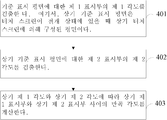
도 4를 참조하면, 일 실시예에 있어서, 터치 스크린의 제 1 표시부와 제 2 표시부 사이의 만곡 각도를 검출하는 단계는, 다음과 같은 단계를 포함한다.Referring to FIG. 4, in one embodiment, the step of detecting the angle of curvature between the first display portion and the second display portion of the touch screen includes the following steps.
단계 401: 기준 표시 평면에 대한 상기 제 1 표시부의 제 1 각도를 검출한다. Step 401: The first angle of the first display portion with respect to the reference display plane is detected.
단계 402: 상기 기준 표시 평면에 대한 상기 제 2 표시부의 제 2 각도를 검출한다.Step 402: The second angle of the second display portion with respect to the reference display plane is detected.
단계 403: 상기 제 1 각도와 상기 제 2 각도에 따라 상기 제 1 표시부와 상기 제 2 표시부 사이의 만곡 각도를 계산한다.Step 403: The angle of curvature between the first display part and the second display part is calculated according to the first angle and the second angle.
그 중에서, 상기 기준 표시 평면은 상기 터치 스크린이 전개 상태에 있을 때 상기 터치 스크린에 의해 구성된 평면이다.Wherein the reference display plane is a plane constructed by the touch screen when the touch screen is in an unfolded state.
도 5를 참조하면, 도 5는 본 발명의 실시예에 따른 오동작을 방지하는 디스플레이 인터페이스 제어 방법의 제 3 사용 장면을 나타내는 도면이다. 이 사용 장면에 있어서, 상기 단말기(20)의 터치 스크린(21)은 전개 상태와 접이 상태 사이의 중간 상태에 있다. 그 중에서 부호 (210)은 상기 터치 스크린(21)이 전개 상태에 있을 때, 상기 터치 스크린(21)에 의해 구성된 평면이며, 즉 기준 표시 평면이다. 부호 (A1)은 상기 제 1 표시부(211)와 상기 기준 표시 평면(210) 사이에 형성된 제 1 각도이다. 부호 (A2)는 상기 제 2 표시부(213)와 상기 기준 표시 평면(210) 사이에 형성된 제 2 각도이다. 본 실시예에 있어서, 상기 제 1 표시부(211)와 상기 제 2 표시부(213) 사이의 만곡 각도는 상기 제 1 각도(A1)와 상기 제 2 각도(A2)의 합과 같다. 미리 설정된 각도를 30도로 설정할 때, 상기 제 1 각도(A1)와 상기 제 2 각도(A2)의 합이 30도보다 클 경우는 상기 단말기(20)가 전개 상태에서 접이 상태로 전환됨을 나타내고, 상기 터치 스크린(21)을 제어하여 상기 제 2 표시부(213) 및 상기 만곡 표시부(215)의 터치 기능을 오프함으로써, 상기 제 2 표시부(213) 및 상기 만곡 표시부(215)에 표시되는 내용이 접이 상태에서 오동작되는 것을 방지한다.Referring to FIG. 5, FIG. 5 is a diagram illustrating a third usage scene of a display interface control method for preventing a malfunction according to an embodiment of the present invention. In this use scene, the
도 6을 참조하면, 일 실시예에 있어서, 상기 터치 스크린의 제 1 표시부와 제 2 표시부 사이의 만곡 각도를 검출하는 단계는, 다음과 같은 단계를 포함한다.Referring to FIG. 6, in one embodiment, detecting the angle of curvature between the first display unit and the second display unit of the touch screen includes the following steps.
단계 601: 상기 제 1 표시부와 상기 제 2 표시부 사이의 협각을 검출한다.Step 601: The coarse angle between the first display unit and the second display unit is detected.
단계 602: 상기 협각에 따라 상기 제 1 표시부와 상기 제 2 표시부 사이의 만곡 각도를 계산한다.Step 602: The angle of curvature between the first display part and the second display part is calculated according to the narrowed angle.
다시 도 5를 참조하면, 그 중에서 부호 (A3)은 상기 제 1 표시부(211)와 상기 제 2 표시부(213) 사이의 협각이다. 상기 협각(A3)과 상기 제 1 각도(A1) 및 상기 제 2 각도(A2)의 합은 180도이기 때문에, 상기 협각(A3)의 크기를 검출함으로써, 상기 협각(A3)에 따라 상기 제 1 표시부(211)와 상기 제 2 표시부(213) 사이의 만곡 각도를 계산할 수 있다. 본 실시예에 있어서, 상기 제 1 표시부(211)와 상기 제 2 표시부(213) 사이의 만곡 각도는 180도에서 상기 제 1 표시부(211)와 상기 제 2 표시부(213) 사이의 협각(A3)을 감산한 것과 같다. 선택 가능한 일 실시예에 있어서, 상기 제 1 표시부(211)와 상기 제 2 표시부(213) 사이의 협각(A3)이 미리 설정된 각도보다 작은지 여부를 판단하여, 상기 제 2 표시부(213) 및 상기 만곡 표시부(215)의 터치 기능을 제어할 수 있다는 것을 이해할 수 있다. 예를 들어, 상기 제 1 표시부(211)와 상기 제 2 표시부(213) 사이의 협각(A3)이 150도보다 작을 때, 상기 단말기(20)가 전개 상태로부터 접이 상태로 전환됨을 나타내고, 상기 터치 스크린(21)을 제어하여 상기 제 2 표시부(213) 및 상기 만곡 표시부(215)의 터치 기능을 오프함으로써 상기 제 2 표시부(213) 및 상기 만곡 표시부(215)에 표시되는 내용이 접이 상태에서 오동작되는 것을 방지할 수 있다.Referring again to FIG. 5, the symbol A3 is a narrow angle between the
일 실시예에 있어서, 상기 방법은 다음과 같은 단계를 더 포함한다.In one embodiment, the method further comprises the following steps.
상기 만곡 각도가 미리 설정된 각도보다 클 경우, 상기 만곡 표시부에 표시되는 내용을 제어하여, 상기 만곡 표시부에 있어서 상기 제 1 표시부에 연결되는 한쪽에서 상기 제 2 표시부에 연결되는 다른 한쪽으로 그라데이션 표시하도록 한다.When the curvature angle is larger than a preset angle, controls the content displayed on the curvature display unit to display a gradation on the other side of the curvature display unit connected to the first display unit and connected to the second display unit .
다시 도 3을 참조하면, 상기 단말기(20)의 터치 스크린(21)이 접힌 상태에 있을 때, 현재 제 1 표시부(211)에 표시되는 내용 외에도 부분 내용은 상기 제 2 표시부(213) 및 상기 만곡 표시부(215)에 표시되는 것을 사용자에게 알려주기 위하여, 상기 만곡 각도가 미리 설정된 각도보다 클 경우, 상기 만곡 표시부(215)에 표시되는 내용을 제어하여, 상기 만곡 표시부(215)에 있어서 상기 제 1 표시부(211)에 연결되는 한쪽에서 상기 제 2 표시부(213)에 연결되는 다른 한쪽으로 그라데이션 표시하도록 한다. 도 3에 도시된 음영 부분과 같이, 부분 내용은 상기 만곡 표시부(215) 및 상기 제 2 표시부(213)에 표시되는 것을 사용자에게 알려준다.3, when the
상기 단말기(20)의 터치 스크린(21)이 접힌 상태에 있을 때, 상기 제 2 표시부(213) 및 상기 만곡 표시부(215)의 터치 기능은 오프되어 있기 때문에, 상기 제 2 표시부(213) 및 상기 만곡 표시부(215)에 표시되는 내용(예를 들어, 응용 프로그램 아이콘(23))을 정상적으로 조작할 수 있도록, 상기 제 1 표시부(211)에 대한 사용자의 터치 명령(예를 들어, 왼쪽으로 슬라이딩함)을 접수하여 상기 만곡 표시부(215) 및 상기 제 2 표시부(213)의 표시 내용을 상기 제 1 표시부 (211)에 이동시켜 사용자는 제 1 표시부(211)를 통해 상기 내용을 조작할 수 있다는 것을 이해할 수 있다.The
상기 단말기(20)의 전력 소모를 저감하기 위하여, 상기 터치 스크린(21)이 접힌 상태에 있을 때, 상기 만곡 표시부(215)의 표시 내용을 그라데이션 표시하도록 제어할 수 있다는 것을 이해할 수 있다. 예를 들어, 상기 제 1 표시부(211)에 연결된 상기 만곡 표시부(215)의 한쪽에서 상기 제 2 표시부(213)에 연결된 상기 만곡 표시부(215)의 다른 한쪽으로 점점 어두워진다. 또한 상기 제 2 표시부(213)의 표시 기능을 오프할 수 있다. 상기 제 2 표시부(213)의 표시 기능을 오프하더라도 사용자가 상기 제 1 표시부(211)에서 왼쪽으로 슬라이딩하는 동작으로 원래는 상기 제 2 표시부(213)에 표시되는 내용을 끌어내는데 영향을 미치지 않는다는 것을 이해할 수 있다.It can be understood that when the
도 7을 참조하면, 본 발명의 실시예에 따른 오동작을 방지하는 디스플레이 인터페이스 제어 장치(70)는,Referring to FIG. 7, a
터치 스크린의 제 1 표시부와 제 2 표시부 사이의 만곡 각도를 검출하는데 사용되는 각도 검출 유닛(71)과, An angle detection unit (71) used for detecting the angle of curvature between the first display unit and the second display unit of the touch screen,
상기 만곡 각도가 미리 설정된 각도보다 큰지 여부를 판단하는데 사용되는 각도 판단 유닛(73)과,An angle determination unit (73) used to determine whether the curvature angle is larger than a predetermined angle,
상기 만곡 각도가 미리 설정된 각도보다 클 경우, 상기 터치 스크린을 제어하여 상기 만곡 표시부 및 상기 제 2 표시부의 터치 기능을 오프하는데 사용되는 터치 관리 유닛(75)을 포함하며,And a touch management unit (75) for controlling the touch screen to turn off the touch function of the curvature display unit and the second display unit when the curvature angle is larger than a preset angle,
상기 제 2 표시부는 만곡 표시부에 의해 상기 제 1 표시부에 유연하게 연결되고, 또한 상기 제 1 표시부에 대하여 접이 또는 전개될 수 있다.The second display portion is connected to the first display portion by the curved display portion in a flexible manner and can be folded or developed relative to the first display portion.
일 실시예에 있어서, 상기 검출 유닛(71)은,In one embodiment, the detection unit (71)
기준 표시 평면에 대한 상기 제 1 표시부의 제 1 각도를 검출하는데 사용되는 제 1 검출 서브 유닛(711)과, A first detection subunit 711 used to detect a first angle of the first display unit with respect to a reference display plane,
상기 기준 표시 평면에 대한 상기 제 2 표시부의 제 2 각도를 검출하는데 사용되는 제 2 검출 서브 유닛(713)과,A second detection subunit 713 used to detect a second angle of the second display unit with respect to the reference display plane,
상기 제 1 각도와 상기 제 2 각도에 따라 상기 제 1 표시부와 상기 제 2 표시부 사이의 만곡 각도를 계산하는데 사용되는 각도 계산 서브 유닛(715)을 포함하며,And an angle calculation subunit (715) used to calculate a curvature angle between the first display portion and the second display portion according to the first angle and the second angle,
상기 기준 표시 평면은 상기 터치 스크린이 전개 상태에 있을 때 상기 터치 스크린에 의해 구성된 평면이다.The reference display plane is a plane constructed by the touch screen when the touch screen is in an unfolded state.
그 중에서, 상기 제 1 표시부와 상기 제 2 표시부 사이의 만곡 각도는 상기 제 1 각도와 상기 제 2 각도의 합과 같다.The curved angle between the first display portion and the second display portion is equal to the sum of the first angle and the second angle.
일 실시예에 있어서, 상기 장치(70)는, 상기 만곡 각도가 미리 설정된 각도보다 클 경우, 상기 만곡 표시부에 표시되는 내용을 제어하여, 상기 만곡 표시부에 있어서 상기 제 1 표시부에 연결되는 한쪽에서 상기 제 2 표시부에 연결되는 다른 한쪽으로 그라데이션 표시하도록 하는 표시 관리 유닛(77)을 더 포함한다.In one embodiment, the
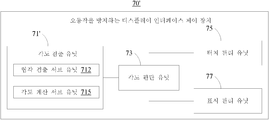
도 8을 참조하면, 본 발명의 일 실시예에 있어서, 오동작을 방지하는 디스플레이 인터페이스 제어 장치(70')가 제공되며, 도 7에 도시된 오동작을 방지하는 디스플레이 인터페이스 제어 장치(70)와 비교할 때, 유일한 차이점이라면, 상기 오동작을 방지하는 디스플레이 인터페이스 제어 장치(70')의 검출 유닛(71')은,Referring to FIG. 8, in an embodiment of the present invention, a display interface control device 70 'for preventing malfunction is provided and compared with the display
상기 제 1 표시부와 상기 제 2 표시부 사이의 협각을 검출하는데 사용되는 협각 검출 서브 유닛(712)과,A narrow detection subunit 712 used to detect a narrow angle between the first display unit and the second display unit,
상기 협각에 따라 상기 제 1 표시부와 상기 제 2 표시부 사이의 만곡 각도를 계산하는데 사용되는 각도 계산 서브 유닛(715)을 포함하는 것이다.And an angle calculation subunit 715 used to calculate a curvature angle between the first display portion and the second display portion according to the narrow angle.
그 중에서, 상기 제 1 표시부와 상기 제 2 표시부 사이의 만곡 각도는 180도에서 상기 제 1 표시부와 상기 제 2 표시부 사이의 협각을 감산한 것과 같다.The curvature angle between the first display portion and the second display portion is equal to 180 degrees and subtracting the narrow angle between the first display portion and the second display portion.
상기 오동작을 방지하는 디스플레이 인터페이스 제어 장치(70,70')의 각 유닛의 기능과 구체적인 실현은 본 발명의 도 1 내지 도 6에 도시된 방법 관련 실시예에 대한 설명을 참조할 수 있기 때문에, 여기에서 상세한 설명을 생략한다는 것을 이해할 수 있다.Since the function and concrete realization of each unit of the display
도 9를 참조하면, 본 발명의 실시예에 따른 단말기(90)는 터치 스크린(91)을 구비한다. 상기 터치 스크린(91)은 제 1 표시부(911), 제 2 표시부(913) 및 만곡 표시부(915)를 포함하고, 상기 제 2 표시부(913)는 상기 만곡 표시부(915)에 의해 상기 제 1 표시부(911)에 유연하게 연결되고, 또한 상기 제 1 표시부(911)에 대하여 접이 또는 전개될 수 있다.Referring to FIG. 9, a terminal 90 according to an embodiment of the present invention includes a
상기 단말기(90)는 프로세서(93) 및 적어도 하나의 각도 센서(95)를 더 구비하고, 상기 프로세서(93)는 적어도 하나의 상기 각도 센서(95) 및 상기 터치 스크린(91)에 전기적으로 연결된다.Wherein the terminal 90 further comprises a
적어도 하나의 상기 각도 센서(95)는 상기 제 1 표시부(911)와 상기 제 2 표시부(913) 사이의 만곡 각도를 검출하는데 사용된다.At least one
상기 프로세서(93)는 상기 만곡 각도가 미리 설정된 각도보다 큰지 여부를 판단하여, 상기 만곡 각도가 미리 설정된 각도보다 클 경우, 상기 터치 스크린(91)을 제어하여 상기 만곡 표시부(915) 및 상기 제 2 표시부(913)의 터치 기능을 오프하는데 사용된다.The
일 실시예에 있어서, 상기 단말기(90)는 제 1 각도 센서(951) 및 제 2 각도 센서(953)를 구비하고,In one embodiment, the terminal 90 includes a
상기 제 1 각도 센서(951)는 상기 단말기(90)에 있어서 상기 제 1 표시부(911)에 대응되는 한쪽에 설치되어, 기준 표시 평면에 대한 상기 제 1 표시부(911)의 제 1 각도를 검출하는데 사용되며, 그 중에서 상기 기준 표시 평면은 상기 터치 스크린(91)이 전개 상태에 있을 때 상기 터치 스크린(91)에 의해 구성된 평면이며,The
상기 제 2 각도 센서(953)는 상기 단말기(90)에 있어서 상기 제 2 표시부(913)에 대응되는 한쪽에 설치되어, 상기 기준 표시 평면에 대한 상기 제 2 표시부(913)의 제 2 각도를 검출하는데 사용되며,The
상기 프로세서(93)는 또한 상기 제 1 각도와 상기 제 2 각도에 따라 상기 제 1 표시부(911)와 상기 제 2 표시부(913) 사이의 만곡 각도를 계산하는데 사용된다.The
그 중에서, 상기 제 1 표시부(911)와 상기 제 2 표시부(913) 사이의 만곡 각도는 상기 제 1 각도와 상기 제 2 각도의 합과 같다.The curvature angle between the
일 실시예에 있어서, 상기 프로세서(93)는 또한 상기 만곡 각도가 미리 설정된 각도보다 클 경우, 상기 만곡 표시부(915)에 표시되는 내용을 제어하여, 상기 만곡 표시부(915)에 있어서 상기 제 1 표시부(911)에 연결되는 한쪽에서 상기 제 2 표시부(913)에 연결되는 다른 한쪽으로 그라데이션 표시하도록 하는데 사용된다.In one embodiment, the
도 10을 참조하면, 일 실시예에서 단말기(90')가 제공되며, 상기 단말기(90)에 비해 차이점은 상기 단말기(90')는 각도 센서(95)를 구비하는 것이다.Referring to FIG. 10, a terminal 90 'is provided in an embodiment, and a difference from the terminal 90 is that the terminal 90' has an
상기 각도 센서(95)는 상기 단말기(90')에 있어서 상기 제 1 표시부(911) 또는 상기 제 2 표시부(913)에 대응되는 한쪽에 설치되어, 상기 제 1 표시부(911)와 상기 제 2 표시부(913) 사이의 협각을 검출하는데 사용된다.The
상기 프로세서(93)는 또한 상기 협각에 따라 상기 제 1 표시부(911)와 상기 제 2 표시부(913) 사이의 만곡 각도를 계산하는데 사용된다.The
그 중에서, 상기 제 1 표시부(911)와 상기 제 2 표시부(913) 사이의 만곡 각도는 180도에서 상기 제 1 표시부(911)와 상기 제 2 표시부부(913) 사이의 협각을 감산한 것과 같다.The curvature angle between the
상기 단말기(90, 90')의 각 부품의 기능 및 구체적인 실현은 본 발명의 도 1 내지 도 6에 도시된 방법 관련 실시예에 대한 설명을 참조할 수 있기 때문에, 여기에서 자세한 설명을 생략하는 것은 이해할 수 있다.The functions and concrete realization of the respective parts of the
상기 오동작을 방지하는 디스플레이 인터페이스 제어 방법은, 터치 스크린의 제 1 표시부와 제 2 표시부 사이의 만곡 각도를 검출하고, 상기 만곡 각도가 미리 설정된 각도보다 클 경우, 상기 터치 스크린을 제어하여 상기 만곡 표시부 및 상기 제 2 표시부의 터치 기능을 오프함으로써, 상기 터치 스크린이 접이 상태에 있는 경우, 상기 만곡 표시부와 상기 제 2 표시부가 사용자의 손과 불가피하게 접촉하여 초래하는 오동작을 방지할 수 있으며, 터치 스크린이 접힌 상태에서 상기 단말기를 정상적으로 쥐고 조작할 수 있도록 확보하여 사용자의 체험을 향상시키고, 상기 단말기의 전력 소모를 저감할 수 있다.The display interface control method for preventing the malfunction includes detecting a curvature angle between the first display unit and the second display unit of the touch screen and controlling the touch screen to display the curvature of the curvature display unit and the second display unit when the curvature angle is larger than a preset angle, By turning off the touch function of the second display unit, when the touch screen is in the folded state, it is possible to prevent a malfunction caused by inevitably contacting the curved display unit and the second display unit with the user's hand, It is possible to securely hold and operate the terminal in a folded state, thereby improving the user's experience and reducing power consumption of the terminal.
상술한 것은 단지 본 발명의 바람직한 실시예이며, 본 발명의 범위를 한정하는 것은 아니다. 당업자라면 상기 실시예를 실현하는 과정의 전부 또는 일부를 이해할 수 있으며, 그 요지를 벗어나지 않는 범위내에서 동일한 변경을 해도, 본 발명의 범위에 속하는 것이다.The foregoing is merely a preferred embodiment of the present invention and does not limit the scope of the present invention. Those skilled in the art can understand the whole or a part of the process of realizing the above embodiment, and the same change can be made within the scope of the present invention without departing from the gist of the present invention.
Claims (14)
터치 스크린의 제 1 표시부와 제 2 표시부 사이의 만곡 각도를 검출하는 단계;
상기 만곡 각도가 미리 설정된 각도보다 큰지 여부를 판단하는 단계;
상기 만곡 각도가 미리 설정된 각도보다 클 경우, 상기 터치 스크린을 제어하여 만곡 표시부 및 상기 제 2 표시부의 터치 기능을 오프하는 단계;
를 포함하며,
상기 제 2 표시부는 상기 만곡 표시부에 의해 상기 제 1 표시부에 유연하게 연결되고, 또한 상기 제 1 표시부에 대하여 접이 또는 전개될 수 있는 것을 특징으로 하는 방법.
A display interface control method for preventing a malfunction,
Detecting a curvature angle between the first display portion and the second display portion of the touch screen;
Determining whether the curvature angle is greater than a preset angle;
Controlling the touch screen to turn off the touch function of the curvature display unit and the second display unit when the curvature angle is larger than a preset angle;
/ RTI >
Wherein the second display portion is connected to the first display portion by the curvature display portion in a flexible manner and can be folded or unfolded relative to the first display portion.
상기 터치 스크린의 제 1 표시부와 제 2 표시부 사이의 만곡 각도를 검출하는 단계는,
기준 표시 평면에 대한 상기 제 1 표시부의 제 1 각도를 검출하는 단계;
상기 기준 표시 평면에 대한 상기 제 2 표시부의 제 2 각도를 검출하는 단계;
상기 제 1 각도와 상기 제 2 각도에 따라 상기 제 1 표시부와 상기 제 2 표시부 사이의 만곡 각도를 계산하는 단계;
를 포함하며,
상기 기준 표시 평면은 상기 터치 스크린이 전개 상태에 있을 때 상기 터치 스크린에 의해 구성된 평면인 것을 특징으로 하는 방법.
The method according to claim 1,
Wherein the step of detecting a curvature angle between the first display unit and the second display unit of the touch screen comprises:
Detecting a first angle of the first display unit with respect to a reference display plane;
Detecting a second angle of the second display unit with respect to the reference display plane;
Calculating a curvature angle between the first display unit and the second display unit according to the first angle and the second angle;
/ RTI >
Wherein the reference display plane is a plane configured by the touch screen when the touch screen is in an unfolded state.
상기 제 1 표시부와 상기 제 2 표시부 사이의 만곡 각도는 상기 제 1 각도와 상기 제 2 각도의 합과 같은 것을 특징으로 하는 방법.
3. The method of claim 2,
Wherein a curvature angle between the first display portion and the second display portion is equal to a sum of the first angle and the second angle.
상기 터치 스크린의 제 1 표시부와 제 2 표시부 사이의 만곡 각도를 검출하는 단계는,
상기 제 1 표시부와 상기 제 2 표시부 사이의 협각을 검출하는 단계;
상기 협각에 따라 상기 제 1 표시부와 상기 제 2 표시부 사이의 만곡 각도를 계산하는 단계;
를 포함하는 것을 특징으로 하는 방법.
The method according to claim 1,
Wherein the step of detecting a curvature angle between the first display unit and the second display unit of the touch screen comprises:
Detecting a narrow angle between the first display unit and the second display unit;
Calculating a curvature angle between the first display portion and the second display portion along the narrow angle;
≪ / RTI >
상기 제 1 표시부와 상기 제 2 표시부 사이의 만곡 각도는 180도에서 상기 제 1 표시부와 상기 제 2 표시부 사이의 협각을 감산한 것과 같은 것을 특징으로 하는 방법.
5. The method of claim 4,
Wherein the angle of curvature between the first display portion and the second display portion is such that the narrowing angle between the first display portion and the second display portion is subtracted from 180 degrees.
상기 방법은,
상기 만곡 각도가 미리 설정된 각도보다 클 경우, 상기 만곡 표시부에 표시되는 내용을 제어하여, 상기 만곡 표시부에 있어서 상기 제 1 표시부에 연결되는 한쪽에서 상기 제 2 표시부에 연결되는 다른 한쪽으로 그라데이션 표시하도록 하는 단계를 더 포함하는 것을 특징으로 하는 방법.
6. The method according to any one of claims 1 to 5,
The method comprises:
When the curvature angle is larger than a predetermined angle, controlling the content displayed on the curvature display unit to display the gradation on the other side connected to the second display unit on one side of the curvature display unit connected to the first display unit ≪ / RTI >
터치 스크린의 제 1 표시부와 제 2 표시부 사이의 만곡 각도를 검출하는데 사용되는 각도 검출 유닛과,
상기 만곡 각도가 미리 설정된 각도보다 큰지 여부를 판단하는데 사용되는 각도 판단 유닛과,
상기 만곡 각도가 미리 설정된 각도보다 클 경우, 상기 터치 스크린을 제어하여 만곡 표시부 및 상기 제 2 표시부의 터치 기능을 오프하는데 사용되는 터치 관리 유닛을 포함하며,
상기 제 2 표시부는 상기 만곡 표시부에 의해 상기 제 1 표시부에 유연하게 연결되고, 또한 상기 제 1 표시부에 대하여 접이 또는 전개될 수 있는 것을 특징으로 하는 장치.
A display interface control device for preventing a malfunction,
An angle detection unit used for detecting the angle of curvature between the first display unit and the second display unit of the touch screen,
An angle determination unit used to determine whether the curvature angle is larger than a predetermined angle,
And a touch management unit for controlling the touch screen to turn off the touch function of the curvature display unit and the second display unit when the curvature angle is larger than a preset angle,
Wherein the second display portion is connected to the first display portion by the curvature display portion and is capable of being folded or unfolded relative to the first display portion.
상기 검출 유닛은,
기준 표시 평면에 대한 상기 제 1 표시부의 제 1 각도를 검출하는데 사용되는 제 1 검출 서브 유닛과,
상기 기준 표시 평면에 대한 상기 제 2 표시부의 제 2 각도를 검출하는데 사용되는 제 2 검출 서브 유닛과,
상기 제 1 각도와 상기 제 2 각도에 따라 상기 제 1 표시부와 상기 제 2 표시부 사이의 만곡 각도를 계산하는데 사용되는 각도 계산 서브 유닛을 포함하며,
상기 기준 표시 평면은 상기 터치 스크린이 전개 상태에 있을 때 상기 터치 스크린에 의해 구성된 평면인 것을 특징으로 하는 장치.
8. The method of claim 7,
Wherein the detection unit comprises:
A first detection sub-unit used for detecting a first angle of the first display unit with respect to a reference display plane,
A second detection sub-unit used for detecting a second angle of the second display unit with respect to the reference display plane,
And an angle calculation subunit used to calculate a curvature angle between the first display portion and the second display portion according to the first angle and the second angle,
Wherein the reference display plane is a plane configured by the touch screen when the touch screen is in an unfolded state.
상기 검출 유닛은,
상기 제 1 표시부와 상기 제 2 표시부 사이의 협각을 검출하는데 사용되는 협각 검출 서브 유닛과,
상기 협각에 따라 상기 제 1 표시부와 상기 제 2 표시부 사이의 만곡 각도를 계산하는데 사용되는 각도 계산 서브 유닛을 포함하는 것을 특징으로 하는 장치.
8. The method of claim 7,
Wherein the detection unit comprises:
A narrow-angle detection sub-unit used for detecting a narrow angle between the first display unit and the second display unit,
And an angle calculation subunit used to calculate a curvature angle between the first display portion and the second display portion according to the narrowed angle.
상기 장치는,
상기 만곡 각도가 미리 설정된 각도보다 클 경우, 상기 만곡 표시부에 표시되는 내용을 제어하여, 상기 만곡 표시부에 있어서 상기 제 1 표시부에 연결되는 한쪽에서 상기 제 2 표시부에 연결되는 다른 한쪽으로 그라데이션 표시하도록 하는 표시 관리 유닛을 더 포함하는 것을 특징으로 하는 장치.
10. The method according to any one of claims 7 to 9,
The apparatus comprises:
When the curvature angle is larger than a predetermined angle, controlling the content displayed on the curvature display unit to display the gradation on the other side connected to the second display unit on one side of the curvature display unit connected to the first display unit Further comprising a display management unit.
상기 단말기는 프로세서 및 적어도 하나의 각도 센서를 더 구비하고, 상기 프로세서는 적어도 하나의 상기 각도 센서 및 상기 터치 스크린에 전기적으로 연결되고,
적어도 하나의 상기 각도 센서는 상기 제 1 표시부와 상기 제 2 표시부 사이의 만곡 각도를 검출하는데 사용되며,
상기 프로세서는 상기 만곡 각도가 미리 설정된 각도보다 큰지 여부를 판단하여, 상기 만곡 각도가 미리 설정된 각도보다 클 경우, 상기 터치 스크린을 제어하여 상기 만곡 표시부 및 상기 제 2 표시부의 터치 기능을 오프하는데 사용되는 것을 특징으로 하는 단말기.
The touch screen includes a first display unit, a second display unit, and a curved display unit. The second display unit is flexibly connected to the first display unit by the curvature display unit, 1 < / RTI > display unit,
Wherein the terminal further comprises a processor and at least one angle sensor, wherein the processor is electrically connected to at least one of the angle sensor and the touch screen,
At least one of the angle sensors is used to detect a tilt angle between the first display portion and the second display portion,
Wherein the processor determines whether the curvature angle is greater than a predetermined angle and controls the touch screen to turn off the touch function of the curvature display unit and the second display unit when the curvature angle is larger than a predetermined angle Lt; / RTI >
상기 단말기는 제 1 각도 센서 및 제 2 각도 센서를 구비하고,
상기 제 1 각도 센서는 상기 단말기에 있어서 상기 제 1 표시부에 대응하는 한쪽에 설치되어, 기준 표시 평면에 대한 상기 제 1 표시부의 제 1 각도를 검출하는데 사용되며, 상기 기준 표시 평면은 상기 터치 스크린이 전개 상태에 있을 때 상기 터치 스크린에 의해 구성된 평면이며,
상기 제 2 각도 센서는 상기 단말기에 있어서 상기 제 2 표시부에 대응하는 한쪽에 설치되어, 상기 기준 표시 평면에 대한 상기 제 2 표시부의 제 2 각도를 검출하는데 사용되며,
상기 프로세서는 또한 상기 제 1 각도와 상기 제 2 각도에 따라 상기 제 1 표시부와 상기 제 2 표시부 사이의 만곡 각도를 계산하는데 사용되는 것을 특징으로 하는 단말기.
12. The method of claim 11,
Wherein the terminal comprises a first angle sensor and a second angle sensor,
Wherein the first angle sensor is provided on one side of the terminal corresponding to the first display unit and is used to detect a first angle of the first display unit with respect to a reference display plane, A plane configured by the touch screen when in an unfolded state,
The second angle sensor is provided on one side of the terminal corresponding to the second display unit and used to detect a second angle of the second display unit with respect to the reference display plane,
Wherein the processor is also used to calculate a curvature angle between the first display portion and the second display portion according to the first angle and the second angle.
상기 각도 센서는 상기 단말기에 있어서 상기 제 1 표시부 또는 상기 제 2 표시부에 대응하는 한쪽에 설치되어, 상기 제 1 표시부와 상기 제 2 표시부 사이의 협각을 검출하는데 사용되며,
상기 프로세서는 또한 상기 협각에 따라 상기 제 1 표시부와 상기 제 2 표시부 사이의 만곡 각도를 계산하는데 사용되는 것을 특징으로 하는 단말기.
12. The method of claim 11,
Wherein the angle sensor is provided on one side of the terminal corresponding to the first display unit or the second display unit and used to detect a narrow angle between the first display unit and the second display unit,
Wherein the processor is also used to calculate a curvature angle between the first display portion and the second display portion according to the narrowed angle.
상기 프로세서는 또한 상기 만곡 각도가 미리 설정된 각도보다 클 경우, 상기 만곡 표시부에 표시되는 내용을 제어하여, 상기 만곡 표시부에 있어서 상기 제 1 표시부에 연결되는 한쪽에서 상기 제 2 표시부에 연결되는 다른 한쪽으로 그라데이션 표시하도록 하는데 사용되는 것을 특징으로 하는 단말기.14. The method according to any one of claims 11 to 13,
Wherein the processor further controls the contents displayed on the curvature display unit when the curvature angle is larger than a predetermined angle so that the curvature of the curvature display unit is changed from one side connected to the first display unit to the other side connected to the second display unit Wherein the terminal is used to display a gradation.
Applications Claiming Priority (1)
| Application Number | Priority Date | Filing Date | Title |
|---|---|---|---|
| PCT/CN2016/091838 WO2018018442A1 (en) | 2016-07-27 | 2016-07-27 | Display interface control method and device for misoperation prevention, and terminal |
Publications (1)
| Publication Number | Publication Date |
|---|---|
| KR20180132847A true KR20180132847A (en) | 2018-12-12 |
Family
ID=61016308
Family Applications (1)
| Application Number | Title | Priority Date | Filing Date |
|---|---|---|---|
| KR1020187032461A Ceased KR20180132847A (en) | 2016-07-27 | 2016-07-27 | Display interface control method, apparatus and terminal for preventing malfunction |
Country Status (6)
| Country | Link |
|---|---|
| US (1) | US20190138179A1 (en) |
| EP (1) | EP3493034A4 (en) |
| JP (1) | JP6619526B2 (en) |
| KR (1) | KR20180132847A (en) |
| CN (1) | CN107636573A (en) |
| WO (1) | WO2018018442A1 (en) |
Cited By (2)
| Publication number | Priority date | Publication date | Assignee | Title |
|---|---|---|---|---|
| WO2020130550A1 (en) | 2018-12-17 | 2020-06-25 | Samsung Electronics Co., Ltd. | Foldable electronic device and method for detecting touch input in foldable electronic device |
| WO2022030804A1 (en) * | 2020-08-04 | 2022-02-10 | 삼성전자 주식회사 | Foldable electronic device for controlling screen rotation, and operating method therefor |
Families Citing this family (25)
| Publication number | Priority date | Publication date | Assignee | Title |
|---|---|---|---|---|
| KR102628240B1 (en) * | 2016-09-07 | 2024-01-25 | 삼성디스플레이 주식회사 | Input sensor and display device including the same |
| CN108459815B (en) * | 2018-03-16 | 2020-06-02 | 维沃移动通信有限公司 | A display control method and mobile terminal |
| CN110609667A (en) * | 2018-06-15 | 2019-12-24 | 佛山市顺德区美的电热电器制造有限公司 | Display method, foldable device and computer readable storage medium |
| CN110658936B (en) * | 2018-06-29 | 2024-05-24 | 中兴通讯股份有限公司 | Edge suppression area control method, device, mobile terminal and storage medium |
| CN110716611A (en) * | 2018-07-13 | 2020-01-21 | 中兴通讯股份有限公司 | Folding angle determination method, device, folding terminal and computer storage medium |
| CN108845711B (en) * | 2018-07-27 | 2021-05-18 | 努比亚技术有限公司 | Screen touch method, terminal and computer readable storage medium |
| WO2020133222A1 (en) * | 2018-12-28 | 2020-07-02 | 深圳市柔宇科技有限公司 | Flexible touch screen and touch control method therefor, and display device |
| CN109710161A (en) * | 2018-12-29 | 2019-05-03 | 中兴通讯股份有限公司 | A kind of display control method and device, electronic equipment |
| CN111610874B (en) * | 2019-02-22 | 2022-05-10 | 华为技术有限公司 | A touch screen response method and electronic device |
| CN113261397A (en) * | 2019-03-14 | 2021-08-13 | 深圳市柔宇科技股份有限公司 | Interaction method, flexible electronic device and readable storage medium |
| CN110119295B (en) * | 2019-04-16 | 2022-05-17 | 华为技术有限公司 | A display control method and related device |
| CN110221653A (en) * | 2019-05-14 | 2019-09-10 | 武汉华星光电半导体显示技术有限公司 | Folding screen |
| WO2020245989A1 (en) * | 2019-06-06 | 2020-12-10 | マクセル株式会社 | Personal digital assistant |
| CN112130741A (en) * | 2019-06-24 | 2020-12-25 | 中兴通讯股份有限公司 | Control method of a mobile terminal and mobile terminal |
| CN115297199B (en) | 2019-08-30 | 2025-02-14 | 华为技术有限公司 | A touch control method for a device with a folding screen and a folding screen device |
| KR102719967B1 (en) | 2019-11-27 | 2024-10-22 | 삼성전자주식회사 | Foldable device and controlling method thereof |
| CN112860359A (en) * | 2019-11-28 | 2021-05-28 | 华为技术有限公司 | Display method and related device of folding screen |
| CN113625865B (en) * | 2020-05-07 | 2023-06-06 | 华为技术有限公司 | Screen state control method and electronic equipment |
| US11481035B2 (en) * | 2020-05-15 | 2022-10-25 | Huawei Technologies Co., Ltd. | Method and system for processing gestures detected on a display screen of a foldable device |
| KR102876736B1 (en) | 2020-11-30 | 2025-10-27 | 삼성전자주식회사 | Flexible type electronics device and thereof method |
| CN112527152B (en) * | 2020-12-18 | 2023-01-06 | Oppo(重庆)智能科技有限公司 | Touch area control method and device, touch system and electronic equipment |
| US11322062B1 (en) * | 2021-01-06 | 2022-05-03 | Microsoft Technology Licensing, Llc | Dual display device control |
| CN113655906B (en) * | 2021-08-16 | 2025-03-21 | 三星电子(中国)研发中心 | Folding screen control method and device |
| US11740719B1 (en) * | 2022-08-09 | 2023-08-29 | Lenovo (United States) Inc. | Managing touch capabilities of an expandable display device |
| WO2026014022A1 (en) * | 2024-07-08 | 2026-01-15 | 株式会社Jvcケンウッド | Electronic device |
Family Cites Families (20)
| Publication number | Priority date | Publication date | Assignee | Title |
|---|---|---|---|---|
| US8686951B2 (en) * | 2009-03-18 | 2014-04-01 | HJ Laboratories, LLC | Providing an elevated and texturized display in an electronic device |
| CN103477304A (en) * | 2011-02-10 | 2013-12-25 | 三星电子株式会社 | Portable device including touch screen display and method of controlling it |
| US8963857B2 (en) * | 2012-02-21 | 2015-02-24 | Lg Electronics Inc. | Electronic device and method of controlling the same |
| KR101899812B1 (en) * | 2012-05-14 | 2018-09-20 | 엘지전자 주식회사 | Portable device and controlling method thereof |
| KR102104588B1 (en) * | 2012-07-11 | 2020-04-24 | 삼성전자주식회사 | Flexible display apparatus and operating method thereof |
| KR102043810B1 (en) * | 2012-08-20 | 2019-11-12 | 삼성전자주식회사 | Flexible display apparatus and controlling method thereof |
| JP2014067291A (en) * | 2012-09-26 | 2014-04-17 | Toshiba Corp | Information processing apparatus, input device and information processing method |
| KR102063952B1 (en) * | 2012-10-10 | 2020-01-08 | 삼성전자주식회사 | Multi display apparatus and multi display method |
| JP2014089326A (en) * | 2012-10-30 | 2014-05-15 | Nec Casio Mobile Communications Ltd | Display device and display method |
| CN103902073B (en) * | 2012-12-25 | 2019-01-04 | 深圳富泰宏精密工业有限公司 | The method of controlling operation thereof and system of bendable panel |
| KR102080896B1 (en) * | 2013-01-29 | 2020-02-25 | 삼성디스플레이 주식회사 | Mobile device and method for operating the same |
| KR102097361B1 (en) * | 2013-02-01 | 2020-04-07 | 삼성디스플레이 주식회사 | Mobile device having a flexible display device and method of operating the same |
| KR102131825B1 (en) * | 2013-03-20 | 2020-07-09 | 엘지전자 주식회사 | Foldable display device providing adaptive touch sensitive region and method for controlling the same |
| CN103412719A (en) * | 2013-08-30 | 2013-11-27 | 深圳市中兴移动通信有限公司 | Method and device for preventing touch screen terminal from misoperation |
| KR102226166B1 (en) * | 2014-02-05 | 2021-03-10 | 삼성전자 주식회사 | Method and apparatus for controlling display of flexible display in a electronic device |
| EP3979048A1 (en) * | 2014-02-10 | 2022-04-06 | Samsung Electronics Co., Ltd. | User terminal device and displaying method thereof |
| KR20150099679A (en) * | 2014-02-22 | 2015-09-01 | 삼성전자주식회사 | Apparatus for displaying execution screen of apllication and method thereof |
| KR20160001602A (en) * | 2014-06-26 | 2016-01-06 | 삼성전자주식회사 | Foldable electronic apparatus and method for performing interfacing thereof |
| CN105653162B (en) * | 2014-11-13 | 2019-05-17 | 昆山工研院新型平板显示技术中心有限公司 | Flexible display device method of controlling operation thereof |
| CN105549785B (en) * | 2015-12-29 | 2018-05-29 | 广东欧珀移动通信有限公司 | Terminal |
-
2016
- 2016-07-27 KR KR1020187032461A patent/KR20180132847A/en not_active Ceased
- 2016-07-27 CN CN201680019523.8A patent/CN107636573A/en active Pending
- 2016-07-27 WO PCT/CN2016/091838 patent/WO2018018442A1/en not_active Ceased
- 2016-07-27 JP JP2018555619A patent/JP6619526B2/en not_active Expired - Fee Related
- 2016-07-27 EP EP16910023.7A patent/EP3493034A4/en not_active Withdrawn
-
2018
- 2018-12-31 US US16/237,472 patent/US20190138179A1/en not_active Abandoned
Cited By (7)
| Publication number | Priority date | Publication date | Assignee | Title |
|---|---|---|---|---|
| WO2020130550A1 (en) | 2018-12-17 | 2020-06-25 | Samsung Electronics Co., Ltd. | Foldable electronic device and method for detecting touch input in foldable electronic device |
| US10908738B2 (en) | 2018-12-17 | 2021-02-02 | Samsung Electronics Co., Ltd. | Foldable electronic device and method for detecting touch input in foldable electronic device |
| EP3864499A4 (en) * | 2018-12-17 | 2021-12-15 | Samsung Electronics Co., Ltd. | FOLDABLE ELECTRONIC DEVICE AND METHOD OF DETECTION OF TOUCH INPUT IN THE FOLDABLE ELECTRONIC DEVICE |
| US11392247B2 (en) | 2018-12-17 | 2022-07-19 | Samsung Electronics Co., Ltd. | Foldable electronic device and method for detecting touch input in foldable electronic device |
| WO2022030804A1 (en) * | 2020-08-04 | 2022-02-10 | 삼성전자 주식회사 | Foldable electronic device for controlling screen rotation, and operating method therefor |
| US12014104B2 (en) | 2020-08-04 | 2024-06-18 | Samsung Electronics Co., Ltd. | Foldable electronic device for controlling screen rotation, and operating method therefor |
| US12411645B2 (en) | 2020-08-04 | 2025-09-09 | Samsung Electronics Co., Ltd. | Foldable electronic device for controlling screen rotation, and operating method therefor |
Also Published As
| Publication number | Publication date |
|---|---|
| EP3493034A4 (en) | 2020-04-08 |
| JP2019516187A (en) | 2019-06-13 |
| JP6619526B2 (en) | 2019-12-11 |
| US20190138179A1 (en) | 2019-05-09 |
| WO2018018442A1 (en) | 2018-02-01 |
| CN107636573A (en) | 2018-01-26 |
| EP3493034A1 (en) | 2019-06-05 |
Similar Documents
| Publication | Publication Date | Title |
|---|---|---|
| KR20180132847A (en) | Display interface control method, apparatus and terminal for preventing malfunction | |
| JP5189197B1 (en) | Portable information terminal | |
| JP5983503B2 (en) | Information processing apparatus and program | |
| JP5507494B2 (en) | Portable electronic device with touch screen and control method | |
| TWI567602B (en) | Touch input determining method electronic apparatus applying the touch input determining method | |
| US20140152593A1 (en) | Method And System For Operating Portable Devices | |
| TWI502479B (en) | Unlocking method and electronic device | |
| JP6319298B2 (en) | Information terminal, display control method and program thereof | |
| TW201329835A (en) | Display control device, display control method, and computer program | |
| US10429948B2 (en) | Electronic apparatus and method | |
| CN104346060B (en) | The method and electronic equipment of information processing | |
| US20120249445A1 (en) | Electronic device | |
| KR20120105167A (en) | Apparatus and method for operating in portable terminal | |
| US20110285625A1 (en) | Information processing apparatus and input method | |
| US20170075453A1 (en) | Terminal and terminal control method | |
| WO2013175798A1 (en) | Information processing device, information processing method, and information processing program | |
| CN105718204A (en) | Touch gesture based control method and device | |
| CN107678591A (en) | A kind of mode control method and terminal | |
| JP2018139158A (en) | Mobile terminal and program | |
| JP2014102557A (en) | Portable terminal | |
| CN109144386B (en) | Touch screen control method and device, storage medium, mobile terminal and terminal accessory | |
| JP2013122711A (en) | Information processing apparatus, information processing method and information processing program | |
| CN108471471A (en) | Method and device for preventing mistaken touch operation and terminal equipment | |
| CN111290569B (en) | Power control method and electronic device using same | |
| JP5624662B2 (en) | Electronic device, display control method and program |
Legal Events
| Date | Code | Title | Description |
|---|---|---|---|
| A201 | Request for examination | ||
| PA0105 | International application |
Patent event date: 20181108 Patent event code: PA01051R01D Comment text: International Patent Application |
|
| PA0201 | Request for examination | ||
| PG1501 | Laying open of application | ||
| E902 | Notification of reason for refusal | ||
| PE0902 | Notice of grounds for rejection |
Comment text: Notification of reason for refusal Patent event date: 20200120 Patent event code: PE09021S01D |
|
| E601 | Decision to refuse application | ||
| PE0601 | Decision on rejection of patent |
Patent event date: 20200508 Comment text: Decision to Refuse Application Patent event code: PE06012S01D Patent event date: 20200120 Comment text: Notification of reason for refusal Patent event code: PE06011S01I |