KR20130033044A - Contents shareing method and display apparatus thereof - Google Patents
Contents shareing method and display apparatus thereof Download PDFInfo
- Publication number
- KR20130033044A KR20130033044A KR1020110096860A KR20110096860A KR20130033044A KR 20130033044 A KR20130033044 A KR 20130033044A KR 1020110096860 A KR1020110096860 A KR 1020110096860A KR 20110096860 A KR20110096860 A KR 20110096860A KR 20130033044 A KR20130033044 A KR 20130033044A
- Authority
- KR
- South Korea
- Prior art keywords
- display device
- content
- sharing
- external
- video display
- Prior art date
- Legal status (The legal status is an assumption and is not a legal conclusion. Google has not performed a legal analysis and makes no representation as to the accuracy of the status listed.)
- Granted
Links
Images




Classifications
-
- G—PHYSICS
- G06—COMPUTING OR CALCULATING; COUNTING
- G06Q—INFORMATION AND COMMUNICATION TECHNOLOGY [ICT] SPECIALLY ADAPTED FOR ADMINISTRATIVE, COMMERCIAL, FINANCIAL, MANAGERIAL OR SUPERVISORY PURPOSES; SYSTEMS OR METHODS SPECIALLY ADAPTED FOR ADMINISTRATIVE, COMMERCIAL, FINANCIAL, MANAGERIAL OR SUPERVISORY PURPOSES, NOT OTHERWISE PROVIDED FOR
- G06Q50/00—Information and communication technology [ICT] specially adapted for implementation of business processes of specific business sectors, e.g. utilities or tourism
- G06Q50/10—Services
-
- H—ELECTRICITY
- H04—ELECTRIC COMMUNICATION TECHNIQUE
- H04N—PICTORIAL COMMUNICATION, e.g. TELEVISION
- H04N21/00—Selective content distribution, e.g. interactive television or video on demand [VOD]
- H04N21/40—Client devices specifically adapted for the reception of or interaction with content, e.g. set-top-box [STB]; Operations thereof
- H04N21/43—Processing of content or additional data, e.g. demultiplexing additional data from a digital video stream; Elementary client operations, e.g. monitoring of home network or synchronising decoder's clock; Client middleware
- H04N21/442—Monitoring of processes or resources, e.g. detecting the failure of a recording device, monitoring the downstream bandwidth, the number of times a movie has been viewed, the storage space available from the internal hard disk
- H04N21/44227—Monitoring of local network, e.g. connection or bandwidth variations; Detecting new devices in the local network
-
- H—ELECTRICITY
- H04—ELECTRIC COMMUNICATION TECHNIQUE
- H04N—PICTORIAL COMMUNICATION, e.g. TELEVISION
- H04N21/00—Selective content distribution, e.g. interactive television or video on demand [VOD]
- H04N21/40—Client devices specifically adapted for the reception of or interaction with content, e.g. set-top-box [STB]; Operations thereof
-
- H—ELECTRICITY
- H04—ELECTRIC COMMUNICATION TECHNIQUE
- H04N—PICTORIAL COMMUNICATION, e.g. TELEVISION
- H04N21/00—Selective content distribution, e.g. interactive television or video on demand [VOD]
- H04N21/40—Client devices specifically adapted for the reception of or interaction with content, e.g. set-top-box [STB]; Operations thereof
- H04N21/41—Structure of client; Structure of client peripherals
- H04N21/4104—Peripherals receiving signals from specially adapted client devices
- H04N21/4122—Peripherals receiving signals from specially adapted client devices additional display device, e.g. video projector
-
- H—ELECTRICITY
- H04—ELECTRIC COMMUNICATION TECHNIQUE
- H04N—PICTORIAL COMMUNICATION, e.g. TELEVISION
- H04N21/00—Selective content distribution, e.g. interactive television or video on demand [VOD]
- H04N21/40—Client devices specifically adapted for the reception of or interaction with content, e.g. set-top-box [STB]; Operations thereof
- H04N21/47—End-user applications
- H04N21/472—End-user interface for requesting content, additional data or services; End-user interface for interacting with content, e.g. for content reservation or setting reminders, for requesting event notification, for manipulating displayed content
- H04N21/47217—End-user interface for requesting content, additional data or services; End-user interface for interacting with content, e.g. for content reservation or setting reminders, for requesting event notification, for manipulating displayed content for controlling playback functions for recorded or on-demand content, e.g. using progress bars, mode or play-point indicators or bookmarks
-
- H—ELECTRICITY
- H04—ELECTRIC COMMUNICATION TECHNIQUE
- H04N—PICTORIAL COMMUNICATION, e.g. TELEVISION
- H04N21/00—Selective content distribution, e.g. interactive television or video on demand [VOD]
- H04N21/40—Client devices specifically adapted for the reception of or interaction with content, e.g. set-top-box [STB]; Operations thereof
- H04N21/47—End-user applications
- H04N21/485—End-user interface for client configuration
-
- H—ELECTRICITY
- H04—ELECTRIC COMMUNICATION TECHNIQUE
- H04N—PICTORIAL COMMUNICATION, e.g. TELEVISION
- H04N21/00—Selective content distribution, e.g. interactive television or video on demand [VOD]
- H04N21/40—Client devices specifically adapted for the reception of or interaction with content, e.g. set-top-box [STB]; Operations thereof
- H04N21/47—End-user applications
- H04N21/488—Data services, e.g. news ticker
- H04N21/4882—Data services, e.g. news ticker for displaying messages, e.g. warnings, reminders
-
- H—ELECTRICITY
- H04—ELECTRIC COMMUNICATION TECHNIQUE
- H04N—PICTORIAL COMMUNICATION, e.g. TELEVISION
- H04N21/00—Selective content distribution, e.g. interactive television or video on demand [VOD]
- H04N21/40—Client devices specifically adapted for the reception of or interaction with content, e.g. set-top-box [STB]; Operations thereof
- H04N21/43—Processing of content or additional data, e.g. demultiplexing additional data from a digital video stream; Elementary client operations, e.g. monitoring of home network or synchronising decoder's clock; Client middleware
- H04N21/443—OS processes, e.g. booting an STB, implementing a Java virtual machine in an STB or power management in an STB
- H04N21/4436—Power management, e.g. shutting down unused components of the receiver
Landscapes
- Engineering & Computer Science (AREA)
- Multimedia (AREA)
- Signal Processing (AREA)
- Databases & Information Systems (AREA)
- Human Computer Interaction (AREA)
- Business, Economics & Management (AREA)
- Computer Networks & Wireless Communication (AREA)
- Tourism & Hospitality (AREA)
- General Health & Medical Sciences (AREA)
- Economics (AREA)
- Health & Medical Sciences (AREA)
- Human Resources & Organizations (AREA)
- Marketing (AREA)
- Primary Health Care (AREA)
- Strategic Management (AREA)
- Physics & Mathematics (AREA)
- General Business, Economics & Management (AREA)
- General Physics & Mathematics (AREA)
- Theoretical Computer Science (AREA)
- Two-Way Televisions, Distribution Of Moving Picture Or The Like (AREA)
- Controls And Circuits For Display Device (AREA)
Abstract
본 발명은 컨텐츠 공유 방법 및 그를 이용한 영상 표시 장치에 관한 것으로, 그 방법은 재생 중인 컨텐츠를 외부 영상 표시 장치와 공유하기 위한 오브젝트를 화면상에 표시하는 단계; 오브젝트가 선택되는 경우 컨텐츠 공유가 가능한 외부 영상 표시 장치를 검색하는 단계; 검색된 적어도 하나의 외부 영상 표시 장치를 포함하는 공유 장치 리스트를 표시하는 단계; 공유 장치 리스트로부터 적어도 하나의 외부 영상 표시 장치를 선택받는 단계; 및 영상 표시 장치 및 선택된 외부 영상 표시 장치 중 적어도 하나에 대한 공유 상태 정보를 표시하는 단계를 포함한다.The present invention relates to a content sharing method and an image display apparatus using the same, the method comprising: displaying an object for sharing content being played with an external image display apparatus on a screen; Searching for an external video display device capable of sharing content when an object is selected; Displaying a sharing device list including at least one searched external image display device; Selecting at least one external video display device from a sharing device list; And displaying sharing state information on at least one of the image display device and the selected external image display device.
Description
본 발명은 영상 표시 장치에서 외부 장치와 컨텐츠를 공유하는 방법에 관한 것이다.The present invention relates to a method of sharing content with an external device in a video display device.
기존의 아날로그 TV보다 우수한 신호 처리 및 저장 능력을 가진 디지털 TV 와 유무선 네트워크기술이 개발되고 상용화되면서, 기존의 전파 매체 외에도 각 가정에 연결되어 있는 인터넷 망을 이용하여 실시간 방송, COD(Contents on Demand), 게임, 뉴스, 화상 통신 등 다양한 종류의 컨텐츠 서비스를 사용자에게 제공할 수 있게 되었다.With the development and commercialization of digital TV and wired / wireless network technology, which has better signal processing and storage capability than conventional analog TV, real-time broadcasting, contents on demand (COD) using the internet network connected to each household in addition to the existing radio media. Various types of content services such as games, news, and video communication can be provided to users.
인터넷 망을 이용한 컨텐츠 서비스 제공의 예로서 IPTV(Internet Protocol TV)를 들 수 있다. 상기 IPTV는 초고속 인터넷 망을 이용하여 각종 정보 서비스, 동영상 컨텐츠 및 방송 등을 전송하여 사용자의 텔레비전에 제공하는 것을 말한다.An example of providing content service using the Internet network is IPTV (Internet Protocol TV). The IPTV refers to transmitting a variety of information services, moving picture content and broadcasting to a user's television using a high-speed Internet network.
또한, 디지털 TV 등과 같은 영상 표시 장치는 또 다른 TV, 스마트폰, PC 또는 태블릿(tablet) 등과 같은 외부의 영상 표시 장치와 유무선 네트워크를 통해 연결되어, 재생 중이거나 내부에 저장된 컨텐츠를 외부 영상 표시 장치와 공유할 수 있다.In addition, a video display device such as a digital TV is connected to an external video display device such as another TV, a smart phone, a PC, or a tablet via a wired or wireless network, ≪ / RTI >
본 발명은 영상 표시 장치들 사이의 컨텐츠 공유를 효율적으로 수행할 수 있도록 하는 컨텐츠 공유 방법 및 그를 이용한 영상 표시 장치를 제공하는 것을 목적으로 한다.An object of the present invention is to provide a content sharing method and a video display device using the same that can efficiently share content between video display devices.
상기 목적을 달성하기 위하여, 본 발명의 실시예에 따른 컨텐츠 공유 방법은, 재생 중인 컨텐츠를 외부 영상 표시 장치와 공유하기 위한 오브젝트를 화면상에 표시하는 단계; 상기 오브젝트가 선택되는 경우, 컨텐츠 공유가 가능한 외부 영상 표시 장치를 검색하는 단계; 상기 검색된 적어도 하나의 외부 영상 표시 장치를 포함하는 공유 장치 리스트를 표시하는 단계; 상기 표시된 공유 장치 리스트로부터 적어도 하나의 외부 영상 표시 장치를 선택받는 단계; 및 상기 영상 표시 장치 및 상기 선택된 외부 영상 표시 장치 중 적어도 하나에 대한 공유 상태 정보를 표시하는 단계를 포함한다.In order to achieve the above object, the content sharing method according to an embodiment of the present invention, displaying an object for sharing the content being played with the external video display device on the screen; Searching for an external video display device capable of sharing content when the object is selected; Displaying a sharing device list including the searched at least one external image display device; Receiving at least one external image display device from the displayed sharing device list; And displaying sharing state information on at least one of the video display device and the selected external video display device.
한편, 본 발명의 실시예에 따른 영상 표시 장치는, 재생 중인 컨텐츠를 외부 영상 표시 장치와 공유하기 위한 오브젝트를 화면상에 표시하고, 상기 오브젝트가 선택되는 경우 컨텐츠 공유가 가능한 적어도 하나의 외부 영상 표시 장치를 포함하는 공유 장치 리스트를 표시하는 디스플레이부; 컨텐츠 공유가 가능한 외부 영상 표시 장치를 검색하여 상기 공유 장치 리스트를 구성하는 제어부; 상기 표시된 공유 장치 리스트 중 적어도 하나의 외부 영상 표시 장치를 사용자로부터 선택받는 사용자 인터페이스부; 및 상기 재생 중인 컨텐츠를 상기 선택된 외부 영상 표시 장치 또는 컨텐츠 공유 서버로 전송하는 네트워크 인터페이스부를 포함한다.Meanwhile, the video display device according to an embodiment of the present invention displays an object for sharing content being played with an external video display device on a screen, and displays at least one external video that can share content when the object is selected. A display unit displaying a list of shared devices including devices; A controller configured to search for an external video display device capable of sharing content and to form the shared device list; A user interface configured to select at least one external image display device from the displayed sharing device list from a user; And a network interface unit configured to transmit the content being played to the selected external video display device or a content sharing server.
한편, 상기 컨텐츠 공유 방법은 컴퓨터에서 실행시키기 위한 프로그램을 기록한 컴퓨터로 읽을 수 있는 기록매체로 구현될 수 있다.On the other hand, the content sharing method may be implemented as a computer-readable recording medium recording a program for execution on a computer.
본 발명의 실시예에 따르면, 영상 표시 장치의 화면상에 표시되는 오브젝트를 이용하여 컨텐츠 공유가 가능한 외부 영상 표시 장치들의 리스트를 디스플레이함으로써, 사용자가 컨텐츠를 공유할 외부 영상 표시 장치를 용이하게 선택하도록 할 수 있으며, 그에 따라 사용자에게 최적화된 컨텐츠 공유 환경을 제공할 수 있다.According to an exemplary embodiment of the present invention, a list of external image display apparatuses capable of content sharing is displayed by using an object displayed on a screen of the image display apparatus, so that a user can easily select an external image display apparatus to share contents. As a result, an optimized content sharing environment may be provided to the user.
도 1은 컨텐츠 공유 시스템의 구성에 대한 제1 실시예를 나타내는 블록도이다.
도 2는 컨텐츠 공유 시스템의 구성에 대한 제2 실시예를 나타내는 블록도이다.
도 3은 본 발명의 실시예에 따른 영상 표시 장치의 구성을 나타내는 블록도이다.
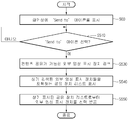
도 4는 본 발명의 실시예에 따른 컨텐츠 공유 방법을 나타내는 흐름도이다.
도 5 내지 도 9는 컨텐츠 공유를 위해 사용자에게 제공되는 유저 인터페이스(UI, User Interface)에 대한 실시예들을 나타내는 도면들이다.
도 10 내지 도 13은 컨텐츠 공유 상태 정보를 표시하는 방법에 대한 실시예을 나타내는 도면들이다.1 is a block diagram showing a first embodiment of the configuration of a content sharing system.
2 is a block diagram illustrating a second embodiment of a configuration of a content sharing system.
3 is a block diagram illustrating a configuration of a video display device according to an embodiment of the present invention.
4 is a flowchart illustrating a content sharing method according to an embodiment of the present invention.
5 to 9 are diagrams illustrating embodiments of a user interface (UI) provided to a user for content sharing.
10 to 13 illustrate embodiments of a method of displaying content sharing state information.
이하, 첨부된 도면을 참조하여 본 발명의 실시예에 따른 컨텐츠 공유 방법 및 그를 이용한 영상 표시 장치에 관하여 상세히 설명한다.Hereinafter, a content sharing method and an image display apparatus using the same according to an embodiment of the present invention will be described in detail with reference to the accompanying drawings.
이하 첨부 도면들 및 첨부 도면들에 기재된 내용들을 참조하여 본 발명의 실시예를 상세하게 설명하지만, 본 발명이 실시예들에 의해 제한되거나 한정되는 것은 아니다.Hereinafter, embodiments of the present invention will be described in detail with reference to the accompanying drawings and the contents described in the accompanying drawings, but the present invention is not limited or limited to the embodiments.
본 명세서에서 사용되는 용어는 본 발명에서의 기능을 고려하면서 가능한 현재 널리 사용되는 일반적인 용어를 선택하였으나, 이는 당분야에 종사하는 기술자의 의도 또는 관례 또는 새로운 기술의 출현 등에 따라 달라질 수 있다. 또한 특정한 경우는 출원인이 임의로 선정한 용어도 있으며, 이 경우 해당되는 발명의 설명 부분에서 그 의미를 기재할 것이다. 따라서 본 명세서에서 사용되는 용어는, 단순한 용어의 명칭이 아닌 그 용어가 가지는 실질적인 의미와 본 명세서의 전반에 걸친 내용을 토대로 해석되어야 함을 밝혀두고자 한다.As used herein, terms used in the present invention are selected from general terms that are widely used in the present invention while taking into account the functions of the present invention, but these may vary depending on the intention or custom of a person skilled in the art or the emergence of new technologies. In addition, in certain cases, there is a term arbitrarily selected by the applicant, and in this case, the meaning will be described in the corresponding description of the invention. Therefore, it is intended that the terminology used herein should be interpreted based on the meaning of the term rather than on the name of the term, and on the entire contents of the specification.
도 1은 컨텐츠 공유 시스템의 구성에 대한 제1 실시예를 블록도로 도시한 것으로, 도시된 시스템은 복수의 영상 표시 장치들(10, 20)을 포함할 수 있다.FIG. 1 is a block diagram illustrating a first embodiment of a configuration of a content sharing system. The illustrated system may include a plurality of
도 1을 참조하면, 제1 영상 표시 장치(10)와 제2 영상 표시 장치(20)는 유무선 네트워크를 통해 연결되어 컨텐츠 데이터를 송수신함으로써, 특정 컨텐츠를 서로 공유할 수 있다.Referring to FIG. 1, the first
예를 들어, 제1, 2 영상 표시 장치들(10, 20)은 DLNA(Digital Living Network Alliance), WiFi(Wireless Lan), WiHD(Wireless HD), WHDi(Wireless Home Digital Interface), 블루투스(Blutooth), 지그비(ZigBee), 바이너리 CDMA(binary Code Division Multiple Access), DiiVA(Digital Interactive Interface for Video & Audio) 등과 같은 다양한 통신 규격을 이용해 서로 연결되어 컨텐츠 데이터를 송수신할 수 있다.For example, the first and second
또한, 제1, 2 영상 표시 장치들(10, 20)이 각각 인터넷 등과 같은 유무선 네트워크를 통해 미디어 서버(30)에 연결되고, 상기 미디어 서버(30)를 통해 컨텐츠 데이터를 송수신함으로써 컨텐츠를 공유할 수도 있다.In addition, the first and second
한편, 제1, 2 영상 표시 장치들(10, 20)은 각각 네트워크 TV, HBBTV 또는 스마트 TV 등과 같은 디지털 TV이거나, 또는 PC, 노트북 컴퓨터, 스마트폰과 같은 이동통신 단말기, 태블릿 PC 등과 같이 다양한 장치일 수 있다.Meanwhile, the first and second
도 1을 참조하여 설명한 바와 같은 컨텐츠 공유 시스템을 이용하여, TV, PC, 태블릿PC, 스마트폰 등 다양한 기기들에서 하나의 컨텐츠를 끊김 없이 이용할 수 있게 해주는 'N-스크린' 서비스가 제공될 수 있다.By using the content sharing system as described with reference to FIG. 1, an 'N-screen' service may be provided that enables a single content to be seamlessly used on various devices such as a TV, a PC, a tablet PC, and a smartphone. .
예를 들어, 사용자는 TV로 시청하던 방송이나 영화를 다른 스마트폰이나 태블릿 PC에서 이어 볼 수 있으며, 그뿐 아니라 TV로 드라마를 시청하면서 해당 드라마와 관련된 추가 정보를 스마트폰이나 태블릿 PC로 볼 수 있다.For example, a user can watch a broadcast or a movie on a TV via another smartphone or a tablet PC, and can view additional information related to the drama on a smartphone or a tablet PC while watching a drama on a TV .
상기한 바와 같은 'N-스크린' 서비스를 이용하여, 제1, 2 영상 표시 장치들(10, 20) 사이에 컨텐츠 파일을 공유(file share)하거나 또는 어느 한 영상 표시 장치의 화면 자체를 공유(screen share)할 수도 있다.By using the 'N-screen' service as described above, the content file is shared between the first and second
그를 위해, 제1 영상 표시 장치(10)는, 사용자의 요청에 따라, 외부로부터 수신되거나 내부에 저장된 컨텐츠를 상기한 바와 같은 다양한 통신 방식을 이용해 제2 영상 표시 장치(20)로 전송할 수 있다.To this end, the first
또한, 사용자가 구매한 컨텐츠는 미디어 서버(30)에 저장되어, 인터넷을 통해 미디어 서버(30)로부터 컨텐츠를 다운로드함으로써, 사용자는 제1, 2 영상 표시 장치들(10, 20) 중 원하는 영상 표시 장치에서 필요에 따라 컨텐츠를 재생시킬 수 있다.In addition, the content purchased by the user is stored in the
도 2는 컨텐츠 공유 시스템의 구성에 대한 제2 실시예를 블록도로 도시한 것으로, 도 2에 도시된 컨텐츠 공유 시스템의 구성 중 도 1을 참조하여 설명한 것과 동일한 것에 대한 설명은 이하 생략하기로 한다.FIG. 2 is a block diagram illustrating a second embodiment of a configuration of a content sharing system, and a description of the same elements as those described with reference to FIG. 1 among the configurations of the content sharing system illustrated in FIG. 2 will be omitted below.
도 2를 참조하면, 영상 표시 장치(100)는 복수의 외부 기기들(400, 410, 420)과 연결되어 영상 신호 및 음성 신호 등을 포함하는 컨텐츠를 수신할 수 있다. 그를 위해, 영상 표시 장치(100)는 외부 기기들(400, 410, 420)과의 데이터 송수신을 위한 HDMI, USB, 컴포넌트, RGB 등의 입출력 단자들을 포함할 수 있다.Referring to FIG. 2, the
예를 들어, 외부 기기들(400, 410, 420)은 DVD 플레이어, 디빅스(Dvix) 플레이어 또는 블루 레이(Blu-ray) 플레이어 등과 같은 영상 재생 장치, IPTV 셋탑 박스, 케이블(cable) 셋탑 박스 또는 위성 셋탑 박스 등과 같은 셋탑 박스, PC, 게임기, 홈씨어터, 휴대용 단말기, 하드 디스크 레코더(HDD recoder), USB 메모리 등 다양한 장치일 수 있다.For example, the
그러나, 본 발명에 따른 영상 표시 장치(100)에 연결되는 외부 기기들(400, 410, 420)은 상기한 바와 같은 장치들에 한정되지 아니하며, 영상 표시 장치(100)와 연결되어 영상 신호 등을 전송할 수 있는 다양한 장치일 수 있다.However, the
또한, 영상 표시 장치(100)는 튜너(미도시) 등을 이용하여 방송 신호를 ㅅ수수신하거나, WiFi, WiHD, WHDi, Blutooth, ZigBee, 바이너리 CDMA, DiiVA 등과 같은 다양한 통신 규격을 이용해 외부 기기로부터 컨텐츠를 전송받거나, 도 1에 도시된 바와 같은 미디어 서버(30)로부터 인터넷을 이용해 컨텐츠를 다운로드할 수 있다.Also, the
한편, 상기한 바와 같이 외부로부터 수신된 컨텐츠를 영상 표시 장치(100)의 내부 또는 그에 연결된 저장 장치(미도시)에 저장된 후, 사용자의 요청에 따라 재생될 수 있다.Meanwhile, as described above, the content received from the outside may be stored in the
본 발명의 실시예에 따르면, 영상 표시 장치(100)는 상기한 바와 같이 외부로부터 입력되거나 또는 내부에 저장되어 있는 컨텐츠를 재생하고 있는 도중에, 원격 제어 장치(200)를 이용한 사용자의 요청에 의해 상기 재생 중인 컨텐츠를 복수의 외부 영상 표시 장치들(300, 310, 320) 중 적어도 하나로 전송하여 해당 컨텐츠가 다른 외부 영상 표시 장치에서 계속하여 재생되도록 할 수 있다.According to an exemplary embodiment of the present invention, the
그를 위해, 사용자는 원격 제어 장치(200)를 이용하여 영상 표시 장치(100)와 컨텐츠 공유가 가능한 외부 영상 표시 장치들(300, 310, 320) 중 어느 하나를 선택하여, 상기 선택된 외부 영상 표시 장치로 컨텐츠가 전송되도록 할 수 있다.To this end, the user selects any one of the external
도 3은 본 발명의 실시예에 따른 영상 표시 장치의 구성을 블록도로 도시한 것으로, 디스플레이 장치(100)는 방송 수신부(130), 외부장치 인터페이스부(135), 저장부(140), 사용자입력 인터페이스부(150), 제어부(170), 디스플레이부(180), 오디오 출력부(185), 전원공급부(190)를 포함할 수 있다. 한편, 방송 수신부(130)는 튜너(131), 복조부(132) 및 네트워크 인터페이스부(133)를 포함할 수 있다. 3 is a block diagram illustrating a configuration of an image display apparatus according to an exemplary embodiment of the present invention. The
도 3을 참조하면, 튜너(131)는 안테나를 통해 수신되는 RF(Radio Frequency) 방송 신호 중 사용자에 의해 선택된 채널 또는 기저장된 모든 채널에 해당하는 RF 방송 신호를 선택하며, 상기 선택된 RF 방송 신호를 중간 주파수 신호 혹은 베이스 밴드 영상 또는 음성신호로 변환할 수 있다.Referring to FIG. 3, the tuner 131 selects an RF broadcast signal corresponding to a channel selected by a user or all pre-stored channels from a radio frequency (RF) broadcast signal received through an antenna, and selects the selected RF broadcast signal. It can be converted into an intermediate frequency signal or a baseband video or audio signal.
복조부(132)는 튜너(131)에서 변환된 디지털 IF 신호(DIF)를 수신하여 복조 동작을 수행할 수 있다. 예를 들어, 튜너(131)에서 출력되는 디지털 IF 신호가 ATSC 방식인 경우, 복조부(132)는 8-VSB(8-Vestigal Side Band) 복조를 수행할 수 있다.The demodulator 132 may perform a demodulation operation by receiving the digital IF signal DIF converted by the tuner 131. For example, when the digital IF signal output from the tuner 131 is an ATSC scheme, the demodulator 132 may perform 8-VSB (8-Vestigal Side Band) demodulation.
또한, 복조부(132)는 채널 복호화를 수행할 수도 있으며, 그를 위해 트렐리스 디코더(Trellis Decoder), 디인터리버(De-interleaver), 및 리드 솔로먼 디코더(Reed Solomon Decoder) 등을 구비하여 트렐리스 복호화, 디인터리빙, 및 리드 솔로먼 복호화를 수행할 수 있다.In addition, the demodulator 132 may perform channel decoding, and includes a trellis decoder, a de-interleaver, a reed solomon decoder, and the like. Release decoding, deinterleaving, and read solo decoding may be performed.
복조부(132)는 복조 및 채널 복호화를 수행한 후 스트림 신호(TS)를 출력할 수 있으며, 상기 스트림 신호는 영상 신호, 음성 신호 또는 데이터 신호가 다중화된 신호일 수 있다.The demodulator 132 may output a stream signal TS after demodulation and channel decoding, and the stream signal may be a signal multiplexed with a video signal, an audio signal, or a data signal.
예를 들어, 상기 스트림 신호는 MPEG-2 규격의 영상 신호, 돌비(Dolby) AC-3 규격의 음성 신호 등이 다중화된 MPEG-2 TS(Transport Stream)일수 있다. 구체적으로, 상기 MPEG-2 TS는 4 바이트(byte)의 헤더와 184 바이트의 페이로드(payload)를 포함할 수 있다.For example, the stream signal may be an MPEG-2 Transport Stream (TS) multiplexed with an MPEG-2 standard video signal, a Dolby AC-3 standard audio signal, and the like. In detail, the MPEG-2 TS may include a header of 4 bytes and a payload of 184 bytes.
복조부(132)로부터 출력된 상기 스트림 신호는 제어부(170)로 입력될 수 있으며, 제어부(170)는 역다중화, 영상/음성 신호 처리 등을 수행한 후 디스플레이부(180)에 영상을 출력하고, 오디오 출력부(185)로 음성을 출력할 수 있다.The stream signal output from the demodulator 132 may be input to the
외부장치 인터페이스부(135)는 외부 장치와 디스플레이 장치(100)를 접속할 수 있으며, 그를 위해 A/V 입출력부(미도시) 또는 무선 통신부(미도시) 등을 포함할 수 있다.The external
외부장치 인터페이스부(135)는 DVD(Digital Versatile Disk), 블루레이(Blu ray), 게임기기, 카메라, 캠코더, 컴퓨터(노트북) 등과 같은 외부 장치와 유/무선으로 접속될 수 있다.The external
또한, 외부장치 인터페이스부(135)는 연결된 외부 장치를 통하여 외부에서 입력되는 영상, 음성 또는 데이터 신호를 디스플레이 장치(100)의 제어부(170)로 전달하며, 제어부(170)에서 처리된 영상, 음성 또는 데이터 신호를 연결된 외부 장치로 출력할 수 있다.In addition, the external
상기 A/V 입출력부는 외부 장치의 영상 및 음성 신호를 디스플레이 장치(100)로 입력할 수 있도록, USB 단자, CVBS(Composite Video Banking Sync) 단자, 컴포넌트 단자, S-비디오 단자(아날로그), DVI(Digital Visual Interface) 단자, HDMI(High Definition Multimedia Interface) 단자, RGB 단자, D-SUB 단자 등을 포함할 수 있다.The A / V input / output unit may use a USB terminal, a Composite Video Banking Sync (CVBS) terminal, a component terminal, an S-video terminal (analog), and a DVI to input video and audio signals of an external device to the
한편, 상기 무선 통신부는 다른 전자기기와 근거리 무선 통신을 수행할 수 있다. 예를 들어, 디스플레이 장치(100)는 블루투스(Bluetooth), RFID(Radio Frequency Identification), 적외선 통신(IrDA, infrared Data Association), UWB(Ultra Wideband), 지그비(ZigBee), DLNA (Digital Living Network Alliance) 등의 통신 규격에 따라 다른 전자기기와 네트워크 연결될 수 있다.The wireless communication unit may perform short range wireless communication with another electronic device. For example, the
또한, 외부장치 인터페이스부(135)는 다양한 셋탑 박스와 상술한 각종 단자 중 적어도 하나를 통해 접속되어, 셋탑 박스와 입력/출력 동작을 수행할 수도 있다. In addition, the external
한편, 외부장치 인터페이스부(135)는 인접하는 외부 장치 내의 애플리케이션 또는 애플리케이션 목록을 수신하여, 제어부(170) 또는 저장부(140)로 전달할 수 있다.Meanwhile, the external
네트워크 인터페이스부(133)는 디스플레이 장치(100)를 인터넷망을 포함하는 유/무선 네트워크와 연결하기 위한 인터페이스를 제공할 수 있다. 예를 들어, 네트워크 인터페이스부(133)는 유선 네트워크와의 접속을 위해 이더넷(Ethernet) 단자 등을 구비할 수 있으며, WiFi, WiHD, WHDi, Blutooth, ZigBee, 바이너리 CDMA, DiiVA, Wibro, Wimax, HSDPA 통신 규격 등을 이용하여 무선 네트워크에 접속할 수 있다.The network interface unit 133 may provide an interface for connecting the
한편, 네트워크 인터페이스부(133)는 접속된 네트워크 또는 접속된 네트워크에 링크된 다른 네트워크를 통해, 다른 사용자 또는 다른 전자 기기와 데이터를 송신 또는 수신할 수 있다. Meanwhile, the network interface unit 133 may transmit or receive data with another user or another electronic device through the connected network or another network linked to the connected network.
또한, 디스플레이 장치(100)에 미리 등록된 다른 사용자 또는 다른 전자 기기 중 선택된 사용자 또는 선택된 전자기기에, 디스플레이 장치(100)에 저장된 일부의 컨텐츠 데이터를 송신할 수 있다.In addition, some content data stored in the
네트워크 인터페이스부(133)는 접속된 네트워크 또는 접속된 네트워크에 링크된 다른 네트워크를 통해, 소정 웹 페이지에 접속할 수 있다. 즉, 네트워크를 통해 소정 웹 페이지에 접속하여, 해당 서버와 데이터를 송신 또는 수신할 수 있다.The network interface unit 133 may access a predetermined web page through a connected network or another network linked to the connected network. That is, by accessing a predetermined web page through the network, it is possible to send or receive data with the server.
그리고, 네트워크 인터페이스부(133)는 컨텐츠 제공자 또는 네트워크 운영자가 제공하는 컨텐츠 또는 데이터들을 수신할 수 있다. 즉, 네트워크 인터페이스부(133)는 네트워크를 통하여 컨텐츠 제공자 또는 네트워크 제공자로부터 제공되는 영화, 광고, 게임, VOD, 방송 신호 등의 컨텐츠 및 그와 관련된 정보를 수신할 수 있다.In addition, the network interface unit 133 may receive content or data provided by a content provider or a network operator. That is, the network interface unit 133 may receive content such as a movie, an advertisement, a game, a VOD, a broadcast signal, and related information provided from a content provider or a network provider through a network.
또한, 네트워크 인터페이스부(133)는 네트워크 운영자가 제공하는 펌웨어의 업데이트 정보 및 업데이트 파일을 수신할 수 있으며, 인터넷 또는 컨텐츠 제공자 또는 네트워크 운영자에게 데이터들을 송신할 수 있다.In addition, the network interface unit 133 may receive the update information and the update file of the firmware provided by the network operator, and may transmit data to the Internet or the content provider or the network operator.
네트워크 인터페이스부(133)는 네트워크를 통해, 공중에 공개(open)된 애플리케이션들 중 원하는 애플리케이션을 선택하여 수신할 수 있다. The network interface unit 133 may select and receive a desired application from among applications that are open to the public through the network.
저장부(140)는 제어부(170) 내의 각 신호 처리 및 제어를 위한 프로그램이 저장하고, 신호 처리된 영상, 음성 또는 데이터신호를 저장할 수 있다.The
또한, 저장부(140)는 외부장치 인터페이스부(135) 또는 네트워크 인터페이스부(133)로부터 입력되는 영상, 음성, 또는 데이터 신호의 임시 저장을 위한 기능을 수행할 수도 있으며, 채널 기억 기능을 통하여 소정 방송 채널에 관한 정보를 저장할 수도 있다.In addition, the
디스플레이 장치(100)는 저장부(140) 내에 저장되어 있거나, 튜너부(110), 네트워크 인터페이스부(135) 또는 외부장치 인터페이스부(130)를 통해 외부로부터 수신되는 컨텐츠(동영상, 정지영상, 음악, 문서, 애플리케이션 등)을 재생하여 사용자에게 제공할 수 있다.The
사용자입력 인터페이스부(150)는 사용자가 입력한 신호를 제어부(170)로 전달하거나, 제어부(170)로부터의 신호를 사용자에게 전달할 수 있다. 예를 들어, 사용자입력 인터페이스부(150)는 RF(Radio Frequency) 통신 방식 또는 적외선(IR) 통신 방식 등 다양한 통신 방식에 따라, 원격제어장치(200)로부터 전원 온/오프, 채널 선택, 화면 설정 등의 제어 신호를 수신하여 처리하거나, 제어부(170)로부터의 제어 신호를 원격제어장치(200)로 송신하도록 처리할 수 있다.The user
또한, 사용자입력 인터페이스부(150)는, 전원키, 채널키, 볼륨키, 설정치 등의 로컬키(미도시)에서 입력되는 제어 신호를 제어부(170)에 전달할 수 있다.In addition, the user
예를 들어, 사용자입력 인터페이스부(150)는 사용자의 제스처를 센싱하는 센싱부(미도시)로부터 입력되는 제어 신호를 제어부(170)에 전달하거나, 제어부(170)로부터의 신호를 센싱부(미도시)로 송신할 수 있다. 한편, 상기 센싱부(미도시)는 터치 센서, 음성 센서, 위치 센서, 동작 센서 등을 포함할 수 있다. For example, the user
제어부(170)는 튜너(131) 또는 복조부(132) 또는 외부장치 인터페이스부(135)로부터 입력되는 스트림을 역다중화하거나, 역다중화된 신호들을 처리하여, 영상 또는 음성 출력을 위한 신호를 생성 및 출력할 수 있다.The
제어부(170)에서 영상 처리된 영상 신호는 디스플레이부(180)로 입력되어 해당 영상 신호에 대응하는 영상으로 표시될 수 있다. 또한, 제어부(170)에서 영상 처리된 영상 신호는 외부장치 인터페이스부(135)를 통하여 외부 출력장치로 입력될 수 있다.The image signal processed by the
제어부(170)에서 처리된 음성 신호는 오디오 출력부(185)로 오디오 출력될 수 있다. 또한, 제어부(170)에서 처리된 음성 신호는 외부장치 인터페이스부(135)를 통하여 외부 출력장치로 입력될 수 있다. The audio signal processed by the
도 3에서는 도시되어 있지 않으나, 제어부(170)는 역다중화부, 영상처리부 등을 포함할 수 있다.Although not shown in FIG. 3, the
그 외, 제어부(170)는, 디스플레이 장치(100) 내의 전반적인 동작을 제어할 수 있다. 예를 들어, 제어부(170)는, 튜너(131)를 제어하여, 사용자가 선택한 채널 또는 기저장된 채널에 해당하는 RF 방송을 선택(Tuning)하도록 제어할 수 있다. In addition, the
또한, 제어부(170)는 사용자입력 인터페이스부(150)를 통하여 입력된 사용자 명령 또는 내부 프로그램에 의하여 디스플레이 장치(100)를 제어할 수 있으며, 네트워크에 접속하여 사용자가 원하는 애플리케이션 또는 애플리케이션 목록을 디스플레이 장치(100) 내로 다운받을 수 있도록 할 수 있다.In addition, the
예를 들어, 제어부(170)는 사용자입력 인터페이스부(150)를 통하여 수신한 소정 채널 선택 명령에 따라 선택한 채널의 신호가 입력되도록 튜너(131)를 제어하며, 선택한 채널의 영상, 음성 또는 데이터 신호를 처리할 수 있다.For example, the
제어부(170)는 사용자가 선택한 채널 정보 등이 처리한 영상 또는 음성신호와 함께 디스플레이부(180) 또는 오디오 출력부(185)를 통하여 출력될 수 있도록 한다.The
또한, 제어부(170)는 사용자입력 인터페이스부(150)를 통하여 수신한 외부장치 영상 재생 명령에 따라, 외부장치 인터페이스부(135)를 통하여 입력되는 외부 장치, 예를 들어, 카메라 또는 캠코더로부터의, 영상 신호 또는 음성 신호가 디스플레이부(180) 또는 오디오 출력부(185)를 통해 출력될 수 있도록 한다.In addition, the
한편, 제어부(170)는 영상을 표시하도록 디스플레이부(180)를 제어할 수 있으며, 예를 들어 튜너(131)를 통해 입력되는 방송 영상, 또는 외부장치 인터페이스부(135)를 통해 입력되는 외부 입력 영상, 또는 네트워크 인터페이스부를 통해 입력되는 영상, 또는 저장부(140)에 저장된 영상이 디스플레이부(180)에서 표시되도록 제어할 수 있다. 이 경우, 디스플레이부(180)에 표시되는 영상은 정지 영상 또는 동영상일 수 있으며, 2D 영상 또는 3D 영상일 수 있다.Meanwhile, the
또한, 제어부(170)는 디스플레이 장치(100) 내에 저장된 컨텐츠, 또는 수신된 방송 컨텐츠, 외부로 부터 입력되는 외부 입력 컨텐츠가 재생되도록 제어할 수 있으며, 상기 컨텐츠는 방송 영상, 외부 입력 영상, 오디오 파일, 정지 영상, 접속된 웹 화면, 및 문서 파일 등 다양한 형태일 수 있다.In addition, the
본 발명의 실시예에 따르면, 영상 표시 장치(100)는 화면상에 표시된 컨텐츠 공유를 위한 오브젝트가 사용자에 의해 선택되는 경우, 컨텐츠 공유가 가능한 외부 영상 표시 장치들을 검색하여 리스트를 표시하고, 상기 리스트 중 적어도 하나의 외부 영상 표시 장치를 사용자로부터 선택받을 수 있다.According to an embodiment of the present invention, when the object for content sharing displayed on the screen is selected by the user, the
이하, 도 4 내지 도 13을 참조하여, 본 발명의 실시예에 따른 컨텐츠 공유 방법에 관하여 상세히 설명하기로 한다.Hereinafter, a content sharing method according to an embodiment of the present invention will be described in detail with reference to FIGS. 4 to 13.
도 4는 본 발명의 실시예에 따른 컨텐츠 공유 방법을 흐름도로 도시한 것으로, 도시된 컨텐츠 공유 방법을 도 2 및 도 3에 도시된 블록도들과 결부시켜 설명하기로 한다.FIG. 4 is a flowchart illustrating a content sharing method according to an embodiment of the present invention. The illustrated content sharing method will be described with reference to the block diagrams shown in FIGS. 2 and 3.
도 4를 참조하면, 영상 표시 장치(100)의 디스플레이부(180)는 화면상에서 'Send to' 아이콘을 표시한다(S500 단계).Referring to FIG. 4, the
예를 들어, 영상 표시 장치(100)에서 컨텐츠가 재생되고 있는 도중에, 원격 제어 장치(200)를 이용한 사용자의 요청에 응답하여 영상 표시 장치(100)의 화면상에 외부 영상 표시 장치와 컨텐츠를 공유하기 위한 오브젝트인 'Send to' 아이콘이 표시될 수 있다.For example, while content is being played on the
도 5를 참조하면, 사용자가 원격 제어 장치(200)를 이용해 영상 표시 장치(100)의 화면(600)에 표시되는 포인터(50)를 화면(600) 하단의 일정 영역에 위치시키는 경우, 화면(600) 하단에 컨텐츠 메뉴 창(610)이 표시될 수 있다.Referring to FIG. 5, when the user places the
컨텐츠 메뉴 창(610)은 컨텐츠의 재생 상태를 나타내기 위한 프로그래시브 바(615)와 선택 가능한 복수의 아이콘들(612 내지 614)을 포함할 수 있다.The
컨텐츠 메뉴 창(610)에 포함된 'Send to' 아이콘(611)은 현재 재생되고 있는 컨텐츠를 다른 외부 영상 표시 장치로 전송해 공유하기 위한 오브젝트이며, 'Chapter' 아이콘(612)은 상기 컨텐츠에 대한 챕터 정보를 확인하여 특정 챕터를 선택하기 위한 오브젝트이고, '3D' 아이콘(613)은 상기 컨텐츠를 3차원 입체 영상으로 재생하도록 하기 위한 오브젝트이며, 'Option' 아이콘(614)은 상기 컨텐츠의 재생과 관련된 설정을 수행하기 위한 오브젝트이다.The 'Send to'
도 5에 도시된 복수의 아이콘들(612 내지 614)은 컨텐츠 메뉴 창(610)의 구성에 대한 일예로서, 컨텐츠 메뉴 창(610)은 'Send to' 아이콘(611)을 포함하는 보다 다양한 오브젝트들로 구성될 수 있다.The plurality of
그 후, 영상 표시 장치(100)의 제어부(170)는 상기 'Send to' 아이콘이 선택되면(S510 단계), 컨텐츠 공유가 가능한 외부 영상 표시 장치들을 검색하여(S530 단계), 상기 검색된 외부 영상 표시 장치들을 포함하는 공유 장치 리스트를 표시한다(S540 단계).After that, when the 'Send to' icon is selected (step S510), the
도 6 및 도 7을 참조하면, 사용자가 포인터(50)를 이용해 컨텐츠 메뉴 창(610)에 표시된 'Send to' 아이콘(611)을 선택하면, 재생 중이던 컨텐츠가 일시 정지되고, 영상 표시 장치(100)와 컨텐츠 공유가 가능한 외부 영상 표시 장치들에 대한 공유 장치 리스트가 화면(600)에 표시될 수 있다. 6 and 7, when the user selects the 'Send to'
예를 들어, 'Send to' 아이콘(611)이 선택되면, 제어부(170)가 네트워크 인터페이스부(135)를 통해 컨텐츠 공유가 가능한, 즉 컨텐츠 데이터의 수신 및 재생이 가능한 외부 영상 표시 장치들을 검색하고, 상기 검색된 외부 영상 표시 장치들 중 어느 하나를 사용자로부터 선택받기 위한 외부 장치 선택 창(620)이 화면(600)에 표시될 수 있다.For example, when the 'Send to'
한편, 외부 장치 선택 창(620)은 상기 검색된 외부 영상 표시 장치들에 각각 대응되는 장치 아이콘들(621 내지 625)과, 일시 정지된 컨텐츠 영상의 썸네일 이미지(627)를 포함할 수 있다.The external device selection window 620 may include
또한, 영상 표시 장치(100)는 전원이 오프(off) 상태인 외부 영상 표시 장치에 대해서도 검색이 가능하며, 그에 따라 상기 공유 장치 리스트는 상기 전원이 오프 상태인 외부 영상 표시 장치도 포함할 수 있다.In addition, the
그를 위해, 상기 외부 영상 표시 장치는 전원이 오프 상태이더라도 영상 표시 장치(100)로부터 검색 신호를 수신하여 그에 응답할 수 있도록 통신 모듈(미도시)에는 전원이 공급되는 상태를 유지할 수 있다.To this end, the external image display device may maintain a state in which power is supplied to a communication module (not shown) so that the search signal may be received from the
이 경우, 상기 전원 오프 상태인 외부 영상 표시 장치가 사용자에 의해 선택되면, 영상 표시 장치(100)는 상기 선택된 외부 영상 표시 장치의 전원을 온(on) 시키기 위한 'Wake up' 메시지를 해당 외부 영상 표시 장치로 전송할 수 있으며, 그에 따라 상기 선택된 외부 영상 표시 장치는 상기 'Wake up' 메시지에 따라 전원이 온 된 후 영상 표시 장치(100)로부터 컨텐츠를 전송받을 수 있다.In this case, when the external image display device which is in the power off state is selected by the user, the
도 8을 참조하면, 상기 530 단계에서 검색된 외부 영상 표시 장치가 존재하지 않는 경우, 'Send to' 아이콘(611)의 표시를 종료시켜 화면(600)에서 사라지도록 하거나, 또는 비활성화시켜, 사용자에 의해 선택될 수 없도록 할 수 있다.Referring to FIG. 8, when the external image display apparatus found in step 530 does not exist, the display of the 'Send to'
한편, 상기 컨텐츠 공유가 가능한 외부 영상 표시 장치들을 검색하는 작업은 'Send to' 아이콘(611)에 대한 선택 여부에 관계없이, 미리 설정된 주기에 따라 반복하여 수행될 수 있다.Meanwhile, the searching of the external image display apparatuses capable of sharing the content may be repeatedly performed according to a preset period regardless of whether the 'Send to'
상기 검색 결과에 따라, 검색된 외부 영상 표시 장치가 존재하면 'Send to' 아이콘(611)을 활성화시키고, 검색된 외부 영상 표시 장치가 존재하지 않으면 'Send to' 아이콘(611)을 사라지게 하거나 비활성화시킬 수 있다.According to the search result, the 'Send to'
그 후, 영상 표시 장치(100)의 사용자 인터페이스부(150)는 사용자로부터 상기 표시된 공유 장치 리스트에 포함된 외부 영상 표시 장치들 중에서 어느 하나를 선택받는다(S550 단계).Thereafter, the
도 9를 참조하면, 사용자는 외부 장치 선택 창(620)에 포함된 장치 아이콘들(621 내지 625) 중 어느 하나인 'TV 2' 아이콘(623)을 선택하여, 영상 표시 장치(100)에서 재생중인 컨텐츠가 상기 'TV 2'로 전송되도록 할 수 있다.Referring to FIG. 9, a user selects a 'TV 2'
본 발명의 또 다른 실시예에 따르면, 영상 표시 장치(100) 또는 공유 장치 리스트 중에서 선택된 외부 영상 표시 장치에 대한 공유 상태 정보가 영상 표시 장치(100)의 화면(600)에 표시될 수 있다.According to another embodiment of the present invention, sharing state information about the external image display device selected from the
상기 공유 상태 정보는 도 4 내지 도 9를 참조하여 설명한 바와 같은 방법에 따라 사용자에 의해 요청된 컨텐츠 공유 작업의 현재 진행 상태나 컨텐츠 공유와 관련하여 사용자에게 필요한 사항 등을 포함할 수 있다.The sharing state information may include a current progress state of a content sharing task requested by the user or items necessary for the content sharing, etc. according to the method described with reference to FIGS. 4 to 9.
도 10을 참조하면, 컨텐츠 전송이 시작되어 외부 영상 표시 장치에서 컨텐츠 재생이 이루어지고 있는 동안에는, 외부 영상 표시 장치(예를 들어, 상기 선택된 'TV 2')에서의 재생이 계속되도록 하기 위해 영상 표시 장치(100)의 전원 온 상태를 유지하여야 함을 알리는 팝업 창(630)이 화면(600)에 표시될 수 있다.Referring to FIG. 10, while content transmission starts and content playback is performed on an external video display device, the video display is continued so that playback on the external video display device (for example, the selected TV 2) is continued. A pop-up
도 11을 참조하면, 컨텐츠 공유를 위한 외부 영상 표시 장치와의 네트워크에 오류가 있는 경우, 컨텐츠 공유에 오류가 있음을 알리기 위한 팝업 창(630)이 화면(600)에 표시될 수 있다.Referring to FIG. 11, when there is an error in a network with an external image display device for content sharing, a pop-up
한편, 컨텐츠를 공유할 외부 영상 표시 장치가 사용자에 의해 선택되면, 영상 표시 장치(100)는 상기 선택된 외부 영상 표시 장치로 컨텐츠 공유 요청(request) 메시지를 전송하고, 상기 요청 메시지에 대한 응답 메시지를 상기 외부 영상 표시 장치로부터 수신할 수 있다.Meanwhile, when an external video display device to share content is selected by the user, the
도 12를 참조하면, 상기 선택된 외부 영상 표시 장치의 화면(700)에는 영상 표시 장치(100), 즉 'TV 1'으로부터 컨텐츠 공유 요청이 수신되었음을 알리고 해당 컨텐츠를 수신할 것인지 여부를 사용자로부터 선택받기 위한 팝업 창(710)이 표시될 수 있다.Referring to FIG. 12, the
이 경우, 사용자가 팝업 창(710)의 '수락' 버튼을 선택하면 그에 상응하는 응답 메시지가 영상 표시 장치(100)로 전송되어 컨텐츠 송수신을 통한 공유가 시작되고, 상기 컨텐츠의 다운로드 진행 상황이 프로그래시브 바 등을 이용하여 상기 외부 영상 표시 장치의 화면(700) 상에 표시될 수 있다.In this case, when the user selects the 'accept' button of the pop-up
한편, 사용자가 팝업 창(710)의 '거절' 버튼을 선택하는 경우, 그에 상응하는 응답 메시지가 영상 표시 장치(100)로 전송되어, 도 13에 도시된 바와 같이 선택된 외부 영상 표시 장치에서 컨텐츠 공유가 거절되었음을 알리기 위한 팝업 창(630)이 영상 표시 장치(100)의 화면(600)상에 표시될 수 있다.Meanwhile, when the user selects the 'decline' button of the pop-up
상기한 바와 같은 방법에 의해 컨텐츠 공유가 시작된 후 컨텐츠 전송이 완료되면, 영상 표시 장치(100)에서 일시 정지되었던 컨텐츠의 재생이 계속되거나, 또는 미리 설정된 조건에 따라 영상 표시 장치(100)의 전원이 오프되거나 슬립(sleep) 모드로 전환될 수 있다.When content transmission is completed after content sharing is started by the above-described method, playback of the content that has been paused in the
예를 들어, 거실에 위치하는 'TV 1'에서 재생되는 컨텐츠를 안방에 위치하는 'TV 2'로 전송하여 공유하는 경우, 사용자의 위치를 감지하여 사용자가 거실에서 안방으로 이동하면 상기 'TV 1'의 전원을 슬립 모드로 전환시키거나, 또는 사용자가 상기 공유된 컨텐츠에 대한 시청을 종료한 후 상기 'TV 2'의 전원을 오프시키면 상기 'TV 1'의 전원도 함께 오프되도록 제어할 수 있다.For example, when the content played on the
또한, 컨텐츠 공유 중 영상 표시 장치(100)에서 재생되는 컨텐츠가 변경되는 경우, 외부 영상 표시 장치로 전송되어 공유되는 컨텐츠에는 영향을 미치지 않을 수 있다.In addition, when the content played back on the
예를 들어, 'TV 1'에서 시청하는 'CH.1' 방송 프로그램이 'TV 2'로 전송되어 공유되고 있는 도중에, 'TV 1'의 방송 채널이 'CH.2'로 전환되는 경우에도, 상기 'CH.1' 방송 프로그램에 대한 'TV 1'으로부터 'TV 2'로의 전송 및 'TV 2'에서의 재생을 계속될 수 있으며, 그를 위해 영상 표시 장치(100)는 2 이상의 튜너들을 구비할 수 있다.For example, even when a broadcast program of 'CH.1' watched on 'TV 1' is transmitted to 'TV 2' and is shared, the broadcast channel of 'TV 1' is switched to 'CH.2', Transmission from 'TV 1' to 'TV 2' and playback on 'TV 2' for the 'CH.1' broadcasting program may be continued, and for this, the
이 경우, 라이브 방송을 다른 외부 영상 표시 장치로 전송하기 위해, 영상 표시 장치(100)는 파일 형태로 스트리밍 서비스를 제공할 수 있다.In this case, in order to transmit the live broadcast to another external video display device, the
한편, 외부 영상 표시 장치에서 특정 컨텐츠, 예를 들어 라이브 방송을 시청하고 있던 중에, 영상 표시 장치(100)로부터의 컨텐츠 공유가 시작되면, 이전에 시청하던 상기 라이브 방송은 상기 외부 영상 표시 장치에 구비 또는 연결된 저장 장치(미도시)에 저장될 수 있다.Meanwhile, when content sharing from the
상기한 바와 같은 본 발명의 실시예에 따른 컨텐츠 공유 방법에 따르면, 영상 표시 장치(100)는 컨텐츠에 대한 주소 정보를 외부 영상 표시 장치들에게 제공하여 재생할 수 있도록 하거나 컨텐츠 재생을 제어하는 DMC(Digital Media Center)의 기능을 할 수 있다.According to the content sharing method according to the embodiment of the present invention as described above, the
또한, 영상 표시 장치(100)는 그와 연결된 USB나 외장 HDD 등과 같은 저장 장치에 저장된 컨텐츠를 다른 외부 영상 표시 장치로 전송하는 DMS(Digital Media Server)의 기능을 수행할 수 있다.In addition, the
상술한 본 발명에 따른 컨텐츠 공유 방법은 컴퓨터에서 실행되기 위한 프로그램으로 제작되어 컴퓨터가 읽을 수 있는 기록 매체에 저장될 수 있으며, 컴퓨터가 읽을 수 있는 기록 매체의 예로는 ROM, RAM, CD-ROM, 자기 테이프, 플로피디스크, 광 데이터 저장장치 등이 있으며, 또한 캐리어 웨이브(예를 들어 인터넷을 통한 전송)의 형태로 구현되는 것도 포함한다.The above-described content sharing method according to the present invention can be stored in a computer-readable recording medium that is produced as a program for execution on a computer, and examples of the computer-readable recording medium include ROM, RAM, CD-ROM, Magnetic tapes, floppy disks, optical data storage devices, and the like, and also include those implemented in the form of carrier waves (eg, transmission over the Internet).
컴퓨터가 읽을 수 있는 기록 매체는 네트워크로 연결된 컴퓨터 시스템에 분산되어, 분산방식으로 컴퓨터가 읽을 수 있는 코드가 저장되고 실행될 수 있다. 그리고, 상기 방법을 구현하기 위한 기능적인(function) 프로그램, 코드 및 코드 세그먼트들은 본 발명이 속하는 기술분야의 프로그래머들에 의해 용이하게 추론될 수 있다.The computer readable recording medium may be distributed over a networked computer system so that computer readable code can be stored and executed in a distributed manner. And, functional programs, codes and code segments for implementing the above method can be easily inferred by programmers of the technical field to which the present invention belongs.
또한, 이상에서는 본 발명의 바람직한 실시예에 대하여 도시하고 설명하였지만, 본 발명은 상술한 특정의 실시예에 한정되지 아니하며, 청구범위에서 청구하는 본 발명의 요지를 벗어남이 없이 당해 발명이 속하는 기술분야에서 통상의 지식을 가진 자에 의해 다양한 변형 실시가 가능한 것은 물론이고, 이러한 변형 실시들은 본 발명의 기술적 사상이나 전망으로부터 개별적으로 이해되어져서는 안될 것이다.While the present invention has been particularly shown and described with reference to exemplary embodiments thereof, it is to be understood that the invention is not limited to the disclosed exemplary embodiments, but, on the contrary, It will be understood by those skilled in the art that various changes in form and details may be made therein without departing from the spirit and scope of the present invention.
Claims (13)
재생 중인 컨텐츠를 외부 영상 표시 장치와 공유하기 위한 오브젝트를 화면상에 표시하는 단계;
상기 오브젝트가 선택되는 경우, 컨텐츠 공유가 가능한 외부 영상 표시 장치를 검색하는 단계;
상기 검색된 적어도 하나의 외부 영상 표시 장치를 포함하는 공유 장치 리스트를 표시하는 단계;
상기 표시된 공유 장치 리스트로부터 적어도 하나의 외부 영상 표시 장치를 선택받는 단계; 및
상기 영상 표시 장치 및 상기 선택된 외부 영상 표시 장치 중 적어도 하나에 대한 공유 상태 정보를 표시하는 단계를 포함하는 컨텐츠 공유 방법.In the method for sharing content in the video display device,
Displaying an object on the screen for sharing content being played with an external video display device;
Searching for an external video display device capable of sharing content when the object is selected;
Displaying a sharing device list including the searched at least one external image display device;
Receiving at least one external image display device from the displayed sharing device list; And
And displaying sharing state information on at least one of the video display device and the selected external video display device.
상기 오브젝트가 선택되는 경우, 상기 컨텐츠의 재생을 일시 정지시킨 후 일시 정지된 컨텐츠 영상의 썸네일 이미지를 화면상에 표시하는 단계를 더 포함하는 컨텐츠 공유 방법.The method of claim 1,
And if the object is selected, displaying a thumbnail image of the paused content image on the screen after pausing playback of the content.
전원 오프 상태의 외부 영상 표시 장치를 포함하는 컨텐츠 공유 방법.The method of claim 1, wherein the shared device list is
A content sharing method comprising an external video display device in a power off state.
상기 전원 오프(off) 상태의 외부 영상 표시 장치가 선택되는 경우, 전원을 온(on) 시키기 위한 메시지를 상기 선택된 외부 영상 표시 장치로 전송하는 단계를 더 포함하는 컨텐츠 공유 방법.The method of claim 3,
And transmitting a message for turning on the power to the selected external image display device when the external image display device of the power off state is selected.
상기 검색된 외부 영상 표시 장치가 존재하지 않는 경우, 상기 오브젝트의 표시를 종료 또는 비활성화시키는 단계를 더 포함하는 컨텐츠 공유 방법.The method of claim 1,
If the searched external image display device does not exist, terminating or deactivating display of the object.
컨텐츠 공유를 위해 상기 영상 표시 장치의 전원 온 상태를 유지하여야 함을 알리기 위한 팝업창을 화면상에 표시하는 단계를 포함하는 컨텐츠 공유 방법.The method of claim 1, wherein displaying the sharing state information
And displaying a pop-up window on the screen to notify that the image display device should be powered on for content sharing.
상기 선택된 외부 영상 표시 장치에서 컨텐츠 공유가 거절되었음을 알리기 위한 팝업창을 화면상에 표시하는 단계를 포함하는 컨텐츠 공유 방법.The method of claim 1, wherein displaying the sharing state information
And displaying a pop-up window for notifying that the content sharing has been rejected by the selected external image display device.
상기 선택된 외부 영상 표시 장치와의 컨텐츠 공유에 오류가 발생하였음을 알리기 위한 팝업창을 화면상에 표시하는 단계를 포함하는 컨텐츠 공유 방법.The method of claim 1, wherein displaying the sharing state information
And displaying a pop-up window on the screen to notify that an error has occurred in sharing the content with the selected external image display device.
사용자의 위치 및 상기 컨텐츠 공유의 종료 여부 중 적어도 하나에 따라, 상기 영상 표시 장치의 전원을 대기 상태 또는 오프 상태로 전환시키는 단계를 더 포함하는 컨텐츠 공유 방법.The method of claim 1,
Switching the power of the video display device to a standby state or an off state according to at least one of a user's location and whether the content sharing is terminated.
재생 중인 컨텐츠를 외부 영상 표시 장치와 공유하기 위한 오브젝트를 화면상에 표시하고, 상기 오브젝트가 선택되는 경우 컨텐츠 공유가 가능한 적어도 하나의 외부 영상 표시 장치를 포함하는 공유 장치 리스트를 표시하는 디스플레이부;
컨텐츠 공유가 가능한 외부 영상 표시 장치를 검색하여 상기 공유 장치 리스트를 구성하는 제어부;
상기 표시된 공유 장치 리스트 중 적어도 하나의 외부 영상 표시 장치를 사용자로부터 선택받는 사용자 인터페이스부; 및
상기 재생 중인 컨텐츠를 상기 선택된 외부 영상 표시 장치 또는 컨텐츠 공유 서버로 전송하는 네트워크 인터페이스부를 포함하는 영상 표시 장치.A video display device for sharing content with an external video display device,
A display unit configured to display an object for sharing content being played with an external video display device on a screen, and to display a list of sharing devices including at least one external video display device capable of sharing content when the object is selected;
A controller configured to search for an external video display device capable of sharing content and to form the shared device list;
A user interface configured to select at least one external image display device from the displayed sharing device list from a user; And
And a network interface unit configured to transmit the content being played to the selected external image display apparatus or a content sharing server.
전원 오프 상태의 외부 영상 표시 장치를 포함하고,
상기 전원 오프 상태의 외부 영상 표시 장치가 선택되는 경우, 상기 네트워크 인터페이스부는 상기 선택된 외부 영상 표시 장치의 전원을 온 시키기 위한 메시지를 전송하는 영상 표시 장치.The method of claim 10, wherein the shared device list is
An external video display device in a power off state,
And when the external image display device of the power off state is selected, the network interface unit transmits a message for turning on the power of the selected external image display device.
상기 검색된 외부 영상 표시 장치가 존재하지 않는 경우, 상기 오브젝트의 표시를 종료 또는 비활성화시키는 영상 표시 장치.The method of claim 10, wherein the control unit
And terminate or deactivate the display of the object when the searched external image display apparatus does not exist.
상기 영상 표시 장치 및 상기 선택된 외부 영상 표시 장치 중 적어도 하나에 대한 공유 상태 정보를 표시하는 영상 표시 장치.The method of claim 10, wherein the display unit
And displaying sharing state information of at least one of the video display device and the selected external video display device.
Priority Applications (3)
| Application Number | Priority Date | Filing Date | Title |
|---|---|---|---|
| KR1020110096860A KR102023609B1 (en) | 2011-09-26 | 2011-09-26 | Content shareing method and display apparatus thereof |
| EP12006065A EP2574069A1 (en) | 2011-09-26 | 2012-08-23 | Contents sharing method and display apparatus using the same |
| US13/595,056 US20130081089A1 (en) | 2011-09-26 | 2012-08-27 | Contents sharing method and display apparatus using the same |
Applications Claiming Priority (1)
| Application Number | Priority Date | Filing Date | Title |
|---|---|---|---|
| KR1020110096860A KR102023609B1 (en) | 2011-09-26 | 2011-09-26 | Content shareing method and display apparatus thereof |
Publications (2)
| Publication Number | Publication Date |
|---|---|
| KR20130033044A true KR20130033044A (en) | 2013-04-03 |
| KR102023609B1 KR102023609B1 (en) | 2019-11-15 |
Family
ID=47044712
Family Applications (1)
| Application Number | Title | Priority Date | Filing Date |
|---|---|---|---|
| KR1020110096860A Active KR102023609B1 (en) | 2011-09-26 | 2011-09-26 | Content shareing method and display apparatus thereof |
Country Status (3)
| Country | Link |
|---|---|
| US (1) | US20130081089A1 (en) |
| EP (1) | EP2574069A1 (en) |
| KR (1) | KR102023609B1 (en) |
Cited By (10)
| Publication number | Priority date | Publication date | Assignee | Title |
|---|---|---|---|---|
| WO2015041438A1 (en) * | 2013-09-17 | 2015-03-26 | Samsung Electronics Co., Ltd. | Method for screen mirroring and source device thereof |
| KR20150048313A (en) * | 2013-10-25 | 2015-05-07 | 주식회사 다음카카오 | Method and system for broadcasting content based on channel |
| KR20150048310A (en) * | 2013-10-25 | 2015-05-07 | 주식회사 다음카카오 | Method and system for broadcasting content based on channel |
| KR20160027410A (en) * | 2014-08-29 | 2016-03-10 | 삼성전자주식회사 | Display apparatus, server, and method for providing contents |
| KR20170088017A (en) * | 2016-01-21 | 2017-08-01 | 엔에이치엔엔터테인먼트 주식회사 | System and method for providing input and output of set-top box using terminal |
| KR20170096849A (en) * | 2016-02-17 | 2017-08-25 | 삼성전자주식회사 | Electronic apparatus and control method for sharing image thereof |
| KR20170120977A (en) * | 2016-04-22 | 2017-11-01 | 엘지전자 주식회사 | Display device for providing a screen mirroring function and operating method thereof |
| CN110493620A (en) * | 2019-08-16 | 2019-11-22 | 四川长虹电器股份有限公司 | Screen share system and method |
| KR20200084587A (en) * | 2019-01-03 | 2020-07-13 | 삼성전자주식회사 | Display apparatus and controlling method thereof |
| WO2023210851A1 (en) * | 2022-04-27 | 2023-11-02 | 엘지전자 주식회사 | Display device and content sharing method for sharing content with external display device |
Families Citing this family (20)
| Publication number | Priority date | Publication date | Assignee | Title |
|---|---|---|---|---|
| US8074581B2 (en) | 2007-10-12 | 2011-12-13 | Steelcase Inc. | Conference table assembly |
| US20140361954A1 (en) | 2013-06-07 | 2014-12-11 | Lewis Epstein | Personal control apparatus and method for sharing information in a collaboration workspace |
| US10631632B2 (en) | 2008-10-13 | 2020-04-28 | Steelcase Inc. | Egalitarian control apparatus and method for sharing information in a collaborative workspace |
| US10884607B1 (en) | 2009-05-29 | 2021-01-05 | Steelcase Inc. | Personal control apparatus and method for sharing information in a collaborative workspace |
| KR20140091356A (en) * | 2013-01-11 | 2014-07-21 | 삼성전자주식회사 | Display apparatus, terminal and video prividing method using display apparatus |
| WO2014197354A1 (en) | 2013-06-05 | 2014-12-11 | Snakt, Inc. | Methods and systems for creating, combining, and sharing time-constrained videos |
| KR101491045B1 (en) * | 2013-09-25 | 2015-02-10 | 주식회사 픽스트리 | Apparatus and methdo for sharing contents |
| JP2015164031A (en) * | 2014-01-30 | 2015-09-10 | 株式会社リコー | image display system |
| CN105282602A (en) * | 2014-07-07 | 2016-01-27 | 乐视致新电子科技(天津)有限公司 | Data processing method, apparatus and mobile terminal equipment |
| KR102469724B1 (en) * | 2016-04-22 | 2022-11-22 | 삼성전자주식회사 | Electronic device and Method for controlling external device thereof |
| CN106101817A (en) * | 2016-07-18 | 2016-11-09 | 乐视控股(北京)有限公司 | A kind of method and device of wireless data transmission |
| US10009933B2 (en) | 2016-09-02 | 2018-06-26 | Brent Foster Morgan | Systems and methods for a supplemental display screen |
| US9720639B1 (en) | 2016-09-02 | 2017-08-01 | Brent Foster Morgan | Systems and methods for a supplemental display screen |
| KR20180067108A (en) * | 2016-12-12 | 2018-06-20 | 삼성전자주식회사 | Display apparatus presenting status of external electronic apparatus and controlling method thereof |
| US10264213B1 (en) | 2016-12-15 | 2019-04-16 | Steelcase Inc. | Content amplification system and method |
| US10346122B1 (en) | 2018-10-18 | 2019-07-09 | Brent Foster Morgan | Systems and methods for a supplemental display screen |
| KR102604202B1 (en) * | 2019-05-28 | 2023-11-21 | 삼성전자주식회사 | Display apparatus and control method thereof |
| KR20220023592A (en) | 2020-08-21 | 2022-03-02 | 엘지전자 주식회사 | Display apparatus, controlling method for the same and control system for the same |
| CN113542839B (en) * | 2021-06-09 | 2022-10-18 | 荣耀终端有限公司 | Screen projection method of electronic equipment and electronic equipment |
| JP7692640B1 (en) * | 2024-02-14 | 2025-06-16 | 株式会社ヒット | SERVER DEVICE, ITS CONTROL METHOD, PROGRAM, AND SYSTEM |
Citations (9)
| Publication number | Priority date | Publication date | Assignee | Title |
|---|---|---|---|---|
| US20060271959A1 (en) * | 2005-01-05 | 2006-11-30 | Ronald Jacoby | System and method for enabling a user to control a context of a client device of a buddy in a social network |
| EP2048882A1 (en) * | 2006-07-28 | 2009-04-15 | Sharp Kabushiki Kaisha | Display apparatus |
| KR20100100566A (en) * | 2009-03-05 | 2010-09-15 | 삼성전자주식회사 | Method for providing content in digital living network alliance |
| JP2010213156A (en) * | 2009-03-12 | 2010-09-24 | Toshiba Corp | Video playback apparatus, method, and program |
| JP2010231789A (en) * | 2010-04-12 | 2010-10-14 | Fujitsu Ltd | Content management program, method and apparatus |
| US20110069940A1 (en) * | 2009-09-23 | 2011-03-24 | Rovi Technologies Corporation | Systems and methods for automatically detecting users within detection regions of media devices |
| KR20110072968A (en) * | 2009-12-23 | 2011-06-29 | 삼성전자주식회사 | System and method for displaying document content using JPNP |
| US20110214148A1 (en) * | 2007-03-30 | 2011-09-01 | Gossweiler Iii Richard C | Interactive Media Display Across Devices |
| US20120054808A1 (en) * | 2010-08-26 | 2012-03-01 | Cox Communications, Inc. | Playlist Bookmarking |
Family Cites Families (15)
| Publication number | Priority date | Publication date | Assignee | Title |
|---|---|---|---|---|
| US7908635B2 (en) * | 2000-03-02 | 2011-03-15 | Tivo Inc. | System and method for internet access to a personal television service |
| US7395546B1 (en) * | 2000-03-09 | 2008-07-01 | Sedna Patent Services, Llc | Set top terminal having a program pause feature |
| WO2002047388A2 (en) * | 2000-11-14 | 2002-06-13 | Scientific-Atlanta, Inc. | Networked subscriber television distribution |
| JP4765182B2 (en) * | 2001-01-19 | 2011-09-07 | ソニー株式会社 | Interactive television communication method and interactive television communication client device |
| KR100577360B1 (en) * | 2003-09-09 | 2006-05-10 | 삼성전자주식회사 | Recommended Program Sharing Device and Method Using Digital Set Top Box |
| EP1765008B1 (en) * | 2004-06-02 | 2015-07-29 | Panasonic Intellectual Property Management Co., Ltd. | Mobile terminal device, control method thereof, program, and semiconductor device |
| KR20060012746A (en) * | 2004-08-04 | 2006-02-09 | 삼성전자주식회사 | Video playback device selectable from the start of playback and its control method |
| US8528028B2 (en) * | 2007-10-25 | 2013-09-03 | At&T Intellectual Property I, L.P. | System and method of delivering personal video content |
| KR101421196B1 (en) * | 2007-10-30 | 2014-07-28 | 삼성전자주식회사 | Display device and control method thereof |
| JP4388125B2 (en) * | 2008-05-13 | 2009-12-24 | 株式会社東芝 | Relay device and relay method |
| KR101633647B1 (en) * | 2009-06-17 | 2016-06-27 | 삼성전자주식회사 | Display device and method for displaying thereof |
| US8849097B2 (en) * | 2009-12-21 | 2014-09-30 | United Video Properties, Inc. | Energy-efficient media equipment device |
| KR20120015931A (en) * | 2010-08-13 | 2012-02-22 | 삼성전자주식회사 | Portable electronic device and its display mirroring method |
| US20120072944A1 (en) * | 2010-09-16 | 2012-03-22 | Verizon New Jersey | Method and apparatus for providing seamless viewing |
| US8589991B2 (en) * | 2010-12-14 | 2013-11-19 | Microsoft Corporation | Direct connection with side channel control |
-
2011
- 2011-09-26 KR KR1020110096860A patent/KR102023609B1/en active Active
-
2012
- 2012-08-23 EP EP12006065A patent/EP2574069A1/en not_active Ceased
- 2012-08-27 US US13/595,056 patent/US20130081089A1/en not_active Abandoned
Patent Citations (9)
| Publication number | Priority date | Publication date | Assignee | Title |
|---|---|---|---|---|
| US20060271959A1 (en) * | 2005-01-05 | 2006-11-30 | Ronald Jacoby | System and method for enabling a user to control a context of a client device of a buddy in a social network |
| EP2048882A1 (en) * | 2006-07-28 | 2009-04-15 | Sharp Kabushiki Kaisha | Display apparatus |
| US20110214148A1 (en) * | 2007-03-30 | 2011-09-01 | Gossweiler Iii Richard C | Interactive Media Display Across Devices |
| KR20100100566A (en) * | 2009-03-05 | 2010-09-15 | 삼성전자주식회사 | Method for providing content in digital living network alliance |
| JP2010213156A (en) * | 2009-03-12 | 2010-09-24 | Toshiba Corp | Video playback apparatus, method, and program |
| US20110069940A1 (en) * | 2009-09-23 | 2011-03-24 | Rovi Technologies Corporation | Systems and methods for automatically detecting users within detection regions of media devices |
| KR20110072968A (en) * | 2009-12-23 | 2011-06-29 | 삼성전자주식회사 | System and method for displaying document content using JPNP |
| JP2010231789A (en) * | 2010-04-12 | 2010-10-14 | Fujitsu Ltd | Content management program, method and apparatus |
| US20120054808A1 (en) * | 2010-08-26 | 2012-03-01 | Cox Communications, Inc. | Playlist Bookmarking |
Cited By (11)
| Publication number | Priority date | Publication date | Assignee | Title |
|---|---|---|---|---|
| WO2015041438A1 (en) * | 2013-09-17 | 2015-03-26 | Samsung Electronics Co., Ltd. | Method for screen mirroring and source device thereof |
| KR20150048313A (en) * | 2013-10-25 | 2015-05-07 | 주식회사 다음카카오 | Method and system for broadcasting content based on channel |
| KR20150048310A (en) * | 2013-10-25 | 2015-05-07 | 주식회사 다음카카오 | Method and system for broadcasting content based on channel |
| KR20160027410A (en) * | 2014-08-29 | 2016-03-10 | 삼성전자주식회사 | Display apparatus, server, and method for providing contents |
| KR20170088017A (en) * | 2016-01-21 | 2017-08-01 | 엔에이치엔엔터테인먼트 주식회사 | System and method for providing input and output of set-top box using terminal |
| KR20170096849A (en) * | 2016-02-17 | 2017-08-25 | 삼성전자주식회사 | Electronic apparatus and control method for sharing image thereof |
| US11985374B2 (en) | 2016-02-17 | 2024-05-14 | Samsung Electronics Co., Ltd | Method of controlling the sharing of videos and electronic device adapted thereto |
| KR20170120977A (en) * | 2016-04-22 | 2017-11-01 | 엘지전자 주식회사 | Display device for providing a screen mirroring function and operating method thereof |
| KR20200084587A (en) * | 2019-01-03 | 2020-07-13 | 삼성전자주식회사 | Display apparatus and controlling method thereof |
| CN110493620A (en) * | 2019-08-16 | 2019-11-22 | 四川长虹电器股份有限公司 | Screen share system and method |
| WO2023210851A1 (en) * | 2022-04-27 | 2023-11-02 | 엘지전자 주식회사 | Display device and content sharing method for sharing content with external display device |
Also Published As
| Publication number | Publication date |
|---|---|
| EP2574069A1 (en) | 2013-03-27 |
| KR102023609B1 (en) | 2019-11-15 |
| US20130081089A1 (en) | 2013-03-28 |
Similar Documents
| Publication | Publication Date | Title |
|---|---|---|
| KR102023609B1 (en) | Content shareing method and display apparatus thereof | |
| CN103024522B (en) | The method of management content and the image display device of use the method | |
| JP2022019726A (en) | Systems and methods for content presentation management | |
| US9277267B2 (en) | Content output system, information display apparatus, content output apparatus, and content information display method | |
| US20100330979A1 (en) | Portable Phone Remote | |
| KR101913255B1 (en) | Apparatus of processing a service and method for processing the same | |
| KR20120058050A (en) | Method for controlling a screen display and display apparatus thereof | |
| KR20130076650A (en) | Image processing apparatus, and control method thereof | |
| KR20120076483A (en) | System, method and apparatus of providing/receiving content of plurality of content providers and client | |
| CN102907112B (en) | The system of user interface supplying method and use the method | |
| US20250386059A1 (en) | Electronic device and operating method therefor | |
| JP2014082722A (en) | Electronic device, control method of electronic device, and program of electronic device | |
| KR20120069961A (en) | Method for displaying contents image and display apparatus thereof | |
| KR102040608B1 (en) | Digital device and method of processing a signal thereof | |
| KR20120053766A (en) | Method for controlling a external in display apparatus and display apparatus thereof | |
| EP2012534A1 (en) | Broadcast scheduling method and broadcast receiving apparatus using the same | |
| KR102221294B1 (en) | Multimedia deivice and method for controlling the same | |
| KR20120057028A (en) | System, method and apparatus of providing/receiving advertisement content of service providers and client | |
| KR20120078069A (en) | System, method and apparatus of providing/receiving contents of plurality of content providers and client | |
| JP6113438B2 (en) | Data management apparatus and method, and television receiver | |
| KR20160142075A (en) | Display device and method for blocking broadcasting content thereof | |
| JP2015056769A (en) | Content recording apparatus and content recording method | |
| JPWO2015173866A1 (en) | Electronic equipment, electronic equipment control system | |
| KR20120092900A (en) | A method for providing a combined log-in menu for social network service and display apparatus thereof | |
| KR20120053910A (en) | Method for recording displayed contents with marking, method for providing contents and video device therefor |
Legal Events
| Date | Code | Title | Description |
|---|---|---|---|
| PA0109 | Patent application |
St.27 status event code: A-0-1-A10-A12-nap-PA0109 |
|
| P22-X000 | Classification modified |
St.27 status event code: A-2-2-P10-P22-nap-X000 |
|
| R17-X000 | Change to representative recorded |
St.27 status event code: A-3-3-R10-R17-oth-X000 |
|
| P22-X000 | Classification modified |
St.27 status event code: A-2-2-P10-P22-nap-X000 |
|
| P22-X000 | Classification modified |
St.27 status event code: A-2-2-P10-P22-nap-X000 |
|
| P22-X000 | Classification modified |
St.27 status event code: A-2-2-P10-P22-nap-X000 |
|
| PG1501 | Laying open of application |
St.27 status event code: A-1-1-Q10-Q12-nap-PG1501 |
|
| PN2301 | Change of applicant |
St.27 status event code: A-3-3-R10-R13-asn-PN2301 St.27 status event code: A-3-3-R10-R11-asn-PN2301 |
|
| R17-X000 | Change to representative recorded |
St.27 status event code: A-3-3-R10-R17-oth-X000 |
|
| A201 | Request for examination | ||
| E13-X000 | Pre-grant limitation requested |
St.27 status event code: A-2-3-E10-E13-lim-X000 |
|
| P11-X000 | Amendment of application requested |
St.27 status event code: A-2-2-P10-P11-nap-X000 |
|
| P13-X000 | Application amended |
St.27 status event code: A-2-2-P10-P13-nap-X000 |
|
| PA0201 | Request for examination |
St.27 status event code: A-1-2-D10-D11-exm-PA0201 |
|
| E902 | Notification of reason for refusal | ||
| PE0902 | Notice of grounds for rejection |
St.27 status event code: A-1-2-D10-D21-exm-PE0902 |
|
| P11-X000 | Amendment of application requested |
St.27 status event code: A-2-2-P10-P11-nap-X000 |
|
| P13-X000 | Application amended |
St.27 status event code: A-2-2-P10-P13-nap-X000 |
|
| E601 | Decision to refuse application | ||
| PE0601 | Decision on rejection of patent |
St.27 status event code: N-2-6-B10-B15-exm-PE0601 |
|
| J201 | Request for trial against refusal decision | ||
| PJ0201 | Trial against decision of rejection |
St.27 status event code: A-3-3-V10-V11-apl-PJ0201 |
|
| R17-X000 | Change to representative recorded |
St.27 status event code: A-3-3-R10-R17-oth-X000 |
|
| J301 | Trial decision |
Free format text: TRIAL NUMBER: 2017101005954; TRIAL DECISION FOR APPEAL AGAINST DECISION TO DECLINE REFUSAL REQUESTED 20171212 Effective date: 20190619 |
|
| PJ1301 | Trial decision |
St.27 status event code: A-3-3-V10-V15-crt-PJ1301 Decision date: 20190619 Appeal event data comment text: Appeal Kind Category : Appeal against decision to decline refusal, Appeal Ground Text : 2011 0096860 Appeal request date: 20171212 Appellate body name: Patent Examination Board Decision authority category: Office appeal board Decision identifier: 2017101005954 |
|
| PS0901 | Examination by remand of revocation |
St.27 status event code: A-6-3-E10-E12-rex-PS0901 |
|
| S901 | Examination by remand of revocation | ||
| GRNO | Decision to grant (after opposition) | ||
| PS0701 | Decision of registration after remand of revocation |
St.27 status event code: A-3-4-F10-F13-rex-PS0701 |
|
| GRNT | Written decision to grant | ||
| PR0701 | Registration of establishment |
St.27 status event code: A-2-4-F10-F11-exm-PR0701 |
|
| PR1002 | Payment of registration fee |
St.27 status event code: A-2-2-U10-U11-oth-PR1002 Fee payment year number: 1 |
|
| PG1601 | Publication of registration |
St.27 status event code: A-4-4-Q10-Q13-nap-PG1601 |
|
| PN2301 | Change of applicant |
St.27 status event code: A-5-5-R10-R13-asn-PN2301 St.27 status event code: A-5-5-R10-R11-asn-PN2301 |
|
| FPAY | Annual fee payment |
Payment date: 20220822 Year of fee payment: 4 |
|
| PR1001 | Payment of annual fee |
St.27 status event code: A-4-4-U10-U11-oth-PR1001 Fee payment year number: 4 |
|
| PR1001 | Payment of annual fee |
St.27 status event code: A-4-4-U10-U11-oth-PR1001 Fee payment year number: 5 |
|
| PR1001 | Payment of annual fee |
St.27 status event code: A-4-4-U10-U11-oth-PR1001 Fee payment year number: 6 |
|
| PR1001 | Payment of annual fee |
St.27 status event code: A-4-4-U10-U11-oth-PR1001 Fee payment year number: 7 |
|
| U11 | Full renewal or maintenance fee paid |
Free format text: ST27 STATUS EVENT CODE: A-4-4-U10-U11-OTH-PR1001 (AS PROVIDED BY THE NATIONAL OFFICE) Year of fee payment: 7 |