KR20100132174A - User list provision method and device to which it is applied - Google Patents
User list provision method and device to which it is applied Download PDFInfo
- Publication number
- KR20100132174A KR20100132174A KR1020090050854A KR20090050854A KR20100132174A KR 20100132174 A KR20100132174 A KR 20100132174A KR 1020090050854 A KR1020090050854 A KR 1020090050854A KR 20090050854 A KR20090050854 A KR 20090050854A KR 20100132174 A KR20100132174 A KR 20100132174A
- Authority
- KR
- South Korea
- Prior art keywords
- user
- task
- list
- application
- display
- Prior art date
- Legal status (The legal status is an assumption and is not a legal conclusion. Google has not performed a legal analysis and makes no representation as to the accuracy of the status listed.)
- Ceased
Links
Images




Classifications
-
- G—PHYSICS
- G06—COMPUTING OR CALCULATING; COUNTING
- G06F—ELECTRIC DIGITAL DATA PROCESSING
- G06F3/00—Input arrangements for transferring data to be processed into a form capable of being handled by the computer; Output arrangements for transferring data from processing unit to output unit, e.g. interface arrangements
- G06F3/01—Input arrangements or combined input and output arrangements for interaction between user and computer
- G06F3/048—Interaction techniques based on graphical user interfaces [GUI]
- G06F3/0487—Interaction techniques based on graphical user interfaces [GUI] using specific features provided by the input device, e.g. functions controlled by the rotation of a mouse with dual sensing arrangements, or of the nature of the input device, e.g. tap gestures based on pressure sensed by a digitiser
- G06F3/0488—Interaction techniques based on graphical user interfaces [GUI] using specific features provided by the input device, e.g. functions controlled by the rotation of a mouse with dual sensing arrangements, or of the nature of the input device, e.g. tap gestures based on pressure sensed by a digitiser using a touch-screen or digitiser, e.g. input of commands through traced gestures
-
- G—PHYSICS
- G06—COMPUTING OR CALCULATING; COUNTING
- G06F—ELECTRIC DIGITAL DATA PROCESSING
- G06F3/00—Input arrangements for transferring data to be processed into a form capable of being handled by the computer; Output arrangements for transferring data from processing unit to output unit, e.g. interface arrangements
- G06F3/01—Input arrangements or combined input and output arrangements for interaction between user and computer
- G06F3/048—Interaction techniques based on graphical user interfaces [GUI]
- G06F3/0481—Interaction techniques based on graphical user interfaces [GUI] based on specific properties of the displayed interaction object or a metaphor-based environment, e.g. interaction with desktop elements like windows or icons, or assisted by a cursor's changing behaviour or appearance
-
- G—PHYSICS
- G06—COMPUTING OR CALCULATING; COUNTING
- G06F—ELECTRIC DIGITAL DATA PROCESSING
- G06F9/00—Arrangements for program control, e.g. control units
- G06F9/06—Arrangements for program control, e.g. control units using stored programs, i.e. using an internal store of processing equipment to receive or retain programs
- G06F9/44—Arrangements for executing specific programs
- G06F9/451—Execution arrangements for user interfaces
Landscapes
- Engineering & Computer Science (AREA)
- General Engineering & Computer Science (AREA)
- Theoretical Computer Science (AREA)
- Human Computer Interaction (AREA)
- Physics & Mathematics (AREA)
- General Physics & Mathematics (AREA)
- User Interface Of Digital Computer (AREA)
Abstract
사용자 리스트 제공방법 및 이를 적용한 디바이스가 제공된다. 본 사용자 리스트 제공방법은, 제1 사용자에 의해 선택된 적어도 하나의 태스크가 수록가능한 제1 태스크 리스트와 제2 사용자에 의해 선택된 적어도 하나의 태스크가 수록가능한 제2 태스크 리스트를 디스플레이에 표시한다. 이에 의해, 사용자들이 하나의 디바이스를 이용하여 각기 다른 작업을 수행하는 경우, 사용자 각각이 자신이 원하는 태스크들이 수록된 리스트를 이용하여 보다 편리하게 개인별 작업을 효율적으로 관리하고 활용할 수 있게 된다.Provided are a user list providing method and a device applying the same. The present user list providing method displays on the display a first task list in which at least one task selected by the first user is memorable and a second task list in which at least one task selected by the second user is memorable. Accordingly, when users perform different tasks using one device, each user can efficiently manage and utilize individual tasks more efficiently by using a list in which tasks desired by the user are included.
Description
본 발명은 사용자 리스트 제공방법에 관한 것으로, 더욱 상세하게는 사용자 별로 자신이 원하는 리스트를 제공하는 방법 및 이를 적용한 디바이스에 관한 것이다.The present invention relates to a method for providing a user list, and more particularly, to a method for providing a list desired by each user and a device to which the same is applied.
휴대용 디바이스의 경우는 하나의 디바이스를 한 명의 사용자가 이용하는 것이 일반적이다. 하지만, 거치형 디바이스의 경우는 하나의 디바이스를 여러 명의 사용자가 공유하여 사용하는 것이 빈번하다.In the case of a portable device, it is common for one user to use one device. However, in the case of a stationary device, a single device is frequently shared and used by multiple users.
여러 사용자가 하나의 디바이스를 공유하여 사용하는 경우는, 여러 사용자 중 한 사람이 디바이스를 조작하는 경우가 일반적이다. 하지만, 필요에 따라서는 여러 명의 사용자 모두가 함께 디바이스를 함께 조작하여야 하는 경우가 있다.When several users share a single device, it is common for one of several users to operate the device. However, there are cases where several users all need to operate the device together as needed.
이 경우, 사용자들은 디바이스를 이용하여 각기 다른 작업을 수행하게 되는데, 이와 같은 환경에서 사용자들이 하나의 디바이스를 이용하여 보다 효율적으로 협업할 수 있음은 물론, 사용자 각각의 개인별 작업 역시 효율적으로 관리할 수 있는 GUI의 모색이 요청된다.In this case, users perform different tasks using a device. In such an environment, users can collaborate more efficiently using a single device, and also manage individual tasks of each user efficiently. You are asked to find a GUI.
본 발명은 상기와 같은 문제점을 해결하기 위하여 안출된 것으로서, 본 발명의 목적은, 사용자 별로 수록되는 태스크 또는 어플리케이션이 각기 다를 수 있는 사용자 리스트를 제공함에 있다.The present invention has been made to solve the above problems, and an object of the present invention is to provide a user list in which a task or an application recorded for each user may be different.
상기 목적을 달성하기 위한 본 발명에 따른, 사용자 리스트 제공방법은, 제1 사용자에 의해 선택된 적어도 하나의 태스크가 수록가능한 제1 태스크 리스트를 디스플레이의 제1 영역에 표시하는 단계; 및 제2 사용자에 의해 선택된 적어도 하나의 태스크가 수록가능한 제2 태스크 리스트를 상기 디스플레이의 제2 영역에 표시하는 단계;를 포함한다.According to an aspect of the present invention, there is provided a user list providing method comprising: displaying a first task list in which at least one task selected by a first user is included in a first area of a display; And displaying a second task list on which the at least one task selected by the second user is included in the second area of the display.
그리고, 본 사용자 리스트 제공방법은, 상기 제1 태스크 리스트에 수록된 어느 하나의 태스크가 상기 제1 사용자에 의해 상기 디스플레이의 제3 영역으로 이동되면, 이동된 태스크가 실행된 태스크 실행 창을 표시하는 단계;를 더 포함하는 것이 바람직하다.The user list providing method may further include displaying a task execution window in which the moved task is executed when any one of the tasks included in the first task list is moved to the third area of the display by the first user. It is preferable to further include;
또한, 본 사용자 리스트 제공방법은, 상기 이동된 태스크를 상기 제1 태스크 리스트에서 사라지게 하는 단계;를 더 포함하는 것이 바람직하다.In addition, the present user list providing method, preferably further comprising the step of making the moved task disappear from the first task list.
또한, 상기 태스크 실행 창은 상기 제1 사용자가 바라보기에 적합한 방향으로 표시되는 것이 바람직하다.In addition, the task execution window is preferably displayed in a direction suitable for viewing by the first user.
그리고, 상기 제3 영역은, 상기 제1 사용자 및 상기 제2 사용자가 함께 사용하는 영역이 바람직하다.The third area is preferably an area used by the first user and the second user.
또한, 본 사용자 리스트 제공방법은, 상기 디스플레이의 제3 영역에 표시된 태스크 실행 창이 상기 제1 태스크 리스트로 이동되면, 이동된 태스크 실행 창에서 실행된 태스크를 상기 제1 태스크 리스트에 추가로 수록하는 단계;를 더 포함하는 것이 바람직하다.In addition, the present user list providing method, if the task execution window displayed in the third area of the display is moved to the first task list, the step of additionally recording the task executed in the moved task execution window to the first task list It is preferable to further include;
그리고, 본 사용자 리스트 제공방법은, 상기 이동된 태스크 실행 창을 상기 디스플레이의 제3 영역에서 사라지게 하는 단계;를 더 포함하는 것이 바람직하다.The user list providing method may further include the step of making the moved task execution window disappear from the third area of the display.
또한, 본 사용자 리스트 제공방법은, 상기 제1 태스크 리스트에 수록된 어느 하나의 태스크가 제1 방향으로 이동되면, 이동된 태스크를 상기 제1 태스크 리스트에서 삭제하는 단계;를 더 포함하는 것이 바람직하다.The user list providing method may further include deleting the moved task from the first task list when any one of the tasks included in the first task list is moved in the first direction.
그리고, 상기 제1 방향은, 상기 디스플레이의 변을 향하는 방향일 수 있다.The first direction may be a direction facing the side of the display.
또한, 본 사용자 리스트 제공방법은, 상기 제1 태스크 리스트의 주변에 상기 제1 사용자를 특정하기 위한 정보를 표시하는 단계;를 더 포함할 수 있다.The user list providing method may further include displaying information for specifying the first user around the first task list.
그리고, 상기 제1 태스크 리스트가 표시되는 상기 디스플레이의 제1 영역은, 상기 디스플레이의 변들 중 상기 제1 사용자에 가장 인접한 변에 인접한 영역인 것이 바람직하다.The first area of the display on which the first task list is displayed is an area adjacent to the side closest to the first user among the sides of the display.
또한, 상기 제1 태스크 리스트는, 상기 제1 사용자가 바라보기에 적합한 방향으로 표시되는 것이 바람직하다.The first task list may be displayed in a direction suitable for viewing by the first user.
그리고, 상기 제1 태스크 리스트에 최초로 수록되는 적어도 하나의 태스크는, 상기 제1 사용자가 소지하고 있는 매체로부터 획득한 정보에 의해 결정될 수 있다.At least one task initially included in the first task list may be determined by information obtained from a medium possessed by the first user.
또한, 본 사용자 리스트 제공방법은, 상기 제1 사용자에 의해 선택된 적어도 하나의 어플리케이션이 수록가능한 제1 어플리케이션 리스트를 상기 디스플레이에 표시하는 단계;를 더 포함하는 것이 바람직하다.The method may further include displaying a first application list on which the at least one application selected by the first user is included, on the display.
그리고, 상기 어플리케이션 리스트 표시단계는, 상기 제1 태스크 리스트의 주변에 위치한 아이콘이 상기 제1 사용자에 의해 선택되는 경우에 수행될 수 있다.The displaying of the application list may be performed when an icon located near the first task list is selected by the first user.
또한, 상기 제1 어플리케이션 리스트에 최초로 수록되는 적어도 하나의 어플리케이션은, 상기 제1 사용자가 소지하고 있는 매체로부터 획득한 정보에 의해 결정될 수 있다.In addition, at least one application initially included in the first application list may be determined by information obtained from a medium possessed by the first user.
그리고, 상기 제1 어플리케이션 리스트에서 어플리케이션 나열 방향은, 상기 제1 태스크 리스트에서 태스크 나열 방향과 다른 것이 바람직하다.The application listing direction in the first application list may be different from the task listing direction in the first task list.
또한, 본 사용자 리스트 제공방법은, 상기 제1 어플리케이션 리스트에 수록된 어느 하나의 어플리케이션이 상기 제1 사용자에 의해 상기 디스플레이의 제3 영역으로 이동되면, 이동된 어플리케이션이 실행된 어플리케이션 실행 창을 표시하는 단계;를 더 포함하는 것이 바람직하다.The method may further include displaying an application execution window in which the moved application is executed when any one application included in the first application list is moved to the third area of the display by the first user. It is preferable to further include;
그리고, 본 사용자 리스트 제공방법은, 상기 제1 사용자에 의해 이동 명령된 위치로 상기 제1 태스크 리스트를 이동시켜 표시하는 단계;를 더 포함하는 것이 바람직하다.The present user list providing method may further include moving and displaying the first task list to a position commanded by the first user.
또한, 상기 제1 태스크 리스트 이동 표시단계는, 상기 이동 명령된 위치에 인접하는 상기 디스플레이의 변에서 상기 제1 태스크 리스트를 바라보기에 적합한 방향으로 회전하여 표시하는 것이 바람직하다.In addition, the first task list movement display step may be displayed by rotating in a direction suitable for viewing the first task list on the side of the display adjacent to the movement commanded position.
그리고, 본 사용자 리스트 제공방법은, 상기 디스플레이에 표시된 특정 아이 콘이 선택된 경우에, 태스크가 수록가능한 제3 태스크 리스트를 상기 디스플레이에 표시하는 단계; 및 상기 제3 태스크 리스트 종료 명령이 입력되면, 상기 제3 태스크 리스트를 사라지게 하고, 상기 특정 아이콘을 표시하는 단계;를 더 포함할 수 있다.The user list providing method may further include displaying a third task list on which the task can be stored when the specific icon displayed on the display is selected; And when the third task list end command is input, disappearing the third task list and displaying the specific icon.
한편, 본 발명에 따른, 디바이스는, 디스플레이; 및 제1 사용자에 의해 선택된 적어도 하나의 태스크가 수록가능한 제1 태스크 리스트를 상기 디스플레이의 제1 영역에 표시하고, 제2 사용자에 의해 선택된 적어도 하나의 태스크가 수록가능한 제2 태스크 리스트를 상기 디스플레이의 제2 영역에 표시하는 제어부;를 포함한다.On the other hand, according to the present invention, a device includes a display; And displaying a first task list in which the at least one task selected by the first user is memorable in the first area of the display, and displaying a second task list in which the at least one task selected by the second user is memorable. And a control unit to display the second area.
한편, 본 발명에 따른, 사용자 리스트 제공방법은, 제1 사용자에 의해 선택된 적어도 하나의 어플리케이션이 수록가능한 제1 어플리케이션 리스트를 디스플레이의 제1 영역에 표시하는 단계; 및 제2 사용자에 의해 선택된 적어도 하나의 어플리케이션이 수록가능한 제2 어플리케이션 리스트를 상기 디스플레이의 제2 영역에 표시하는 단계;를 포함한다.On the other hand, according to the present invention, a method for providing a user list comprises: displaying a first application list in which at least one application selected by a first user is included in a first area of a display; And displaying a second application list on which the at least one application selected by the second user is included in the second area of the display.
이상 설명한 바와 같이, 본 발명에 따르면, 사용자 별로 수록되는 태스크 또는 어플리케이션이 각기 다를 수 있는 사용자 리스트를 제공할 수 있게 된다. 이에 따라, 사용자들이 하나의 디바이스를 이용하여 각기 다른 작업을 수행하는 경우, 사용자 각각이 자신이 원하는 태스크 또는 어플리케이션이 수록된 리스트를 이용하여 보다 편리하게 개인별 작업을 효율적으로 관리하고 활용할 수 있게 된다.As described above, according to the present invention, it is possible to provide a user list in which tasks or applications recorded for each user may be different. Accordingly, when users perform different tasks using one device, each user can efficiently manage and utilize individual tasks more conveniently by using a list of tasks or applications desired by each user.
이하에서는 도면을 참조하여 본 발명을 보다 상세하게 설명한다.Hereinafter, with reference to the drawings will be described the present invention in more detail.
본 발명에서는 '사용자 트레이(User Tray)'를 제안한다. '사용자 트레이'에는 '태스크 트레이(Task Tray)'와 '어플리케이션 트레이(Applicaiotn Tray)'가 포함되어 있다.The present invention proposes a 'user tray'. The 'User Tray' includes a 'Task Tray' and an 'Applicaiotn Tray'.
'태스크 트레이'는 사용자가 선택한 '태스크'들이 담겨 있는 GUI(Graphical User Interface)로, 사용자가 선택한 태스크들이 나열되어 있는 리스트의 일종에 해당한다.The task tray is a graphical user interface (GUI) that contains the tasks selected by the user. The task tray is a kind of list that lists tasks selected by the user.
'태스크'는 어플리케이션이 사용자 명령에 의해 수행하는 작업(job)을 말한다. 예를 들어, 1) 워드 프로세서가 사용자가 지정한 문서 파일을 사용자가 보고 편집할 수 있도록 하는 작업, 2) 이미지 뷰어가 사용자가 지정한 이미지 파일을 불러들여 사용자가 볼 수 있도록 하는 작업, 3) 인터넷 브라우저가 사용자가 인터넷 서핑을 할 수 있도록 하는 작업, 4) 인터넷 브라우저가 사용자가 지정한 URL의 웹페이지를 사용자가 이용할 수 있도록 하는 작업 등을 말한다.'Task' refers to a job that an application performs by a user command. For example: 1) a word processor allows a user to view and edit a user specified document file, 2) an image viewer loads a user specified image file for the user to view, and 3) an internet browser. 4) allow the user to surf the Internet, and 4) allow the Internet browser to access the web page of the URL specified by the user.
어플리케이션에 의한 태스크 실행 결과는 태스크 실행 창에 나타난다. 예를 들어, 위 "1)"의 태스크 실행 결과는, 사용자가 지정한 문서 파일을 불러들인 워드 프로세서가 실행된 창으로 나타난다.The task execution result by the application is displayed in the task execution window. For example, the task execution result of "1)" above appears in a window in which a word processor that loads a document file specified by a user is executed.
'어플리케이션 트레이'는 사용자가 선택한 어플리케이션들이 담겨 있는 GUI로, 사용자가 선택한 어플리케이션들이 나열되어 있는 리스트의 일종에 해당한다.The application tray is a GUI that contains the applications selected by the user. The application tray is a kind of list that lists the applications selected by the user.
1. 사용자 트레이 & 태스크 트레이1. User Tray & Task Tray
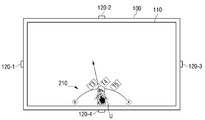
도 1a 내지 도 1h는, 사용자 트레이와 태스크 트레이의 개념 설명에 제공되 는 도면이다. 도 1a에는 디지털 회의에 이용되는 테이블-탑 기기(100)가 도시되어 있다. 도 1a에 도시된 바와 같이, 테이블-탑 기기(100)의 상부에는 터치-스크린(110)이 마련되어 있고, 각 측면에는 카드 리더들(120-1 내지 120-4)이 마련되어 있다.1A to 1H are diagrams provided to explain concepts of a user tray and a task tray. 1A shows a table-
한편, 도 1a에 도시된 바에 따르면, 터치-스크린(110)에는 태스크 실행 창들(TW1, TW2)이 나타나 있음을 확인할 수 있다. 태스크 실행 창은 테이블-탑 기기(100)에 인스톨된 어플리케이션에 의해 태스크 실행 결과가 나타난 창으로, 위에서 전술한 바 있다.Meanwhile, as shown in FIG. 1A, it can be seen that task execution windows TW1 and TW2 are displayed on the touch-
태스크 실행 창-1(TW1)은 태스크-1(T1)의 실행 결과가 나타난 창이고, 태스크 실행 창-2(TW2)은 태스크-2(T2)의 실행 결과가 나타난 창이다.Task execution window-1 (TW1) is a window in which the execution result of task-1 (T1) is displayed, and task execution window-2 (TW2) is a window in which the execution result of task-2 (T2) is displayed.
도 1b에는 ID 카드(10)를 소지한 사용자(U)가 테이블-탑 기기(100)의 남측 변에 접근하여, 자신의 ID 카드(10)를 테이블-탑 기기(100)의 남측에 마련된 카드 리더-4(120-4)에 접촉시킨 경우를 도시하였다.In FIG. 1B, a user U having an
이와 같이, 카드 리더-4(120-4)에 사용자(U)의 ID 카드(10)가 접촉되면, 도 1b에 도시된 바와 같이 테이블-탑 기기(100)에 마련된 터치-스크린(110)의 남측에는 사용자 트레이(210)가 나타난다.As such, when the
도 1b에 도시된 바와 같이, 사용자 트레이(210)에는 1) 태스크 트레이(⌒), 2) 어플리케이션 호출/종료용 아이콘(ⓐ), 3) 사용자 트레이 종료용 아이콘(ⓧ) 및 4) 사용자 정보가 나타난다.As shown in FIG. 1B, the
1) 태스크 트레이(⌒)1) Task Tray
도 1b에 도시된 태스크 트레이(⌒)의 북측에는 태스크들(T3, T4 및 T5)이 나열되어 있다. 이 태스크들(T3, T4 및 T5)은 사용자(U)에 의해 선택되어 태스크 트레이(⌒)에 담겨진 태스크들이다.Tasks T3, T4, and T5 are listed on the north side of the task tray shown in FIG. 1B. These tasks T3, T4 and T5 are tasks selected by the user U and contained in the task tray.
엄밀하게 말하면, 태스크 트레이(⌒)에 나열된 것은 태스크들 자체가 아닌 태스크들을 상징하는 아이콘들이며, 이 아이콘들은 각 태스크들을 상징할 수 있는 썸네일 이미지들로 구현가능하다.Strictly speaking, what is listed in the task tray is icons representing the tasks, not the tasks themselves, and these icons can be embodied as thumbnail images that can symbolize each task.
하지만, 본 명세서에서는 표기의 편의를 위해, 태스크 트레이(⌒)에는 태스크들이 나열되는 것으로 표기하겠다.However, in the present specification, for convenience of notation, tasks will be marked as listed in the task tray.
태스크 트레이(⌒)에 어느 태스크들이 담겨져 있는지에 대한 정보는 사용자(U)의 ID 카드(10)에 수록되어 있다. 따라서, 테이블-탑 기기(100)는 카드 리더-4(120-4)가 읽어들인 사용자(U)의 ID 카드(10)에 수록된 정보를 기초로, 태스크 트레이(⌒)에 최초로 수록할 태스크들(T3, T4 및 T5)을 결정한다.Information on which tasks are contained in the task tray is stored in the user U's
2) 2) 어플리케이션application 호출/종료용 아이콘(ⓐ) Call / end icon (ⓐ)
태스크 트레이(⌒)의 서측에 나타난 어플리케이션 호출/종료용 아이콘(ⓐ)은 터치 입력을 통해 어플리케이션 트레이를 호출하는데 이용되는 아이콘이다. 어플리케이션 트레이에 대한 상세한 설명은 후술한다.The application call / end icon (ⓐ) shown on the west side of the task tray is an icon used to call the application tray through touch input. Detailed description of the application tray will be described later.
3) 사용자 트레이 종료용 아이콘(ⓧ)3) Icon for exiting the user tray (ⓧ)
태스크 트레이(⌒)의 동측에 나타난 사용자 트레이 종료용 아이콘(ⓧ)은 터치 입력을 통해 사용자 트레이를 종료 명령(즉, 사용자 트레이를 터치-스크린(110)에서 사라지게 하는 명령)을 입력하는데 이용되는 아이콘이다.The user tray exit icon (i) displayed on the east side of the task tray is an icon used to input a user tray exit command (ie, a command to make the user tray disappear from the touch-screen 110) through touch input. to be.
4) 사용자 정보4) User Information
태스크 트레이(⌒)의 남측에 나타난 사용자 정보는 카드 리더-4(120-4)에 접촉된 ID 카드(10)를 소지한 사용자(U)를 특정하는 정보이다. 도 1b에서는 사용자 정보를, 사용자(U)의 사진과 이름으로 상정하였다. 사용자 정보를 통해 사용자(U)는 자신의 사용자 트레이가 어느 것인지 쉽게 인식하게 된다.The user information shown on the south side of the task tray is information for specifying the user U who holds the
이하에서는, 태스크 트레이(⌒)에 수록된 태스크들(T3, T4 및 T5)을 조작하는 방법에 대해 상세히 설명한다.Hereinafter, a method of operating the tasks T3, T4, and T5 contained in the task tray will be described in detail.
도 1c 및 도 1d는 태스크 트레이(⌒)에 수록된 태스크를 실행하는 방법의 설명에 제공되는 도면이다.1C and 1D are diagrams provided for explaining a method of executing a task contained in a task tray.
도 1c에 도시된 바와 같이, 태스크 실행 명령은 태스크 트레이(⌒)에 수록된 태스크들 중 사용자(U)가 실행되기 원하는 태스크(T4)를 바탕 화면으로 D&D(Drag & Drop)하는 방법으로 입력 가능하다.As illustrated in FIG. 1C, the task execution command may be input by D & D (Drag & Drop) on the desktop of the task T4 that the user U wants to execute among the tasks included in the task tray. .
도 1d에는, 도 1c에 도시된 바와 같은 사용자(U)의 조작에 의해, 1) 태스크-4(T4)가 태스크 트레이(⌒)에서 사라지고, 2) 바탕 화면에 태스크 실행 창-4(TW4)가 나타난 결과를 도시하였다. 여기서, 태스크 실행 창-4(TW4)는 태스크-4(T4)가 드롭(Drop)된 위치에 나타난다.In FIG. 1D, by operation of the user U as shown in FIG. 1C, 1) Task-4 (T4) disappears from the task tray, and 2) Task Execution Window-4 (TW4) on the desktop. The results shown are shown. Here, task execution window-4 (TW4) appears at the position where task-4 (T4) is dropped.
도 1e 및 도 1f에는 바탕 화면에 나타난 태스크 실행 창을 태스크 트레이(⌒)에 태스크로 수록하는 방법의 설명에 제공되는 도면이다.1E and 1F are diagrams for explaining a method of recording a task execution window displayed on the desktop as a task in the task tray.
도 1e에 도시된 바와 같이, 태스크 수록 명령은 바탕 화면에 나타난 태스크 실행 창들 중 사용자(U)가 태스크 트레이(⌒)에 수록하기 원하는 태스크 실행 창-1(TW1)을 태스크 트레이(⌒)로 D&D하는 방법으로 입력 가능하다.As illustrated in FIG. 1E, the task recording command includes a task execution window-1 (TW1) that the user U wants to include in the task tray among the task execution windows displayed on the desktop. It can be entered in a way.
도 1f에는, 도 1e에 도시된 바와 같은 사용자(U)의 조작에 의해, 1) 태스크 실행 창-1(TW-1)이 바탕 화면에서 사라지고, 2) 태스크-1(T1)이 태스크 트레이(⌒)에 수록된 결과를 도시하였다.In FIG. 1F, by the operation of the user U as shown in FIG. 1E, 1) the task execution window-1 (TW-1) disappears from the desktop, and 2) the task-1 (T1) moves to the task tray ( Results shown in iii) are shown.
태스크 트레이(⌒)는 1인의 사용자만을 위한 '개인 영역'이고, 바탕 화면은 테이블-탑 기기(100)의 모든 사용자들을 위한 '공유 영역'이다. 따라서, 태스크 트레이(⌒)에 수록된 태스크를 바탕 화면에 실행시키는 것은, 1인의 사용자가 가지고 있었던 태스크를 모든 사용자들이 공유하기 위한 행위로 볼 수 있다. 또한, 바탕 화면에 실행된 태스크를 태스크 트레이(⌒)에 수록한다 함은 모든 사용자들이 공유하고 있었던 태스크에 대한 공유 상태를 해제하고 1인의 사용자만이 관리하기 위한 행위로 볼 수 있다.The task tray is a 'private area' for only one user, and the desktop is a 'shared area' for all users of the table-
도 1g 및 도 1h는 태스크 트레이(⌒)에 수록된 태스크를 삭제하는 방법의 설명에 제공되는 도면이다.1G and 1H are diagrams provided for explaining a method of deleting a task included in the task tray.
도 1g에 도시된 바와 같이, 태스크 삭제 명령은 태스크 트레이(⌒)에 나타난 태스크들 중 사용자(U)가 삭제하기 원하는 태스크-5(T5)를 태스크 트레이(⌒)에 인 접한 터치-스크린(110) 밖으로 D&D하는 방법으로 입력 가능하다.As shown in FIG. 1G, the task delete command includes a touch-
도 1h에는, 도 1g에 도시된 바와 같은 사용자(U)의 조작에 의해, 태스크-5(T5)가 태스크 트레이(⌒)에서 삭제된 결과를 도시하였다.FIG. 1H shows the result of task-5 (T5) being deleted from the task tray by operation of user U as shown in FIG. 1G.
2. 2. 어플리케이션application 트레이 tray
도 2a 내지 도 2e는, 어플리케이션 트레이의 개념 설명에 제공되는 도면이다. 어플리케이션 트레이 호출은, 도 2a에 도시된 바와 같이, 사용자(U)가 어플리케이션 호출/종료용 아이콘(ⓐ)을 터치함으로서 입력가능하다.2A to 2E are views provided to explain the concept of the application tray. As shown in FIG. 2A, the application tray call can be input by the user U touching the icon ⓐ for application call / end.
도 2b에는, 도 2a에 도시된 바와 같은 사용자 입력에 의해, 어플리케이션 트레이(/)가 호출된 상태를 도시하였다. 도 2b에 도시된 바와 같이, 어플리케이션 트레이(/)에는 어플리케이션들(A1 내지 A5)이 나열되어 있다. 이 어플리케이션들(A1 내지 A5)은 사용자(U)에 의해 선택되어 어플리케이션 트레이(/)에 수록된 어플리케이션들이다.In FIG. 2B, the application tray / is called by a user input as shown in FIG. 2A. As shown in FIG. 2B, the applications A1 to A5 are listed in the application tray /. These applications A1 to A5 are the applications selected by the user U and stored in the application tray /.
어플리케이션 트레이(/)에 어느 어플리케이션들이 담겨져 있는지에 대한 정보는 사용자(U)의 ID 카드(10)에 수록되어 있다. 따라서, 테이블-탑 기기(100)는 카드 리더-4(120-4)가 읽어들인 사용자(U)의 ID 카드(10)에 수록된 정보를 기초로, 어플리케이션 트레이(/)에 최초로 수록할 어플리케이션들(A1 내지 A5)을 결정한다.Information on which applications are contained in the application tray / is stored in the user U's
이에 따라, 어플리케이션 트레이(/)에 담겨 있는 어플리케이션들은 사용자 마다 각기 다르다.Accordingly, applications contained in the application tray (/) are different for each user.
한편, 어플리케이션들(A1 내지 A5)은 태스크들(T3 내지 T5)과 다른 방향으로 나열된다. 즉, 어플리케이션 트레이(/)의 방향과 태스크 트레이(⌒)의 방향은 서로 다른 방향으로 구별된다.On the other hand, the applications A1 to A5 are listed in a different direction from the tasks T3 to T5. That is, the direction of the application tray / and the direction of the task tray are distinguished in different directions.
도 2c와 도 2d는 어플리케이션 트레이(/)에 담겨진 어플리케이션을 실행하는 방법의 설명에 제공되는 도면이다.2C and 2D are diagrams for explaining a method of executing an application contained in an application tray (/).
도 2c에 도시된 바와 같이, 어플리케이션 실행 명령은 어플리케이션 트레이(/)에 담겨진 어플리케이션들 중 사용자(U)가 실행되기 원하는 어플리케이션-3(A3) 태스크을 바탕 화면으로 D&D하는 방법으로 입력 가능하다.As illustrated in FIG. 2C, an application execution command may be input by D & D on a desktop of an application-3 (A3) task which a user U wants to be executed among applications contained in an application tray (/).
도 2d에는, 도 2c에 도시된 바와 같은 사용자(U)의 조작에 의해, 어플리케이션-3(A3)이 실행되어 바탕 화면에 어플리케이션 실행 창-3(AW3)이 나타난 결과를 도시하였다. 여기서, 어플리케이션 실행 창-3(AW3)은 어플리케이션-3(A3)이 드롭된 위치에 나타난다.FIG. 2D illustrates a result of the application-3 (A3) being executed by the user U as shown in FIG. 2C to display the application execution window-3 (AW3) on the desktop. Here, the application execution window-3 (AW3) appears in the position where the application-3 (A3) is dropped.
바탕 화면에서 실행되면 태스크 트레이(⌒)에서 사라지는 태스크와 달리, 어플리케이션은 바탕 화면에서 실행되더라도 어플리케이션 트레이(/)에서 사라지지 않는다. 이후에, 그 어플리케이션을 중복하여 실행시킬 여지가 있기 때문이다.Unlike a task that disappears from the task tray when executed from the desktop, the application does not disappear from the application tray even if executed from the desktop. This is because there is room for the application to run repeatedly.
한편, 바탕 화면에 나타난 어플리케이션 실행 창-3(AW3)이 특정 태스크를 실행하고 있을 수 있다. 예를 들어, 어플리케이션 실행 창-3(AW3)이 나타난 후에 사용자(U)가 이를 통해 특정 문서 파일을 불러들인 경우가 이에 해당한다. 이 경우, 어플리케이션 실행 창-3(AW3)은 태스크 실행 창에 해당한다. 따라서, 태스크 실행 창인 어플리케이션 실행 창-3(AW3)을 태스크 트레이(⌒)에 수록하는 것이 가능하며, 수록 방법은 전술한 바 있기에 생략한다.Meanwhile, the application execution window-3 (AW3) displayed on the desktop may be executing a specific task. For example, this is the case when the user U loads a specific document file through the application execution window-3 (AW3). In this case, the application execution window-3 (AW3) corresponds to the task execution window. Therefore, the application execution window-3 (AW3), which is a task execution window, can be recorded in the task tray, and the recording method is omitted since it has been described above.
한편, 도 2e에 도시된 바와 같이, 어플리케이션 트레이(/)가 나타난 상태에서 사용자(U)가 어플리케이션 호출/종료용 아이콘(ⓐ)을 터치하면, 어플리케이션 트레이(/)가 사라져, 도 2a에 도시된 상태로 회귀한다.Meanwhile, as shown in FIG. 2E, when the user U touches the application call / exit icon ⓐ while the application tray / is displayed, the application tray / disappears and is shown in FIG. 2A. Return to state
3. 태스크/3. Task / 어플리케이션application 스크롤scroll
도 3a 및 도 3b는, 태스크 트레이(⌒)에 수록된 태스크들에 대한 스크롤의 개념 설명에 제공되는 도면이다. 태스크 스크롤은 태스크 트레이(⌒)에 수록된 태스크들 모두를 표시할 수 없을 때, 표시되지 않은 태스크들을 탐색하고자 하는 경우에 이용된다.3A and 3B are diagrams provided for explaining the concept of scrolling for tasks included in the task tray. Task scrolling is used when you want to search for tasks that are not displayed when all of the tasks contained in the task tray cannot be displayed.
태스크 스크롤은, 도 3a에 도시된 바와 같이, 사용자(U)가 태스크 트레이(⌒)를 패닝(Panning)(또는 플릭(flick))함으로서 입력가능하다. 도 3b에는, 도 3a에 도시된 바와 같은 사용자 입력에 의해, 태스크 트레이(⌒)에 수록된 태스크들이 스크롤된 결과를 도시하였다.Task scrolling is input by the user U panning (or flicking) the task tray, as shown in FIG. 3A. FIG. 3B illustrates a result of scrolling of tasks included in the task tray by user input as shown in FIG. 3A.
한편, 태스크 스크롤을 위한 사용자(U)의 패닝은, 도 3a에 도시된 방향과 반대 방향으로 입력될 수 있음은 물론이며, 이 경우 태스크 스크롤은 반대 방향으로 이루어진다.Meanwhile, the panning of the user U for task scrolling may be input in a direction opposite to that shown in FIG. 3A. In this case, the task scrolling may be performed in the opposite direction.
도 3c 및 도 3d는, 어플리케이션 트레이(/)에 수록된 어플리케이션들에 대한 스크롤의 개념 설명에 제공되는 도면이다. 어플리케이션 스크롤은 어플리케이션 트레이(/)에 수록된 어플리케이션들 모두를 표시할 수 없을 때, 표시되지 않은 어플리케이션들을 탐색하고자 하는 경우에 이용된다.3C and 3D are diagrams provided to explain a concept of scrolling for applications included in the application tray (/). Application scrolling is used to search for applications that are not displayed when all of the applications contained in the application tray (/) cannot be displayed.
어플리케이션 스크롤은, 도 3c에 도시된 바와 같이, 사용자(U)가 어플리케이션 트레이(/)를 패닝(Panning)(또는 플릭(flick))함으로서 입력가능하다. 도 3d에는, 도 3c에 도시된 바와 같은 사용자 입력에 의해, 어플리케이션 트레이(/)에 수록된 어플리케이션들이 스크롤된 결과를 도시하였다.The application scroll can be input by the user U panning (or flicking) the application tray, as shown in FIG. 3C. In FIG. 3D, a result of scrolling of applications included in the application tray (/) by a user input as shown in FIG. 3C is illustrated.
한편, 어플리케이션 스크롤을 위한 사용자(U)의 패닝은, 도 3c에 도시된 방향과 반대 방향으로 입력될 수 있음은 물론이며, 이 경우 어플리케이션 스크롤은 반대 방향으로 이루어진다.Meanwhile, the panning of the user U for application scrolling may be input in a direction opposite to that shown in FIG. 3C. In this case, the application scrolling may be performed in the opposite direction.
4. 태스크/4. Task / 어플리케이션application 순서 교체 Order rotation
도 4a 및 도 4b는, 태스크 트레이(⌒)에 수록된 태스크들에 대한 순서 교체의 개념 설명에 제공되는 도면이다.4A and 4B are diagrams provided for explaining a concept of order change for tasks included in the task tray.
태스크 순서 교체 명령은, 도 4a에 도시된 바와 같이, 사용자(U)가 태스크 트레이(⌒)에 나열된 태스크들 중 순서 교체를 원하는 태스크-4(T4)를 원하는 순서의 위치로 D&D함으로서 입력가능하다. 도 4b에는, 도 4a에 도시된 바와 같은 사용자 입력에 의해, 태스크 트레이(⌒)에 수록된 태스크-4(T4)의 순서가 앞서게 된 결과를 도시하였다.As shown in FIG. 4A, the task order change command may be input by D & D of the task-4 (T4) that the user U wants to change order among among the tasks listed in the task tray. . FIG. 4B shows the result of the order of Task-4 (T4) recorded in the task tray being advanced by the user input as shown in FIG. 4A.
도 4c 및 도 4d는, 어플리케이션 트레이(/)에 수록된 어플리케이션들의 순서 교체의 개념 설명에 제공되는 도면이다.4C and 4D are diagrams provided to explain a concept of reordering of applications included in the application tray (/).
어플리케이션 순서 교체 명령은, 도 4c에 도시된 바와 같이, 사용자(U)가 어플리케이션 트레이(/)에 나열된 어플리케이션들 중 순서 교체를 원하는 어플리케이 션-4(A4)을 원하는 순서의 위치로 D&D함으로서 입력가능하다. 도 4d에는, 도 4c에 도시된 바와 같은 사용자 입력에 의해, 어플리케이션 트레이(/)에 수록된 어플리케이션-4(A4)의 순서가 앞서게 된 결과를 도시하였다.As shown in FIG. 4C, the application order change command is input by D & D of the application U (A4) to which the user U wants to change order among the applications listed in the application tray (/) to the position of the desired order. It is possible. FIG. 4D illustrates a result of the order of the application-4 (A4) recorded in the application tray / by the user input as shown in FIG. 4C.
5. 태스크/5. Task / 어플리케이션application 하이라이트 highlight
도 5a는 태스크 트레이(⌒)에 수록된 태스크에 대한 하이라이트의 개념 설명에 제공되는 도면이다. 도 5a에 도시된 바와 같이, 사용자(U)는 태스크 트레이(⌒)에 수록된 태스크들 중 원하는 태스크-4(T4)를 터치하여, 하이라이트 되도록 할 수 있다. 도 5a에 도시된 바와 같이, 하이라이트된 태스크의 옆에는 그 태스크에 대한 타이틀(Schedule)이 나타난다.FIG. 5A is a diagram provided to explain a concept of highlighting for a task contained in a task tray. As shown in FIG. 5A, the user U may touch a desired task-4 (T4) among tasks included in the task tray to be highlighted. As shown in FIG. 5A, a title for the task appears next to the highlighted task.
그리고, 도 5b 및 도 5c에 도시된 바와 같이, 이 태스크 타이틀(Schedule)은 사용자(U)의 터치가 해제되면 서서히 사라진다. As shown in FIGS. 5B and 5C, the task title (Schedule) gradually disappears when the user U's touch is released.
도 5d는 어플리케이션 트레이(/)에 수록된 어플리케이션에 대한 하이라이트의 개념 설명에 제공되는 도면이다. 도 5d에 도시된 바와 같이, 사용자(U)는 어플리케이션 트레이(/)에 수록된 어플리케이션들 중 원하는 어플리케이션를 터치하여, 하이라이트 되도록 할 수 있다. 도 5d에 도시된 바와 같이, 하이라이트된 어플리케이션의 옆에는 그 어플리케이션에 대한 타이틀(Intertnet Explorer)이 나타난다.5D is a diagram provided to explain a concept of highlighting of an application included in an application tray (/). As illustrated in FIG. 5D, the user U may touch a desired application among the applications included in the application tray (/) to highlight the application. As shown in Fig. 5D, a title (Intertnet Explorer) for the application appears next to the highlighted application.
그리고, 도 5e 및 도 5f에 도시된 바와 같이, 이 어플리케이션 타이틀(Intertnet Explorer)은 사용자(U)의 터치가 해제되면 서서히 사라진다.5E and 5F, this application title (Intertnet Explorer) gradually disappears when the user U's touch is released.
6. 사용자 트레이 이동6. Move the User Tray
도 6a 내지 도 6d는, 사용자 트레이(210)를 터치-스크린(110)의 다른 위치로 이동시키는 방법의 개념 설명에 제공되는 도면이다.6A-6D are diagrams provided to explain a concept of a method of moving the
사용자 트레이 이동은, 도 6a에 도시된 바와 같이, 사용자 트레이(210)에 나타난 사용자 정보를 원하는 위치로 D&D하여 함으로서 입력가능하다.The user tray movement can be input by D & D of the user information displayed on the
도 6b 내지 도 6d에는 사용자(U)에 의한 사용자 정보 D&D에 의해, 터치-스크린(110)의 남측 변에 인접한 사용자 트레이가 터치-스크린(110)의 서측 변으로 이동되는 과정을 도시하였다.6B to 6D illustrate a process in which a user tray adjacent to the south side of the
도 6b 및 도 6c에 도시된 바와 같이, 터치-스크린(110)의 중앙 부분에서는 사용자 트레이 전체가 표시되는 것이 아니라, 사용자 정보만 표시된다. 또한, 도 6c에 도시된 바와 같이, 드래그 중인 사용자 정보가 터치-스크린(110)의 서측 변에 인접하게 되면, 터치-스크린(110)의 서측 변에서 사용자 정보를 바라보기에 적합한 방향으로 사용자 정보의 표시방향이 바뀐다.As shown in FIGS. 6B and 6C, the entire user tray is not displayed in the center portion of the touch-
아울러, 도 6d에 도시된 바와 같이, 사용자 정보가 터치-스크린(110) 서측 변의 인접한 영역에 드롭 되면, 사용자 트레이(210) 전체가 나타난다. 이때, 사용자 트레이(210)는 터치-스크린(110)의 서측 변에서 바라보기에 적합한 방향으로 나타난다.In addition, as shown in FIG. 6D, when the user information is dropped in an adjacent area of the west side of the
7. 사용자 트레이 종료7. Exit the User Tray
도 7a 및 도 7b는 사용자 트레이를 종료시켜 터치-스크린(110)에서 사라지게 하는 방법의 설명에 제공되는 도면이다. 사용자 트레이 종료 명령은, 도 7a에 도시된 바와 같이, 사용자(U)가 사용자 트레이(210)에 나타난 사용자 트레이 종료용 아이콘(ⓧ)을 터치함으로서 입력가능하다.7A and 7B are diagrams illustrating a method of closing a user tray and disappearing from the touch-
도 7b에는, 도 7a에 도시된 바와 같은 사용자 입력에 의해, 사용자 트레이가 종료되어 터치-스크린(110)에서 사라진 결과를 도시하였다.In FIG. 7B, a user input as shown in FIG. 7A terminates the user tray and disappears from the touch-
한편, 사용자 트레이(210)가 일정 시간 동안 사용되지 않으면, 사용자 트레이는 자동으로 종료된다. 이때, 자동 종료까지 남아 있는 시간을 사용자 트레이(210)의 주변에 표시하여, 사용자(U)에게 자동 종료를 안내할 수 있다.On the other hand, if the
이는, 후술할 테이블-탑 기기(100)에 사용자 트레이가 여러 개가 나타난 경우에 효과적이다. 사용되지 않는 사용자 트레이를 자동 종료시켜, 테이블-탑 기기(100)의 터치-스크린(110)을 간소화시키기 위함이다.This is effective when several user trays appear on the table-
8. 다수 사용자를 위한 사용자 트레이 구현8. User Tray Implementation for Multiple Users
도 8a에는 다수의 사용자(U)가 테이블-탑 기기(100)를 이용하여 디지털 회의를 할 수 있도록, 사용자들(U1 내지 U4)마다 사용자 트레이(210-1 내지 210-4)가 제공된 상황을 도시하였다.FIG. 8A illustrates a situation in which user trays 210-1 to 210-4 are provided for each of users U1 to U4 so that a plurality of users U can perform digital conference using the table-
도 8a에 도시된 바에 따르면,As shown in FIG. 8A,
1) 카드 리더-1(120-1)에 자신의 ID 카드(10-1)를 접촉시킨 사용자-1(U1)을 위한 사용자 트레이-1(210-1)이 터치-스크린(110)의 서측 변(사용자-1(U1)에 가장 가까운 터치-스크린(110)의 변)에 인접한 영역에, 사용자-1(U1)이 바라보기에 적합 한 방향으로 나타나고,1) The user tray-1 210-1 for the user-1 (U1) having contacted his or her ID card 10-1 with the card reader-1 120-1 is on the west side of the touch-
2) 카드 리더-2(120-2)에 자신의 ID 카드(10-2)를 접촉시킨 사용자-2(U2)를 위한 사용자 트레이-2(210-2)가 터치-스크린(110)의 북측 변(사용자-2(U2)에 가장 가까운 터치-스크린(110)의 변)에 인접한 영역에, 사용자-2(U2)가 바라보기에 적합한 방향으로 나타나며,2) The user tray-2 (210-2) for the user-2 (U2) having contacted the card reader-2 (120-2) with its ID card (10-2) is located on the north side of the touch-screen (110). In an area adjacent to the side (the side of the touch-
3) 카드 리더-3(120-3)에 자신의 ID 카드(10-3)를 접촉시킨 사용자-3(U3)을 위한 사용자 트레이-3(210-3)이 터치-스크린(110)의 동측 변(사용자-3(U3)에 가장 가까운 터치-스크린(110)의 변)에 인접한 영역에, 사용자-3(U3)이 바라보기에 적합한 방향으로 나타나고,3) The user tray-3 (210-3) for the user-3 (U3) having the ID card 10-3 in contact with the card reader-3 (120-3) is the east side of the touch-
4) 카드 리더-4(120-4)에 자신의 ID 카드(10-4)를 접촉시킨 사용자-4(U4)를 위한 사용자 트레이-4(210-4)가 터치-스크린(110)의 남측 변(사용자-4(U4)에 가장 가까운 터치-스크린(110)의 변)에 인접한 영역에, 사용자-4(U4)가 바라보기에 적합한 방향으로 나타나 있다.4) The user tray-4 (210-4) for the user-4 (U4) having the ID card 10-4 in contact with the card reader-4 (120-4) is located on the south side of the touch-
그리고, 도 8a에 도시된 바와 같이, 각 사용자 트레이들(210-1 내지 210-4)의 태스트 트레이에 수록되는 태스크들은 각기 다르게 나타나 있는데, 이는 각 사용자(U1 내지 U4) 마다 태스크 트레이에 담겨 지는 태스크들이 다름을 반영한 것이다.And, as shown in Figure 8a, the tasks contained in the task tray of each of the user trays (210-1 to 210-4) are shown differently, which is contained in the task tray for each user (U1 to U4) The tasks reflect the difference.
또한, 터치-스크린(110)의 각 변에 인접한 영역에 나타난 사용자 트레이들(210-1 내지 210-4)은 각 사용자(U1 내지 U4)가 바라보기에 적합한 방향으로 표시된다.In addition, the user trays 210-1 to 210-4 shown in an area adjacent to each side of the touch-
뿐만 아니라, 태스크 트레이(⌒)로부터 태스크가 바탕 화면으로 D&D된 경우에 바탕 화면에 나타나는 태스크 실행 창 역시 그 사용자 트레이(⌒)의 사용자가 바라보기에 적합한 방향으로 표시된다.In addition, when a task is D & Ded from the task tray to the desktop, the task execution window that appears on the desktop is also displayed in a direction suitable for the user of the user tray.
즉, 도 8b와 도 8c에 도시된 바와 같이, 사용자 트레이-3(210-3)의 태스크 트레이(⌒)에서 태스크-7(T7)이 바탕 화면으로 D&D된 경우에 바탕 화면에 나타나는 태스크 실행 창-7(TW7)은 사용자 트레이-3(210-3)의 사용자인 사용자-3(U3)이 바라보기에 적합한 방향으로 표시된다.That is, as shown in FIGS. 8B and 8C, the task execution window that appears on the desktop when task-7 (T7) is D & Ded to the desktop from the task tray of the user tray-3 210-3 -7 (TW7) is displayed in a direction suitable for viewing by user-3 (U3), a user of user tray-3 (210-3).
9. 9. 게스트guest 트레이 tray
도 9a 내지 도 9d는, 사용자 트레이의 일종인 '게스트 트레이'의 개념 설명에 제공되는 도면이다. '게스트 트레이'란 게스트를 위한 트레이로, 여기서, 게스트란 ID 카드를 소지하고 있지 않은 자를 말한다.9A to 9D are diagrams provided to explain a concept of a 'guest tray' which is a kind of a user tray. 'Guest Tray' is a tray for guests, where a guest is a person who does not have an ID card.
게스트 트레이 호출은, 도 9a에 도시된 바와 같이, 게스트(G)가 터치-스크린(110) 각 변의 중앙에 나타난 게스트 트레이 호출용 아이콘들(GT) 중 어느 하나를 터치함으로서 입력가능하다.As shown in FIG. 9A, the guest tray call can be input by touching one of the guest tray call icons GT displayed at the center of each side of the touch-
도 9b에는, 도 9a에 도시된 바와 같은 사용자 입력에 의해, 게스트 트레이 호출용 아이콘(GT)이 사라지고 게스트 트레이(220)가 호출된 상태를 도시하였다. 도 9b에 도시된 바에 따르면, 게스트 트레이(220)는 사라진 게스트 트레이 호출용 아이콘(GT)의 근방에 나타난다.FIG. 9B illustrates a state in which the guest tray call icon GT disappears and the
도 9b에 도시된 바와 같이, 게스트 트레이(220)에는 사용자 정보가 포함되어 있지 않고, 게스트 트레이(220)의 태스크 트레이(⌒)에는 태스크들이 담겨 있지 않다는 점에서, ID 카드에 의해 호출된 사용자 트레이와 차이가 있다.As shown in FIG. 9B, the user tray called by the ID card in that the
또한, ID 카드에 의해 호출된 사용자 트레이에 마련된 어플리케이션 트레이에 수록되어 있는 어플리케이션들은 사용자마다 다르다. 하지만, 게스트 트레이는 어느 게스트에 의해 호출되든지 간에 어플리케이션 트레이에 수록되어 있는 어플리케이션들이 동일하다.In addition, the applications contained in the application tray provided in the user tray called by the ID card are different for each user. However, the guest tray is the same application contained in the application tray no matter which guest is called.
이와 같은 상이점을 제외하고, 게스트 트레이 조작은 사용자 트레이 조작과 동일하므로, 게스트 트레이 조작에 대한 상세한 설명은 생략한다.Except for such differences, the guest tray operation is the same as the user tray operation, and thus detailed description of the guest tray operation is omitted.
다만, 도 9c에 도시된 바와 같이 게스트(G)에 의해 게스트 트레이 종료용 아이콘(ⓧ)이 터치되면, 도 9d에 도시된 바와 같이 게스트 트레이(220)가 사라지고 게스트 트레이 호출용 아이콘(GT)이 다시 나타난다.However, when the guest tray end icon (ⓧ) is touched by the guest G as shown in FIG. 9C, the
10. 기타 10. Other 변형예Variant
위 실시예들에서, 사용자 트레이를 제공하는데 필요한 정보를 사용자 ID 카드로부터 획득하는 것으로 구현하였다. 사용자 트레이를 제공하는데 필요한 정보에는, 1) 태스크 트레이에 수록될 태스크들에 대한 정보, 2) 어플리케이션 트레이에 수록될 어플리케이션들에 대한 정보 및 3) 사용자 정보이다.In the above embodiments, the information required to provide the user tray is obtained by obtaining from the user ID card. Information necessary to provide a user tray includes 1) information on tasks to be included in the task tray, 2) information about applications to be included in the application tray, and 3) user information.
하지만, 위 정보들을 다른 수단으로부터 획득하는 것도 가능함은 물론이다. 예를 들어, 테이블-탑 기기(100)에 네트워크로 연결된 사용자의 PC, 관리용 서버는 물론이고, 테이블-탑 기기(100)에 내장된 저장매체로부터, 위 정보들을 획득하는 것도 가능하다.However, it is of course possible to obtain the above information from other means. For example, the above information may be obtained from a PC of a user connected to the table-
뿐만 아니라, 위 정보들을 각기 다른 수단으로부터 획득하는 것도 가능하다. 예를 들어, '3) 사용자 정보'는 사용자 ID 카드로부터 획득하되, '1) 태스크 트레이에 수록될 태스크들에 대한 정보'와 '2) 어플리케이션 트레이에 수록될 어플리케이션들에 대한 정보'는 사용자 정보를 이용하여, 네트워크에 연결된 사용자의 PC, 관리용 서버 또는 테이블-탑 기기(100)에 내장된 저장매체로부터 획득하는 것이 가능하다.In addition, it is possible to obtain the above information from different means. For example, '3) user information' is obtained from a user ID card, but '1) information on tasks to be stored in the task tray' and '2) information about applications to be displayed on the application tray' is user information. By using, it is possible to obtain from a storage medium built in the user's PC, management server or table-
11. 본 발명이 적용가능한 11. Applicable to the present invention 디바이스device
위 실시예들에서는, 테이블-탑 기기(100)에서 사용자 트레이가 제공되는 경우를 상정하였는데, 테이블-탑 기기 이외의 다른 디바이스의 경우도 본 발명이 적용될 수 있다. 즉, 여러 사용자가 함께 공유하여 사용할 수 있는 디바이스라면, 어느 디바이스라도 본 발명이 적용될 수 있다.In the above embodiments, it is assumed that the user tray is provided in the table-
도 10에는 본 발명이 적용가능한 디바이스의 블럭도를 도시하였다. 도 10에 도시된 바와 같이, 디바이스는 기능 블럭(1010), 터치-스크린(1020), 제어부(1030), 저장부(1040) 및 리더(1050) 및 네트워크 인터페이스(1060)을 구비한다.10 shows a block diagram of a device to which the present invention is applicable. As shown in FIG. 10, the device includes a
기능 블럭(1010)은 디바이스 본연의 기능을 수행한다. 만약, 디바이스가 테이블-탑 기기인 경우 기능 블럭(1010)은 디지털 회의에 필요한 기능을 수행한다.The
터치-스크린(1020)은 기능 블럭(1010)의 수행 결과, 사용자 트레이, 게스트 트레이 및 태스크 실행 창 등의 GUI가 표시되는 디스플레이로서의 기능과, 터치, 드래그 및 D&D 등과 같은 사용자 명령을 입력받기 위한 사용자 인터페이스로서의 기능을 수행한다.The touch-
저장부(1040)에는 어플리케이션과 이 어플리케이션이 불러오는 파일들이 저장되는 저장매체이다.The
리더(1050)는 사용자 ID 카드에 수록된 정보를 읽어들이고, 네트워크 인터페이스(1060)는 네트워크를 통해 연결된 다른 디바이스와 네트워크 통신을 수행한다.The
제어부(1030)는 위 실시예들을 통해 전술한 사용자 트레이를 GUI로 제공하고, 사용자 트레이에 포함되어 있는 태스크 트레이와 어플리케이션 트레이를 이용하여 입력된 사용자 명령을 수행한다.The
여기서, 태스크 트레이를 이용한 사용자 명령에는, 태스크 실행, 태스크 추가, 태스크 삭제, 태스크 스크롤, 태스크 순서 교체, 태스크 하이라이트 등이 있고, 어플리케이션 트레이를 이용한 사용자 명령에는, 어플리케이션 실행, 어플리케이션 스크롤, 어플리케이션 순서 교체, 어플리케이션 하이라이트 등이 있다.Here, the user command using the task tray includes task execution, task addition, task deletion, task scrolling, task sequence switching, task highlighting, and the like. The user command using the application tray includes application execution, application scrolling, application sequence switching, Application highlights.
또한, 제어부(1030)는 입력된 사용자 명령에 따라, 어플리케이션 트레이 호출/종료, 사용자 트레이 이동, 사용자 트레이 종료/자동 종료 등을 수행한다.In addition, the
도 11은 제어부(1030)에 의해 수행되는 제어 절차를 도시한 흐름도이다. 도 11에 도시된 바와 같이, 제어부(1030)는 사용자 트레이를 요청하는 사용자들에게 사용자 트레이들을 제공한다(S1110).11 is a flowchart illustrating a control procedure performed by the
S1110단계에서 제공되는 사용자 트레이에는 태스크 트레이와 어플리케이션 트레이가 포함되어 있다. 태스크 트레이에 수록되는 태스크들과 어플리케이션 트 레이에 수록되어 있는 어플리케이션들은 사용자들 마다 각기 다르다.The user tray provided in step S1110 includes a task tray and an application tray. The tasks in the task tray and the applications in the application tray are different for different users.
한편, 최초에는 태스크 트레이에 수록되는 태스크들이 같았지만, 추후 사용자의 조작에 의해 태스크 트레이에 수록되는 태스크들이 달라질 수도 있다.On the other hand, although the tasks initially included in the task tray are the same, the tasks contained in the task tray may be changed by a user's operation later.
이후, 제어부(1030)에 S1110단계에서 제공된 사용자 트레이를 통해 입력되는 사용자 명령을 수행한다(S1120). S1120단계 수행 내용은 전술한 태스크 실행, 태스크 추가, 태스크 삭제, 태스크 스크롤, 태스크 순서 교체, 태스크 하이라이트, 어플리케이션 실행, 어플리케이션 스크롤, 어플리케이션 순서 교체, 어플리케이션 하이라이트, 어플리케이션 트레이 호출/종료, 사용자 트레이 이동, 사용자 트레이 종료/자동 종료 등을 포함한다.Thereafter, the
또한, 이상에서는 본 발명의 바람직한 실시예에 대하여 도시하고 설명하였지만, 본 발명은 상술한 특정의 실시예에 한정되지 아니하며, 청구범위에서 청구하는 본 발명의 요지를 벗어남이 없이 당해 발명이 속하는 기술분야에서 통상의 지식을 가진자에 의해 다양한 변형실시가 가능한 것은 물론이고, 이러한 변형실시들은 본 발명의 기술적 사상이나 전망으로부터 개별적으로 이해되어져서는 안될 것이다.In addition, although the preferred embodiment of the present invention has been shown and described above, the present invention is not limited to the specific embodiments described above, but the technical field to which the invention belongs without departing from the spirit of the invention claimed in the claims. Of course, various modifications can be made by those skilled in the art, and these modifications should not be individually understood from the technical spirit or the prospect of the present invention.
도 1a 내지 도 1h는, 사용자 트레이와 태스크 트레이의 개념 설명에 제공되는 도면,1A to 1H are diagrams provided for explaining a concept of a user tray and a task tray,
도 2a 내지 도 2e는, 어플리케이션 트레이의 개념 설명에 제공되는 도면,2A to 2E are views provided to explain a concept of an application tray;
도 3a 내지 도 3d는, 태스크/어플리케이션 스크롤의 개념 설명에 제공되는 도면,3A to 3D are views provided to explain a concept of task / application scrolling,
도 4a 내지 도 4d는, 태스크/어플리케이션 순서 교체의 개념 설명에 제공되는 도면,4A to 4D are views provided to explain a concept of task / application order switching;
도 5a 내지 도 5f는 태스크 트레이에 수록된 태스크에 대한 하이라이트의 개념 설명에 제공되는 도면,5A through 5F are provided for illustrating a conceptual representation of highlights for tasks contained in a task tray;
도 6a 내지 도 6d는, 사용자 트레이를 터치-스크린의 다른 위치로 이동시키는 방법의 개념 설명에 제공되는 도면,6A-6D are provided for illustrating a concept of a method of moving a user tray to another position on a touch-screen,
도 7a 및 도 7b는 사용자 트레이를 종료시켜 터치-스크린에서 사라지게 하는 방법의 설명에 제공되는 도면,7A and 7B are provided to explain how to close the user tray so that it disappears from the touch-screen;
도 8a 내지 도 8c는 다수 사용자를 위한 사용자 트레이 구현의 설명에 제공되는 도면,8A-8C are provided in the description of a user tray implementation for multiple users;
도 9a 내지 도 9d는 게스트 트레이의 개념 설명에 제공되는 도면,9a to 9d are provided for explaining the concept of the guest tray,
도 10은 본 발명이 적용가능한 디바이스의 블럭도, 그리고,10 is a block diagram of a device to which the present invention is applicable, and
도 11은 제어부에 의해 수행되는 제어 절차를 도시한 흐름도이다.11 is a flowchart illustrating a control procedure performed by the controller.
Claims (23)
Priority Applications (6)
| Application Number | Priority Date | Filing Date | Title |
|---|---|---|---|
| KR1020090050854A KR20100132174A (en) | 2009-06-09 | 2009-06-09 | User list provision method and device to which it is applied |
| CN201610741310.8A CN106371747A (en) | 2009-06-09 | 2010-06-09 | Method and apparatus of providing task information in electronic device |
| CN2010800262061A CN102460366A (en) | 2009-06-09 | 2010-06-09 | User list providing method and apparatus applying the method |
| US13/377,363 US20120096390A1 (en) | 2009-06-09 | 2010-06-09 | Method of providing a user list and device adopting same |
| EP10786371.4A EP2442219A4 (en) | 2009-06-09 | 2010-06-09 | METHOD AND DEVICE FOR IMPLEMENTING A USER LIST |
| PCT/KR2010/003705 WO2010143888A2 (en) | 2009-06-09 | 2010-06-09 | Method for providing a user list and device adopting same |
Applications Claiming Priority (1)
| Application Number | Priority Date | Filing Date | Title |
|---|---|---|---|
| KR1020090050854A KR20100132174A (en) | 2009-06-09 | 2009-06-09 | User list provision method and device to which it is applied |
Publications (1)
| Publication Number | Publication Date |
|---|---|
| KR20100132174A true KR20100132174A (en) | 2010-12-17 |
Family
ID=43309369
Family Applications (1)
| Application Number | Title | Priority Date | Filing Date |
|---|---|---|---|
| KR1020090050854A Ceased KR20100132174A (en) | 2009-06-09 | 2009-06-09 | User list provision method and device to which it is applied |
Country Status (5)
| Country | Link |
|---|---|
| US (1) | US20120096390A1 (en) |
| EP (1) | EP2442219A4 (en) |
| KR (1) | KR20100132174A (en) |
| CN (2) | CN106371747A (en) |
| WO (1) | WO2010143888A2 (en) |
Cited By (2)
| Publication number | Priority date | Publication date | Assignee | Title |
|---|---|---|---|---|
| KR101702022B1 (en) * | 2015-09-24 | 2017-02-02 | 네모유엑스 주식회사 | Display Control Apparatus, Method and Computer Readable Record Medium Thereof |
| KR101980977B1 (en) * | 2017-11-23 | 2019-05-21 | 성균관대학교산학협력단 | Method for User based Application Grouping under Multi-User Environment and Table Top Display Apparatus for Performing the Same |
Families Citing this family (15)
| Publication number | Priority date | Publication date | Assignee | Title |
|---|---|---|---|---|
| CN102760037B (en) * | 2012-03-30 | 2016-03-30 | 联想(北京)有限公司 | A kind of electronic equipment input display method and electronic equipment |
| CN103838483B (en) | 2012-11-27 | 2018-02-27 | 联想(北京)有限公司 | A kind of display methods and electronic equipment |
| US20140298246A1 (en) * | 2013-03-29 | 2014-10-02 | Lenovo (Singapore) Pte, Ltd. | Automatic display partitioning based on user number and orientation |
| GB2530460A (en) * | 2013-06-06 | 2016-03-23 | Standard & Poor S Financial Services Llc | Financial information management system and user interface |
| USD740849S1 (en) * | 2013-06-27 | 2015-10-13 | Tencent Technology (Shenzhen) Company Limited | Display screen or portion thereof with animated graphical user interface |
| USD741355S1 (en) * | 2013-06-27 | 2015-10-20 | Tencent Technology (Shenzhen) Company Limited | Display screen or portion thereof with animated graphical user interface |
| AU2013206685A1 (en) * | 2013-07-04 | 2015-01-22 | Canon Kabushiki Kaisha | Projected user interface system for multiple users |
| US9501205B2 (en) * | 2013-12-16 | 2016-11-22 | Sap Se | Nature inspired interaction paradigm |
| US9519398B2 (en) | 2013-12-16 | 2016-12-13 | Sap Se | Search in a nature inspired user interface |
| WO2016013712A1 (en) * | 2014-07-22 | 2016-01-28 | Lg Electronics Inc. | Display device and method for controlling the same |
| KR102241074B1 (en) | 2014-07-22 | 2021-04-16 | 엘지전자 주식회사 | The Apparatus and Method for Display Device |
| CN105607806A (en) * | 2015-12-21 | 2016-05-25 | 联想(北京)有限公司 | Information processing method and electronic equipment |
| CN105511733A (en) * | 2016-01-30 | 2016-04-20 | 深圳天珑无线科技有限公司 | Method, system and electronic device for adjusting multitask arraying sequence through pressure touch control |
| CN109656456B (en) * | 2018-12-25 | 2020-10-20 | 杭州达现科技有限公司 | Display interface directory sharing method and device |
| CN109976611B (en) * | 2019-03-21 | 2021-06-29 | 维沃移动通信有限公司 | Terminal device control method and terminal device |
Family Cites Families (12)
| Publication number | Priority date | Publication date | Assignee | Title |
|---|---|---|---|---|
| EP1503988B1 (en) * | 2002-03-26 | 2009-07-22 | Biofrontera Discovery Gmbh | Fredericamycin derivatives |
| US20050183035A1 (en) * | 2003-11-20 | 2005-08-18 | Ringel Meredith J. | Conflict resolution for graphic multi-user interface |
| WO2005109284A2 (en) * | 2004-05-03 | 2005-11-17 | Trintuition Llc | Apparatus and method for creating and using documents in a distributed computing network |
| US20060073891A1 (en) * | 2004-10-01 | 2006-04-06 | Holt Timothy M | Display with multiple user privacy |
| JP2007128288A (en) * | 2005-11-04 | 2007-05-24 | Fuji Xerox Co Ltd | Information display system |
| US20070124370A1 (en) * | 2005-11-29 | 2007-05-31 | Microsoft Corporation | Interactive table based platform to facilitate collaborative activities |
| US20080192059A1 (en) * | 2007-02-09 | 2008-08-14 | Microsoft Corporation | Multi-user display |
| US8009147B2 (en) * | 2007-09-27 | 2011-08-30 | At&T Intellectual Property I, Lp | Multi-touch interfaces for user authentication, partitioning, and external device control |
| US20090094561A1 (en) * | 2007-10-05 | 2009-04-09 | International Business Machines Corporation | Displaying Personalized Documents To Users Of A Surface Computer |
| US20090132274A1 (en) * | 2007-11-15 | 2009-05-21 | General Electric Company | Systems and Methods for Image and Report Preview in a Healthcare Worklist |
| KR101467881B1 (en) * | 2008-08-18 | 2014-12-02 | 엘지전자 주식회사 | Controlling a Mobile Terminal with at least two display area |
| CN101561758A (en) * | 2009-05-20 | 2009-10-21 | 深圳北控信息发展有限公司 | Method for classifying application program of embedded terminal |
-
2009
- 2009-06-09 KR KR1020090050854A patent/KR20100132174A/en not_active Ceased
-
2010
- 2010-06-09 CN CN201610741310.8A patent/CN106371747A/en not_active Withdrawn
- 2010-06-09 US US13/377,363 patent/US20120096390A1/en not_active Abandoned
- 2010-06-09 WO PCT/KR2010/003705 patent/WO2010143888A2/en not_active Ceased
- 2010-06-09 CN CN2010800262061A patent/CN102460366A/en active Pending
- 2010-06-09 EP EP10786371.4A patent/EP2442219A4/en not_active Withdrawn
Cited By (3)
| Publication number | Priority date | Publication date | Assignee | Title |
|---|---|---|---|---|
| KR101702022B1 (en) * | 2015-09-24 | 2017-02-02 | 네모유엑스 주식회사 | Display Control Apparatus, Method and Computer Readable Record Medium Thereof |
| KR101980977B1 (en) * | 2017-11-23 | 2019-05-21 | 성균관대학교산학협력단 | Method for User based Application Grouping under Multi-User Environment and Table Top Display Apparatus for Performing the Same |
| US11048529B2 (en) | 2017-11-23 | 2021-06-29 | Research & Business Foundation Sungkyunkwan University | Method for user based application grouping under multi-user environment and table top display apparatus for performing the same |
Also Published As
| Publication number | Publication date |
|---|---|
| WO2010143888A3 (en) | 2011-03-31 |
| CN102460366A (en) | 2012-05-16 |
| EP2442219A2 (en) | 2012-04-18 |
| EP2442219A4 (en) | 2016-04-20 |
| WO2010143888A2 (en) | 2010-12-16 |
| US20120096390A1 (en) | 2012-04-19 |
| CN106371747A (en) | 2017-02-01 |
Similar Documents
| Publication | Publication Date | Title |
|---|---|---|
| KR20100132174A (en) | User list provision method and device to which it is applied | |
| US12393323B2 (en) | Devices, methods, and graphical user interfaces for interacting with user interface objects corresponding to applications | |
| EP4097578B1 (en) | Devices, methods, and graphical user interfaces for interacting with user interface objects | |
| US20200097135A1 (en) | User Interface Spaces | |
| JP5930363B2 (en) | Portable information device and content display method | |
| KR20160013162A (en) | User interface elements for multiple displays | |
| WO2014051130A1 (en) | Image processing apparatus, image processing method and program | |
| US20070045961A1 (en) | Method and system providing for navigation of a multi-resource user interface | |
| Iwata et al. | Any-application window sharing mechanism based on WebRTC | |
| CN113196220A (en) | Method and apparatus for organizing and invoking commands for a computing device | |
| AU2021101401A4 (en) | Devices, methods, and graphical user interfaces for interacting with user interface objects corresponding to applications | |
| Iwata et al. | Any-Application Window Sharing Mechanism based on WebRTC and its Evaluations |
Legal Events
| Date | Code | Title | Description |
|---|---|---|---|
| PA0109 | Patent application |
Patent event code: PA01091R01D Comment text: Patent Application Patent event date: 20090609 |
|
| PG1501 | Laying open of application | ||
| A201 | Request for examination | ||
| PA0201 | Request for examination |
Patent event code: PA02012R01D Patent event date: 20140206 Comment text: Request for Examination of Application Patent event code: PA02011R01I Patent event date: 20090609 Comment text: Patent Application |
|
| E902 | Notification of reason for refusal | ||
| PE0902 | Notice of grounds for rejection |
Comment text: Notification of reason for refusal Patent event date: 20150624 Patent event code: PE09021S01D |
|
| AMND | Amendment | ||
| E601 | Decision to refuse application | ||
| PE0601 | Decision on rejection of patent |
Patent event date: 20160128 Comment text: Decision to Refuse Application Patent event code: PE06012S01D Patent event date: 20150624 Comment text: Notification of reason for refusal Patent event code: PE06011S01I |
|
| AMND | Amendment | ||
| J201 | Request for trial against refusal decision | ||
| PJ0201 | Trial against decision of rejection |
Patent event date: 20160229 Comment text: Request for Trial against Decision on Refusal Patent event code: PJ02012R01D Patent event date: 20160128 Comment text: Decision to Refuse Application Patent event code: PJ02011S01I Appeal kind category: Appeal against decision to decline refusal Decision date: 20171215 Appeal identifier: 2016101001297 Request date: 20160229 |
|
| PB0901 | Examination by re-examination before a trial |
Comment text: Amendment to Specification, etc. Patent event date: 20160229 Patent event code: PB09011R02I Comment text: Request for Trial against Decision on Refusal Patent event date: 20160229 Patent event code: PB09011R01I Comment text: Amendment to Specification, etc. Patent event date: 20150824 Patent event code: PB09011R02I |
|
| B601 | Maintenance of original decision after re-examination before a trial | ||
| E801 | Decision on dismissal of amendment | ||
| PB0601 | Maintenance of original decision after re-examination before a trial |
Comment text: Report of Result of Re-examination before a Trial Patent event code: PB06011S01D Patent event date: 20160502 |
|
| PE0801 | Dismissal of amendment |
Patent event code: PE08012E01D Comment text: Decision on Dismissal of Amendment Patent event date: 20160502 Patent event code: PE08011R01I Comment text: Amendment to Specification, etc. Patent event date: 20160229 Patent event code: PE08011R01I Comment text: Amendment to Specification, etc. Patent event date: 20150824 |
|
| J301 | Trial decision |
Free format text: TRIAL NUMBER: 2016101001297; TRIAL DECISION FOR APPEAL AGAINST DECISION TO DECLINE REFUSAL REQUESTED 20160229 Effective date: 20171215 |
|
| PJ1301 | Trial decision |
Patent event code: PJ13011S01D Patent event date: 20171215 Comment text: Trial Decision on Objection to Decision on Refusal Appeal kind category: Appeal against decision to decline refusal Request date: 20160229 Decision date: 20171215 Appeal identifier: 2016101001297 |