KR20070056759A - Display device and method for outputting content notification window - Google Patents
Display device and method for outputting content notification window Download PDFInfo
- Publication number
- KR20070056759A KR20070056759A KR1020050115816A KR20050115816A KR20070056759A KR 20070056759 A KR20070056759 A KR 20070056759A KR 1020050115816 A KR1020050115816 A KR 1020050115816A KR 20050115816 A KR20050115816 A KR 20050115816A KR 20070056759 A KR20070056759 A KR 20070056759A
- Authority
- KR
- South Korea
- Prior art keywords
- content
- notification window
- screen
- output
- unit
- Prior art date
- Legal status (The legal status is an assumption and is not a legal conclusion. Google has not performed a legal analysis and makes no representation as to the accuracy of the status listed.)
- Ceased
Links
Images



Classifications
-
- H—ELECTRICITY
- H04—ELECTRIC COMMUNICATION TECHNIQUE
- H04H—BROADCAST COMMUNICATION
- H04H60/00—Arrangements for broadcast applications with a direct linking to broadcast information or broadcast space-time; Broadcast-related systems
- H04H60/61—Arrangements for services using the result of monitoring, identification or recognition covered by groups H04H60/29-H04H60/54
- H04H60/64—Arrangements for services using the result of monitoring, identification or recognition covered by groups H04H60/29-H04H60/54 for providing detail information
-
- H—ELECTRICITY
- H04—ELECTRIC COMMUNICATION TECHNIQUE
- H04N—PICTORIAL COMMUNICATION, e.g. TELEVISION
- H04N21/00—Selective content distribution, e.g. interactive television or video on demand [VOD]
- H04N21/40—Client devices specifically adapted for the reception of or interaction with content, e.g. set-top-box [STB]; Operations thereof
- H04N21/43—Processing of content or additional data, e.g. demultiplexing additional data from a digital video stream; Elementary client operations, e.g. monitoring of home network or synchronising decoder's clock; Client middleware
- H04N21/431—Generation of visual interfaces for content selection or interaction; Content or additional data rendering
Landscapes
- Engineering & Computer Science (AREA)
- Signal Processing (AREA)
- Multimedia (AREA)
- Two-Way Televisions, Distribution Of Moving Picture Or The Like (AREA)
Abstract
컨텐츠 알림창을 출력하는 디스플레이 장치 및 그 방법이 개시된다. 본 디스플레이 장치는, 방송신호를 수신하는 신호수신부, 수신된 방송신호를 화면상에 출력하는 출력부, 소정 서버를 통해 컨텐츠를 다운로드 받는 서버 접속부, 컨텐츠 다운로드 상태에 따라 컨텐츠 알림창을 생성하는 알림창 생성부, 및 방송신호가 출력되는 화면상의 소정 영역에 컨텐츠 알림창을 출력하도록 출력부를 제어하는 제어부를 포함한다. 이에 따라, 컨텐츠 다운로드 작업을 수행함과 동시에 타 작업을 수행할 수 있으며, 컨텐츠의 세부 정보를 확인할 수 있으며, 컨텐츠에 대한 보다 빠른 접근이 가능하게 된다. Disclosed are a display apparatus and a method for outputting a content notification window. The display apparatus includes a signal receiving unit for receiving a broadcast signal, an output unit for outputting the received broadcast signal on a screen, a server connection unit for downloading content through a predetermined server, and a notification window generating unit for generating a content notification window according to the content download state. And a control unit controlling the output unit to output the content notification window to a predetermined area on the screen on which the broadcast signal is output. Accordingly, other tasks can be performed at the same time as performing a content download task, detailed information of the contents can be checked, and faster access to the contents can be performed.
Description
도 1은 본 발명의 일 실시예에 따른 디스플레이 장치의 구성을 나타내는 블럭도, 1 is a block diagram showing a configuration of a display apparatus according to an embodiment of the present invention;
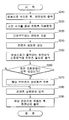
도 2는 본 발명의 일 실시예에 따른 컨텐츠 알림창 출력 방법을 설명하기 위한 흐름도, 2 is a flowchart illustrating a method of outputting a content notification window according to an embodiment of the present invention;
도 3은 본 발명의 일 실시예에 따른 제1 알림창 출력 화면을 나타내는 모식도, 3 is a schematic diagram showing a first notification window output screen according to an embodiment of the present invention;
도 4는 도 3의 제1 알림창에 적용되는 컨텐츠 세부 화면을 나타내는 모식도, 4 is a schematic diagram illustrating a content detail screen applied to a first notification window of FIG. 3;
도 5는 본 발명의 일 실시예에 따른 제2 알림창 출력 화면을 나타내는 모식도,5 is a schematic diagram showing a second notification window output screen according to an embodiment of the present invention;
도 6은 도 5의 제2 알림창에 적용되는 컨텐츠 세부 화면을 나타내는 모식도, 6 is a schematic diagram illustrating a content detail screen applied to a second notification window of FIG. 5;
도 7은 본 발명의 일 실시예에 따른 제3 알림창 출력 화면을 나타내는 모식도, 그리고,7 is a schematic diagram showing a third notification window output screen according to an embodiment of the present invention;
도 8은 도 7의 제3 알림창에 적용되는 컨텐츠 세부 화면을 나타내는 모식도이다.FIG. 8 is a schematic diagram illustrating a content detail screen applied to the third notification window of FIG. 7.
* 도면의 주요 부분에 대한 설명 *Description of the main parts of the drawing
100 : 디스플레이 장치 110 : 신호수신부100: display device 110: signal receiving unit
130 : 서버 접속부 140 : 메모리부 130: server connection unit 140: memory unit
150 : 알림창 생성부 160 : 제어부150: notification window generation unit 160: control unit
170 : 출력부 180 : 입력부170: output unit 180: input unit
본 발명은 컨텐츠 알림창을 출력하는 디스플레이 장치 및 그 방법에 관한 것으로, 보다 상세하게는, 컨텐츠를 다운로드 받는 동안 컨텐츠 알림창을 화면상에 출력하는 디스플레이 장치 및 그 방법에 관한 것이다. The present invention relates to a display apparatus for outputting a content notification window and a method thereof, and more particularly, to a display apparatus and a method for outputting a content notification window on a screen while downloading content.
디스플레이 장치는 다양한 외부기기들을 연결하여 외부기기들로부터 그에 대응되는 다양한 영상 및 음성 신호를 전송받아 출력하는 장치이다. 이러한 디스플레이 장치는 다양한 외부기기를 연결할 수도 있으며, 더 나아가 외부기기의 기능을 통합한 디스플레이 장치가 개발되고 있는 추세이다. 일 예로, 셋탑 박스 기능을 내장한 디스플레이 장치가 있을 수 있다. 이러한 디스플레이 장치는 셋탑 박스 기능을 이용하여 소정 서버에 접속하여 영화, 음악, 게임 및 쇼핑과 같은 다양한 컨텐츠를 다운로드 받을 수 있게 된다. The display device is a device that connects various external devices to receive and output various video and audio signals corresponding to the external devices. Such display devices may connect various external devices, and further, display devices incorporating functions of external devices are being developed. For example, there may be a display device having a set-top box function. Such a display device may access a predetermined server using a set-top box function to download various contents such as movies, music, games, and shopping.
한편, 디스플레이 장치는 소정 서버에 접속하여 컨텐츠 다운로드 작업을 수행하는 경우, 다운로드 외의 타 작업을 수행하는 것이 어려웠다. 또한, 화면상에 컨텐츠 다운로드 상태에 따른 정보를 제공하지 않아 컨텐츠 다운로드 작업이 얼마 나 진행되었는지, 혹은 얼마나 남았는지를 알 수 없었다. 뿐만 아니라, 컨텐츠 다운로드 완료 후, 컨텐츠를 실행시키기 위해서는 사용자가 해당 컨텐츠를 검색한 후, 실행시켜야 하는 불편함이 발생했다. On the other hand, when the display apparatus connects to a predetermined server and performs a content download task, it is difficult to perform other tasks other than the download. In addition, since information on the content download status is not provided on the screen, it may not be known how long the content download task has been performed or how much remains. In addition, in order to execute the content after the content download is completed, the user has to search for the content and then run the inconvenience.
본 발명은 상술한 문제점을 해결하기 위한 것으로, 본 발명의 목적은, 컨텐츠 다운로드 작업 수행시, 컨텐츠 알림창을 화면상에 출력함으로써, 타 작업을 수행함과 동시에 컨텐츠 다운로드 관련 정보를 확인할 수 있는 디스플레이 장치 및 그 방법을 제공함에 있다.The present invention is to solve the above problems, an object of the present invention, by outputting a content notification window on the screen, when performing a content download operation, the display device that can check the content download-related information while performing other tasks and To provide a method.
이상과 같은 목적을 달성하기 위한 본 발명의 일 실시예에 따른 컨텐츠 다운로드 장치는, 방송신호를 수신하는 신호수신부, 상기 수신된 방송신호를 화면상에 출력하는 출력부, 소정 서버를 통해 컨텐츠를 다운로드 받는 서버 접속부, 상기 컨텐츠 다운로드 상태에 따라 컨텐츠 알림창을 생성하는 알림창 생성부, 및 상기 방송신호가 출력되는 화면상의 소정 영역에 컨텐츠 알림창을 출력하도록 상기 출력부를 제어하는 제어부를 포함한다. Contents download apparatus according to an embodiment of the present invention for achieving the above object, a signal receiving unit for receiving a broadcast signal, an output unit for outputting the received broadcast signal on the screen, download the content via a predetermined server And a control unit for controlling the output unit to output the content notification window to a predetermined area on the screen on which the broadcast signal is output.
상기 컨텐츠 알림창은, 상기 컨텐츠 다운로드 진행을 알리는 제1 알림창, 컨텐츠 다운로드 완료를 알리는 제2 알림창, 및 그 밖의 컨텐츠 공지사항을 알리는 제3 알림창 중 하나를 포함하는 것이 바람직하다.The content notification window may include one of a first notification window notifying the progress of downloading the content, a second notification window notifying the completion of the content download, and a third notification window notifying other content announcements.
소정의 명령을 입력받는 입력부, 및 상기 다운로드된 컨텐츠를 저장하는 메모리부를 더 포함하며, 상기 제어부는 상기 입력부를 통해 화면 전환 명령이 입력 되면, 상기 컨텐츠의 세부 정보를 상기 화면상에 출력하고, 상기 입력부를 통해 컨텐츠 실행 명령이 입력되면, 해당 컨텐츠를 상기 메모리부에서 독출하여 처리한 후, 상기 화면상에 출력하도록 상기 출력부를 제어하는 것이 바람직하다.The apparatus may further include an input unit configured to receive a predetermined command, and a memory unit configured to store the downloaded content, wherein the controller outputs detailed information of the content on the screen when a screen switching command is input through the input unit. When a content execution command is input through an input unit, it is preferable to control the output unit to read and process the corresponding content from the memory unit and output the content on the screen.
이상과 같은 목적을 달성하기 위한 본 발명의 일 실시예에 따른 컨텐츠 알림창 출력 방법은, 방송신호를 수신하여 화면상에 출력하는 단계, 소정 서버를 통해 컨텐츠를 다운로드 받는 단계, 상기 컨텐츠 다운로드 상태에 따라 컨텐츠 알림창을 생성하는 단계, 및 상기 방송신호가 출력되는 화면상의 소정 영역에 상기 컨텐츠 알림창을 출력하는 단계를 포함한다.Contents notification window output method according to an embodiment of the present invention for achieving the above object, receiving and outputting a broadcast signal on the screen, downloading the content through a predetermined server, according to the content download state Generating a content notification window, and outputting the content notification window to a predetermined area on a screen on which the broadcast signal is output.
화면 전환 명령 및 컨텐츠 실행 명령을 입력받는 단계, 상기 다운로드된 컨텐츠를 저장하는 단계, 및 상기 화면 전환 명령이 입력되면, 상기 컨텐츠 알림창을 세부 화면으로 전환하여 출력하고, 상기 컨텐츠 실행 명령이 입력되면, 해당 컨텐츠를 독출한 후, 처리하여 화면상에 출력하도록 하는 단계를 더 포함하는 것이 바람직하다.Receiving a screen switching command and a content execution command, storing the downloaded content, and the screen switching command, the content notification window is switched to a detail screen and outputted; After reading the content, it is preferable to further include the step of processing and outputting on the screen.
이하에서는 첨부된 도면을 참조하여 본 발명에 대하여 자세하게 설명한다. Hereinafter, with reference to the accompanying drawings will be described in detail with respect to the present invention.
도 1은 본 발명의 일 실시예에 따른 디스플레이 장치의 구성을 나타내는 블럭도이다. 도 1에 따르면, 본 디스플레이 장치(100)는 신호수신부(110), 신호처리부(120), 서버접속부(130), 메모리부(140), 알림창 생성부(150), 출력부(170), 입력부(180) 및 제어부(160)를 포함한다. 1 is a block diagram illustrating a configuration of a display apparatus according to an embodiment of the present invention. According to FIG. 1, the
신호수신부(110)는 디스플레이 장치(100)의 입력단자를 통해 방송신호를 수신받는다. 여기서 방송신호는 방송국 전송 신호 및 외부 기기로부터 수신되는 신호 를 포함한다. 신호처리부(120)는 신호수신부(110)를 통해 수신되는 방송신호를 처리한다. The
서버접속부(130)는 LAN을 이용하여 소정의 서버와 접속하여 다양한 컨텐츠들을 다운로드 받는다. 이 경우, 컨텐츠로는 영화, 음악, 게임 및 쇼핑 등이 있을 수 있으며, 각각의 컨텐츠들은 푸쉬 방식으로 다운로드 될 수 있다. 여기서 푸쉬(push) 방식이란, 사용자 의사에 관계없이 컨텐츠들을 다운로드 받는 방식을 말하며, 이와는 달리 사용자가 서버를 통해 원하는 컨텐츠들을 선택적으로 다운로드 받는 풀(pull) 방식이 존재한다. The
메모리부(140)는 서버 접속부(130)를 통해 다운로드되는 컨텐츠를 저장한다. The
알림창 생성부(150)는 컨텐츠 알림창을 생성한다. 이 때, 컨텐츠 알림창이란, 컨텐츠 다운로드 상태 및 그 밖의 컨텐츠 공지사항을 표시하는 창을 말한다. 알림창 생성부(150)는 컨텐츠의 다운로드 상태에 따라 컨텐츠 다운로드 진행을 알리는 제1 알림창, 컨텐츠 다운로드 완료를 알리는 제2 알림창, 및 그 밖의 컨텐츠 공지사항을 알리는 제3 알림창 등을 생성한다. 특히, 컨텐츠 다운로드 진행에 따른 제1 알림창은 콘텐츠 다운로드 상태에 따라 지속적으로 갱신되어 생성될 수 있다. 또한, 알림창 생성부(150)는 각 알림창은 소정 영역에 컨텐츠에 대한 세부 화면으로 전환할 수 있도록 하는 화면 전환 단축키를 포함한다. The notification
출력부(170)는 신호처리부(120)를 통해 처리된 방송신호 및 컨텐츠 알림창을 생성한다. The
입력부(180)는 화면 전환 명령 및 컨텐츠 실행 명령을 입력받을 수 있다. 이 경우, 화면 전환 명령은 사용자가 컨텐츠 알림창에 표시된 해당 컨텐츠의 세부 정보를 확인하고자 할 경우, 입력할 수 있다. 또한, 컨텐츠 실행 명령은 다운로드가 완료된 상태의 컨텐츠를 사용자가 실행시키고자 할 경우, 입력할 수 있다. 각 명령들은 리모컨 및 외부 조작 키에 구비된 소정 키들을 이용하여 입력할 수 있게 된다.The
제어부(160)는 디스플레이 장치(100)의 전반적인 동작을 제어한다. 구체적으로, 제어부(160)는 방송신호가 출력되는 화면상의 소정 영역에 컨텐츠 알림창을 출력하도록 출력부(170)를 제어한다. 구체적으로, 제어부(160)는 화면상에 방송신호가 출력되고 있는 상태에서 컨텐츠를 다운로드 받고 있는 경우, 컨텐츠 관련 정보를 표시하기 위해 컨텐츠 알림창을 화면의 소정 영역에 출력하도록 출력부(170)를 제어한다. 이 경우, 컨텐츠 알림창은 화면 하단의 우측에서 상승하는 풀업(pull-up) 형식으로 출력될 수 있으며, 팝업(pop-up) 형식으로 출력될 수도 있다. 이를 통해 사용자는 방송을 시청함과 동시에 컨텐츠 관련 정보를 확인할 수 있게 된다. The
또한, 제어부(160)는 입력부(180)를 통해 입력된 소정 명령에 따라 출력부(170)를 제어한다. 구체적으로, 제어부(160)는 입력부(180)를 통해 화면 전환 명령이 입력되면, 화면상에 출력된 컨텐츠 알림창의 해당 컨텐츠 세부 정보를 표시하는 세부 화면으로 전환하여 출력하도록 출력부(170)를 제어한다. 또한, 제어부(160)는 입력부(180)를 통해 컨텐츠 실행 명령이 입력되면, 메모리부(140)에 저장되어 있는 컨텐츠 중 해당 컨텐츠를 독출하여 출력하도록 출력부(170)를 제어한다. In addition, the
본 발명을 설명함에 있어서, 셋탑 박스의 기능을 내장한 디스플레이 장치를 실시예로 들었으나, 이에 한정하지 않으며 별도의 셋탑 박스를 연결하는 디스플레이 장치에 대해서도 본 발명이 적용 가능함을 명시한다. In describing the present invention, a display device having a function of a set-top box has been described as an embodiment, but the present invention is not limited thereto, and the present invention is also applicable to a display device connecting a separate set-top box.
도 2는 본 발명의 일 실시예에 따른 컨텐츠 알림창 출력 방법을 설명하기 위한 흐름도이다. 도 2에 따르면, 디스플레이 장치(100)는 방송신호를 수신한 후, 처리하여 화면상에 출력한다(S210). 2 is a flowchart illustrating a content notification window output method according to an embodiment of the present invention. According to FIG. 2, the
이 후, 디스플레이 장치(100)는 소정 서버에 접속하여 컨텐츠를 다운로드 받는다(S220). 이 경우, 컨텐츠로는 영화, 음악, 게임 및 쇼핑 등이 될 수 있으며, 컨텐츠 다운로드 방식은 사용자 의사에 관계없이 컨텐츠들을 다운로드 받는 푸쉬(push) 방식이 이용될 수 있으며, 이와는 달리 사용자가 서버를 통해 원하는 컨텐츠들을 선택적으로 다운로드 받는 풀(pull) 방식이 이용될 수도 있다. Thereafter, the
한편, 디스플레이 장치(100)는 컨텐츠가 다운로드되어 저장됨과 동시에 컨텐츠 관련 정보에 대한 컨텐츠 알림창을 생성한다(S240). 이 경우, 컨텐츠 관련 정보로는 다운로드 상태 및 그 밖의 공지사항이 될 수 있으며, 컨텐츠 알림창은 컨텐츠 다운로드 진행을 알리는 제1 알림창, 컨텐츠 다운로드 완료를 알리는 제2 알림창, 및 컨텐츠 공지사항을 알리는 제3 알림창이 있을 수 있다. 특히, 제1 알림창은 컨텐츠 다운로드 진행 상태에 따라 지속적으로 갱신되어 생성될 수 있다. 또한, 각 알림창은 소정 영역에 알림창의 세부 화면으로 전환할 수 있는 화면 전환 단축키를 구비한다. On the other hand, the
다음, 디스플레이 장치(100)는 방송신호가 출력되는 화면상의 소정 영역에 컨텐츠 알림창을 화면상에 출력한다(S250). 이 경우, 컨텐츠 알림창은 풀업(pull- up) 형식 또는 팝업(pop-up)형식으로 출력될 수 있다. 이를 통해 사용자는 방송을 시청함과 동시에 컨텐츠 관련 정보를 확인할 수 있게 된다.Next, the
디스플레이 장치(100)는 컨텐츠 알림창이 출력된 상태에서 화면 전환 명령이 입력되면(S260), 해당 컨텐츠에 대한 세부 화면으로 전환하여 출력한다(S270). 이 때, 컨텐츠의 세부 화면은 컨텐츠 명, 컨텐츠 내용 및 컨텐츠 미리보기 화면 등을 포함한다.When the screen change command is input while the content notification window is output (S260), the
디스플레이 장치(100)는 컨텐츠 다운로드가 완료된 상태에서, 컨텐츠 실행 명령을 입력받으면(S280), 저장된 컨텐츠 중 해당 컨텐츠를 독출하여 실행시킨 후, 화면상에 출력한다(S290). When the content download command is input in the state in which the content download is completed (S280), the
도 3은 본 발명의 일 실시예에 따른 제1 알림창 출력 화면을 나타내는 모식도이다. 도 3에 따르면, 현재 채널 검색 작업을 수행하고 있는 동시에 컨텐츠를 다운로드 받고 있는 경우, 채널 검색 작업에 대한 화면이 전체 화면(300) 상에 출력되고 화면의 우측 하단에 소정 크기의 제1 알림창(310)이 풀업(pull-up) 형식으로 출력된다. 이 때, 제1 알림창(310)은 알림 제목 영역(311), 알림 내용 영역(312) 및 화면 전환 단축키(313)를 구비한다. 현재 컨텐츠가 다운로드 진행 상태인 경우, 알림 제목 영역(311)에는 '컨텐츠 다운로드'라는 제목이 표시된다. 한편, 알림 내용 영역(312)에는 컨텐츠 다운로드 진행 내용과 함께 다운로드 진행률이 표시된다. 예를 들어, 현재 영화 '킹콩'이 다운로드 되고 있는 경우, '영화 '킹콩'을 다운로드 받고 있습니다'라는 내용과 함께 현재 다운로드 진행률인 51%가 표시되며, 그 하단에 막대 그래프를 이용하여 그림으로 표시될 수도 있다. 한편, 다운로드 진행 은 컨텐츠의 다운로드 상태에 따라 갱신되어 표시된다. 3 is a schematic diagram showing a first notification window output screen according to an embodiment of the present invention. According to FIG. 3, when a channel search operation is being performed and content is being downloaded at the same time, a screen for the channel search operation is output on the
한편, 화면 전환 단축키(313)는 현재 컨텐츠 알림창에 표시된 해당 컨텐츠에 대한 세부 정보를 확인하고자 할 경우, 선택할 수 있다. 이 때, 화면 전환 단축키(313)는 소정의 색으로 표시될 수 있으며, 리모컨에 구비된 버튼 중 화면 전환 단축키(313)의 색과 동일한 버튼을 누르는 방식으로 선택할 수 있게 된다.On the other hand, the screen change
도 4는 도 3의 제1 알림창에 적용되는 컨텐츠 세부 화면을 나타내는 모식도이다. 도 4에 따르면, 사용자가 도 3에 도시된 제1 알림창(310)의 화면 전환 단축키(313)를 선택하게 되면 해당 컨텐츠의 세부 정보를 표시하는 컨텐츠 세부 화면(400)으로 전환하게 된다. 컨텐츠 세부 화면(400)은 컨텐츠 제목 영역(410), 컨텐츠 내용 영역(420) 및 컨텐츠 미리보기 영역(430) 등이 포함된다. 한편, 컨텐츠 제목 영역(410)에는 해당 컨텐츠의 제목인 '영화 [킹콩]'이 표시된다. 컨텐츠 내용 영역(420)에는 '영화 [킹콩]'의 감독, 출연배우 및 줄거리가 포함되며, 컨텐츠 미리보기 영역(430)에는 '영화 [킹콩]'의 미리보기 화면이 표시된다. 이를 통해 사용자는 컨텐츠에 대한 세부 정보를 확인할 수 있게 된다. FIG. 4 is a schematic diagram illustrating a content detail screen applied to the first notification window of FIG. 3. According to FIG. 4, when the user selects the screen change
도 5는 본 발명의 일 실시예에 따른 제2 알림창 출력 화면을 나타내는 모식도이다. 도 5에 따르면, 현재 채널 검색을 수행하고 있는 중 컨텐츠의 다운로드가 완료된 경우, 채널 검색 작업에 대한 화면이 전체 화면(500)에 상에 출력되고 화면의 우측 하단에 소정 크기의 제2 알림창(510)이 풀업(pull-up) 형식으로 출력된다. 이 때, 제2 알림창(510)은 알림 제목 영역(511), 알림 내용 영역(512) 및 화면 전환 단축키(513)를 구비한다. 현재 다운로드가 완료 상태인 경우, 알림 제목 영역 (511)에는 '컨텐츠 다운로드 완료'라는 제목이 표시된다. 5 is a schematic diagram showing a second notification window output screen according to an embodiment of the present invention. According to FIG. 5, when the download of content is completed while the channel search is being performed, a screen for the channel search operation is output on the
한편, 알림 내용 영역(512)에는 컨텐츠 다운로드 완료 내용과 함께 컨텐츠 실행 안내 내용이 표시된다. 예를 들어, 현재 영화 '킹콩'의 다운로드가 완료된 경우, '영화 '킹콩'의 다운로드가 완료되었습니다'라는 내용과 함께 '영화 '킹콩'을 실행하시려면 하단의 키를 입력하십시요'라는 내용이 표시된다. 한편, 화면 전환 단축키(513)는 현재 컨텐츠 알림창에 표시된 해당 컨텐츠를 실행시키거나 컨텐츠 세부 정보를 확인하고자 할 경우, 선택할 수 있다. 이 경우, 화면 전환 단축키(513)는 도 3에서 도시하고 설명한 화면 전환 단축키(313)의 표시 및 선택 방법과 같다. In the
도 6은 도 5의 제2 알림창에 적용되는 컨텐츠 세부 화면을 나타내는 모식도이다. 도 6에 따르면, 사용자가 도 5에 도시된 제2 알림창(510)의 화면 전환 단축키(513)를 선택하게 되면 해당 컨텐츠의 세부 정보를 표시하는 컨텐츠 세부 화면(600)으로 전환하게 된다. 컨텐츠 세부 화면(600)은 컨텐츠 제목 영역(610), 컨텐츠 내용 영역(620), 컨텐츠 미리보기 영역(630) 및 컨텐츠 실행키(640) 등이 포함된다. 한편, 컨텐츠 제목 영역(610)에는 해당 컨텐츠의 제목인 '영화 [킹콩]'이 표시된다. 컨텐츠 내용 영역(620)에는 '영화 [킹콩]'의 감독, 출연배우 및 줄거리가 포함되며, 컨텐츠 미리보기 영역(630)에는 '영화 [킹콩]'의 미리보기 화면이 표시된다. 이를 통해 사용자는 컨텐츠에 대한 세부 정보를 확인할 수 있게 된다. 한편, 컨텐츠 실행키(640)는 다운로드 완료된 영화 '킹콩'을 실행시키고자 할 경우, 선택될 수 있다. 이 경우, 사용자가 컨텐츠 실행키(640)를 선택하면, 영화 '킹콩'이 실 행되어 화면상에 출력된다. 이에 따라 사용자는 별도의 과정을 거치지 않고 영화 '킹콩'을 시청할 수 있게 된다. FIG. 6 is a schematic diagram illustrating a content detail screen applied to the second notification window of FIG. 5. According to FIG. 6, when the user selects the screen change
도 7은 본 발명의 일 실시예에 따른 제3 알림창 출력 화면을 나타내는 모식도이다. 도 7에 따르면, 현재 채널 검색 작업을 수행하고 있는 동시에 컨텐츠 공지사항이 전송된 경우, 채널 검색 작업에 대한 화면이 전체 화면(700) 상에 출력되고 화면의 우측 하단에 소정 크기의 제3 알림창(710)이 풀업(pull-up) 형식으로 출력된다. 이 때, 제3 알림창(710)은 알림창 제목 영역(711), 알림 내용 영역(712) 및 화면 전환 단축키(713)을 포함한다. 현재 컨텐즈 공지사항이 전송된 경우, 알림창 제목 영역(711)에는 '컨텐츠 공지사항'이라는 제목이 표시된다.7 is a schematic diagram illustrating a third notification window output screen according to an embodiment of the present invention. According to FIG. 7, when the content announcement is transmitted while the current channel search operation is performed, a screen for the channel search operation is output on the
한편, 알림 내용 영역(712)에는 컨텐츠 공지사항에 따른 알림 내용이 표시된다. 예를 들어, '영화 '킹콩' 명장명, 명대사 경품 이벤트'와 같은 이벤트 알림 내용이 표시될 수 있다. Meanwhile, the
한편, 화면 단축키(713)는 현재 컨텐츠 알림창에 표시된 해당 컨텐츠에 대한 세부 내용을 확인하고자 할 경우 선택할 수 있다. 이 경우, 화면 전환 단축키(713)는 도 3 및 도 5에서 도시하고 설명한 화면 전환 단축키(313,513)의 표시 및 선택 방법과 같다.On the other hand, the
도 8은 도 7의 제3 알림창에 적용되는 컨텐츠 세부 화면을 나타내는 모식도이다. 도 8에 따르면, 사용자가 도 7에 도시된 제3 알림창(710)의 화면 전환 단축키(713)를 선택하게 되면 해당 컨텐츠의 세부 정보를 표시하는 컨텐츠 세부 화면(800)으로 전환하게 된다. 컨텐츠 세부 화면(800)은 컨텐츠 제목 영역(810), 컨텐 츠 내용 영역(820), 컨텐츠 미리보기 영역(830) 등이 포함된다. 한편, 컨텐츠 제목 영역(610)에는 컨텐츠 공지사항의 제목인 '명장면 명대사 경품 이벤트'가 표시된다. 컨텐츠 내용 영역(820)에는 관련 영화, 이벤트 기간, 경품내역 및 상세내역 등이 표시된다. 컨텐츠 미리보기 영역(830)에는 '영화 [킹콩]'의 미리보기 화면이 표시된다. 이를 통해 사용자는 컨텐츠에 대한 세부 정보를 확인할 수 있게 된다. FIG. 8 is a schematic diagram illustrating a content detail screen applied to the third notification window of FIG. 7. According to FIG. 8, when the user selects the screen change
이상 설명한 바와 같이, 본 발명에 따르면, 컨텐츠 다운로드 작업을 수행함과 동시에 타 작업을 수행할 수 있으며, 타 작업 수행 중 컨텐츠 다운로드 상태 및 그 밖의 컨텐츠 공지사항을 확인할 수 있는 컨텐츠 알림창을 화면상의 소정 영역에 출력하여 확인할 수 있도록 함으로써 사용자 편의성이 증대될 수 있다. As described above, according to the present invention, another task can be performed simultaneously with a content download task, and a content notification window for checking a content download status and other content announcements while performing another task is displayed in a predetermined area on the screen. User convenience may be increased by allowing output to be confirmed.
또한, 컨텐츠 알림창에 소정의 단축키를 구비하여 컨텐츠 관련된 작업에 있어서 접근을 용이하게 함으로써 사용자 편의성이 증대될 수 있다.In addition, user convenience may be increased by providing a shortcut key in the content notification window to facilitate access in a content related task.
이상에서는 본 발명의 바람직한 실시 예에 대하여 도시하고 설명하였지만, 본 발명은 상술한 특정의 실시 예에 한정되지 아니하며, 청구범위에서 청구하는 본 발명의 요지를 벗어남이 없이 당해 발명이 속하는 기술분야에서 통상의 지식을 가진자에 의해 다양한 변형실시가 가능한 것은 물론이고, 이러한 변형실시들은 본 발명의 기술적 사상이나 전망으로부터 개별적으로 이해되어져서는 안 될 것이다. While the above has been shown and described with respect to preferred embodiments of the invention, the invention is not limited to the specific embodiments described above, it is usually in the technical field to which the invention belongs without departing from the spirit of the invention claimed in the claims. Various modifications can be made by those skilled in the art, and these modifications should not be individually understood from the technical spirit or the prospect of the present invention.
Claims (5)
Priority Applications (1)
| Application Number | Priority Date | Filing Date | Title |
|---|---|---|---|
| KR1020050115816A KR20070056759A (en) | 2005-11-30 | 2005-11-30 | Display device and method for outputting content notification window |
Applications Claiming Priority (1)
| Application Number | Priority Date | Filing Date | Title |
|---|---|---|---|
| KR1020050115816A KR20070056759A (en) | 2005-11-30 | 2005-11-30 | Display device and method for outputting content notification window |
Publications (1)
| Publication Number | Publication Date |
|---|---|
| KR20070056759A true KR20070056759A (en) | 2007-06-04 |
Family
ID=38354478
Family Applications (1)
| Application Number | Title | Priority Date | Filing Date |
|---|---|---|---|
| KR1020050115816A Ceased KR20070056759A (en) | 2005-11-30 | 2005-11-30 | Display device and method for outputting content notification window |
Country Status (1)
| Country | Link |
|---|---|
| KR (1) | KR20070056759A (en) |
Cited By (2)
| Publication number | Priority date | Publication date | Assignee | Title |
|---|---|---|---|---|
| KR100859663B1 (en) * | 2007-09-28 | 2008-09-23 | 하나로미디어(주) | How to provide user interface when downloading from IPTV service |
| KR20110055264A (en) * | 2009-11-19 | 2011-05-25 | 엘지전자 주식회사 | How to display mobile terminal and his incoming screen |
-
2005
- 2005-11-30 KR KR1020050115816A patent/KR20070056759A/en not_active Ceased
Cited By (4)
| Publication number | Priority date | Publication date | Assignee | Title |
|---|---|---|---|---|
| KR100859663B1 (en) * | 2007-09-28 | 2008-09-23 | 하나로미디어(주) | How to provide user interface when downloading from IPTV service |
| KR20110055264A (en) * | 2009-11-19 | 2011-05-25 | 엘지전자 주식회사 | How to display mobile terminal and his incoming screen |
| US9723141B2 (en) | 2009-11-19 | 2017-08-01 | Lg Electronics Inc. | Mobile terminal and incoming screen display method thereof |
| US10063679B2 (en) | 2009-11-19 | 2018-08-28 | Lg Electronics Inc. | Mobile terminal and incoming screen display method thereof |
Similar Documents
| Publication | Publication Date | Title |
|---|---|---|
| CN113805738B (en) | A customized setting method, starting method and display device for control buttons | |
| US20120194560A1 (en) | Remote control system and appliance for use in the remote control system | |
| JP4315197B2 (en) | Information processing apparatus, display control method, and program | |
| CN111935357B (en) | Multimedia playing method and equipment | |
| US9013637B2 (en) | Set-top box receiver soft control system and method | |
| US20010007455A1 (en) | Method of menu-driven control of an external connected device in an audio/video apparatus | |
| KR100596585B1 (en) | Video display apparatus having a hotkey function and method using the same | |
| US7107529B2 (en) | Method for displaying manual of video apparatus and apparatus therefor | |
| US20090219452A1 (en) | Electronic apparatus and display control method | |
| KR20070056759A (en) | Display device and method for outputting content notification window | |
| US8248531B2 (en) | Digital photo frame with television tuning function and method thereof | |
| KR20110066685A (en) | Selective booting method and broadcast receiving device using same | |
| CN111158499A (en) | Display device | |
| JP2019207552A (en) | Display device, television receiver, and display device controlling method | |
| JP5603752B2 (en) | Video receiving apparatus and program | |
| KR100320459B1 (en) | Apparatus and method for selecting user menu of tv | |
| JP7778946B2 (en) | Video playback setting method, device, electronic device and storage medium | |
| JP2006203391A (en) | Video apparatus and menu operation method thereof | |
| KR0183113B1 (en) | Return method of previous screen of video signal processing device | |
| KR100633233B1 (en) | Character input method of a broadcast receiver and a broadcast receiver that supports a variety of character input method. | |
| JP4638318B2 (en) | Remote control system and device used in remote control system | |
| KR950007606B1 (en) | On-screen Display of TV Receiver | |
| JP6301720B2 (en) | Digital broadcast receiver | |
| WO2019058712A1 (en) | TERMINAL DEVICE, CONTROL METHOD, AND CONTROL PROGRAM | |
| JP3111406U (en) | TV receiver |
Legal Events
| Date | Code | Title | Description |
|---|---|---|---|
| A201 | Request for examination | ||
| PA0109 | Patent application |
Patent event code: PA01091R01D Comment text: Patent Application Patent event date: 20051130 |
|
| PA0201 | Request for examination | ||
| E902 | Notification of reason for refusal | ||
| PE0902 | Notice of grounds for rejection |
Comment text: Notification of reason for refusal Patent event date: 20061115 Patent event code: PE09021S01D |
|
| PG1501 | Laying open of application | ||
| E601 | Decision to refuse application | ||
| PE0601 | Decision on rejection of patent |
Patent event date: 20070622 Comment text: Decision to Refuse Application Patent event code: PE06012S01D Patent event date: 20061115 Comment text: Notification of reason for refusal Patent event code: PE06011S01I |