KR102629413B1 - Electronic apparatus and method of executing function thereof - Google Patents
Electronic apparatus and method of executing function thereof Download PDFInfo
- Publication number
- KR102629413B1 KR102629413B1 KR1020180033289A KR20180033289A KR102629413B1 KR 102629413 B1 KR102629413 B1 KR 102629413B1 KR 1020180033289 A KR1020180033289 A KR 1020180033289A KR 20180033289 A KR20180033289 A KR 20180033289A KR 102629413 B1 KR102629413 B1 KR 102629413B1
- Authority
- KR
- South Korea
- Prior art keywords
- layout
- visual effect
- displayed
- user input
- function
- Prior art date
- Legal status (The legal status is an assumption and is not a legal conclusion. Google has not performed a legal analysis and makes no representation as to the accuracy of the status listed.)
- Active
Links
Images





Classifications
-
- G—PHYSICS
- G06—COMPUTING OR CALCULATING; COUNTING
- G06F—ELECTRIC DIGITAL DATA PROCESSING
- G06F3/00—Input arrangements for transferring data to be processed into a form capable of being handled by the computer; Output arrangements for transferring data from processing unit to output unit, e.g. interface arrangements
- G06F3/01—Input arrangements or combined input and output arrangements for interaction between user and computer
- G06F3/048—Interaction techniques based on graphical user interfaces [GUI]
- G06F3/0484—Interaction techniques based on graphical user interfaces [GUI] for the control of specific functions or operations, e.g. selecting or manipulating an object, an image or a displayed text element, setting a parameter value or selecting a range
- G06F3/0485—Scrolling or panning
-
- G—PHYSICS
- G06—COMPUTING OR CALCULATING; COUNTING
- G06F—ELECTRIC DIGITAL DATA PROCESSING
- G06F3/00—Input arrangements for transferring data to be processed into a form capable of being handled by the computer; Output arrangements for transferring data from processing unit to output unit, e.g. interface arrangements
- G06F3/01—Input arrangements or combined input and output arrangements for interaction between user and computer
- G06F3/048—Interaction techniques based on graphical user interfaces [GUI]
- G06F3/0481—Interaction techniques based on graphical user interfaces [GUI] based on specific properties of the displayed interaction object or a metaphor-based environment, e.g. interaction with desktop elements like windows or icons, or assisted by a cursor's changing behaviour or appearance
- G06F3/0483—Interaction with page-structured environments, e.g. book metaphor
-
- G—PHYSICS
- G06—COMPUTING OR CALCULATING; COUNTING
- G06F—ELECTRIC DIGITAL DATA PROCESSING
- G06F3/00—Input arrangements for transferring data to be processed into a form capable of being handled by the computer; Output arrangements for transferring data from processing unit to output unit, e.g. interface arrangements
- G06F3/01—Input arrangements or combined input and output arrangements for interaction between user and computer
- G06F3/048—Interaction techniques based on graphical user interfaces [GUI]
- G06F3/0481—Interaction techniques based on graphical user interfaces [GUI] based on specific properties of the displayed interaction object or a metaphor-based environment, e.g. interaction with desktop elements like windows or icons, or assisted by a cursor's changing behaviour or appearance
- G06F3/04812—Interaction techniques based on cursor appearance or behaviour, e.g. being affected by the presence of displayed objects
-
- G—PHYSICS
- G06—COMPUTING OR CALCULATING; COUNTING
- G06F—ELECTRIC DIGITAL DATA PROCESSING
- G06F3/00—Input arrangements for transferring data to be processed into a form capable of being handled by the computer; Output arrangements for transferring data from processing unit to output unit, e.g. interface arrangements
- G06F3/01—Input arrangements or combined input and output arrangements for interaction between user and computer
- G06F3/048—Interaction techniques based on graphical user interfaces [GUI]
- G06F3/0484—Interaction techniques based on graphical user interfaces [GUI] for the control of specific functions or operations, e.g. selecting or manipulating an object, an image or a displayed text element, setting a parameter value or selecting a range
- G06F3/0486—Drag-and-drop
-
- G—PHYSICS
- G06—COMPUTING OR CALCULATING; COUNTING
- G06F—ELECTRIC DIGITAL DATA PROCESSING
- G06F3/00—Input arrangements for transferring data to be processed into a form capable of being handled by the computer; Output arrangements for transferring data from processing unit to output unit, e.g. interface arrangements
- G06F3/01—Input arrangements or combined input and output arrangements for interaction between user and computer
- G06F3/048—Interaction techniques based on graphical user interfaces [GUI]
- G06F3/0487—Interaction techniques based on graphical user interfaces [GUI] using specific features provided by the input device, e.g. functions controlled by the rotation of a mouse with dual sensing arrangements, or of the nature of the input device, e.g. tap gestures based on pressure sensed by a digitiser
- G06F3/0488—Interaction techniques based on graphical user interfaces [GUI] using specific features provided by the input device, e.g. functions controlled by the rotation of a mouse with dual sensing arrangements, or of the nature of the input device, e.g. tap gestures based on pressure sensed by a digitiser using a touch-screen or digitiser, e.g. input of commands through traced gestures
- G06F3/04883—Interaction techniques based on graphical user interfaces [GUI] using specific features provided by the input device, e.g. functions controlled by the rotation of a mouse with dual sensing arrangements, or of the nature of the input device, e.g. tap gestures based on pressure sensed by a digitiser using a touch-screen or digitiser, e.g. input of commands through traced gestures for inputting data by handwriting, e.g. gesture or text
-
- G—PHYSICS
- G06—COMPUTING OR CALCULATING; COUNTING
- G06T—IMAGE DATA PROCESSING OR GENERATION, IN GENERAL
- G06T3/00—Geometric image transformations in the plane of the image
- G06T3/40—Scaling of whole images or parts thereof, e.g. expanding or contracting
-
- G—PHYSICS
- G06—COMPUTING OR CALCULATING; COUNTING
- G06F—ELECTRIC DIGITAL DATA PROCESSING
- G06F2203/00—Indexing scheme relating to G06F3/00 - G06F3/048
- G06F2203/048—Indexing scheme relating to G06F3/048
- G06F2203/04806—Zoom, i.e. interaction techniques or interactors for controlling the zooming operation
Landscapes
- Engineering & Computer Science (AREA)
- Theoretical Computer Science (AREA)
- General Engineering & Computer Science (AREA)
- Physics & Mathematics (AREA)
- General Physics & Mathematics (AREA)
- Human Computer Interaction (AREA)
- User Interface Of Digital Computer (AREA)
- Controls And Circuits For Display Device (AREA)
Abstract
전자 장치 및 전자 장치의 기능 실행 방법이 개시된다. 전자 장치의 기능 실행 방법은, 적어도 하나의 콘텐트를 포함하는 레이아웃의 일부 및 상기 전자 장치의 적어도 하나의 기능에 대응되는 UI 객체를 터치 스크린을 통하여 표시하는 동작, 상기 레이아웃의 일부가 표시되는 동안에, 상기 터치 스크린을 통한 사용자 입력을 감지하는 동작, 상기 사용자 입력에 응답하여, 상기 사용자 입력의 이동 방향에 대응되는 상기 레이아웃의 에지를 표시하는 동작, 상기 레이아웃의 에지가 표시되는 동안에, 상기 사용자 입력이 계속하여 감지됨에 따라, 상기 레이아웃의 에지를 포함하는 영역 또는 상기 에지 인접 영역에 제1 시각적 효과를 표시하고, 상기 UI 객체가 미리 설정된 시간 동안 변경되는 제2 시각적 효과를 표시하는 동작, 및 상기 미리 설정된 시간이 경과됨에 따라, 상기 UI 객체에 대응되는 적어도 하나의 기능의 실행 화면을 표시하는 동작을 포함한다.An electronic device and a method of executing a function of the electronic device are disclosed. A method of executing a function of an electronic device includes displaying a part of a layout including at least one content and a UI object corresponding to at least one function of the electronic device through a touch screen, while the part of the layout is displayed, An operation of detecting a user input through the touch screen, an operation of displaying an edge of the layout corresponding to a moving direction of the user input in response to the user input, while the edge of the layout is displayed, the user input As continuously detected, displaying a first visual effect in an area including an edge of the layout or an area adjacent to the edge, and displaying a second visual effect in which the UI object changes for a preset time, and As a set time elapses, an operation of displaying an execution screen of at least one function corresponding to the UI object is included.
Description
본 문서에서 개시되는 실시 예들은, 콘텐트를 표시하는 전자 장치 및 상기 전자 장치의 적어도 하나의 기능을 실행하는 기술과 관련된다.Embodiments disclosed in this document relate to electronic devices that display content and technology that executes at least one function of the electronic device.
최근 모바일 전자 장치에 관한 기술이 급속도로 발전하고 있다. 특히 터치 스크린이 전자 장치에 포함되면서 터치 스크린을 통한 사용자 인터페이스에 관한 기술도 급속도로 발전하고 있다.Recently, technology related to mobile electronic devices has been developing rapidly. In particular, as touch screens are included in electronic devices, technology related to user interfaces through touch screens is also rapidly developing.
터치 스크린을 이용한 사용자 인터페이스는 사용자로부터의 터치를 검출하여 각종 입력을 제공받아 다양한 기능을 수행하는 방식을 의미한다. 예로, 전자 장치에는 다양한 종류의 애플리케이션이 실행될 수 있고, 전자 장치는 실행된 어플리케이션이 제공하는 콘텐트를 터치 스크린에 표시할 수 있다. 이 경우, 전자 장치는 사용자의 제스처를 검출하여 다른 콘텐트를 표시할 수 있다. A user interface using a touch screen refers to a method of performing various functions by detecting a touch from the user and receiving various inputs. For example, various types of applications can be executed on an electronic device, and the electronic device can display content provided by the executed application on a touch screen. In this case, the electronic device can detect the user's gesture and display different content.
예를 들면, 전자 장치에서 웹 브라우저 애플리케이션이 실행될 수 있고, 전자 장치의 터치 스크린 상에 웹 페이지의 일부가 표시될 수 있다. 이 경우, 사용자가 터치 스크린 상에서 드래그 제스처를 수행하면, 전자 장치는 사용자의 드래그 제스처를 감지하고, 웹 페이지를 일 방향으로 스크롤하여 웹 페이지의 다른 일부를 표시할 수 있다.For example, a web browser application may be executed on the electronic device, and a portion of a web page may be displayed on the touch screen of the electronic device. In this case, when the user performs a drag gesture on the touch screen, the electronic device can detect the user's drag gesture and scroll the web page in one direction to display another part of the web page.
전자 장치가 사용자 입력에 응답하여 콘텐트를 표시하는 경우, 더 이상 화면에 표시할 콘텐트가 없을 수 있다. 예로, 드래그 제스처를 수행하는 사용자 입력에 응답하여, 웹 페이지가 스크롤되며 표시되는 경우, 웹 페이지의 끝에 다다르면, 전자 장치는 더 이상 표시할 웹 페이지가 없을 수 있다.When an electronic device displays content in response to user input, there may no longer be content to display on the screen. For example, when a web page is scrolled and displayed in response to a user input performing a drag gesture, when the end of the web page is reached, the electronic device may no longer have web pages to display.
이 경우, 사용자는 더 이상 표시할 콘텐트가 없다는 것을 인지하고, 콘텐트와 연관된 추가 기능을 신속하게 수행하기를 원할 수 있다. 예로, 사용자는 더 이상 표시할 콘텐트가 없는 경우, 현재 표시 중인 콘텐트의 다음 또는 이전의 콘텐트의 실행 화면을 표시하기를 원할 수 있다. In this case, the user may recognize that there is no more content to display and may wish to quickly perform additional functions associated with the content. For example, when there is no more content to display, the user may want to display an execution screen of the content next to or previous to the content currently being displayed.
이에 따라, 사용자가 최소한의 동작으로 현재 표시 중인 콘텐트와 연관된 기능을 수행하기 위한 사용자 인터페이스가 제공될 필요성이 요구된다.Accordingly, there is a need to provide a user interface that allows the user to perform functions related to the content currently being displayed with minimal operation.
본 개시에 따르면, 전자 장치의 기능 실행 방법은, 적어도 하나의 콘텐트를 포함하는 레이아웃의 일부 및 상기 전자 장치의 적어도 하나의 기능에 대응되는 UI 객체를 터치 스크린을 통하여 표시하는 동작; 상기 레이아웃의 일부가 표시되는 동안에, 상기 터치 스크린을 통한 사용자 입력을 감지하는 동작; 상기 사용자 입력에 응답하여, 상기 사용자 입력의 이동 방향에 대응되는 상기 레이아웃의 에지를 표시하는 동작; 상기 레이아웃의 에지가 표시되는 동안에 상기 사용자 입력이 계속하여 감지됨에 따라, 상기 레이아웃의 에지를 포함하는 영역 또는 상기 에지 인접 영역에 제1 시각적 효과를 표시하고, 상기 UI 객체가 미리 설정된 시간 동안 변경되는 제2 시각적 효과를 표시하는 동작; 및 상기 미리 설정된 시간이 경과됨에 따라, 상기 UI 객체에 대응되는 적어도 하나의 기능의 실행 화면을 표시하는 동작을 포함한다.According to the present disclosure, a method of executing a function of an electronic device includes: displaying a portion of a layout including at least one content and a UI object corresponding to at least one function of the electronic device through a touch screen; detecting a user input through the touch screen while a portion of the layout is displayed; In response to the user input, displaying an edge of the layout corresponding to a moving direction of the user input; As the user input is continuously detected while an edge of the layout is displayed, a first visual effect is displayed in an area containing the edge of the layout or an area adjacent to the edge, and the UI object changes for a preset time. an action for displaying a second visual effect; and displaying an execution screen of at least one function corresponding to the UI object as the preset time elapses.
본 개시에 따르면, 전자 장치는, 터치 스크린; 적어도 하나의 프로세서; 및 상기 터치 스크린 및 상기 적어도 하나의 프로세서와 전기적으로 연결된 적어도 하나의 메모리를 포함하고, 상기 적어도 하나의 메모리는, 상기 프로세서가, 적어도 하나의 콘텐트를 포함하는 레이아웃의 일부 및 상기 전자 장치의 적어도 하나의 기능에 대응되는 UI 객체가 표시되는 동안에, 상기 터치 스크린을 통하여 사용자 입력에 대응되는 사용자 입력 신호가 수신되면, 상기 사용자 입력의 이동 방향에 대응되는 상기 레이아웃의 에지가 표시되도록 상기 터치 스크린을 제어하고, 상기 레이아웃의 에지가 표시되는 동안에, 상기 사용자 입력 신호가 계속하여 수신되면, 상기 레이아웃의 에지를 포함하는 영역 또는 상기 에지 인접 영역에 제1 시각적 효과가 표시되고, 상기 UI 객체가 미리 설정된 시간 동안 변경되는 제2 시각적 효과가 표시되도록 상기 터치 스크린을 제어하고, 상기 미리 설정된 시간이 경과됨에 따라, 상기 UI 객체에 대응되는 적어도 하나의 기능의 실행 화면이 표시되도록 상기 터치 스크린을 제어하도록 설정된 적어도 하나의 명령어를 저장한다.According to the present disclosure, an electronic device includes a touch screen; at least one processor; and at least one memory electrically connected to the touch screen and the at least one processor, wherein the at least one memory is configured to display a part of the layout including at least one content and at least one of the electronic device. While the UI object corresponding to the function is displayed, if a user input signal corresponding to the user input is received through the touch screen, the touch screen is controlled to display the edge of the layout corresponding to the moving direction of the user input. And, while the edge of the layout is displayed, if the user input signal is continuously received, a first visual effect is displayed in an area including the edge of the layout or an area adjacent to the edge, and the UI object is displayed for a preset time. At least configured to control the touch screen to display a second visual effect that changes during a period of time, and to control the touch screen to display an execution screen of at least one function corresponding to the UI object as the preset time elapses. Save one command.
본 개시에 따르면, 컴퓨터 프로그램 제품은, 적어도 하나의 콘텐트를 포함하는 레이아웃의 일부 및 상기 전자 장치의 적어도 하나의 기능에 대응되는 UI 객체가 표시되는 동안에, 터치 스크린을 통하여 사용자 입력에 대응되는 사용자 입력 신호가 수신됨에 따라 상기 사용자 입력의 이동 방향에 대응되는 상기 레이아웃의 에지가 표시되도록 터치 스크린을 제어하는 동작; 상기 레이아웃의 에지가 표시되는 동안에, 상기 사용자 입력 신호가 계속하여 수신됨에 따라, 상기 레이아웃의 에지를 포함하는 영역 또는 상기 에지 인접 영역에 제1 시각적 효과가 표시되고, 상기 UI 객체가 미리 설정된 시간 동안 변경되는 제2 시각적 효과가 표시되도록 상기 터치 스크린을 제어하는 동작; 및 상기 미리 설정된 시간이 경과됨에 따라, 상기 UI 객체에 대응되는 적어도 하나의 기능의 실행 화면이 표시되도록 상기 터치 스크린을 제어하는 동작을 컴퓨터가 수행하도록 설정된 명령어들을 포함한다.According to the present disclosure, a computer program product displays a user input corresponding to a user input through a touch screen while a portion of a layout including at least one content and a UI object corresponding to at least one function of the electronic device are displayed. Controlling a touch screen to display an edge of the layout corresponding to a moving direction of the user input as a signal is received; While an edge of the layout is displayed, as the user input signal is continuously received, a first visual effect is displayed in an area containing the edge of the layout or an area adjacent to the edge, and the UI object displays for a preset time. Controlling the touch screen to display a second visual effect that changes; and commands configured to cause the computer to perform an operation of controlling the touch screen to display an execution screen of at least one function corresponding to the UI object as the preset time elapses.
본 개시에 따르면, 더 이상 표시할 콘텐트가 없다는 것을 나타내는 제1 시각적 효과 및 후속적인 기능이 수행될 수 있음을 나타내는 제2 시각적 효과가 제공될 수 있다. According to the present disclosure, a first visual effect may be provided indicating that there is no more content to display and a second visual effect indicating that a subsequent function may be performed.
본 개시에 따르면, 후속으로 실행될 기능에 대응되는 UI 객체를 대상으로 제2 시각적 효과가 표시됨에 따라, 사용자는 더 이상 표시할 콘텐트가 없는 경우에 실행되는 기능을 직관적으로 알 수가 있다. According to the present disclosure, as the second visual effect is displayed for the UI object corresponding to the function to be executed subsequently, the user can intuitively know the function to be executed when there is no more content to be displayed.
본 개시에 따르면, 미리 설정된 시간의 진행에 따라, UI 객체의 시각적 형태가 점차적으로 변경되어, 어느 정도의 시간이 경과되면 후속적인 기능이 실행될 지 사용자가 예측 가능할 수 있다.According to the present disclosure, as the preset time progresses, the visual form of the UI object is gradually changed, so that the user can predict how much time will elapse before a subsequent function will be executed.
그 밖에, 본 개시를 통해 직접적 또는 간접적으로 파악되는 다양한 효과들이 제공될 수 있다.In addition, various effects that can be directly or indirectly realized through the present disclosure may be provided.
도 1은, 본 개시의 다양한 실시 예에 따른 전자 장치의 블록도를 나타내는 도면이다.
도 2 내지 도 9는 본 개시의 다양한 실시 예에 따른 전자 장치에서 적어도 하나의 기능이 실행되는 과정을 나타내는 도면이다.
도 10은 본 개시의 다양한 실시 예에 따른, 전자 장치의 기능을 실행하는 흐름도이다.
도 11은, 다양한 실시예들에 따른, 네트워크 환경 내의 전자 장치의 블럭도이다
도면의 설명과 관련하여, 동일 또는 유사한 구성요소에 대해서는 동일 또는 유사한 참조 부호가 사용될 수 있다.1 is a block diagram of an electronic device according to various embodiments of the present disclosure.
2 to 9 are diagrams illustrating a process in which at least one function is executed in an electronic device according to various embodiments of the present disclosure.
10 is a flowchart of executing functions of an electronic device according to various embodiments of the present disclosure.
11 is a block diagram of an electronic device in a network environment, according to various embodiments.
In relation to the description of the drawings, identical or similar reference numerals may be used for identical or similar components.
이하, 본 개시의 다양한 실시 예가 첨부된 도면을 참조하여 기재된다. 그러나, 이는 본 개시를 특정한 실시 형태에 대해 한정하려는 것이 아니며, 본 개시의 실시 예의 다양한 변경(modification), 균등물(equivalent), 및/또는 대체물(alternative)을 포함하는 것으로 이해되어야 한다. Hereinafter, various embodiments of the present disclosure are described with reference to the attached drawings. However, this is not intended to limit the present disclosure to specific embodiments, and should be understood to include various modifications, equivalents, and/or alternatives to the embodiments of the present disclosure.
본 개시에서, 콘텐트란, 이미지, 텍스트, 비디오, 연락처, 오디오, 아이콘, 항목, 탭 또는 이들의 조합으로 형성되는 것을 포함할 수 있다.In the present disclosure, content may include images, text, video, contact information, audio, icons, items, tabs, or combinations thereof.
본 개시에서, 콘텐트를 포함하는 레이아웃은, 정해진 크기를 가지거나, 콘텐트 크기에 비례하여 가변적인 크기를 가질 수 있다. 예로, 콘텐트가 페이지(예로, 웹 페이지), 항목들이 포함된 리스트 뷰, 문서, 콘텐트(예로, 이미지)가 포함되는 프레임(frame) 또는 포맷 등을 포함할 수 있다. In the present disclosure, a layout including content may have a fixed size or a variable size in proportion to the content size. For example, the content may include a page (eg, a web page), a list view containing items, a document, a frame or format containing the content (eg, an image), etc.
본 개시에서, 사용자 입력은, 사용자의 손가락을 이용한 입력 또는 스타일러스 펜을 통한 입력을 포함할 수 있다. 이 때, 사용자 입력은, 예로, 사용자 제스처를 포함할 수 있다. 사용자 제스처는, 터치 제스처, 홀드(또는, 롱 프레스) 제스처, 드래그 제스처, 드래그 앤 홀드 제스처, 핀치 줌 인/아웃 제스처, 스와이프 제스처, 탭 제스처, 더블 탭 제스처 등을 포함할 수 있다.In the present disclosure, user input may include input using the user's finger or input using a stylus pen. At this time, the user input may include, for example, a user gesture. User gestures may include touch gestures, hold (or long press) gestures, drag gestures, drag and hold gestures, pinch zoom in/out gestures, swipe gestures, tap gestures, double tap gestures, etc.
도 1은, 본 개시의 다양한 실시 예에 따른 전자 장치의 블록도를 나타내는 도면이다.1 is a block diagram of an electronic device according to various embodiments of the present disclosure.
도 1에서, 전자 장치(1)는 터치 스크린(11), 프로세서(12) 및 메모리(13)를 포함할 수 있다.In FIG. 1 , the
터치 스크린(11)은 사용자 제스처를 감지하거나, 적어도 하나의 정보(예로, 콘텐트를 포함하는 레이아웃)을 표시할 수 있다. 터치 스크린(11)은 표시 장치 및 터치 회로가 결합된 형태일 수 있으며, 표시 장치의 상세한 설명은 도 11에서 후술하여 중복되는 설명은 생략한다.The
프로세서(12)는 메모리(13)에 저장된 프로그램을 구동하여 전자 장치(1)의 적어도 하나의 구성 요소를 제어하거나, 다양한 데이터를 처리하여 터치 스크린(11)이 정보를 표시하도록 제어할 수 있다. 프로세서(12)의 상세한 설명은 도 11에서 후술하여 중복되는 설명은 생략한다.The
다양한 실시예로, 터치 스크린(11) 상에 적어도 하나의 콘텐트를 포함하는 레이아웃의 일부 및 전자 장치(1)의 적어도 하나의 기능에 대응되는 UI 객체가 표시되는 동안에, 터치 스크린(11)을 통하여 사용자 입력에 대응되는 사용자 입력 신호가 수신되면, 프로세서(12)는 터치 스크린(11)이 사용자 입력의 이동 방향에 대응되는 레이아웃의 에지를 표시하도록 제어할 수 있다. 터치 스크린(11) 상에 레이아웃의 에지가 표시되는 동안에, 터치 스크린(11)을 통하여 사용자 입력 신호가 계속하여 수신되면, 프로세서(12)는 터치 스크린(11)이 레이아웃의 에지를 포함하는 영역 또는 에지 인접 영역에 제1 시각적 효과를 표시하고, UI 객체가 미리 설정된 시간 동안 변경되는 제2 시각적 효과를 표시하도록 제어할 수 있다.In various embodiments, while a portion of a layout including at least one content and a UI object corresponding to at least one function of the
메모리(13)는 전자 장치(1)의 적어도 하나의 구성요소에 의해 사용되는 다양한 데이터, 예를 들어, 소프트웨어, 명령에 대한 입력 데이터 또는 출력 데이터를 저장할 수 있다. 메모리(13)의 상세한 설명은 도 11에서 후술하여 중복되는 설명은 생략한다.The
메모리(13)는 적어도 하나의 콘텐트를 포함하는 레이아웃의 일부 및 전자 장치(1)의 적어도 하나의 기능에 대응되는 UI 객체가 표시되는 동안에, 터치 스크린(11)을 통하여 사용자 입력에 대응되는 사용자 입력 신호가 수신되면, 사용자 입력의 이동 방향에 대응되는 레이아웃의 에지가 표시되도록 프로세서(12)가 터치 스크린(11)을 제어하도록 설정된 적어도 하나의 명령어를 저장할 수 있다. 또한, 메모리(13)는 레이아웃의 에지가 표시되는 동안에, 사용자 입력 신호가 계속하여 수신되면, 레이아웃의 에지를 포함하는 영역 또는 에지 인접 영역에 제1 시각적 효과가 표시되고, UI 객체가 미리 설정된 시간 동안 변경되는 제2 시각적 효과가 표시되도록 프로세서(12)가 터치 스크린(11)을 제어하도록 설정된 적어도 하나의 명령어를 저장할 수 있다. 또한, 메모리(13)는 미리 설정된 시간이 경과됨에 따라, UI 객체에 대응되는 적어도 하나의 기능의 실행 화면이 표시되도록 프로세서(12)가 터치 스크린(11)을 제어하도록 설정된 적어도 하나의 명령어를 저장할 수 있다.The
다양한 실시예로, 미리 설정된 시간은, 제1 시각적 효과의 표시가 시작된 후 일정 시간, 제1 시각적 효과의 표시가 종료된 후 일정 시간, 레이아웃의 에지의 표시가 시작된 후 일정 시간, 또는 계속되는 사용자 입력이 홀드 제스처인 것이 감지된 후 일정 시간을 포함할 수 있다.In various embodiments, the preset time may be a certain amount of time after the display of the first visual effect begins, a certain amount of time after the display of the first visual effect ends, a certain amount of time after the display of the edge of the layout begins, or continued user input. This may include a certain amount of time after it is detected that this is a hold gesture.
다양한 실시예로, 메모리(13)는, 제1 시각적 효과가 표시되는 동안에 제2 시각적 효과가 표시되거나, 제1 시각적 효과가 표시된 후 제2 시각적 효과가 표시되거나, 제1 시각적 효과가 표시되기 전에 제2 시각적 효과가 표시되거나, 또는 제1 시각적 효과의 적어도 일부 및 제2 시각적 효과의 적어도 일부를 함께 표시되도록 프로세서(12)가 터치 스크린(11)을 제어하도록 설정된 적어도 하나의 명령어를 저장할 수 있다.In various embodiments,
다양한 실시예로, 레이아웃의 일부가 표시되는 동안에 수신되는 사용자 입력 신호는, 드래그 제스처에 대응되는 신호를 포함할 수 있다. 이 때, 레이아웃의 에지가 표시되는 동안에 수신되는 사용자 입력 신호는, 드래그 제스처와 연속되는 홀드 제스처에 대응되는 신호이거나, 또는 드래그 제스처와 연속되는 추가 드래그 제스처에 대응되는 신호일 수 있다.In various embodiments, a user input signal received while a portion of the layout is displayed may include a signal corresponding to a drag gesture. At this time, the user input signal received while the edge of the layout is displayed may be a signal corresponding to a hold gesture consecutive to the drag gesture, or a signal corresponding to an additional drag gesture consecutive to the drag gesture.
다양한 실시예로, 메모리(13)는 미리 설정된 시간이 경과되고, 사용자 입력이 감지되지 않으면, UI 객체에 대응되는 적어도 하나의 기능의 실행 화면이 표시되도록, 프로세서(12)가 터치 스크린(11)을 제어하도록 설정된 적어도 하나의 명령어를 저장할 수 있다.In various embodiments, the
다양한 실시예로, 적어도 하나의 기능은, 터치 스크린(11)을 통하여 표시 중인 현재 화면의 이전 화면을 표시하는 기능 또는 현재 화면의 다음 화면을 표시하는 기능을 포함할 수 있다.In various embodiments, at least one function may include a function of displaying a screen previous to the current screen being displayed through the
다양한 실시예로, 제2 시각적 효과는, 미리 설정된 시간의 진행에 따라, UI 객체의 시각적 형태가 변경되는 것을 포함할 수 있다. 이 때, UI 객체의 시각적 형태가 변경되는 것은, 미리 설정된 시간의 진행에 비례하여, UI 객체의 적어도 일부가 제1 색으로부터 제2 색으로 점차적으로 변경되는 것을 포함할 수 있다. 또한, 제2 시각적 효과는 미리 설정된 시간의 진행에 따라, 레이아웃을 포함하는 화면의 스크린 샷(screenshot)의 스케일(scale)이 변경되는 것을 포함할 수 있다.In various embodiments, the second visual effect may include changing the visual form of the UI object according to the progress of a preset time. At this time, changing the visual form of the UI object may include gradually changing at least a portion of the UI object from the first color to the second color in proportion to the progress of a preset time. Additionally, the second visual effect may include changing the scale of a screenshot of a screen including the layout according to the progress of a preset time.
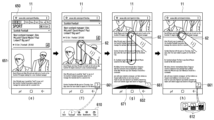
도 2는 본 개시의 다양한 실시 예에 따른 전자 장치(1)에서 적어도 하나의 기능이 실행되는 과정을 나타내는 도면이다.FIG. 2 is a diagram illustrating a process in which at least one function is executed in the
도 2의 (a)에서, 전자 장치(1)의 프로세서(12)는 터치 스크린(11)이 적어도 하나의 콘텐트를 포함하는 레이아웃의 일부(101) 및 전자 장치(1)의 적어도 하나의 기능에 대응되는 UI 객체(111)를 표시하도록 제어할 수 있다. 이 때, 콘텐트는, 예로, 복수의 디스플레이 설정 항목들을 포함할 수 있다. 또한, UI 객체(111)에 대응되는 적어도 하나의 기능은, 현재 터치 스크린(11)에 의하여 표시되는 화면의 이전 화면을 표시하거나, 현재 표시 중인 화면의 상위 계층 화면을 표시하는 기능을 포함할 수 있다.In Figure 2 (a), the
도 2의 (a)에서, 레이아웃의 일부(101)가 표시되는 동안에, 터치 스크린(11)은 사용자 입력(2)을 감지할 수 있다. 사용자 입력(2)은, 예로, 복수의 디스플레이 설정 항목들을 일 방향으로 스크롤하는 드래그 제스처를 포함할 수 있다. In (a) of FIG. 2, while a
사용자 입력(2)에 대응되는 사용자 입력 신호가 수신되면, 도 2의 (b)와 같이, 프로세서(12)는 터치 스크린(11)이 사용자 입력의 이동 방향에 대응되는(또는 레이아웃이 사용자 입력의 이동 방향에 따라 이동된 후 표시되는) 레이아웃의 다른 일부(102) 및 레이아웃의 에지(103)를 표시하도록 제어할 수 있다. 이 때, 사용자 입력이 상방향의 드래그 입력인 경우, 레이아웃의 에지는 레이아웃의 하방향에 위치한 레이아웃의(또는 레이아웃의 최하단의 위치에 대응하는) 에지일 수 있다. 반면에, 사용자 입력이 하방향의 드래그 입력인 경우, 레이아웃의 에지는 상기 레이아웃의 상방향에 위치한 상기 레이아웃의(또는 레이아웃의 최상단의 위치에 대응하는) 에지일 수 있다.When a user input signal corresponding to the
레이아웃의 에지(103)가 표시되는 동안에, 도 2의 (b)에서, 터치 스크린(11)은 사용자 입력(2)을 계속하여 감지할 수 있다. 계속하여 감지되는 사용자 입력은, 예로, 도 2의 (a)에서 감지되는 사용자 입력과 연속되는 사용자 입력일 수도 있고, 단절된 사용자 입력일 수 있다. 예로, 계속하여 감지되는 사용자 입력은 드래그 제스처이거나, 드래그 앤 홀드 제스처일 수 있다.While the
레이아웃의 에지(103)가 표시되는 동안에, 사용자 입력(2)에 대응되는 사용자 입력 신호가 계속하여 수신되면, 도 2의 (b)와 같이, 프로세서(12)는 터치 스크린(11)이 레이아웃의 에지(103)를 포함하는 영역 또는 레이아웃의 에지(103)의 인접 영역에 제1 시각적 효과(121)를 표시하도록 제어할 수 있다. 제1 시각적 효과(121)는 사용자 입력 신호가 계속하여 수신되어도, 더 이상 표시할 디스플레이 항목이 없다는 것을 나타낼 수 있다. While the
또한, 레이아웃의 에지(103)가 표시되는 동안에, 사용자 입력(2)에 대응되는 사용자 입력 신호가 계속하여 수신되면, 도 2의 (c)와 같이, 프로세서(12)는 터치 스크린(11)이 UI 객체(111)가 미리 설정된 시간 동안 변경되는 제2 시각적 효과(112)를 표시하도록 제어할 수 있다. 미리 설정된 시간의 진행에 따라, 프로세서(12)는 터치 스크린(11)이 UI 객체(111)의 시각적 형태를 점차적으로(또는 순차적으로) 변경하여 표시하도록 제어할 수 있다. 예로, 미리 설정된 시간의 진행에 비례하여, 프로세서(12)는 터치 스크린(11)이 UI 객체(111)의 적어도 일부를 제1 색으로부터 제2 색으로(또는 색상, 명도, 또는 채도 중 적어도 하나가 변경된 제2 색으로) 점차적으로 변경하도록 제어할 수 있다. 이 때, 제1 색은 제2 색 보다 명도 또는 채도가 높은 색이 될 수 있다. 예로, 제1 색이 어두운 색이라면, 제2 색은 밝은 색이 될 수 있다. 또한, 제1 색이 탁한 색이라면, 제2 색은 선명한 색이 될 수 있다. 또는, 제1 색과 제2 색은 서로 보색 관계일 수도 있다. In addition, while the
이때, 미리 설정된 시간은 레이아웃의 에지(103)가 표시된 후 일정 시간, 제1 시각적 효과(121)가 표시가 시작된 후 일정 시간, 제1 시각적 효과(121)의 표시가 종료된 후(또는 사라진 후) 일정 시간, 또는 상기 계속된 사용자 입력(2)이 홀드 제스처인 것이 감지된 후 일정 시간을 포함할 수 있다. 미리 설정된 시간은, 예로, 0.2 초 내지 0.6초 사이의 적어도 하나의 값이 될 수 있으며, 바람직하게는 0.2초 또는 0.3초가 될 수 있으나 전술한 예에 제한되지는 않는다.At this time, the preset time is a certain time after the
미리 설정된 시간이 경과되면, 도 2의 (d)와 같이, 프로세서(12)는 터치 스크린(11)이 UI 객체(111)에 대응되는 적어도 하나의 기능의 실행 화면(181)을 표시하도록 제어할 수 있다. 예로, 적어도 하나의 기능은 현재 터치 스크린(11)에 의하여 표시되는 화면의 이전 화면을 표시되거나, 현재 표시 중인 화면의 상위 계층 화면을 표시되는 기능을 포함할 수 있다. 한편, 프로세서(12)는 적어도 하나의 기능을 선제적으로(또는 미리 설정된 시간과 관계없이 지정된 이벤트에 대응하여) 실행할 수도 있다. 예로, 레이아웃의 에지(103)가 표시된 후, 제1 시각적 효과(121)의 표시가 시작된 후, 제1 시각적 효과(121)의 표시가 종료된 후, 또는 사용자 입력이 홀드 제스처인 것이 감지된 후, 프로세서(12)는 상기 적어도 하나의 기능을 선제적으로 실행할 수도 있다.When a preset time elapses, as shown in (d) of FIG. 2, the
다양한 실시예로, 레이아웃의 에지(103)가 표시되는 동안에, 사용자 입력(2)에 대응되는 사용자 입력 신호가 계속하여 수신되면, 프로세서(12)는 도 2의 (b)의 제1 시각적 효과(121)가 표시되는 동안에, 터치 스크린(11)이 도 2의 (c)의 제2 시각적 효과(112)의 적어도 일부를 표시하도록 제어할 수 있다. 또는, 프로세서(12)는 도 2의 (c)의 터치 스크린(11)이 제2 시각적 효과(112)를 먼저 표시하고, 도 2의 (b)의 제1 시각적 효과(121)를 표시하도록 제어할 수 있다. 또는, 프로세서(12)는 도 2의 (b)의 제1 시각적 효과(121)의 표시가 종료된 후, 터치 스크린(11)이 도 2의 (c)의 제2 시각적 효과(112)를 표시하도록 제어할 수 있다. 또는, 프로세서(12)는 터치 스크린(11)이 도 2의 (b)의 제1 시각적 효과(121)와 도 2의 (c)의 제2 시각적 효과(112)를 동시에 표시하도록 제어할 수 있다.In various embodiments, while the
다양한 실시예로, 레이아웃의 에지(103)가 표시되는 동안에, 사용자 입력(2)에 대응되는 사용자 입력 신호가 계속하여 수신되면, 프로세서(12)는 도 2의 (b)의 제1 시각적 효과(121)를 표시하지 않고, 도 2의 (c)의 제2 시각적 효과(112)를 표시할 수도 있다. In various embodiments, while the
다양한 실시예로, 프로세서(12)는 제2 시각적 효과(112)가 표시되고, 사용자 입력(2)에 대응되는 사용자 입력 신호가 일정 시간 동안 수신되지 않으면, 프로세서(12)는 터치 스크린(11)이 UI 객체(111)에 대응되는 적어도 하나의 기능의 실행 화면(181)을 표시하도록 제어할 수 있다. 예로, 사용자가 홀드를 해제(release)하는 제스처를 수행하면, 프로세서(12)는 터치 스크린(11)이 UI 객체(111)에 대응되는 적어도 하나의 기능의 실행 화면(181)을 표시하도록 제어할 수 있다.In various embodiments, the
도 3은 본 개시의 다양한 실시 예에 따른 전자 장치(1)에서 적어도 하나의 기능이 실행되는 과정을 나타내는 도면이다.FIG. 3 is a diagram illustrating a process in which at least one function is executed in the
도 3의 (a)에서, 전자 장치(1)의 프로세서(12)는 터치 스크린(11)이 적어도 하나의 콘텐트를 포함하는 레이아웃의 에지(303) 및 전자 장치(1)의 적어도 하나의 기능에 대응되는 UI 객체(311)를 표시하도록 제어할 수 있다. 이 때, 콘텐트는, 예로, 복수의 연락처 항목들을 포함할 수 있다. 또한, UI 객체(311)에 대응되는 적어도 하나의 기능은, 백 버튼(back button)에 대응하는 기능일 수 있다.In (a) of FIG. 3, the
도 3의 (a)에서, 레이아웃의 에지(303)가 표시되는 동안에, 터치 스크린(11)은 사용자 입력(3)을 감지할 수 있다. 사용자 입력(3)은, 예로, 일 방향으로의 드래그 제스처일 수 있다. 이 때, 사용자 입력(3)에 대응되는 사용자 입력 신호에 따라 더 이상 표시할 콘텐트가 없는 경우, 프로세서(12)는 터치 스크린(11)이 제1 시각적 효과(321)를 표시하도록 제어할 수 있다.In (a) of FIG. 3, while the
사용자 입력(3)에 대응되는 사용자 입력 신호가 계속하여 수신되면, 도 3의 (b)와 같이, 프로세서(12)는 터치 스크린(11)이 UI 객체(311)가 미리 설정된 시간 동안 변경되는 제2 시각적 효과(312)를 표시하도록 제어할 수 있다. 이 때, 사용자 입력(3)은 예로, 도 3의 (a)의 드래그 제스처 이후 연속되는 홀드 제스처일 수 있다. When a user input signal corresponding to the
다양한 실시예로, 도 3의 (a)에서, 터치 스크린을 통한 사용자 입력(3)이 감지되면, 프로세서(12)는 도 3의 (a)의 제1 시각적 효과(321)와 도 3의 (b)의 제2 시각적 효과(312)의 적어도 일부를 함께 표시할 수도 있다. 즉, 드래그 제스처가 감지되는 동안에, 프로세서(12)는 도 3의 (a)의 제1 시각적 효과(321)와 도 3의 (b)의 제2 시각적 효과(312)의 적어도 일부를 함께 표시할 수도 있다.In various embodiments, in Figure 3 (a), when the
도 3의 (b)에서, 미리 설정된 시간의 진행에 따라, 프로세서(12)는 터치 스크린(11)이 UI 객체(311)의 시각적 형태를 점차적으로 변경하여 표시하도록 제어할 수 있다. In (b) of FIG. 3, as the preset time progresses, the
예로, 미리 설정된 시간의 진행에 비례하여, 프로세서(12)는 터치 스크린(11)이 UI 객체(311)의 적어도 일부를 제1 색으로부터 제2 색으로 점차적으로 변경하도록 제어할 수 있다.For example, in proportion to the progress of a preset time, the
미리 설정된 시간이 경과되면, 도 3의 (c)와 같이, 프로세서(12)는 터치 스크린(11)이 UI 객체(311)에 대응되는 적어도 하나의 기능의 실행 화면을 표시하도록 제어할 수 있다. 예로, 프로세서(12)는 터치 스크린(11)이 UI 객체(311)에 대응되는 적어도 하나의 기능으로서, 백 버튼에 대응하는 기능의 실행 화면(381)을 표시하도록 제어할 수 있다. 도 3의 (c)에서, 백 버튼의 대응하는 기능의 실행 화면(381)은, 예로, 홈 화면이 될 수 있다.When a preset time elapses, the
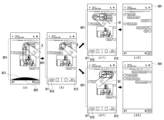
도 4는 본 개시의 다양한 실시 예에 따른 전자 장치(1)에서 적어도 하나의 기능이 실행되는 과정을 나타내는 도면이다.FIG. 4 is a diagram illustrating a process in which at least one function is executed in the
도 4의 (a)에서, 전자 장치(1)의 프로세서(12)는 적어도 하나의 콘텐트를 포함하는 레이아웃의 에지(403)를 표시하도록 제어할 수 있다.In (a) of FIG. 4, the
도 4의 (a)에서, 레이아웃의 에지(403)가 표시되는 동안에, 터치 스크린(11)은 사용자 입력(4)을 감지할 수 있다. 사용자 입력(4)은, 예로, 드래그 제스처일 수 있다. In (a) of FIG. 4, while the
사용자 입력(4)에 대응되는 사용자 입력 신호에 대응되어 더 이상 표시할 콘텐트가 없는 경우, 도 4의 (b)와 같이, 프로세서(12)는 터치 스크린(11)이 제1 시각적 효과(421)를 표시하도록 제어할 수 있다. 이 경우, 사용자 입력(4)에 대응되는 사용자 입력 신호가 계속하여 수신될 수 있다. 사용자 입력(4)은 예로, 도 4의 (a)의 드래그 제스처와 연속되는 드래그 제스처일 수 있다.When there is no more content to display in response to the user input signal corresponding to the
사용자 입력(4)에 대응되는 사용자 입력 신호가 계속하여 수신되면, 도 4의 (c-1) 및 (c-2)와 같이, 프로세서(12)는 터치 스크린(11)이 UI 객체(411)가 미리 설정된 시간 동안 변경되는 제2 시각적 효과를 표시하도록 제어할 수 있다. 이 때, 사용자 입력(4)은 예로, 도 4의 (b)의 드래그 제스처와 연속되는 드래그 제스처일 수 있다. When the user input signal corresponding to the
제2 시각적 효과는, 예로, 도 4의 (c-1) 및 (c-2)와 같이, 미리 설정된 시간의 진행에 따라, UI 객체(411)로서 표시 중인 화면의 스크린샷(screenshot)(또는, 썸네일)(411)의 스케일(scale)이 점차적으로 변경되는 것일 수 있다. 도 4의 (c-1) 및 (c-2)에서, 제2 시각적 효과로서 화면의 스크린샷(411)은 점차적으로 작아질 수 있다. 또한, 다양한 구현 방식에 따라, 제2 시각적 효과로서 화면의 스크린 샷(411)이 점차적으로 커지거나, 회전하거나, 페이드 아웃(fade out)되거나, 페이드 인(fade in)될 수도 있다. The second visual effect is, for example, as shown in (c-1) and (c-2) of Figure 4, a screenshot (or , the scale of the thumbnail) 411 may gradually change. In Figures 4 (c-1) and (c-2), the
미리 설정된 시간이 경과되면, 도 4의 (d)와 같이, 프로세서(12)는 터치 스크린(11)이 적어도 하나의 기능의 실행 화면(481)을 표시하도록 제어할 수 있다. 이 때, 적어도 하나의 기능은 본 개시에 따른 사용자 입력에 대응되도록 미리 설정된 기능일 수 있다. 미리 설정된 기능은, 예로, 전자 장치(1)의 제조자, 전자 장치(1)에 설정된 어플리케이션의 제공자 또는 운영 시스템의 제공자 등에 의하여 디폴트 값으로 미리 설정될 수 있다. 또는, 미리 설정된 기능은 사용자 인터페이스를 통하여 사용자에 의하여 미리 지정될 수도 있다.When a preset time elapses, the
도 4의 (d)에서, 프로세서(12)는 미리 설정된 기능으로, 예로, 터치 스크린(11)이 이전 화면(또는 이전 페이지)을 표시하도록 제어할 수 있다. In (d) of FIG. 4, the
다양한 실시예로, 적어도 하나의 기능의 실행 화면은 제2 시각적 효과에서 미리 표시될 수도 있다. 예로, 도 4의 (c-2)에서, 제2 시각적 효과로서, 화면의 스크린 샷(411)은, 적어도 하나의 기능의 실행 화면(481)과 오버랩될 수 있다. 예로, 화면의 스크린 샷(411)이 페이드 아웃되고, 적어도 하나의 기능의 실행 화면(481)이 페이드 인되면서 서로 오버랩될 수 있다.In various embodiments, the execution screen of at least one function may be displayed in advance in the second visual effect. For example, in (c-2) of FIG. 4, as a second visual effect, a screen shot 411 of the screen may overlap with an
도 5는 본 개시의 다양한 실시 예에 따른 전자 장치(1)에서 적어도 하나의 기능이 실행되는 과정을 나타내는 도면이다.FIG. 5 is a diagram illustrating a process in which at least one function is executed in the
도 5의 (a)에서, 전자 장치(1)의 프로세서(12)는 터치 스크린(11)이 적어도 하나의 콘텐트를 포함하는 레이아웃의 일부(501)를 표시하도록 제어할 수 있다. 이 때, 콘텐트는, 예로, 복수의 이메일 항목들을 포함할 수 있다. In Figure 5(a), the
도 5의 (a)에서, 레이아웃의 일부(501)가 표시되는 동안에, 터치 스크린(11)은 사용자 입력(5)을 감지할 수 있다. 사용자 입력(5)은, 예로, 복수의 이메일 항목들을 일 방향으로 스크롤하는 드래그 제스처를 포함할 수 있다.In (a) of FIG. 5, while a
사용자 입력(5)에 대응되는 사용자 입력 신호가 수신되면, 도 5의 (b)와 같이, 프로세서(12)는 터치 스크린(11)이 사용자 입력(5)의 이동 방향에 대응되는 레이아웃의 다른 일부(502) 및 레이아웃의 에지(503)를 표시하도록 제어할 수 있다. When a user input signal corresponding to the
레이아웃의 에지(503)가 표시되는 동안에, 사용자 입력(5)에 대응되는 사용자 입력 신호가 계속하여 수신되면, 도 5의 (b)와 같이, 프로세서(12)는 터치 스크린(11)이 더 이상 표시할 이메일 항목이 없다는 것을 나타내는 제1 시각적 효과(521)를 레이아웃의 에지(503) 근처에 표시하도록 제어할 수 있다.While the
일정 시간이 경과되어 제1 시각적 효과(521)가 종료되면, 도 5의 (c)와 같이, 프로세서(12)는 터치 스크린(11)이 UI 객체(511)가 미리 설정된 시간 동안 변경되는 제2 시각적 효과(512)를 표시하도록 제어할 수 있다. 사용자 입력(5)은, 예로, 도 5의 (b)의 드래그 제스처 이후 연속되는 홀드 제스처일 수 있다.When the first
이때, 제2 시각적 효과(512)는 도 5의 (a) 및 (b)에서는 표시되지 않았던 새롭게 표시되는 UI 객체(511)를 대상으로 제공될 수 있다. 미리 설정된 시간의 진행에 따라, 프로세서(12)는 터치 스크린(11)이 새롭게 표시된 UI 객체(511)의 시각적 형태를 점차적으로 변경하여 표시하도록 제어할 수 있다. 예로, 미리 설정된 시간이 경과됨에 따라(예: 미리 설정된 시간에 비례하여), UI 객체(511)의 진행 바(progress bar)가 점차적으로 증가될 수 있다.At this time, the second
미리 설정된 시간이 경과되면, 도 5의 (d)와 같이, 프로세서(12)는 터치 스크린(11)이 적어도 하나의 기능의 실행 화면(581)을 표시하도록 제어할 수 있다. 이 때, 적어도 하나의 기능은 본 개시에 따른 사용자 입력에 대응되도록 미리 설정된 기능일 수 있다. 프로세서(12)는 미리 설정된 기능으로서, 예로, 터치 스크린(11)이 이전 화면을 표시하도록 제어할 수 있다.When a preset time elapses, the
다양한 실시예로, 프로세서(12)는 미리 설정된 시간이 경과된 후, 사용자 입력이 더 이상 감지되지 않으면, 적어도 하나의 기능의 실행 화면을 표시할 수도 있다. 예로, 도 5의 (c)에서, 미리 설정된 경과하여 UI 객체(511)의 진행 바가 일정 수준까지 다다르고, 사용자의 홀드 제스처가 해제(release)되면, 적어도 하나의 기능의 실행 화면을 표시할 수 있다.In various embodiments, the
다양한 실시예로, 미리 설정된 시간이 경과되지 않더라도, 사용자 입력이 더 이상 감지되지 않으면, 프로세서(12)는 터치 스크린(11)이 적어도 하나의 기능의 실행 화면을 표시할 수도 있다. 예로, 도 5의 (c)에서, 미리 설정된 시간이 진행되는 도중에, 사용자의 홀드 제스처가 해제(release)되면, 프로세서(12)는 터치 스크린(11)이 적어도 하나의 기능의 실행 화면을 표시하도록 제어할 수 있다.In various embodiments, even if the preset time has not elapsed, if the user input is no longer detected, the
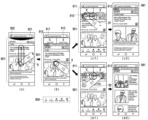
도 6a는 본 개시의 다양한 실시 예에 따른 전자 장치(1)에서 적어도 하나의 기능이 실행되는 과정을 나타내는 도면이다.FIG. 6A is a diagram illustrating a process in which at least one function is executed in the
도 6a의 (a)에서, 전자 장치(1)의 프로세서(12)는 터치 스크린(11)이 적어도 하나의 콘텐트를 포함하는 레이아웃의 일부(601)를 표시하도록 제어할 수 있다. 이 때, 적어도 하나의 콘텐트를 포함하는 레이아웃은 웹 페이지일 수 있다. In (a) of FIG. 6A, the
적어도 하나의 콘텐트를 포함하는 레이아웃의 일부(601)가 표시되는 동안에, 도 6a의 (b)와 같이, 터치 스크린(11)은 사용자 입력(61)을 감지할 수 있다. 사용자 입력(6)은, 예로, 하 방향으로의 드래그 제스처일 수 있다. 사용자에 의하여 드래그 제스처가 수행되는 동안에, 전자 장치(1)의 프로세서(12)는 터치 스크린(11)이 레이아웃의 다른 일부(602) 및 적어도 하나의 기능에 대응되는 UI 객체(611)를 표시하도록 제어할 수 있다. UI 객체(611)는, 예로, 특정 조건(예로, 미리 지정된 방향으로 웹 페이지를 스크롤 시)에서 자동으로 제공되는 웹 페이지를 제어할 수 있는 UI 객체들(610) 중 일 UI 객체가 될 수 있다. 일 UI 객체(611)는, 예로, 레이아웃의 다른 일부(602)의 일 측에 오버레이되어 표시될 수 있다.While a
사용자 입력(61)에 대응되는 사용자 입력 신호가 계속하여 수신되면, 도 6a의 (c)에서, 전자 장치(1)의 프로세서(12)는 터치 스크린(11)이 더 이상 표시할 웹 페이지가 없다는 것을 나타내는 제1 시각적 효과(621)를 레이아웃의 에지(603) 근처에 표시하도록 제어할 수 있다. 사용자 입력(61)은, 예로, 도 6a의 (b)의 드래그 제스처 이후 연속되는 드래그 제스처일 수 있다.When the user input signal corresponding to the
레이아웃의 에지(603)가 표시되는 동안에, 사용자 입력(61)에 대응되는 사용자 입력 신호가 계속하여 수신되면, 도 6a의 (d)와 같이, 프로세서(12)는 터치 스크린(11)이 UI 객체(611)가 미리 설정된 시간 동안 변경되는 제2 시각적 효과(612)를 표시하도록 제어할 수 있다. 사용자 입력(61)은, 예로, 도 6a의 (c)의 드래그 제스처 이후 연속되는 홀드 제스처일 수 있다.While the
예로, 미리 설정된 시간의 진행에 비례하여, 프로세서(12)는 터치 스크린(11)이 UI 객체(611)의 적어도 일부가 제1 색으로부터 제2 색으로 점차적으로 변경하도록 제어할 수 있다. 점차적으로 변경되는 시각적 효과는, 예로, UI 객체(611)의 적어도 일부가 제1 색에서 제2 색으로 아래부터 위로 점차적으로 채워지는 시각적 효과를 포함할 수 있다.For example, in proportion to the progress of a preset time, the
미리 설정된 시간이 경과되면, 도 6b의 (e)와 같이, 프로세서(12)는 터치 스크린(11)이 UI 객체(611)에 대응되는 적어도 하나의 기능의 실행 화면(651)을 표시하도록 제어할 수 있다. 예로, 프로세서(12)는 터치 스크린(11)이 UI 객체(611)에 대응되는 제1 기능으로서, 백 버튼에 대응하는 기능의 실행 화면(651)을 표시하도록 제어할 수 있다.When a preset time elapses, as shown in (e) of FIG. 6B, the
도 6b의 (e)에서, 프로세서(12)는 터치 스크린(11)이 백 버튼의 대응하는 기능의 실행 화면(650)으로서, 적어도 하나의 콘텐트를 포함하는 레이아웃의 일부(651)를 표시하도록 제어할 수 있다. 이 때, 도 6a의 (d)에서의 사용자의 홀드 제스처(61)가 해제되면, 프로세서(12)는 터치 스크린(11)이 적어도 하나의 콘텐트를 포함하는 레이아웃의 일부(651)를 표시하도록 제어할 수도 있다.In (e) of FIG. 6B, the
도 6b의 (f)에서, 적어도 하나의 콘텐트를 포함하는 레이아웃의 일부(651)이 표시되는 동안에, 터치 스크린(11)은 사용자 입력(62)을 감지할 수 있다. 이 때, 사용자 입력(62)은, 도 6a의 (b)에서 드래그 제스처의 반대 방향인, 상 방향으로의 드래그 제스처일 수 있다. 사용자에 의하여 드래그 제스처(62)가 수행되는 동안에, 전자 장치(1)의 프로세서(12)는 터치 스크린(11)이 적어도 하나의 기능에 대응되는 UI 객체(661)를 표시하도록 제어할 수 있다. UI 객체(661)는, 예로, 웹 페이지와 연결되어 특정 조건(예로, 특정 방향으로 웹 페이지를 스크롤 시)에서 제공되는 웹 페이지를 제어할 수 있는 UI 객체들(610) 중 일 UI 객체가 될 수 있다. 이 경우, 도 6a의 (b)에서의 UI 객체(611)와 도 6b의 (f)의 UI 객체(661)는 서로 다른 객체일 수 있다. 예로, 사용자의 제스처 방향에 따라 표시되는 UI 객체의 기능이 서로 다를 수 있다. 예로, 도 6a의 (b)에서의 UI 객체(611)가 백(back) 버튼이며, 도 6b의 (f)에서의 UI 객체(661)는 포워드(forward) 버튼일 수 있다.In (f) of FIG. 6B, while a
사용자 입력(62)에 대응되는 사용자 입력 신호가 계속하여 수신되면, 도 6b의 (g)에서, 전자 장치(1)의 프로세서(12)는 터치 스크린(11)이 더 이상 표시할 웹 페이지가 없다는 것을 나타내는 제1 시각적 효과(671)를 레이아웃의 에지(652) 근처에 표시하도록 제어할 수 있다. When the user input signal corresponding to the
레이아웃의 에지(652)가 표시되는 동안에, 사용자 입력(62)에 대응되는 사용자 입력 신호가 계속하여 수신되면, 도 6b의 (h)와 같이, 프로세서(12)는 터치 스크린(11)이 UI 객체(661)가 미리 설정된 시간 동안 변경되는 제2 시각적 효과(662)를 표시하도록 제어할 수 있다. 예로, 미리 설정된 시간의 진행에 비례하여, 프로세서(12)는 터치 스크린(11)이 UI 객체(661)의 적어도 일부가 제1 색으로부터 제2 색으로 점차적으로 변경하도록 제어할 수 있다.While the
미리 설정된 시간이 경과되면, 프로세서(12)는 터치 스크린(11)이 UI 객체(661)에 대응되는 적어도 하나의 기능의 실행 화면을 표시하도록 제어할 수 있다. 예로, 프로세서(12)는 터치 스크린(11)이 UI 객체(661)에 대응되는 제2 기능으로서, 포워드 버튼에 대응하는 기능의 실행 화면을 표시하도록 제어할 수 있다. 예로, 프로세서(12)는 터치 스크린(11)이 도 6a의 (a)와 같은 웹 페이지를 다시 표시하도록 제어할 수 있다.When a preset time elapses, the
도 7은 본 개시의 다양한 실시 예에 따른 전자 장치(1)에서 적어도 하나의 기능이 실행되는 과정을 나타내는 도면이다.FIG. 7 is a diagram illustrating a process in which at least one function is executed in the
도 7에서, 전자 장치(1)의 프로세서(12)는 터치 스크린(11)이 적어도 하나의 콘텐트(701)를 포함하는 레이아웃을 표시하도록 제어할 수 있다. 이 때, 적어도 하나의 콘텐트(701)는 이미지이고, 콘텐트를 포함하는 레이아웃은 터치 스크린(11)의 뷰포트(viewport) 크기를 고려하여 결정된 레이아웃일 수 있다.In FIG. 7 , the
이미지가 표시되는 동안에, 터치 스크린(11)은 사용자 입력(71)을 감지할 수 있다. 사용자 입력(71)은, 예로, 콘텐트(701)를 확대시키는 핀치 아웃(pinch out) 제스처일 수 있다.While the image is displayed, the
사용자 입력(71)에 응답하여, 도 7의 (b)와 같이, 전자 장치(1)의 프로세서(12)는 터치 스크린(11)이 확대된 콘텐트(701)를 표시하도록 제어할 수 있다. 이 때, 사용자 입력(71)에 응답하여, 콘텐트(701)를 포함하는 레이아웃(701)의 크기도 함께 확대될 수 있다.In response to the
확대된 콘텐트(701)가 표시되는 동안에, 도 7의 (c)에서, 터치 스크린(11)은 사용자 입력(72)을 감지할 수 있다. 사용자 입력(72)은, 예로, 좌 방향으로의 드래그 제스처일 수 있다.While the
사용자 입력(72)에 대응되는 사용자 입력 신호가 수신되면, 도 7의 (c)와 같이, 프로세서(12)는 터치 스크린(11)이 사용자 입력(72)의 이동 방향에 대응되는 콘텐트(701)의 에지(702)를 표시하도록 제어할 수 있다.When a user input signal corresponding to the
콘텐트(701)의 에지(702)가 표시되는 동안에, 사용자 입력(72)에 대응되는 사용자 입력 신호가 계속하여 수신되면, 도 7의 (c)와 같이, 프로세서(12)는 터치 스크린(11)이, 사용자 입력의 이동 방향으로 더 이상 표시할 콘텐트가 없다는 것을 나타내는 제1 시각적 효과(721)를 표시하도록 제어할 수 있다.While the
콘텐트(701)의 에지(702)가 표시되는 동안에, 사용자 입력(72)에 대응되는 사용자 입력 신호가 계속하여 수신되면, 도 7의 (d-1) 및 (d-2)와 같이, 프로세서(12)는 터치 스크린(11)이 제1 시각적 효과(721)와 함께 일 기능의 실행을 나타내는 UI 객체(711)가 미리 설정된 시간 동안 표시되도록 제어할 수 있다. While the
이 때, 미리 설정된 시간의 진행에 따라, 프로세서(12)는 터치 스크린(11)이 UI 객체(711)의 시각적 형태를 점차적으로 변경하는 제2 시각적 효과를 표시하도록 제어할 수 있다. 예로, 프로세서(12)는 UI 객체(711)를 제1 색으로부터 제2 색으로 점차적으로 변경할 수 있다. 구체적으로, 프로세서(12)는 터치 스크린(11)이 UI 객체(711)를 점차적으로 강조하여 표시하도록 제어할 수 있다. 이 경우, 제1 시각적 효과(721)는 UI 객체(711)의 제2 시각적 효과와 함께 표시될 수 있다. 또한, 제1 시각적 효과(721) 및 UI 객체(711)의 제2 시각적 효과는 서로 오버랩되어 표시될 수 있다.At this time, as the preset time progresses, the
미리 설정된 시간이 경과되면, 도 7의 (e)와 같이, 프로세서(12)는 터치 스크린(11)이 UI 객체(711)에 대응되는 기능의 실행 화면(781)을 표시하도록 제어할 수 있다. 예로, UI 객체(711)에 대응되는 기능은 현재 터치 스크린(11)에 의하여 표시 중인 이미지의 다음 순서의 이미지가 표시되는 기능을 포함할 수 있다. 다음 순서의 이미지는, 이미지의 이름, 이미지의 촬영 날짜, 이미지의 크기, 이미지의 태깅 정보 등을 고려하여 결정될 수 있다.When a preset time elapses, the
도 8은 본 개시의 다양한 실시 예에 따른 전자 장치(1)에서 적어도 하나의 기능이 실행되는 과정을 나타내는 도면이다.FIG. 8 is a diagram illustrating a process in which at least one function is executed in the
도 8의 (a)에서, 전자 장치(1)의 프로세서(12)는 터치 스크린(11)이 적어도 하나의 콘텐트를 포함하는 레이아웃의 에지(802)를 표시하도록 제어할 수 있다. 이 경우, 콘텐트를 포함하는 레이아웃은, 문자 메시지를 포함하는 대화 창이 될 수 있다.In (a) of FIG. 8, the
도 8의 (a)에서, 대화 창의 에지(802)가 표시되는 동안에, 터치 스크린(11)은 사용자 입력(8)을 감지할 수 있다. 사용자 입력(8)은, 예로, 일 방향으로의 드래그 제스처일 수 있다. 이 때, 사용자 입력(8)에 대응되어 더 이상 표시할 메시지가 없는 경우, 프로세서(12)는 터치 스크린(11)이 제1 시각적 효과(821)를 표시하도록 제어할 수 있다.In (a) of FIG. 8, while the
사용자 입력(8)에 대응되는 사용자 입력 신호가 계속하여 수신되면, 도 8의 (b)와 같이, 프로세서(12)는 터치 스크린(11)이 복수 개의 UI 객체들(810)을 표시하도록 제어할 수 있다. 복수 개의 UI 객체들(810)에 대응하는 기능들은, 대화 창을 표시하는 어플리케이션이 제공하는 기능들 중 일부일 수 있다. 이 때, 복수 개의 UI 객체들(810)은 제1 시각적 효과(821)가 표시된 후 미리 설정된 시간이 경과되면 표시될 수도 있다.When the user input signal corresponding to the
복수 개의 UI 객체들(810)은, 예로, 이전 순서의 상대방과의 대화 창을 표시하는 UI 객체(811) 및 이후 순서의 상대방과의 대화 창을 표시하는 UI 객체(812)를 포함할 수 있다. 또한, 도 8의 (b)에서의 사용자 입력(8)은 예로, 도 8의 (a)의 드래그 제스처 이후 연속되는 홀드 제스처일 수 있다. The plurality of UI objects 810 may include, for example, a
복수 개의 UI 객체들(810)이 표시되는 동안, 도 8의 (c-1)과 같이, 사용자 입력(81)에 대응되는 사용자 입력 신호가 계속하여 수신될 수 있다. 이 때, 사용자 입력(81)은, 도 8의 (b)의 홀드 제스처(8) 이후 연속하여 제1 방향으로 드래그하는 제스처(81)일 수 있다.While the plurality of UI objects 810 are displayed, a user input signal corresponding to the
제1 방향으로 드래그 제스처(81)에 대응되는 사용자 입력 신호가 수신되면, 도 8의 (c-2)와 같이, 프로세서(12)는 터치 스크린(11)이 사용자 입력(81)에 대응되는 UI 객체(811)에 대응되는 기능의 실행 화면(881)을 표시하도록 제어할 수 있다. 예로, 사용자 입력(81)이 좌 방향으로 드래그하는 제스처인 경우, 사용자 입력(81)에 대응되는 UI 객체는 복수 개의 UI 객체들(810) 중 좌 방향에 위치한 UI 객체(811)가 될 수 있다. 도 8의 (c-2)에서, UI 객체(811)에 대응되는 기능의 실행 화면(881)으로서, 프로세서(12)는 터치 스크린(11)이 이전 순서의 상대방과의 대화 창을 표시하도록 제어할 수 있다. 이 때, 이전 순서의 상대방은, 상대방의 이름, 상대방과의 대화 시간, 북마크 순서, 대화창의 열람 시간 등을 고려하여 결정될 수 있다. 또한, 도 8의 (c-1)에서, 사용자 입력(81)에 대응되는 사용자 입력 신호가 수신되면, 프로세서(12)는 사용자 입력(81)에 대응되는 UI 객체(811)의 적어도 일부에 시각적 효과를 표시하여 다음의 실행될 기능을 사용자가 예측하도록 가이드할 수 있다.When a user input signal corresponding to the
한편, 도 8의 (b)에서, 복수 개의 UI 객체들(810)이 표시되는 동안, 도 8의 (d-1)과 같이, 사용자 입력(82)에 대응되는 사용자 입력 신호가 계속하여 수신될 수 있다. 이 때, 사용자 입력(82)은, 도 8의 (b)의 홀드 제스처(8) 이후 연속하여 제2 방향으로 드래그하는 제스처(82)일 수 있다. 예로, 제2 방향으로 드래그하는 제스처(82)는, 도 8의 (c-1)에서 제1 방향으로 드래그하는 제스처(81)에 반대되는 방향으로 드래그하는 제스처일 수 있다.Meanwhile, in (b) of FIG. 8, while the plurality of UI objects 810 are displayed, the user input signal corresponding to the
제2 방향으로 드래그 제스처(82)를 수행하는 사용자 입력에 대응되는 사용자 입력 신호가 수신되면, 도 8의 (d-2)와 같이, 프로세서(12)는 터치 스크린(11)이 사용자 제스처(82)에 대응되는 UI 객체(812)에 대응되는 기능의 실행 화면(891)을 표시하도록 제어할 수 있다. 예로, 사용자 제스처(82)가 우 방향으로 드래그하는 제스처인 경우, 사용자 제스처(82)에 대응되는 UI 객체는 복수 개의 UI 객체들(820) 중 우 방향에 위치한 UI 객체(812)가 될 수 있다. 도 8의 (d-2)에서, UI 객체(811)에 대응되는 기능의 실행 화면(891)으로서, 프로세서(12)는 터치 스크린(11)이 이후 순서의 상대방과의 대화 창을 표시하도록 제어할 수 있다. 다양한 실시예로, 도 8의 (d-1)에서, 사용자 입력(81)에 대응되는 사용자 입력 신호가 수신되면, 프로세서(12)는 사용자 입력(81)에 대응되는 UI 객체(812)의 적어도 일부에 시각적 효과를 표시하여 다음의 실행될 기능을 사용자가 예측하도록 가이드할 수도 있다.When a user input signal corresponding to a user input of performing a
도 9는 본 개시의 다양한 실시 예에 따른 전자 장치(1)에서 적어도 하나의 기능이 실행되는 과정을 나타내는 도면이다.FIG. 9 is a diagram illustrating a process in which at least one function is executed in the
도 9의 (a)에서, 전자 장치(1)의 프로세서(12)는 터치 스크린(11)이 웹 페이지(901)의 에지(902)를 표시하도록 제어할 수 있다. 웹 페이지(901)의 에지(902)가 표시되는 동안에 사용자 입력(9)이 계속하여 감지될 수 있다. 이 경우, 사용자 입력(9)에 대응되어 더 이상 표시할 메시지가 없는 경우, 프로세서(12)는 터치 스크린(11)이 제1 시각적 효과(921)를 표시하도록 제어할 수 있다. In (a) of FIG. 9 , the
사용자 입력(9)에 대응되는 사용자 입력 신호가 계속하여 수신되면, 도 9의 (b)와 같이, 프로세서(12)는 터치 스크린(11)이 복수 개의 UI 객체들(910)을 표시하도록 제어할 수 있다. 이 때, 사용자 입력(9)은, 예로, 도 9의 (a)의 드래그 제스처 이후 연속되는 홀드 제스처일 수 있다. 또한, 복수 개의 UI 객체들(910)는 특정 조건에서 자동으로 제공되는 웹 페이지를 제어할 수 있는 복수 개의 UI 객체들(909) 중 적어도 하나가 될 수 있다. 예로, 복수 개의 UI 객체들(910) 중 일 UI 객체(911)는 현재 표시 중인 웹 페이지(901)의 이전 웹 페이지를 표시하기 위한 백(back) 버튼이며, 다른 UI 객체(912)는 현재 표시 중인 웹 페이지(901)의 다음 웹 페이지를 표시하기 위한 포워드(forward) 버튼일 수 있다. 이 경우, 복수 개의 UI 객체들(910)에는 사용자의 제스처에 따라 수행 가능한 가이드 정보가 표시될 수 있다. 예로, 일 UI 객체(911)에는 'Swipe to Back' 가이드 정보가 표시되어, 사용자가 '<' 방향으로 스와이프를 수행하면 백(back) 버튼에 대응되는 기능이 수행됨을 나타낼 수 있다. 또한, 다른 UI 객체(912)에는 'Swipe to Next' 가이드 정보가 표시되어, 사용자가 '>'방향으로 스와이프를 수행하면 포워드(forward) 버튼에 대응되는 기능이 수행됨을 나타낼 수 있다. 다양한 실시 예로, 복수 개의 UI 객체들(910)은 제1 시각적 효과(921)가 표시된 후 미리 설정된 시간이 경과되면 표시될 수도 있다.When the user input signal corresponding to the
복수 개의 UI 객체들(910)이 표시되는 동안, 도 9의 (c-1)과 같이, 사용자 입력(91)에 대응되는 사용자 입력 신호가 계속하여 수신될 수 있다. 이 때, 사용자 입력(91)은, 도 9의 (b)의 홀드 제스처(9) 이후 연속하여 제1 방향으로 드래그하는 제스처(91)일 수 있다.While the plurality of UI objects 910 are displayed, a user input signal corresponding to the
제1 방향으로 드래그 제스처(91)에 대응되는 사용자 입력 신호가 수신되면, 도 9의 (c-2)와 같이, 프로세서(12)는 터치 스크린(11)이 사용자 제스처(91)에 대응되는 UI 객체(911)에 대응되는 기능의 실행 화면(981)을 표시하도록 제어할 수 있다. UI 객체(911)에 대응되는 기능의 실행 화면(981)으로서, 프로세서(12)는 터치 스크린(11)이 현재 표시 중인 웹 페이지(901)의 이전 웹 페이지(981)를 표시하도록 제어할 수 있다. When a user input signal corresponding to the
한편, 도 9의 (b)에서, 복수 개의 UI 객체들(910)이 표시되는 동안, 도 9의 (d-1)과 같이, 사용자 입력(92)에 대응되는 사용자 입력 신호가 계속하여 수신될 수 있다. 이 때, 사용자 입력(92)은, 도 9의 (b)의 홀드 제스처(9) 이후 연속하여 제2 방향으로 드래그하는 제스처(92)일 수 있다. 예로, 제2 방향으로 드래그하는 제스처(92)는, 도 9의 (c-1)에서 제1 방향으로 드래그하는 제스처(91)에 반대되는 방향으로 드래그하는 제스처일 수 있다.Meanwhile, in (b) of FIG. 9, while the plurality of UI objects 910 are displayed, the user input signal corresponding to the
제2 방향으로 드래그 제스처(92)를 수행하는 사용자 입력에 대응되는 사용자 입력 신호가 수신되면, 도 9의 (d-2)와 같이, 프로세서(12)는 터치 스크린(11)이 사용자 제스처(92)에 대응되는 UI 객체(912)에 대응되는 기능의 실행 화면(991)을 표시하도록 제어할 수 있다. UI 객체(912)에 대응되는 기능의 실행 화면(991)으로서, 프로세서(12)는 터치 스크린(11)이 현재 표시 중인 웹 페이지(901)의 다음 웹 페이지(991)를 표시하도록 제어할 수 있다.When a user input signal corresponding to a user input of performing a
도 10은 본 개시의 다양한 실시 예에 따른, 전자 장치(1)의 기능을 실행하는 흐름도이다.FIG. 10 is a flowchart of executing functions of the
먼저, 동작 1001에서, 전자 장치(1)는 적어도 하나의 콘텐트를 포함하는 레이아웃의 일부 및 전자 장치(1)의 적어도 하나의 기능에 대응되는 UI 객체를 터치 스크린(11)을 통하여 표시할 수 있다. First, in
동작 1003에서, 레이아웃의 일부가 표시되는 동안에, 전자 장치(1)는 터치 스크린(11)을 통한 사용자 입력이 감지되는지를 판단할 수 있다.In
동작 1003에서 사용자 입력이 감지된 것으로 판단되면, 동작 1005에서, 전자 장치(1)는 사용자 입력의 이동 방향에 대응되는(또는 레이아웃이 사용자 입력의 이동 방향에 따라 이동된 후 표시되는) 레이아웃의 에지를 표시할 수 있다.If it is determined in
예로, 사용자 입력이 상방향의 드래그 입력인 경우, 레이아웃의 에지는 레이아웃의 하방향에 위치한 상기 레이아웃의(또는 레이아웃의 최하단의 위치에 대응하는) 에지고, 사용자 입력이 하방향의 드래그 입력인 경우, 레이아웃의 에지는 상기 레이아웃의 상방향에 위치한 레이아웃의(또는 레이아웃의 최상단의 위치에 대응하는) 에지일 수 있다.For example, if the user input is an upward drag input, the edge of the layout is the edge of the layout (or corresponding to the bottom position of the layout) located at the bottom of the layout, and if the user input is a downward drag input. , the edge of the layout may be an edge of the layout located above the layout (or corresponding to the top position of the layout).
동작 1007에서, 레이아웃의 에지가 표시되는 동안에, 전자 장치(1)는 사용자 입력이 계속하여 감지되는지를 판단할 수 있다. 이 때, 동작 1003에서, 레이아웃의 일부가 표시되는 동안에 감지된 사용자 입력이 드래그 제스처인 경우, 레이아웃의 에지가 표시되는 동안에 감지된 사용자 입력은 상기 드래그 제스처와 연속되는 홀드 제스처이거나, 상기 드래그 제스처와 연속되는 추가 드래그 제스처일 수 있다.In
사용자 입력이 계속하여 감지되면(1007-예), 동작 1009에서, 전자 장치(1)는 레이아웃의 에지를 포함하는 영역 또는 에지 인접 영역에 제1 시각적 효과를 표시할 수 있다. 또한, 전자 장치(1)는 UI 객체가 미리 설정된 시간 동안 변경되는 제2 시각적 효과를 표시할 수 있다. 제2 시각적 효과는, 미리 설정된 시간의 진행에 따라, UI 객체의 시각적 형태를 변경하는 것을 포함할 수 있다. 예로, 제2 시각적 효과는 미리 설정된 시간의 진행에 비례하여, UI 객체의 적어도 일부를 제1 색으로부터 제2 색으로(또는 색상, 명도, 또는 채도 중 적어도 하나가 변경된 제2 색으로) 점차적으로(또는 순차적으로) 변경할 수 있다.If the user input is continuously detected (1007 - Yes), in
또는, 제2 시각적 효과는, 미리 설정된 시간의 진행에 따라, 레이아웃을 포함하는 화면의 스크린 샷의 스케일을 변경하는 것을 포함할 수 있다. Alternatively, the second visual effect may include changing the scale of a screenshot of a screen including the layout according to the progress of a preset time.
미리 설정된 시간은, 제1 시각적 효과의 표시가 시작된 후 일정 시간, 제1 시각적 효과의 표시가 종료된 후(또는 사라진 후) 일정 시간, 레이아웃의 에지의 표시가 시작된 후 일정 시간, 또는 계속되는 사용자 입력이 홀드 제스처인 것이 감지된 후 일정 시간일 수 있다.The preset time may be a certain amount of time after the display of the first visual effect begins, a certain amount of time after the display of the first visual effect ends (or disappears), a certain amount of time after the display of the edge of the layout begins, or continued user input. It may be some time after this hold gesture is detected.
또한, 제2 시각적 효과를 표시하는 동작은, 제1 시각적 효과가 표시되는 동안에 제2 시각적 효과를 표시하거나, 제1 시각적 효과가 표시된 후 제2 시각적 효과를 표시하거나, 제1 시각적 효과가 표시되기 전에 제2 시각적 효과를 표시하거나, 또는 제1 시각적 효과의 적어도 일부 및 상기 제2 시각적 효과의 적어도 일부를 함께 표시하는 동작을 포함할 수 있다.Additionally, the act of displaying the second visual effect may include displaying the second visual effect while the first visual effect is displayed, displaying the second visual effect after the first visual effect is displayed, or displaying the second visual effect before the first visual effect is displayed. It may include displaying the second visual effect before, or displaying at least a part of the first visual effect and at least a part of the second visual effect together.
동작 1011에서, 전자 장치(10)는 미리 설정된 시간이 경과되는지를 판단할 수 있다.In
미리 설정된 시간이 경과되면(1011-예), 동작 1013에서, 전자 장치(1)는 UI 객체에 대응되는 적어도 하나의 기능의 실행 화면을 표시할 수 있다. 예로, 적어도 하나의 기능은, 터치 스크린을 통하여 표시 중인 현재 화면의 이전 화면을 표시하는 기능 또는 상기 현재 화면의 다음 화면을 표시하는 기능을 포함할 수 있다. 이 때, 전자 장치(1)는 미리 설정된 시간이 경과되고, 사용자 입력이 감지되지 않음에 따라, UI 객체에 대응되는 적어도 하나의 기능의 실행 화면을 표시할 수도 있다.When the preset time elapses (1011 - Yes), in
도 11은, 다양한 실시예들에 따른, 네트워크 환경(1100) 내의 전자 장치(1101)의 블럭도이다. 도 11의 전자 장치(1101)는, 도 1의 전자 장치(1)를 포함할 수 있다. 도 11을 참조하면, 네트워크 환경(1100)에서 전자 장치(1101)는 제 1 네트워크(1198)(예: 근거리 무선 통신)를 통하여 전자 장치(1102)와 통신하거나, 또는 제 2 네트워크(1199)(예: 원거리 무선 통신)를 통하여 전자 장치(1104) 또는 서버(1108)와 통신할 수 있다. 일 실시예에 따르면, 전자 장치(1101)는 서버(1108)를 통하여 전자 장치(1104)와 통신할 수 있다. 일 실시예에 따르면, 전자 장치(1101)는 프로세서(1120), 메모리(1130), 입력 장치(1150), 음향 출력 장치(1155), 표시 장치(1160), 오디오 모듈(1170), 센서 모듈(1176), 인터페이스(1177), 햅틱 모듈(1179), 카메라 모듈(1180), 전력 관리 모듈(1188), 배터리(1189), 통신 모듈(1190), 가입자 식별 모듈(1196), 및 안테나 모듈(1197)을 포함할 수 있다. 어떤 실시예에서는, 전자 장치(1101)에는, 이 구성요소들 중 적어도 하나(예: 표시 장치(1160) 또는 카메라 모듈(1180))가 생략되거나 다른 구성 요소가 추가될 수 있다. 어떤 실시예에서는, 예를 들면, 표시 장치(1160)(예: 디스플레이)에 임베디드된 센서 모듈(1176)(예: 지문 센서, 홍채 센서, 또는 조도 센서)의 경우와 같이, 일부의 구성요소들이 통합되어 구현될 수 있다.FIG. 11 is a block diagram of an electronic device 1101 in a
프로세서(1120)는, 예를 들면, 소프트웨어(예: 프로그램(1140))를 구동하여 프로세서(1120)에 연결된 전자 장치(1101)의 적어도 하나의 다른 구성요소(예: 하드웨어 또는 소프트웨어 구성요소)을 제어할 수 있고, 다양한 데이터 처리 및 연산을 수행할 수 있다. 프로세서(1120)는, 도 1의 프로세서(12)를 포함할 수 있다. 프로세서(1120)는 다른 구성요소(예: 센서 모듈(1176) 또는 통신 모듈(1190))로부터 수신된 명령 또는 데이터를 휘발성 메모리(1132)에 로드하여 처리하고, 결과 데이터를 비휘발성 메모리(1134)에 저장할 수 있다. 일 실시예에 따르면, 프로세서(1120)는 메인 프로세서(1121)(예: 중앙 처리 장치 또는 어플리케이션 프로세서), 및 이와는 독립적으로 운영되고, 추가적으로 또는 대체적으로, 메인 프로세서(1121)보다 저전력을 사용하거나, 또는 지정된 기능에 특화된 보조 프로세서(1123)(예: 그래픽 처리 장치, 이미지 시그널 프로세서, 센서 허브 프로세서, 또는 커뮤니케이션 프로세서)를 포함할 수 있다. 여기서, 보조 프로세서(1123)는 메인 프로세서(1121)와 별개로 또는 임베디드되어 운영될 수 있다.The
이런 경우, 보조 프로세서(1123)는, 예를 들면, 메인 프로세서(1121)가 인액티브(예: 슬립) 상태에 있는 동안 메인 프로세서(1121)를 대신하여, 또는 메인 프로세서(1121)가 액티브(예: 어플리케이션 수행) 상태에 있는 동안 메인 프로세서(1121)와 함께, 전자 장치(1101)의 구성요소들 중 적어도 하나의 구성요소(예: 표시 장치(1160), 센서 모듈(1176), 또는 통신 모듈(1190))와 관련된 기능 또는 상태들의 적어도 일부를 제어할 수 있다. 일 실시예에 따르면, 보조 프로세서(1123)(예: 이미지 시그널 프로세서 또는 커뮤니케이션 프로세서)는 기능적으로 관련 있는 다른 구성 요소(예: 카메라 모듈(1180) 또는 통신 모듈(1190))의 일부 구성 요소로서 구현될 수 있다. In this case, the auxiliary processor 1123 may, for example, replace the main processor 1121 while the main processor 1121 is in an inactive (e.g., sleep) state, or while the main processor 1121 is in an active (e.g., sleep) state. : While in the application execution) state, at least one of the components of the electronic device 1101 (e.g., display device 1160,
메모리(1130)는, 전자 장치(1101)의 적어도 하나의 구성요소(예: 프로세서(1120) 또는 센서모듈(1176))에 의해 사용되는 다양한 데이터, 예를 들어, 소프트웨어(예: 프로그램(1140)) 및, 이와 관련된 명령에 대한 입력 데이터 또는 출력 데이터를 저장할 수 있다. 메모리(1130)는 도 1의 메모리(13)을 포함할 수 있다. 메모리(1130)는, 휘발성 메모리(1132) 또는 비휘발성 메모리(1134)를 포함할 수 있다. The memory 1130 stores various data used by at least one component (e.g.,
프로그램(1140)은 메모리(1130)에 저장되는 소프트웨어로서, 예를 들면, 운영 체제(1142), 미들 웨어(1144) 또는 어플리케이션(1146)을 포함할 수 있다. The program 1140 is software stored in the memory 1130 and may include, for example, an operating system 1142, middleware 1144, or an
입력 장치(1150)는, 전자 장치(1101)의 구성요소(예: 프로세서(1120))에 사용될 명령 또는 데이터를 전자 장치(1101)의 외부(예: 사용자)로부터 수신하기 위한 장치로서, 예를 들면, 마이크, 마우스, 또는 키보드를 포함할 수 있다. The
음향 출력 장치(1155)는 음향 신호를 전자 장치(1101)의 외부로 출력하기 위한 장치로서, 예를 들면, 멀티미디어 재생 또는 녹음 재생과 같이 일반적인 용도로 사용되는 스피커와 전화 수신 전용으로 사용되는 리시버를 포함할 수 있다. 일실시예에 따르면, 리시버는 스피커와 일체 또는 별도로 형성될 수 있다.The
표시 장치(1160)는 전자 장치(1101)의 사용자에게 정보를 시각적으로 제공하기 위한 장치로서, 예를 들면, 디스플레이, 홀로그램 장치, 또는 프로젝터 및 해당 장치를 제어하기 위한 제어 회로를 포함할 수 있다. 일 실시예에 따르면, 표시 장치(1160)는 터치 회로(touch circuitry) 또는 터치에 대한 압력의 세기를 측정할 수 있는 압력 센서를 포함할 수 있다. 표시 장치(1160)는 터치 회로와 결합하여 터치 스크린을 형성할 수 있다. 터치 스크린은 도 1의 터치 스크린(11)을 포함할 수 있다.The display device 1160 is a device for visually providing information to the user of the electronic device 1101 and may include, for example, a display, a hologram device, or a projector, and a control circuit for controlling the device. According to one embodiment, the display device 1160 may include touch circuitry or a pressure sensor capable of measuring the intensity of pressure on a touch. The display device 1160 can be combined with a touch circuit to form a touch screen. The touch screen may include the
오디오 모듈(1170)은 소리와 전기 신호를 쌍방향으로 변환시킬 수 있다. 일 실시예에 따르면, 오디오 모듈(1170)은, 입력 장치(1150)를 통해 소리를 획득하거나, 음향 출력 장치(1155), 또는 전자 장치(1101)와 유선 또는 무선으로 연결된 외부 전자 장치(예: 전자 장치(1102)(예: 스피커 또는 헤드폰))를 통해 소리를 출력할 수 있다.The
센서 모듈(1176)은 전자 장치(1101)의 내부의 작동 상태(예: 전력 또는 온도), 또는 외부의 환경 상태에 대응하는 전기 신호 또는 데이터 값을 생성할 수 있다. 센서 모듈(1176)은, 예를 들면, 제스처 센서, 자이로 센서, 기압 센서, 마그네틱 센서, 가속도 센서, 그립 센서, 근접 센서, 컬러 센서, IR(infrared) 센서, 생체 센서, 온도 센서, 습도 센서, 또는 조도 센서를 포함할 수 있다. The
인터페이스(1177)는 외부 전자 장치(예: 전자 장치(1102))와 유선 또는 무선으로 연결할 수 있는 지정된 프로토콜을 지원할 수 있다. 일실시예에 따르면, 인터페이스(1177)는 HDMI(high definition multimedia interface), USB(universal serial bus) 인터페이스, SD카드 인터페이스, 또는 오디오 인터페이스를 포함할 수 있다.The
연결 단자(1178)는 전자 장치(1101)와 외부 전자 장치(예: 전자 장치(1102))를 물리적으로 연결시킬 수 있는 커넥터, 예를 들면, HDMI 커넥터, USB 커넥터, SD 카드 커넥터, 또는 오디오 커넥터(예: 헤드폰 커넥터)를 포함할 수 있다.The
햅틱 모듈(1179)은 전기적 신호를 사용자가 촉각 또는 운동 감각을 통해서 인지할 수 있는 기계적인 자극(예: 진동 또는 움직임) 또는 전기적인 자극으로 변환할 수 있다. 햅틱 모듈(1179)은, 예를 들면, 모터, 압전 소자, 또는 전기 자극 장치를 포함할 수 있다.The haptic module 1179 can convert electrical signals into mechanical stimulation (e.g., vibration or movement) or electrical stimulation that the user can perceive through tactile or kinesthetic senses. Haptic module 1179 may include, for example, a motor, a piezoelectric element, or an electrical stimulation device.
카메라 모듈(1180)은 정지 영상 및 동영상을 촬영할 수 있다. 일실시예에 따르면, 카메라 모듈(1180)은 하나 이상의 렌즈, 이미지 센서, 이미지 시그널 프로세서, 또는 플래시를 포함할 수 있다.The camera module 1180 can capture still images and moving images. According to one embodiment, the camera module 1180 may include one or more lenses, an image sensor, an image signal processor, or a flash.
전력 관리 모듈(1188)은 전자 장치(1101)에 공급되는 전력을 관리하기 위한 모듈로서, 예를 들면, PMIC(power management integrated circuit)의 적어도 일부로서 구성될 수 있다.The power management module 1188 is a module for managing power supplied to the electronic device 1101, and may be configured as at least a part of, for example, a power management integrated circuit (PMIC).
배터리(1189)는 전자 장치(1101)의 적어도 하나의 구성 요소에 전력을 공급하기 위한 장치로서, 예를 들면, 재충전 불가능한 1차 전지, 재충전 가능한 2차 전지 또는 연료 전지를 포함할 수 있다.The battery 1189 is a device for supplying power to at least one component of the electronic device 1101 and may include, for example, a non-rechargeable primary battery, a rechargeable secondary battery, or a fuel cell.
통신 모듈(1190)은 전자 장치(1101)와 외부 전자 장치(예: 전자 장치(1102), 전자 장치(1104), 또는 서버(1108))간의 유선 또는 무선 통신 채널의 수립, 및 수립된 통신 채널을 통한 통신 수행을 지원할 수 있다. 통신 모듈(1190)은 프로세서(1120)(예: 어플리케이션 프로세서)와 독립적으로 운영되는, 유선 통신 또는 무선 통신을 지원하는 하나 이상의 커뮤니케이션 프로세서를 포함할 수 있다. 일실시예에 따르면, 통신 모듈(1190)은 무선 통신 모듈(1192)(예: 셀룰러 통신 모듈, 근거리 무선 통신 모듈, 또는 GNSS(global navigation satellite system) 통신 모듈) 또는 유선 통신 모듈(1194)(예: LAN(local area network) 통신 모듈, 또는 전력선 통신 모듈)을 포함하고, 그 중 해당하는 통신 모듈을 이용하여 제 1 네트워크(1198)(예: 블루투스, WiFi direct 또는 IrDA(infrared data association) 같은 근거리 통신 네트워크) 또는 제 2 네트워크(1199)(예: 셀룰러 네트워크, 인터넷, 또는 컴퓨터 네트워크(예: LAN 또는 WAN)와 같은 원거리 통신 네트워크)를 통하여 외부 전자 장치와 통신할 수 있다. 상술한 여러 종류의 통신 모듈(1190)은 하나의 칩으로 구현되거나 또는 각각 별도의 칩으로 구현될 수 있다. The communication module 1190 is configured to establish a wired or wireless communication channel between the electronic device 1101 and an external electronic device (e.g., the
일 실시예에 따르면, 무선 통신 모듈(1192)은 가입자 식별 모듈(1196)에 저장된 사용자 정보를 이용하여 통신 네트워크 내에서 전자 장치(1101)를 구별 및 인증할 수 있다. According to one embodiment, the
안테나 모듈(1197)은 신호 또는 전력을 외부로 송신하거나 외부로부터 수신하기 위한 하나 이상의 안테나들을 포함할 수 있다. 일시예에 따르면, 통신 모듈(1190)(예: 무선 통신 모듈(1192))은 통신 방식에 적합한 안테나를 통하여 신호를 외부 전자 장치로 송신하거나, 외부 전자 장치로부터 수신할 수 있다. The
상기 구성요소들 중 일부 구성요소들은 주변 기기들간 통신 방식(예: 버스, GPIO(general purpose input/output), SPI(serial peripheral interface), 또는 MIPI(mobile industry processor interface))를 통해 서로 연결되어 신호(예: 명령 또는 데이터)를 상호간에 교환할 수 있다.Some of the above components are connected to each other through a communication method between peripheral devices (e.g., bus, general purpose input/output (GPIO), serial peripheral interface (SPI), or mobile industry processor interface (MIPI)) to signal (e.g. commands or data) can be exchanged with each other.
일 실시예에 따르면, 명령 또는 데이터는 제 2 네트워크(1199)에 연결된 서버(1108)를 통해서 전자 장치(1101)와 외부의 전자 장치(1104)간에 송신 또는 수신될 수 있다. 전자 장치(1102, 1104) 각각은 전자 장치(1101)와 동일한 또는 다른 종류의 장치일 수 있다. 일실시예에 따르면, 전자 장치(1101)에서 실행되는 동작들의 전부 또는 일부는 다른 하나 또는 복수의 외부 전자 장치에서 실행될 수 있다. 일실시예에 따르면, 전자 장치(1101)가 어떤 기능이나 서비스를 자동으로 또는 요청에 의하여 수행해야 할 경우에, 전자 장치(1101)는 기능 또는 서비스를 자체적으로 실행시키는 대신에 또는 추가적으로, 그와 연관된 적어도 일부 기능을 외부 전자 장치에게 요청할 수 있다. 상기 요청을 수신한 외부 전자 장치는 요청된 기능 또는 추가 기능을 실행하고, 그 결과를 전자 장치(1101)로 전달할 수 있다. 전자 장치(1101)는 수신된 결과를 그대로 또는 추가적으로 처리하여 요청된 기능이나 서비스를 제공할 수 있다. 이를 위하여, 예를 들면, 클라우드 컴퓨팅, 분산 컴퓨팅, 또는 클라이언트-서버 컴퓨팅 기술이 이용될 수 있다. According to one embodiment, commands or data may be transmitted or received between the electronic device 1101 and the external
본 문서에 개시된 다양한 실시예들에 따른 전자 장치(예로, 도 1의 전자 장치(1), 도 11의 전자 장치(1101))는 다양한 형태의 장치가 될 수 있다. 전자 장치는, 예를 들면, 휴대용 통신 장치 (예: 스마트폰), 컴퓨터 장치, 휴대용 멀티미디어 장치, 휴대용 의료 기기, 카메라, 웨어러블 장치, 또는 가전 장치 중 적어도 하나를 포함할 수 있다. 본 문서의 실시예에 따른 전자 장치는 전술한 기기들에 한정되지 않는다.Electronic devices (eg,
본 문서의 다양한 실시예들 및 이에 사용된 용어들은 본 문서에 기재된 기술을 특정한 실시 형태에 대해 한정하려는 것이 아니며, 해당 실시예의 다양한 변경, 균등물, 및/또는 대체물을 포함하는 것으로 이해되어야 한다. 도면의 설명과 관련하여, 유사한 구성요소에 대해서는 유사한 참조 부호가 사용될 수 있다. 단수의 표현은 문맥상 명백하게 다르게 뜻하지 않는 한, 복수의 표현을 포함할 수 있다. 본 문서에서, "A 또는 B", "A 및/또는 B 중 적어도 하나", "A, B 또는 C" 또는 "A, B 및/또는 C 중 적어도 하나" 등의 표현은 함께 나열된 항목들의 모든 가능한 조합을 포함할 수 있다. "제 1", "제 2", "첫째" 또는 "둘째" 등의 표현들은 해당 구성요소들을, 순서 또는 중요도에 상관없이 수식할 수 있고, 한 구성요소를 다른 구성요소와 구분하기 위해 사용될 뿐 해당 구성요소들을 한정하지 않는다. 어떤(예: 제 1) 구성요소가 다른(예: 제 2) 구성요소에 "(기능적으로 또는 통신적으로) 연결되어" 있다거나 "접속되어" 있다고 언급된 때에는, 상기 어떤 구성요소가 상기 다른 구성요소에 직접적으로 연결되거나, 다른 구성요소(예: 제 3 구성요소)를 통하여 연결될 수 있다.The various embodiments of this document and the terms used herein are not intended to limit the technology described in this document to a specific embodiment, and should be understood to include various modifications, equivalents, and/or replacements of the embodiments. In connection with the description of the drawings, similar reference numbers may be used for similar components. Singular expressions may include plural expressions, unless the context clearly indicates otherwise. In this document, expressions such as “A or B”, “at least one of A and/or B”, “A, B or C” or “at least one of A, B and/or C” refer to all of the items listed together. Possible combinations may be included. Expressions such as "first", "second", "first" or "second" can modify the corresponding components regardless of order or importance, and are only used to distinguish one component from another. The components are not limited. When a component (e.g., a first) component is said to be "connected (functionally or communicatively)" or "connected" to another (e.g., second) component, it means that the component is connected to the other component. It may be connected directly to a component or may be connected through another component (e.g., a third component).
본 문서에서 사용된 용어 "모듈"은 하드웨어, 소프트웨어 또는 펌웨어로 구성된 유닛을 포함하며, 예를 들면, 로직, 논리 블록, 부품, 또는 회로 등의 용어와 상호 호환적으로 사용될 수 있다. 모듈은, 일체로 구성된 부품 또는 하나 또는 그 이상의 기능을 수행하는 최소 단위 또는 그 일부가 될 수 있다. 예를 들면, 모듈은 ASIC(application-specific integrated circuit)으로 구성될 수 있다. The term “module” used in this document includes a unit comprised of hardware, software, or firmware, and may be used interchangeably with terms such as logic, logic block, component, or circuit, for example. A module may be an integrated part, a minimum unit that performs one or more functions, or a part thereof. For example, a module may be comprised of an application-specific integrated circuit (ASIC).
본 문서의 다양한 실시예들은 기기(machine)(예: 컴퓨터)로 읽을 수 있는 저장 매체(machine-readable storage media)(예: 내장 메모리(1136) 또는 외장 메모리(1138))에 저장된 명령어를 포함하는 소프트웨어(예: 프로그램(1140))로 구현될 수 있다. 기기는, 저장 매체로부터 저장된 명령어를 호출하고, 호출된 명령어에 따라 동작이 가능한 장치로서, 개시된 실시예들에 따른 전자 장치(예: 전자 장치(1101))를 포함할 수 있다. 상기 명령이 프로세서(예: 프로세서(1120))에 의해 실행될 경우, 프로세서가 직접, 또는 상기 프로세서의 제어 하에 다른 구성요소들을 이용하여 상기 명령에 해당하는 기능을 수행할 수 있다. 명령은 컴파일러 또는 인터프리터에 의해 생성 또는 실행되는 코드를 포함할 수 있다. 기기로 읽을 수 있는 저장매체는, 비일시적(non-transitory) 저장매체의 형태로 제공될 수 있다. 여기서, ‘비일시적’은 저장매체가 신호(signal)를 포함하지 않으며 실재(tangible)한다는 것을 의미할 뿐 데이터가 저장매체에 반영구적 또는 임시적으로 저장됨을 구분하지 않는다.Various embodiments of this document include instructions stored in a machine-readable storage media (e.g.,
일시예에 따르면, 본 문서에 개시된 다양한 실시예들에 따른 방법은 컴퓨터 프로그램 제품(computer program product)에 포함되어 제공될 수 있다. 컴퓨터 프로그램 제품은 상품으로서 판매자 및 구매자 간에 거래될 수 있다. 컴퓨터 프로그램 제품은 기기로 읽을 수 있는 저장 매체(예: compact disc read only memory (CD-ROM)) 또는 유/무선 네트워크를 통하여 전송 가능한 프로그램을 포함할 수 있다. 예로, 컴퓨터 프로그램 제품은 어플리케이션 스토어(예: 플레이 스토어TM)를 통해 온라인으로 배포될 수 있으며, 컴퓨터(예로, 전자 장치(1) 또는 전자 장치(1101))는 컴퓨터 프로그램 제품의 적어도 일부를 다운로드하여 컴퓨터의 메모리에 저장할 수 있다. 온라인 배포의 경우에, 컴퓨터 프로그램 제품의 적어도 일부는 제조사의 서버, 어플리케이션 스토어의 서버, 또는 중계 서버의 메모리와 같은 저장 매체에 적어도 일시 저장되거나, 임시적으로 생성될 수 있다.According to one example, methods according to various embodiments disclosed in this document may be provided and included in a computer program product. Computer program products are commodities and can be traded between sellers and buyers. A computer program product may include a program that can be transmitted via a machine-readable storage medium (e.g. compact disc read only memory (CD-ROM)) or a wired/wireless network. For example, a computer program product may be distributed online through an application store (e.g., Play Store™), and a computer (e.g.,
다양한 실시예들에 따른 구성 요소(예: 모듈 또는 프로그램) 각각은 단수 또는 복수의 개체로 구성될 수 있으며, 전술한 해당 서브 구성 요소들 중 일부 서브 구성 요소가 생략되거나, 또는 다른 서브 구성 요소가 다양한 실시예에 더 포함될 수 있다. 대체적으로 또는 추가적으로, 일부 구성 요소들(예: 모듈 또는 프로그램)은 하나의 개체로 통합되어, 통합되기 이전의 각각의 해당 구성 요소에 의해 수행되는 기능을 동일 또는 유사하게 수행할 수 있다. 다양한 실시예들에 따른, 모듈, 프로그램 또는 다른 구성 요소에 의해 수행되는 동작들은 순차적, 병렬적, 반복적 또는 휴리스틱하게 실행되거나, 적어도 일부 동작이 다른 순서로 실행되거나, 생략되거나, 또는 다른 동작이 추가될 수 있다.Each component (e.g., module or program) according to various embodiments may be composed of a single or multiple entities, and some of the above-described sub-components may be omitted or other sub-components may be used. It may be further included in various embodiments. Alternatively or additionally, some components (e.g., modules or programs) may be integrated into a single entity and perform the same or similar functions performed by each corresponding component prior to integration. According to various embodiments, operations performed by a module, program, or other component may be executed sequentially, in parallel, iteratively, or heuristically, or at least some operations may be executed in a different order, omitted, or other operations may be added. It can be.
1: 전자 장치 11: 터치 스크린
12: 프로세서 13: 메모리1: Electronic device 11: Touch screen
12: Processor 13: Memory
Claims (20)
스크롤 가능하고 적어도 하나의 콘텐트를 포함하는 레이아웃의 일부분, 및 상기 전자 장치의 적어도 하나의 기능에 대응되는 UI 객체를 상기 전자 장치의 터치 스크린을 통하여 표시하는 동작;
상기 레이아웃의 일부분 중 상기 레이아웃의 제1 부분이 표시되는 동안에, 상기 터치 스크린을 통한 상기 레이아웃을 스크롤하는 사용자 입력을 감지하는 동작;
상기 사용자 입력에 응답하여, 상기 레이아웃의 에지(edge)를 포함하는 제2 부분 및 상기 UI 객체를 표시하는 동작;
상기 레이아웃의 상기 제2 부분이 표시된 후 상기 사용자 입력이 계속하여 감지되는 것에 응답하여, 상기 레이아웃의 에지를 포함하는 영역 또는 상기 레이아웃의 에지에 인접하는 영역에 제1 시각적 효과를 표시하고, 상기 UI 객체가 미리 설정된 시간 동안 점진적으로 변경되는 제2 시각적 효과를 표시하는 동작; 및
상기 미리 설정된 시간이 경과됨에 따라, 상기 UI 객체에 대응되는 적어도 하나의 기능의 실행 화면을 표시하는 동작을 포함하고,
상기 제1 시각적 효과는 더 이상 표시할 콘텐트가 없음을 나타내기 위해 표시되고, 상기 제2 시각적 효과는 후속 기능이 수행될 수 있음을 나타내기 위해 표시되는,
기능 실행 방법.
In a method of executing a function of an electronic device,
Displaying a portion of a layout that is scrollable and includes at least one content and a UI object corresponding to at least one function of the electronic device through a touch screen of the electronic device;
While a first portion of the layout is being displayed, detecting a user input for scrolling the layout through the touch screen;
In response to the user input, displaying the UI object and a second portion including an edge of the layout;
In response to continuing to detect the user input after the second portion of the layout is displayed, display a first visual effect in an area including an edge of the layout or an area adjacent to an edge of the layout, the UI an action of displaying a second visual effect in which the object changes gradually over a preset period of time; and
As the preset time elapses, displaying an execution screen of at least one function corresponding to the UI object,
the first visual effect is displayed to indicate that there is no more content to display, and the second visual effect is displayed to indicate that a subsequent function can be performed,
How to run the function.
상기 미리 설정된 시간은,
상기 제1 시각적 효과의 표시가 시작된 후 일정 시간, 상기 제1 시각적 효과의 표시가 종료된 후 일정 시간, 상기 레이아웃의 에지의 표시가 시작된 후 일정 시간, 또는 상기 계속되는 사용자 입력이 홀드 제스처인 것이 감지된 후 일정 시간을 포함하는,
기능 실행 방법.
According to paragraph 1,
The preset time is,
a certain period of time after the display of the first visual effect begins, a certain period of time after the display of the first visual effect ends, a certain period of time after the display of the edge of the layout begins, or detecting that the continuing user input is a hold gesture including a certain period of time after
How to run the function.
상기 제2 시각적 효과를 표시하는 동작은,
상기 제1 시각적 효과가 표시되는 동안에 상기 제2 시각적 효과를 표시하거나, 상기 제1 시각적 효과가 표시된 후 상기 제2 시각적 효과를 표시하거나, 상기 제1 시각적 효과가 표시되기 전에 상기 제2 시각적 효과를 표시하거나, 또는 상기 제1 시각적 효과의 적어도 일부 및 상기 제2 시각적 효과의 적어도 일부를 함께 표시하는 동작을 포함하는,
기능 실행 방법.
According to paragraph 1,
The operation of displaying the second visual effect is,
Displaying the second visual effect while the first visual effect is displayed, displaying the second visual effect after the first visual effect is displayed, or displaying the second visual effect before the first visual effect is displayed. Comprising the operation of displaying, or displaying at least a portion of the first visual effect and at least a portion of the second visual effect together,
How to run the function.
상기 레이아웃의 상기 제1 부분이 표시되는 동안에 감지된 사용자 입력은 드래그 제스처를 포함하고,
상기 레이아웃의 에지를 포함하는 상기 제2 부분이 표시되는 동안에 감지된 사용자 입력은 상기 드래그 제스처와 연속되는 홀드 제스처이거나, 또는 상기 드래그 제스처와 연속되는 추가 드래그 제스처를 포함하는,
기능 실행 방법.
According to paragraph 1,
User input detected while the first portion of the layout is displayed includes a drag gesture,
A user input detected while the second portion including an edge of the layout is displayed is a hold gesture subsequent to the drag gesture, or comprises an additional drag gesture subsequent to the drag gesture.
How to run the function.
상기 미리 설정된 시간이 경과됨에 따라, 상기 적어도 하나의 기능의 실행 화면을 표시하는 동작은,
상기 미리 설정된 시간이 경과되고, 상기 사용자 입력이 감지되지 않음에 따라, 상기 UI 객체에 대응되는 적어도 하나의 기능의 실행 화면을 표시하는 동작을 포함하는,
기능 실행 방법.
According to paragraph 1,
As the preset time elapses, the operation of displaying an execution screen of the at least one function includes:
When the preset time elapses and the user input is not detected, displaying an execution screen of at least one function corresponding to the UI object,
How to run the function.
상기 적어도 하나의 기능은,
상기 터치 스크린을 통하여 표시 중인 현재 화면의 이전 화면을 표시하는 기능 또는 상기 현재 화면의 다음 화면을 표시하는 기능을 포함하는,
기능 실행 방법.
According to paragraph 1,
The at least one function is,
Including a function of displaying the previous screen of the current screen being displayed through the touch screen or a function of displaying the next screen of the current screen,
How to run the function.
상기 제2 시각적 효과는,
상기 미리 설정된 시간의 진행에 따라, 상기 UI 객체의 시각적 형태가 변경되는 것을 포함하는,
기능 실행 방법.
According to paragraph 1,
The second visual effect is,
Including changing the visual form of the UI object according to the progress of the preset time,
How to run the function.
상기 UI 객체의 시각적 형태가 변경되는 것은,
상기 미리 설정된 시간의 진행에 비례하여, 상기 UI 객체의 적어도 일부가 제1 색으로부터 제2 색으로 점차적으로 변경되는 것을 포함하는,
기능 실행 방법.
In clause 7,
When the visual form of the UI object changes,
In proportion to the progress of the preset time, at least a portion of the UI object gradually changes from a first color to a second color,
How to run the function.
상기 제2 시각적 효과는,
상기 미리 설정된 시간의 진행에 따라, 레이아웃을 포함하는 화면의 스크린 샷(screenshot)의 스케일(scale)이 변경되는 것을 포함하는,
기능 실행 방법.
According to paragraph 1,
The second visual effect is,
Including changing the scale of a screenshot of a screen including a layout as the preset time progresses,
How to run the function.
상기 사용자 입력의 이동 방향에 대응되는 레이아웃의 에지는,
상기 사용자 입력이 상방향의 드래그 입력인 경우, 상기 레이아웃의 에지는 상기 레이아웃의 하방향에 위치한 상기 레이아웃의 에지고,
상기 사용자 입력이 하방향의 드래그 입력인 경우, 상기 레이아웃의 에지는 상기 레이아웃의 상방향에 위치한 상기 레이아웃의 에지인,
기능 실행 방법.
According to paragraph 1,
The edge of the layout corresponding to the direction of movement of the user input is,
When the user input is an upward drag input, the edge of the layout is an edge of the layout located below the layout,
When the user input is a downward drag input, the edge of the layout is an edge of the layout located above the layout,
How to run the function.
터치 스크린;
적어도 하나의 프로세서; 및
상기 터치 스크린 및 상기 적어도 하나의 프로세서와 전기적으로 연결된 적어도 하나의 메모리를 포함하고,
상기 적어도 하나의 메모리는, 상기 프로세서가,
적어도 하나의 콘텐트를 포함하는 레이아웃의 제1 부분 및 상기 전자 장치의 적어도 하나의 기능에 대응되는 UI 객체가 표시되는 동안에, 상기 터치 스크린을 통하여 상기 레이아웃을 스크롤하는 사용자 입력에 대응되는 사용자 입력 신호가 수신되면, 상기 사용자 입력에 응답하여 상기 레이아웃의 에지를 포함하는 제2 부분 및 상기 UI 객체가 표시되도록 상기 터치 스크린을 제어하고,
상기 레이아웃의 상기 제2 부분이 표시된 후, 상기 사용자 입력 신호가 계속하여 수신되는 것에 응답하여, 상기 레이아웃의 에지를 포함하는 영역 또는 상기 레이아웃의 에지에 인접하는 영역에 제1 시각적 효과가 표시되고, 상기 UI 객체가 미리 설정된 시간 동안 점진적으로 변경되는 제2 시각적 효과가 표시되도록 상기 터치 스크린을 제어하고,
상기 미리 설정된 시간이 경과됨에 따라, 상기 UI 객체에 대응되는 적어도 하나의 기능의 실행 화면이 표시되도록 상기 터치 스크린을 제어하도록 설정된 적어도 하나의 명령어를 저장하며,
상기 제1 시각적 효과는 더 이상 표시할 콘텐트가 없음을 나타내기 위해 표시되고, 상기 제2 시각적 효과는 후속 기능이 수행될 수 있음을 나타내기 위해 표시되는,
전자 장치.
In electronic devices,
touch screen;
at least one processor; and
At least one memory electrically connected to the touch screen and the at least one processor,
The at least one memory, the processor,
While a first part of a layout including at least one content and a UI object corresponding to at least one function of the electronic device are displayed, a user input signal corresponding to a user input for scrolling the layout through the touch screen is displayed. When received, control the touch screen to display the UI object and a second portion including an edge of the layout in response to the user input;
After the second portion of the layout is displayed, in response to continuing to receive the user input signal, a first visual effect is displayed in an area including an edge of the layout or an area adjacent to an edge of the layout, Controlling the touch screen to display a second visual effect in which the UI object gradually changes for a preset time,
As the preset time elapses, storing at least one command set to control the touch screen so that an execution screen of at least one function corresponding to the UI object is displayed,
the first visual effect is displayed to indicate that there is no more content to display, and the second visual effect is displayed to indicate that a subsequent function can be performed,
Electronic devices.
상기 미리 설정된 시간은,
상기 제1 시각적 효과의 표시가 시작된 후 일정 시간, 상기 제1 시각적 효과의 표시가 종료된 후 일정 시간, 상기 레이아웃의 에지의 표시가 시작된 후 일정 시간, 또는 상기 계속되는 사용자 입력이 홀드 제스처인 것이 감지된 후 일정 시간을 포함하는,
전자 장치.
According to clause 11,
The preset time is,
a certain period of time after the display of the first visual effect begins, a certain period of time after the display of the first visual effect ends, a certain period of time after the display of the edge of the layout begins, or detecting that the continuing user input is a hold gesture including a certain period of time after
Electronic devices.
상기 적어도 하나의 메모리는, 상기 프로세서가,
상기 제1 시각적 효과가 표시되는 동안에 상기 제2 시각적 효과가 표시되거나, 상기 제1 시각적 효과가 표시된 후 상기 제2 시각적 효과가 표시되거나, 상기 제1 시각적 효과가 표시되기 전에 상기 제2 시각적 효과가 표시되거나, 또는 상기 제1 시각적 효과의 적어도 일부 및 상기 제2 시각적 효과의 적어도 일부를 함께 표시되도록 상기 터치 스크린을 제어하도록 설정된 적어도 하나의 명령어를 저장하는,
전자 장치.
According to clause 11,
The at least one memory, the processor,
The second visual effect is displayed while the first visual effect is displayed, the second visual effect is displayed after the first visual effect is displayed, or the second visual effect is displayed before the first visual effect is displayed. storing at least one command configured to control the touch screen to display or display at least a portion of the first visual effect and at least a portion of the second visual effect together,
Electronic devices.
상기 레이아웃의 상기 제1 부분이 표시되는 동안에 수신되는 사용자 입력 신호는, 드래그 제스처에 대응되는 신호를 포함하고,
상기 레이아웃의 에지를 포함하는 상기 제2 부분이 표시되는 동안에 수신되는 사용자 입력 신호는, 상기 드래그 제스처와 연속되는 홀드 제스처에 대응되는 신호이거나, 또는 상기 드래그 제스처와 연속되는 추가 드래그 제스처에 대응되는 신호를 포함하는,
전자 장치.
According to clause 11,
A user input signal received while the first portion of the layout is displayed includes a signal corresponding to a drag gesture,
The user input signal received while the second portion including the edge of the layout is displayed is a signal corresponding to a hold gesture consecutive to the drag gesture, or a signal corresponding to an additional drag gesture consecutive to the drag gesture. Including,
Electronic devices.
상기 적어도 하나의 메모리는, 상기 프로세서가,
상기 미리 설정된 시간이 경과되고, 상기 사용자 입력이 감지되지 않으면, 상기 UI 객체에 대응되는 적어도 하나의 기능의 실행 화면이 표시되도록 상기 터치 스크린을 제어하도록 설정된 적어도 하나의 명령어를 저장하는,
전자 장치.
According to clause 11,
The at least one memory, the processor,
When the preset time elapses and the user input is not detected, storing at least one command set to control the touch screen so that an execution screen of at least one function corresponding to the UI object is displayed,
Electronic devices.
상기 적어도 하나의 기능은,
터치 스크린을 통하여 표시 중인 현재 화면의 이전 화면을 표시하는 기능 또는 상기 현재 화면의 다음 화면을 표시하는 기능을 포함하는,
전자 장치.
According to clause 11,
The at least one function is,
Including a function of displaying the previous screen of the current screen being displayed through a touch screen or a function of displaying the next screen of the current screen,
Electronic devices.
상기 제2 시각적 효과는,
상기 미리 설정된 시간의 진행에 따라, 상기 UI 객체의 시각적 형태가 변경되는 것을 포함하는,
전자 장치.
According to clause 11,
The second visual effect is,
Including changing the visual form of the UI object according to the progress of the preset time,
Electronic devices.
상기 UI 객체의 시각적 형태가 변경되는 것은,
상기 미리 설정된 시간의 진행에 비례하여, 상기 UI 객체의 적어도 일부가 제1 색으로부터 제2 색으로 점차적으로 변경되는 것을 포함하는,
전자 장치.
According to clause 17,
When the visual form of the UI object changes,
In proportion to the progress of the preset time, at least a portion of the UI object gradually changes from a first color to a second color,
Electronic devices.
상기 제2 시각적 효과는,
상기 미리 설정된 시간의 진행에 따라, 레이아웃을 포함하는 화면의 스크린 샷(screenshot)의 스케일(scale)이 변경되는 것을 포함하는,
전자 장치.
According to clause 11,
The second visual effect is,
Including changing the scale of a screenshot of a screen including a layout as the preset time progresses,
Electronic devices.
Priority Applications (5)
| Application Number | Priority Date | Filing Date | Title |
|---|---|---|---|
| KR1020180033289A KR102629413B1 (en) | 2018-03-22 | 2018-03-22 | Electronic apparatus and method of executing function thereof |
| PCT/KR2019/003355 WO2019182397A1 (en) | 2018-03-22 | 2019-03-22 | Electronic device and method of executing function thereof |
| US16/361,993 US10901610B2 (en) | 2018-03-22 | 2019-03-22 | Electronic device and method of executing function thereof |
| EP19771392.8A EP3756083B1 (en) | 2018-03-22 | 2019-03-22 | Electronic device and method of executing function thereof |
| CN201980021019.5A CN111886569B (en) | 2018-03-22 | 2019-03-22 | Electronic device and method for executing functions of the electronic device |
Applications Claiming Priority (1)
| Application Number | Priority Date | Filing Date | Title |
|---|---|---|---|
| KR1020180033289A KR102629413B1 (en) | 2018-03-22 | 2018-03-22 | Electronic apparatus and method of executing function thereof |
Publications (2)
| Publication Number | Publication Date |
|---|---|
| KR20190111310A KR20190111310A (en) | 2019-10-02 |
| KR102629413B1 true KR102629413B1 (en) | 2024-01-26 |
Family
ID=67985209
Family Applications (1)
| Application Number | Title | Priority Date | Filing Date |
|---|---|---|---|
| KR1020180033289A Active KR102629413B1 (en) | 2018-03-22 | 2018-03-22 | Electronic apparatus and method of executing function thereof |
Country Status (5)
| Country | Link |
|---|---|
| US (1) | US10901610B2 (en) |
| EP (1) | EP3756083B1 (en) |
| KR (1) | KR102629413B1 (en) |
| CN (1) | CN111886569B (en) |
| WO (1) | WO2019182397A1 (en) |
Families Citing this family (1)
| Publication number | Priority date | Publication date | Assignee | Title |
|---|---|---|---|---|
| CN115437527A (en) * | 2022-06-28 | 2022-12-06 | 北京罗克维尔斯科技有限公司 | Interactive control method, device, electronic device, storage medium and vehicle |
Family Cites Families (17)
| Publication number | Priority date | Publication date | Assignee | Title |
|---|---|---|---|---|
| KR101588242B1 (en) * | 2009-07-13 | 2016-01-25 | 삼성전자주식회사 | Apparatus and method for scroll of a portable terminal |
| US8448084B2 (en) | 2010-04-08 | 2013-05-21 | Twitter, Inc. | User interface mechanics |
| US8508347B2 (en) * | 2010-06-24 | 2013-08-13 | Nokia Corporation | Apparatus and method for proximity based input |
| KR20130033229A (en) | 2011-09-26 | 2013-04-03 | 안재석 | Method and apparatus for browsing web contents in mobile terminal |
| KR101933054B1 (en) * | 2011-12-16 | 2019-03-18 | 삼성전자주식회사 | Method and apparatus for providing visual effect in a portable device |
| US9400600B2 (en) | 2011-12-16 | 2016-07-26 | Samsung Electronics Co., Ltd. | Method, apparatus, and graphical user interface for providing visual effects on a touchscreen display |
| KR101936250B1 (en) | 2012-01-13 | 2019-01-08 | 엘지전자 주식회사 | Terminal providing e-book and method of controlling the terminal |
| KR20130086409A (en) * | 2012-01-25 | 2013-08-02 | 삼성전자주식회사 | Apparatus and method for controlling a scorll boundary action of terminal |
| KR101872865B1 (en) * | 2012-03-05 | 2018-08-02 | 엘지전자 주식회사 | Electronic Device And Method Of Controlling The Same |
| KR102174916B1 (en) * | 2012-11-30 | 2020-11-05 | 삼성전자주식회사 | Mobile apparatus displaying end effect and cotrol method there of |
| KR102124476B1 (en) * | 2013-06-03 | 2020-06-19 | 엘지전자 주식회사 | Mobile terminal and method for controlling the same |
| KR102186548B1 (en) | 2013-08-21 | 2020-12-07 | 삼성전자주식회사 | Method, apparatus and recovering medium for screen display by executing scroll |
| KR20160004590A (en) | 2014-07-03 | 2016-01-13 | 삼성전자주식회사 | Method for display window in electronic device and the device thereof |
| KR20170058051A (en) * | 2015-11-18 | 2017-05-26 | 삼성전자주식회사 | Portable apparatus and method for controlling a screen |
| WO2017086689A1 (en) * | 2015-11-18 | 2017-05-26 | 삼성전자 주식회사 | Electronic device and control method therefor |
| KR102500060B1 (en) | 2015-11-18 | 2023-02-16 | 삼성전자주식회사 | Electronic device and Method for controlling the electronic device thereof |
| KR102475336B1 (en) * | 2015-12-29 | 2022-12-08 | 에스케이플래닛 주식회사 | User equipment, control method thereof and computer readable medium having computer program recorded thereon |
-
2018
- 2018-03-22 KR KR1020180033289A patent/KR102629413B1/en active Active
-
2019
- 2019-03-22 US US16/361,993 patent/US10901610B2/en active Active
- 2019-03-22 WO PCT/KR2019/003355 patent/WO2019182397A1/en not_active Ceased
- 2019-03-22 EP EP19771392.8A patent/EP3756083B1/en active Active
- 2019-03-22 CN CN201980021019.5A patent/CN111886569B/en active Active
Also Published As
| Publication number | Publication date |
|---|---|
| EP3756083B1 (en) | 2025-07-30 |
| EP3756083A1 (en) | 2020-12-30 |
| CN111886569A (en) | 2020-11-03 |
| KR20190111310A (en) | 2019-10-02 |
| US10901610B2 (en) | 2021-01-26 |
| EP3756083A4 (en) | 2021-04-21 |
| WO2019182397A1 (en) | 2019-09-26 |
| US20190294324A1 (en) | 2019-09-26 |
| CN111886569B (en) | 2024-06-25 |
Similar Documents
| Publication | Publication Date | Title |
|---|---|---|
| US11943530B2 (en) | Electronic device and method for adjusting camera magnification | |
| KR102481894B1 (en) | Electronic device and method for sharing screen thereof | |
| US10509492B2 (en) | Mobile device comprising stylus pen and operation method therefor | |
| KR102599383B1 (en) | Electronic device for displaying an executable application on a split screen and method for the same | |
| US20200125144A1 (en) | Foldable electronic device for controlling user interface and operating method thereof | |
| KR101229699B1 (en) | Method of moving content between applications and apparatus for the same | |
| JP6096900B2 (en) | Information display terminal | |
| CN108370396B (en) | Electronic device, notification display method of electronic device, and computer-readable medium | |
| KR102684874B1 (en) | Method for displaying charging situation at start of charging, the electronic device and storage medium therefor | |
| KR20200014128A (en) | Electronic device and method for executing application using both of display in the electronic device and external display | |
| US11281313B2 (en) | Mobile device comprising stylus pen and operation method therefor | |
| KR20190069877A (en) | Electronic device and method for controlling input thereof | |
| CN112230910B (en) | Page generation method, device and equipment of embedded program and storage medium | |
| KR102527824B1 (en) | Electronic apparatus for controlling display of virtual input interface in environment of a plurality of output screens and operating method thereof | |
| US10908868B2 (en) | Data processing method and mobile device | |
| KR102473081B1 (en) | Electronic apparatus and Method of performing a function thereof | |
| US20160077795A1 (en) | Display apparatus and method of controlling thereof | |
| KR20190107901A (en) | Electronic device for executing various functions based on a signal recevied from an electric pen | |
| KR102629413B1 (en) | Electronic apparatus and method of executing function thereof | |
| KR102824373B1 (en) | Electronic device and method for controlling and operating of screen capture | |
| KR102757109B1 (en) | An electronic apparatus comprising a display device which comprises a touch sensor | |
| JP2017134632A (en) | Display device, display control method, and program | |
| KR20200133945A (en) | Electronic device for fast scrolling of pages and method for the same | |
| KR102929328B1 (en) | Method for operating function based on gesture recognition and electronic device supporting the same | |
| KR102742771B1 (en) | Method and apparatus for providing list in electronic device |
Legal Events
| Date | Code | Title | Description |
|---|---|---|---|
| PA0109 | Patent application |
Patent event code: PA01091R01D Comment text: Patent Application Patent event date: 20180322 |
|
| PG1501 | Laying open of application | ||
| A201 | Request for examination | ||
| PA0201 | Request for examination |
Patent event code: PA02012R01D Patent event date: 20210305 Comment text: Request for Examination of Application Patent event code: PA02011R01I Patent event date: 20180322 Comment text: Patent Application |
|
| E902 | Notification of reason for refusal | ||
| PE0902 | Notice of grounds for rejection |
Comment text: Notification of reason for refusal Patent event date: 20221012 Patent event code: PE09021S01D |
|
| E902 | Notification of reason for refusal | ||
| PE0902 | Notice of grounds for rejection |
Comment text: Notification of reason for refusal Patent event date: 20230424 Patent event code: PE09021S01D |
|
| E701 | Decision to grant or registration of patent right | ||
| PE0701 | Decision of registration |
Patent event code: PE07011S01D Comment text: Decision to Grant Registration Patent event date: 20231030 |
|
| GRNT | Written decision to grant | ||
| PR0701 | Registration of establishment |
Comment text: Registration of Establishment Patent event date: 20240122 Patent event code: PR07011E01D |
|
| PR1002 | Payment of registration fee |
Payment date: 20240123 End annual number: 3 Start annual number: 1 |
|
| PG1601 | Publication of registration |