KR102607562B1 - Method for providing visual effects according to interaction based on bezel and electronic device for the same - Google Patents
Method for providing visual effects according to interaction based on bezel and electronic device for the same Download PDFInfo
- Publication number
- KR102607562B1 KR102607562B1 KR1020160110899A KR20160110899A KR102607562B1 KR 102607562 B1 KR102607562 B1 KR 102607562B1 KR 1020160110899 A KR1020160110899 A KR 1020160110899A KR 20160110899 A KR20160110899 A KR 20160110899A KR 102607562 B1 KR102607562 B1 KR 102607562B1
- Authority
- KR
- South Korea
- Prior art keywords
- visual effect
- electronic device
- control unit
- user interface
- interaction
- Prior art date
- Legal status (The legal status is an assumption and is not a legal conclusion. Google has not performed a legal analysis and makes no representation as to the accuracy of the status listed.)
- Active
Links
Images



Classifications
-
- G—PHYSICS
- G04—HOROLOGY
- G04C—ELECTROMECHANICAL CLOCKS OR WATCHES
- G04C3/00—Electromechanical clocks or watches independent of other time-pieces and in which the movement is maintained by electric means
- G04C3/001—Electromechanical switches for setting or display
- G04C3/005—Multiple switches
-
- G—PHYSICS
- G06—COMPUTING OR CALCULATING; COUNTING
- G06F—ELECTRIC DIGITAL DATA PROCESSING
- G06F3/00—Input arrangements for transferring data to be processed into a form capable of being handled by the computer; Output arrangements for transferring data from processing unit to output unit, e.g. interface arrangements
- G06F3/01—Input arrangements or combined input and output arrangements for interaction between user and computer
- G06F3/048—Interaction techniques based on graphical user interfaces [GUI]
- G06F3/0484—Interaction techniques based on graphical user interfaces [GUI] for the control of specific functions or operations, e.g. selecting or manipulating an object, an image or a displayed text element, setting a parameter value or selecting a range
- G06F3/04847—Interaction techniques to control parameter settings, e.g. interaction with sliders or dials
-
- G—PHYSICS
- G04—HOROLOGY
- G04B—MECHANICALLY-DRIVEN CLOCKS OR WATCHES; MECHANICAL PARTS OF CLOCKS OR WATCHES IN GENERAL; TIME PIECES USING THE POSITION OF THE SUN, MOON OR STARS
- G04B19/00—Indicating the time by visual means
- G04B19/28—Adjustable guide marks or pointers for indicating determined points of time
- G04B19/283—Adjustable guide marks or pointers for indicating determined points of time on rotatable rings, i.e. bezel
-
- G—PHYSICS
- G04—HOROLOGY
- G04G—ELECTRONIC TIME-PIECES
- G04G21/00—Input or output devices integrated in time-pieces
-
- G—PHYSICS
- G06—COMPUTING OR CALCULATING; COUNTING
- G06F—ELECTRIC DIGITAL DATA PROCESSING
- G06F1/00—Details not covered by groups G06F3/00 - G06F13/00 and G06F21/00
- G06F1/16—Constructional details or arrangements
- G06F1/1613—Constructional details or arrangements for portable computers
- G06F1/163—Wearable computers, e.g. on a belt
-
- G—PHYSICS
- G06—COMPUTING OR CALCULATING; COUNTING
- G06F—ELECTRIC DIGITAL DATA PROCESSING
- G06F3/00—Input arrangements for transferring data to be processed into a form capable of being handled by the computer; Output arrangements for transferring data from processing unit to output unit, e.g. interface arrangements
- G06F3/01—Input arrangements or combined input and output arrangements for interaction between user and computer
- G06F3/03—Arrangements for converting the position or the displacement of a member into a coded form
- G06F3/033—Pointing devices displaced or positioned by the user, e.g. mice, trackballs, pens or joysticks; Accessories therefor
- G06F3/0362—Pointing devices displaced or positioned by the user, e.g. mice, trackballs, pens or joysticks; Accessories therefor with detection of one-dimensional [1D] translations or rotations of an operating part of the device, e.g. scroll wheels, sliders, knobs, rollers or belts
-
- G—PHYSICS
- G06—COMPUTING OR CALCULATING; COUNTING
- G06F—ELECTRIC DIGITAL DATA PROCESSING
- G06F3/00—Input arrangements for transferring data to be processed into a form capable of being handled by the computer; Output arrangements for transferring data from processing unit to output unit, e.g. interface arrangements
- G06F3/01—Input arrangements or combined input and output arrangements for interaction between user and computer
- G06F3/048—Interaction techniques based on graphical user interfaces [GUI]
- G06F3/0481—Interaction techniques based on graphical user interfaces [GUI] based on specific properties of the displayed interaction object or a metaphor-based environment, e.g. interaction with desktop elements like windows or icons, or assisted by a cursor's changing behaviour or appearance
- G06F3/04812—Interaction techniques based on cursor appearance or behaviour, e.g. being affected by the presence of displayed objects
-
- G—PHYSICS
- G06—COMPUTING OR CALCULATING; COUNTING
- G06F—ELECTRIC DIGITAL DATA PROCESSING
- G06F3/00—Input arrangements for transferring data to be processed into a form capable of being handled by the computer; Output arrangements for transferring data from processing unit to output unit, e.g. interface arrangements
- G06F3/01—Input arrangements or combined input and output arrangements for interaction between user and computer
- G06F3/048—Interaction techniques based on graphical user interfaces [GUI]
- G06F3/0481—Interaction techniques based on graphical user interfaces [GUI] based on specific properties of the displayed interaction object or a metaphor-based environment, e.g. interaction with desktop elements like windows or icons, or assisted by a cursor's changing behaviour or appearance
- G06F3/0482—Interaction with lists of selectable items, e.g. menus
-
- G—PHYSICS
- G06—COMPUTING OR CALCULATING; COUNTING
- G06F—ELECTRIC DIGITAL DATA PROCESSING
- G06F3/00—Input arrangements for transferring data to be processed into a form capable of being handled by the computer; Output arrangements for transferring data from processing unit to output unit, e.g. interface arrangements
- G06F3/01—Input arrangements or combined input and output arrangements for interaction between user and computer
- G06F3/048—Interaction techniques based on graphical user interfaces [GUI]
- G06F3/0484—Interaction techniques based on graphical user interfaces [GUI] for the control of specific functions or operations, e.g. selecting or manipulating an object, an image or a displayed text element, setting a parameter value or selecting a range
- G06F3/04842—Selection of displayed objects or displayed text elements
-
- G—PHYSICS
- G06—COMPUTING OR CALCULATING; COUNTING
- G06F—ELECTRIC DIGITAL DATA PROCESSING
- G06F3/00—Input arrangements for transferring data to be processed into a form capable of being handled by the computer; Output arrangements for transferring data from processing unit to output unit, e.g. interface arrangements
- G06F3/01—Input arrangements or combined input and output arrangements for interaction between user and computer
- G06F3/048—Interaction techniques based on graphical user interfaces [GUI]
- G06F3/0487—Interaction techniques based on graphical user interfaces [GUI] using specific features provided by the input device, e.g. functions controlled by the rotation of a mouse with dual sensing arrangements, or of the nature of the input device, e.g. tap gestures based on pressure sensed by a digitiser
-
- G—PHYSICS
- G04—HOROLOGY
- G04G—ELECTRONIC TIME-PIECES
- G04G21/00—Input or output devices integrated in time-pieces
- G04G21/04—Input or output devices integrated in time-pieces using radio waves
Landscapes
- Engineering & Computer Science (AREA)
- Theoretical Computer Science (AREA)
- General Engineering & Computer Science (AREA)
- Physics & Mathematics (AREA)
- General Physics & Mathematics (AREA)
- Human Computer Interaction (AREA)
- Computer Hardware Design (AREA)
- User Interface Of Digital Computer (AREA)
Abstract
다양한 실시예는 회전형 입력모듈, 디스플레이, 메모리, 및 상기 회전형 입력모듈, 상기 디스플레이 또는 상기 메모리 중 적어도 하나와 기능적으로 연결된 프로세서를 포함하고, 상기 프로세서는, 이벤트를 검출하고, 상기 회전형 입력모듈에 의한 인터랙션을 검출하고, 상기 인터랙션에 기반하여 상기 이벤트와 연관된 객체를 결정하고, 상기 객체와 연관된 비주얼 이펙트를 가변적으로 표시하는 방법 및 장치를 제공한다. 또한, 다른 실시예도 가능하다.Various embodiments include a rotary input module, a display, a memory, and a processor functionally connected to at least one of the rotary input module, the display, or the memory, wherein the processor detects an event and detects the rotary input. A method and device are provided for detecting an interaction by a module, determining an object associated with the event based on the interaction, and variably displaying a visual effect associated with the object. Additionally, other embodiments are possible.
Description
다양한 실시예는 베젤 기반의 인터랙션에 따라 비주얼 이펙트를 제공하는 방법 및 장치에 관한 것이다.Various embodiments relate to a method and device for providing visual effects according to bezel-based interaction.
최근 디지털 기술의 발달과 함께 이동통신 단말기, PDA(personal digital assistant), 전자수첩, 스마트 폰, 태블릿 PC(personal computer), 웨어러블 디바이스(wearable device) 등과 같은 다양한 유형의 전자 장치가 널리 사용되고 있다. 이러한, 전자 장치는 기능 지지 및 증대를 위해, 전자 장치의 하드웨어적인 부분 및/또는 소프트웨어적인 부분이 지속적으로 개량되고 있다. Recently, with the development of digital technology, various types of electronic devices such as mobile communication terminals, personal digital assistants (PDAs), electronic notebooks, smart phones, personal computers (tablet PCs), and wearable devices have been widely used. In order to support and increase functionality, the hardware and/or software aspects of electronic devices are continuously being improved.
한편, 신체에 직접 착용하여 사용 가능한 웨어러블 디바이스는 머리 장착형 디스플레이(head-mounted display), 스마트 안경(smart glass), 스마트 시계(smart watch) 또는 밴드(wristband), 콘텍트 렌즈형 장치, 반지형 장치, 신발형 장치, 의복형 장치, 장갑형 장치 등 신체의 일부 또는 의복에 탈부착 가능한 다양한 형태일 수 있다. 이러한, 웨어러블 디바이스는 전자 장치에 연결하여 사용 가능하다. 손목 시계형 웨어러블 디바이스는 외관에 회전 가능한 로터리가 배치되어, 로터리를 회전시켜 표시부에 표시되는 메뉴, 항목을 이동시킬 수 있다.Meanwhile, wearable devices that can be worn directly on the body include head-mounted displays, smart glasses, smart watches or wristbands, contact lens-type devices, ring-shaped devices, It may be in various forms that can be attached and detached to a part of the body or clothing, such as a shoe-type device, a clothing-type device, or a glove-type device. These wearable devices can be used by connecting to electronic devices. A wristwatch-type wearable device has a rotatable rotary placed on its exterior, and menus and items displayed on the display can be moved by rotating the rotary.
다양한 실시예들은 베젤 기반 인터랙션(interaction)에 따라 비주얼 이펙트(visual effects)를 제공함으로써, 사용자가 직관적으로 기능 실행 여부를 확인할 수 있는 장치 및 방법을 제공할 수 있다.Various embodiments may provide an apparatus and method that allows a user to intuitively check whether a function is executed by providing visual effects according to bezel-based interaction.
다양한 실시예들에 따른 전자 장치는 회전형 입력모듈, 디스플레이, 메모리, 및 상기 회전형 입력모듈, 상기 디스플레이 또는 상기 메모리 중 적어도 하나와 기능적으로 연결된 프로세서를 포함하고, 상기 프로세서는, 이벤트를 검출하고, 상기 회전형 입력모듈에 의한 인터랙션을 검출하고, 상기 인터랙션에 기반하여 상기 이벤트와 연관된 객체를 결정하고, 상기 객체와 연관된 비주얼 이펙트를 가변적으로 표시할 수 있다.An electronic device according to various embodiments includes a rotary input module, a display, a memory, and a processor functionally connected to at least one of the rotary input module, the display, or the memory, wherein the processor detects an event and , it is possible to detect an interaction by the rotary input module, determine an object associated with the event based on the interaction, and variably display a visual effect associated with the object.
다양한 실시예들에 따른 회전형 입력모듈을 포함하는 전자 장치의 동작 방법은 이벤트를 검출하는 동작, 상기 회전형 입력모듈에 의한 인터랙션을 검출하는 동작, 상기 인터랙션에 기반하여 상기 이벤트와 연관된 객체를 결정하는 동작, 및 상기 객체와 연관된 비주얼 이펙트를 가변적으로 표시하는 동작을 포함할 수 있다.A method of operating an electronic device including a rotary input module according to various embodiments includes detecting an event, detecting an interaction by the rotary input module, and determining an object associated with the event based on the interaction. It may include an operation of performing an operation, and an operation of variably displaying a visual effect associated with the object.
다양한 실시예들에 따르면, 베젤 기반 인터랙션에 따라 비주얼 이펙트를 제공함으로써, 사용자가 직관적으로 기능 실행 여부를 확인할 수 있다.According to various embodiments, by providing a visual effect according to bezel-based interaction, a user can intuitively check whether a function is executed.
다양한 실시예들에 따르면, 베젤 기반 인터랙션에 따라 다양한 비주얼 이펙트를 표시함으로써, 사용자 입력에 따라 실시간으로 반응하는 피드백을 나타낼 수 있다.According to various embodiments, feedback that reacts in real time to user input can be displayed by displaying various visual effects according to bezel-based interaction.
다양한 실시예들에 따르면, 회전 방향을 기준으로 하나의 기능을 실행하는 것이 아니라 다수의 기능을 실행할 수 있다.According to various embodiments, rather than executing one function, multiple functions may be executed based on the direction of rotation.
다양한 실시예들에 따르면, 베젤 기반 인터랙션의 회전량(예: 회전 각도, 회전 거리)에 따라 표시되는 정보 및 정보 표현 방식을 다르게 변경할 수 있다.According to various embodiments, the displayed information and information expression method may be changed differently depending on the rotation amount (e.g., rotation angle, rotation distance) of the bezel-based interaction.
도 1은 다양한 실시예들에 따른 전자 장치의 구성을 도시한 도면이다.
도 2는 다양한 실시예들에 따른 전자 장치의 동작 방법을 도시한 흐름도이다.
도 3a 및 도 3b는 다양한 실시예들에 따른 베젤 기반 인터랙션을 이용한 비주얼 이펙트를 제공하는 일례를 도시한 도면들이다.
도 4a 및 도 4b는 다양한 실시예들에 따른 전화 어플리케이션에서 비주얼 이펙트를 제공하는 일례를 도시한 도면들이다.
도 5a 및 도 5b는 다양한 실시예들에 따른 알람 어플리케이션에서 비주얼 이펙트를 제공하는 일례를 도시한 도면들이다.
도 6a 및 도 6b는 다양한 실시예들에 따른 캘린더 어플리케이션에서 비주얼 이펙트를 제공하는 일례를 도시한 도면들이다.
도 7a 및 도 7b는 다양한 실시예들에 따른 장치 찾기 어플리케이션에서 비주얼 이펙트를 제공하는 일례를 도시한 도면들이다.
도 8a 및 도 8b는 다양한 실시예들에 따른 타이머 어플리케이션에서 비주얼 이펙트를 제공하는 일례를 도시한 도면들이다.
도 9는 다양한 실시예들에 따른 전자 장치에서 비주얼 이펙트 제공 방법을 도시한 흐름도이다.
도 10 및 도 11은 전화 어플리케이션에서 비주얼 이펙트를 제공하는 다른 일례를 도시한 도면들이다.
도 12는 다양한 실시예들에 따른 전자 장치에서 비주얼 이펙트 제공 방법을 도시한 흐름도이다.FIG. 1 is a diagram illustrating the configuration of an electronic device according to various embodiments.
FIG. 2 is a flowchart illustrating a method of operating an electronic device according to various embodiments.
3A and 3B are diagrams illustrating an example of providing a visual effect using bezel-based interaction according to various embodiments.
FIGS. 4A and 4B are diagrams illustrating an example of providing a visual effect in a phone application according to various embodiments.
5A and 5B are diagrams illustrating an example of providing a visual effect in an alarm application according to various embodiments.
FIGS. 6A and 6B are diagrams illustrating an example of providing a visual effect in a calendar application according to various embodiments.
FIGS. 7A and 7B are diagrams illustrating an example of providing a visual effect in a device finding application according to various embodiments.
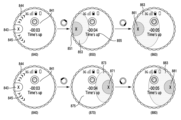
FIGS. 8A and 8B are diagrams illustrating an example of providing a visual effect in a timer application according to various embodiments.
FIG. 9 is a flowchart illustrating a method of providing a visual effect in an electronic device according to various embodiments.
10 and 11 are diagrams showing another example of providing visual effects in a phone application.
FIG. 12 is a flowchart illustrating a method of providing a visual effect in an electronic device according to various embodiments.
이하, 본 발명의 다양한 실시 예가 첨부된 도면을 참조하여 기재된다. 그러나, 이는 본 발명에 기재된 기술을 특정한 실시 형태에 대해 한정하려는 것이 아니며, 본 발명의 실시예의 다양한 변경(modifications), 균등물(equivalents), 및/또는 대체물(alternatives)을 포함하는 것으로 이해되어야 한다. 도면의 설명과 관련하여, 유사한 구성 요소에 대해서는 유사한 참조 부호가 사용될 수 있다. 그리고 본 발명에 개시된 실시 예는 개시된 기술 내용의 설명 및 이해를 위해 제시된 것이며, 본 발명에서 기재된 기술의 범위를 한정하는 것은 아니다. 따라서, 본 발명의 범위는, 본 발명의 기술적 사상에 근거한 모든 변경 또는 다양한 다른 실시 예를 포함하는 것으로 해석되어야 한다.Hereinafter, various embodiments of the present invention are described with reference to the accompanying drawings. However, this is not intended to limit the technology described in the present invention to specific embodiments, and should be understood to include various modifications, equivalents, and/or alternatives to the embodiments of the present invention. . In connection with the description of the drawings, similar reference numerals may be used for similar components. Additionally, the embodiments disclosed in the present invention are presented for explanation and understanding of the disclosed technical content, and do not limit the scope of the technology described in the present invention. Accordingly, the scope of the present invention should be interpreted as including all changes or various other embodiments based on the technical idea of the present invention.
본 발명의 실시 예에서 전자 장치는 본 발명의 다양한 실시 예들에 따른 기능(예: 표시 기능)을 지원하는 모든 정보통신기기, 멀티미디어기기, 웨어러블 디바이스(Wearable Device) 및 그에 대한 응용기기와 같이 AP(Application Processor)), CP(Communication Processor), GPU(Graphic Processing Unit), 및 CPU(Central Processing Unit) 등의 다양한 프로세서 중 하나 또는 그 이상을 사용하는 모든 장치를 포함할 수 있다.In an embodiment of the present invention, an electronic device includes an AP (AP), such as all information and communication devices, multimedia devices, wearable devices, and application devices thereof that support functions (e.g., display functions) according to various embodiments of the present invention. It may include any device that uses one or more of a variety of processors, such as an Application Processor (APP), Communication Processor (CP), Graphics Processing Unit (GPU), and Central Processing Unit (CPU).
본 발명의 실시 예에 따른 전자 장치는, 예를 들면, 스마트폰(smartphone), 태블릿 PC(tablet personal computer), 이동 전화기(mobile phone), 영상 전화기, 전자책 리더기(e-book reader), 데스크탑 PC(desktop personal computer), 랩탑 PC(laptop personal computer), 넷북 컴퓨터(netbook computer), 워크스테이션(workstation), 서버, PDA(personal digital assistant), PMP(portable multimedia player), MP3 플레이어, 모바일 의료기기, 카메라(camera), 또는 웨어러블 장치(wearable device)(예: 스마트 안경, 머리 착용형 장치(HMD, head-mounted-device) 등), 또는 스마트 와치(smart watch)) 중 적어도 하나를 포함할 수 있다.Electronic devices according to embodiments of the present invention include, for example, a smartphone, a tablet personal computer, a mobile phone, a video phone, an e-book reader, and a desktop. PC (desktop personal computer), laptop PC (laptop personal computer), netbook computer, workstation, server, PDA (personal digital assistant), PMP (portable multimedia player), MP3 player, mobile medical device , a camera, or a wearable device (e.g., smart glasses, head-mounted-device (HMD), etc.), or a smart watch). there is.
또한 본 발명의 실시 예에서 전자 장치는 스마트 가전 제품(smart home appliance)일 수 있다. 스마트 가전 제품은, 예를 들면, 텔레비전, DVD(digital video disk) 플레이어, 냉장고, 에어컨, 청소기, 세탁기, 셋톱 박스(set-top box), 홈 오토매이션 컨트롤 패널(home automation control panel), TV 박스(예: 삼성 HomeSyncTM, 애플TVTM, 또는 구글 TVTM), 게임 콘솔(예: XboxTM, PlayStationTM), 또는 전자 액자 중 적어도 하나를 포함할 수 있다. 또한 본 발명의 실시 예에서 전자 장치는 네비게이션(navigation) 장치, 또는 사물 인터넷 장치(internet of things) 중 적어도 하나를 포함할 수 있다.Additionally, in an embodiment of the present invention, the electronic device may be a smart home appliance. Smart home appliances include, for example, televisions, DVD (digital video disk) players, refrigerators, air conditioners, vacuum cleaners, washing machines, set-top boxes, home automation control panels, and TVs. It may include at least one of a box (e.g., Samsung HomeSyncTM, Apple TVTM, or Google TVTM), a game console (e.g., XboxTM, PlayStationTM), or an electronic picture frame. Additionally, in an embodiment of the present invention, the electronic device may include at least one of a navigation device or an Internet of things device.
다양한 실시 예들에서, 전자 장치는 전술한 다양한 장치들 중 하나 또는 그 이상의 조합일 수 있다. 어떤 실시 예에 따른 전자 장치는 플렉서블 전자 장치일 수 있다. 또한, 본 발명의 실시 예에 따른 전자 장치는 전술한 기기들에 한정되지 않으며, 기술 발전에 따른 새로운 전자 장치를 포함할 수 있다.In various embodiments, the electronic device may be one or a combination of more than one of the various devices described above. An electronic device according to some embodiments may be a flexible electronic device. Additionally, electronic devices according to embodiments of the present invention are not limited to the above-mentioned devices and may include new electronic devices according to technological developments.
또한 본 발명의 실시 예에서 사용자라는 용어는 전자 장치를 사용하는 사람 또는 전자 장치를 사용하는 장치(예: 인공지능 전자 장치)를 지칭할 수 있다. 본 발명의 실시 예에서 모듈 또는 프로그램 모듈은 본 발명의 다양한 구성 요소들 중 적어도 하나를 포함하거나, 일부가 생략되거나, 또는 추가적인 다른 구성 요소를 더 포함할 수 있다. 다양한 실시 예들에 따른 모듈, 프로그램 모듈 또는 다른 구성 요소에 의해 수행되는 동작들은 순차적, 병렬적, 반복적 또는 휴리스틱(heuristic)한 방법으로 실행될 수 있다. 또한 일부 동작은 다른 순서로 실행되거나, 생략되거나, 또는 다른 동작이 추가될 수 있다.Additionally, in embodiments of the present invention, the term user may refer to a person using an electronic device or a device (eg, an artificial intelligence electronic device) using an electronic device. In an embodiment of the present invention, a module or program module may include at least one of the various components of the present invention, some may be omitted, or may further include other additional components. Operations performed by modules, program modules, or other components according to various embodiments may be executed sequentially, in parallel, iteratively, or in a heuristic manner. Additionally, some operations may be executed in a different order, omitted, or other operations may be added.
이하에서, 첨부 도면을 참조하여 본 발명의 실시 예에 따른 베젤 기반 인터랙션에 따른 비주얼 이펙트 제공 방법 및 장치에 대하여 살펴보기로 한다. 하지만, 본 발명의 다양한 실시 예들이 하기에서 기술하는 내용에 의해 제한되거나 한정되는 것은 아니므로, 하기의 실시 예에 의거하여 다양한 실시 예들에 적용할 수 있음에 유의하여야 한다. 이하에서 설명되는 본 발명의 다양한 실시 예들에서는 하드웨어적인 접근 방법을 예시로서 설명한다. 하지만, 본 발명의 다양한 실시 예들에서는 하드웨어와 소프트웨어를 모두 사용하는 기술을 포함하고 있으므로, 본 발명의 다양한 실시 예들이 소프트웨어 기반의 접근 방법을 제외하는 것은 아니다.Hereinafter, a method and device for providing a visual effect according to bezel-based interaction according to an embodiment of the present invention will be examined with reference to the accompanying drawings. However, it should be noted that the various embodiments of the present invention are not restricted or limited by the content described below, and can be applied to various embodiments based on the examples below. In various embodiments of the present invention described below, a hardware approach method is explained as an example. However, since various embodiments of the present invention include technology using both hardware and software, various embodiments of the present invention do not exclude software-based approaches.
도 1은 다양한 실시예들에 따른 전자 장치의 구성을 도시한 도면이다.FIG. 1 is a diagram illustrating the configuration of an electronic device according to various embodiments.
도 1을 참조하면, 본 발명의 다양한 실시 예들에 따른 전자 장치(100)는 무선 통신부(110), 사용자 입력부(120), 터치스크린(Touch screen)(130), 오디오 처리부(140), 메모리(150), 인터페이스부(160), 카메라 모듈(170), 제어부(180), 그리고 전원 공급부(190)를 포함할 수 있다. 본 발명의 다양한 실시 예들에서 전자 장치(100)는 도 1에 도시된 구성들이 필수적인 것은 아니어서, 도 1에 도시된 구성들보다 많은 구성들을 가지거나, 또는 그보다 적은 구성들을 가지는 것으로 구현될 수 있다.Referring to FIG. 1, the
무선 통신부(110)는 전자 장치(100)와 다른 외부 전자 장치 사이의 무선 통신을 가능하게 하는 하나 또는 그 이상의 모듈들을 포함할 수 있다. 다양한 실시 예들에서, 무선 통신부(110)는 주변의 외부 전자 장치와 통신을 수행하기 위한 모듈(예: 근거리 통신 모듈, 원거리 통신 모듈 등)을 포함할 수 있다. 예를 들어, 무선 통신부(110)는 이동통신 모듈(111), 무선 랜(WLAN, wireless local area network) 모듈(113), 근거리 통신 모듈(115), 그리고 위치 산출 모듈(117) 등을 포함하여 구성될 수 있다.The
이동통신 모듈(111)은 이동통신 네트워크 상에서 기지국, 외부의 전자 장치, 그리고 다양한 서버들(예: 통합 서버(Integration Server), 프로바이더 서버(Provider Server), 컨텐츠 서버(Content Server), 인터넷 서버(Internet Server), 또는 클라우드 서버(Cloud Server)) 중 적어도 하나와 무선 신호를 송수신할 수 있다. 상기 무선 신호는 음성 신호, 데이터 신호 또는 다양한 형태의 제어 신호를 포함할 수 있다. 이동통신 모듈(111)은 전자 장치(100)의 동작에 필요한 다양한 데이터들을 사용자 요청에 응답하여 외부 장치(예: 서버 또는 다른 전자 장치 등)로 전송할 수 있다. 다양한 실시 예들에서, 이동통신 모듈(111)은 다양한 통신 방식에 기반하여 무선 신호를 송수신 할 수 있다. 예를 들어, 상기 통신 방식은, 이들에 한정하지는 않지만, LTE(Long-Term Evolution), LTE-A(LTE Advance), GSM(Global System for Mobile communication), EDGE(Enhanced Data GSM Environment), CDMA(Code Division Multiple Access), WCDMA(Wideband CDMA), UMTS(Universal Mobile Telecommunications System), 또는 OFDMA(Orthogonal Frequency Division Multiple access) 등의 통신 방식을 포함할 수 있다.The
무선 랜 모듈(113)은 무선 인터넷 접속 및 다른 외부 전자 장치와 무선 랜 링크(link)를 형성하기 위한 모듈을 나타낼 수 있다. 무선 랜 모듈(113)은 전자 장치(100)에 내장되거나 외장될 수 있다. 무선 인터넷 기술로는 WiFi(Wireless Fidelity), Wibro(Wireless broadband), WiMax(World interoperability for Microwave Access), HSDPA(High Speed Downlink Packet Access), 또는 mmWave(millimeter Wave) 등이 이용될 수 있다. 무선 랜 모듈(113)은 전자 장치(100)와 네트워크(예: 무선 인터넷 네트워크)를 통해 연결되어 있는 다른 외부 전자 장치와 연동하여, 전자 장치(100)의 다양한 데이터들을 외부(예: 외부 전자 장치 또는 서버)로 전송하거나, 또는 외부로부터 수신할 수 있다. 무선 랜 모듈(113)은 상시 온(on) 상태를 유지하거나, 전자 장치(100)의 설정 또는 사용자 입력에 따라 턴-온(turn-on)될 수 있다.The
근거리 통신 모듈(115)은 근거리 통신(Short Range Communication)을 수행하기 위한 모듈을 나타낼 수 있다. 근거리 통신 기술로 블루투스(Bluetooth), 저전력 블루투스(BLE, Bluetooth Low Energy), RFID(Radio Frequency Identification), 적외선 통신(IrDA, Infrared Data Association), UWB(Ultra Wideband), 지그비(Zigbee), 또는 NFC(Near Field Communication) 등이 이용될 수 있다. 근거리 통신 모듈(115)은 전자 장치(100)와 네트워크(예: 근거리 통신 네트워크)를 통해 연결되어 있는 다른 외부 전자 장치(예: 외부 음향 장치)와 연동하여, 전자 장치(100)의 다양한 데이터들을 외부 전자 장치로 전송하거나 수신 받을 수 있다. 근거리 통신 모듈(115)은 상시 온 상태를 유지하거나, 전자 장치(100)의 설정 또는 사용자 입력에 따라 턴-온(turn-on)될 수 있다.The short-
위치 산출 모듈(117)은 전자 장치(100)의 위치를 획득하기 위한 모듈로서, 대표적인 예로는 GPS(global position system) 모듈을 포함할 수 있다. 위치 산출 모듈(117)은 삼각 측량의 원리로 전자 장치(100)의 위치를 측정할 수 있다. 예를 들어, 위치 산출 모듈(117)은 3개 이상의 기지국들로부터 떨어진 거리 정보와 시간 정보를 산출한 다음 상기 산출된 정보에 삼각법을 적용함으로써, 위도(Latitude), 경도(Longitude), 및 고도(Altitude)에 따른 3차원의 현 위치 정보를 산출할 수 있다. 또는 위치 산출 모듈(117)은 3개 이상의 위성들로부터 전자 장치(100)의 위치 정보를 실시간으로 계속 수신함으로써 위치 정보를 산출할 수 있다. 전자 장치(100)의 위치 정보는 다양한 방법에 의해 획득될 수 있다.The
사용자 입력부(120)는 전자 장치(100)의 동작 제어를 위한 입력 데이터를 사용자 입력에 응답하여 발생할 수 있다. 사용자 입력부(120)는 사용자의 다양한 입력을 검출하기 위한 적어도 하나의 입력 수단을 포함할 수 있다. 예를 들어, 사용자 입력부(120)는 키패드(key pad), 돔 스위치(dome switch), 물리 버튼, 터치패드(정압/정전), 조그셔틀(jog & shuttle), 그리고 센서 등을 포함할 수 있다. 사용자 입력부(120)는 일부가 전자 장치(100)의 외부에 버튼 형태로 구현될 수 있으며, 일부 또는 전체가 터치 패널(touch panel)로 구현될 수도 있다. 사용자 입력부(120)는 본 발명의 다양한 실시 예들에 따른 전자 장치(100)의 동작을 개시(initiation)하기 위한 사용자 입력을 수신할 수 있고, 사용자 입력에 따른 입력 신호를 발생할 수 있다.The
터치스크린(130)은 입력 기능과 디스플레이 기능을 동시에 수행할 수 있는 입출력 장치를 나타내며, 디스플레이(131)와 터치감지부(133)를 포함할 수 있다. 터치스크린(130)은 전자 장치(100)와 사용자 사이에 입출력 인터페이스를 제공하며, 사용자의 터치 입력을 전자 장치(100)에게 전달할 수 있고, 또한 전자 장치(100)로부터의 출력을 사용자에게 보여주는 매개체 역할을 포함할 수 있다. 터치스크린(130)은 사용자에게 시각적인 출력(visual output)을 보여줄 수 있다. 상기 시각적 출력은 텍스트(text), 그래픽(graphic), 비디오(video)와 이들의 조합의 형태로 나타날 수 있다. 본 발명의 실시 예에서 터치스크린(130)은 디스플레이(131)를 통해 전자 장치(100)의 동작에 따른 다양한 화면을 디스플레이 할 수 있다. 터치스크린(130)은 디스플레이(131)를 통해 특정 화면을 디스플레이 하는 중에 터치감지부(133)를 통해 사용자로부터 터치(touch), 호버링(hovering) 또는 에어 제스처(air gesture) 중 적어도 하나에 기반하는 이벤트(예: 터치 이벤트, 근접 이벤트, 호버링 이벤트, 에어 제스처 이벤트)를 감지할 수 있고, 상기 이벤트에 따른 입력 신호를 상기 제어부(180)에게 전달할 수 있다.The
본 발명의 다양한 실시 예들에 따르면, 디스플레이(131)는 전자 장치(100)에서 처리되는 다양한 정보를 디스플레이(출력)할 수 있다. 예를 들어, 디스플레이(131)는 검출된 이벤트와 연관된 정보 및 상기 정보를 기준으로 양측에 하나 또는 하나 이상의 객체를 표시하는 동작, 및 상기 객체와 연관된 비주얼 이펙트를 가변적으로 표시하는 동작과 관련된 유저 인터페이스 또는 그래픽 유저 인터페이스(GUI, graphical UI)를 디스플레이 할 수 있다. 디스플레이(131)는 전자 장치(100)의 회전 방향(또는 놓인 방향)에 따라 가로모드에 의한 화면 디스플레이, 세로모드에 의한 화면 디스플레이, 또는 가로모드와 세로모드 간의 변화에 따른 화면 디스플레이를 지원할 수 있다. 디스플레이(131)는 다양한 디스플레이가 사용될 수 있다. 다양한 실시 예들에서 디스플레이(131)는 벤디드 디스플레이가 사용될 수 있다. 예를 들어, 디스플레이(131)는 종이처럼 얇고 유연한 기판을 통해 손상 없이 휘거나 구부리거나 말 수 있는 벤디드 디스플레이를 포함할 수 있다.According to various embodiments of the present invention, the
벤디드 디스플레이는 하우징(예: 본체)에 체결되어 구부러진 형태를 유지할 수 있다. 다양한 실시 예들에서 전자 장치(100)는 벤디드 디스플레이와 같은 형태를 비롯하여, 플렉서블 디스플레이(flexible display)와 같이 구부렸다가 폈다가를 자유자재로 할 수 있는 디스플레이 장치로 구현될 수도 있다. 다양한 실시 예들에서 디스플레이(131)는 액정 디스플레이(LCD, Liquid Crystal Display), 발광다이오드(LED, Light Emitting Diode) 디스플레이, 유기 발광 다이오드(OLED, Organic LED) 디스플레이, 능동형 OLED(AMOLED, Active Matrix OLED) 디스플레이, 또는 전자 종이(electronic paper) 등에서 액정을 싸고 있는 유리 기판을 플라스틱 필름으로 대체하여, 접고 펼 수 있는 유연성을 부여할 수 있다. 다양한 실시 예들에서 디스플레이(131)는 전자 장치(100)의 적어도 하나의 측면(side)(예: 좌측, 우측, 상측, 하측 중 적어도 하나의 면)까지 연장되어 체결될 수 있다.A bent display can maintain a bent shape by being fastened to a housing (e.g., main body). In various embodiments, the
터치감지부(133)는 디스플레이(131)에 안착될 수 있으며, 상기 터치스크린(130) 표면에 접촉 또는 근접하는 사용자 입력을 감지할 수 있다. 터치감지부(133)는 본 발명의 실시 예에서 전자 장치(100)의 사용과 관련된 동작을 개시하기 위한 사용자 입력을 수신할 수 있고, 사용자 입력에 따른 입력 신호를 발생할 수 있다. 상기 사용자 입력은 싱글터치(single-touch), 멀티터치(multi-touch), 호버링(hovering), 또는 에어 제스처 중 적어도 하나에 기반하여 입력되는 터치 이벤트 또는 근접 이벤트를 포함할 수 있다. 예를 들어, 상기 사용자 입력은 탭(tap), 드래그(drag), 스윕(sweep), 스와이프(swipe), 플릭(flick), 드래그앤드롭(drag & drop), 또는 드로잉 제스처(drawing gesture)(예: 필기) 등)의 방식으로 입력될 수 있다.The
오디오 처리부(140)는 제어부(180)로부터 입력 받은 오디오 신호를 스피커(SPK, speaker, 141)로 전송하고, 마이크(MIC, microphone, 143)로부터 입력 받은 음성 등의 오디오 신호를 제어부(180)에 전달하는 기능을 수행할 수 있다. 오디오 처리부(140)는 음성/음향 데이터를 제어부(180)의 제어에 따라 스피커(141)를 통해 가청음으로 변환하여 출력하고, 마이크(143)로부터 수신되는 음성 등의 오디오 신호를 디지털 신호로 변환하여 제어부(180)에게 전달할 수 있다. 오디오 처리부(140)는 데이터에 삽입된 오디오 처리 정보(예: 효과음, 음악 파일 등)에 따라 사용자 입력에 반응하는 오디오 신호를 출력할 수 있다.The
스피커(141)는 무선 통신부(110)으로부터 수신되거나, 또는 메모리(150)에 저장된 오디오 데이터를 출력할 수 있다. 스피커(141)는 전자 장치(100)에서 수행되는 다양한 동작(기능)과 관련된 음향 신호를 출력할 수도 있다. 본 발명의 실시 예에서는 도시하지 않았지만, 스피커(141)는 탈부착 가능한(attachable and detachable) 이어폰(ear phone), 헤드폰(head phone) 또는 헤드셋(head set)이 외부 포트를 통해 전자 장치(100)에 연결될 수 있다.The speaker 141 may output audio data received from the
마이크(143)는 외부의 음향 신호를 입력 받아 전기적인 음성 데이터로 처리할 수 있다. 마이크(143)에는 외부의 음향 신호를 입력 받는 과정에서 발생되는 잡음(noise)을 제거하기 위한 다양한 잡음 제거 알고리즘(noise reduction algorithm)이 구현될 수 있다. 마이크(143)는 음성 명령(예: 음악 어플리케이션 동작을 개시하기 위한 음성 명령) 등과 같은 오디오 스트림의 입력을 담당할 수 있다. 마이크(143)는 전자 장치(100)에 실장되는 내장 마이크와 전자 장치에 연결되는 외장 마이크를 포함할 수 있다. The
메모리(150)는 제어부(180)에 의해 실행되는 하나 또는 그 이상의 프로그램들(one or more programs)을 저장할 수 있고, 입/출력되는 데이터들의 임시 저장을 위한 기능을 수행할 수도 있다. 상기 입/출력되는 데이터들은 예를 들어, 동영상, 이미지, 사진, 오디오 등의 파일을 포함할 수 있다. 메모리(150)는 획득된 데이터를 저장하는 역할을 담당하며, 실시간으로 획득된 데이터는 일시적인 저장 장치에 저장할 수 있고, 저장하기로 확정된 데이터는 오래 보관 가능한 저장 장치에 저장할 수 있다.The
메모리(150)는 다양한 실시 예들에서 이벤트를 검출하는 동작, 회전형 입력모듈에 의한 인터랙션을 검출하는 동작, 상기 인터랙션에 기반하여 상기 이벤트와 연관된 객체를 결정하는 동작, 및 상기 객체와 연관된 비주얼 이펙트를 가변적으로 표시하는 동작을 실행하도록 하는 인스트럭션들(instructions)을 저장할 수 있다. 메모리(150)는 전자 장치(100)의 운영 체제(OS, operating system), 터치스크린(130)을 이용한 입력 및 디스플레이 제어와 관련된 프로그램, 전자 장치(100)의 다양한 동작(기능)들의 제어와 관련된 프로그램, 그리고 각 프로그램들의 동작에 의해 발생되는 다양한 데이터 등을 지속적으로 또는 일시적으로 저장할 수 있다.In various embodiments, the
메모리(150)는 확장 메모리(예: 외장 메모리) 또는 내부 메모리를 포함할 수 있다. 메모리(150)는 플래시 메모리 타입(flash memory type), 하드디스크 타입(hard disk type), 마이크로 타입(micro type), 및 카드 타입(예컨대, SD 카드(Secure Digital Card) 또는 XD 카드(eXtream Digital Card)) 등의 메모리와, DRAM(Dynamic Random Access Memory), SRAM(Static RAM), ROM(Read-Only Memory), PROM(Programmable ROM), EEPROM(Electrically Erasable PROM), 자기 메모리(MRAM, Magnetic RAM), 자기 디스크(magnetic disk), 및 광디스크(optical disk) 타입의 메모리 중 적어도 하나의 타입의 저장 매체(storage medium)를 포함할 수 있다. 전자 장치(100)는 인터넷 상에서 상기 메모리(150)의 저장 기능을 수행하는 웹 스토리지(web storage)와 관련되어 동작할 수도 있다.
메모리(150)는 다양한 소프트웨어를 저장할 수 있다. 예를 들어, 소프트웨어 구성 요소는 운영 체제(operating system) 소프트웨어 모듈, 통신 소프트웨어 모듈, 그래픽 소프트웨어 모듈, 유저 인터페이스 소프트웨어 모듈, MPEG(Moving Picture Experts Group) 모듈 및 카메라 소프트웨어 모듈, 하나 이상의 어플리케이션 소프트웨어 모듈 등을 포함할 수 있다. 또한 소프트웨어 구성 요소인 모듈은 명령어들의 집합으로 표현할 수 있으므로, 모듈을 명령어 세트(instruction set)라고 표현하기도 한다. 모듈은 또한 프로그램으로 표현하기도 한다.
상기 운영 체제 소프트웨어 모듈은 일반적인 시스템 동작(system operation)을 제어하는 여러 가지의 소프트웨어 구성 요소를 포함할 수 있다. 이러한 일반적인 시스템 작동의 제어는, 예를 들면, 메모리 관리 및 제어, 전력 제어 및 관리 등을 의미할 수 있다. 또한 운영 체제 소프트웨어 모듈은 여러 가지의 하드웨어(장치)와 소프트웨어 구성 요소(모듈) 사이의 통신을 원활하게 하는 기능도 수행할 수 있다. 상기 통신 소프트웨어 모듈은 무선 통신부(110)을 통해 컴퓨터, 서버 또는 휴대용 단말기 등 다른 전자 장치와 통신을 가능하게 할 수 있다. 그리고, 통신 소프트웨어 모듈은 해당 통신 방식에 해당하는 프로토콜 구조로 구성될 수 있다.The operating system software module may include various software components that control general system operation. Control of these general system operations may mean, for example, memory management and control, power control and management, etc. Additionally, operating system software modules can also perform functions that facilitate communication between various hardware (devices) and software components (modules). The communication software module may enable communication with other electronic devices such as computers, servers, or portable terminals through the
상기 그래픽 소프트웨어 모듈은 터치스크린(130) 상에 그래픽을 제공하고 디스플레이 하기 위한 여러 가지 소프트웨어 구성 요소를 포함할 수 있다. 상기 그래픽(graphics)이란 용어는 텍스트(text), 웹 페이지(web page), 아이콘(icon), 디지털 이미지(digital image), 비디오(video), 애니메이션(animation) 등을 포함하는 의미로 사용될 수 있다. 상기 유저 인터페이스 소프트웨어 모듈은 유저 인터페이스(UI)에 관련한 여러 가지 소프트웨어 구성 요소를 포함할 수 있다. 예를 들어, 유저 인터페이스의 상태가 어떻게 변경되는지 또는 유저 인터페이스 상태의 변경이 어떤 조건에서 이루어지는지 등에 대한 내용을 포함할 수 있다.The graphics software module may include various software components for providing and displaying graphics on the
상기 MPEG 모듈은 디지털 컨텐츠(예: 비디오, 오디오) 관련 프로세스 및 기능들(예: 컨텐츠의 생성, 재생, 배포 및 전송 등)을 가능하게 하는 소프트웨어 구성 요소를 포함할 수 있다. 상기 카메라 소프트웨어 모듈은 카메라 관련 프로세스 및 기능들을 가능하게 하는 카메라 관련 소프트웨어 구성 요소를 포함할 수 있다.The MPEG module may include software components that enable processes and functions (e.g., creation, playback, distribution, and transmission of content) related to digital content (e.g., video, audio). The camera software module may include camera-related software components that enable camera-related processes and functions.
상기 어플리케이션 모듈은 렌더링 엔진(rendering engine)을 포함하는 웹브라우저(browser), 이메일(email), 즉석 메시지(instant message), 워드 프로세싱(word processing), 키보드 에뮬레이션(keyboard emulation), 어드레스 북(address book), 위젯(widget), 디지털 저작권 관리(DRM, digital right management), 홍채 인식(iris scan), 상황 인지(context cognition), 음성 인식(voice recognition), 위치 기반 서비스(location based service) 등을 포함할 수 있다. 본 발명의 다양한 실시 예들에 따라, 상기 어플리케이션 모듈은 선택된 셀에 해당하는 사운드 샘플을 출력하면서, 선택된 셀의 대표 색상을 표시하고, 두 셀들 사이의 영역에 트레이스 이펙트(Trace Effect)를 표시하는 동작(기능)을 처리할 수 있다.The application module includes a web browser including a rendering engine, email, instant message, word processing, keyboard emulation, and address book. ), widget, digital rights management (DRM), iris scan, context cognition, voice recognition, location based service, etc. can do. According to various embodiments of the present invention, the application module outputs a sound sample corresponding to the selected cell, displays a representative color of the selected cell, and displays a trace effect in the area between the two cells. function) can be processed.
인터페이스부(160)는 외부 다른 외부 전자 장치로부터 데이터를 전송 받거나, 전원을 공급받아 전자 장치(100) 내부의 각 구성들에 전달할 수 있다. 인터페이스부(160)는 전자 장치(100) 내부의 데이터가 다른 외부 전자 장치로 전송되도록 할 수 있다. 예를 들어, 유/무선 헤드폰 포트(port), 외부 충전기 포트, 유/무선 데이터 포트, 메모리 카드(memory card) 포트, 오디오 입/출력(Input/Output) 포트, 비디오 입/출력 포트, 이어폰 포트 등이 인터페이스부(160)에 포함될 수 있다.The
카메라 모듈(170)은 전자 장치(100)의 촬영 기능을 지원하는 구성을 나타낸다. 카메라 모듈(170)은 제어부(180)의 제어에 따라 임의의 피사체를 촬영하고, 촬영된 데이터(예: 이미지)를 디스플레이(131) 및 제어부(180)에 전달할 수 있다. 카메라 모듈(170)은 하나 이상의 이미지 센서를 포함할 수 있다. 예를 들어, 카메라 모듈(170)은 전자 장치(100)의 전면(예: 디스플레이(131)와 동일한 평면) 상에 구비되는 전면 센서(예: 전면 카메라)와 전자 장치(100)의 측면 상에 구비되는 측면 센서(예: 측면 카메라)를 포함할 수 있다.The
제어부(180)는 전자 장치(100)의 전반적인 동작을 제어할 수 있다. 예를 들어, 제어부(180)는 음악 플레이, 음악적 속성의 시각화 처리, 음성 통신, 데이터 통신, 화상 통신 등에 관련된 다양한 제어를 수행할 수 있다. 제어부(180)는 하나 또는 그 이상의 프로세서들(one or more processors)로 구현되거나, 또는 제어부(180)을 프로세서로 칭할 수도 있다. 예를 들어, 제어부(180)는 커뮤니케이션 프로세서(CP, communication processor), 어플리케이션 프로세서(AP, application processor), 인터페이스(예: GPIO(general purpose input/output)), 또는 내부 메모리 등을 별개의 구성 요소로 포함하거나, 또는 하나 이상의 집적화된 회로에 집적화될 수 있다. 상기 어플리케이션 프로세서는 여러 가지의 소프트웨어 프로그램을 실행하여 전자 장치(100)을 위한 여러 기능을 수행할 수 있고, 상기 커뮤니케이션 프로세서는 음성 통신 및 데이터 통신을 위한 처리 및 제어를 수행할 수 있다. 또한, 제어부(180)는 메모리(150)에 저장되어 있는 특정한 소프트웨어 모듈(명령어 세트(instruction set))을 실행하여 그 모듈에 대응하는 특정한 여러 가지의 기능을 수행하는 역할을 담당할 수 있다.The
본 발명의 다양한 실시 예들에서, 제어부(180)는 이벤트를 검출하고, 회전형 입력모듈에 의한 인터랙션을 검출하고, 상기 인터랙션에 기반하여 상기 이벤트와 연관된 객체를 결정하고, 상기 객체와 연관된 비주얼 이펙트를 가변적으로 표시하는 동작을 처리할 수 있다. 상기 제어부(180)의 본 발명의 다양한 실시 예들에 따른 제어 동작은 후술하는 도면들을 참조하여 설명된다.In various embodiments of the present invention, the
본 발명의 실시 예에 따른 제어부(180)는 상기의 기능 외에 전자 장치(100)의 통상적인 기능과 관련된 각종 동작을 제어할 수 있다. 예를 들어, 제어부(180)는 특정 어플리케이션 실행 시 그의 운영 및 화면 디스플레이를 제어할 수 있다. 또한 제어부(180)는 터치 기반 또는 근접 기반의 입력 인터페이스(예: 터치스크린(130))에서 지원하는 다양한 터치 이벤트 또는 근접 이벤트 입력에 대응하는 입력 신호를 수신하고 그에 따른 기능 운영을 제어할 수 있다. 또한 제어부(180)는 유선 통신 기반 또는 무선 통신 기반으로 각종 데이터의 송수신을 제어할 수도 있다.The
전원 공급부(190)는 제어부(180)의 제어에 의해 외부의 전원, 내부의 전원을 인가 받아 각 구성 요소들의 동작에 필요한 전원을 공급할 수 있다. 본 발명의 실시 예에서 전원 공급부(190)는 제어부(180)의 제어에 의해 디스플레이(131), 카메라 모듈(170) 등에 전원을 공급 또는 차단(on/off)할 수 있다.The
그리고 일부의 경우에 본 명세서에서 설명되는 실시 예들이 제어부(180) 자체로 구현될 수 있다. 또한 소프트웨어적인 구현에 의하면, 본 명세서에서 설명되는 절차 및 기능과 같은 실시 예들은 별도의 소프트웨어 모듈들로 구현될 수도 있다. 상기 소프트웨어 모듈들 각각은 본 명세서에서 설명되는 하나 이상의 기능 및 동작을 수행할 수 있다.And in some cases, the embodiments described in this specification may be implemented by the
도 2는 다양한 실시예들에 따른 전자 장치의 동작 방법을 도시한 흐름도이다.FIG. 2 is a flowchart illustrating a method of operating an electronic device according to various embodiments.
도 2를 참조하면, 동작(201)에서, 전자 장치(100)(예: 제어부(180))는 이벤트를 검출할 수 있다. 상기 이벤트는 전자 장치(100)의 기능(예: 어플리케이션) 실행과 연관된 것일 수 있다. 예를 들면, 상기 이벤트는 사용자 입력에 의한 기능(예: 타이머, 장치 찾기 등), 사용자 설정(또는 전자 장치의 설정)에 의한 기능(예: 알람 등), 또는 외부 입력에 의한 기능(예: 전화, 푸시 메시지 등) 중 적어도 하나에 의해 검출될 수 있다.Referring to FIG. 2, in
동작(203)에서, 전자 장치(100)(예: 제어부(180))는 이벤트와 연관된 정보 및 객체를 표시할 수 있다. 상기 이벤트와 연관된 정보(이하, '이벤트 정보'라 함)는 기능과 관련된 정보일 수 있다. 상기 이벤트 정보는 텍스트, 이미지(예: 아이콘) 및 비디오 중 적어도 하나로 표시될 수 있다. 예를 들어, 상기 이벤트 정보는 통화 정보(예: 발신자 이름, 발신자 전화번호), 알람 정보(예: 알람 이미지, 알람 시간), 캘린더 정보(예: 캘린더 이미지, 설정 일시), 타이머 정보(예: 타이머 이미지, 타이머 시간) 또는 장치 찾기 정보(예: 장치 찾기 이미지, 안내 메시지, 장치 이름 등)일 수 있다. In
상기 이벤트와 연관된 객체(이하, '객체'라 함)는 상기 이벤트 정보와 연관된 액션 버튼(action button)일 수 있다. 상기 객체는 텍스트, 이미지(예: 아이콘) 및 비디오 중 적어도 하나로 표시될 수 있다. 예를 들어, 상기 이벤트 정보가 "통화 정보"인 경우, 상기 객체는 통화 연결(connection) 버튼 또는 통화 거절(reection) 버튼일 수 있다. 상기 이벤트 정보가 "알람 정보"인 경우, 상기 객체는 알람 끄기(dismiss) 버튼 또는 재알람(snooze) 버튼일 수 있다. 상기 이벤트 정보가 "캘린더 정보"인 경우, 상기 객체는 캘린더 알람 끄기 버튼 또는 캘린더 재알람 버튼일 수 있다. 상기 이벤트 정보가 "타이머 정보"인 경우, 상기 객체는 타이머 끄기 버튼 또는 타이머 재시작 버튼일 수 있다. 상기 이벤트 정보가 "장치 찾기 정보"인 경우, 상기 객체는 찾기 끄기 버튼 또는 찾기 재시작 버튼일 수 있다.An object (hereinafter referred to as 'object') associated with the event may be an action button associated with the event information. The object may be displayed as at least one of text, image (eg, icon), and video. For example, when the event information is “call information,” the object may be a call connection button or a call rejection button. When the event information is “alarm information,” the object may be an alarm dismiss button or a snooze button. When the event information is “calendar information,” the object may be a calendar alarm turn off button or a calendar alarm reset button. When the event information is “timer information,” the object may be a timer turn off button or a timer restart button. If the event information is “device finding information”, the object may be a search turn off button or a search restart button.
다양한 실시예들에 따른 제어부(180)는 상기 이벤트 정보를 전자 장치(100)의 표시 영역(예: 디스플레이(131)의 표시 영역)의 중앙에 표시하고, 상기 객체를 상기 표시 영역의 측면에 표시할 수 있다. 예를 들어, 디스플레이(131)가 전자 장치(100)의 전면에 배치된 경우, 제어부(180)는 상기 이벤트 정보를 기준으로 디스플레이(131)의 양측(예: 좌/우 또는 상/하)에 상기 객체를 표시할 수 있다. 즉, 제어부(180)는 상기 이벤트 정보와 중첩되지 않도록 상기 객체를 표시할 수 있다. The
예를 들어, 전자 장치(100)가 손목 시계형 웨어러블 디바이스(wearable device)일 때, 제어부(180)는 상기 객체를 시계 시간의 12시, 3시, 6시 또는 9시 위치 중 어느 하나에 대응하는 위치에 표시할 수 있다. 두 개의 객체들이 표시되는 경우, 제어부(180)는 하나의 객체(예: 제1 객체)의 위치에 대향하는 위치에 다른 객체(예: 제2 객체)를 표시할 수 있다. 예를 들어, 하나의 객체가 시계 시간 3시에 배치된 경우, 다른 하나의 객체는 시계 시간 9시에 배치될 수 있다. 또는, 하나의 객체가 시계 시간 12시에 배치된 경우, 다른 하나의 객체는 시계 시간 6시에 배치될 수 있다.For example, when the
다양한 실시예들에 따른 제어부(180)는 디스플레이(131) 상에 표시된 객체를 선택(예: 터치 입력)하는 사용자 입력이 검출되면, 상기 객체와 연관된 기능(예: 동작(213))을 수행할 수 있다.When a user input for selecting an object displayed on the display 131 (e.g., touch input) is detected, the
동작(205)에서, 전자 장치(100)(예: 제어부(180))는 베젤 기반 인터랙션을 검출할 수 있다. 상기 베젤 기반 인터랙션은 디스플레이(예: 디스플레이(131))의 가장자리를 둘러싸는 베젤 부분을 돌리는 사용자 입력일 수 있다. 디스플레이(131)의 가장자리에는 회전할 수 있도록 하는 회전형 입력모듈(예: 로터리)이 배치될 수 있다. 제어부(180)는 사용자에 의해 상기 회전형 입력모듈을 회전시키는 베젤 기반 인터랙션을 검출할 수 있다.In
다양한 실시예들에 따른 제어부(180)는 디스플레이(131) 상에 검출되는 터치 입력에 의해 이하 동작(207) 내지 동작(213)을 수행할 수 있다. 예를 들어, 제어부(180)는 시계 방향 또는 반시계 방향으로 움직이는(예: 드래그) 터치 입력에 기반하여 동작(207) 내지 동작(213)을 수행할 수 있다.The
동작(207)에서, 전자 장치(100)(예: 제어부(180))는 인터랙션에 기반하여 객체를 결정할 수 있다. 여기서, 객체는 동작(203)에 표시된 객체 중 하나일 수 있다. 예를 들어, 동작(203)에서 표시한 객체가 하나일 경우, 제어부(180)는 표시된 하나의 객체를 결정할 수 있다. 또는, 동작(203)에서 표시한 객체가 하나 이상일 경우, 제어부(180)는 상기 인터랙션에 기반하여 하나 이상의 객체들 중에서 어느 하나를 선택할 수 있다. 예를 들어, 제1 객체가 시계 시간 9시 위치에 배치되고, 제2 객체가 3시 위치에 배치된 경우, 제어부(180)는 시계 방향(예: 제1 방향)으로 인터랙션이 검출되면, 상기 제1 객체를 선택하고, 반시계 방향(예: 제2 방향)으로 인터랙션이 검출되면, 상기 제2 객체를 선택할 수 있다. 또는, 제어부(180)는 시계 방향으로 인터랙션이 검출되면, 상기 제2 객체를 선택하고, 반시계 방향으로 인터랙션이 검출되면, 상기 제1 객체를 선택할 수 있다. In
또는, 제1 객체가 시계 시간 12시 위치에 배치되고, 제2 객체가 6시 위치에 배치된 경우, 제어부(180)는 시계 방향으로 인터랙션이 검출되면, 상기 제1 객체를 선택하고, 반시계 방향으로 인터랙션이 검출되면, 상기 제2 객체를 선택할 수 있다. 또는, 제어부(180)는 시계 방향으로 인터랙션이 검출되면, 상기 제2 객체를 선택하고, 반시계 방향으로 인터랙션이 검출되면, 상기 제1 객체를 선택할 수 있다. Alternatively, when the first object is placed at the 12 o'clock position and the second object is placed at the 6 o'clock position, the
동작(209)에서, 전자 장치(100)(예: 제어부(180))는 상기 결정된(또는 선택된) 객체와 연관된 비주얼 이펙트(visual effects)를 가변적으로 표시할 수 있다. 예를 들어, 제어부(180)는 베젤 기반 인터랙션에 기반하여 비주얼 이펙트(또는 비주얼 피드백)를 가변적으로 표시할 수 있다. 제어부(180)는 베젤 기반 인터랙션에 따라 상기 비주얼 이펙트를 제공하는 크기, 모양, 투명도 또는 색상 중 적어도 하나를 가변하여 표시할 수 있다. 상기 비주얼 이펙트는 상기 결정된 객체의 위치에서부터 기준점(또는 임계치)을 향하는 방향으로 커질 수 있다. 상기 비주얼 이펙트가 작아질 때는 기준점 방향에서부터 상기 객체를 향하는 방향으로 작아질 수 있다. In
제1 객체가 시계 시간 9시 위치에 배치되고, 제2 객체가 3시 위치에 배치된 경우, 제어부(180)는 시계 방향으로 회전되는 인터랙션의 회전 각도(또는 회전 거리)에 따라 제1 객체와 연관된 비주얼 이펙트를 가변적으로 표시할 수 있다. 예를 들어, 제어부(180)는 시계 방향으로 회전되는 회전 각도가 커짐에 따라 상기 제1 객체를 중심으로 비주얼 이펙트를 점점 크게 표시할 수 있다. 또는, 제어부(180)는 반시계 방향으로 회전되는 회전 각도가 커짐에 따라 제2 객체를 중심으로 비주얼 이펙트를 점점 크게 표시할 수 있다.When the first object is placed at the 9 o'clock position and the second object is placed at the 3 o'clock position, the
다양한 실시예들에 따른 제어부(180)는 상기 객체를 선택하는 사용자 입력이 검출되고, 검출된 사용자 입력이 움직이는 방향에 대응하여 상기 비주얼 이펙트를 가변적으로 표시할 수 있다. 예를 들어, 제1 객체가 시계 시간 9시 위치에 배치되고, 제2 객체가 3시 위치에 배치된 경우, 제어부(180)는 상기 제1 객체를 선택하는 사용자 입력을 검출하고, 상기 제1 객체를 기준점 방향으로 드래그하는 움직임이 검출된 경우, 상기 제1 객체를 중심으로 상기 기준점 방향으로 상기 비주얼 이펙트의 크기, 모양, 투명도 또는 색상 중 적어도 하나를 가변하여 표시할 수 있다.The
동작(211)에서, 전자 장치(100)(예: 제어부(180))는 상기 표시된 비주얼 이펙트가 기준점(또는 기준 라인)을 초과하는지 여부를 판단할 수 있다. 상기 기준점은 디스플레이(131)의 중간 라인(또는 영역)에 설정될 수 있다. 상기 기준점은 디스플레이(131)의 측면에서부터 50% 이상 중앙으로 이동한 영역일 수 있다. 예를 들어, 디스플레이(131)가 원형인 경우, 상기 기준점은 원의 지름으로 설정될 수 있다. 상기 기준점은 시계의 12시에서 6시 사이에 선 또는 시계의 9시에서 3시 사이의 선으로 설정될 수 있다. 제어부(180)는 시계 시간 9시 위치에 배치된 제1 객체와 연관된 비주얼 이펙트가 점점 커져 상기 기준점을 초과하는지 여부를 판단할 수 있다. 인터랙션의 회전 각도가 커짐에 따라 상기 비주얼 이펙트가 커지기 때문에, 제어부(180)는 상기 기준점을 회전 각도와 연관하여 설정할 수 있다. 예를 들어, 제어부(180)는 회전 각도가 기준 각도(예: 90도, 130도, 180도 등)를 초과하는 경우, 상기 비주얼 이펙트가 상기 기준점을 초과하는 것으로 판단할 수 있다.In
제어부(180)는 기준점을 초과하는 경우(예: 동작(211)에서 예) 동작(213)을 수행하고, 기준점을 초과하지 않는 경우(예: 동작(211)에서 아니오) 동작(209)을 수행할 수 있다.The
기준점을 초과하는 경우 동작(213)에서, 전자 장치(100)(예: 제어부(180))는 객체와 연관된 기능을 실행할 수 있다. 예를 들어, 상기 이벤트 정보가 통화 정보인 경우, 시계 시간 9시 위치에 배치된 제1 객체는 통화 연결 버튼이고, 시계 시간 3시 위치에 배치된 제2 객체는 통화 거절 버튼일 수 있다. 제어부(180)는 시계 방향으로 회전되는 인터랙션에 따라 제1 객체의 비주얼 이펙트를 크게 표시하다가, 상기 인터랙션의 회전 각도가 기준 각도를 초과하는 경우(또는 상기 제1 객체의 비주얼 이펙트가 기준점을 초과), 통화 연결할 수 있다. 또는, 제어부(180)는 반시계 방향으로 회전되는 인터랙션에 따라 제2 객체의 비주얼 이펙트를 크게 표시하다가, 상기 인터랙션의 회전 각도가 기준 각도를 초과하는 경우(또는 상기 제2 객체의 비주얼 이펙트가 기준점을 초과), 통화 거절할 수 있다. 다양한 실시예들에 따르면, 제어부(180)는 회전 방향을 기준으로 통화 연결 또는 통화 거절할 수 있다.If the reference point is exceeded, in
또는, 상기 이벤트 정보가 알람 정보인 경우, 시계 시간 9시 위치에 배치된 제1 객체는 알람 끄기 버튼이고, 시계 시간 3시 위치에 배치된 제2 객체는 재알람 버튼일 수 있다. 제어부(180)는 시계 방향으로 회전되는 인터랙션에 따라 제1 객체의 비주얼 이펙트를 크게 표시하다가, 상기 인터랙션의 회전 각도가 기준 각도를 초과하는 경우, 알람을 오프할 수 있다. 또는, 제어부(180)는 반시계 방향으로 회전되는 인터랙션에 따라 제2 객체의 비주얼 이펙트를 크게 표시하다가, 상기 인터랙션의 회전 각도가 기준 각도를 초과하는 경우, 알람을 일정 시간 후(예: 5분 후, 10분 후)에 다시 울리도록 설정할 수 있다. 다양한 실시예들에 따르면, 제어부(180)는 회전 방향을 기준으로 알람 끄기 또는 재알람 설정할 수 있다.Alternatively, when the event information is alarm information, the first object placed at 9 o'clock on the clock may be an alarm turn off button, and the second object placed at 3 o'clock on the clock may be a re-alarm button. The
또는, 상기 이벤트 정보가 장치 찾기 정보인 경우, 시계 시간 9시 위치에 하나의 객체가 배치되고, 상기 객체는 찾기 끄기 버튼일 수 있다. 제어부(180)는 시계 방향으로 회전되는 인터랙션에 따라 상기 객체의 비주얼 이펙트를 크게 표시하다가, 상기 인터랙션의 회전 각도가 기준 각도를 초과하는 경우, 장치 찾기를 오프(또는 중지)할 수 있다. Alternatively, when the event information is device search information, an object is placed at the 9 o'clock clock time position, and the object may be a search turn off button. The
또는, 상기 이벤트 정보가 타이머 정보인 경우, 시계 시간 9시 위치에 하나의 객체가 배치되고, 상기 객체는 타이머 끄기 버튼일 수 있다. 제어부(180)는 시계 방향으로 회전되는 인터랙션에 따라 상기 객체의 비주얼 이펙트를 크게 표시하다가, 상기 인터랙션의 회전 각도가 기준 각도를 초과하는 경우, 타이머를 오프(또는 중지)할 수 있다. Alternatively, when the event information is timer information, an object is placed at 9 o'clock on the clock, and the object may be a timer turn off button. The
도 3a 및 도 3b는 다양한 실시예들에 따른 베젤 기반 인터랙션을 이용한 비주얼 이펙트를 제공하는 일례를 도시한 도면들이다.3A and 3B are diagrams illustrating an example of providing a visual effect using bezel-based interaction according to various embodiments.
도 3a는 전자 장치(300)의 사시도를 도시한 것이다. FIG. 3A shows a perspective view of the
도 3a를 참고하면, 전자 장치(300)(예: 도 1의 전자 장치(100))는 사용자의 손목에 착용할 수 있는 손목 착용형 웨어러블 디바이스일 수 있다. 다양한 실시예들에 따르면, 전자 장치(300)는 하우징(20)과 하우징(20)에 장착되는 연결부(예: 스트랩)(21)를 포함할 수 있다. 다양한 실시예들에 따르면, 전자 장치(300)는 내부에 전원 공급 수단으로 배터리(예: 충전용 배터리 등)를 포함할 수 있다. 전자 장치(300)는 휴대용 충전 크래들(cradle)에 선택적으로 장착되어 배터리를 충전시키도록 구현될 수도 있다.Referring to FIG. 3A, the electronic device 300 (eg, the
다양한 실시예들에 따르면, 하우징(20)은 디스플레이(350) 또는/및 적어도 하나의 키 버튼(미도시 됨)을 포함할 수 있다. 디스플레이(350)는 터치스크린을 포함하여, 터치 입력을 수신할 수 있다. 하우징(20)의 일면에는 회전할 수 있도록 하는 회전형 입력모듈(22)이 배치될 수 있다. 도면에서는 하우징(20)을 원통형으로 도시하였는데, 하우징(20)은 다양한 형태(예: 사각형, 다각형 등)로 형성될 수 있다. 다양한 실시예들에 따르면, 회전형 입력모듈(22)은 하우징(20)의 상면에 배치된 디스플레이(350)의 가장자리를 둘러싸는 베젤 부분에 배치될 수 있다. 또는, 회전형 입력모듈(22)은 용두와 같이 하우징(20)의 측면에 배치될 수도 있다. 이러한, 회전형 입력모듈(22)은 돌출형으로 형성되거나, 돌출형으로 형성되지 않을 수도 있다. 다양한 실시예들에 따르면, 회전형 입력모듈(22)은 z-축을 회전축으로 시계 방향 또는 반시계 방향으로 회전될 수 있으며, 지정된 값(예; 360도)으로 회전량이 제한되거나, 무한 회전되도록 구성될 수도 있다. According to various embodiments, the
다양한 실시예들에 따르면, 연결부(21)는 금속, 가죽, 러버, 실리콘, 우레탄 중 적어도 하나의 재질로 형성될 수 있다. 연결부(21)는 다양하게 실시하여, 인체의 특정 위치, 예를 들면, 목이나, 발목, 팔목 등에 착용할 수 있다.According to various embodiments, the
다양한 실시예들에 따르면, 사용자가 회전형 입력모듈(22)을 회전시키면, 전자 장치(300)는 회전형 입력모듈(22)의 회전 파라미터에 따라 다양한 기능을 수행할 수 있다. 예를 들면, 전자 장치(300)는 다수 개의 회전 인식부들을 이용하여 회전형 입력모듈(22)의 회전 파라미터를 검출할 수 있다. 예컨대, 다수 개의 회전 인식부들은 회전형 입력모듈(22)의 광학 패턴을 인식하여 회전 파라미터를 검출하는 광학적 센서, 회전형 입력모듈(22)에 내부에 실장된 자석의 자력을 감지하여 회전 파라미터를 검출하는 자력 감지 센서, 또는 홀센서(Hall Sensor) 등 회전 입력을 검출할 수 있는 다른 센서들도 포함될 수 있다. 여기서, 회전 파라미터는 회전체의 회전 방향, 회전 속도, 회전량 및 회전된 위치 중 적어도 하나를 포함할 수 있다.According to various embodiments, when a user rotates the
다양한 실시예들에 따른 제어부(180)는 시계 방향으로 회전되는 인터랙션에 따라 제1 객체의 비주얼 이펙트를 크게 표시하다가, 상기 인터랙션의 회전 각도가 기준 각도를 초과하는 경우, 상기 제1 객체와 연관된 기능(예: 통화 연결)을 수행할 수 있다. 또는, 제어부(180)는 반시계 방향으로 회전되는 인터랙션에 따라 제2 객체의 비주얼 이펙트를 크게 표시하다가, 상기 인터랙션의 회전 각도가 기준 각도를 초과하는 경우, 상기 제2 객체와 연관된 기능(예: 통화 거절)을 수행할 수 있다.The
도 3b는 베젤 기반 인터랙션을 이용한 비주얼 이펙트를 제공하는 일례를 도시한 것이다.Figure 3b shows an example of providing a visual effect using bezel-based interaction.
도 3b를 참조하면, 전자 장치(100)(예: 제어부(180))는 이벤트 정보 및 이벤트와 연관된 객체를 포함하는 제1 사용자 인터페이스(310)를 표시할 수 있다. 제1 사용자 인터페이스(310)는 이벤트 정보(311, 예: information area), 제1 객체(313) 및 제2 객체(315)를 포함할 수 있다. 제어부(180)는 이벤트 정보(311)를 기준으로 양 측(예: 좌/우 또는 상/하)에 제1 객체(313) 및 제2 객체(315)를 표시할 수 있다. 도면에서는 제1 객체(313) 및 제2 객체(315)가 이벤트 정보(311)를 기준으로 좌, 우에 배치된 것을 도시하고 있다. 제어부(180)는 제1 객체(313) 및 제2 객체(315)의 위치에 기반하여 기준점(317)을 설정할 수 있다. 예를 들어, 제어부(180)는 시계 시간 12시와 6시 사이에 선을 기준점(317)으로 설정할 수 있다. 또는, 제어부(180)는 비주얼 이펙트가 기준점(317)에 근접하도록 제어하는 회전 각도에 기반하여 기준 각도를 기준점(317)으로 설정할 수 있다. 제어부(180)는 회전형 입력모듈(319)(예: 회전형 입력모듈(22))의 회전에 따라 제1 객체(313) 또는 제2 객체(315)와 연관된 비주얼 이펙트를 가변적으로 표시할 수 있다.Referring to FIG. 3B, the electronic device 100 (eg, the control unit 180) may display a
다양한 실시예들에 따른 제1 객체(313) 및 제2 객체(315)는 이벤트 정보(311)를 기준으로 상, 하에 배치될 수 있다. 예를 들어, 제1 객체(313)는 시계 시간 12시의 위치에 배치하고, 제2 객체(315)는 시계 시간 6시의 위치에 배치될 수도 있다. 이 경우, 기준점은 시계 시간 3시와 9시 사이에 선으로 설정될 수 있다. 도면에서는 객체가 하나 또는 두 개로 표시되는 것을 예로 들어 설명하지만, 상기 객체는 세개 또는 네개로 표시될 수도 있다. 이 경우, 회전 인터랙션에 따른 각 객체의 비주얼 이펙트의 크기에 따라 상기 기준점이 설정될 수 있다.The
전자 장치(100)(예: 제어부(180))는 시계 방향으로 회전형 입력모듈(319)이 회전됨에 따라 제1 객체(323)와 연관된 비주얼 이펙트(325)를 표시하는 제2 사용자 인터페이스(320)를 표시할 수 있다. 제2 사용자 인터페이스(320)는 이벤트 정보(327), 제1 객체(323), 제1 객체(323)와 연관된 비주얼 이펙트(325) 및 제2 객체(AC2)를 포함할 수 있다. 제어부(180)는 시계 방향으로 회전되는 회전 각도가 커짐에 따라 제1 객체(323)와 연관된 비주얼 이펙트(325)를 점점 크게 표시할 수 있다. 다양한 실시예들에 따른 제어부(180)는 시계 방향으로 회전되는 회전 각도가 커짐에 따라 제1 객체(323)의 자체 크기도 크게 표시되도록 제어할 수 있다.The electronic device 100 (e.g., the control unit 180) displays a
전자 장치(100)(예: 제어부(180))는 반시계 방향으로 회전형 입력모듈(319)이 회전됨에 따라 제2 객체(333)와 연관된 비주얼 이펙트(335)를 표시하는 제3 사용자 인터페이스(330)를 표시할 수 있다. 제3 사용자 인터페이스(330)는 이벤트 정보(337), 제1 객체(AC1), 제2 객체(333), 및 제2 객체(333)와 연관된 비주얼 이펙트(335)를 포함할 수 있다. 제어부(180)는 반시계 방향으로 회전되는 회전 각도가 커짐에 따라 제2 객체(333)와 연관된 비주얼 이펙트(335)를 점점 크게 표시할 수 있다.The electronic device 100 (e.g., the control unit 180) displays a third user interface (335) that displays a
도 4a 및 도 4b는 다양한 실시예들에 따른 전화 어플리케이션에서 비주얼 이펙트를 제공하는 일례를 도시한 도면들이다.FIGS. 4A and 4B are diagrams illustrating an example of providing a visual effect in a phone application according to various embodiments.
도 4a는 전화 어플리케이션에서 통화 연결 버튼(예: 제1 객체)과 연관된 비주얼 이펙트를 제공하는 일례를 도시한 것이다.Figure 4a shows an example of providing a visual effect associated with a call connection button (eg, first object) in a phone application.
도 4a를 참조하면, 전자 장치(100)(예: 제어부(180))는 상대방 전자 장치로부터 전화가 걸러오면, 이벤트가 발생한 것으로 검출하고, 발생한 이벤트(예: 전화)와 연관된 제1 사용자 인터페이스(410)를 제공할 수 있다. 제1 사용자 인터페이스(410)는 전화와 연관된 통화 정보(411, 예: 이벤트 정보), 통화 연결 버튼(413, 예: 제1 객체)), 및 통화 거절 버튼(415, 예: 제2 객체)을 포함할 수 있다. 제1 사용자 인터페이스(410)는 전화 안내 메시지(예: incoming call) 및 전화 거절 메시지 전송을 위한 정보(예: reject messages)를 더 포함할 수 있다. 통화 정보(411)는 상대방 전자 장치의 전화번호(예: 010-0123-1234) 및 상대방 이름(Aris Christian)을 포함할 수 있다. 상대방 이름은 전자 장치(100)에 상대방 전화번호와 이름이 등록된 경우에 표시될 수 있다.Referring to FIG. 4A, when a call is received from the other party's electronic device, the electronic device 100 (e.g., the control unit 180) detects that an event has occurred, and displays a first user interface (e.g., a phone call) associated with the occurred event (e.g., a phone call). 410) can be provided. The
또한, 제어부(180)는 통화 연결 버튼(413)을 활성화(또는 실행)하고자 하는 경우, 시계 방향으로 회전 입력모듈(예: 회전 입력모듈(22))을 회전시키라는 큐(cue, 414)를 표시할 수 있다. 큐는 사용자에게 직관적으로 회전 방향을 안내하는 것일 수 있다. 또한, 제어부(180)는 통화 거절 버튼(415)을 활성화(또는 실행)하고자 하는 경우, 반시계 방향으로 회전 입력모듈(22)을 회전시키라는 큐(416)를 표시할 수 있다. 전자 장치(100)(예: 제어부(180))는 제1 사용자 인터페이스(410)를 표시하는 동안 전자 장치(100)의 설정에 따라 전화 알림과 연관된 소리 또는 진동을 출력하거나 출력하지 않을 수도(예: 무음 설정 시) 있다.In addition, when the
전자 장치(100)(예: 제어부(180))는 사용자가 시계 방향으로 회전 입력모듈(22)을 회전시키는 베젤 기반 인터랙션(예: 회전각 30도)을 검출하는 경우, 제2 사용자 인터페이스(420)를 제공할 수 있다. 제2 사용자 인터페이스(420)는 통화 연결 버튼(421), 통화 연결 버튼(421)과 연관된 비주얼 이펙트(423) 및 통화 정보(425)를 포함할 수 있다. 다양한 실시예들에 따른 제어부(180)는 시계 방향으로 회전하는 입력(예: 통화 연결 버튼(421)을 실행하고자 하는 베젤 기반 인터랙션)이 검출된 경우, 통화 거절 버튼(415)을 제거할 수 있다. 또는, 제어부(180)는 시계 방향으로 회전하는 입력이 검출되더라도 통화 거절 버튼(415)을 표시하거나, 통화 거절 버튼(415)의 크기를 축소하여 표시할 수도 있다. 이때, 제어부(180)는 비주얼 이펙트(423)가 기준점을 초과하는지 여부를 판단할 수 있다.When the electronic device 100 (e.g., the control unit 180) detects a bezel-based interaction in which the user rotates the
다양한 실시예들에 따른 제어부(180)는 비주얼 이펙트(423)를 통화 정보(425)의 일부 또는 전부와 중첩되게 표시할 수 있다. 또한, 제어부(180)는 베젤 기반 인터랙션에 기반하여 통화 연결 버튼(421)의 자체 크기도 크게 변경할 수 있다. 또한, 제어부(180)는 베젤 기반 인터랙션에 기반하여 비주얼 이펙트(423)의 크기, 모양, 투명도 또는 색상 중 적어도 하나를 가변하여 표시할 수 있다. 예를 들어, 제어부(180)는 시계 방향으로 회전하는 회전 각도가 커짐에 따라 비주얼 이펙트(423)의 크기를 크게 하거나, 비주얼 이펙트(423)의 모양(예: 반달, 원형, 타원형 등)을 변경하고, 비주얼 이펙트(423)의 투명도를 높게 또는 낮게하거나, 비주얼 이펙트(423)의 색상을 밝게 또는 어둡게 변경할 수 있다. 비주얼 이펙트(423)의 크기가 변경됨에 따라 모양도 변경될 수 있다.The
제2 사용자 인터페이스(420)를 표시하는 중에, 전자 장치(100)(예: 제어부(180))는 시계 방향으로 회전 입력모듈(22)을 회전시키는 베젤 기반 인터랙션(예: 회전각 60도)이 계속 검출되는 경우, 제3 사용자 인터페이스(430)를 제공할 수 있다. 제3 사용자 인터페이스(430)는 통화 연결 버튼(431), 통화 연결 버튼(431)과 연관된 비주얼 이펙트(433) 및 통화 정보(435)를 포함할 수 있다. 제어부(180)는 제2 사용자 인터페이스(420)의 비주얼 이펙트(423) 보다 제3 사용자 인터페이스(430)의 비주얼 이펙트(433)의 크기를 크게 하고, 투명도를 낮게하고, 색상을 어둡게 변경할 수 있다. 또는, 제어부(180)는 제2 사용자 인터페이스(420)의 비주얼 이펙트(423) 보다 제3 사용자 인터페이스(430)의 비주얼 이펙트(433)의 크기를 크게, 투명도를 낮게, 및 색상을 밝게하거나, 크기를 크게, 투명도를 높게, 색상을 어둡게하거나, 크기를 크게, 투명도를 높게, 색상을 밝게 변경할 수 있다. 이때, 제어부(180)는 비주얼 이펙트(433)가 기준점을 초과하는지 여부를 판단할 수 있다.While displaying the
제3 사용자 인터페이스(430)를 표시하는 중에, 전자 장치(100)(예: 제어부(180))는 시계 방향으로 회전 입력모듈(22)을 회전시키는 베젤 기반 인터랙션(예: 회전각 90도)이 계속 검출되는 경우, 제4 사용자 인터페이스(440)를 제공할 수 있다. 제4 사용자 인터페이스(440)는 통화 연결 버튼(441) 및 통화 연결 버튼(441)과 연관된 비주얼 이펙트(443)를 포함할 수 있다. 제어부(180)는 제3 사용자 인터페이스(430)의 비주얼 이펙트(433) 보다 제4 사용자 인터페이스(440)의 비주얼 이펙트(443)의 크기를 크게 하고, 투명도를 낮게(또는 높게)하고, 색상을 어둡게(또는 밝게) 변경할 수 있다. 이때, 제어부(180)는 비주얼 이펙트(443)가 기준점을 초과하는지 여부를 판단할 수 있다.While displaying the
다양한 실시예들에 따른 제어부(180)는 제4 사용자 인터페이스(440)에서 통화 정보(Aris chistian, 010-0123-1234)가 비주얼 이펙트(443)에 중첩되게 표시될 수 있다. 이때, 비주얼 이펙트(443)의 투명도 또는 색상에 따라 통화 정보가 보이지 않을 수도 있다. 즉, 투명도가 낮고, 색상이 어두운 경우 통화 정보가 비주얼 이펙트(443)에 가려져서 보이지 않을 수 있다. 다양한 실시예들에 따른 제어부(180)는 비주얼 이펙트(443)에 기반하여 통화 정보의 표시 위치를 변경할 수 있다. 예를 들어, 제어부(180)는 통화 정보가 비주얼 이펙트(443)에 가려져서 보이지 않을 경우 통화 정보의 표시 위치를 변경할 수 있다. 비주얼 이펙트(443)가 왼쪽에서부터 오른쪽으로 점점 커지도록 변경되는 경우, 제어부(180)는 통화 정보의 표시 위치를 왼쪽에서 오른쪽으로 이동시킬 수 있다. 다양한 실시예들에 따른 제어부(180)는 비주얼 이펙트(443)에 기반하여 통화 정보에 포함되는 데이터 양을 변경할 수 있다. 예를 들어, 비주얼 이펙트(443)가 점점 커지도록 변경되는 경우, 제어부(180)는 통화 정보를 상대방 전화번호 또는 상대방 이름 중 어느 하나만 표시되도록 변경할 수 있다.The
비주얼 이펙트(443)가 기준점을 초과하는 경우, 전자 장치(100)(예: 제어부(180))는 통화 연결 버튼(441)과 연관된 기능을 실행할 수 있다. 예를 들어, 제4 사용자 인터페이스(440)에서 통화 연결 버튼(441)과 연관된 비주얼 이펙트(443)이 기준점을 초과하는 경우, 제어부(180)는 통화 정보에 해당하는 상대방과 통화 연결할 수 있다. 상대방과 통화 연결되면, 제어부(180)는 통화 연결과 관련된 사용자 인터페이스(450)를 표시할 수 있다. 사용자 인터페이스(450)는 상대방 이름(Aris Chistian) 및 통화 시간(00:01)을 포함할 수 있다. 사용자 인터페이스(450)는 전화 어플리케이션의 실행 화면일 수 있다.When the
도 4b는 전화 어플리케이션에서 통화 거절 버튼(예: 제2 객체)과 연관된 비주얼 이펙트를 제공하는 일례를 도시한 것이다.Figure 4b shows an example of providing a visual effect associated with a call rejection button (eg, a second object) in a phone application.
도 4b를 참조하면, 전자 장치(100)(예: 제어부(180))는 상대방 전자 장치로부터 전화가 걸러오면, 이벤트가 발생한 것으로 검출하고, 발생한 이벤트(예: 전화)와 연관된 제1 사용자 인터페이스(410)를 제공할 수 있다. 제1 사용자 인터페이스(410)는 전화와 연관된 통화 정보(예: Aris Christian, 010-0123-1234), 통화 연결 버튼(예: 전화기 아이콘), 및 통화 거절 버튼을 포함할 수 있다. 또한, 제1 사용자 인터페이스(410)에는 상기 통화 연결 버튼의 실행을 안내하는 큐 및 상기 통화 거절 버튼의 실행을 안내하는 큐를 포함할 수 있다. 전자 장치(100)(예: 제어부(180))는 제1 사용자 인터페이스(410)를 표시하는 동안 전자 장치(100)의 설정에 따라 전화 알림과 연관된 소리 또는 진동을 출력하거나 출력하지 않을 수도 있다.Referring to FIG. 4B, when a call is received from the other party's electronic device, the electronic device 100 (e.g., the control unit 180) detects that an event has occurred, and displays a first user interface (e.g., a phone call) associated with the occurred event (e.g., a phone call). 410) can be provided. The
전자 장치(100)(예: 제어부(180))는 사용자가 반시계 방향으로 회전 입력모듈(22)을 회전시키는 베젤 기반 인터랙션(예: 회전각 -30도)을 검출하는 경우, 제2 사용자 인터페이스(460)를 제공할 수 있다. 제2 사용자 인터페이스(460)는 통화 거절 버튼(461), 통화 거절 버튼(461)과 연관된 비주얼 이펙트(463) 및 통화 정보(465)를 포함할 수 있다. 다양한 실시예들에 따른 제어부(180)는 반시계 방향으로 회전하는 입력(예: 통화 거절 버튼(461)을 실행하고자 하는 베젤 기반 인터랙션)이 검출된 경우, 통화 연결 버튼을 제거할 수 있다. 또는, 제어부(180)는 반시계 방향으로 회전하는 입력이 검출되더라도 통화 연결 버튼을 표시하거나, 통화 연결 버튼의 크기를 축소하여 표시할 수도 있다. 이때, 제어부(180)는 비주얼 이펙트(463)가 기준점을 초과하는지 여부를 판단할 수 있다.When the electronic device 100 (e.g., the control unit 180) detects a bezel-based interaction (e.g., a rotation angle of -30 degrees) in which the user rotates the
다양한 실시예들에 따른 제어부(180)는 비주얼 이펙트(463)를 통화 정보(465)의 일부 또는 전부와 중첩되게 표시할 수 있다. 또한, 제어부(180)는 베젤 기반 인터랙션에 기반하여 비주얼 이펙트(463)의 크기, 모양, 투명도 또는 색상 중 적어도 하나를 가변하여 표시할 수 있다. 예를 들어, 제어부(180)는 반시계 방향으로 회전하는 회전 각도가 커짐에 따라 비주얼 이펙트(463)의 크기를 크게 하거나, 비주얼 이펙트(423)의 모양(예: 반달, 원형, 타원형 등)을 변경하고, 비주얼 이펙트(463)의 투명도를 높게 또는 낮게하거나, 비주얼 이펙트(463)의 색상을 밝게 또는 어둡게 변경할 수 있다. 비주얼 이펙트(463)의 크기가 변경됨에 따라 모양도 변경될 수 있다.The
제2 사용자 인터페이스(460)를 표시하는 중에, 전자 장치(100)(예: 제어부(180))는 반시계 방향으로 회전 입력모듈(22)을 회전시키는 베젤 기반 인터랙션(예: 회전각 -60도)이 계속 검출되는 경우, 제3 사용자 인터페이스(470)를 제공할 수 있다. 제3 사용자 인터페이스(470)는 통화 거절 버튼(471), 통화 거절 버튼(471)과 연관된 비주얼 이펙트(473) 및 통화 정보(475)를 포함할 수 있다. 제어부(180)는 제2 사용자 인터페이스(460)의 비주얼 이펙트(463) 보다 제3 사용자 인터페이스(470)의 비주얼 이펙트(473)의 크기를 크게 하고, 투명도를 낮게(또는 높게)하고, 색상을 어둡게(또는 밝게) 변경할 수 있다. 이때, 제어부(180)는 비주얼 이펙트(473)가 기준점을 초과하는지 여부를 판단할 수 있다.While displaying the second user interface 460, the electronic device 100 (e.g., control unit 180) uses a bezel-based interaction to rotate the
제3 사용자 인터페이스(470)를 표시하는 중에, 전자 장치(100)(예: 제어부(180))는 반시계 방향으로 회전 입력모듈(22)을 회전시키는 베젤 기반 인터랙션(예: 회전각 -90도)이 계속 검출되는 경우, 제4 사용자 인터페이스(480)를 제공할 수 있다. 제4 사용자 인터페이스(480)는 통화 거절 버튼(481) 및 통화 거절 버튼(481)과 연관된 비주얼 이펙트(483)를 포함할 수 있다. 제어부(180)는 제3 사용자 인터페이스(470)의 비주얼 이펙트(473) 보다 제4 사용자 인터페이스(480)의 비주얼 이펙트(483)의 크기를 크게 하고, 투명도를 낮게(또는 높게)하고, 색상을 어둡게(또는 밝게) 변경할 수 있다. 이때, 제어부(180)는 비주얼 이펙트(483)가 기준점을 초과하는지 여부를 판단할 수 있다.While displaying the third user interface 470, the electronic device 100 (e.g., control unit 180) uses a bezel-based interaction to rotate the
다양한 실시예들에 따른 제어부(180)는 제4 사용자 인터페이스(480)에서 통화 정보(Aris chistian, 010-0123-1234)가 비주얼 이펙트(483)에 중첩되게 표시될 수 있다. 이때, 비주얼 이펙트(483)의 투명도 또는 색상에 따라 통화 정보가 보이지 않을 수도 있다. 즉, 투명도가 낮고, 색상이 어두운 경우 통화 정보가 비주얼 이펙트(483)에 가려져서 보이지 않을 수 있다. 다양한 실시예들에 따른 제어부(180)는 비주얼 이펙트(483)에 기반하여 통화 정보의 표시 위치를 변경할 수 있다. 예를 들어, 비주얼 이펙트(483)가 오른쪽에서부터 왼쪽으로 점점 커지도록 변경되는 경우, 제어부(180)는 통화 정보의 표시 위치를 오른쪽에서 왼쪽으로 이동시킬 수 있다.The
비주얼 이펙트(483)가 기준점을 초과하는 경우, 전자 장치(100)(예: 제어부(180))는 통화 거절 버튼(481)과 연관된 기능을 실행할 수 있다. 예를 들어, 제4 사용자 인터페이스(480)에서 통화 거절 버튼(481)과 연관된 비주얼 이펙트(483)이 기준점을 초과하는 경우, 제어부(180)는 통화 거절할 수 있다. 통화 거절되면, 제어부(180)는 전화 알림과 연관된 소리 또는 진동의 출력을 중지하고, 전화와 연관된 사용자 인터페이스(예: 제1 사용자 인터페이스(410))를 제거하고, 전화가 오기 전의 이전 사용자 인터페이스(490)로 복귀할 수 있다. 예를 들어, 이전 사용자 인터페이스(490)는 배경 화면(예: 시계 화면) 또는 어플리케이션의 실행 화면일 수 있다.When the visual effect 483 exceeds the reference point, the electronic device 100 (eg, the control unit 180) may execute a function associated with the call rejection button 481. For example, if the visual effect 483 associated with the call rejection button 481 in the fourth user interface 480 exceeds the reference point, the
도 5a 및 도 5b는 다양한 실시예들에 따른 알람 어플리케이션에서 비주얼 이펙트를 제공하는 일례를 도시한 도면들이다.5A and 5B are diagrams illustrating an example of providing a visual effect in an alarm application according to various embodiments.
도 5a는 알람 어플리케이션에서 알람 끄기 버튼(예: 제1 객체)과 연관된 비주얼 이펙트를 제공하는 일례를 도시한 것이다.Figure 5a shows an example of providing a visual effect associated with an alarm turn off button (eg, first object) in an alarm application.
도 5a를 참조하면, 전자 장치(100)(예: 제어부(180))는 현재 시간이 기설정된 알람 시간인 경우, 알람에 의한 이벤트가 발생한 것으로 검출하고, 검출된 이벤트(예: 알람)와 연관된 제1 사용자 인터페이스(510)를 제공할 수 있다. 제1 사용자 인터페이스(510)는 알람 정보(511), 알람 끄기 버튼(513, 예: 제1 객체)), 및 재알람 버튼(515, 예: 제2 객체)을 포함할 수 있다. 알람 정보(511)는 알람 아이콘 및 알람 시간을 포함할 수 있다. 또한, 제1 사용자 인터페이스(510)는 알람 끄기 버튼(513)을 활성화기 위해서 시계 방향으로 회전 입력모듈(예: 회전 입력모듈(22))을 회전시키라는 큐(514)를 포함할 수 있다. 또한, 제1 사용자 인터페이스(510)는 재알람 버튼(515)을 활성화하기 위해서 반시계 방향으로 회전 입력모듈(22)을 회전시키라는 큐(516)를 포함할 수 있다. 전자 장치(100)(예: 제어부(180))는 제1 사용자 인터페이스(510)를 표시하는 동안 알람과 연관된 소리 또는 진동을 출력하거나, 출력하지 않을 수도 있다.Referring to FIG. 5A, when the current time is a preset alarm time, the electronic device 100 (e.g., control unit 180) detects that an event due to an alarm has occurred, and generates an event associated with the detected event (e.g., alarm). A
전자 장치(100)(예: 제어부(180))는 사용자가 시계 방향으로 회전 입력모듈(22)을 회전시키는 베젤 기반 인터랙션(예: 회전각 30도)을 검출하는 경우, 제2 사용자 인터페이스(520)를 제공할 수 있다. 제2 사용자 인터페이스(520)는 알람 끄기 버튼(521), 알람 끄기 버튼(521)과 연관된 비주얼 이펙트(523) 및 알람 정보(525)를 포함할 수 있다. 다양한 실시예들에 따른 제어부(180)는 시계 방향으로 회전하는 입력(예: 알람 끄기 버튼(521)을 실행하고자 하는 베젤 기반 인터랙션)이 검출된 경우, 재알람 버튼(515)을 제거할 수 있다. 다양한 실시예들에 따른 제어부(180)는 비주얼 이펙트(523)를 알람 정보(525)의 일부 또는 전부와 중첩되게 표시할 수 있다. 또한, 제어부(180)는 베젤 기반 인터랙션에 기반하여 비주얼 이펙트(523)의 크기, 모양, 투명도 또는 색상 중 적어도 하나를 가변하여 표시할 수 있다. When the electronic device 100 (e.g., the control unit 180) detects a bezel-based interaction in which the user rotates the
제2 사용자 인터페이스(520)를 표시하는 중에, 전자 장치(100)(예: 제어부(180))는 시계 방향으로 회전 입력모듈(22)을 회전시키는 베젤 기반 인터랙션(예: 회전각 60도)이 계속 검출되는 경우, 제3 사용자 인터페이스(530)를 제공할 수 있다. 제3 사용자 인터페이스(530)는 알람 끄기 버튼(531), 알람 끄기 버튼(531)과 연관된 비주얼 이펙트(533) 및 알람 정보(예: 알람 아이콘, 알람 시간)를 포함할 수 있다. 제어부(180)는 제2 사용자 인터페이스(520)의 비주얼 이펙트(523) 보다 제3 사용자 인터페이스(530)의 비주얼 이펙트(533)의 크기를 크게 하고, 투명도를 낮게(또는 높게)하고, 색상을 어둡게(또는 밝게) 변경할 수 있다. 이때, 제어부(180)는 비주얼 이펙트(533)가 기준점을 초과하는지 여부를 판단할 수 있다.While displaying the
제3 사용자 인터페이스(530)를 표시하는 중에, 전자 장치(100)(예: 제어부(180))는 시계 방향으로 회전 입력모듈(22)을 회전시키는 베젤 기반 인터랙션(예: 회전각 90도)이 계속 검출되는 경우, 제4 사용자 인터페이스(540)를 제공할 수 있다. 비주얼 이펙트(533)가 기준점을 초과하는 경우, 전자 장치(100)(예: 제어부(180))는 알람 끄기 버튼(531)과 연관된 기능을 실행할 수 있다. 예를 들어, 비주얼 이펙트(533)이 기준점을 초과하는 경우, 제어부(180)는 알람을 중지할 수 있다. 알람이 중지되면, 제어부(180)는 알람과 연관된 소리 또는 진동의 출력을 중지하고, 알람과 연관된 사용자 인터페이스(예: 제1 사용자 인터페이스(510))를 제거하고, 알람이 울리기 전의 이전 사용자 인터페이스(540)로 복귀할 수 있다. 예를 들어, 이전 사용자 인터페이스(540)는 배경 화면(예: 시계 화면) 또는 어플리케이션의 실행 화면일 수 있다.While displaying the
도 5b는 알람 어플리케이션에서 재알람 버튼(예: 제2 객체)과 연관된 비주얼 이펙트를 제공하는 일례를 도시한 것이다.Figure 5b shows an example of providing a visual effect associated with a re-alarm button (eg, a second object) in an alarm application.
도 5b를 참조하면, 전자 장치(100)(예: 제어부(180))는 현재 시간이 기설정된 알람 시간인 경우, 알람에 의한 이벤트가 발생한 것으로 검출하고, 검출된 이벤트(예: 알람)와 연관된 제1 사용자 인터페이스(510)를 제공할 수 있다. 제1 사용자 인터페이스(510)는 알람 정보(예: 알람 아이콘 및 알람 시간), 알람 끄기 버튼(예: X), 및 재알람 버튼(예: zZ)을 포함할 수 있다. 알람 정보(511)는 알람 아이콘 및 알람 시간을 포함할 수 있다. 또한, 제1 사용자 인터페이스(510)는 상기 알람 끄기 버튼의 실행을 안내하는 큐 및 상기 재알람 버튼의 실행을 안내하는 큐를 포함할 수 있다. 전자 장치(100)(예: 제어부(180))는 제1 사용자 인터페이스(510)를 표시하는 동안 알람과 연관된 소리 또는 진동을 출력하거나, 출력하지 않을 수 있다.Referring to FIG. 5B, when the current time is a preset alarm time, the electronic device 100 (e.g., control unit 180) detects that an event due to an alarm has occurred, and detects that an event related to the detected event (e.g., alarm) has occurred. A
전자 장치(100)(예: 제어부(180))는 사용자가 반시계 방향으로 회전 입력모듈(22)을 회전시키는 베젤 기반 인터랙션(예: 회전각 -30도)을 검출되는 경우, 제2 사용자 인터페이스(550)를 제공할 수 있다. 제2 사용자 인터페이스(550)는 재알람 버튼(551), 재알람 버튼(551)과 연관된 비주얼 이펙트(553) 및 알람 정보(555)를 포함할 수 있다. 다양한 실시예들에 따른 제어부(180)는 반시계 방향으로 회전하는 입력(예: 재알람 버튼(551)을 실행하고자 하는 베젤 기반 인터랙션)이 검출된 경우, 알람 끄기 버튼을 제거할 수 있다. 다양한 실시예들에 따른 제어부(180)는 비주얼 이펙트(553)를 알람 정보(555)의 일부 또는 전부와 중첩되게 표시할 수 있다. 또한, 제어부(180)는 베젤 기반 인터랙션에 기반하여 비주얼 이펙트(553)의 크기, 모양, 투명도 또는 색상 중 적어도 하나를 가변하여 표시할 수 있다. When the electronic device 100 (e.g., the control unit 180) detects a bezel-based interaction (e.g., a rotation angle of -30 degrees) in which the user rotates the
제2 사용자 인터페이스(550)를 표시하는 중에, 전자 장치(100)(예: 제어부(180))는 반시계 방향으로 회전 입력모듈(22)을 회전시키는 베젤 기반 인터랙션(예: 회전각 -60도)이 계속 검출되는 경우, 제3 사용자 인터페이스(560)를 제공할 수 있다. 제3 사용자 인터페이스(560)는 재알람 버튼(561), 재알람 버튼(561)과 연관된 비주얼 이펙트(563) 및 알람 정보(예: 알람 아이콘, 알람 시간)를 포함할 수 있다. 제어부(180)는 제2 사용자 인터페이스(550)의 비주얼 이펙트(553) 보다 제3 사용자 인터페이스(560)의 비주얼 이펙트(563)의 크기를 크게 하고, 투명도를 낮게(또는 높게)하고, 색상을 어둡게(또는 밝게) 변경할 수 있다. 이때, 제어부(180)는 비주얼 이펙트(563)가 기준점을 초과하는지 여부를 판단할 수 있다.While displaying the
제3 사용자 인터페이스(530)를 표시하는 중에, 전자 장치(100)(예: 제어부(180))는 시계 방향으로 회전 입력모듈(22)을 회전시키는 베젤 기반 인터랙션(예: 회전각 -90도)이 계속 검출되는 경우, 제4 사용자 인터페이스(570)를 제공할 수 있다. 비주얼 이펙트(563)가 기준점을 초과하는 경우, 전자 장치(100)(예: 제어부(180))는 재알람 버튼(561)과 연관된 기능을 실행할 수 있다. 예를 들어, 비주얼 이펙트(561)이 기준점을 초과하는 경우, 제어부(180)는 알람을 재설정할 수 있다. 재알람 버튼(561)이 선택되면, 일정 시간 이후(예: 5분, 10분)에 알람이 다시 울리도록 설정할 수 있다. 알람이 재설정되면, 제어부(180)는 알람과 연관된 소리 또는 진동의 출력을 중지하고, 알람과 연관된 사용자 인터페이스(예: 제1 사용자 인터페이스(510))를 제거하고, 재설정된 알람과 연관된 사용자 인터페이스(570)를 표시할 수 있다. 예를 들어, 알람과 연관된 사용자 인터페이스(570)는 알람 이미지 및 재알람 시간(예: 15:10)을 포함할 수 있다.While displaying the
도 6a 및 도 6b는 다양한 실시예들에 따른 캘린더 어플리케이션에서 비주얼 이펙트를 제공하는 일례를 도시한 도면들이다.FIGS. 6A and 6B are diagrams illustrating an example of providing a visual effect in a calendar application according to various embodiments.
도 6a는 캘린더 어플리케이션에서 알람 끄기 버튼(예: 제1 객체)과 연관된 비주얼 이펙트를 제공하는 일례를 도시한 것이다.FIG. 6A shows an example of providing a visual effect associated with an alarm turn off button (eg, the first object) in a calendar application.
도 6a를 참조하면, 전자 장치(100)(예: 제어부(180))는 현재 일시가 캘린더 설정(또는 등록) 일시(예: 2016년 3월 1일 오후 1시 30분)인 경우, 캘린더에 의한 이벤트가 발생한 것으로 검출하고, 검출된 이벤트(예: 캘린더 알람)와 연관된 제1 사용자 인터페이스(610)를 제공할 수 있다. 제1 사용자 인터페이스(610)는 캘린더 정보(611), 알람 끄기 버튼(613, 예: 제1 객체)), 및 재알람 버튼(615, 예: 제2 객체)을 포함할 수 있다. 캘린더 정보(611)는 설정된 캘린더와 연관된 아이콘(예: 달력 아이콘), 이름(Team meeting) 및 설정 일시(또는 시간)를 포함할 수 있다. 또한, 제1 사용자 인터페이스(610)는 알람 끄기 버튼(613)을 활성화기 위해서 시계 방향으로 회전 입력모듈(예: 회전 입력모듈(22))을 회전시키라는 큐(614)를 포함할 수 있다. 또한, 제1 사용자 인터페이스(610)는 재알람 버튼(615)을 활성화하기 위해서 반시계 방향으로 회전 입력모듈(22)을 회전시키라는 큐(616)를 포함할 수 있다. 전자 장치(100)(예: 제어부(180))는 제1 사용자 인터페이스(610)를 표시하는 동안 캘린더 알람과 연관된 소리 또는 진동을 출력하거나, 출력하지 않을 수 있다.Referring to FIG. 6A, the electronic device 100 (e.g., the control unit 180) enters the calendar when the current date and time is the calendar setting (or registration) date and time (e.g., 1:30 p.m. on March 1, 2016). It is possible to detect that an event has occurred and to provide a
전자 장치(100)(예: 제어부(180))는 사용자가 시계 방향으로 회전 입력모듈(22)을 회전시키는 베젤 기반 인터랙션(예: 회전각 30도)을 검출하는 경우, 제2 사용자 인터페이스(620)를 제공할 수 있다. 제2 사용자 인터페이스(620)는 알람 끄기 버튼(621), 알람 끄기 버튼(621)과 연관된 비주얼 이펙트(623) 및 캘린더 정보(625)를 포함할 수 있다. 다양한 실시예들에 따른 제어부(180)는 시계 방향으로 회전하는 입력(예: 알람 끄기 버튼(621)을 실행하고자 하는 베젤 기반 인터랙션)이 검출된 경우, 재알람 버튼(615)을 제거할 수 있다. 다양한 실시예들에 따른 제어부(180)는 비주얼 이펙트(623)를 캘린더 정보(625)의 일부 또는 전부와 중첩되게 표시할 수 있다. 또한, 제어부(180)는 베젤 기반 인터랙션에 기반하여 비주얼 이펙트(623)의 크기, 모양, 투명도 또는 색상 중 적어도 하나를 가변하여 표시할 수 있다. When the electronic device 100 (e.g., the control unit 180) detects a bezel-based interaction in which the user rotates the
제2 사용자 인터페이스(620)를 표시하는 중에, 전자 장치(100)(예: 제어부(180))는 시계 방향으로 회전 입력모듈(22)을 회전시키는 베젤 기반 인터랙션(예: 회전각 60도)이 계속 검출되는 경우, 제3 사용자 인터페이스(630)를 제공할 수 있다. 제3 사용자 인터페이스(630)는 알람 끄기 버튼(631), 알람 끄기 버튼(631)과 연관된 비주얼 이펙트(633) 및 캘린더 정보(예: 캘린더 아이콘, 캘린더 설정 시간)를 포함할 수 있다. 제어부(180)는 제2 사용자 인터페이스(620)의 비주얼 이펙트(623) 보다 제3 사용자 인터페이스(630)의 비주얼 이펙트(633)의 크기를 크게 하고, 투명도를 낮게(또는 높게)하고, 색상을 어둡게(또는 밝게) 변경할 수 있다. 이때, 제어부(180)는 비주얼 이펙트(633)가 기준점을 초과하는지 여부를 판단할 수 있다.While displaying the
제3 사용자 인터페이스(630)를 표시하는 중에, 전자 장치(100)(예: 제어부(180))는 시계 방향으로 회전 입력모듈(22)을 회전시키는 베젤 기반 인터랙션(예: 회전각 90도)이 계속 검출되는 경우, 제4 사용자 인터페이스(640)를 제공할 수 있다. 비주얼 이펙트(633)가 기준점을 초과하는 경우, 전자 장치(100)(예: 제어부(180))는 알람 끄기 버튼(631)과 연관된 기능을 실행할 수 있다. 예를 들어, 비주얼 이펙트(633)이 기준점을 초과하는 경우, 제어부(180)는 캘린더 알람을 중지할 수 있다. 캘린더 알람이 중지되면, 제어부(180)는 알람과 연관된 소리 또는 진동의 출력을 중지하고, 캘린더 알람과 연관된 사용자 인터페이스(예: 제1 사용자 인터페이스(610))를 제거하고, 캘린더 알람이 울리기 전의 이전 사용자 인터페이스(640)로 복귀할 수 있다. 예를 들어, 이전 사용자 인터페이스(640)는 배경 화면(예: 시계 화면) 또는 어플리케이션의 실행 화면일 수 있다.While displaying the
도 6b는 캘린더 어플리케이션에서 재알람 버튼(예: 제2 객체)과 연관된 비주얼 이펙트를 제공하는 일례를 도시한 것이다.Figure 6b shows an example of providing a visual effect associated with a re-alarm button (eg, a second object) in a calendar application.
도 6b를 참조하면, 전자 장치(100)(예: 제어부(180))는 현재 일시가 캘린더 설정 일시인 경우, 캘린더 알람에 의한 이벤트가 발생한 것으로 검출하고, 검출된 이벤트(예: 캘린더 알람)와 연관된 제1 사용자 인터페이스(610)를 제공할 수 있다. 제1 사용자 인터페이스(610)는 캘린더 정보(611), 알람 끄기 버튼(613), 및 재알람 버튼(615)을 포함할 수 있다. 또한, 제1 사용자 인터페이스(610)는 알람 끄기 버튼(613)의 실행을 안내하는 큐(614) 및 재알람 버튼(615)의 실행을 안내하는 큐(616)를 포함할 수 있다. 전자 장치(100)(예: 제어부(180))는 제1 사용자 인터페이스(610)를 표시하는 동안 알람과 연관된 소리 또는 진동을 출력하거나, 출력하지 않을 수 있다.Referring to FIG. 6B, the electronic device 100 (e.g., the control unit 180) detects that an event due to a calendar alarm has occurred when the current date and time is the calendar setting date and time, and the detected event (e.g., calendar alarm) An associated
전자 장치(100)(예: 제어부(180))는 사용자가 반시계 방향으로 회전 입력모듈(22)을 회전시키는 베젤 기반 인터랙션(예: 회전각 -30도)을 검출되는 경우, 제2 사용자 인터페이스(650)를 제공할 수 있다. 제2 사용자 인터페이스(650)는 재알람 버튼(651), 재알람 버튼(651)과 연관된 비주얼 이펙트(653) 및 캘린더 정보(655)를 포함할 수 있다. 다양한 실시예들에 따른 제어부(180)는 반시계 방향으로 회전하는 입력(예: 재알람 버튼(651)을 실행하고자 하는 베젤 기반 인터랙션)이 검출된 경우, 알람 끄기 버튼을 제거할 수 있다. 다양한 실시예들에 따른 제어부(180)는 비주얼 이펙트(653)를 캘린더 정보(655)의 일부 또는 전부와 중첩되게 표시할 수 있다. 또한, 제어부(180)는 베젤 기반 인터랙션에 기반하여 비주얼 이펙트(653)의 크기, 모양, 투명도 또는 색상 중 적어도 하나를 가변하여 표시할 수 있다. When the electronic device 100 (e.g., the control unit 180) detects a bezel-based interaction (e.g., a rotation angle of -30 degrees) in which the user rotates the
제2 사용자 인터페이스(650)를 표시하는 중에, 전자 장치(100)(예: 제어부(180))는 반시계 방향으로 회전 입력모듈(22)을 회전시키는 베젤 기반 인터랙션(예: 회전각 -60도)이 계속 검출되는 경우, 제3 사용자 인터페이스(660)를 제공할 수 있다. 제3 사용자 인터페이스(660)는 재알람 버튼(661), 재알람 버튼(661)과 연관된 비주얼 이펙트(663) 및 캘린더 정보(665)를 포함할 수 있다. 제어부(180)는 제2 사용자 인터페이스(650)의 비주얼 이펙트(653) 보다 제3 사용자 인터페이스(660)의 비주얼 이펙트(663)의 크기를 크게 하고, 투명도를 낮게(또는 높게)하고, 색상을 어둡게(또는 밝게) 변경할 수 있다. 이때, 제어부(180)는 비주얼 이펙트(663)가 기준점을 초과하는지 여부를 판단할 수 있다.While displaying the second user interface 650, the electronic device 100 (e.g., control unit 180) uses a bezel-based interaction to rotate the
제3 사용자 인터페이스(660)를 표시하는 중에, 전자 장치(100)(예: 제어부(180))는 시계 방향으로 회전 입력모듈(22)을 회전시키는 베젤 기반 인터랙션(예: 회전각 -90도)이 계속 검출되는 경우, 제4 사용자 인터페이스(670)를 제공할 수 있다. 비주얼 이펙트(663)가 기준점을 초과하는 경우, 전자 장치(100)(예: 제어부(180))는 재알람 버튼(661)과 연관된 기능을 실행할 수 있다. 예를 들어, 비주얼 이펙트(661)이 기준점을 초과하는 경우, 제어부(180)는 알람을 재설정할 수 있다. 재알람 버튼(661)이 선택되면, 일정 시간 이후(예: 5분, 10분)에 알람이 다시 울리도록 설정할 수 있다. 알람이 재설정되면, 제어부(180)는 알람과 연관된 소리 또는 진동의 출력을 중지하고, 알람과 연관된 사용자 인터페이스(예: 제1 사용자 인터페이스(610))를 제거하고, 재설정된 알람과 연관된 사용자 인터페이스(670)를 표시할 수 있다. 예를 들어, 알람과 연관된 사용자 인터페이스(670)는 캘린더 이미지, 캘린더 이름(Team meeting) 및 재알람 시간(예: 01:40 PM을 포함할 수 있다.While displaying the third user interface 660, the electronic device 100 (e.g., control unit 180) uses a bezel-based interaction to rotate the
도 7a 및 도 7b는 다양한 실시예들에 따른 장치 찾기 어플리케이션에서 비주얼 이펙트를 제공하는 일례를 도시한 도면들이다.FIGS. 7A and 7B are diagrams illustrating an example of providing a visual effect in a device finding application according to various embodiments.
도 7a는 장치 찾기 어플리케이션에서 장치 끄기 버튼(예: 객체)과 연관된 비주얼 이펙트를 제공하는 일례를 도시한 것이다.FIG. 7A illustrates an example of providing a visual effect associated with a device turn off button (eg, an object) in a device finding application.
도 7a를 참조하면, 전자 장치(100)(예: 제어부(180))는 사용자에 의해 장치(예: 전자 장치(100) 또는 전자 장치(100)와 연결된 다른 장치) 찾기 어플리케이션을 실행하고, 장치 찾기 어플리케이션 내 장치 찾기를 요청(예: 장치 찾기 버튼 선택)받을 수 있다. 제어부(180)는 장치 찾기를 요청받은 경우 이벤트가 발생한 것으로 검출하고, 검출된 이벤트(예: 장치 찾기)와 연관된 제1 사용자 인터페이스(710)를 제공할 수 있다. 제1 사용자 인터페이스(710)는 장치 찾기 정보(711), 찾기 끄기 버튼(713, 예: 객체), 및 찾기 끄기 버튼(713)의 활성화를 안내하는 큐(714)를 포함할 수 있다. 장치 찾기 정보(711)는 장치 찾기 이미지(예: 아이콘), 안내 메시지(Find your Gear), 장치 이름 중 적어도 하나를 포함할 수 있다. 전자 장치(100)(예: 제어부(180))는 제1 사용자 인터페이스(710)를 표시하는 동안 장치 찾기와 연관된 소리 또는 진동을 출력하거나, 출력하지 않을 수 있다.Referring to FIG. 7A, the electronic device 100 (e.g., the control unit 180) executes an application to find a device (e.g., the
도시하지 않았지만, 제1 사용자 인터페이스(710)에는 찾기 끄기 버튼(713)과 대향하는 위치에 찾기 재시작 버튼(예: 새로고침)을 포함하고, 찾기 재시작 버튼의 활성화를 안내하는 큐를 더 포함할 수 있다. 이 경우, 찾기 끄기 버튼(713)은 제1 객체이고, 상기 찾기 재시작 버튼은 제2 객체일 수 있다. 제어부(180)는 상기 찾기 재시작 버튼을 활성화하는 베젤 기반 인터랙션에 기반하여 상기 찾기 재시작 버튼와 연관된 비주얼 이펙트를 가변적으로 표시하고, 상기 비주얼 이펙트가 기준점을 초과하면 상기 찾기 재시작 버튼과 연관된 기능을 실행할 수 있다. 찾기 재시작이 실행되면, 제어부(180)는 장치 찾기를 위한 프로세스를 수행할 수 있다. 또는, 제1 사용자 인터페이스(710)에는 찾기 끄기 버튼(713) 대신에 찾기 재시작 버튼이 포함될 수도 있다.Although not shown, the
전자 장치(100)(예: 제어부(180))는 사용자가 시계 방향으로 회전 입력모듈(22)을 회전시키는 베젤 기반 인터랙션(예: 회전각 30도)을 검출하는 경우, 제2 사용자 인터페이스(720)를 제공할 수 있다. 제2 사용자 인터페이스(720)는 찾기 끄기 버튼(721), 찾기 끄기 버튼(721)과 연관된 비주얼 이펙트(723) 및 창치 찾기 정보(725)를 포함할 수 있다. 다양한 실시예들에 따른 제어부(180)는 비주얼 이펙트(723)를 장치 찾기 정보(725)의 일부 또는 전부와 중첩되게 표시할 수 있다. 또한, 제어부(180)는 베젤 기반 인터랙션에 기반하여 비주얼 이펙트(723)의 크기, 모양, 투명도 또는 색상 중 적어도 하나를 가변하여 표시할 수 있다. 이때, 제어부(180)는 비주얼 이펙트(723)가 기준점을 초과하는지 여부를 판단할 수 있다.When the electronic device 100 (e.g., the control unit 180) detects a bezel-based interaction in which the user rotates the
제2 사용자 인터페이스(720)를 표시하는 중에, 전자 장치(100)(예: 제어부(180))는 시계 방향으로 회전 입력모듈(22)을 회전시키는 베젤 기반 인터랙션(예: 회전각 60도)이 계속 검출되는 경우, 제3 사용자 인터페이스(730)를 제공할 수 있다. 제3 사용자 인터페이스(730)와 같이 비주얼 이펙트(733)가 기준점을 초과하는 경우, 전자 장치(100)(예: 제어부(180))는 장치 끄기 버튼(731)과 연관된 기능을 실행할 수 있다. 예를 들어, 비주얼 이펙트(733)이 기준점을 초과하는 경우, 제어부(180)는 장치 찾기를 중지할 수 있다. 장치 찾기가 중지되면, 제어부(180)는 장치 찾기와 연관된 사용자 인터페이스(예: 제1 사용자 인터페이스(710))를 제거하고, 장치 찾기 전의 이전 사용자 인터페이스로 복귀할 수 있다. 예를 들어, 이전 사용자 인터페이스는 장치 찾기 어플리케이션의 초기 화면(또는 메인 화면)일 수 있다.While displaying the
도 7b는 장치 찾기 어플리케이션에서 장치 끄기 버튼(예: 객체)과 연관된 비주얼 이펙트를 제공하는 다른 일례를 도시한 것이다.Figure 7b shows another example of providing a visual effect associated with a device turn off button (eg, an object) in a device finding application.
도 7b를 참조하면, 전자 장치(100)(예: 제어부(180))는 사용자에 의해 장치 찾기 어플리케이션을 실행하고, 장치 찾기 어플리케이션 내 장치 찾기를 요청받은 경우, 이벤트(예: 장치 찾기)와 연관된 제1 사용자 인터페이스(740)를 제공할 수 있다. 제1 사용자 인터페이스(740)는 장치 찾기 정보(741), 찾기 끄기 버튼(743), 찾기 끄기 버튼(743)의 활성화를 안내하는 제1 큐(744) 및 제2 큐(745)를 포함할 수 있다. 제1 큐(744)는 시계 방향으로 회전하라는 안내 표기 신호이고, 제2 큐(745)는 반시계 방향으로 회전하라는 안내 표기 신호일 수 있다.Referring to FIG. 7B, the electronic device 100 (e.g., control unit 180) executes a device search application by a user, and when a request is made to find a device within the device search application, an event (e.g., device search) associated A
전자 장치(100)(예: 제어부(180))는 사용자가 시계 방향(예: 제1 큐(744))으로 회전 입력모듈(22)을 회전시키는 베젤 기반 인터랙션(예: 회전각 30도)을 검출하는 경우, 제2 사용자 인터페이스(750)를 제공할 수 있다. 제2 사용자 인터페이스(750)는 찾기 끄기 버튼(751), 찾기 끄기 버튼(751)과 연관된 비주얼 이펙트(753) 및 장치 찾기 정보(755)를 포함할 수 있다. 제2 사용자 인터페이스(750)는 제2 사용자 인터페이스(720)와 동일 또는 유사하므로 자세한 설명을 생략한다.The electronic device 100 (e.g., control unit 180) performs a bezel-based interaction (e.g., rotation angle of 30 degrees) in which the user rotates the
제2 사용자 인터페이스(750)를 표시하는 중에, 전자 장치(100)(예: 제어부(180))는 시계 방향으로 회전 입력모듈(22)을 회전시키는 베젤 기반 인터랙션(예: 회전각 60도)이 계속 검출되는 경우, 제3 사용자 인터페이스(760)를 제공할 수 있다. 제3 사용자 인터페이스(760)와 같이 비주얼 이펙트(763)가 기준점을 초과하는 경우, 전자 장치(100)(예: 제어부(180))는 장치 끄기 버튼(761)과 연관된 기능을 실행할 수 있다. 예를 들어, 제어부(180)는 장치 찾기를 중지하고, 장치 찾기와 연관된 사용자 인터페이스(예: 제1 사용자 인터페이스(740))를 제거하고, 장치 찾기 전의 이전 사용자 인터페이스로 복귀할 수 있다. While displaying the
전자 장치(100)(예: 제어부(180))는 사용자가 반시계 방향(예: 제2 큐(745))으로 회전 입력모듈(22)을 회전시키는 베젤 기반 인터랙션(예: 회전각 -30도)을 검출하는 경우, 제2 사용자 인터페이스(770)를 제공할 수 있다. 제2 사용자 인터페이스(770)는 찾기 끄기 버튼(771), 찾기 끄기 버튼(771)과 연관된 비주얼 이펙트(773) 및 장치 찾기 정보(예: 찾기 아이콘, Find your gear)를 포함할 수 있다. 제어부(180)는 반시계 방향(예: 제2 큐(745))으로 회전시키는 입력이 검출되면, 찾기 끄기 버튼(771)을 원래의 찾기 끄기 버튼(743)과 대향되는 위치로 이동시킬 수 있다. 즉, 제1 사용자 인터페이스(740)의 원래 찾기 끄기 버튼(743)이 시계 9시 위치(예: 왼쪽)에 배치된 경우, 제2 사용자 인터페이스(770)의 찾기 끄기 버튼(771)은 시계 3시 위치(예: 오른쪽)에 배치될 수 있다. 제어부(180)는 찾기 끄기 버튼(771)의 위치 변경에 따라, 찾기 끄기 버튼(771)과 연관된 비주얼 이펙트(773)의 크기를 오른쪽에서 왼쪽 방향으로 커지도록 제어할 수 있다. 또는, 제어부(180)는 찾기 끄기 버튼(771)의 위치를 변경하지 않고, 찾기 끄기 버튼(771)과 연관된 비주얼 이펙트(773)의 위치만 변경시킬 수도 있다.The electronic device 100 (e.g., control unit 180) performs a bezel-based interaction (e.g., rotation angle -30 degrees) in which the user rotates the
제2 사용자 인터페이스(770)를 표시하는 중에, 전자 장치(100)(예: 제어부(180))는 반시계 방향으로 회전 입력모듈(22)을 회전시키는 베젤 기반 인터랙션(예: 회전각 -60도)이 계속 검출되는 경우, 제3 사용자 인터페이스(780)를 제공할 수 있다. 제3 사용자 인터페이스(780)와 같이 비주얼 이펙트(783)가 기준점을 초과하는 경우, 전자 장치(100)(예: 제어부(180))는 장치 끄기 버튼(781)과 연관된 기능을 실행할 수 있다. 예를 들어, 비주얼 이펙트(783)이 기준점을 초과하는 경우, 제어부(180)는 장치 찾기를 중지할 수 있다. 장치 찾기가 중지되면, 제어부(180)는 장치 찾기와 연관된 사용자 인터페이스(예: 제1 사용자 인터페이스(740))를 제거하고, 장치 찾기 전의 이전 사용자 인터페이스로 복귀할 수 있다. While displaying the
도 8a 및 도 8b는 다양한 실시예들에 따른 타이머 어플리케이션에서 비주얼 이펙트를 제공하는 일례를 도시한 도면들이다.FIGS. 8A and 8B are diagrams illustrating an example of providing a visual effect in a timer application according to various embodiments.
도 8a는 타이머 어플리케이션에서 타이머 끄기 버튼(예: 객체)과 연관된 비주얼 이펙트를 제공하는 일례를 도시한 것이다.Figure 8a shows an example of providing a visual effect associated with a timer turn off button (eg, object) in a timer application.
도 8a를 참조하면, 전자 장치(100)(예: 제어부(180))는 사용자에 의해 타이머 어플리케이션을 실행하고, 타이머 어플리케이션 내 타이머 시작 요청(예: 시작 선택)받을 수 있다. 제어부(180)는 타이머 시작 요청받은 경우 이벤트가 발생한 것으로 검출하고, 검출된 이벤트(예: 타이머)와 연관된 제1 사용자 인터페이스(810)를 제공할 수 있다. 제1 사용자 인터페이스(810)는 타이머 정보(811), 타이머 끄기 버튼(7813, 예: 객체), 및 타이머 끄기 버튼(813)의 활성화를 안내하는 큐(814)를 포함할 수 있다. 타이머 정보(811)는 타이머 이미지(예: 타이머 아이콘), 타이머 시간(예: -00:03), 타이머 안내 메시지(time's up) 중 적어도 하나를 포함할 수 있다. 전자 장치(100)(예: 제어부(180))는 제1 사용자 인터페이스(810)를 표시하는 동안 타이머와 연관된 소리 또는 진동을 출력하거나, 출력하지 않을 수 있다.Referring to FIG. 8A, the electronic device 100 (eg, control unit 180) may execute a timer application by a user and receive a timer start request (eg, start selection) within the timer application. When a timer start request is received, the
도시하지 않았지만, 제1 사용자 인터페이스(810)에는 타이머 끄기 버튼(813)과 대향하는 위치에 타이머 재시작 버튼을 포함하고, 타이머 재시작 버튼의 활성화를 안내하는 큐를 더 포함할 수 있다. 이 경우, 타이머 끄기 버튼(813)은 제1 객체이고, 상기 타이머 재시작 버튼은 제2 객체일 수 있다. 제어부(180)는 상기 타이머 재시작 버튼을 활성화하는 베젤 기반 인터랙션에 기반하여 상기 타이머 재시작 버튼와 연관된 비주얼 이펙트를 가변적으로 표시하고, 상기 비주얼 이펙트가 기준점을 초과하면 상기 타이머 재시작 버튼과 연관된 기능을 실행할 수 있다. 타이머 재시작이 실행되면, 제어부(180)는 현재까지 카운트된 시간을 제거하고, 0초부터 타이머를 재시작할 수 있다. 또는, 제1 사용자 인터페이스(810)에는 타이머 끄기 버튼(813) 대신에 타이머 재시작 버튼이 포함될 수도 있다.Although not shown, the
전자 장치(100)(예: 제어부(180))는 사용자가 시계 방향으로 회전 입력모듈(22)을 회전시키는 베젤 기반 인터랙션(예: 회전각 30도)을 검출하는 경우, 제2 사용자 인터페이스(820)를 제공할 수 있다. 제2 사용자 인터페이스(820)는 타이머 끄기 버튼(821), 타이머 끄기 버튼(821)과 연관된 비주얼 이펙트(823) 및 타이머 정보(825)를 포함할 수 있다. 다양한 실시예들에 따른 제어부(180)는 비주얼 이펙트(823)를 타이머 정보(825)의 일부 또는 전부와 중첩되게 표시할 수 있다. 또한, 제어부(180)는 베젤 기반 인터랙션에 기반하여 비주얼 이펙트(823)의 크기, 모양, 투명도 또는 색상 중 적어도 하나를 가변하여 표시할 수 있다. 이때, 제어부(180)는 비주얼 이펙트(823)가 기준점을 초과하는지 여부를 판단할 수 있다.When the electronic device 100 (e.g., the control unit 180) detects a bezel-based interaction in which the user rotates the
제2 사용자 인터페이스(820)를 표시하는 중에, 전자 장치(100)(예: 제어부(180))는 시계 방향으로 회전 입력모듈(22)을 회전시키는 베젤 기반 인터랙션(예: 회전각 60도)이 계속 검출되는 경우, 제3 사용자 인터페이스(830)를 제공할 수 있다. 제3 사용자 인터페이스(830)와 같이 비주얼 이펙트(833)가 기준점을 초과하는 경우, 전자 장치(100)(예: 제어부(180))는 타이머 끄기 버튼(831)과 연관된 기능을 실행할 수 있다. 예를 들어, 비주얼 이펙트(833)이 기준점을 초과하는 경우, 제어부(180)는 타이머를 중지할 수 있다. 타이머가 중지되면, 제어부(180)는 현재까지 카운트한 시간을 삭제하고, 타이머 시작 전의 이전 사용자 인터페이스로 복귀할 수 있다. 예를 들어, 이전 사용자 인터페이스는 타이머 어플리케이션의 초기 화면(또는 메인 화면)일 수 있다.While displaying the
도 8b는 타이머 어플리케이션에서 타이머 끄기 버튼(예: 객체)과 연관된 비주얼 이펙트를 제공하는 다른 일례를 도시한 것이다.Figure 8b shows another example of providing a visual effect associated with a timer turn off button (eg, an object) in a timer application.
도 8b를 참조하면, 전자 장치(100)(예: 제어부(180))는 사용자에 의해 타이머 어플리케이션을 실행하고, 타이머 어플리케이션 내 타이머 시작을 요청받은 경우, 이벤트(예: 타이머 시작)와 연관된 제1 사용자 인터페이스(840)를 제공할 수 있다. 제1 사용자 인터페이스(840)는 타이머 정보(841), 타이머 끄기 버튼(843), 타이머 끄기 버튼(843)의 활성화를 안내하는 제1 큐(844) 및 제2 큐(845)를 포함할 수 있다. 제1 큐(844)는 시계 방향으로 회전하라는 안내 표기 신호이고, 제2 큐(845)는 반시계 방향으로 회전하라는 안내 표기 신호일 수 있다.Referring to FIG. 8B, the electronic device 100 (e.g., control unit 180) executes a timer application by a user, and when a request is made to start a timer within the timer application, the first device associated with the event (e.g., timer start) A
전자 장치(100)(예: 제어부(180))는 사용자가 시계 방향(예: 제1 큐(844))으로 회전 입력모듈(22)을 회전시키는 베젤 기반 인터랙션(예: 회전각 30도)을 검출하는 경우, 제2 사용자 인터페이스(550)를 제공할 수 있다. 제2 사용자 인터페이스(550)는 타이머 끄기 버튼(851), 찾기 끄기 버튼(851)과 연관된 비주얼 이펙트(853) 및 타이머 정보(855)를 포함할 수 있다. 제2 사용자 인터페이스(850)는 제2 사용자 인터페이스(820)와 동일 또는 유사하므로 자세한 설명을 생략한다.The electronic device 100 (e.g., control unit 180) performs a bezel-based interaction (e.g., rotation angle of 30 degrees) in which the user rotates the
제2 사용자 인터페이스(750)를 표시하는 중에, 전자 장치(100)(예: 제어부(180))는 시계 방향으로 회전 입력모듈(22)을 회전시키는 베젤 기반 인터랙션(예: 회전각 60도)이 계속 검출되는 경우, 제3 사용자 인터페이스(860)를 제공할 수 있다. 제3 사용자 인터페이스(860)와 같이 비주얼 이펙트(863)가 기준점을 초과하는 경우, 전자 장치(100)(예: 제어부(180))는 장치 끄기 버튼(861)과 연관된 기능을 실행할 수 있다. 예를 들어, 제어부(180)는 현재까지 카운트한 시간을 삭제하고, 타이머 시작 전의 이전 사용자 인터페이스로 복귀할 수 있다. While displaying the
전자 장치(100)(예: 제어부(180))는 사용자가 반시계 방향(예: 제2 큐(845))으로 회전 입력모듈(22)을 회전시키는 베젤 기반 인터랙션(예: 회전각 -30도)을 검출하는 경우, 제2 사용자 인터페이스(870)를 제공할 수 있다. 제2 사용자 인터페이스(870)는 타이머 끄기 버튼(871), 타이머 끄기 버튼(871)과 연관된 비주얼 이펙트(873) 및 타이머 정보(예: -00:04, Time's up)를 포함할 수 있다. 제어부(180)는 반시계 방향(예: 제2 큐(845))으로 회전시키는 입력이 검출되면, 타이머 끄기 버튼(871)을 원래의 타이머 끄기 버튼(843)과 대향되는 위치로 이동시킬 수 있다. 즉, 제1 사용자 인터페이스(840)의 원래 타이머 끄기 버튼(843)이 시계 9시 위치(예: 왼쪽)에 배치된 경우, 제2 사용자 인터페이스(870)의 타이머 끄기 버튼(871)은 시계 3시 위치(예: 오른쪽)에 배치될 수 있다. 제어부(180)는 타이머 끄기 버튼(871)의 위치 변경에 따라, 타이머 끄기 버튼(871)과 연관된 비주얼 이펙트(873)의 크기를 오른쪽에서 왼쪽 방향으로 커지도록 제어할 수 있다. 또는, 제어부(180)는 타이머 끄기 버튼(871)의 위치를 변경하지 않고, 타이머 끄기 버튼(871)과 연관된 비주얼 이펙트(873)의 위치만 변경시킬 수도 있다.The electronic device 100 (e.g., control unit 180) performs a bezel-based interaction (e.g., rotation angle -30 degrees) in which the user rotates the
제2 사용자 인터페이스(870)를 표시하는 중에, 전자 장치(100)(예: 제어부(180))는 반시계 방향으로 회전 입력모듈(22)을 회전시키는 베젤 기반 인터랙션(예: 회전각 -60도)이 계속 검출되는 경우, 제3 사용자 인터페이스(880)를 제공할 수 있다. 제3 사용자 인터페이스(880)와 같이 비주얼 이펙트(883)가 기준점을 초과하는 경우, 전자 장치(100)(예: 제어부(180))는 타이머 끄기 버튼(881)과 연관된 기능을 실행할 수 있다. 예를 들어, 제어부(180)는 현재까지 카운트한 시간을 삭제하고, 타이머 시작 전의 이전 사용자 인터페이스로 복귀할 수 있다. While displaying the
도 9는 다양한 실시예들에 따른 전자 장치에서 비주얼 이펙트 제공 방법을 도시한 흐름도이다.FIG. 9 is a flowchart illustrating a method of providing a visual effect in an electronic device according to various embodiments.
도 9를 참조하면, 동작(901)에서, 전자 장치(100)(예: 제어부(180))는 제1 객체와 연관된 비주얼 이펙트를 가변적으로 표시할 수 있다. 동작(901)은 도 2의 동작(207) 이후에 수행되는 것일 수 있다. 동작(203)에서 두 개의 객체가 표시되는 경우, 동작(205) 및 동작(207)에 의해 비주얼 이펙트를 제공할 객체가 결정될 수 있다. 동작(901)은 도 2의 동작(209)과 동일 또는 유사할 수 있다. 이하에서는, 이해를 돕기 위해 동작(901)에서 결정된 객체는 시계 방향으로 회전하는 경우 실행되는 제1 객체(예: 통화 연결)인 것을 예로 들어 설명한다.Referring to FIG. 9 , in operation 901, the electronic device 100 (eg, the control unit 180) may variably display a visual effect associated with the first object. Operation 901 may be performed after
동작(903)에서, 전자 장치(100)(예: 제어부(180))는 상기 표시된 비주얼 이펙트가 기준점(또는 기준 라인)을 초과하는지 여부를 판단할 수 있다. 동작(903)은 도 2의 동작(211)과 동일 또는 유사하므로 자세한 설명을 생략할 수 있다.In operation 903, the electronic device 100 (eg, the control unit 180) may determine whether the displayed visual effect exceeds a reference point (or reference line). Since operation 903 is the same or similar to
제어부(180)는 기준점을 초과하는 경우(예: 동작(903)에서 예) 동작(905)을 수행하고, 기준점을 초과하지 않는 경우(예: 동작(903)에서 아니오) 동작(907)을 수행할 수 있다.The
기준점을 초과하는 경우 동작(905)에서, 전자 장치(100)(예: 제어부(180))는 상기 제1 객체와 연관된 기능을 실행할 수 있다. 상기 제1 객체가 통화 연결 버튼인 경우, 제어부(180)는 상대방과 통화를 연결할 수 있다. 상대방과 통화 연결되면, 제어부(180)는 통화 연결과 관련된 사용자 인터페이스(예: 도 4a의 사용자 인터페이스(450))를 표시할 수 있다. When the reference point is exceeded, in operation 905, the electronic device 100 (eg, the control unit 180) may execute a function associated with the first object. When the first object is a call connection button, the
기준점을 초과하지 않는 경우, 동작(907)에서, 전자 장치(100)(예: 제어부(180))는 반대 인터랙션을 검출할 수 있다. 상기 반대 인터랙션이란 동작(901)에서 검출되는 인터랙션과 반대 항으로 검출되는 입력을 의미할 수 있다. 상기에서 설명한 바와 같이 동작(901)은 시계 방향으로 회전하는 인터랙션이 검출될 수 있다. 이 경우, 상기 반대 인터랙션이란 반시계 향으로 회전하는 입력을 의미할 수 있다. 또는, 동작(901)이 반시계 방향으로 회전하는 인터랙션인 경우, 상기 반대 인터랙션이란 시계 향으로 회전하는 입력을 의미할 수 있다.If the reference point is not exceeded, in operation 907, the electronic device 100 (eg, the control unit 180) may detect the opposite interaction. The opposite interaction may mean an input detected as the opposite of the interaction detected in operation 901. As described above, operation 901 may be detected as a clockwise rotation interaction. In this case, the reverse interaction may mean an input that rotates counterclockwise. Alternatively, when the operation 901 is an interaction that rotates counterclockwise, the counter interaction may mean an input that rotates clockwise.
동작(909)에서, 전자 장치(100)(예: 제어부(180))는 상기 제1 객체와 연관된 비주얼 이펙트를 변경할 수 있다. 예를 들어, 제어부(180)는 상기 반대 인터랙션이 검출됨에 따라 상기 제1 객체와 연관된 비주얼 이펙트를 작게 표시할 수 있다. 즉, 제어부(180)는 동작(901)에서 표시되는 비주얼 이펙트보다 동작(909)에서 표시되는 비주얼 이펙트의 크기를 작게 표시할 수 있다. 또는, 제어부(180)는 동작(901)에서 표시되는 비주얼 이펙트보다 동작(909)에서 표시되는 비주얼 이펙트의 투명도를 낮게(또는 높게), 색상을 밝게(또는 어둡게) 표시할 수 있다.In operation 909, the electronic device 100 (eg, the control unit 180) may change a visual effect associated with the first object. For example, the
동작(911)에서, 전자 장치(100)(예: 제어부(180))는 상기 제1 객체와 연관된 비주얼 이펙트를 제거할 수 있다. 제어부(180)는 상기 제1 객체와 연관된 비주얼 이펙트를 완전히 제거하여, 도 2의 동작(203)에서 표시되는 화면 상태로 복귀할 수 있다. 예를 들어, 제어부(180)는 동작(205)의 베젤 기반 인터랙션이 검출되기 전의 화면 상태로 복귀할 수 있다. 제어부(180)는 계속해서 반대 인터랙션이 검출되는 경우 동작(913)을 수행할 수 있다.In operation 911, the electronic device 100 (eg, the control unit 180) may remove the visual effect associated with the first object. The
동작(913)에서, 전자 장치(100)(예: 제어부(180))는 제2 객체와 연관된 비주얼 이펙트를 가변적으로 표시할 수 있다. 상기 제2 객체는 반시계 방향으로 회전하는 경우 실행되는 객체(예: 통화 거절)일 수 있다. 다양한 실시예들에 따른 제어부(180)는 상기 제1 객체와 연관된 비주얼 이펙트가 완전히 제거된 후, 상기 제2 객체와 연관된 비주얼 이펙트를 가변적으로 표시할 수 있다. 또는, 제어부(180)는 상기 반대 인터랙션에 기반하여 상기 제1 객체와 연관된 비주얼 이펙트를 점점 작게 표시하고, 상기 제2 객체와 연관된 비주얼 이펙트를 점점 크게 표시할 수 있다. 즉, 제어부(180)는 상기 제1 객체와 연관된 비주얼 이펙트와 상기 제2 객체와 연관된 비주얼 이펙트를 동시에 표시할 수 있다.In operation 913, the electronic device 100 (eg, the control unit 180) may variably display a visual effect associated with the second object. The second object may be an object that is executed when rotating counterclockwise (eg, rejecting a call). The
동작(915)에서, 전자 장치(100)(예: 제어부(180))는 상기 표시된 비주얼 이펙트가 기준점(또는 기준 라인)을 초과하는지 여부를 판단할 수 있다. 동작(915)은 동작(903)과 동일 또는 유사하므로 자세한 설명을 생략할 수 있다.In operation 915, the electronic device 100 (e.g., the control unit 180) may determine whether the displayed visual effect exceeds a reference point (or reference line). Since operation 915 is the same or similar to operation 903, detailed description can be omitted.
제어부(180)는 기준점을 초과하는 경우(예: 동작(915)에서 예) 동작(917)을 수행하고, 기준점을 초과하지 않는 경우(예: 동작(915)에서 아니오) 동작(919)을 수행할 수 있다.The
기준점을 초과하는 경우 동작(9175)에서, 전자 장치(100)(예: 제어부(180))는 상기 제2 객체와 연관된 기능을 실행할 수 있다. 상기 제2 객체가 통화 거절 버튼인 경우, 제어부(180)는 전화 알림과 연관된 소리 또는 진동의 출력을 중지하고, 전화와 연관된 사용자 인터페이스(예: 제1 사용자 인터페이스(410))를 제거하고, 전화가 오기 전의 이전 사용자 인터페이스(490)로 복귀할 수 있다.If the reference point is exceeded, in operation 9175, the electronic device 100 (eg, the control unit 180) may execute a function associated with the second object. If the second object is a call rejection button, the
기준점을 초과하지 않는 경우, 동작(919)에서, 전자 장치(100)(예: 제어부(180))는 반대 인터랙션이 검출되는지 여부를 판단할 수 있다. 상기 반대 인터랙션이란 동작(907) 내지 동작(913)에서 검출되는 인터랙션과 반대 항으로 검출되는 입력을 의미할 수 있다. 상기에서 설명한 바와 같이 동작(907) 내지 동작(913)에서는 반시계 방향으로 회전하는 인터랙션이 검출될 수 있다. 이 경우, 상기 반대 인터랙션이란 시계 향으로 회전하는 입력을 의미할 수 있다.If the reference point is not exceeded, in operation 919, the electronic device 100 (eg, the control unit 180) may determine whether a reverse interaction is detected. The opposite interaction may mean an input detected as the opposite of the interaction detected in operations 907 to 913. As described above, an interaction rotating counterclockwise may be detected in operations 907 to 913. In this case, the reverse interaction may mean an input that rotates clockwise.
동작(921)에서, 전자 장치(100)(예: 제어부(180))는 상기 제2 객체와 연관된 비주얼 이펙트를 변경할 수 있다. 예를 들어, 제어부(180)는 상기 반대 인터랙션이 검출됨에 따라 상기 제2 객체와 연관된 비주얼 이펙트를 작게 표시할 수 있다. 즉, 제어부(180)는 동작(913)에서 표시되는 비주얼 이펙트보다 동작(919)에서 표시되는 비주얼 이펙트의 크기를 작게 표시할 수 있다. 또는, 제어부(180)는 동작(913)에서 표시되는 비주얼 이펙트보다 동작(919)에서 표시되는 비주얼 이펙트의 투명도를 낮게(또는 높게), 색상을 밝게(또는 어둡게) 표시할 수 있다.In operation 921, the electronic device 100 (eg, the control unit 180) may change a visual effect associated with the second object. For example, the
동작(923)에서, 전자 장치(100)(예: 제어부(180))는 상기 제2 객체와 연관된 비주얼 이펙트를 제거할 수 있다. 제어부(180)는 상기 제2 객체와 연관된 비주얼 이펙트를 완전히 제거하여, 도 2의 동작(203)에서 표시되는 화면 상태로 복귀할 수 있다. 예를 들어, 제어부(180)는 동작(205)의 베젤 기반 인터랙션이 검출되기 전의 화면 상태로 복귀할 수 있다. 제어부(180)는 계속해서 반대 인터랙션이 검출되는 경우 동작(901)을 수행할 수 있다.In operation 923, the electronic device 100 (eg, the control unit 180) may remove the visual effect associated with the second object. The
도 10 및 도 11은 전화 어플리케이션에서 비주얼 이펙트를 제공하는 다른 일례를 도시한 도면들이다.10 and 11 are diagrams showing another example of providing visual effects in a phone application.
도 10은 전화 어플리케이션에서 비주얼 이펙트를 제공하는 다른 일례를 도시한 것이다.Figure 10 shows another example of providing visual effects in a phone application.
도 10을 참조하면, 전자 장치(100)(예: 제어부(180))는 상대방 전자 장치로부터 전화가 걸러오면, 이벤트가 발생한 것으로 검출하고, 발생한 이벤트(예: 전화)와 연관된 제1 사용자 인터페이스(1010)를 제공할 수 있다. 제1 사용자 인터페이스(1010)는 통화 정보(1011), 통화 연결 버튼(1013), 및 통화 거절 버튼(1015)을 포함할 수 있다. 제1 사용자 인터페이스(1010)는 도 4a의 제1 사용자 인터페이스(410)와 동일하므로 자세한 설명을 생략할 수 있다.Referring to FIG. 10, when a call is received from the other party's electronic device, the electronic device 100 (e.g., the control unit 180) detects that an event has occurred, and displays a first user interface (e.g., a phone call) associated with the occurred event (e.g., a phone call). 1010) can be provided. The
전자 장치(100)(예: 제어부(180))는 시계 방향의 베젤 기반 인터랙션(예: 회전각 30도)을 검출하는 경우, 제2 사용자 인터페이스(1020)를 제공할 수 있다. 제2 사용자 인터페이스(1020)는 통화 연결 버튼(1021), 통화 연결 버튼(1021)과 연관된 비주얼 이펙트(1023) 및 통화 정보(1025)를 포함할 수 있다. 제2 사용자 인터페이스(1020)를 표시하는 중에, 전자 장치(100)(예: 제어부(180))는 시계 방향의 베젤 기반 인터랙션(예: 회전각 60도)이 계속 검출되는 경우, 제3 사용자 인터페이스(1030)를 제공할 수 있다. 제3 사용자 인터페이스(1030)는 통화 연결 버튼(1031), 통화 연결 버튼(1031)과 연관된 비주얼 이펙트(1033) 및 통화 정보(예: Aris Christian, 010-0123-1234)를 포함할 수 있다.The electronic device 100 (e.g., control unit 180) may provide the
제3 사용자 인터페이스(1030)를 표시하는 중에, 전자 장치(100)(예: 제어부(180))는 반시계 방향의 베젤 기반 인터랙션(예: 반대 인터랙션)이 검출되는 경우, 제2 사용자 인터페이스(1020)를 제공할 수 있다. 제2 사용자 인터페이스(1020)를 표시하는 중에, 전자 장치(100)(예: 제어부(180))는 계속해서 반시계 방향의 베젤 기반 인터랙션이 검출되는 경우, 제1 사용자 인터페이스(1010)를 제공할 수 있다. 즉, 제어부(180)는 제3 사용자 인터페이스(1030)를 표시하다가, 반시계 방향의 베젤 기반 인터랙션이 계속 검출되는 경우, 초기 화면(예: 제1 사용자 인터페이스(1010))으로 복귀할 수 있다.While displaying the
제1 사용자 인터페이스(1030)를 표시하는 중에, 전자 장치(100)(예: 제어부(180))는 반시계 방향의 베젤 기반 인터랙션(예: 반대 인터랙션)이 검출되는 경우, 제4 사용자 인터페이스(1040)를 제공할 수 있다. 제4 사용자 인터페이스(1040)는 통화 거절 버튼(1041), 통화 거절 버튼(1041)과 연관된 비주얼 이펙트(1043) 및 통화 정보(예: Aris Christian, 010-0123-1234)를 포함할 수 있다. 제4 사용자 인터페이스(1040)는 도 4b의 제2 사용자 인터페이스(460)와 동일 또는 유사할 수 있다. 제4 사용자 인터페이스(1040)를 표시하는 중에, 전자 장치(100)(예: 제어부(180))는 계속해서 반시계 방향의 베젤 기반 인터랙션이 검출되는 경우, 제5 사용자 인터페이스(1050)를 제공할 수 있다. 제5 사용자 인터페이스(1050)는 통화 거절 버튼(1051), 통화 거절 버튼(1051)과 연관된 비주얼 이펙트(1053) 및 통화 정보(예: Aris Christian, 010-0123-1234)를 포함할 수 있다. 제5 사용자 인터페이스(1050)는 도 4b의 제3 사용자 인터페이스(470)와 동일 또는 유사할 수 있다.While displaying the
제5 사용자 인터페이스(1050)를 표시하는 중에, 전자 장치(100)(예: 제어부(180))는 계속해서 반시계 방향의 베젤 기반 인터랙션이 검출되는 경우, 제6 사용자 인터페이스(1060)를 제공할 수 있다. 제6 사용자 인터페이스(1060)는 통화 거절 버튼(1061) 및 통화 거절 버튼(1061)과 연관된 비주얼 이펙트(1063)를 포함할 수 있다. 제6 사용자 인터페이스(1060)에서는 통화 정보가 비주얼 이펙트(1063)에 의해 가려져서 보이지 않을 수 있다. 제6 사용자 인터페이스(1060)와 같이 비주얼 이펙트(1063)가 기준점(예: 점선 표시)을 초과하는 경우, 전자 장치(100)(예: 제어부(180))는 통화 거절 버튼(1061)과 연관된 기능을 실행할 수 있다. 예를 들어, 제어부(180)는 전화 알림과 연관된 소리 또는 진동의 출력을 중지하고, 전화와 연관된 사용자 인터페이스(예: 제1 사용자 인터페이스(1010))를 제거하고, 전화가 오기 전의 이전 사용자 인터페이스로 복귀할 수 있다. 예를 들어, 상기 이전 사용자 인터페이스는 배경 화면(예: 시계 화면) 또는 어플리케이션의 실행 화면일 수 있다.While displaying the
도 11은 전화 어플리케이션에서 비주얼 이펙트를 제공하는 또 다른 일례를 도시한 것이다.Figure 11 shows another example of providing visual effects in a phone application.
도 11을 참조하면, 전자 장치(100)(예: 제어부(180))는 상대방 전자 장치로부터 전화가 걸러오면, 이벤트가 발생한 것으로 검출하고, 발생한 이벤트(예: 전화)와 연관된 제1 사용자 인터페이스(1110)를 제공할 수 있다. 제1 사용자 인터페이스(1110)는 통화 정보(1111), 통화 연결 버튼(1113), 및 통화 거절 버튼(1115)을 포함할 수 있다. 제1 사용자 인터페이스(1110)는 도 10의 제1 사용자 인터페이스(1010)와 동일하므로 자세한 설명을 생략할 수 있다.Referring to FIG. 11, when a call is received from the other party's electronic device, the electronic device 100 (e.g., the control unit 180) detects that an event has occurred, and displays a first user interface (e.g., a phone call) associated with the occurred event (e.g., a phone call). 1110) can be provided. The first user interface 1110 may include call information 1111, a call connection button 1113, and a call rejection button 1115. Since the first user interface 1110 is the same as the
전자 장치(100)(예: 제어부(180))는 시계 방향의 베젤 기반 인터랙션(예: 회전각 30도)을 검출하는 경우, 제2 사용자 인터페이스(1120)를 제공할 수 있다. 제2 사용자 인터페이스(1120)는 통화 연결 버튼(1121), 통화 연결 버튼(1121)과 연관된 비주얼 이펙트(1123) 및 통화 정보(1125)를 포함할 수 있다. 제2 사용자 인터페이스(1120)를 표시하는 중에, 전자 장치(100)(예: 제어부(180))는 시계 방향의 베젤 기반 인터랙션(예: 회전각 60도)이 계속 검출되는 경우, 제3 사용자 인터페이스(1130)를 제공할 수 있다. 제3 사용자 인터페이스(1130)는 통화 연결 버튼(1131), 통화 연결 버튼(1131)과 연관된 비주얼 이펙트(1133) 및 통화 정보(1135)를 포함할 수 있다.The electronic device 100 (e.g., control unit 180) may provide a second user interface 1120 when detecting a clockwise bezel-based interaction (e.g., a rotation angle of 30 degrees). The second user interface 1120 may include a call connection button 1121, a visual effect 1123 associated with the call connection button 1121, and call information 1125. While displaying the second user interface 1120, if a clockwise bezel-based interaction (e.g., a rotation angle of 60 degrees) is continuously detected, the electronic device 100 (e.g., control unit 180) displays the third user interface. (1130) can be provided. The third user interface 1130 may include a call connection button 1131, a visual effect 1133 associated with the call connection button 1131, and call information 1135.
제3 사용자 인터페이스(1130)를 표시하는 중에, 전자 장치(100)(예: 제어부(180))는 반시계 방향의 베젤 기반 인터랙션(예: 반대 인터랙션)이 검출되는 경우, 제4 사용자 인터페이스(1140)를 제공할 수 있다. 제4 사용자 인터페이스(1140)는 통화 연결 버튼(1141), 통화 연결 버튼(1141)과 연관된 비주얼 이펙트(1143), 통화 정보(1147) 및 통화 거절 버튼(1145)을 포함할 수 있다. 즉, 제어부(180)는 반대 인터랙션이 검출되면, 삭제한 통화 거절 버튼(1145)을 다시 표시할 수 있다.While displaying the third user interface 1130, the electronic device 100 (e.g., control unit 180) displays the fourth user interface 1140 when a counterclockwise bezel-based interaction (e.g., reverse interaction) is detected. ) can be provided. The fourth user interface 1140 may include a call connection button 1141, a visual effect 1143 associated with the call connection button 1141, call information 1147, and a call rejection button 1145. That is, when a reverse interaction is detected, the
제4 사용자 인터페이스(1140)를 표시하는 중에, 전자 장치(100)(예: 제어부(180))는 반시계 방향의 베젤 기반 인터랙션이 계속 검출되는 경우, 제5 사용자 인터페이스(1150)를 제공할 수 있다. 제5 사용자 인터페이스(1150)는 통화 연결 버튼(1151), 통화 연결 버튼(1151)과 연관된 비주얼 이펙트(1153), 통화 정보(예: Aris Christian, 010-0123-1234), 통화 거절 버튼(1159) 및 통화 거절 버튼(1159)과 연관된 비주얼 이펙트(1157)를 포함할 수 있다. 즉, 제어부(180)는 반대 인터랙션 검출에 따라 통화 연결 버튼(1151)과 연관된 비주얼 이펙트(1153) 및 통화 거절 버튼(1159)과 연관된 비주얼 이펙트(1157)를 동시에 모두 표시할 수 있다.While displaying the fourth user interface 1140, the electronic device 100 (e.g., control unit 180) may provide the fifth user interface 1150 if a counterclockwise bezel-based interaction is continuously detected. there is. The fifth user interface 1150 includes a call connection button 1151, a visual effect 1153 associated with the call connection button 1151, call information (e.g. Aris Christian, 010-0123-1234), and a call rejection button 1159. and a visual effect 1157 associated with the call rejection button 1159. That is, the
제5 사용자 인터페이스(1150)를 표시하는 중에, 전자 장치(100)(예: 제어부(180))는 반시계 방향의 베젤 기반 인터랙션이 계속 검출되는 경우, 제6 사용자 인터페이스(1160)를 제공할 수 있다. 제6 사용자 인터페이스(1160)는 통화 거절 버튼(1161), 통화 거절 버튼(1161)과 연관된 비주얼 이펙트(1163) 및 통화 정보(예: Aris Christian, 010-0123-1234)를 포함할 수 있다. 제6 사용자 인터페이스(1160)는 도 4a의 제3 사용자 인터페이스(470)와 동일 또는 유사할 수 있다.While displaying the fifth user interface 1150, the electronic device 100 (e.g., control unit 180) may provide the sixth user interface 1160 if a counterclockwise bezel-based interaction is continuously detected. there is. The sixth user interface 1160 may include a call rejection button 1161, a visual effect 1163 associated with the call rejection button 1161, and call information (eg, Aris Christian, 010-0123-1234). The sixth user interface 1160 may be the same or similar to the third user interface 470 of FIG. 4A.
제6 사용자 인터페이스(1060)를 표시하는 중에, 전자 장치(100)(예: 제어부(180))는 계속해서 반시계 방향의 베젤 기반 인터랙션이 검출되는 경우, 제7 사용자 인터페이스(1170)를 제공할 수 있다. 제7 사용자 인터페이스(1170)는 통화 거절 버튼(1171) 및 통화 거절 버튼(1171)과 연관된 비주얼 이펙트(1173)를 포함할 수 있다. 제7 사용자 인터페이스(1170)에서는 통화 정보가 비주얼 이펙트(1173)에 의해 가려져서 보이지 않을 수 있다. 제7 사용자 인터페이스(1170)와 같이 비주얼 이펙트(1173)가 기준점(예: 점선 표시)을 초과하는 경우, 전자 장치(100)(예: 제어부(180))는 통화 거절 버튼(1171)과 연관된 기능을 실행할 수 있다. 예를 들어, 제어부(180)는 전화 알림과 연관된 소리 또는 진동의 출력을 중지하고, 전화와 연관된 사용자 인터페이스(예: 제1 사용자 인터페이스(1110))를 제거하고, 전화가 오기 전의 이전 사용자 인터페이스로 복귀할 수 있다. While displaying the
도 12는 다양한 실시예들에 따른 전자 장치에서 비주얼 이펙트 제공 방법을 도시한 흐름도이다.FIG. 12 is a flowchart illustrating a method of providing a visual effect in an electronic device according to various embodiments.
도 12를 참조하면, 동작(1201)에서, 전자 장치(100)(예: 제어부(180))는 객체와 연관된 비주얼 이펙트를 가변적으로 표시할 수 있다. 동작(1201)은 도 2의 동작(207) 이후에 수행되는 것일 수 있다. 동작(203)에서 두 개의 객체가 표시되는 경우, 동작(205) 및 동작(207)에 의해 비주얼 이펙트를 제공할 객체가 결정될 수 있다. 동작(1201)은 도 2의 동작(209)과 동일 또는 유사할 수 있다. 이하에서는, 이해를 돕기 위해 동작(1201)에서 결정된 객체는 시계 방향으로 회전하는 경우 실행되는 객체(예: 통화 연결)인 것을 예로 들어 설명한다.Referring to FIG. 12 , in operation 1201, the electronic device 100 (eg, the control unit 180) may variably display a visual effect associated with an object. Operation 1201 may be performed after
동작(1203)에서, 전자 장치(100)(예: 제어부(180))는 상기 표시된 비주얼 이펙트가 기준점(또는 기준 라인)을 초과하는지 여부를 판단할 수 있다. 동작(1203)은 도 2의 동작(211)과 동일 또는 유사하므로 자세한 설명을 생략할 수 있다.In operation 1203, the electronic device 100 (eg, the control unit 180) may determine whether the displayed visual effect exceeds a reference point (or reference line). Since operation 1203 is the same or similar to
제어부(180)는 기준점을 초과하는 경우(예: 동작(1203)에서 예) 동작(1205)을 수행하고, 기준점을 초과하지 않는 경우(예: 동작(1203)에서 아니오) 동작(1207)을 수행할 수 있다.The
기준점을 초과하는 경우 동작(1205)에서, 전자 장치(100)(예: 제어부(180))는 상기 객체와 연관된 기능을 실행할 수 있다. 상기 객체가 통화 연결 버튼인 경우, 제어부(180)는 상대방과 통화를 연결할 수 있다. 상대방과 통화 연결되면, 제어부(180)는 통화 연결과 관련된 사용자 인터페이스(예: 도 4a의 사용자 인터페이스(450))를 표시할 수 있다. If the reference point is exceeded, in operation 1205, the electronic device 100 (eg, the control unit 180) may execute a function associated with the object. If the object is a call connection button, the
기준점을 초과하지 않는 경우, 동작(1207)에서, 전자 장치(100)(예: 제어부(180))는 반대 인터랙션이 검출되는지 여부를 판단할 수 있다. 상기 반대 인터랙션이란 동작(1201)에서 검출되는 인터랙션과 반대 항으로 검출되는 입력을 의미할 수 있다. 상기에서 설명한 바와 같이 동작(1201)에서는 시계 방향으로 회전하는 인터랙션이 검출될 수 있다. 이 경우, 상기 반대 인터랙션이란 반시계 향으로 회전하는 입력을 의미할 수 있다.If the reference point is not exceeded, in operation 1207, the electronic device 100 (eg, the control unit 180) may determine whether a reverse interaction is detected. The opposite interaction may mean an input detected as the opposite of the interaction detected in operation 1201. As described above, in operation 1201, a clockwise rotation interaction may be detected. In this case, the reverse interaction may mean an input that rotates counterclockwise.
제어부(180)는 상기 반대 인터랙션이 검출되는 경우(예: 동작(1207)에서 예) 동작(1209)을 수행하고, 상기 반대 인터랙션이 검출되지 않는 경우(예: 동작(1207)에서 아니오) 동작(1211)을 수행할 수 있다.The
상기 반대 인터랙션이 검출되는 경우, 동작(1209)에서, 전자 장치(100)(예: 제어부(180))는 비주얼 이펙트 변경 프로세스를 수행할 수 있다. 예를 들어, 제어부(180)는 상기 반대 인터랙션이 검출됨에 따라 상기 객체와 연관된 비주얼 이펙트를 작게 표시할 수 있다. 상기 비주얼 이펙트 변경 프로세스는 상기 객체와 연관된 비주얼 이펙트를 변경하고, 상기 비주얼 이펙트를 제거하고, 다른 객체와 연관된 비주얼 이펙트를 가변적으로 표시하고, 상기 다른 객체와 연관된 비주얼 이펙트가 기준점을 초과하는지 판단하고, 상기 다른 객체와 연관된 기능을 실행하는 동작을 포함할 수 있다. 즉, 상기 비주얼 이펙트 변경 프로세스는 도 9의 동작(911) 내지 동작(917)을 포함하는 것일 수 있다.When the opposite interaction is detected, in operation 1209, the electronic device 100 (eg, the control unit 180) may perform a visual effect change process. For example, the
상기 반대 인터랙션이 검출되지 않는 경우, 동작(1211)에서, 전자 장치(100)(예: 제어부(180))는 객체와 연관된 비주얼 이펙트 표시를 유지할 수 있다. 즉, 제어부(180)는 동작(1201)에서 표시되는 비주얼 이펙트를 유지할 수 있다. 동작(1211)은 동작(1201)에서 표시된 비주얼 이펙트의 크기, 모양, 투명도 또는 색상 중 적어도 하나를 변경하지 않고 유지하는 것일 수 있다.If the opposite interaction is not detected, in operation 1211, the electronic device 100 (eg, the control unit 180) may maintain display of a visual effect associated with the object. That is, the
동작(1213)에서, 전자 장치(100)(예: 제어부(180))는 이벤트가 종료되는지 여부를 판단할 수 있다. 예를 들어, 제어부(180)는 상대방 전자 장치로부터 통화 연결이 종료되거나, 알람 시간(또는 알람 알림 시간)을 경과하는 경우, 이벤트가 종료된 것으로 판단할 수 있다. In operation 1213, the electronic device 100 (eg, the control unit 180) may determine whether the event ends. For example, the
제어부(180)는 상기 이벤트가 종료된 경우(예: 동작(1213)에서 예) 동작(1215)을 수행하고, 상기 이벤트가 종료되지 않은 경우(예: 동작(1213)에서 아니오) 동작(1201)으로 복귀할 수 있다. The
상기 이벤트가 종료된 경우, 동작(1211)에서, 전자 장치(100)(예: 제어부(180))는 객체와 연관된 비주얼 이펙트를 제거할 수 있다. 제어부(180))는 전화와 연관된 사용자 인터페이스(예: 제1 사용자 인터페이스(410))를 제거하고, 배경 화면 또는 전화 오기 전 화면(예: 어플리케이션 실행 화면)으로 복귀할 수 있다. 또는, 제어부(180))는 알람과 연관된 사용자 인터페이스(예: 제1 사용자 인터페이스(510))를 제거하고, 배경 화면 또는 알람이 울리기 전 화면(예: 어플리케이션 실행 화면)으로 복귀할 수 있다.When the event ends, in operation 1211, the electronic device 100 (eg, the control unit 180) may remove the visual effect associated with the object. The
다양한 실시예들에 따른 제어부(180)는 동작(1213)에서, 베젤 기반 인터랙션이 더 이상 검출되지 않는지 여부를 판단할 수 있다. 상기 베젤 기반 인터랙션이 더 이상 검출되지 않는 경우, 제어부(180)는 상기 이벤트 종료 시까지 동작(1211)을 수행하거나, 일정 시간 동안 상기 베젤 기반 인터랙션이 검출되지 않는 경우 동작(1215)을 수행할 수 있다.The
본 발명에서 설명되는 다양한 실시 예들은 소프트웨어(software), 하드웨어(hardware) 또는 이들의 조합된 것을 이용하여 컴퓨터(computer) 또는 이와 유사한 장치로 읽을 수 있는 기록 매체 내에서 구현될 수 있다. 하드웨어적인 구현에 의하면, 본 발명에서 설명되는 실시 예들은 ASICs(application specific integrated circuits), DSPs(digital signal processors), DSPDs(digital signal processing devices), PLDs(programmable logic devices), FPGAs(field programmable gate arrays), 프로세서(processors), 제어기(controllers), 마이크로 컨트롤러(micro-controllers), 마이크로프로세서(microprocessors), 기타 기능 수행을 위한 전기적인 유닛(unit) 중 적어도 하나를 이용하여 구현될 수 있다.Various embodiments described in the present invention may be implemented in a recording medium that can be read by a computer or similar device using software, hardware, or a combination thereof. According to hardware implementation, embodiments described in the present invention include application specific integrated circuits (ASICs), digital signal processors (DSPs), digital signal processing devices (DSPDs), programmable logic devices (PLDs), and field programmable gate arrays (FPGAs). ), processors, controllers, micro-controllers, microprocessors, and other electrical units for performing functions.
본 발명의 실시 예에서, 상기 기록 매체는 이벤트를 검출하는 동작, 회전형 입력모듈에 의한 인터랙션을 검출하는 동작, 상기 인터랙션에 기반하여 상기 이벤트와 연관된 객체를 결정하는 동작, 및 상기 객체와 연관된 비주얼 이펙트를 가변적으로 표시하는 동작을 실행시키기 위한 프로그램을 기록한 컴퓨터로 판독 가능한 기록 매체를 포함할 수 있다.In an embodiment of the present invention, the recording medium includes an operation for detecting an event, an operation for detecting an interaction by a rotary input module, an operation for determining an object associated with the event based on the interaction, and a visual associated with the object. It may include a computer-readable recording medium on which a program for executing an operation for variably displaying an effect is recorded.
그리고 본 명세서와 도면에 개시된 실시 예들은 본 발명의 내용을 쉽게 설명하고, 이해를 돕기 위해 특정 예를 제시한 것일 뿐이며, 본 발명의 범위를 한정하고자 하는 것은 아니다. 따라서 본 발명의 범위는 여기에 개시된 실시 예들 이외에도 본 발명의 기술적 사상을 바탕으로 도출되는 모든 변경 또는 변형된 형태가 본 발명의 범위에 포함되는 것으로 해석되어야 한다.Additionally, the embodiments disclosed in the specification and drawings are merely provided as specific examples to easily explain the contents of the present invention and aid understanding, and are not intended to limit the scope of the present invention. Therefore, the scope of the present invention should be construed as including all changes or modified forms derived based on the technical idea of the present invention in addition to the embodiments disclosed herein.
100: 전자 장치
180: 제어부
131: 디스플레이
350: 디스플레이
20: 하우징
22: 회전형 입력모듈100: electronic device
180: control unit
131: display
350: display
20: housing
22: Rotating input module
Claims (20)
회전형 입력 모듈;
디스플레이;
메모리; 및
상기 회전형 입력 모듈, 상기 디스플레이 또는 상기 메모리 중 적어도 하나와 기능적으로 연결된 프로세서를 포함하고,
상기 프로세서는,
이벤트를 검출하고,
상기 회전형 입력 모듈에 의한 인터랙션을 검출하고,
상기 인터랙션에 기반하여 상기 이벤트와 연관된 제1 객체를 결정하고,
상기 제1 객체와 연관된 비주얼 이펙트를 가변적으로 표시하고,
상기 회전형 입력 모듈의 회전 각도가 증가하는 것에 기반하여, 상기 제1 객체와 연관된 비주얼 이펙트의 사이즈를 증가시키고, 및
상기 제1 객체와 연관된 비주얼 이펙트의 사이즈가 지정된 기준점을 초과하는 것에 기반하여, 상기 제1 객체와 연관된 기능을 실행하도록 구성되는 전자 장치.In electronic devices,
rotary input module;
display;
Memory; and
A processor functionally connected to at least one of the rotary input module, the display, and the memory,
The processor,
detect events,
Detecting interaction by the rotary input module,
Determine a first object associated with the event based on the interaction,
variably displaying a visual effect associated with the first object,
Based on increasing the rotation angle of the rotary input module, increase the size of the visual effect associated with the first object, and
An electronic device configured to execute a function associated with the first object based on the size of the visual effect associated with the first object exceeding a specified reference point.
상기 인터랙션에 기반하여 상기 제1 객체와 연관된 비주얼 이펙트의 크기, 모양, 투명도 또는 색상 중 적어도 하나를 가변하여 표시하도록 구성되는 전자 장치.The method of claim 1, wherein the processor:
An electronic device configured to change and display at least one of the size, shape, transparency, or color of a visual effect associated with the first object based on the interaction.
상기 회전형 입력 모듈은,
상기 디스플레이의 가장자리를 둘러싸는 베젤 부분에 회전 가능하게 형성되는 전자 장치.According to paragraph 1,
The rotary input module,
An electronic device rotatably formed on a bezel portion surrounding an edge of the display.
상기 회전형 입력 모듈을 시계 방향 또는 반시계 방향으로 회전시키는 사용자 입력을 포함하는 전자 장치.The method of claim 3, wherein the interaction is:
An electronic device including a user input that rotates the rotary input module clockwise or counterclockwise.
상기 검출된 이벤트와 연관된 정보를 상기 디스플레이에 표시하도록 구성되는 전자 장치.The method of claim 1, wherein the processor:
An electronic device configured to display information associated with the detected event on the display.
상기 제1 객체와 반대되는 위치에 제2 객체를 표시하도록 구성되는 전자 장치.The method of claim 6, wherein the processor:
An electronic device configured to display a second object in a position opposite to the first object.
상기 이벤트와 연관된 정보의 좌/우 또는 상/하에 상기 제1 객체 및 상기 제2 객체를 표시하도록 구성되는 전자 장치.The method of claim 7, wherein the processor:
An electronic device configured to display the first object and the second object to the left/right or above/below the information associated with the event.
제1 방향으로 회전하는 인터랙션에 기반하여 상기 제1 객체와 연관된 비주얼 이펙트를 가변적으로 표시하는 중에 상기 제1 방향과 반대되는 제2 방향으로 회전하는 인터랙션이 검출되는 것에 기반하여, 상기 제1 객체와 연관된 비주얼 이펙트를 변경하도록 구성되는 전자 장치.The method of claim 1, wherein the processor:
Based on detection of an interaction rotating in a second direction opposite to the first direction while variably displaying a visual effect associated with the first object based on an interaction rotating in a first direction, the first object and An electronic device configured to change the associated visual effect.
상기 제1 객체와 연관된 비주얼 이펙트를 제거하고, 상기 제2 방향으로 회전하는 인터랙션에 기반하여 제2 객체와 연관된 비주얼 이펙트를 가변적으로 표시하도록 구성되는 전자 장치.The method of claim 9, wherein the processor:
An electronic device configured to remove a visual effect associated with the first object and variably display a visual effect associated with the second object based on an interaction rotating in the second direction.
상기 제2 방향으로 회전하는 인터랙션에 기반하여 상기 제1 객체와 연관된 비주얼 이펙트 및 제2 객체와 연관된 비주얼 이펙트를 가변적으로 표시하도록 구성되는 전자 장치.The method of claim 9, wherein the processor:
An electronic device configured to variably display a visual effect associated with the first object and a visual effect associated with the second object based on an interaction rotating in the second direction.
상기 제2 객체와 연관된 비주얼 이펙트의 사이즈가 상기 기준점을 초과하는 것에 기반하여, 상기 제2 객체와 연관된 기능을 실행하도록 구성되는 전자 장치.The method of claim 10, wherein the processor:
An electronic device configured to execute a function associated with the second object based on the size of the visual effect associated with the second object exceeding the reference point.
이벤트를 검출하는 동작;
상기 회전형 입력 모듈에 의한 인터랙션을 검출하는 동작;
상기 인터랙션에 기반하여 상기 이벤트와 연관된 제1 객체를 결정하는 동작;
상기 제1 객체와 연관된 비주얼 이펙트를 가변적으로 표시하는 동작;
상기 회전형 입력 모듈의 회전 각도가 증가하는 것에 기반하여, 상기 제1 객체와 연관된 비주얼 이펙트의 사이즈를 증가시키는 동작; 및
상기 제1 객체와 연관된 비주얼 이펙트의 사이즈가 지정된 기준점을 초과하는 것에 기반하여, 상기 제1 객체와 연관된 기능을 실행하는 동작을 포함하는 방법.In a method of operating an electronic device including a rotary input module,
An operation to detect an event;
An operation of detecting interaction by the rotary input module;
determining a first object associated with the event based on the interaction;
An operation to variably display a visual effect associated with the first object;
increasing the size of a visual effect associated with the first object based on an increase in the rotation angle of the rotary input module; and
A method comprising executing a function associated with the first object based on the size of the visual effect associated with the first object exceeding a specified reference point.
상기 인터랙션에 기반하여 상기 제1 객체와 연관된 비주얼 이펙트의 크기, 모양, 투명도 또는 색상 중 적어도 하나를 가변하여 표시하는 동작을 포함하는 방법.The method of claim 13, wherein the displaying operation is:
A method comprising changing and displaying at least one of the size, shape, transparency, or color of a visual effect associated with the first object based on the interaction.
상기 회전형 입력 모듈을 시계 방향 또는 반시계 방향으로 회전시키는 사용자 입력을 포함하는 방법.The method of claim 13, wherein the interaction is:
A method comprising a user input to rotate the rotary input module clockwise or counterclockwise.
상기 검출된 이벤트와 연관된 정보를 표시하는 동작을 더 포함하는 방법.According to clause 13,
The method further includes displaying information associated with the detected event.
제1 방향으로 회전하는 인터랙션에 기반하여 상기 제1 객체와 연관된 비주얼 이펙트를 가변적으로 표시하는 중에 상기 제1 방향과 반대되는 제2 방향으로 회전하는 인터랙션이 검출되는 것에 기반하여, 상기 제1 객체와 연관된 비주얼 이펙트를 변경하는 동작을 더 포함하는 방법.According to clause 13,
Based on detection of an interaction rotating in a second direction opposite to the first direction while variably displaying a visual effect associated with the first object based on an interaction rotating in a first direction, the first object and A method that further includes actions that change the associated visual effect.
상기 제1 객체와 연관된 비주얼 이펙트를 제거하는 동작; 및
상기 제2 방향으로 회전하는 인터랙션에 기반하여 제2 객체와 연관된 비주얼 이펙트를 가변적으로 표시하는 동작을 더 포함하는 방법.According to clause 18,
removing a visual effect associated with the first object; and
The method further includes variably displaying a visual effect associated with a second object based on the interaction rotating in the second direction.
상기 제2 객체와 연관된 비주얼 이펙트의 사이즈가 상기 기준점을 초과하는 것에 기반하여, 상기 제2 객체와 연관된 기능을 실행하는 동작을 더 포함하는 방법.According to clause 19,
The method further includes executing a function associated with the second object based on the size of the visual effect associated with the second object exceeding the reference point.
Priority Applications (5)
| Application Number | Priority Date | Filing Date | Title |
|---|---|---|---|
| KR1020160110899A KR102607562B1 (en) | 2016-08-30 | 2016-08-30 | Method for providing visual effects according to interaction based on bezel and electronic device for the same |
| EP17188499.2A EP3291046B1 (en) | 2016-08-30 | 2017-08-30 | Method for providing visual effects according to bezel-based interaction and electronic device for same |
| US15/690,678 US10712928B2 (en) | 2016-08-30 | 2017-08-30 | Method for providing visual effects according to bezel-based interaction and electronic device for same |
| PCT/KR2017/009478 WO2018044063A1 (en) | 2016-08-30 | 2017-08-30 | Method for providing visual effects according to bezel-based interaction and electronic device for same |
| CN201710767682.2A CN107797734B (en) | 2016-08-30 | 2017-08-30 | Method and electronic device for providing visual effects based on frame-based interaction |
Applications Claiming Priority (1)
| Application Number | Priority Date | Filing Date | Title |
|---|---|---|---|
| KR1020160110899A KR102607562B1 (en) | 2016-08-30 | 2016-08-30 | Method for providing visual effects according to interaction based on bezel and electronic device for the same |
Publications (2)
| Publication Number | Publication Date |
|---|---|
| KR20180024528A KR20180024528A (en) | 2018-03-08 |
| KR102607562B1 true KR102607562B1 (en) | 2023-11-30 |
Family
ID=59914258
Family Applications (1)
| Application Number | Title | Priority Date | Filing Date |
|---|---|---|---|
| KR1020160110899A Active KR102607562B1 (en) | 2016-08-30 | 2016-08-30 | Method for providing visual effects according to interaction based on bezel and electronic device for the same |
Country Status (5)
| Country | Link |
|---|---|
| US (1) | US10712928B2 (en) |
| EP (1) | EP3291046B1 (en) |
| KR (1) | KR102607562B1 (en) |
| CN (1) | CN107797734B (en) |
| WO (1) | WO2018044063A1 (en) |
Families Citing this family (15)
| Publication number | Priority date | Publication date | Assignee | Title |
|---|---|---|---|---|
| WO2017200279A1 (en) * | 2016-05-17 | 2017-11-23 | Samsung Electronics Co., Ltd. | Method and apparatus for facilitating interaction with virtual reality equipment |
| USD816688S1 (en) * | 2016-08-26 | 2018-05-01 | Samsung Electronics Co., Ltd. | Display screen or portion thereof with graphical user interface |
| USD875751S1 (en) * | 2017-08-22 | 2020-02-18 | Samsung Electronics Co., Ltd. | Display screen or portion thereof with transitional graphical user interface |
| CN109308158A (en) * | 2018-08-14 | 2019-02-05 | 奇酷互联网络科技(深圳)有限公司 | A kind of intelligent wearable device and its control method |
| CN109259391B (en) * | 2018-11-21 | 2024-05-28 | 歌尔科技有限公司 | Wrist wearing equipment |
| KR20220032182A (en) * | 2020-09-07 | 2022-03-15 | 삼성전기주식회사 | Rotor apparatus considering effective identification of angular position and electronic device |
| USD1001826S1 (en) * | 2021-07-23 | 2023-10-17 | Samsung Electronics Co., Ltd. | Display screen or portion thereof with graphical user interface |
| USD1005313S1 (en) * | 2021-07-23 | 2023-11-21 | Samsung Electronics Co., Ltd. | Display screen or portion thereof with animated graphical user interface |
| USD1006039S1 (en) * | 2021-07-23 | 2023-11-28 | Samsung Electronics Co., Ltd. | Display screen or portion thereof with transitional graphical user interface |
| KR20230022018A (en) * | 2021-08-06 | 2023-02-14 | 삼성전자주식회사 | Method and electronic device for identifying lotation angle of annular member |
| USD1029863S1 (en) * | 2021-12-15 | 2024-06-04 | Huawei Technologies Co., Ltd. | Display screen or portion thereof with transitional graphical user interface |
| USD1042496S1 (en) * | 2021-12-15 | 2024-09-17 | Huawei Technologies Co., Ltd. | Display screen or portion thereof with graphical user interface |
| USD1038144S1 (en) * | 2021-12-15 | 2024-08-06 | Huawei Technologies Co., Ltd. | Display screen or portion thereof with graphical user interface |
| USD1052596S1 (en) * | 2022-04-22 | 2024-11-26 | Huawei Technologies Co., Ltd. | Display screen or portion thereof with graphical user interface |
| USD1065227S1 (en) * | 2023-01-10 | 2025-03-04 | Huawei Technologies Co., Ltd. | Display screen or portion thereof with animated graphical user interface |
Citations (1)
| Publication number | Priority date | Publication date | Assignee | Title |
|---|---|---|---|---|
| US20160091867A1 (en) | 2014-09-26 | 2016-03-31 | Intel Corporation | Digital analog display with rotating bezel |
Family Cites Families (18)
| Publication number | Priority date | Publication date | Assignee | Title |
|---|---|---|---|---|
| US20020101457A1 (en) * | 2001-01-31 | 2002-08-01 | Microsoft Corporation | Bezel interface for small computing devices |
| US7210618B2 (en) * | 2005-03-03 | 2007-05-01 | Nokia Corporation | Mobile communication terminal |
| TWI407763B (en) * | 2008-05-13 | 2013-09-01 | Htc Corp | Electronic device, imcoming call answering and rejection method and digital data storage media |
| KR101050642B1 (en) * | 2008-12-04 | 2011-07-19 | 삼성전자주식회사 | Watch phone and method of conducting call in watch phone |
| KR101339420B1 (en) | 2011-10-05 | 2013-12-10 | 한국과학기술원 | Method and system for controlling contents in electronic book using bezel region |
| KR101393733B1 (en) | 2011-10-10 | 2014-05-14 | 한국과학기술원 | Touch screen control method using bezel area |
| KR101333211B1 (en) | 2012-02-16 | 2013-12-02 | 한국과학기술원 | Method for controlling touch screen using bezel |
| KR101404931B1 (en) | 2012-05-17 | 2014-06-13 | 한국과학기술원 | Method for controlling touch screen using bezel |
| US10551928B2 (en) * | 2012-11-20 | 2020-02-04 | Samsung Electronics Company, Ltd. | GUI transitions on wearable electronic device |
| US10545657B2 (en) * | 2013-09-03 | 2020-01-28 | Apple Inc. | User interface for manipulating user interface objects |
| KR102143895B1 (en) * | 2013-09-03 | 2020-08-12 | 애플 인크. | User interface for manipulating user interface objects |
| KR20150064432A (en) | 2013-12-03 | 2015-06-11 | 엘지전자 주식회사 | Mobile and method for changing size of a display object |
| KR101520806B1 (en) | 2014-10-24 | 2015-05-15 | (주)아바엔터테인먼트 | Watch type mobile terminal using the bezel |
| KR20160083690A (en) | 2015-01-02 | 2016-07-12 | 삼성전자주식회사 | Electronic device having rotation member and method thereof |
| US20160196419A1 (en) * | 2015-01-06 | 2016-07-07 | Google Inc. | Multi-action lock screen |
| KR20160099399A (en) * | 2015-02-12 | 2016-08-22 | 엘지전자 주식회사 | Watch type terminal |
| KR20170017112A (en) * | 2015-08-05 | 2017-02-15 | 엘지전자 주식회사 | Mobile terminal and method for controlling the same |
| US9971407B2 (en) * | 2015-09-30 | 2018-05-15 | Apple Inc. | Haptic feedback for rotary inputs |
-
2016
- 2016-08-30 KR KR1020160110899A patent/KR102607562B1/en active Active
-
2017
- 2017-08-30 EP EP17188499.2A patent/EP3291046B1/en active Active
- 2017-08-30 WO PCT/KR2017/009478 patent/WO2018044063A1/en not_active Ceased
- 2017-08-30 CN CN201710767682.2A patent/CN107797734B/en active Active
- 2017-08-30 US US15/690,678 patent/US10712928B2/en active Active
Patent Citations (1)
| Publication number | Priority date | Publication date | Assignee | Title |
|---|---|---|---|---|
| US20160091867A1 (en) | 2014-09-26 | 2016-03-31 | Intel Corporation | Digital analog display with rotating bezel |
Also Published As
| Publication number | Publication date |
|---|---|
| EP3291046A1 (en) | 2018-03-07 |
| EP3291046B1 (en) | 2020-07-15 |
| CN107797734B (en) | 2021-08-20 |
| KR20180024528A (en) | 2018-03-08 |
| WO2018044063A1 (en) | 2018-03-08 |
| US20180059897A1 (en) | 2018-03-01 |
| CN107797734A (en) | 2018-03-13 |
| US10712928B2 (en) | 2020-07-14 |
Similar Documents
| Publication | Publication Date | Title |
|---|---|---|
| KR102607562B1 (en) | Method for providing visual effects according to interaction based on bezel and electronic device for the same | |
| US10817165B2 (en) | Folder management method and device | |
| EP3335097B1 (en) | Method for measuring angles between displays and electronic device using the same | |
| US10502580B2 (en) | Method and apparatus for providing augmented reality function in electronic device | |
| KR102760820B1 (en) | Electronic device and method for displaying screen thereof | |
| EP3345077B1 (en) | Foldable electronic device including hidden display and information display method thereof | |
| KR102218901B1 (en) | Method and apparatus for correcting color | |
| CN105607696B (en) | Method of controlling screen and electronic device for processing the same | |
| KR102632795B1 (en) | Method for displaying navigator related to contents and electronic device for the same | |
| JP2020518054A (en) | Display control method and device | |
| KR102534714B1 (en) | Method for providing user interface related to note and electronic device for the same | |
| AU2017291584B2 (en) | Method for recognizing iris based on user intention and electronic device for the same | |
| EP2835732A2 (en) | Electronic device provided with touch screen and operating method thereof | |
| EP3573317B1 (en) | Notification providing method and electronic device implementing same | |
| KR102614044B1 (en) | Method and apparatus for providing miracast | |
| KR102841063B1 (en) | Electronic device and operating method thereof | |
| KR102526860B1 (en) | Electronic device and method for controlling thereof | |
| KR102375216B1 (en) | Method for changing display ratio of application and electronic device for the same | |
| KR102160105B1 (en) | A method and apparatus for providing a user interface |
Legal Events
| Date | Code | Title | Description |
|---|---|---|---|
| PA0109 | Patent application |
St.27 status event code: A-0-1-A10-A12-nap-PA0109 |
|
| P11-X000 | Amendment of application requested |
St.27 status event code: A-2-2-P10-P11-nap-X000 |
|
| P13-X000 | Application amended |
St.27 status event code: A-2-2-P10-P13-nap-X000 |
|
| R15-X000 | Change to inventor requested |
St.27 status event code: A-3-3-R10-R15-oth-X000 |
|
| R16-X000 | Change to inventor recorded |
St.27 status event code: A-3-3-R10-R16-oth-X000 |
|
| PG1501 | Laying open of application |
St.27 status event code: A-1-1-Q10-Q12-nap-PG1501 |
|
| A201 | Request for examination | ||
| PA0201 | Request for examination |
St.27 status event code: A-1-2-D10-D11-exm-PA0201 |
|
| E902 | Notification of reason for refusal | ||
| PE0902 | Notice of grounds for rejection |
St.27 status event code: A-1-2-D10-D21-exm-PE0902 |
|
| E13-X000 | Pre-grant limitation requested |
St.27 status event code: A-2-3-E10-E13-lim-X000 |
|
| P11-X000 | Amendment of application requested |
St.27 status event code: A-2-2-P10-P11-nap-X000 |
|
| P13-X000 | Application amended |
St.27 status event code: A-2-2-P10-P13-nap-X000 |
|
| E701 | Decision to grant or registration of patent right | ||
| PE0701 | Decision of registration |
St.27 status event code: A-1-2-D10-D22-exm-PE0701 |
|
| PR0701 | Registration of establishment |
St.27 status event code: A-2-4-F10-F11-exm-PR0701 |
|
| PR1002 | Payment of registration fee |
St.27 status event code: A-2-2-U10-U11-oth-PR1002 Fee payment year number: 1 |
|
| PG1601 | Publication of registration |
St.27 status event code: A-4-4-Q10-Q13-nap-PG1601 |