KR102479448B1 - Electronic apparatus and operating method thereof - Google Patents
Electronic apparatus and operating method thereof Download PDFInfo
- Publication number
- KR102479448B1 KR102479448B1 KR1020150153579A KR20150153579A KR102479448B1 KR 102479448 B1 KR102479448 B1 KR 102479448B1 KR 1020150153579 A KR1020150153579 A KR 1020150153579A KR 20150153579 A KR20150153579 A KR 20150153579A KR 102479448 B1 KR102479448 B1 KR 102479448B1
- Authority
- KR
- South Korea
- Prior art keywords
- magnification
- display unit
- electronic device
- controller
- display
- Prior art date
- Legal status (The legal status is an assumption and is not a legal conclusion. Google has not performed a legal analysis and makes no representation as to the accuracy of the status listed.)
- Active
Links
Images




Classifications
-
- G—PHYSICS
- G06—COMPUTING OR CALCULATING; COUNTING
- G06F—ELECTRIC DIGITAL DATA PROCESSING
- G06F3/00—Input arrangements for transferring data to be processed into a form capable of being handled by the computer; Output arrangements for transferring data from processing unit to output unit, e.g. interface arrangements
- G06F3/01—Input arrangements or combined input and output arrangements for interaction between user and computer
- G06F3/048—Interaction techniques based on graphical user interfaces [GUI]
-
- G—PHYSICS
- G06—COMPUTING OR CALCULATING; COUNTING
- G06T—IMAGE DATA PROCESSING OR GENERATION, IN GENERAL
- G06T3/00—Geometric image transformations in the plane of the image
- G06T3/40—Scaling of whole images or parts thereof, e.g. expanding or contracting
-
- G—PHYSICS
- G09—EDUCATION; CRYPTOGRAPHY; DISPLAY; ADVERTISING; SEALS
- G09G—ARRANGEMENTS OR CIRCUITS FOR CONTROL OF INDICATING DEVICES USING STATIC MEANS TO PRESENT VARIABLE INFORMATION
- G09G3/00—Control arrangements or circuits, of interest only in connection with visual indicators other than cathode-ray tubes
- G09G3/20—Control arrangements or circuits, of interest only in connection with visual indicators other than cathode-ray tubes for presentation of an assembly of a number of characters, e.g. a page, by composing the assembly by combination of individual elements arranged in a matrix no fixed position being assigned to or needed to be assigned to the individual characters or partial characters
-
- G—PHYSICS
- G09—EDUCATION; CRYPTOGRAPHY; DISPLAY; ADVERTISING; SEALS
- G09G—ARRANGEMENTS OR CIRCUITS FOR CONTROL OF INDICATING DEVICES USING STATIC MEANS TO PRESENT VARIABLE INFORMATION
- G09G5/00—Control arrangements or circuits for visual indicators common to cathode-ray tube indicators and other visual indicators
- G09G5/36—Control arrangements or circuits for visual indicators common to cathode-ray tube indicators and other visual indicators characterised by the display of a graphic pattern, e.g. using an all-points-addressable [APA] memory
- G09G5/37—Details of the operation on graphic patterns
- G09G5/373—Details of the operation on graphic patterns for modifying the size of the graphic pattern
-
- G—PHYSICS
- G09—EDUCATION; CRYPTOGRAPHY; DISPLAY; ADVERTISING; SEALS
- G09G—ARRANGEMENTS OR CIRCUITS FOR CONTROL OF INDICATING DEVICES USING STATIC MEANS TO PRESENT VARIABLE INFORMATION
- G09G2320/00—Control of display operating conditions
- G09G2320/02—Improving the quality of display appearance
- G09G2320/0257—Reduction of after-image effects
-
- G—PHYSICS
- G09—EDUCATION; CRYPTOGRAPHY; DISPLAY; ADVERTISING; SEALS
- G09G—ARRANGEMENTS OR CIRCUITS FOR CONTROL OF INDICATING DEVICES USING STATIC MEANS TO PRESENT VARIABLE INFORMATION
- G09G2330/00—Aspects of power supply; Aspects of display protection and defect management
- G09G2330/02—Details of power systems and of start or stop of display operation
- G09G2330/026—Arrangements or methods related to booting a display
-
- G—PHYSICS
- G09—EDUCATION; CRYPTOGRAPHY; DISPLAY; ADVERTISING; SEALS
- G09G—ARRANGEMENTS OR CIRCUITS FOR CONTROL OF INDICATING DEVICES USING STATIC MEANS TO PRESENT VARIABLE INFORMATION
- G09G2330/00—Aspects of power supply; Aspects of display protection and defect management
- G09G2330/02—Details of power systems and of start or stop of display operation
- G09G2330/027—Arrangements or methods related to powering off a display
-
- G—PHYSICS
- G09—EDUCATION; CRYPTOGRAPHY; DISPLAY; ADVERTISING; SEALS
- G09G—ARRANGEMENTS OR CIRCUITS FOR CONTROL OF INDICATING DEVICES USING STATIC MEANS TO PRESENT VARIABLE INFORMATION
- G09G2340/00—Aspects of display data processing
- G09G2340/04—Changes in size, position or resolution of an image
- G09G2340/0407—Resolution change, inclusive of the use of different resolutions for different screen areas
Landscapes
- Engineering & Computer Science (AREA)
- Theoretical Computer Science (AREA)
- Physics & Mathematics (AREA)
- General Physics & Mathematics (AREA)
- Computer Hardware Design (AREA)
- User Interface Of Digital Computer (AREA)
- General Engineering & Computer Science (AREA)
- Human Computer Interaction (AREA)
Abstract
다양한 실시예들에 따른 전자 장치와 그의 동작 방법은, 표시부에 미리 설정된 배율에 따라 객체를 표시하고, 표시부의 상태 전환에 기반하여, 설정된 배율을 갱신하고, 갱신된 배율에 따라 표시부에 객체를 표시할 수 있다. An electronic device and an operating method thereof according to various embodiments display an object according to a preset magnification on a display unit, update the set magnification rate based on a state transition of the display unit, and display the object on the display unit according to the updated magnification rate. can do.
Description
다양한 실시예들은 전자 장치 및 그의 동작 방법에 관한 것이다.Various embodiments relate to an electronic device and an operating method thereof.
기술이 발전함에 따라, 전자 장치는 다양한 기능들이 부가되어 복합적인 기능을 수행할 수 있다. 전자 장치는 표시부를 구비할 수 있다. 그리고 전자 장치가 표시부를 통해 다양한 화면들을 표시할 수 있다. 최근에, 표시부는 별도의 후광 장치 없이, 자체 발광 현상을 이용하여 구동할 수 있다.As technology develops, electronic devices may perform complex functions by adding various functions. An electronic device may include a display unit. Also, the electronic device may display various screens through the display unit. Recently, the display unit can be driven using a self-luminous phenomenon without a separate halo device.
그런데, 상기와 같은 전자 장치에서, 표시부에 잔상이 발생하는 문제점이 있을 수 있다. 이는, 표시부의 발광 소자들의 수명이 차등적으로 저하되기 때문일 수 있다. 이로 인하여, 표시부에서, 발광 소자들의 밝기가 상이해 질 수 있다. 이에 따라, 표시부에서 고정된 위치의 객체에 대응하여, 잔상이 발생할 수 있다. However, in the electronic device as described above, there may be a problem in that afterimages occur on the display unit. This may be because the lifespan of the light emitting elements of the display unit is differentially reduced. Due to this, in the display unit, the brightness of the light emitting elements may be different. Accordingly, an afterimage may occur in response to an object at a fixed position on the display unit.
다양한 실시예들에 따른 전자 장치의 동작 방법은, 표시부에 미리 설정된 배율에 따라 객체를 표시하는 동작, 상기 표시부의 상태 전환에 기반하여, 상기 설정된 배율을 갱신하는 동작 및 상기 갱신된 배율에 따라 상기 표시부에 객체를 표시하는 동작을 포함할 수 있다. An operating method of an electronic device according to various embodiments includes an operation of displaying an object according to a preset magnification on a display unit, an operation of updating the set magnification based on a state transition of the display unit, and an operation of retrieving the display according to the updated magnification. An operation of displaying an object on the display unit may be included.
다양한 실시예들에 따른 전자 장치는, 표시부, 상기 표시부에 기능적으로 연결된 제어부를 포함할 수 있다. An electronic device according to various embodiments may include a display unit and a control unit functionally connected to the display unit.
다양한 실시예들에 따르면, 상기 제어부는, 상기 표시부에 미리 설정된 배율에 따라 객체를 표시하고, 상기 표시부의 상태 전환에 기반하여, 상기 설정된 배율을 갱신하고, 상기 갱신된 배율에 따라 상기 표시부에 객체를 표시할 수 있다. According to various embodiments, the control unit displays an object according to a preset magnification on the display unit, updates the set magnification based on a state transition of the display unit, and updates the object on the display unit according to the updated magnification. can be displayed.
다양한 실시예들에 따르면, 상기 제어부는, 상기 표시부에 배경화면과 제 1 배율의 객체를 표시하고, 상기 전자장치의 상태 전환에 기반하여, 상기 표시부에 제 2 배율의 객체를 표시할 수 있다. According to various embodiments, the controller may display a background screen and an object of a first magnification on the display unit, and display an object of a second magnification on the display unit based on a state transition of the electronic device.
다양한 실시예들에 따르면, 전자 장치가 표시부에서 잔상의 발생을 억제할 수 있다. 즉 전자 장치가 객체 표시 배율을 변경함으로써, 표시부에서 객체의 위치 또는 사이즈 중 적어도 어느 하나를 변경할 수 있다. 바꿔 말하면, 표시부에서, 객체의 위치 및 사이즈가 유동적일 수 있다. 이를 통해, 표시부에서, 잔상의 발생이 억제될 수 있다. 그리고 발광 소자들의 열화가 지연될 수 있다. 이 때 전자 장치가 표시부의 상태 전환 또는 전자 장치의 상태 전환에 기반하여, 객체 표시 배율을 변경할 수 있다. 이로 인하여, 전자 장치가 객체 표시 배율을 변경하더라도, 사용자가 객체 표시 배율의 변화를 인지하지 못하여, 거슬리지 않도록 할 수 있다.According to various embodiments, an electronic device may suppress generation of an afterimage on a display unit. That is, the electronic device may change at least one of the position or size of the object on the display unit by changing the object display magnification. In other words, in the display unit, the position and size of the object may be flexible. Through this, generation of afterimages in the display unit may be suppressed. In addition, deterioration of the light emitting devices may be delayed. In this case, the electronic device may change the object display magnification based on the state conversion of the display unit or the state conversion of the electronic device. As a result, even if the electronic device changes the object display magnification, the user is not aware of the change in object display magnification, so that it is not annoying.
도 1은 다양한 실시예들에 따른 네트워크 환경 시스템을 도시한다.
도 2는 다양한 실시예들에 따른 전자 장치의 블록도를 도시한다.
도 3은 다양한 실시예들에 따른 프로그래밍 모듈의 블록도를 도시한다.
도 4는 다양한 실시예들에 따른 전자 장치의 블록도를 도시한다.
도 5는 다양한 실시예들에 따른 전자 장치의 동작 방법의 순서도를 도시한다.
도 6은 도 5에서 객체 표시 배율 설정 동작의 순서도를 도시한다.
도 7은 도 5에서 객체 표시 배율에 따라 객체 표시 동작의 순서도를 도시한다.
도 8은 도 5에서 객체 표시 배율 갱신 동작의 순서도를 도시한다.
도 9는 도 5에서 객체 표시 배율 갱신 동작의 순서도를 도시한다.
도 10은 도 5에서 객체 표시 배율 갱신 동작의 순서도를 도시한다.
도 11은 도 5에서 객체 표시 배율 갱신 동작의 순서도를 도시한다.
도 12는 도 5에서 해당 기능 수행 동작의 순서도를 도시한다.
도 13a, 도 13b, 도 13c 및 도 13d는 다양한 실시예들에 따른 전자 장치의 동작 방법을 설명하기 위한 예시도들을 도시한다.
도 14a, 도 14b, 도 14c 및 도 14d는 다양한 실시예들에 따른 전자 장치의 동작 방법을 설명하기 위한 예시도들을 도시한다.1 illustrates a network environment system according to various embodiments.
2 shows a block diagram of an electronic device according to various embodiments.
3 shows a block diagram of a programming module in accordance with various embodiments.
4 shows a block diagram of an electronic device according to various embodiments.
5 is a flowchart of a method of operating an electronic device according to various embodiments.
FIG. 6 is a flowchart of an operation of setting an object display magnification in FIG. 5 .
FIG. 7 is a flowchart of an object display operation according to an object display magnification in FIG. 5 .
FIG. 8 is a flowchart of an object display magnification update operation in FIG. 5 .
FIG. 9 is a flowchart of an object display magnification update operation in FIG. 5 .
FIG. 10 is a flowchart of an object display magnification updating operation in FIG. 5 .
FIG. 11 is a flowchart of an operation of updating an object display magnification in FIG. 5 .
FIG. 12 is a flowchart of a corresponding function execution operation in FIG. 5 .
13A, 13B, 13C, and 13D illustrate exemplary diagrams for describing an operating method of an electronic device according to various embodiments.
14a, 14b, 14c, and 14d illustrate exemplary diagrams for describing an operating method of an electronic device according to various embodiments.
이하, 본 문서의 다양한 실시예들이 첨부된 도면을 참조하여 기재된다. 실시예 및 이에 사용된 용어들은 본 문서에 기재된 기술을 특정한 실시 형태에 대해 한정하려는 것이 아니며, 해당 실시예의 다양한 변경, 균등물, 및/또는 대체물을 포함하는 것으로 이해되어야 한다. 도면의 설명과 관련하여, 유사한 구성요소에 대해서는 유사한 참조 부호가 사용될 수 있다. 단수의 표현은 문맥상 명백하게 다르게 뜻하지 않는 한, 복수의 표현을 포함할 수 있다. 본 문서에서, "A 또는 B" 또는 "A 및/또는 B 중 적어도 하나" 등의 표현은 함께 나열된 항목들의 모든 가능한 조합을 포함할 수 있다. "제 1," "제 2," "첫째," 또는 "둘째,"등의 표현들은 해당 구성요소들을, 순서 또는 중요도에 상관없이 수식할 수 있고, 한 구성요소를 다른 구성요소와 구분하기 위해 사용될 뿐 해당 구성요소들을 한정하지 않는다. 어떤(예: 제 1) 구성요소가 다른(예: 제 2) 구성요소에 "(기능적으로 또는 통신적으로) 연결되어" 있다거나 "접속되어" 있다고 언급된 때에는, 상기 어떤 구성요소가 상기 다른 구성요소에 직접적으로 연결되거나, 다른 구성요소(예: 제 3 구성요소)를 통하여 연결될 수 있다.Hereinafter, various embodiments of this document will be described with reference to the accompanying drawings. Examples and terms used therein are not intended to limit the technology described in this document to specific embodiments, and should be understood to include various modifications, equivalents, and/or substitutes of the embodiments. In connection with the description of the drawings, like reference numerals may be used for like elements. Singular expressions may include plural expressions unless the context clearly dictates otherwise. In this document, expressions such as "A or B" or "at least one of A and/or B" may include all possible combinations of the items listed together. Expressions such as "first," "second," "first," or "second," may modify the corresponding components regardless of order or importance, and are used to distinguish one component from another. It is used only and does not limit the corresponding components. When a (e.g., first) element is referred to as being "(functionally or communicatively) coupled to" or "connected to" another (e.g., second) element, that element refers to the other (e.g., second) element. It may be directly connected to the component or connected through another component (eg, a third component).
본 문서에서, "~하도록 구성된(또는 설정된)(configured to)"은 상황에 따라, 예를 들면, 하드웨어적 또는 소프트웨어적으로 "~에 적합한," "~하는 능력을 가지는," "~하도록 변경된," "~하도록 만들어진," "~를 할 수 있는," 또는 "~하도록 설계된"과 상호 호환적으로(interchangeably) 사용될 수 있다. 어떤 상황에서는, "~하도록 구성된 장치"라는 표현은, 그 장치가 다른 장치 또는 부품들과 함께 "~할 수 있는" 것을 의미할 수 있다. 예를 들면, 문구 "A, B, 및 C를 수행하도록 구성된(또는 설정된) 프로세서"는 해당 동작을 수행하기 위한 전용 프로세서(예: 임베디드 프로세서), 또는 메모리 장치에 저장된 하나 이상의 소프트웨어 프로그램들을 실행함으로써, 해당 동작들을 수행할 수 있는 범용 프로세서(예: CPU 또는 application processor)를 의미할 수 있다. In this document, "configured (or configured to)" means "suitable for," "having the ability to," "changed to," depending on the situation, for example, hardware or software. ," can be used interchangeably with "made to," "capable of," or "designed to." In some contexts, the expression "device configured to" can mean that the device is "capable of" in conjunction with other devices or components. For example, the phrase "a processor configured (or configured) to perform A, B, and C" may include a dedicated processor (eg, embedded processor) to perform the operation, or by executing one or more software programs stored in a memory device. , may mean a general-purpose processor (eg, CPU or application processor) capable of performing corresponding operations.
본 문서의 다양한 실시예들에 따른 전자 장치는, 예를 들면, 스마트폰, 태블릿 PC, 이동 전화기, 영상 전화기, 전자책 리더기, 데스크탑 PC, 랩탑 PC, 넷북 컴퓨터, 워크스테이션, 서버, PDA, PMP(portable multimedia player), MP3 플레이어, 의료기기, 카메라, 또는 웨어러블 장치 중 적어도 하나를 포함할 수 있다. 웨어러블 장치는 액세서리형(예: 시계, 반지, 팔찌, 발찌, 목걸이, 안경, 콘택트 렌즈, 또는 머리 착용형 장치(head-mounted-device(HMD)), 직물 또는 의류 일체형(예: 전자 의복), 신체 부착형(예: 스킨 패드 또는 문신), 또는 생체 이식형 회로 중 적어도 하나를 포함할 수 있다. 어떤 실시예들에서, 전자 장치는, 예를 들면, 텔레비전, DVD(digital video disk) 플레이어, 오디오, 냉장고, 에어컨, 청소기, 오븐, 전자레인지, 세탁기, 공기 청정기, 셋톱 박스, 홈 오토매이션 컨트롤 패널, 보안 컨트롤 패널, 미디어 박스(예: 삼성 HomeSyncTM, 애플TVTM, 또는 구글 TVTM), 게임 콘솔(예: XboxTM, PlayStationTM), 전자 사전, 전자 키, 캠코더, 또는 전자 액자 중 적어도 하나를 포함할 수 있다.Electronic devices according to various embodiments of the present document include, for example, a smart phone, a tablet PC, a mobile phone, a video phone, an e-book reader, a desktop PC, a laptop PC, a netbook computer, a workstation, a server, a PDA, and a PMP. It may include at least one of a portable multimedia player, an MP3 player, a medical device, a camera, or a wearable device. A wearable device may be in the form of an accessory (e.g. watch, ring, bracelet, anklet, necklace, eyeglasses, contact lens, or head-mounted-device (HMD)), integrated into textiles or clothing (e.g. electronic garment); In some embodiments, the electronic device may include, for example, a television, a digital video disk (DVD) player, Audio, refrigerator, air conditioner, vacuum cleaner, oven, microwave, washing machine, air purifier, set top box, home automation control panel, security control panel, media box (e.g. Samsung HomeSyncTM, Apple TVTM, or Google TVTM), game console (eg, XboxTM, PlayStationTM), an electronic dictionary, an electronic key, a camcorder, or an electronic photo frame.
다른 실시예에서, 전자 장치는, 각종 의료기기(예: 각종 휴대용 의료측정기기(혈당 측정기, 심박 측정기, 혈압 측정기, 또는 체온 측정기 등), MRA(magnetic resonance angiography), MRI(magnetic resonance imaging), CT(computed tomography), 촬영기, 또는 초음파기 등), 네비게이션 장치, 위성 항법 시스템(GNSS(global navigation satellite system)), EDR(event data recorder), FDR(flight data recorder), 자동차 인포테인먼트 장치, 선박용 전자 장비(예: 선박용 항법 장치, 자이로 콤파스 등), 항공 전자기기(avionics), 보안 기기, 차량용 헤드 유닛(head unit), 산업용 또는 가정용 로봇, 드론(drone), 금융 기관의 ATM, 상점의 POS(point of sales), 또는 사물 인터넷 장치 (예: 전구, 각종 센서, 스프링클러 장치, 화재 경보기, 온도조절기, 가로등, 토스터, 운동기구, 온수탱크, 히터, 보일러 등) 중 적어도 하나를 포함할 수 있다. 어떤 실시예에 따르면, 전자 장치는 가구, 건물/구조물 또는 자동차의 일부, 전자 보드(electronic board), 전자 사인 수신 장치(electronic signature receiving device), 프로젝터, 또는 각종 계측 기기(예: 수도, 전기, 가스, 또는 전파 계측 기기 등) 중 적어도 하나를 포함할 수 있다. 다양한 실시예들에서, 전자 장치는 플렉서블하거나, 또는 전술한 다양한 장치들 중 둘 이상의 조합일 수 있다. 본 문서의 실시예에 따른 전자 장치는 전술한 기기들에 한정되지 않는다. 본 문서에서, 사용자라는 용어는 전자 장치를 사용하는 사람 또는 전자 장치를 사용하는 장치(예: 인공지능 전자 장치)를 지칭할 수 있다. In another embodiment, the electronic device may include various types of medical devices (e.g., various portable medical measuring devices (such as blood glucose meter, heart rate monitor, blood pressure monitor, or body temperature monitor), magnetic resonance angiography (MRA), magnetic resonance imaging (MRI), CT (computed tomography), imager, or ultrasonicator, etc.), navigation device, global navigation satellite system (GNSS), EDR (event data recorder), FDR (flight data recorder), automobile infotainment device, marine electronic equipment (e.g. navigation devices for ships, gyrocompasses, etc.), avionics, security devices, head units for vehicles, industrial or home robots, drones, ATMs in financial institutions, point of sale (POS) in stores of sales), or IoT devices (eg, light bulbs, various sensors, sprinkler devices, fire alarms, thermostats, street lights, toasters, exercise equipment, hot water tanks, heaters, boilers, etc.). According to some embodiments, the electronic device may be a piece of furniture, a building/structure or a vehicle, an electronic board, an electronic signature receiving device, a projector, or various measuring devices (eg, water, electricity, gas, radio wave measuring device, etc.). In various embodiments, the electronic device may be flexible or a combination of two or more of the various devices described above. An electronic device according to an embodiment of the present document is not limited to the aforementioned devices. In this document, the term user may refer to a person using an electronic device or a device using an electronic device (eg, an artificial intelligence electronic device).
도 1을 참조하여, 다양한 실시예들에서의, 네트워크 환경(100) 내의 전자 장치(101)가 기재된다. 전자 장치(101)는 버스(110), 프로세서(120), 메모리(130), 입출력 인터페이스(150), 디스플레이(160), 및 통신 인터페이스(170)를 포함할 수 있다. 어떤 실시예에서는, 전자 장치(101)는, 구성요소들 중 적어도 하나를 생략하거나 다른 구성요소를 추가적으로 구비할 수 있다. 버스(110)는 구성요소들(110-170)을 서로 연결하고, 구성요소들 간의 통신(예: 제어 메시지 또는 데이터)을 전달하는 회로를 포함할 수 있다. 프로세서(120)는, 중앙처리장치, 어플리케이션 프로세서, 또는 커뮤니케이션 프로세서(communication processor(CP)) 중 하나 또는 그 이상을 포함할 수 있다. 프로세서(120)는, 예를 들면, 전자 장치(101)의 적어도 하나의 다른 구성요소들의 제어 및/또는 통신에 관한 연산이나 데이터 처리를 실행할 수 있다. Referring to FIG. 1 , an
메모리(130)는, 휘발성 및/또는 비휘발성 메모리를 포함할 수 있다. 메모리(130)는, 예를 들면, 전자 장치(101)의 적어도 하나의 다른 구성요소에 관계된 명령 또는 데이터를 저장할 수 있다. 한 실시예에 따르면, 메모리(130)는 소프트웨어 및/또는 프로그램(140)을 저장할 수 있다. 프로그램(140)은, 예를 들면, 커널(141), 미들웨어(143), 어플리케이션 프로그래밍 인터페이스(API)(145), 및/또는 어플리케이션 프로그램(또는 "어플리케이션")(147) 등을 포함할 수 있다. 커널(141), 미들웨어(143), 또는 API(145)의 적어도 일부는, 운영 시스템으로 지칭될 수 있다. 커널(141)은, 예를 들면, 다른 프로그램들(예: 미들웨어(143), API(145), 또는 어플리케이션 프로그램(147))에 구현된 동작 또는 기능을 실행하는 데 사용되는 시스템 리소스들(예: 버스(110), 프로세서(120), 또는 메모리(130) 등)을 제어 또는 관리할 수 있다. 또한, 커널(141)은 미들웨어(143), API(145), 또는 어플리케이션 프로그램(147)에서 전자 장치(101)의 개별 구성요소에 접근함으로써, 시스템 리소스들을 제어 또는 관리할 수 있는 인터페이스를 제공할 수 있다.
미들웨어(143)는, 예를 들면, API(145) 또는 어플리케이션 프로그램(147)이 커널(141)과 통신하여 데이터를 주고받을 수 있도록 중개 역할을 수행할 수 있다. 또한, 미들웨어(143)는 어플리케이션 프로그램(147)으로부터 수신된 하나 이상의 작업 요청들을 우선 순위에 따라 처리할 수 있다. 예를 들면, 미들웨어(143)는 어플리케이션 프로그램(147) 중 적어도 하나에 전자 장치(101)의 시스템 리소스(예: 버스(110), 프로세서(120), 또는 메모리(130) 등)를 사용할 수 있는 우선 순위를 부여하고, 상기 하나 이상의 작업 요청들을 처리할 수 있다. API(145)는 어플리케이션(147)이 커널(141) 또는 미들웨어(143)에서 제공되는 기능을 제어하기 위한 인터페이스로, 예를 들면, 파일 제어, 창 제어, 영상 처리, 또는 문자 제어 등을 위한 적어도 하나의 인터페이스 또는 함수(예: 명령어)를 포함할 수 있다. 입출력 인터페이스(150)는, 예를 들면, 사용자 또는 다른 외부 기기로부터 입력된 명령 또는 데이터를 전자 장치(101)의 다른 구성요소(들)에 전달하거나, 또는 전자 장치(101)의 다른 구성요소(들)로부터 수신된 명령 또는 데이터를 사용자 또는 다른 외부 기기로 출력할 수 있다. The
디스플레이(160)는, 예를 들면, 액정 디스플레이(LCD), 발광 다이오드(LED) 디스플레이, 유기 발광 다이오드(OLED) 디스플레이, 또는 마이크로 전자기계 시스템 (MEMS) 디스플레이, 또는 전자종이(electronic paper) 디스플레이를 포함할 수 있다. 디스플레이(160)는, 예를 들면, 사용자에게 각종 콘텐츠(예: 텍스트, 이미지, 비디오, 아이콘, 및/또는 심볼 등)을 표시할 수 있다. 디스플레이(160)는, 터치 스크린을 포함할 수 있으며, 예를 들면, 전자 펜 또는 사용자의 신체의 일부를 이용한 터치, 제스쳐, 근접, 또는 호버링 입력을 수신할 수 있다. 통신 인터페이스(170)는, 예를 들면, 전자 장치(101)와 외부 장치(예: 제 1 외부 전자 장치(102), 제 2 외부 전자 장치(104), 또는 서버(106)) 간의 통신을 설정할 수 있다. 예를 들면, 통신 인터페이스(170)는 무선 통신 또는 유선 통신을 통해서 네트워크(162)에 연결되어 외부 장치(예: 제 2 외부 전자 장치(104) 또는 서버(106))와 통신할 수 있다.The
무선 통신은, 예를 들면, LTE, LTE-A(LTE Advance), CDMA(code division multiple access), WCDMA(wideband CDMA), UMTS(universal mobile telecommunications system), WiBro(Wireless Broadband), 또는 GSM(Global System for Mobile Communications) 등 중 적어도 하나를 사용하는 셀룰러 통신을 포함할 수 있다. 한 실시예에 따르면, 무선 통신은, 예를 들면, WiFi(wireless fidelity), 블루투스, 블루투스 저전력(BLE), 지그비(Zigbee), NFC(near field communication), 자력 시큐어 트랜스미션(Magnetic Secure Transmission), 라디오 프리퀀시(RF), 또는 보디 에어리어 네트워크(BAN) 중 적어도 하나를 포함할 수 있다. 한 실시예에 따르면, 무선 통신은 GNSS를 포함할 수 있다. GNSS는, 예를 들면, GPS(Global Positioning System), Glonass(Global Navigation Satellite System), Beidou Navigation Satellite System(이하 “Beidou”) 또는 Galileo, the European global satellite-based navigation system일 수 있다. 이하, 본 문서에서는, “GPS”는 “GNSS”와 상호 호환적으로 사용될 수 있다. 유선 통신은, 예를 들면, USB(universal serial bus), HDMI(high definition multimedia interface), RS-232(recommended standard232), 전력선 통신, 또는 POTS(plain old telephone service) 등 중 적어도 하나를 포함할 수 있다. 네트워크(162)는 텔레커뮤니케이션 네트워크, 예를 들면, 컴퓨터 네트워크(예: LAN 또는 WAN), 인터넷, 또는 텔레폰 네트워크 중 적어도 하나를 포함할 수 있다.Wireless communication is, for example, LTE, LTE-A (LTE Advance), CDMA (code division multiple access), WCDMA (wideband CDMA), UMTS (universal mobile telecommunications system), WiBro (Wireless Broadband), or GSM (Global System for Mobile Communications) may include cellular communication using at least one of the like. According to one embodiment, wireless communication, for example, WiFi (wireless fidelity), Bluetooth, Bluetooth Low Energy (BLE), Zigbee, near field communication (NFC), magnetic secure transmission (Magnetic Secure Transmission), radio It may include at least one of a frequency (RF) and a body area network (BAN). According to one embodiment, wireless communication may include GNSS. GNSS may be, for example, Global Positioning System (GPS), Global Navigation Satellite System (Glonass), Beidou Navigation Satellite System (hereinafter “Beidou”) or Galileo, the European global satellite-based navigation system. Hereinafter, in this document, “GPS” may be used interchangeably with “GNSS”. Wired communication may include, for example, at least one of universal serial bus (USB), high definition multimedia interface (HDMI), recommended standard 232 (RS-232), power line communication, or plain old telephone service (POTS). there is.
제 1 및 제 2 외부 전자 장치(102, 104) 각각은 전자 장치(101)와 동일한 또는 다른 종류의 장치일 수 있다. 다양한 실시예들에 따르면, 전자 장치(101)에서 실행되는 동작들의 전부 또는 일부는 다른 하나 또는 복수의 전자 장치(예: 전자 장치(102,104), 또는 서버(106)에서 실행될 수 있다. 한 실시예에 따르면, 전자 장치(101)가 어떤 기능이나 서비스를 자동으로 또는 요청에 의하여 수행해야 할 경우에, 전자 장치(101)는 기능 또는 서비스를 자체적으로 실행시키는 대신에 또는 추가적으로, 그와 연관된 적어도 일부 기능을 다른 장치(예: 전자 장치(102, 104), 또는 서버(106))에게 요청할 수 있다. 다른 전자 장치(예: 전자 장치(102, 104), 또는 서버(106))는 요청된 기능 또는 추가 기능을 실행하고, 그 결과를 전자 장치(101)로 전달할 수 있다. 전자 장치(101)는 수신된 결과를 그대로 또는 추가적으로 처리하여 요청된 기능이나 서비스를 제공할 수 있다. 이를 위하여, 예를 들면, 클라우드 컴퓨팅, 분산 컴퓨팅, 또는 클라이언트-서버 컴퓨팅 기술이 이용될 수 있다.Each of the first and second external
도 2는 다양한 실시예들에 따른 전자 장치(201)의 블록도이다. 전자 장치(201)는, 예를 들면, 도 1에 도시된 전자 장치(101)의 전체 또는 일부를 포함할 수 있다. 전자 장치(201)는 하나 이상의 프로세서(예: AP)(210), 통신 모듈(220), 가입자 식별 모듈(224), 메모리(230), 센서 모듈(240), 입력 장치(250), 디스플레이(260), 인터페이스(270), 오디오 모듈(280), 카메라 모듈(291), 전력 관리 모듈(295), 배터리(296), 인디케이터(297), 및 모터(298) 를 포함할 수 있다. 프로세서(210)는, 예를 들면, 운영 체제 또는 응용 프로그램을 구동하여 프로세서(210)에 연결된 다수의 하드웨어 또는 소프트웨어 구성요소들을 제어할 수 있고, 각종 데이터 처리 및 연산을 수행할 수 있다. 프로세서(210)는, 예를 들면, SoC(system on chip) 로 구현될 수 있다. 한 실시예에 따르면, 프로세서(210)는 GPU(graphic processing unit) 및/또는 이미지 신호 프로세서를 더 포함할 수 있다. 프로세서(210)는 도 2에 도시된 구성요소들 중 적어도 일부(예: 셀룰러 모듈(221))를 포함할 수도 있다. 프로세서(210)는 다른 구성요소들(예: 비휘발성 메모리) 중 적어도 하나로부터 수신된 명령 또는 데이터를 휘발성 메모리에 로드하여 처리하고, 결과 데이터를 비휘발성 메모리에 저장할 수 있다.2 is a block diagram of an electronic device 201 according to various embodiments. The electronic device 201 may include, for example, all or part of the
통신 모듈(220)은, 예를 들면, 통신 인터페이스(170)와 동일 또는 유사한 구성을 가질 수 있다. 통신 모듈(220)은, 예를 들면, 셀룰러 모듈(221), WiFi 모듈(223), 블루투스 모듈(225), GNSS 모듈(227), NFC 모듈(228) 및 RF 모듈(229)를 포함할 수 있다. 셀룰러 모듈(221)은, 예를 들면, 통신망을 통해서 음성 통화, 영상 통화, 문자 서비스, 또는 인터넷 서비스 등을 제공할 수 있다. 한 실시예에 따르면, 셀룰러 모듈(221)은 가입자 식별 모듈(예: SIM 카드)(224)을 이용하여 통신 네트워크 내에서 전자 장치(201)의 구별 및 인증을 수행할 수 있다. 한 실시예에 따르면, 셀룰러 모듈(221)은 프로세서(210)가 제공할 수 있는 기능 중 적어도 일부 기능을 수행할 수 있다. 한 실시예에 따르면, 셀룰러 모듈(221)은 커뮤니케이션 프로세서(CP)를 포함할 수 있다. 어떤 실시예에 따르면, 셀룰러 모듈(221), WiFi 모듈(223), 블루투스 모듈(225), GNSS 모듈(227) 또는 NFC 모듈(228) 중 적어도 일부(예: 두 개 이상)는 하나의 integrated chip(IC) 또는 IC 패키지 내에 포함될 수 있다. RF 모듈(229)은, 예를 들면, 통신 신호(예: RF 신호)를 송수신할 수 있다. RF 모듈(229)은, 예를 들면, 트랜시버, PAM(power amp module), 주파수 필터, LNA(low noise amplifier), 또는 안테나 등을 포함할 수 있다. 다른 실시예에 따르면, 셀룰러 모듈(221), WiFi 모듈(223), 블루투스 모듈(225), GNSS 모듈(227) 또는 NFC 모듈(228) 중 적어도 하나는 별개의 RF 모듈을 통하여 RF 신호를 송수신할 수 있다. 가입자 식별 모듈(224)은, 예를 들면, 가입자 식별 모듈을 포함하는 카드 또는 임베디드 SIM을 포함할 수 있으며, 고유한 식별 정보(예: ICCID(integrated circuit card identifier)) 또는 가입자 정보(예: IMSI(international mobile subscriber identity))를 포함할 수 있다. The
메모리(230)(예: 메모리(130))는, 예를 들면, 내장 메모리(232) 또는 외장 메모리(234)를 포함할 수 있다. 내장 메모리(232)는, 예를 들면, 휘발성 메모리(예: DRAM, SRAM, 또는 SDRAM 등), 비휘발성 메모리(예: OTPROM(one time programmable ROM), PROM, EPROM, EEPROM, mask ROM, flash ROM, 플래시 메모리, 하드 드라이브, 또는 솔리드 스테이트 드라이브 (SSD) 중 적어도 하나를 포함할 수 있다. 외장 메모리(234)는 플래시 드라이브(flash drive), 예를 들면, CF(compact flash), SD(secure digital), Micro-SD, Mini-SD, xD(extreme digital), MMC(multi-media card) 또는 메모리 스틱 등을 포함할 수 있다. 외장 메모리(234)는 다양한 인터페이스를 통하여 전자 장치(201)와 기능적으로 또는 물리적으로 연결될 수 있다.The memory 230 (eg, the memory 130) may include, for example, an internal memory 232 or an external memory 234. The built-in memory 232 may include, for example, volatile memory (eg, DRAM, SRAM, SDRAM, etc.), non-volatile memory (eg, OTPROM (one time programmable ROM), PROM, EPROM, EEPROM, mask ROM, flash ROM). , a flash memory, a hard drive, or a solid state drive (SSD).The external memory 234 may include a flash drive, for example, a compact flash (CF) or secure digital (SD). ), Micro-SD, Mini-SD, extreme digital (xD), multi-media card (MMC), or memory stick, etc. The external memory 234 is functionally compatible with the electronic device 201 through various interfaces. can be physically or physically connected.
센서 모듈(240)은, 예를 들면, 물리량을 계측하거나 전자 장치(201)의 작동 상태를 감지하여, 계측 또는 감지된 정보를 전기 신호로 변환할 수 있다. 센서 모듈(240)은, 예를 들면, 제스처 센서(240A), 자이로 센서(240B), 기압 센서(240C), 마그네틱 센서(240D), 가속도 센서(240E), 그립 센서(240F), 근접 센서(240G), 컬러(color) 센서(240H)(예: RGB(red, green, blue) 센서), 생체 센서(240I), 온/습도 센서(240J), 조도 센서(240K), 또는 UV(ultra violet) 센서(240M) 중의 적어도 하나를 포함할 수 있다. 추가적으로 또는 대체적으로, 센서 모듈(240)은, 예를 들면, 후각(e-nose) 센서, 일렉트로마이오그라피(EMG) 센서, 일렉트로엔씨팔로그램(EEG) 센서, 일렉트로카디오그램(ECG) 센서, IR(infrared) 센서, 홍채 센서 및/또는 지문 센서를 포함할 수 있다. 센서 모듈(240)은 그 안에 속한 적어도 하나 이상의 센서들을 제어하기 위한 제어 회로를 더 포함할 수 있다. 어떤 실시예에서는, 전자 장치(201)는 프로세서(210)의 일부로서 또는 별도로, 센서 모듈(240)을 제어하도록 구성된 프로세서를 더 포함하여, 프로세서(210)가 슬립(sleep) 상태에 있는 동안, 센서 모듈(240)을 제어할 수 있다.The
입력 장치(250)는, 예를 들면, 터치 패널(252), (디지털) 펜 센서(254), 키(256), 또는 초음파 입력 장치(258)를 포함할 수 있다. 터치 패널(252)은, 예를 들면, 정전식, 감압식, 적외선 방식, 또는 초음파 방식 중 적어도 하나의 방식을 사용할 수 있다. 또한, 터치 패널(252)은 제어 회로를 더 포함할 수도 있다. 터치 패널(252)은 택타일 레이어(tactile layer)를 더 포함하여, 사용자에게 촉각 반응을 제공할 수 있다. (디지털) 펜 센서(254)는, 예를 들면, 터치 패널의 일부이거나, 별도의 인식용 쉬트를 포함할 수 있다. 키(256)는, 예를 들면, 물리적인 버튼, 광학식 키, 또는 키패드를 포함할 수 있다. 초음파 입력 장치(258)는 마이크(예: 마이크(288))를 통해, 입력 도구에서 발생된 초음파를 감지하여, 상기 감지된 초음파에 대응하는 데이터를 확인할 수 있다.The
디스플레이(260)(예: 디스플레이(160))는 패널(262), 홀로그램 장치(264), 프로젝터(266), 및/또는 이들을 제어하기 위한 제어 회로를 포함할 수 있다. 패널(262)은, 예를 들면, 유연하게, 투명하게, 또는 착용할 수 있게 구현될 수 있다. 패널(262)은 터치 패널(252)과 하나 이상의 모듈로 구성될 수 있다. 홀로그램 장치(264)는 빛의 간섭을 이용하여 입체 영상을 허공에 보여줄 수 있다. 프로젝터(266)는 스크린에 빛을 투사하여 영상을 표시할 수 있다. 스크린은, 예를 들면, 전자 장치(201)의 내부 또는 외부에 위치할 수 있다. 인터페이스(270)는, 예를 들면, HDMI(272), USB(274), 광 인터페이스(optical interface)(276), 또는 D-sub(D-subminiature)(278)를 포함할 수 있다. 인터페이스(270)는, 예를 들면, 도 1에 도시된 통신 인터페이스(170)에 포함될 수 있다. 추가적으로 또는 대체적으로, 인터페이스(270)는, 예를 들면, MHL(mobile high-definition link) 인터페이스, SD카드/MMC(multi-media card) 인터페이스, 또는 IrDA(infrared data association) 규격 인터페이스를 포함할 수 있다. The display 260 (eg, the display 160) may include a panel 262, a
오디오 모듈(280)은, 예를 들면, 소리와 전기 신호를 쌍방향으로 변환시킬 수 있다. 오디오 모듈(280)의 적어도 일부 구성요소는, 예를 들면, 도 1 에 도시된 입출력 인터페이스(145)에 포함될 수 있다. 오디오 모듈(280)은, 예를 들면, 스피커(282), 리시버(284), 이어폰(286), 또는 마이크(288) 등을 통해 입력 또는 출력되는 소리 정보를 처리할 수 있다. 카메라 모듈(291)은, 예를 들면, 정지 영상 및 동영상을 촬영할 수 있는 장치로서, 한 실시예에 따르면, 하나 이상의 이미지 센서(예: 전면 센서 또는 후면 센서), 렌즈, 이미지 시그널 프로세서(ISP), 또는 플래시(예: LED 또는 xenon lamp 등)를 포함할 수 있다. 전력 관리 모듈(295)은, 예를 들면, 전자 장치(201)의 전력을 관리할 수 있다. 한 실시예에 따르면, 전력 관리 모듈(295)은 PMIC(power management integrated circuit), 충전 IC, 또는 배터리 또는 연료 게이지를 포함할 수 있다. PMIC는, 유선 및/또는 무선 충전 방식을 가질 수 있다. 무선 충전 방식은, 예를 들면, 자기공명 방식, 자기유도 방식 또는 전자기파 방식 등을 포함하며, 무선 충전을 위한 부가적인 회로, 예를 들면, 코일 루프, 공진 회로, 또는 정류기 등을 더 포함할 수 있다. 배터리 게이지는, 예를 들면, 배터리(296)의 잔량, 충전 중 전압, 전류, 또는 온도를 측정할 수 있다. 배터리(296)는, 예를 들면, 충전식 전지 및/또는 태양 전지를 포함할 수 있다. The audio module 280 may, for example, convert a sound and an electrical signal in both directions. At least some components of the audio module 280 may be included in the input/
인디케이터(297)는 전자 장치(201) 또는 그 일부(예: 프로세서(210))의 특정 상태, 예를 들면, 부팅 상태, 메시지 상태 또는 충전 상태 등을 표시할 수 있다. 모터(298)는 전기적 신호를 기계적 진동으로 변환할 수 있고, 진동, 또는 햅틱 효과 등을 발생시킬 수 있다. 전자 장치(201)는, 예를 들면, DMB(digital multimedia broadcasting), DVB(digital video broadcasting), 또는 미디어플로(mediaFloTM) 등의 규격에 따른 미디어 데이터를 처리할 수 있는 모바일 TV 지원 장치(예: GPU)를 포함할 수 있다. 본 문서에서 기술된 구성요소들 각각은 하나 또는 그 이상의 부품(component)으로 구성될 수 있으며, 해당 구성요소의 명칭은 전자 장치의 종류에 따라서 달라질 수 있다. 다양한 실시예들에서, 전자 장치(예: 전자 장치(201))는 일부 구성요소가 생략되거나, 추가적인 구성요소를 더 포함하거나, 또는, 구성요소들 중 일부가 결합되어 하나의 개체로 구성되되, 결합 이전의 해당 구성요소들의 기능을 동일하게 수행할 수 있다.The
도 3은 다양한 실시예들에 따른 프로그램 모듈의 블록도이다. 한 실시예에 따르면, 프로그램 모듈(310)(예: 프로그램(140))은 전자 장치(예: 전자 장치(101))에 관련된 자원을 제어하는 운영 체제 및/또는 운영 체제 상에서 구동되는 다양한 어플리케이션(예: 어플리케이션 프로그램(147))을 포함할 수 있다. 운영 체제는, 예를 들면, AndroidTM, iOSTM, WindowsTM, SymbianTM, TizenTM, 또는 BadaTM를 포함할 수 있다. 도 3을 참조하면, 프로그램 모듈(310)은 커널(320)(예: 커널(141)), 미들웨어(330)(예: 미들웨어(143)), (API(360)(예: API(145)), 및/또는 어플리케이션(370)(예: 어플리케이션 프로그램(147))을 포함할 수 있다. 프로그램 모듈(310)의 적어도 일부는 전자 장치 상에 프리로드 되거나, 외부 전자 장치(예: 전자 장치(102, 104), 서버(106) 등)로부터 다운로드 가능하다.3 is a block diagram of a program module according to various embodiments. According to one embodiment, the program module 310 (eg, the program 140) is an operating system that controls resources related to an electronic device (eg, the electronic device 101) and/or various applications running on the operating system (eg, the electronic device 101). Example: application program 147). The operating system may include, for example, Android™, iOS™, Windows™, Symbian™, Tizen™, or Bada™. Referring to FIG. 3, the
커널(320)은, 예를 들면, 시스템 리소스 매니저(321) 및/또는 디바이스 드라이버(323)를 포함할 수 있다. 시스템 리소스 매니저(321)는 시스템 리소스의 제어, 할당, 또는 회수를 수행할 수 있다. 한 실시예에 따르면, 시스템 리소스 매니저(321)는 프로세스 관리부, 메모리 관리부, 또는 파일 시스템 관리부를 포함할 수 있다. 디바이스 드라이버(323)는, 예를 들면, 디스플레이 드라이버, 카메라 드라이버, 블루투스 드라이버, 공유 메모리 드라이버, USB 드라이버, 키패드 드라이버, WiFi 드라이버, 오디오 드라이버, 또는 IPC(inter-process communication) 드라이버를 포함할 수 있다. 미들웨어(330)는, 예를 들면, 어플리케이션(370)이 공통적으로 필요로 하는 기능을 제공하거나, 어플리케이션(370)이 전자 장치 내부의 제한된 시스템 자원을 사용할 수 있도록 API(360)를 통해 다양한 기능들을 어플리케이션(370)으로 제공할 수 있다. 한 실시예에 따르면, 미들웨어(330)는 런타임 라이브러리(335), 어플리케이션 매니저(341), 윈도우 매니저(342), 멀티미디어 매니저(343), 리소스 매니저(344), 파워 매니저(345), 데이터베이스 매니저(346), 패키지 매니저(347), 커넥티비티 매니저(348), 노티피케이션 매니저(349), 로케이션 매니저(350), 그래픽 매니저(351), 또는 시큐리티 매니저(352) 중 적어도 하나를 포함할 수 있다.The kernel 320 may include, for example, a system resource manager 321 and/or a device driver 323 . The system resource manager 321 may perform control, allocation, or recovery of system resources. According to one embodiment, the system resource manager 321 may include a process management unit, a memory management unit, or a file system management unit. The device driver 323 may include, for example, a display driver, a camera driver, a Bluetooth driver, a shared memory driver, a USB driver, a keypad driver, a WiFi driver, an audio driver, or an inter-process communication (IPC) driver. . The middleware 330, for example, provides functions commonly required by the application 370 or provides various functions through the
런타임 라이브러리(335)는, 예를 들면, 어플리케이션(370)이 실행되는 동안에 프로그래밍 언어를 통해 새로운 기능을 추가하기 위해 컴파일러가 사용하는 라이브러리 모듈을 포함할 수 있다. 런타임 라이브러리(335)는 입출력 관리, 메모리 관리, 또는 산술 함수 처리를 수행할 수 있다. 어플리케이션 매니저(341)는, 예를 들면, 어플리케이션(370)의 생명 주기를 관리할 수 있다. 윈도우 매니저(342)는 화면에서 사용되는 GUI 자원을 관리할 수 있다. 멀티미디어 매니저(343)는 미디어 파일들의 재생에 필요한 포맷을 파악하고, 해당 포맷에 맞는 코덱을 이용하여 미디어 파일의 인코딩 또는 디코딩을 수행할 수 있다. 리소스 매니저(344)는 어플리케이션(370)의 소스 코드 또는 메모리의 공간을 관리할 수 있다. 파워 매니저(345)는, 예를 들면, 배터리의 용량 또는 전원을 관리하고, 전자 장치의 동작에 필요한 전력 정보를 제공할 수 있다. 한 실시예에 따르면, 파워 매니저(345)는 바이오스(BIOS: basic input/output system)와 연동할 수 있다. 데이터베이스 매니저(346)는, 예를 들면, 어플리케이션(370)에서 사용될 데이터베이스를 생성, 검색, 또는 변경할 수 있다. 패키지 매니저(347)는 패키지 파일의 형태로 배포되는 어플리케이션의 설치 또는 갱신을 관리할 수 있다. The runtime library 335 may include, for example, a library module used by a compiler to add new functions through a programming language while the application 370 is being executed. The runtime library 335 may perform input/output management, memory management, or arithmetic function processing. The application manager 341 may manage the life cycle of the application 370 , for example. The window manager 342 may manage GUI resources used in the screen. The multimedia manager 343 may determine a format required for reproducing media files, and encode or decode the media files using a codec suitable for the format. The resource manager 344 may manage a source code of the application 370 or a memory space. The power manager 345 may manage, for example, battery capacity or power, and provide power information necessary for the operation of the electronic device. According to one embodiment, the power manager 345 may interoperate with a basic input/output system (BIOS). The database manager 346 may create, search, or change a database to be used in the application 370 , for example. The package manager 347 may manage installation or update of applications distributed in the form of package files.
커넥티비티 매니저(348)는, 예를 들면, 무선 연결을 관리할 수 있다. 노티피케이션 매니저(349)는, 예를 들면, 도착 메시지, 약속, 근접성 알림 등의 이벤트를 사용자에게 제공할 수 있다. 로케이션 매니저(350)는, 예를 들면, 전자 장치의 위치 정보를 관리할 수 있다. 그래픽 매니저(351)는, 예를 들면, 사용자에게 제공될 그래픽 효과 또는 이와 관련된 사용자 인터페이스를 관리할 수 있다. 시큐리티 매니저(352)는, 예를 들면, 시스템 보안 또는 사용자 인증을 제공할 수 있다. 한 실시예에 따르면, 미들웨어(330)는 전자 장치의 음성 또는 영상 통화 기능을 관리하기 위한 통화(telephony) 매니저 또는 전술된 구성요소들의 기능들의 조합을 형성할 수 있는 하는 미들웨어 모듈을 포함할 수 있다. 한 실시예에 따르면, 미들웨어(330)는 운영 체제의 종류 별로 특화된 모듈을 제공할 수 있다. 미들웨어(330)는 동적으로 기존의 구성요소를 일부 삭제하거나 새로운 구성요소들을 추가할 수 있다. API(360)는, 예를 들면, API 프로그래밍 함수들의 집합으로, 운영 체제에 따라 다른 구성으로 제공될 수 있다. 예를 들면, 안드로이드 또는 iOS의 경우, 플랫폼 별로 하나의 API 셋을 제공할 수 있으며, 타이젠의 경우, 플랫폼 별로 두 개 이상의 API 셋을 제공할 수 있다.The connectivity manager 348 may manage wireless connections, for example. The notification manager 349 may provide a user with an event such as an arrival message, an appointment, or proximity notification. The location manager 350 may manage, for example, location information of an electronic device. The graphic manager 351 may manage, for example, graphic effects to be provided to the user or user interfaces related thereto.
어플리케이션(370)은, 예를 들면, 홈(371), 다이얼러(372), SMS/MMS(373), IM(instant message)(374), 브라우저(375), 카메라(376), 알람(377), 컨택트(378), 음성 다이얼(379), 이메일(380), 달력(381), 미디어 플레이어(382), 앨범(383), 와치(384), 헬스 케어(예: 운동량 또는 혈당 등을 측정), 또는 환경 정보(예: 기압, 습도, 또는 온도 정보) 제공 어플리케이션을 포함할 수 있다. 한 실시예에 따르면, 어플리케이션(370)은 전자 장치와 외부 전자 장치 사이의 정보 교환을 지원할 수 있는 정보 교환 어플리케이션을 포함할 수 있다. 정보 교환 어플리케이션은, 예를 들면, 외부 전자 장치에 특정 정보를 전달하기 위한 노티피케이션 릴레이 어플리케이션, 또는 외부 전자 장치를 관리하기 위한 장치 관리 어플리케이션을 포함할 수 있다. 예를 들면, 알림 전달 어플리케이션은 전자 장치의 다른 어플리케이션에서 발생된 알림 정보를 외부 전자 장치로 전달하거나, 또는 외부 전자 장치로부터 알림 정보를 수신하여 사용자에게 제공할 수 있다. 장치 관리 어플리케이션은, 예를 들면, 전자 장치와 통신하는 외부 전자 장치의 기능(예: 외부 전자 장치 자체(또는, 일부 구성 부품)의 턴-온/턴-오프 또는 디스플레이의 밝기(또는, 해상도) 조절), 또는 외부 전자 장치에서 동작하는 어플리케이션을 설치, 삭제, 또는 갱신할 수 있다. 한 실시예에 따르면, 어플리케이션(370)은 외부 전자 장치의 속성에 따라 지정된 어플리케이션(예: 모바일 의료 기기의 건강 관리 어플리케이션)을 포함할 수 있다. 한 실시예에 따르면, 어플리케이션(370)은 외부 전자 장치로부터 수신된 어플리케이션을 포함할 수 있다. 프로그램 모듈(310)의 적어도 일부는 소프트웨어, 펌웨어, 하드웨어(예: 프로세서(210)), 또는 이들 중 적어도 둘 이상의 조합으로 구현(예: 실행)될 수 있으며, 하나 이상의 기능을 수행하기 위한 모듈, 프로그램, 루틴, 명령어 세트 또는 프로세스를 포함할 수 있다.The application 370 includes, for example, a home 371, a
본 문서에서 사용된 용어 "모듈"은 하드웨어, 소프트웨어 또는 펌웨어로 구성된 유닛을 포함하며, 예를 들면, 로직, 논리 블록, 부품, 또는 회로 등의 용어와 상호 호환적으로 사용될 수 있다. "모듈"은, 일체로 구성된 부품 또는 하나 또는 그 이상의 기능을 수행하는 최소 단위 또는 그 일부가 될 수 있다. "모듈"은 기계적으로 또는 전자적으로 구현될 수 있으며, 예를 들면, 어떤 동작들을 수행하는, 알려졌거나 앞으로 개발될, ASIC(application-specific integrated circuit) 칩, FPGAs(field-programmable gate arrays), 또는 프로그램 가능 논리 장치를 포함할 수 있다. 다양한 실시예들에 따른 장치(예: 모듈들 또는 그 기능들) 또는 방법(예: 동작들)의 적어도 일부는 프로그램 모듈의 형태로 컴퓨터로 판독 가능한 저장 매체(예: 메모리(130))에 저장된 명령어로 구현될 수 있다. 상기 명령어가 프로세서(예: 프로세서(120))에 의해 실행될 경우, 프로세서가 상기 명령어에 해당하는 기능을 수행할 수 있다. 컴퓨터로 판독 가능한 기록 매체는, 하드디스크, 플로피디스크, 마그네틱 매체(예: 자기테이프), 광기록 매체(예: CD-ROM, DVD, 자기-광 매체 (예: 플롭티컬 디스크), 내장 메모리 등을 포함할 수 있다. 명령어는 컴파일러에 의해 만들어지는 코드 또는 인터프리터에 의해 실행될 수 있는 코드를 포함할 수 있다. 다양한 실시예들에 따른 모듈 또는 프로그램 모듈은 전술한 구성요소들 중 적어도 하나 이상을 포함하거나, 일부가 생략되거나, 또는 다른 구성요소를 더 포함할 수 있다. 다양한 실시예들에 따른, 모듈, 프로그램 모듈 또는 다른 구성요소에 의해 수행되는 동작들은 순차적, 병렬적, 반복적 또는 휴리스틱하게 실행되거나, 적어도 일부 동작이 다른 순서로 실행되거나, 생략되거나, 또는 다른 동작이 추가될 수 있다.The term "module" used in this document includes a unit composed of hardware, software, or firmware, and may be used interchangeably with terms such as logic, logic block, component, or circuit, for example. A “module” may be an integrally constructed component or a minimal unit or part thereof that performs one or more functions. A "module" may be implemented mechanically or electronically, for example, a known or future developed application-specific integrated circuit (ASIC) chip, field-programmable gate arrays (FPGAs), or A programmable logic device may be included. At least some of devices (eg, modules or functions thereof) or methods (eg, operations) according to various embodiments are stored in a computer-readable storage medium (eg, memory 130) in the form of program modules. It can be implemented as a command. When the command is executed by a processor (eg, the processor 120), the processor may perform a function corresponding to the command. Computer-readable recording media include hard disks, floppy disks, magnetic media (e.g. magnetic tape), optical recording media (e.g. CD-ROM, DVD, magneto-optical media (e.g. floptical disks), built-in memory, etc.) A command may include code generated by a compiler or code executable by an interpreter A module or program module according to various embodiments includes at least one or more of the above-described components. According to various embodiments, operations performed by modules, program modules, or other components may be executed sequentially, in parallel, iteratively, or heuristically. , at least some operations may be executed in a different order, omitted, or other operations may be added.
도 4는 다양한 실시예들에 따른 전자 장치의 블록도를 도시한다.4 shows a block diagram of an electronic device according to various embodiments.
도 4를 참조하면, 다양한 실시예들에 따른 전자 장치(400)는 통신부(410), 입력부(420), 표시부(430), 저장부(440) 및 제어부(450)를 포함할 수 있다. Referring to FIG. 4 , an
통신부(410)는 전자 장치(400)에서 통신을 수행할 수 있다. 이 때 통신부(410)는 다양한 통신 방식으로, 외부 장치(도시되지 않음)와 통신할 수 있다. 예를 들면, 통신부(410)는 유선 또는 무선으로 통신을 수행할 수 있다. 이를 위해, 통신부(410)는 이동 통신망 또는 데이터 통신망 중 적어도 어느 하나에 접속할 수 있다. 또는 통신부(410)는 근거리 통신을 수행할 수 있다. 예를 들면, 외부 장치는 전자 장치, 기지국, 서버 및 위성을 포함할 수 있다. 그리고 통신 방식은 LTE(long term evolution), WCDMA(wideband code division multiple access), GSM(global system for mobile communications), WiFi(wireless fidelity), 무선랜(wireless LNA; wireless Local area network), 블루투스(bluetooth) 및 NFC(near field communications)를 포함할 수 있다. The
입력부(420)는 전자 장치(400)에서 입력 데이터를 발생시킬 수 있다. 이 때 입력부(420)는 전자 장치(400)의 사용자 입력에 대응하여, 입력 데이터를 발생시킬 수 있다. 그리고 입력부(420)는 적어도 하나의 입력 수단을 포함할 수 있다. 이러한 입력부(420)는 키 패드(key pad), 돔 스위치(dome switch), 물리 버튼, 터치 패널(touch panel), 조그 셔틀(jog & shuttle) 및 센서(sensor)를 포함할 수 있다.The
표시부(430)는 전자 장치(400)에서 표시 데이터를 출력할 수 있다. 다양한 실시예들에 따르면, 표시부(430)는 자체 발광 현상을 이용하여, 구동할 수 있다. 이러한 표시부(430)는 유기 발광 다이오드(OLED; organic light emitting diode) 디스플레이 및 능동형 유기 발광 다이오드(AMOLED; active matrix light emitting diode)를 포함할 수 있다. 이 때 표시부(430)는 입력부(420)와 결합되어, 터치 스크린(touch screen)으로 구현될 수 있다.The
저장부(440)는 전자 장치(400)의 동작 프로그램들을 저장할 수 있다. 다양한 실시예들에 따르면, 저장부(440)는 객체 표시 배율을 제어하기 위한 프로그램들을 저장할 수 있다. 그리고 저장부(440)는 프로그램들을 수행하는 중에 발생되는 데이터를 저장할 수 있다. 또한 저장부(440)는 적어도 하나의 객체를 저장할 수 있다. The
다양한 실시예들에 따르면, 객체는 이미지 객체, 아이콘 또는 텍스트 중 적어도 어느 하나를 포함할 수 있다. 예를 들면, 이미지 객체는 상태 표시줄(status bar) 또는 작업 표시줄(task bar) 중 적어도 어느 하나를 포함할 수 있다. 아이콘은 바로가기, 폴더 또는 파일 중 적어도 어느 하나를 포함할 수 있다. 텍스트는 이미지 객체 또는 아이콘에 대응하는 텍스트를 나타낼 수 있다. 아이콘과 텍스트는 이미지 객체에 배치될 수 있으며, 이미지 객체와 별도로 배치될 수도 있다.According to various embodiments, an object may include at least one of an image object, an icon, and text. For example, the image object may include at least one of a status bar and a task bar. The icon may include at least one of a shortcut, a folder, or a file. Text may represent text corresponding to an image object or icon. Icons and texts may be placed on image objects or may be placed separately from image objects.
다양한 실시예들에 따르면, 객체 표시 배율은 표시부(430)에서 객체의 표시 배율을 나타낼 수 있다. 예를 들면, 객체 표시 배율은 텍스트 또는 아이콘의 크기를 나타내는 DPI(dot-per-inch) 또는 PPI(pixel-per-inch)일 수 있다. According to various embodiments, the object display magnification may represent the display magnification of an object on the
제어부(450)는 전자 장치(400)에서 전반적인 동작을 제어할 수 있다. 이를 위해, 제어부(450)는 전자 장치(400)의 구성요소들에 기능적으로 연결되어, 전자 장치(400)의 구성요소들을 제어할 수 있다. 그리고 제어부(450)는 전자 장치(400)의 구성요소들로부터 명령 또는 데이터를 수신하여, 처리할 수 있다. 이를 통해, 제어부(450)는 다양한 기능들을 수행할 수 있다. 예를 들면, 제어부(450)는 각각의 기능을 위한 기능 처리부를 포함할 수 있다. 또한 기능 처리부는 애플리케이션 처리부(application processor; AP)일 수 있다. The
이 때 제어부(450)는 객체 표시 배율에 따라, 표시부(430)에 객체를 표시할 수 있다. 이를 위해, 제어부(450)는 상태 감지부(451) 및 배율 설정부(453)를 포함할 수 있다. 상태 감지부(451)는 전자 장치(400)의 상태를 감지할 수 있다. 예를 들면, 상태 감지부(451)는 전자 장치(400)의 온 및 오프를 감지할 수 있다. 그리고 상태 감지부(451)는 전자 장치(400)의 구성요소들 각각의 상태를 감지할 수 있다. 또한 상태 감지부(451)는 전자 장치(400)의 상태 전환을 위한 이벤트를 감지할 수 있다. 배율 설정부(453)는 표시부(430)에 대응하여, 객체 표시 배율을 설정할 수 있다. 게다가, 배율 설정부(453)는 객체 표시 배율을 갱신할 수 있다. At this time, the
다양한 실시예들에 따르면, 제어부(450)는 전자 장치(400)의 온을 감지하고, 표시부(430)의 속성 정보를 파악할 수 있다. 예를 들면, 표시부(430)의 속성 정보는 표시부(430)의 사이즈 또는 해상도 중 적어도 어느 하나를 포함할 수 있다. 그리고 제어부(450)는 표시부(430)의 속성 정보에 기반하여, 객체 표시 배율을 설정할 수 있다. 또한 제어부(450)는 표시부(430)의 속성 정보에 기반하여, 객체 표시 배율의 최소값과 최대값에 의해 정의되는 배율 가변 범위 또는 배율 변경 방향 중 적어도 어느 하나를 더 설정할 수 있다. According to various embodiments, the
다양한 실시예들에 따르면, 제어부(450)는 표시부(430)의 상태 전환에 기반하여, 객체 표시 배율을 갱신할 수 있다. 표시부(430)의 상태 전환은 표시부(430)의 오프와 온 간 전환을 나타낼 수 있다. 한 실시예에 따르면, 표시부(430)를 오프시키기 위한 이벤트가 감지되면, 제어부(450)가 객체 표시 배율을 갱신한 다음, 표시부(430)를 오프시킬 수 있다. 다른 실시예에 따르면, 표시부(430)를 온시키기 위한 이벤트가 감지되면, 제어부(450)가 객체 표시 배율을 갱신한 다음, 표시부(430)를 온시킬 수 있다. According to various embodiments, the
예를 들면, 제어부(450)는 객체 표시 배율을 미리 설정된 값 만큼 변경할 수 있다. 그리고 제어부(450)는 배율 가변 범위 내에서, 객체 표시 배율을 변경할 수 있다. 이 때 제어부(450)는, 객체 표시 배율이 배율 변경 방향으로 변경이 가능한 지의 여부를 판단할 수 있다. 또한 객체 표시 배율이 배율 변경 방향으로 변경이 가능하면, 제어부(450)는 객체 표시 배율을 배율 변경 방향으로 변경할 수 있다. 한편, 객체 표시 배율이 배율 변경 방향으로 변경이 불가능하면, 제어부(450)는 배율 변경 방향을 역으로 갱신한 다음, 객체 표시 배율을 배율 변경 방향으로 변경할 수 있다.For example, the
다양한 실시예들에 따른 전자 장치(400)는, 표시부(430), 표시부(430)에 기능적으로 연결된 제어부(450)를 포함할 수 있다.The
다양한 실시예들에 따르면, 제어부(450)는, 표시부(430)에 미리 설정된 배율에 따라 객체를 표시하고, 표시부(430)의 상태 전환에 기반하여, 설정된 배율을 갱신하고, 갱신된 배율에 따라 표시부(430)에 객체를 표시할 수 있다. According to various embodiments, the
다양한 실시예들에 따르면, 표시부(430)의 상태 전환은 표시부(430)의 오프와 온 간 전환을 나타낼 수 있다.According to various embodiments, the state transition of the
다양한 실시예들에 따르면, 제어부(450)는, 표시부(430)를 오프시키기 위한 이벤트를 감지하고, 설정된 배율을 갱신하고, 표시부(430)를 오프시킬 수 있다.According to various embodiments, the
다양한 실시예들에 따르면, 제어부(450)는, 표시부(430)를 온시키기 위한 이벤트를 감지하고, 설정된 배율을 갱신하고, 표시부(430)를 온시킬 수 있다.According to various embodiments, the
다양한 실시예들에 따르면, 제어부(450)는, 설정된 배율을 미리 설정된 값 만큼 변경하여, 설정된 배율을 갱신할 수 있다. According to various embodiments, the
다양한 실시예들에 따르면, 제어부(450)는, 설정된 배율을 미리 설정된 최소값과 최대값에 의해 정의되는 범위 내에서 변경할 수 있다. According to various embodiments, the
다양한 실시예들에 따르면, 제어부(450)는, 설정된 배율이 미리 설정된 방향으로 변경이 가능한 지의 여부를 판단하고, 설정된 방향으로 변경이 가능하면, 설정된 배율을 설정된 방향으로 변경하거나, 설정된 방향으로 변경이 불가능하면, 설정된 배율을 설정된 방향의 역방향으로 변경할 수 있다.According to various embodiments, the
다양한 실시예들에 따르면, 제어부(450)는, 전자 장치(400)의 온을 감지하고, 속성 정보에 기반하여, 배율을 설정할 수 있다.According to various embodiments, the
다양한 실시예들에 따르면, 속성 정보는 표시부(430)의 사이즈 또는 해상도 중 적어도 어느 하나를 포함할 수 있다. According to various embodiments, the attribute information may include at least one of the size or resolution of the
다양한 실시예들에 따르면, 제어부(450)는, 속성 정보에 기반하여, 배율을 변경하기 위한 방향 또는 범위 중 적어도 어느 하나를 설정할 수 있다.According to various embodiments, the
다양한 실시예들에 따르면, 제어부(450)는 표시부(430)에 배경 화면과 제 1 배율의 객체를 표시하고, 전자 장치(400)의 상태 전환에 기반하여, 표시부(430)에 제 2 배율의 객체를 표시할 수 있다. According to various embodiments, the
도 5는 다양한 실시예들에 따른 전자 장치의 동작 방법의 순서도를 도시한다. 그리고 도 13a, 도 13b, 도 13c 및 도 13d는 다양한 실시예들에 따른 전자 장치의 동작 방법을 설명하기 위한 예시도들을 도시한다. 한 실시예에 따르면, 도 13a, 도 13b, 도 13c 및 도 13d에 도시된 바와 같이, 전자 장치는 스마트 폰일 수 있다. 또한 도 14a, 도 14b, 도 14c 및 도 14d는 다양한 실시예들에 따른 전자 장치의 동작 방법을 설명하기 위한 예시도들을 도시한다. 다른 실시예에 따르면, 도 14a, 도 14b, 도 14c 및 도 14d에 도시된 바와 같이, 전자 장치는 PC(personal computer) 또는 태블릿(tablet)일 수 있다. 5 is a flowchart of a method of operating an electronic device according to various embodiments. 13a, 13b, 13c, and 13d illustrate exemplary diagrams for explaining an operating method of an electronic device according to various embodiments. According to one embodiment, as shown in FIGS. 13a, 13b, 13c, and 13d, the electronic device may be a smart phone. Also, FIGS. 14A, 14B, 14C, and 14D illustrate exemplary diagrams for describing an operating method of an electronic device according to various embodiments. According to another embodiment, as shown in FIGS. 14a, 14b, 14c, and 14d, the electronic device may be a personal computer (PC) or a tablet.
도 5를 참조하면, 다양한 실시예들에 따른 전자 장치(400)의 동작 방법은, 제어부(450)가 511 동작에서 전자 장치(400)의 온을 감지하는 것으로부터 출발할 수 있다. 예를 들면, 입력부(420)는 전원 키를 포함할 수 있다. 이러한 경우, 전원 키가 선택되면, 입력부(420)가 전자 장치(400)를 온시키기 위한 이벤트를 발생할 수 있다. 그리고 제어부(450)가 전자 장치(400)를 온시키기 위한 이벤트를 감지하여, 활성화될 수 있다. 이를 통해, 전자 장치(400)가 온될 수 있다. 또한 제어부(450)는 전자 장치(400)의 구성요소들 중 적어도 어느 하나를 온시킬 수 있다. 즉 제어부(450)는 전자 장치(400)의 구성요소들 중 적어도 어느 하나에 전원을 공급할 수 있다. Referring to FIG. 5 , the operating method of the
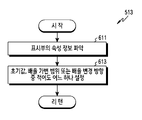
다음으로, 제어부(450)는 513 동작에서 객체 표시 배율을 설정할 수 있다. 이 때 제어부(450)는 표시부(430)에 대응하여, 객체 표시 배율을 설정할 수 있다. 즉 제어부(450)는 표시부(430)의 속성 정보에 기반하여, 객체 표시 배율을 설정할 수 있다. 예를 들면, 제어부(450)는 객체 표시 배율을 미리 설정된 값으로 결정할 수 있다. 제어부(450)가 객체 표시 배율을 설정하는 동작을 도 6을 참조하여 후술할 것이다. Next, the
도 6은 도 5에서 객체 표시 배율 설정 동작의 순서도를 도시한다. FIG. 6 is a flowchart of an operation of setting an object display magnification in FIG. 5 .
도 6을 참조하면, 제어부(450)는 611 동작에서 표시부(430)의 속성 정보를 파악할 수 있다. 예를 들면, 표시부(430)의 속성 정보는 표시부(430)의 사이즈 또는 해상도 중 적어도 어느 하나를 포함할 수 있다. 그리고 표시부(430)의 속성 정보는 표시부(430)에 저장되어 있을 수 있다. 또는 표시부(430)의 속성 정보는 저장부(440)에 저장되어 있을 수 있다. 또한 표시부(430)의 속성 정보는 전자 장치(400)의 사용자 조작에 의해 변경될 수 있다. Referring to FIG. 6 , the
다음으로, 제어부(450)는 613 동작에서 표시부(430)의 속성 정보에 기반하여, 객체 표시 배율의 초기값을 설정할 수 있다. 이를 위해, 저장부(440)가 표시부(430)의 속성 정보와 객체 표시 배율의 초기값을 매핑하여, 저장하고 있을 수 있다. 이를 통해, 제어부(450)는 표시부(430)의 속성 정보를 이용하여, 객체 표시 배율의 초기값을 결정할 수 있다. 예를 들면, 객체 표시 배율의 초기값은 250 %일 수 있다. 이 후 제어부(450)는 도 5로 리턴할 수 있다. Next, the
그리고 제어부(450)는 613 동작에서 표시부(430)의 속성 정보에 기반하여, 객체 표시 배율의 배율 가변 범위 또는 배율 변경 방향 중 적어도 어느 하나를 더 설정할 수 있다. 예를 들면, 저장부(440)가 표시부(430)의 속성 정보와 객체 표시 배율의 최소값과 최대값을 매핑하여, 저장하고 있을 수 있다. 이를 통해, 제어부(450)는 표시부(430)의 속성 정보를 이용하여, 객체 표시 배율의 최소값과 최대값을 결정할 수 있다. 또한 객체 표시 배율의 배율 가변 범위가 최소값 이상이고 최대값 이하로 정의될 수 있다. 게다가, 저장부(440)는 표시부(430)의 속성 정보와 객체 표시 배율의 배율 변경 방향을 매핑하여, 저장하고 있을 수 있다. 이를 통해, 제어부(450)는 표시부(430)의 속성 정보를 이용하여, 객체 표시 배율의 배율 변경 방향을 결정할 수 있다. 예를 들면, 객체 표시 배율의 배율 변경 방향은 최소값에 대향하여 객체 표시 배율을 감소시키기 위한 감소 방향 및 최대값에 대향하여 객체 표시 배율을 증가시키기 위한 증가 방향을 포함할 수 있다. 이 후 제어부(450)는 도 5로 리턴할 수 있다. In
다음으로, 제어부(450)는 515 동작에서 객체 표시 배율에 따라, 객체를 표시할 수 있다. 한 실시예에 따르면, 제어부(450)는 도 13a에 도시된 바와 같이 객체 표시 배율에 따라, 배경 화면(1300)에 이미지 객체(1311), 아이콘(1321) 및 텍스트(1331)를 표시할 수 있다. 다른 실시예에 따르면, 제어부(450)는 도 14a에 도시된 바와 같이 객체 표시 배율에 따라, 배경 화면(1400)에 이미지 객체(1411), 아이콘(1421) 및 텍스트(1431)를 표시할 수 있다. 예를 들면, 제어부(450)는 미리 설정된 값의 객체 표시 배율로, 객체를 표시할 수 있다. 제어부(450)가 객체를 표시하는 동작을 도 7을 참조하여 후술할 것이다.Next, the
도 7은 도 5에서 객체 표시 배율에 따라 객체 표시 동작의 순서도를 도시한다. FIG. 7 is a flowchart of an object display operation according to an object display magnification in FIG. 5 .
도 7을 참조하면, 제어부(450)는 711 동작에서 표시부(430)를 온시킬 수 있다. 이 때 제어부(450)는 표시부(430)에 전원을 공급할 수 있다. 그리고 제어부(450)는 713 동작에서 초기값의 객체 표시 배율로, 객체를 표시할 수 있다. 예를 들면, 제어부(450)는 250 %의 객체 표시 배율로, 객체를 표시할 수 있다. 이 후 제어부(450)는 도 5로 리턴할 수 있다. Referring to FIG. 7 , the
다음으로, 표시부(430)를 오프시키기 위한 이벤트가 발생되면, 제어부(450)가 517 동작에서 이를 감지할 수 있다. 예를 들면, 입력부(420)는 전원 키를 포함할 수 있다. 이러한 경우, 전원 키가 선택되면, 입력부(420)가 표시부(430)를 오프시키기 위한 이벤트를 발생할 수 있다. 또는 저장부(440)에 설정된 바에 따라, 표시부(430)를 오프시키기 위한 이벤트가 발생될 수 있다. 예를 들면, 저장부(440)에 설정된 시점이 도래한 다음, 일정 시간 동안 사용자의 요청 또는 제어부(450)의 별도 동작이 감지되지 않으면, 표시부(430)를 오프시키기 위한 이벤트가 발생할 수 있다. 이를 통해, 제어부(450)가 표시부(430)를 오프시키기 위한 이벤트를 감지할 수 있다. Next, when an event for turning off the
이어서, 제어부(450)는 519 동작에서 객체 표시 배율을 갱신할 수 있다. 즉 제어부(450)는 표시부(430)의 상태 전환에 기반하여, 객체 표시 배율을 갱신할 수 있다. 이 때 제어부(450)는 표시부(430)를 오프시키기 위한 이벤트 또는 표시부(430)를 온시키기 위한 이벤트 중 어느 하나에 대응하여, 객체 표시 배율을 갱신할 수 있다. 그리고 제어부(450)는 객체 표시 배율을 미리 설정된 값 만큼 변경할 수 있다. 제어부(450)가 객체 표시 배율을 갱신하는 동작을 도 8, 도 9, 도 10 및 도 11을 참조하여 후술할 것이다. Next, the
도 8은 도 5에서 객체 표시 배율 갱신 동작의 순서도를 도시한다. FIG. 8 is a flowchart of an object display magnification update operation in FIG. 5 .
도 8을 참조하면, 제어부(450)는 811 동작에서 표시부(430)를 오프시킬 수 있다. 즉 제어부(450)는 표시부(430)를 오프시키기 위한 이벤트에 대응하여, 표시부(430)를 오프시킬 수 있다. 이를 위해, 제어부(450)는 표시부(430)로 전원 공급을 차단할 수 있다. Referring to FIG. 8 , the
다음으로, 제어부(450)는 813 동작에서 객체 표시 배율을 변경할 수 있다. 이 때 제어부(450)는 객체 표시 배율을 미리 설정된 값 만큼 변경할 수 있다. 예를 들면, 제어부(450)는 객체 표시 배율을 1 % 만큼 감소 또는 증가시킬 수 있다. 즉 제어부(450)는 객체 표시 배율을 250 %로부터 249 %로 감소시킬 수 있다. 또는 제어부(450)는 객체 표시 배율을 250 %로부터 251 %로 증가시킬 수 있다. Next, the
다음으로, 표시부(430)를 온시키기 위한 이벤트가 발생되면, 제어부(450)가 815 동작에서 이를 감지할 수 있다. 예를 들면, 입력부(420)는 전원 키를 포함할 수 있다. 이러한 경우, 전원 키가 선택되면, 입력부(420)가 표시부(430)를 온시키기 위한 이벤트를 발생할 수 있다. 이를 통해, 제어부(450)가 표시부(430)를 온시키기 위한 이벤트를 감지할 수 있다. 그리고 제어부(450)는 도 5로 리턴할 수 있다. Next, when an event for turning on the
도 9는 도 5에서 객체 표시 배율 갱신 동작의 순서도를 도시한다. FIG. 9 is a flowchart of an object display magnification update operation in FIG. 5 .
도 9를 참조하면, 제어부(450)는 911 동작에서 표시부(430)를 오프시킬 수 있다. 즉 제어부(450)는 표시부(430)를 오프시키기 위한 이벤트에 대응하여, 표시부(430)를 오프시킬 수 있다. 이 때 제어부(450)는 표시부(430)로 전원 공급을 차단할 수 있다. 이 후 표시부(430)를 온시키기 위한 이벤트가 발생되면, 제어부(450)가 913 동작에서 이를 감지할 수 있다. 예를 들면, 입력부(420)는 전원 키를 포함할 수 있다. 이러한 경우, 전원 키가 선택되면, 입력부(420)가 표시부(430)를 온시키기 위한 이벤트를 발생할 수 있다. 이를 통해, 제어부(450)가 표시부(430)를 온시키기 위한 이벤트를 감지할 수 있다. Referring to FIG. 9 , the
다음으로, 제어부(450)는 915 동작에서 객체 표시 배율을 변경할 수 있다. 즉 제어부(450)는 표시부(430)를 온시키기 위한 이벤트에 대응하여, 객체 표시 배율을 변경할 수 있다. 이 때 제어부(450)는 객체 표시 배율을 미리 설정된 값 만큼 변경할 수 있다. 예를 들면, 제어부(450)는 객체 표시 배율을 1 % 만큼 감소 또는 증가시킬 수 있다. 즉 제어부(450)는 객체 표시 배율을 250 %로부터 249 %로 감소시킬 수 있다. 또는 제어부(450)는 객체 표시 배율을 250 %로부터 251 %로 증가시킬 수 있다. 이 후 제어부(450)는 도 5로 리턴할 수 있다. Next, the
도 10은 도 5에서 객체 표시 배율 갱신 동작의 순서도를 도시한다. FIG. 10 is a flowchart of an object display magnification updating operation in FIG. 5 .
도 10을 참조하면, 제어부(450)는 1011 동작에서 표시부(430)를 오프시킬 수 있다. 즉 제어부(450)는 표시부(430)를 오프시키기 위한 이벤트에 대응하여, 표시부(430)를 오프시킬 수 있다. 이 때 제어부(450)는 표시부(430)로 전원 공급을 차단할 수 있다. Referring to FIG. 10 , the
다음으로, 제어부(450)는 1013 동작에서 배율 변경 방향으로 객체 표시 배율의 변경이 가능한 지의 여부를 판단할 수 있다. 즉 제어부(450)는 표시부(430)를 오프시키기 위한 이벤트에 대응하여, 배율 변경 방향으로 객체 표시 배율의 변경이 가능한 지의 여부를 판단할 수 있다. 이 때 제어부(450)는 객체 표시 배율과 배율 가변 범위 및 배율 변경 방향을 비교할 수 있다. 예를 들면, 배율 변경 방향이 감소 방향인 경우, 제어부(450)는, 객체 표시 배율이 배율 가변 범위의 최소값에 도달한 지의 여부를 판단할 수 있다. 또는 배율 변경 방향이 증가 방향인 경우, 제어부(450)는, 객체 표시 배율이 배율 가변 범위의 최대값에 도달한 지의 여부를 판단할 수 있다. Next, in
다음으로, 1013 동작에서 배율 변경 방향으로 객체 표시 배율의 변경이 불가능한 것으로 판단되면, 제어부(450)는 1015 동작에서 객체 표시 배율의 배율 변경 방향을 전환할 수 있다. 즉 제어부(450)는 객체 표시 배율의 배율 변경 방향을 역방향으로 갱신할 수 있다. 예를 들면, 객체 표시 배율이 배율 가변 범위의 최소값에 도달한 것으로 판단되면, 제어부(450)는 배율 변경 방향을 감소 방향으로부터 증가 방향으로 변경할 수 있다. 또는 객체 표시 배율이 배율 가변 범위의 최대값에 도달한 것으로 판단되면, 제어부(450)는 배율 변경 방향을 증가 방향으로부터 감소 방향으로 변경할 수 있다. Next, if it is determined in
다음으로, 제어부(450)는 1017 동작에서 객체 표시 배율을 변경할 수 있다. 즉 제어부(450)는 표시부(430)를 오프시키기 위한 이벤트에 대응하여, 객체 표시 배율을 변경할 수 있다. 이 때 제어부(450)는 객체 표시 배율을 미리 설정된 값 만큼 변경할 수 있다. 예를 들면, 배율 변경 방향이 감소 방향인 경우, 제어부(450)는 객체 표시 배율을 1 % 만큼 감소시킬 수 있다. 즉 제어부(450)는 객체 표시 배율을 250 %로부터 249 %로 감소시킬 수 있다. 또는 배율 변경 방향이 증가 방향인 경우, 제어부(450)는 객체 표시 배율을 1 % 만큼 증가시킬 수 있다. 즉 제어부(450)는 객체 표시 배율을 250 %로부터 251 %로 증가시킬 수 있다. Next, the
한편, 1013 동작에서 배율 변경 방향으로 객체 표시 배율의 변경이 가능한 것으로 판단되면, 제어부(450)는 1017 동작에서 객체 표시 배율을 변경할 수 있다. 즉 제어부(450)는 표시부(430)를 오프시키기 위한 이벤트에 대응하여, 객체 표시 배율을 변경할 수 있다. 이 때 제어부(450)는 객체 표시 배율을 미리 설정된 값 만큼 변경할 수 있다. 예를 들면, 배율 변경 방향이 감소 방향인 경우, 제어부(450)는 객체 표시 배율을 1 % 만큼 감소시킬 수 있다. 즉 제어부(450)는 객체 표시 배율을 250 %로부터 249 %로 감소시킬 수 있다. 또는 배율 변경 방향이 증가 방향인 경우, 제어부(450)는 객체 표시 배율을 1 % 만큼 증가시킬 수 있다. 즉 제어부(450)는 객체 표시 배율을 250 %로부터 251 %로 증가시킬 수 있다. Meanwhile, if it is determined in
다음으로, 표시부(430)를 온시키기 위한 이벤트가 발생되면, 제어부(450)가 1019 동작에서 이를 감지할 수 있다. 예를 들면, 입력부(420)는 전원 키를 포함할 수 있다. 이러한 경우, 전원 키가 선택되면, 입력부(420)가 표시부(430)를 온시키기 위한 이벤트를 발생할 수 있다. 이를 통해, 제어부(450)가 표시부(430)를 온시키기 위한 이벤트를 감지할 수 있다. 그리고 제어부(450)는 도 5로 리턴할 수 있다. Next, when an event for turning on the
도 11은 도 5에서 객체 표시 배율 갱신 동작의 순서도를 도시한다. FIG. 11 is a flowchart of an operation of updating an object display magnification in FIG. 5 .
도 11을 참조하면, 제어부(450)는 1111 동작에서 표시부(430)를 오프시킬 수 있다. 즉 제어부(450)는 표시부(430)를 오프시키기 위한 이벤트에 대응하여, 표시부(430)를 오프시킬 수 있다. 이 때 제어부(450)는 표시부(430)로 전원 공급을 차단할 수 있다. 이 후 표시부(430)를 온시키기 위한 이벤트가 발생되면, 제어부(450)가 1113 동작에서 이를 감지할 수 있다. 예를 들면, 입력부(420)는 전원 키를 포함할 수 있다. 이러한 경우, 전원 키가 선택되면, 입력부(420)가 표시부(430)를 온시키기 위한 이벤트를 발생할 수 있다. 이를 통해, 제어부(450)가 표시부(430)를 온시키기 위한 이벤트를 감지할 수 있다. Referring to FIG. 11 , the
다음으로, 제어부(450)는 1115 동작에서 배율 변경 방향으로 객체 표시 배율의 변경이 가능한 지의 여부를 판단할 수 있다. 즉 제어부(450)는 표시부(430)를 온시키기 위한 이벤트에 대응하여, 배율 변경 방향으로 객체 표시 배율의 변경이 가능한 지의 여부를 판단할 수 있다. 이 때 제어부(450)는 객체 표시 배율과 배율 가변 범위 및 배율 변경 방향을 비교할 수 있다. 예를 들면, 배율 변경 방향이 감소 방향인 경우, 제어부(450)는, 객체 표시 배율이 배율 가변 범위의 최소값에 도달한 지의 여부를 판단할 수 있다. 또는 배율 변경 방향이 증가 방향인 경우, 제어부(450)는, 객체 표시 배율이 배율 가변 범위의 최대값에 도달한 지의 여부를 판단할 수 있다. Next, in
다음으로, 1115 동작에서 배율 변경 방향으로 객체 표시 배율의 변경이 불가능한 것으로 판단되면, 제어부(450)는 1117 동작에서 객체 표시 배율의 배율 변경 방향을 전환할 수 있다. 즉 제어부(450)는 객체 표시 배율의 배율 변경 방향을 역방향으로 갱신할 수 있다. 예를 들면, 객체 표시 배율이 배율 가변 범위의 최소값에 도달한 것으로 판단되면, 제어부(450)는 배율 변경 방향을 감소 방향으로부터 증가 방향으로 변경할 수 있다. 또는 객체 표시 배율이 배율 가변 범위의 최대값에 도달한 것으로 판단되면, 제어부(450)는 배율 변경 방향을 증가 방향으로부터 감소 방향으로 변경할 수 있다.Next, if it is determined in
다음으로, 제어부(450)는 1119 동작에서 객체 표시 배율을 변경할 수 있다. 즉 제어부(450)는 표시부(430)를 온시키기 위한 이벤트에 대응하여, 객체 표시 배율을 변경할 수 있다. 이 때 제어부(450)는 객체 표시 배율을 미리 설정된 값 만큼 변경할 수 있다. 예를 들면, 배율 변경 방향이 감소 방향인 경우, 제어부(450)는 객체 표시 배율을 1 % 만큼 감소시킬 수 있다. 즉 제어부(450)는 객체 표시 배율을 250 %로부터 249 %로 감소시킬 수 있다. 또는 배율 변경 방향이 증가 방향인 경우, 제어부(450)는 객체 표시 배율을 1 % 만큼 증가시킬 수 있다. 즉 제어부(450)는 객체 표시 배율을 250 %로부터 251 %로 증가시킬 수 있다. Next, the
한편, 1115 동작에서 배율 변경 방향으로 객체 표시 배율의 변경이 가능한 것으로 판단되면, 제어부(450)는 1117 동작에서 객체 표시 배율을 변경할 수 있다. 즉 제어부(450)는 표시부(430)를 온시키기 위한 이벤트에 대응하여, 객체 표시 배율을 변경할 수 있다. 이 때 제어부(450)는 객체 표시 배율을 미리 설정된 값 만큼 변경할 수 있다. 예를 들면, 배율 변경 방향이 감소 방향인 경우, 제어부(450)는 객체 표시 배율을 1 % 만큼 감소시킬 수 있다. 즉 제어부(450)는 객체 표시 배율을 250 %로부터 249 %로 감소시킬 수 있다. 또는 배율 변경 방향이 증가 방향인 경우, 제어부(450)는 객체 표시 배율을 1 % 만큼 증가시킬 수 있다. 즉 제어부(450)는 객체 표시 배율을 250 %로부터 251 %로 증가시킬 수 있다. 이 후 제어부(450)는 도 5로 리턴할 수 있다.Meanwhile, if it is determined in
계속해서, 제어부(450)는 521 동작에서 표시부(430)를 온시킬 수 있다. 이 때 제어부(450)는 표시부(430)에 전원을 공급할 수 있다. 그리고 제어부(450)는 523 동작에서 객체 표시 배율에 따라, 객체를 표시할 수 있다. 한 실시예에 따르면, 제어부(450)는 도 13b에 도시된 바와 같이 객체 표시 배율에 따라, 배경 화면(1300)에 이미지 객체(1313), 아이콘(1323) 및 텍스트(1333)를 표시할 수 있다. 이를 통해, 배경 화면(1300)에서, 이미지 객체(1313), 아이콘(1323) 및 텍스트(1333)의 위치 또는 사이즈 중 적어도 어느 하나가 변경될 수 있다. 다른 실시예에 따르면, 제어부(450)는 도 14b에 도시된 바와 같이 객체 표시 배율에 따라, 배경 화면(1400)에 이미지 객체(1413), 아이콘(1423) 및 텍스트(1433)를 표시할 수 있다. 이를 통해, 배경 화면(1400)에서, 이미지 객체(1413), 아이콘(1423) 및 텍스트(1433)의 위치 또는 사이즈 중 적어도 어느 하나가 변경될 수 있다.Subsequently, the
한 실시예에 따르면, 도 13c에 도시된 바와 같이, 배경 화면(1300)에서 이미지 객체(1313)가 변경 방향(1315)을 따라 축소될 수 있다. 예를 들면, 이미지 객체(1313)의 변경 방향(1315)은 수직 방향일 수 있다. 그리고 도 13d에 도시된 바와 같이, 배경 화면(1300)에서 아이콘(1323) 및 텍스트(1333)가 각각의 변경 방향(1325, 1335)을 따라 축소될 수 있다. 예를 들면, 아이콘(1323) 및 텍스트(1333)의 변경 방향(1325, 1335)은 수평 방향 및 수직 방향일 수 있다. 또는 도시되지는 않았으나, 배경 화면(1300)에서 이미지 객체(1313), 아이콘(1323) 및 텍스트(1333)가 확대될 수 있다. 다른 실시예에 따르면, 도 14c에 도시된 바와 같이, 배경 화면(1400)에서 이미지 객체(1413)가 변경 방향(1415)을 따라 축소될 수 있다. 예를 들면, 이미지 객체(1413)의 변경 방향(1415)은 수직 방향일 수 있다. 그리고 도 14d에 도시된 바와 같이, 배경 화면(1400)에서 아이콘(1423) 및 텍스트(1433)가 각각의 변경 방향(1425, 1435)을 따라 축소될 수 있다. 예를 들면, 아이콘(1423) 및 텍스트(1433)의 변경 방향(1425, 1435)은 수평 방향 및 수직 방향일 수 있다. 또는 도시되지는 않았으나, 배경 화면(1400)에서 이미지 객체(1413), 아이콘(1423) 및 텍스트(1433)가 확대될 수 있다.According to one embodiment, as shown in FIG. 13C , the
한편, 517 동작에서 표시부(430)를 오프시키기 위한 이벤트가 감지되지 않으면, 제어부(430)는 525 동작에서 해당 기능을 수행할 수 있다. 즉 제어부(430)는 객체 표시 배율을 갱신하지 않고, 해당 기능을 수행할 수 있다. 예를 들면, 전자 장치(400) 사용자의 요청에 대응하여, 제어부(430)는 객체 표시 배율을 재설정할 수 있다. 즉 제어부(430)는 표시부(430)의 속성 정보 변경에 기반하여, 객체 표시 배율을 재설정할 수 있다. 제어부(430)가 해당 기능을 수행하는 동작을 도 12를 참조하여 후술할 것이다. Meanwhile, if an event for turning off the
도 12는 도 5에서 해당 기능 수행 동작의 순서도를 도시한다. FIG. 12 is a flowchart of a corresponding function execution operation in FIG. 5 .
도 12를 참조하면, 제어부(450)는 1211 동작에서 표시부(430)의 속성 정보 변경을 감지할 수 있다. 예를 들면, 전자 장치(400) 사용자의 조작에 의해, 표시부(430)의 속성 정보가 변경될 수 있다. 이를 통해, 제어부(450)가 표시부(430)의 속성 정보 변경을 감지할 수 있다. 그리고 제어부(450)는 1213 동작에서 표시부(430)의 속성 정보를 파악할 수 있다. 이 때 표시부(430)의 속성 정보는 표시부(430)에서 변경되어 있을 수 있다. 또는 표시부(430)의 속성 정보는 저장부(440)에서 변경되어 있을 수 있다.Referring to FIG. 12 , the
다음으로, 제어부(450)는 1215 동작에서 표시부(430)의 속성 정보에 기반하여, 객체 표시 배율의 초기값을 변경할 수 있다. 이를 위해, 저장부(440)가 표시부(430)의 속성 정보와 객체 표시 배율의 초기값을 매핑하여, 저장하고 있을 수 있다. 이를 통해, 제어부(450)는 표시부(430)의 속성 정보를 이용하여, 객체 표시 배율의 초기값을 결정할 수 있다. 예를 들면, 객체 표시 배율의 초기값은 249 %일 수 있다. Next, the
그리고 제어부(450)는 1215 동작에서 표시부(430)의 속성 정보에 기반하여, 객체 표시 배율의 배율 가변 범위 또는 배율 변경 방향 중 적어도 어느 하나를 더 변경할 수 있다. 예를 들면, 저장부(440)가 표시부(430)의 속성 정보와 객체 표시 배율의 최소값과 최대값을 매핑하여, 저장하고 있을 수 있다. 이를 통해, 제어부(450)는 표시부(430)의 속성 정보를 이용하여, 객체 표시 배율의 최소값과 최대값을 결정할 수 있다. 또한 객체 표시 배율의 배율 가변 범위가 최소값 이상이고 최대값 이하로 정의될 수 있다. 게다가, 저장부(440)는 표시부(430)의 속성 정보와 객체 표시 배율의 배율 변경 방향을 매핑하여, 저장하고 있을 수 있다. 이를 통해, 제어부(450)는 표시부(430)의 속성 정보를 이용하여, 객체 표시 배율의 배율 변경 방향을 결정할 수 있다. 예를 들면, 객체 표시 배율의 배율 변경 방향은 최소값에 대향하여 객체 표시 배율을 감소시키기 위한 감소 방향 및 최대값에 대향하여 객체 표시 배율을 증가시키기 위한 증가 방향을 포함할 수 있다.In
다음으로, 제어부(450)는 1217 동작에서 초기값의 객체 표시 배율로, 객체를 표시할 수 있다. 예를 들면, 제어부(450)는 249 %의 객체 표시 배율로, 객체를 표시할 수 있다. 이 후 제어부(450)는 도 5로 리턴할 수 있다. Next, in
마지막으로, 전자 장치(400)가 오프되면, 제어부(450)가 527 동작에서 이를 감지할 수 있다. 예를 들면, 전원 키가 선택되면, 입력부(420)가 전자 장치(400)를 오프시키기 위한 이벤트를 발생할 수 있다. 그리고 제어부(450)가 전자 장치(400)를 오프시키기 위한 이벤트를 감지하여, 전자 장치(400)의 구성요소들로 전원 공급을 차단할 수 있다. 또한 제어부(430)가 비활성화될 수 있다. 이를 통해, 전자 장치(400)가 오프될 수 있다. 이에 따라, 전자 장치(400)의 동작 방법이 종료될 수 있다. Finally, when the
한편, 527 동작에서 전자 장치(400)의 오프가 감지되지 않으면, 제어부(450)는 517 동작 내지 527 동작 중 적어도 어느 하나를 반복하여 수행할 수 있다. 이 때 527 동작에서 전자 장치(400)의 오프가 감지될 때까지, 제어부(450)는 517 동작 내지 527 동작 중 적어도 어느 하나를 반복하여 수행할 수 있다.Meanwhile, if the
다른 실시예에 따르면, 제어부(450)는 전자 장치(400)의 상태 전환에 기반하여, 객체 표시 배율을 변경할 수 있다. 즉 전자 장치(400)가 저전력 상태 또는 정상 상태 사이에서 전환하는 경우, 제어부(450)가 객체 표시 배율을 변경할 수 있다. 이 때 제어부(450)는 전자 장치(400)를 저전력 상태에서 정상 상태로 전환시키기 위한 이벤트 또는 전자 장치(400)를 정상 상태에서 저전력 상태로 전환시키기 위한 이벤트 중 적어도 어느 하나에 대응하여, 객체 표시 배율을 갱신할 수 있다.According to another embodiment, the
다양한 실시예들에 따르면, 전자 장치(400)의 동작 방법은, 표시부(430)에 미리 설정된 배율에 따라 객체를 표시하는 동작, 표시부(430)의 상태 전환에 기반하여, 설정된 배율을 갱신하는 동작 및 갱신된 배율에 따라 표시부(430)에 객체를 표시하는 동작을 포함할 수 있다. According to various embodiments, an operating method of the
다양한 실시예들에 따르면, 표시부(430)의 상태 전환은 표시부(430)의 오프와 온 간 전환을 나타낼 수 있다. According to various embodiments, the state transition of the
다양한 실시예들에 따르면, 설정된 배율을 갱신하는 동작은, 표시부(430)를 오프시키기 위한 이벤트를 감지하는 동작, 설정된 배율을 갱신하는 동작 및 표시부(430)를 오프시키는 동작을 포함할 수 있다. According to various embodiments, the operation of updating the set magnification may include an operation of detecting an event for turning off the
다양한 실시예들에 따르면, 설정된 배율을 갱신하는 동작은, 표시부(430)를 오프시키는 동작, 표시부(430)를 온시키기 위한 이벤트를 감지하는 동작, 설정된 배율을 갱신하는 동작 및 표시부(430)를 온시키는 동작을 포함할 수 있다. According to various embodiments, the operation of updating the set magnification may include an operation of turning off the
다양한 실시예들에 따르면, 설정된 배율을 갱신하는 동작은, 설정된 배율을 미리 설정된 값 만큼 변경할 수 있다. According to various embodiments, the operation of updating the set magnification may change the set magnification by a preset value.
다양한 실시예들에 따르면, 설정된 배율을 갱신하는 동작은, 설정된 배율을 미리 설정된 최소값과 최대값에 의해 정의되는 범위 내에서 변경할 수 있다.According to various embodiments, the operation of updating the set magnification may change the set magnification within a range defined by preset minimum and maximum values.
다양한 실시예들에 따르면, 설정된 배율을 갱신하는 동작은, 설정된 배율이 미리 설정된 방향으로 변경이 가능한 지의 여부를 판단하는 동작, 설정된 방향으로 변경이 가능하면, 설정된 배율을 상기 설정된 방향으로 변경하는 동작 또는 설정된 방향으로 변경이 불가능하면, 설정된 배율을 설정된 방향의 역방향으로 변경하는 동작 중 어느 하나를 포함할 수 있다.According to various embodiments, the operation of updating the set magnification may include an operation of determining whether the set magnification can be changed in a preset direction, and an operation of changing the set magnification in the set direction if change is possible in the set direction. Alternatively, if it is impossible to change in the set direction, it may include any one of an operation of changing the set magnification in a direction opposite to the set direction.
다양한 실시예들에 따르면, 전자 장치(400)의 동작 방법은, 전자 장치(400)의 온을 감지하는 동작 및 속성 정보에 기반하여, 배율을 설정하는 동작을 더 포함할 수 있다.According to various embodiments, the operating method of the
다양한 실시예들에 따르면, 속성 정보는 표시부(430)의 사이즈 또는 해상도 중 적어도 어느 하나를 포함할 수 있다. According to various embodiments, the attribute information may include at least one of the size or resolution of the
다양한 실시예들에 따르면, 전자 장치(400)의 동작 방법은, 속성 정보에 기반하여, 배율을 변경하기 위한 방향 또는 범위 중 적어도 어느 하나를 설정하는 동작을 더 포함할 수 있다. According to various embodiments, the operating method of the
다양한 실시예들에 따르면, 전자 장치(400)의 동작 방법은, 표시부(430)에 배경 화면과 제 1 배율의 객체를 표시하는 동작 및 전자 장치(400)의 상태 전환에 기반하여, 표시부(430)에 제 2 배율의 객체를 표시하는 동작을 포함할 수 있다. According to various embodiments, an operating method of the
다양한 실시예들에 따르면, 전자 장치(400)가 표시부(430)에서 잔상의 발생을 억제할 수 있다. 즉 전자 장치(400)가 객체 표시 배율을 변경함으로써, 표시부(430)에서 객체의 위치 또는 사이즈 중 적어도 어느 하나를 변경할 수 있다. 바꿔 말하면, 표시부(430)에서, 객체의 위치 및 사이즈가 유동적일 수 있다. 이를 통해, 표시부(430)에서, 잔상의 발생이 억제될 수 있다. 그리고 발광 소자들의 열화가 지연될 수 있다. 이 때 전자 장치(400)가 표시부(430)의 상태 전환 또는 전자 장치(400)의 상태 전환에 기반하여, 객체 표시 배율을 변경할 수 있다. 이로 인하여, 전자 장치(400)가 객체 표시 배율을 변경하더라도, 사용자가 객체 표시 배율의 변화를 인지하지 못하여, 거슬리지 않도록 할 수 있다.According to various embodiments, the
한편, 본 명세서와 도면에 개시된 본 발명의 실시예들은 본 발명의 기술 내용을 쉽게 설명하고 본 발명의 이해를 돕기 위해 특정 예를 제시한 것일 뿐이며, 본 발명의 범위를 한정하고자 하는 것은 아니다. 즉 본 발명의 기술적 사상에 바탕을 둔 다른 변형 예들이 실시 가능하다는 것은 본 발명이 속하는 기술 분야에서 통상의 지식을 가진 자에게 자명한 것이다. On the other hand, the embodiments of the present invention disclosed in the present specification and drawings are only presented as specific examples to easily explain the technical content of the present invention and help understanding of the present invention, and are not intended to limit the scope of the present invention. That is, it is obvious to those skilled in the art that other modified examples based on the technical idea of the present invention can be implemented.
Claims (20)
활성 상태의 상기 표시부에 제 1 배율에 따라 객체를 표시하는 동작;
상기 객체를 제 1 배율로 표시하는 동안에, 지정된 이벤트를 감지함에 응답하여, 상기 표시부의 상태를 비활성 상태로 전환하는 동작;
상기 표시부가 상기 비활성 상태인 동안에, 다른 지정된 이벤트를 감지함에 응답하여, 상기 표시부의 상기 상태를 상기 활성 상태로 복구하는 동작; 및
상기 표시부의 상기 상태를 복구함에 응답하여, 상기 활성 상태에서 제 2 배율로 상기 객체를 표시하는 동작;을 포함하는, 방법.In the operating method of an electronic device including a display unit,
displaying an object according to a first magnification on the active display unit;
converting a state of the display unit to an inactive state in response to detecting a designated event while displaying the object at a first magnification;
restoring the state of the display to the active state in response to detecting another designated event while the display is in the inactive state; and
In response to restoring the state of the display unit, displaying the object at a second magnification in the active state.
상기 제 2 배율은 사용자의 입력과 독립적으로 상기 전자 장치에 의해 결정되는 방법. According to claim 1,
The second magnification is determined by the electronic device independently of a user's input.
상기 표시부의 상기 상태를 상기 비활성 상태로 전환하기 직전 또는 직후에, 상기 제 1 배율을 상기 제 2 배율로 변경하는 동작을 더 포함하는 방법. According to claim 1,
and changing the first magnification to the second magnification right before or after switching the state of the display unit to the inactive state.
상기 표시부의 상기 상태를 상기 활성 상태로 복구하기 직전 또는 직후에, 상기 제 1 배율을 상기 제 2 배율로 변경하는 동작을 더 포함하는 방법. According to claim 1,
and changing the first magnification to the second magnification right before or after restoring the state of the display unit to the active state.
미리 설정된 파라미터에 기반하여 상기 제 1 배율을 상기 제 2 배율로 변경하는 동작을 더 포함하는 방법.According to claim 1,
and changing the first magnification to the second magnification based on a preset parameter.
상기 제 1 배율을 미리 설정된 최소값 및 미리 설정된 최대값에 의해 정의되는 범위 내에서 변경하는 방법.The method of claim 5, wherein the operation of changing the first magnification,
A method of changing the first magnification within a range defined by a preset minimum value and a preset maximum value.
상기 제 1 배율이 미리 설정된 방향으로 변경이 가능한 지의 여부를 판단하는 동작;
상기 제 1 배율이 상기 설정된 방향으로 변경이 가능하면, 상기 제 1 배율을 상기 설정된 방향으로 변경하는 동작; 및
상기 제 1 배율이 상기 설정된 방향으로 변경이 불가능하면, 상기 제 1 배율을 상기 설정된 방향의 역방향으로 변경하는 동작을 포함하는 방법.The method of claim 6, wherein the operation of changing the magnification,
determining whether the first magnification can be changed in a preset direction;
if the first magnification can be changed in the set direction, changing the first magnification in the set direction; and
and if the first magnification cannot be changed in the set direction, changing the first magnification in a direction opposite to the set direction.
상기 표시부의 속성 정보에 기반하여, 상기 제 1 배율을 설정하는 동작을 더 포함하는 방법.According to claim 1,
and setting the first magnification based on the attribute information of the display unit.
상기 표시부의 속성 정보는 상기 표시부의 사이즈 또는 해상도 중 적어도 어느 하나를 포함하는 방법. According to claim 8,
The attribute information of the display unit includes at least one of a size or a resolution of the display unit.
상기 표시부의 속성 정보에 기반하여, 상기 제 1 배율을 변경하기 위한 방향 또는 범위 중 적어도 어느 하나를 설정하는 동작을 더 포함하는 방법.According to claim 8,
The method further comprising setting at least one of a direction or a range for changing the first magnification based on the attribute information of the display unit.
상기 표시부에 기능적으로 연결된 제어부를 포함하고,
상기 제어부는,
활성 상태의 상기 표시부에 제 1 배율에 따라 객체를 표시하고,
상기 객체를 제 1 배율로 표시하는 동안에, 지정된 이벤트를 감지함에 응답하여, 상기 표시부의 상태를 비활성 상태로 전환하고,
상기 표시부가 상기 비활성 상태인 동안에, 다른 지정된 이벤트를 감지함에 응답하여, 상기 표시부의 상기 상태를 상기 활성 상태로 복구하고,
상기 표시부의 상기 상태를 복구함에 응답하여, 상기 활성 상태에서 제 2 배율로 상기 객체를 표시하는, 전자 장치.display unit;
A control unit functionally connected to the display unit;
The control unit,
Displaying an object according to a first magnification on the display unit in an active state;
While displaying the object at a first magnification, in response to detecting a specified event, switching the state of the display unit to an inactive state;
while the display is in the inactive state, in response to detecting another designated event, restoring the state of the display to the active state;
Displaying the object at a second magnification in the active state in response to restoring the state of the display unit.
상기 제 2 배율은 사용자의 입력과 독립적으로 상기 전자 장치에 의해 결정되는 전자 장치.According to claim 11,
The second magnification is determined by the electronic device independently of a user's input.
상기 표시부의 상기 상태를 상기 비활성 상태로 전환하기 직전 또는 직후에, 상기 제 1 배율을 상기 제 2 배율로 변경하는 전자 장치.The method of claim 11, wherein the control unit,
and changing the first magnification to the second magnification right before or after switching the state of the display unit to the inactive state.
상기 표시부의 상기 상태를 상기 활성 상태로 복구하기 직전 또는 직후에, 상기 제 1 배율을 상기 제 2 배율로 변경하는 전자 장치.The method of claim 11, wherein the control unit,
and changing the first magnification to the second magnification right before or after restoring the state of the display unit to the active state.
미리 설정된 파라미터에 기반하여 상기 제 1 배율을 상기 제 2 배율로 변경하는 전자 장치. The method of claim 11, wherein the control unit,
An electronic device that changes the first magnification to the second magnification based on a preset parameter.
상기 제 1 배율을 미리 설정된 최소값과 최대값에 의해 정의되는 범위 내에서 변경하는 전자 장치. The method of claim 15, wherein the control unit,
An electronic device that changes the first magnification within a range defined by preset minimum and maximum values.
상기 제 1 배율이 미리 설정된 방향으로 변경이 가능한 지의 여부를 판단하고,
상기 제 1 배율이 상기 설정된 방향으로 변경이 가능하면, 상기 제 1 배율을 상기 설정된 방향으로 변경하고, 상기 제 1 배율이 상기 설정된 방향으로 변경이 불가능하면, 상기 제 1 배율을 상기 설정된 방향의 역방향으로 변경하는 전자 장치. The method of claim 16, wherein the control unit,
determining whether the first magnification can be changed in a preset direction;
If the first magnification can be changed in the set direction, the first magnification is changed in the set direction, and if the first magnification cannot be changed in the set direction, the first magnification is changed in a direction opposite to the set direction. Electronic device to change to.
상기 표시부의 속성 정보에 기반하여, 상기 제 1 배율을 설정하는 전자 장치.The method of claim 11, wherein the control unit,
An electronic device configured to set the first magnification based on the attribute information of the display unit.
상기 표시부의 속성 정보는 상기 표시부의 사이즈 또는 해상도 중 적어도 어느 하나를 포함하는 전자 장치.According to claim 18,
The electronic device of claim 1 , wherein the attribute information of the display unit includes at least one of a size or a resolution of the display unit.
표시부;
상기 표시부에 기능적으로 연결된 제어부를 포함하고,
상기 제어부는,
상기 표시부의 배경 화면에 제 1 배율의 객체를 표시하고,
상기 표시부의 활성 상태와 비활성 상태 사이의 상태 전환에 기반하여, 상기 표시부의 상기 배경 화면에서 상기 제 1 배율에서 변경된 제 2 배율의 상기 객체를 표시하는 전자 장치.In electronic devices,
display unit;
A control unit functionally connected to the display unit;
The control unit,
Displaying an object of a first magnification on the background screen of the display unit;
An electronic device displaying the object at a second magnification changed from the first magnification on the background screen of the display unit based on a state transition between an active state and an inactive state of the display unit.
Priority Applications (2)
| Application Number | Priority Date | Filing Date | Title |
|---|---|---|---|
| KR1020150153579A KR102479448B1 (en) | 2015-11-03 | 2015-11-03 | Electronic apparatus and operating method thereof |
| US15/342,400 US10140684B2 (en) | 2015-11-03 | 2016-11-03 | Electronic device and operating method thereof |
Applications Claiming Priority (1)
| Application Number | Priority Date | Filing Date | Title |
|---|---|---|---|
| KR1020150153579A KR102479448B1 (en) | 2015-11-03 | 2015-11-03 | Electronic apparatus and operating method thereof |
Publications (2)
| Publication Number | Publication Date |
|---|---|
| KR20170051905A KR20170051905A (en) | 2017-05-12 |
| KR102479448B1 true KR102479448B1 (en) | 2022-12-21 |
Family
ID=58637814
Family Applications (1)
| Application Number | Title | Priority Date | Filing Date |
|---|---|---|---|
| KR1020150153579A Active KR102479448B1 (en) | 2015-11-03 | 2015-11-03 | Electronic apparatus and operating method thereof |
Country Status (2)
| Country | Link |
|---|---|
| US (1) | US10140684B2 (en) |
| KR (1) | KR102479448B1 (en) |
Citations (5)
| Publication number | Priority date | Publication date | Assignee | Title |
|---|---|---|---|---|
| JP2002091417A (en) * | 2000-09-12 | 2002-03-27 | Fujitsu Ltd | Image display device |
| JP2009005152A (en) | 2007-06-22 | 2009-01-08 | Olympus Corp | Image processing device |
| US20090066730A1 (en) | 2007-09-06 | 2009-03-12 | Canon Kabushiki Kaisha | Image display control apparatus and image display control method |
| JP2010061623A (en) * | 2008-09-08 | 2010-03-18 | Konica Minolta Business Technologies Inc | Document processor, document processing method, and document processing program |
| JP2014209331A (en) * | 2013-03-22 | 2014-11-06 | 株式会社Nttドコモ | Notification information display device and notification information display method |
Family Cites Families (15)
| Publication number | Priority date | Publication date | Assignee | Title |
|---|---|---|---|---|
| CA2310945C (en) * | 2000-06-05 | 2009-02-03 | Corel Corporation | System and method for magnifying and editing images |
| KR100994011B1 (en) * | 2003-05-08 | 2010-11-11 | 힐크레스트 래보래토리스, 인크. | A control framework with a zoomable graphical user interface for organizing, selecting and launching media items |
| KR20070010710A (en) | 2005-07-19 | 2007-01-24 | 삼성전자주식회사 | Image display device with automatic pixel shifting function and method |
| KR100719114B1 (en) | 2005-07-19 | 2007-05-17 | 삼성전자주식회사 | Display device and method for shifting pixel position |
| KR20090071683A (en) | 2007-12-28 | 2009-07-02 | 엘지전자 주식회사 | Video display device and afterimage prevention method |
| JP2010039931A (en) * | 2008-08-07 | 2010-02-18 | Brother Ind Ltd | Portable display terminal and program |
| KR20100131093A (en) * | 2009-06-05 | 2010-12-15 | 엘지전자 주식회사 | LCD display device and widget-type standby screen display method |
| US9250800B2 (en) * | 2010-02-18 | 2016-02-02 | Rohm Co., Ltd. | Touch-panel input device |
| KR101890135B1 (en) | 2011-03-18 | 2018-08-23 | 삼성전자주식회사 | Method and display apparatus for providing graphic user interface to decrease image sticking |
| JP2013089175A (en) * | 2011-10-21 | 2013-05-13 | Furuno Electric Co Ltd | Image display device, image display program, and image display method |
| JP6192276B2 (en) * | 2012-09-14 | 2017-09-06 | キヤノン株式会社 | Display control apparatus, control method therefor, program, and recording medium |
| JP6186184B2 (en) * | 2013-06-21 | 2017-08-23 | 株式会社ソニー・インタラクティブエンタテインメント | Image processing apparatus, image processing system, and image processing method |
| KR102156729B1 (en) | 2013-08-27 | 2020-09-16 | 삼성전자주식회사 | Method for adjusting magnification of screen images in electronic device, machine-readable storage medium and electronic device |
| KR102222341B1 (en) * | 2014-08-08 | 2021-03-04 | 삼성전자주식회사 | Image display apparatus |
| KR102178298B1 (en) * | 2014-11-21 | 2020-11-12 | 삼성전자주식회사 | Method for controlling display and apparatus supplying the same |
-
2015
- 2015-11-03 KR KR1020150153579A patent/KR102479448B1/en active Active
-
2016
- 2016-11-03 US US15/342,400 patent/US10140684B2/en active Active
Patent Citations (6)
| Publication number | Priority date | Publication date | Assignee | Title |
|---|---|---|---|---|
| JP2002091417A (en) * | 2000-09-12 | 2002-03-27 | Fujitsu Ltd | Image display device |
| JP2009005152A (en) | 2007-06-22 | 2009-01-08 | Olympus Corp | Image processing device |
| US20100097401A1 (en) | 2007-06-22 | 2010-04-22 | Olympus Corporation | Image processing device, program, and recording medium |
| US20090066730A1 (en) | 2007-09-06 | 2009-03-12 | Canon Kabushiki Kaisha | Image display control apparatus and image display control method |
| JP2010061623A (en) * | 2008-09-08 | 2010-03-18 | Konica Minolta Business Technologies Inc | Document processor, document processing method, and document processing program |
| JP2014209331A (en) * | 2013-03-22 | 2014-11-06 | 株式会社Nttドコモ | Notification information display device and notification information display method |
Also Published As
| Publication number | Publication date |
|---|---|
| KR20170051905A (en) | 2017-05-12 |
| US20170124681A1 (en) | 2017-05-04 |
| US10140684B2 (en) | 2018-11-27 |
Similar Documents
| Publication | Publication Date | Title |
|---|---|---|
| KR102760797B1 (en) | Electronic device and method for displaying history of executed application thereof | |
| KR102426070B1 (en) | Electronic apparatus and method for configuring of display thereof | |
| KR102503937B1 (en) | Apparatus and method for providing user interface of electronic device | |
| KR102540111B1 (en) | Electronic device and method for operating electronic device | |
| KR102543955B1 (en) | Electronic device and method for providing information in the electronic device | |
| KR102547115B1 (en) | Method for switching application and electronic device thereof | |
| KR20180095409A (en) | Electronic device and method for displaying screen thereof | |
| KR102587138B1 (en) | Electronic device and method of controlling display in the electronic device | |
| KR102496058B1 (en) | Scan method in wireless local area network and electronic device implementing the same | |
| KR102513147B1 (en) | Electronic device and method for recognizing touch input using the same | |
| KR102304260B1 (en) | Method for determining location, electronic apparatus and storage medium | |
| KR102475230B1 (en) | Method for controlling communication network connection, storage medium and electronic device therefor | |
| KR102629409B1 (en) | Method for providing object information and electronic device thereof | |
| KR102545665B1 (en) | Notification display method and apparatus | |
| KR20180089085A (en) | Method for swtiching application and electronic device thereof | |
| KR102544716B1 (en) | Method for Outputting Screen and the Electronic Device supporting the same | |
| KR20170030349A (en) | Electronic device for detecting pressure of input and operating method thereof | |
| KR102534547B1 (en) | Electronic apparatus and operating method thereof | |
| US20170031591A1 (en) | Screen controlling method and electronic device for supporting the same | |
| KR102561108B1 (en) | Electronic device and display method thereof | |
| KR20170081903A (en) | Electronic device and method for operating thereof | |
| KR20170052003A (en) | Electronic device having multiple displays and method for controlling thereof | |
| KR102488580B1 (en) | Apparatus and method for providing adaptive user interface | |
| KR102517167B1 (en) | Electronic device and controlling method thereof | |
| KR102467434B1 (en) | Device for Controlling Brightness of Display and Method Thereof |
Legal Events
| Date | Code | Title | Description |
|---|---|---|---|
| PA0109 | Patent application |
St.27 status event code: A-0-1-A10-A12-nap-PA0109 |
|
| PG1501 | Laying open of application |
St.27 status event code: A-1-1-Q10-Q12-nap-PG1501 |
|
| P22-X000 | Classification modified |
St.27 status event code: A-2-2-P10-P22-nap-X000 |
|
| A201 | Request for examination | ||
| PA0201 | Request for examination |
St.27 status event code: A-1-2-D10-D11-exm-PA0201 |
|
| D13-X000 | Search requested |
St.27 status event code: A-1-2-D10-D13-srh-X000 |
|
| D14-X000 | Search report completed |
St.27 status event code: A-1-2-D10-D14-srh-X000 |
|
| E902 | Notification of reason for refusal | ||
| PE0902 | Notice of grounds for rejection |
St.27 status event code: A-1-2-D10-D21-exm-PE0902 |
|
| P11-X000 | Amendment of application requested |
St.27 status event code: A-2-2-P10-P11-nap-X000 |
|
| P13-X000 | Application amended |
St.27 status event code: A-2-2-P10-P13-nap-X000 |
|
| E701 | Decision to grant or registration of patent right | ||
| PE0701 | Decision of registration |
St.27 status event code: A-1-2-D10-D22-exm-PE0701 |
|
| PR0701 | Registration of establishment |
St.27 status event code: A-2-4-F10-F11-exm-PR0701 |
|
| PR1002 | Payment of registration fee |
St.27 status event code: A-2-2-U10-U11-oth-PR1002 Fee payment year number: 1 |
|
| PG1601 | Publication of registration |
St.27 status event code: A-4-4-Q10-Q13-nap-PG1601 |