KR101932270B1 - Mobile terminal and control method therof - Google Patents
Mobile terminal and control method therof Download PDFInfo
- Publication number
- KR101932270B1 KR101932270B1 KR1020120000843A KR20120000843A KR101932270B1 KR 101932270 B1 KR101932270 B1 KR 101932270B1 KR 1020120000843 A KR1020120000843 A KR 1020120000843A KR 20120000843 A KR20120000843 A KR 20120000843A KR 101932270 B1 KR101932270 B1 KR 101932270B1
- Authority
- KR
- South Korea
- Prior art keywords
- display
- touch
- displayed
- information
- mobile terminal
- Prior art date
- Legal status (The legal status is an assumption and is not a legal conclusion. Google has not performed a legal analysis and makes no representation as to the accuracy of the status listed.)
- Expired - Fee Related
Links
Images




Classifications
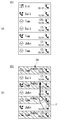
-
- G—PHYSICS
- G06—COMPUTING OR CALCULATING; COUNTING
- G06F—ELECTRIC DIGITAL DATA PROCESSING
- G06F1/00—Details not covered by groups G06F3/00 - G06F13/00 and G06F21/00
- G06F1/16—Constructional details or arrangements
- G06F1/1613—Constructional details or arrangements for portable computers
- G06F1/1626—Constructional details or arrangements for portable computers with a single-body enclosure integrating a flat display, e.g. Personal Digital Assistants [PDAs]
-
- G—PHYSICS
- G06—COMPUTING OR CALCULATING; COUNTING
- G06F—ELECTRIC DIGITAL DATA PROCESSING
- G06F3/00—Input arrangements for transferring data to be processed into a form capable of being handled by the computer; Output arrangements for transferring data from processing unit to output unit, e.g. interface arrangements
- G06F3/01—Input arrangements or combined input and output arrangements for interaction between user and computer
- G06F3/048—Interaction techniques based on graphical user interfaces [GUI]
- G06F3/0487—Interaction techniques based on graphical user interfaces [GUI] using specific features provided by the input device, e.g. functions controlled by the rotation of a mouse with dual sensing arrangements, or of the nature of the input device, e.g. tap gestures based on pressure sensed by a digitiser
- G06F3/0488—Interaction techniques based on graphical user interfaces [GUI] using specific features provided by the input device, e.g. functions controlled by the rotation of a mouse with dual sensing arrangements, or of the nature of the input device, e.g. tap gestures based on pressure sensed by a digitiser using a touch-screen or digitiser, e.g. input of commands through traced gestures
- G06F3/04883—Interaction techniques based on graphical user interfaces [GUI] using specific features provided by the input device, e.g. functions controlled by the rotation of a mouse with dual sensing arrangements, or of the nature of the input device, e.g. tap gestures based on pressure sensed by a digitiser using a touch-screen or digitiser, e.g. input of commands through traced gestures for inputting data by handwriting, e.g. gesture or text
-
- G—PHYSICS
- G06—COMPUTING OR CALCULATING; COUNTING
- G06F—ELECTRIC DIGITAL DATA PROCESSING
- G06F3/00—Input arrangements for transferring data to be processed into a form capable of being handled by the computer; Output arrangements for transferring data from processing unit to output unit, e.g. interface arrangements
- G06F3/01—Input arrangements or combined input and output arrangements for interaction between user and computer
- G06F3/03—Arrangements for converting the position or the displacement of a member into a coded form
- G06F3/041—Digitisers, e.g. for touch screens or touch pads, characterised by the transducing means
- G06F3/0412—Digitisers structurally integrated in a display
-
- G—PHYSICS
- G06—COMPUTING OR CALCULATING; COUNTING
- G06F—ELECTRIC DIGITAL DATA PROCESSING
- G06F3/00—Input arrangements for transferring data to be processed into a form capable of being handled by the computer; Output arrangements for transferring data from processing unit to output unit, e.g. interface arrangements
- G06F3/01—Input arrangements or combined input and output arrangements for interaction between user and computer
- G06F3/03—Arrangements for converting the position or the displacement of a member into a coded form
- G06F3/041—Digitisers, e.g. for touch screens or touch pads, characterised by the transducing means
- G06F3/0416—Control or interface arrangements specially adapted for digitisers
-
- G—PHYSICS
- G06—COMPUTING OR CALCULATING; COUNTING
- G06F—ELECTRIC DIGITAL DATA PROCESSING
- G06F3/00—Input arrangements for transferring data to be processed into a form capable of being handled by the computer; Output arrangements for transferring data from processing unit to output unit, e.g. interface arrangements
- G06F3/01—Input arrangements or combined input and output arrangements for interaction between user and computer
- G06F3/048—Interaction techniques based on graphical user interfaces [GUI]
- G06F3/0481—Interaction techniques based on graphical user interfaces [GUI] based on specific properties of the displayed interaction object or a metaphor-based environment, e.g. interaction with desktop elements like windows or icons, or assisted by a cursor's changing behaviour or appearance
- G06F3/04812—Interaction techniques based on cursor appearance or behaviour, e.g. being affected by the presence of displayed objects
-
- G—PHYSICS
- G06—COMPUTING OR CALCULATING; COUNTING
- G06F—ELECTRIC DIGITAL DATA PROCESSING
- G06F3/00—Input arrangements for transferring data to be processed into a form capable of being handled by the computer; Output arrangements for transferring data from processing unit to output unit, e.g. interface arrangements
- G06F3/01—Input arrangements or combined input and output arrangements for interaction between user and computer
- G06F3/048—Interaction techniques based on graphical user interfaces [GUI]
- G06F3/0481—Interaction techniques based on graphical user interfaces [GUI] based on specific properties of the displayed interaction object or a metaphor-based environment, e.g. interaction with desktop elements like windows or icons, or assisted by a cursor's changing behaviour or appearance
- G06F3/04817—Interaction techniques based on graphical user interfaces [GUI] based on specific properties of the displayed interaction object or a metaphor-based environment, e.g. interaction with desktop elements like windows or icons, or assisted by a cursor's changing behaviour or appearance using icons
-
- G—PHYSICS
- G06—COMPUTING OR CALCULATING; COUNTING
- G06F—ELECTRIC DIGITAL DATA PROCESSING
- G06F2203/00—Indexing scheme relating to G06F3/00 - G06F3/048
- G06F2203/048—Indexing scheme relating to G06F3/048
- G06F2203/04808—Several contacts: gestures triggering a specific function, e.g. scrolling, zooming, right-click, when the user establishes several contacts with the surface simultaneously; e.g. using several fingers or a combination of fingers and pen
Landscapes
- Engineering & Computer Science (AREA)
- Theoretical Computer Science (AREA)
- General Engineering & Computer Science (AREA)
- Human Computer Interaction (AREA)
- Physics & Mathematics (AREA)
- General Physics & Mathematics (AREA)
- Computer Hardware Design (AREA)
- Telephone Function (AREA)
- User Interface Of Digital Computer (AREA)
Abstract
이동 단말기 및 그 제어방법이 개시된다. 본 발명의 이동 단말기 및 그 제어방법은, 디스플레이; 및 상기 디스플레이에 대한 제1 터치입력을 획득하면, 상기 터치입력이 유지되는 중 상기 디스플레이에 표시한 콘텐츠와 관련된 정보를 표시하는 제어부를 포함하는 것을 특징으로 한다. 본 발명에 의하면, 표시한 콘텐츠와 관련된 정보를 효과적으로 사용자에게 표출할 수 있다.A mobile terminal and a control method thereof are disclosed. A mobile terminal and a control method thereof according to the present invention include: a display; And a controller for displaying information related to the content displayed on the display while the touch input is maintained when the first touch input for the display is obtained. According to the present invention, the information related to the displayed content can be effectively displayed to the user.
Description
본 발명은 이동 단말기 및 그 제어방법에 관한 것으로서, 보다 구체적으로는 표시한 콘텐츠와 관련된 정보를 효과적으로 사용자에게 표출할 수 있는 이동 단말기 및 그 제어방법에 관한 것이다.The present invention relates to a mobile terminal and a control method thereof, and more particularly, to a mobile terminal and a control method thereof that can effectively display information related to a displayed content to a user.
개인용 컴퓨터, 노트북, 휴대폰 등과 같은 단말기(terminal)는 기능이 다양화됨에 따라 예를 들어, 사진이나 동영상의 촬영, 음악이나 동영상 파일의 재생, 게임, 방송의 수신 등의 복합적인 기능들을 갖춘 멀티미디어 기기(Multimedia player) 형태로 구현되고 있다. A terminal such as a personal computer, a notebook computer, or a mobile phone has various functions, for example, a multimedia device having a complex function such as photographing or photographing of a moving picture, reproduction of music or a moving picture file, (Multimedia player).
단말기는 이동 가능 여부에 따라 이동 단말기(mobile terminal) 및 고정 단말기(stationary terminal)로 나뉠 수 있다. 다시 이동 단말기는 사용자의 직접 휴대 가능 여부에 따라 휴대(형) 단말기(handheld terminal) 및 거치형 단말기(vehicle mount terminal)로 나뉠 수 있다.The terminal can move And may be divided into a mobile terminal and a stationary terminal depending on whether the mobile terminal is a mobile terminal or a mobile terminal. The mobile terminal can be divided into a handheld terminal and a vehicle mount terminal according to whether the user can directly carry the mobile terminal.
단말기의 기능 지지 및 증대를 위해, 단말기의 구조적인 부분 및/또는 소프트웨어적인 부분을 개량하는 것이 고려되고 있다.In order to support and enhance the functionality of the terminal, it is contemplated to improve the structural and / or software portion of the terminal.
최근 이동 단말기를 포함한 다양한 단말기들은 복합적이고 다양한 기능들을 제공함에 따라 메뉴 구조 또한 복잡해지는 추세이다. 또한 이동 단말기로 웹페이지를 포함하는 각종 디지털문서를 디스플레이할 수 있는 기능이 추가되고 있다.Recently, a variety of terminals including mobile terminals provide a complex and various functions, and the menu structure is also becoming complicated. In addition, a function of displaying various digital documents including a web page is added to a mobile terminal.
나아가, 이동 단말기의 터치기능을 이용하여 정보를 효과적으로 표시할 수 있도록 하는 필요성이 대두되고 있다.Further, there is a need to enable information to be effectively displayed using the touch function of the mobile terminal.
본 발명은 표시한 콘텐츠와 관련된 정보를 효과적으로 사용자에게 표출할 수 있는 이동 단말기 및 그 제어방법에 관한 것이다.The present invention relates to a mobile terminal capable of effectively displaying information related to a displayed content to a user and a control method thereof.
상기한 과제를 실현하기 위한 본 발명의 일 실시예에 따른 이동 단말기는, 디스플레이; 및 상기 디스플레이에 대한 제1 터치입력을 획득하면, 상기 터치입력이 유지되는 중 상기 디스플레이에 표시한 콘텐츠와 관련된 정보를 표시하는 제어부를 포함할 수 있다.According to an aspect of the present invention, there is provided a mobile terminal including: a display; And a controller for displaying information related to the content displayed on the display while the touch input is maintained when the first touch input for the display is acquired.
상기 제어부는, 설정된 시간 이상 연속된 터치입력, 설정된 거리 이상 이동하는 터치입력 중 적어도 하나의 터치입력을 획득하는 경우에 상기 관련된 정보를 표시할 수 있다.The control unit may display the related information when acquiring at least one touch input among a touch input that is continuously performed for a predetermined time or more and a touch input that moves over a predetermined distance.
상기 제어부는, 상기 제1 터치입력이 해제되면, 상기 디스플레이에서 상기 표시한 관련된 정보가 사라지도록 할 수 있다.The control unit may cause the displayed related information to disappear when the first touch input is released.
상기 제1 터치입력은, 상기 디스플레이에 대한 드래그(drag) 터치, 플리킹(flicking) 터치 중 적어도 하나일 수 있다.The first touch input may be at least one of a drag touch and a flicking touch to the display.
상기 제어부는, 상기 관련된 정보가 표시된 상태에서 상기 디스플레이에 대한 제2 터치입력을 획득하면, 상기 제1 터치입력의 중단여부에 관계없이 상기 관련된 정보의 표시를 유지할 수 있다.The controller may maintain the display of the related information regardless of whether the first touch input is stopped or not when the second touch input for the display is acquired while the related information is displayed.
상기 제2 터치입력은, 상기 제1 터치입력이 설정된 시간 이상 특정 지점에 유지되는 터치입력일 수 있다.The second touch input may be a touch input in which the first touch input is maintained at a specific point over a predetermined time.
상기 관련된 정보는, 상기 표시한 콘텐츠에 대한 추가 정보, 상기 표시한 콘텐츠의 실행 여부 정보, 상기 표시한 콘텐츠의 업데이트 정보, 상기 표시한 콘텐츠인 통화내역의 통화빈도 정보, 상기 표시한 콘텐츠인 메시지내역의 메시지빈도 정보, 상기 표시한 콘텐츠인 이미지의 연관 이미지 정보 중 적어도 하나일 수 있다.Wherein the related information includes at least one of additional information on the displayed content, information indicating whether the displayed content is executed, update information of the displayed content, call frequency information of the call history as the displayed content, The message frequency information of the content, and the related image information of the image that is the displayed content.
상기 제어부는, 상기 표시한 콘텐츠의 색상, 크기, 위치 중 적어도 하나를 변경하여 상기 정보를 표시할 수 있다.The controller may change at least one of a color, a size, and a position of the displayed content to display the information.
상기 제어부는, 상기 표시한 콘텐츠 중 적어도 일부와 오버랩(overlap)되도록 상기 관련된 정보를 표시할 수 있다.The control unit may display the related information so as to overlap with at least a part of the displayed content.
상기 콘텐츠는, 통화목록, 메시지목록, 연락처목록 중 적어도 하나의 목록(list)이며, 상기 제어부는, 상기 적어도 하나의 목록에서 상기 제1 터치입력이 시작된 지점에 대응된 아이템(item), 상기 적어도 하나의 목록에서 선택된 빈도가 높은 아이템(item) 중 적어도 하나에 상기 관련된 정보를 표시할 수 있다.Wherein the content is a list of at least one of a call list, a message list, and a contact list, and the control unit displays an item corresponding to a point where the first touch input is started in the at least one list, The related information can be displayed on at least one item having a high frequency selected from a list.
상기 콘텐츠는, 이미지이며, 상기 제어부는, 상기 이미지와 실질적으로 동일한 위치에서 촬영된 이미지, 상기 이미지가 촬영된 시점과 유사한 시점에 촬영된 이미지, 상기 이미지에 포함된 오브젝트 중 적어도 하나를 포함하는 이미지 중 적어도 하나를 상기 관련된 정보로 표시할 수 있다.Wherein the content is an image and the control unit displays the image including at least one of an image photographed at substantially the same position as the image, an image photographed at a time point similar to the time point at which the image was photographed, May be displayed as the related information.
또한, 상기한 과제를 실현하기 위한 본 발명의 일 실시예에 따른 이동 단말기의 제어방법은, 콘텐츠를 표시하는 단계; 제1 터치입력을 획득하는 단계; 및 상기 제1 터치입력이 유지되는 중 상기 콘텐츠와 관련된 정보를 표시하는 단계를 포함할 수 있다.According to another aspect of the present invention, there is provided a method of controlling a mobile terminal, the method comprising: displaying a content; Obtaining a first touch input; And displaying information related to the content while the first touch input is being held.
상기 관련된 정보를 표시하는 단계는, 설정된 시간 이상 연속된 터치입력, 설정된 거리 이상 이동하는 터치입력 중 적어도 하나의 터치입력을 획득하는 경우에 진행될 수 있다.The step of displaying the related information may be performed in the case of acquiring at least one touch input among a touch input continuously or continuously for a set time or a touch input moving over a set distance.
상기 제1 터치입력이 해제되면, 상기 표시한 관련정보가 사라지도록 하는 단계를 더 포함할 수 있다.And causing the displayed related information to disappear when the first touch input is released.
상기 관련된 정보가 표시된 상태에서 상기 디스플레이에 대한 제2 터치입력을 획득하면, 상기 제1 터치입력의 중단여부에 관계없이 상기 관련된 정보의 표시를 유지하는 단계를 더 포함할 수 있다.And if the second touch input for the display is acquired while the related information is displayed, the display of the related information may be maintained regardless of whether the first touch input is stopped or not.
상기 관련된 정보를 표시하는 단계는, 상기 표시한 콘텐츠의 색상, 크기, 위치 중 적어도 하나를 변경하여 상기 정보를 표시할 수 있다.The step of displaying the related information may display the information by changing at least one of a color, a size, and a position of the displayed content.
본 발명에 따른 이동 단말기 및 그 제어방법은, 표시한 콘텐츠와 관련된 정보를 효과적으로 사용자에게 표출할 수 있는 효과가 있다.INDUSTRIAL APPLICABILITY The mobile terminal and its control method according to the present invention have the effect of effectively displaying information related to the displayed content to the user.
도 1은 본 발명의 일 실시예와 관련된 이동 단말기의 블록 구성도(block diagram)이다.
도 2a은 본 발명의 일 실시예에 관련된 이동 단말기의 전면 사시도이다.
도 2b는 본 발명의 일 실시예에 관련된 이동 단말기의 후면 사시도이다.
도 3은 근접 센서의 근접 깊이를 설명하기 위한 개념도이다.
도 4는 본 발명의 일 실시예에 따른 이동 단말기의 동작을 도시한 플로우챠트이다.
도 5 및 도 6은 본 발명의 일 실시예에 따른 이동 단말기의 관련정보 표시과정을 도시한 도면이다.
도 7은 도 4 이동 단말기의 관련정보 표시를 위한 터치입력을 도시한 도면이다.
도 8은 도 4 이동 단말기의 관련정보 표시방법을 도시한 도면이다.
도 9는 도 4 이동 단말기의 표시되는 정보의 종류를 도시한 도면이다.
도 10 및 도 11은 도 4 이동 단말기의 다른 관련정보 표시방법을 도시한 도면이다.
도 12 및 도 13은 도 4 이동 단말기의 또 다른 관련정보 표시방법을 도시한 도면이다.
도 14 내지 도 20은 도 4 이동 단말기의 또 다른 관련정보 표시방법을 도시한 도면이다.
도 21 및 도 22는 도 4 이동 단말기의 또 다른 관련정보 표시방법을 도시한 도면이다.
도 23 내지 도 27은 도 4 이동 단말기의 또 다른 관련정보 표시방법을 도시한 도면이다.1 is a block diagram of a mobile terminal according to an embodiment of the present invention.
2A is a front perspective view of a mobile terminal according to an embodiment of the present invention.
2B is a rear perspective view of a mobile terminal according to an embodiment of the present invention.
3 is a conceptual diagram for explaining the proximity depth of the proximity sensor.
4 is a flowchart illustrating an operation of a mobile terminal according to an exemplary embodiment of the present invention.
5 and 6 are views illustrating a process of displaying related information of a mobile terminal according to an embodiment of the present invention.
FIG. 7 is a diagram illustrating a touch input for displaying related information of the mobile terminal of FIG.
8 is a diagram showing a related information display method of the mobile terminal of FIG.
FIG. 9 is a view showing the types of information displayed on the mobile terminal of FIG.
10 and 11 are views showing another related information display method of the mobile terminal of FIG.
12 and 13 are views showing another related information display method of the mobile terminal of FIG.
FIGS. 14 to 20 are views showing another related information display method of the mobile terminal of FIG.
FIG. 21 and FIG. 22 are views showing another related information display method of the mobile terminal of FIG.
23 to 27 are views showing another related information display method of the mobile terminal of FIG.
본 발명의 상술한 목적, 특징들 및 장점은 첨부된 도면과 관련된 다음의 상세한 설명을 통해 보다 분명해질 것이다. 다만, 본 발명은 다양한 변경을 가할 수 있고 여러 가지 실시예들을 가질 수 있는 바, 이하에서는 특정 실시예들을 도면에 예시하고 이를 상세히 설명하고자 한다. 명세서 전체에 걸쳐서 동일한 참조번호들은 원칙적으로 동일한 구성요소들을 나타낸다. 또한, 본 발명과 관련된 공지 기능 혹은 구성에 대한 구체적인 설명이 본 발명의 요지를 불필요하게 흐릴 수 있다고 판단되는 경우 그 상세한 설명을 생략한다. 또한, 본 명세서의 설명 과정에서 이용되는 숫자(예를 들어, 제1, 제2 등)는 하나의 구성요소를 다른 구성요소와 구분하기 위한 식별기호에 불과하다The above objects, features and advantages of the present invention will become more apparent from the following detailed description taken in conjunction with the accompanying drawings. It is to be understood, however, that the invention is not limited to the disclosed embodiments, but, on the contrary, is intended to cover various modifications and similarities. Like reference numerals designate like elements throughout the specification. In the following description, well-known functions or constructions are not described in detail since they would obscure the invention in unnecessary detail. Further, numerals (e.g., first, second, etc.) used in the description process of this specification are only an identifier for distinguishing one component from another component
이하, 본 발명과 관련된 이동 단말기에 대하여 도면을 참조하여 보다 상세하게 설명한다. 이하의 설명에서 사용되는 구성요소에 대한 접미사 "모듈" 및 "부"는 명세서 작성의 용이함만이 고려되어 부여되거나 혼용되는 것으로서, 그 자체로 서로 구별되는 의미 또는 역할을 갖는 것은 아니다. Hereinafter, a mobile terminal related to the present invention will be described in detail with reference to the drawings. The suffix "module" and " part "for the components used in the following description are given or mixed in consideration of ease of specification, and do not have their own meaning or role.
본 명세서에서 설명되는 이동 단말기에는 휴대폰, 스마트 폰(smart phone), 노트북 컴퓨터(laptop computer), 디지털방송용 단말기, PDA(Personal Digital Assistants), PMP(Portable Multimedia Player), 네비게이션 등이 포함될 수 있다. 그러나, 본 명세서에 기재된 실시예에 따른 구성은 이동 단말기에만 적용 가능한 경우를 제외하면, 디지털 TV, 데스크탑 컴퓨터 등과 같은 고정 단말기에도 적용될 수도 있음을 본 기술분야의 당업자라면 쉽게 알 수 있을 것이다.The mobile terminal described in this specification may include a mobile phone, a smart phone, a laptop computer, a digital broadcasting terminal, a PDA (Personal Digital Assistants), a PMP (Portable Multimedia Player), navigation and the like. However, it will be understood by those skilled in the art that the configuration according to the embodiments described herein may be applied to a fixed terminal such as a digital TV, a desktop computer, and the like, unless the configuration is applicable only to a mobile terminal.
도 1은 본 발명의 일 실시예와 관련된 이동 단말기의 블록 구성도(block diagram)이다.1 is a block diagram of a mobile terminal according to an embodiment of the present invention.
상기 이동 단말기(100)는 무선 통신부(110), A/V(Audio/Video) 입력부(120), 사용자 입력부(130), 센싱부(140), 출력부(150), 메모리부(160), 인터페이스부(170), 제어부(180) 및 전원 공급부(190) 등을 포함할 수 있다. 도 1에 도시된 구성요소들이 필수적인 것은 아니어서, 그보다 많은 구성요소들을 갖거나 그보다 적은 구성요소들을 갖는 이동 단말기를 구현될 수도 있다.The
이하, 상기 구성요소들에 대해 차례로 살펴본다.Hereinafter, the components will be described in order.
무선 통신부(110)는 이동 단말기(100)와 무선 통신 시스템 사이 또는 이동 단말기(100)와 이동 단말기(100)가 위치한 네트워크 사이의 무선 통신을 가능하게 하는 하나 이상의 모듈을 포함할 수 있다. 예를 들어, 무선 통신부(110)는 방송 수신 모듈(111), 이동통신 모듈(112), 무선 인터넷 모듈(113), 근거리 통신 모듈(114) 및 위치정보 모듈(115) 등을 포함할 수 있다.The
방송 수신 모듈(111)은 방송 채널을 통하여 외부의 방송 관리 서버로부터 방송 신호 및/또는 방송 관련된 정보를 수신한다. The
상기 방송 채널은 위성 채널, 지상파 채널을 포함할 수 있다. 상기 방송 관리 서버는, 방송 신호 및/또는 방송 관련 정보를 생성하여 송신하는 서버 또는 기 생성된 방송 신호 및/또는 방송 관련 정보를 제공받아 단말기에 송신하는 서버를 의미할 수 있다. 상기 방송 신호는, TV 방송 신호, 라디오 방송 신호, 데이터 방송 신호를 포함할 뿐만 아니라, TV 방송 신호 또는 라디오 방송 신호에 데이터 방송 신호가 결합한 형태의 방송 신호도 포함할 수 있다. The broadcast channel may include a satellite channel and a terrestrial channel. The broadcast management server may refer to a server for generating and transmitting broadcast signals and / or broadcast related information, or a server for receiving broadcast signals and / or broadcast related information generated by the broadcast management server and transmitting the generated broadcast signals and / or broadcast related information. The broadcast signal may include a TV broadcast signal, a radio broadcast signal, a data broadcast signal, and a broadcast signal in which a data broadcast signal is combined with a TV broadcast signal or a radio broadcast signal.
상기 방송 관련 정보는, 방송 채널, 방송 프로그램 또는 방송 서비스 제공자에 관련한 정보를 의미할 수 있다. 상기 방송 관련 정보는, 이동통신망을 통하여도 제공될 수 있다. 이러한 경우에는 상기 이동통신 모듈(112)에 의해 수신될 수 있다.The broadcast-related information may refer to a broadcast channel, a broadcast program, or information related to a broadcast service provider. The broadcast-related information may also be provided through a mobile communication network. In this case, it may be received by the
상기 방송 관련 정보는 다양한 형태로 존재할 수 있다. 예를 들어, DMB(Digital Multimedia Broadcasting)의 EPG(Electronic Program Guide) 또는 DVBH(Digital Video BroadcastHandheld)의 ESG(Electronic Service Guide) 등의 형태로 존재할 수 있다.The broadcast-related information may exist in various forms. For example, an EPG (Electronic Program Guide) of a DMB (Digital Multimedia Broadcasting) or an ESG (Electronic Service Guide) of a DVBH (Digital Video BroadcastHandheld).
상기 방송 수신 모듈(111)은, 각종 방송 시스템을 이용하여 방송 신호를 수신하는데, 특히, DMBT(Digital Multimedia BroadcastingTerrestrial), DMBS(Digital Multimedia BroadcastingSatellite), MediaFLO(Media Forward Link Only), DVBH(Digital Video BroadcastHandheld), ISDBT(Integrated Services Digital BroadcastTerrestrial) 등의 디지털 방송 시스템을 이용하여 디지털 방송 신호를 수신할 수 있다. 물론, 상기 방송 수신 모듈(111)은, 상술한 디지털 방송 시스템뿐만 아니라 방송 신호를 제공하는 다른 방송 시스템에 적합하도록 구성될 수도 있다.The
방송 수신 모듈(111)을 통해 수신된 방송 신호 및/또는 방송 관련 정보는 메모리부(160)에 저장될 수 있다.The broadcast signal and / or broadcast related information received through the
이동통신 모듈(112)은, 이동 통신망 상에서 기지국, 외부의 단말, 서버 중 적어도 하나와 무선 신호를 송수신한다. 상기 무선 신호는, 음성 호 신호, 화상 통화 호 신호 또는 문자/멀티미디어 메시지 송수신에 따른 다양한 형태의 데이터를 포함할 수 있다. The
무선 인터넷 모듈(113)은 무선 인터넷 접속을 위한 모듈을 말하는 것으로, 무선 인터넷 모듈(113)은 이동 단말기(100)에 내장되거나 외장될 수 있다. 무선 인터넷 기술로는 WLAN(Wireless LAN)(WiFi), Wibro(Wireless broadband), Wimax(World Interoperability for Microwave Access), HSDPA(High Speed Downlink Packet Access) 등이 이용될 수 있다. The
근거리 통신 모듈(114)은 근거리 통신을 위한 모듈을 말한다. 근거리 통신 기술로 블루투스(Bluetooth), RFID(Radio Frequency Identification), 적외선 통신(IrDA, infrared Data Association), UWB(Ultra Wideband), ZigBee 등이 이용될 수 있다.The short-
위치정보 모듈(115)은 이동 단말기의 위치를 확인하거나 얻기 위한 모듈이다. 상기 위치정보 모듈의 대표적인 예로는 GPS(Global Position System) 모듈이 있다. 현재 기술에 의하면, 상기 GPS모듈(115)은, 일 지점(개체)이 3개 이상의 위성으로부터 떨어진 거리에 관한 정보와, 상기 거리 정보가 측정된 시간에 관한 정보를 산출한 다음 상기 산출된 거리 정보에 삼각법을 적용함으로써, 일 시간에 일 지점(개체)에 대한 위도, 경도, 및 고도에 따른 3차원의 위치 정보를 산출할 수 있다. 나아가, 3개의 위성을 이용하여 위치 및 시간 정보를 산출하고, 또 다른 1개의 위성을 이용하여 상기 산출된 위치 및 시간 정보의 오차를 수정하는 방법 또한 사용되고 있다. GPS 모듈(115)은 현 위치를 실시간으로 계속 산출하고 그를 이용하여 속도 정보를 산출하기도 한다. The
도 1을 참조하면, A/V(Audio/Video) 입력부(120)는 오디오 신호 또는 비디오 신호 입력을 위한 것으로, 이에는 카메라(121)와 마이크(122) 등이 포함될 수 있다. 카메라(121)는 화상 통화모드 또는 촬영 모드에서 이미지 센서에 의해 얻어지는 정지영상 또는 동영상 등의 화상 프레임을 처리한다. 처리된 화상 프레임은 디스플레이부(151)에 표시될 수 있다.Referring to FIG. 1, an A / V (Audio / Video)
카메라(121)에서 처리된 화상 프레임은 메모리부(160)에 저장되거나 무선 통신부(110)를 통하여 외부로 전송될 수 있다. 카메라(121)는 단말기의 구성 태양에 따라 2개 이상이 구비될 수도 있다.The image frame processed by the
마이크(122)는 통화모드 또는 녹음모드, 음성인식 모드 등에서 마이크로폰(Microphone)에 의해 외부의 음향 신호를 입력받아 전기적인 음성 데이터로 처리한다. 처리된 음성 데이터는 통화 모드인 경우 이동통신 모듈(112)을 통하여 이동통신 기지국으로 송신 가능한 형태로 변환되어 출력될 수 있다. 마이크(122)에는 외부의 음향 신호를 입력받는 과정에서 발생되는 잡음(noise)을 제거하기 위한 다양한 잡음 제거 알고리즘이 구현될 수 있다.The
사용자 입력부(130)는 사용자가 단말기의 동작 제어를 위한 입력 데이터를 발생시킨다. 사용자 입력부(130)는 키 패드(key pad) 돔 스위치 (dome switch), 터치 패드(정압/정전), 조그 휠, 조그 스위치 등으로 구성될 수 있다. The
센싱부(140)는 이동 단말기(100)의 개폐 상태, 이동 단말기(100)의 위치, 사용자 접촉 유무, 이동 단말기의 방위, 이동 단말기의 가속/감속 등과 같이 이동 단말기(100)의 현 상태를 감지하여 이동 단말기(100)의 동작을 제어하기 위한 센싱 신호를 발생시킨다. 예를 들어 이동 단말기(100)가 슬라이드 폰 형태인 경우 슬라이드 폰의 개폐 여부를 센싱할 수 있다. 또한, 전원 공급부(190)의 전원 공급 여부, 인터페이스부(170)의 외부 기기 결합 여부 등과 관련된 센싱 기능을 담당할 수도 있다. 한편, 상기 센싱부(140)는 자세감지센서(141) 및/또는 근접센서를 포함할 수 있다. The
출력부(150)는 시각, 청각 또는 촉각 등과 관련된 출력을 발생시키기 위한 것으로, 이에는 디스플레이부(151), 음향 출력 모듈(152), 알람부(153), 및 햅틱 모듈(154) 등이 포함될 수 있다.The
디스플레이부(151)는 이동 단말기(100)에서 처리되는 정보를 표시 출력한다. 예를 들어, 이동 단말기가 통화 모드인 경우 통화와 관련된 UI(User Interface) 또는 GUI(Graphic User Interface)를 표시한다. 이동 단말기(100)가 화상 통화 모드 또는 촬영 모드인 경우에는 촬영 또는/및 수신된 영상 또는 UI, GUI를 표시한다. The
디스플레이부(151)는 액정 디스플레이(liquid crystal display), 박막 트랜지스터 액정 디스플레이(thin film transistorliquid crystal display), 유기 발광 다이오드(organic lightemitting diode), 플렉시블 디스플레이(flexible display), 3차원 디스플레이(3D display) 중에서 적어도 하나를 포함할 수 있다. The
이들 중 일부 디스플레이는 그를 통해 외부를 볼 수 있도록 투명형 또는 광투과형으로 구성될 수 있다. 이는 투명 디스플레이라 호칭될 수 있는데, 상기 투명 디스플레이의 대표적인 예로는 투명 LCD 등이 있다. 디스플레이부(151)의 후방 구조 또한 광 투과형 구조로 구성될 수 있다. 이러한 구조에 의하여, 사용자는 단말기 바디의 디스플레이부(151)가 차지하는 영역을 통해 단말기 바디의 후방에 위치한 사물을 볼 수 있다.Some of these displays may be transparent or light transmissive so that they can be seen through. This may be referred to as a transparent display. A typical example of the transparent display is a transparent LCD or the like. The rear structure of the
이동 단말기(100)의 구현 형태에 따라 디스플레이부(151)이 2개 이상 존재할 수 있다. 예를 들어, 이동 단말기(100)에는 복수의 디스플레이부들이 하나의 면에 이격되거나 일체로 배치될 수 있고, 또한 서로 다른 면에 각각 배치될 수도 있다. There may be two or
디스플레이부(151)와 터치 동작을 감지하는 센서(이하, '터치 센서'라 함)가 상호 레이어 구조를 이루는 경우(이하, '터치 스크린'이라 약칭함)에, 디스플레이부(151)는 출력 장치 이외에 입력 장치로도 사용될 수 있다. 터치 센서는, 예를 들어, 터치 필름, 터치 시트, 터치 패드 등의 형태를 가질 수 있다.The
터치 센서는 디스플레이부(151)의 특정 부위에 가해진 압력 또는 디스플레이부(151)의 특정 부위에 발생하는 정전 용량 등의 변화를 전기적인 입력신호로 변환하도록 구성될 수 있다. 터치 센서는 터치 되는 위치 및 면적뿐만 아니라, 터치 시의 압력까지도 검출할 수 있도록 구성될 수 있다. The touch sensor may be configured to convert a change in a pressure applied to a specific portion of the
터치 센서에 대한 터치 입력이 있는 경우, 그에 대응하는 신호(들)는 터치 제어기로 보내진다. 터치 제어기는 그 신호(들)를 처리한 다음 대응하는 데이터를 제어부(180)로 전송한다. 이로써, 제어부(180)는 디스플레이부(151)의 어느 영역이 터치 되었는지 여부 등을 알 수 있게 된다.If there is a touch input to the touch sensor, the corresponding signal (s) is sent to the touch controller. The touch controller processes the signal (s) and transmits the corresponding data to the
도 1을 참조하면, 상기 터치스크린에 의해 감싸지는 이동 단말기의 내부 영역 또는 상기 터치 스크린의 근처에 근접센서가 배치될 수 있다. 상기 근접센서는 소정의 검출면에 접근하는 물체, 혹은 근방에 존재하는 물체의 유무를 전자계의 힘 또는 적외선을 이용하여 기계적 접촉이 없이 검출하는 센서를 말한다. 근접센서는 접촉식 센서보다는 그 수명이 길며 그 활용도 또한 높다. Referring to FIG. 1, a proximity sensor may be disposed in an inner region of the mobile terminal or in the vicinity of the touch screen, which is enclosed by the touch screen. The proximity sensor refers to a sensor that detects the presence or absence of an object approaching a predetermined detection surface or a nearby object without mechanical contact using the force of an electromagnetic field or infrared rays. The proximity sensor has a longer life span than the contact sensor and its utilization is also high.
상기 근접센서의 예로는 투과형 광전 센서, 직접 반사형 광전 센서, 미러 반사형 광전 센서, 고주파 발진형 근접센서, 정전용량형 근접센서, 자기형 근접센서, 적외선 근접센서 등이 있다.Examples of the proximity sensor include a transmission type photoelectric sensor, a direct reflection type photoelectric sensor, a mirror reflection type photoelectric sensor, a high frequency oscillation type proximity sensor, a capacitive proximity sensor, a magnetic proximity sensor, and an infrared proximity sensor.
상기 터치스크린이 정전식인 경우에는 상기 포인터의 근접에 따른 전계의 변화로 상기 포인터의 근접을 검출하도록 구성된다. 이 경우 상기 터치 스크린(터치 센서)은 근접센서로 분류될 수도 있다.And to detect the proximity of the pointer by the change of the electric field along the proximity of the pointer when the touch screen is electrostatic. In this case, the touch screen (touch sensor) may be classified as a proximity sensor.
이하에서는 설명의 편의를 위해, 상기 터치스크린 상에 포인터가 접촉되지 않으면서 근접되어 상기 포인터가 상기 터치스크린 상에 위치함이 인식되도록 하는 행위를 "근접 터치(proximity touch)"라고 칭하고, 상기 터치스크린 상에 포인터가 실제로 접촉되는 행위를 "접촉 터치(contact touch)"라고 칭한다. 상기 터치스크린 상에서 포인터로 근접 터치가 되는 위치라 함은, 상기 포인터가 근접 터치될 때 상기 포인터가 상기 터치스크린에 대해 수직으로 대응되는 위치를 의미한다.Hereinafter, for convenience of explanation, the act of recognizing that the pointer is positioned on the touch screen while the pointer is not in contact with the touch screen is referred to as "proximity touch & The act of actually touching the pointer on the screen is called "contact touch. &Quot; The position where the pointer is proximately touched on the touch screen means a position where the pointer is vertically corresponding to the touch screen when the pointer is touched.
상기 근접센서는, 근접 터치 및 근접 터치 패턴(예를 들어, 근접 터치 거리, 근접 터치 방향, 근접 터치 속도, 근접 터치 시간, 근접 터치 위치, 근접 터치 이동 상태 등)을 감지한다. 상기 감지된 근접 터치 동작 및 근접 터치 패턴에 상응하는 정보는 터치 스크린상에 출력될 수 있다. The proximity sensor detects a proximity touch and a proximity touch pattern (e.g., a proximity touch distance, a proximity touch direction, a proximity touch speed, a proximity touch time, a proximity touch position, a proximity touch movement state, and the like). Information corresponding to the detected proximity touch operation and the proximity touch pattern may be output on the touch screen.
음향 출력 모듈(152)은 호신호 수신, 통화모드 또는 녹음 모드, 음성인식 모드, 방송수신 모드 등에서 무선 통신부(110)로부터 수신되거나 메모리부(160)에 저장된 오디오 데이터를 출력할 수도 있다. 음향 출력 모듈(152)은 이동 단말기(100)에서 수행되는 기능(예를 들어, 호신호 수신음, 메시지 수신음 등)과 관련된 음향 신호를 출력한다. 이러한 음향 출력 모듈(152)에는 리시버(Receiver), 스피커(speaker), 버저(Buzzer) 등이 포함될 수 있다.The
알람부(153)는 이동 단말기(100)의 이벤트 발생을 알리기 위한 신호를 출력한다. 이동 단말기에서 발생 되는 이벤트의 예로는 호 신호 수신, 메시지 수신, 키 신호 입력, 터치 입력 등이 있다. 알람부(153)는 비디오 신호나 오디오 신호 이외에 다른 형태, 예를 들어 진동으로 이벤트 발생을 알리기 위한 신호를 출력할 수도 있다. 비디오 신호나 오디오 신호는 디스플레이부(151)이나 음성 출력 모듈(152)을 통해서도 출력될 수 있다.The
햅틱 모듈(haptic module)(154)은 사용자가 느낄 수 있는 다양한 촉각 효과를 발생시킨다. 햅틱 모듈(154)이 발생시키는 촉각 효과의 대표적인 예로는 진동이 있다. 햅택 모듈(154)이 발생하는 진동의 세기와 패턴 등은 제어가능하다. 예를 들어, 서로 다른 진동을 합성하여 출력하거나 순차적으로 출력할 수도 있다. The
햅틱 모듈(154)은, 진동 외에도, 접촉 피부면에 대해 수직 운동하는 핀 배열에 의한 자극에 의한 효과, 분사구나 흡입구를 통한 공기의 분사력이나 흡입력을 통한 자극에 의한 효과, 피부 표면을 스치는 자극에 의한 효과, 전극(eletrode)의 접촉을 통한 자극에 의한 효과, 정전기력을 이용한 자극에 의한 효과, 흡열이나 발열 가능한 소자를 이용한 냉온감 재현에 의한 효과 등 다양한 촉각 효과를 발생시킬 수 있다. In addition to the vibration, the
햅틱 모듈(154)은 직접적인 접촉을 통해 촉각 효과의 전달할 수 있을 뿐만 아니라, 사용자의 손가락이나 팔 등의 근 감각을 통해 촉각 효과를 느낄 수 있도록 구현할 수도 있다. 햅틱 모듈(154)은 휴대 단말기(100)의 구성 태양에 따라 2개 이상이 구비될 수 있다.The
메모리부(160)는 제어부(180)의 동작을 위한 프로그램을 저장할 수 있고, 입/출력되는 데이터들(예를 들어, 폰북, 메시지, 정지영상, 동영상 등)을 임시 저장할 수도 있다. 상기 메모리부(160)는 상기 터치스크린 상의 터치 입력시 출력되는 다양한 패턴의 진동 및 음향에 관한 데이터를 저장할 수 있다.The
메모리부(160)는 플래시 메모리 타입(flash memory type), 하드디스크 타입(hard disk type), 멀티미디어 카드 마이크로 타입(multimedia card micro type), 카드 타입의 메모리(예를 들어 SD 또는 XD 메모리 등), 램(Random Access Memory, RAM), SRAM(Static Random Access Memory), 롬(ReadOnly Memory, ROM), EEPROM(Electrically Erasable Programmable ReadOnly Memory), PROM(Programmable ReadOnly Memory) 자기 메모리, 자기 디스크, 광디스크 중 적어도 하나의 타입의 저장매체를 포함할 수 있다. 이동 단말기(100)는 인터넷(internet)상에서 상기 메모리부(160)의 저장 기능을 수행하는 웹 스토리지(web storage)와 관련되어 동작할 수도 있다.The
인터페이스부(170)는 이동 단말기(100)에 연결되는 모든 외부기기와의 통로 역할을 한다. 인터페이스부(170)는 외부 기기로부터 데이터를 전송받거나 전원을 공급받아 이동 단말기(100) 내부의 각 구성 요소에 전달하거나 이동 단말기(100) 내부의 데이터가 외부 기기로 전송되도록 한다. 예를 들어, 유/무선 헤드셋 포트, 외부 충전기 포트, 유/무선 데이터 포트, 메모리 카드(memory card) 포트, 식별 모듈이 구비된 장치를 연결하는 포트, 오디오 I/O(Input/Output) 포트, 비디오 I/O(Input/Output) 포트, 이어폰 포트 등이 인터페이스부(170)에 포함될 수 있다. The
식별 모듈은 이동 단말기(100)의 사용 권한을 인증하기 위한 각종 정보를 저장한 칩으로서, 사용자 인증 모듈(User Identify Module, UIM), 가입자 인증 모듈(Subscriber Identify Module, SIM), 범용 사용자 인증 모듈(Universal Subscriber Identity Module, USIM) 등을 포함할 수 있다. 식별 모듈이 구비된 장치(이하 '식별 장치')는, 스마트 카드(smart card) 형식으로 제작될 수 있다. 따라서 식별 장치는 포트를 통하여 단말기(100)와 연결될 수 있다. The identification module is a chip for storing various information for authenticating the use right of the
상기 인터페이스부는 이동 단말기(100)가 외부 크래들(cradle)과 연결될 때 상기 크래들로부터의 전원이 상기 이동 단말기(100)에 공급되는 통로가 되거나, 사용자에 의해 상기 크래들에서 입력되는 각종 명령 신호가 상기 이동 단말기로 전달되는 통로가 될 수 있다. 상기 크래들로부터 입력되는 각종 명령 신호 또는 상기 전원은 상기 이동 단말기가 상기 크래들에 정확히 장착되었음을 인지하기 위한 신호로 동작될 수도 있다.When the
제어부(180)는 통상적으로 이동 단말기의 전반적인 동작을 제어한다. 예를 들어 음성 통화, 데이터 통신, 화상 통화 등을 위한 관련된 제어 및 처리를 수행한다. 제어부(180)는 멀티 미디어 재생을 위한 멀티미디어 모듈(181)을 구비할 수도 있다. 멀티미디어 모듈(181)은 제어부(180) 내에 구현될 수도 있고, 제어부(180)와 별도로 구현될 수도 있다.The
상기 제어부(180)는 상기 터치스크린 상에서 행해지는 필기 입력 또는 그림 그리기 입력을 각각 문자 및 이미지로 인식할 수 있는 패턴 인식 처리를 행할 수 있다. The
전원 공급부(190)는 제어부(180)의 제어에 의해 외부의 전원, 내부의 전원을 인가받아 각 구성요소들의 동작에 필요한 전원을 공급한다.The
여기에 설명되는 다양한 실시예는 예를 들어, 소프트웨어, 하드웨어 또는 이들의 조합된 것을 이용하여 컴퓨터 또는 이와 유사한 장치로 읽을 수 있는 기록매체 내에서 구현될 수 있다.The various embodiments described herein may be embodied in a recording medium readable by a computer or similar device using, for example, software, hardware, or a combination thereof.
하드웨어적인 구현에 의하면, 여기에 설명되는 실시예는 ASICs (application specific integrated circuits), DSPs (digital signal processors), DSPDs (digital signal processing devices), PLDs (programmable logic devices), FPGAs (field programmable gate arrays, 프로세서(processors), 제어기(controllers), 마이크로 컨트롤러(microcontrollers), 마이크로 프로세서(microprocessors), 기능 수행을 위한 전기적인 유닛 중 적어도 하나를 이용하여 구현될 수 있다. 일부의 경우에 그러한 실시예들이 제어부(180)에 의해 구현될 수 있다.According to a hardware implementation, the embodiments described herein may be implemented as application specific integrated circuits (ASICs), digital signal processors (DSPs), digital signal processing devices (DSPDs), programmable logic devices (PLDs), field programmable gate arrays May be implemented using at least one of processors, controllers, microcontrollers, microprocessors, and electrical units for performing functions. In some cases such embodiments may be implemented using a
소프트웨어적인 구현에 의하면, 절차나 기능과 같은 실시예들은 적어도 하나의 기능 또는 작동을 수행하게 하는 별개의 소프트웨어 모듈과 함께 구현될 수 있다. 소프트웨어 코드는 적절한 프로그램 언어로 쓰여진 소프트웨어 어플리케이션에 의해 구현될 수 있다. 또한, 소프트웨어 코드는 메모리부(160)에 저장되고, 제어부(180)에 의해 실행될 수 있다.According to a software implementation, embodiments such as procedures or functions may be implemented with separate software modules that perform at least one function or operation. The software code may be implemented by a software application written in a suitable programming language. Also, the software codes may be stored in the
도 2a는 본 발명과 관련된 이동 단말기 또는 휴대 단말기의 일 예를 전면에서 바라본 사시도이다.2A is a perspective view of an example of a mobile terminal or a mobile terminal according to the present invention.
개시된 휴대 단말기(100)는 바 형태의 단말기 바디를 구비하고 있다. 다만, 본 발명은 여기에 한정되지 않고, 2 이상의 바디들이 상대 이동 가능하게 결합되는 슬라이드 타입, 폴더 타입, 스윙 타입, 스위블 타입 등 다양한 구조에 적용이 가능하다. The disclosed
바디는 외관을 이루는 케이스(케이싱, 하우징, 커버 등)를 포함한다. 본 실시예에서, 케이스는 프론트 케이스(101)와 리어 케이스(102)로 구분될 수 있다. 프론트 케이스(101)와 리어 케이스(102)의 사이에 형성된 공간에는 각종 전자부품들이 내장된다. 프론트 케이스(101)와 리어 케이스(102) 사이에는 적어도 하나의 중간 케이스들이 추가로 배치될 수도 있다.The body includes a case (a casing, a housing, a cover, and the like) which forms an appearance. In this embodiment, the case may be divided into a
케이스들은 합성수지를 사출하여 형성되거나 금속 재질, 예를 들어 스테인레스 스틸(STS) 또는 티타늄(Ti) 등과 같은 금속 재질을 갖도록 형성될 수도 있다.The cases may be formed by injection molding a synthetic resin, or may be formed to have a metal material such as stainless steel (STS) or titanium (Ti) or the like.
단말기 바디, 주로 프론트 케이스(101)에는 디스플레이부(151), 음향출력부(152), 카메라(121), 사용자 입력부(130/131,132), 마이크(122), 인터페이스(170) 등이 배치될 수 있다.The
디스플레이부(151)는 프론트 케이스(101)의 주면의 대부분을 차지한다. 디스플레이부(151)의 양단부 중 일 단부에 인접한 영역에는 음향출력부(152)와 카메라(121)가 배치되고, 다른 단부에 인접한 영역에는 사용자 입력부(131)와 마이크(122)가 배치된다. 사용자 입력부(132)와 인터페이스(170) 등은 프론트 케이스(101) 및 리어 케이스(102)의 측면들에 배치된다.The
사용자 입력부(130)는 휴대 단말기(100)의 동작을 제어하기 위한 명령을 입력받기 위해 조작되는 것으로서, 복수의 조작 유닛들(131,132)을 포함할 수 있다. The
조작 유닛들(131,132)은 조작부(manipulating portion)로도 통칭 될 수 있으며, 사용자가 촉각 적인 느낌을 가면서 조작하게 되는 방식(tactile manner)이라면 어떤 방식이든 채용될 수 있다.The
조작 유닛들(131,132)에 의하여 입력되는 내용은 다양하게 설정될 수 있다. 예를 들어, 제1 조작 유닛(131)은 시작, 종료, 스크롤 등과 같은 명령을 입력받고, 제2 조작 유닛(132)은 음향출력부(152)에서 출력되는 음향의 크기 조절 또는 디스플레이부(151)의 터치 인식 모드로의 전환 등과 같은 명령을 입력받을 수 있다.The contents input by the
도 2b는 도 2a에 도시된 휴대 단말기의 후면 사시도이다. FIG. 2B is a rear perspective view of the portable terminal shown in FIG. 2A.
도 2b를 참조하면, 단말기 바디의 후면, 다시 말해서 리어 케이스(102)에는 카메라(121')가 추가로 장착될 수 있다. 카메라(121')는 카메라(121, 도 2a 참조)와 실질적으로 반대되는 촬영 방향을 가지며, 카메라(121)와 서로 다른 화소를 가지는 카메라일 수 있다. Referring to FIG. 2B, a camera 121 'may be further mounted on the rear surface of the terminal body, that is, the
예를 들어, 카메라(121)는 화상 통화 등의 경우에 사용자의 얼굴을 촬영하여 상대방에 전송함에 무리가 없도록 저 화소를 가지며, 카메라(121')는 일반적인 피사체를 촬영하고 바로 전송하지는 않는 경우가 많기에 고 화소를 가지는 것이 바람직하다. 카메라(121,121')는 회전 또는 팝업(popup) 가능하게 단말기 바디에 설치될 수도 있다.For example, the
카메라(121')에 인접하게는 플래쉬(123)와 거울(124)이 추가로 배치된다. 플래쉬(123)는 카메라(121')로 피사체를 촬영하는 경우에 피사체를 향해 빛을 비추게 된다. 거울(124)은 사용자가 카메라(121')를 이용하여 자신을 촬영(셀프 촬영)하고자 하는 경우에, 사용자 자신의 얼굴 등을 비춰볼 수 있게 한다.A flash 123 and a
단말기 바디의 후면에는 음향 출력부(152')가 추가로 배치될 수도 있다. 음향 출력부(152')는 음향 출력부(152, 도 2a 참조)와 함께 스테레오 기능을 구현할 수 있으며, 통화시 스피커폰 모드의 구현을 위하여 사용될 수도 있다.An acoustic output 152 'may be additionally disposed on the rear surface of the terminal body. The sound output unit 152 'may implement the stereo function together with the sound output unit 152 (see FIG. 2A), and may be used for the implementation of the speakerphone mode during a call.
단말기 바디의 측면에는 통화 등을 위한 안테나 외에 방송신호 수신용 안테나(124)가 추가적으로 배치될 수 있다. 방송수신모듈(111, 도 1 참조)의 일부를 이루는 안테나(124)는 단말기 바디에서 인출 가능하게 설치될 수 있다.In addition to the antenna for a call or the like, a broadcast
단말기 바디에는 휴대 단말기(100)에 전원을 공급하기 위한 전원공급부(190)가 장착된다. 전원공급부(190)는 단말기 바디에 내장되거나, 단말기 바디의 외부에서 직접 탈착될 수 있게 구성될 수 있다.A
리어 케이스(102)에는 터치를 감지하기 위한 터치 패드(135)가 추가로 장착될 수 있다. 터치 패드(135) 또한 디스플레이부(151)와 마찬가지로 광 투과형으로 구성될 수 있다. 이 경우에, 디스플레이부(151)가 양면에서 시각 정보를 출력하도록 구성된다면, 터치 패드(135)를 통해서도 상기 시각 정보를 인지할 수 있게 된다. 상기 양면에 출력되는 정보는 상기 터치 패드(135)에 의해 모두 제어될 수도 있다. 이와는 달리, 터치 패드(135)에는 디스플레이가 추가로 장착되어, 리어 케이스(102)에도 터치 스크린이 배치될 수도 있다.The
터치 패드(135)는 프론트 케이스(101)의 디스플레이부(151)와 상호 관련되어 작동한다. 터치 패드(135)는 디스플레이부(151)의 후방에 평행하게 배치될 수 있다. 이러한 터치 패드(135)는 디스플레이부(151)와 동일하거나 작은 크기를 가질 수 있다.The
도 3은 근접 센서의 근접 깊이를 설명하기 위한 개념도이다.3 is a conceptual diagram for explaining the proximity depth of the proximity sensor.
도 3에 도시한 바와 같이 사용자의 손가락 등과 같은 포인터가 상기 터치스크린에 근접하는 경우, 상기 터치스크린 내부 또는 근방에 배치된 상기 근접센서가 이를 감지하여 근접신호를 출력한다. As shown in FIG. 3, when a pointer such as a finger of a user approaches the touch screen, the proximity sensor disposed in or near the touch screen senses the proximity sensor and outputs a proximity signal.
근접 센서는 상기 근접 터치되는 포인터와 상기 터치스크린 간의 거리(이하 "근접 깊이"라고 함)에 따라 서로 다른 근접 신호를 출력하도록 구성될 수 있다. The proximity sensor may be configured to output different proximity signals according to a distance between the proximity-touched pointer and the touch screen (hereinafter referred to as "proximity depth").
터치스크린에 포인터가 접근할 때 근접신호가 출력되는 거리를 검출거리라고 하는데, 간단하게는 상기 검출거리가 서로 다른 근접센서를 복수로 사용함으로써 각 근접센서에서 출력되는 근접신호를 비교하면 상기 근접 깊이를 알 수 있다. A distance at which the proximity signal is output when the pointer approaches the touch screen is referred to as a detection distance. In short, by using a plurality of proximity sensors having different detection distances, the proximity signals output from the proximity sensors are compared, .
도 3에서는 예컨대 3개의 근접 깊이를 감지할 수 있는 근접 센서가 배치된 터치스크린의 단면이 예시되고 있다. 3개 미만 또는 4개 이상의 근접 깊이를 감지하는 근접 센서도 가능함은 물론이다.In FIG. 3, for example, a cross-section of a touch screen having proximity sensors capable of sensing three proximity depths is illustrated. Of course, proximity sensors that detect less than three or more than four proximity depths are also possible.
구체적으로 살펴보면, 상기 포인터가 상기 터치스크린 상에 완전히 접촉되는 경우(d0)에는 접촉 터치로 인식된다. 상기 포인터가 상기 터치스크린 상에서 d1 거리 미만으로 이격되어 위치하는 경우에는 제 1 근접 깊이의 근접 터치로 인식된다. Specifically, when the pointer is completely in contact with the touch screen (d0), it is recognized as a contact touch. If the pointer is located on the touch screen at a distance less than the distance d1, it is recognized as a proximity touch of the first proximity depth.
상기 포인터가 상기 터치스크린 상에서 d1 거리 이상 d2 거리 미만으로 이격되어 위치하는 경우에는 제 2 근접 깊이의 근접 터치로 인식된다. 상기 포인터가 상기 터치스크린 상에서 d2 거리 이상 d3 거리 미만으로 이격되어 위치하는 경우에는 제 3근접 깊이의 근접 터치로 인식된다. 그리고, 상기 포인터가 상기 터치스크린 상에서 d3 거리 이상으로 이격되어 위치하는 경우에는 근접 터치가 해제된 것으로 인식된다.If the pointer is located on the touch screen at a distance d1 or less and less than the distance d2, the pointer is recognized as a proximity touch of the second proximity depth. If the pointer is located on the touch screen at a distance d2 or more and less than the distance d3, it is recognized as a proximity touch of the third proximity depth. If the pointer is located at a distance d3 or more on the touch screen, it is recognized that the proximity touch is released.
따라서, 상기 제어부(180)는 상기 포인터의 터치스크린에 대한 근접거리 및 근접 위치 등에 따라 상기 근접 터치를 다양한 입력 신호로 인식할 수 있고, 상기 다양한 입력 신호에 따른 다양한 동작 제어를 수행할 수 있다.Accordingly, the
도 4는 본 발명의 일 실시예에 따른 이동 단말기의 동작을 도시한 플로우챠트이다.4 is a flowchart illustrating an operation of a mobile terminal according to an exemplary embodiment of the present invention.
이에 도시한 바와 같이, 본 발명의 일 실시예에 따른 이동 단말기(100)의 제어부(180)는, 사용자로부터의 터치입력에 따라 표시된 콘텐트와 관련된 정보를 표시할 수 있다. 제어부(180)가 콘텐츠의 관련정보를 표시함으로써, 별도의 조작없이도 사용자가 필요한 정보를 획득할 수 있다.As shown, the
제어부(180)는, 콘텐츠를 표시하는 단계(S10)를 진행할 수 있다.The
콘텐츠(contents)는, 이동 단말기(100)에 의하여 출력될 수 있는 각종 데이터일 수 있다. 예를 들어, 콘텐츠는, 이동 단말기(100)의 메모리(160)에 저장되어 있는 데이터 일 수 있음을 의미한다.The contents may be various kinds of data that can be output by the
콘텐츠는 다양할 수 있다. 예를 들어, 배경화면(background screen)에 표시된 어플리케이션의 아이콘, 메시지, 연락처, 통화목록, SNS(Social Network Service) 내역, 웹페이지, 그림 및/또는 사진 등일 수 있다.The content may vary. For example, it may be an icon, a message, a contact, a call list, a Social Network Service (SNS) history, a web page, a picture and / or a picture displayed on a background screen.
콘텐츠는, 제어부(180)의 제어신호 및/또는 사용자의 선택에 의하여 디스플레이(151)에 표시될 수 있다. The content can be displayed on the
터치입력을 획득하는 단계(S20) 및 터치입력이 일정시간 이상 유지되었는가 여부를 판단하는 단계(S30)가 진행될 수 있다.The step of obtaining the touch input (S20) and the step of determining whether the touch input is held for a predetermined time or longer (S30) may be performed.
터치입력은, 사용자가 디스플레이(151)를 직접 터치하거나 근접 터치하는 동작일 수 있다. 터치입력은, 디스플레이(151)의 특정 지점에 대한 터치입력, 특정 지점에 대한 터치 후 일정 거리 이동하는 드래그(drag) 또는 플리킹(flicking) 터치입력 등일 수 있다. 드래그와 플리킹은 일 지점에서 시작된 터치가 연속적으로 타 지점까지 이동한다는 점에서는 공통될 수 있다. 다만, 플리킹은 드래그 보다 빠르게 이동하는 터치입력일 수 있다. 이하에서는, 특별히 구분하지 않는 이상 드래그라는 표현을 플리킹의 경우까지 포함하는 것으로 사용하도록 한다.The touch input may be an operation in which the user directly touches or touches the
터치입력은, 특정 지점에 대한 롱(long) 터치입력 및/또는 드래그 터치입력일 수 있다. 즉, 일정 시간 이상 터치입력이 지속되는 터치입력일 수 있음을 의미한다. The touch input may be a long touch input and / or a drag touch input for a specific point. That is, it means that the touch input can be a touch input that continues for a predetermined time or longer.
사용자로부터의 터치입력이 획득되면, 제어부(180)는 해당 터치입력의 지속시간을 체크할 수 있다. 제어부(180)는, 해당 터치입력이 일정시간 이상 유지되는 터치입력인가 여부를 판단할 수 있다.When the touch input from the user is obtained, the
사용자로부터의 터치입력이 획득되면, 제어부(180)는 해당 터치입력이 드래그 터치인가 여부를 판단할 수도 있다. 예를 들어, 특정 지점에 대한 터치가 수행된 이후에 위치가 이동되며 터치가 지속되는 경우에 드래그 터치입력이 수행된 것으로 판단할 수 있다. 드래그 터치입력이 수행되면, 제어부(180)는 터치입력이 일정시간 이상 지속된 것으로 판단할 수 있다.When the touch input from the user is obtained, the
터치입력이 일정시간 이상 유지되면, 제어부(180)는 관련정보를 표시할 수 있다.When the touch input is maintained for a predetermined time or longer, the
관련정보는, 표시된 콘텐츠와 관련된 정보일 수 있다. 관련정보는, 표시된 콘텐츠에 대한 추가 정보의 표현, 표시된 콘텐츠 중 적어도 일부에 대한 사용자의 식별력이 높아지도록 해당 부분에 대한 강조 표현, 표시된 콘텐츠 중 적어도 일부에 대한 식별력이 낮아지도록 해당 부분을 디밍(dimming)한 표현 등일 수 있다. 관련정보의 예는 해당하는 부분에서 구체적으로 설명한다.The related information may be information related to the displayed content. The related information may include at least one of a representation of additional information about the displayed content, an emphasis expression for the portion so that the user's discretion with respect to at least a part of the displayed content is high, and a dimming ), And so on. Examples of relevant information will be described in detail in the relevant sections.
제어부(180)는 터치입력이 종료되었는가 여부를 판단하는 단계(S50) 및 관련정보의 표시를 해제하는 단계(S60)를 포함할 수 있다.The
터치입력의 종료는, 터치스크린(151)에 대한 물리적 터치를 종료하거나 터치스크린(151)에 근접하였던 손가락 등을 터치스크린(151)에서 일정 거리 이상 이격시키는 동작을 의미할 수 있다.The termination of the touch input may mean terminating a physical touch on the
터치입력이 종료되면, 제어부(180)는 표시된 콘텐츠의 관련정보의 표시를 해제할 수 있다. 즉, 관련정보가 더 이상 표시되지 않도록 할 수 있음을 의미한다. When the touch input is terminated, the
관련정보는, 터치입력의 유무와 연동될 수 있다. 예를 들어, 터치입력이 수행되는 중에는 관련정보가 표시되고, 터치입력이 종료되면 관련정보가 표시되지 않을 수 있음을 의미한다. 관련정보가 터치입력과 연동되어 표시되므로, 관련정보를 보기 위하여 별도의 조작이 필요없을 수 있다. 예를 들어, 바탕화면에서 페이지를 넘기기 위한 드래그 터치동작이 수행되는 중에 어플리케이션의 실행 상태가 표시되었다가 드래그 터치동작이 종료되면 어플리케이션의 실행 상태의 표시가 사라질 수 있음을 의미한다. 페이지를 넘기기 위한 드래그 터치동작이 수행되는 중에 관련정보인 어플리케이션의 실행 상태가 표시되므로, 별도의 터치동작 없이도 사용자는 유용한 정보를 획득할 수 있다. 나아가, 드래그 터치동작 중에 관련정보가 표시되었다가 사라짐으로 인하여, 콘텐츠 자체가 관련정보에 의하여 가려지는 현상을 미연에 방지할 수 있다.The related information can be interlocked with the presence or absence of the touch input. For example, the related information is displayed while the touch input is being performed, and related information may not be displayed when the touch input is terminated. Since the related information is displayed in association with the touch input, there is no need to perform any other operation to view the related information. For example, if the execution state of the application is displayed while the dragging operation for turning pages is performed on the desktop, and the dragging operation is terminated, the display of the execution state of the application may disappear. Since the execution state of the application, which is related information, is displayed while the drag-touch operation for turning pages is performed, the user can acquire useful information without performing a separate touch operation. Furthermore, since the related information is displayed and disappeared during the drag-touch operation, the phenomenon that the content itself is obscured by the related information can be prevented in advance.
도 5 및 도 6은 본 발명의 일 실시예에 따른 이동 단말기의 관련정보 표시과정을 도시한 도면이다.5 and 6 are views illustrating a process of displaying related information of a mobile terminal according to an embodiment of the present invention.
이들 도면에 도시한 바와 같이, 본 발명의 일 실시예에 따른 이동 단말기(100)는, 사용자의 터치동작이 수행되는 중에 콘텐츠와 관련된 정보를 표시할 수 있다.As shown in these drawings, the
도 5의 (a)에 도시한 바와 같이, 디스플레이(151)에는 이동 단말기(100)의 배경화면(W)이 표시되어 있을 수 있다. 배경화면(W)에는 다수의 아이콘(IC)이 배치되어 있을 수 있다. 아이콘(IC)이 선택되면 특정 어플리케이션이 실행될 수 있다. 배경화면(W)에 배치된 아이콘(IC)들은, 이동 단말기(100)의 동작과 관련된 콘텐츠일 수 있다.As shown in FIG. 5 (a), a background screen W of the
배경화면(W)의 복수의 페이지를 포함할 수 있다. 예를 들어, 도 5의 (a)에 표시되어 있는 아이콘(IC)은 제1 페이지에 표시된 그룹일 수 있으며, 제2 페이지에는 다른 그룹의 아이콘(IC)이 배치되어 있을 수 있다.And may include a plurality of pages of the background screen W. For example, the icon IC shown in FIG. 5A may be a group displayed on the first page, and another group of icons IC may be disposed on the second page.
도 5의 (b)에 도시한 바와 같이, 사용자는 손가락(F) 등으로 배경화면(W)의 특징 지점을 터치한 후 드래그 터치동작을 수행할 수 있다. 사용자의 드래그 터치동작이 입력되면, 제어부(180)는 그 방향에 따라서 디스플레이(151)에 표시되는 페이지를 전환하여 표시할 수 있다. 예를 들어, 현재 제 2페이지를 표시하고 있는 중이라면, 드래그 터치동작의 방향에 따라 제 1페이지 또는 제 3페이지를 표시할 수 있음을 의미한다.As shown in FIG. 5B, the user can perform a drag-and-touch operation after touching the feature point of the background screen W with the finger F or the like. When the user's drag-touch operation is input, the
도 6의 (a)에 도시한 바와 같이, 손가락(F) 등을 이용한 드래그 터치동작이 입력되면, 터치동작이 입력되는 중에 콘텐츠인 아이콘(IC)과 관련된 정보가 표시될 수 있다. 예를 들어, 아이콘(IC)이 터치동작에 의하여 표시 상태가 변경되는 제1 아이콘(IC1)과 터치동작에 의하여 표시 상태가 변경되지 않은 제2 아이콘(IC2)으로 구분되어 표시될 수 있음을 의미한다. 상태가 변경된 제1 아이콘(IC1)은, 해당 아이콘(IC)과 관련된 콘텐츠인 어플리케이션의 상태를 반영할 수 있다. 예를 들어, 제1 아이콘(IC1)에 대응된 어플리케이션이 실행 중임을 의미할 수 있다.As shown in FIG. 6A, when a drag-touch operation using the finger F or the like is input, information related to the icon IC, which is a content, can be displayed while the touch operation is being input. For example, it means that an icon (IC) can be divided and displayed by a first icon (IC1) whose display state is changed by a touch operation and a second icon (IC2) whose display state is not changed by a touch operation do. The first icon IC1 whose status has been changed can reflect the status of the application which is a content related to the icon IC. For example, it may mean that an application corresponding to the first icon IC1 is being executed.
상태가 변경된 제1 아이콘(IC1)은, 손가락(F) 등에 의한 터치동작이 수행되고 있는 중에 표시될 수 있다. 즉, 사용자가 배경화면(W)을 넘기기 위한 드래그 터치동작을 수행하면, 별도의 터치동작이 없는 경우에도 제1 아이콘(IC1)의 표시가 변경될 수 있음을 의미한다. 따라서 사용자는 제1 아이콘(IC1)과 관련 어플리케이션이 현재 백그라운드 상태 등으로 실행되고 있음을 직관적으로 인지할 수 있다.The first icon IC1 whose status has been changed can be displayed while the touch operation by the finger F or the like is being performed. That is, if the user performs a drag-touch operation for turning over the background screen W, it means that the display of the first icon IC1 can be changed even if there is no separate touch operation. Accordingly, the user can intuitively recognize that the first icon IC1 and the related application are being executed in the current background state or the like.
도 6의 (b)에 도시한 바와 같이, 손가락(F) 등을 이용한 드래그 터치동작이 진행되면 배경화면(W)의 페이지가 그에 따라 변경될 수 있으며, 제어부(180)는 그에 따라 아이콘(IC)을 이동하여 표시할 수 있다.6 (b), when the drag-touch operation using the finger F or the like is performed, the page of the background screen W can be changed accordingly, and the
드래그 터치동작이 종료되면, 제1 아이콘(IC1) 형태로 변경된 표시는 사라질 수 있다. 즉, 모든 아이콘(IC)이 최초 형상인 제2 아이콘(IC2) 형태로 표현될 수 있음을 의미한다. 따라서 1 아이콘(IC1)으로 인하여 이동 단말기(100)를 사용하는 사용자의 시야가 방해받는 현상을 미연에 방지할 수 있다.When the drag-touch operation is ended, the display changed to the first icon (IC1) can disappear. That is, it means that all icons IC can be expressed in the form of a second icon IC2, which is the initial shape. Therefore, it is possible to prevent the user's view using the mobile terminal 100 from being disturbed due to the icon IC1.
도 7은 도 4 이동 단말기의 관련정보 표시를 위한 터치입력을 도시한 도면이다.FIG. 7 is a diagram illustrating a touch input for displaying related information of the mobile terminal of FIG.
이에 도시한 바와 같이, 본 발명의 일 실시예에 따른 이동 단말기(100)는, 사용자의 터치입력에 대응하여 콘텐츠의 관련정보를 표시할 수 있다.As shown in the figure, the
도 7의 (a)에 도시한 바와 같이, 사용자는 t1 시점에 터치동작을 수행할 수 있다. t1 시점에 수행된 터치동작은 t3 시점까지 유지될 수 있다. 예를 들어, 특정 지점을 t3 시점까지 연속하여 터치하고 있거나, 드래그 내지 플리킹 하며 터치를 유지하고 있음을 의미한다. t1 시점에 수행된 터치동작은, t2 시점에 기 설정된 일정시간을 넘어서는 연속된 터치동작이 될 수 있다. 즉, t2 시점에 임계시간을 넘게 됨을 의미한다.As shown in Fig. 7 (a), the user can perform the touch operation at the time t1. The touch operation performed at the time t1 may be maintained until the time t3. For example, it means that a specific point is touched continuously until t3, or dragging or flicking, and the touch is maintained. The touch operation performed at the time t1 may be a continuous touch operation exceeding a predetermined time at the time t2. That is, it means that the threshold time is exceeded at time t2.
도 7의 (b)에 도시한 바와 같이, 기 설정된 시간을 넘어서면, 제어부(180)는 t2 시점에 관련정보를 표시할 수 있다. 즉, 터치동작이 입력되면, 제어부(180)가 터치동작이 수행된 시간을 카운트하여 그 임계값을 넘어섰는가 여부를 판단할 수 있음을 의미한다. 임계값이 넘어서면 제어부(180)는, t2 시점부터 관련정보를 표시할 수 있다.As shown in FIG. 7 (b), if the predetermined time is exceeded, the
제어부(180)는, 사용자의 터치동작이 해제된 t3 시점에 관련정보의 표시를 해제할 수 있다. 즉, 사용자가 터치동작을 중단하면 그 시점에 관련정보의 표시도 중단할 수 있음을 의미한다. 터치동작과 함께 관련정보가 표시되고, 티치동작의 중단과 함께 관련정보의 표시가 해제되므로 사용자에게 콘텐츠에 대한 정보를 효과적으로 전달할 수 있다. 전술한 실시예에서는, 터치동작이 수행된 시간의 정도에 따라 관련정보를 표시하는 경우를 설명하였다. 다만, 드래그 내지는 플리킹 거리에 대응된 값일 수도 있다. 예를 들어, 특정 지점에 대한 터치동작이 개시된 이후에 그 터치동작이 어느 정도 이동하였는가 여부를 판단하여, 터치동작의 이동 거리가 일정한 정도를 넘어서면 관련정보를 표시하는 것이 가능함을 의미한다.The
도 8은 도 4 이동 단말기의 관련정보 표시방법을 도시한 도면이다.8 is a diagram showing a related information display method of the mobile terminal of FIG.
이에 도시한 바와 같이, 본 발명의 일 실시예에 따른 이동 단말기(100)의 제어부(180)는, 관련정보 그 자체 및/또는 그 내용을 다양한 방법으로 표현할 수 있다.As shown, the
도 8의 (a)에 도시한 바와 같이, 제어부(180)는 아이콘의 색상 변경으로 정보를 표출할 수 있다. 예를 들어, 평소의 통상적인 색상을 특정 색상으로 변경함으로써, 해당 아이콘과 관련된 정보가 존재함으로 사용자에게 환기시킬 수 있음을 의미한다. 나아가, 해당하는 부분에서 설명하겠지만, 아이콘에는 추가적으로 정보가 더 표시되어 관련된 정보의 내용을 보다 구체적으로 표현할 수 있다.As shown in FIG. 8A, the
도 8의 (b)에 도시한 바와 같이, 제어부(180)는 아이콘의 외곽부분을 강조하는 표시를 함으로써 정보의 존재여부를 표출할 수 있다. 예를 들어, 아이콘의 외곽부분을 강조하여 굵은선으로 표현함으로써 관련된 정보가 존재함을 사용자에게 알릴 수 있음을 의미한다.As shown in Fig. 8 (b), the
도 8의 (c)에 도시한 바와 같이, 제어부(180)는 아이콘의 크기를 변경함으로써 정보의 존재여부를 표출할 수 있다. 아이콘의 크기가 변경되면, 사용자는 그 아이콘과 관련되어 정보가 존재함을 쉽게 인지할 수 있다.As shown in (c) of FIG. 8, the
도 9는 도 4 이동 단말기의 표시되는 정보의 종류를 도시한 도면이다.FIG. 9 is a view showing the types of information displayed on the mobile terminal of FIG.
이에 도시한 바와 같이, 본 발명의 일 실시예에 따른 이동 단말기(100)의 제어부(180)는, 이동 단말기(100)와 관련된 다양한 정보를 표시할 수 있다.As shown, the
표시되는 정보는, 특정 어플리케이션의 활성화 여부를 포함할 수 있다. 예를 들어, 실행되며 활성화된 특정 어플리케이션은, 제어부(180) 및/또는 사용자의 특정 조작이 수행되기 이전까지는 포어그라운드(foreground) 또는 백그라운드(background)에서 활성화된 상태로 존재할 수 있다. 본 발명의 일 실시예에 따른 이동 단말기(100)의 제어부(180)는, 활성화된 어플리케이션이 어떤 것인가 여부를 터치동작이 수행되는 중에 표시할 수 있다. 예를 들어, 활성화된 어플리케이션에 대응된 아이콘의 표시상태를 변경할 수 있음을 의미한다.The displayed information may include whether or not the specific application is activated. For example, the specific application that is executed and activated may be active in the foreground or background until the
표시되는 정보는, 업데이트의 필요 여부를 포함할 수 있다. 예를 들어, 터치동작이 수행되는 중에 업데이트가 필요한 어플리케이션에 대응된 아이콘의 표시상태를 변경하여, 특정 어플리케이션의 업데이트가 필요함을 사용자가 인지하게 할 수 있다.The displayed information may include whether or not an update is required. For example, while the touch operation is being performed, the display state of the icon corresponding to the application that needs to be updated may be changed to allow the user to recognize that the specific application needs to be updated.
표시되는 정보는, SNS(Social Network Service)에서 관련된 글의 개수일 수 있다. 예를 들어, 터치동작이 수행되는 중에 특정 SNS의 특정 게시물과 관련된 코멘트 내지는 댓글의 개수가 표시될 수 있음을 의미한다. 따라서 사용되는 표시된 관련된 글의 개수를 빠르게 인지할 수 있다.The displayed information may be the number of related articles in the SNS (Social Network Service). For example, the number of comments or comments associated with a particular post of a particular SNS may be displayed while the touch operation is being performed. Therefore, it is possible to quickly recognize the number of related related articles to be used.
표시되는 정보는, 통화내역에서 통화가 많은 상대방의 표시일 수 있다. 예를 들어, 통화내역이 표시된 상태에서 터치동작이 수행되면, 통화가 많은 상대방이 강조되어 표시될 수 있음을 의미한다. 또한, 통화내역이 표시된 상태에서 터치동작이 수행되면, 부재중 통화 내역이 강조되거나 특정 그룹에 속한 상대방과의 통화 내역이 강조되는 등의 경우가 가능할 수 있다.The displayed information may be an indication of the other party having a lot of calls in the call history. For example, if the touch operation is performed while the call history is displayed, it means that the other party with a lot of calls can be highlighted and displayed. In addition, when the touch operation is performed while the call history is displayed, it may be possible that the absence call highlight is emphasized, or the call history with a party belonging to a specific group is emphasized.
표시되는 정보는, 메시지내역에서 특정 상대방에 대한 메시지의 표시일 수 있다. 예를 들어, 메시지내역이 표시된 상태에서 터치동작이 수행되면, 메시지 교환이 많은 상대방이 강조되어 표시되거나, 특정한 그룹에 속한 상대방과의 메시지 내역이 강조되어 표시되는 등의 경우가 가능할 수 있다.The displayed information may be a display of a message to a specific party in the message history. For example, when a touch operation is performed while a message history is displayed, it may be possible to emphasize and display a message having a large number of message exchanges, or to emphasize and display message details with a party belonging to a specific group.
표시되는 정보는, 이미지의 경우에 촬영정보의 표시일 수 있다. 예를 들어, 이미지 갤러리가 표시된 상태에서 터치동작이 수행되면, 특정 이미지의 촬영장소, 촬영시각 등의 정보가 표시될 수 있음을 의미한다. 또한, 이미지 갤러리가 표시된 상태에서 터치동작이 수행되면, 특정 이미지와 관련된 다른 이미지가 부각되어 표시될 수도 있다.The displayed information may be a display of shooting information in the case of an image. For example, if the touch operation is performed while the image gallery is displayed, it means that information such as a photographing location and a photographing time of a specific image can be displayed. In addition, when the touch operation is performed while the image gallery is displayed, other images related to the specific image may be highlighted.
도 10 및 도 11은 도 4 이동 단말기의 다른 관련정보 표시방법을 도시한 도면이다.10 and 11 are views showing another related information display method of the mobile terminal of FIG.
이들 도면에 도시한 바와 같이, 본 발명의 일 실시예에 따른 이동 단말기(100)의 제어부(180)는, 터치동작이 수행되는 중에 아이콘(IC)에 콘텐츠와 관련된 정보를 표시할 수 있다.As shown in these drawings, the
도 10의 (a)에 도시한 바와 같이, 디스플레이(151)에는 아이콘(IC)이 표시되어 있을 수 있다. 특정한 터치동작이 수행되지 않는 경우에, 제어부(180)는 통상적인 아이콘(IC)을 표시할 수 있다.As shown in Fig. 10 (a), an icon (IC) may be displayed on the
도 10의 (b)에 도시한 바와 같이, 손가락(F) 등으로 터치동작이 수행될 수 있다. The touch operation can be performed with the finger F or the like as shown in Fig. 10 (b).
터치동작은, 배경화면의 페이지를 변경하는 특정 드래그 터치동작일 수 있다. 일정 시간 내지는 거리 이상의 드래그 터치동작이 입력되면, 제어부(180)는 업데이트가 필요한 아이콘(IC)에 정보를 표시할 수 있다. 예를 들어, 업데이트가 필요한 아이콘(IC)에 업데이트 인디케이터(UI)를 콘텐츠인 아이콘(IC)과 오버랩(overlap)되도록 표시할 수 있다.The touch operation may be a specific drag-touch operation for changing the page of the background screen. When a drag operation with a predetermined time or more distance is input, the
업데이트 인디케이터(UI)는, 터치동작이 수행되는 중에만 표시될 수 있다. 즉, 터치동작이 종료되면 업데이트 인디케이터(UI)의 표시가 사라질 수 있음을 의미한다.The update indicator UI can be displayed only while the touch operation is being performed. That is, when the touch operation ends, the indication of the update indicator UI disappears.
도 11의 (a)에 도시한 바와 같이, SNS와 관련된 아이콘(IC)이 표시될 수 있다.As shown in Fig. 11 (a), an icon IC related to the SNS can be displayed.
도 11의 (b)에 도시한 바와 같이, 사용자가 특정한 터치동작을 수행하면, SNS와 관련된 아이콘(IC)에 관련된 코멘트의 개수를 나타내는 코멘트 인디케이터(CI)가 표시될 수 있다. 코멘트 인디케이터(CI)는, 터치동작이 종료되면 사라질 수 있다.As shown in (b) of FIG. 11, when the user performs a specific touch operation, a comment indicator CI indicating the number of comments related to the icon IC related to the SNS can be displayed. The comment indicator (CI) may disappear when the touch operation is terminated.
도 12 및 도 13은 도 4 이동 단말기의 또 다른 관련정보 표시방법을 도시한 도면이다.12 and 13 are views showing another related information display method of the mobile terminal of FIG.
이들 도면에 도시한 바와 같이, 본 발명의 일 실시예에 따른 이동 단말기(100)의 제어부(180)는, 특정한 터치동작이 수행되면 활성화된 어플리케이션을 비활성화되도록 할 수 있는 환경을 제공할 수 있다.As shown in these drawings, the
도 12의 (a)에 도시한 바와 같이, 사용자는 배경화면(W)이 표시된 상태에서 손가락(F) 등으로 일정 시간 이상 드래그하는 특정 터치동작을 수행할 수 있다. 특정 터치동작이 수행되면, 제어부(180)는 현재 활성화되어 있는 어플리케이션에 대응된 아이콘의 표시를 변경하여 표시할 수 있다.As shown in FIG. 12A, the user can perform a specific touch operation to drag the finger F or the like for a predetermined time or longer while the background screen W is being displayed. When a specific touch operation is performed, the
드래그하는 터치동작을 수행한 후, 사용자는 특정 지점에서 터치를 일정 시간 이상 유지하는 홀드(hold) 터치동작을 수행할 수 있다. 사용자가 드래그 후 홀드하는 터치동작을 수행하면, 제어부(180)는 활성화되어 있는 어플리케이션에 대응된 아이콘의 변경된 표시를 그대로 유지할 수 있다. 예를 들어, 활성화되어 있는 어플리케이션에 대응된 아이콘의 변경된 표시를, 터치동작이 종료된 이후에도 유지할 수 있음을 의미한다.After performing the drag operation, the user can perform a hold touch operation to hold the touch for a predetermined time or longer at a specific point. When the user performs a touch operation to hold after dragging, the
도 12의 (b)에 도시한 바와 같이, 활성화되어 있는 어플리케이션에 대응된 아이콘의 표시가 변경되어 있는 상태에서, 사용자는 제1,2 손가락(F1, F2)를 이용하여 멀티 터치동작을 수행할 수 있다. 예를 들어, 두 손가락(F1, F2)을 서로 모으는 방향으로 터치동작을 수행할 수 있음을 의미한다.As shown in FIG. 12 (b), in a state in which the display of the icon corresponding to the activated application is changed, the user performs multi-touch operation using the first and second fingers F1 and F2 . For example, it means that the touch operation can be performed in the direction of collecting the two fingers F1 and F2.
도 13에 도시한 바와 같이, 사용자의 멀티 터치동작에 따라서 제어부(180)는, 실행 중인 어플리케이션의 실행을 한번에 중지할 수 있는 팝업창(CP)을 표시할 수 있다. 예를 들어, 팝업창(CP)의 특정 지점을 선택하면, 팝업창(CP)에 포함된 아이콘에 대응된 어플리케이션들의 실행이 중단되도록 할 수 있음을 의미한다. 나아가, 팝업창(CP)에 포함된 중단 아이콘(CPI)를 선택하여 어플리케이션을 개별적으로 중단시킬 수도 있다.As shown in Fig. 13, in accordance with the multi-touch operation of the user, the
도 14 내지 도 20은 도 4 이동 단말기의 또 다른 관련정보 표시방법을 도시한 도면이다.FIGS. 14 to 20 are views showing another related information display method of the mobile terminal of FIG.
이들 도면에 도시한 바와 같이, 본 발명의 일 실시예에 따른 이동 단말기(100)의 제어부(180)는, 콘텐츠의 특정 부분을 확대하여 표시하는 것으로서 콘텐츠와의 관련정보를 표현할 수 있다.As shown in these drawings, the
도 14에 도시한 바와 같이, 표시된 연락처에서 터치된 지점의 특정 상대방, 연락이 빈번한 상대방, 부재중 통화의 상대방 등이 “Tom"일 경우에, 해당 문자를 확대하여 표시할 수 있다. 즉, 본 발명의 일 실시예에 따른 특정한 터치입력이 수행된 경우에, 그에 대응된 콘텐츠의 적어도 일 부분에 대한 식별력이 높아지도록 표시할 수 있음을 의미한다.14, it is possible to enlarge and display the character in the case where the specific contact of the point touched in the displayed contact, the contact frequented, the counterpart of the missed call, etc. is " Tom " It is possible to display such that the discrimination power for at least a part of the contents corresponding to the specific touch input is high.
도 15의 (a)에 도시한 바와 같이, 디스플레이(151)에는 목록(list)이 표시되어 있을 수 있다. 목록은 다양한 상황에서 생성된 콘텐츠일 수 있다. 예를 들어, 다른 사용자와 통화, 메시지, 이메일 등을 교환한 목록이 표시된 콘텐츠일 수 있음을 의미한다. 목록 콘텐츠가 표시되어 있는 상태에서, 사용자는 일 지점을 터치하여 특정 방향으로 드래그 하는 터치동작을 수행할 수 있다. 예를 들어, 통화목록이 상측 또는 하측으로 스크롤링(scrolling) 되도록 하는 터치동작을 수행할 수 있음을 의미한다.As shown in FIG. 15 (a), a list may be displayed on the
도 15의 (b)에 도시한 바와 같이, 사용자의 특정 터치동작이 입력되면, 제어부(180)는 특정한 상대방(LI)의 표시를 확대하여 표시할 수 있다. 예를 들어, 사용자가 터치한 지점에 대응된 상대방(LI)의 이름이 확대되어 표시될 수 있음을 의미한다. 따라서 사용자는 자신이 터치한 지점에 대응된 상대방(LI)이 누구인가 여부를 손쉽게 확인할 수 있다.As shown in FIG. 15 (b), when the user's specific touch operation is input, the
특정한 상대방(LI)은, 전술한 바와 같이 터치동작이 최초로 시작된 지점에 대응된 상대인 경우 뿐 아니라 연락한 빈도에 따라 결정될 수도 있다. 예를 들어, 통화 목록에서 터치동작을 수행하면, 통화 빈도가 높은 상대방의 이름이 확대되어 표시될 수 있음을 의미한다. 나아가, 어떠한 조건인 경우에 확대되어 표시될지 여부를 미리 설정하여, 그 기준값 보다 높은 아이템이 확대되어 표시될 수 있음을 의미한다.The specific counterpart LI may be determined not only in the case of the counterpart corresponding to the point where the touch operation is first started but also in accordance with the frequency of contact as described above. For example, when a touch operation is performed on a call list, it means that the name of a caller having a high call frequency can be enlarged and displayed. Further, it is possible to preset whether or not to enlarge the display in a certain condition, and the item higher than the reference value can be enlarged and displayed.
터치동작이 종료되면, 제어부(180)는 확대하였던 상대방(LI)의 이름을 최초 상태로 복귀하여 표시할 수 있다.When the touch operation ends, the
도 16의 (a)에 도시한 바와 같이, 디스플레이(151)에는 다른 사용자와 주고받은 메시지 목록(list)이 표시되어 있을 수 있다. 메시지 목록에는, 각 상대방의 이름, 전화번호 등이 표시된 복수의 아이템(item)이 포함되어 있을 수 있다.As shown in FIG. 16 (a), a message list (list) exchanged with another user may be displayed on the
도 16의 (b)에 도시한 바와 같이, 사용자는 손가락(F) 등으로 메시지 목록을 터치하는 동작을 수행할 수 있다. 예를 들어, 특정 지점을 터치한 후 드래그 하는 터치동작을 수행할 수 있음을 의미한다.As shown in (b) of FIG. 16, the user can perform an operation of touching the message list with the finger F or the like. For example, it means that a touch operation can be performed by touching and dragging a specific point.
사용자가 드래그 하는 터치동작이 수행되는 중에 제어부(180)는 그에 대응하여 특정 메시지(SM)를 확대하여 표시할 수 있다. 특정 메시지(SM)는, 사용자의 터치동작이 시작된 지점에 있는 메시지이거나, 상대적으로 빈도가 높은 상대방과의 메시지 등일 수 있다. 예를 들어, 터치동작이 시작된 지점에 있는 메시지의 상대방과 주고받은 메시지들을 강조하여 표시할 수 있음을 의미한다. 특정한 상대방과 주고받은 메시지(SM)가 강조되어 표시됨으로 인하여, 사용자가 원하는 정보를 손쉽게 검색할 수 있다.The
도 17의 (a)에 도시한 바와 같이, 디스플레이(151)에는 연락처 목록이 표시되어 있을 수 있다.As shown in Fig. 17 (a), a list of contacts may be displayed on the
도 17의 (b)에 도시한 바와 같이, 손가락(F) 등으로 터치동작을 수행하면, 제어부(180)는 특정한 상대방의 연락처(FA)를 강조하여 표시할 수 있다. 강조되어 표시되는 연락처(FA)는, 연락이 빈번한 상대이거나 사용자의 터치동작이 개시된 지점의 상대방일 수 있다.As shown in Fig. 17B, when the touch operation is performed with the finger F or the like, the
도 18의 (a)에 도시한 바와 같이, 디스플레이(151)에는 연락처 목록이 표시되어 있을 수 있다.As shown in Fig. 18 (a), a list of contacts may be displayed on the
도 18의 (b)에 도시한 바와 같이, 사용자의 터치동작이 입력되면, 연락처 목록 중 특정한 상대방이 속한 그룹명칭(GN)이 표시될 수 있다. 예를 들어, Tom 이라는 상대방이 선택된 경우에 Tom 이 속한 그룹명칭(GN)인 FAMILY가 함께 표시될 수 있음을 의미한다. 그룹명칭(GN)은 사용자가 지정하거나, SNS 등을 통하여 그룹화된 명칭일 수 있다.As shown in FIG. 18 (b), when the touch operation of the user is input, the group name (GN) to which a particular counterpart of the contact list belongs can be displayed. For example, if Tom is selected, FAMILY, which is the group name (GN) to which Tom belongs, can be displayed together. The group name (GN) may be a name specified by the user or grouped through the SNS.
도 19의 (a)에 도시한 바와 같이, 디스플레이(151)에는 특정한 상대방과의 메시지 목록이 표시되어 있을 수 있다.As shown in FIG. 19 (a), a message list with a specific counterpart may be displayed on the
도 19의 (b)에 도시한 바와 같이, 손가락(F) 등을 이용한 터치동작이 수행되면, 제어부(180)는 선택된 특정 메시지(SM)를 확대하여 표시할 수 있다. 예를 들어, 사용자의 터치가 입력되면, 제어부(180)는 터치가 시작된 지점의 특정 메시지(SM)를 확대하여 표시할 수 있음을 의미한다. 확대 표시된 메시지는, 사용자의 터치가 종료되면 최초의 표시상태로 복귀될 수 있다.As shown in FIG. 19 (b), when the touch operation using the finger F or the like is performed, the
도 20의 (a)에 도시한 바와 같이, 디스플레이(151)에는 SNS 에 업로드된 메시지가 표시되어 있을 수 있다.As shown in FIG. 20 (a), a message uploaded to the SNS may be displayed on the
도 20의 (b)에 도시한 바와 같이, 손가락(F) 등을 이용한 터치동작이 수행되면, 제어부(180)는 특정한 메시지(SM)를 강조하여 표시할 수 있다. 강조된 특정한 메시지(SM)는, 평소 빈번하게 메시지를 교환한 상대이거나, 확인하지 않은 코멘트가 추가된 메시지일 수 있다.As shown in FIG. 20B, when the touch operation using the finger F or the like is performed, the
도 21 및 도 22는 도 4 이동 단말기의 또 다른 관련정보 표시방법을 도시한 도면이다.FIG. 21 and FIG. 22 are views showing another related information display method of the mobile terminal of FIG.
이들 도면에 도시한 바와 같이, 본 발명의 일 실시예에 따른 이동 단말기(100)의 제어부(180)는, 표시한 웹페이지의 특정 부분을 강조하여 표시할 수 있다.As shown in these drawings, the
도 21의 (a)에 도시한 바와 같이, 디스플레이(151)에는 웹페이지(WP)가 표시되어 있을 수 있다. 웹페이지(WP)에는 다양한 정보가 표시될 수 있다. 예를 들어, 뉴스, 각종 홈페이지 등이 표시될 수 있다.As shown in Fig. 21 (a), a web page (WP) may be displayed on the
도 21의 (b)에 도시한 바와 같이, 손가락(F)등을 이용한 터치동작이 수행되면, 제어부(180)는 웹페이지(WP)의 특정 부분을 강조하여 표시할 수 있다. 예를 들어, 인터넷 뉴스가 표시되어 있는 경우에, 특정한 기사(AT) 부분이 강조되어 표시될 수 있음을 의미한다. 특정 기사(AT)는, 사용자의 터치동작이 수행되는 중에만 강조되어 표시될 수 있다. 즉, 터치동작이 종료되면 강조된 표시가 사라질 수 있음을 의미한다.As shown in FIG. 21B, when the touch operation using the finger F or the like is performed, the
강조된 특정 기사(AT)는, 사용자가 선택하여 읽은 적이 없는 부분일 수 있다. 또는, 제어부(180)가 사용자가 관심을 보일 기사를 선택하여 표시할 수도 있다. 다량의 정보 중에서 사용자가 관심을 기울일 부분만을 선택적으로 표시함으로 인하여, 사용자는 보다 효과적으로 웹서핑을 수행할 수 있다.The highlighted specific article (AT) may be a portion that the user has not selected and read. Alternatively, the
도 22의 (a)에 도시한 바와 같이, 사용자는 특정 검색어(SW)를 입력할 수 있다. 디스플레이(151)에는 특정 검색어(SW)에 대한 검색결과가 표시될 수 있다. 예를 들어, North 라는 검색어(SW)에 대응된 기사(AT)들이 표시될 수 있음을 의미한다.As shown in FIG. 22 (a), the user can input a specific search word SW. The
도 22의 (b)에 도시한 바와 같이, 사용자는 손가락(F) 등으로 터치동작을 수행할 수 있다. 손가락(F) 등을 이용한 터치동작이 수행되면, 제어부(180)는 기사(AT)에서 검색어(SW)에 대응된 단어를 강조하여 표시할 수 있다. 강조된 단어는, 터치동작이 종료되면 다시 최초의 상태로 표시될 수 있다.As shown in FIG. 22 (b), the user can perform the touch operation with the finger F or the like. When the touch operation using the finger F or the like is performed, the
도 23 내지 도 27은 도 4 이동 단말기의 또 다른 관련정보 표시방법을 도시한 도면이다.23 to 27 are views showing another related information display method of the mobile terminal of FIG.
이들 도면에 도시한 바와 같이, 본 발명의 일 실시예에 따른 이동 단말기(100)의 제어부(180)는, 표시한 이미지와 관련된 정보를 표시할 수 있다.As shown in these drawings, the
도 23의 (a)에 도시한 바와 같이, 디스플레이(151)에는 이미지(P)가 표시되어 있을 수 있다. 예를 들어, 이동 단말기(100)의 메모리(160)에 저장된 이미지(P)가 갤러리(G) 형태로 표시되고 있을 수 있음을 의미한다.As shown in Fig. 23 (a), an image P may be displayed on the
도 23의 (b)에 도시한 바와 같이, 손가락(F) 등을 이용한 터치동작이 수행되면, 제어부(180)는 표시된 이미지(P) 중에서 특정 이미지(P1 내지 P3)를 강조하여 표시할 수 있다. 터치동작이 종료되면, 강조되어 표시된 특정 이미지(P1 내지 P3)는 최초의 표시상태로 복귀될 수 있다.23B, when the touch operation using the finger F or the like is performed, the
특정 이미지(P1 내지 P3)는 다양한 조건에 기초하여 선택될 수 있다. 예를 들어, 이동 단말기(100)의 현재 위치에서 촬영된 이미지(P)가 선택되어 크게 표시될 수 있다. 또는, 터치동작이 개시된 지점에 있는 이미지(P)와 관련된 이미지(P)가 선택되어 크게 표시될 수도 있다. 또는, 사용자가 빈번하여 선택한 이미지(P)가 선택되어 크게 표시될 수도 있다.The specific images P1 to P3 can be selected based on various conditions. For example, the photographed image P at the current position of the
도 24의 (a)에 도시한 바와 같이, 디스플레이(151)에는 제1 이미지(P1)가 표시되어 있을 수 있다.As shown in Fig. 24A, the first image P1 may be displayed on the
도 24의 (b)에 도시한 바와 같이, 손가락(F) 등을 이용한 터치동작이 수행되면, 제어부(180)는 디스플레이(151)에 표시되는 제2 이미지(P2)가 제1 이미지(P1)와 관련되어 있음을 나타내는 관련 아이콘(CI)을 표시할 수 있다. 예를 들어, 제1 이미지(P1)와 동일한 장소에서 촬영되었거나, 제1 이미지(P1)에 촬영된 인물 및/또는 사물이 포함되어 있는 경우에 관련 아이콘(CI)이 표시될 수 있다. 관련 아이콘(CI)은 터치동작이 수행되는 중에 표시되며, 터치동작이 종료되면 관련 아이콘(CI)은 사라질 수 있다.24 (b), when the touch operation using the finger F or the like is performed, the
도 25의 (a)에 도시한 바와 같이, 디스플레이(151)에는 제1 이미지(P1)가 표시되어 있을 수 있다.As shown in FIG. 25 (a), the
도 25의 (b)에 도시한 바와 같이, 손가락(F) 등을 이용한 터치동작이 수행되면, 제어부(180)는 디스플레이(151)에 표시된 제1 이미지(P1)와 관련된 이미지를 표시할 수 있다. 예를 들어, 터치동작에 따라 스크롤되고 있는 제1 이미지(P1)와 제3 이미지(P3)의 사이 공간에 썸네일 이미지(T)를 표시할 수 있음을 의미한다. 썸네일 이미지(T)는, 제1 이미지(P1)와 관련이 있는 이미지의 썸네일일 수 있다. 제어부(180)는, 제1 이미지(P1)와 관련된 제1 내지 3 썸네일 이미지(T1 내지 T3)를 표시할 수 있다. 제1 내지 3 썸네일 이미지(T1 내지 T3)는, 터치동작이 중단되면 사라질 수 있다.25B, when the touch operation using the finger F or the like is performed, the
도 26의 (a)에 도시한 바와 같이, 디스플레이(151)에는 제1 이미지(P1)가 표시되어 있을 수 있다.As shown in FIG. 26 (a), the first image P1 may be displayed on the
도 26의 (b)에 도시한 바와 같이, 관련정보인 썸네일 이미지(T)와 관련된 이미지의 개수를 나타내는 넘버 인디케이터(N)가 표시될 수 있다. 넘버 인디케이터(N)가 표시되면, 사용자는 보고 있는 이미지와 관련된 이미지의 개수를 빠르고 정확하게 인지할 수 있다.As shown in FIG. 26 (b), a number indicator N indicating the number of images related to the thumbnail image T, which is related information, may be displayed. When the number indicator N is displayed, the user can quickly and accurately recognize the number of images related to the image being viewed.
도 27의 (a)에 도시한 바와 같이, 디스플레이(151)에는 제1 이미지(P1)가 표시되어 있을 수 있다.As shown in FIG. 27 (a), the first image P1 may be displayed on the
도 27의 (b)에 도시한 바와 같이, 손가락(F) 등으로 터치동작을 수행하면, 제어부(180)는 해당 이미지와 관련된 이미지를 표시할 수 있다. 예를 들어, 제1 이미지(P1)에 Kitty와 관련된 이미지가 포함되어 있으면, 제어부(180)는 Kitty가 포함되어 있는 썸네일 이미지(T)를 표시할 수 있다. 나아가, 제어부(180)는, 제1 이미지(P1)와 썸네일 이미지(T)가 어떠한 면에서 관련이 있는가 여부를 나타내는 키워드(KW)를 더 표시할 수 있다.As shown in FIG. 27 (b), when the touch operation is performed with the finger F or the like, the
본 발명은 기재된 실시예들에 한정되는 것이 아니고, 본 발명의 사상 및 범위를 벗어나지 않고 다양하게 수정 및 변형할 수 있음은 이 기술의 분야에서 통상의 지식을 가진 자에게 자명하다. 따라서, 그러한 수정예 또는 변형예들은 본 발명의 특허청구범위에 속한다 하여야 할 것이다.It will be apparent to those skilled in the art that various modifications and variations can be made in the present invention without departing from the spirit and scope of the invention. Accordingly, such modifications or variations are intended to fall within the scope of the appended claims.
100 : 이동 단말기 110 : 무선 통신부
140 : 센싱부 151 : 디스플레이부
180 : 제어부100: mobile terminal 110: wireless communication unit
140: sensing unit 151: display unit
180:
Claims (16)
상기 디스플레이 상의 임의의 지점에서 드래그(drag) 터치, 플리킹(flicking) 터치 중 적어도 하나를 포함하는 제1 터치입력을 통하여 상기 드래그 또는 플리킹 방향으로 상기 화면이 전환되는 동안, 상기 콘텐츠와 관련된 정보를 일정시간 표시하는 제어부를 포함하되,
상기 관련된 정보는,
상기 표시한 콘텐츠에 대한 추가 정보, 상기 표시한 콘텐츠의 실행 여부 정보, 상기 표시한 콘텐츠의 업데이트 정보, 상기 표시한 콘텐츠인 통화내역의 통화빈도 정보, 상기 표시한 콘텐츠인 메시지내역의 메시지빈도 정보, 상기 표시한 콘텐츠인 이미지의 연관 이미지 정보 중 적어도 하나인 것을 특징으로 하는 이동 단말기.A display for displaying a screen including contents; And
During the switching of the screen in the drag or flicking direction through a first touch input including at least one of a drag touch and a flicking touch at an arbitrary point on the display, For a predetermined period of time,
The related information may include,
Information on execution of the displayed content, update information on the displayed content, call frequency information on a call history as the displayed content, message frequency information on a message history as the displayed content, And related image information of an image which is the displayed content.
상기 제어부는,
설정된 시간 이상 연속된 터치입력, 설정된 거리 이상 이동하는 터치입력 중 적어도 하나의 터치입력을 획득하는 경우에 상기 관련된 정보를 표시하는 이동 단말기.The method according to claim 1,
Wherein,
Wherein the display unit displays the related information when acquiring at least one touch input among consecutive touch inputs over a set time and touch inputs moving over a set distance.
상기 제어부는,
상기 제1 터치입력이 해제되면, 상기 디스플레이에서 상기 표시한 관련된 정보가 사라지도록 하는 이동 단말기.The method according to claim 1,
Wherein,
Wherein when the first touch input is released, the displayed related information disappears from the display.
상기 제어부는,
상기 관련된 정보가 표시된 상태에서 상기 디스플레이에 대한 제2 터치입력을 획득하면, 상기 제1 터치입력의 중단여부에 관계없이 상기 관련된 정보의 표시를 유지하는 것을 특징으로 하는 이동 단말기.The method according to claim 1,
Wherein,
Wherein when the second touch input for the display is acquired while the related information is displayed, the display of the related information is maintained regardless of whether the first touch input is stopped or not.
상기 제2 터치입력은,
상기 제1 터치입력이 설정된 시간 이상 특정 지점에 유지되는 터치입력인 것을 특징으로 하는 이동 단말기.6. The method of claim 5,
Wherein the second touch input comprises:
Wherein the first touch input is a touch input that is maintained at a specific point over a predetermined time.
상기 제어부는,
상기 표시한 콘텐츠의 색상, 크기, 위치 중 적어도 하나를 변경하여 상기 정보를 표시하는 이동 단말기.The method according to claim 1,
Wherein,
And changing at least one of a color, a size, and a position of the displayed content to display the information.
상기 제어부는,
상기 표시한 콘텐츠 중 적어도 일부와 오버랩(overlap)되도록 상기 관련된 정보를 표시하는 이동 단말기.The method according to claim 1,
Wherein,
And displays the related information so as to overlap with at least a part of the displayed contents.
상기 콘텐츠는, 통화목록, 메시지목록, 연락처목록 중 적어도 하나의 목록(list)이며,
상기 제어부는,
상기 적어도 하나의 목록에서 상기 제1 터치입력이 시작된 지점에 대응된 아이템(item), 상기 적어도 하나의 목록에서 선택된 빈도가 기준값 보다 높은 아이템(item) 중 적어도 하나에 상기 관련된 정보를 표시하는 이동 단말기.The method according to claim 1,
The content is a list of at least one of a call list, a message list, and a contact list,
Wherein,
An item corresponding to a point at which the first touch input is started in the at least one list, an item corresponding to a point at which the first touch input is started in the at least one list, .
상기 콘텐츠는, 이미지이며,
상기 제어부는,
상기 이미지와 실질적으로 동일한 위치에서 촬영된 이미지, 상기 이미지가 촬영된 시점과 유사한 시점에 촬영된 이미지, 상기 이미지에 포함된 오브젝트 중 적어도 하나를 포함하는 이미지 중 적어도 하나를 상기 관련된 정보로 표시하는 이동 단말기.The method according to claim 1,
The content is an image,
Wherein,
Displaying at least one of an image photographed at substantially the same position as the image, an image photographed at a time point similar to the time point at which the image was photographed, and an object including at least one of the objects included in the image, terminal.
Priority Applications (3)
| Application Number | Priority Date | Filing Date | Title |
|---|---|---|---|
| KR1020120000843A KR101932270B1 (en) | 2012-01-04 | 2012-01-04 | Mobile terminal and control method therof |
| US13/591,925 US20130169556A1 (en) | 2012-01-04 | 2012-08-22 | Mobile terminal and control method thereof |
| EP12185568.8A EP2613245A3 (en) | 2012-01-04 | 2012-09-21 | Mobile terminal and control method thereof |
Applications Claiming Priority (1)
| Application Number | Priority Date | Filing Date | Title |
|---|---|---|---|
| KR1020120000843A KR101932270B1 (en) | 2012-01-04 | 2012-01-04 | Mobile terminal and control method therof |
Publications (2)
| Publication Number | Publication Date |
|---|---|
| KR20130080102A KR20130080102A (en) | 2013-07-12 |
| KR101932270B1 true KR101932270B1 (en) | 2018-12-24 |
Family
ID=47290575
Family Applications (1)
| Application Number | Title | Priority Date | Filing Date |
|---|---|---|---|
| KR1020120000843A Expired - Fee Related KR101932270B1 (en) | 2012-01-04 | 2012-01-04 | Mobile terminal and control method therof |
Country Status (3)
| Country | Link |
|---|---|
| US (1) | US20130169556A1 (en) |
| EP (1) | EP2613245A3 (en) |
| KR (1) | KR101932270B1 (en) |
Families Citing this family (9)
| Publication number | Priority date | Publication date | Assignee | Title |
|---|---|---|---|---|
| US20140267130A1 (en) * | 2013-03-13 | 2014-09-18 | Microsoft Corporation | Hover gestures for touch-enabled devices |
| US9544343B2 (en) * | 2013-07-03 | 2017-01-10 | Cisco Technology, Inc. | Content sharing system for small-screen devices |
| CN104423789B (en) * | 2013-09-09 | 2018-07-06 | 联想(北京)有限公司 | A kind of information processing method and electronic equipment |
| US10451874B2 (en) | 2013-09-25 | 2019-10-22 | Seiko Epson Corporation | Image display device, method of controlling image display device, computer program, and image display system |
| JP2015227919A (en) * | 2014-05-30 | 2015-12-17 | セイコーエプソン株式会社 | Image display device, method for controlling image display device, computer program, and image display system |
| KR102147282B1 (en) * | 2013-09-30 | 2020-08-24 | 엘지전자 주식회사 | Mobile terminal |
| CN105793810A (en) * | 2013-11-29 | 2016-07-20 | 金佑中 | Method for implementing intelligent flash cards in mobile device having touch screen, and mobile device having touch screen for implementing intelligent flash cards |
| US11169661B2 (en) * | 2017-05-31 | 2021-11-09 | International Business Machines Corporation | Thumbnail generation for digital images |
| KR102939255B1 (en) * | 2020-09-04 | 2026-03-13 | 삼성전자주식회사 | Drawing method for preview and electronic device therefor |
Family Cites Families (21)
| Publication number | Priority date | Publication date | Assignee | Title |
|---|---|---|---|---|
| US5564004A (en) * | 1994-04-13 | 1996-10-08 | International Business Machines Corporation | Method and system for facilitating the selection of icons |
| US7685530B2 (en) * | 2005-06-10 | 2010-03-23 | T-Mobile Usa, Inc. | Preferred contact group centric interface |
| US7779370B2 (en) * | 2006-06-30 | 2010-08-17 | Google Inc. | User interface for mobile devices |
| US8564544B2 (en) * | 2006-09-06 | 2013-10-22 | Apple Inc. | Touch screen device, method, and graphical user interface for customizing display of content category icons |
| US20090164923A1 (en) * | 2007-12-21 | 2009-06-25 | Nokia Corporation | Method, apparatus and computer program product for providing an adaptive icon |
| KR101592296B1 (en) * | 2008-09-03 | 2016-02-05 | 엘지전자 주식회사 | Mobile terminal and its object selection and execution method |
| KR20100030388A (en) * | 2008-09-10 | 2010-03-18 | 삼성디지털이미징 주식회사 | Touch screen |
| KR101537598B1 (en) * | 2008-10-20 | 2015-07-20 | 엘지전자 주식회사 | A portable terminal having a video projector and a control method thereof |
| KR20100050103A (en) * | 2008-11-05 | 2010-05-13 | 엘지전자 주식회사 | Method of controlling 3 dimension individual object on map and mobile terminal using the same |
| KR101078929B1 (en) * | 2008-11-06 | 2011-11-01 | 엘지전자 주식회사 | Terminal and internet-using method thereof |
| KR20110014040A (en) * | 2009-08-04 | 2011-02-10 | 엘지전자 주식회사 | Mobile terminal and its icon collision control method |
| KR101651128B1 (en) * | 2009-10-05 | 2016-08-25 | 엘지전자 주식회사 | Mobile terminal and method for controlling application execution thereof |
| US20110252357A1 (en) * | 2010-04-07 | 2011-10-13 | Imran Chaudhri | Device, Method, and Graphical User Interface for Managing Concurrently Open Software Applications |
| EP2378406B1 (en) * | 2010-04-13 | 2018-08-22 | LG Electronics Inc. | Mobile terminal and method of controlling operation of the mobile terminal |
| KR101626301B1 (en) * | 2010-05-28 | 2016-06-01 | 엘지전자 주식회사 | Electronic device and operation control method thereof |
| JP2012032872A (en) * | 2010-07-28 | 2012-02-16 | Funai Electric Co Ltd | Character input device |
| EP2641145A4 (en) * | 2010-11-20 | 2017-05-03 | Nuance Communications, Inc. | Systems and methods for using entered text to access and process contextual information |
| JP2012155408A (en) * | 2011-01-24 | 2012-08-16 | Kyocera Corp | Portable electronic device |
| KR101276846B1 (en) * | 2011-04-22 | 2013-06-18 | 엘지전자 주식회사 | Method and apparatus for streaming control of media data |
| US9182897B2 (en) * | 2011-04-22 | 2015-11-10 | Qualcomm Incorporated | Method and apparatus for intuitive wrapping of lists in a user interface |
| KR102074347B1 (en) * | 2013-03-15 | 2020-03-02 | 엘지전자 주식회사 | Mobile terminal and control method for the mobile terminal |
-
2012
- 2012-01-04 KR KR1020120000843A patent/KR101932270B1/en not_active Expired - Fee Related
- 2012-08-22 US US13/591,925 patent/US20130169556A1/en not_active Abandoned
- 2012-09-21 EP EP12185568.8A patent/EP2613245A3/en not_active Withdrawn
Also Published As
| Publication number | Publication date |
|---|---|
| EP2613245A3 (en) | 2016-02-10 |
| US20130169556A1 (en) | 2013-07-04 |
| KR20130080102A (en) | 2013-07-12 |
| EP2613245A2 (en) | 2013-07-10 |
Similar Documents
| Publication | Publication Date | Title |
|---|---|---|
| KR101315957B1 (en) | Mobile terminal and control method thereof | |
| KR101932270B1 (en) | Mobile terminal and control method therof | |
| KR102080742B1 (en) | Mobile terminal and control method thereof | |
| KR101867513B1 (en) | Mobile terminal and control method thereof | |
| KR101873413B1 (en) | Mobile terminal and control method for the mobile terminal | |
| KR101801188B1 (en) | Mobile device and control method for the same | |
| KR101853057B1 (en) | Mobile Terminal And Method Of Controlling The Same | |
| KR101590189B1 (en) | A menu control method in a mobile communication terminal and a mobile communication terminal | |
| KR101917690B1 (en) | Mobile terminal and control method for the mobile terminal | |
| KR101716893B1 (en) | Mobile terminal and control method thereof | |
| KR101952177B1 (en) | Mobile terminal and control method thereof | |
| KR20140029720A (en) | Method for controlling mobile terminal | |
| KR101779001B1 (en) | Mobile terminal and control method therof | |
| KR101925327B1 (en) | Mobile terminal and control method thereof | |
| KR101987461B1 (en) | Mobile terminal and method for controlling of the same | |
| KR20140044618A (en) | Mobile terminal and controlling method of mobile terminal | |
| KR101442551B1 (en) | Mobile terminal and control method for mobile terminal | |
| KR20150094057A (en) | Method for controlling mobile terminal | |
| KR101968524B1 (en) | Mobile terminal and control method thereof | |
| KR101727323B1 (en) | Method for performing memo function in mobile terminal and mobile terminal thereof | |
| KR101604357B1 (en) | Mobile terminal, and menu displaying method using the mobile terminal | |
| KR20150057849A (en) | Mobile terminal and control method for the mobile terminal | |
| KR101951420B1 (en) | Mobile terminal and control method thereof | |
| KR101889476B1 (en) | Mobile terminal and contents sharing method for mobile terminal | |
| KR101970527B1 (en) | Mobile terminal and control method thereof |
Legal Events
| Date | Code | Title | Description |
|---|---|---|---|
| PA0109 | Patent application |
St.27 status event code: A-0-1-A10-A12-nap-PA0109 |
|
| PG1501 | Laying open of application |
St.27 status event code: A-1-1-Q10-Q12-nap-PG1501 |
|
| PN2301 | Change of applicant |
St.27 status event code: A-3-3-R10-R13-asn-PN2301 St.27 status event code: A-3-3-R10-R11-asn-PN2301 |
|
| A201 | Request for examination | ||
| PA0201 | Request for examination |
St.27 status event code: A-1-2-D10-D11-exm-PA0201 |
|
| D13-X000 | Search requested |
St.27 status event code: A-1-2-D10-D13-srh-X000 |
|
| D14-X000 | Search report completed |
St.27 status event code: A-1-2-D10-D14-srh-X000 |
|
| E902 | Notification of reason for refusal | ||
| PE0902 | Notice of grounds for rejection |
St.27 status event code: A-1-2-D10-D21-exm-PE0902 |
|
| AMND | Amendment | ||
| E13-X000 | Pre-grant limitation requested |
St.27 status event code: A-2-3-E10-E13-lim-X000 |
|
| P11-X000 | Amendment of application requested |
St.27 status event code: A-2-2-P10-P11-nap-X000 |
|
| P13-X000 | Application amended |
St.27 status event code: A-2-2-P10-P13-nap-X000 |
|
| E601 | Decision to refuse application | ||
| PE0601 | Decision on rejection of patent |
St.27 status event code: N-2-6-B10-B15-exm-PE0601 |
|
| X091 | Application refused [patent] | ||
| AMND | Amendment | ||
| P11-X000 | Amendment of application requested |
St.27 status event code: A-2-2-P10-P11-nap-X000 |
|
| P13-X000 | Application amended |
St.27 status event code: A-2-2-P10-P13-nap-X000 |
|
| PX0901 | Re-examination |
St.27 status event code: A-2-3-E10-E12-rex-PX0901 |
|
| PX0701 | Decision of registration after re-examination |
St.27 status event code: A-3-4-F10-F13-rex-PX0701 |
|
| X701 | Decision to grant (after re-examination) | ||
| GRNT | Written decision to grant | ||
| PR0701 | Registration of establishment |
St.27 status event code: A-2-4-F10-F11-exm-PR0701 |
|
| PR1002 | Payment of registration fee |
St.27 status event code: A-2-2-U10-U11-oth-PR1002 Fee payment year number: 1 |
|
| PG1601 | Publication of registration |
St.27 status event code: A-4-4-Q10-Q13-nap-PG1601 |
|
| PN2301 | Change of applicant |
St.27 status event code: A-5-5-R10-R13-asn-PN2301 St.27 status event code: A-5-5-R10-R11-asn-PN2301 |
|
| P22-X000 | Classification modified |
St.27 status event code: A-4-4-P10-P22-nap-X000 |
|
| PC1903 | Unpaid annual fee |
St.27 status event code: A-4-4-U10-U13-oth-PC1903 Not in force date: 20211219 Payment event data comment text: Termination Category : DEFAULT_OF_REGISTRATION_FEE |
|
| PC1903 | Unpaid annual fee |
St.27 status event code: N-4-6-H10-H13-oth-PC1903 Ip right cessation event data comment text: Termination Category : DEFAULT_OF_REGISTRATION_FEE Not in force date: 20211219 |