JP5236720B2 - Information processing apparatus, image output system, image output support apparatus for image output system, program, and recording medium - Google Patents
Information processing apparatus, image output system, image output support apparatus for image output system, program, and recording medium Download PDFInfo
- Publication number
- JP5236720B2 JP5236720B2 JP2010277336A JP2010277336A JP5236720B2 JP 5236720 B2 JP5236720 B2 JP 5236720B2 JP 2010277336 A JP2010277336 A JP 2010277336A JP 2010277336 A JP2010277336 A JP 2010277336A JP 5236720 B2 JP5236720 B2 JP 5236720B2
- Authority
- JP
- Japan
- Prior art keywords
- image output
- common format
- printing
- format data
- information processing
- Prior art date
- Legal status (The legal status is an assumption and is not a legal conclusion. Google has not performed a legal analysis and makes no representation as to the accuracy of the status listed.)
- Active
Links
Images




Classifications
-
- G—PHYSICS
- G06—COMPUTING OR CALCULATING; COUNTING
- G06F—ELECTRIC DIGITAL DATA PROCESSING
- G06F3/00—Input arrangements for transferring data to be processed into a form capable of being handled by the computer; Output arrangements for transferring data from processing unit to output unit, e.g. interface arrangements
- G06F3/12—Digital output to print unit, e.g. line printer, chain printer
- G06F3/1201—Dedicated interfaces to print systems
- G06F3/1223—Dedicated interfaces to print systems specifically adapted to use a particular technique
- G06F3/1237—Print job management
- G06F3/1244—Job translation or job parsing, e.g. page banding
- G06F3/1245—Job translation or job parsing, e.g. page banding by conversion to intermediate or common format
-
- G—PHYSICS
- G06—COMPUTING OR CALCULATING; COUNTING
- G06F—ELECTRIC DIGITAL DATA PROCESSING
- G06F3/00—Input arrangements for transferring data to be processed into a form capable of being handled by the computer; Output arrangements for transferring data from processing unit to output unit, e.g. interface arrangements
- G06F3/12—Digital output to print unit, e.g. line printer, chain printer
- G06F3/1201—Dedicated interfaces to print systems
- G06F3/1202—Dedicated interfaces to print systems specifically adapted to achieve a particular effect
- G06F3/1203—Improving or facilitating administration, e.g. print management
- G06F3/1208—Improving or facilitating administration, e.g. print management resulting in improved quality of the output result, e.g. print layout, colours, workflows, print preview
-
- G—PHYSICS
- G06—COMPUTING OR CALCULATING; COUNTING
- G06F—ELECTRIC DIGITAL DATA PROCESSING
- G06F3/00—Input arrangements for transferring data to be processed into a form capable of being handled by the computer; Output arrangements for transferring data from processing unit to output unit, e.g. interface arrangements
- G06F3/12—Digital output to print unit, e.g. line printer, chain printer
- G06F3/1201—Dedicated interfaces to print systems
- G06F3/1202—Dedicated interfaces to print systems specifically adapted to achieve a particular effect
- G06F3/1218—Reducing or saving of used resources, e.g. avoiding waste of consumables or improving usage of hardware resources
- G06F3/122—Reducing or saving of used resources, e.g. avoiding waste of consumables or improving usage of hardware resources with regard to computing resources, e.g. memory, CPU
-
- G—PHYSICS
- G06—COMPUTING OR CALCULATING; COUNTING
- G06F—ELECTRIC DIGITAL DATA PROCESSING
- G06F3/00—Input arrangements for transferring data to be processed into a form capable of being handled by the computer; Output arrangements for transferring data from processing unit to output unit, e.g. interface arrangements
- G06F3/12—Digital output to print unit, e.g. line printer, chain printer
- G06F3/1201—Dedicated interfaces to print systems
- G06F3/1223—Dedicated interfaces to print systems specifically adapted to use a particular technique
- G06F3/1224—Client or server resources management
- G06F3/1226—Discovery of devices having required properties
-
- G—PHYSICS
- G06—COMPUTING OR CALCULATING; COUNTING
- G06F—ELECTRIC DIGITAL DATA PROCESSING
- G06F3/00—Input arrangements for transferring data to be processed into a form capable of being handled by the computer; Output arrangements for transferring data from processing unit to output unit, e.g. interface arrangements
- G06F3/12—Digital output to print unit, e.g. line printer, chain printer
- G06F3/1201—Dedicated interfaces to print systems
- G06F3/1223—Dedicated interfaces to print systems specifically adapted to use a particular technique
- G06F3/1224—Client or server resources management
- G06F3/1228—Printing driverless or using generic drivers
-
- G—PHYSICS
- G06—COMPUTING OR CALCULATING; COUNTING
- G06F—ELECTRIC DIGITAL DATA PROCESSING
- G06F3/00—Input arrangements for transferring data to be processed into a form capable of being handled by the computer; Output arrangements for transferring data from processing unit to output unit, e.g. interface arrangements
- G06F3/12—Digital output to print unit, e.g. line printer, chain printer
- G06F3/1201—Dedicated interfaces to print systems
- G06F3/1278—Dedicated interfaces to print systems specifically adapted to adopt a particular infrastructure
- G06F3/1285—Remote printer device, e.g. being remote from client or server
-
- H—ELECTRICITY
- H04—ELECTRIC COMMUNICATION TECHNIQUE
- H04N—PICTORIAL COMMUNICATION, e.g. TELEVISION
- H04N1/00—Scanning, transmission or reproduction of documents or the like, e.g. facsimile transmission; Details thereof
- H04N1/00127—Connection or combination of a still picture apparatus with another apparatus, e.g. for storage, processing or transmission of still picture signals or of information associated with a still picture
- H04N1/00204—Connection or combination of a still picture apparatus with another apparatus, e.g. for storage, processing or transmission of still picture signals or of information associated with a still picture with a digital computer or a digital computer system, e.g. an internet server
- H04N1/00209—Transmitting or receiving image data, e.g. facsimile data, via a computer, e.g. using e-mail, a computer network, the internet, I-fax
- H04N1/00222—Transmitting or receiving image data, e.g. facsimile data, via a computer, e.g. using e-mail, a computer network, the internet, I-fax details of image data generation or reproduction, e.g. scan-to-email or network printing
- H04N1/00233—Transmitting or receiving image data, e.g. facsimile data, via a computer, e.g. using e-mail, a computer network, the internet, I-fax details of image data generation or reproduction, e.g. scan-to-email or network printing details of image data reproduction, e.g. network printing or remote image display
-
- H—ELECTRICITY
- H04—ELECTRIC COMMUNICATION TECHNIQUE
- H04N—PICTORIAL COMMUNICATION, e.g. TELEVISION
- H04N1/00—Scanning, transmission or reproduction of documents or the like, e.g. facsimile transmission; Details thereof
- H04N1/32—Circuits or arrangements for control or supervision between transmitter and receiver or between image input and image output device, e.g. between a still-image camera and its memory or between a still-image camera and a printer device
- H04N1/32502—Circuits or arrangements for control or supervision between transmitter and receiver or between image input and image output device, e.g. between a still-image camera and its memory or between a still-image camera and a printer device in systems having a plurality of input or output devices
- H04N1/32523—Circuits or arrangements for control or supervision between transmitter and receiver or between image input and image output device, e.g. between a still-image camera and its memory or between a still-image camera and a printer device in systems having a plurality of input or output devices a plurality of output devices
- H04N1/32529—Circuits or arrangements for control or supervision between transmitter and receiver or between image input and image output device, e.g. between a still-image camera and its memory or between a still-image camera and a printer device in systems having a plurality of input or output devices a plurality of output devices of different type, e.g. internal and external devices
-
- G—PHYSICS
- G06—COMPUTING OR CALCULATING; COUNTING
- G06F—ELECTRIC DIGITAL DATA PROCESSING
- G06F3/00—Input arrangements for transferring data to be processed into a form capable of being handled by the computer; Output arrangements for transferring data from processing unit to output unit, e.g. interface arrangements
- G06F3/12—Digital output to print unit, e.g. line printer, chain printer
- G06F3/1201—Dedicated interfaces to print systems
- G06F3/1223—Dedicated interfaces to print systems specifically adapted to use a particular technique
- G06F3/1237—Print job management
- G06F3/1253—Configuration of print job parameters, e.g. using UI at the client
-
- H—ELECTRICITY
- H04—ELECTRIC COMMUNICATION TECHNIQUE
- H04N—PICTORIAL COMMUNICATION, e.g. TELEVISION
- H04N2201/00—Indexing scheme relating to scanning, transmission or reproduction of documents or the like, and to details thereof
- H04N2201/0077—Types of the still picture apparatus
- H04N2201/0082—Image hardcopy reproducer
-
- H—ELECTRICITY
- H04—ELECTRIC COMMUNICATION TECHNIQUE
- H04N—PICTORIAL COMMUNICATION, e.g. TELEVISION
- H04N2201/00—Indexing scheme relating to scanning, transmission or reproduction of documents or the like, and to details thereof
- H04N2201/0077—Types of the still picture apparatus
- H04N2201/0094—Multifunctional device, i.e. a device capable of all of reading, reproducing, copying, facsimile transception, file transception
-
- H—ELECTRICITY
- H04—ELECTRIC COMMUNICATION TECHNIQUE
- H04N—PICTORIAL COMMUNICATION, e.g. TELEVISION
- H04N2201/00—Indexing scheme relating to scanning, transmission or reproduction of documents or the like, and to details thereof
- H04N2201/32—Circuits or arrangements for control or supervision between transmitter and receiver or between image input and image output device, e.g. between a still-image camera and its memory or between a still-image camera and a printer device
- H04N2201/3201—Display, printing, storage or transmission of additional information, e.g. ID code, date and time or title
- H04N2201/3204—Display, printing, storage or transmission of additional information, e.g. ID code, date and time or title of data relating to a user, sender, addressee, machine or electronic recording medium
-
- H—ELECTRICITY
- H04—ELECTRIC COMMUNICATION TECHNIQUE
- H04N—PICTORIAL COMMUNICATION, e.g. TELEVISION
- H04N2201/00—Indexing scheme relating to scanning, transmission or reproduction of documents or the like, and to details thereof
- H04N2201/32—Circuits or arrangements for control or supervision between transmitter and receiver or between image input and image output device, e.g. between a still-image camera and its memory or between a still-image camera and a printer device
- H04N2201/3201—Display, printing, storage or transmission of additional information, e.g. ID code, date and time or title
- H04N2201/3273—Display
-
- H—ELECTRICITY
- H04—ELECTRIC COMMUNICATION TECHNIQUE
- H04N—PICTORIAL COMMUNICATION, e.g. TELEVISION
- H04N2201/00—Indexing scheme relating to scanning, transmission or reproduction of documents or the like, and to details thereof
- H04N2201/32—Circuits or arrangements for control or supervision between transmitter and receiver or between image input and image output device, e.g. between a still-image camera and its memory or between a still-image camera and a printer device
- H04N2201/3201—Display, printing, storage or transmission of additional information, e.g. ID code, date and time or title
- H04N2201/3274—Storage or retrieval of prestored additional information
Landscapes
- Engineering & Computer Science (AREA)
- Theoretical Computer Science (AREA)
- General Engineering & Computer Science (AREA)
- Physics & Mathematics (AREA)
- Human Computer Interaction (AREA)
- General Physics & Mathematics (AREA)
- Signal Processing (AREA)
- Multimedia (AREA)
- Computing Systems (AREA)
- Mathematical Physics (AREA)
- Quality & Reliability (AREA)
- Accessory Devices And Overall Control Thereof (AREA)
- Facsimiles In General (AREA)
- Information Transfer Between Computers (AREA)
Description
本発明は、アプリケーションデータを印刷用共通フォーマットファイルのデータに変換して用いる画像出力システムにおける画像出力を支援する情報処理装置、画像出力支援装置などに関する。 The present invention relates to an information processing apparatus, an image output support apparatus, and the like that support image output in an image output system used by converting application data into common format file data for printing.
近年、情報処理装置(パーソナル・コンピュータ)の普及に伴って、情報処理装置から送信された画像データを出力処理する画像出力装置が普及してきている。画像出力装置には、印刷機能のみを備えるプリンタもあれば、印刷機能に加えて、スキャナ機能やFax送信機能、E−Mail送信機能などのデータ送信機能を備えた複合機や、MFP(多機能周辺装置)等がある。 2. Description of the Related Art In recent years, with the spread of information processing apparatuses (personal computers), image output apparatuses that output image data transmitted from information processing apparatuses have become widespread. Some image output apparatuses have only a printing function. In addition to the printing function, the image output apparatus includes a multifunction machine having a data transmission function such as a scanner function, a fax transmission function, and an E-mail transmission function. Peripheral devices).
これらの画像出力装置は、LAN等のネットワークに接続されていることが多く、オフィスなどでは、複数の場所に複数の画像出力装置が設置されている。ユーザは、設置されている場所や、画像出力装置がサポートしている機能を考慮して、利用する画像出力装置を選択する。 These image output apparatuses are often connected to a network such as a LAN, and a plurality of image output apparatuses are installed at a plurality of locations in an office or the like. The user selects an image output device to be used in consideration of the installation location and the functions supported by the image output device.
また、最近では、街中に、インターネット・カフェ(以下、「ネット・カフェ」と称する)のように、インターネットに接続可能なネットワークが完備された環境が増えている。ユーザは自身の所有するモバイルパソコン等の情報処理装置をこのような環境に持ち込むことで、自宅外でも簡単にインターネットに接続することができる。 Recently, an environment in which a network that can be connected to the Internet, such as an Internet cafe (hereinafter referred to as “net cafe”), is fully equipped in the city. By bringing an information processing apparatus such as a mobile personal computer owned by the user into such an environment, the user can easily connect to the Internet even outside the home.
ところで、ネットワーク上に接続されている、ある画像出力装置Aを利用して印刷するには、画像データを送信する情報処理装置に、画像出力装置Aのプリンタドライバがインストールされている必要がある。同様に、ネットワーク上に接続されている別の画像出力装置B(画像出力装置Aとは異なる機種)を利用して印刷するには、情報処理装置に画像出力装置Bのプリンタドライバがインストールされている必要がある。 By the way, in order to print using a certain image output apparatus A connected to the network, the printer driver of the image output apparatus A needs to be installed in the information processing apparatus that transmits the image data. Similarly, in order to print using another image output device B (a model different from the image output device A) connected on the network, the printer driver of the image output device B is installed in the information processing device. Need to be.
つまり、ネットワークに接続されている複数の画像出力装置を使用するには、画像データの送信元となる情報処理装置に、各画像出力装置のプリンタドライバがインストールされている必要がある。 In other words, in order to use a plurality of image output apparatuses connected to the network, it is necessary to install a printer driver for each image output apparatus in the information processing apparatus that is the transmission source of the image data.
そのため、上述のような複数の画像出力装置が設置されているオフィスのような環境では、情報処理装置や画像出力装置を管理するIT管理者が、新しい画像出力装置が設置される度に、管理下の情報処理装置のユーザに連絡し、新たに設置された画像出力装置のプリンタドライバをインストールさせている。 Therefore, in an environment such as an office where a plurality of image output devices as described above are installed, the IT administrator who manages the information processing device and the image output device manages each time a new image output device is installed. A user of the information processing apparatus below is contacted to install a printer driver for a newly installed image output apparatus.
しかしながら、情報処理装置のユーザからしてみれば、新しく設置された画像出力装置を利用したいとは思っても、プリンタドライバのインストール作業を面倒に感じ、実施しないことも考えられる。このような場合、このユーザは、新しく設置された画像出力装置の機能はもちろんのこと、存在さえも知ることができない。 However, from the viewpoint of the user of the information processing apparatus, even if it is desired to use a newly installed image output apparatus, it may be troublesome to install the printer driver and not implement it. In such a case, the user cannot know not only the function of the newly installed image output apparatus but also the existence.
また、ネット・カフェのような環境において、該環境に設置されている画像出力装置Cを利用したい場合は、自身の情報処理装置より画像データをUSBメモリなどに一旦移し、これを環境下に設置されている、画像出力装置Cのプリンタドライバがインストールされている情報処理装置に装着して、利用する必要がある。 If you want to use the image output device C installed in an environment such as a net cafe, transfer the image data from your information processing device to a USB memory, etc., and install it in the environment. It is necessary to use it by mounting it on an information processing apparatus in which the printer driver of the image output apparatus C is installed.
しかしながら、印刷しようとしている画像データが機密性の高いものである場合、別の情報処理装置を介して印刷することを躊躇するユーザも多く、自身の情報処理装置から画像データをダイレクトに送信して、印刷できることが望まれている。 However, if the image data to be printed is highly confidential, many users are hesitant to print via another information processing device, and send image data directly from their information processing device. It is hoped that it can be printed.
一方、特許文献1には、任意のアプリケーションプログラムに基づいて作成されたアプリケーションデータを、印刷用共通フォーマットファイルのデータ(例えば、PDF(Portable Document Format)ファイルのデータ。以下、「共通フォーマットデータ」と称する。)に変換する技術が記載されている。
On the other hand,
共通フォーマットデータに変換することで、共通フォーマットデータを印刷できる画像出力装置であれば、この画像出力装置のプリンタドライバがインストールされていなくても印刷することが可能となる。 By converting to common format data, any image output apparatus capable of printing the common format data can be printed even if the printer driver of the image output apparatus is not installed.
したがって、IT管理者や情報処理装置のユーザは、プリンタドライバをインストールさせる、あるいはプリンタドライバをインストールするといった作業から解放される。また、ネット・カフェのような環境に設置された画像出力装置に対しても、ユーザは自身の情報処理装置から画像データをダイレクトに送信して印刷させることが可能となる。 Therefore, the IT administrator and the user of the information processing apparatus are freed from work such as installing a printer driver or installing a printer driver. In addition, even for an image output apparatus installed in an environment such as a net cafe, a user can directly transmit image data from his / her information processing apparatus and print it.
アプリケーションデータを共通フォーマットに変換することで、ネットワーク上に存在する、共通フォーマットデータを印刷できる画像出力装置であれば、プリンタドライバをインストールしていない画像出力装置も使用できるようになるので、使用できる画像出力装置は大幅に増加する。 By converting the application data to a common format, any image output device that can print common format data on the network can be used because an image output device without a printer driver installed can also be used. The number of image output devices is greatly increased.
例えば、情報処理装置を持ち歩くユーザの場合、街中のネット・カフェや、コンビニエンスストア、会議施設、宿泊施設などに設置されている画像出力装置を使って、簡単に印刷を実行することができる。 For example, in the case of a user carrying an information processing device, printing can be easily executed using an image output device installed in an internet cafe, a convenience store, a conference facility, an accommodation facility, or the like.
しかしながら、使用できる画像出力装置が増えても、情報処理装置のユーザ側からみれば、外出先において、近くに利用できる画像出力装置が存在するのかどうかさえ知ることができない。つまり、共通フォーマットデータを利用することで、せっかく使用できる画像出力装置を大幅に増やすことができても、それをユーザに有効に利用させるための支援システムが整っていない。 However, even if the number of usable image output devices increases, it is impossible to know even if there is an image output device that can be used nearby, when viewed from the user side of the information processing device. In other words, even if the number of image output devices that can be used can be greatly increased by using the common format data, a support system for effectively using the image output devices is not yet available.
この問題は、複数の画像出力装置が設置されているオフィスにおいても同様である。プリンタドライバをインストールしていない画像出力装置でも、共通フォーマットデータに変換することで利用できることは認識していても、その画像出力装置の存在を把握することはできない。そのため、せっかくプリンタドライバのインストールなしに画像出力装置が使用できるようになっても、結局は、ユーザはその画像出力装置を有効に利用することができない。 This problem is the same in an office where a plurality of image output devices are installed. Even if an image output device in which no printer driver is installed is recognized that it can be used by converting to common format data, the existence of the image output device cannot be grasped. Therefore, even if the image output apparatus can be used without installing a printer driver, the user cannot effectively use the image output apparatus after all.
本発明は、このような課題に鑑みなされたものであり、共通フォーマットデータに変換することで、プリンタドライバがインストールされていない画像出力装置でも印刷させることができる画像出力システムを、ユーザが有効に利用できるように支援する情報処理装置、画像出力システムの画像出力支援装置、画像出力システム、プログラム及び記録媒体を提供することにある。 The present invention has been made in view of such problems, and by converting the data into common format data, the user can effectively create an image output system that can be printed even by an image output apparatus in which no printer driver is installed. An object is to provide an information processing apparatus, an image output support apparatus for an image output system, an image output system, a program, and a recording medium that are supported so that they can be used.
上記の課題を解決するために、本発明の情報処理装置は、アプリケーションプログラムに基づいて作成されたアプリケーションデータの共通フォーマットデータを生成するデータ生成手段と、上記データ生成手段にて共通フォーマットデータの生成が開始されると、ネットワーク上に接続されている、共通フォーマットデータを印刷可能な画像出力装置を検索する検索手段と、上記検索手段にて検索された印刷可能な画像出力装置を、ユーザインタフェースを用いてユーザに開示する開示手段と、ユーザによる、共通フォーマットデータの送信先となる画像出力装置の選択、印刷条件の入力、及び実行指示を、ユーザインタフェースを用いて受け付ける受付手段と、上記受付手段にて実行指示を受け付けると、印刷を受け付けた印刷条件に基づいて実行させるためのコマンドを生成するコマンド生成手段とを有することを特徴としている。 In order to solve the above problems, an information processing apparatus according to the present invention includes a data generation unit that generates common format data of application data created based on an application program, and the generation of common format data by the data generation unit. Is started, a search unit for searching for an image output device connected to the network and capable of printing common format data, and a printable image output device searched by the search unit are connected to a user interface. And a receiving unit that receives a selection of an image output device that is a transmission destination of common format data, an input of a printing condition, and an execution instruction by a user using a user interface, and the receiving unit When the execution instruction is accepted at It is characterized by having a command generating means for generating a command to be executed are.
上記構成によれば、データ生成手段がアプリケーションデータの共通フォーマットデータの生成を開始すると、検索手段がネットワーク上に接続されている共通フォーマットデータを印刷可能な画像出力装置を検索し、開示手段がその検索結果をユーザに対してインタフェースを用いて開示する。 According to the above configuration, when the data generation unit starts generating the common format data of the application data, the search unit searches for an image output device capable of printing the common format data connected to the network, and the disclosure unit The search result is disclosed to the user using the interface.
そして、ユーザによる、共通フォーマットデータの送信先となる画像出力装置の選択、印刷条件の入力、実行指示を、ユーザインタフェースを用いて受付手段が受け付け、コマンド生成手段が、受付手段が受け付けた内容に従ってコマンドを生成する。生成されたコマンドを、共通フォーマットデータに付して、選択された画像出力装置に送信することで、共通フォーマットデータの印刷が実行されることとなる。 Then, the accepting unit accepts the user's selection of the image output device as the transmission destination of the common format data, the input of the printing condition, and the execution instruction using the user interface, and the command generating unit according to the contents accepted by the accepting unit Generate a command. The generated command is attached to the common format data and transmitted to the selected image output device, thereby printing the common format data.
つまり、上記構成によれば、ユーザが、あるアプリケーションデータを印刷したいと思ったときに、共通フォーマットデータへの変換を指示するだけで、共通フォーマットデータの印刷を行うことのできる近くに存在する画像出力装置が検索されて、ユーザに開示される。したがって、ユーザは、開示された情報に基づいて、利用する画像出力装置を選択し、印刷条件を入力し、実行を指示するだけで、共通フォーマットデータの印刷物を、印刷を指示した場所の近くに存在する画像出力装置より取得することができる。 In other words, according to the above configuration, when the user wants to print certain application data, it is possible to print the common format data just by instructing conversion to the common format data. The output device is searched and disclosed to the user. Accordingly, the user simply selects an image output device to be used based on the disclosed information, inputs printing conditions, and instructs execution. It can be obtained from an existing image output device.
これにより、前述した情報処理装置を持ち歩くユーザの場合であれば、街中のネット・カフェや、コンビニエンスストア、会議施設、宿泊施設などに設置されている画像出力装置の存在を知らなくても、簡単にこれらを探し出して、印刷を実行させることが可能になる。 This makes it easy for users who carry the information processing devices mentioned above, without knowing the existence of image output devices installed in Internet cafes, convenience stores, conference facilities, lodging facilities, etc. It is possible to search for them and execute printing.
また、複数の画像出力装置が設置されているオフィスのユーザの場合であれば、プリンタドライバをインストールしていない、新しく設置された画像出力装置であって、その画像出力装置の存在を知らなくても、簡単にこれらを探し出して、印刷を実行させることが可能になる。 Further, if the user is an office user who has a plurality of image output devices installed, the printer driver is not installed and the newly installed image output device does not know the existence of the image output device. However, it is possible to easily find these and execute printing.
これにより、共通フォーマットデータに変換することで、プリンタドライバがインストールされていない画像出力装置でも印刷させることができる画像出力システムを、ユーザが有効に利用できるように支援することができる情報処理装置を提供できる。 Accordingly, an information processing apparatus capable of supporting the user to effectively use an image output system that can be printed even by an image output apparatus that does not have a printer driver installed by converting into common format data. Can be provided.
本発明の情報処理装置においては、さらに、上記検索手段は、共通フォーマットデータを印刷可能な画像出力装置を検索すると共に、共通フォーマットデータを利用できる、印刷以外の出力処理の情報についても取得し、上記開示手段は、取得した印刷以外の出力処理についてもユーザインタフェースを用いてユーザに開示し、上記受付手段は、ユーザによる、印刷以外の出力処理の選択、及びその処理条件の入力、並び実行指示を、ユーザインタフェースを用いて受け付け、上記コマンド生成手段は、上記受付手段にて実行指示を受け付けると、選択された出力処理を受け付けた出力処理の条件で実行させるためのコマンドを生成する構成とすることが好ましい。 In the information processing apparatus of the present invention, the search means further searches for an image output apparatus capable of printing the common format data, and also acquires information on output processing other than printing that can use the common format data, The disclosure means also discloses the acquired output processing other than printing to the user using the user interface, and the receiving means selects the output processing other than printing, inputs the processing conditions, and instructs the execution of the processing by the user. The command generation unit generates a command for executing the selected output process under the condition of the received output process when receiving the execution instruction by the reception unit. It is preferable.
これによれば、検索手段が、共通フォーマットデータを印刷可能な画像出力装置における、共通フォーマットデータを利用できる印刷以外の出力処理の情報についても取得し、開示手段が、印刷以外の出力処理についてもユーザインタフェースを用いて開示する。そして、受付手段が、印刷以外の出力処理の選択、及びその処理条件の入力、並び実行指示も受け付け、コマンド生成手段が、受付手段が受け付けた内容に従ってコマンドを生成する。 According to this, the search means also obtains information on output processing other than printing that can use the common format data in the image output apparatus capable of printing the common format data, and the disclosure means also obtains output processing other than printing. Disclose using a user interface. Then, the accepting unit accepts selection of an output process other than printing, input of the processing conditions, and an instruction to execute the arrangement, and the command generating unit generates a command according to the contents received by the accepting unit.
つまり、上記構成によれば、印刷以外の出力処理が可能な場合は、その出力処理の機能の情報についても開示され、アプリケーションデータを印刷したいと思って、共通フォーマットデータへの変換を指示した後においても、そのまま、最初からやり直すことなく、印刷以外の出力処理への変更を簡単に行える。 In other words, according to the above configuration, when output processing other than printing is possible, information on the function of the output processing is also disclosed, and after the application data is instructed to be converted to common format data However, it is possible to easily change to output processing other than printing without starting over from the beginning.
また、出力処理として、印刷から送信に切り換えることで、用紙及びトナーの消費が抑制され、CO2の排出を抑えることができる。したがって、このような印刷以外の出力処理についても選択可能であることを知らせて、選択の機会を与える構成は、地球環境にやさしい配慮を積極的に提案するものである。 Further, by switching from printing to transmission as output processing, consumption of paper and toner can be suppressed, and CO 2 emission can be suppressed. Therefore, a configuration that informs that output processing other than printing can also be selected and gives a selection opportunity actively proposes consideration that is friendly to the global environment.
本発明の情報処理装置においては、さらに、上記開示手段は、処理可能な画像出力装置の名称を一覧にて表示し、各画像出力装置にて利用できる出力処理の情報については、各画像出力装置に対応付けてポップアップメニューにて表示する構成とすることもできる。 In the information processing apparatus of the present invention, the disclosure means further displays a list of names of image output devices that can be processed, and information on output processing that can be used in each image output device is provided for each image output device. It can also be set as the structure displayed on a pop-up menu in response to.
検索結果の表示画面が小さい場合や、多くの画像出力装置が検出された場合に、各画像出力装置の選択可能な出力処理の情報までが表示されると確認しずらいことがある。そこで、このように、利用できる出力処理の選択に関してはポップアップメニューにて表示することで、見やすい画面とすることができる。 When the search result display screen is small, or when many image output devices are detected, it may be difficult to confirm if the information of output processing that can be selected by each image output device is displayed. Thus, in this way, regarding the selection of the output processing that can be used, it is possible to obtain a screen that is easy to view by displaying it in a pop-up menu.
本発明の情報処理装置においては、さらに、上記開示手段は、処理可能な画像出力装置の名称を一覧にて表示し、各画像出力装置にて利用できる出力処理の名称を、各画像出力装置に対応付けて一覧にて表示する構成とすることもできる。 In the information processing apparatus according to the present invention, the disclosure unit further displays a list of names of image output apparatuses that can be processed, and displays the names of output processes that can be used in each image output apparatus for each image output apparatus. It can also be set as the structure displayed in a list in correlation.
これによれば、処理可能な画像出力装置の名称が一覧にて表示され、各画像出力装置にて利用できる出力処理の名称が、各画像出力装置に対応付けて一覧にて表示されるので、一目瞭然に、利用できる画像出力装置、及び出力処理の機能の情報を把握することができる。 According to this, the names of image output devices that can be processed are displayed in a list, and the names of output processes that can be used in each image output device are displayed in a list in association with each image output device. Obviously, it is possible to grasp information on the available image output devices and output processing functions.
本発明の情報処理装置においては、さらに、上記データ生成手段は、共通フォーマットデータを作成するアプリケーションデータを印刷するための画面より起動させることができる構成とすることが好ましい。 In the information processing apparatus according to the present invention, it is preferable that the data generation unit can be activated from a screen for printing application data for creating common format data.
印刷の要求は、通常、アプリケーションデータを開いている状態で行われることが多い。したがって、アプリケーションデータを印刷するための画面より、データ生成手段を起動させることで、自然な流れで指示が可能となる。 A print request is usually made with application data open. Therefore, by starting the data generation unit from the screen for printing application data, it is possible to give instructions in a natural flow.
また、印刷するための画面は、送信を指示するための画面などに比べて、最もよく利用されている指示画面である。したがって、このような慣れた画面から、印刷以外の出力処理を選択できることは、不慣れなユーザの負担軽減にも役立つ。 The screen for printing is an instruction screen that is most often used compared to a screen for instructing transmission. Therefore, being able to select an output process other than printing from such a familiar screen is useful for reducing the burden on unfamiliar users.
本発明の情報処理装置においては、さらに、上記データ生成手段は、共通フォーマットデータを作成するアプリケーションデータのファイルが、上記データ生成手段を起動させるためのアイコンにドラッグアンドドロップされることで、起動する構成とすることも好ましい。 In the information processing apparatus according to the present invention, the data generation unit is activated by dragging and dropping an application data file for creating the common format data to an icon for activating the data generation unit. A configuration is also preferable.
一々アプリケーションを開かなくても共通フォーマットデータの作成を指示することができるので、慣れたユーザにとっては、便利な構成となる。 Since it is possible to instruct the creation of the common format data without opening the application one by one, this is a convenient configuration for a user who is used to it.
本発明の情報処理装置においては、さらに、上記共通フォーマットデータを利用できる、印刷以外の出力処理がE−Mail送信であり、上記検索手段が、E−Mail送信において使用できるファイル形式の情報も取得する構成とできる。 In the information processing apparatus of the present invention, the output processing other than printing that can use the common format data is E-Mail transmission, and the search means also acquires information on a file format that can be used in E-Mail transmission. Can be configured.
E−Mail送信においては、共通フォーマット以外のファイル形式でもデータ送信可能であるので、共通フォーマットデータを、他のファイル形式に変換できるかどうかの情報も併せて取得しておことで、E−Mail送信時の選択肢を広げることができる。 In E-Mail transmission, data can be transmitted even in file formats other than the common format. Therefore, E-Mail can also be obtained by acquiring information as to whether the common format data can be converted into other file formats. You can expand the options for transmission.
本発明の情報処理装置においては、さらに、ユーザインタフェースを用いて、共通フォーマットデータのプレビュー画像を表示するプレビュー表示手段を備える構成とすることもできる。 The information processing apparatus according to the present invention may further include a preview display unit that displays a preview image of the common format data using a user interface.
この場合、さらに、ユーザインタフェースを用いて行われるユーザによる、表示されているプレビュー画像を操作することによる共通フォーマットデータの編集を可能とする編集手段を備える構成とすることもできる。 In this case, it is also possible to provide an editing means that enables editing of the common format data by manipulating the displayed preview image by the user performed using the user interface.
共通フォーマットデータのプレビュー画像が表示されることで、データの内容を確認することができる。また、編集手段を備えることで、プレビュー表示画面上でのページの入れ替え等の編集が可能になるので、利便性を向上できる。 By displaying the preview image of the common format data, the contents of the data can be confirmed. Also, by providing the editing means, editing such as page replacement on the preview display screen becomes possible, so that convenience can be improved.
本発明の画像出力システムは、上記した本発明の情報処理装置と、上記情報処理装置とネットワークを介して接続された、少なくとも共通フォーマットデータの印刷が可能な画像出力装置とから構成されている。 The image output system of the present invention includes the above-described information processing apparatus of the present invention and an image output apparatus connected to the information processing apparatus via a network and capable of printing at least common format data.
情報処理装置の構成において既に説明したように、本発明の情報処理装置を備えた画像出力システムにおいては、情報処理装置が、共通フォーマットデータを生成するだけでなく、共通フォーマットを印刷できる画像出力装置を情報処理装置が探し出して、ユーザに知らせ、画像出力装置の選択、印刷条件の入力、或いは、出力処理の選択、選択した出力処理の条件入力、及び実行指示の入力を可能とするので、共通フォーマットデータに変換することで、プリンタドライバがインストールされていない画像出力装置でも印刷させることができる画像出力システムを、より有効にユーザに利用させることが可能となる。 As already described in the configuration of the information processing apparatus, in the image output system including the information processing apparatus of the present invention, the information output apparatus can not only generate common format data but also print the common format. The information processing device finds out and informs the user, so that it is possible to select the image output device, input the printing conditions, or select the output processing, input the conditions of the selected output processing, and input the execution instruction. By converting to the format data, it becomes possible for the user to more effectively use an image output system that can be printed even by an image output apparatus in which no printer driver is installed.
本発明の画像出力システムの画像出力支援装置は、アプリケーションプログラムに基づいて作成されたアプリケーションデータの共通フォーマットデータを生成するデータ生成手段を備えた情報処理装置より、ネットワークを介して接続された、少なくとも共通フォーマットデータの印刷が可能な画像出力装置へ、共通フォーマットデータを出力する画像出力システムに供される画像出力支援装置であって、上記データ生成手段にて共通フォーマットデータの生成が開始されると、ネットワーク上に接続されている、共通フォーマットデータを印刷可能な画像出力装置を検索する検索手段と、上記検索手段にて検索された印刷可能な画像出力装置を、ユーザインタフェースを用いてユーザに開示する開示手段と、ユーザによる、共通フォーマットデータの送信先となる画像出力装置の選択、印刷条件の入力、及び実行指示を、ユーザインタフェースを用いて受け付ける受付手段と、上記受付手段にて実行指示を受け付けると、印刷を受け付けた印刷条件に基づいて実行させるためのコマンドを生成するコマンド生成手段とを有することを特徴としている。 The image output support device of the image output system of the present invention is at least connected via a network from an information processing device including data generation means for generating common format data of application data created based on an application program. An image output support apparatus for use in an image output system for outputting common format data to an image output apparatus capable of printing common format data, and when the generation of common format data is started by the data generation means A search means for searching for an image output apparatus connected to a network and capable of printing common format data, and a printable image output apparatus searched by the search means are disclosed to a user using a user interface Disclosing means and a common format by a user Receiving means for receiving an image output device as a destination of data transmission, inputting a printing condition, and executing an instruction using a user interface, and accepting the executing instruction by the receiving means, And a command generation means for generating a command to be executed based on the command.
本発明の画像出力システムの画像出力支援装置は、さらに、上記検索手段は、共通フォーマットデータを印刷可能な画像出力装置を検索すると共に、共通フォーマットデータを利用できる、印刷以外の出力処理の情報についても取得し、上記開示手段は、取得した印刷以外の出力処理についてもユーザインタフェースを用いてユーザに開示し、上記受付手段は、ユーザによる、印刷以外の出力処理の選択、及びその処理条件の入力、並び実行指示を、ユーザインタフェースを用いて受け付け、上記コマンド生成手段は、上記受付手段にて実行指示を受け付けると、選択された出力処理を受け付けた出力処理の条件で実行させるためのコマンドを生成する構成とすることが好ましい。 In the image output support apparatus of the image output system of the present invention, the search means searches for an image output apparatus capable of printing the common format data and can use the common format data for information on output processing other than printing. The disclosure unit also discloses the output process other than the acquired print to the user using the user interface, and the reception unit selects the output process other than the print and inputs the process condition by the user. When the execution instruction is received by the user interface, the command generation unit generates a command for executing the selected output process under the condition of the received output process when the execution instruction is received by the reception unit. It is preferable to adopt a configuration to
情報処理装置の構成において既に説明したように、本発明の画像出力支援装置においては、画像出力支援装置が、共通フォーマットデータの生成が指示されることで、共通フォーマットを印刷できる画像出力装置を画像出力支援装置が探し出して、ユーザに知らせ、画像出力装置の選択、印刷条件の入力、或いは、出力処理の選択、選択した出力処理の条件入力、及び実行指示の入力を可能とするので、共通フォーマットデータに変換することで、プリンタドライバがインストールされていない画像出力装置でも印刷させることができる画像出力システムの画像出力を支援して、ユーザに有効に利用させることを可能にする。 As already described in the configuration of the information processing apparatus, in the image output support apparatus according to the present invention, the image output support apparatus is configured to print an image output apparatus capable of printing the common format when instructed to generate the common format data. The output support device finds out and informs the user so that the user can select the image output device, input the printing conditions, or select the output processing, input the conditions for the selected output processing, and input the execution instruction. By converting to data, it is possible to support the image output of the image output system that can be printed even by an image output apparatus in which no printer driver is installed, and to allow the user to use it effectively.
また、上記情報処理装置、画像出力支援装置は、コンピュータによって実現してもよく、この場合には、コンピュータを上記各手段として動作させることにより、上記情報処理装置、画像出力支援装置をコンピュータにて実現させるプログラム、およびそれを記録したコンピュータ読み取り可能な記録媒体も、本発明の範疇に含まれる。 In addition, the information processing apparatus and the image output support apparatus may be realized by a computer. In this case, the information processing apparatus and the image output support apparatus are operated by the computer by operating the computer as the respective means. A program to be realized and a computer-readable recording medium on which the program is recorded are also included in the scope of the present invention.
本発明によれば、アプリケーションデータの共通フォーマットデータを生成するだけでなく、共通フォーマットを印刷できる画像出力装置を情報処理装置が探し出して、ユーザに知らせ、画像出力装置の選択、印刷条件の入力、或いは、出力処理の選択、選択した出力処理の条件入力、及び実行指示の入力を可能とするので、共通フォーマットデータに変換することで、プリンタドライバがインストールされていない画像出力装置でも印刷させることができる画像出力システムを、より有効にユーザに利用させることが可能となる。 According to the present invention, the information processing apparatus searches for an image output device capable of printing the common format as well as generating the common format data of the application data, and notifies the user, selecting the image output device, inputting the printing conditions, Alternatively, since it is possible to select an output process, input a condition for the selected output process, and input an execution instruction, it is possible to print even an image output apparatus that does not have a printer driver installed by converting to common format data. It is possible to allow the user to use an image output system that can be used more effectively.
図2に示すように、本発明の実施の形態に係る情報処理装置20が、画像出力を支援する画像出力システムXでは、情報処理装置20と、画像出力装置10−1〜画像出力装置10−nとが、インターネットやイントラネット等であるネットワーク5を介して接続されている。
As shown in FIG. 2, in the image output system X in which the
ネットワーク5は、LAN、無線LAN、WiMAX、PLC、c.link等のイントラネット/インターネット等のIPネットワーク等であり、外部のネットワークと接続することもできる。
画像出力装置10−1〜10−nは、プリンタや、スキャナ機能付きのプリンタ、複合機、MFP等の、少なくとも印刷機能を有する画像出力装置である。 The image output devices 10-1 to 10-n are image output devices having at least a printing function, such as a printer, a printer with a scanner function, a multifunction peripheral, and an MFP.
情報処理装置20は、情報処理装置/AT互換機やMAC規格機等の情報処理装置であり、PDA等の携帯端末等の端末であってもよい。ネットワーク5に接続された、同様の構成の情報処理装置20が複数存在してもよい。
The
図1に、情報処理装置20、画像出力装置10の機能ブロック図を示す。まずは、情報処理装置20より説明する。
FIG. 1 is a functional block diagram of the
情報処理装置20は、共通フォーマットデータ生成部(データ生成手段)21、検索部(検索手段)22、コマンド生成部(コマンド生成手段)23、通信部24、開示部(開示手段)25、受付部(受付手段)26、記憶部27、ユーザインタフェース28、プレビュー表示編集部(プレビュー表示手段・編集手段)30を備えている。
The
共通フォーマットデータ生成部21は、文章や表計算書、ベクトル図、ラスタ図、写真などの種々のアプリケーションプログラム(ソフトウエア)に基づいて作成された種々の形式のアプリケーションデータの共通フォーマットデータを作成するものである。共通フォーマットデータ生成部21は、プリンタドライバの1種であり、任意のアプリケーションから印刷を行う際に起動させることができる。任意の画像出力装置で印刷可能な共通フォーマットとしては、PDF(Portable Document Format)やXPS(XML Paper Specification)などがある。本実施形態では、共通フォーマットとして、PDFを例示する。
The common format
検索部22は、共通フォーマットデータ生成部21にて共通フォーマットデータの生成が開始されると、通信部24を介して、ネットワーク5上に接続されている、共通フォーマットデータを印刷可能な画像出力装置10−1〜10−Nを検索するものである。また、本実施形態の情報処理装置20では、より好ましい構成として、検索部22は、共通フォーマットを印刷可能な画像出力装置10がサポートしている機能の情報も取得し、印刷以外の出力処理の機能として、共通フォーマットデータを利用できる機能も検出するものである。
When the common format
検索部22は、例えばSNMP(Simple Network Management Protocol)やWSD(WS-Discovery)利用して検索を行う。
The
本実施形態の情報処理装置20では、処理可能な画像出力装置10の装置の名称、IPアドレス、及び、共通フォーマットデータを利用できる、印刷をはじめとする、サポートしている出力処理の機能の情報を取得する。
In the
検索部22は、検出された画像出力装置10の名称や、検索にて検出された画像出力装置10におけるサポートしている機能の情報より、共通フォーマットデータを利用できる出力処理の機能を検出する。共通フォーマットを利用できる印刷以外の出力処理の機能としては、例えば、Fax送信、I−Fax送信、E−Mail送信、FTP送信等がある。
The
また、検索部22は、E−Mail送信が可能である場合には、PDFデータをJPEGデータや、TIFFデータへと変換する機能を有しているかどうかの情報もサポートしている機能の情報として取得する。
In addition, when the E-Mail transmission is possible, the
記憶部27は、HDDなどより構成されるメモリである。検索部22で検索した結果(検索結果)である、共通フォーマットデータを印刷可能な画像出力装置10の名称、IPアドレスなどの情報と共に、印刷可能な各画像出力装置10においてサポートされている、共通フォーマットデータを利用できる印刷や、データ送信等の出力処理の機能の情報などを記憶するものである(図5参照)。
The
開示部25は、ユーザインタフェース28を用いて、検索部22にて検索され、共通フォーマットデータを印刷可能な画像出力装置10として検出された画像出力装置の情報と、共通フォーマットを利用できると判定された、各画像出力装置10がサポートしている出力処理の機能の情報を開示するものである。開示の仕方としては、ユーザインタフェース28の表示画面に表示することが一般的であるが、視覚障害をもつユーザに対しては、音声にて開示してもよい。
The
受付部26は、ユーザによる、共通フォーマットデータの送信先となる画像出力装置10の選択、利用する出力処理の選択、選択された出力処理の条件入力、及び実行指示を、ユーザインタフェース28を用いて受け付けるものである。
The
プレビュー表示編集部30は、共通フォーマットデータ生成部21で生成された共通フォーマットのプレビュー画像を作成して、ユーザインタフェース28を用いて表示するものである。また、プレビュー表示編集部30は、プレビュー表示画面上でのページの入れ替え・編集など、ユーザインタフェースを用いてのユーザ指示も受け付けるものでもある。
The preview
コマンド生成部23は、受付部26にて実行指示が受け付けられると、選択された出力処理を、受け付けた出力条件で、画像出力装置に実行させるコマンドを生成するものである。生成されたコマンドは、選択された画像出力装置10に対して、共通フォーマットデータと共に送信される。
The
上記共通フォーマットデータ生成部21、検索部22、コマンド生成部23、開示部25、受付部26、及びプレビュー表示編集部30は、制御部29に構築されている。制御部29は、特に図示してはいないが、CPUが、ROM、RAMに格納されているプログラムを実行し、RAMを作業領域として使用することで構成される。
The common format
通信部24は、共通フォーマットデータ生成部21が生成した共通フォーマットデータ(プレビュー表示編集部30にてページの並べ替え等の処理がなされている場合もある)とコマンド生成部23が生成したコマンドを、ネットワーク5を介して共通フォーマットデータの送信先として選択された画像出力装置10に送信するものである。共通フォーマットデータとコマンドの送信には、LPR(Line Printer daemon protocol)やFTP(File Transfer Protocol)等を利用することができる。
The
ユーザインタフェース28は、表示装置やキーボード、マウス等の指示入力装置より構成される。
The
一方、画像出力装置10は、通信部11、コマンド解析部12、画像出力処理部13、応答部16、記憶部15、ユーザインタフェース14、及び印刷エンジン17を備えている。
On the other hand, the image output apparatus 10 includes a
通信部11は、情報処理装置20から送信された共通フォーマットデータとコマンドとを受信するものである。また、出力処理として送信が指示された場合には、画像データを、指定された宛先へと送信するものでもある。
The
コマンド解析部12は、受信したコマンドを解析し、画像データの出力処理としてどの機能を使用するか、つまり、出力処理は、印刷か、Fax送信か、I−Fax(インターネットFax)送信か、E−Mail送信か、あるいはFTP送信かなどを判断する。そして、印刷の場合は、印刷設定を決定し、各種の送信処理の場合は宛先設定等を決定する。
The
画像出力処理部13は、受信した共通フォーマットデータをコマンド解析部12で決定した設定で出力処理するものである。画像出力処理部13は、出力処理が印刷の場合は、共通フォーマットデータを、コマンド解析部12で決定された印刷設定の条件と共に、印刷エンジン17に出力する。また、画像出力処理部13は、出力処理が、Fax送信、I−Fax送信等であれば、共通フォーマットデータをTIFFファイルのデータに変換してから、宛先設定等と共に通信部11に送る。また、E−Mail送信やFTP送信などであれば、共通フォーマットデータのままか、変更するデータ形式が指定されている場合は、共通フォーマットデータを指定されたデータ形式のデータに生成しなおしてから、宛先設定等と共に通信部11に送る。
The image
応答部16は、通信部11を介して、ネットワーク5上の情報処理装置20の検索部22から問い合せを受けると、記憶部15より、少なくとも、自装置の名称、IPアドレス、及びサポートしている機能の情報を読み出して応答するものである。
When the
コマンド解析部12、画像出力処理部13、及び応答部16は、制御部19に構築されている。制御部19は、特に図示してはいないが、CPUが、ROM、RAMに格納されているプログラムを実行し、RAMを作業領域として使用することで構成される。
The
記憶部15は、HDDなどより構成されるメモリであり、自装置の名称、IPアドレス、自装置が備えている機能の情報等の自装置情報を、少なくとも記憶するものである。
The
ユーザインタフェース14は、表示装置やキーボード、マウス等の指示入力装置より構成される。
The
図3に、情報処理装置20の共通フォーマットデータ生成部21を起動させるための画面を示す。これは、任意のアプリケーションにおいて、「印刷」を指定することで開く印刷画面である。この印刷画面における「プリンタの選択」において、「画像を送信」を選択して「印刷」をクリックすることで、この印刷画面を開いたときに起動させていたアプリケーションデータの共通フォーマットデータを生成することができる。なお、本実施形態では、情報処理装置20として、マウスを用いて表示ボタンをクリックすることで、選択するタイプのものを想定しているが、タッチパネル式であれば、タッチによる表示ボタンの押下にて選択することとなる。
FIG. 3 shows a screen for starting the common format
また、図3の画面において、「詳細設定」をクリックすることで、図4に示すようなダイアログが表示され、共通フォーマットデータを作成する上で、いくつかの設定を行うことが可能になる。図4の画面では、用紙サイズと、用紙の向きと、N−Up印刷の設定と、ズーム設定とが可能となっている。この画面で「OK」をクリックすると、設定した内容が有効になり、図3の画面に戻る。 In addition, by clicking “detail setting” on the screen of FIG. 3, a dialog as shown in FIG. 4 is displayed, and several settings can be made in creating the common format data. In the screen of FIG. 4, the paper size, the paper orientation, the N-Up printing setting, and the zoom setting can be set. When “OK” is clicked on this screen, the set contents are validated and the screen returns to the screen of FIG.
また、図4の画面で詳細設定がなされ、デフォルトからの変更が指示されると、共通フォーマットデータ生成部21は、図3の「印刷」がクリックされることで、図4の画面で詳細設定された内容に基づいて、共通フォーマットデータを生成する。例えば、N−Up印刷が「2−Up」に設定されると、2−Upされた共通フォーマットデータを生成する。
Further, when the detailed setting is made on the screen of FIG. 4 and the change from the default is instructed, the common format
このように、情報処理装置20においては、共通フォーマットデータ生成部21は、共通フォーマットデータを生成するアプリケーションデータを印刷するための画面より、起動させる構成である。
As described above, in the
印刷の要求は、通常、アプリケーションデータを開いている状態で行われることが多いので、アプリケーションデータを印刷するための画面より、共通フォーマットデータ生成部21を起動させることで、自然な流れで指示が可能となる。
Since the print request is usually made in a state where the application data is open, the common format
また、印刷するための画面は、送信を指示するための画面などに比べて、最もよく利用されている指示画面である。したがって、このような慣れた画面から、印刷以外の出力処理を選択できることは、不慣れなユーザの負担軽減にも役立つ。 The screen for printing is an instruction screen that is most often used compared to a screen for instructing transmission. Therefore, being able to select an output process other than printing from such a familiar screen is useful for reducing the burden on unfamiliar users.
また、共通フォーマットデータ生成部21は、このようなアプリケーションを立ち上げた状態からではなく、共通フォーマットデータ生成部21のアイコンを作成しておき、このアイコンに、出力処理したいアプリケーションデータのファイルをドラッグアンドドロップすることによって、共通フォーマットデータを生成させる構成としてもよい。
Further, the common format
これによれば、一々アプリケーションを開かなくても共通フォーマットデータの作成を指示することができるので、慣れたユーザにとっては、便利な構成となる。 According to this, since it is possible to instruct creation of common format data without opening the application one by one, it is a convenient configuration for a user who is used to it.
情報処理装置20の検索部22は、図3の「印刷」がクリックされる、或いは共通フォーマットデータ生成部21のアイコンに、出力処理したいアプリケーションデータのファイルをドラッグアンドドロップすることにより、ネットワーク5上で、共通フォーマットが処理可能な画像出力装置10の検索を開始する。
The
図5に、情報処理装置20の検索部22にて検索された結果であり、記憶部27に格納される検索結果の一例を示す。上述したように、検索部22は、ネットワーク上の複数の画像出力装置10−1〜10−Nと通信し、相手先の画像出力装置10の応答部16からの応答内容より、共通フォーマットデータを処理可能であるかどうかを判断する。
FIG. 5 shows an example of a search result stored in the
共通フォーマットデータを印刷可能であるか、印刷以外にどのような出力処理が利用できるかどうかの判断は、例えば、装置の名称により判断することができる。装置の名称で、サポートされている機能が特定される場合には、装置の名称に、サポートされている機能を対応付けて保持しておくことで、装置の名称により判断することができる。 The determination of whether the common format data can be printed and what kind of output processing other than printing can be used can be made based on the name of the apparatus, for example. When a supported function is specified by the name of the device, it can be determined by the name of the device by holding the supported function in association with the name of the device.
例えば、検索部22がSNMPプロトコルを用いる場合、検索部22は、各画像出力装置10−1〜10−Nに実装されているMIBデータを参照する。SNMPプロトコルは、OIDと呼ばれるIDを指定すると、画像出力装置10のMIBの中からそのIDに設定されている値を返す一般的なプロトコルである。各画像出力装置10−1〜10−Nには、プリンタ関連情報として定義されている共通のIDがあり、この共通のIDで機種名・オプション名・トレイ名・トレイに設定されている用紙サイズ等を取得することが可能である。検索部22は、取得した機種名やオプション名から、共通フォーマットが処理可能な機能を判断することができる。MIBデータは、画像出力装置10に記憶部15に格納されており、応答部16がSNMPプロトコルを用いた通信に応答する。
For example, when the
図5の例では、例えば、装置名称「SHARP MX−3100FG」では、共通フォーマットデータを利用できる出力処理の機能(サポートする機能)のとして、「印刷」、「Fax送信」、「E−Mail送信」の3つのが格納されている。一方、装置名称「SHARP MX-M503N」のように、オプションが装着されていない場合や、その機種自体が共通フォーマットデータを利用する機能として「印刷」以外の出力処理の機能を保持していない場合は、「印刷」のみがサポートする機能の情報として格納される。 In the example of FIG. 5, for example, in the device name “SHARP MX-3100FG”, “print”, “Fax transmission”, “E-Mail transmission” are output processing functions (supported functions) that can use common format data. Are stored. On the other hand, when an option is not installed, such as the device name “SHARP MX-M503N”, or when the model itself does not have a function for output processing other than “Print” as a function that uses common format data Is stored as function information supported only by “printing”.
図6に、図3の「印刷」がクリックされたのちに表示される、検索結果の表示画面の一例を示す。ここでは、情報処理装置20のプレビュー表示編集部30が、開示部25による検索結果の表示と一緒に、共通フォーマットデータのプレビュー画像を表示する例を挙げている。
FIG. 6 shows an example of a search result display screen that is displayed after “Print” in FIG. 3 is clicked. Here, an example is shown in which the preview
情報処理装置20のユーザは、表示されているプレビュー画像より、任意のアプリケーションデータの共通フォーマットデータを確認することができる。また、このプレビューの表示画面において、マウス等を使って、各ページ(P.1,P.2,P.3)の画像の並びを換えることで、共通フォーマットデータのページ順を変更するなどの編集も実施できる。
The user of the
図3の例では、検索結果の表示画面に、処理可能な画像出力装置10の情報として、各装置の外観を模したアイコンと共に、各装置の名称及びIPアドレスが一覧表示されている。そして、このような検索結果の表示画面においては、共通フォーマットデータを送信して、処理を行わせる画像出力装置10の選択が可能となる。この画面において、ある画像出力装置10のアイコンをクリックすると、開示部25によって、この画像出力装置10が共通フォーマットデータを利用して処理可能な出力処理の機能の情報を表示した、機能を選択するためのポップアップメニューが表示されることとなる。
In the example of FIG. 3, the name and IP address of each device are listed on the search result display screen, as icons of the appearance of each device, as information of the image output device 10 that can be processed. In such a search result display screen, it is possible to select the image output apparatus 10 that transmits the common format data and performs the processing. When an icon of an image output device 10 is clicked on this screen, the
また、図3の例では、処理可能な画像出力装置10の情報のみを一覧表示していて、各画像出力装置10の処理可能な機能の情報は、後で表示される構成としているが、各画像出力装置の利用可能な出力処理の機能の情報を、検索結果の画面に一緒に表示することももちろん可能である。 In the example of FIG. 3, only the information of the processable image output devices 10 is displayed as a list, and the processable function information of each image output device 10 is configured to be displayed later. Of course, it is also possible to display information on the output processing functions available in the image output apparatus together on the search result screen.
また、処理可能な画像出力装置10が多く検出され、画面のサイズ上、一覧表示が不可能な場合は、次画面があることを示す「▽」などを表示して、スクロールさせて検出された全ての画像出力装置10を表示する構成としてもよい。 In addition, when a large number of processable image output devices 10 are detected and list display is impossible due to the size of the screen, “▽” or the like indicating that there is a next screen is displayed and scrolled. It is good also as a structure which displays all the image output apparatuses 10. FIG.
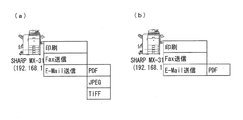
図7(a)、図7(b)に、機能の選択を可能にするポップアップメニューを例示する。図7(a)は、図6の検索結果の表示画面における、装置名称「SHARP MX-3100FG」の
画像出力装置10のアイコンをクリックすることで表示され、出力処理として、「印刷」、「Fax送信」、及び「E−Mail送信」を選択できることを、ユーザに開示する。開示部25は、記憶部27に格納されている検索結果(図5参照)に基づいて、このような情報の開示を行う。
FIG. 7A and FIG. 7B illustrate pop-up menus that enable function selection. FIG. 7A is displayed by clicking the icon of the image output device 10 having the device name “SHARP MX-3100FG” on the search result display screen of FIG. 6. As output processing, “print”, “Fax” are displayed. It is disclosed to the user that “transmission” and “E-Mail transmission” can be selected. The
また、図7の(b)は、図6の検索結果の表示画面における、装置名称「SHARP MX-M503N」の画像出力装置10のアイコンをクリックすることで表示され、出力処理として、「印刷」のみ選択できることを、ユーザに開示する。開示部25は、記憶部27に格納されている検索結果(図5参照)に基づいて、このような情報の開示を行う。
FIG. 7B is displayed by clicking the icon of the image output apparatus 10 having the apparatus name “SHARP MX-M503N” on the search result display screen of FIG. 6. As an output process, “print” is displayed. Disclose to the user that they can only select. The
なお、ここでは図示していないが、図6の検索結果の表示画面における、装置名称「SHARP MX-2310F」の画像出力装置10のアイコンをクリックすると、開示部25は、記憶部27に格納されている検索結果(図5参照)に基づいて、出力処理として、「印刷」、「E−Mail送信」が選択可能であることを、ユーザに開示することとなる。
Although not shown here, when the icon of the image output device 10 with the device name “SHARP MX-2310F” is clicked on the search result display screen of FIG. 6 , the
また、ネットワーク5上の画像出力装置10−1〜10−Nのうちの共通フォーマットデータを処理可能な画像出力装置10から取得した情報から、PDFデータをJPEGデータへと変更する機能や、あるいはPDFデータからTIFFデータへと変換する機能を有していることが判明している場合には、出力処理として「E−Mail送信」が選択された場合に、送信するデータの形式を、「PDF」「JPEG」「TIFF」の中からさらに選択させることが可能な構成とすることもできる。
Also, a function for changing PDF data to JPEG data from information acquired from the image output apparatus 10 capable of processing common format data among the image output apparatuses 10-1 to 10-N on the
図8(a)は、「E−Mail送信」においては、さらに、送信するデータの形式を、「PDF」「JPEG」「TIFF」の中から選択させることを可能にする画面である。また、図8(b)は、「E−Mail送信」においては、送信するデータの形式は、「PDF」のみとなることをユーザに認識させる画面である。 FIG. 8A shows a screen that allows the user to select the format of data to be transmitted from “PDF”, “JPEG”, and “TIFF” in “E-Mail transmission”. FIG. 8B is a screen that allows the user to recognize that the format of data to be transmitted is “PDF” only in “E-Mail transmission”.
このように、情報処理装置20においては、開示部25は、処理可能な画像出力装置10の名称を一覧にて表示し、各画像出力装置10にて利用できる出力処理の情報については、各画像出力装置10に対応付けて、ポップアップメニューにて表示する構成となっている。
As described above, in the
これによれば、検索結果表示画面が小さい場合や、多くの画像出力装置10が検出された場合に、各画像出力装置の選択可能な出力処理の情報までが表示されると、確認しずらいような場合に、利用できる出力処理の選択に関しては、ポップアップメニューにて表示することで、見やすい画面とすることができる。 According to this, when the search result display screen is small, or when many image output devices 10 are detected, it is difficult to confirm if information up to selectable output processing of each image output device is displayed. In such a case, regarding the selection of output processing that can be used, a screen that is easy to view can be obtained by displaying it in a pop-up menu.
なお、これ以外に、特に図示してはいないが、開示部25は、処理可能な画像出力装置10の名称を一覧にて表示し、各画像出力装置10にて利用できる出力処理の名称を、各画像出力装置10に対応付けて一覧にて表示する構成とすることもできる。
In addition, although not specifically illustrated, the
これによれば、処理可能な画像出力装置10の名称が一覧にて表示され、各画像出力装置10にて利用できる出力処理の名称が、各画像出力装置10に対応付けて一覧にて表示されるので、一目瞭然に、利用できる画像出力装置10、及び出力処理の機能の情報を把握することができる。 According to this, the names of the image output devices 10 that can be processed are displayed in a list, and the names of output processes that can be used in each image output device 10 are displayed in a list in association with each image output device 10. Therefore, it is possible to grasp the information of the image output device 10 that can be used and the function of the output process, at a glance.
図7(a)(b)、図8(a)(b)に示す、出力処理の機能の選択画面において、ユーザが所望する機能をクリックすると、次に、開示部25は、図9(a)〜図9(d)に示すような、処理方法を設定するためのダイアログを表示する。
When the user clicks a desired function on the output processing function selection screen shown in FIGS. 7A, 7B, 8A, and 8B, the
このようなダイアログの表示は、検索結果の表示画面に収まるように表示してもよいし、図6のプレビューの表示画面及び検索結果の表示画面の上に、両表示画面に跨るように、大きく表示してもよい。 Such a dialog may be displayed so as to fit on the search result display screen, or on the preview display screen and the search result display screen of FIG. 6 so as to extend over both display screens. It may be displayed.
ここで、図9(a)は、機能として印刷が選択された場合に表示される印刷設定のダイアログである。この画面では、「部数」「両面印刷」「N−Up印刷」「カラーモード」を選択できるようになっている。「部数」「両面印刷」「N−Up印刷」「カラーモード」の各ブロックの横にある「▽」或いは「△」マークをクリックすることで、選択可能な条件の中から選択できる。 FIG. 9A shows a print setting dialog displayed when printing is selected as a function. On this screen, “number of copies”, “double-sided printing”, “N-Up printing”, and “color mode” can be selected. By clicking the “▽” or “Δ” mark next to each block of “number of copies”, “double-sided printing”, “N-Up printing”, and “color mode”, it is possible to select from among selectable conditions.
例えば、「両面印刷」であれば、「▽」マークをクリックすることで、「両面印刷」「片面印刷」の何れかを設定できる。 For example, if “double-sided printing” is selected, either “double-sided printing” or “single-sided printing” can be set by clicking the “▽” mark.
また、「N−Up印刷」であれば、「▽」マークをクリックすることで、例えば、「1−Up」「2−Up」「4−Up」「8−Up」の中から何れかを設定できる。但し、「N−Up印刷」においては、図4に示す、共通フォーマットデータ生成部21のダイアログで設定された内容をもとに指示が反映される。そのため、共通フォーマットデータ生成部21のダイアログで「2−Up」が設定されている状態でさらに、図9(a)のダイアログでも「2−Up」が設定されると、画像出力装置10における印刷結果は「4−Up」となる。
In the case of “N-Up printing”, by clicking the “▽” mark, for example, one of “1-Up”, “2-Up”, “4-Up”, and “8-Up” is selected. Can be set. However, in “N-Up printing”, the instruction is reflected based on the contents set in the dialog of the common format
また、「カラーモード」であれば、「▽」マークをクリックすることで、「カラー」「モノクロ」の何れかを設定できる。カラーが選択されると、カラー印刷が実行され、モノクロが選択されるとモノクロ印刷が実行される。 In the “color mode”, either “color” or “monochrome” can be set by clicking the “▽” mark. Color printing is executed when a color is selected, and monochrome printing is executed when monochrome is selected.
そして、このような画面において、「OK」がクリックされると、受付部26が入力された印刷設定の条件を受け付けると共に、印刷の実行指示を受け付け、コマンド生成部23へその内容を送信して、コマンドの作成を指示すると共に、通信部24に対して、選択された画像出力装置10へ、生成されたコマンドと共に共通フォーマットデータを送信するよう指示する。
When “OK” is clicked on such a screen, the receiving
図9(b)は、機能としてFax送信が選択された場合に表示されるFax送信設定のダイアログである。この画面では、「ファックス番号」「通信速度」を設定することができる。「ファックス番号」は、図示しないキーボード等を用いて入力する。「通信速度」は、ブロックの横にある「▽」マークをクリックすることで、選択可能な条件の中から選択できるようになっている。 FIG. 9B is a Fax transmission setting dialog displayed when Fax transmission is selected as a function. On this screen, “fax number” and “communication speed” can be set. The “fax number” is input using a keyboard (not shown). The “communication speed” can be selected from selectable conditions by clicking the “▽” mark next to the block.
ここでも、画面における「OK」がクリックされると、受付部26がFax送信設定の条件を受け付けると共に、Fax送信の実行指示を受け付け、コマンド生成部23へその内容を送信して、コマンドの作成を指示すると共に、通信部24に対して、選択された画像出力装置10へ、生成されたコマンドと共に共通フォーマットデータを送信するよう指示する。
In this case as well, when “OK” on the screen is clicked, the accepting
図9(c)は、機能としてE−Mail送信が選択された場合に表示されるE−Mail送信設定のダイアログである。この画面では、「E−Mailアドレス」「ファイル形式」「カラーモード」「圧縮形式」を設定する。「E−Mailアドレス」は、図示しないキーボード等を用いて入力する。「ファイル形式」「カラーモード」「圧縮形式」は、各ブロックの横にある「▽」マークをクリックすることで、選択可能な条件の中から選択できるようになっている。 FIG. 9C is an E-Mail transmission setting dialog displayed when E-Mail transmission is selected as a function. On this screen, “E-Mail address”, “file format”, “color mode”, and “compression format” are set. The “E-Mail address” is input using a keyboard (not shown). The “file format”, “color mode”, and “compression format” can be selected from selectable conditions by clicking the “「 ”mark next to each block.
ここでも、画面における「OK」がクリックされると、受付部26がE−Mail送信設定の条件を受け付けると共に、E−Mail送信の実行指示を受け付け、コマンド生成部23へその内容を送信して、コマンドの作成を指示すると共に、通信部24に対して、選択された画像出力装置10へ、生成されたコマンドと共に共通フォーマットデータを送信するよう指示する。
Again, when “OK” on the screen is clicked, the receiving
図9(d)は、機能としてI−Fax(インターネットFax)送信が選択された場合に表示されるインターネットFax送信設定のダイアログである。この画面では、「E−Mailアドレス」「圧縮形式」「送達確認の要求」を設定する。「E−Mailアドレス」は、図示しないキーボード等を用いて入力する。「圧縮形式」「送達確認の要求」は、各ブロックの横にある「▽」マークをクリックすることで、選択可能な条件の中から選択できるようになっている。 FIG. 9D is an Internet Fax transmission setting dialog displayed when I-Fax (Internet Fax) transmission is selected as a function. On this screen, “E-Mail address”, “compression format”, and “request for delivery confirmation” are set. The “E-Mail address” is input using a keyboard (not shown). The “compression format” and “request for delivery confirmation” can be selected from selectable conditions by clicking the “▽” mark next to each block.
ここでも、画面における「OK」がクリックされると、受付部26がインターネットFax送信設定の条件を受け付けると共に、インターネットFax送信の実行指示を受け付け、コマンド生成部23へその内容を送信して、コマンドの作成を指示すると共に、通信部24に対して、選択された画像出力装置10へ、生成されたコマンドと共に共通フォーマットデータを送信するよう指示する。
Again, when “OK” on the screen is clicked, the accepting
また、例えば、画像出力装置10から取得した情報から、両面印刷機能を有していないことが判明した場合は、図10(a)に示すように、印刷設定のダイアログにおいて、「両面印刷」のブロックを「片面印刷」のグレーアウト表示とし、「▽」マークをクリックすることによる選択を不可能にすればよい。 For example, when it is determined from the information acquired from the image output apparatus 10 that the double-sided printing function is not provided, as shown in FIG. The block may be grayed out with “single-sided printing”, and selection by clicking the “▽” mark may be disabled.
また、両面印刷機能を有している画像出力装置10の多くのものは、両面印刷において横綴じと縦綴じの指定が可能である。そこで、図10(b)に示すように、「両面印刷」のブロックの横の「▽」マークをクリックすることで、「片面印刷」「両面印刷(横とじ)」「両面印刷(縦とじ)」の3つの選択肢を表示し、この中から選択させる構成とすることもできる。 In addition, many image output apparatuses 10 having a double-sided printing function can designate side binding and vertical binding in double-sided printing. Therefore, as shown in FIG. 10B, by clicking the “▽” mark next to the “double-sided printing” block, “single-sided printing” “double-sided printing (horizontal binding)” “double-sided printing (vertical binding)” ”Can be displayed and selected from these three options.
なお、上述した図9(a)〜図9(d)、及び図10(a)(b)のダイアログにおいて、「キャンセル」がクリックされると、図7(a)(b)或いは図8(a)(b)に示す、出力処理の機能を選択するポップアップメニューの画面に戻ることとなる。 Note that when “cancel” is clicked in the dialogs of FIGS. 9A to 9D and FIGS. 10A and 10B described above, FIGS. 7A and 7B or FIG. a) Return to the pop-up menu screen for selecting the output processing function shown in (b).
図11(a)〜図11(d)に、情報処理装置20のコマンド生成部23にて生成されるコマンドの例を示す。
FIG. 11A to FIG. 11D show examples of commands generated by the
ここで、図11(a)は、機能として印刷が選択された場合のコマンドの例であり、図9(a)に示すダイアログの設定内容で「OK」がクリックされ場合に生成されるコマンドである。 Here, FIG. 11A is an example of a command when printing is selected as a function, and is a command generated when “OK” is clicked in the setting contents of the dialog shown in FIG. 9A. is there.
「TYPE=PRINT」が出力処理が印刷であることを表し、「COPIES=1」が部数が1であることを表している。また、「DUPLEX=SIMPLEX」が片面印刷であること、「NUP=2」が2−Up印刷であることを表している。「ORIENTATION=PORTRAIT」が用紙の向きが縦であることを、「COLORMODE=COLOR」が、カラー印刷であることを表している。生成されたコマンドは、//共通フォーマットデータの前に追加される。 “TYPE = PRINT” indicates that the output process is printing, and “COPIES = 1” indicates that the number of copies is 1. Further, “DUPLEX = SIMPLEX” represents single-sided printing, and “NUP = 2” represents 2-Up printing. “ORIENTATION = PORTRAIT” indicates that the paper orientation is vertical, and “COLORMODE = COLOR” indicates that color printing is performed. The generated command is added before // the common format data.
図11(b)は、機能としてFax送信が選択された場合のコマンドの例であり、図9(b)のダイアログの設定内容で「OK」がクリックされ場合に生成されるコマンドである。 FIG. 11B is an example of a command when Fax transmission is selected as a function, and is a command generated when “OK” is clicked in the setting contents of the dialog of FIG. 9B.
「TYPE=FAX」が出力処理がFax送信であることを表し、「FAXNUMBER=xxxx-xx-xxxx」が送信先の電話番号を表している。また、「SPEED=336000」が、通信速度を表している。生成されたコマンドは、//共通フォーマットデータの前に追加される。 “TYPE = FAX” indicates that the output process is fax transmission, and “FAXNUMBER = xxxx-xx-xxxx” indicates the telephone number of the transmission destination. “SPEED = 336000” represents the communication speed. The generated command is added before // the common format data.
図11(c)は、機能としてE−Mail送信が選択された場合のコマンドの例であり、図9(c)のダイアログの設定内容で「OK」がクリックされ場合に生成されるコマンドである。 FIG. 11C shows an example of a command when E-Mail transmission is selected as a function, and is a command generated when “OK” is clicked in the setting contents of the dialog shown in FIG. 9C. .
「TYPE=MAIL」が出力処理がE−Mail送信であることを表し、「MAILADDRESS=aaa@sharp.co.jp」が送信先のメールアドレスを表している。また、「FILETYPE=PDF」がファイル形式がPDFであることを、「COLORMODE=COLOR」がカラーモードであることを表している。また、「COMPRESSION=MIDDLE」が中圧縮であることを表している。生成されたコマンドは、//共通フォーマットデータの前に追加される。 “TYPE = MAIL” represents that the output process is E-Mail transmission, and “MAILADDRESS=aaa@sharp.co.jp” represents the mail address of the transmission destination. “FILETYPE = PDF” indicates that the file format is PDF, and “COLORMODE = COLOR” indicates that it is a color mode. In addition, “COMPRESSION = MIDDLE” represents medium compression. The generated command is added before // the common format data.
図11(d)は、機能としてI−Fax送信が選択された場合のコマンドの例であり、図9(d)のダイアログの設定内容で「OK」がクリックされ場合に生成されるコマンドである。 FIG. 11D is an example of a command when I-Fax transmission is selected as a function, and is a command generated when “OK” is clicked in the setting contents of the dialog in FIG. 9D. .
「TYPE=IFAX」は出力処理がI−Fax送信であることを表し、「MAILADDRESS=aaa@sharp.co.jp」は送信先のメールアドレスを表している。また、「COMPRESSION=MMR」は圧縮形式がMMR圧縮であること、「RECEPTION=ON」は送達確認の要求がありであることを表している。生成されたコマンドは、//共通フォーマットデータの前に追加される。 “TYPE = IFAX” represents that the output process is I-Fax transmission, and “MAILADDRESS=aaa@sharp.co.jp” represents the mail address of the transmission destination. “COMPRESSION = MMR” indicates that the compression format is MMR compression, and “RECEPTION = ON” indicates that there is a request for delivery confirmation. The generated command is added before // the common format data.
共通フォーマットデータを受信した画像出力装置10のコマンド解析部12は、このような共通フォーマットデータの前に付されたコマンドを解析して、画像出力処理部13にてどのような処理を行うかを判断し、印刷設定、宛先設定等を決定する。
The
図12のフローチャートに、ユーザが、共通フォーマットデータの生成を指示することで実施される、情報処理装置20における処理シーケンスを示す。
The flowchart in FIG. 12 shows a processing sequence in the
アプリケーションデータのファイルを開いている状態で印刷画面(図3参照)の「印刷」がクリックされる、或いは、共通フォーマットデータ生成部21を起動させるアイコンに、出力処理したいアプリケーションデータのファイルがドラッグアンドドロップされたことを検出すると、共通フォーマットデータ生成部21が、アプリケーションデータの共通フォーマットデータを生成する処理を開始する(S1)。
Clicking “Print” on the print screen (see FIG. 3) while the application data file is open, or dragging the application data file to be output to the icon that activates the common format
共通フォーマットデータ生成部21が、共通フォーマットデータの生成を開始すると、検索部22が、共通フォーマットデータを処理可能な画像出力装置の検索を開始する(S2)。このとき、検索の開始は、S1の処理完了を待つ必要なない。
When the common format
また、プレビュー表示編集部30は、共通フォーマットデータのプレビュー画像を、ユーザインタフェース28に表示するプレビュー表示を開始する(S3)。
Also, the preview
検索部22は、検索にて検出した画像出力装置の情報や、共通フォーマットデータを利用できる出力処理の機能の情報である検索結果を、記憶部27へ記憶させる(S4)。
The
記憶部27に記憶された検索結果に基づいて、開示部25が、ユーザインタフェース28を用いて、検索結果を表示する(S5)。ここで、開示部25は、S3のプレビュー表示の完了を待って、検索結果画面を表示する必要はなく、同様に、検索部22の検索の完了を待つ必要もなく、検索されたものから順次表示していってもよい。
Based on the search results stored in the
図13のフローチャートに、ユーザが、検索結果表示画面より、画像出力装置10及び出力処理を選択することで実施される、情報処理装置20における処理シーケンスを示す。
The flowchart in FIG. 13 shows a processing sequence in the
開示部25にてユーザインタフェース28を用いて表示されている検索結果表示画面において、ある画像出力装置10をクリックしたことを検出すると、開示部25は、記憶部27より、対応する画像出力装置10がサポートしている共通フォーマットデータを利用できる出力処理の機能を読み込み(S11)、サポート機能をメニュー表示する(S12)。ここでは、印刷、Fax送信、E−Mail送信の3つの機能を選択できる場合を例示している。
When it is detected that a certain image output device 10 has been clicked on the search result display screen displayed by the
そして、ユーザが表示している何れかの機能を選択すると、開示部25は、S13において、選択された機能を判断して、印刷が選択された場合は、印刷設定のダイアログ(図9(a)参照)を表示し、設定を受け付ける(S14)。また、Fax送信が選択された場合は、Fax送信設定のダイアログ(図9(b)参照)を表示し、設定を受け付ける(S17)。同様に、E−Mail送信が選択された場合は、E−Mail送信設定のダイアログ(図9(c)参照)を表示し、設定を受け付ける(S18)。
When the user selects any function displayed, the
S14、S17、S18で、各選択された機能にて設定が完了する、つまり、図9(a)〜図9(b)において、「OK」がクリックされると、受付部26が設定内容を受け付けると共に、実行指示がなされたとして、設定内容をコマンド生成部23に送り、コマンド生成部23が設定に応じたコマンドを生成する(S15)。そして、コマンドが生成されると、コマンドを付加した共通フォーマットデータを、選択された画像出力装置10へと通信部24が送信する(S16)。
In S14, S17, and S18, the setting is completed with each selected function, that is, when “OK” is clicked in FIG. 9A to FIG. At the same time as accepting, the execution content is sent to the
以上のように、情報処理装置20の構成によれば、共通フォーマットデータ生成部21がアプリケーションデータの共通フォーマットデータの生成を開始すると、検索部22が、ネットワーク5上に接続されている共通フォーマットデータを印刷可能な画像出力装置10−1〜10−Nを検索し、開示部25が、その検索結果を、ユーザインタフェース28を用いてユーザに開示する。
As described above, according to the configuration of the
そして、ユーザによる、共通フォーマットデータの送信先となる画像出力装置10の選択、印刷条件の入力、実行指示を、ユーザインタフェース28を用いて受付部26が受け付け、コマンド生成部23が、受付部26が受け付けた内容に従って、コマンドを生成する。そして、生成されたコマンドを、共通フォーマットデータに付して、通信部24が選択された画像出力装置10に送信することで、共通フォーマットデータの印刷が実行されることとなる。
Then, the
上記構成によれば、ユーザが、あるアプリケーションデータを印刷したいと思ったときに、共通フォーマットデータへの変換を指示するだけで、共通フォーマットデータの印刷を行うことのできる近くに存在する画像出力装置10が検索されて、ユーザインタフェース28を用いてユーザに表示される。したがって、ユーザは、表示された情報に基づいて、利用する画像出力装置10を選択し、印刷条件を入力し、実行を指示するだけで、共通フォーマットデータの印刷物を、印刷を指示した場所の近くに存在する画像出力装置10より取得することができる。
According to the above configuration, when the user wants to print certain application data, the image output apparatus exists in the vicinity that can print the common format data only by instructing the conversion to the common format data. 10 is retrieved and displayed to the user using the
これにより、モバイルパソコン等の情報処理装置を持ち歩くユーザの場合であれば、街中のネット・カフェや、コンビニエンスストア、会議施設、宿泊施設などに設置されている画像出力装置の存在を知らなくても、簡単にこれらを探し出して、印刷を実行させることが可能になる。 This makes it possible for users who carry information processing devices such as mobile PCs without knowing the existence of image output devices installed in Internet cafes, convenience stores, conference facilities, lodging facilities, etc. It is possible to easily find these and execute printing.
また、複数の画像出力装置が設置されているオフィスのユーザの場合であれば、プリンタドライバをインストールしていない、新しく設置された画像出力装置であって、その画像出力装置の存在を知らなくても、簡単にこれらを探し出して、印刷を実行させることが可能になる。 Further, if the user is an office user who has a plurality of image output devices installed, the printer driver is not installed and the newly installed image output device does not know the existence of the image output device. However, it is possible to easily find these and execute printing.
また、本実施形態の情報処理装置20においては、より好ましい構成として、検索部22が、共通フォーマットデータを印刷可能な画像出力装置10における、共通フォーマットデータを利用できる印刷以外の出力処理の情報についても取得し、開示部26が、印刷以外の出力処理についてもユーザインタフェース28を用いて開示する。そして、受付部26が、印刷以外の出力処理の選択、及びその処理条件の入力、並び実行指示も受け付け、コマンド生成部23が、受付部26が受け付けた内容に従ってコマンドを生成する。
In the
これにより、印刷以外の出力処理が可能な場合は、その出力処理の機能の情報についても開示され、アプリケーションデータを印刷したいと思って、共通フォーマットデータへの変換を指示した後においても、そのまま、最初からやり直すことなく、印刷以外の出力処理への変更を簡単に行える。 As a result, when output processing other than printing is possible, information on the function of the output processing is also disclosed, and even after instructing to print application data and instructing conversion to common format data, You can easily change to output processing other than printing without having to start over.
また、出力処理として、印刷から送信に切り換えることで、用紙及びトナーの消費が抑制され、CO2の排出を抑えることができる。したがって、このような印刷以外の出力処理についても選択可能であることを知らせて、選択の機会を与える構成は、地球環境にやさしい配慮を積極的に提案するものである。 Further, by switching from printing to transmission as output processing, consumption of paper and toner can be suppressed, and CO 2 emission can be suppressed. Therefore, a configuration that informs that output processing other than printing can also be selected and gives a selection opportunity actively proposes consideration that is friendly to the global environment.
なお、上記実施の形態では、情報処理装置20を例示したが、アプリケーションプログラムに基づいて作成されたアプリケーションデータの共通フォーマットデータを生成するデータ生成機能を備えた情報処理装置が、生成した共通フォーマットデータを、ネットワークを介して接続された、少なくとも共通フォーマットデータの印刷が可能な画像出力装置へ出力する画像出力システムに供される画像出力支援装置として提供されるものであってもよい。
In the above embodiment, the
画像出力支援装置は、上記情報処理装置20とは、共通フォーマットデータ生成部21を備えていない点と、共通フォーマットデータを、コマンドを付して画像出力装置へと送信する通信部が、共通フォーマットデータ生成部を備えた情報処理装置の通信部となる。
The image output support apparatus is different from the
画像出力支援装置の通信部は、任意のアプリケーションデータを共通フォーマットデータに変換する機能を備えた情報処理装置の通信部と通信して、共通フォーマットデータのプレビュー画像の表示や編集、共通フォーマットデータの設定等を受け付ける。また、ユーザのよる、画像出力装置の選択、出力処理の選択、及び条件設定に応じたコマンドを作成して、情報処理装置に送信する。情報処理装置は、画像出力支援装置で作成されたコマンドを、自身の備える共通フォーマットデータ生成部にて作成した共通フォーマットデータに付けて、選択された画像出力装置へと送信する。 The communication unit of the image output support apparatus communicates with the communication unit of the information processing apparatus having a function of converting arbitrary application data into common format data, and displays and edits the preview image of the common format data and the common format data. Accept settings etc. In addition, a command corresponding to selection of an image output device, selection of output processing, and condition setting by the user is created and transmitted to the information processing device. The information processing apparatus attaches the command created by the image output support apparatus to the common format data created by the common format data generation unit provided therein, and transmits the command to the selected image output apparatus.
情報処理装置20の構成において既に説明したように、画像出力支援装置においては、画像出力支援装置が、共通フォーマットデータの生成が指示されることで、共通フォーマットを印刷できる画像出力装置を画像出力支援装置が探し出して、ユーザに知らせ、画像出力装置の選択、印刷条件の入力、或いは、出力処理の選択、選択した出力処理の条件入力、及び実行指示の入力を可能とするので、共通フォーマットデータに変換することで、プリンタドライバがインストールされていない画像出力装置でも印刷させることができる画像出力システムの画像出力を支援して、ユーザに有効に利用させることを可能にする。
As already described in the configuration of the
また、上記情報処理装置、画像出力支援装置は、コンピュータによって実現してもよく、この場合には、コンピュータを上記各手段として動作させることにより、上記情報処理装置、画像出力支援装置をコンピュータにて実現させるプログラム、およびそれを記録したコンピュータ読み取り可能な記録媒体も、本発明の範疇に含まれる。 In addition, the information processing apparatus and the image output support apparatus may be realized by a computer. In this case, the information processing apparatus and the image output support apparatus are operated by the computer by operating the computer as the respective means. A program to be realized and a computer-readable recording medium on which the program is recorded are also included in the scope of the present invention.
つまり、上記実施形態において、情報処理装置20、画像出力支援装置に備えられる各部(各手段)を、CPU等のプロセッサを用いてソフトウェアによって実現してもよい。この場合、情報処理装置20、画像出力支援装置は、各機能を実現する制御プログラムの命令を実行するCPU(central processing unit)、上記プログラムを格納したROM(read only memory)、上記プログラムを展開するRAM(random access memory)、上記プログラムおよび各種データを格納するメモリ等の記憶装置(記録媒体)などを備えている。
That is, in the above-described embodiment, each unit (each unit) included in the
そして、本発明の目的は、上述した機能を実現するソフトウェアである情報処理装置20、画像出力支援装置の制御プログラムのプログラムコード(実行形式プログラム、中間コードプログラム、ソースプログラム)をコンピュータで読み取り可能に記録した記録媒体を、情報処理装置20、画像出力支援装置に供給し、そのコンピュータ(またはCPUやMPU)が記録媒体に記録されているプログラムコードを読み出し実行することによって達成される。
An object of the present invention is to enable a computer to read the program code (execution format program, intermediate code program, source program) of the control program for the
上記記録媒体としては、例えば、磁気テープやカセットテープ等のテープ系、フロッピー(登録商標)ディスク/ハードディスク等の磁気ディスクやCD−ROM/MO/MD/DVD/CD−R等の光ディスクを含むディスク系、ICカード(メモリカードを含む)/光カード等のカード系、あるいはマスクROM/EPROM/EEPROM/フラッシュROM等の半導体メモリ系などを用いることができる。 Examples of the recording medium include a tape system such as a magnetic tape and a cassette tape, a magnetic disk such as a floppy (registered trademark) disk / hard disk, and an optical disk such as a CD-ROM / MO / MD / DVD / CD-R. Card system such as IC card, IC card (including memory card) / optical card, or semiconductor memory system such as mask ROM / EPROM / EEPROM / flash ROM.
また、情報処理装置20、画像出力支援装置を通信ネットワークと接続可能に構成し、通信ネットワークを介して上記プログラムコードを供給してもよい。この通信ネットワークとしては、特に限定されず、例えば、インターネット、イントラネット、エキストラネット、LAN、ISDN、VAN、CATV通信網、仮想専用網(virtual private network)、電話回線網、移動体通信網、衛星通信網等が利用可能である。また、通信ネットワークを構成する伝送媒体としては、特に限定されず、例えば、IEEE1394、USB、電力線搬送、ケーブルTV回線、電話線、ADSL回線等の有線でも、IrDAやリモコンのような赤外線、Bluetooth(登録商標)、802.11無線、HDR、携帯電話網、衛星回線、地上波デジタル網等の無線でも利用可能である。なお、本発明は、上記プログラムコードが電子的な伝送で具現化された、搬送波に埋め込まれたコンピュータデータ信号の形態でも実現され得る。
Further, the
また、情報処理装置20、画像出力支援装置の各部(各手段)は、ソフトウェアを用いて実現されるものに限らず、ハードウェアロジックによって構成されるものであってもよく、処理の一部を行うハードウェアと当該ハードウェアの制御や残余の処理を行うソフトウェアを実行する演算手段とを組み合わせたものであってもよい。
In addition, each unit (each unit) of the
本発明は上述した実施形態に限定されるものではなく、請求項に示した範囲で種々の変更が可能である。すなわち、請求項に示した範囲で適宜変更した技術的手段を組み合わせて得られる実施形態についても本発明の技術的範囲に含まれる。 The present invention is not limited to the above-described embodiments, and various modifications can be made within the scope shown in the claims. That is, embodiments obtained by combining technical means appropriately modified within the scope of the claims are also included in the technical scope of the present invention.
本発明は、任意のアプリケーションデータを共通フォーマットデータに変換して用いる画像出力システムを支援する情報処理装置、画像出力支援装置であり、プリンタドライバをインストールしていない画像出力装置を使って、簡単に印刷や、データ送信などを実施できるので、モバイルパソコンの画像データを、ネット・カフェや、コンビニエンスストア、会議施設、宿泊施設、駅などの公共の施設に設置されている画像出力装置を使って出力処理システムなどに利用することができる。 The present invention is an information processing apparatus and an image output support apparatus for supporting an image output system that converts arbitrary application data into common format data and uses the image output apparatus without installing a printer driver. Since printing and data transmission can be performed, the image data of mobile PCs can be output using image output devices installed in public facilities such as Internet cafes, convenience stores, conference facilities, accommodation facilities, and stations. It can be used for processing systems.
5 ネットワーク
10 画像出力装置
11 通信部
12 コマンド解析部
13 画像出力処理部
14 ユーザインタフェース
15 記憶部
16 応答部
17 印刷エンジン
19 制御部
20 情報処理装置
21 共通フォーマットデータ生成部(データ生成手段)
22 検索部(検索手段)
23 コマンド生成部(コマンド生成手段)
24 通信部
25 開示部(開示手段)
26 受付部(受付手段)
27 記憶部
28 ユーザインタフェース
30 プレビュー表示編集部(プレビュー表示手段、編集手段)
X 画像出力システム
DESCRIPTION OF
22 Search part (search means)
23 Command generator (command generator)
24
26 Reception part (reception means)
27
X image output system
Claims (15)
上記データ生成手段に対して共通フォーマットデータの生成が指示されると、ネットワーク上に接続されている、共通フォーマットデータを印刷可能な画像出力装置を検索する検索手段と、
上記検索手段にて検索された印刷可能な画像出力装置を開示する開示手段と、
共通フォーマットデータの送信先となる画像出力装置の選択、印刷条件の入力、及び実行指示を受け付ける受付手段と、
上記受付手段にて実行指示を受け付けると、印刷を受け付けた印刷条件に基づいて実行させるためのコマンドを生成するコマンド生成手段とを有し、
さらに、上記検索手段は、共通フォーマットデータを印刷可能な画像出力装置を検索すると共に、共通フォーマットデータを利用できる、印刷以外の出力処理の情報についても取得し、
上記開示手段は、取得した印刷以外の出力処理についても開示し、
上記受付手段は、印刷以外の出力処理の選択、及びその処理条件の入力、並び実行指示を受け付け、
上記コマンド生成手段は、上記受付手段にて実行指示を受け付けると、選択された出力処理を受け付けた出力処理の条件で実行させるためのコマンドを生成することを特徴とする情報処理装置。 Data for generating common format data of application data created based on an application program , and capable of causing the information processing apparatus to perform printing even for an image output apparatus in which no driver is installed. Generating means;
When the generation of common format data is instructed to the data generation means, search means for searching for an image output device connected to the network and capable of printing the common format data;
Disclosure means for disclosing a printable image output device searched by the search means;
Receiving means for selecting an image output device to which the common format data is to be transmitted, inputting printing conditions, and executing instructions;
When receiving the execution instruction at the accepting unit, possess a command generating means for generating a command to be executed based on the print condition received printing,
Further, the search means searches for an image output device capable of printing the common format data, and also acquires information on output processing other than printing that can use the common format data,
The above disclosure means also discloses output processing other than the acquired printing,
The accepting means accepts selection of an output process other than printing, input of the processing conditions, and an instruction to execute the arrangement,
The information processing apparatus according to claim 1, wherein the command generation unit generates a command for executing the selected output process under the condition of the received output process when the execution unit receives the execution instruction .
上記検索手段が、E−Mail送信において使用できるファイル形式の情報も取得することを特徴とする請求項1に記載の情報処理装置。 Output processing other than printing that can use the common format data is E-Mail transmission,
The information processing apparatus according to claim 1, wherein the search unit also acquires information on a file format that can be used in E-Mail transmission.
上記情報処理装置とネットワークを介して接続された、少なくとも共通フォーマットデータの印刷が可能な画像出力装置とを含む画像出力システム。 An information processing apparatus according to any one of claims 1 to 9 ,
An image output system comprising: an image output apparatus connected to the information processing apparatus via a network and capable of printing at least common format data.
上記データ生成手段に対して共通フォーマットデータの生成が指示されると、ネットワーク上に接続されている、共通フォーマットデータを印刷可能な画像出力装置を検索する検索手段と、
上記検索手段にて検索された印刷可能な画像出力装置を開示する開示手段と、
共通フォーマットデータの送信先となる画像出力装置の選択、印刷条件の入力、及び実行指示を受け付ける受付手段と、
上記受付手段にて実行指示を受け付けると、印刷を受け付けた印刷条件に基づいて実行させるためのコマンドを生成するコマンド生成手段とを有し、
さらに、上記検索手段は、共通フォーマットデータを印刷可能な画像出力装置を検索すると共に、共通フォーマットデータを利用できる、印刷以外の出力処理の情報についても取得し、
上記開示手段は、取得した印刷以外の出力処理についても開示し、
上記受付手段は、印刷以外の出力処理の選択、及びその処理条件の入力、並び実行指示を受け付け、
上記コマンド生成手段は、上記受付手段にて実行指示を受け付けると、選択された出力処理を受け付けた出力処理の条件で実行させるためのコマンドを生成することを特徴とする画像出力システムの画像出力支援装置。 Data for generating common format data of application data created based on an application program , and capable of causing the information processing apparatus to perform printing even for an image output apparatus in which no driver is installed. An image output support apparatus provided to an image output system that outputs common format data to an image output apparatus that is connected via a network and capable of printing at least common format data from an information processing apparatus including a generation unit. And
When the generation of common format data is instructed to the data generation means, search means for searching for an image output device connected to the network and capable of printing the common format data;
Disclosure means for disclosing a printable image output device searched by the search means;
Receiving means for selecting an image output device to which the common format data is to be transmitted, inputting printing conditions, and executing instructions;
When receiving the execution instruction at the accepting unit, possess a command generating means for generating a command to be executed based on the print condition received printing,
Further, the search means searches for an image output device capable of printing the common format data, and also acquires information on output processing other than printing that can use the common format data,
The above disclosure means also discloses output processing other than the acquired printing,
The accepting means accepts selection of an output process other than printing, input of the processing conditions, and an instruction to execute the arrangement,
An image output support for an image output system, wherein the command generation unit generates a command for executing the selected output process under the condition of the received output process when the execution unit receives the execution instruction. apparatus.
Priority Applications (3)
| Application Number | Priority Date | Filing Date | Title |
|---|---|---|---|
| JP2010277336A JP5236720B2 (en) | 2010-12-13 | 2010-12-13 | Information processing apparatus, image output system, image output support apparatus for image output system, program, and recording medium |
| US13/314,598 US8879096B2 (en) | 2010-12-13 | 2011-12-08 | Information processing device, image output system, non-transitory computer-readable recording medium, and image output assisting device for image output system |
| CN201110409986.4A CN102547028B (en) | 2010-12-13 | 2011-12-09 | Information processing device, image output system, and image output assisting device |
Applications Claiming Priority (1)
| Application Number | Priority Date | Filing Date | Title |
|---|---|---|---|
| JP2010277336A JP5236720B2 (en) | 2010-12-13 | 2010-12-13 | Information processing apparatus, image output system, image output support apparatus for image output system, program, and recording medium |
Publications (2)
| Publication Number | Publication Date |
|---|---|
| JP2012128524A JP2012128524A (en) | 2012-07-05 |
| JP5236720B2 true JP5236720B2 (en) | 2013-07-17 |
Family
ID=46199116
Family Applications (1)
| Application Number | Title | Priority Date | Filing Date |
|---|---|---|---|
| JP2010277336A Active JP5236720B2 (en) | 2010-12-13 | 2010-12-13 | Information processing apparatus, image output system, image output support apparatus for image output system, program, and recording medium |
Country Status (3)
| Country | Link |
|---|---|
| US (1) | US8879096B2 (en) |
| JP (1) | JP5236720B2 (en) |
| CN (1) | CN102547028B (en) |
Families Citing this family (9)
| Publication number | Priority date | Publication date | Assignee | Title |
|---|---|---|---|---|
| JP2013250785A (en) * | 2012-05-31 | 2013-12-12 | Canon Inc | Printing system, print server, control method, and computer program |
| US9377971B2 (en) * | 2014-04-16 | 2016-06-28 | Canon Kabushiki Kaisha | Systems and methods for improving device discovery |
| JP6385265B2 (en) * | 2014-12-09 | 2018-09-05 | キヤノン株式会社 | Information processing apparatus, control method, and program |
| CN107102831A (en) * | 2017-04-14 | 2017-08-29 | 北京小度信息科技有限公司 | Data-printing method and apparatus |
| JP6711438B2 (en) * | 2019-04-26 | 2020-06-17 | ブラザー工業株式会社 | Mobile terminal and output program |
| JP7275823B2 (en) * | 2019-05-09 | 2023-05-18 | 株式会社リコー | PRINTING DEVICE, PRINTING METHOD AND PRINTING PROGRAM |
| JP6888711B2 (en) * | 2020-04-22 | 2021-06-16 | ブラザー工業株式会社 | Mobile terminal and output program |
| JP7415786B2 (en) * | 2020-05-15 | 2024-01-17 | セイコーエプソン株式会社 | Printing system, printing method, printing device, and terminal device |
| CN113395531B (en) * | 2021-05-14 | 2023-08-11 | 广州虎牙科技有限公司 | Play switching method and device, electronic equipment and computer readable storage medium |
Family Cites Families (35)
| Publication number | Priority date | Publication date | Assignee | Title |
|---|---|---|---|---|
| US5287194A (en) | 1992-11-25 | 1994-02-15 | Xerox Corporation | Distributed printing |
| JPH06274292A (en) | 1993-03-18 | 1994-09-30 | Fuji Xerox Co Ltd | Display device for printer selecting criterion |
| US6213652B1 (en) * | 1995-04-18 | 2001-04-10 | Fuji Xerox Co., Ltd. | Job scheduling system for print processing |
| JPH11134142A (en) | 1997-10-31 | 1999-05-21 | Minolta Co Ltd | Printing system |
| JPH11331455A (en) | 1998-05-20 | 1999-11-30 | Canon Inc | Remote copy system and remote copy method |
| JP3557517B2 (en) | 1999-06-16 | 2004-08-25 | 株式会社沖データ | Multi-function terminal |
| WO2001033367A1 (en) * | 1999-11-01 | 2001-05-10 | Seiko Epson Corporation | Data output controller |
| JP3478212B2 (en) | 1999-11-29 | 2003-12-15 | 村田機械株式会社 | Network system |
| US20020030840A1 (en) * | 2000-09-12 | 2002-03-14 | Fuji Xerox Co., Ltd. | Image output system, and device and method applicable to the same |
| JP2002091732A (en) * | 2000-09-14 | 2002-03-29 | Minolta Co Ltd | Recording medium, method and system for controlling printer |
| US20020097419A1 (en) * | 2001-01-19 | 2002-07-25 | Chang William Ho | Information apparatus for universal data output |
| JP4146621B2 (en) * | 2001-04-05 | 2008-09-10 | セイコーエプソン株式会社 | Security system for output device |
| JP2002328795A (en) * | 2001-05-01 | 2002-11-15 | Jekku:Kk | Common format data batch creation system for printing and recording medium |
| US8681352B2 (en) * | 2002-04-18 | 2014-03-25 | Hewlett-Packard Development Company, L.P. | Pull based computer output devices |
| JP4141182B2 (en) * | 2002-05-31 | 2008-08-27 | シャープ株式会社 | Information processing apparatus, information processing method, and computer software |
| US7096208B2 (en) | 2002-06-10 | 2006-08-22 | Microsoft Corporation | Large margin perceptrons for document categorization |
| US20040130744A1 (en) | 2003-01-03 | 2004-07-08 | Vincent Wu | Online print with driverless web print server |
| US20060074840A1 (en) | 2004-09-24 | 2006-04-06 | Toshiba Corporation | System and method for tracking print job status |
| US7312887B2 (en) | 2003-01-03 | 2007-12-25 | Toshiba Corporation | Internet print protocol print dispatch server |
| US20080306902A1 (en) | 2003-01-03 | 2008-12-11 | Gava Fabio M | System and method for tracking print job status |
| JP2005102041A (en) * | 2003-09-26 | 2005-04-14 | Murata Mach Ltd | Image recording apparatus |
| KR100601696B1 (en) | 2004-07-27 | 2006-07-14 | 삼성전자주식회사 | Direct image processing method and apparatus |
| JP2006163993A (en) | 2004-12-09 | 2006-06-22 | Canon Inc | Data processing system, data processing apparatus, data processing method, storage medium storing computer-readable program, and program |
| US20060279775A1 (en) | 2005-02-21 | 2006-12-14 | Seiko Epson Corporation | Distributed printing control apparatus and print job distribution method |
| JP2006243998A (en) | 2005-03-02 | 2006-09-14 | Canon Inc | Image forming system |
| JP5020566B2 (en) | 2005-09-01 | 2012-09-05 | キヤノン株式会社 | Information processing apparatus and file operation restriction method |
| US7804612B2 (en) * | 2006-01-31 | 2010-09-28 | Ricoh Company, Ltd. | Network printing with driverless clients |
| JP2007256991A (en) | 2006-03-20 | 2007-10-04 | Ricoh Co Ltd | Data processing apparatus, program, computer-readable recording medium |
| JP4302710B2 (en) | 2006-04-11 | 2009-07-29 | シャープ株式会社 | Image processing device control system |
| JP4899684B2 (en) | 2006-07-21 | 2012-03-21 | 富士ゼロックス株式会社 | Image forming apparatus and program |
| JP2008234111A (en) | 2007-03-19 | 2008-10-02 | Seiko Epson Corp | Printer system and printer |
| JP4544257B2 (en) * | 2007-03-28 | 2010-09-15 | ブラザー工業株式会社 | Printing apparatus, printing command program, and printing method |
| US8508755B2 (en) * | 2007-07-30 | 2013-08-13 | Ricoh Company, Ltd. | Print server |
| US20100235216A1 (en) | 2009-03-16 | 2010-09-16 | Microsoft Corporation | Integration of pre-meeting and post-meeting experience into a meeting lifecycle |
| JP4780211B2 (en) * | 2009-03-19 | 2011-09-28 | ブラザー工業株式会社 | Image processing system and image processing apparatus |
-
2010
- 2010-12-13 JP JP2010277336A patent/JP5236720B2/en active Active
-
2011
- 2011-12-08 US US13/314,598 patent/US8879096B2/en active Active
- 2011-12-09 CN CN201110409986.4A patent/CN102547028B/en not_active Expired - Fee Related
Also Published As
| Publication number | Publication date |
|---|---|
| CN102547028A (en) | 2012-07-04 |
| CN102547028B (en) | 2014-11-05 |
| US8879096B2 (en) | 2014-11-04 |
| US20120147422A1 (en) | 2012-06-14 |
| JP2012128524A (en) | 2012-07-05 |
Similar Documents
| Publication | Publication Date | Title |
|---|---|---|
| JP5619649B2 (en) | Information processing apparatus, image output system, program, and recording medium | |
| JP5236720B2 (en) | Information processing apparatus, image output system, image output support apparatus for image output system, program, and recording medium | |
| JP5803834B2 (en) | Print setting apparatus, program, and image forming system | |
| US9355046B2 (en) | Information processing apparatus, information processing method, and computer-readable medium | |
| JP5377044B2 (en) | Printing system, data processing method and program | |
| JP4987950B2 (en) | MFP, program and recording medium | |
| CN100384202C (en) | Image processing system, image processing device and server | |
| JP2007325251A (en) | Image forming apparatus and application execution method | |
| JP5822442B2 (en) | Information processing apparatus, control method, and program | |
| JP2011096096A (en) | Apparatus, method and program for processing information | |
| JP5863339B2 (en) | Printing apparatus, printing method, computer program | |
| JP2011186969A (en) | Information processing apparatus, method for controlling the same, installation method, and computer program | |
| JP6321842B2 (en) | Data processing method and program | |
| JP5893295B2 (en) | Information processing apparatus, display method, and program | |
| JP6100936B2 (en) | Data processing method and program | |
| JP2013142920A (en) | Application management device, application management system, program, and recording medium therefor | |
| JP5891270B2 (en) | Data processing method and program | |
| JP5697393B2 (en) | Information processing apparatus, peripheral device control method, and program | |
| JP2004259250A (en) | Multifunctional server apparatus | |
| JP6592552B2 (en) | Data processing method and program | |
| JP2009140196A (en) | Printing control program, printing control apparatus and printing system | |
| JP2004172903A (en) | Network scanning system | |
| JP2007280264A (en) | Job flow designation program, job flow designating method and job flow execution system | |
| JP2010087742A (en) | Communication terminal and program | |
| JP2007001233A (en) | Electric appliance, and program |
Legal Events
| Date | Code | Title | Description |
|---|---|---|---|
| A977 | Report on retrieval |
Free format text: JAPANESE INTERMEDIATE CODE: A971007 Effective date: 20120928 |
|
| A131 | Notification of reasons for refusal |
Free format text: JAPANESE INTERMEDIATE CODE: A131 Effective date: 20121002 |
|
| A521 | Written amendment |
Free format text: JAPANESE INTERMEDIATE CODE: A523 Effective date: 20121203 |
|
| TRDD | Decision of grant or rejection written | ||
| A01 | Written decision to grant a patent or to grant a registration (utility model) |
Free format text: JAPANESE INTERMEDIATE CODE: A01 Effective date: 20130226 |
|
| A61 | First payment of annual fees (during grant procedure) |
Free format text: JAPANESE INTERMEDIATE CODE: A61 Effective date: 20130327 |
|
| R150 | Certificate of patent or registration of utility model |
Free format text: JAPANESE INTERMEDIATE CODE: R150 Ref document number: 5236720 Country of ref document: JP Free format text: JAPANESE INTERMEDIATE CODE: R150 |
|
| FPAY | Renewal fee payment (event date is renewal date of database) |
Free format text: PAYMENT UNTIL: 20160405 Year of fee payment: 3 |