JP3834849B2 - Image control apparatus and method - Google Patents
Image control apparatus and method Download PDFInfo
- Publication number
- JP3834849B2 JP3834849B2 JP25497595A JP25497595A JP3834849B2 JP 3834849 B2 JP3834849 B2 JP 3834849B2 JP 25497595 A JP25497595 A JP 25497595A JP 25497595 A JP25497595 A JP 25497595A JP 3834849 B2 JP3834849 B2 JP 3834849B2
- Authority
- JP
- Japan
- Prior art keywords
- menu
- image
- polyhedron
- menu item
- displayed
- Prior art date
- Legal status (The legal status is an assumption and is not a legal conclusion. Google has not performed a legal analysis and makes no representation as to the accuracy of the status listed.)
- Expired - Lifetime
Links
Images





Landscapes
- Digital Computer Display Output (AREA)
- User Interface Of Digital Computer (AREA)
Description
【0001】
【発明の属する技術分野】
本発明は、画像制御装置および方法に関し、特に、多角形の平面で構成される閉曲面に沿って配置されたメニューアイテムを、閉曲面の中心から眺めるようにメニュー画像を生成し、その画像を表示する画像制御装置および方法に関する。
【0002】
【従来の技術】
現在最も一般的に使用されているグラフィカルユーザインターフェース(GUI: Graphical User Interface)は、CRTディスプレイなどにおいて、ビットマップデータ(2次元データ)でメニューアイテムを表示することで、グラフィック表現のユーザインターフェースを構築している。このようなGUIにおいては、平面的に配置された複数のメニューアイテムから、1つのメニューアイテムを選択することで、そのメニューアイテムに対応する機能を所定のプログラムにより実行するようになされている。
【0003】
例えば、図22に示すメニューは、キャラクタジェネレータによって表示されたビットマップデータによるGUIの一例である。このようなメニューにおいては、メニューアイテムである各文字列を生成し、生成された文字列を平面的に列挙して、画面に表示する。そして、この例では、所定のキャラクタをカーソルとして扱い、カーソルを移動させて、いずれかのメニューアイテム(文字列)を選択し、実行する機能を選択する。
【0004】
また、図23に示すメニューにおいては、ビットマップデータでボタン形状のメニューアイテムを生成し、生成された複数のメニューアイテムを平面的に並べて表示し、それらのメニューアイテムからをマウスなどの入力装置で、画面上のカーソルを移動して、いずれかのメニューアイテム(ボタン)を選択し、実行する機能を選択する。
【0005】
これらのメニューのように、平面的にメニューアイテムを並べて表示するGUIにおいては、画面に一括して表示できない数のメニューアイテムをユーザに対して表示する場合、最初に表示可能な数のメニューアイテムを表示し、残りのメニューアイテムを新規の画面で表示するか、あるいは画面スクロールを行って表示するなどの方法で、全メニューアイテムをユーザに対して表示している。
【0006】
【発明が解決しようとする課題】
しかしながら、これらのような2次元(平面的な)GUIにおいては、所望のメニューアイテムを探す場合、メニューの端に位置するメニューアイテムまで表示して、所望のメニューアイテムが見つからない場合、一旦、元の位置に戻って再び逆方向に向かって所望のメニューアイテムを探さなければならないという課題を有している。
【0007】
また、このように、メニューの端が存在することで、メニューアイテムの選択操作が複雑になるため、3次元の(立体的な)GUIを構築し、メニューの端と端を繋げて、メニューアイテムの選択操作を簡単にすることが考えられる。
【0008】
例えば、図24に示すように、3次元の実空間を忠実に再現するバーチャルリアリティ(VR:Virtual Reality)を利用して、グラフィック能力のすぐれた演算装置(CPU)を利用して、メニューアイテムがどの方向にも連続しているようにメニューアイテムを配置し、ユーザインターフェースとして利用することが考えられるが、構築されるメニューの空間が複雑になり過ぎ、メニューアイテムを選択するときの操作性が悪いという課題を有している。
【0009】
本発明は、このような状況に鑑みてなされたもので、階層構造を有するメニューにおいて複数のメニューアイテムを多角形の平面で構成される閉曲面に沿って表示し、直感的に理解しやすい操作によってメニューアイテムのうちの1つを選択することを可能にするものである。
【0010】
【課題を解決するための手段】
請求項1に記載の画像制御装置は、多面体を構成する複数の連続する平面に沿ってメニューアイテムを関連付けて配置させ、多面体の内部から多面体を構成する平面を眺めるように、メニュー画像を生成する生成手段と、生成手段により生成されたメニュー画像を出力する出力手段と、メニューアイテムの1つを選択する選択手段とを備え、生成手段は、多面体を構成する平面に沿って配置されたメニューアイテム全体の回転を指示する操作入力に応じて、メニューアイテムを順次移動させたメニュー画像を生成し、選択手段は、メニュー画像の所定の位置に表示されるメニューアイテムを選択することを特徴とする。
【0011】
請求項2に記載の画像制御方法は、多面体を構成する複数の連続する平面に沿ってメニューアイテムを関連付けて配置させ、多面体の内部から多面体を構成する平面を眺めるように、メニュー画像を生成し、生成されたメニュー画像を出力し、多面体を構成する平面に沿って配置されたメニューアイテム全体の回転を指示する操作入力を受けた場合、メニューアイテムを順次移動させたメニュー画像をさらに生成し、さらに生成されたメニュー画像を出力し、メニュー画像の所定の位置に表示されるメニューアイテムの1つを選択することを特徴とする。
【0012】
請求項1に記載の画像制御装置においては、生成手段は、多面体を構成する複数の連続する平面に沿ってメニューアイテムを関連付けて配置させ、多面体の内部から多面体を構成する平面を眺めるように、メニュー画像を生成するとともに、多面体を構成する平面に沿って配置されたメニューアイテム全体の回転を指示する操作入力に応じて、メニューアイテムを順次移動させたメニュー画像を生成し、出力手段は、生成手段により生成されたメニュー画像を出力し、選択手段は、メニュー画像の所定の位置に表示されるメニューアイテムを選択する。
【0013】
請求項2に記載の画像制御方法においては、多面体を構成する複数の連続する平面に沿ってメニューアイテムを関連付けて配置させ、多面体の内部から多面体を構成する平面を眺めるように、メニュー画像を生成するとともに、多面体を構成する平面に沿って配置されたメニューアイテム全体の回転を指示する操作入力に応じて、メニューアイテムを順次移動させたメニュー画像を生成し、生成されたメニュー画像を出力し、メニュー画像の所定の位置に表示されるメニューアイテムを選択する。
【0014】
【発明の実施の形態】
図1は、本発明の画像制御装置の一実施例を利用したビデオオンデマンド(VOD:Video On Demand)サービスシステムの構成例を示している。
【0015】
ビデオサーバ1は、様々な種類の番組を各受信者に提供する。ビデオサーバ1は、送信装置2および放送衛星3を介して番組を送信するか(BS、CSなどの衛星放送)、あるいは有線放送などのケーブル配信や地上波などによる配信によって番組を提供する。
【0016】
セットトップボックス4−1(生成手段)は、放送衛星3が送信する番組を受信し、それらの番組の画像などを、ユーザの操作に従って画像表示装置5に表示させる。同様に、セットトップボックス4−2(生成手段)は、ケーブル配信や地上波などによって提供される番組を受信し、それらの番組の画像などを、ユーザの操作に従って画像表示装置5に表示させる。
【0017】
図2は、本発明の画像制御装置の一実施例の構成例を示している。この構成例は、セットトップボックス4(生成手段)、画像表示装置5(出力手段)、およびコントローラ6(選択手段)を備える。セットトップボックス4は、ビデオサーバ1から送信されるデータを受信し、ユーザは、コントローラ6を操作して、そのデータを画像表示装置5に表示させる。
【0018】
図3は、図2の実施例におけるコントローラ6の構成例を示している。コントローラ6は、上下左右ボタン21乃至24、Lボタン25、Rボタン26、Uボタン27、Dボタン28、情報ボタン29、およびリセットボタン30を備え、ユーザは、これらのボタン21乃至30を操作することにより、画像表示装置5に表示されるメニューにおいて、メニューアイテムを選択する。
【0019】
図4は、図1および図2に示すセットトップボックス4(4−1,4−2)の一構成例を示している。この実施例は受信回路41を備え、受信回路41は、ビデオサーバ1から配信される番組を受信し、インターフェース42を介してCPU43に供給する。CPU43は、このデータを必要に応じてハードディスク(HD)46に記憶させる。
【0020】
CPU43は、ROM44に記憶されているプログラムに基づいて、コントローラ6からの画像制御信号に従って、メニューにおける選択操作を処理し、選択操作に対応した画像を、インターフェース42を介して画像表示装置5に表示させる。CPU43がこのような処理を行うとき、RAM45は、一時的にプログラムおよびデータなどを記憶するようになされている。
【0021】
なお、このCPU43には、低価格で、3次元描画をリアルタイムで行うことができるゲーム機器用のグラフィックCPU(例えばソニープレイステーション(商標)用の処理装置としてのGPU(Graphical Processing Unit)や、それより高性能のGPU−Aなど)を用いている。また、そのようなCPUの代わりに、グラフィック機能を追加した汎用のCPUを使用することもできる。
【0022】
図5は、VODサービスで提供される番組の階層構造の例を示している。この例においては、VODサービスで提供されるムービー(Movie)のカテゴリは、さらにネイチャー(Nature)、ドラマ(Drama)、アクション(Action)、およびコメディ(Comedy)の他、30個のカテゴリに分類され、コメディの中には、現在ムービー1乃至ムービー4の4本のムービーが用意されている。また、ネイチャー、アクション、およびコメディには、新着情報が付加されている。
【0023】
図6は、メニュー全体の構成例を示しており、このメニューは、複数の6角形のメニューアイテムを円筒形に配置しており、これらのメニューアイテムが、ネイチャー、ドラマ、アクション、およびコメディにそれぞれ対応し、メニューアイテムの中央に、ビットマップでそのメニューアイテムが有する情報のタイトルやシンボルが表示される。
【0024】
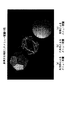
本実施例においては、図7(a)および図7(b)に示すような、各面の面積がその位置に拘わらず同一であるか、またはほぼ等しくなるような3次元の閉曲面をメニューアイテムの配置形状に用いており、これらの閉曲面に沿ってメニューアイテムを配置し、これらの閉曲面の中心から各面を眺めるように、メニューアイテムを画像表示装置5に表示させる。このような3次元形状としては、正4面体(3角形で構成される)、正6面体(4角形で構成される)、正12面体(5角形で構成される)、正20面体(3角形で構成される)などの正多面体の他、正5角形の面と正6角形の面を組み合わせた、サッカーボールのような3次元形状がある。
【0025】
このような多面体上にメニューアイテムを配置すると、メニューアイテムの選択の方向の自由度が大きくなり、例えば、多くのカテゴリのメニューアイテムを関連づけて配置する場合に有利となる。
【0026】
ただし、このような閉曲面を利用する場合、図7(c)に示すような矩形の面を有する球体を用いると、球体の軸に近づくにつれて表示面(1つの矩形)の面積が小さくなり、メニューアイテムを表示しにくくなるので、図7(a)および図7(b)に示すように、同一の面積を有する多角形で構成される閉曲面を利用するほうが好ましい。
【0027】
また、図6および図7はメニュー全体を示しているが、実際に、メニューを表示する場合、例えば図8に示すように、これらの閉曲面の中心から外側を眺めるように、ユーザに対して、常に選択しやすい数のメニューアイテムのみが、画像制御装置5に表示される。
【0028】
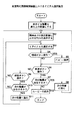
次に、図9のフローチャートおよび図10乃至図21の画像表示例を参照して、メニューアイテムの選択動作について説明する。
【0029】
最初に、装置の電源がオンされると、CPU43は、図9のステップS1において、図10に示すようなオープニング画面を画像表示装置5に表示させ、さらに図11および図12に示すように、建物に入っていく画像を順次表示させる。
【0030】
次に、ステップS2において、図13に示すように、一番上の階層におけるメニューアイテムが表示され、そのメニューアイテムが、VODサービスにおける新着の情報を有する場合、そのメニューアイテム61の周囲を小さいオブジェクト(物体)62が周回している画像も同時に表示される。これは、鳥や昆虫などの生物が花や食べ物などに集まってくる動きを、メタファとして用いており、例えば、図13においては、メニューアイテムMUSICおよびNATUREの中に新着の情報が存在することがわかる。
【0031】
そして、ステップS3において、ユーザは、コントローラ6を操作してこのメニューから1つのメニューアイテムを選択する。このとき、左右ボタン23,24(細かい操作)またはLRボタン25,26(大規模な操作)を操作して、メニューアイテム全体を、左または右方向に、細かくまたは大きく回転させることで、画面上においては、順々にメニューアイテムが表示される。また、Uボタン27およびDボタン28で、メニュー全体を上下方向に回転させることでも、順々にメニューアイテムが表示される。そして、所定のタイミングで操作ボタンを離すことにより回転を停止させ、所望のメニューアイテムを画面の中心に配列させることで、そのメニューアイテムを選択する(図13の例においては、NATUREが選択されている)。
【0032】
従って、この実施例においては、従来のGUIで用いられているようなカーソルを必要としないで、メニューアイテムの選択を行うことができる。選択されたメニューアイテムは、表示色が他のものとは異なる色(例えば黄色)に変化し、さらに、他のメニューアイテムとは異なる動きを行う。例えば、選択されていない(中心以外に配置されている)メニューアイテムは、浮遊するようにわずかに上下方向に運動するのに対して、選択された(中心に配置された)メニューアイテムは、縦方向の中心軸を支点に、所定の範囲(表面の文字が見える範囲)で、左右方向に回動する。このようにすることで、選択されているメニューアイテムを直感的に識別することができる。
【0033】
ステップS4において、新着情報を有するメニューアイテムを選択している状態で、情報ボタン29が押されたと判定された場合、ステップS5に進み、その情報のプレビュー(例えば予告編)が図14に示すように表示される。また、もう一度情報ボタン29を押すと、元の画面(図13)に戻る。従って、ユーザは、このような操作をすることで、新着情報のプレビューだけを見ることができる。
【0034】
次に、ステップS6において、前進ボタン(右ボタン)24を押したと判定された場合、ステップS7において、CPU43は、選択されているメニューアイテムが階層を有しているか否かを判断し、下位階層を有している場合、ステップS8において、その階層に進む。いまの場合、NATUREが下位階層を有しているので、ステップS8においてその階層に進み、ステップS2に戻り、その階層のメニューアイテムを表示する。
【0035】
下位階層に進むときは、図15および図16に示すように、選択されたメニューアイテムに接近していき、図17に示すように、ドアが開いてズームインしていく画像が表示される。このように奥行き方向に階層構造を有することで、階層間を移動するとき、ユーザに対して、「目的に向かって移動する」ということを自然に表現することができる。
【0036】
ステップS8において下位階層に移動した場合、ステップS2においてCPU43は、図18に示すように、その階層のメニューを画像表示装置5に表示させる。そして、ステップS3において、ユーザは、コントローラ6を操作して、さらにメニューアイテムを選択する。例えば、図18の例では、ALASKAが選択されているが、コントローラ6を操作し、図19に示すように、メニューアイテムWINGを選択する。
【0037】
そしてさらに前進ボタン24を操作すると、ステップS7において、メニューアイテムWINGが下位階層を有しているか否かを判断する。この例においては、メニューアイテムWINGは、下位階層を有していない(即ち、メニューアイテムWINGに対応するムービーが存在する)ので、ステップS12に進む。
【0038】
ステップS12において、最初に、次階層に進む場合と同様に、図20に示すように、ドアを開けてズームインする画像が表示される。そして、ビデオサーバ1から送信されるメニューアイテムWINGに対応する画像が、受信回路41によって受信された後、CPU43によって、画像表示装置5に表示される。
【0039】
また、ステップS6において、前進ボタン(右ボタン)24が押されたと判定されず、ステップS9において、後進ボタン(左ボタン)23が押されたと判定された場合、ステップS10に進み、現時点の階層に対して上位の階層が存在するか否かを判断し、上位階層が存在する場合、ステップS11において、その階層に戻る。上位階層に戻る場合、画像がズームアウトしていき、ドアが閉まる画像が表示された後、ステップS2に戻り、その階層でのメニューアイテムを表示する。
【0040】
ステップS10において、上位階層が存在しないと判定された場合、ステップS3に戻る。即ち、この場合、特に処理は行わない。また、ステップS6およびステップS9において、前進ボタン(右ボタン)24および後進ボタン(左ボタン)23を操作せず、ステップS3に戻り、新たなメニューアイテムを選択することもできる。
【0041】
なお、図21に示すように、所定の番組の受信状態になると、表示されている画像の再生などの操作を行うコントロールバー81が、コントローラ6の操作ボタン21乃至29のうちのいずれかが押されたとき、表示される。このコントロールバー81は、再生される画像を妨げないように、画像が再生されている間は消去される。
【0042】
コントロールバー81の各ボタンのいずれかを、左ボタン23または右ボタン24を操作して選択すると、各ボタンに対応する処理が行われる。図中最も左側のボタン81−1を操作すると、番組が中断され、1つ上の階層に戻る(あるいは図10に示す状態に戻るようにしてもよい)。ボタン81−2を操作すると、前のインデックスの位置まで戻り、ボタン81−3を操作すると高速逆再生状態(巻き戻し状態)となる。ボタン81−4は、再生開始のとき操作される。
【0043】
ボタン81−5は、高速順方向再生(早送り)のとき操作され、ボタン81−6は、次のインデックス位置まで進むとき操作される。ボタン81−7は、コマ送り再生のとき操作される。
【0044】
また、リセットボタン30がユーザによって押された場合、その時点で行われているメニューアイテムの選択操作はリセットされ、ステップS1に戻り、最初から選択操作をやり直すことができる。
【0045】
以上のようにして、ユーザは、コントローラ6を操作することで、所望の画像を画像表示装置5に表示させることができる。
【0046】
【発明の効果】
以上のように、本発明の画像制御装置および方法によれば、多面体を構成する複数の連続する平面に沿ってメニューアイテムを関連付けて配置させ、多面体の内部から多面体を構成する平面を眺めるように、メニュー画像を生成するとともに、多面体を構成する平面に沿って配置されたメニューアイテム全体の回転を指示する操作入力に応じて、メニューアイテムを順次移動させたメニュー画像を生成し、生成されたメニュー画像を出力し、メニュー画像の所定の位置に表示されるメニューアイテム選択するようにしたので、人間に直感で理解しやすい操作方法を実現し、メニューアイテムを選択するときの操作性を向上させることができる。
【図面の簡単な説明】
【図1】VODサービスシステムの実施例の構成例を示す図である。
【図2】本発明の画像制御装置の一実施例の構成例を示す図である。
【図3】図2のコントローラ6の構成例を示す図である。
【図4】図2のセットトップボックス4の構成例を示すブロック図である。
【図5】図1のVODサービスにおいて提供されるムービーの階層構造の一例を示す図である。
【図6】メニューアイテム全体の構成例を示す図である。
【図7】図2の実施例において表示されるメニューアイテムの配置形状の例を示すディスプレー上に表示した中間調画像の写真である。
【図8】図2の実施例におけるメニューアイテムの表示例を示す図である。
【図9】図2の実施例の動作を説明するフローチャートである。
【図10】図2の実施例において、メニューアイテムを選択するときに表示される画面の一例を示す図である。
【図11】図2の実施例において、メニューアイテムを選択するときに表示される画面の一例を示す図である。
【図12】図2の実施例において、メニューアイテムを選択するときに表示される画面の一例を示す図である。
【図13】図2の実施例において、メニューアイテムを選択するときに表示される画面の一例を示す図である。
【図14】図2の実施例において、メニューアイテムを選択するときに表示される画面の一例を示す図である。
【図15】図2の実施例において、メニューアイテムを選択するときに表示される画面の一例を示す図である。
【図16】図2の実施例において、メニューアイテムを選択するときに表示される画面の一例を示す図である。
【図17】図2の実施例において、メニューアイテムを選択するときに表示される画面の一例を示す図である。
【図18】図2の実施例において、メニューアイテムを選択するときに表示される画面の一例を示す図である。
【図19】図2の実施例において、メニューアイテムを選択するときに表示される画面の一例を示す図である。
【図20】図2の実施例において、メニューアイテムを選択するときに表示される画面の一例を示す図である。
【図21】図2の実施例において、メニューアイテムを選択するときに表示される画面の一例を示す図である。
【図22】従来の2次元GUIの例を示す図である。
【図23】従来の2次元GUIの例を示すディスプレー上に表示した中間調画像の写真である。
【図24】従来の3次元GUIの例を示すディスプレー上に表示した中間調画像の写真である。
【符号の説明】
1 ビデオサーバ
2 送信装置
3 放送衛星
4,4−1,4−2 セットトップボックス
5 画像表示装置
6 コントローラ
21乃至24 上下左右ボタン
25 Lボタン
26 Rボタン
27 Uボタン
28 Dボタン
29 情報ボタン
30 リセットボタン
41 受信回路
42 インターフェース
43 CPU
44 ROM
45 RAM
46 ハードディスク
61 メニューアイテム
62 オブジェクト
81 コントロールバー[0001]
BACKGROUND OF THE INVENTION
The present invention relates to an image control apparatus and method, and in particular, generates a menu image so that a menu item arranged along a closed curved surface formed of a polygonal plane is viewed from the center of the closed curved surface, and the image is displayed. The present invention relates to a display image control apparatus and method.
[0002]
[Prior art]
The most commonly used graphical user interface (GUI) is a graphical user interface that displays menu items as bitmap data (two-dimensional data) on a CRT display. is doing. In such a GUI, by selecting one menu item from a plurality of menu items arranged in a plane, a function corresponding to the menu item is executed by a predetermined program.
[0003]
For example, the menu shown in FIG. 22 is an example of a GUI based on bitmap data displayed by a character generator. In such a menu, each character string that is a menu item is generated, and the generated character strings are listed in a plane and displayed on the screen. In this example, a predetermined character is treated as a cursor, the cursor is moved, one of the menu items (character string) is selected, and a function to be executed is selected.
[0004]
In addition, in the menu shown in FIG. 23, button-shaped menu items are generated from bitmap data, the generated menu items are displayed in a two-dimensional manner, and the menu items are displayed using an input device such as a mouse. Move the cursor on the screen, select one of the menu items (buttons), and select the function to be executed.
[0005]
In GUIs that display menu items in a plane, such as these menus, when the number of menu items that cannot be displayed on the screen is displayed to the user, the number of menu items that can be displayed first is displayed. All menu items are displayed to the user by a method such as displaying and displaying the remaining menu items on a new screen or scrolling the screen.
[0006]
[Problems to be solved by the invention]
However, in such a two-dimensional (planar) GUI, when searching for a desired menu item, the menu item located at the end of the menu is displayed, and if the desired menu item is not found, the original menu item is temporarily restored. There is a problem that a desired menu item has to be searched again in the reverse direction by returning to the position.
[0007]
In addition, since the menu item selection operation becomes complicated due to the presence of the end of the menu in this way, a three-dimensional (three-dimensional) GUI is constructed, and the end of the menu is connected to the end of the menu item. It may be possible to simplify the selection operation.
[0008]
For example, as shown in FIG. 24, using a virtual reality (VR) that faithfully reproduces a three-dimensional real space, and using a computing device (CPU) with excellent graphic ability, menu items can be displayed. It is conceivable to arrange menu items so that they are continuous in any direction and use it as a user interface, but the space of the menu to be constructed becomes too complicated, and the operability when selecting menu items is poor It has a problem.
[0009]
The present invention has been made in view of such a situation. In a menu having a hierarchical structure, a plurality of menu items are displayed along a closed curved surface formed of a polygonal plane, and an operation that is easy to understand intuitively. Makes it possible to select one of the menu items.
[0010]
[Means for Solving the Problems]
The image control device according to
[0011]
The image control method according to
[0012]
In the image control device according to
[0013]
The image control method according to
[0014]
DETAILED DESCRIPTION OF THE INVENTION
FIG. 1 shows a configuration example of a video on demand (VOD) service system using an embodiment of an image control apparatus of the present invention.
[0015]
The
[0016]
The set-top box 4-1 (generation means) receives programs transmitted from the
[0017]
FIG. 2 shows a configuration example of an embodiment of the image control apparatus of the present invention. This configuration example includes a set top box 4 (generation means), an image display device 5 (output means), and a controller 6 (selection means). The
[0018]
FIG. 3 shows a configuration example of the
[0019]
FIG. 4 shows a configuration example of the set top box 4 (4-1, 4-2) shown in FIG. 1 and FIG. This embodiment includes a receiving circuit 41, which receives a program distributed from the
[0020]
The
[0021]
The
[0022]
FIG. 5 shows an example of a hierarchical structure of programs provided by the VOD service. In this example, the category of the movie (Movie) provided by the VOD service is further classified into 30 categories in addition to Nature, Drama, Action, and Comedy. In the comedy, there are currently four movies,
[0023]
FIG. 6 shows an example of the configuration of the entire menu. In this menu, a plurality of hexagonal menu items are arranged in a cylindrical shape, and these menu items are assigned to nature, drama, action, and comedy, respectively. Correspondingly, a title or symbol of information of the menu item is displayed in the center of the menu item as a bitmap.
[0024]
In this embodiment, as shown in FIGS. 7A and 7B, a three-dimensional closed surface in which the area of each surface is the same or almost equal regardless of the position is displayed as a menu. The menu items are arranged along these closed curved surfaces, and the menu items are displayed on the
[0025]
Arranging menu items on such a polyhedron increases the degree of freedom in selecting the menu item, which is advantageous, for example, when arranging menu items of many categories in association with each other.
[0026]
However, when using such a closed curved surface, if a sphere having a rectangular surface as shown in FIG. 7C is used, the area of the display surface (one rectangle) decreases as the axis of the sphere approaches, Since it is difficult to display the menu item, it is preferable to use a closed curved surface formed of polygons having the same area as shown in FIGS. 7 (a) and 7 (b).
[0027]
6 and 7 show the entire menu. When the menu is actually displayed, for example, as shown in FIG. 8, the user can look at the outside from the center of these closed surfaces. Only the number of menu items that are always easy to select are displayed on the
[0028]
Next, the menu item selection operation will be described with reference to the flowchart of FIG. 9 and the image display examples of FIGS.
[0029]
First, when the apparatus is turned on, the
[0030]
Next, in step S2, as shown in FIG. 13, when a menu item in the top layer is displayed and the menu item has new arrival information in the VOD service, a small object is placed around the
[0031]
In step S3, the user operates the
[0032]
Therefore, in this embodiment, the menu item can be selected without requiring a cursor as used in the conventional GUI. The selected menu item changes its display color to a color (for example, yellow) different from that of the other items, and further moves differently from the other menu items. For example, a menu item that is not selected (located outside the center) moves slightly up and down to float, whereas a menu item that is selected (centered) is vertically With the central axis of the direction as a fulcrum, it rotates in the left-right direction within a predetermined range (a range where the characters on the surface can be seen). In this way, the selected menu item can be intuitively identified.
[0033]
If it is determined in step S4 that the information button 29 is pressed while a menu item having new arrival information is selected, the process proceeds to step S5, and a preview of the information (for example, a trailer) is shown in FIG. Is displayed. When the information button 29 is pressed again, the original screen (FIG. 13) is restored. Therefore, the user can see only a preview of newly arrived information by performing such an operation.
[0034]
Next, when it is determined in step S6 that the forward button (right button) 24 has been pressed, in step S7, the
[0035]
When proceeding to the lower hierarchy, as shown in FIGS. 15 and 16, an image is displayed in which the selected menu item is approached and the door is opened and zoomed in as shown in FIG. By having a hierarchical structure in the depth direction in this way, when moving between hierarchies, it can be naturally expressed to the user that “move toward the purpose”.
[0036]
When moving to the lower hierarchy in step S8, in step S2, the
[0037]
When the forward button 24 is further operated, it is determined in step S7 whether or not the menu item WING has a lower hierarchy. In this example, the menu item WING does not have a lower hierarchy (that is, there is a movie corresponding to the menu item WING), and thus the process proceeds to step S12.
[0038]
In step S12, first, as in the case of proceeding to the next layer, as shown in FIG. 20, an image for zooming in by opening the door is displayed. Then, an image corresponding to the menu item WING transmitted from the
[0039]
If it is not determined in step S6 that the forward button (right button) 24 has been pressed and it is determined in step S9 that the backward button (left button) 23 has been pressed, the process proceeds to step S10 and the current level is entered. On the other hand, it is determined whether or not an upper hierarchy exists. If an upper hierarchy exists, the process returns to that hierarchy in step S11. When returning to the upper layer, the image zooms out and the image that the door closes is displayed. Then, the process returns to step S2 to display the menu items in the layer.
[0040]
If it is determined in step S10 that no upper hierarchy exists, the process returns to step S3. That is, in this case, no particular processing is performed. In step S6 and step S9, the forward button (right button) 24 and the backward button (left button) 23 are not operated, and the process returns to step S3 to select a new menu item.
[0041]
As shown in FIG. 21, when a predetermined program is received, the control bar 81 for performing operations such as reproduction of displayed images is pressed by any of the operation buttons 21 to 29 of the
[0042]
When one of the buttons on the control bar 81 is selected by operating the left button 23 or the right button 24, processing corresponding to each button is performed. When the leftmost button 81-1 in the figure is operated, the program is interrupted and the program returns to the next higher level (or may return to the state shown in FIG. 10). When the button 81-2 is operated, the position returns to the previous index position, and when the button 81-3 is operated, the high-speed reverse playback state (rewind state) is entered. The button 81-4 is operated at the start of reproduction.
[0043]
The button 81-5 is operated during high-speed forward playback (fast forward), and the button 81-6 is operated when proceeding to the next index position. The button 81-7 is operated during frame-by-frame playback.
[0044]
When the
[0045]
As described above, the user can display a desired image on the
[0046]
【The invention's effect】
As described above, according to the image control apparatus and method of the present invention, the menu items are arranged in association with each other along a plurality of continuous planes constituting the polyhedron, and the plane constituting the polyhedron is viewed from the inside of the polyhedron. A menu image is generated by sequentially moving menu items in response to an operation input that generates a menu image and instructs rotation of the entire menu item arranged along a plane constituting the polyhedron. Since an image is output and a menu item displayed at a predetermined position of the menu image is selected, an operation method that is easy to understand intuitively by humans is realized, and operability when selecting a menu item is improved. Can do.
[Brief description of the drawings]
FIG. 1 is a diagram illustrating a configuration example of an embodiment of a VOD service system.
FIG. 2 is a diagram illustrating a configuration example of an embodiment of an image control apparatus according to the present invention.
FIG. 3 is a diagram illustrating a configuration example of a
4 is a block diagram illustrating a configuration example of the set
FIG. 5 is a diagram illustrating an example of a hierarchical structure of movies provided in the VOD service of FIG. 1;
FIG. 6 is a diagram illustrating a configuration example of an entire menu item.
FIG. 7 is a photograph of a halftone image displayed on a display showing an example of an arrangement shape of menu items displayed in the embodiment of FIG. 2;
FIG. 8 is a diagram showing a display example of menu items in the embodiment of FIG. 2;
FIG. 9 is a flowchart for explaining the operation of the embodiment of FIG. 2;
FIG. 10 is a diagram showing an example of a screen displayed when a menu item is selected in the embodiment of FIG.
FIG. 11 is a diagram showing an example of a screen displayed when a menu item is selected in the embodiment of FIG.
12 is a diagram showing an example of a screen displayed when a menu item is selected in the embodiment of FIG.
FIG. 13 is a diagram showing an example of a screen displayed when a menu item is selected in the embodiment of FIG.
FIG. 14 is a diagram showing an example of a screen displayed when a menu item is selected in the embodiment of FIG.
FIG. 15 is a diagram showing an example of a screen displayed when a menu item is selected in the embodiment of FIG.
FIG. 16 is a diagram showing an example of a screen displayed when a menu item is selected in the embodiment of FIG.
FIG. 17 is a diagram showing an example of a screen displayed when a menu item is selected in the embodiment of FIG.
18 is a diagram showing an example of a screen displayed when a menu item is selected in the embodiment of FIG.
FIG. 19 is a diagram showing an example of a screen displayed when a menu item is selected in the embodiment of FIG.
FIG. 20 is a diagram illustrating an example of a screen displayed when a menu item is selected in the embodiment of FIG.
FIG. 21 is a diagram showing an example of a screen displayed when a menu item is selected in the embodiment of FIG.
FIG. 22 is a diagram illustrating an example of a conventional two-dimensional GUI.
FIG. 23 is a photograph of a halftone image displayed on a display showing an example of a conventional two-dimensional GUI.
FIG. 24 is a photograph of a halftone image displayed on a display showing an example of a conventional three-dimensional GUI.
[Explanation of symbols]
DESCRIPTION OF
44 ROM
45 RAM
46
Claims (2)
多面体を構成する複数の連続する平面に沿ってメニューアイテムを関連付けて配置させ、前記多面体の内部から前記多面体を構成する前記平面を眺めるように、前記メニュー画像を生成する生成手段と、
前記生成手段により生成された前記メニュー画像を出力する出力手段と、
前記メニューアイテムの1つを選択する選択手段と
を備え、
前記生成手段は、前記多面体を構成する前記平面に沿って配置された前記メニューアイテム全体の回転を指示する操作入力に応じて、前記メニューアイテムを順次移動させた前記メニュー画像を生成し、
前記選択手段は、前記メニュー画像の所定の位置に表示される前記メニューアイテムを選択する
ことを特徴とする画像制御装置。In an image control device that controls display of a menu image,
Generating means for generating the menu image so that menu items are arranged in association with each other along a plurality of continuous planes constituting the polyhedron, and the plane constituting the polyhedron is viewed from the inside of the polyhedron ;
Output means for outputting the menu image generated by the generating means;
Selecting means for selecting one of the menu items ;
The generating means generates the menu image in which the menu items are sequentially moved in response to an operation input instructing rotation of the entire menu item arranged along the plane constituting the polyhedron,
The image control apparatus , wherein the selection unit selects the menu item displayed at a predetermined position of the menu image .
多面体を構成する複数の連続する平面に沿ってメニューアイテムを関連付けて配置させ、前記多面体の内部から前記多面体を構成する前記平面を眺めるように、前記メニュー画像を生成し、
生成された前記メニュー画像を出力し、
前記多面体を構成する前記平面に沿って配置された前記メニューアイテム全体の回転を指示する操作入力を受けた場合、前記メニューアイテムを順次移動させた前記メニュー画像をさらに生成し、
さらに生成された前記メニュー画像を出力し、
前記メニュー画像の所定の位置に表示される前記メニューアイテムの1つを選択する
ことを特徴とする画像制御方法。In an image control method for controlling display of a menu image,
A menu item is arranged in association with a plurality of continuous planes constituting the polyhedron, and the menu image is generated so as to view the plane constituting the polyhedron from the inside of the polyhedron ,
Output the generated menu image,
When receiving an operation input for instructing rotation of the entire menu item arranged along the plane constituting the polyhedron, the menu image in which the menu item is sequentially moved is generated,
Furthermore, the generated menu image is output,
One of the menu items displayed at a predetermined position of the menu image is selected.
Priority Applications (5)
| Application Number | Priority Date | Filing Date | Title |
|---|---|---|---|
| JP25497595A JP3834849B2 (en) | 1995-10-02 | 1995-10-02 | Image control apparatus and method |
| US08/723,769 US5898435A (en) | 1995-10-02 | 1996-09-30 | Image controlling device and image controlling method |
| EP96115842A EP0767418B1 (en) | 1995-10-02 | 1996-10-02 | Image controlling device and image controlling method |
| DE69625979T DE69625979T2 (en) | 1995-10-02 | 1996-10-02 | Image processing apparatus and method |
| US09/190,430 US6184884B1 (en) | 1995-10-02 | 1998-11-12 | Image controlling device and image controlling method for displaying a plurality of menu items |
Applications Claiming Priority (1)
| Application Number | Priority Date | Filing Date | Title |
|---|---|---|---|
| JP25497595A JP3834849B2 (en) | 1995-10-02 | 1995-10-02 | Image control apparatus and method |
Publications (2)
| Publication Number | Publication Date |
|---|---|
| JPH0997153A JPH0997153A (en) | 1997-04-08 |
| JP3834849B2 true JP3834849B2 (en) | 2006-10-18 |
Family
ID=17272475
Family Applications (1)
| Application Number | Title | Priority Date | Filing Date |
|---|---|---|---|
| JP25497595A Expired - Lifetime JP3834849B2 (en) | 1995-10-02 | 1995-10-02 | Image control apparatus and method |
Country Status (1)
| Country | Link |
|---|---|
| JP (1) | JP3834849B2 (en) |
Families Citing this family (16)
| Publication number | Priority date | Publication date | Assignee | Title |
|---|---|---|---|---|
| GB0027260D0 (en) * | 2000-11-08 | 2000-12-27 | Koninl Philips Electronics Nv | An image control system |
| EP1052849B1 (en) | 1998-11-30 | 2011-06-15 | Sony Corporation | Set-top box and method for operating same |
| US6804825B1 (en) * | 1998-11-30 | 2004-10-12 | Microsoft Corporation | Video on demand methods and systems |
| US6342884B1 (en) * | 1999-02-03 | 2002-01-29 | Isurftv | Method and apparatus for using a general three-dimensional (3D) graphics pipeline for cost effective digital image and video editing, transformation, and representation |
| US6538665B2 (en) * | 1999-04-15 | 2003-03-25 | Apple Computer, Inc. | User interface for presenting media information |
| EP1281115A2 (en) * | 2000-03-17 | 2003-02-05 | Vizible.com Inc. | A three dimensional spatial user interface |
| JP4325075B2 (en) | 2000-04-21 | 2009-09-02 | ソニー株式会社 | Data object management device |
| JP4730571B2 (en) * | 2000-05-01 | 2011-07-20 | ソニー株式会社 | Information processing apparatus and method, and program storage medium |
| EP1391848A4 (en) | 2001-05-14 | 2009-11-04 | Netdimension Corp | Information distribution system and information distribution method |
| WO2003062976A1 (en) | 2002-01-22 | 2003-07-31 | Fujitsu Limited | Menu element selecting device and method |
| GB0207373D0 (en) * | 2002-03-28 | 2002-05-08 | Superscape Ltd | Item display |
| JP2007287135A (en) * | 2006-03-20 | 2007-11-01 | Denso Corp | Image display control device and program for image display control device |
| JP2008123376A (en) * | 2006-11-14 | 2008-05-29 | Trust Technology:Kk | Menu display, information processor, and menu display method |
| JP2007183989A (en) * | 2007-03-15 | 2007-07-19 | Sony Corp | Information processing apparatus, information processing method, and recording medium |
| KR20120006066A (en) * | 2009-06-16 | 2012-01-17 | 인텔 코오퍼레이션 | Camera applications in a handheld device |
| JP6320610B1 (en) * | 2017-09-11 | 2018-05-09 | 株式会社タッグ | Information display device, information display system, information display method, and information display program |
Family Cites Families (17)
| Publication number | Priority date | Publication date | Assignee | Title |
|---|---|---|---|---|
| JP2669422B2 (en) * | 1989-03-10 | 1997-10-27 | 富士通株式会社 | Display device |
| US5347628A (en) * | 1990-01-18 | 1994-09-13 | International Business Machines Corporation | Method of graphically accessing electronic data |
| JP3024652B2 (en) * | 1990-12-13 | 2000-03-21 | 松下電工株式会社 | 3D display type item selection device |
| JP3134374B2 (en) * | 1991-08-08 | 2001-02-13 | 日本電気株式会社 | Window display |
| JPH05265689A (en) * | 1992-03-19 | 1993-10-15 | Hitachi Ltd | Information processing equipment |
| JP2548666B2 (en) * | 1992-11-10 | 1996-10-30 | 松下電器産業株式会社 | Instruction command selection device |
| JPH06149517A (en) * | 1992-11-10 | 1994-05-27 | Hitachi Ltd | Method and device for selecting menu |
| JPH06324833A (en) * | 1993-05-10 | 1994-11-25 | Sharp Corp | Screen scroll control system |
| US5524195A (en) * | 1993-05-24 | 1996-06-04 | Sun Microsystems, Inc. | Graphical user interface for interactive television with an animated agent |
| EP0626635B1 (en) * | 1993-05-24 | 2003-03-05 | Sun Microsystems, Inc. | Improved graphical user interface with method for interfacing to remote devices |
| JPH07141335A (en) * | 1993-06-29 | 1995-06-02 | Canon Inc | Document display device |
| JP3022069B2 (en) * | 1993-06-30 | 2000-03-15 | 株式会社ビジュアルサイエンス研究所 | Information display apparatus and method using three-dimensional icons |
| JPH0736749A (en) * | 1993-07-16 | 1995-02-07 | Canon Inc | Storage status display device in information processing system |
| JPH0736654A (en) * | 1993-07-19 | 1995-02-07 | Nec Corp | Animation icon display device |
| JPH07114451A (en) * | 1993-10-19 | 1995-05-02 | Canon Inc | Three-dimensional menu selection method and device |
| JPH07175627A (en) * | 1993-12-20 | 1995-07-14 | Nec Software Ltd | Icon display system |
| JP2646993B2 (en) * | 1993-12-29 | 1997-08-27 | 日本電気株式会社 | Screen scroll method |
-
1995
- 1995-10-02 JP JP25497595A patent/JP3834849B2/en not_active Expired - Lifetime
Also Published As
| Publication number | Publication date |
|---|---|
| JPH0997153A (en) | 1997-04-08 |
Similar Documents
| Publication | Publication Date | Title |
|---|---|---|
| JP3786294B2 (en) | Image control apparatus and method | |
| US5898435A (en) | Image controlling device and image controlling method | |
| JP3834849B2 (en) | Image control apparatus and method | |
| JP6737841B2 (en) | System and method for navigating a three-dimensional media guidance application | |
| EP1226487B1 (en) | Simulated three-dimensional navigational menu system | |
| EP1960990B1 (en) | Voice and video control of interactive electronically simulated environment | |
| KR100994011B1 (en) | A control framework with a zoomable graphical user interface for organizing, selecting and launching media items | |
| US6363404B1 (en) | Three-dimensional models with markup documents as texture | |
| US5524195A (en) | Graphical user interface for interactive television with an animated agent | |
| US8024671B2 (en) | Three-dimensional graphic user interface, and apparatus and method of providing the same | |
| US7834849B2 (en) | Control framework with a zoomable graphical user interface for organizing selecting and launching media items | |
| US8046705B2 (en) | Systems and methods for resolution consistent semantic zooming | |
| US20140040949A1 (en) | User control interface for interactive digital television | |
| CN114443945A (en) | Display method of application icons in virtual user interface and three-dimensional display equipment | |
| US6075515A (en) | Virtual workspace for tactual interaction | |
| CN101430631B (en) | Method for interaction with multiple images and user interface device | |
| JPH0997162A (en) | Image control apparatus and method | |
| JP3904087B2 (en) | Image control apparatus and method | |
| EP1034471A1 (en) | Virtual 3d object control | |
| JPH096574A (en) | Image display device and image display method | |
| JP3755164B2 (en) | Image display apparatus and method, and information providing apparatus and method | |
| CN1535412A (en) | system for presenting interactive content | |
| Shibuya et al. | Introduction of action interface and its experimental uses for device control, performing art, and menu selection | |
| CN116248968A (en) | Display device and interface range switching method | |
| JP2006065888A (en) | Image display apparatus and method, and information providing apparatus and method |
Legal Events
| Date | Code | Title | Description |
|---|---|---|---|
| A977 | Report on retrieval |
Free format text: JAPANESE INTERMEDIATE CODE: A971007 Effective date: 20040607 |
|
| A131 | Notification of reasons for refusal |
Free format text: JAPANESE INTERMEDIATE CODE: A131 Effective date: 20040610 |
|
| A521 | Request for written amendment filed |
Free format text: JAPANESE INTERMEDIATE CODE: A523 Effective date: 20040809 |
|
| A131 | Notification of reasons for refusal |
Free format text: JAPANESE INTERMEDIATE CODE: A131 Effective date: 20050906 |
|
| A521 | Request for written amendment filed |
Free format text: JAPANESE INTERMEDIATE CODE: A523 Effective date: 20051104 |
|
| TRDD | Decision of grant or rejection written | ||
| A01 | Written decision to grant a patent or to grant a registration (utility model) |
Free format text: JAPANESE INTERMEDIATE CODE: A01 Effective date: 20060704 |
|
| A61 | First payment of annual fees (during grant procedure) |
Free format text: JAPANESE INTERMEDIATE CODE: A61 Effective date: 20060717 |
|
| FPAY | Renewal fee payment (event date is renewal date of database) |
Free format text: PAYMENT UNTIL: 20100804 Year of fee payment: 4 |
|
| FPAY | Renewal fee payment (event date is renewal date of database) |
Free format text: PAYMENT UNTIL: 20110804 Year of fee payment: 5 |
|
| FPAY | Renewal fee payment (event date is renewal date of database) |
Free format text: PAYMENT UNTIL: 20110804 Year of fee payment: 5 |
|
| FPAY | Renewal fee payment (event date is renewal date of database) |
Free format text: PAYMENT UNTIL: 20120804 Year of fee payment: 6 |
|
| FPAY | Renewal fee payment (event date is renewal date of database) |
Free format text: PAYMENT UNTIL: 20120804 Year of fee payment: 6 |
|
| FPAY | Renewal fee payment (event date is renewal date of database) |
Free format text: PAYMENT UNTIL: 20130804 Year of fee payment: 7 |
|
| R250 | Receipt of annual fees |
Free format text: JAPANESE INTERMEDIATE CODE: R250 |
|
| R250 | Receipt of annual fees |
Free format text: JAPANESE INTERMEDIATE CODE: R250 |
|
| S531 | Written request for registration of change of domicile |
Free format text: JAPANESE INTERMEDIATE CODE: R313531 |
|
| R350 | Written notification of registration of transfer |
Free format text: JAPANESE INTERMEDIATE CODE: R350 |
|
| R250 | Receipt of annual fees |
Free format text: JAPANESE INTERMEDIATE CODE: R250 |
|
| S111 | Request for change of ownership or part of ownership |
Free format text: JAPANESE INTERMEDIATE CODE: R313113 |
|
| EXPY | Cancellation because of completion of term | ||
| R360 | Written notification for declining of transfer of rights |
Free format text: JAPANESE INTERMEDIATE CODE: R360 |
|
| R370 | Written measure of declining of transfer procedure |
Free format text: JAPANESE INTERMEDIATE CODE: R370 |