JP2009265531A - Endoscope apparatus and program - Google Patents
Endoscope apparatus and program Download PDFInfo
- Publication number
- JP2009265531A JP2009265531A JP2008117776A JP2008117776A JP2009265531A JP 2009265531 A JP2009265531 A JP 2009265531A JP 2008117776 A JP2008117776 A JP 2008117776A JP 2008117776 A JP2008117776 A JP 2008117776A JP 2009265531 A JP2009265531 A JP 2009265531A
- Authority
- JP
- Japan
- Prior art keywords
- character string
- unit
- character
- display
- operation state
- Prior art date
- Legal status (The legal status is an assumption and is not a legal conclusion. Google has not performed a legal analysis and makes no representation as to the accuracy of the status listed.)
- Pending
Links
- 238000012545 processing Methods 0.000 claims description 25
- 238000001514 detection method Methods 0.000 claims description 23
- 230000007274 generation of a signal involved in cell-cell signaling Effects 0.000 claims description 20
- 238000003384 imaging method Methods 0.000 claims description 17
- 238000005259 measurement Methods 0.000 description 27
- 238000007689 inspection Methods 0.000 description 17
- 238000000034 method Methods 0.000 description 14
- 230000004913 activation Effects 0.000 description 12
- 230000003287 optical effect Effects 0.000 description 9
- 230000008569 process Effects 0.000 description 6
- 238000003780 insertion Methods 0.000 description 5
- 230000037431 insertion Effects 0.000 description 5
- 230000006870 function Effects 0.000 description 4
- 238000012790 confirmation Methods 0.000 description 3
- 238000003825 pressing Methods 0.000 description 3
- 238000001454 recorded image Methods 0.000 description 3
- 238000012937 correction Methods 0.000 description 2
- 230000007797 corrosion Effects 0.000 description 2
- 238000005260 corrosion Methods 0.000 description 2
- 230000008676 import Effects 0.000 description 2
- 125000002066 L-histidyl group Chemical group [H]N1C([H])=NC(C([H])([H])[C@](C(=O)[*])([H])N([H])[H])=C1[H] 0.000 description 1
- 230000003213 activating effect Effects 0.000 description 1
- 238000006243 chemical reaction Methods 0.000 description 1
- 238000004891 communication Methods 0.000 description 1
- 238000013461 design Methods 0.000 description 1
- 238000003745 diagnosis Methods 0.000 description 1
- 238000010586 diagram Methods 0.000 description 1
- 230000000694 effects Effects 0.000 description 1
- 238000012986 modification Methods 0.000 description 1
- 230000004048 modification Effects 0.000 description 1
- 230000002194 synthesizing effect Effects 0.000 description 1
- 238000012360 testing method Methods 0.000 description 1
- 230000000007 visual effect Effects 0.000 description 1
Images




Classifications
-
- G—PHYSICS
- G02—OPTICS
- G02B—OPTICAL ELEMENTS, SYSTEMS OR APPARATUS
- G02B23/00—Telescopes, e.g. binoculars; Periscopes; Instruments for viewing the inside of hollow bodies; Viewfinders; Optical aiming or sighting devices
- G02B23/24—Instruments or systems for viewing the inside of hollow bodies, e.g. fibrescopes
- G02B23/2476—Non-optical details, e.g. housings, mountings, supports
- G02B23/2484—Arrangements in relation to a camera or imaging device
-
- A—HUMAN NECESSITIES
- A61—MEDICAL OR VETERINARY SCIENCE; HYGIENE
- A61B—DIAGNOSIS; SURGERY; IDENTIFICATION
- A61B1/00—Instruments for performing medical examinations of the interior of cavities or tubes of the body by visual or photographical inspection, e.g. endoscopes; Illuminating arrangements therefor
- A61B1/00002—Operational features of endoscopes
- A61B1/00039—Operational features of endoscopes provided with input arrangements for the user
- A61B1/0004—Operational features of endoscopes provided with input arrangements for the user for electronic operation
-
- A—HUMAN NECESSITIES
- A61—MEDICAL OR VETERINARY SCIENCE; HYGIENE
- A61B—DIAGNOSIS; SURGERY; IDENTIFICATION
- A61B1/00—Instruments for performing medical examinations of the interior of cavities or tubes of the body by visual or photographical inspection, e.g. endoscopes; Illuminating arrangements therefor
- A61B1/04—Instruments for performing medical examinations of the interior of cavities or tubes of the body by visual or photographical inspection, e.g. endoscopes; Illuminating arrangements therefor combined with photographic or television appliances
- A61B1/05—Instruments for performing medical examinations of the interior of cavities or tubes of the body by visual or photographical inspection, e.g. endoscopes; Illuminating arrangements therefor combined with photographic or television appliances characterised by the image sensor, e.g. camera, being in the distal end portion
-
- G—PHYSICS
- G16—INFORMATION AND COMMUNICATION TECHNOLOGY [ICT] SPECIALLY ADAPTED FOR SPECIFIC APPLICATION FIELDS
- G16H—HEALTHCARE INFORMATICS, i.e. INFORMATION AND COMMUNICATION TECHNOLOGY [ICT] SPECIALLY ADAPTED FOR THE HANDLING OR PROCESSING OF MEDICAL OR HEALTHCARE DATA
- G16H40/00—ICT specially adapted for the management or administration of healthcare resources or facilities; ICT specially adapted for the management or operation of medical equipment or devices
- G16H40/60—ICT specially adapted for the management or administration of healthcare resources or facilities; ICT specially adapted for the management or operation of medical equipment or devices for the operation of medical equipment or devices
- G16H40/63—ICT specially adapted for the management or administration of healthcare resources or facilities; ICT specially adapted for the management or operation of medical equipment or devices for the operation of medical equipment or devices for local operation
Landscapes
- Health & Medical Sciences (AREA)
- Engineering & Computer Science (AREA)
- Life Sciences & Earth Sciences (AREA)
- Physics & Mathematics (AREA)
- Biomedical Technology (AREA)
- Surgery (AREA)
- Optics & Photonics (AREA)
- General Health & Medical Sciences (AREA)
- Medical Informatics (AREA)
- Public Health (AREA)
- Molecular Biology (AREA)
- Animal Behavior & Ethology (AREA)
- Veterinary Medicine (AREA)
- Heart & Thoracic Surgery (AREA)
- Radiology & Medical Imaging (AREA)
- Pathology (AREA)
- Biophysics (AREA)
- Nuclear Medicine, Radiotherapy & Molecular Imaging (AREA)
- General Business, Economics & Management (AREA)
- Epidemiology (AREA)
- Business, Economics & Management (AREA)
- General Physics & Mathematics (AREA)
- Primary Health Care (AREA)
- Multimedia (AREA)
- Astronomy & Astrophysics (AREA)
- Endoscopes (AREA)
- Instruments For Viewing The Inside Of Hollow Bodies (AREA)
- Studio Devices (AREA)
Abstract
Description
本発明は、文字入力が可能な内視鏡装置、およびその動作を制御するためのプログラムに関する。 The present invention relates to an endoscope apparatus capable of inputting characters and a program for controlling the operation thereof.
民生機器などで、文字入力に用いるキーの数や種類に制限がある場合でも効率良く文字入力を行うための手段として、文字列を登録可能な文字列記憶手段と、この文字列記憶手段に登録されている文字列を選択して呼び出す文字列選択手段を設ける方法がある(例えば特許文献1参照)。工業用内視鏡も、小型化を図っているため、入力手段の数や種類は少ない。 A character string storage means that can register a character string and a means for registering the character string storage means as means for efficiently inputting characters even when there are restrictions on the number and types of keys used for character input in consumer devices. There is a method of providing character string selection means for selecting and calling a character string that has been read (see, for example, Patent Document 1). Since industrial endoscopes are also downsized, the number and types of input means are small.
一般的な工業用内視鏡の動作モードには、撮像した画像をリアルタイムに表示するライブモードや、記録した画像を再生する再生モード、取得した画像に対して被写体である検査対象物の傷の長さや腐食の面積などを測定する計測モードがある。ライブモードと計測モードでは、画像をCFカードなどの記録メディアに記録することができる。また、工業用内視鏡は、画像に関連する文字列情報を画像ファイルの一部として記録する機能を持っており、文字列の入力を効率良く行うために、民生機器と同様に上記の方法をとることができる。
しかしながら、工業用内視鏡には、上述したように複数の動作モードがあり、その動作モードごとに画像に付加したい文字列の種類が異なっており、毎回同じ登録済みの文字列のリストが呼び出されると、必要な文字列を選択するのに手間がかかるという問題があった。 However, industrial endoscopes have a plurality of operation modes as described above, and the types of character strings to be added to images differ for each operation mode, and the same list of registered character strings is called each time. The problem is that it takes time to select a necessary character string.
本発明は、上述した課題に鑑みてなされたものであって、文字入力の手間を削減することができる内視鏡装置およびプログラムを提供することを目的とする。 The present invention has been made in view of the above-described problems, and an object of the present invention is to provide an endoscope apparatus and a program that can reduce the trouble of inputting characters.
本発明は、上記の課題を解決するためになされたもので、被写体像を光電変換し撮像信号を生成する内視鏡と、前記撮像信号を処理し画像データを生成する撮像信号処理部と、前記画像データに基づく画像および文字入力用の画面を表示するための表示信号を生成する表示信号生成部と、前記文字入力用の画面を操作して文字を入力するための操作部とを備えた内視鏡装置において、文字列と装置の動作状態とを対応付けて記憶する文字列記憶部と、前記文字入力用の画面の表示指示を検出する表示指示検出部と、装置の動作状態を検出する動作状態検出部と、前記表示指示が検出された場合に、前記動作状態検出部によって検出された動作状態に対応した文字列を前記文字列記憶部から読み出す読出部と、前記読出部によって読み出された文字列を選択するための部品を含む画面を表示するように前記表示信号生成部を制御し、前記部品に対する操作が検出された場合に、当該部品に対応した文字列を表示するように前記表示信号生成部を制御する制御部とを備えたことを特徴とする内視鏡装置である。 The present invention has been made in order to solve the above-described problem. An endoscope that photoelectrically converts a subject image to generate an imaging signal, an imaging signal processing unit that processes the imaging signal and generates image data, A display signal generation unit that generates a display signal for displaying an image based on the image data and a screen for character input; and an operation unit for operating the character input screen to input characters. In an endoscopic device, a character string storage unit that stores a character string and an operation state of the device in association with each other, a display instruction detection unit that detects a display instruction for the character input screen, and an operation state of the device An operation state detection unit that reads out a character string corresponding to the operation state detected by the operation state detection unit when the display instruction is detected, and a read unit that reads out the character string corresponding to the operation state detected by the operation state detection unit. Issued The display signal generation unit is controlled so as to display a screen including a part for selecting a character string, and when an operation on the part is detected, the display is performed so that a character string corresponding to the part is displayed. An endoscope apparatus including a control unit that controls a signal generation unit.
また、本発明の内視鏡装置において、前記文字列記憶部は、文字列と装置の動作状態毎の当該文字列の使用頻度とを対応付けて記憶し、前記制御部は、前記読出部によって読み出された文字列を選択するための部品を含む画面を表示するように前記表示信号生成部を制御すると共に、前記動作状態検出部によって検出された動作状態に対応した使用頻度に基づいて前記部品の表示/非表示を制御し、前記部品に対する操作が検出された場合に、当該部品に対応した文字列を表示するように前記表示信号生成部を制御し、当該部品に対応した文字列に対して、前記動作状態検出部によって検出された動作状態に対応した使用頻度を更新することを特徴とする。 In the endoscope apparatus of the present invention, the character string storage unit stores a character string and a frequency of use of the character string for each operation state of the apparatus in association with each other, and the control unit is controlled by the reading unit. The display signal generation unit is controlled to display a screen including a part for selecting the read character string, and based on the use frequency corresponding to the operation state detected by the operation state detection unit When display / non-display of a part is controlled and an operation on the part is detected, the display signal generation unit is controlled to display a character string corresponding to the part, and the character string corresponding to the part is displayed. On the other hand, the use frequency corresponding to the operation state detected by the operation state detection unit is updated.
また、本発明の内視鏡装置は、前記操作部の操作に応じて入力された文字列を前記文字列記憶部に記憶させる文字列登録部をさらに備えたことを特徴とする。 The endoscope apparatus according to the present invention further includes a character string registration unit that stores a character string input according to an operation of the operation unit in the character string storage unit.
また、本発明の内視鏡装置において、前記制御部はさらに、装置の動作状態を表示するように前記表示信号生成部を制御することを特徴とする。 In the endoscope apparatus of the present invention, the control unit further controls the display signal generation unit so as to display an operation state of the apparatus.
また、本発明は、被写体像を光電変換し撮像信号を生成する内視鏡と、前記撮像信号を処理し画像データを生成する撮像信号処理部と、前記画像データに基づく画像および文字入力用の画面を表示するための表示信号を生成する表示信号生成部と、前記文字入力用の画面を操作して文字を入力するための操作部とを備えた内視鏡装置を制御するコンピュータを、文字列と装置の動作状態とを対応付けて記憶する文字列記憶部と、前記文字入力用の画面の表示指示を検出する表示指示検出部と、装置の動作状態を検出する動作状態検出部と、前記表示指示が検出された場合に、前記動作状態検出部によって検出された動作状態に対応した文字列を前記文字列記憶部から読み出す読出部と、前記読出部によって読み出された文字列を選択するための部品を含む画面を表示するように前記表示信号生成部を制御し、前記部品に対する操作が検出された場合に、当該部品に対応した文字列を表示するように前記表示信号生成部を制御する制御部と、として機能させるためのプログラムである。 The present invention also provides an endoscope that photoelectrically converts a subject image to generate an imaging signal, an imaging signal processing unit that processes the imaging signal and generates image data, and an image and character input unit based on the image data. A computer that controls an endoscope apparatus including a display signal generation unit that generates a display signal for displaying a screen and an operation unit for operating the character input screen to input characters. A character string storage unit that stores the column and the operation state of the device in association with each other, a display instruction detection unit that detects a display instruction of the character input screen, an operation state detection unit that detects the operation state of the device, When the display instruction is detected, a reading unit that reads a character string corresponding to the operation state detected by the operation state detection unit from the character string storage unit and a character string read by the reading unit are selected To do Control for controlling the display signal generation unit to display a screen including a component, and for controlling the display signal generation unit to display a character string corresponding to the component when an operation on the component is detected. This is a program for functioning as a part.
本発明によれば、装置の動作状態に応じて、文字列選択用の部品が選択的に表示される。これによって、各動作状態に適した文字列を選択し易くすることが可能となるので、文字入力の手間を削減することができるという効果が得られる。 According to the present invention, the character string selection component is selectively displayed according to the operating state of the apparatus. As a result, it is possible to easily select a character string suitable for each operation state, so that an effect of reducing the time and effort for character input can be obtained.
以下、図面を参照し、本発明の実施形態を説明する。図1は、本発明の一実施形態による内視鏡装置の構成を示している。図1に示すように内視鏡装置は、細長の挿入部1と、筐体を構成する本体部2と、LCD等の外部表示装置8と、各種操作のための操作部14とを有している。
Hereinafter, embodiments of the present invention will be described with reference to the drawings. FIG. 1 shows a configuration of an endoscope apparatus according to an embodiment of the present invention. As shown in FIG. 1, the endoscope apparatus has an
検査者は、挿入部1をパイプなどの検査対象物に挿入し、外部表示装置8上に表示される画像を確認しながら、所望の検査部位にアクセスし、画像による検査・診断作業を行う。挿入部1の先端には、交換可能な光学アダプタ19が接続される。光学アダプタ19は、検査対象物からの光を結像する対物光学系4と、検査対象物を照明するLED5とを有している。また、挿入部1の先端内には、入射光を光電変換し撮像信号に変換する撮像素子3が配置されている。LED5によって照明された検査対象物の像は、対物光学系4によって撮像素子3上に結像され、撮像素子3によって撮像信号に光電変換される。
The inspector inserts the
本体部2は、画像処理部6と、LED駆動部7と、画像合成部9と、メイン制御部10と、外部機器接続検出部11と、グラフィック生成部13と、記録媒体読み書き部15と、記録媒体16と、お気に入り記憶部18と、モード記憶部20とを有している。撮像素子3から出力された撮像信号は映像信号(画像データ)に変換され、画像処理部6に入力される。画像処理部6は、被写体である検査対象物を観察可能な画像を生成するために、ガンマ補正処理、エッジ強調処理、デジタルズーム処理等の処理を映像信号に施す。
The
グラフィック生成部13は、メニュー表示等のグラフィックユーザーインターフェース(以下GUIと記載)用のグラフィック画像信号を生成する。画像合成部9は、画像処理部6によって処理された映像信号と、グラフィック生成部13によって生成されたグラフィック画像信号とを合成し、撮像素子3で撮像された検査対象物の画像や文字入力画面等を表示するための表示信号を生成する。表示信号は外部表示装置8へ出力され、外部表示装置8によって検査対象物の画像や文字入力画面等が表示される。
The
LED駆動部7は光学アダプタ19内のLED5を駆動する。外部機器接続検出部11は、本体部2への接続および本体部2からの取り外しが可能な外付け入力機器12(例えばキーボード)の接続状態を検出する。操作部14は、GUIを利用した画面操作により各種入力を行うための入力機器である。また、操作部14は、文字入力画面を起動するための画面起動スイッチ17を有している。メニュー操作や文字入力は、操作部14または外付け入力機器12の操作によって行われる。
The
メイン制御部10は、図示せぬ不揮発性メモリに格納されているプログラムを実行し、内視鏡装置内の各部を制御する。特に、文字入力に関しては、メイン制御部10は、ユーザーによる操作部14または外付け入力機器12の操作内容に基づいてグラフィック生成部13を制御する。これによって、外部表示装置8に文字入力の結果が表示される。文字入力の結果として生成された文字列は、メイン制御部10内の図示せぬメモリ内に保存される。
The
また、画像の記録に関しては、メイン制御部10は記録媒体読み書き部15を制御する。記録媒体読み書き部15は、メイン制御部10による制御に従って、画像処理部6から出力された画像データを記録媒体16に書き込み、記録する。このとき、メイン制御部10内の図示せぬメモリ内に保存されている文字列も画像データの一部分として保存される。
Further, with respect to image recording, the
記録媒体16は、内視鏡装置に内蔵された記録媒体、または本体部2への接続および本体部2からの取り外しが可能な外付けの記録媒体である。記録媒体16には、カテゴリとコンテンツからなるリスト形式のノートデータを画像データと共に保存することが可能である。ノートデータの詳細は後述する。
The
お気に入り記憶部18は、ユーザーが所定の操作により予め登録した文字列(お気に入り)を記憶する。登録された文字列は、複数の文字列をリスト化したお気に入りリストとしてお気に入り記憶部18に保存される。この文字列は一単語で構成されていてもよいし、複数の単語で構成されていてもよい。また、この文字列は数字や記号などを含むものであってもよい。お気に入り記憶部18に保存されるお気に入りリストの数やお気に入りリスト内の文字列の数は特に問わない。
The
モード記憶部20は、現在の装置の動作モード(動作状態)を記憶する。動作モードの切り替え時にメイン制御部10は、モード記憶部20に格納されているモード情報を更新する。本実施形態の動作モードには、撮像した画像をリアルタイムに表示するライブモードや、記録した画像を再生する再生モード、取得した画像に対して被写体である検査対象物の傷の長さや腐食の面積などを測定する計測モードがある。
The
各動作モードは、操作部14に設けられているボタンの操作に応じて切り替わる。メイン制御部10がライブボタンの押下を検出した場合、動作モードがライブモードに切り替わる。この際にメイン制御部10は、モード記憶部20に格納されているモード情報をライブモードに更新する。続いて、メイン制御部10がフリーズボタンの押下を検出した場合、メイン制御部10は画像処理部6から画像データを取得する。
Each operation mode is switched according to an operation of a button provided on the
メイン制御部10が画像データを取得している状態で、メイン制御部10が計測起動ボタンの押下を検出した場合、動作モードが計測モードに切り替わる。この際にメイン制御部10は、モード記憶部20に格納されているモード情報を計測モードに更新する。また、メイン制御部10が画像再生ボタンの押下を検出した場合、動作モードが再生モードに切り替わる。この際にメイン制御部10は、モード記憶部20に格納されているモード情報を再生モードに更新する。また、動作モードがライブモードまたは計測モードの状態で、メイン制御部10がレコードボタンの押下を検出した場合、画像データを記録媒体16に記録することができる。また、上記の動作モード以外に、ノートデータの編集を行う動作モードなどもある。
When the
内視鏡装置では、上記の動作モード毎に、画像に付加したい文字列の種類が異なるという特徴がある。例えば、ライブモードでは、検査者名(「SATO」など)、検査対象名(航空機のエンジンを示す「R-985-17」など)、検査部位名(エンジンのアクセスポート名を示す「AP-1」など)、検査結果(「OK」、「NG」など)といった文字列を入力することが多い。また、計測モードでは、注目している部位を目立たせるための矢印文字(「→」など)や、計測機能に特有の文字列を入力することが多い。また、再生モードでは、既に記録されている文字列の誤記などの修正のための文字入力を行うことが多く、対象とする画像に計測結果が付加されているのか否かに応じて、入力したい文字列は上記と同様に異なる。 An endoscope apparatus is characterized in that the type of character string desired to be added to an image is different for each of the above operation modes. For example, in live mode, the name of the inspector (such as “SATO”), the name of the inspection object (such as “R-985-17” indicating the engine of the aircraft), and the inspection part name (“AP-1” indicating the access port name of the engine) Etc.) and test results (“OK”, “NG”, etc.) are often entered. In the measurement mode, an arrow character (such as “→”) for conspicuously highlighting a site of interest and a character string specific to the measurement function are often input. Also, in the playback mode, there are many cases where characters are input for correction such as mistakes in already recorded character strings, and it is desired to input depending on whether or not a measurement result is added to the target image. The string is different as above.
次に、本実施形態による内視鏡装置の文字入力に関する動作を説明する。文字入力時にはメイン制御部10が、操作部14または外付け入力機器12から出力される信号に基づいて、ユーザーによる操作部14または外付け入力機器12の操作内容を検出し、その操作内容に応じた制御を行う。以下では、操作部14の操作内容に基づく動作を説明する。
Next, operations related to character input of the endoscope apparatus according to the present embodiment will be described. When inputting characters, the
まず、第1の動作例を説明する。第1の動作例では、動作モードごとにお気に入りリストが用意され、文字入力時に起動中の動作モードに対応したお気に入りリストが文字入力に使用される。図3は、第1の動作例におけるお気に入りリストの内容を示している。図3(a)はライブモード用のお気に入りリストの内容を示し、図3(b)は計測モード用のお気に入りリストの内容を示している。図3(a)に示すように、ライブモード用のお気に入りリストには、検査者名、検査対象名、検査結果などの文字列が登録されている。また、図3(b)に示すように、計測モード用のお気に入りリストには、矢印文字などの文字列が登録されている。お気に入りリスト内で文字列が登録されていない箇所は空欄となる。また、図示しないが、再生モード用のお気に入りリストも用意されている。 First, a first operation example will be described. In the first operation example, a favorite list is prepared for each operation mode, and the favorite list corresponding to the active operation mode is used for character input when characters are input. FIG. 3 shows the contents of the favorite list in the first operation example. FIG. 3A shows the contents of the favorite list for the live mode, and FIG. 3B shows the contents of the favorite list for the measurement mode. As shown in FIG. 3A, character strings such as an inspector name, an inspection object name, and an inspection result are registered in the favorite list for the live mode. Further, as shown in FIG. 3B, character strings such as arrow characters are registered in the favorite list for the measurement mode. A portion where no character string is registered in the favorites list is blank. Although not shown, a favorite list for the playback mode is also prepared.
図3では、文字入力画面内に同時に表示できる文字列からなるページがお気に入りリストの先頭から3行ずつの単位で設定される。すなわち、お気に入りリストの先頭(1行目)から3行目までの文字列が1ページ目に設定され、4行目から6行目までの文字列が2ページ目に設定され、以下同様にページが3行単位で設定される。文字入力画面の起動時には1ページ目の文字列が表示される。以後、表示される文字列をページごとに切り替えることが可能である。 In FIG. 3, pages composed of character strings that can be displayed simultaneously on the character input screen are set in units of three lines from the top of the favorite list. That is, the character string from the top (first line) to the third line of the favorites list is set to the first page, the character string from the fourth line to the sixth line is set to the second page, and so on. Is set in units of three lines. When the character input screen is activated, the character string of the first page is displayed. Thereafter, the displayed character string can be switched for each page.
文字入力を行う場合、ユーザーは文字入力画面を起動する。図4は、文字入力画面が起動する前の外部表示装置8の画面を示している。図4(a)はライブモード時の外部表示装置8の画面を示している。画像処理部6によって処理された映像信号に基づく検査対象物の画像上に、グラフィック生成部13によって生成されたグラフィック画像信号に基づく文字列400が表示されている。この文字列400は撮像条件や日時などを示している。
When performing character input, the user starts a character input screen. FIG. 4 shows a screen of the
図4(b)は計測モード時の外部表示装置8の画面を示している。画像処理部6によって処理された映像信号に基づく検査対象物の画像410,411が左右の2箇所に表示されている。これらの画像410,411は、左右2つの視野を形成するステレオ光学アダプタを光学アダプタ19として用いたときの画像である。また、グラフィック生成部13によって生成されたグラフィック画像信号に基づくカーソルなどの各種アイコンや文字列が表示されている。
FIG. 4B shows a screen of the
文字入力を行う場合、ユーザーは操作部14を操作し、文字入力画面の起動指示(表示指示)を入力する。メイン制御部10は、操作部14から出力される信号に基づいて起動指示を検出する。続いて、メイン制御部10は、図2に示す手順に従って、文字入力に関する制御を実行する。
When inputting characters, the user operates the
起動指示を検出したメイン制御部10は、文字入力画面の表示をグラフィック生成部13に指示する。グラフィック生成部13は、文字入力画面を表示するためのグラフィック画像信号を生成し、画像合成部9へ出力する。画像合成部9は、グラフィック生成部13から出力されたグラフィック画像信号を外部表示装置8へ出力する。外部表示装置8は、グラフィック画像信号に基づいて文字入力画面を表示する(ステップS100)。
The
続いて、メイン制御部10は、モード記憶部20に保持されているモード情報を読み出して参照する(ステップS101)。モード情報がライブモードを示している場合(ステップS102でYESの場合)、メイン制御部10はライブモード用のお気に入りリストをお気に入り記憶部18から読み出し、メイン制御部10内のメモリ上にロードする(ステップS103)。また、モード情報がライブモードではなく計測モードを示している場合(ステップS102でNO、ステップS104でYESの場合)、メイン制御部10は計測モード用のお気に入りリストをお気に入り記憶部18から読み出し、メイン制御部10内のメモリ上にロードする(ステップS105)。
Subsequently, the
また、モード情報がライブモードでも計測モードでもなく再生モードを示している場合(ステップS102,S104でNO、ステップS106でYESの場合)、メイン制御部10は再生モード用のお気に入りリストをお気に入り記憶部18から読み出し、メイン制御部10内のメモリ上にロードする(ステップS107)。また、モード情報が示す動作モードがライブモード、計測モード、再生モードのいずれでもない場合(ステップS102,S104,S106でNOの場合)、文字入力に関する制御が終了する。ステップS103,S105,S107に続いて、メイン制御部10は、メモリ上にロードしたお気に入りリスト内の文字列を含む文字入力画面を表示するためのグラフィック画像信号を生成するようにグラフィック生成部13を制御する(ステップS108)。
When the mode information indicates the playback mode, not the live mode or the measurement mode (NO in steps S102 and S104, YES in step S106), the
図5は、ライブモードで文字入力画面が起動したときの外部表示装置8の画面を示している。また、図6は、計測モードで文字入力画面が起動したときの外部表示装置8の画面を示している。画面には、文字入力を行うためのGUI部品であるボタンなどが表示される。文字入力画面に表示する言語は特に問わない(以下、同様)。候補欄500,600には、お気に入りリスト内の文字列が表示される(図5(a)、図6(a))。特に、候補欄600,600の一行目には、お気に入りリスト内の先頭の文字列が表示され、その文字列が選択された状態となる。候補欄500,600の所望の文字列が表示されている行が選択されている状態で、ユーザーが操作部14の操作により文字列の入力を指示すると、上記の文字列が入力欄510,610に表示される(図5(b)、図6(b))。なお、文字入力画面の起動時の動作モードを示すアイコンや文字列を文字入力画面に表示してもよい。
FIG. 5 shows a screen of the
ステップS108に続いて、メイン制御部10は、操作部14から出力される信号に基づいて文字入力画面の終了要求の有無を判定する(ステップS109)。終了要求がない場合(ステップS109でYES)、メイン制御部10は文字入力処理を実行する(ステップS110)。また、終了要求があった場合(ステップS109でNO)、メイン制御部10は、文字入力画面を非表示とし、確定した文字列を表示するようにグラフィック生成部13を制御し、文字入力に関する制御を終了する。
Subsequent to step S108, the
以下、ステップS110の文字入力処理の詳細を説明する。図5(a)、図6(a)に示したように候補欄500,600には、お気に入りリスト内の文字列が表示される。文字入力画面の起動時には、お気に入りリスト内の1ページ目の文字列が表示される。前候補ボタン520,620および次候補ボタン521,621の操作により、ページ単位で文字列を切り替えて表示することが可能である。前候補ボタン520,620が操作された場合には、前のページの文字列が表示され、次候補ボタン521,621が操作された場合には、次のページの文字列が表示される。
Details of the character input process in step S110 will be described below. As shown in FIGS. 5A and 6A, the character strings in the favorite list are displayed in the candidate fields 500 and 600. When the character input screen is activated, the character string of the first page in the favorites list is displayed. By operating the
ユーザーは操作部14の操作により、入力したい文字列が表示されている候補欄を選択し、さらに文字列の入力を指示する操作を行う。この操作が行われると、メイン制御部10は、選択された文字列を入力欄510,610に表示するようにグラフィック生成部13を制御する。ユーザーが上記の操作を繰り返すことにより、お気に入りリスト内の文字列を組み合わせた文字列を入力することが可能である。
The user operates the
本実施形態では、お気に入りリストを利用した文字入力と、文字ボタンを利用した文字入力とを併用することが可能である。文字入力画面が起動すると、文字を選択するためのGUI部品である文字ボタン530,630も表示される。文字ボタン530,630を使用して文字入力を行う場合、ユーザーは操作部14の操作により、入力したい文字が表示されているボタンを選択し、さらに文字の入力を指示する操作を行う。この操作が行われると、メイン制御部10は、図示せぬ記憶部から単語辞書を読み出し、選択された文字に対応する文字変換の複数の候補を検索する。図7に示すようにメイン制御部10は、検索した複数の候補を候補欄700に表示するようにグラフィック生成部13を制御する。
In this embodiment, it is possible to use both character input using a favorite list and character input using a character button. When the character input screen is activated,
ユーザーは操作部14の操作により、候補欄700に表示された文字列の候補の中から、入力したい文字列を選択し、さらに文字列の入力を指示する操作を行う。この操作が行われると、メイン制御部10は、選択された文字列を入力欄710に表示するようにグラフィック生成部13を制御する。ユーザーが上記の操作を繰り返すことにより、所望の文字列を組み合わせた文字列を入力することが可能である。
The user operates the
お気に入りリストを利用した文字入力と、文字ボタンを利用した文字入力との切替は、以下のようにして行われる。お気に入りリストを利用した文字入力を行った後、文字ボタンを利用した文字入力を行う場合には、ユーザーは操作部14の操作により、入力したい文字が表示されている文字ボタンを選択すればよい。この後、上記と同様にして、文字ボタンを利用した文字入力を行うことが可能となる。
Switching between character input using a favorite list and character input using a character button is performed as follows. When performing character input using a character button after performing character input using a favorite list, the user may select a character button displaying a character to be input by operating the
また、文字ボタンを利用した文字入力を行った後、お気に入りリストを利用した文字入力を行う場合には、ユーザーは操作部14の操作により、お気に入り呼出ボタン540,640を操作すればよい。この後、上記と同様にして、お気に入りリストを利用した文字入力を行うことが可能となる。お気に入りリストを利用した文字入力と、文字ボタンを利用した文字入力とが連続的に行われた場合、メイン制御部10は、お気に入りリスト内の文字列と単語辞書を用いた変換文字列とを結合して表示するようにグラフィック生成部13を制御する。
In addition, when performing character input using the favorite list after performing character input using the character button, the user may operate the
ユーザーが操作部14の操作により確定ボタン550,650を操作すると、入力した文字列が確定する。確定ボタン550,650の操作を検出した場合、メイン制御部10は、文字入力画面を終了し、確定した文字列を元の画像に重畳するため、画像処理部6、画像合成部9、およびグラフィック生成部13を制御する。ライブモードで文字入力画面が起動した場合には、図8(a)に示すように、文字入力画面が起動する前のライブモード時の画面が再度表示され、確定した文字列800が重畳して表示される。また、計測モードで文字入力画面が起動した場合には、図8(b)に示すように、文字入力画面が起動する前の計測モード時の画面が再度表示され、確定した文字列810が重畳して表示される。上記のようにして確定した文字列は、メイン制御部10内の図示せぬメモリ内に保存される。
When the user operates the
その後、ユーザーが操作部14の操作により画像の記録指示を入力すると、メイン制御部10は画像の記録制御を開始する。メイン制御部10は、画像処理部6から出力された画像データに対して、図示せぬメモリ内に保存した文字列を付加し、記録媒体読み書き部15へ出力する。記録媒体読み書き部15は、文字列が付加された画像データを記録媒体16に書き込み、記録する。
Thereafter, when the user inputs an image recording instruction by operating the
文字ボタンを利用して文字入力を行う場合には、ユーザーがまず文字ボタンを操作し、続いて表示される文字列の一覧から所望の文字列を選択する必要があるが、お気に入りリストを利用して文字入力を行う場合には、自動的に表示される文字列の一覧から所望の文字列を選択するだけで良い。したがって、文字入力に必要な操作を削減することができる。また、お気に入りリストを利用して文字入力を行う場合、文字入力画面の起動時の動作モードに応じてお気に入りリストが切り替わり、各動作モードに最適なお気に入りリストを入力することが可能となるので、文字入力に必要な操作をより削減することができる。 When inputting characters using the character buttons, the user must first operate the character buttons and then select a desired character string from the list of character strings displayed. When inputting characters, it is only necessary to select a desired character string from a list of automatically displayed character strings. Therefore, operations necessary for character input can be reduced. In addition, when inputting characters using the favorite list, the favorite list is switched according to the operation mode at the time of starting the character input screen, and it becomes possible to input an optimum favorite list for each operation mode. The number of operations required for input can be further reduced.
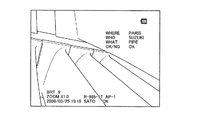
次に、第2の動作例を説明する。第2の動作例では、ノートデータに登録されている文字列の中からユーザーが選択した文字列が画像データの一部分として記録される。ノートデータは、1個のカテゴリと、カテゴリに対応するコンテンツとを一組としたデータである。ユーザーは、第1の動作例と同様の文字入力により、カテゴリとコンテンツに対する文字列の登録や編集を行うことが可能である。カテゴリには、どこで、だれが、等の大きなグループを示す文字列を入力することが多く、コンテンツには、「NEW YORK」、「LONDON」、「TOKYO」、「SATO」、「SUZUKI」等の具体的な文字列を入力することが多い。作成されたノートデータは画像データの一部分として記録媒体16に記録される。
Next, a second operation example will be described. In the second operation example, the character string selected by the user from the character strings registered in the note data is recorded as a part of the image data. Note data is a set of one category and content corresponding to the category. The user can register and edit character strings for categories and contents by inputting characters as in the first operation example. In the category, where and who often enter a character string indicating a large group, such as “NEW YORK”, “LONDON”, “TOKYO”, “SATO”, “SUZUKI”, etc. A specific character string is often input. The created note data is recorded on the
第2の動作例では、カテゴリ入力用のお気に入りリストとコンテンツ入力用のお気に入りリストが用意され、カテゴリまたはコンテンツに対する文字入力時には、文字入力の対象となるカテゴリまたはコンテンツに対応したお気に入りリストが使用される。ノートデータの編集を行う場合、ユーザーは操作部14を操作し、ノート編集画面の起動指示(表示指示)を入力する。メイン制御部10は、操作部14から出力される信号に基づいてノート編集画面の起動指示を検出する。
In the second operation example, a favorite list for category input and a favorite list for content input are prepared, and when inputting characters for a category or content, a favorite list corresponding to the category or content targeted for character input is used. . When editing note data, the user operates the
ノート編集画面の起動指示を検出したメイン制御部10は、ノート編集画面の表示をグラフィック生成部13に指示する。この際に、メイン制御部10は記録媒体読み書き部15を制御し、記録媒体16からノートデータを読み出し、ノートデータに含まれるカテゴリおよびコンテンツの文字列を表示するようにグラフィック生成部13を制御する。グラフィック生成部13は、ノート編集画面を表示するためのグラフィック画像信号を生成し、画像合成部9へ出力する。画像合成部9は、グラフィック生成部13から出力されたグラフィック画像信号を外部表示装置8へ出力する。外部表示装置8は、グラフィック画像信号に基づいてノート編集画面を表示する。
The
図10は、ノート編集画面が起動したときの外部表示装置8の画面を示している。図10に示すようにカテゴリ欄1000には、ノートデータに登録されているカテゴリの文字列がリスト形式で表示される。コンテンツ欄1001には、ノートデータに登録されているコンテンツの文字列のうち、選択されているカテゴリに対応したコンテンツの文字列がリスト形式で表示される。図10では、カテゴリ「WHERE」に対応したコンテンツ「NEW YORK」、「SUZUKI」、「PIPE」がコンテンツ欄1001に表示されている。文字列が登録されていない場合には空欄となる。
FIG. 10 shows a screen of the
カテゴリ欄またはコンテンツ欄に文字列を入力する場合、ユーザーは操作部14の操作により、カテゴリ欄またはコンテンツ欄を選択し、さらに文字入力画面の起動指示(表示指示)を入力する。メイン制御部10は、操作部14から出力される信号に基づいて起動指示を検出する。続いて、メイン制御部10は、図9に示す手順に従って、文字入力に関する制御を実行する。
When inputting a character string in the category field or the content field, the user selects the category field or the content field by operating the
起動指示を検出したメイン制御部10は、文字入力画面の表示をグラフィック生成部13に指示する。グラフィック生成部13は、文字入力画面を表示するためのグラフィック画像信号を生成し、画像合成部9へ出力する。画像合成部9は、グラフィック生成部13から出力されたグラフィック画像信号を外部表示装置8へ出力する。外部表示装置8は、グラフィック画像信号に基づいて文字入力画面を表示する(ステップS200)。
The
続いて、メイン制御部10は、モード記憶部20に保持されているモード情報を読み出して参照する(ステップS201)。第2の動作例におけるモード情報は、カテゴリ欄とコンテンツ欄のどちらが選択されているのかを示している。メイン制御部10は、カテゴリ欄とコンテンツ欄の選択状態に応じてモード情報を更新している。モード情報がカテゴリ欄を示している場合(ステップS202でYESの場合)、メイン制御部10はカテゴリ入力用のお気に入りリストをお気に入り記憶部18から読み出し、メイン制御部10内のメモリ上にロードする(ステップS203)。
Subsequently, the
また、モード情報がカテゴリ欄ではなくコンテンツ欄を示している場合(ステップS202でNO、ステップS204でYESの場合)、メイン制御部10はコンテンツ入力用のお気に入りリストをお気に入り記憶部18から読み出し、メイン制御部10内のメモリ上にロードする(ステップS205)。また、モード情報がカテゴリ欄とコンテンツ欄のいずれをも示していない場合(ステップS202,S204でNOの場合)、文字入力に関する制御が終了する。ステップS203,S205に続いて、メイン制御部10は、メモリ上にロードしたお気に入りリスト内の文字列を含む文字入力画面を表示するためのグラフィック画像信号を生成するようにグラフィック生成部13を制御する(ステップS206)。
When the mode information indicates the content column instead of the category column (NO in step S202, YES in step S204), the
図11は、カテゴリ欄から文字入力画面が起動したときの外部表示装置8の画面を示している。また、図12は、コンテンツ欄から文字入力画面が起動したときの外部表示装置8の画面を示している。画面には、文字入力を行うためのGUI部品であるボタンなどが表示される。候補欄1100,1200には、お気に入りリスト内の文字列が表示される(図11(a)、図12(a))。特に、候補欄1100,1200の一行目には、お気に入りリスト内の先頭の文字列が表示され、その文字列が選択された状態となる。候補欄1100,1200の所望の文字列が表示されている行が選択されている状態で、ユーザーが操作部14の操作により文字列の入力を指示すると、上記の文字列が入力欄1110,1210に表示される(図11(b)、図12(b))。なお、文字入力画面の起動時にカテゴリ欄とコンテンツ欄のどちらが選択されていたのかを示すアイコンや文字列を文字入力画面に表示してもよい。
FIG. 11 shows a screen of the
ステップS206に続いて、メイン制御部10は、操作部14から出力される信号に基づいて文字入力画面の終了要求の有無を判定する(ステップS207)。終了要求がない場合(ステップS207でYES)、メイン制御部10は文字入力処理を実行する(ステップS208)。また、終了要求があった場合(ステップS207でNO)、メイン制御部10は、文字入力画面を非表示とし、確定した文字列を表示するようにグラフィック生成部13を制御し、文字入力に関する制御を終了する。
Subsequent to step S206, the
ステップS208の文字入力処理の詳細は第1の動作例と同様である。ユーザーが操作部14の操作により所望の文字入力を行った後、確定ボタン1120,1220を操作すると、入力した文字列が確定する。確定ボタン1120,1220の操作を検出した場合、メイン制御部10は、文字入力画面を終了し、確定した文字列をノート編集画面に表示するため、グラフィック生成部13を制御する。
Details of the character input processing in step S208 are the same as those in the first operation example. After the user inputs a desired character by operating the
カテゴリ欄から文字入力画面が起動した場合には、文字入力の結果がノート編集画面のカテゴリ欄に反映される。例えば、図10に示したカテゴリ欄1000の文字列「WHERE」が選択された状態で文字入力画面(図11)が起動し、文字列「CITY」が入力されると、図13(a)に示すようにカテゴリ欄1300の文字列「WHERE」が「CITY」に更新される。また、図10に示したコンテンツ欄1001の文字列「NEW YORK」が選択された状態で文字入力画面(図12)が起動し、文字列「PARIS」が入力されると、図13(b)に示すようにコンテンツ欄1301の文字列「NEW YORK」が「PARIS」に更新される。ユーザーが上記の操作を繰り返すことにより、所望のカテゴリとコンテンツを入力することが可能である。
When the character input screen is activated from the category column, the result of character input is reflected in the category column of the note edit screen. For example, when the character input screen (FIG. 11) is activated in a state where the character string “WHERE” in the
ユーザーが操作部14の操作により、確定ボタン1310を操作すると、カテゴリおよびコンテンツの文字列が確定する。確定ボタン1310の操作を検出した場合、メイン制御部10は、ノートデータをメイン制御部10内のメモリに保存すると共に、記録媒体読み書き部15を制御し、記録媒体16内のノートデータを更新する。
When the user operates the
その後、ユーザーが操作部14の操作により画像の記録指示を入力すると、メイン制御部10は、画像処理部6から出力された画像データに対して、図示せぬメモリ内に保存したノートデータを付加し、記録媒体読み書き部15へ出力する。記録媒体読み書き部15は、ノートデータが付加された画像データを記録媒体16に書き込み、記録する。記録された画像データ内のノートデータは、PCの画像ビューアーや内視鏡装置本体で表示することができる(図14)。
Thereafter, when the user inputs an image recording instruction by operating the
次に、第3の動作例を説明する。第3の動作例では、お気に入りリストは各動作モードで共通して使用される。また、動作モードごとに文字列の使用頻度が記録され、使用頻度に応じて、文字入力画面の候補欄に表示する文字列の順番を入れ替える処理が実行される。図16は、第3の動作例におけるお気に入りリストの内容を示している。ユーザーによって登録された文字列に対して、動作モードごとの使用頻度が対応付けられている。使用頻度Aはライブモード用の使用頻度であり、使用頻度Bは計測モード用の使用頻度であり、使用頻度Cは再生モード用の使用頻度である。お気に入りリスト内で文字列が登録されていない箇所は未使用領域(空欄)となり、使用頻度は0となる。 Next, a third operation example will be described. In the third operation example, the favorite list is used in common in each operation mode. In addition, the frequency of use of the character string is recorded for each operation mode, and processing for changing the order of the character strings displayed in the candidate field of the character input screen is executed according to the use frequency. FIG. 16 shows the contents of the favorite list in the third operation example. The frequency of use for each operation mode is associated with the character string registered by the user. The usage frequency A is the usage frequency for the live mode, the usage frequency B is the usage frequency for the measurement mode, and the usage frequency C is the usage frequency for the playback mode. A portion where no character string is registered in the favorite list is an unused area (blank), and the usage frequency is zero.
お気に入りリストに登録されていない文字列が新たにお気に入りリストに登録された場合には、お気に入りリストの未使用領域に文字列が追加されると共に、起動中の動作モード用の使用頻度に1が設定され、それ以外の動作モード用の使用頻度に0が設定される。また、既にお気に入りリストに登録されている文字列(言い換えると、いずれかの動作モードで使用した実績がある文字列)がいずれかの動作モードで使用された場合には、その動作モード用の使用頻度に1が加算される。 When a character string not registered in the favorite list is newly registered in the favorite list, the character string is added to the unused area of the favorite list, and 1 is set as the use frequency for the active operation mode. The usage frequency for other operation modes is set to 0. In addition, when a character string already registered in the favorites list (in other words, a character string that has been used in any operation mode) is used in any operation mode, use for that operation mode is used. 1 is added to the frequency.
文字入力を行う場合、ユーザーは操作部14を操作し、文字入力画面の起動指示(表示指示)を入力する。メイン制御部10は、操作部14から出力される信号に基づいて起動指示を検出する。続いて、メイン制御部10は、図15に示す手順に従って、文字入力に関する制御を実行する。
When inputting characters, the user operates the
起動指示を検出したメイン制御部10は、文字入力画面の表示をグラフィック生成部13に指示する。グラフィック生成部13は、文字入力画面を表示するためのグラフィック画像信号を生成し、画像合成部9へ出力する。画像合成部9は、グラフィック生成部13から出力されたグラフィック画像信号を外部表示装置8へ出力する。外部表示装置8は、グラフィック画像信号に基づいて文字入力画面を表示する(ステップS300)。
The
続いて、メイン制御部10は、お気に入りリストをお気に入り記憶部18から読み出し、メイン制御部10内のメモリ上にロードする(ステップS301)。さらに、メイン制御部10は、モード記憶部20に保持されているモード情報を読み出して参照する(ステップS302)。モード情報がライブモードを示している場合(ステップS303でYESの場合)、メイン制御部10は、メモリ上にロードしたお気に入りリスト内の文字列を、ライブモード用の使用頻度に基づいて降順にソートする(ステップS304)。
Subsequently, the
また、モード情報がライブモードではなく計測モードを示している場合(ステップS303でNO、ステップS305でYESの場合)、メイン制御部10は、メモリ上にロードしたお気に入りリスト内の文字列を、計測モード用の使用頻度に基づいて降順にソートする(ステップS306)。また、モード情報がライブモードでも計測モードでもなく再生モードを示している場合(ステップS303,S305でNO、ステップS307でYESの場合)、メイン制御部10は、メモリ上にロードしたお気に入りリスト内の文字列を、再生モード用の使用頻度に基づいて降順にソートする(ステップS308)。また、モード情報が示す動作モードがライブモード、計測モード、再生モードのいずれでもない場合(ステップS303,S305,S307でNOの場合)、文字入力に関する制御が終了する。
When the mode information indicates the measurement mode instead of the live mode (NO in step S303 and YES in step S305), the
文字入力画面がライブモードで起動した場合、図16に示したお気に入りリスト内の文字列は、ライブモード用の使用頻度Aに基づいて、図17に示すようにソートされる。また、文字入力画面が計測モードで起動した場合、図16に示したお気に入りリスト内の文字列は、計測モード用の使用頻度Bに基づいて、図18に示すようにソートされる。前述したように、文字入力画面内に一度に表示できる文字列からなるページがお気に入りリストの先頭から3行ずつの単位で設定される。すなわち、お気に入りリストの先頭(1行目)から3行目までの文字列が1ページ目に設定され、4行目から6行目までの文字列が2ページ目に設定され、以下同様にページが3行単位で設定される。したがって、上記のステップS304,S306,S308において、お気に入りリスト内の文字列がソートされることにより、表示に関する文字列の優先順位が決定される。 When the character input screen is activated in the live mode, the character strings in the favorite list shown in FIG. 16 are sorted as shown in FIG. 17 based on the use frequency A for the live mode. When the character input screen is activated in the measurement mode, the character strings in the favorite list shown in FIG. 16 are sorted as shown in FIG. 18 based on the use frequency B for the measurement mode. As described above, pages composed of character strings that can be displayed at once in the character input screen are set in units of three lines from the top of the favorite list. That is, the character string from the top (first line) to the third line of the favorites list is set to the first page, the character string from the fourth line to the sixth line is set to the second page, and so on. Is set in units of three lines. Accordingly, in the above steps S304, S306, and S308, the character strings in the favorite list are sorted, whereby the priority order of the character strings related to display is determined.
ステップS304,S306,S308に続いて、メイン制御部10は、ソート後のお気に入りリスト内の文字列を含む文字入力画面を表示するためのグラフィック画像信号を生成するようにグラフィック生成部13を制御する(ステップS309)。これによって、図5などに示した文字入力画面が起動し、候補欄にはお気に入りリスト内の1ページ目の文字列が表示される。
Subsequent to steps S304, S306, and S308, the
ステップS309に続いて、メイン制御部10は、操作部14から出力される信号に基づいて文字入力画面の終了要求の有無を判定する(ステップS310)。終了要求がない場合(ステップS310でYES)、メイン制御部10は文字入力処理を実行する(ステップS311)。また、終了要求があった場合(ステップS310でNO)、メイン制御部10は、文字入力画面を非表示とし、確定した文字列を表示するようにグラフィック生成部13を制御し、文字入力に関する制御を終了する。
Subsequent to step S309, the
ステップS311の文字入力処理の詳細は第1の動作例と同様である。ただし、お気に入りリスト内の文字列が選択されて入力欄に表示された場合、メイン制御部10は、その文字列に対応した使用頻度のうち、モード情報が示す動作モードに対応した使用頻度に1を加算することにより使用頻度を更新する。
Details of the character input processing in step S311 are the same as those in the first operation example. However, when a character string in the favorites list is selected and displayed in the input field, the
上記のように、文字入力画面の起動時の動作モードに対応した使用頻度に基づいて文字列の優先順位を決定することにより、使用頻度の高い文字列を文字入力画面の起動時に表示することが可能となる。これによって、各動作モードに最適な文字列を優先的に入力することが可能となるので、文字入力に必要な操作を削減することができる。 As described above, by determining the priority order of the character strings based on the frequency of use corresponding to the operation mode at the time of starting the character input screen, it is possible to display a character string having a high frequency of use at the time of starting the character input screen. It becomes possible. As a result, it is possible to preferentially input a character string that is optimal for each operation mode, thereby reducing the number of operations required for character input.
次に、お気に入りリストに文字列を登録する場合の動作を説明する。前述した方法と同様にして、ユーザーは操作部14の操作により文字入力画面上で文字入力を行い、登録したい文字列を入力する。図19(a)に示すように、入力された文字列は入力欄1900に表示される。続いて、ユーザーが操作部14の操作により、お気に入り登録ボタン1910を操作すると、メイン制御部10は、お気に入り記憶部18に保存されている現在のお気に入りリスト内の登録済み文字列を候補欄1920に表示するようにグラフィック生成部13を制御する。お気に入りリストに文字列が1つも登録されていない場合には、候補欄1920は空白の状態となる。
Next, an operation for registering a character string in the favorite list will be described. In the same manner as described above, the user inputs characters on the character input screen by operating the
ユーザーは操作部14の操作により、文字列を登録したい行を指定する。図19(a)は、1行目が選択された状態を示している。続いて、ユーザーは操作部14の操作により、選択した行に対して文字列を登録する操作を行う。この操作を検出したメイン制御部10は、候補欄1920の1行目に表示されている文字列に対応したお気に入りリスト内の文字列を、入力欄1900に表示されている文字列に置き換え、お気に入り記憶部18に保存する。また、メイン制御部10は、候補欄1920の1行目に表示されている文字列を、入力欄1900に表示されている文字列に置き換えて表示するようにグラフィック生成部13を制御する。この結果、図19(b)に示すように、候補欄1920の1行目の文字列が更新される。また、空白の行が文字列の登録先として選択された場合には、その行に対して、ユーザーが登録を希望する文字列が表示されると共に、お気に入りリスト内に新たに文字列が追加される。
The user designates a line to register a character string by operating the
前述した第1および第2の動作例に対応したお気に入りリストに文字列を登録する場合には、メイン制御部10は、モード記憶部20に保持されているモード情報が示す動作モードに対応したお気に入りリストに対して文字列を登録する。また、前述した第3の動作例に対応したお気に入りリストに文字列を登録する場合には、メイン制御部10は、モード記憶部20に保持されているモード情報が示す動作モード用の使用頻度に1を設定する。
When a character string is registered in the favorite list corresponding to the first and second operation examples described above, the
なお、入力欄1900に文字列が入力されていない状態で、上記と同様にお気に入り登録ボタン1910が操作され、さらに候補欄上の行が指定された場合、その行に対応するお気に入りリスト内の文字列を削除することが可能である。
Note that when the
次に、本実施形態の変形例を説明する。以下のようなインポート・エクスポートの機能により、お気に入りリストを他の装置と共有することも可能である。お気に入りリストを他の装置用に出力(エクスポート)する場合、ユーザーは操作部14の操作によりエクスポートの指示を入力する。この指示を検出したメイン制御部10は、お気に入り記憶部18からお気に入りリストを読み出し、記録媒体読み書き部15の制御により、記録媒体16にお気に入りリストを書き込み、記録する。
Next, a modification of this embodiment will be described. The favorites list can be shared with other devices by the following import / export functions. When outputting (exporting) the favorite list to another device, the user inputs an export instruction by operating the
また、他の装置で作成されたお気に入りリストを入力(インポート)する場合、ユーザーは操作部14の操作によりインポートの指示を入力する。この指示を検出したメイン制御部10は、記録媒体読み書き部15の制御により、記録媒体16からお気に入りリストを読み出し、お気に入り記憶部18にお気に入りリストを書き込む。
When inputting (importing) a favorite list created by another device, the user inputs an import instruction by operating the
また、記録媒体16を介して他の装置とお気に入りリストの受け渡しを行うだけでなく、外付け入力機器12として他の装置を接続してお気に入りリストの受け渡しを行ってもよい。あるいは、ネットワークを介した通信により、他の装置とお気に入りリストの受け渡しを行ってもよい。
In addition to passing the favorite list with other devices via the
また、ユーザーが操作部14の操作により文字入力画面の起動指示を入力する以外に、画面起動スイッチ17の操作により起動指示を入力することも可能である。あるいは、ユーザーが外付け入力機器12を接続することにより起動指示を入力することも可能である。
Further, in addition to the user inputting a start instruction for the character input screen by operating the
また、内視鏡装置の起動時に検査者の認証を行うユーザーログイン機能を設け、ユーザーごとにお気に入りリストを用意し、ログインしたユーザーに応じてお気に入りリストを切り替えるようにしてもよい。このとき、ログインしたユーザーを示すアイコンや文字列を文字入力画面に表示してもよい。 In addition, a user login function for authenticating an inspector when the endoscope apparatus is activated may be provided, a favorite list may be prepared for each user, and the favorite list may be switched according to the logged-in user. At this time, an icon or a character string indicating the logged-in user may be displayed on the character input screen.
上述したように、本実施形態によれば、装置の動作モードに応じて、お気に入りリスト内の文字列を選択するためのGUI部品(候補欄やボタンなど)の表示/非表示が制御される。具体的には、第1および第2の動作例では、起動中の動作モードに対応したお気に入りリスト内の文字列を選択するためのGUI部品が表示される。また、第3の動作例では、お気に入りリスト内の文字列のうち、起動中の動作モードに対応した使用頻度の高い文字列を選択するためのGUI部品が表示される。これによって、各動作モードに適した文字列を選択し易くすることが可能となるので、文字入力の手間を削減することができる。 As described above, according to the present embodiment, display / non-display of GUI parts (candidate fields, buttons, etc.) for selecting a character string in the favorite list is controlled according to the operation mode of the apparatus. Specifically, in the first and second operation examples, a GUI component for selecting a character string in the favorite list corresponding to the active operation mode is displayed. In the third operation example, a GUI component for selecting a frequently used character string corresponding to the active operation mode from among the character strings in the favorite list is displayed. As a result, it becomes possible to easily select a character string suitable for each operation mode, so that it is possible to reduce time and effort for character input.
また、ユーザーが入力した文字列をお気に入り記憶部18内のお気に入りリストに保存することによって、ユーザーが自身の意思で好みの文字列をお気に入りリストに登録することができる。
Further, by storing the character string input by the user in the favorite list in the
また、文字入力画面を切り替えることなく、お気に入り入力モードと文字ボタンモードの両方による文字列の入力を可能とすることによって、文字入力の操作性を向上することができる。 In addition, by making it possible to input a character string in both the favorite input mode and the character button mode without switching the character input screen, the operability of character input can be improved.
以上、図面を参照して本発明の実施形態について詳述してきたが、具体的な構成は上記の実施形態に限られるものではなく、本発明の要旨を逸脱しない範囲の設計変更等も含まれる。 As described above, the embodiments of the present invention have been described in detail with reference to the drawings. However, the specific configuration is not limited to the above-described embodiments, and includes design changes and the like without departing from the gist of the present invention. .
1・・・挿入部、2・・・本体部、3・・・撮像素子、4・・・対物光学系、5・・・LED、6・・・画像処理部、7・・・LED駆動部、8・・・外部表示装置、9・・・画像合成部(表示信号生成部)、10・・・メイン制御部(表示指示検出部、動作状態検出部、読出部、制御部、文字列登録部)、11・・・外部機器接続検出部(表示指示検出部)、12・・・外付け入力機器、13・・・グラフィック生成部(表示信号生成部)、14・・・操作部、15・・・記録媒体読み書き部、16・・・記録媒体、17・・・画面起動スイッチ、18・・・お気に入り記憶部(文字列記憶部)、19・・・光学アダプタ、20・・・モード記憶部
DESCRIPTION OF
Claims (5)
文字列と装置の動作状態とを対応付けて記憶する文字列記憶部と、
前記文字入力用の画面の表示指示を検出する表示指示検出部と、
装置の動作状態を検出する動作状態検出部と、
前記表示指示が検出された場合に、前記動作状態検出部によって検出された動作状態に対応した文字列を前記文字列記憶部から読み出す読出部と、
前記読出部によって読み出された文字列を選択するための部品を含む画面を表示するように前記表示信号生成部を制御し、前記部品に対する操作が検出された場合に、当該部品に対応した文字列を表示するように前記表示信号生成部を制御する制御部と、
を備えたことを特徴とする内視鏡装置。 An endoscope for photoelectrically converting a subject image to generate an imaging signal, an imaging signal processing unit for processing the imaging signal and generating image data, and an image based on the image data and a screen for inputting characters In an endoscope apparatus including a display signal generation unit that generates a display signal and an operation unit for operating the character input screen to input characters,
A character string storage unit for storing the character string and the operation state of the apparatus in association with each other;
A display instruction detection unit for detecting a display instruction for the character input screen;
An operation state detection unit for detecting the operation state of the device;
A reading unit that reads a character string corresponding to the operation state detected by the operation state detection unit from the character string storage unit when the display instruction is detected;
When the display signal generation unit is controlled to display a screen including a part for selecting a character string read by the reading unit, and an operation on the part is detected, a character corresponding to the part A control unit for controlling the display signal generation unit to display a column;
An endoscope apparatus comprising:
前記制御部は、前記読出部によって読み出された文字列を選択するための部品を含む画面を表示するように前記表示信号生成部を制御すると共に、前記動作状態検出部によって検出された動作状態に対応した使用頻度に基づいて前記部品の表示/非表示を制御し、前記部品に対する操作が検出された場合に、当該部品に対応した文字列を表示するように前記表示信号生成部を制御し、当該部品に対応した文字列に対して、前記動作状態検出部によって検出された動作状態に対応した使用頻度を更新する
ことを特徴とする請求項1に記載の内視鏡装置。 The character string storage unit stores a character string and a frequency of use of the character string for each operation state of the device in association with each other,
The control unit controls the display signal generation unit to display a screen including a part for selecting a character string read by the reading unit, and the operation state detected by the operation state detection unit The display signal generation unit is controlled to display / hide the component based on the use frequency corresponding to the component, and to display a character string corresponding to the component when an operation on the component is detected. The endoscope apparatus according to claim 1, wherein the use frequency corresponding to the operation state detected by the operation state detection unit is updated with respect to the character string corresponding to the component.
文字列と装置の動作状態とを対応付けて記憶する文字列記憶部と、
前記文字入力用の画面の表示指示を検出する表示指示検出部と、
装置の動作状態を検出する動作状態検出部と、
前記表示指示が検出された場合に、前記動作状態検出部によって検出された動作状態に対応した文字列を前記文字列記憶部から読み出す読出部と、
前記読出部によって読み出された文字列を選択するための部品を含む画面を表示するように前記表示信号生成部を制御し、前記部品に対する操作が検出された場合に、当該部品に対応した文字列を表示するように前記表示信号生成部を制御する制御部と、
として機能させるためのプログラム。 An endoscope for photoelectrically converting a subject image to generate an imaging signal, an imaging signal processing unit for processing the imaging signal and generating image data, and an image based on the image data and a screen for inputting characters A computer that controls an endoscope apparatus including a display signal generation unit that generates a display signal and an operation unit for operating the character input screen to input characters,
A character string storage unit for storing the character string and the operation state of the apparatus in association with each other;
A display instruction detection unit for detecting a display instruction for the character input screen;
An operation state detection unit for detecting the operation state of the device;
A reading unit that reads a character string corresponding to the operation state detected by the operation state detection unit from the character string storage unit when the display instruction is detected;
When the display signal generation unit is controlled to display a screen including a part for selecting a character string read by the reading unit, and an operation on the part is detected, a character corresponding to the part A control unit for controlling the display signal generation unit to display a column;
Program to function as.
Priority Applications (2)
| Application Number | Priority Date | Filing Date | Title |
|---|---|---|---|
| JP2008117776A JP2009265531A (en) | 2008-04-28 | 2008-04-28 | Endoscope apparatus and program |
| US12/430,351 US8432439B2 (en) | 2008-04-28 | 2009-04-27 | Endoscope apparatus and method of inputting character string |
Applications Claiming Priority (1)
| Application Number | Priority Date | Filing Date | Title |
|---|---|---|---|
| JP2008117776A JP2009265531A (en) | 2008-04-28 | 2008-04-28 | Endoscope apparatus and program |
Publications (1)
| Publication Number | Publication Date |
|---|---|
| JP2009265531A true JP2009265531A (en) | 2009-11-12 |
Family
ID=41214579
Family Applications (1)
| Application Number | Title | Priority Date | Filing Date |
|---|---|---|---|
| JP2008117776A Pending JP2009265531A (en) | 2008-04-28 | 2008-04-28 | Endoscope apparatus and program |
Country Status (2)
| Country | Link |
|---|---|
| US (1) | US8432439B2 (en) |
| JP (1) | JP2009265531A (en) |
Families Citing this family (7)
| Publication number | Priority date | Publication date | Assignee | Title |
|---|---|---|---|---|
| US20110066979A1 (en) * | 2009-09-14 | 2011-03-17 | Olympus Corporation | Nondestructive testing apparatus |
| US8826190B2 (en) | 2011-05-27 | 2014-09-02 | Google Inc. | Moving a graphical selector |
| CN103093735B (en) * | 2011-10-27 | 2015-07-29 | 康佳集团股份有限公司 | The LED video processor of word can be embedded |
| US9804777B1 (en) * | 2012-10-23 | 2017-10-31 | Google Inc. | Gesture-based text selection |
| US10108003B2 (en) * | 2014-05-30 | 2018-10-23 | General Electric Company | Systems and methods for providing monitoring state-based selectable buttons to non-destructive testing devices |
| JP7016612B2 (en) * | 2017-02-10 | 2022-02-07 | 株式会社東芝 | Image processing equipment and programs |
| WO2019102753A1 (en) * | 2017-11-27 | 2019-05-31 | オリンパス株式会社 | Endoscope system, terminal device, control method, and program |
Citations (6)
| Publication number | Priority date | Publication date | Assignee | Title |
|---|---|---|---|---|
| JPH0625934U (en) * | 1992-08-26 | 1994-04-08 | 横河メディカルシステム株式会社 | Name input device |
| JPH08112239A (en) * | 1994-10-14 | 1996-05-07 | Olympus Optical Co Ltd | Endoscope system |
| JPH11312202A (en) * | 1998-04-30 | 1999-11-09 | Sanyo Electric Co Ltd | Consulation support device |
| JP2004348687A (en) * | 2003-03-26 | 2004-12-09 | Olympus Corp | Inspection management method and system |
| JP2005110944A (en) * | 2003-10-07 | 2005-04-28 | Sanyo Electric Co Ltd | Apparatus, method and program for assisting medical examination |
| JP2008052544A (en) * | 2006-08-25 | 2008-03-06 | Konica Minolta Medical & Graphic Inc | Database system, program, image retrieval method, and report retrieval method |
Family Cites Families (3)
| Publication number | Priority date | Publication date | Assignee | Title |
|---|---|---|---|---|
| US20040080541A1 (en) * | 1998-03-20 | 2004-04-29 | Hisashi Saiga | Data displaying device |
| JP2000259327A (en) | 1999-03-11 | 2000-09-22 | Sony Corp | Character input device |
| JP2006218233A (en) * | 2005-02-14 | 2006-08-24 | Olympus Corp | Endoscope apparatus |
-
2008
- 2008-04-28 JP JP2008117776A patent/JP2009265531A/en active Pending
-
2009
- 2009-04-27 US US12/430,351 patent/US8432439B2/en not_active Expired - Fee Related
Patent Citations (6)
| Publication number | Priority date | Publication date | Assignee | Title |
|---|---|---|---|---|
| JPH0625934U (en) * | 1992-08-26 | 1994-04-08 | 横河メディカルシステム株式会社 | Name input device |
| JPH08112239A (en) * | 1994-10-14 | 1996-05-07 | Olympus Optical Co Ltd | Endoscope system |
| JPH11312202A (en) * | 1998-04-30 | 1999-11-09 | Sanyo Electric Co Ltd | Consulation support device |
| JP2004348687A (en) * | 2003-03-26 | 2004-12-09 | Olympus Corp | Inspection management method and system |
| JP2005110944A (en) * | 2003-10-07 | 2005-04-28 | Sanyo Electric Co Ltd | Apparatus, method and program for assisting medical examination |
| JP2008052544A (en) * | 2006-08-25 | 2008-03-06 | Konica Minolta Medical & Graphic Inc | Database system, program, image retrieval method, and report retrieval method |
Also Published As
| Publication number | Publication date |
|---|---|
| US20090268018A1 (en) | 2009-10-29 |
| US8432439B2 (en) | 2013-04-30 |
Similar Documents
| Publication | Publication Date | Title |
|---|---|---|
| US10832812B2 (en) | Endoscope inspection report creating apparatus, creating method of endoscope inspection report and storage medium | |
| US9298351B2 (en) | Inspection image display apparatus, inspection image display method and storage medium | |
| JP2009265531A (en) | Endoscope apparatus and program | |
| US20060224961A1 (en) | Information processing method and apparatus | |
| US20110066979A1 (en) | Nondestructive testing apparatus | |
| JPH09212529A (en) | Portable information collecting device and information collecting method thereof | |
| CN1327687C (en) | Image taking apparatus | |
| JP2001005902A (en) | Image recorder | |
| KR101523971B1 (en) | Terminal executing function of voice recording and method for processing image thereof | |
| JP2006107144A (en) | Image playback device | |
| US8098296B2 (en) | Image display system | |
| JP2009279057A (en) | Endoscope system and program | |
| JPH08272932A (en) | Image file device | |
| US20250260848A1 (en) | Electronic device and shooting management method | |
| JP2009261695A (en) | Endoscope system and program | |
| US20260059194A1 (en) | Electronic device and video management method | |
| JP5362257B2 (en) | Waveform recorder | |
| JP5160874B2 (en) | Endoscope device | |
| JPH10272094A (en) | Endoscope information storage medium | |
| KR20110083095A (en) | Digital image processing device capable of generating and playing back images linked with multimedia contents and control method thereof | |
| JP2009140017A (en) | Information processing apparatus and processing method thereof | |
| JP2006148705A (en) | Camera and control method thereof | |
| JP2007251420A (en) | Image display unit | |
| JP2017161912A (en) | Device for generating display data, method, and program | |
| JP2025121758A (en) | Information processing device, information processing method, and program |
Legal Events
| Date | Code | Title | Description |
|---|---|---|---|
| A621 | Written request for application examination |
Free format text: JAPANESE INTERMEDIATE CODE: A621 Effective date: 20110304 |
|
| A521 | Request for written amendment filed |
Free format text: JAPANESE INTERMEDIATE CODE: A523 Effective date: 20120316 |
|
| A977 | Report on retrieval |
Free format text: JAPANESE INTERMEDIATE CODE: A971007 Effective date: 20121030 |
|
| A131 | Notification of reasons for refusal |
Free format text: JAPANESE INTERMEDIATE CODE: A131 Effective date: 20121211 |
|
| A521 | Request for written amendment filed |
Free format text: JAPANESE INTERMEDIATE CODE: A523 Effective date: 20130204 |
|
| A521 | Request for written amendment filed |
Free format text: JAPANESE INTERMEDIATE CODE: A821 Effective date: 20130205 |
|
| A02 | Decision of refusal |
Free format text: JAPANESE INTERMEDIATE CODE: A02 Effective date: 20130521 |