CN109413333B - Display control method and terminal - Google Patents
Display control method and terminal Download PDFInfo
- Publication number
- CN109413333B CN109413333B CN201811433680.0A CN201811433680A CN109413333B CN 109413333 B CN109413333 B CN 109413333B CN 201811433680 A CN201811433680 A CN 201811433680A CN 109413333 B CN109413333 B CN 109413333B
- Authority
- CN
- China
- Prior art keywords
- target window
- input
- image
- target
- window
- Prior art date
- Legal status (The legal status is an assumption and is not a legal conclusion. Google has not performed a legal analysis and makes no representation as to the accuracy of the status listed.)
- Active
Links
Images


Classifications
-
- H—ELECTRICITY
- H04—ELECTRIC COMMUNICATION TECHNIQUE
- H04N—PICTORIAL COMMUNICATION, e.g. TELEVISION
- H04N23/00—Cameras or camera modules comprising electronic image sensors; Control thereof
- H04N23/60—Control of cameras or camera modules
- H04N23/63—Control of cameras or camera modules by using electronic viewfinders
-
- H—ELECTRICITY
- H04—ELECTRIC COMMUNICATION TECHNIQUE
- H04M—TELEPHONIC COMMUNICATION
- H04M1/00—Substation equipment, e.g. for use by subscribers
- H04M1/02—Constructional features of telephone sets
- H04M1/0202—Portable telephone sets, e.g. cordless phones, mobile phones or bar type handsets
- H04M1/026—Details of the structure or mounting of specific components
- H04M1/0264—Details of the structure or mounting of specific components for a camera module assembly
-
- H—ELECTRICITY
- H04—ELECTRIC COMMUNICATION TECHNIQUE
- H04M—TELEPHONIC COMMUNICATION
- H04M1/00—Substation equipment, e.g. for use by subscribers
- H04M1/72—Mobile telephones; Cordless telephones, i.e. devices for establishing wireless links to base stations without route selection
- H04M1/724—User interfaces specially adapted for cordless or mobile telephones
- H04M1/72448—User interfaces specially adapted for cordless or mobile telephones with means for adapting the functionality of the device according to specific conditions
- H04M1/72454—User interfaces specially adapted for cordless or mobile telephones with means for adapting the functionality of the device according to specific conditions according to context-related or environment-related conditions
-
- H—ELECTRICITY
- H04—ELECTRIC COMMUNICATION TECHNIQUE
- H04N—PICTORIAL COMMUNICATION, e.g. TELEVISION
- H04N23/00—Cameras or camera modules comprising electronic image sensors; Control thereof
- H04N23/60—Control of cameras or camera modules
Landscapes
- Engineering & Computer Science (AREA)
- Signal Processing (AREA)
- Multimedia (AREA)
- Environmental & Geological Engineering (AREA)
- Human Computer Interaction (AREA)
- Computer Networks & Wireless Communication (AREA)
- User Interface Of Digital Computer (AREA)
Abstract
本发明提供一种显示控制方法及终端,该方法包括:接收用户的第一输入;响应于所述第一输入,拍摄图像;在目标窗口显示拍摄的所述图像;其中,所述目标窗口显示于拍摄预览界面的图像显示区,且所述目标窗口的面积小于所述图像显示区的面积。通过本发明提供的显示控制方法,能够实现在拍摄图像的过程中,基于目标窗口查看所拍摄的图像,不仅查看图像较为方便,还便于用户根据之前拍摄的图像确定是否需要继续拍摄,或是调整拍摄角度、拍摄参数等继续进行拍摄,以提高图像拍摄效果。
The present invention provides a display control method and terminal. The method includes: receiving a first input from a user; capturing an image in response to the first input; displaying the captured image in a target window; wherein the target window displays in the image display area of the shooting preview interface, and the area of the target window is smaller than the area of the image display area. Through the display control method provided by the present invention, it is possible to view the captured image based on the target window during the process of capturing an image, which is not only convenient for viewing the image, but also facilitates the user to determine whether to continue capturing or adjust the image based on the previously captured image. The shooting angle, shooting parameters, etc. continue to shoot to improve the image shooting effect.
Description
技术领域technical field
本发明涉及通信技术领域,尤其涉及一种显示控制方法及终端。The present invention relates to the field of communication technologies, and in particular, to a display control method and a terminal.
背景技术Background technique
随着终端技术的发展,终端的功能越来越多样,其中,相机已成为许多终端不可或缺的功能。目前,在使用终端的相机过程中,用户拍摄图像后,所拍摄的图像会以缩略图的方式呈现在拍摄预览界面的缩略图控件中,在用户需要查看所拍摄的图像时,需点击该缩略图控件,退出拍摄预览界面并进入图库,才可以显示原图。With the development of terminal technology, the functions of the terminal are becoming more and more diverse, among which the camera has become an indispensable function of many terminals. At present, in the process of using the camera of the terminal, after the user captures an image, the captured image will be displayed in the thumbnail control of the capture preview interface in the form of a thumbnail. When the user needs to view the captured image, he needs to click the thumbnail Thumbnail control, exit the shooting preview interface and enter the gallery to display the original image.
可见,现有技术中存在拍摄图像过程中查看图像较为不便的问题。It can be seen that in the prior art, there is a problem that it is inconvenient to view images during the process of capturing images.
发明内容SUMMARY OF THE INVENTION
本发明实施例提供一种显示控制方法及终端,以解决拍摄图像过程中查看图像较为不便的问题。Embodiments of the present invention provide a display control method and terminal, so as to solve the problem of inconvenience in viewing images during the process of capturing images.
为了解决上述技术问题,本发明是这样实现的:In order to solve the above-mentioned technical problems, the present invention is achieved in this way:
第一方面,本发明实施例提供了一种显示控制方法,应用于终端,该方法包括:In a first aspect, an embodiment of the present invention provides a display control method, which is applied to a terminal, and the method includes:
接收用户的第一输入;receiving the first input from the user;
响应于所述第一输入,拍摄图像;in response to the first input, capturing an image;
在目标窗口显示拍摄的所述图像;displaying the captured image in the target window;
其中,所述目标窗口显示于拍摄预览界面的图像显示区,且所述目标窗口的面积小于所述图像显示区的面积。Wherein, the target window is displayed in the image display area of the shooting preview interface, and the area of the target window is smaller than the area of the image display area.
第二方面,本发明实施例还提供一种终端。该终端包括:In a second aspect, an embodiment of the present invention further provides a terminal. The terminal includes:
第一接收模块,用于接收用户的第一输入;a first receiving module, configured to receive the first input of the user;
拍摄模块,用于响应于所述第一输入,拍摄图像;a photographing module for photographing an image in response to the first input;
第一显示模块,用于在目标窗口显示拍摄的所述图像;a first display module for displaying the captured image in a target window;
其中,所述目标窗口显示于拍摄预览界面的图像显示区,且所述目标窗口的面积小于所述图像显示区的面积。Wherein, the target window is displayed in the image display area of the shooting preview interface, and the area of the target window is smaller than the area of the image display area.
第三方面,本发明实施例还提供一种终端,包括处理器、存储器及存储在所述存储器上并可在所述处理器上运行的计算机程序,所述计算机程序被所述处理器执行时实现上述的显示控制方法的步骤。In a third aspect, an embodiment of the present invention further provides a terminal, including a processor, a memory, and a computer program stored on the memory and executable on the processor, when the computer program is executed by the processor Implement the steps of the above-mentioned display control method.
第四方面,本发明实施例还提供一种计算机可读存储介质,所述计算机可读存储介质上存储有计算机程序,所述计算机程序被处理器执行时实现上述的显示控制方法的步骤。In a fourth aspect, an embodiment of the present invention further provides a computer-readable storage medium, where a computer program is stored on the computer-readable storage medium, and when the computer program is executed by a processor, the steps of the above-mentioned display control method are implemented.
本发明实施例中,通过接收用户的第一输入;响应于所述第一输入,拍摄图像;在目标窗口显示拍摄的所述图像;其中,所述目标窗口显示于拍摄预览界面的图像显示区,且所述目标窗口的面积小于所述图像显示区的面积,能够实现在拍摄图像的过程中,基于目标窗口查看所拍摄的图像,不仅查看图像较为方便,还便于用户根据之前拍摄的图像确定是否需要继续拍摄,或是调整拍摄角度、拍摄参数等继续进行拍摄,以提高图像拍摄效果。In this embodiment of the present invention, the first input from the user is received; an image is captured in response to the first input; the captured image is displayed in a target window; wherein, the target window is displayed in the image display area of the capture preview interface , and the area of the target window is smaller than the area of the image display area, so that in the process of capturing an image, viewing the captured image based on the target window is not only convenient for viewing the image, but also convenient for the user to determine based on the previously captured image. Whether you need to continue shooting, or adjust the shooting angle, shooting parameters, etc. to continue shooting to improve the image shooting effect.
附图说明Description of drawings
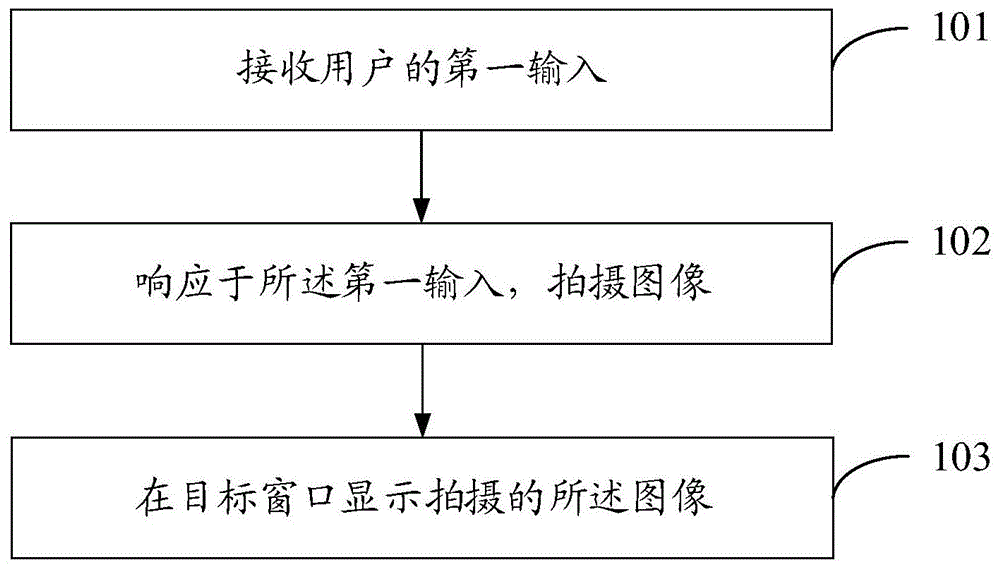
图1是本发明实施例提供的显示控制方法的流程图;1 is a flowchart of a display control method provided by an embodiment of the present invention;
图2是本发明实施例提供的在拍摄预览界面显示目标窗口的示意图;2 is a schematic diagram of displaying a target window on a shooting preview interface provided by an embodiment of the present invention;
图3是本发明又一实施例提供的显示控制方法的流程图;3 is a flowchart of a display control method provided by another embodiment of the present invention;
图4是本发明实施例提供的终端的结构图;4 is a structural diagram of a terminal provided by an embodiment of the present invention;
图5为实现本发明各个实施例的一种终端的硬件结构示意图。FIG. 5 is a schematic diagram of a hardware structure of a terminal implementing various embodiments of the present invention.
具体实施方式Detailed ways
下面将结合本发明实施例中的附图,对本发明实施例中的技术方案进行清楚、完整地描述,显然,所描述的实施例是本发明一部分实施例,而不是全部的实施例。基于本发明中的实施例,本领域普通技术人员在没有作出创造性劳动前提下所获得的所有其他实施例,都属于本发明保护的范围。The technical solutions in the embodiments of the present invention will be clearly and completely described below with reference to the accompanying drawings in the embodiments of the present invention. Obviously, the described embodiments are part of the embodiments of the present invention, but not all of the embodiments. Based on the embodiments of the present invention, all other embodiments obtained by those of ordinary skill in the art without creative efforts shall fall within the protection scope of the present invention.
本发明实施例提供一种显示控制方法,应用于终端,其中,上述终端可以是计算机、手机、平板电脑(Tablet Personal Computer)、膝上型电脑(Laptop Computer)、个人数字助理(personal digital assistant,简称PDA)或可穿戴式设备(Wearable Device)等。An embodiment of the present invention provides a display control method, which is applied to a terminal, where the terminal may be a computer, a mobile phone, a tablet personal computer (Tablet Personal Computer), a laptop computer (Laptop Computer), a personal digital assistant (personal digital assistant) PDA for short) or wearable device (Wearable Device).
参见图1,图1是本发明实施例提供的显示控制方法的流程图,如图1所示,包括以下步骤:Referring to FIG. 1, FIG. 1 is a flowchart of a display control method provided by an embodiment of the present invention, as shown in FIG. 1, including the following steps:
步骤101、接收用户的第一输入。Step 101: Receive a first input from a user.
本发明实施例中,上述第一输入可以是语音输入、在终端屏幕的触控输入或是悬浮触控输入、对终端的物理按键的按压输入等可触发图像拍摄的输入。In this embodiment of the present invention, the above-mentioned first input may be an input that can trigger image shooting, such as voice input, touch input on the terminal screen or floating touch input, pressing input on a physical key of the terminal, or the like.
步骤102、响应于所述第一输入,拍摄图像。
例如,上述第一输入为针对终端相机的拍摄按钮的触控输入,在用户触控相机的拍摄按钮的情况下,拍摄图像。For example, the above-mentioned first input is a touch input to the shooting button of the terminal camera, and when the user touches the shooting button of the camera, an image is shot.
需要说明的是,响应于上述第一输入,可以拍摄一张或是至少两张图像。It should be noted that, in response to the above-mentioned first input, one or at least two images can be captured.
步骤103、在目标窗口显示拍摄的所述图像;其中,所述目标窗口显示于拍摄预览界面的图像显示区,且所述目标窗口的面积小于所述图像显示区的面积。Step 103: Display the captured image in a target window; wherein, the target window is displayed in the image display area of the capture preview interface, and the area of the target window is smaller than the area of the image display area.
本发明实施例中,上述图像显示区为拍摄预览界面中用于显示预览图像的区域。上述目标窗口为用于显示所拍摄图像的区域。In the embodiment of the present invention, the above-mentioned image display area is an area used for displaying a preview image in the shooting preview interface. The above-mentioned target window is an area for displaying the captured image.
上述目标窗口的显示参数(例如,窗口大小、显示位置、透明度等)可以是预设的。实际应用中,可以预先在相机设置中添加用于目标窗口的设置选项,通过该设置选项可以设置上述目标窗口的显示参数。例如,可以通过设置坐标的方式,设置上述目标窗口的位置和大小,例如,设置该目标窗口的顶点坐标:The display parameters (eg, window size, display position, transparency, etc.) of the above-mentioned target window may be preset. In practical applications, a setting option for the target window can be added in the camera settings in advance, and the display parameters of the target window can be set through the setting option. For example, the position and size of the above target window can be set by setting the coordinates, for example, setting the vertex coordinates of the target window:
左上角顶点的坐标为:(设置值/总行数,设置值/总列数);The coordinates of the upper left vertex are: (set value/total number of rows, set value/total number of columns);
右下角顶点的坐标为:(设置值/总行数,设置值/总列数);The coordinates of the lower right corner vertex are: (set value/total number of rows, set value/total number of columns);
其中,总行数和总列数为相机中的定值,设置值大于零且小于对应的定值,目标窗口为矩形,因此,基于上述两个顶点的坐标,可以确定目标窗口的位置和大小。此外,当用户设置的参数不满足预设的显示要求时,可以进行提示。Among them, the total number of rows and total columns are fixed values in the camera. The set value is greater than zero and less than the corresponding fixed value. The target window is a rectangle. Therefore, based on the coordinates of the above two vertices, the position and size of the target window can be determined. In addition, when the parameters set by the user do not meet the preset display requirements, a prompt can be given.
例如,如图2所示,在拍摄预览界面的图像显示区10的左上角显示目标窗口11,其中,目标窗口11的大小为拍摄预览界面的图像显示区10面积的四分子一。需要说明的是,在拍摄预览界面还设置有拍摄控件12以及缩略图控件13。For example, as shown in FIG. 2 , a
上述目标窗口的显示参数也可以是根据用户输入的输入参数确定的,例如,当用户输入为滑动输入时,可以根据滑动输入的滑动距离、滑动时长、滑动轨迹等参数确定目标窗口的显示参数。The display parameters of the target window may also be determined according to input parameters input by the user. For example, when the user input is a sliding input, the display parameters of the target window may be determined according to parameters such as sliding distance, sliding duration, and sliding trajectory of the sliding input.
需要说明的是,本发明实施例可以在终端屏幕显示拍摄预览界面的情况下立即显示上述目标窗口;也可以是在接收到用于指示显示目标窗口的输入的情况下显示目标窗口;也可以是在检测到拍摄了图像的情况下显示目标窗口。It should be noted that in this embodiment of the present invention, the above-mentioned target window can be displayed immediately when the terminal screen displays the shooting preview interface; the target window can also be displayed when an input for instructing to display the target window is received; or the target window can be displayed Displays the target window when it is detected that an image has been captured.
为了便于理解,以下结合举例进行说明:For ease of understanding, the following examples are used to illustrate:
示例一:在用户启动终端的相机进入拍摄预览界面时,可以立即在拍摄预览界面的图像显示区显示目标窗口,此时,目标窗口可以不显示任何内容,也可以显示预览图像。在用户拍摄图像后,将当前所拍摄的图像显示在目标窗口。从而在当前所拍摄的图像效果较差的情况下,用户可以基于该图像调整拍摄角度、拍摄参数等继续进行拍摄,以拍摄效果更好的图像,在该图像效果较好的情况下,可以结束拍摄或是拍摄其它对象,以避免拍摄角度内容相似的图像。Example 1: When the user starts the camera of the terminal to enter the shooting preview interface, the target window can be displayed in the image display area of the shooting preview interface immediately. At this time, the target window can display no content or display a preview image. After the user captures an image, the currently captured image is displayed in the target window. Therefore, in the case that the effect of the currently captured image is poor, the user can adjust the shooting angle, shooting parameters, etc. based on the image to continue shooting, so as to shoot an image with a better effect, and in the case of a better image effect, the user can end the shooting. Shoot or photograph other subjects to avoid images with similar content and angles.
示例二:在用户启动终端的相机进入拍摄预览界面时,可以不立即显示目标窗口。在用户拍摄图像后,显示目标窗口,并在目标窗口中显示当前所拍摄的图像,以供用户查看。Example 2: When the user starts the camera of the terminal to enter the shooting preview interface, the target window may not be displayed immediately. After the user captures an image, the target window is displayed, and the currently captured image is displayed in the target window for the user to view.
本发明实施例的显示控制方法,接收用户的第一输入;响应于所述第一输入,拍摄图像;在目标窗口显示拍摄的所述图像;其中,所述目标窗口显示于拍摄预览界面的图像显示区,且所述目标窗口的面积小于所述图像显示区的面积,能够实现在拍摄图像的过程中,基于目标窗口查看所拍摄的图像,不仅查看图像较为方便,还便于用户根据之前拍摄的图像确定是否需要继续拍摄,或是调整拍摄角度、拍摄参数等继续进行拍摄,以提高图像拍摄效果。In the display control method of the embodiment of the present invention, a first input from a user is received; an image is captured in response to the first input; the captured image is displayed in a target window; wherein, the target window is displayed on a capture preview interface display area, and the area of the target window is smaller than the area of the image display area, so that in the process of capturing an image, viewing the captured image based on the target window is not only convenient for viewing the image, but also convenient for the user to view the captured image according to the previously captured image. The image determines whether to continue shooting, or adjust the shooting angle, shooting parameters, etc. to continue shooting, so as to improve the image shooting effect.
参见图3,图3是本发明实施例提供的显示控制方法的流程图。本发明实施例与上一实施例的区别主要在于进一步限定可以基于用户输入调整目标窗口的显示参数。本发明实施例中,所述在目标窗口显示拍摄的所述图像之后,所述方法还包括:接收用户的第二输入;响应于所述第二输入,调整所述目标窗口的显示参数;其中,所述显示参数包括窗口大小、显示位置、显示时长和透明度中的至少一项。Referring to FIG. 3, FIG. 3 is a flowchart of a display control method provided by an embodiment of the present invention. The difference between the embodiment of the present invention and the previous embodiment mainly lies in that the display parameters of the target window can be adjusted based on user input. In the embodiment of the present invention, after the captured image is displayed in the target window, the method further includes: receiving a second input from the user; adjusting a display parameter of the target window in response to the second input; wherein , the display parameters include at least one of window size, display position, display duration and transparency.
如图3所示,本发明实施例提供的显示控制方法包括以下步骤:As shown in FIG. 3 , the display control method provided by the embodiment of the present invention includes the following steps:
步骤301、接收用户的第一输入。Step 301: Receive a first input from a user.
该步骤可以同上述步骤101,为避免重复,在此不做赘述。This step may be the same as the above-mentioned
步骤302、响应于所述第一输入,拍摄图像。
该步骤可以同上述步骤102,为避免重复,在此不做赘述。This step may be the same as the above-mentioned
步骤303、在目标窗口显示拍摄的所述图像。Step 303: Display the captured image in the target window.
该步骤可以同上述步骤103,为避免重复,在此不做赘述。This step may be the same as the above-mentioned
步骤304、接收用户的第二输入;
本发明实施例中,第二输入可以语音输入、在终端屏幕的触控输入或悬浮触控输入等。其中,上述在终端屏幕的触控输入可以是针对拍摄按钮的触控输入,或是针对目标窗口的触控输入等。In this embodiment of the present invention, the second input may be voice input, touch input on the terminal screen, or floating touch input, or the like. Wherein, the above-mentioned touch input on the screen of the terminal may be the touch input for the shooting button, or the touch input for the target window, or the like.
步骤305、响应于所述第二输入,调整所述目标窗口的显示参数;其中,所述显示参数包括窗口大小、显示位置、显示时长和透明度中的至少一项。Step 305: In response to the second input, adjust the display parameters of the target window; wherein, the display parameters include at least one of window size, display position, display duration, and transparency.
本发明实施例中,在接收用户的第二输入之后,可以是获取第二输入的输入参数,并根据第二输入的输入参数,调整目标窗口的显示参数。例如,在第二输入为在终端屏幕的滑动输入的情况下,可以将目标窗口的左上角顶点的位置调整为滑动输入的初始位置,并根据滑动输入的滑动距离调整目标窗口的大小,如滑动距离越远,目标窗口越大;或者可以根据滑动输入的滑动距离调整目标窗口的透明度或是显示时长,如滑动距离越远,目标窗口的透明度越高或是显示时长越长等。In this embodiment of the present invention, after receiving the second input from the user, the input parameters of the second input may be acquired, and the display parameters of the target window may be adjusted according to the input parameters of the second input. For example, when the second input is a sliding input on the terminal screen, the position of the upper left corner of the target window can be adjusted to the initial position of the sliding input, and the size of the target window can be adjusted according to the sliding distance of the sliding input, such as sliding The farther the distance is, the larger the target window; or you can adjust the transparency or display duration of the target window according to the sliding distance entered by the sliding input. For example, the farther the sliding distance is, the higher the transparency of the target window or the longer the display duration.
可选的,在接收用户的第二输入之后,也可以响应于第二输入,进一步获取终端的移动参数(例如,终端在空间的移动距离、移动方向等),或是获取用户握持终端的区域等,并根据终端的移动参数或是用户握持终端的区域调整移动终端的大小或是位置等。Optionally, after receiving the second input of the user, the movement parameters of the terminal (for example, the movement distance and movement direction of the terminal in space, etc.) may be further obtained in response to the second input, or the movement parameters of the user holding the terminal may be obtained. area, etc., and adjust the size or position of the mobile terminal according to the movement parameters of the terminal or the area where the user holds the terminal.
本发明实施例提供的显示控制方法,不仅能够实现在拍摄图像的过程中,基于目标窗口查看所拍摄的图像,还可以灵活的调整目标窗口的显示参数,使得所显示的目标窗口更为贴合用户的使用需求。The display control method provided by the embodiment of the present invention can not only realize the viewing of the captured image based on the target window during the process of capturing the image, but also flexibly adjust the display parameters of the target window, so that the displayed target window is more suitable user needs.
可选的,所述第二输入为针对拍摄控件的第一拖动输入;Optionally, the second input is a first drag input for the shooting control;
上述步骤305,也即所述响应于所述第二输入,调整所述目标窗口的显示参数,包括:The
按照与所述第一拖动输入的输入参数对应的大小调整速度,调整所述目标窗口的大小,其中,所述第一拖动输入的输入参数包括拖动方向、拖动距离、拖动时长和拖动速度中的至少一项;Adjust the size of the target window according to the size adjustment speed corresponding to the input parameter of the first drag input, wherein the input parameters of the first drag input include the drag direction, the drag distance, and the drag duration and at least one of drag speed;
或者,or,
响应于所述第一拖动输入,将所述目标窗口的大小调整为预设窗口大小。In response to the first drag input, the target window is resized to a preset window size.
在一实施方式中,可以在用户拖动拍摄控件的情况下,可以根据拖动方向、拖动距离、拖动时长、拖动速度等中的至少一项调整目标窗口的大小。In one embodiment, when the user drags the shooting control, the size of the target window can be adjusted according to at least one of the drag direction, the drag distance, the drag duration, and the drag speed.
例如,可以预先建立拖动输入的输入参数与大小调整速度的对应关系,如拖动方向R1对应大小调整速度v1,拖动方向R2对应大小调整速度v2,以此类推,以便于基于拖动输入的输入参数快速查找对应的大小调整速度,以基于所查找到的大小调整速度调整目标窗口的大小;也可以预先建立拖动输入的输入参数与大小调整速度的映射函数,例如,v=k*T*D,其中,v表示大小调整速度,k为可调整的定值,T表示拖动时长,D表示拖动距离。For example, the corresponding relationship between the input parameters of the drag input and the size adjustment speed can be established in advance, for example, the drag direction R1 corresponds to the size adjustment speed v1, the drag direction R2 corresponds to the size adjustment speed v2, and so on, so as to facilitate the input based on the drag Quickly find the corresponding resizing speed based on the input parameters of , and adjust the size of the target window based on the found resizing speed; you can also pre-establish a mapping function between the input parameters of the drag input and the resizing speed, for example, v=k* T*D, where v represents the resizing speed, k is an adjustable fixed value, T represents the dragging duration, and D represents the dragging distance.
需要说明的是,上述大小调整速度可以表示单位时间(例如,每秒)调整的窗口面积,例如,每秒增加的窗口面积,或是每秒减少的窗口面积等。其中,上述窗口面积可以是相对面积,例如,目标窗口的面积S1,则大小调整速度可以为0.05S1/秒。It should be noted that the above-mentioned resizing speed may represent the window area adjusted per unit time (eg, per second), for example, the window area is increased per second, or the window area is decreased per second. Wherein, the above-mentioned window area may be a relative area. For example, if the area of the target window is S1, the size adjustment speed may be 0.05S1/second.
实际应用中,在基于拖动距离、拖动时长和拖动速度等中的至少一项确定大小调整速度的情况下,还可以基于拖动方向确定是调大目标窗口还是调小目标窗口。例如,第一拖动方向对应调大目标窗口,第二拖动方向对应调小目标窗口。In practical applications, when the size adjustment speed is determined based on at least one of drag distance, drag duration, and drag speed, it is also possible to determine whether to increase or decrease the target window based on the drag direction. For example, the first drag direction corresponds to the size of the target window, and the second drag direction corresponds to the size of the target window.
可选的,在上述第一拖动输入结束,或是拍摄控件回到拖动前的位置,或是目标窗口的大小达到某一预设大小(如,拍摄预览界面的80%)的情况下,可以停止调整所述目标窗口的大小。Optionally, when the above-mentioned first drag input ends, or the shooting control returns to the position before the dragging, or the size of the target window reaches a certain preset size (for example, 80% of the shooting preview interface) , you can stop resizing the target window.
可选的,在调整目标窗口的大小的过程中,可以保持目标窗口的某个顶点位置不变,也可以保持目标窗口的几何中心位置不变,也可以不固定图像显示窗口的位置,本发明实施例对此不做限定。Optionally, in the process of adjusting the size of the target window, the position of a certain vertex of the target window can be kept unchanged, the position of the geometric center of the target window can also be kept unchanged, or the position of the image display window can be not fixed. The embodiment does not limit this.
本实施方式基于第一拖动输入的输入参数确定大小调整速度,并基于所确定的大小调整速度调整所述目标窗口的大小,便于渐进的调整目标窗口的大小。This embodiment determines the size adjustment speed based on the input parameter of the first drag input, and adjusts the size of the target window based on the determined size adjustment speed, so as to gradually adjust the size of the target window.
在另一实施方式中,可以响应于所述第一拖动输入,直接调整所述目标窗口的大小为预设窗口大小,以提高目标窗口的大小调整的效率。其中,上述预设窗口大小可以是根据实际需求进行设置,例如,上述预设窗口大小为拍摄预览界面的大小,便于用户全屏预览所拍摄的图像,或是上述预设窗口大小为拍摄预览界面的八分之一,以减少图像显示对预览画面的影响。In another implementation manner, in response to the first drag input, the size of the target window may be directly adjusted to a preset window size, so as to improve the efficiency of the size adjustment of the target window. The above-mentioned preset window size may be set according to actual needs. For example, the above-mentioned preset window size is the size of the shooting preview interface, which is convenient for users to preview the captured images in full screen, or the above-mentioned preset window size is the size of the shooting preview interface. 1/8 to reduce the influence of the image display on the preview screen.
为了便于理解,以下结合示例进行说明:For ease of understanding, the following description is combined with an example:
示例一:在用户按下拍摄控件拍摄图像的过程中,按压拍摄控件的手指可以不松开,并继续拖动拍摄控件。此时,终端在目标窗口显示所拍摄的图像,并可以根据用户对拍摄控件的拖动时长,确定大小调整速度,并可以基于拖动方向确定是按照上述大小调整速度调大显示窗口还是调小显示窗口,如,向左拖动时按照上述大小调整速度调大显示窗口,向右拖动时按照上述大小调整速度调大显示窗口。Example 1: During the process that the user presses the capture control to capture an image, the finger pressing the capture control may not be released and continue to drag the capture control. At this time, the terminal displays the captured image in the target window, and can determine the size adjustment speed according to the duration of dragging the shooting control by the user, and can determine whether to enlarge the display window or reduce it according to the above-mentioned size adjustment speed based on the drag direction. Display window, for example, when dragging to the left, the display window will be enlarged according to the above size adjustment speed, and when dragging to the right, the display window will be enlarged according to the above size adjustment speed.
示例二:在用户按下拍摄控件拍摄图像的过程中,按压拍摄控件的手指可以不松开,并继续拖动拍摄控件。此时,终端在目标窗口显示所拍摄的图像,并可以直接将目标窗口的大小调整为预设窗口大小,例如,将目标窗口调整为与拍摄预览界面的大小相同,便于用户全屏预览所拍摄的图像。Example 2: During the process that the user presses the capture control to capture an image, the finger pressing the capture control may not be released and continue to drag the capture control. At this time, the terminal displays the captured image in the target window, and can directly adjust the size of the target window to the preset window size. For example, the target window is adjusted to the same size as the capture preview interface, so that the user can preview the captured image in full screen. image.
可选的,所述响应于所述第一拖动输入,调整所述目标窗口的大小为预设窗口大小之后,所述方法还包括:Optionally, after adjusting the size of the target window to a preset window size in response to the first drag input, the method further includes:
在满足预设条件的情况下,将所述目标窗口的大小恢复至调整前的窗口大小;Under the condition that the preset condition is met, restore the size of the target window to the window size before adjustment;
其中,所述预设条件包括以下至少一项:Wherein, the preset condition includes at least one of the following:
所述第一拖动输入结束;the first drag input ends;
所述拍摄控件恢复至拖动之前的显示位置;The shooting control is restored to the display position before the dragging;
接收到第三输入,其中,所述第三输入为所述第一拖动输入结束后所接收到的输入;receiving a third input, wherein the third input is the input received after the first dragging input ends;
调整后的所述目标窗口的显示时长达到预设时长。The adjusted display duration of the target window reaches a preset duration.
本发明实施例中,上述第三输入可以是上述第一拖动输入结束后所接收的任意输入,例如,语音输入、在终端屏幕的触控输入、针对终端按键的输入、悬浮触控输入等。In this embodiment of the present invention, the third input may be any input received after the first drag input is completed, for example, voice input, touch input on the terminal screen, input for terminal keys, floating touch input, etc. .
实际应用中,在停止拖动拍摄控件之后,可以在接收到点击屏幕、滑动屏幕、按下音量键、电源键等输入的情况下,恢复目标窗口为调整之前的状态。In practical applications, after stopping the dragging of the shooting controls, the target window can be restored to the state before adjustment in the case of receiving input such as tapping the screen, sliding the screen, pressing the volume key, and the power key.
上述预设时长可以根据实际需求进行设置,例如,2秒、3秒等。The above preset duration can be set according to actual needs, for example, 2 seconds, 3 seconds, etc.
本发明实施例通过恢复目标窗口为调整之前的状态,可以提高目标窗口控制的灵活性。此外,在上述预设窗口大小为拍摄预览界面的大小的情况下,通过将所述目标窗口的大小恢复至调整前的窗口大小,便于用户继续预览画面进行拍摄。The embodiment of the present invention can improve the flexibility of the control of the target window by restoring the target window to the state before adjustment. In addition, when the above-mentioned preset window size is the size of the shooting preview interface, by restoring the size of the target window to the window size before adjustment, it is convenient for the user to continue to preview the screen for shooting.
可选的,所述响应于所述第二输入,调整所述目标窗口的显示参数,包括:Optionally, the adjusting the display parameters of the target window in response to the second input includes:
响应于所述第二输入,获取所述终端的移动参数,其中,所述移动参数包括移动距离和移动方向;in response to the second input, acquiring a movement parameter of the terminal, wherein the movement parameter includes a movement distance and a movement direction;
根据所述移动参数,调整所述目标窗口的显示位置。According to the movement parameter, the display position of the target window is adjusted.
本发明实施例中,上述第二输入可以是在拍摄界面的触控输入,也可以是针对拍摄控件的触控输入(如拖动输入)。In the embodiment of the present invention, the above-mentioned second input may be a touch input on a shooting interface, or may be a touch input (eg, dragging input) for a shooting control.
实际应用中,在用户按下拍摄控件拍摄图像的过程中,按压拍摄控件的手指可以不松开,并可在拖动拍摄控件移动预设距离后,移动终端(例如,手机)。此时,可以通过陀螺仪等获取终端的移动距离、移动方向等移动参数,并可基于终端的移动参数调整目标窗口的显示位置。例如,若用户向左移动终端第一距离,则可以以拍摄预览界面的左边界作为参考,向右移动目标窗口第一距离,以保持目标窗口相对用户视觉的位置不变。In practical applications, when the user presses the capture control to capture an image, the finger pressing the capture control may not be released, and the terminal (eg, mobile phone) may be moved after dragging the capture control to move a preset distance. At this time, movement parameters such as the movement distance and movement direction of the terminal can be obtained through a gyroscope, etc., and the display position of the target window can be adjusted based on the movement parameters of the terminal. For example, if the user moves the terminal to the left by the first distance, the left border of the shooting preview interface can be used as a reference to move the target window to the right by the first distance to keep the position of the target window relative to the user's vision unchanged.
本发明实施例基于终端的移动参数调整所述目标窗口的显示位置,使得目标窗口的显示位置的调整较为灵活便捷。The embodiment of the present invention adjusts the display position of the target window based on the movement parameters of the terminal, so that the adjustment of the display position of the target window is more flexible and convenient.
可选的,所述在目标窗口显示拍摄的所述图像之前,所述方法还包括:Optionally, before displaying the captured image in the target window, the method further includes:
接收第四输入;receive a fourth input;
根据所述第四输入的输入参数,确定目标窗口的显示参数;Determine the display parameters of the target window according to the input parameters of the fourth input;
根据所述显示参数,在所述图像显示区显示目标窗口;Displaying a target window in the image display area according to the display parameters;
其中,所述显示参数包括窗口大小、显示位置、显示时长和透明度中的至少一项。Wherein, the display parameter includes at least one of window size, display position, display duration and transparency.
本发明实施例中,上述第四输入可以是在终端屏幕的触控输入、针对终端按键的输入、悬浮触控输入等。In the embodiment of the present invention, the above-mentioned fourth input may be a touch input on a terminal screen, an input for a terminal button, a floating touch input, and the like.
例如,可以在终端屏幕显示拍摄预览界面的情况下,若检测到用户在拍摄预览界面滑出的闭合轨迹,则可以基于该闭合轨迹确定目标窗口的大小和显示位置;或者在终端屏幕显示拍摄预览界面的情况下,若用户按压拍摄控件拍摄图像后未松开手指,并继续拖动拍摄控件,则可以根据拖动拍摄控件的时长、距离等确定目标窗口的大小、显示时长等,例如,拖动距离越长,目标窗口越大,拖动时间越长,显示时长越长;等等。For example, when a shooting preview interface is displayed on the terminal screen, if a closed trajectory that the user slides out on the shooting preview interface is detected, the size and display position of the target window can be determined based on the closed trajectory; or the shooting preview can be displayed on the terminal screen. In the case of the interface, if the user does not release his finger after pressing the capture control to capture an image, and continues to drag the capture control, the size and display duration of the target window can be determined according to the duration and distance of dragging the capture control. The longer the moving distance, the larger the target window, the longer the drag time, the longer the display time; and so on.
本发明实施例中,基于用户输入的输入参数确定目标窗口的显示参数,并基于所确定的显示参数在拍摄预览界面的图像显示区显示目标窗口,使得目标窗口的显示更灵活,更为贴合用户查看图像的需求,可以减少后期调整的操作。In the embodiment of the present invention, the display parameters of the target window are determined based on the input parameters input by the user, and the target window is displayed in the image display area of the shooting preview interface based on the determined display parameters, so that the display of the target window is more flexible and more suitable The user needs to view the image, which can reduce the operation of post-adjustment.
可选的,所述在目标窗口显示拍摄的所述图像之前,所述方法还包括:Optionally, before displaying the captured image in the target window, the method further includes:
确定用户接触终端屏幕的接触位置;Determine where the user touches the screen of the terminal;
将距离所述接触位置的预设范围的区域确定为第一目标显示区;determining an area within a preset range from the contact position as the first target display area;
所述在目标窗口显示拍摄的所述图像,包括:The displaying the captured image in the target window includes:
在所述第一目标显示区,显示所述目标窗口,并在所述目标窗口显示拍摄的所述图像。In the first target display area, the target window is displayed, and the captured image is displayed in the target window.
实际情况中,用户手指握持终端时,其手指往往仅可以触控终端屏幕的某一范围的区域。因此,可以基于用户握持终端时手指接触终端屏幕的接触位置确定目标窗口的显示区域,便于用户操作目标窗口。In an actual situation, when a user's finger holds the terminal, the user's finger can often only touch a certain range of the terminal screen. Therefore, the display area of the target window can be determined based on the contact position where the user's finger touches the screen of the terminal when the user holds the terminal, which facilitates the user to operate the target window.
本发明实施例中,上述预设范围可以根据实际需求进行设定。例如,将距离以接触位置为圆点,半径为预设长度的区域确定为第一目标显示区。In this embodiment of the present invention, the above-mentioned preset range may be set according to actual requirements. For example, an area whose distance is the contact position and whose radius is a preset length is determined as the first target display area.
本发明实施例可以将目标窗口显示于距离所述接触位置的预设范围的区域,方便用户操作目标窗口。In this embodiment of the present invention, the target window can be displayed in an area within a preset range from the contact position, so as to facilitate the user to operate the target window.
可选的,所述在目标窗口显示拍摄的所述图像之前,所述方法还包括:Optionally, before displaying the captured image in the target window, the method further includes:
获取所述图像显示区中的预览图像的主体区域;acquiring the main area of the preview image in the image display area;
根据所述主体区域,确定所述目标窗口在所述图像显示区的第二目标显示区;According to the main body area, determine that the target window is in the second target display area of the image display area;
在所述第二目标显示区,显示所述目标窗口;In the second target display area, display the target window;
其中,所述目标窗口显示在所述第二目标显示区时,对所述主体区域的遮挡面积最小。Wherein, when the target window is displayed in the second target display area, the occlusion area for the main body area is the smallest.
本发明实施例中,可以通过识别拍摄预览界面中图像显示区的预览图像,以识别拍摄主体,并可以基于拍摄主体所处的区域确定主体区域。例如,可以将人物、动物等对象作为拍摄主体,在识别出预览图像中包括人脸的情况下,可以获取人脸所处区域,并将人脸所处区域确定为主体区域。在确定主体区域后,可以尽量将目标窗口显示在不遮挡主体区域或是遮挡主体区域的面积较小的位置,以减少目标窗口对预览图像中拍摄主体的遮挡,影响拍摄效果。In this embodiment of the present invention, a preview image of the image display area in the shooting preview interface can be identified to identify the shooting subject, and the subject area can be determined based on the region where the shooting subject is located. For example, people, animals and other objects can be used as the subject of the shooting, and when it is recognized that the preview image includes a human face, the area where the human face is located can be acquired, and the area where the human face is located can be determined as the subject area. After determining the subject area, try to display the target window in a position that does not block the subject area or a small area that blocks the subject area, so as to reduce the occlusion of the subject in the preview image by the target window and affect the shooting effect.
本发明实施例通过将目标窗口显示在对所述主体区域的遮挡面积最小的第二目标显示区,以减少目标窗口对预览图像中拍摄主体的遮挡,影响拍摄效果。In the embodiment of the present invention, the target window is displayed in the second target display area with the smallest occlusion area to the main body area, so as to reduce the occlusion of the target window to the shooting subject in the preview image and affect the shooting effect.
可选的,所述在目标窗口显示拍摄的所述图像,包括:Optionally, displaying the captured image in the target window includes:
在M个目标窗口中显示M张图像;Display M images in M target windows;
其中,所述M个目标窗口和所述M张图像一一对应;M为根据目标时间段内拍摄的图像的数量N所确定的整数,M小于或等于N;Wherein, the M target windows are in one-to-one correspondence with the M images; M is an integer determined according to the number N of images captured in the target time period, and M is less than or equal to N;
所述目标时间段的开始时刻为当前时刻T,结束时刻为T-t,t为预设时长;The start time of the target time period is the current time T, the end time is T-t, and t is the preset duration;
所述M张图像为所述目标时间段内拍摄的N张图像,按照拍摄时间从晚到早排序位于前M的图像。The M images are N images shot within the target time period, and the images located in the top M are sorted according to the shooting time from late to early.
实际应用中,在用户在目标时间段内拍摄多张图像的情况下,可以显示多个目标窗口,以显示最近拍摄的多张图像,以增加可显示的图像的数量。In practical applications, when the user shoots multiple images within a target time period, multiple target windows may be displayed to display multiple recently captured images, so as to increase the number of images that can be displayed.
可选的,可以在N小于或等于K的情况下,M等于N;在N大于K的情况下,M=K,其中,K为预设值,例如,K为3、4等。通过设置可显示的图像的最大数量,可以避免过多图像显示严重影响图像预览。Optionally, when N is less than or equal to K, M is equal to N; when N is greater than K, M=K, where K is a preset value, for example, K is 3, 4, and so on. By setting the maximum number of images that can be displayed, you can avoid excessive image display from seriously affecting the image preview.
本发明实施例通过在多个目标窗口中显示最近拍摄的多张图像,方便用户查看所拍摄的多张图像,从而可以给用户提供更多的图像拍摄的参考信息。In the embodiment of the present invention, by displaying multiple recently captured images in multiple target windows, it is convenient for the user to view the multiple captured images, thereby providing the user with more reference information for image capturing.
可选的,上述目标窗口的大小可以跟随目标窗口的数量的变化进行调整,例如,目标窗口的数量越多,每个目标窗口越小。Optionally, the size of the above-mentioned target window can be adjusted following the change of the number of target windows. For example, the more the number of target windows is, the smaller each target window is.
需要说明的是,在目标窗口的数量变化的情况下,本发明实施例也可以保持用于显示最新拍摄图像的目标窗口的大小不变,而调整其他目标窗口的大小,以便于用户可以较为准确的辨识最新拍摄的图像的内容。It should be noted that when the number of target windows changes, the embodiment of the present invention can also keep the size of the target window used for displaying the latest captured image unchanged, and adjust the size of other target windows, so that the user can be more accurate to identify the content of the latest captured image.
可选的,所述在目标窗口显示拍摄的所述图像,包括:Optionally, displaying the captured image in the target window includes:
在第一目标窗口显示拍摄的第一图像,并在第二目标窗口显示拍摄的第二图像,其中,所述第二图像的拍摄时间晚于所述第一图像的拍摄时间,所述第二目标窗口位于所述第一目标窗口的第一侧;The captured first image is displayed in the first target window, and the captured second image is displayed in the second target window, wherein the capture time of the second image is later than the capture time of the first image, and the second image captures the target window is located on the first side of the first target window;
所述在目标窗口显示拍摄的所述图像之后,所述方法还包括:After displaying the captured image in the target window, the method further includes:
接收用户针对拍摄控件的第一滑动输入;receiving a first sliding input from the user for the shooting control;
响应于所述第一滑动输入,调整所述第二目标窗口的位置,以使所述第二目标窗口处于所述第一目标窗口的第二侧;in response to the first sliding input, adjusting the position of the second target window so that the second target window is on the second side of the first target window;
其中,所述第一侧和所述第二侧不同。wherein the first side and the second side are different.
本发明实施例中,上述第一侧可以是任意侧,例如,左侧、右侧、上侧、下侧等。上述第二侧可以是不同于第一侧的任意一侧。In this embodiment of the present invention, the above-mentioned first side may be any side, for example, a left side, a right side, an upper side, a lower side, and the like. The aforementioned second side may be any side other than the first side.
例如,可以在拍摄第一图像之后,将第一图像显示于第一目标窗口,在拍摄第二图像之后,在第一目标窗口的右侧显示第二目标窗口,并在第二目标窗口显示第二图像。若用户滑动拍摄控件,则可以调整第二目标窗口的位置至第一目标窗口的左侧,若用户继续滑动拍摄控制,可以再次调整第二目标窗口的位置至第一目标窗口的上侧,以此类推。For example, after the first image is captured, the first image may be displayed in the first target window, after the second image is captured, the second target window may be displayed on the right side of the first target window, and the second target window may be displayed in the second target window. Second image. If the user slides the shooting control, the position of the second target window can be adjusted to the left side of the first target window. If the user continues to slide the shooting control, the position of the second target window can be adjusted again to the upper side of the first target window to prevent And so on.
本发明实施例通过滑动拍摄控件,可以较为便捷的调整第二目标窗口的位置。In the embodiment of the present invention, the position of the second target window can be adjusted more conveniently by sliding the shooting control.
可选的,所述第一输入为滑动输入;Optionally, the first input is a sliding input;
所述在目标窗口显示拍摄的所述图像,包括:The displaying the captured image in the target window includes:
获取所述滑动输入的输入参数;obtain the input parameters of the sliding input;
获取与所述输入参数关联的目标侧;obtaining the target side associated with the input parameter;
在第三目标窗口的所述目标侧显示第四目标窗口,并在第四目标窗口中显示拍摄的所述图像;displaying a fourth target window on the target side of the third target window, and displaying the captured image in the fourth target window;
其中,所述第三目标窗口为在显示所述第四目标窗口之前,已显示于所述图像显示区的窗口。The third target window is a window that has been displayed in the image display area before the fourth target window is displayed.
本发明实施例中,上述滑动输入的输入参数可以包括滑动方向、滑动距离、滑动时长、滑动次数等。上述目标侧可以是左侧、右侧、上侧和下侧等中的一个。In the embodiment of the present invention, the input parameters of the sliding input may include a sliding direction, a sliding distance, a sliding duration, a sliding number, and the like. The above-mentioned target side may be one of the left side, the right side, the upper side, the lower side, and the like.
可选的,可以预先建立输入参数和显示侧的关联关系,例如,向左滑动和左侧关联,向右滑动与右侧关联,向上滑动与上侧关联,向下滑动与下侧关联;或是位于第一距离区间的滑动距离和左侧关联,位于第二距离区间的滑动距离和右侧关联,位于第三距离区间的滑动距离和左侧关联,位于第四距离区间的滑动距离和右侧关联,等等。从而根据输入参数可以确定其关联的目标侧,进而确定用于显示拍摄的图像的窗口的显示位置。Optionally, the relationship between the input parameter and the display side can be pre-established, for example, swiping left is associated with the left side, swiping right is associated with the right side, swiping up is associated with the upper side, and swiping down is associated with the lower side; or The sliding distance in the first distance interval is associated with the left side, the sliding distance in the second distance interval is associated with the right side, the sliding distance in the third distance interval is associated with the left side, and the sliding distance in the fourth distance interval is associated with the right side. side associations, etc. Therefore, the associated target side can be determined according to the input parameters, and then the display position of the window for displaying the captured image can be determined.
上述第三目标窗口可以为在第四目标窗口之前已显示的任意窗口,也可以是最近显示的一个窗口,也可以是最早显示的一个窗口,本发明实施例对此不做限定。The above-mentioned third target window may be any window displayed before the fourth target window, or may be a recently displayed window, or may be a first displayed window, which is not limited in this embodiment of the present invention.
本发明实施例可以在响应于滑动输入拍摄图像的同时,根据滑动输入的输入参数,确定用于显示所拍摄的图像的窗口的位置,操作较为便捷和灵活。In the embodiment of the present invention, the position of the window for displaying the captured image can be determined according to the input parameter of the sliding input while the image is captured in response to the sliding input, and the operation is relatively convenient and flexible.
以下结合示例对本发明实施例进行说明:Embodiments of the present invention are described below with reference to examples:
本发明实施例提供的显示控制方法包括如下步骤:The display control method provided by the embodiment of the present invention includes the following steps:
步骤a1、在拍摄预览界面的图像显示区显示目标窗口。Step a1: Display the target window in the image display area of the shooting preview interface.
该步骤中,可以按照默认的显示参数(例如,大小、位置、透明度等)显示上述目标窗口,也可以按照前一次显示上述目标窗口时的显示参数显示上述图像显示窗。In this step, the target window may be displayed according to default display parameters (eg, size, position, transparency, etc.), or the image display window may be displayed according to the display parameters of the previous display of the target window.
例如,当用户打开相机,显示拍摄预览界面时,在拍摄预览界面的图像显示区显示一个目标窗口,默认目标窗口的位置在整个拍摄预览界面的图像显示区的最左上角,大小为整个拍摄预览界面的图像显示区面积的四分之一。For example, when the user turns on the camera and displays the shooting preview interface, a target window is displayed in the image display area of the shooting preview interface. By default, the position of the target window is at the upper left corner of the image display area of the entire shooting preview interface, and the size is the entire shooting preview. One-fourth of the image display area of the interface.
步骤a2、调整目标窗口的大小。Step a2, adjust the size of the target window.
该步骤中,可以通过不同的操作方式,调整拍摄过程中的目标窗口的大小(也可称为尺寸),以使用于图像预览的区域的大小与用于查看图像的区域的大小达到适当尺寸。In this step, the size (also referred to as size) of the target window during the shooting process can be adjusted through different operation modes, so that the size of the area used for image preview and the size of the area used for viewing the image reach appropriate sizes.
例如,在拍摄过程中,通过按住拍摄控件(例如,拍摄按钮)不松开并往上拖动,用于显示图像的目标窗口会逐渐变大,在向下拖动拍摄控件的情况下,用于显示图像的目标窗口会逐渐变小,其中,可以基于拖动拍摄控件的距离D与拖动时间T确定目标窗口的变大或变小速度。For example, by holding down the capture control (eg, capture button) and dragging it upwards during capture, the target window for displaying the image will gradually become larger, and when the capture control is dragged down, The target window used for displaying the image will gradually become smaller, wherein the speed of the target window increasing or decreasing may be determined based on the distance D of dragging the shooting control and the dragging time T.
需要说明的是,可以在目标窗口扩大至拍摄预览界面的第一预设倍数(例如,0.8、0.65等)的情况下停止扩大,以减少图像查看对图像预览的影响;可以在目标窗口的缩小至拍摄预览界面的第二预设倍数(例如,0.2、0.15等)的情况下停止缩小,以免难以辨识所显示的图像的内容。It should be noted that the enlargement can be stopped when the target window is enlarged to the first preset multiple (for example, 0.8, 0.65, etc.) of the shooting preview interface, so as to reduce the influence of image viewing on the image preview; When it reaches the second preset multiple (eg, 0.2, 0.15, etc.) of the shooting preview interface, the zooming out is stopped, so as to avoid difficulty in recognizing the content of the displayed image.
可选的,当用户还没有开始拍摄图像时,目标窗口可以仅有边框,并显示相机预览的对应内容。当用户拍摄图像后,目标窗口显示所拍摄的图像。Optionally, when the user has not started capturing an image, the target window may only have a border, and display the corresponding content of the camera preview. After the user captures an image, the target window displays the captured image.
步骤a3、调整目标窗口的显示位置。Step a3: Adjust the display position of the target window.
该步骤可以通过不同的操作方式,调整拍摄过程中的目标窗口的显示位置,以使目标窗口位于适当位置,便于用户查看图像。In this step, the display position of the target window during the shooting process can be adjusted through different operation modes, so that the target window is located at an appropriate position, which is convenient for the user to view the image.
例如,在拍摄过程中,通过按住拍摄控件(例如,拍摄按钮)不松开并往左边拖动一定幅度时,该幅度可以根据实际情况进行设置,例如,设置为拍摄按钮直径的1/20。目标窗口的位置相对于拍摄预览界面的边缘,不再是固定的,在用户按住拍摄控件,并沿上、下、左或右移动手机时,目标窗口的位置可以随着手机的移动而相应移动,直到目标窗口移动到预览画面的边缘位置;或者目标窗口移动至用户的期望位置,用户松开拍摄控件时,拍摄控件恢复到原来的位置,目标窗口的位置也同时固定下来。通过该方式,让用户调整目标窗口的位置,可以使目标窗口不会遮盖相机拍摄预览界面的主体区域,使用户可以在拍摄预览界面看到主要部分。For example, during the shooting process, when you press and hold the shooting control (for example, the shooting button) without releasing it and drag it to the left by a certain amount, the amplitude can be set according to the actual situation, for example, set to 1/20 of the diameter of the shooting button . The position of the target window is no longer fixed relative to the edge of the shooting preview interface. When the user presses the shooting control and moves the phone up, down, left or right, the position of the target window can correspond with the movement of the phone Move until the target window moves to the edge of the preview screen; or the target window moves to the user's desired position, when the user releases the capture control, the capture control returns to its original position, and the position of the target window is fixed at the same time. In this way, the user can adjust the position of the target window, so that the target window does not cover the main area of the camera shooting preview interface, so that the user can see the main part on the shooting preview interface.
步骤a4、在目标窗口显示所拍摄的图像。In step a4, the captured image is displayed in the target window.
例如,用户拍摄图像后,所拍摄图像的缩略图显示在缩略图控件,并且在目标窗口中显示所拍摄的图像,从而用户查看图像无需再进行任何操作。此外,目标窗口呈现图像的同时,也可以充当图库的功能,用户点击目标窗口可以直接查看拍下的原图。如果用户拍照后没有进行任何操作,那么目标窗口展现图像的时间为某一预设时长(例如,5秒),或者一直显示,直到用户拍摄下一张图像,再对新拍摄的图像进行展示。For example, after the user captures an image, a thumbnail of the captured image is displayed in the thumbnail control, and the captured image is displayed in the target window, so that the user does not need to perform any operation to view the image. In addition, the target window can also act as a gallery while presenting the image. Users can click on the target window to directly view the original image taken. If the user does not perform any operation after taking a photo, the target window displays the image for a preset duration (for example, 5 seconds), or until the user captures the next image, and then displays the newly captured image.
可选的,上述目标窗口的数量可以是一个或是多个。实际应用中,用户可以预先设置是否只显示当前拍摄图像,还是包括以前的拍摄图像。例如,第一次拍摄图像后,可以在拍摄预览界面上仅显示一个目标窗口,也即第一目标窗口;第二次拍摄图像后,当用户选择第二次拍照同时显示以前的拍摄图像时,第二次拍摄的图像可以显示第二目标窗口中,并且第二目标窗口可默认在第一目标窗口的右边,且相邻边界重合,并上下对齐。Optionally, the number of the above-mentioned target windows may be one or more. In practical applications, the user can preset whether to display only the current shot image or whether to include the previous shot image. For example, after taking an image for the first time, only one target window, that is, the first target window, can be displayed on the shooting preview interface; The image captured for the second time may be displayed in the second target window, and the second target window may be on the right side of the first target window by default, and the adjacent boundaries overlap and are aligned up and down.
可选的,用户向右边滑动拍摄控件时,可以将第二目标窗口变换至第一目标窗口的左边。当用户再次向右边滑动拍摄控件时,可以将第二目标窗口变换到第一显示窗口的上边或下边。通过上述的操作后,可能第二目标窗口已经超出了拍摄预览界面,拍摄预览界面中的所有目标窗口可自适应调整尺寸,使得所有目标窗口所占据的面积不超过整个拍摄预览界面的第三预设倍数(例如,80%),使得用户可以查看刚拍摄的多张图像。Optionally, when the user slides the shooting control to the right, the second target window can be changed to the left of the first target window. When the user slides the shooting control to the right again, the second target window can be changed to the upper side or the lower side of the first display window. After the above operations, it is possible that the second target window has exceeded the shooting preview interface, and all target windows in the shooting preview interface can be adaptively adjusted in size, so that the area occupied by all target windows does not exceed the third preview of the entire shooting preview interface. A multiple (eg, 80%) is set so that the user can view multiple images just taken.
可选的,上述拖动拍摄按钮的操作也可以触发图像的全屏显示。例如,拖动一次拍摄控件,目标窗口中的图像可全屏显示,例如,覆盖整个拍摄预览界面。当用户做任何其他操作时,例如,单击屏幕、滑动屏幕、双击屏幕、按下音量键、按下电源键等,目标窗口返回之前的状态;或者显示某一时长(例如,2秒)后自动返回之前的状态。Optionally, the above operation of dragging the shooting button can also trigger full-screen display of the image. For example, drag the capture control once and the image in the target window can be displayed full screen, eg, covering the entire capture preview interface. When the user does any other operation, for example, clicks the screen, swipes the screen, double-tap the screen, presses the volume key, presses the power key, etc., the target window returns to the previous state; or after displaying for a certain period of time (for example, 2 seconds) Automatically return to the previous state.
可选的,上述拖动拍摄按钮的操作也可以控制显示时长。例如,用户拍摄图像过程中,没有立即松开手指,而是沿某一方向拖动拍摄按钮,其中,该方向可以是任何一个方向,也可以是预设的方向。在拍摄图像的时刻,图像显示在目标窗口中。拍摄按钮拖动的时刻,目标窗口中的图像显示到整个相机屏幕或终端屏幕,直到用户将拍摄按钮拖动到原来的位置,或者用户松开手指时,图像不再全屏显示,恢复到原来的状态。Optionally, the above operation of dragging the shooting button can also control the display duration. For example, during the process of capturing an image, the user does not release his finger immediately, but drags the capture button in a certain direction, where the direction may be any direction or a preset direction. At the moment the image was taken, the image is displayed in the target window. When the capture button is dragged, the image in the target window is displayed on the entire camera screen or terminal screen, until the user drags the capture button to the original position, or when the user releases his finger, the image is no longer displayed in full screen and returns to the original one state.
本发明实施例能够在实现相机预览和拍摄的同时,查看刚拍摄的图像。此外,用户可以通过拖动拍摄控件的方式,便可以对目标窗口进行调整,操作较为便捷。The embodiment of the present invention can view the image just shot while realizing the camera preview and shooting. In addition, the user can adjust the target window by dragging the shooting controls, which is more convenient to operate.
参见图4,图4是本发明实施例提供的终端的结构图。如图4所示,终端400包括:Referring to FIG. 4, FIG. 4 is a structural diagram of a terminal provided by an embodiment of the present invention. As shown in FIG. 4, the terminal 400 includes:
第一接收模块401,用于接收用户的第一输入;a
拍摄模块402,用于响应于所述第一输入,拍摄图像;a photographing
第一显示模块403,用于在目标窗口显示拍摄的所述图像;a
其中,所述目标窗口显示于拍摄预览界面的图像显示区,且所述目标窗口的面积小于所述图像显示区的面积。Wherein, the target window is displayed in the image display area of the shooting preview interface, and the area of the target window is smaller than the area of the image display area.
可选的,所述终端还包括:Optionally, the terminal further includes:
第二接收模块,用于所述在目标窗口显示拍摄的所述图像之后,接收用户的第二输入;a second receiving module, configured to receive a second input from the user after the captured image is displayed in the target window;
第一调整模块,用于响应于所述第二输入,调整所述目标窗口的显示参数;a first adjustment module, configured to adjust a display parameter of the target window in response to the second input;
其中,所述显示参数包括窗口大小、显示位置、显示时长和透明度中的至少一项。Wherein, the display parameter includes at least one of window size, display position, display duration and transparency.
可选的,所述第二输入为针对拍摄控件的第一拖动输入;Optionally, the second input is a first drag input for the shooting control;
所述第一调整模块具体用于:The first adjustment module is specifically used for:
按照与所述第一拖动输入的输入参数对应的大小调整速度,调整所述目标窗口的大小,其中,所述第一拖动输入的输入参数包括拖动方向、拖动距离、拖动时长和拖动速度中的至少一项;Adjust the size of the target window according to the size adjustment speed corresponding to the input parameter of the first drag input, wherein the input parameters of the first drag input include the drag direction, the drag distance, and the drag duration and at least one of drag speed;
或者,or,
响应于所述第一拖动输入,将所述目标窗口的大小调整为预设窗口大小。In response to the first drag input, the target window is resized to a preset window size.
可选的,所述终端还包括:Optionally, the terminal further includes:
恢复模块,用于所述响应于所述第一拖动输入,调整所述目标窗口的大小为预设窗口大小之后,在满足预设条件的情况下,将所述目标窗口的大小恢复至调整前的窗口大小;A restoration module, configured to restore the size of the target window to the adjusted size after the size of the target window is adjusted to a preset window size in response to the first drag input, under the condition that a preset condition is satisfied the size of the previous window;
其中,所述预设条件包括以下至少一项:Wherein, the preset condition includes at least one of the following:
所述第一拖动输入结束;the first drag input ends;
所述拍摄控件恢复至拖动之前的显示位置;The shooting control is restored to the display position before the dragging;
接收到第三输入,其中,所述第三输入为所述第一拖动输入结束后所接收到的输入;receiving a third input, wherein the third input is the input received after the first dragging input ends;
调整后的所述目标窗口的显示时长达到预设时长。The adjusted display duration of the target window reaches a preset duration.
可选的,所述第一调整模块具体用于:Optionally, the first adjustment module is specifically used for:
响应于所述第二输入,获取所述终端的移动参数,其中,所述移动参数包括移动距离和移动方向;in response to the second input, acquiring a movement parameter of the terminal, wherein the movement parameter includes a movement distance and a movement direction;
根据所述移动参数,调整所述目标窗口的显示位置。According to the movement parameter, the display position of the target window is adjusted.
可选的,所述终端还包括:Optionally, the terminal further includes:
第一确定模块,用于所述在目标窗口显示拍摄的所述图像之前,确定用户接触终端屏幕的接触位置;a first determining module, configured to determine the contact position where the user touches the screen of the terminal before the captured image is displayed in the target window;
第二确定模块,用于将距离所述接触位置的预设范围的区域确定为第一目标显示区;a second determining module, configured to determine an area within a preset range from the contact position as the first target display area;
所述第一显示模块具体用于:The first display module is specifically used for:
在所述第一目标显示区,显示所述目标窗口,并在所述目标窗口显示拍摄的所述图像。In the first target display area, the target window is displayed, and the captured image is displayed in the target window.
可选的,所述终端还包括:Optionally, the terminal further includes:
获取模块,用于所述在目标窗口显示拍摄的所述图像之前,获取所述图像显示区中的预览图像的主体区域;an acquisition module, configured to acquire the main area of the preview image in the image display area before the captured image is displayed in the target window;
第三确定模块,用于根据所述主体区域,确定所述目标窗口在所述图像显示区的第二目标显示区;a third determination module, configured to determine the target window in the second target display area of the image display area according to the main body area;
第二显示模块,用于在所述第二目标显示区,显示所述目标窗口;a second display module, configured to display the target window in the second target display area;
其中,所述目标窗口显示在所述第二目标显示区时,对所述主体区域的遮挡面积最小。Wherein, when the target window is displayed in the second target display area, the occlusion area for the main body area is the smallest.
可选的,所述第一显示模块具体用于:Optionally, the first display module is specifically used for:
在M个目标窗口中显示M张图像;Display M images in M target windows;
其中,所述M个目标窗口和所述M张图像一一对应;M为根据目标时间段内拍摄的图像的数量N所确定的整数,M小于或等于N;Wherein, the M target windows are in one-to-one correspondence with the M images; M is an integer determined according to the number N of images captured in the target time period, and M is less than or equal to N;
所述目标时间段的开始时刻为当前时刻T,结束时刻为T-t,t为预设时长;The start time of the target time period is the current time T, the end time is T-t, and t is the preset duration;
所述M张图像为所述目标时间段内拍摄的N张图像,按照拍摄时间从晚到早排序位于前M的图像。The M images are N images shot within the target time period, and the images located in the top M are sorted according to the shooting time from late to early.
可选的,所述第一显示模块具体用于:Optionally, the first display module is specifically used for:
在第一目标窗口显示拍摄的第一图像,并在第二目标窗口显示拍摄的第二图像,其中,所述第二图像的拍摄时间晚于所述第一图像的拍摄时间,所述第二目标窗口位于所述第一目标窗口的第一侧;The captured first image is displayed in the first target window, and the captured second image is displayed in the second target window, wherein the capture time of the second image is later than the capture time of the first image, and the second image captures the target window is located on the first side of the first target window;
所述终端还包括:The terminal also includes:
第三接收模块,用于所述在目标窗口显示拍摄的所述图像之后,接收用户针对拍摄控件的第一滑动输入;a third receiving module, configured to receive a user's first sliding input for the photographing control after the photographed image is displayed in the target window;
第二调整模块,用于响应于所述第一滑动输入,调整所述第二目标窗口的位置,以使所述第二目标窗口处于所述第一目标窗口的第二侧;a second adjustment module, configured to adjust the position of the second target window in response to the first sliding input, so that the second target window is on the second side of the first target window;
其中,所述第一侧和所述第二侧不同。wherein the first side and the second side are different.
可选的,所述第一输入为滑动输入;Optionally, the first input is a sliding input;
所述第一显示模块具体用于:The first display module is specifically used for:
获取所述滑动输入的输入参数;obtain the input parameters of the sliding input;
获取与所述输入参数关联的目标侧;obtaining the target side associated with the input parameter;
在第三目标窗口的所述目标侧显示第四目标窗口,并在第四目标窗口中显示拍摄的所述图像;displaying a fourth target window on the target side of the third target window, and displaying the captured image in the fourth target window;
其中,所述第三目标窗口为在显示所述第四目标窗口之前,已显示于所述图像显示区的窗口。The third target window is a window that has been displayed in the image display area before the fourth target window is displayed.
本发明实施例提供的终端400能够实现图1和图3的方法实施例中终端实现的各个过程,为避免重复,这里不再赘述。The terminal 400 provided in this embodiment of the present invention can implement each process implemented by the terminal in the method embodiments of FIG. 1 and FIG. 3 , and to avoid repetition, details are not repeated here.
本发明实施例的终端400,第一接收模块401,用于接收用户的第一输入;拍摄模块402,用于响应于所述第一输入,拍摄图像;第一显示模块403,用于在目标窗口显示拍摄的所述图像;其中,所述目标窗口显示于拍摄预览界面的图像显示区,且所述目标窗口的面积小于所述图像显示区的面积,能够实现在拍摄图像的过程中,基于目标窗口查看所拍摄的图像,不仅查看图像较为方便,还便于用户根据之前拍摄的图像确定是否需要继续拍摄,或是调整拍摄角度、拍摄参数等继续进行拍摄,以提高图像拍摄效果。In the terminal 400 according to the embodiment of the present invention, the
图5为实现本发明各个实施例的一种终端的硬件结构示意图。参见图5,该终端500包括但不限于:射频单元501、网络模块502、音频输出单元503、输入单元504、传感器505、显示单元506、用户输入单元507、接口单元508、存储器509、处理器510、以及电源511等部件。本领域技术人员可以理解,图5中示出的终端结构并不构成对终端的限定,终端可以包括比图示更多或更少的部件,或者组合某些部件,或者不同的部件布置。在本发明实施例中,终端包括但不限于手机、平板电脑、笔记本电脑、掌上电脑、车载终端、可穿戴设备、以及计步器等。FIG. 5 is a schematic diagram of a hardware structure of a terminal implementing various embodiments of the present invention. 5, the terminal 500 includes but is not limited to: a
其中,处理器510,用于接收用户的第一输入;响应于所述第一输入,拍摄图像;在目标窗口显示拍摄的所述图像;其中,所述目标窗口显示于拍摄预览界面的图像显示区,且所述目标窗口的面积小于所述图像显示区的面积。The
本发明实施例能够实现在拍摄图像的过程中,基于目标窗口查看所拍摄的图像,不仅查看图像较为方便,还便于用户根据之前拍摄的图像确定是否需要继续拍摄,或是调整拍摄角度、拍摄参数等继续进行拍摄,以提高图像拍摄效果。The embodiment of the present invention can realize that in the process of capturing images, the captured images can be viewed based on the target window, which is not only convenient to view the images, but also facilitates the user to determine whether to continue capturing, or to adjust the capturing angle and capturing parameters according to the previously captured images. etc. to continue shooting to improve the image capture effect.
所述处理器510,还用于:The
所述在目标窗口显示拍摄的所述图像之后,接收用户的第二输入;after the captured image is displayed in the target window, receiving a second input from the user;
响应于所述第二输入,调整所述目标窗口的显示参数;In response to the second input, adjusting a display parameter of the target window;
其中,所述显示参数包括窗口大小、显示位置、显示时长和透明度中的至少一项。Wherein, the display parameter includes at least one of window size, display position, display duration and transparency.
可选的,所述第二输入为针对拍摄控件的第一拖动输入;Optionally, the second input is a first drag input for the shooting control;
所述处理器510,还用于:The
按照与所述第一拖动输入的输入参数对应的大小调整速度,调整所述目标窗口的大小,其中,所述第一拖动输入的输入参数包括拖动方向、拖动距离、拖动时长和拖动速度中的至少一项;Adjust the size of the target window according to the size adjustment speed corresponding to the input parameter of the first drag input, wherein the input parameters of the first drag input include the drag direction, the drag distance, and the drag duration and at least one of drag speed;
或者,or,
响应于所述第一拖动输入,将所述目标窗口的大小调整为预设窗口大小。In response to the first drag input, the target window is resized to a preset window size.
可选的,所述处理器510,还用于:Optionally, the
所述响应于所述第一拖动输入,调整所述目标窗口的大小为预设窗口大小之后,在满足预设条件的情况下,将所述目标窗口的大小恢复至调整前的窗口大小;After adjusting the size of the target window to a preset window size in response to the first drag input, in the case of satisfying a preset condition, restoring the size of the target window to the window size before the adjustment;
其中,所述预设条件包括以下至少一项:Wherein, the preset condition includes at least one of the following:
所述第一拖动输入结束;the first drag input ends;
所述拍摄控件恢复至拖动之前的显示位置;The shooting control is restored to the display position before the dragging;
接收到第三输入,其中,所述第三输入为所述第一拖动输入结束后所接收到的输入;receiving a third input, wherein the third input is the input received after the first dragging input ends;
调整后的所述目标窗口的显示时长达到预设时长。The adjusted display duration of the target window reaches a preset duration.
可选的,所述处理器510,还用于:Optionally, the
响应于所述第二输入,获取所述终端的移动参数,其中,所述移动参数包括移动距离和移动方向;in response to the second input, acquiring a movement parameter of the terminal, wherein the movement parameter includes a movement distance and a movement direction;
根据所述移动参数,调整所述目标窗口的显示位置。According to the movement parameter, the display position of the target window is adjusted.
可选的,所述处理器510,还用于:Optionally, the
所述在目标窗口显示拍摄的所述图像之前,确定用户接触终端屏幕的接触位置;before the captured image is displayed in the target window, determining the contact position where the user touches the screen of the terminal;
将距离所述接触位置的预设范围的区域确定为第一目标显示区;determining an area within a preset range from the contact position as the first target display area;
所述在目标窗口显示拍摄的所述图像,包括:The displaying the captured image in the target window includes:
在所述第一目标显示区,显示所述目标窗口,并在所述目标窗口显示拍摄的所述图像。In the first target display area, the target window is displayed, and the captured image is displayed in the target window.
可选的,所述处理器510,还用于:Optionally, the
所述在目标窗口显示拍摄的所述图像之前,获取所述图像显示区中的预览图像的主体区域;before displaying the captured image in the target window, acquiring the main area of the preview image in the image display area;
根据所述主体区域,确定所述目标窗口在所述图像显示区的第二目标显示区;According to the main body area, determine that the target window is in the second target display area of the image display area;
在所述第二目标显示区,显示所述目标窗口;In the second target display area, display the target window;
其中,所述目标窗口显示在所述第二目标显示区时,对所述主体区域的遮挡面积最小。Wherein, when the target window is displayed in the second target display area, the occlusion area for the main body area is the smallest.
可选的,所述处理器510,还用于:Optionally, the
在M个目标窗口中显示M张图像;Display M images in M target windows;
其中,所述M个目标窗口和所述M张图像一一对应;M为根据目标时间段内拍摄的图像的数量N所确定的整数,M小于或等于N;Wherein, the M target windows are in one-to-one correspondence with the M images; M is an integer determined according to the number N of images captured in the target time period, and M is less than or equal to N;
所述目标时间段的开始时刻为当前时刻T,结束时刻为T-t,t为预设时长;The start time of the target time period is the current time T, the end time is T-t, and t is the preset duration;
所述M张图像为所述目标时间段内拍摄的N张图像,按照拍摄时间从晚到早排序位于前M的图像。The M images are N images shot within the target time period, and the images located in the top M are sorted according to the shooting time from late to early.
可选的,所述处理器510,还用于:Optionally, the
在第一目标窗口显示拍摄的第一图像,并在第二目标窗口显示拍摄的第二图像,其中,所述第二图像的拍摄时间晚于所述第一图像的拍摄时间,所述第二目标窗口位于所述第一目标窗口的第一侧;The captured first image is displayed in the first target window, and the captured second image is displayed in the second target window, wherein the capture time of the second image is later than the capture time of the first image, and the second image captures the target window is located on the first side of the first target window;
所述在目标窗口显示拍摄的所述图像之后,所述方法还包括:After displaying the captured image in the target window, the method further includes:
接收用户针对拍摄控件的第一滑动输入;receiving a first sliding input from the user for the shooting control;
响应于所述第一滑动输入,调整所述第二目标窗口的位置,以使所述第二目标窗口处于所述第一目标窗口的第二侧;in response to the first sliding input, adjusting the position of the second target window so that the second target window is on the second side of the first target window;
其中,所述第一侧和所述第二侧不同。wherein the first side and the second side are different.
可选的,所述第一输入为滑动输入;Optionally, the first input is a sliding input;
所述处理器510,还用于:The
获取所述滑动输入的输入参数;obtain the input parameters of the sliding input;
获取与所述输入参数关联的目标侧;obtaining the target side associated with the input parameter;
在第三目标窗口的所述目标侧显示第四目标窗口,并在第四目标窗口中显示拍摄的所述图像;displaying a fourth target window on the target side of the third target window, and displaying the captured image in the fourth target window;
其中,所述第三目标窗口为在显示所述第四目标窗口之前,已显示于所述图像显示区的窗口。The third target window is a window that has been displayed in the image display area before the fourth target window is displayed.
应理解的是,本发明实施例中,射频单元501可用于收发信息或通话过程中,信号的接收和发送,具体的,将来自基站的下行数据接收后,给处理器510处理;另外,将上行的数据发送给基站。通常,射频单元501包括但不限于天线、至少一个放大器、收发信机、耦合器、低噪声放大器、双工器等。此外,射频单元501还可以通过无线通信系统与网络和其他设备通信。It should be understood that, in this embodiment of the present invention, the
终端通过网络模块502为用户提供了无线的宽带互联网访问,如帮助用户收发电子邮件、浏览网页和访问流式媒体等。The terminal provides the user with wireless broadband Internet access through the
音频输出单元503可以将射频单元501或网络模块502接收的或者在存储器509中存储的音频数据转换成音频信号并且输出为声音。而且,音频输出单元503还可以提供与终端500执行的特定功能相关的音频输出(例如,呼叫信号接收声音、消息接收声音等等)。音频输出单元503包括扬声器、蜂鸣器以及受话器等。The
输入单元504用于接收音频或视频信号。输入单元504可以包括图形处理器(Graphics Processing Unit,GPU)5041和麦克风5042,图形处理器5041对在视频捕获模式或图像捕获模式中由图像捕获装置(如摄像头)获得的静态图像或视频的图像数据进行处理。处理后的图像帧可以显示在显示单元506上。经图形处理器5041处理后的图像帧可以存储在存储器509(或其它存储介质)中或者经由射频单元501或网络模块502进行发送。麦克风5042可以接收声音,并且能够将这样的声音处理为音频数据。处理后的音频数据可以在电话通话模式的情况下转换为可经由射频单元501发送到移动通信基站的格式输出。The
终端500还包括至少一种传感器505,比如光传感器、运动传感器以及其他传感器。具体地,光传感器包括环境光传感器及接近传感器,其中,环境光传感器可根据环境光线的明暗来调节显示面板5061的亮度,接近传感器可在终端500移动到耳边时,关闭显示面板5061和/或背光。作为运动传感器的一种,加速计传感器可检测各个方向上(一般为三轴)加速度的大小,静止时可检测出重力的大小及方向,可用于识别终端姿态(比如横竖屏切换、相关游戏、磁力计姿态校准)、振动识别相关功能(比如计步器、敲击)等;传感器505还可以包括指纹传感器、压力传感器、虹膜传感器、分子传感器、陀螺仪、气压计、湿度计、温度计、红外线传感器等,在此不再赘述。The terminal 500 also includes at least one
显示单元506用于显示由用户输入的信息或提供给用户的信息。显示单元506可包括显示面板5061,可以采用液晶显示器(Liquid Crystal Display,LCD)、有机发光二极管(Organic Light-Emitting Diode,OLED)等形式来配置显示面板5061。The
用户输入单元507可用于接收输入的数字或字符信息,以及产生与终端的用户设置以及功能控制有关的键信号输入。具体地,用户输入单元507包括触控面板5071以及其他输入设备5072。触控面板5071,也称为触摸屏,可收集用户在其上或附近的触摸操作(比如用户使用手指、触笔等任何适合的物体或附件在触控面板5071上或在触控面板5071附近的操作)。触控面板5071可包括触摸检测装置和触摸控制器两个部分。其中,触摸检测装置检测用户的触摸方位,并检测触摸操作带来的信号,将信号传送给触摸控制器;触摸控制器从触摸检测装置上接收触摸信息,并将它转换成触点坐标,再送给处理器510,接收处理器510发来的命令并加以执行。此外,可以采用电阻式、电容式、红外线以及表面声波等多种类型实现触控面板5071。除了触控面板5071,用户输入单元507还可以包括其他输入设备5072。具体地,其他输入设备5072可以包括但不限于物理键盘、功能键(比如音量控制按键、开关按键等)、轨迹球、鼠标、操作杆,在此不再赘述。The
进一步的,触控面板5071可覆盖在显示面板5061上,当触控面板5071检测到在其上或附近的触摸操作后,传送给处理器510以确定触摸事件的类型,随后处理器510根据触摸事件的类型在显示面板5061上提供相应的视觉输出。虽然在图5中,触控面板5071与显示面板5061是作为两个独立的部件来实现终端的输入和输出功能,但是在某些实施例中,可以将触控面板5071与显示面板5061集成而实现终端的输入和输出功能,具体此处不做限定。Further, the
接口单元508为外部装置与终端500连接的接口。例如,外部装置可以包括有线或无线头戴式耳机端口、外部电源(或电池充电器)端口、有线或无线数据端口、存储卡端口、用于连接具有识别模块的装置的端口、音频输入/输出(I/O)端口、视频I/O端口、耳机端口等等。接口单元508可以用于接收来自外部装置的输入(例如,数据信息、电力等等)并且将接收到的输入传输到终端500内的一个或多个元件或者可以用于在终端500和外部装置之间传输数据。The
存储器509可用于存储软件程序以及各种数据。存储器509可主要包括存储程序区和存储数据区,其中,存储程序区可存储操作系统、至少一个功能所需的应用程序(比如声音播放功能、图像播放功能等)等;存储数据区可存储根据手机的使用所创建的数据(比如音频数据、电话本等)等。此外,存储器509可以包括高速随机存取存储器,还可以包括非易失性存储器,例如至少一个磁盘存储器件、闪存器件、或其他易失性固态存储器件。The
处理器510是终端的控制中心,利用各种接口和线路连接整个终端的各个部分,通过运行或执行存储在存储器509内的软件程序和/或模块,以及调用存储在存储器509内的数据,执行终端的各种功能和处理数据,从而对终端进行整体监控。处理器510可包括一个或多个处理单元;优选的,处理器510可集成应用处理器和调制解调处理器,其中,应用处理器主要处理操作系统、用户界面和应用程序等,调制解调处理器主要处理无线通信。可以理解的是,上述调制解调处理器也可以不集成到处理器510中。The
终端500还可以包括给各个部件供电的电源511(比如电池),优选的,电源511可以通过电源管理系统与处理器510逻辑相连,从而通过电源管理系统实现管理充电、放电、以及功耗管理等功能。The terminal 500 may also include a power supply 511 (such as a battery) for supplying power to various components. Preferably, the
另外,终端500包括一些未示出的功能模块,在此不再赘述。In addition, the terminal 500 includes some unshown functional modules, which will not be repeated here.
优选的,本发明实施例还提供一种终端,包括处理器510,存储器509,存储在存储器509上并可在所述处理器510上运行的计算机程序,该计算机程序被处理器510执行时实现上述显示控制方法实施例的各个过程,且能达到相同的技术效果,为避免重复,这里不再赘述。Preferably, an embodiment of the present invention further provides a terminal, including a
本发明实施例还提供一种计算机可读存储介质,计算机可读存储介质上存储有计算机程序,该计算机程序被处理器执行时实现上述显示控制方法实施例的各个过程,且能达到相同的技术效果,为避免重复,这里不再赘述。其中,所述的计算机可读存储介质,如只读存储器(Read-Only Memory,简称ROM)、随机存取存储器(Random Access Memory,简称RAM)、磁碟或者光盘等。Embodiments of the present invention further provide a computer-readable storage medium, where a computer program is stored on the computer-readable storage medium. When the computer program is executed by a processor, each process of the above-mentioned embodiment of the display control method can be implemented, and the same technology can be achieved. The effect, in order to avoid repetition, is not repeated here. The computer-readable storage medium is, for example, a read-only memory (Read-Only Memory, ROM for short), a random access memory (Random Access Memory, RAM for short), a magnetic disk, or an optical disk.
需要说明的是,在本文中,术语“包括”、“包含”或者其任何其他变体意在涵盖非排他性的包含,从而使得包括一系列要素的过程、方法、物品或者装置不仅包括那些要素,而且还包括没有明确列出的其他要素,或者是还包括为这种过程、方法、物品或者装置所固有的要素。在没有更多限制的情况下,由语句“包括一个……”限定的要素,并不排除在包括该要素的过程、方法、物品或者装置中还存在另外的相同要素。It should be noted that, herein, the terms "comprising", "comprising" or any other variation thereof are intended to encompass non-exclusive inclusion, such that a process, method, article or device comprising a series of elements includes not only those elements, It also includes other elements not expressly listed or inherent to such a process, method, article or apparatus. Without further limitation, an element qualified by the phrase "comprising a..." does not preclude the presence of additional identical elements in a process, method, article or apparatus that includes the element.
通过以上的实施方式的描述,本领域的技术人员可以清楚地了解到上述实施例方法可借助软件加必需的通用硬件平台的方式来实现,当然也可以通过硬件,但很多情况下前者是更佳的实施方式。基于这样的理解,本发明的技术方案本质上或者说对现有技术做出贡献的部分可以以软件产品的形式体现出来,该计算机软件产品存储在一个存储介质(如ROM/RAM、磁碟、光盘)中,包括若干指令用以使得一台终端(可以是手机,计算机,服务器,空调器,或者网络设备等)执行本发明各个实施例所述的方法。From the description of the above embodiments, those skilled in the art can clearly understand that the methods of the above embodiments can be implemented by means of software plus a necessary general hardware platform, and of course hardware can also be used, but in many cases the former is better implementation. Based on this understanding, the technical solutions of the present invention can be embodied in the form of software products in essence or the parts that make contributions to the prior art, and the computer software products are stored in a storage medium (such as ROM/RAM, magnetic disk, CD), including several instructions to make a terminal (which may be a mobile phone, a computer, a server, an air conditioner, or a network device, etc.) execute the methods described in the various embodiments of the present invention.
上面结合附图对本发明的实施例进行了描述,但是本发明并不局限于上述的具体实施方式,上述的具体实施方式仅仅是示意性的,而不是限制性的,本领域的普通技术人员在本发明的启示下,在不脱离本发明宗旨和权利要求所保护的范围情况下,还可做出很多形式,均属于本发明的保护之内。The embodiments of the present invention have been described above in conjunction with the accompanying drawings, but the present invention is not limited to the above-mentioned specific embodiments, which are merely illustrative rather than restrictive. Under the inspiration of the present invention, without departing from the spirit of the present invention and the scope protected by the claims, many forms can be made, which all belong to the protection of the present invention.
Claims (11)
Priority Applications (1)
| Application Number | Priority Date | Filing Date | Title |
|---|---|---|---|
| CN201811433680.0A CN109413333B (en) | 2018-11-28 | 2018-11-28 | Display control method and terminal |
Applications Claiming Priority (1)
| Application Number | Priority Date | Filing Date | Title |
|---|---|---|---|
| CN201811433680.0A CN109413333B (en) | 2018-11-28 | 2018-11-28 | Display control method and terminal |
Publications (2)
| Publication Number | Publication Date |
|---|---|
| CN109413333A CN109413333A (en) | 2019-03-01 |
| CN109413333B true CN109413333B (en) | 2022-04-01 |
Family
ID=65455961
Family Applications (1)
| Application Number | Title | Priority Date | Filing Date |
|---|---|---|---|
| CN201811433680.0A Active CN109413333B (en) | 2018-11-28 | 2018-11-28 | Display control method and terminal |
Country Status (1)
| Country | Link |
|---|---|
| CN (1) | CN109413333B (en) |
Cited By (1)
| Publication number | Priority date | Publication date | Assignee | Title |
|---|---|---|---|---|
| US12316952B2 (en) * | 2020-04-07 | 2025-05-27 | Huawei Technologies Co., Ltd. | Photo preview method, electronic device, and storage medium |
Families Citing this family (4)
| Publication number | Priority date | Publication date | Assignee | Title |
|---|---|---|---|---|
| CN112214621A (en) * | 2020-10-19 | 2021-01-12 | 深圳市圆周率软件科技有限责任公司 | An image viewing method and electronic device |
| CN112492205B (en) * | 2020-11-30 | 2023-05-09 | 维沃移动通信(杭州)有限公司 | Image preview method and device and electronic equipment |
| CN115499622B (en) * | 2021-06-18 | 2025-01-17 | 浙江华视智检科技有限公司 | Image display method, device, security inspection machine, electronic device and storage medium |
| CN117119285B (en) * | 2023-02-27 | 2024-08-16 | 荣耀终端有限公司 | Shooting method |
Citations (3)
| Publication number | Priority date | Publication date | Assignee | Title |
|---|---|---|---|---|
| CN1947412A (en) * | 2004-05-13 | 2007-04-11 | 索尼株式会社 | Camera device, screen display method, and user interface |
| CN105554553A (en) * | 2015-12-15 | 2016-05-04 | 腾讯科技(深圳)有限公司 | Method and device for playing video through floating window |
| CN106131394A (en) * | 2016-06-15 | 2016-11-16 | 青岛海信移动通信技术股份有限公司 | A kind of method and device taken pictures |
Family Cites Families (2)
| Publication number | Priority date | Publication date | Assignee | Title |
|---|---|---|---|---|
| CN104980659A (en) * | 2015-06-30 | 2015-10-14 | 广州三星通信技术研究有限公司 | Electronic terminal for controlling shooting display and control method thereof |
| US20180203596A1 (en) * | 2017-01-19 | 2018-07-19 | Microsoft Technology Licensing, Llc | Computing device with window repositioning preview interface |
-
2018
- 2018-11-28 CN CN201811433680.0A patent/CN109413333B/en active Active
Patent Citations (3)
| Publication number | Priority date | Publication date | Assignee | Title |
|---|---|---|---|---|
| CN1947412A (en) * | 2004-05-13 | 2007-04-11 | 索尼株式会社 | Camera device, screen display method, and user interface |
| CN105554553A (en) * | 2015-12-15 | 2016-05-04 | 腾讯科技(深圳)有限公司 | Method and device for playing video through floating window |
| CN106131394A (en) * | 2016-06-15 | 2016-11-16 | 青岛海信移动通信技术股份有限公司 | A kind of method and device taken pictures |
Cited By (1)
| Publication number | Priority date | Publication date | Assignee | Title |
|---|---|---|---|---|
| US12316952B2 (en) * | 2020-04-07 | 2025-05-27 | Huawei Technologies Co., Ltd. | Photo preview method, electronic device, and storage medium |
Also Published As
| Publication number | Publication date |
|---|---|
| CN109413333A (en) | 2019-03-01 |
Similar Documents
| Publication | Publication Date | Title |
|---|---|---|
| CN108668083B (en) | A kind of photographing method and terminal | |
| US11115591B2 (en) | Photographing method and mobile terminal | |
| CN108513070B (en) | Image processing method, mobile terminal and computer readable storage medium | |
| KR102826304B1 (en) | Shooting method and terminal | |
| CN111182205B (en) | Shooting method, electronic device and medium | |
| CN108471498B (en) | Shooting preview method and terminal | |
| CN109413333B (en) | Display control method and terminal | |
| CN110087001B (en) | A shooting processing method, device and mobile terminal | |
| CN108391053A (en) | A kind of filming control method and terminal | |
| CN110198413B (en) | A video shooting method, video shooting device and electronic equipment | |
| US12469101B2 (en) | Image cropping method and electronic device | |
| CN110505400A (en) | A kind of preview image display adjusting method and terminal | |
| CN109683777B (en) | Image processing method and terminal equipment | |
| CN107948523A (en) | A shooting method and mobile terminal | |
| CN108132749B (en) | Image editing method and mobile terminal | |
| CN108259761B (en) | Shooting method and terminal | |
| WO2019184947A1 (en) | Image viewing method and mobile terminal | |
| CN111147752B (en) | Zoom factor adjustment method, electronic device and medium | |
| CN111405181B (en) | Focusing method and electronic equipment | |
| CN108881721B (en) | Display method and terminal | |
| CN110519512A (en) | A kind of object processing method and terminal | |
| CN109688325B (en) | An image display method and terminal device | |
| CN108924422B (en) | A panorama photographing method and mobile terminal | |
| CN107959755B (en) | Photographing method, mobile terminal and computer readable storage medium | |
| CN109144369B (en) | Image processing method and terminal equipment |
Legal Events
| Date | Code | Title | Description |
|---|---|---|---|
| PB01 | Publication | ||
| PB01 | Publication | ||
| SE01 | Entry into force of request for substantive examination | ||
| SE01 | Entry into force of request for substantive examination | ||
| GR01 | Patent grant | ||
| GR01 | Patent grant |