Disclosure of Invention
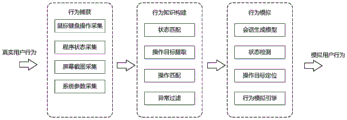
In order to overcome the above-mentioned deficiencies in the prior art, the present invention provides a general user desktop behavior simulation system, comprising: the system comprises a user behavior capturing module, a behavior knowledge construction module and a user desktop behavior simulation module;
the user behavior capturing module is used for collecting user behavior data in real time; the data collected includes: the method comprises the following steps of (1) operating a mouse and a keyboard of a user, running a program, screenshot and system parameters related to the user operation;
the behavior knowledge building module is used for merging the snapshots in the snapshot-behavior chain obtained by preprocessing by using state matching, operating each state and extracting an operation target; combining the operation target with the data of the mouse and the keyboard to form a defined operation; mining conversion rules in states and among states through a user historical behavior track formed by states and operations, eliminating error data and noise data in the conversion rules, and generating the data, wherein the generation comprises the following steps: the user behavior state diagram is a storage form of behavior knowledge;
and the user desktop behavior simulation module is used for generating and simulating behaviors by playback, template customization or model generation based on the established user behavior state diagram.
In the invention, the user behavior capturing module is also used for capturing the desktop behavior track of the user, and the desktop behavior track is expressed by the change of mouse and keyboard operation, GUI interface and program state; the captured data includes: user input operation, program running state and interface change; describing and reproducing the behavior track of the user by collecting and fusing the captured data;
the method is also used for collecting all operations of the user and collecting snapshots before and after the user operations.
In the invention, each snapshot data sample consists of a program running state, a screenshot and system parameters which are acquired in a preset time period, and represents the state and the setting of a system desktop.
In the invention, the behavior knowledge construction module is also used for classifying the desktop snapshot according to the state entities by using state matching, and counting the arrival frequency and the departure frequency of each state when the desktop snapshot is matched with the state entities; dividing the definition attributes of the state into an accurate definition attribute, a fuzzy definition attribute and an auxiliary definition attribute;
the method is also used for performing operation extraction on an operation containing an operation target, and the operation containing the operation target comprises the following steps: single mouse click, dragging mouse and double mouse click;
the operation matching device is also used for classifying the operation in each state into a plurality of operations by using operation matching, removing repeated operation in each state and counting the use times of each operation while classifying;
the behavior state diagram is also constructed; converting the original snapshot-operation event behavior chain into a state-operation behavior chain, regarding the state of the state-operation behavior chain as a node and regarding the operation as an edge between the nodes, and gradually constructing a behavior state diagram according to the state-operation behavior chain;
and the method is also used for dividing the filtering of the abnormal path in the behavior state diagram into calculation filtering and heuristic filtering.
In the invention, the user desktop behavior simulation module is also used for supporting four types of user behavior simulation scenes, and corresponding simulation scenes are adopted according to requirements when the user desktop behavior simulation module is used;
the four types of user behavior simulation scenes comprise: behavior recurrence based on historical data playback; customized behavior simulation based on template editing; generating and simulating vivid user behaviors based on the model; automatically generating and simulating behaviors based on local description instructions; the behavior simulation process runs on the deployed computers, and continuously generates and executes behaviors according to corresponding strategies.
A general user desktop behavior simulation method comprises the following steps:
step one, collecting user behavior data in real time; the data collected includes: the method comprises the following steps of (1) operating a mouse and a keyboard of a user, running a program, screenshot and system parameters related to the user operation;
merging snapshots in the snapshot-behavior chain obtained by preprocessing by using state matching, operating each state, and extracting an operation target; combining the operation target with the data of the mouse and the keyboard to form a defined operation; mining conversion rules in states and among states through a user historical behavior track formed by states and operations, eliminating error data and noise data in the conversion rules, and generating the data, wherein the generation comprises the following steps: the user behavior state diagram is a storage form of behavior knowledge;
and thirdly, based on the established user behavior state diagram, performing behavior generation and simulation by adopting playback, template customization or model generation.
In the invention, the first step further comprises: capturing a desktop behavior track of a user, and expressing the desktop behavior track through the change of mouse and keyboard operation, a GUI interface and a program state; the captured data includes: user input operation, program running state and interface change; describing and reproducing the behavior track of the user by collecting and fusing the captured data;
all operations of the user are collected, and snapshots of the user before and after the operations are collected.
In the invention, the second step further comprises:
classifying the desktop snapshot according to the state entities by using state matching, and counting the arrival frequency and the departure frequency of each state when the desktop snapshot is matched with the state entities; dividing the definition attributes of the state into an accurate definition attribute, a fuzzy definition attribute and an auxiliary definition attribute;
performing operation extraction on an operation containing an operation target, wherein the operation containing the operation target comprises the following steps: single mouse click, dragging mouse and double mouse click;
classifying the operation in each state into a plurality of operations by using operation matching, removing repeated operation in each state, and counting the use times of each operation while classifying;
constructing a behavior state diagram; converting the original snapshot-operation event behavior chain into a state-operation behavior chain, regarding the state of the state-operation behavior chain as a node and regarding the operation as an edge between the nodes, and gradually constructing a behavior state diagram according to the state-operation behavior chain;
and dividing the filtering of the abnormal path in the behavior state diagram into calculation filtering and heuristic filtering.
In the invention, the third step further comprises:
supporting four types of user behavior simulation scenes, and adopting corresponding simulation scenes according to requirements when in use; the four types of user behavior simulation scenes comprise: behavior recurrence based on historical data playback; customized behavior simulation based on template editing; generating and simulating vivid user behaviors based on the model; automatically generating and simulating behaviors based on local description instructions; the behavior simulation process runs on the deployed computers, and continuously generates and executes behaviors according to corresponding strategies.
According to the technical scheme, the invention has the following advantages:
according to the method, the user behaviors are collected and analyzed, software operation knowledge contained in the user behaviors is mined, and an expression model of the user behaviors is constructed, so that intelligent and automatic desktop behavior script generation is realized, and functions of automatically using and simulating the specified real desktop behaviors of the user by software are provided.
The invention provides a universal user desktop behavior simulation system and method aiming at the requirements of realistic user behavior simulation in a network target range and a test bed, execution of automatic software operation in a desktop environment and generation of an intelligent script. The system can accurately acquire required behavior data, can highly reproduce the historical behaviors of the user, and can also mine software operation knowledge contained in the user behaviors, so that automatic operation, script generation and user desktop behavior simulation are realized. The invention relates to an intelligent and automatic high-fidelity user desktop behavior simulation system. Typical functions that may be provided when the invention is actually deployed include: 1) recording and playing back historical behaviors of a user; 2) customized behavior simulation based on template editing; 3) generating and simulating vivid user behaviors based on the model; 4) and automatically generating and simulating the behaviors based on the local description instructions.
The invention can completely capture the user desktop behavior data, construct a historical behavior track library and a behavior knowledge base based on the behavior state diagram, realize various user behavior generation and simulation methods suitable for different scenes, such as recording and playback of user behaviors, and the like, and meet the requirements of network shooting range, software test and the like on automatic behavior generation simulation and high-fidelity behavior generation simulation.
Detailed Description
The invention provides a general user desktop behavior simulation system, as shown in fig. 1, comprising: the system comprises a user behavior capturing module 1, a behavior knowledge construction module 2 and a user desktop behavior simulation module 3;
the user behavior capturing module 1 is used for collecting user behavior data in real time; the data collected includes: the method comprises the following steps of (1) operating a mouse and a keyboard of a user, running a program, screenshot and system parameters related to the user operation; the behavior knowledge building module 2 is used for merging the snapshots in the snapshot behavior chain obtained by preprocessing by using state matching, operating each state and extracting an operation target; combining the operation target with the data of the mouse and the keyboard to form a defined operation; mining conversion rules in states and among states through a user historical behavior track formed by states and operations, eliminating error data and noise data in the conversion rules, and generating the data, wherein the generation comprises the following steps: the user behavior state diagram is a storage form of behavior knowledge; the user desktop behavior simulation module 3 is used for generating and simulating behaviors by playback, template customization or model generation based on the established user behavior state diagram.
In order to make the objects, features and advantages of the present invention more obvious and understandable, the technical solutions of the present invention will be clearly and completely described below with reference to specific embodiments and drawings. All other embodiments, which can be derived by a person skilled in the art from the embodiments given herein without making any creative effort, shall fall within the scope of protection of this patent.
In the embodiment of the present invention, as shown in fig. 2 and 4, the user behavior capturing module is further configured to display the desktop behavior trace of the user through mouse and keyboard operations, GUI interfaces, and changes of program states. The data captured by the invention mainly comprises user input operations (such as mouse and keyboard operations), program running states (including process attributes and window attributes) and interface changes (embodied by screenshots), wherein various input operations of the user are collectively called operations, and the program running states, the screenshots and system parameters are collectively called state snapshots (snapshot for short). By collecting and fusing the data, the user behavior track can be more completely described and reproduced. The data acquisition module of the invention acquires all operations of the user and acquires snapshots of the user before and after the operations. Wherein the acquisition of the operation is a passive-responsive acquisition; in order to reduce resource occupation, the acquisition of the snapshot can be divided into passive triggered acquisition and active periodic acquisition in specific implementation. The passive triggered acquisition refers to acquiring snapshots of a user during or after certain operations when the user is captured, and actively and periodically acquiring the snapshots in a specified period even without significant user operations. The intensive snapshot collection process may occupy higher system resources, collection of different intensive degrees can be implemented according to actual conditions, and the collection module is realized through multiple threads to improve the real-time performance.
Each snapshot data sample is composed of a program running state, a screenshot and system parameters which are acquired at a certain time, and represents the state and main settings of a system desktop. Specifically, typically, taking a Windows operating system as an example, the acquired snapshot data mainly includes: 1) the current position of the mouse; 2) a front end active window title; 3) front end active window handle class name; 4) a front end active window position; 5) the rectangular size of the front end active window; 6) the process name of the front-end active window; 7) a style of a front end active window handle; 8) the attributes of the sub-handles of the front-end active window handle, such as class name, title, position, size, style and the like; 9) executable file path of process to which front-end active window belongs: according to the method, the relevant information of the software can be extracted; 10) screenshot: screenshot of the whole screen, wherein image information of a front-end window and image information of an area where a mouse is located can be extracted from the screenshot; 11) the number of threads of the process to which the front-end active window belongs; 12) screen resolution, the set of parameters in the system that are relevant to the mouse and keyboard operation settings (e.g.: dragWidth and DragHeight values in the Windows system registry key are used for distinguishing whether a group of mouse is pressed down and bounced, and the operation is in-place click operation or drag operation); 13) a time stamp.
The different data collection items in the snapshot data may be updated at different frequencies (i.e., collected asynchronously in time) as needed to reduce overhead. For example: the setting parameters of the mouse and keyboard operation in item 12 are changed by the user very little, so that the setting parameters can be updated in a period of 1 day, and the data of the snapshot collected at the rest of the time is only obtained by using the value collected last time by default.
The mouse and keyboard message is the original expression of mouse and keyboard operation of the user by the computer, and typical mouse operation and keyboard operation can be obtained after processing.
Taking the Windows operating system as an example, the fields of the collected mouse and keyboard messages and their supplementary attributes include: 1) mouse position abscissa x; 2) the vertical coordinate y of the mouse position; 3) a message timestamp t; 4) mouse event type: indicating which one of left key press, left key pop-up, mouse movement, etc., the event is; 5) the states of whether the keys Ctrl, Alt, and Shift are pressed: for distinguishing certain keyboard and mouse combination operations. The fields for each keyboard message and its complementary attributes include: 1) virtual key codes vkey of the key positions; 2) the pressed or bounced state of the key position; 3) a message timestamp t; 4) keyboard Shift, Ctrl, the pressed state of the Alt key, and the indicator light state of the CapsLock capital lock key.
The original mouse and keyboard operation data are classified into a plurality of types of entity operations through preprocessing, the entity operations can be predefined according to needs, typical entity mouse operations comprise left mouse button clicking, double clicking and dragging, right mouse button clicking, double clicking and dragging, middle mouse button clicking, double clicking and dragging, clicking, double clicking and dragging of other mouse function keys and rolling of a mouse roller; typical physical keyboard operations include predefined single key operations (typically: Enter, ESC, arrow keys), predefined combination key operations (typically: Alt + Tab, Ctrl + S, Ctrl + C, Ctrl + V, Ctrl + Space, Win + E), text editing operations (keystroke operations on successive character keys during which a keystroke on a text editing-related function key such as Space, Backspace, Shift, Enter is allowed), and the like.
The classification method of the typical operation is obvious, and it should be noted that the classification of the operation uses the mouse and keyboard operation classification parameters (typically, in the Windows system, these parameters are available in the registry) included in the snapshot data for distinguishing and defining similar operations (for example, in the operation of pressing and popping up the mouse key, when the horizontal coordinate difference value is greater than DragWidth or the vertical coordinate difference value is greater than DragHeight, the operation is regarded as dragging, when the time interval of two mouse clicks is greater than the time interval specified by double click speed, or when the horizontal coordinate difference value is greater than double click width, or when the vertical coordinate difference value is greater than double click height, the operation is regarded as two independent click operations, otherwise, the operation is regarded as one double click operation).
The snapshot and operation definition based on the attributes is universal for various platforms, and the required acquisition items can be changed according to the characteristics of different platforms during actual implementation. The snapshot data items are generally acquired by reading a system file or calling an operating system API or a desktop software API, and the contents include a full screen shot, a pixel coordinate range of the full screen shot, a mouse position coordinate, an attribute set of a front-end active window and an attribute set of a process of the front-end active window.
The snapshot-operation event behavior chain captured based on the above-mentioned acquisition and preprocessing method is a complete expression of the user's historical behavior trajectory.
In the embodiment provided by the invention, the behavior knowledge construction module is further used for constructing a behavior state diagram expressing desktop behavior knowledge, the construction flow of the behavior state diagram is shown in fig. 5, and the specific steps are as follows:
step one, classifying the desktop snapshot according to the state entities by using a state matching technology, and counting the arrival frequency and the leaving frequency of each state when the desktop snapshot is matched with the state entities. The invention divides the definition attributes of the state into an accurate definition attribute, a fuzzy definition attribute and an auxiliary definition attribute, wherein the accurate definition attribute comprises the following steps: the name of the process to which the front-end window belongs and the name of the handle class of the front-end window; the fuzzy definition attributes include: screenshot of a front-end window and screenshot of a region where a mouse is located; the auxiliary definition attribute comprises a front-end window title, a front-end window position, a front-end window rectangle size, a front-end window handle style and a clause handle attribute set of the front-end window handle. The requirement that a snapshot be classified as a state is: the precisely defined attributes are completely equal, and the auxiliary definition meets certain conditions (for example, the angle difference of the window rectangle diagonals does not exceed a specified threshold, the clause handle attribute sets of the window handles are the same), and the similarity of each component of the fuzzy defined attribute reaches the threshold. The screenshot similarity is calculated by a normalized correlation coefficient matching method, the two pictures are scaled to the same size in an equal ratio, then the normalized correlation coefficient value is calculated to serve as the similarity measurement, and the detailed realization can use the matchTemplate function of an opencv computer vision library.
Step two, performing operation extraction on the operation containing the operation target, wherein the operation containing the operation target mainly comprises the following steps: mouse click, mouse drag, and mouse double click. The definition of the operation target by the invention comprises the following steps: in the state, the percentage horizontal and vertical coordinates (the upper left corner of the window is used as the origin, the window width is used as the denominator of the horizontal coordinate percentage calculation, and the window height is used as the denominator of the vertical coordinate percentage calculation) in the state window operate the image with a larger target and operate the image with a smaller target. The method for extracting the operation target image comprises the following steps: a larger rectangular area and a smaller rectangular area are respectively extracted from the screenshot of the state to which the operation belongs by taking the operation position (such as the mouse click position) as the center. The conditions for equivalence of the two operational objectives are: the belonging states are the same, the cosine similarity of the percentage coordinates reaches a threshold value, and the small image of the respective operation target can be matched with the large image of another operation target. The matching from the small operation target image to the large operation target image also uses a normalized correlation coefficient matching method, the practical realization can use the matchTemplate function of opencv, the maximum value in the calculation result matrix is taken as the similarity measurement, and the matching is considered to be successful when the maximum value reaches the specified threshold value.
And step three, classifying a large number of operations in each state into a plurality of operations by using an operation matching technology, namely removing repeated operations in the operations, and counting the use times of the operations while classifying the operations. The definition of the operation includes: operation source state, operation result state, operation type, operation message sequence and operation target (partial operation no operation target). The requirement that one operation be equivalent to another is: the operation source states are the same, the operation types are the same, and the operation targets are equivalent. Note that, this definition may result in different operation result states for a certain operation appearing multiple times in the next source state, in which case different effects on the same operation need to be counted separately according to "sub-operations". In the merging operation, the operation message sequence may be one operation, or may store a plurality of operations.
And step four, constructing a behavior state diagram. Based on the steps, the original snapshot-operation event behavior chain is converted into a state-operation behavior chain, the state in the state-operation event behavior chain is regarded as a node, the operation is regarded as an edge (path) between the nodes, and a behavior state diagram is built step by step according to the behavior chain. For example, the general structure of the behavior state diagram of state a transitioning to state B after a "move-double click" operation and state B transitioning back to state a … … when a "move-single click" operation is shown in fig. 6.
And step five, the filtering of the abnormal path in the behavior state diagram is divided into two steps of calculation filtering and heuristic filtering. And calculating and filtering to calculate the confidence and the support degree of each operation from the source state to the result state, and filtering the operation when the confidence and the support degree are less than a specified threshold value. Wherein the confidence level represents the frequency of reaching a certain state after the operation; the support degree indicates a frequency of state transition using an operation in the operation from the source state to the result state. The heuristic filtering uses a behavior simulation module to perform one-time behavior simulation traversal on all or part of states and operations thereof in a behavior state diagram, and an operation path which is not successfully simulated is regarded as an abnormal path to be eliminated. The finally constructed behavior state diagram is a directed graph, and only state nodes with in-degree and no out-degree (namely, nodes which can not be transferred to other states through operation) in the graph are regarded as termination nodes. Optionally, the filtering of the abnormal path may be performed by a human observer, and the worker may filter or repair the abnormal data according to the state diagram visualized as the picture and the operation on the picture.
And step six, optionally, adding descriptors for the state and operation to be retrieved and used.
And step seven, the behavior state diagram is stored into the state diagram database in the form of state nodes and operations, and optionally descriptors can be added to the state diagram to illustrate the use scene (for example, the behavior state diagram for certain software) so as to select the use. If the state diagram exists in the database, diagram merging operation is needed, and the steps of diagram merging are the same as the processes of state matching and operation matching. Optionally, the original snapshot-operation event behavior chain can be finally converted into a state-operation behavior chain, and can be stored in the historical behavior trace database in a greatly compressed manner only in the form of an index number.
Supplementary explanation: before the image and coordinate calculation, preprocessing methods such as rotation, translation and scaling are used to ensure that the coordinate reference system and the pixel unit of the calculation object are consistent based on the acquired data such as resolution.
The behavioral state diagram according to the present invention may be multiple, for example, the behavioral state diagram is constructed based on different users respectively, so as to distinguish behavioral models of different users. The behavior state diagram can also be constructed by recording the states and operations which users have accessed to show the distinction.
In the embodiment provided by the invention, the user desktop behavior simulation module is also used for providing a simulation scene supporting four types of user behaviors, and a corresponding simulation strategy can be adopted according to requirements during actual use. The method comprises the following steps: 1) behavior recurrence based on historical data playback; 2) customized behavior simulation based on template editing; 3) generating and simulating vivid user behaviors based on the model; 4) and automatically generating and simulating the behaviors based on the local description instructions. The behavior simulation process runs on the deployed computers, and continuously generates and executes behaviors according to corresponding strategies. The following describes the behavior simulation procedure under different scenarios.
Simulation scene 1: behavior reproduction based on historical data playback
Step one, a behavior chain is appointed to be used as historical behaviors to be played back, and the current desktop state is placed in the initial state of the behavior chain.
Step two, obtaining the appointed historical behavior chain (like a snapshot S) from the snapshot-operation event behavior chain database1Operation P1Snapshot S2… …) as a behavior simulation template, the simulation is started.
Step three, in the current state SiNext, operation P is performedi: if the operation target exists, the operation is executed after the target is positioned, otherwise, the operation is directly executed.
Step four, capturing a snapshot of the current desktop state and the expected state S in the templatei+1 for comparison, check if the same. If yes, go to step five; otherwise, it indicates that the data is noisyOr an error, needs to be eliminated or repaired, reported and exited.
Step five, if the current state is the last state in the template, the playback is finished, and the operation is exited; otherwise go to step three.
Simulation scene 2: customized behavior simulation based on template editing
Step one, a state diagram subgraph (or a behavior chain) optionally consisting of a plurality of states and transition operations among the states in the behavior state diagram is selected as a behavior template according to needs. Alternatively, the operation sequence in which the operations are operated may be appropriately edited or some mouse movement operation that does not cause state switching may be added within a range in which the meaning of the operation and the rule of state transition are not changed.
Step two, optionally, the state transition probability or the execution probability of the operation in the state diagram subgraph (template) can be modified. The frequency is computed as a probability by default as the frequency of state diagram generation when not modified. Optionally, it is allowed to specify or mask simulation termination nodes, or to self-specify other termination conditions (e.g., number of operations performed, number of state transitions, behavior simulation time).
And step three, placing the current desktop state in a state described by any state node contained in the state diagram subgraph, and starting simulation.
Step four, capturing a snapshot of the current desktop state, and matching the snapshot to the state S in the state diagram subgraphiAt the current state SiNext, the next target state S is randomly generated according to the state transition probabilityjAt a slave state SiTo SjIn the operation of (1), operation P is selected according to operation execution probabilityijIf the operation has an operation target, the operation is executed after the target is positioned, otherwise, the operation is directly executed. In particular, if the current desktop snapshot does not belong to any state in the state diagram subgraph, the exception is reported and the simulation is interrupted.
Step five, capturing a snapshot of the current desktop state and the expected state S in the templatejAnd comparing and detecting whether the signals are the same. If yes, go to step five; otherwise, it indicates that there is noise or error in the dataIf the operation needs to be eliminated or repaired, the processing method can be to report an error and exit or to shield the operation and continue the simulation, and then the step four is carried out.
Step six, if the current state is the end point state in the template or other end conditions are reached, the playback is finished, and the operation is quitted; otherwise go to step four.
Simulation scene 3: model-based realistic user behavior generation and simulation
Step one, training a model. And designating a sequence generation model M, designating partial data in the historical behavior trajectory database, extracting a state sequence, constructing a training set and training the model M. For example, a K-order markov model trains K-order state transition probabilities with a sequence of states of a training set as inputs. Optionally, it is allowed to specify or mask simulation termination nodes, or to self-specify other termination conditions (e.g., number of operations performed, number of state transitions, behavior simulation time).
And step two, detecting the initial state. Capturing a snapshot of the current desktop state, matching the snapshot to the state S0As an initial state.
Inputting an initial state to the model M, and generating a state sequence S by the model M0,S1,S2,…,SNAs a behavior template.
Step four, in the current state SiNext, state S in the state diagramiThe lower result state is SiOperation P is randomly selected according to execution probability in operation of +1iIf the operation target exists, the operation is executed after the target is positioned, otherwise, the operation is directly executed.
Step five, capturing a snapshot of the current desktop state and the expected state S in the templatei+1 for comparison, check if the same. If yes, go to step six; otherwise: if state Si+1 in the state diagram, go to step two to continue the simulation, or report the exception and interrupt; if state SiIf +1 is not in the state diagram, the exception is reported and interrupted.
Step six, if the current state is the termination state or other termination conditions are reached, the simulation is finished, and the operation is quitted; otherwise go to step four.
Simulation scene 4: behavior automatic generation and simulation based on local description instruction
Step one, inputting a local description instruction of a behavior track to be simulated. The instruction specifies a plurality of nodes S in the user behavior state diagram which are arranged in sequence1,S2,…,SNRequiring in the state diagram, by the node SiThe node S can be reached by several state transitionsi+1. Placing the current desktop state in state diagram any state S that can be reached by several non-state transitions1The state node of (2).
And step two, detecting the initial state. Capturing a snapshot of the current desktop state, matching the snapshot to the state S0As an initial state.
And step three, automatically completing the track. Based on a specified sequence of local states Si|i0,1, …, N, for each two adjacent state nodes S in turni、Si+1, from S in the calculation state diagramiTo Si+1 shortest path Si,0,Si,1,Si,2,…,SiAnd K. The state graph is a directed graph without a negative ring, the edge weights of the directed graph are all 1, and the shortest path of the directed graph can be calculated by using a single-source shortest path Dijkstra algorithm. All shortest paths are spliced with each other to obtain a complete state transition sequence { SjAnd the obtained behavior track is used as a behavior template.
Step four, in the current state SjNext, state S in the state diagramjThe lower result state is SjOperation P is randomly selected according to execution probability in operation of +1jIf the operation target exists, the operation is executed after the target is positioned, otherwise, the operation is directly executed.
Step five, capturing a snapshot of the current desktop state and the expected state S in the templatej+1 for comparison, check if the same. If yes, go to step six; otherwise, the exception is reported and aborted.
Step six, if the current state is the last state in the template, the simulation is finished, and the operation is quitted; otherwise go to step four.
In each scene, the simulation execution of the operation is realized by a behavior simulation engine, and the specific realization method is various. This is typically done by simulating the sequence of messages sent. The message sequence can be synthesized according to the message sequence attribute of the operation, and the time stamp of the message in the original message sequence is converted into the time interval (the time interval of the first message is 0) with the previous message when synthesizing. For the mobile operation, a linear uniform-speed message sequence may be generated directly according to a start point (current position of the mouse) and an end point (operation target position) of the operation, or the original operation message sequence may be synthesized by performing translation, rotation, and scaling transformation of coordinates according to the start point and the end point.
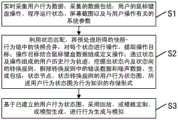
The invention also provides a general user desktop behavior simulation method, as shown in fig. 7, the method includes:
step one, collecting user behavior data in real time; the data collected includes: the method comprises the following steps of (1) operating a mouse and a keyboard of a user, running a program, screenshot and system parameters related to the user operation;
merging snapshots in the snapshot behavior chain obtained by preprocessing by using state matching, operating each state, and extracting an operation target; combining the operation target with the data of the mouse and the keyboard to form a defined operation; mining conversion rules in states and among states through a user historical behavior track formed by states and operations, eliminating error data and noise data in the conversion rules, and generating the data, wherein the generation comprises the following steps: the user behavior state diagram is a storage form of behavior knowledge;
and thirdly, based on the established user behavior state diagram, performing behavior generation and simulation by adopting playback, template customization or model generation.
In the method, the first step further comprises the following steps: capturing a desktop behavior track of a user, and expressing the desktop behavior track through the change of mouse and keyboard operation, a GUI interface and a program state; the captured data includes: user input operation, program running state and interface change; describing and reproducing the behavior track of the user by collecting and fusing the captured data;
all operations of the user are collected, and snapshots of the user before and after the operations are collected.
In the method, the second step further comprises:
classifying the desktop snapshot according to the state entities by using state matching, and counting the arrival frequency and the departure frequency of each state when the desktop snapshot is matched with the state entities; dividing the definition attributes of the state into an accurate definition attribute, a fuzzy definition attribute and an auxiliary definition attribute;
performing operation extraction on an operation containing an operation target, wherein the operation containing the operation target comprises the following steps: single mouse click, dragging mouse and double mouse click;
classifying the operation in each state into a plurality of operations by using operation matching, removing repeated operation in each state, and counting the use times of each operation while classifying;
constructing a behavior state diagram; converting the original snapshot-operation event behavior chain into a state-operation behavior chain, regarding the state of the state-operation behavior chain as a node and regarding the operation as an edge between the nodes, and gradually constructing a behavior state diagram according to the state-operation behavior chain;
and dividing the filtering of the abnormal path in the behavior state diagram into calculation filtering and heuristic filtering.
In the method, the third step further comprises:
supporting four types of user behavior simulation scenes, and adopting corresponding simulation scenes according to requirements when in use; the four types of user behavior simulation scenes comprise: behavior recurrence based on historical data playback; customized behavior simulation based on template editing; generating and simulating vivid user behaviors based on the model; automatically generating and simulating behaviors based on local description instructions; the behavior simulation process runs on the deployed computers, and continuously generates and executes behaviors according to corresponding strategies.
The method can completely capture the user desktop behavior data, construct a historical behavior track library and a behavior knowledge base based on the behavior state diagram, realize various user behavior generation and simulation methods suitable for different scenes, such as recording and playback of user behaviors, and meet the requirements of network shooting range, software test and the like on automatic behavior generation simulation and high-fidelity behavior generation simulation.
The method comprises the aspects of a user behavior simulation system in a network target range, software function testing, flow generation, server load testing, intelligent script rapid generation and the like based on user behaviors. Compared with the traditional method for recording and playing back the mouse and keyboard messages and the manual script programming method, the method has better robustness, flexibility, expandability, readability and editability, provides a solution for simulating the behaviors of the large-scale desktop users in the network shooting range, and is also beneficial to accelerating other development and test processes and saving manpower resources and cost. Meanwhile, the method for constructing and using the behavior knowledge base can also be used for realizing a desktop operation assistant based on the user behavior knowledge. In conclusion, the invention has wide application prospect.
The previous description of the disclosed embodiments is provided to enable any person skilled in the art to make or use the present invention. Various modifications to these embodiments will be readily apparent to those skilled in the art, and the generic principles defined herein may be applied to other embodiments without departing from the spirit or scope of the invention. Thus, the present invention is not intended to be limited to the embodiments shown herein but is to be accorded the widest scope consistent with the principles and novel features disclosed herein.