CN106970735B - Information processing method and electronic equipment - Google Patents
Information processing method and electronic equipment Download PDFInfo
- Publication number
- CN106970735B CN106970735B CN201610025228.5A CN201610025228A CN106970735B CN 106970735 B CN106970735 B CN 106970735B CN 201610025228 A CN201610025228 A CN 201610025228A CN 106970735 B CN106970735 B CN 106970735B
- Authority
- CN
- China
- Prior art keywords
- application
- interface
- area
- display
- display unit
- Prior art date
- Legal status (The legal status is an assumption and is not a legal conclusion. Google has not performed a legal analysis and makes no representation as to the accuracy of the status listed.)
- Active
Links
Images



Classifications
-
- G—PHYSICS
- G06—COMPUTING OR CALCULATING; COUNTING
- G06F—ELECTRIC DIGITAL DATA PROCESSING
- G06F3/00—Input arrangements for transferring data to be processed into a form capable of being handled by the computer; Output arrangements for transferring data from processing unit to output unit, e.g. interface arrangements
- G06F3/01—Input arrangements or combined input and output arrangements for interaction between user and computer
- G06F3/048—Interaction techniques based on graphical user interfaces [GUI]
- G06F3/0481—Interaction techniques based on graphical user interfaces [GUI] based on specific properties of the displayed interaction object or a metaphor-based environment, e.g. interaction with desktop elements like windows or icons, or assisted by a cursor's changing behaviour or appearance
- G06F3/04817—Interaction techniques based on graphical user interfaces [GUI] based on specific properties of the displayed interaction object or a metaphor-based environment, e.g. interaction with desktop elements like windows or icons, or assisted by a cursor's changing behaviour or appearance using icons
-
- G—PHYSICS
- G06—COMPUTING OR CALCULATING; COUNTING
- G06F—ELECTRIC DIGITAL DATA PROCESSING
- G06F3/00—Input arrangements for transferring data to be processed into a form capable of being handled by the computer; Output arrangements for transferring data from processing unit to output unit, e.g. interface arrangements
- G06F3/01—Input arrangements or combined input and output arrangements for interaction between user and computer
- G06F3/048—Interaction techniques based on graphical user interfaces [GUI]
- G06F3/0484—Interaction techniques based on graphical user interfaces [GUI] for the control of specific functions or operations, e.g. selecting or manipulating an object, an image or a displayed text element, setting a parameter value or selecting a range
- G06F3/0486—Drag-and-drop
-
- G—PHYSICS
- G06—COMPUTING OR CALCULATING; COUNTING
- G06F—ELECTRIC DIGITAL DATA PROCESSING
- G06F3/00—Input arrangements for transferring data to be processed into a form capable of being handled by the computer; Output arrangements for transferring data from processing unit to output unit, e.g. interface arrangements
- G06F3/01—Input arrangements or combined input and output arrangements for interaction between user and computer
- G06F3/048—Interaction techniques based on graphical user interfaces [GUI]
- G06F3/0487—Interaction techniques based on graphical user interfaces [GUI] using specific features provided by the input device, e.g. functions controlled by the rotation of a mouse with dual sensing arrangements, or of the nature of the input device, e.g. tap gestures based on pressure sensed by a digitiser
- G06F3/0488—Interaction techniques based on graphical user interfaces [GUI] using specific features provided by the input device, e.g. functions controlled by the rotation of a mouse with dual sensing arrangements, or of the nature of the input device, e.g. tap gestures based on pressure sensed by a digitiser using a touch-screen or digitiser, e.g. input of commands through traced gestures
- G06F3/04886—Interaction techniques based on graphical user interfaces [GUI] using specific features provided by the input device, e.g. functions controlled by the rotation of a mouse with dual sensing arrangements, or of the nature of the input device, e.g. tap gestures based on pressure sensed by a digitiser using a touch-screen or digitiser, e.g. input of commands through traced gestures by partitioning the display area of the touch-screen or the surface of the digitising tablet into independently controllable areas, e.g. virtual keyboards or menus
-
- G—PHYSICS
- G06—COMPUTING OR CALCULATING; COUNTING
- G06F—ELECTRIC DIGITAL DATA PROCESSING
- G06F2203/00—Indexing scheme relating to G06F3/00 - G06F3/048
- G06F2203/048—Indexing scheme relating to G06F3/048
- G06F2203/04803—Split screen, i.e. subdividing the display area or the window area into separate subareas
Landscapes
- Engineering & Computer Science (AREA)
- General Engineering & Computer Science (AREA)
- Theoretical Computer Science (AREA)
- Human Computer Interaction (AREA)
- Physics & Mathematics (AREA)
- General Physics & Mathematics (AREA)
- User Interface Of Digital Computer (AREA)
Abstract
The invention discloses an information processing method and electronic equipment, comprising the following steps: controlling a display unit of the electronic equipment to display a first application interface corresponding to the first application and a second interface at least comprising a second application icon; detecting and obtaining a first operation performed on the second application icon; judging whether the first operation meets a first preset condition or not, and determining a first display area and a second display area which is not overlapped with the first display area from the display unit when the first operation meets the first preset condition; and displaying a second application interface of a second application corresponding to the second application icon in the second display area, and displaying a related interface of the first application interface in the first display area.
Description
Technical Field
The present invention relates to the field of electronic technologies, and in particular, to an information processing method and an electronic device.
Background
With the continuous development of the internet and the continuous popularization of electronic devices such as mobile phones, computers, tablet computers and the like, the life style of people also changes greatly.
In the prior art, when an electronic device such as a mobile phone and a tablet computer needs to switch a currently running application program, a shortcut display interface including other application program icons can be directly called on the currently running application program display interface, then the application icons in the shortcut display interface are operated, the switching of the application programs can be completed, and the switched application program interface is displayed in a full screen mode in a display screen.
However, in the process of implementing the technical solution of the invention in the embodiments of the present application, the inventors of the present application find that the above-mentioned technology has at least the following technical problems:
in the prior art, the electronic equipment has the technical problem that the display effect of an application program interface is single in the application program switching process.
Disclosure of Invention
The embodiment of the invention provides an information processing method and electronic equipment, and aims to solve the technical problem that in the prior art, the display effect of an application program interface is single in the application program switching process of the electronic equipment.
An embodiment of the present application provides an information processing method, including:
controlling a display unit of the electronic equipment to display a first application interface corresponding to the first application and a second interface at least comprising a second application icon;
detecting and obtaining a first operation performed on the second application icon;
judging whether the first operation meets a first preset condition or not, and determining a first display area and a second display area which is not overlapped with the first display area from the display unit when the first operation meets the first preset condition;
and displaying a second application interface of a second application corresponding to the second application icon in the second display area, and displaying a related interface of the first application interface in the first display area.
Optionally, the determining whether the first operation meets a first preset condition specifically includes: and judging whether the first operation is a first preset operation.
Optionally, the determining whether the first operation meets a first preset condition further includes:
judging whether the first operation is a second preset operation or not;
and when the first operation is the second preset operation, displaying a second application interface of a second application corresponding to the second application icon in a first area corresponding to the first application interface, and controlling the first application interface to be in a non-display state.
Optionally, the displaying, in the first display area, an interface related to the first application interface includes:
adjusting the size of the first application interface to obtain an adjusted first application interface with the size smaller than or equal to the size of the first display area so as to adapt to the first display area;
displaying the adjusted first application interface in the first display area; or
Displaying a portion of the interface of the first application interface on the first display area.
Optionally, the method for controlling the electronic device includes displaying, in a display unit of the electronic device, a first application interface corresponding to the first application and a second interface including at least a second application icon, specifically:
controlling a first area of a display unit of the electronic equipment to display a first application interface, and controlling a second area to display a second interface;
wherein the second display area at least comprises a first sub-area of the first area and a second sub-area of the second area, and the first sub-area and the second sub-area are adjacent areas.
Optionally, the first operation is a sliding operation from the display position of the second application icon to the first area, and the first sub-area is obtained by:
determining a first position of an operation end point of the sliding operation in the display unit;
determining a line passing through the first location and parallel to a line where the first region intersects the second region, wherein the first region and the second region intersect and do not overlap, when the first location is in the first region;
dividing the first subregion adjoining the second subregion from the first region based on the straight line.
Optionally, the first preset operation is a sliding operation from a display position of the second application icon to the first area, and the second preset operation is a clicking operation performed on the second interface for the second application icon; or
The first preset operation is a click operation performed on the second interface aiming at the second application icon, and the second preset operation is a sliding operation from the display position of the second application icon to the first area.
Optionally, before determining that a first application interface corresponding to the first application and a second interface including at least a second application icon are displayed in the display unit of the electronic device, the method further includes:
detecting and obtaining a second operation performed on the display unit when the first application interface is displayed on the display unit;
and when the second operation is a third preset operation, simultaneously displaying the second interface and the first application interface on the display unit.
Optionally, the method further includes:
determining at least one application including a second application from the electronic equipment based on a preset rule;
and displaying an application icon corresponding to each application in the at least one application in the second interface.
Optionally, after the displaying the second application interface of the second application corresponding to the second application icon in the second display area and the displaying the relevant interface with the first application interface in the first display area, the method further includes: and controlling the second interface to be in a non-display state.
In another aspect, an embodiment of the present application provides an electronic device, including:
a display unit;
a processor coupled to the display unit, the processor configured to:
controlling the display unit to display a first application interface corresponding to the first application and a second interface at least comprising a second application icon;
detecting and obtaining a first operation performed on the second application icon;
judging whether the first operation meets a first preset condition or not, and determining a first display area and a second display area which is not overlapped with the first display area from the display unit when the first operation meets the first preset condition;
and controlling the display unit to display a second application interface of a second application corresponding to the second application icon in the second display area, and displaying a related interface of the first application interface in the first display area.
Optionally, the processor is specifically configured to:
and judging whether the first operation is a first preset operation.
Optionally, when the first operation is not a first preset operation, the processor is specifically configured to:
judging whether the first operation is a second preset operation or not;
and when the first operation is the second preset operation, controlling the display unit to display a second application interface of a second application corresponding to the second application icon in a first area corresponding to the first application interface, and controlling the first application interface to be in a non-display state.
Optionally, the processor is specifically configured to:
adjusting the size of the first application interface to obtain an adjusted first application interface with the size smaller than or equal to the size of the first display area;
and control the display unit to display the adjusted first application interface in the first display area; or
And controlling the display unit to display part of the interface of the first application interface on the first display area.
Optionally, the processor is specifically configured to:
controlling a first area of the display unit to display a first application interface, and controlling a second area to display a second interface;
wherein the second display area at least comprises a first sub-area of the first area and a second sub-area of the second area, and the first sub-area and the second sub-area are adjacent areas.
Optionally, the processor is specifically configured to:
determining a first position of an operation end point of the sliding operation in the display unit;
determining a line passing through the first location and parallel to a line where the first region intersects the second region, wherein the first region and the second region intersect and do not overlap, when the first location is in the first region;
dividing the first subregion adjoining the second subregion from the first region based on the straight line.
Optionally, the first preset operation is a sliding operation from a display position of the second application icon to the first area, and the second preset operation is a clicking operation performed on the second interface for the second application icon; or
The first preset operation is a click operation performed on the second interface aiming at the second application icon, and the second preset operation is a sliding operation from the display position of the second application icon to the first area.
Optionally, the processor is further configured to:
detecting and obtaining a second operation performed on the display unit when the first application interface is displayed on the display unit;
and when the second operation is a third preset operation, controlling the display unit to simultaneously display the second interface and the first application interface.
Optionally, the processor is further configured to:
determining at least one application including a second application from the electronic equipment based on a preset rule;
and controlling the display unit to display an application icon corresponding to each application in the at least one application in the second interface.
Optionally, the processor is further configured to:
and controlling the second interface to be in a non-display state.
In another aspect, an embodiment of the present application further provides an electronic device, including:
the control module is used for controlling a display unit of the electronic equipment to display a first application interface corresponding to the first application and a second interface at least comprising a second application icon;
the detection module is used for detecting and obtaining a first operation performed on the second application icon;
the judging module is used for judging whether the first operation meets a first preset condition or not, and when the first operation meets the first preset condition, determining a first display area and a second display area which is not overlapped with the first display area from the display unit;
and the display module is used for displaying a second application interface of the second application corresponding to the second application icon in the second display area and displaying a related interface of the first application interface in the first display area.
One or more technical solutions in the embodiments of the present application have at least the following technical effects:
according to the technical scheme in the embodiment of the application, a display unit of the control electronic equipment is adopted to display a first application interface corresponding to a first application and a second interface at least comprising a second application icon; detecting and obtaining a first operation performed on the second application icon; judging whether the first operation meets a first preset condition or not, and determining a first display area and a second display area which is not overlapped with the first display area from the display unit when the first operation meets the first preset condition; and displaying a second application interface of a second application corresponding to the second application icon in the second display area, and displaying a related interface of the first application interface in the first display area.
That is, in the present application, a shortcut display interface is displayed on a currently running first application display interface, and a second application switching operation is performed on a second application icon in the shortcut display interface, and when the operation meets a preset condition, a display area for displaying the first application interface and the second application interface corresponding to the second application icon can be determined again on the display interface, so that a situation that in the prior art, the second application switching operation is performed on the second application icon in the shortcut display interface, and only the second application interface can be displayed in a full screen mode is avoided, and therefore, a technical problem that in an application switching process of an electronic device in the prior art, a display effect of the application interface is single can be effectively solved.
Drawings
In order to more clearly illustrate the embodiments of the present invention or the technical solutions in the prior art, the drawings used in the description of the embodiments will be briefly described below, and it is obvious that the drawings in the following description are only some embodiments of the present invention.
Fig. 1 is a flowchart of an information processing method according to an embodiment of the present application;
fig. 2 a-2 b are schematic structural diagrams of different display manners of a first area and a second area of a mobile phone according to a first embodiment of the present application;
fig. 3 is a flowchart of steps that may be further executed before step S101 is executed in an embodiment of the present application;
FIG. 4 is a schematic structural diagram of a mobile phone display screen according to an embodiment of the present application, which shows a first application interface and a shortcut operation interface simultaneously;
fig. 5 is a flowchart of a determination method of an application icon displayed on the shortcut interface in this embodiment:
fig. 6 is a flowchart of a first implementation manner of step S104 in the first embodiment of the present application;
fig. 7 is a schematic structural diagram of a mobile phone re-determining a first display area and a second display area according to a first embodiment of the present application;
fig. 8 is a schematic structural diagram of a mobile phone determining a first sub-area in a first area according to a first embodiment of the present application;
fig. 9 is a flowchart of a step that may be further included in step S103 in the first embodiment of the present application;
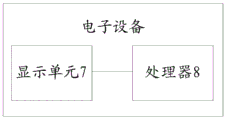
fig. 10 is a schematic structural diagram of an electronic device provided in the second embodiment of the present application;
fig. 11 is a schematic structural diagram of an electronic device according to a third embodiment of the present application.
Detailed Description
The embodiment of the invention provides an information processing method and electronic equipment, and aims to solve the technical problem that in the prior art, the display effect of an application program interface is single in the application program switching process of the electronic equipment.
In order to solve the technical problems, the general idea of the embodiment of the present application is as follows:
controlling a display unit of the electronic equipment to display a first application interface corresponding to the first application and a second interface at least comprising a second application icon;
detecting and obtaining a first operation performed on the second application icon;
judging whether the first operation meets a first preset condition or not, and determining a first display area and a second display area which is not overlapped with the first display area from the display unit when the first operation meets the first preset condition;
and displaying a second application interface of a second application corresponding to the second application icon in the second display area, and displaying a related interface of the first application interface in the first display area.
In the method, a display unit of the control electronic equipment is adopted to display a first application interface corresponding to the first application and a second interface at least comprising a second application icon; detecting and obtaining a first operation performed on the second application icon; judging whether the first operation meets a first preset condition or not, and determining a first display area and a second display area which is not overlapped with the first display area from the display unit when the first operation meets the first preset condition; and displaying a second application interface of a second application corresponding to the second application icon in the second display area, and displaying a related interface of the first application interface in the first display area.
The method comprises the steps that a shortcut display interface is displayed on a first application display interface which is currently running, and a second application switching operation is carried out on a second application icon in the shortcut display interface, when the operation meets a preset condition, a display area for displaying the first application interface and the second application interface corresponding to the second application icon can be determined on the display interface again, so that the situation that in the prior art, the second application switching operation is carried out on the second application icon in the shortcut display interface, and the second application interface can only be displayed in a full screen mode is avoided, and therefore the technical problem that in the prior art, in an application switching process of an electronic device, the display effect of the application interface is single can be effectively solved.
In order to make the objects, technical solutions and advantages of the embodiments of the present invention clearer, the technical solutions of the present invention will be clearly and completely described below with reference to the drawings in the embodiments of the present invention, and it is obvious that the described embodiments are some, but not all, embodiments of the technical solutions of the present invention. All other embodiments obtained by a person skilled in the art without any inventive work based on the embodiments described in the present application are within the scope of the protection of the technical solution of the present invention.
Example one
Referring to fig. 1, an information processing method provided in an embodiment of the present application includes:
s101: controlling a display unit of the electronic equipment to display a first application interface corresponding to the first application and a second interface at least comprising a second application icon;
s102: detecting and obtaining a first operation performed on the second application icon;
s103: judging whether the first operation meets a first preset condition or not, and determining a first display area and a second display area which is not overlapped with the first display area from the display unit when the first operation meets the first preset condition;
s104: and displaying a second application interface of a second application corresponding to the second application icon in the second display area, and displaying a related interface of the first application interface in the first display area.
In the specific implementation process, the electronic device in the method may be an electronic device such as a mobile phone, a notebook computer, an ipad, or the like, or may be other electronic devices with a display unit, and here, taking the mobile phone as an example, the detailed implementation process of the method in the embodiment of the present application is described in detail.
When the method in this embodiment is used to perform information processing, step S101 is first executed, that is, a display unit of the electronic device is controlled to display a first application interface corresponding to a first application and a second interface including at least a second application icon.
In the specific implementation process, please continue to use the above example, the operating system of the mobile phone may be an android operating system, or an IOS operating system, or a widow operating system or other operating systems, and in practical applications, no matter which operating system the mobile phone is in, some application programs, such as a game program of entertainment class, a music program, such as a QQ program of communication class, a WeChat program, and a financial program of life service class, a shopping program, etc., may be installed in the mobile phone, in this embodiment, taking the mobile phone as an example of being in the android operating system, the mobile phone may install an application program of entertainment class, communication class, office class or other class through an application platform provided by the android operating system, where it is assumed that the application program installed in the mobile phone has a first application program of entertainment class, a second application program of communication class and a third application program, then, the user can operate any one of the three applications installed on the mobile phone, and the mobile phone responds to the operation and displays the interface of the corresponding application on the display screen of the mobile phone.
Specifically, when the application programs in the mobile phone include a first application program, a second application program, and a third application program, the mobile phone may control one area in the display screen of the mobile phone to display any application program interface in the three application programs in the mobile phone, and simultaneously control another area in the display screen to display a shortcut operation interface including at least application program icons corresponding to the other application programs.
The mobile phone may further control the display screen of the mobile phone to display the second application interface in the first area, and display the shortcut operation interface including the first application icon corresponding to the first application program, the second application icon corresponding to the second application program, and the third application icon corresponding to the third application program in the second area, of course, the mobile phone may also control the display screen of the mobile phone to display the third application interface in the first area, and display the shortcut operation interface including the first application icon corresponding to the first application program in the second area, and in practical applications, the first area and the second area may be adjacent and non-overlapping areas on the display screen as shown in fig. 2a, and of course, the first area and the second area may also be overlapping areas on the display screen as shown in fig. 2b, the first area is the entire display area of the display screen of the mobile phone, the second area is a display area partially overlapping the dotted line in the first area.
Referring to fig. 3, in the specific implementation process, before the mobile phone performs step S101, the following steps may also be performed:
s201: detecting and obtaining a second operation performed on the display unit when the first application interface is displayed on the display unit;
s202: and when the second operation is a third preset operation, simultaneously displaying the second interface and the first application interface on the display unit.
In a specific implementation process, please continue to use the above example, in an actual application, after the mobile phone may display an application interface corresponding to any application program on the mobile phone on the display screen, the mobile phone calls the shortcut operation interface by detecting and responding to a preset operation performed on the application interface, such as a click operation, a slide operation, a press operation, and the like, so that the mobile phone controls the display screen to simultaneously display the application interface and the shortcut operation interface corresponding to any application program.
Specifically, referring to fig. 4, when the mobile phone detects a click operation (or other set operation) performed by a user on the display screen 1 on the first application icon, the mobile phone will respond to the first application corresponding to the first application icon, run the first application, and display the first application interface of the first application on the display screen 1 in a full screen manner, and when the mobile phone detects a shortcut operation performed on the first application interface and sliding from the edge of the display screen of the mobile phone into the display screen in the full screen manner, the mobile phone will respond to the shortcut operation to determine whether the shortcut operation is a preset operation.
Here, assuming that the preset operation is a shortcut operation for invoking a shortcut operation interface, the mobile phone may determine that the shortcut operation is the preset operation, the mobile phone may invoke the shortcut operation interface, and directly display the shortcut operation interface on a second area 3 corresponding to the shortcut operation on the display screen, at this time, the first application interface may be in a full screen display state, only a part of the interface corresponding to the second area 3 on the first application interface is covered by the shortcut operation interface displayed on the second area 3, only a part of the interface not covered by the shortcut operation interface in the first application interface may be displayed on a first area 2 adjacent to the second area 3, at this time, the shortcut operation interface displayed on the second area 3 is in a running state, the first application interface may be in a suspended state (also called a pending state) and the first application interface may be subjected to a blackening process, so that the display brightness of the partial interface of the first application interface displayed on the first area 2 is lower than that of the shortcut operation interface displayed on the second area 3, thereby facilitating the distinguishing and operation.
Certainly, the mobile phone may also control the shortcut operation interface displayed on the second area 3 to be in the running state and the first application interface to be in the running state, at this time, the display brightness of the partial interface of the first application interface displayed on the first area 2 may be set to be consistent with the display brightness of the shortcut operation interface displayed on the second area 3, or the display brightness of the partial interface of the first application interface displayed on the first area 2 may be set to be inconsistent with the display brightness of the shortcut operation interface displayed on the second area 3, so as to facilitate distinguishing and operating.
In practical application, when the shortcut operation interface is directly displayed on the second area 3 corresponding to the shortcut operation on the display screen, the mobile phone may further control the first application interface to be in a non-full screen display state, for example, the size of the first application interface is reduced, so that the size of the reduced first application interface is exactly the same as the size of the first area 2, the first application interface may be displayed on the first area 2 in a full screen manner, at this time, the mobile phone may only enable the shortcut operation interface displayed on the second area 3 to be in an operating state, the first application interface is in a suspended state and the first application interface is subjected to blackening treatment, and of course, in practical application, the mobile phone may further simultaneously control the shortcut operation interface on the second area 3 and the first application interface on the first area 2 to be in an operating state, and set the display brightness of the first application interface displayed on the first area 2 to be the same as the display brightness of the shortcut operation interface displayed on the second area 3 Or may be inconsistent.
Therefore, through the mode, the mobile phone display screen can conveniently enter the split screen mode, namely, the first application interface and the shortcut operation interface are displayed simultaneously, when the mobile phone display screen is in split screen display, all applications in the split screen display can be controlled to be in the running state, one application in the split screen display can be controlled to be in the running state, and the other application is in the suspended state.
Here, specifically, as an example, the shortcut operation interface is directly displayed in the second area 3 of the display screen shown in fig. 4, the first area 2 displays a first application interface with a size consistent with that of the first area 2, the shortcut operation interface is in a running state, the first application interface is in a suspended state, and the shortcut operation interface specifically includes a second application icon corresponding to the second application and a third application icon corresponding to the third application.
In practical applications, of course, when the mobile phone detects a click operation (or other set operation) performed by the user on the second application icon on the display screen, the mobile phone responds to the second application program corresponding to the second application program icon, runs the second application program, displays a second application interface of the second application program in a full screen mode on the display screen, when the mobile phone display screen displays a second application interface corresponding to a second application program in the mobile phone in a full screen mode, when the mobile phone detects a shortcut operation which is performed on the second application interface and slides from the edge of the mobile phone display screen to the inside of the display screen, the mobile phone responds to the shortcut operation to judge whether the shortcut operation is a preset shortcut operation for calling out the shortcut operation interface, and if the shortcut operation is judged to be a preset operation, the mobile phone can call out the shortcut operation interface and enter a split screen display state.
Simultaneously displaying a second application interface and a shortcut operation interface comprising a first application icon corresponding to a first application program, a second application icon corresponding to a second application program and a third application icon corresponding to a third application program on a display screen of the mobile phone; of course, the mobile phone may also respond to the operation performed by the user on the third application icon on the mobile phone, display the third application interface in a full screen mode, and when the mobile phone detects that the shortcut operation for calling the shortcut operation interface is performed on the third application interface, the mobile phone may also conveniently enter a split-screen display state, and simultaneously display the third application interface and the shortcut operation interface including the first application icon corresponding to the first application on the display screen of the mobile phone, so that the description is not repeated here.
In practical applications, it should be understood by those skilled in the art that application icons included in the shortcut interface in the mobile phone may be flexibly set according to actual needs, for example, when a display screen of the mobile phone simultaneously displays a first application interface and a shortcut interface corresponding to a first application program, the application icons included in the shortcut interface may be only one, such as only including a second application icon corresponding to a second application program, or may include application icons corresponding to a plurality of application programs, such as including the second application icon, the first application icon corresponding to the first application program, and a third application icon corresponding to a third application program.
Of course, in practical applications, the application icon displayed in the shortcut operation interface shown in fig. 4 can be determined by the following method, please refer to fig. 5 in combination:
s203: determining at least one application including a second application from the electronic equipment based on a preset rule;
s204: and displaying an application icon corresponding to each application in the at least one application in the second interface.
In a specific implementation process, please continue to use the above example, in an actual application, the application programs displayed in the shortcut operation interface may be determined according to the frequency of use of each application program in the mobile phone, for example, if the application icons corresponding to all application programs whose frequency of use is higher than a preset value in the mobile phone are displayed on the shortcut operation interface, specifically, when the preset value is 10 times, the frequency of use of the first application program in the mobile phone is 6 times, the frequency of use of the second application program is 12 times, and the frequency of use of the third application program is 16 times, then both the frequency of use of the second application program and the frequency of use of the third application program are greater than the preset 10 times, and the mobile phone may display the second application program icon corresponding to the second application program and the third application program icon corresponding to the third application program in the shortcut operation interface.
In practical application, the mobile phone may further determine the application programs displayed in the shortcut operation interface according to an application program sequence recently used in the mobile phone, for example, the application programs used in the first three hours in the mobile phone are displayed on the shortcut operation interface, specifically, the application programs used in the current three hours are a first application program, a second application program and a third application program in sequence, and since the first application program, the second application program and the third application program are all used in the first three hours, a first application program icon corresponding to the first application program, a second application program icon corresponding to the second application program and a third application program icon corresponding to the third application program may be sequentially displayed in the shortcut operation interface or displayed in any sequence in the shortcut operation interface, of course, in practical application, the application may also be set by default in the mobile phone, displaying a default application program in the shortcut operation interface, or determining to display the application program displayed in the shortcut operation interface according to a program associated with the application program displayed in the current mobile phone, or according to other rules, which is not limited herein.
In practical application, when the mobile phone screen is large, in order to facilitate the user to call the shortcut operation interface, the operation position of the shortcut operation corresponding to the called shortcut operation interface may be set at a position convenient for the user to operate, for example, the operation position of the shortcut operation is set at a position on the mobile phone screen where the thumb is often placed when the user uses the mobile phone, and of course, the called shortcut operation interface may also be displayed at a position convenient for the user to operate, for example, in an area corresponding to the called shortcut operation on the mobile phone display screen, or in an area near the edge of the display screen or an edge area of the display screen where the shortcut operation interface is displayed on the mobile phone display screen, which is convenient for the user to operate with fingers, without any limitation.
After step S101 is executed, the method in this embodiment of the application executes step S102, that is, detects and obtains the first operation performed on the second application icon.
In a specific implementation process, please continue to use the above example, specifically, when the first application program interface and the shortcut operation interface including the second application program icon and the third application program icon are displayed on the display screen of the mobile phone, the user may operate the second application program icon on the shortcut operation interface, then the mobile phone may detect an operation performed on the second application program image by the user, and the user may also operate the third application program icon on the shortcut operation interface, then the mobile phone may detect an operation performed on the third application program icon by the user, where specifically, taking the operation performed on the second application program icon on the shortcut operation interface by the user as an example, the mobile phone may detect an operation performed on the second application program icon on the shortcut operation interface by the user.
After step S102 is executed, the method in this embodiment of the application executes step S103, that is, determines whether the first operation satisfies a first preset condition, and determines, when the first operation satisfies the first preset condition, a first display area and a second display area that is not overlapped with the first display area from the display unit.
In a specific implementation process, please continue to use the above example, specifically, after the mobile phone detects an operation performed by the user on the second application icon on the shortcut operation interface, the mobile phone may determine whether the operation satisfies a preset condition, where for convenience of description, the operation performed by the user on the second application icon on the shortcut operation interface detected by the mobile phone is referred to as a first operation, and in an actual application, the determining, by the mobile phone, whether the first operation satisfies the first preset condition may specifically be:
and judging whether the first operation is a first preset operation.
The first preset operation specifically comprises: the first preset operation is a sliding operation from the display position of the second application icon to the first area;
or the first preset operation specifically comprises: and clicking operation on the second interface aiming at the second application icon.
In a specific implementation process, please continue to use the above example, after the mobile phone detects that the user performs the first operation on the second application icon on the shortcut operation interface, the mobile phone may determine whether the first operation is the first preset operation, and in an actual application, the first preset operation may be a sliding operation of sliding the second application icon to an area where the first application interface is located at a position where the second application icon of the shortcut operation interface is located, or a clicking operation of directly clicking the second application icon at the position where the second application icon of the shortcut operation interface is located.
Of course, in practical applications, the first preset operation may be, in addition to the above-mentioned sliding operation from the display position of the second application icon to the first area, or the clicking operation performed on the second interface for the second application icon, the first preset operation may also be a pressing operation or other operations for directly pressing the second application icon at the position of the second application icon on the shortcut operation interface, which is not listed here.
Specifically, when the first preset operation is a sliding operation of sliding the second application icon to the area where the first application interface is located from the position where the second application icon is located on the shortcut operation interface, the mobile phone may first select the second application icon corresponding to the second application program on the shortcut operation interface, where the selection mode may be long-pressing the second application icon or other preset selection modes, and when the second application icon is selected on the shortcut operation interface of the mobile phone, the second application icon is slid to the area where the first application interface is located from the position where the second application icon is located on the shortcut operation interface.
In this way, the mobile phone determines whether the first operation is a sliding operation, and if the first operation detected by the mobile phone is the sliding operation performed on the second application icon, the mobile phone determines two non-overlapping display areas from the display screen of the mobile phone. Then, the mobile phone executes step S104 in this embodiment, that is, displays a second application interface of the second application corresponding to the second application icon in the second display area, and displays a related interface of the first application interface in the first display area.
In a specific implementation process, please continue to use the above example, specifically, after the mobile phone determines that the first operation is the first preset operation, that is, the location of the second application icon of the shortcut operation interface is, a sliding operation of sliding the second application icon to the area where the first application interface is located is performed, and the mobile phone determines the first display area and the second display area from the display screen, the mobile phone displays the second application interface corresponding to the second application program in the second display area, and displays the interface related to the first application program in the first display area, in an actual application, the displaying the interface related to the first application program in the first display area in step S104 includes at least the following two implementation manners:
referring to fig. 6, for the first implementation manner of displaying the interface related to the first application program in the first display area in step S104:
s1041: adjusting the size of the first application interface to obtain an adjusted first application interface with the size smaller than or equal to the size of the first display area so as to adapt to the first display area;
s1042: displaying the adjusted first application interface in the first display area.
In practical application, the mobile phone displays the second application interface corresponding to the second application program in the second display area, and the mobile phone can also reduce the size of the first application interface corresponding to the first application program so that the size of the reduced first application interface and the size of the first display area are just proper, so that the reduced first display application interface which is a complete display interface can be completely displayed in the first display area, the display screen of the mobile phone can simultaneously display the first application interface and the second application interface, and the display screen of the mobile phone is in a split-screen display state, in a specific practical process, the mobile phone can control the first application interface displayed in the first display area and the second application interface in the second display area to be simultaneously in a running state, and when the first application interface and the second application interface in the mobile phone are both in the running state, through preset operation, both the first application interface and the second application interface which are in the running state in the mobile phone are in the non-running state or one of the first application interface and the second application interface is in the running state.
For example, when the first application interface is displayed on the left side of the display screen and the second application interface is displayed on the right side of the display screen, the first application interface and the second application interface slide left or right on the display interface of the mobile phone, so that the first application interface and the second application interface in the display screen of the mobile phone are in an operating state and a non-operating state, or the first application interface and the second application interface are in an operating state. For another example, when the first application interface is displayed on the left side of the display screen and the second application interface is displayed on the right side of the display screen, the first application interface is slid upwards on the first application interface of the display interface of the mobile phone, so that the first application interface in the display screen of the mobile phone is in a non-running state, and the second application interface is in a running state.
Of course, the mobile phone may also control the first application interface displayed in the first display area to be in an operating state, the second application interface may be in a suspended state (also called a pending state or a waiting state), and the second application interface may be subjected to blackening processing, so that the display brightness of the first application interface is higher than that of the second application interface, thereby facilitating differentiation and operation. Similarly, when the first application interface in the display screen of the mobile phone is in the running state and the second application interface can be in the suspended state, the mobile phone can also control the switching of the program interface in the current running state through preset operation, for example, when the mobile phone detects that the second application interface in the suspended state has a click operation, the mobile phone can control the second application interface in the running state and the first application interface in the suspended state. Similarly, the mobile phone may further control the second application interface to be in the running state and the first application interface to be in the suspended state, the mobile phone may set the display brightness of the first application interface to be consistent with or inconsistent with the display brightness of the second application interface, and the mobile phone may further implement switching of the program interface that controls the current running state through a preset operation, which is not repeated herein.
Therefore, by the above manner, when the mobile phone performs the second application program switching operation on the second application icon in the shortcut operation interface, the first application interface corresponding to the first application program before switching and the second application interface corresponding to the second application program after switching can be simultaneously and completely displayed on the display screen, so that the technical problem that the display effect of the application program interface is single in the application program switching process of the electronic device in the prior art can be effectively solved, and the application program interface in the running state can be flexibly controlled and selected when the first application interface and the second application interface, namely the split-screen display state, are simultaneously displayed on the mobile phone.
In practical applications, after step S104 is executed, the method in this embodiment may further execute:
and controlling the second interface to be in a non-display state.
Specifically, after the mobile phone displays the first application interface with the reduced size in the first display area and displays the second application interface of the second application program corresponding to the second application program icon in the second display area, the mobile phone can also control the shortcut operation interface to be in a non-display state.
In step S104, a second implementation manner of displaying the interface related to the first application program in the first display area is as follows:
displaying a portion of the interface of the first application interface on the first display area.
In practical applications, the mobile phone may, as shown in fig. 6, reduce the size of the first application interface corresponding to the first application program to adapt to the size of the first display area, and may also display a part of the interface in the first application interface according to the size of the first display area without reducing the first application interface corresponding to the first application program, for example, after the mobile phone determines the first display area and the second display area, the mobile phone does not perform any processing on the first application interface, so that the first display area directly displays the part of the area in the first application interface corresponding to the first display area, or after the mobile phone determines the first display area and the second display area, moves any part of the area in the first application interface, which is consistent with the size of the first display area, to the first display area for display, and the like.
In practical application, when the mobile phone does not perform any processing on the first application interface, the first display area directly displays a part of area in the first application interface corresponding to the first display area, and the second application interface of the second application program corresponding to the second application program icon is displayed in the second display area, the mobile phone can also control the shortcut operation interface to be in a non-display state.
In this embodiment, specifically, the first application interface is reduced, and the size of the reduced first application interface and the size of the first display area are just suitable, so that the reduced first application interface is just displayed in the first display area, and the area of the display screen displaying the first application interface in step S101 of the mobile phone is the first area, the area displaying the shortcut operation interface is the second area, and the area where the first area and the second area are adjacent and not overlapped (as shown in fig. 2a) is taken as an example, the second display area in step S104 at least includes the first sub-area of the first area and the second sub-area of the second area, and the first sub-area and the second sub-area are adjacent areas.
That is, the second display area determined by the mobile phone may include the second area corresponding to the shortcut operation interface, and another sub-area adjacent to the second area in the first area corresponding to the first application interface, specifically, referring to fig. 7 in combination with fig. 2a, in fig. 7, the second display area includes the second area 3 corresponding to the shortcut operation interface, and the sub-area 21 adjacent to the second area 3 in the first area, so that the remaining sub-area 22 in the first area is the first display area, and is used to display the first application interface with the reduced size as described above, or is used to display a part of the display interface in the first application interface without being reduced.
In practical applications, the sub-area 21 in the first area in fig. 7 for displaying the second application interface together with the second area can be obtained by the following steps, please refer to fig. 8 in combination:
a: determining a first position of an operation end point of the sliding operation in the display unit;
b: determining a line passing through the first location and parallel to a line where the first region intersects the second region, wherein the first region and the second region intersect and do not overlap, when the first location is in the first region;
c: dividing the first subregion adjoining the second subregion from the first region based on the straight line.
Referring to fig. 7 and fig. 8 in combination, the mobile phone may determine a specific position of an operation endpoint of the sliding operation from the display position of the second application icon to the first application interface in the display screen, specifically, in fig. 8, a mark 4 is a position of the second application in the shortcut operation interface, and a dashed arrow in fig. 8 indicates: sliding a second application icon on the shortcut operation interface into the first application interface from the display position of the shortcut operation interface, wherein the identifier 41 is the position of the first application interface after the second application icon slides into the first application interface, the identifier 41 is the end point position of the sliding operation of the second application icon determined by the mobile phone, the mobile phone further determines whether the end point position is the identifier 41 in the first area, if the identifier 41 is in the first area, a straight line 5 is determined at the position passing through the identifier 41, the straight line 5 is parallel to the intersection line 6 of the first area and the second area, then, the straight line 5 is used as a reference to divide the first area into a sub-area 21 and a sub-area 22 adjacent to the sub-area 21, and thus, the sub-area 21 and the second area 3 in the first area in the display screen are determined second display areas, the sub-area 22 in the first area is the determined first display area, and is used for displaying the related interface of the first application interface.
In a specific implementation process, please continue to use the above example, in an actual application, when performing a click operation of directly clicking a second application icon at a position where the second application icon is located on the shortcut operation interface, and when detecting that a first operation performed on the second application icon by a user is the click operation, the mobile phone may further perform:
when the first operation meets the first preset condition, determining a first display area and a second display area which is not overlapped with the first display area from the display unit;
and displaying a second application interface of a second application corresponding to the second application icon in the second display area, and displaying a related interface of the first application interface in the first display area.
In practical application, when the mobile phone determines that the first operation is a click operation, the mobile phone determines two non-overlapping display areas from the display screen of the mobile phone, and for convenience of description, the non-overlapping display areas determined from the display screen by the mobile phone are respectively referred to as a first display area and a second display area. The mobile phone displays a second application interface corresponding to the second application program in the second display area, and displays an interface related to the first application program in the first display area.
Similarly, the method for displaying the interface related to the first application program in the first display area may also include the above two implementation manners, that is, reducing the size of the first application interface corresponding to the first application program so that the size of the reduced first application interface is just appropriate to the size of the first display area, so that the reduced first application interface which is a complete display interface can be completely displayed in the first display area, or the first application program is not reduced, and a part of the interface in the first application interface is directly displayed according to the size of the first display area, which is not described repeatedly herein.
In the specific implementation process, please continue to use the above example, please refer to fig. 9, the method in this embodiment of the present application, after executing step S103, that is, determining whether the first operation satisfies the first preset condition, may further include the following steps:
s1031: judging whether the first operation is a second preset operation or not;
s1032: and when the first operation is the second preset operation, displaying a second application interface of a second application corresponding to the second application icon in a first area corresponding to the first application interface, and controlling the first application interface to be in a non-display state.
Specifically, when the mobile phone determines whether the first operation is the first preset operation, and then the mobile phone determines whether the first operation is the second preset operation, it is assumed here that the first preset operation is a sliding operation of sliding the second application icon to the area where the first application interface is located from the position where the second application icon of the shortcut operation interface is located, and the second preset operation is a clicking operation of directly clicking the second application icon at the position where the second application icon of the shortcut operation interface is located, then, under the premise that the mobile phone judges that the first operation is not the sliding operation, after judging that the first operation is the clicking operation, the mobile phone can control a first area, which displays the first application interface, in the mobile phone display screen to display a second application interface of a second application program corresponding to the second application program icon.
The mobile phone can also control the previously displayed first application interface to be in a non-display state, and the second area of the mobile phone can also continue to display the shortcut operation interface.
Example two
Referring to fig. 10, based on the same inventive concept as the first embodiment, a second embodiment of the present application provides an electronic device, including:
a display unit 7;
a processor 8 connected to the display unit 7, the processor 8 being configured to:
controlling the display unit 7 to display a first application interface corresponding to the first application and a second interface at least comprising a second application icon;
detecting and obtaining a first operation performed on the second application icon;
judging whether the first operation meets a first preset condition or not, and determining a first display area and a second display area which is not overlapped with the first display area from the display unit 7 when the first operation meets the first preset condition;
and controlling the display unit 7 to display a second application interface of the second application corresponding to the second application icon in the second display area, and to display a related interface of the first application interface in the first display area.
Optionally, the processor 8 is specifically configured to:
and judging whether the first operation is a first preset operation.
Optionally, when the first operation is not a first preset operation, the processor 8 is specifically configured to:
judging whether the first operation is a second preset operation or not;
and when the first operation is the second preset operation, controlling the display unit 7 to display a second application interface of a second application corresponding to the second application icon in a first area corresponding to the first application interface, and controlling the first application interface to be in a non-display state.
Optionally, the processor 8 is specifically configured to:
adjusting the size of the first application interface to obtain an adjusted first application interface with the size smaller than or equal to the size of the first display area;
and controlling the display unit 7 to display the adjusted first application interface in the first display area; or
And controlling the display unit 7 to display part of the interface of the first application interface on the first display area.
Optionally, the processor 8 is specifically configured to:
controlling a first area of the display unit 7 to display a first application interface, and controlling a second area to display a second interface;
wherein the second display area at least comprises a first sub-area of the first area and a second sub-area of the second area, and the first sub-area and the second sub-area are adjacent areas.
Optionally, the processor 8 is specifically configured to:
determining a first position of an operation end point of the sliding operation in the display unit 7;
determining a line passing through the first location and parallel to a line where the first region intersects the second region, wherein the first region and the second region intersect and do not overlap, when the first location is in the first region;
dividing the first subregion adjoining the second subregion from the first region based on the straight line.
Optionally, the first preset operation is a sliding operation from a display position of the second application icon to the first area, and the second preset operation is a clicking operation performed on the second interface for the second application icon; or
The first preset operation is a click operation performed on the second interface aiming at the second application icon, and the second preset operation is a sliding operation from the display position of the second application icon to the first area.
Optionally, the processor 8 is further configured to:
detecting and obtaining a second operation performed on the display unit 7 while the first application interface is displayed on the display unit 7;
and when the second operation is a third preset operation, controlling the display unit 7 to simultaneously display the second interface and the first application interface.
Optionally, the processor 8 is further configured to:
determining at least one application including a second application from the electronic equipment based on a preset rule;
and controlling the display unit 7 to display an application icon corresponding to each application in the at least one application in the second interface.
Optionally, the processor 8 is further configured to:
and controlling the second interface to be in a non-display state.
EXAMPLE III
Referring to fig. 11, based on the same inventive concept as the first embodiment of the present application, a third embodiment of the present application provides an electronic device, including:
the control module 9 is configured to control a display unit of the electronic device to display a first application interface corresponding to the first application and a second interface including at least a second application icon;
a detection module 10, configured to detect that a first operation performed on the second application icon is obtained;
a determining module 11, configured to determine whether the first operation meets a first preset condition, and when the first operation meets the first preset condition, determine, from the display unit, a first display area and a second display area that is not overlapped with the first display area;
the display module 12 is configured to display a second application interface of the second application corresponding to the second application icon in the second display area, and display a related interface of the first application interface in the first display area.
Optionally, the determining module 11 specifically includes:
and the first judgment submodule is used for judging whether the first operation is a first preset operation.
Optionally, the determining module 11 further includes:
the second judgment submodule is used for judging whether the first operation is a second preset operation or not;
and the first display sub-module is configured to display a second application interface of a second application corresponding to the second application icon in a first area corresponding to the first application interface and control the first application interface to be in a non-display state when the first operation is the second preset operation.
Optionally, the display module 12 includes:
the adjusting module is used for adjusting the size of the first application interface to obtain an adjusted first application interface with the size smaller than or equal to the size of the first display area so as to adapt to the first display area;
a second display sub-module for displaying the adjusted first application interface in the first display area; or
And the third display submodule is used for displaying part of the interface of the first application interface on the first display area.
Optionally, the control module 9 specifically includes:
the first control submodule is used for controlling a first area of a display unit of the electronic equipment to display a first application interface, and a second area of the display unit of the electronic equipment to display a second interface;
wherein the second display area at least comprises a first sub-area of the first area and a second sub-area of the second area, and the first sub-area and the second sub-area are adjacent areas.
Optionally, the first operation is a sliding operation from the display position of the second application icon to the first area, and the first sub-area is obtained by:
determining a first position of an operation end point of the sliding operation in the display unit;
determining a line passing through the first location and parallel to a line where the first region intersects the second region, wherein the first region and the second region intersect and do not overlap, when the first location is in the first region;
dividing the first subregion adjoining the second subregion from the first region based on the straight line.
Optionally, the first preset operation is a sliding operation from a display position of the second application icon to the first area, and the second preset operation is a clicking operation performed on the second interface for the second application icon; or
The first preset operation is a click operation performed on the second interface aiming at the second application icon, and the second preset operation is a sliding operation from the display position of the second application icon to the first area.
Optionally, the electronic device further includes:
the detection obtaining module is used for detecting and obtaining a second operation performed on the display unit when the first application interface is displayed on the display unit;
and the fourth display sub-module is used for simultaneously displaying the second interface and the first application interface on the display unit when the second operation is a third preset operation.
Optionally, the electronic device further includes:
the determining module is used for determining at least one application including a second application from the electronic equipment based on a preset rule;
and the fifth display sub-module is used for displaying the application icon corresponding to each application in the at least one application in the second interface.
Optionally, the electronic device further includes:
and the second control submodule is used for controlling the second interface to be in a non-display state.
One or more technical solutions in the embodiments of the present application have at least the following technical effects:
according to the technical scheme in the embodiment of the application, a display unit of the control electronic equipment is adopted to display a first application interface corresponding to a first application and a second interface at least comprising a second application icon; detecting and obtaining a first operation performed on the second application icon; judging whether the first operation meets a first preset condition or not, and determining a first display area and a second display area which is not overlapped with the first display area from the display unit when the first operation meets the first preset condition; and displaying a second application interface of a second application corresponding to the second application icon in the second display area, and displaying a related interface of the first application interface in the first display area.
That is, in the present application, a shortcut display interface is displayed on a currently running first application display interface, and a second application switching operation is performed on a second application icon in the shortcut display interface, and when the operation meets a preset condition, a display area for displaying the first application interface and the second application interface corresponding to the second application icon can be determined again on the display interface, so that a situation that in the prior art, the second application switching operation is performed on the second application icon in the shortcut display interface, and only the second application interface can be displayed in a full screen mode is avoided, and therefore, a technical problem that in an application switching process of an electronic device in the prior art, a display effect of the application interface is single can be effectively solved.
As will be appreciated by one skilled in the art, embodiments of the present invention may be provided as a method, system, or computer program product. Accordingly, the present invention may take the form of an entirely hardware embodiment, an entirely software embodiment or an embodiment combining software and hardware aspects. Furthermore, the present invention may take the form of a computer program product embodied on one or more computer-usable storage media (including, but not limited to, disk storage, CD-ROM, optical storage, and the like) having computer-usable program code embodied therein.
The present invention is described with reference to flowchart illustrations and/or block diagrams of methods, apparatus (systems), and computer program products according to embodiments of the invention. It will be understood that each flow and/or block of the flow diagrams and/or block diagrams, and combinations of flows and/or blocks in the flow diagrams and/or block diagrams, can be implemented by computer program instructions. These computer program instructions may be provided to a processor of a general purpose computer, special purpose computer, embedded processor, or other programmable data processing apparatus to produce a machine, such that the instructions, which execute via the processor of the computer or other programmable data processing apparatus, create means for implementing the functions specified in the flowchart flow or flows and/or block diagram block or blocks.
These computer program instructions may also be stored in a computer-readable memory that can direct a computer or other programmable data processing apparatus to function in a particular manner, such that the instructions stored in the computer-readable memory produce an article of manufacture including instruction means which implement the function specified in the flowchart flow or flows and/or block diagram block or blocks.
These computer program instructions may also be loaded onto a computer or other programmable data processing apparatus to cause a series of operational steps to be performed on the computer or other programmable apparatus to produce a computer implemented process such that the instructions which execute on the computer or other programmable apparatus provide steps for implementing the functions specified in the flowchart flow or flows and/or block diagram block or blocks.
Specifically, the computer program instructions corresponding to the information processing method in the embodiment of the present application may be stored on a storage medium such as an optical disc, a hard disc, a usb disk, or the like, and when the computer program instructions corresponding to the information processing method in the storage medium are read or executed by an electronic device, the method includes the following steps:
controlling a display unit of the electronic equipment to display a first application interface corresponding to the first application and a second interface at least comprising a second application icon;
detecting and obtaining a first operation performed on the second application icon;
judging whether the first operation meets a first preset condition or not, and determining a first display area and a second display area which is not overlapped with the first display area from the display unit when the first operation meets the first preset condition;
and displaying a second application interface of a second application corresponding to the second application icon in the second display area, and displaying a related interface of the first application interface in the first display area.
Optionally, the step of storing in the storage medium: when the computer program instruction corresponding to the judgment whether the first operation satisfies the first preset condition is executed, the method specifically includes:
and judging whether the first operation is a first preset operation.
Optionally, the step of storing in the storage medium: when the computer program instruction corresponding to the judgment whether the first operation satisfies the first preset condition is executed, the method specifically includes:
judging whether the first operation is a second preset operation or not;
and when the first operation is the second preset operation, displaying a second application interface of a second application corresponding to the second application icon in a first area corresponding to the first application interface, and controlling the first application interface to be in a non-display state.
Optionally, the step of storing in the storage medium: when executed, the computer program instructions for displaying the interface corresponding to the first application interface in the first display area specifically include:
adjusting the size of the first application interface to obtain an adjusted first application interface with the size smaller than or equal to the size of the first display area so as to adapt to the first display area;
displaying the adjusted first application interface in the first display area; or
Displaying a portion of the interface of the first application interface on the first display area.
Optionally, the step of storing in the storage medium: when executed, the computer program instructions for displaying a first application interface corresponding to a first application and a second interface corresponding to a second application icon at least include:
controlling a first area of a display unit of the electronic equipment to display a first application interface, and controlling a second area to display a second interface;
wherein the second display area at least comprises a first sub-area of the first area and a second sub-area of the second area, and the first sub-area and the second sub-area are adjacent areas.
Optionally, the first operation is a sliding operation from the display position of the second application icon to the first area, and when executed, the computer program instructions corresponding to the step of obtaining the first sub-area stored in the storage medium specifically include:
determining a first position of an operation end point of the sliding operation in the display unit;
determining a line passing through the first location and parallel to a line where the first region intersects the second region, wherein the first region and the second region intersect and do not overlap, when the first location is in the first region;
dividing the first subregion adjoining the second subregion from the first region based on the straight line.
Optionally, the storage medium further stores other computer program instructions, and the other computer program instructions are further stored in the step of: the method is executed before a first application interface corresponding to a first application and a second interface at least comprising a second application icon are displayed in a display unit of the determined electronic equipment, and the execution process comprises the following steps:
detecting and obtaining a second operation performed on the display unit when the first application interface is displayed on the display unit;
and when the second operation is a third preset operation, simultaneously displaying the second interface and the first application interface on the display unit.
Optionally, the storage medium further stores other computer program instructions, and the other computer program instructions, in the execution process, include the following steps:
determining at least one application including a second application from the electronic equipment based on a preset rule;
and displaying an application icon corresponding to each application in the at least one application in the second interface.
Optionally, the storage medium further stores other computer program instructions, and the other computer program instructions are further stored in the step of: the second application interface of the second application corresponding to the second application icon is displayed in the second display area, and the execution is executed after the relevant interface of the first application interface is displayed in the first display area, and the execution process comprises the following steps:
and controlling the second interface to be in a non-display state.
While preferred embodiments of the present invention have been described, additional variations and modifications in those embodiments may occur to those skilled in the art once they learn of the basic inventive concepts. Therefore, it is intended that the appended claims be interpreted as including preferred embodiments and all such alterations and modifications as fall within the scope of the invention.
It will be apparent to those skilled in the art that various changes and modifications may be made in the present invention without departing from the spirit and scope of the invention. Thus, if such modifications and variations of the present invention fall within the scope of the claims of the present invention and their equivalents, the present invention is also intended to include such modifications and variations.
Claims (19)
1. An information processing method comprising:
controlling a first area of a display unit of the electronic equipment to display a first application interface corresponding to a first application, and controlling a second area of the display unit of the electronic equipment to display a second interface at least comprising a second application icon;
detecting and obtaining a first operation performed on the second application icon;
judging whether the first operation meets a first preset condition, and when the first operation is a sliding operation from the display position of the second application icon to the first area, determining a first display area and a second display area which is not overlapped with the first display area from the display unit; wherein the second display area at least comprises a first sub-area of the first area and a second sub-area of the second area, and the first sub-area and the second sub-area are adjacent areas;
and displaying a second application interface of a second application corresponding to the second application icon in the second display area, and displaying a related interface of the first application interface in the first display area.
2. The method of claim 1, wherein the determining whether the first operation satisfies a first preset condition is specifically: and judging whether the first operation is a first preset operation.
3. The method of claim 2, wherein said determining whether the first operation satisfies a first predetermined condition further comprises:
judging whether the first operation is a second preset operation or not;
and when the first operation is the second preset operation, displaying a second application interface of a second application corresponding to the second application icon in a first area corresponding to the first application interface, and controlling the first application interface to be in a non-display state.
4. The method of any of claims 1-2, wherein said displaying the interface associated with the first application interface in the first display area comprises:
adjusting the size of the first application interface to obtain an adjusted first application interface with the size smaller than or equal to the size of the first display area so as to adapt to the first display area;
displaying the adjusted first application interface in the first display area; or
Displaying a portion of the interface of the first application interface on the first display area.
5. The method according to claim 1, characterized in that said first sub-area is obtained in particular by:
determining a first position of an operation end point of the sliding operation in the display unit;
determining a line passing through the first location and parallel to a line where the first region intersects the second region, wherein the first region and the second region intersect and do not overlap, when the first location is in the first region;
dividing the first subregion adjoining the second subregion from the first region based on the straight line.
6. The method of claim 3, wherein the first preset operation is a slide operation from a display position of the second application icon to the first area, and the second preset operation is a click operation for the second application icon on the second interface; or
The first preset operation is a click operation performed on the second interface aiming at the second application icon, and the second preset operation is a sliding operation from the display position of the second application icon to the first area.
7. The method of claim 1, wherein before the first area of the display unit of the control electronic device displays a first application interface corresponding to a first application and the second area of the display unit of the control electronic device displays a second interface including at least a second application icon, the method further comprises:
detecting and obtaining a second operation performed on the display unit when the first application interface is displayed on the display unit;
and when the second operation is a third preset operation, simultaneously displaying the second interface and the first application interface on the display unit.
8. The method of claim 1, wherein the method further comprises:
determining at least one application including a second application from the electronic equipment based on a preset rule;
and displaying an application icon corresponding to each application in the at least one application in the second interface.
9. The method of claim 1, wherein after displaying a second application interface of a second application corresponding to the second application icon in the second display area and displaying a related interface to the first application interface in the first display area, the method further comprises: and controlling the second interface to be in a non-display state.
10. An electronic device, comprising:
a display unit;
a processor coupled to the display unit, the processor configured to:
controlling a first area of the display unit to display a first application interface corresponding to a first application, and controlling a second area of the display unit to display a second interface at least comprising a second application icon;
detecting and obtaining a first operation performed on the second application icon;
judging whether the first operation meets a first preset condition, and when the first operation is a sliding operation from the display position of the second application icon to the first area, determining a first display area and a second display area which is not overlapped with the first display area from the display unit; wherein the second display area at least comprises a first sub-area of the first area and a second sub-area of the second area, and the first sub-area and the second sub-area are adjacent areas;
and controlling the display unit to display a second application interface of a second application corresponding to the second application icon in the second display area, and displaying a related interface of the first application interface in the first display area.
11. The electronic device of claim 10, wherein the processor is specifically configured to:
and judging whether the first operation is a first preset operation.
12. The electronic device of claim 11, wherein when the first operation is not a first preset operation, the processor is specifically configured to:
judging whether the first operation is a second preset operation or not;
and when the first operation is the second preset operation, controlling the display unit to display a second application interface of a second application corresponding to the second application icon in a first area corresponding to the first application interface, and controlling the first application interface to be in a non-display state.
13. The electronic device of any of claims 10-11, wherein the processor is specifically configured to:
adjusting the size of the first application interface to obtain an adjusted first application interface with the size smaller than or equal to the size of the first display area;
and control the display unit to display the adjusted first application interface in the first display area; or
And controlling the display unit to display part of the interface of the first application interface on the first display area.
14. The electronic device of claim 10, wherein the processor is specifically configured to:
determining a first position of an operation end point of the sliding operation in the display unit;
determining a line passing through the first location and parallel to a line where the first region intersects the second region, wherein the first region and the second region intersect and do not overlap, when the first location is in the first region;
dividing the first subregion adjoining the second subregion from the first region based on the straight line.
15. The electronic device according to claim 12, wherein the first preset operation is a slide operation from a display position of the second application icon to the first area, and the second preset operation is a click operation for the second application icon performed on the second interface; or
The first preset operation is a click operation performed on the second interface aiming at the second application icon, and the second preset operation is a sliding operation from the display position of the second application icon to the first area.
16. The electronic device of claim 10, wherein the processor is further to:
detecting and obtaining a second operation performed on the display unit when the first application interface is displayed on the display unit;
and when the second operation is a third preset operation, controlling the display unit to simultaneously display the second interface and the first application interface.
17. The electronic device of claim 10, wherein the processor is further to:
determining at least one application including a second application from the electronic equipment based on a preset rule;
and controlling the display unit to display an application icon corresponding to each application in the at least one application in the second interface.
18. The electronic device of claim 10, wherein the processor is further to:
and controlling the second interface to be in a non-display state.
19. An electronic device, comprising:
the control module is used for controlling a first area of a display unit of the electronic equipment to display a first application interface corresponding to a first application, and controlling a second area of the display unit of the electronic equipment to display a second interface at least comprising a second application icon;
the detection module is used for detecting and obtaining a first operation performed on the second application icon;
the judging module is used for judging whether the first operation meets a first preset condition or not, and when the first operation is a sliding operation from the display position of the second application icon to the first area, determining a first display area and a second display area which is not overlapped with the first display area from the display unit; wherein the second display area at least comprises a first sub-area of the first area and a second sub-area of the second area, and the first sub-area and the second sub-area are adjacent areas;
and the display module is used for displaying a second application interface of the second application corresponding to the second application icon in the second display area and displaying a related interface of the first application interface in the first display area.
Priority Applications (1)
| Application Number | Priority Date | Filing Date | Title |
|---|---|---|---|
| CN201610025228.5A CN106970735B (en) | 2016-01-14 | 2016-01-14 | Information processing method and electronic equipment |
Applications Claiming Priority (1)
| Application Number | Priority Date | Filing Date | Title |
|---|---|---|---|
| CN201610025228.5A CN106970735B (en) | 2016-01-14 | 2016-01-14 | Information processing method and electronic equipment |
Publications (2)
| Publication Number | Publication Date |
|---|---|
| CN106970735A CN106970735A (en) | 2017-07-21 |
| CN106970735B true CN106970735B (en) | 2020-06-23 |
Family
ID=59334366
Family Applications (1)
| Application Number | Title | Priority Date | Filing Date |
|---|---|---|---|
| CN201610025228.5A Active CN106970735B (en) | 2016-01-14 | 2016-01-14 | Information processing method and electronic equipment |
Country Status (1)
| Country | Link |
|---|---|
| CN (1) | CN106970735B (en) |
Families Citing this family (11)
| Publication number | Priority date | Publication date | Assignee | Title |
|---|---|---|---|---|
| WO2019037359A1 (en) * | 2017-08-24 | 2019-02-28 | 华为技术有限公司 | Split-screen display method, device and terminal |
| CN107943364B (en) * | 2017-11-23 | 2019-11-26 | 武汉卓讯互动信息科技有限公司 | A kind of method and apparatus of parallel operation application interface |
| CN108415751B (en) * | 2018-03-12 | 2020-11-03 | Oppo广东移动通信有限公司 | Message reminding method, device, equipment and storage medium |
| CN108509131B (en) * | 2018-03-28 | 2021-04-06 | 维沃移动通信有限公司 | A kind of application program startup method and terminal |
| CN108664182B (en) * | 2018-04-09 | 2020-04-24 | Oppo广东移动通信有限公司 | Application switching method, terminal and computer readable storage medium |
| CN108595072B (en) * | 2018-04-19 | 2020-01-31 | Oppo广东移动通信有限公司 | Split-screen display method, device, storage medium and electronic device |
| CN110858856A (en) * | 2018-08-22 | 2020-03-03 | 阿里巴巴集团控股有限公司 | Multi-application display method, application group construction method, and electronic device |
| CN110032296B (en) * | 2019-04-10 | 2022-06-03 | 网易(杭州)网络有限公司 | Method and device for determining virtual object in terminal, terminal and storage medium |
| CN112068907A (en) | 2019-05-25 | 2020-12-11 | 华为技术有限公司 | Interface display method and electronic equipment |
| CN111813356A (en) * | 2020-06-12 | 2020-10-23 | 彭程 | Multimedia resource display method and electronic device |
| CN113342440A (en) * | 2021-06-11 | 2021-09-03 | 北京字节跳动网络技术有限公司 | Screen splicing method and device, electronic equipment and storage medium |
Citations (6)
| Publication number | Priority date | Publication date | Assignee | Title |
|---|---|---|---|---|
| CN103853381A (en) * | 2012-12-06 | 2014-06-11 | 三星电子株式会社 | Display device and method for controlling display device |
| CN103997564A (en) * | 2013-02-14 | 2014-08-20 | Lg电子株式会社 | Mobile terminal and method of controlling the mobile terminal |
| CN104303140A (en) * | 2012-05-11 | 2015-01-21 | 三星电子株式会社 | Multiple window providing apparatus and method |
| CN104598104A (en) * | 2014-12-31 | 2015-05-06 | 小米科技有限责任公司 | Widget processing method and device |
| CN104793838A (en) * | 2014-01-20 | 2015-07-22 | 中兴通讯股份有限公司 | Suspension display implementing method and device |
| CN105094812A (en) * | 2015-06-30 | 2015-11-25 | 努比亚技术有限公司 | Method and device for switching applications |
Family Cites Families (2)
| Publication number | Priority date | Publication date | Assignee | Title |
|---|---|---|---|---|
| KR102153366B1 (en) * | 2013-08-30 | 2020-10-15 | 삼성전자 주식회사 | Method and apparatus for switching screen in electronic device |
| KR102108069B1 (en) * | 2014-01-22 | 2020-05-08 | 엘지전자 주식회사 | Mobile terminal and method for controlling the same |
-
2016
- 2016-01-14 CN CN201610025228.5A patent/CN106970735B/en active Active
Patent Citations (6)
| Publication number | Priority date | Publication date | Assignee | Title |
|---|---|---|---|---|
| CN104303140A (en) * | 2012-05-11 | 2015-01-21 | 三星电子株式会社 | Multiple window providing apparatus and method |
| CN103853381A (en) * | 2012-12-06 | 2014-06-11 | 三星电子株式会社 | Display device and method for controlling display device |
| CN103997564A (en) * | 2013-02-14 | 2014-08-20 | Lg电子株式会社 | Mobile terminal and method of controlling the mobile terminal |
| CN104793838A (en) * | 2014-01-20 | 2015-07-22 | 中兴通讯股份有限公司 | Suspension display implementing method and device |
| CN104598104A (en) * | 2014-12-31 | 2015-05-06 | 小米科技有限责任公司 | Widget processing method and device |
| CN105094812A (en) * | 2015-06-30 | 2015-11-25 | 努比亚技术有限公司 | Method and device for switching applications |
Also Published As
| Publication number | Publication date |
|---|---|
| CN106970735A (en) | 2017-07-21 |
Similar Documents
| Publication | Publication Date | Title |
|---|---|---|
| CN106970735B (en) | Information processing method and electronic equipment | |
| US10983668B2 (en) | Method and apparatus for component display processing | |
| US10268353B2 (en) | Method and apparatus for processing dockbar and storage medium | |
| US20190095059A1 (en) | Method and device for processing application icon and electronic apparatus | |
| US20100255882A1 (en) | Apparatus and a method for arranging elements on a display | |
| CN104866206B (en) | The moving method and mobile terminal of a kind of image data | |
| US20170293421A1 (en) | Interface Display Method and Apparatus | |
| US20170205990A1 (en) | Method, system, and apparatus for controlling display regions for an electronic device | |
| KR20140040401A (en) | Method for providing one hand control mode and an electronic device thereof | |
| JP2016051462A (en) | Data processing system and data processing method | |
| CN103902220A (en) | Mobile terminal and interface display method thereof | |
| KR20140036576A (en) | Method for displaying category and an electronic device thereof | |
| CN104571829A (en) | Display control method of terminal and terminal | |
| CN111708471B (en) | Control processing method and related device | |
| CN106325720B (en) | Information processing method and information processing apparatus | |
| KR102096070B1 (en) | Method for improving touch recognition and an electronic device thereof | |
| CN105549829B (en) | A kind of setting project processing method and its device | |
| CN107765951A (en) | Task switching method and device, electronic equipment and storage medium | |
| US20130239069A1 (en) | Control method for mobile device using setting pattern and mobile device | |
| CN106020695A (en) | Display method for desktop icons and mobile terminal | |
| CN112764862A (en) | Application program control method and device and electronic equipment | |
| CN109164950B (en) | Method, device, medium and equipment for setting system interface of mobile terminal | |
| CN104793848B (en) | Information processing method and electronic equipment | |
| CN104516481A (en) | Information processing method and electronic equipment | |
| AU2019205000B2 (en) | Component display processing method and user equipment |
Legal Events
| Date | Code | Title | Description |
|---|---|---|---|
| PB01 | Publication | ||
| SE01 | Entry into force of request for substantive examination | ||
| SE01 | Entry into force of request for substantive examination | ||
| GR01 | Patent grant | ||
| GR01 | Patent grant |