CN106716954B - Real-time sharing method, system and computer readable memory during phone call - Google Patents
Real-time sharing method, system and computer readable memory during phone call Download PDFInfo
- Publication number
- CN106716954B CN106716954B CN201580048854.XA CN201580048854A CN106716954B CN 106716954 B CN106716954 B CN 106716954B CN 201580048854 A CN201580048854 A CN 201580048854A CN 106716954 B CN106716954 B CN 106716954B
- Authority
- CN
- China
- Prior art keywords
- content
- sharing
- shared
- remote
- local device
- Prior art date
- Legal status (The legal status is an assumption and is not a legal conclusion. Google has not performed a legal analysis and makes no representation as to the accuracy of the status listed.)
- Expired - Fee Related
Links
Images
















Classifications
-
- H—ELECTRICITY
- H04—ELECTRIC COMMUNICATION TECHNIQUE
- H04L—TRANSMISSION OF DIGITAL INFORMATION, e.g. TELEGRAPHIC COMMUNICATION
- H04L65/00—Network arrangements, protocols or services for supporting real-time applications in data packet communication
- H04L65/40—Support for services or applications
- H04L65/401—Support for services or applications wherein the services involve a main real-time session and one or more additional parallel real-time or time sensitive sessions, e.g. white board sharing or spawning of a subconference
-
- G—PHYSICS
- G06—COMPUTING OR CALCULATING; COUNTING
- G06F—ELECTRIC DIGITAL DATA PROCESSING
- G06F3/00—Input arrangements for transferring data to be processed into a form capable of being handled by the computer; Output arrangements for transferring data from processing unit to output unit, e.g. interface arrangements
- G06F3/01—Input arrangements or combined input and output arrangements for interaction between user and computer
- G06F3/048—Interaction techniques based on graphical user interfaces [GUI]
- G06F3/0484—Interaction techniques based on graphical user interfaces [GUI] for the control of specific functions or operations, e.g. selecting or manipulating an object, an image or a displayed text element, setting a parameter value or selecting a range
-
- H—ELECTRICITY
- H04—ELECTRIC COMMUNICATION TECHNIQUE
- H04L—TRANSMISSION OF DIGITAL INFORMATION, e.g. TELEGRAPHIC COMMUNICATION
- H04L12/00—Data switching networks
- H04L12/54—Store-and-forward switching systems
- H04L12/56—Packet switching systems
-
- H—ELECTRICITY
- H04—ELECTRIC COMMUNICATION TECHNIQUE
- H04L—TRANSMISSION OF DIGITAL INFORMATION, e.g. TELEGRAPHIC COMMUNICATION
- H04L51/00—User-to-user messaging in packet-switching networks, transmitted according to store-and-forward or real-time protocols, e.g. e-mail
- H04L51/04—Real-time or near real-time messaging, e.g. instant messaging [IM]
- H04L51/046—Interoperability with other network applications or services
-
- H—ELECTRICITY
- H04—ELECTRIC COMMUNICATION TECHNIQUE
- H04L—TRANSMISSION OF DIGITAL INFORMATION, e.g. TELEGRAPHIC COMMUNICATION
- H04L67/00—Network arrangements or protocols for supporting network services or applications
- H04L67/01—Protocols
- H04L67/10—Protocols in which an application is distributed across nodes in the network
- H04L67/1095—Replication or mirroring of data, e.g. scheduling or transport for data synchronisation between network nodes
-
- H—ELECTRICITY
- H04—ELECTRIC COMMUNICATION TECHNIQUE
- H04W—WIRELESS COMMUNICATION NETWORKS
- H04W4/00—Services specially adapted for wireless communication networks; Facilities therefor
- H04W4/12—Messaging; Mailboxes; Announcements
- H04W4/14—Short messaging services, e.g. short message services [SMS] or unstructured supplementary service data [USSD]
-
- H—ELECTRICITY
- H04—ELECTRIC COMMUNICATION TECHNIQUE
- H04W—WIRELESS COMMUNICATION NETWORKS
- H04W4/00—Services specially adapted for wireless communication networks; Facilities therefor
- H04W4/16—Communication-related supplementary services, e.g. call-transfer or call-hold
Landscapes
- Engineering & Computer Science (AREA)
- Computer Networks & Wireless Communication (AREA)
- Signal Processing (AREA)
- General Engineering & Computer Science (AREA)
- Theoretical Computer Science (AREA)
- Multimedia (AREA)
- General Physics & Mathematics (AREA)
- Physics & Mathematics (AREA)
- Human Computer Interaction (AREA)
- User Interface Of Digital Computer (AREA)
- Telephonic Communication Services (AREA)
- Telephone Function (AREA)
- Information Transfer Between Computers (AREA)
Abstract
Description
技术领域technical field
本公开的实施例总体上涉及电话呼叫期间的实时共享。Embodiments of the present disclosure generally relate to real-time sharing during phone calls.
背景技术Background technique
人们时常想在打电话的同时共享个人信息,并且时常地,在其电话或计算机上的内容将帮助他们在他们正在呼叫期间交谈的同时有效地共享。传统的智能电话能够实现异步共享,其中个人发送照片、视频或通过电子邮件的文档、文本消息、邮件至社交网络或至云存储系统等等。虽然这样的异步共享能够在许多应用中令人满意地执行并准许内容共享,但是用户体验仍可能有所脱节和断开。People often want to share personal information while on the phone, and often times, what's on their phone or computer will help them share efficiently while they're talking during the call. Traditional smartphones enable asynchronous sharing, where individuals send photos, videos or documents via email, text messages, mail to social networks or to cloud storage systems, and so on. While such asynchronous sharing can perform satisfactorily in many applications and permit content sharing, the user experience can still be disjointed and disconnected.
提供这个背景部分来针对随后的概述部分和具体描述部分介绍简短的上下文。这个背景部分并不旨在帮助确定所请求保护的主题的范畴,也不旨在被视为将所请求保护的主题限制于解决上面呈现的任何或所有的缺点或问题的实现方式。This Background section is provided to provide brief context for the Overview and Detailed Description sections that follow. This Background section is not intended to aid in determining the scope of the claimed subject matter, nor is it intended to be construed as limiting the claimed subject matter to implementations that solve any or all disadvantages or problems presented above.
发明内容SUMMARY OF THE INVENTION
操作在计算设备诸如智能电话、平板计算机或个人计算机(PC)上的实时共享组件被配置成允许(enable)本地共享方在电话呼叫期间与远程方共享内容。实时共享组件暴露(expose)允许共享内容是策划(curate)的体验的工具、控件(control)和功能,其中可用于共享方的内容能够被选择并利用语音解说(narration)与远程方进行共享,同时控制共享的步调(pacing),维护隐私(以致只有有意共享的内容而不是其他内容能够被远程方看到),并且控制如何与何时共享内容能够由远程方保存,而且允许共享内容被缩放和被平移并利用图形来突出显示和/或利用文本来注释。A real-time sharing component operating on a computing device such as a smartphone, tablet, or personal computer (PC) is configured to enable a local sharer to share content with a remote party during a phone call. The real-time sharing component exposes the tools, controls, and capabilities that allow shared content to be a curated experience, where content available to the sharing party can be selected and shared with remote parties using voice narration, Also controls the pacing of sharing, maintains privacy (so that only content that is intentionally shared and not other content can be seen by remote parties), controls how and when shared content can be saved by remote parties, and allows shared content to be scaled and are panned and highlighted with graphics and/or annotated with text.
在各种说明性示例中,共享的内容能够包括存储在共享方的设备上(和/或从远程储存器可用于其)的不同类型的内容,诸如照片、文档、文件、视频、音频、应用、位置和联系信息等等。共享内容也能够包括现场捕获的内容,诸如照片、视频、音频等。在其中远程方的设备没有被配置实时共享组件的情况下,外部网络(web)服务能够用于通过常规的网络浏览器在远程设备上提供策划的共享体验而不需要安装客户端应用。In various illustrative examples, shared content can include different types of content, such as photos, documents, files, video, audio, applications, stored on (and/or available to) the sharer's device from remote storage. , location and contact information, and more. Shared content can also include live captured content, such as photos, video, audio, and the like. In situations where the remote party's device is not configured with a real-time sharing component, an external web (web) service can be used to provide a curated sharing experience on the remote device via a conventional web browser without the need to install a client application.
有利地,通过允许共享是针对远程方的策划体验,其中内容呈现显现为衔接的、有组织的和专业的,其中在各段(piece)共享内容之间具有平滑过渡,实时共享组件将共享方放置在正光(positive light)中,同时使之容易在电话呼叫内共享体验而无需在多个应用之间发动(launch)和切换(toggle)。Advantageously, by allowing sharing to be a curated experience for remote parties, where content presentation appears cohesive, organized, and professional, with smooth transitions between pieces of shared content, the real-time sharing component will Placed in positive light while making it easy to share the experience within a phone call without having to launch and toggle between multiple apps.
提供这个概述部分来以简化形式介绍下面在具体描述部分中进一步描述的概念的选择。这个概述部分并不旨在识别所请求保护的主题的关键特性或基本特性,也不旨在被用作帮助确定所请求保护的主题的范畴。此外,所请求保护的主题不限于解决在这个公开的任何部分中指出的任何或所有缺点的实现方式。可以意识到:上述主题可以被实现为计算机控制的装置、计算机处理、计算系统或为制品诸如一个或多个计算机可读存储媒体。通过阅读以下具体描述部分和审阅相关联的附图,这些和各种其它特性可以是显而易见的。This Summary section is provided to introduce a selection of concepts in a simplified form that are further described below in the Detailed Description section. This Summary section is not intended to identify key features or essential characteristics of the claimed subject matter, nor is it intended to be used as an aid in determining the scope of the claimed subject matter. Furthermore, the claimed subject matter is not limited to implementations that solve any or all disadvantages noted in any part of this disclosure. It will be appreciated that the above-described subject matter can be implemented as a computer-controlled apparatus, a computer process, a computing system, or as an article of manufacture such as one or more computer-readable storage media. These and various other features may be apparent from reading the following detailed description and reviewing the associated drawings.
附图说明Description of drawings
图1显示其中具有通信能力的设备通过网络交互的说明性环境;Figure 1 shows an illustrative environment in which communication-capable devices interact over a network;
图2显示在设备之间的说明性通信;Figure 2 shows illustrative communication between devices;
图3显示在多个设备用户之间的说明性共享;Figure 3 shows illustrative sharing among multiple device users;
图4显示包括应用层、操作系统(OS)层和硬件层的说明性分层架构;4 shows an illustrative layered architecture including an application layer, an operating system (OS) layer, and a hardware layer;
图5显示可共享内容的说明性分类;Figure 5 shows an illustrative classification of sharable content;
图6、7和8显示在用户和实时共享组件之间的说明性接口;Figures 6, 7 and 8 show illustrative interfaces between users and real-time sharing components;
图9显示至实时共享组件的说明性输入和可以利用实时共享组件来支持的特性与功能的说明性分类;9 shows illustrative inputs to the real-time sharing component and an illustrative taxonomy of features and functions that can be supported with the real-time sharing component;
图10显示其中实时共享组件与可以在设备上实例化的数字助理交互的说明性布置;10 shows an illustrative arrangement in which the real-time sharing component interacts with a digital assistant that can be instantiated on a device;
图11-30显示在电话呼叫期间在共享对话中的各个点上显示在设备上的说明性用户界面(UI)的屏幕捕获;11-30 show screen captures of an illustrative user interface (UI) displayed on a device at various points in a shared conversation during a phone call;
图31显示在相应设备上实例化的实时共享组件之间的说明性交互;Figure 31 shows illustrative interactions between real-time shared components instantiated on respective devices;
图32显示在一个设备上的实时共享组件、远程服务提供商和另一设备上的客户端组件之间的说明性交互;32 shows illustrative interactions between a real-time sharing component on one device, a remote service provider, and a client component on another device;
图33显示利用提供至共享内容的链接的设备暴露的说明性UI的屏幕捕获;33 shows a screen capture of an illustrative UI exposed with a device that provides a link to shared content;
图34和35显示在实现目前的电话呼叫期间的实时共享时可以执行的说明性方法;34 and 35 show illustrative methods that may be performed in implementing real-time sharing during a current phone call;
图36是可以部分用于实现目前的电话呼叫期间的实时共享的说明性计算机系统诸如个人计算机(PC)的简化框图;36 is a simplified block diagram of an illustrative computer system, such as a personal computer (PC), that may be used in part to implement real-time sharing during current phone calls;
图37显示可以部分用于实现目前的电话呼叫期间的实时共享的说明性设备的框图;37 shows a block diagram of an illustrative device that may be used, in part, to implement real-time sharing during an ongoing phone call;
图38是说明性移动设备的框图;以及38 is a block diagram of an illustrative mobile device; and
图39是说明性多媒体控制台的框图。39 is a block diagram of an illustrative multimedia console.
相似的参考数字在附图中指示相似的元件。除非另有说明,否则元件没有按比例来绘制。强调:根据特定实现方式的需要,附图中显示的特定UI能够不同于所显示的。虽然在附图中在纵向模式(portrait mode)中显示UI,目前布置也可以使用横向模式(landscape mode)来实现。Like reference numerals indicate like elements in the drawings. Elements are not drawn to scale unless otherwise stated. Emphasis: The particular UI shown in the figures can vary from what is shown, depending on the needs of a particular implementation. Although in the drawings the UI is shown in portrait mode, current arrangements can also be implemented using landscape mode.
具体实施方式Detailed ways
在电话会话期间的常规异步共享期间,智能电话、个人计算机(PC)或其它计算平台的使用对于共享方和接收共享内容的远程方两者而言时常能够是脱节的和断开的体验。在远程方与发送方正在讨论内容时,远程方可能以与发送方不同的步调来查看共享内容,诸如照片幻灯片(slideshow)。发送方典型地也无法调出(call out)将被突出显示或者吸引远程方的注意的内容的具体区域。混乱能够发展,并且发送方不断地不得不检查以确认远程方在电话呼叫中的特定时刻正在观看什么。如果具有多个共享内容项将被管理,这个问题能够尤其加剧。如果内容可用于保存在远程方的设备上,共享方也能够失去内容的控制。During conventional asynchronous sharing during a telephony session, the use of a smartphone, personal computer (PC) or other computing platform can often be a disjointed and disconnected experience for both the sharing party and the remote party receiving the shared content. While the remote party and the sender are discussing content, the remote party may view shared content, such as a photo slideshow, at a different pace than the sender. The sender also typically does not have the ability to call out specific areas of the content that will be highlighted or attract the remote party's attention. Chaos can develop, and the sender constantly has to check to see what the remote party is watching at a particular moment in the phone call. This problem can be especially exacerbated if there are multiple shared content items to be managed. The sharing party can also lose control of the content if the content is available for saving on the remote party's device.
目前的电话呼叫期间的实时共享在电话呼叫期间提供用户体验,其镜像(mirror)在相同的物理位置中执行共享时的体验——共享方能够控制共享内容呈现的步调,突出显示内容中的具体区域,并且在实时共享组件保护不打算用于共享的内容不被远程方看到且允许用户控制是否共享内容能够被远程方保存时控制隐私。Current real-time sharing during phone calls provides a user experience during a phone call that mirrors the experience when sharing is performed in the same physical location - the sharing party can control the pace at which the shared content is presented, highlighting specific points in the content area, and control privacy while the real-time sharing component protects content not intended for sharing from being seen by remote parties and allows the user to control whether shared content can be saved by remote parties.
现在转向附图,图1显示其中各个用户105采用通过通信网络115通信的相应设备110的说明性通信环境100。设备110提供各种通信能力,诸如语音与视频呼叫和消息传送,并且除了各种其它特性之外还支持数据消费应用,诸如因特网浏览和多媒体(例如音乐、视频等)消费。设备110可以包括例如用户设备、移动电话、蜂窝电话、特性电话、平板计算机和智能电话,用户时常采用其来发出和接收语音和/或多媒体(即,视频)呼叫、从事消息传送(例如,发短信(texting))、使用应用和访问采用数据的服务、浏览万维网(World WideWeb)等等。然而,替代类型的电子设备也被设想成在通信环境100内是可用的,只要它们被配置有通信能力并且能够连接到通信网络115。这样的替代设备不同地包括手持计算设备、PDA(个人数字助理)、便携式媒体播放器、平板手机(phablet)设备(即,组合智能电话/平板设备)、可穿戴式计算机、导航设备诸如GPS(全球定位系统)系统、膝上型PC(个人计算机)、台式计算机、多媒体控制台、游戏系统、联网的和/或远程控制的照相机(例如,房间和家庭监控摄像机、身体佩戴摄像机、网络摄像机、与PC、平板计算机和其它计算设备一起使用的外部照相机、车辆中的远程照相机等)等等。在随后的讨论中,术语“设备”的使用旨在覆盖被配置有通信能力并且能够连接到通信网络115的所有设备。Turning now to the drawings, FIG. 1 shows an
环境100中的各种设备110能够支持不同的特性、功能和能力(在此一般称为“特性”)。在给定设备上支持的特性中的一些特性能够类似于在其它设备上支持的特性,而其它特性对于给定设备来说可以是唯一的。在各种设备110上支持的特性之间的重叠程度和/或区别性能够随着实现方式而变化。例如,一些设备110能够支持触摸控制、手势识别和语音命令,而其它设备可以启用更有限的UI。一些设备可以支持视频消费和因特网浏览,而其它设备可以支持更有限的媒体处理和网络接口特性。The
如所示的,设备110能够访问通信网络115,以便实现各种用户体验。通信网络能够在包括蜂窝网络、卫星网络、IP(因特网协议)网络诸如Wi-Fi和Ethernet(以太网)网络、公共交换电话网络(PSTN)和/或短距离网络诸如Bluetooth(蓝牙)网络的各种组合或子组合中包括任何的各种各样的网络类型和网络基础设施。网络基础设施能够例如由移动运营商、企业、因特网服务提供商(ISP)、电话服务提供商、数据服务提供商等等来支持。通信网络115典型地包括支持到因特网120的连接的接口,以致移动设备110在一些情况下能够访问由一个或多个内容提供商125提供的内容和访问服务提供商130。As shown,
设备110和通信网络115可以被配置成允许设备到设备通信。如图2所示,这样的设备到设备通信200能够包括例如语音呼叫205、消息会话210和视频呼叫215。可以使用在设备110上运行的各种应用来提供对于设备到设备通信200的支持。
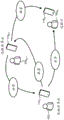
通信200能够被利用来支持目前的电话呼叫期间的实时共享。在图3所示的电话会议情境中能够在本地共享方1051和单个远程方105N之间或在本地共享方和多个远程方之间实现共享。在一些情况下,一个或多个远程方也能够与本地方和/或与另一方实现共享返回(sharing back)。共享也可以使用多于一个的网络连接来实现。例如,与电话呼叫和共享对话相关联的音频可以部分通过PSTN或移动运营商网络来传送(carry),而共享内容诸如图片、视频等能够通过Wi-Fi或其它网络来传送。Communication 200 can be utilized to support real-time sharing during current phone calls. Sharing can be achieved in the teleconferencing scenario shown in FIG. 3 between the
目前的电话呼叫期间的实时共享可以使用在给定设备上实例化的组件来实现。另外,如下面所讨论的,实时共享也能够全部或部分使用由远程服务提供商(例如,图1中的服务提供商130)支持的网络服务来实现。图4显示支持通信应用和其它组件的说明性分层架构400。架构400典型地在软件中实现,但是在一些情况下也可以利用软件、固件和/或硬件的组合。架构400被布置在层中并且包括应用层405、OS(操作系统)层410和硬件层415。硬件层415给在其上面的层提供由设备110使用的各种硬件(例如输入和输出设备、联网和无线电硬件等)的抽象。在这个说明性示例中,硬件层支持麦克风420和音频端点425,其可以包括例如有线或无线头戴耳机(headset)/耳塞耳机(earpiece)、外部扬声器/设备等等和设备的扬声器电话(speakerphone)428。Real-time sharing during current phone calls can be achieved using components instantiated on a given device. Additionally, as discussed below, real-time sharing can also be implemented in whole or in part using web services supported by a remote service provider (eg,
应用层405在这个说明性示例中支持各种应用(app)430(例如网络浏览器、地图应用、电子邮件应用等)以及电话应用435、消息应用440和视频呼叫应用445诸如SkypeTM。这些应用时常使用本地执行代码来实现。然而,在一些情况下,这些应用可以依赖于由远程服务器或诸如由服务提供商130或如利用线条460所指示的其它的基于云的资源所支持的其它计算平台提供的服务和/或远程代码执行。虽然这些应用430、435、440和445在这里被显示为在应用层405中实例化的组件,但是可以意识到:利用给定应用所提供的功能可以全部或部分使用在或OS或硬件层中支持的组件来实现。
OS层410支持实时共享组件450和各种其它OS组件455。在一些情况下,实时共享组件450能够与服务提供商交互。即,实时共享组件450在一些实现方式中能够部分利用或完全利用在服务提供商130支持的远程代码执行或使用其它远程资源。另外,它可以利用为了实现在本文描述的各种特性和功能而可能需要的其它OS组件455(和/或在架构400的其它层中实例化的其它组件)和/或与之交互。实时共享组件450可以替代地使用在OS和应用层两者中实例化或者被配置为应用的元件来实例化,如在图4中使用虚线椭圆所示的。也可以意识到:利用实时共享组件450提供的功能能够全部或部分使用在或应用或硬件层中支持的组件来实现。
各种类型的内容能够使用目前的实时共享来共享。图5显示可共享内容500的说明性分类。注意:可共享内容能够本地存储在设备上或者远离设备进行存储但是对于设备而言仍是可访问的。例如,可共享内容能够存储在云储存器中、在网络诸如局域网上是可用的、使用至另一设备的连接来访问等等。Various types of content can be shared using current live sharing. FIG. 5 shows an illustrative classification of shareable content 500 . Note: Shareable content can be stored locally on the device or away from the device but still be accessible to the device. For example, the sharable content can be stored in cloud storage, available on a network such as a local area network, accessed using a connection to another device, and the like.
如图5所示,可共享内容500能够包括预先存在/先前捕获的内容505(例如商业上可用的内容和/或用户生成的内容(UGC)等)以及与现场事件(例如音乐会、讲座、体育赛事、音频评论/听写、视频日志(视频博客)等)相关联的内容510两者。图5所示的可共享内容是说明性的并且不打算是详尽的。所利用的内容的类型能够根据特定实现方式的需要而变化。As shown in FIG. 5, sharable content 500 can include pre-existing/previously captured content 505 (eg, commercially available content and/or user-generated content (UGC), etc.) as well as content related to live events (eg, concerts, lectures, Sports events, audio commentary/dictation, video logs (video blogs, etc.) associated
预先存在可共享内容的说明性示例包括图像515、音频520、视频525、多媒体530、文件535、应用540和其它可共享内容545诸如共享方的位置和/或联系信息。Illustrative examples of pre-existing shareable content include
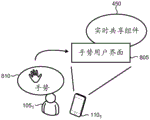
用户能够典型地取决于给定设备110所支持的特性和功能采用许多方式与实时共享组件450(图4)交互。例如,如图6所示,实时共享组件450可以暴露有形用户接口605,其允许用户105在设备110上的用户体验的实时共享的支持中采用物理交互610。这样的物理交互能够包括使用基于触摸的输入如同在触摸屏上轻敲、轻弹、拖动等的物理和/或虚拟控件诸如按钮、菜单、键盘等的操纵等等。在一些实现方式中,实时共享组件可以暴露图7所示的自然语言用户界面705或者替代地暴露基于语音命令的用户界面(未显示),用户利用这些用户界面、采用语音710来给设备110提供各种输入。在其它实现方式中,实时共享组件450可以暴露图8所示的用户用于采用手势810来给设备110提供输入的手势用户界面805。注意:在一些情况下,用户界面的组合可以被利用,其中用户可以采用例如语音和物理输入两者来与实时共享组件450和设备110交互。能够使用各种技术诸如光学感测、触摸感测、接近感测等等来感测用户手势。A user can interact with the real-time sharing component 450 (FIG. 4) in a number of ways, typically depending on the features and functionality supported by a given
图9显示典型地可以利用实时共享组件450来支持的功能900的说明性分类。至实时共享组件450的输入典型地能够包括用户输入905(其中在某些情况下,这样的用户输入能够包括从本地方和远程方中的任一或两者至给定共享对话的输入)、来自内部源的数据910和来自外部源的数据915。例如,来自内部源的数据910能够包括利用设备上的GPS(全球定位系统)组件或一些其它位置感知组件报告的设备110的当前地理位置。外部来源的数据915包括例如由外部系统、数据库、服务等等诸如服务提供商130(图1))提供的数据。各种输入能够独自或在各种组合中被使用来允许实时共享组件450在其操作时利用上下文数据920。上下文数据能够包括例如时间/日期、用户的位置、语言、日程安排、安装在设备上的应用、用户的偏好、用户的行为(其中这样的行为利用针对用户的通知和用户的同意来监视/追踪)、存储的联系人(在一些情况下包括至诸如利用外部社交网络服务维护的本地用户的或远程用户的社交图的链接)、呼叫历史、消息历史、浏览历史、设备类型、设备能力、其中提供的通信网络类型和/或特性/功能、移动数据计划约束/限制、与通信的其它方相关联的数据(例如其日程安排、偏好等)等等。下面提供利用实时共享组件进行的上下文的使用的附加说明性示例。FIG. 9 shows an illustrative taxonomy of
如所示的,功能900说明性地包括实现支持具有解说的策划的用户体验的实时共享模式(如利用参考数字925所指示的)。这样的策划的用户体验能够利用单个远程方和/或多个远程方来实现,并且共享在一些情况下能够在两个方向上进行(如图3所示和在随附文本中所描述的)。功能900也可以包括:显露(surface)各种UI以允许特定项被选择用于共享(930);通过将共享准备与共享呈现分开和控制如何由远程方保存共享内容来维护共享方的隐私(935);为用户提供工具来控制共享的步调和呈现(940),其中这样的控制能够选择性地被传递到远程方,如下所述;提供工具来突出显示、评论、缩放、平移、注释、策划、动画化(animate)、着色、阴影、添加至附加内容或体验的链接或幕上标记(telestrate)(945);以及提供和支持其它特性和功能(950)。功能900的列表并不打算是详尽的,并且可以利用实时共享组件来提供对于目前的电话呼叫期间的实时共享的特定实现方式而言可能需要的其它功能。As shown, function 900 illustratively includes implementing a real-time sharing mode (as indicated with reference numeral 925 ) that supports a curated user experience with narration. Such a curated user experience can be implemented with a single remote party and/or multiple remote parties, and sharing can occur in both directions in some cases (as shown in Figure 3 and described in accompanying text) .
在一些实现方式中,实时共享组件450能够被配置成与在设备110上是可操作的个人数字助理交互操作。如图10所示,个人数字助理1010能够暴露各种功能1000,其说明性地包括:(例如通过自然语言用户界面和/或其它用户界面)与用户交互1015;执行任务1020(例如在用户的日历中记录约会、发送消息和电子邮件等);提供服务1025(例如回答来自用户的问题、映射方向至目的地等);收集信息1030(例如找到用户所请求的关于书或电影的信息、定位最近的意大利餐馆等);操作设备1035(例如设置偏好、调整屏幕亮度、打开和关闭无线连接诸如Wi-Fi和Bluetooth等);以及执行各种其它功能1040。功能1000的列表并不打算是详尽的,并且可以利用数字助理来提供对于目前的电话呼叫期间的实时共享的特定实现方式而言可能需要的其它功能。In some implementations, the real-
在与图9所示的布置相类似的方式中,至数字助理1010的输入能够包括用户输入905、来自内部源的数据910、来自外部源的数据915和上下文数据920。In a manner similar to the arrangement shown in FIG. 9 , input to
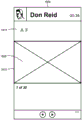
图11-30显示在电话呼叫期间的共享对话中的各个点在设备上显示的说明性实时共享用户界面(UI)的屏幕捕获。图11显示UI 1100,其能够在由本地共享方启动至远程方的电话呼叫时利用语音呼叫电话应用435来暴露(图4)。在这个特定示例中,呼叫和共享利用单个远程方来实现。然而,可以意识到:这个示例是说明性的,并且多方(即电话会议)也可以使用目前的实时共享来实现。注意:附图中所示的所有UI旨在是说明性的,并且信息的呈现、暴露的特性和控件以及UI的整体外观和感觉能够与利用实现方式所显示的有所不同。如图11所示,UI 1100在UI的底部显示被叫方(即远程方,在这里名为“Don Reid”)的图片和名字、所拨打的号码以及各种呼叫控件1105。11-30 show screen captures of an illustrative real-time sharing user interface (UI) displayed on a device at various points in a sharing conversation during a phone call. FIG. 11
当用户(即本地共享方)选择在电话应用的UI上暴露的共享按钮1110、在这里使用触摸屏上的触摸1115或其它交互时,如图12所示,显露共享UI 1200,以致用户能够启动与远程方的实时共享对话。实时共享组件450(图4)典型地将自动地将设备转变成操作在扬声器电话模式中,以致用户能够在与实时共享UI交互的同时继续与远程方交谈。When the user (ie, the local sharer) selects the
UI 1200提供能够由用户通过触摸来调用的许多共享选项1205。在这个示例中,用户采用触摸1215在各种选项之间选择图片和视频选项1220,以共享各种其它类型的内容。用户的选择动作显露图13中的UI 1300,其提供可用于与远程方共享的内容的相册(album)的垂直可滚动窗口1305,并且用户已使用触摸1315选择了名为“Luca Soccer”的内容的相册1310。在替代的实现方式中,用户可以调用可用于本地设备的个人数字助理1010(图10)或类似的实用程序(utility)来选择内容用于共享。因而,使用至个人数字助理的自然语言界面,用户可以说“找到上周末我的徒步旅行的照片和视频”或“给我显示我爸爸的图片”或“给我显示我和我妻子上个月在墨西哥拍摄的照片”,并且个人数字助理1010能够解析语句来定位和显露适当的内容。
如图14中的UI 1400所示,响应于用户选择,相册打开作为垂直可滚动窗口1405,其显示包括照片和视频两者的个别段的可共享内容的缩略图1410(为了说明清楚,实际缩略图图像未在图14中显示)。用户能够例如通过触摸适当的对应缩略图1410来选择相册中的一段或多段内容来共享。在这个示例中,用户不选择特定子集的内容并在共享按钮1420上采用触摸1415来共享相册中的所有内容。这个动作带来UI 1500,其暴露文本串确认1505以及分别用于共享内容或取消的按钮1510和1515。在这个示例中,用户采用触摸1520在电话呼叫期间与远程方共享所有的相册内容。As shown in
在这一点上,选择的内容被预先筹划(pre-stage)以便呈现给远程用户,但是在用户准备好之前没有内容与远程方进行共享。如图16中的UI 1600所示,用户的设备上的共享屏幕1605“变灰(gray out)”,以指示当前没有选择的内容在与远程方进行共享。当用户准备好启动策划的共享体验时,如图17中的UI 1700所示,内容缩略图1710上的触摸1705点亮共享屏幕,并且那个段的选择内容与远程用户进行共享。At this point, the selected content is pre-staged for presentation to the remote user, but no content is shared with the remote party until the user is ready. As shown in
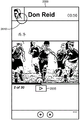
图18显示UI 1800,其在UI上的窗口1810中与文本串1815(“Sharing(共享)”)一起显示当前共享的内容1805,以便向用户指示显示的内容正被共享。实时共享组件450(图4)允许用户对共享的步调实行完全控制。在这个示例中,UI被配置成当用户希望向远程用户呈现相册中的另一段内容时允许用户水平滚动在显示窗口1810中显示的内容。如上面提到的,用户能够在共享期间继续提供语音解说。用户也能够采用在伴随图9的文本中描述的各种工具来增强共享体验。例如,用户可能希望使用允许特定共享对话被命名的工具并随后使用其它工具来将标题页与共享内容的呈现放在一起。用户也能够采用工具来制造动画化的闭合“演职员表(credit)”,其可以包括例如在共享照片中标记的人们的名字和/或至可能与共享的内容上下文相关的其它内容和/或体验的链接。18 shows
如在图19中的UI 1900的一系列屏幕捕获中所示的,用户105可以使用触摸和拖动操作(如内嵌图1902所示)来滚动至主动共享窗口1910中的相册中的下一段内容1915(即,30项中的项2)。在这个示例中,下一段内容是56秒视频剪辑。当用户按压所暴露的播放按钮1920时,能够开始视频剪辑。如图20中的UI 2000所示,能够暴露视频传输控件2005,以致用户能够擦洗(scrub)视频剪辑、暂停、恢复播放等作为在电话呼叫期间与远程用户进行的策划的实时共享对话的部分。As shown in the series of screen captures of UI 1900 in FIG. 19 ,
实时共享组件能够显露各种内容控制特性。当用户在远程方的化身(avatar)或名字上采用触摸2010时,内容控制选项被提供,如在图21中的UI 2100说明性显示的。在这里,在UI上显示文本串2105,其询问是否远程用户能够将当前共享的内容保存到远程用户的设备。按钮2110和2115被显示,以便分别准许或阻止由远程用户进行的这样的保存。在这里,用户采用触摸2120来准许远程用户保存当前共享内容(即,视频剪辑)的拷贝。The real-time sharing component can expose various content control features. When the user takes
其它内容控制选项也能够被暴露并被利用来满足特定实现方式的需要。例如,共享内容能够被配置成对于有限时长时间周期和/或在用户指定的时间间隔期间是可访问的以便由远程方下载。在其它实现方式中,共享内容能够被布置成在共享对话结束之后、但是只是对于有限时间周期和/或在用户指定的时间间隔期间内被远程观看。在一些情况下,服务提供商130(图1)可以被用作用户的共享内容的主机,以促进由远程方进行的后共享(post-sharing)对话访问。服务提供商随后能够在这样的情况下代表用户来强制执行时间限制和/或内容控制。Other content control options can also be exposed and utilized to meet the needs of specific implementations. For example, shared content can be configured to be accessible for download by a remote party for a limited time period of time and/or during user-specified time intervals. In other implementations, the shared content can be arranged to be viewed remotely after the end of the shared session, but only for a limited period of time and/or during user-specified time intervals. In some cases, service provider 130 (FIG. 1) may be used as a host for a user's shared content to facilitate post-sharing conversational access by remote parties. The service provider can then enforce time limits and/or content control on behalf of the user in such situations.
在其中用户已选择禁用由远程方保存共享内容的一些情况下,可以采用各种方法来阻止远程方使用屏幕捕获特性和/或实用程序来应对(work around)这样的禁用。例如,利用设备的操作系统支持的屏幕捕获特性在一些实现方式中可以在远程设备上被禁用和/或被推翻(override)。在其中第三方应用可以在远程设备上被用于屏幕捕获的情境下,所显示的共享内容能够包括各种处理,其仍允许远程用户看到内容,但是使用例如水印等等使得屏幕捕获不太有吸引力的。共享内容在一些实现方式中也能够使用时间抖动(dithering)、内容刷新率的操纵、加扰和/或加密中的一个或多个来处理,以禁用在远程设备上共享内容的保存。In some cases where the user has chosen to disable saving of shared content by the remote party, various methods may be employed to prevent the remote party from using the screen capture feature and/or utility to work around such disabling. For example, utilizing a screen capture feature supported by the device's operating system may in some implementations be disabled and/or overridden on the remote device. In scenarios where third-party applications can be used for screen captures on the remote device, the shared content displayed can include various processing that still allows the remote user to see the content, but makes the screen capture less likely to use, for example, watermarks, etc. Attractive. Shared content can also be processed in some implementations using one or more of temporal dithering, manipulation of content refresh rates, scrambling, and/or encryption to disable saving of shared content on remote devices.
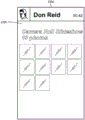
图22显示举例说明实时共享的另一示例的UI 2200。在这个示例中,用户已选择包含265段内容的名为“Camera Roll(相机胶卷)”的相册。使用在设备的触摸屏上触摸的多个实例,用户已选择10个照片的子集2205,其在UI上被突出显示。允许只是相册的子集用于共享的这样的选择对于可能希望保留一些内容不被共享的用户而言促进隐私保护,同时也通过上下文允许适当的内容被共享来增强策划的用户体验。用户采用触摸2210来在电话呼叫期间与远程方共享所选择的内容。FIG. 22 shows a
如图23中的UI 2300所示,所选择的内容被预先筹划,以便呈现给远程用户。共享屏幕2305再次被变灰,以指示没有选择内容(即,10张照片)当前正与远程用户进行共享。当用户准备好启动策划的共享体验时,内容缩略图上的触摸点亮共享屏幕,并且那段选择内容与远程用户进行共享。如上面提到的,本地用户能够对共享的步调和呈现实行完全控制。然而,在一些情况下,用户能够选择性地将对于呈现的控制给予远程用户。例如,本地用户能够在显示有关在附近经销商处销售的汽车的一系列照片,并且远程用户具有有关较早显示的特定图片的问题或评论。本地用户能够将临时控制给予远程用户,以致远程用户能够在呈现中返回到感兴趣的图片,而不必向本地用户口头描述如何导航返回至感兴趣的图片。As shown in
图24和25显示其它UI 2400和2500的说明性示例,其能够在电话呼叫期间替代地被利用来促进目前的实时共享。在这里,选择相册中的内容被显示为水平可滚动的缩略图的电影胶片(filmstrip)2405。主动共享窗口2410被配置,以致用户能够将选择的内容项从电影胶片拖动到共享窗口中,以便与远程方共享。如所示的,用户已采用触摸2415来选择视频剪辑并将其拖动到共享窗口2410中。当用户按压所暴露的如图25所示的播放按钮2520时,能够开始视频剪辑。24 and 25 show illustrative examples of
多个内容项在一些情况下能够被拖动到共享窗口2410中,其随后将在实时共享对话期间以它们被拖动并被放置到窗口中的特定顺序来显示(例如,用户能够在实时共享对话期间在内容项之间水平滚动,如上面在图19中所示和在随附文本中所描述的)。替代地,在共享特定段的内容之后,用户能够返回到UI 2400来选择另一内容项并将其拖动到共享窗口2410中,用于实时共享。给定的实时共享对话典型地以维持共享内容的上下文的方式来实现。例如,视频在共享内容内在线播放,共享文字处理文档支持垂直滚动,音频内容包括嵌入式音量控制等等。这样的上下文能够典型地在本地设备和远程设备两者上被维护至共享对话。Multiple content items can in some cases be dragged into the
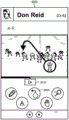
图26显示说明性UI 2600,其中各种工具2605被暴露给用户,以便添加突出显示和注释或评论至共享内容项并通过放大与缩小和/或平移来控制内容呈现。所暴露的特定工具和所提供的特性能够根据特定实现方式的需要而变化,并且不是所有的工具需要在每一种实现方式中被支持。在一些情况下也能够支持颜色、阴影、透明度、动画和其它效果。绘图工具也能够被布置成为“智能”工具,以致实现线条平滑并绘制完美形状(即圆形、正方形等)。所利用的平滑和形状完美的程度在一些实现方式中能够是用户可选择的。26 shows an
在这个示例中,用户已使用笔工具在所显示照片的特定部分周围绘制突出显示圆圈并添加注释(即,字幕)。突出显示能够在实时共享对话期间现场实现,或者替代地,用户能够在呈现筹划(staging)期间采用工具,以致只有完成的突出显示的内容项被共享。如图27所示,具有突出显示的共享内容项被显示在被显示在远程用户的设备上的UI 2700上。In this example, the user has used the pen tool to draw highlight circles and add annotations (ie, captions) around specific portions of the displayed photo. Highlighting can be implemented live during a real-time sharing session, or alternatively, the user can employ tools during presentation staging so that only completed highlighted content items are shared. As shown in FIG. 27, the shared content item with highlighting is displayed on a
当共享内容是视频时,突出显示工具包能够被扩展为包括附加工具,诸如图28的UI 2800中所示的幕上标记(telestration)工具280。幕上标记工具2805能够暴露各种各样的幕上标记功能,以致用户在视频被暂停的同时能够以例如在专业体育赛事的广播上所执行的相类似方式使用各种颜色的线条和形状在实时共享对话中标记和突出显示视频的各部分。提供视频传输控件2810,以致用户能够根据需要来播放、暂停和擦洗视频。When the shared content is video, the highlighting toolkit can be extended to include additional tools, such as the on-screen telecasting tool 280 shown in
虽然在语音呼叫的上下文中描述上面的实时共享的说明性示例,但是实时共享也能够在视频呼叫的上下文中进行实现。如图29和30所示,利用视频呼叫应用(例如图4中的应用445)暴露的UI 2900和3000提供共享内容可以被放置于其中以便显示的相对大的帆布(canvas)。在图29中,用户的设备(即,本地共享方)上的UI 2900能够被布置成在大视图2905、用户的小内嵌视图2910以及与呈现工具和其它呈现准备UI一起显示共享内容的主动共享窗口2915中显示远程方的视频图像,其视情况而定。While the above illustrative examples of real-time sharing are described in the context of voice calls, real-time sharing can also be implemented in the context of video calls. As shown in Figures 29 and 30,
在一些实施方式中,共享窗口2915能够由用户放置在UI 2900上的特定位置中和/或在尺寸上被放大或被缩小。例如,用户能够触摸共享窗口2915并将其拖动到期望位置,而且使用多点触摸手势诸如捏和张开来放大和缩小该窗口。In some implementations, the shared
在图30中,UI 3000被显示在远程方的设备上。以与用户的设备上的UI 2900相类似的方式,远程方UI 3000包括其它方(即,本地共享方)的大视图3005、内嵌视图3010和共享窗口3015。在这里,共享窗口3015显示由本地共享方提供的共享内容并因此不暴露任何内容准备/呈现UI或预先筹划的内容。在一些实现方式中,在远程方的设备上的共享窗口3015在UI上能够是用户定位和调整大小的。In Figure 30,
在一些实时共享情境中,参与共享的每一个设备(无论是共享的单个实例还是在两方或更多方之间的多实例共享)能够具有被安装并执行来支持实时共享用户体验的实时共享组件。这显示在图31中,其中(利用参考数字3105所指示的)交互典型地发生在每一个设备110上的实时共享组件450的个别实例之间,以促进共享3110。In some real-time sharing scenarios, each device participating in the sharing (whether a single instance of the sharing or a multi-instance sharing between two or more parties) can have a real-time sharing installed and implemented to support the real-time sharing user experience components. This is shown in FIG. 31 , where interaction (indicated with reference numeral 3105 ) typically occurs between individual instances of the real-
在其它实时共享情境中,参与共享的各方之中的一方或多方可能不具有实例化的实时共享组件450。在这样的情况下,通过利用由图32所示的远程服务提供商130提供的能力,实时共享仍可以利用全套特性和用户体验来实现。服务提供商130能够给网络服务客户端3210诸如远程设备上的浏览器或其它应用提供网络服务3205,以致来自本地实时共享组件450的共享内容能够由服务提供商供应给客户端,以便在共享3215期间进行渲染。In other real-time sharing scenarios, one or more of the parties participating in the sharing may not have the real-
当本地共享方启动共享对话时,服务提供商130能够发送消息3220至在远程设备上是可用的消息应用3225。例如,消息3220能够是使用SMS(短消息服务)传输的文本消息,其包含至共享内容的链接以及利用网络服务3205来促进的实时策划的共享体验。When the local sharer initiates the sharing session, the
当消息3220利用消息应用3225来接收时,它典型地能够在UI例如图33所示的UI3300中显露消息。在这个示例中,消息发送者被识别为“Sharing Service(共享服务)”,并且显示的消息3305包括简短消息,其典型地按名字来识别本地共享方并包括远程方能够跟随来参与策划的实时共享对话的链接3310。When the
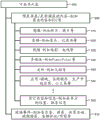
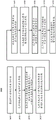
图34显示用于实现实时共享的说明性方法3400的流程图。除非特别声明,否则在下面的流程图中所示和在随附文本中所描述的方法或步骤并不限于特定的次序或顺序。另外,其中的一些方法或步骤能够同时发生或被执行,并且不是所有的方法或步骤必须在给定的实现方式中被执行,这取决于这样的实现方式的要求,而且可以可选地利用一些方法或步骤。34 shows a flowchart of an
在步骤3405中,UI被暴露,以便本地共享方启动与远程方的实时共享。如上面所提到的,UI可以被并入利用语音呼叫应用或视频呼叫应用所暴露的UI中。在步骤3410中,本地共享方被允许在可用内容之间选择,以便共享。在步骤3415中,使得共享的准备与主动共享窗口分开,以致本地共享方的隐私被维护。即,远程方只看到被放置在主动共享窗口中的共享内容,而不是正在场景后面发生的任何本地共享方的活动。例如,不显示预先筹划的内容,也没有任何工具被实时共享应用暴露来控制、准备、成形或修改共享的内容及其呈现。In
在步骤3420中,允许被提供给本地共享方来将内容从预先筹划移动到主动共享,以便控制共享内容的呈现的步调。这样的移动能够以上面描述的包括在主动共享窗口中在内容项之间水平滚动、将项从电影胶片移动到主动共享窗口等的各种方式来完成。In
在步骤3425中,工具被提供来突出显示共享内容。突出显示典型地能够在内容在被预先筹划的同时被共享之前被执行,或者能够在实际上被共享的同时对内容执行突出显示,以致远程方能够看到突出显示在其发生时被实时添加。突出显示能够使用线条、图形形状、图形对象、文本、颜色、透明度、阴影或动画中的一种或多种和/或其组合来实现。在步骤3430中,从本地共享方接收形成伴随共享内容的呈现的解说的语音输入。在步骤3435中,允许被提供来在UI上重新定位共享窗口和重新调整共享窗口的大小。在步骤3440中,允许被提供,以便共享内容在电话呼叫被终止之后被控制。这样的内容控制布置可以被称为“留下(leave behind)”或纪念品(souvenir),其中利用实时共享组件给本地共享方提供选项来控制是否共享内容能够由远程方保存、访问共享内容后呼叫(post-call)、作为流观看共享内容而不保存等。示例性留下能够包括例如共享对话的视频文件,其包括在电话呼叫期间提供的共享内容和解说。In
在步骤3445中,允许被提供,以便给定的共享对话被暂停、暂时被停止并随后被重新开始。例如,共享能够在电话期间被暂停并随后在那个同一呼叫中稍后被恢复。替代地,共享可能一起被停止并随后在稍后的单独呼叫中再次(例如从一开始或从共享被离开的地方)被拾起(pick up)。共享对话数据在这两种情况下能够被存留(persist),以允许用户容易地重新开始共享体验。在一些情况下,也能够利用这样的共享对话数据,以致用户能够在不同的呼叫上在不同的时间将相同的呈现给予不同的远程用户。In
图35显示用于使用由服务提供商(例如,图1中的服务提供商130)支持的网络服务来促进实时共享的说明性方法3500的流程图。在步骤3505中,从正操作在本地设备上的实时共享组件接收共享内容。在一些情况下,共享内容没有被接收,但是以其它方式向服务提供商指示实时共享对话的启动。在响应中,在步骤3510中,服务提供商通过网络向远程设备发送消息,其包括能够被跟随来访问实时共享体验的链接。例如,消息能够是通过SMS发送的文本消息。35 shows a flowchart of an
在步骤3515中,当远程方跟随链接时,网络服务被提供给在远程设备上运行的客户端。网络服务随后能够将实时共享体验渲染到网络服务客户端诸如浏览器或其它应用中。在步骤3520中,输入被接收来控制共享内容呈现的步调。网络服务将在步骤3525中响应于这些输入而呈现所共享的内容。In
图36是可以利用来实现目前的电话呼叫期间的实时共享的说明性计算机系统3600诸如PC、客户机或服务器的简化框图。计算机系统3600包括处理器3605、系统存储器3611以及将包括系统存储器3611的各种系统组件耦合到处理器3605的系统总线3614。系统总线3614可以是任何的若干类型的总线结构,其包括内存总线或内存控制器、外围总线或使用任何的各种各样总线架构的局部总线。系统存储器3611包括只读存储器(ROM)3617和随机存取存储器(RAM)3621。包含诸如在启动期间帮助在计算机系统3600内的元件之间传送信息的基本例程的基本输入/输出系统(BIOS)3625被存储在ROM 3617中。计算机系统3600可以进一步包括:硬盘驱动器3628,用于从内部安排的硬盘(未显示)中读取和写入该硬盘;磁盘驱动器3630,用于从可移除磁盘3633(例如,软盘)中读取或写入可移除磁盘3633;以及光盘驱动器3638,用于从可移除光盘3643诸如CD(光盘)、DVD(数字通用盘)或其它光学媒体中读取或写入可移除光盘3643。硬盘驱动器3628、磁盘驱动器3630和光盘驱动器3638分别通过硬盘驱动器接口3646、磁盘驱动器接口3649和光驱接口3652被连接到系统总线3614。这些驱动器及其相关联的计算机可读存储媒体为计算机系统3600提供计算机可读指令、数据结构、程序模块和其它数据的非易失性存储。虽然这个说明性示例包括硬盘、可移除磁盘3633和可移除光盘3643,但是能够存储由计算机可访问的数据的其它类型的计算机可读存储媒体诸如磁带盒、闪存卡、数字视频盘、数据磁带(data cartridge)、随机存取存储器(RAM)、只读存储器(ROM)等等也可以用于目前的电话呼叫期间的实时共享的一些应用中。此外,如在本文所使用的,术语计算机可读存储媒体包括媒体类型的一个或多个实例(例如一个或多个磁盘、一个或多个CD等)。为了这个说明书和权利要求书的目的,短语“计算机可读存储媒体”及其变体不包括波、信号和/或其它的短暂和/或无形通信媒体。36 is a simplified block diagram of an
许多程序模块可以被存储在硬盘、磁盘3633、光盘3643、ROM3617或RAM 3621上,这些程序模块包括操作系统3655、一个或多个应用程序3657、其它程序模块3660和程序数据3663。用户可以通过输入设备诸如键盘3666和指点设备3668诸如鼠标将命令和信息输入计算机系统3600中。其它输入设备(未显示)可以包括麦克风、操纵杆、游戏垫、卫星盘、扫描仪、轨迹球、触摸板、触摸屏、触敏设备、语音命令模块或设备、用户动作或用户手势捕获设备等等。这些和其它输入设备时常通过被耦合到系统总线3614的串行端口接口3671被连接到处理器3605,但是可以通过其它接口诸如并行端口、游戏端口或通用串行总线(USB))来连接。监视器3673或其它类型的显示设备也经由接口诸如视频适配器3675被连接到系统总线3614。除了监视器3673之外,个人计算机典型地包括其它外围输出设备(未显示),诸如扬声器和打印机。图36所示的说明性示例也包括主机适配器3678、小型计算机系统接口(SCSI)总线3683和连接到SCSI总线3683的外部存储设备3676。A number of program modules, including
计算机系统3600使用至一个或多个远程计算机诸如远程计算机3688的逻辑连接而可操作在联网环境中。远程计算机3688可以被选择作为另一个人计算机、服务器、路由器、网络PC、对等设备或其它常见的网络节点,并且典型地包括上面相对于计算机系统3600描述的元件中的许多或所有元件,但是在图36中仅显示单个代表性远程存储器/存储设备3690。图36中所描绘的逻辑连接包括局域网(LAN)3693和广域网(WAN)3695。这样的联网环境时常被部署在例如办公室、企业范围计算机网络、内联网和因特网中。
当被用于LAN联网环境中时,计算机系统3600通过网络接口或适配器3696被连接到局域网3693。当被用于WAN联网环境中时,计算机系统3600典型地包括宽带调制解调器3698、网络网关或用于通过广域网3695诸如因特网建立通信的其它装置。可以是内部或外部的宽带调制解调器3698经由串行端口接口3671被连接到系统总线3614。在联网环境中,涉及计算机系统3600或其部分的程序模块可以被存储在远程存储器存储设备3690中。注意:图36所示的网络连接是说明性的,并且取决于目前的电话呼叫期间的实时共享的应用的具体要求而可以使用在计算机之间建立通信链路的其它装置。When used in a LAN networking environment,
图37显示用于能够执行在本文描述的各种组件来提供目前的电话呼叫期间的实时共享的设备的说明性架构3700。因而,图37中举例说明的架构3700显示可以针对服务器计算机、移动电话、PDA、智能电话、台式计算机、上网本计算机、平板计算机、GPS设备、游戏控制台和/或膝上型计算机进行适配的架构。架构3700可以被利用来执行在本文呈现的组件的任何方面。37 shows an
图37中举例说明的架构3700包括CPU(中央处理单元)3702、包括RAM 3706和ROM3708的系统存储器3704以及将存储器3704耦合到CPU 3702的系统总线3710。包含帮助诸如在启动期间在架构3700内的元件之间传送信息的基本例程的基本输入/输出系统被存储在ROM 3708中。架构3700进一步包括用于存储软件代码或被利用来实现应用、文件系统和操作系统的其它计算机执行代码的大容量存储设备3712。The
大容量存储设备3712通过连接到总线3710的大容量存储控制器(未显示)被连接到CPU 3702。大容量存储设备3712及其相关联的计算机可读存储媒体为架构3700提供非易失性存储。
虽然在本文包含的计算机可读存储媒体的描述涉及大容量存储设备诸如硬盘或CD-ROM驱动器,但是本领域技术人员可以意识到:计算机可读存储媒体能够是能够由架构3700访问的任何可用的存储媒体。Although the description of computer-readable storage media contained herein refers to mass storage devices such as hard disks or CD-ROM drives, those skilled in the art will appreciate that computer-readable storage media can be any available storage media that can be accessed by
通过示例而非限制,计算机可读存储媒体可以包括在用于存储信息诸如计算机可读指令、数据结构、程序模块或其它数据的任何方法或技术中实现的易失性和非易失性、可移除和不可移除媒体。例如,计算机可读媒体包括但不限于RAM、ROM、EPROM(可擦除可编程只读存储器)、EEPROM(电可擦除可编程只读存储器)、闪存或其它的固态存储技术、CD-ROM、DVD、HD-DVD(高清晰度DVD)、Blu-ray(蓝光)或其它光储存器、磁带盒、磁带、磁盘储存器或其它磁存储设备或者能够用于存储期望信息并能够由架构3700访问的任何其它介质。By way of example and not limitation, computer-readable storage media may include volatile and non-volatile, removable, volatile and memory devices implemented in any method or technology for storage of information such as computer-readable instructions, data structures, program modules or other data. Removable and non-removable media. For example, computer readable media include, but are not limited to, RAM, ROM, EPROM (Erasable Programmable Read Only Memory), EEPROM (Electrically Erasable Programmable Read Only Memory), flash memory or other solid state storage technology, CD-ROM , DVD, HD-DVD (High Definition DVD), Blu-ray (Blu-ray) or other optical storage, cassettes, magnetic tapes, disk storage or other magnetic storage devices or can be used to store desired information and can be stored by the
根据各种实施例,架构3700可以通过网络使用至远程计算机的逻辑连接而操作在联网环境中。架构3700可以通过连接到总线3710的网络接口单元3716而连接到网络。可以意识到:网络接口单元3716也可以被利用来连接到其它类型的网络和远程计算机系统。架构3700也可以包括输入/输出控制器3718,用于接收和处理来自许多其它的包括键盘、鼠标或电子笔(未在图37中显示)的设备的输入。类似地,输入/输出控制器3718可以提供输出至显示屏、打印机或其它类型的输出设备(也未在图37中显示)。According to various embodiments,
可以意识到:在本文描述的软件组件可以在被加载到CPU 3702中并被执行时将CPU 3702和整体架构3700从通用计算系统转换成被定制来促进在本文呈现的功能的专用计算系统。CPU 3702可以由任何数量的晶体管或其它分立电路元件构成,其可以个别地或共同地假设(assume)任何数量的状态。更具体地,CPU 3702可以响应于包含在本文公开的软件模块内的可执行指令而作为有限状态机来操作。这些计算机可执行指令可以通过指定CPU 3702如何在状态之间过渡来转换CPU 3702,从而转换构成CPU 3702的晶体管或其它分立硬件元件。It will be appreciated that the software components described herein can, when loaded into
编码在本文呈现的软件模块也可以转换在本文呈现的计算机可读存储媒体的物理结构。在这个描述的不同实现方式中,物理结构的具体转换可以取决于各种因素。这样的因素的示例可以包括但不限于用于实现计算机可读存储媒体的技术、计算机可读存储媒体被表征为主储存器还是辅助储存器等等。例如,如果计算机可读存储媒体被实现为基于半导体的存储器,则在本文公开的软件可以通过转换半导体存储器的物理状态而在计算机可读存储媒体上被编码。例如,软件可以转换构成半导体存储器的晶体管、电容器或其它分立电路元件的状态。软件也可以转换这样的组件的物理状态,以便在其上存储数据。Encoding the software modules presented herein can also transform the physical structure of the computer-readable storage media presented herein. In different implementations of this description, the specific transformation of the physical structure may depend on various factors. Examples of such factors may include, but are not limited to, the technology used to implement the computer-readable storage medium, whether the computer-readable storage medium is characterized as primary or secondary storage, and the like. For example, if the computer-readable storage medium is implemented as a semiconductor-based memory, the software disclosed herein may be encoded on the computer-readable storage medium by converting the physical state of the semiconductor memory. For example, software can convert the states of transistors, capacitors, or other discrete circuit elements that make up a semiconductor memory. Software can also transform the physical state of such components in order to store data on them.
作为另一示例,在本文公开的计算机可读存储媒体可以使用磁性或光学技术来实现。在这样的实现方式中,当软件被编码于其中时,在本文呈现的软件可以转换磁性或光学媒体的物理状态。这些转换可以包括改变给定磁性媒体内的特定位置的磁特征。这些转换也可以包括改变给定光学媒体内的特定位置的物理特性或特征,以改变那些位置的光学特征。在不背离目前描述的范畴和精神的情况下,物理媒体的其它转换是可能的,其中只是为了促进此讨论而提供上述示例。As another example, the computer-readable storage media disclosed herein may be implemented using magnetic or optical techniques. In such implementations, the software presented herein can convert the physical state of magnetic or optical media when the software is encoded therein. These transformations may include changing the magnetic characteristics of specific locations within a given magnetic medium. These transformations may also include changing the physical properties or characteristics of specific locations within a given optical medium to alter the optical characteristics of those locations. Other transformations of physical media are possible without departing from the scope and spirit of the present description, the above examples being provided only to facilitate this discussion.
鉴于上述,可以意识到:许多类型的物理转换发生在架构3700中,以便存储和执行在本文呈现的软件组件。也可以意识到:架构3700可以包括其它类型的计算设备,其包括手持计算机、嵌入式计算机系统、智能电话、PDA以及本领域技术人员已知的其它类型的计算设备。也考虑到:架构3700可以不包括图37所示的所有组件,可以包括未在图37中明确显示的其它组件,或者可以利用与图37所显示的完全不同的架构。In view of the above, it can be appreciated that many types of physical transformations take place in
图38是包括一般显示在3802的各种各样的可选的硬件和软件组件的说明性移动设备110诸如移动电话或智能电话的功能框图。移动设备中的任何组件3802能够与任何其它组件通信,但是为了便于说明,并未显示所有的连接。移动设备能够是任何的各种各样的计算设备(例如蜂窝电话、智能电话、手持计算机、PDA等),并且能够准许与一个或多个移动通信网络3804诸如蜂窝或卫星网络进行的无线双向通信。38 is a functional block diagram of an illustrative
举例说明的设备110能够包括控制器或处理器3810(例如信号处理器、微处理器、微控制器、ASIC(专用集成电路)或其它控制和处理逻辑电路),用于执行这样的任务诸如信号编码、数据处理、输入/输出处理、功率控制和/或其它功能。操作系统3812能够控制组件3802的分配和使用,其包括功率状态、上锁(above-lock)状态和下锁(below-lock)状态,并且提供对于一个或多个应用程序3814的支持。应用程序能够包括常见的移动计算应用(例如图像捕获应用、电子邮件应用、日历、联系人管理器、网络浏览器、消息应用)或任何其它的计算应用。The illustrated
举例说明的移动设备110能够包括存储器3820。存储器3820能够包括不可移除存储器3822和/或可移除存储器3824。不可移除存储器3822能够包括RAM、ROM、闪存、硬盘或其它众所周知的存储器存储技术。可移除存储器3824能够包括闪存或在GSM(全球移动通信系统)系统中是众所周知的Subscriber Identity Module(用户身份模块)(SIM)卡或者其它的众所周知的存储器存储技术诸如“智能卡”。存储器3820能够用于存储用于运行操作系统3812和应用程序3814的数据和/或代码。示例数据能够包括网页、文本、图像、声音文件、视频数据或其它数据集,其将经由一个或多个有线或无线网络被发送到一个或多个网络服务器或其它设备和/或从其进行接收。The illustrated
存储器3820也可以被布置为或包括一个或多个计算机可读存储媒体,其在用于存储信息诸如计算机可读指令、数据结构、程序模块或其它数据的任何方法或技术中进行实现。例如,计算机可读媒体包括但不限于RAM、ROM、EPROM、EEPROM、闪存或其它固态存储技术、CD-ROM(光盘ROM)、DVD(数字通用盘)、HD-DVD(高清晰度DVD)、Blu-ray或其它光储存器、磁带盒、磁带、磁盘储存器或其它磁存储设备或者能够用于存储期望信息并能够由移动设备110访问的任何其它介质。
存储器3820能够用于存储用户识别符诸如International Mobile SubscriberIdentity(国际移动用户身份)(IMSI)和设备识别符诸如International MobileEquipment Identifier(国际移动设备识别符)(IMEI)。这样的识别符可以被发射到网络服务器来识别用户和设备。移动设备110能够支持:一个或多个输入设备3830,诸如触摸屏3832;麦克风3834,用于实现语音输入以便语音识别、语音命令等等;照相机3836;物理键盘3838;轨迹球3840;和/或接近传感器3842;以及一个或多个输出设备3850,诸如扬声器3852和一个或多个显示器3854。在一些情况下也可以利用使用手势辨别的其它输入设备(未显示)。其它可能的输出设备(未显示)能够包括压电或触觉输出设备。一些设备能够服务多于一个的输入/输出功能。例如,触摸屏3832和显示器3854能够被组合到单个输入/输出设备中。
无线调制解调器3860能够被耦合到天线(未显示)并且能够支持处理器3810和外部设备之间的双向通信,如在本领域中众所周知的。调制解调器3860被一般显示并且能够包括用于与移动通信网络3804通信的蜂窝调制解调器和/或其它的基于无线电的调制解调器(例如Bluetooth 3864或Wi-Fi 3862)。无线调制解调器3860典型地被配置用于与一个或多个蜂窝网络诸如GSM网络通信,用于在单个蜂窝网络内、在蜂窝网络之间或在移动设备和公共交换电话网络(PSTN)之间的数据和语音通信。
移动设备能够进一步包括至少一个输入/输出端口3880、电源3882、卫星导航系统接收器3884诸如GPS接收器、加速度计3886、陀螺仪(未显示)和/或物理连接器3890,其能够是USB端口、IEEE1394(FireWire(火线))端口和/或RS-232端口。举例说明的组件3802不是必需的或包罗万象的,这是因为能够删除任何组件并且能够添加其它组件。The mobile device can further include at least one input/
图39是多媒体控制台1104的说明性功能框图。多媒体控制台1104具有中央处理单元(CPU)3901,其具有1级缓存3902、2级缓存3904和Flash ROM(闪速ROM)(只读存储器)3906。1级缓存3902和2级缓存3904临时存储数据并因此减少存储器访问周期的数量,从而改进处理速度和吞吐量。CPU 3901可以被配置有多于一个的核,并因而,被配置有附加的1级缓存3902和2级缓存3904。闪速ROM 3906可以存储可执行代码,其在多媒体控制台1104被上电时在引导(boot)处理的初始阶段期间被加载。39 is an illustrative functional block diagram of the multimedia console 1104 . The multimedia console 1104 has a central processing unit (CPU) 3901 having a
图形处理单元(GPU)3908和视频编码器/视频编解码器(编码器/解码器)3914形成用于高速和高分辨率图形处理的视频处理管线。经由总线从GPU 3908传送数据到视频编码器/视频编解码器3914。视频处理管线将数据输出到A/V(音频/视频)端口3940,以便传输到电视或其它显示器。内存控制器3910被连接到GPU 3908,以促进处理器访问各种类型的存储器3912,诸如但不限于RAM。Graphics processing unit (GPU) 3908 and video encoder/video codec (encoder/decoder) 3914 form a video processing pipeline for high speed and high resolution graphics processing. Data is transferred from
多媒体控制台1104包括I/O控制器3920、系统管理控制器3922、音频处理单元3923、网络接口控制器3924、第一USB(通用串行总线)主机控制器3926、第二USB控制器3928和前面板I/O子组件3930,其优选地被实现在模块3918上。USB控制器3926和3928用作外围控制器3942(1)和3942(2)、无线适配器3948和外部存储设备3946(例如闪存、外部CD/DVDROM驱动器、可移除媒体等)的主机。网络接口控制器3924和/或无线适配器3948提供对于网络(例如因特网、家庭网络等)的访问,并且可以是任何的各种各样的各种有线或无线适配器组件,其包括以太网卡、调制解调器、Bluetooth模块、电缆调制解调器等等。The multimedia console 1104 includes an I/
提供系统存储器3943来存储在引导处理期间加载的应用数据。媒体驱动器3944被提供并可以包括DVD/CD驱动器、硬盘驱动器或其它可移除媒体驱动器等。媒体驱动器3944对于多媒体控制台1104而言可以是内部的或外部的。应用数据可以由多媒体控制台1104经由媒体驱动器3944来访问,以便执行、回放等。媒体驱动器3944经由总线诸如串行ATA总线或其它高速连接(例如IEEE 1394)被连接到I/O控制器3920。
系统管理控制器3922提供涉及保证多媒体控制台1104的可用性的各种各样的服务功能。音频处理单元3923和音频编解码器3932形成具有高保真度和立体声处理的对应音频处理管线。音频数据经由通信链路在音频处理单元3923和音频编解码器3932之间进行传送。音频处理管线将数据输出到A/V端口3940,以便由具有音频能力的外部音频播放器或设备再现。The
前面板I/O子组件3930支持电源按钮3950和弹出按钮3952以及暴露在多媒体控制台1104的外表面上的任何LED(发光二极管)或其它指示器的功能。系统电源模块3936给多媒体控制台1104的组件提供电力。风扇3938冷却多媒体控制台1104内的电路。Front panel I/
多媒体控制台1104内的CPU 3901、GPU 3908、内存控制器3910和各种其它组件经由一个或多个总线进行互连,这些总线包括使用任何的各种各样的总线架构的串行和并行总线、内存总线、外围总线和处理器或局部总线。通过示例,这样的架构能够包括Peripheral Component Interconnect(外围组件互连)(PCI)总线、PCI-Express总线等。 The CPU 3901,
当多媒体控制台1104被上电时,应用数据可以从系统存储器3943被加载到存储器3912和/或缓存3902和3904中并被执行在CPU 3901上。应用可以呈现图形用户界面,其在导航到多媒体控制台1104上可用的不同媒体类型时提供一致的用户体验。在操作中,包含在媒体驱动器3944内的应用和/或其它媒体可以从媒体驱动器3944被发动或被播放来给多媒体控制台1104提供附加功能。Application data may be loaded from
多媒体控制台1104可以通过简单地将系统连接到电视或其它显示器而作为独立系统来操作。在这个独立模式中,多媒体控制台1104准许一个或多个用户与系统交互、观看电影或听音乐。然而,如果通过网络接口控制器3924或无线适配器3948而使得宽带连接性的集成是可用的话,多媒体控制台1104可以进一步作为更大网络社区中的参与者来操作。The multimedia console 1104 can operate as a stand-alone system by simply connecting the system to a television or other display. In this standalone mode, the multimedia console 1104 permits one or more users to interact with the system, watch movies, or listen to music. However, if the integration of broadband connectivity is available through the
当多媒体控制台1104被上电时,定量的硬件资源被多媒体控制台操作系统保留用于系统使用。这些资源能够包括存储器(例如16MB)、CPU和GPU循环(例如5%)、网络带宽(例如8kbps)的保留等。因为这些资源在系统引导时间被保留,所以保留的资源从应用的角度而言不存在。When the multimedia console 1104 is powered up, a certain amount of hardware resources are reserved by the multimedia console operating system for system use. These resources can include memory (eg, 16MB), CPU and GPU cycles (eg, 5%), reservation of network bandwidth (eg, 8kbps), and the like. Because these resources are reserved at system boot time, the reserved resources do not exist from the application's perspective.
特别地,存储器保留优选地对于包含发动内核(launch kernel)、并发系统应用和驱动器而言是足够大的。CPU保留优选地为恒定的,以致在所保留的CPU使用没有被系统应用使用时,空闲线程将消耗任何未使用的循环。In particular, the memory reservation is preferably large enough to contain the launch kernel, concurrent system applications and drivers. The CPU reservation is preferably constant such that idle threads will consume any unused cycles while the reserved CPU usage is not being used by system applications.
至于GPU保留,由系统应用(例如,弹出窗口(pop-up))生成的轻量级消息通过使用GPU中断来显示,以便调度代码来将弹出窗口渲染在覆盖中。覆盖所需的内存量取决于覆盖区域尺寸,并且覆盖优选地利用屏幕分辨率来扩缩(scale)。在完整用户界面被并发系统应用使用的情况下,优选的是使用独立于应用分辨率的分辨率。定标器(scaler)可以用于设置这个分辨率,以致改变频率和导致TV重新同步的需要被消除。As for GPU reservation, lightweight messages generated by system applications (eg, pop-ups) are displayed by using GPU interrupts in order to dispatch code to render pop-ups in overlays. The amount of memory required for the overlay depends on the overlay area size, and the overlay is preferably scaled with the screen resolution. In the case where the full user interface is used by concurrent system applications, it is preferable to use a resolution that is independent of the application resolution. A scaler can be used to set this resolution so that the need to change the frequency and cause the TV to resynchronize is eliminated.
在多媒体控制台1104引导并且系统资源被保留之后,并发系统应用被执行来提供系统功能。系统功能被封装在一组系统应用中,这些系统应用在上述的保留系统资源内执行。相对于游戏应用线程,操作系统内核识别是系统应用线程的线程。系统应用优选地被调度成在预定的时间和间隔运行在CPU 3901上,以便给应用提供一致的系统资源视图。调度是针对在控制台上运行的游戏应用来最小化缓存中断。After the multimedia console 1104 boots and system resources are reserved, concurrent system applications are executed to provide system functions. System functions are encapsulated in a set of system applications that execute within the reserved system resources described above. As opposed to game application threads, the operating system kernel identifies threads that are system application threads. System applications are preferably scheduled to run on CPU 3901 at predetermined times and intervals in order to provide applications with a consistent view of system resources. Scheduling is aimed at minimizing cache disruptions for game applications running on consoles.
当并发系统应用需要音频时,音频处理由于时间敏感性而与游戏应用异步地进行调度。当系统应用是活动的时,(下面描述的)多媒体控制台应用管理器控制游戏应用音频水平(例如静音、衰减)。When audio is required by concurrent system applications, audio processing is scheduled asynchronously with game applications due to time sensitivity. The multimedia console application manager (described below) controls game application audio levels (eg, mute, attenuate) when system applications are active.
输入设备(例如,控制器3942(1)和3942(2))被游戏应用和系统应用共享。输入设备不被保留资源,而是在系统应用和游戏应用之间进行切换,以致每一个将具有设备的焦点(focus)。应用管理器优选地控制输入流的切换而不知道游戏应用的知识,并且驱动器维持有关焦点切换的状态信息。Input devices (eg, controllers 3942(1) and 3942(2)) are shared by game applications and system applications. Input devices are not reserved resources, but are switched between system applications and game applications so that each will have the focus of the device. The application manager preferably controls the switching of input streams without knowledge of the game application, and the driver maintains state information about the focus switching.
基于前述内容,可以意识到:在本文已公开用于电话呼叫期间的实时共享的技术。虽然在本文呈现的主题以特定于计算机结构特性、方法和转换动作、具体的计算机器和计算机可读存储媒体的语言进行描述了,但是将明白:在所附权利要求书中定义的发明不一定限于在本文描述的具体特性、动作或媒体。相反,具体特性、动作和介质被公开作为实现这些权利要求的示例形式。Based on the foregoing, it can be appreciated that techniques for real-time sharing during phone calls have been disclosed herein. While the subject matter presented herein has been described in language specific to computer architecture features, methods, and acts of transformation, specific computing machines, and computer-readable storage media, it will be understood that the inventions defined in the appended claims are not necessarily Be limited to the specific features, acts or media described herein. Rather, the specific features, acts, and media are disclosed as example forms of implementing the claims.
上面描述的主题仅通过说明的方式来提供,并且不可以被解释为限制。在不遵循所举例说明和所描述的示例实施例和应用并且不背离在随后的权利要求书中阐述的本发明的真实精神和范畴的情况下,对于在本文描述的主题可以做出各种修改和改变。The above-described subject matter is provided by way of illustration only, and should not be construed as limiting. Various modifications may be made to the subject matter described herein without following the example embodiments and applications illustrated and described and without departing from the true spirit and scope of the invention as set forth in the claims that follow and change.
Claims (17)
Applications Claiming Priority (3)
| Application Number | Priority Date | Filing Date | Title |
|---|---|---|---|
| US14/482960 | 2014-09-10 | ||
| US14/482,960 US10057305B2 (en) | 2014-09-10 | 2014-09-10 | Real-time sharing during a phone call |
| PCT/US2015/049262 WO2016040535A1 (en) | 2014-09-10 | 2015-09-10 | Real-time sharing during a phone call |
Publications (2)
| Publication Number | Publication Date |
|---|---|
| CN106716954A CN106716954A (en) | 2017-05-24 |
| CN106716954B true CN106716954B (en) | 2020-06-19 |
Family
ID=54186307
Family Applications (1)
| Application Number | Title | Priority Date | Filing Date |
|---|---|---|---|
| CN201580048854.XA Expired - Fee Related CN106716954B (en) | 2014-09-10 | 2015-09-10 | Real-time sharing method, system and computer readable memory during phone call |
Country Status (11)
| Country | Link |
|---|---|
| US (1) | US10057305B2 (en) |
| EP (1) | EP3192220B1 (en) |
| JP (1) | JP6700254B2 (en) |
| KR (1) | KR102350329B1 (en) |
| CN (1) | CN106716954B (en) |
| AU (1) | AU2015315114B2 (en) |
| BR (1) | BR112017003124A2 (en) |
| CA (1) | CA2959718C (en) |
| MX (1) | MX389646B (en) |
| RU (1) | RU2702049C2 (en) |
| WO (1) | WO2016040535A1 (en) |
Families Citing this family (62)
| Publication number | Priority date | Publication date | Assignee | Title |
|---|---|---|---|---|
| US8502856B2 (en) | 2010-04-07 | 2013-08-06 | Apple Inc. | In conference display adjustments |
| WO2015183366A1 (en) | 2014-05-30 | 2015-12-03 | Apple, Inc. | Continuity |
| US10637986B2 (en) | 2016-06-10 | 2020-04-28 | Apple Inc. | Displaying and updating a set of application views |
| US10235366B2 (en) | 2016-08-16 | 2019-03-19 | Microsoft Technology Licensing, Llc | Activity gallery view in communication platforms |
| US11150795B2 (en) * | 2016-11-28 | 2021-10-19 | Facebook, Inc. | Systems and methods for providing content |
| US20190207946A1 (en) * | 2016-12-20 | 2019-07-04 | Google Inc. | Conditional provision of access by interactive assistant modules |
| US10412175B2 (en) * | 2017-01-13 | 2019-09-10 | Panasonic Intellectual Property Management Co., Ltd. | Information communication apparatus and information communication method |
| CN110383861B (en) * | 2017-03-03 | 2021-05-18 | 华为技术有限公司 | Method and terminal for sharing information during a call |
| US12242707B2 (en) | 2017-05-15 | 2025-03-04 | Apple Inc. | Displaying and moving application views on a display of an electronic device |
| US11436417B2 (en) | 2017-05-15 | 2022-09-06 | Google Llc | Providing access to user-controlled resources by automated assistants |
| US12526361B2 (en) | 2017-05-16 | 2026-01-13 | Apple Inc. | Methods for outputting an audio output in accordance with a user being within a range of a device |
| KR102323797B1 (en) * | 2017-05-22 | 2021-11-09 | 삼성전자 주식회사 | Electronic device and method for sharing information of the same |
| KR102387400B1 (en) * | 2017-08-08 | 2022-04-15 | 라인 가부시키가이샤 | Method and system for recognizing emotions during a call and utilizing the recognized emotions |
| US10356234B2 (en) | 2017-08-31 | 2019-07-16 | Uniti, Llc | Enhanced calling systems and methods |
| US10607035B2 (en) * | 2017-08-31 | 2020-03-31 | Yeo Messaging Ltd. | Method of displaying content on a screen of an electronic processing device |
| US10372298B2 (en) | 2017-09-29 | 2019-08-06 | Apple Inc. | User interface for multi-user communication session |
| US10237324B1 (en) * | 2017-11-21 | 2019-03-19 | International Business Machines Corporation | System and method for web conferencing presentation pre-staging |
| DK180130B1 (en) | 2018-05-07 | 2020-06-02 | Apple Inc. | MULTI-PARTICIPANT LIVE COMMUNICATION USER INTERFACE |
| US10993110B2 (en) * | 2018-07-13 | 2021-04-27 | Nvidia Corp. | Connectionless fast method for configuring Wi-Fi on displayless Wi-Fi IoT device |
| US11455418B2 (en) | 2018-08-07 | 2022-09-27 | Google Llc | Assembling and evaluating automated assistant responses for privacy concerns |
| US11128792B2 (en) | 2018-09-28 | 2021-09-21 | Apple Inc. | Capturing and displaying images with multiple focal planes |
| US10841536B2 (en) * | 2018-09-28 | 2020-11-17 | Universal City Studios Llc | Special effects communication techniques |
| US10681300B1 (en) * | 2019-02-14 | 2020-06-09 | Avaya Inc. | Split screen for video sharing |
| CN111835920B (en) * | 2019-04-17 | 2022-04-22 | 百度在线网络技术(北京)有限公司 | Call processing method, device, equipment and storage medium |
| CN110049198A (en) * | 2019-04-22 | 2019-07-23 | 杭州数金在线云科技有限公司 | A kind of voice service exchange method Internet-based and system |
| CN112291496A (en) * | 2019-07-24 | 2021-01-29 | 北京我声我视科技有限公司 | Instant messaging method and system based on content |
| CN115643359B (en) | 2020-02-28 | 2023-08-22 | 华为技术有限公司 | An enhanced video call method, system, and electronic device |
| KR102735623B1 (en) * | 2020-05-06 | 2024-11-29 | 라인플러스 주식회사 | Method, system, and computer program for displaying reaction during voip-based call |
| US11079913B1 (en) | 2020-05-11 | 2021-08-03 | Apple Inc. | User interface for status indicators |
| CN112311754B (en) * | 2020-06-02 | 2022-09-30 | 北京字节跳动网络技术有限公司 | Interaction method and device and electronic equipment |
| CN118069007A (en) * | 2020-08-03 | 2024-05-24 | 腾讯科技(深圳)有限公司 | Screen sharing method, device, equipment and storage medium |
| US11930240B2 (en) | 2020-11-11 | 2024-03-12 | Motorola Mobility Llc | Media content recording with sensor data |
| CN114691060A (en) | 2020-12-29 | 2022-07-01 | 摩托罗拉移动有限责任公司 | Personal content managed during device screen recording |
| CN114691061A (en) | 2020-12-29 | 2022-07-01 | 摩托罗拉移动有限责任公司 | Personal content managed during extended display screen recording |
| US11431891B2 (en) | 2021-01-31 | 2022-08-30 | Apple Inc. | User interfaces for wide angle video conference |
| US12301979B2 (en) | 2021-01-31 | 2025-05-13 | Apple Inc. | User interfaces for wide angle video conference |
| CN114915744A (en) * | 2021-02-09 | 2022-08-16 | 摩托罗拉移动有限责任公司 | Recorded content managed for limited screen recording |
| US12170579B2 (en) | 2021-03-05 | 2024-12-17 | Apple Inc. | User interfaces for multi-participant live communication |
| US11822761B2 (en) | 2021-05-15 | 2023-11-21 | Apple Inc. | Shared-content session user interfaces |
| KR102666081B1 (en) * | 2021-05-15 | 2024-05-16 | 애플 인크. | Shared content session user interfaces |
| US11893214B2 (en) | 2021-05-15 | 2024-02-06 | Apple Inc. | Real-time communication user interface |
| CN120881039A (en) | 2021-05-15 | 2025-10-31 | 苹果公司 | Real-time communication user interface |
| US11907605B2 (en) | 2021-05-15 | 2024-02-20 | Apple Inc. | Shared-content session user interfaces |
| JP7567076B2 (en) * | 2021-05-15 | 2024-10-15 | アップル インコーポレイテッド | Shared Content Session User Interface |
| US12449961B2 (en) | 2021-05-18 | 2025-10-21 | Apple Inc. | Adaptive video conference user interfaces |
| CN113489937B (en) * | 2021-07-02 | 2023-06-20 | 北京字跳网络技术有限公司 | Video sharing method, device, equipment and medium |
| KR102536806B1 (en) * | 2021-08-11 | 2023-05-26 | 라인플러스 주식회사 | Method and system for sharing content on instant messaging application during calls |
| US11620770B1 (en) | 2021-09-23 | 2023-04-04 | International Business Machines Corporation | Object oriented screen overlay |
| US11770600B2 (en) | 2021-09-24 | 2023-09-26 | Apple Inc. | Wide angle video conference |
| US12267622B2 (en) | 2021-09-24 | 2025-04-01 | Apple Inc. | Wide angle video conference |
| US12368946B2 (en) | 2021-09-24 | 2025-07-22 | Apple Inc. | Wide angle video conference |
| CN114153362A (en) * | 2021-11-30 | 2022-03-08 | 广东维沃软件技术有限公司 | Information processing method and device |
| US12563299B2 (en) | 2022-04-04 | 2026-02-24 | Apple Inc. | User interfaces for camera sharing |
| CN114760516A (en) * | 2022-04-11 | 2022-07-15 | 北京字跳网络技术有限公司 | Video processing method, device, equipment and storage medium |
| US20230370507A1 (en) * | 2022-05-10 | 2023-11-16 | Apple Inc. | User interfaces for managing shared-content sessions |
| US12405631B2 (en) | 2022-06-05 | 2025-09-02 | Apple Inc. | Displaying application views |
| CN117478686A (en) * | 2022-07-22 | 2024-01-30 | 华为技术有限公司 | Sharing methods, electronic devices and systems |
| US12615491B2 (en) | 2022-09-06 | 2026-04-28 | Apple Inc. | Interfaces for device interactions |
| US12578837B2 (en) | 2022-09-23 | 2026-03-17 | Apple Inc. | User interfaces for managing sharing of content in three-dimensional environments |
| CN118338294A (en) | 2023-01-10 | 2024-07-12 | 摩托罗拉移动有限责任公司 | Secure peer-to-peer application cross-view screen sharing |
| US20250080537A1 (en) * | 2023-09-04 | 2025-03-06 | Zscaler, Inc. | Systems and methods for pause and resume functionality for shared Privileged Remote Access (PRA) sessions |
| US12470812B2 (en) * | 2023-10-18 | 2025-11-11 | Getac Technology Corporation | Photographic system and control method for heterogeneous video architecture |
Citations (2)
| Publication number | Priority date | Publication date | Assignee | Title |
|---|---|---|---|---|
| CN1717672A (en) * | 2002-11-27 | 2006-01-04 | 日本电气株式会社 | Real-time Web sharing system |
| CN103546629A (en) * | 2012-07-13 | 2014-01-29 | Lg电子株式会社 | Mobile terminal and controlling method thereof |
Family Cites Families (17)
| Publication number | Priority date | Publication date | Assignee | Title |
|---|---|---|---|---|
| US7096024B2 (en) * | 2003-01-31 | 2006-08-22 | Qualcomm, Incorporated | Method and apparatus to initiate point-to-point call during shared-channel delivery of broadcast content in a wireless telephone network |
| US7434166B2 (en) * | 2003-06-03 | 2008-10-07 | Harman International Industries Incorporated | Wireless presentation system |
| US7802095B2 (en) * | 2004-02-03 | 2010-09-21 | Music Public Broadcasting, Inc. | Method and system for preventing unauthorized recording of media content on a Macintosh operating system |
| EP1596613A1 (en) | 2004-05-10 | 2005-11-16 | Dialog Semiconductor GmbH | Data and voice transmission within the same mobile phone call |
| US20080307324A1 (en) * | 2007-06-08 | 2008-12-11 | Apple Inc. | Sharing content in a videoconference session |
| US8867779B2 (en) * | 2008-08-28 | 2014-10-21 | Microsoft Corporation | Image tagging user interface |
| US20100080361A1 (en) | 2008-09-29 | 2010-04-01 | Conrad Edward Houghton | Method for Sharing Audio-only content, Audio-Visual content, and Visual-only content between Subscribers on a Telephone call |
| US8654952B2 (en) | 2009-08-20 | 2014-02-18 | T-Mobile Usa, Inc. | Shareable applications on telecommunications devices |
| RU2571954C2 (en) * | 2010-10-04 | 2015-12-27 | Интердиджитал Пэйтент Холдингз, Инк. | Transfer between user devices (ue) (iut) for collaboration sessions which include information on media session |
| US20120287231A1 (en) | 2011-05-12 | 2012-11-15 | Sreekanth Ravi | Media sharing during a video call |
| AU2012267514A1 (en) | 2011-06-08 | 2014-01-09 | Vidyo, Inc. | Systems and methods for improved interactive content sharing in video communication systems |
| JP5842392B2 (en) * | 2011-06-10 | 2016-01-13 | 日本電気株式会社 | Content sharing system, content sharing terminal, server, content sharing method, and computer program |
| JP5503597B2 (en) * | 2011-07-01 | 2014-05-28 | 株式会社Active node | Mobile terminal, communication method and program using mobile terminal |
| US8494123B2 (en) | 2011-07-01 | 2013-07-23 | Apple Inc. | On-hold visual menu from a user's communications device |
| US9547647B2 (en) * | 2012-09-19 | 2017-01-17 | Apple Inc. | Voice-based media searching |
| US9112930B2 (en) | 2012-10-26 | 2015-08-18 | Microsoft Technology Licensing, Llc | Updating services during real-time communication and sharing-experience sessions |
| US9477380B2 (en) * | 2013-03-15 | 2016-10-25 | Afzal Amijee | Systems and methods for creating and sharing nonlinear slide-based mutlimedia presentations and visual discussions comprising complex story paths and dynamic slide objects |
-
2014
- 2014-09-10 US US14/482,960 patent/US10057305B2/en active Active
-
2015
- 2015-09-10 WO PCT/US2015/049262 patent/WO2016040535A1/en not_active Ceased
- 2015-09-10 KR KR1020177006664A patent/KR102350329B1/en not_active Expired - Fee Related
- 2015-09-10 EP EP15767660.2A patent/EP3192220B1/en active Active
- 2015-09-10 BR BR112017003124A patent/BR112017003124A2/en not_active Application Discontinuation
- 2015-09-10 CA CA2959718A patent/CA2959718C/en active Active
- 2015-09-10 JP JP2017511257A patent/JP6700254B2/en not_active Expired - Fee Related
- 2015-09-10 MX MX2017002793A patent/MX389646B/en unknown
- 2015-09-10 AU AU2015315114A patent/AU2015315114B2/en not_active Ceased
- 2015-09-10 RU RU2017107454A patent/RU2702049C2/en active
- 2015-09-10 CN CN201580048854.XA patent/CN106716954B/en not_active Expired - Fee Related
Patent Citations (2)
| Publication number | Priority date | Publication date | Assignee | Title |
|---|---|---|---|---|
| CN1717672A (en) * | 2002-11-27 | 2006-01-04 | 日本电气株式会社 | Real-time Web sharing system |
| CN103546629A (en) * | 2012-07-13 | 2014-01-29 | Lg电子株式会社 | Mobile terminal and controlling method thereof |
Also Published As
| Publication number | Publication date |
|---|---|
| CN106716954A (en) | 2017-05-24 |
| RU2702049C2 (en) | 2019-10-03 |
| CA2959718C (en) | 2022-05-17 |
| BR112017003124A2 (en) | 2017-11-28 |
| KR102350329B1 (en) | 2022-01-11 |
| KR20170051445A (en) | 2017-05-11 |
| AU2015315114B2 (en) | 2019-03-21 |
| CA2959718A1 (en) | 2016-03-17 |
| US20160072861A1 (en) | 2016-03-10 |
| US10057305B2 (en) | 2018-08-21 |
| WO2016040535A1 (en) | 2016-03-17 |
| MX2017002793A (en) | 2017-06-19 |
| RU2017107454A (en) | 2018-09-07 |
| EP3192220A1 (en) | 2017-07-19 |
| AU2015315114A1 (en) | 2017-03-16 |
| MX389646B (en) | 2025-03-20 |
| JP6700254B2 (en) | 2020-05-27 |
| RU2017107454A3 (en) | 2019-04-17 |
| JP2017532645A (en) | 2017-11-02 |
| EP3192220B1 (en) | 2021-08-04 |
Similar Documents
| Publication | Publication Date | Title |
|---|---|---|
| CN106716954B (en) | Real-time sharing method, system and computer readable memory during phone call | |
| CN107077661B (en) | Task completion across devices using shared workspaces | |
| CN108781271B (en) | Method and apparatus for providing image service | |
| US9432314B2 (en) | Quick navigation of message conversation history | |
| KR101059681B1 (en) | How to implement a computer to manage virtual meeting room communication sessions | |
| US9462112B2 (en) | Use of a digital assistant in communications | |
| US20160150009A1 (en) | Actionable souvenir from real-time sharing | |
| CN106575361A (en) | Method for providing visual audio image and electronic device for realizing the method | |
| CN111597000A (en) | Small window management method and terminal | |
| US20160205427A1 (en) | User terminal apparatus, system, and control method thereof | |
| AU2014250635A1 (en) | Apparatus and method for editing synchronous media | |
| CN112114733A (en) | Screen capturing and recording method, mobile terminal and computer storage medium | |
| US20160150281A1 (en) | Video-based user indicia on social media and communication services | |
| US10592534B2 (en) | Automated aggregation of social contact groups | |
| WO2016049875A1 (en) | Device and method for capturing, sharing and watching video messages | |
| CN106713613B (en) | Memo display method and device | |
| WO2016049882A1 (en) | Device and method for capturing, sharing and watching video messages | |
| KR20230162039A (en) | Present participant conversations within a virtual conference system | |
| CN119213412A (en) | External application streaming | |
| HK40038288B (en) | Method and apparatus for generating album video, device, and medium |
Legal Events
| Date | Code | Title | Description |
|---|---|---|---|
| PB01 | Publication | ||
| PB01 | Publication | ||
| SE01 | Entry into force of request for substantive examination | ||
| GR01 | Patent grant | ||
| GR01 | Patent grant | ||
| CF01 | Termination of patent right due to non-payment of annual fee | ||
| CF01 | Termination of patent right due to non-payment of annual fee |
Granted publication date: 20200619 |