CN103092399A - Information processing apparatus, information processing method, and program - Google Patents
Information processing apparatus, information processing method, and program Download PDFInfo
- Publication number
- CN103092399A CN103092399A CN2012104120963A CN201210412096A CN103092399A CN 103092399 A CN103092399 A CN 103092399A CN 2012104120963 A CN2012104120963 A CN 2012104120963A CN 201210412096 A CN201210412096 A CN 201210412096A CN 103092399 A CN103092399 A CN 103092399A
- Authority
- CN
- China
- Prior art keywords
- display screen
- depth location
- messaging device
- depth
- operation object
- Prior art date
- Legal status (The legal status is an assumption and is not a legal conclusion. Google has not performed a legal analysis and makes no representation as to the accuracy of the status listed.)
- Pending
Links
Images




Classifications
-
- G—PHYSICS
- G06—COMPUTING OR CALCULATING; COUNTING
- G06F—ELECTRIC DIGITAL DATA PROCESSING
- G06F3/00—Input arrangements for transferring data to be processed into a form capable of being handled by the computer; Output arrangements for transferring data from processing unit to output unit, e.g. interface arrangements
- G06F3/01—Input arrangements or combined input and output arrangements for interaction between user and computer
- G06F3/048—Interaction techniques based on graphical user interfaces [GUI]
- G06F3/0481—Interaction techniques based on graphical user interfaces [GUI] based on specific properties of the displayed interaction object or a metaphor-based environment, e.g. interaction with desktop elements like windows or icons, or assisted by a cursor's changing behaviour or appearance
- G06F3/04815—Interaction with a metaphor-based environment or interaction object displayed as three-dimensional [3D], e.g. changing the user viewpoint with respect to the environment or object
-
- G—PHYSICS
- G06—COMPUTING OR CALCULATING; COUNTING
- G06F—ELECTRIC DIGITAL DATA PROCESSING
- G06F3/00—Input arrangements for transferring data to be processed into a form capable of being handled by the computer; Output arrangements for transferring data from processing unit to output unit, e.g. interface arrangements
- G06F3/01—Input arrangements or combined input and output arrangements for interaction between user and computer
- G06F3/03—Arrangements for converting the position or the displacement of a member into a coded form
- G06F3/041—Digitisers, e.g. for touch screens or touch pads, characterised by the transducing means
-
- G—PHYSICS
- G06—COMPUTING OR CALCULATING; COUNTING
- G06F—ELECTRIC DIGITAL DATA PROCESSING
- G06F3/00—Input arrangements for transferring data to be processed into a form capable of being handled by the computer; Output arrangements for transferring data from processing unit to output unit, e.g. interface arrangements
- G06F3/01—Input arrangements or combined input and output arrangements for interaction between user and computer
- G06F3/048—Interaction techniques based on graphical user interfaces [GUI]
- G06F3/0487—Interaction techniques based on graphical user interfaces [GUI] using specific features provided by the input device, e.g. functions controlled by the rotation of a mouse with dual sensing arrangements, or of the nature of the input device, e.g. tap gestures based on pressure sensed by a digitiser
- G06F3/0488—Interaction techniques based on graphical user interfaces [GUI] using specific features provided by the input device, e.g. functions controlled by the rotation of a mouse with dual sensing arrangements, or of the nature of the input device, e.g. tap gestures based on pressure sensed by a digitiser using a touch-screen or digitiser, e.g. input of commands through traced gestures
-
- G—PHYSICS
- G06—COMPUTING OR CALCULATING; COUNTING
- G06F—ELECTRIC DIGITAL DATA PROCESSING
- G06F3/00—Input arrangements for transferring data to be processed into a form capable of being handled by the computer; Output arrangements for transferring data from processing unit to output unit, e.g. interface arrangements
- G06F3/01—Input arrangements or combined input and output arrangements for interaction between user and computer
- G06F3/048—Interaction techniques based on graphical user interfaces [GUI]
- G06F3/0487—Interaction techniques based on graphical user interfaces [GUI] using specific features provided by the input device, e.g. functions controlled by the rotation of a mouse with dual sensing arrangements, or of the nature of the input device, e.g. tap gestures based on pressure sensed by a digitiser
- G06F3/0488—Interaction techniques based on graphical user interfaces [GUI] using specific features provided by the input device, e.g. functions controlled by the rotation of a mouse with dual sensing arrangements, or of the nature of the input device, e.g. tap gestures based on pressure sensed by a digitiser using a touch-screen or digitiser, e.g. input of commands through traced gestures
- G06F3/04883—Interaction techniques based on graphical user interfaces [GUI] using specific features provided by the input device, e.g. functions controlled by the rotation of a mouse with dual sensing arrangements, or of the nature of the input device, e.g. tap gestures based on pressure sensed by a digitiser using a touch-screen or digitiser, e.g. input of commands through traced gestures for inputting data by handwriting, e.g. gesture or text
-
- G—PHYSICS
- G06—COMPUTING OR CALCULATING; COUNTING
- G06F—ELECTRIC DIGITAL DATA PROCESSING
- G06F2203/00—Indexing scheme relating to G06F3/00 - G06F3/048
- G06F2203/041—Indexing scheme relating to G06F3/041 - G06F3/045
- G06F2203/04101—2.5D-digitiser, i.e. digitiser detecting the X/Y position of the input means, finger or stylus, also when it does not touch, but is proximate to the digitiser's interaction surface and also measures the distance of the input means within a short range in the Z direction, possibly with a separate measurement setup
-
- G—PHYSICS
- G06—COMPUTING OR CALCULATING; COUNTING
- G06F—ELECTRIC DIGITAL DATA PROCESSING
- G06F2203/00—Indexing scheme relating to G06F3/00 - G06F3/048
- G06F2203/041—Indexing scheme relating to G06F3/041 - G06F3/045
- G06F2203/04105—Pressure sensors for measuring the pressure or force exerted on the touch surface without providing the touch position
Landscapes
- Engineering & Computer Science (AREA)
- General Engineering & Computer Science (AREA)
- Theoretical Computer Science (AREA)
- Human Computer Interaction (AREA)
- Physics & Mathematics (AREA)
- General Physics & Mathematics (AREA)
- User Interface Of Digital Computer (AREA)
- Position Input By Displaying (AREA)
Abstract
本发明公开信息处理设备,信息处理方法和程序。提供一种信息处理设备,包括操作量获取单元,所述操作量获取单元获得在显示屏上的操作输入的操作量;深度位置计算单元,所述深度位置计算单元根据操作量,计算三维可视操作对象的深度位置;和显示处理单元,所述显示处理单元执行根据深度位置,调整操作对象的深度位置,并把操作对象显示在显示屏上的处理。
The invention discloses an information processing device, an information processing method and a program. Provided is an information processing device, comprising an operation amount acquisition unit that obtains an operation amount of an operation input on a display screen; a depth position calculation unit that calculates a three-dimensional visual the depth position of the operation object; and a display processing unit, the display processing unit executes the processing of adjusting the depth position of the operation object according to the depth position and displaying the operation object on the display screen.
Description
技术领域 technical field
本公开涉及信息处理设备,信息处理方法和程序。The present disclosure relates to an information processing device, an information processing method, and a program.
背景技术 Background technique
最近,信息处理设备的计算能力和通信速度已显著提高。不过,在诸如便携式终端之类的较小的信息处理设备中,由于显示处理结果的显示单元的尺寸有限,因此能够显示的信息量受到限制,从而,高性能不能得到充分利用。Recently, computing capabilities and communication speeds of information processing devices have been significantly improved. However, in smaller information processing devices such as portable terminals, since the size of a display unit that displays processing results is limited, the amount of information that can be displayed is limited, and thus, high performance cannot be fully utilized.
于是,提出了有效地利用信息处理设备的显示单元的技术。例如,已知在显示单元中设置触摸面板,以便同时实现确保可操作性和放大显示单元的技术。具体地,在日本专利申请公报(JP-A)No.2010-109552和No.2009-009252中,说明了利用触摸面板的按压状态作为操作输入的技术。Then, a technique of effectively utilizing a display unit of an information processing device has been proposed. For example, it is known to provide a touch panel in a display unit in order to simultaneously realize a technique of ensuring operability and enlarging the display unit. Specifically, in Japanese Patent Application Publication (JP-A) No. 2010-109552 and No. 2009-009252, a technique of using a pressing state of a touch panel as an operation input is described.
近年来,三维显示器和供三维显示器之用的内容已增多。特别地,安装有触摸面板的移动设备的三维显示器已普及。In recent years, three-dimensional displays and content for three-dimensional displays have increased. In particular, three-dimensional displays of mobile devices mounted with touch panels have spread.
发明内容 Contents of the invention
不过,为了生成三维可视内容,通常必须使用用特殊的立体摄像机拍摄的图片,或者利用诸如CAD之类供专业人员使用的特殊软件,编辑拍摄的图像。因而,使用户可以容易地生成具有深度的内容的技术还未普及,用户难以容易地生成具有深度的三维可视内容。However, in order to generate three-dimensional visual content, it is usually necessary to use pictures taken with special stereo cameras, or to edit the pictures taken with special software such as CAD for professionals. Therefore, technology that allows users to easily create deep content has not yet spread, and it is difficult for users to easily create deep three-dimensional visual content.
从而,理想的是利用简单的操作,生成三维可视内容。Therefore, it is desirable to generate three-dimensional visual content with simple operations.
按照本公开的一个实施例,提供一种信息处理设备,所述信息处理设备包括操作量获取单元,所述操作量获取单元获得在显示屏上的操作输入的操作量,深度位置计算单元,所述深度位置计算单元根据操作量,计算三维可视操作对象的深度位置,和显示处理单元,所述显示处理单元执行根据深度位置,调整操作对象的深度位置,并把操作对象显示在显示屏上的处理。According to an embodiment of the present disclosure, there is provided an information processing device including an operation amount acquisition unit that obtains an operation amount of an operation input on a display screen, a depth position calculation unit, and The depth position calculation unit calculates the depth position of the three-dimensional visual operation object according to the operation amount, and the display processing unit performs the adjustment of the depth position of the operation object according to the depth position, and displays the operation object on the display screen processing.
按照本公开的另一个实施例,提供一种信息处理方法,所述方法包括获得在显示屏上的操作输入的操作量,根据操作量,计算三维可视操作对象的深度位置,和根据深度位置,调整操作对象的深度位置,并把操作对象显示在显示屏上。According to another embodiment of the present disclosure, there is provided an information processing method, the method including obtaining the operation amount of the operation input on the display screen, calculating the depth position of the three-dimensional visible operation object according to the operation amount, and calculating the depth position according to the depth position , adjust the depth position of the operation object, and display the operation object on the display.
按照本公开的另一个实施例,提供一种使计算机执行以下步骤的程序:获得在显示屏上的操作输入的操作量,根据操作量,计算三维可视操作对象的深度位置,和根据深度位置,调整操作对象的深度位置,并把操作对象显示在显示屏上。According to another embodiment of the present disclosure, there is provided a program for causing a computer to execute the steps of: obtaining an operation amount of an operation input on a display screen, calculating a depth position of a three-dimensional visible operation object according to the operation amount, and calculating a depth position according to the depth position , adjust the depth position of the operation object, and display the operation object on the display.
按照上面说明的本公开的实施例,能够利用简单的操作,生成三维可视内容。According to the embodiments of the present disclosure described above, it is possible to generate three-dimensional visual content with simple operations.
附图说明 Description of drawings
图1是图解说明用户操作按照本公开的实施例的信息处理设备的样子的示意图;FIG. 1 is a schematic diagram illustrating how a user operates an information processing device according to an embodiment of the present disclosure;
图2A和2B是图解说明利用按照实施例的信息处理设备,改变特定字符的深度位置的操作的示意图;2A and 2B are schematic diagrams illustrating the operation of changing the depth position of a specific character using the information processing apparatus according to the embodiment;
图3A-3C是图解说明当信息处理设备在显示屏中包括普通触摸面板时的操作的示意图;3A-3C are diagrams illustrating operations when the information processing device includes a general touch panel in a display screen;
图4是图解说明其中在显示屏上显示诸如滑动块之类的操作部件,并利用所述操作部件的操作,调整操作对象的深度位置的情况的例子的示意图;4 is a schematic diagram illustrating an example of a case where an operation member such as a slider is displayed on a display screen, and the depth position of an operation object is adjusted by the operation of the operation member;
图5是图解说明利用操作部件的操作,改变操作对象的深度位置的样子的示意图;5 is a schematic diagram illustrating how the depth position of an operation object is changed by the operation of the operation member;
图6A-6D是图解说明接近触摸面板的操作的概况的示意图;6A-6D are schematic diagrams illustrating an overview of an operation approaching a touch panel;
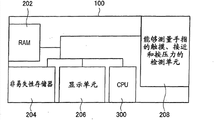
图7是图解说明信息处理设备的结构例子的示意图;FIG. 7 is a schematic diagram illustrating a structural example of an information processing device;
图8是图解说明CPU的功能结构的方框图;FIG. 8 is a block diagram illustrating a functional structure of a CPU;
图9是图解说明在利用普通触摸面板的情况下的处理的流程图;FIG. 9 is a flowchart illustrating processing in the case of utilizing a general touch panel;
图10是图解说明在利用普通触摸面板的情况下的处理的流程图;FIG. 10 is a flowchart illustrating processing in the case of utilizing a general touch panel;
图11是图解说明利用接近触摸面板的操作,调整操作对象的深度位置的处理的流程图;11 is a flowchart illustrating a process of adjusting the depth position of an operation object by an operation approaching the touch panel;
图12是图解说明利用压敏触摸面板的操作,调整操作对象的深度位置的处理的流程图。FIG. 12 is a flowchart illustrating a process of adjusting the depth position of an operation object by the operation of the pressure-sensitive touch panel.
具体实施方式 Detailed ways
下面参考附图,详细说明本公开的优选实施例。注意在说明书和附图中,功能和结构基本相同的构成元件用相同的附图标记表示,这些构成元件的重复说明被省略。Preferred embodiments of the present disclosure will be described in detail below with reference to the accompanying drawings. Note that in this specification and the appended drawings, constituent elements that have substantially the same function and structure are denoted with the same reference numerals, and repeated explanation of these constituent elements is omitted.
下面,将按照以下顺序进行说明。Hereinafter, description will be made in the following order.
1.实施例的概述1. Overview of the Examples
2.避免伴随深度调整的对象的重叠的方法2. Method to avoid overlapping of objects with depth adjustment
3.调整深度位置的操作的细节3. Details of the operation of adjusting the depth position
3-1.普通触摸面板的情况3-1. In the case of a normal touch panel
3-2.接近触摸面板的例子3-2. Example of proximity touch panel
3-3.压敏触摸面板3-3. Pressure sensitive touch panel
4.信息处理设备的结构的例子4. Example of structure of information processing device
5.信息处理设备中的处理的例子5. Example of processing in information processing equipment
5-1.普通触摸面板的情况5-1. In the case of a normal touch panel
5-2.接近触摸面板的情况5-2. When approaching the touch panel
5-3.压敏触摸面板的情况5-3. Case of pressure-sensitive touch panel
(1.实施例的概述)(1. Outline of Embodiment)
图1是图解说明用户操作按照本公开的实施例的信息处理设备100的样子的示意图。如图1中图解所示,本实施例涉及利用三维显示器(信息处理设备100),改变任意对象相对于显示屏的深度位置(Z坐标)的操作方法。此时,如图1中图解所示,通过按照设备,做出能够与现有触摸操作共存的手势,用户能够直观地向显示屏中的对象添加立体效果。在本实施例中,利用触摸面板的检测,压力检测和接近检测被用作操作检测方法的例子,并举例说明适合于每种情况的操作方法。FIG. 1 is a schematic diagram illustrating how a user operates an
(2.避免伴随深度调整的对象的重叠的方法)(2. Method to avoid overlapping of objects with depth adjustment)
图2A和2B是图解说明利用按照实施例的信息处理设备100,改变特定字符的深度位置的操作的示意图。如图2A和2B中图解所示,借助利用触摸面板的操作,调整诸如图像或字符之类信息的深度位置。图2A和2B图解说明其中调整电子邮件的文本中的文字“concerned”的深度方向的情况的例子。图2A是信息处理设备100的显示屏102的正视图,和图解说明其中从右侧观看显示屏102的状态的示意图,图2A图解说明其中文字“concerned”在深度方向的位置被调整到显示屏102的前侧的情况的例子。图2B是信息处理设备100的显示屏102的正视图,和图解说明其中从右侧观看显示屏102的状态的示意图,图2B图解说明其中文字“concerned”在深度方向的位置被调整到显示屏102的后侧的情况的例子。2A and 2B are diagrams illustrating an operation of changing the depth position of a specific character using the
如图2A中图解所示,如果文字“concerned”在深度方向的位置被调整到显示屏102的前侧,那么文字“concerned”的大小增大到和该文字被置于前侧一般大。同时,在图2B中,由于文字“concerned”在深度方向的位置比显示屏102的位置稍深,因此文字“concerned”的大小几乎和排列在文字“concerned”的左右两侧的文字“I’m a little”和“!”的大小相同。As illustrated in FIG. 2A, if the position of the text "concerned" in the depth direction is adjusted to the front side of the
因此,在图2A的情况下,进行沿着向左和向上方向(图2A中箭头所示的方向),移动排列在文字“concerned”的左右两侧的文字“I’m alittle”和“!”的处理。从而,当文字“concerned”在深度方向的位置被调整到显示屏102的前侧时,能够避免排列在左右两侧的文字“I’m alittle”和“!”被文字“concerned”遮盖。在图2A和2B中,图解说明了其中调整包括在电子邮件的文本中的文字的情况的例子。不过,在图2A和2B中图解所示的结构适用于其中调整诸如照片之类的另一个图像的深度位置的情况。Therefore, in the case of FIG. 2A, moving the characters "I'm alittle" and "! " processing. Therefore, when the position of the text "concerned" in the depth direction is adjusted to the front side of the
(3.调整深度位置的操作的细节)(3. Details of the operation of adjusting the depth position)
下面分别说明3种触摸面板(普通触摸面板/接近触摸面板/压敏触摸面板)。Three types of touch panels (ordinary touch panel/proximity touch panel/pressure-sensitive touch panel) will be described below.
(3-1.普通触摸面板的情况)(3-1. In the case of a normal touch panel)
图3A-3C是图解说明当图像处理设备100在显示屏102中包括普通触摸面板时的操作的示意图。图3A-3C中图解所示的操作中,利用所谓的捏小/拉大操作,调整对象的深度位置。捏小/拉大操作是改变拇指和食指之间的距离(开合距离)的操作,如图3A-3C中图解所示。3A-3C are diagrams illustrating operations when the
这种情况下,当用户正常进行捏小/拉大操作时,显示在显示屏102上的操作对象(例如,照片或文字)104被放大/缩小,而不存在深度方向的位置变化。In this case, when the user normally performs a pinch-in/zoom-out operation, the operation object (for example, a photo or text) 104 displayed on the
同时,如图3A-3C中图解所示,如果在用户利用左手按压显示屏102上的预定位置的状态下,用户进行捏小/拉大操作,那么操作对象104的大小不被改变,然而操作对象104在深度方向的位置被调整。Meanwhile, as illustrated in FIGS. 3A-3C , if the user performs a pinch/zoom operation while the user presses a predetermined position on the
下面进行具体说明。首先,如图3A中图解所示,用户用左手的拇指按压显示屏102。在这种状态下,用户用右手的食指选择操作对象104。从而,模式变成深度改变模式。随后,如图3B中图解所示,用户用右手的食指和拇指,对操作对象104进行捏小/拉大操作,从而改变深度信息。从而,能够调整操作对象104的深度位置。A detailed description will be given below. First, as illustrated in FIG. 3A , the user presses the
图3C是图解说明其中调整操作对象在深度方向的位置的状态的示意图,图3C示意图解说明其中从右侧观看显示屏102的状态。如图3C中图解所示,通过进行拉大操作,操作对象104的深度位置可被调整到显示屏102的前侧。当进行捏小操作,操作对象的深度位置可被调整到显示屏102的后侧。FIG. 3C is a schematic diagram illustrating a state in which the position of the operation object in the depth direction is adjusted, and FIG. 3C schematically illustrates a state in which the
因而,如果用户对操作对象104进行捏小/拉大操作,那么按照该操作,改变操作对象104的深度位置。从而,用户能够利用简单操作,改变操作对象104的深度位置。在深度改变模式下,操作对象104的大小不变化,而只有操作对象104的深度位置发生变化。不过,本公开并不局限于此,操作对象104的大小和深度位置都可被改变。在图3A-3C中图解所示的例子中,利用拉大操作,操作对象104的深度位置被移动到显示屏102的前侧。另外,利用捏小操作,操作对象104的深度位置被移动到显示屏102的后侧。Thus, if the user performs a pinch-in/zoom-in operation on the
图4是图解说明其中在显示屏102上,显示诸如滑动块之类的操作部件106,并利用操作部件106的操作,调整操作对象104的深度位置的情况的例子的示意图。如图4中图解所示,当用户用左手的拇指按压显示屏102,并用右手的食指选择操作对象104时,诸如滑动块之类的操作部件106被显示在显示屏102上。从而,模式变成深度改变模式。在这种情况下,如果用户对操作部件106进行触摸操作,并沿着用图4中的箭头A1所示的方向(上下方向)操纵操作部件106,那么操作对象104的深度位置改变。例如,如果用户沿着向上方向操纵操作部件106,那么如图5A中图解所示,操作对象104的深度位置移动到显示屏102的前侧。如果用户沿着向下方向操纵操作部件106,如图5B中图解所示,那么操作对象104的深度位置移动到显示屏102的后侧。4 is a schematic diagram illustrating an example of a case where, on the
图3A-4图解说明其中只在信息处理设备100的表面侧布置触摸面板的情况的例子。不过,当在表面和背面都布置触摸面板时,能够实现其中当用户从背面轻点触摸面板时,在表面侧的显示屏102上的操作对象104变得凸起,而当用户从表面轻点触摸面板时,所述操作对象104变得凹陷的操作方法。3A-4 illustrate an example of a case where a touch panel is arranged only on the surface side of the
(3-2.接近触摸面板的例子)(3-2. Example of proximity touch panel)
下面,说明其中信息处理设备100包括接近触摸面板的情况。图6A-6D是图解说明接近触摸面板的操作的概况的示意图。就接近触摸面板来说,仅仅通过使用户的手指在接近触摸面板的接近检测区中,逼近显示屏102,而不触摸显示屏102,就能够实现操作。接近检测区是在显示屏102上方预定距离的范围。Next, a case in which the
首先,在用户用左手的拇指按压显示屏102的状态下,用户使右手的食指逼近显示屏102,如图6A中图解所示,然后使食指停留在显示屏102上方一定时间,如图6B中图解所示。信息处理设备100检测到这种状态,从而模式变成深度调整模式。当模式变成深度调整模式时的食指的接近距离(从右手的食指到显示屏102的距离)与操作对象104的当前深度相关联,接近距离和当前深度变成基准,从而按照到停留位置的接近距离的变化,改变操作对象的深度方向。First, in the state where the user presses the
在图6A-6D中图解所示的例子中,在图6B的状态下,操作对象104的深度位置在正向与显示屏102相隔Z1。这种情况下,如果用户使手指逼近显示屏102,并且过去预定时间,那么用户的手指和显示屏之间的距离D与操作对象104的深度位置Z1相关联,距离D和深度位置Z1变成基准,模式变成深度调整模式。随后,如图6C中图解所示,如果用户沿正向把手指移动到与显示屏102相隔d1的位置,那么操作对象104的深度位置沿着正向移动d1。随后,如图6D中图解所示,如果用户沿反向把手指移动到与显示屏102相隔d2的位置,那么操作对象104的深度位置沿着反向移动d2。In the example illustrated in FIGS. 6A-6D , in the state of FIG. 6B , the depth position of the
当取消深度调整模式时,用户进行沿着x方向或y方向(与显示屏102平行的方向),把手指移动一定距离以上,或者使左手的拇指与显示屏分离的操作。从而,取消深度调整模式。When the depth adjustment mode is canceled, the user moves the finger over a certain distance along the x direction or the y direction (direction parallel to the display screen 102 ), or separates the thumb of the left hand from the display screen. Thus, the depth adjustment mode is canceled.
(3-3.压敏触摸面板)(3-3. Pressure-sensitive touch panel)
下面,说明信息处理设备100包括压敏触摸面板的情况。当使用压敏触摸面板时的操作与当使用接近触摸面板时的操作类似。在压敏触摸面板的情况下,当用户用手指在压敏触摸面板的按压力检测区中按压显示屏102时,能够实现操作。首先,与接近触摸面板的情况类似,用户用左手的拇指,按压显示屏102。随后,如果用户用右手的食指,以一定值以上的按压力持续按压显示屏102上的操作对象104,时间超过预定时间,那么模式变成深度调整模式。随后,按照用户的按压力,改变操作对象104的深度位置。例如,当按压力大于100g时,操作对象104的深度位置移向显示屏的背侧,而如果按压力为100g以下,那么操作对象的深度位置移向显示屏的前侧。Next, a case where the
即使在压敏触摸面板的情况下,当取消深度调整模式时,用户也可沿着x和y方向,把手指移动一定距离以上,或者使拇指与显示屏分离。从而,消除深度调整模式。Even in the case of a pressure-sensitive touch panel, when the depth adjustment mode is canceled, the user can move the finger over a certain distance in the x and y directions, or separate the thumb from the display. Thus, the depth adjustment mode is eliminated.
(4.信息处理设备的结构的例子)(4. Example of structure of information processing device)
图7是图解说明信息处理设备100的结构的例子的示意图。如图7中图解所示,信息处理设备100包括RAM 202、非易失性存储器204、诸如LCD或有机EL之类的显示单元206、CPU 300、和能够检测手指的触摸、接近和按压力的检测单元208。信息处理设备100利用检测单元208,检测用户的操作,根据检测到的操作,利用CPU 300计算操作对象104的深度位置,调整显示单元206的显示,从而调整深度位置。在图7中图解所示的结构中,显示在显示单元206上的数据被临时保持在RAM 202中。运行CPU 300的程序被保存在非易失性存储器206中。显示单元206是利用三维显示器(3D显示器)构成的。例如,显示单元206利用偏光板系统,使左眼图像和右眼图像入射到用户的左眼和右眼,从而使用户看到三维图像。检测单元208对应于上面说明的触摸传感器、接近传感器或压敏传感器。触摸传感器和接近传感器都可利用电容传感器构成。FIG. 7 is a schematic diagram illustrating an example of the structure of the
图8是图解说明CPU 300的功能结构的方框图。为了如上所述调整深度位置,CPU 300被配置成包括操作量获取单元302、深度位置计算单元304和3D显示控制单元306。操作量获取单元302获得利用检测单元208检测的来自用户的操作输入的操作量。深度位置计算单元304根据操作量,计算三维可视操作对象的深度位置。3D显示控制单元306执行根据深度位置,调整操作对象304的深度位置,并把操作对象304显示在显示屏102上的处理。通过调整左眼图像和右眼图像的视差,调整操作对象304的深度位置。3D显示控制单元306执行调整深度位置和显示操作对象的处理(图3A-6D中图解所示),和按照操作对象106的深度位置的变化,移动周边显示对象的处理(图2中图解所示)。图8中图解所示的各个部件可以利用CPU 300和运行CPU 300的程序(软件)来构成。这种情况下,程序可被保存在非易失性存储器204,外部连接的USB存储器和诸如光盘之类的记录介质中。FIG. 8 is a block diagram illustrating the functional structure of the
(5.信息处理设备中的处理的例子)(5. Example of processing in information processing device)
下同,说明分别与3种触摸面板(普通触摸面板/接近触摸面板/压敏触摸面板)对应的信息处理设备100中的每种处理。The same below, each processing in the
(5-1.普通触摸面板的情况)(5-1. In the case of a normal touch panel)
图9和10是图解说明在利用普通触摸面板的情况下的处理的流程图。就普通触摸面板来说,将说明图9和10的两种处理。9 and 10 are flowcharts illustrating processing in the case of utilizing a general touch panel. In the case of a general touch panel, two processes of FIGS. 9 and 10 will be explained.
在图9中图解说明的例子中,利用捏小/拉大操作,调整操作对象104的深度位置。首先,在步骤S110中,判定模式是否是深度调整模式。当判定模式是深度调整模式时,处理进入步骤S112,判定拇指是否触摸显示屏102。当判定拇指触摸显示屏102时(“是”),处理进入步骤S114。在步骤S114,判定食指和中指是否触摸显示屏102。当判定食指和中指触摸显示屏102时(“是”),处理进入步骤S116。在步骤S116,判定食指和中指的中点是否在一定范围内。当判定食指和中指的中点在一定范围内时(“是”),处理进入步骤S118。这种情况下,所述一定范围是包括操作对象104的一定范围。在步骤S118,按照开合距离,调整(更新)操作对象104的深度位置。In the example illustrated in FIG. 9 , the depth position of the
同时,当步骤S112、S114和S116的判定结果为“否”时,处理进入步骤S120,取消深度调整模式。Meanwhile, when the determined result of steps S112, S114, and S116 is "No", the process proceeds to step S120, and the depth adjustment mode is canceled.
当在步骤S110,判定模式不是深度调整模式时(“否”),处理进入步骤S122。在步骤S122,判定拇指是否触摸显示屏102。当判定拇指触摸显示屏102时(“是”),处理进入步骤S124。在步骤S124,判定食指和中指是否持续一定时间,停留在一定范围内。这种情况下,所述一定范围是包括操作对象104的一定范围。当在步骤S124,判定食指和中指持续一定时间停留在一定范围内时(“是”),处理进入步骤S126。在步骤S126,操作对象的深度位置和开合距离(食指和中指之间的距离)被记录为基准。之后,在步骤S128,模式变成深度调整模式。When it is determined in step S110 that the mode is not the depth adjustment mode ("NO"), the process proceeds to step S122. In step S122, it is determined whether the thumb touches the
同时,当步骤S122和S124的判定结果为“否”时,模式不改变成深度调整模式,处理返回步骤S110,重复之后的处理。Meanwhile, when the determination results in steps S122 and S124 are "No", the mode is not changed to the depth adjustment mode, the process returns to step S110, and the subsequent processes are repeated.
下面,说明利用普通触摸面板的图10的处理。在图10中图解说明的例子中,利用操作部件106的操作,调整操作对象104的深度位置。首先,在步骤S210,判定模式是否是深度调整模式。当判定模式是深度调整模式时,处理进入步骤S212,判定拇指是否触摸显示屏102。当判定拇指触摸显示屏102时(“是”),处理进入步骤S214。在步骤S214,判定食指是否触摸显示屏102。当判定食指触摸显示屏102时(“是”),处理进入步骤S216。在步骤S216,判定食指是否在诸如滑动块之类的操作部件106的范围内。当判定食指在诸如滑动块之类的操作部件106的范围内时(“是”),处理进入步骤S218。在步骤S218,按照操作部件106的移动距离,调整(更新)操作对象104的深度位置。Next, the processing of FIG. 10 using a general touch panel will be described. In the example illustrated in FIG. 10 , the depth position of the
同时,当步骤S212、S214和S216的判定结果为“否”时,处理进入步骤S220,取消深度调整模式。Meanwhile, when the determination result in steps S212, S214, and S216 is "No", the process proceeds to step S220, and the depth adjustment mode is canceled.
当在步骤S210,判定模式不是深度调整模式时(“否”),处理进入步骤S222。在步骤S222,判定拇指是否触摸显示屏102。当判定拇指触摸显示屏102时(“是”),处理进入步骤S224。在步骤S224,判定食指是否持续一定时间,停留在一定范围内。这种情况下,所述一定范围是包括操作对象104的一定范围。当在步骤S224,判定食指持续一定时间停留在一定范围内时(“是”),处理进入步骤S226。在步骤S226,操作对象104的深度位置和操作部件106的位置(滑动块的位置)被记录为基准。之后,在步骤S228,模式变成深度调整模式。When it is determined in step S210 that the mode is not the depth adjustment mode ("No"), the process proceeds to step S222. In step S222, it is determined whether the thumb touches the
同时,当步骤S222和S224的判定结果为“否”时,模式不改变成深度调整模式,处理返回步骤S210,重复之后的处理。Meanwhile, when the determination results in steps S222 and S224 are "No", the mode is not changed to the depth adjustment mode, the process returns to step S210, and the subsequent processes are repeated.
(5-2.接近触摸面板的情况)(5-2. When approaching the touch panel)
在图11中图解说明的例子中,利用接近触摸面板的操作,调整操作对象104的深度位置。首先,在步骤S310,判定模式是否是深度调整模式。当判定模式是深度调整模式时,处理进入步骤S312,判定拇指是否触摸显示屏102。当判定拇指触摸显示屏102时(“是”),处理进入步骤S314。在步骤S314,判定食指是否在接近检测区中。当判定食指在接近检测区中时(“是”),处理进入步骤S316。在步骤S316,判定食指是否在x方向和y方向的一定范围内。当判定食指在所述一定范围内时(“是”),处理进入步骤S318。这种情况下,所述一定范围是包括操作对象104的上方的一定范围。在步骤S318,检测手指的接近距离,并按照接近距离,调整(更新)操作对象104的深度位置。In the example illustrated in FIG. 11 , the depth position of the
同时,当步骤S312、S314和S316的判定结果为“否”时,处理进入步骤S320,取消深度调整模式。Meanwhile, when the determination result in steps S312, S314, and S316 is "No", the process proceeds to step S320, and the depth adjustment mode is canceled.
当在步骤S310,判定模式不是深度调整模式时(“否”),处理进入步骤S322。在步骤S322,判定拇指是否触摸显示屏102。当判定拇指触摸显示屏102时(“是”),处理进入步骤S324。在步骤S324,判定食指是否持续一定时间,停留在一定范围内。这种情况下,所述一定范围是接近检测区中,在操作对象104上方的一定范围。当在步骤S324,判定食指持续一定时间停留在一定范围内时(“是”),处理进入步骤S326。在步骤S326,操作对象104的深度位置和接近距离(手指与显示屏102之间的距离)被记录为基准。之后,在步骤S328,模式变成深度调整模式。When it is determined in step S310 that the mode is not the depth adjustment mode ("NO"), the process proceeds to step S322. In step S322, it is determined whether the thumb touches the
同时,当步骤S322和S324的判定结果为“否”时,模式不变成深度调整模式,处理返回步骤S310,重复之后的处理。如上所述,如果在检测到手指的接近的状态下,使手指停留一定时间以上,那么模式变成深度调整模式。如果在深度调整模式下,接近距离被改变,那么相对地改变作为调整对象的操作对象106的深度。当手指沿着x方向和y方向移动一定距离以上时,深度调整模式被取消,从而模式变成正常触摸模式。Meanwhile, when the determination results in steps S322 and S324 are "No", the mode does not change to the depth adjustment mode, the process returns to step S310, and the subsequent processes are repeated. As described above, the mode changes to the depth adjustment mode if the finger is left for a certain period of time or longer while the approach of the finger is detected. If the approach distance is changed in the depth adjustment mode, the depth of the
(5-3.压敏触摸面板的情况)(5-3. In the case of a pressure-sensitive touch panel)
在图12中图解说明的例子中,利用压敏触摸面板的操作,调整操作对象104的深度位置。首先,在步骤S410,判定模式是否是深度调整模式。当判定模式是深度调整模式时,处理进入步骤S412,判定拇指是否触摸显示屏102。当判定拇指触摸显示屏102时(“是”),处理进入步骤S414。在步骤S414,判定食指是否在按压力检测区中。当判定食指在按压力检测区中时(“是”),处理进入步骤S416。在步骤S416,判定食指是否在x方向和y方向的一定范围内。当判定食指在所述一定范围内时(“是”),处理进入步骤S418。这种情况下,所述一定范围是包括操作对象104的上方的一定范围。在步骤S418,检测手指的按压力,并按照按压力,调整(更新)操作对象104的深度位置。In the example illustrated in FIG. 12 , the depth position of the
同时,当步骤S412、S414和S416的判定结果为“否”时,处理进入步骤S420,取消深度调整模式。Meanwhile, when the determination result in steps S412, S414, and S416 is "No", the process proceeds to step S420, and the depth adjustment mode is canceled.
当在步骤S410,判定模式不是深度调整模式时(“否”),处理进入步骤S422。在步骤S422,判定拇指是否触摸显示屏102。当判定拇指触摸显示屏102时(“是”),处理进入步骤S424。在步骤S424,判定食指是否持续一定时间,停留在一定范围内。这种情况下,所述一定范围是按压力检测区中,在操作对象104上方的一定范围。当在步骤S424,判定食指持续一定时间停留在一定范围内时(“是”),处理进入步骤S426。在步骤S426,操作对象104的深度位置和按压力被记录为基准。之后,在步骤S428,模式变成深度调整模式。When it is determined in step S410 that the mode is not the depth adjustment mode ("No"), the process proceeds to step S422. In step S422, it is determined whether the thumb touches the
同时,当步骤S422和S424的判定结果为“否”时,模式不改变成深度调整模式,处理返回步骤S410,重复之后的处理。Meanwhile, when the determination results in steps S422 and S424 are "No", the mode is not changed to the depth adjustment mode, the process returns to step S410, and the subsequent processes are repeated.
按照上面说明的实施例,用户能够利用诸如触摸面板之类的操作屏幕上的简单操作,调整操作对象106的深度位置。于是,用户能够把操作对象106调整成待三维观看的期望图像。According to the embodiment explained above, the user can adjust the depth position of the
虽然参考附图详细说明了本公开的优选实施例,不过本公开并不局限于此。对本领域的技术人员来说,各种修改或变化都是可能的,只要它们在所附的权利要求或其等同物的范围之内。应明白这样的修改或变化也在本公开的技术范围之内。Although the preferred embodiments of the present disclosure have been described in detail with reference to the accompanying drawings, the present disclosure is not limited thereto. Various modifications or changes are possible to those skilled in the art, provided they come within the scope of the appended claims or their equivalents. It should be understood that such modifications or changes are also within the technical scope of the present disclosure.
另外还可如下构成本技术。Alternatively, the present technology may be configured as follows.
(1)一种信息处理设备,包括:(1) An information processing device, comprising:
操作量获取单元,所述操作量获取单元获得在显示屏上的操作输入的操作量;an operation amount acquisition unit that obtains an operation amount of an operation input on the display screen;
深度位置计算单元,所述深度位置计算单元根据操作量,计算三维可视操作对象的深度位置;和a depth position calculation unit, which calculates the depth position of the three-dimensional visual operation object according to the operation amount; and
显示处理单元,所述显示处理单元执行根据深度位置,调整操作对象的深度位置,并把操作对象显示在显示屏上的处理。A display processing unit, the display processing unit executes the process of adjusting the depth position of the operation object according to the depth position and displaying the operation object on the display screen.
(2)按照(1)所述的信息处理设备,(2) The information processing device according to (1),
其中操作输入是显示屏上的捏小操作或拉大操作。The operation input is a pinching operation or a zooming operation on the display screen.
(3)按照(1)所述的信息处理设备,(3) The information processing device according to (1),
其中操作输入是移动显示在显示屏上的操作部件的操作。Wherein the operation input is an operation of moving an operation member displayed on the display screen.
(4)按照(1)所述的信息处理设备,(4) The information processing device according to (1),
其中操作输入是使用户的手指接近显示屏,或者使用户的手指离开显示屏的操作。The operation input is an operation of bringing the user's finger close to the display screen, or making the user's finger leave the display screen.
(5)按照(1)所述的信息处理设备,(5) The information processing device according to (1),
其中操作输入是按压显示屏的操作。The operation input is an operation of pressing the display screen.
(6)按照(1)所述的信息处理设备,(6) The information processing device according to (1),
其中显示处理单元调整操作对象的深度位置,并调整在该操作对象周围的显示对象的位置。Wherein the display processing unit adjusts the depth position of the operation object, and adjusts the positions of the display objects around the operation object.
(7)按照(1)所述的信息处理设备,(7) The information processing device according to (1),
其中当执行预定操作时,显示处理单元执行根据深度位置,调整操作对象的深度位置的处理。Wherein when a predetermined operation is performed, the display processing unit executes a process of adjusting the depth position of the operation object according to the depth position.
(8)按照(7)所述的信息处理设备,(8) The information processing device according to (7),
其中所述预定操作包括触摸显示屏的操作。Wherein the predetermined operation includes the operation of touching the display screen.
(9)按照(7)所述的信息处理设备,(9) The information processing device according to (7),
其中利用触摸传感器的检测,获得操作量,所述预定操作包括显示屏上的捏小操作或拉大操作。Wherein, the operation amount is obtained by using the detection of the touch sensor, and the predetermined operation includes a pinch-in operation or a zoom-in operation on the display screen.
(10)按照(7)所述的信息处理设备,(10) The information processing device according to (7),
其中利用接近传感器的检测,获得操作量,所述预定操作包括使用户的手指在位于显示屏上方的接近传感器的可检测范围中,停留一定时间的操作。The operation amount is obtained through the detection of the proximity sensor, and the predetermined operation includes the operation of making the user's finger stay within the detectable range of the proximity sensor above the display screen for a certain period of time.
(11)按照(7)所述的信息处理设备,(11) The information processing device according to (7),
其中利用压敏传感器的检测,获得操作量,所述预定操作包括利用用户的手指,以预定值以上的按压力,按压压敏传感器的操作。Wherein, the operation amount is obtained by using the detection of the pressure-sensitive sensor, and the predetermined operation includes the operation of pressing the pressure-sensitive sensor with a pressing force greater than a predetermined value with a finger of the user.
(12)按照(9)所述的信息处理设备,(12) The information processing device according to (9),
其中利用压敏传感器的检测,获得操作量,所述预定操作包括利用用户的手指,以预定值以上的按压力,按压压敏传感器的操作。Wherein, the operation amount is obtained by using the detection of the pressure-sensitive sensor, and the predetermined operation includes the operation of pressing the pressure-sensitive sensor with a pressing force greater than a predetermined value with a finger of the user.
(13)一种信息处理方法,包括:(13) An information processing method, comprising:
获得在显示屏上的操作输入的操作量;Obtaining the operation amount of the operation input on the display screen;
根据操作量,计算三维可视操作对象的深度位置;和calculating the depth position of the 3D visible operand based on the amount of manipulation; and
根据深度位置,调整操作对象的深度位置,并把操作对象显示在显示屏上。According to the depth position, adjust the depth position of the operation object, and display the operation object on the display screen.
(14)一种使计算机执行以下步骤的程序:(14) A program that causes a computer to perform the following steps:
获得在显示屏上的操作输入的操作量;Obtaining the operation amount of the operation input on the display screen;
根据操作量,计算三维可视操作对象的深度位置;和calculating the depth position of the 3D visible operand based on the amount of manipulation; and
根据深度位置,调整操作对象的深度位置,并把操作对象显示在显示屏上。According to the depth position, adjust the depth position of the operation object, and display the operation object on the display screen.
本公开包含与在2011年11月1日向日本专利局提交的日本优先权专利申请JP 2011-240189中公开的主题相关的主题,该专利申请的整个内容在此引为参考。The present disclosure contains subject matter related to that disclosed in Japanese Priority Patent Application JP 2011-240189 filed in the Japan Patent Office on Nov. 1, 2011, the entire content of which is hereby incorporated by reference.
Claims (14)
Applications Claiming Priority (2)
| Application Number | Priority Date | Filing Date | Title |
|---|---|---|---|
| JP2011240189A JP2013097593A (en) | 2011-11-01 | 2011-11-01 | Information processing apparatus, information processing method, and program |
| JP2011-240189 | 2011-11-01 |
Publications (1)
| Publication Number | Publication Date |
|---|---|
| CN103092399A true CN103092399A (en) | 2013-05-08 |
Family
ID=48171930
Family Applications (1)
| Application Number | Title | Priority Date | Filing Date |
|---|---|---|---|
| CN2012104120963A Pending CN103092399A (en) | 2011-11-01 | 2012-10-25 | Information processing apparatus, information processing method, and program |
Country Status (3)
| Country | Link |
|---|---|
| US (2) | US9342167B2 (en) |
| JP (1) | JP2013097593A (en) |
| CN (1) | CN103092399A (en) |
Cited By (4)
| Publication number | Priority date | Publication date | Assignee | Title |
|---|---|---|---|---|
| CN103631492A (en) * | 2013-09-27 | 2014-03-12 | 深圳超多维光电子有限公司 | Method and device for adjusting depth of three-dimensional content |
| CN103870195A (en) * | 2014-03-03 | 2014-06-18 | 联想(北京)有限公司 | Information prompt method and electronic equipment |
| CN106873886A (en) * | 2016-12-30 | 2017-06-20 | 深圳超多维科技有限公司 | A kind of control method of stereoscopic display, device and electronic equipment |
| CN108027707A (en) * | 2015-09-21 | 2018-05-11 | 三星电子株式会社 | Subscriber terminal equipment, electronic equipment and the method for control subscriber terminal equipment and electronic equipment |
Families Citing this family (9)
| Publication number | Priority date | Publication date | Assignee | Title |
|---|---|---|---|---|
| KR102201733B1 (en) * | 2013-09-30 | 2021-01-12 | 엘지전자 주식회사 | Apparatus and Method for Display Device |
| WO2015064489A1 (en) * | 2013-11-01 | 2015-05-07 | 株式会社村田製作所 | Touch input device and portable display device |
| US9502002B2 (en) * | 2014-03-26 | 2016-11-22 | Lenovo (Singapore) Pte. Ltd. | Proximity-based display scaling |
| DE102014114742A1 (en) * | 2014-10-10 | 2016-04-14 | Infineon Technologies Ag | An apparatus for generating a display control signal and a method thereof |
| JP6682928B2 (en) * | 2016-03-14 | 2020-04-15 | セイコーエプソン株式会社 | Printing device, electronic device, control program, and method for setting operating parameters of printing device |
| KR102580327B1 (en) * | 2016-09-09 | 2023-09-19 | 삼성전자주식회사 | Electronic device and method for cotrolling of the electronic device |
| JP6592056B2 (en) * | 2017-10-17 | 2019-10-16 | 株式会社Nttドコモ | Information processing device |
| US11188154B2 (en) * | 2018-05-30 | 2021-11-30 | International Business Machines Corporation | Context dependent projection of holographic objects |
| US12587032B2 (en) * | 2023-06-05 | 2026-03-24 | International Business Machines Corporation | Intelligent wireless energy sharing |
Citations (5)
| Publication number | Priority date | Publication date | Assignee | Title |
|---|---|---|---|---|
| US20100095206A1 (en) * | 2008-10-13 | 2010-04-15 | Lg Electronics Inc. | Method for providing a user interface using three-dimensional gestures and an apparatus using the same |
| CN102012778A (en) * | 2009-09-04 | 2011-04-13 | 索尼公司 | Display control apparatus, display control method, and display control program |
| CN102129292A (en) * | 2010-01-15 | 2011-07-20 | 微软公司 | Recognizing user intent in motion capture system |
| CN102184020A (en) * | 2010-05-18 | 2011-09-14 | 微软公司 | Method for manipulating posture of user interface and posture correction |
| CN102221886A (en) * | 2010-06-11 | 2011-10-19 | 微软公司 | Interacting with user interface through metaphoric body |
Family Cites Families (10)
| Publication number | Priority date | Publication date | Assignee | Title |
|---|---|---|---|---|
| US5315703A (en) * | 1992-12-23 | 1994-05-24 | Taligent, Inc. | Object-oriented notification framework system |
| KR101395780B1 (en) * | 2007-07-27 | 2014-05-16 | 삼성전자주식회사 | Pressure sensor arrary apparatus and method for tactility |
| US8106890B2 (en) * | 2008-04-07 | 2012-01-31 | International Business Machines Corporation | Slide based technique for inputting a sequence of numbers for a computing device |
| US10198854B2 (en) * | 2009-08-14 | 2019-02-05 | Microsoft Technology Licensing, Llc | Manipulation of 3-dimensional graphical objects for view in a multi-touch display |
| US8826184B2 (en) * | 2010-04-05 | 2014-09-02 | Lg Electronics Inc. | Mobile terminal and image display controlling method thereof |
| US8982160B2 (en) * | 2010-04-16 | 2015-03-17 | Qualcomm, Incorporated | Apparatus and methods for dynamically correlating virtual keyboard dimensions to user finger size |
| US8565830B2 (en) * | 2010-05-12 | 2013-10-22 | Lg Electronics Inc. | Mobile terminal and method of displaying 3D images thereon |
| JP5723721B2 (en) * | 2010-09-28 | 2015-05-27 | 富士フイルム株式会社 | Stereoscopic image editing apparatus and stereoscopic image editing method |
| JP2012109934A (en) * | 2010-10-19 | 2012-06-07 | Panasonic Corp | Stereoscopic image display device |
| KR101727899B1 (en) * | 2010-11-26 | 2017-04-18 | 엘지전자 주식회사 | Mobile terminal and operation control method thereof |
-
2011
- 2011-11-01 JP JP2011240189A patent/JP2013097593A/en active Pending
-
2012
- 2012-10-25 CN CN2012104120963A patent/CN103092399A/en active Pending
- 2012-10-26 US US13/661,248 patent/US9342167B2/en active Active
-
2016
- 2016-04-15 US US15/130,467 patent/US10318103B2/en active Active
Patent Citations (5)
| Publication number | Priority date | Publication date | Assignee | Title |
|---|---|---|---|---|
| US20100095206A1 (en) * | 2008-10-13 | 2010-04-15 | Lg Electronics Inc. | Method for providing a user interface using three-dimensional gestures and an apparatus using the same |
| CN102012778A (en) * | 2009-09-04 | 2011-04-13 | 索尼公司 | Display control apparatus, display control method, and display control program |
| CN102129292A (en) * | 2010-01-15 | 2011-07-20 | 微软公司 | Recognizing user intent in motion capture system |
| CN102184020A (en) * | 2010-05-18 | 2011-09-14 | 微软公司 | Method for manipulating posture of user interface and posture correction |
| CN102221886A (en) * | 2010-06-11 | 2011-10-19 | 微软公司 | Interacting with user interface through metaphoric body |
Cited By (8)
| Publication number | Priority date | Publication date | Assignee | Title |
|---|---|---|---|---|
| CN103631492A (en) * | 2013-09-27 | 2014-03-12 | 深圳超多维光电子有限公司 | Method and device for adjusting depth of three-dimensional content |
| CN103631492B (en) * | 2013-09-27 | 2018-09-04 | 深圳超多维科技有限公司 | A kind of method and device adjusting depth of three-dimensional content |
| CN103870195A (en) * | 2014-03-03 | 2014-06-18 | 联想(北京)有限公司 | Information prompt method and electronic equipment |
| CN108027707A (en) * | 2015-09-21 | 2018-05-11 | 三星电子株式会社 | Subscriber terminal equipment, electronic equipment and the method for control subscriber terminal equipment and electronic equipment |
| US10802784B2 (en) | 2015-09-21 | 2020-10-13 | Samsung Electronics Co., Ltd. | Transmission of data related to an indicator between a user terminal device and a head mounted display and method for controlling the transmission of data |
| CN108027707B (en) * | 2015-09-21 | 2021-07-20 | 三星电子株式会社 | User terminal device, electronic device, and method for controlling user terminal device and electronic device |
| CN106873886A (en) * | 2016-12-30 | 2017-06-20 | 深圳超多维科技有限公司 | A kind of control method of stereoscopic display, device and electronic equipment |
| CN106873886B (en) * | 2016-12-30 | 2020-01-10 | 深圳超多维科技有限公司 | Control method and device for stereoscopic display and electronic equipment |
Also Published As
| Publication number | Publication date |
|---|---|
| US10318103B2 (en) | 2019-06-11 |
| US9342167B2 (en) | 2016-05-17 |
| JP2013097593A (en) | 2013-05-20 |
| US20130106842A1 (en) | 2013-05-02 |
| US20160266765A1 (en) | 2016-09-15 |
Similar Documents
| Publication | Publication Date | Title |
|---|---|---|
| CN103092399A (en) | Information processing apparatus, information processing method, and program | |
| CN103365410B (en) | Gesture sensing device and electronic system with gesture input function | |
| US20190250714A1 (en) | Systems and methods for triggering actions based on touch-free gesture detection | |
| KR102129374B1 (en) | Method for providing user interface, machine-readable storage medium and portable terminal | |
| EP2585900B1 (en) | Apparatus and method for proximity based input | |
| EP2638461B1 (en) | Apparatus and method for user input for controlling displayed information | |
| CN101634933B (en) | Information processing apparatus and information processing method | |
| CN103261997B (en) | Apparatus and method for user input for controlling displayed information | |
| US11714540B2 (en) | Remote touch detection enabled by peripheral device | |
| EP2068235A2 (en) | Input device, display device, input method, display method, and program | |
| US9454260B2 (en) | System and method for enabling multi-display input | |
| EP3400500A1 (en) | Three-dimensional object tracking to augment display area | |
| TW201610784A (en) | Electronic device with curved display and method for controlling thereof | |
| CN105229582A (en) | Gesture detection based on proximity sensor and image sensor | |
| TW201322178A (en) | System and method for augmented reality | |
| KR20120038788A (en) | Apparatus and method for controlling user interface based motion | |
| US20120284671A1 (en) | Systems and methods for interface mangement | |
| KR20170055865A (en) | Rollable mobile terminal | |
| US20210405773A1 (en) | Method and apparatus for detecting orientation of electronic device, and storage medium | |
| CN104978018B (en) | Touch system and touch method | |
| EP3088991B1 (en) | Wearable device and method for enabling user interaction | |
| US20110119579A1 (en) | Method of turning over three-dimensional graphic object by use of touch sensitive input device | |
| JP2012103980A5 (en) | ||
| US11914646B1 (en) | Generating textual content based on an expected viewing angle | |
| JP5391917B2 (en) | Head mounted display |
Legal Events
| Date | Code | Title | Description |
|---|---|---|---|
| C06 | Publication | ||
| PB01 | Publication | ||
| C10 | Entry into substantive examination | ||
| SE01 | Entry into force of request for substantive examination | ||
| WD01 | Invention patent application deemed withdrawn after publication |
Application publication date: 20130508 |