CN101395572A - Auxiliary display gadget suitable for distributed content - Google Patents
Auxiliary display gadget suitable for distributed content Download PDFInfo
- Publication number
- CN101395572A CN101395572A CNA2007800074874A CN200780007487A CN101395572A CN 101395572 A CN101395572 A CN 101395572A CN A2007800074874 A CNA2007800074874 A CN A2007800074874A CN 200780007487 A CN200780007487 A CN 200780007487A CN 101395572 A CN101395572 A CN 101395572A
- Authority
- CN
- China
- Prior art keywords
- data
- content
- rss
- widget
- gadget
- Prior art date
- Legal status (The legal status is an assumption and is not a legal conclusion. Google has not performed a legal analysis and makes no representation as to the accuracy of the status listed.)
- Granted
Links
Images



Classifications
-
- G—PHYSICS
- G06—COMPUTING OR CALCULATING; COUNTING
- G06F—ELECTRIC DIGITAL DATA PROCESSING
- G06F16/00—Information retrieval; Database structures therefor; File system structures therefor
- G06F16/90—Details of database functions independent of the retrieved data types
- G06F16/95—Retrieval from the web
- G06F16/958—Organisation or management of web site content, e.g. publishing, maintaining pages or automatic linking
-
- G—PHYSICS
- G06—COMPUTING OR CALCULATING; COUNTING
- G06F—ELECTRIC DIGITAL DATA PROCESSING
- G06F9/00—Arrangements for program control, e.g. control units
- G06F9/06—Arrangements for program control, e.g. control units using stored programs, i.e. using an internal store of processing equipment to receive or retain programs
- G06F9/44—Arrangements for executing specific programs
- G06F9/445—Program loading or initiating
- G06F9/44521—Dynamic linking or loading; Link editing at or after load time, e.g. Java class loading
- G06F9/44526—Plug-ins; Add-ons
-
- G—PHYSICS
- G06—COMPUTING OR CALCULATING; COUNTING
- G06F—ELECTRIC DIGITAL DATA PROCESSING
- G06F9/00—Arrangements for program control, e.g. control units
- G06F9/06—Arrangements for program control, e.g. control units using stored programs, i.e. using an internal store of processing equipment to receive or retain programs
- G06F9/44—Arrangements for executing specific programs
- G06F9/448—Execution paradigms, e.g. implementations of programming paradigms
-
- H—ELECTRICITY
- H04—ELECTRIC COMMUNICATION TECHNIQUE
- H04L—TRANSMISSION OF DIGITAL INFORMATION, e.g. TELEGRAPHIC COMMUNICATION
- H04L67/00—Network arrangements or protocols for supporting network services or applications
- H04L67/34—Network arrangements or protocols for supporting network services or applications involving the movement of software or configuration parameters
-
- H—ELECTRICITY
- H04—ELECTRIC COMMUNICATION TECHNIQUE
- H04L—TRANSMISSION OF DIGITAL INFORMATION, e.g. TELEGRAPHIC COMMUNICATION
- H04L67/00—Network arrangements or protocols for supporting network services or applications
- H04L67/50—Network services
- H04L67/55—Push-based network services
-
- Y—GENERAL TAGGING OF NEW TECHNOLOGICAL DEVELOPMENTS; GENERAL TAGGING OF CROSS-SECTIONAL TECHNOLOGIES SPANNING OVER SEVERAL SECTIONS OF THE IPC; TECHNICAL SUBJECTS COVERED BY FORMER USPC CROSS-REFERENCE ART COLLECTIONS [XRACs] AND DIGESTS
- Y02—TECHNOLOGIES OR APPLICATIONS FOR MITIGATION OR ADAPTATION AGAINST CLIMATE CHANGE
- Y02D—CLIMATE CHANGE MITIGATION TECHNOLOGIES IN INFORMATION AND COMMUNICATION TECHNOLOGIES [ICT], I.E. INFORMATION AND COMMUNICATION TECHNOLOGIES AIMING AT THE REDUCTION OF THEIR OWN ENERGY USE
- Y02D10/00—Energy efficient computing, e.g. low power processors, power management or thermal management
Landscapes
- Engineering & Computer Science (AREA)
- Software Systems (AREA)
- Theoretical Computer Science (AREA)
- Physics & Mathematics (AREA)
- General Engineering & Computer Science (AREA)
- General Physics & Mathematics (AREA)
- Databases & Information Systems (AREA)
- Computer Networks & Wireless Communication (AREA)
- Signal Processing (AREA)
- Data Mining & Analysis (AREA)
- Information Transfer Between Computers (AREA)
Abstract
Description
背景background
在当代(例如,基于

为了提供数据以供显示,辅助显示平台使用小配件,包括运行在主机系统上并获取和处理来自另一应用程序或数据源的内容的小型插件型计算机程序。在大多数情形中,小配件是预先安装的、专用程序,他们将配件提供的内容限于用户个人计算机上本地可用的内容。To provide data for display, secondary display platforms use gadgets, which include small plug-in-type computer programs that run on the host system and acquire and process content from another application or data source. In most cases, gadgets are pre-installed, proprietary programs that limit the content provided by the gadget to that available locally on the user's personal computer.
概述overview
提供本概述以便以简化形式介绍将在以下的详细描述中进一步描述的一些代表性概念。本概述并不旨在标识要求保护的主题的关键特征或本质特征,也不旨在用于以任何方式帮助确定要求保护的主题的范围。This Summary is provided to introduce a selection of representative concepts in a simplified form that are further described below in the Detailed Description. This Summary is not intended to identify key features or essential features of the claimed subject matter, nor is it intended to be used as an aid in any way in determining the scope of the claimed subject matter.
简而言之,此处所述的主题的各个方面针对耦合至一个或多个辅助显示设备并包括处理来自诸如RSS订阅源等源的数据的组件的主机计算机系统。数据包括对应于用于处理与源数据相关联的内容的信息的元数据。元数据用于使得小配件能够处理内容,这包括向辅助显示平台提供内容的至少一部分(例如,以合适的格式供辅助设备消费)。启用小配件包括如有需要安装小配件,例如通过将对应于元数据的信息写入系统注册表以及加载并运行小配件。Briefly, various aspects of the subject matter described herein are directed to a host computer system coupled to one or more auxiliary display devices and including components for processing data from sources such as RSS feeds. The data includes metadata corresponding to information for processing content associated with the source data. Metadata is used to enable the gadget to process the content, which includes providing at least a portion of the content to the secondary display platform (eg, in a suitable format for consumption by the secondary device). Enabling the gadget includes installing the gadget if necessary, such as by writing information corresponding to metadata to the system registry and loading and running the gadget.
通过使小配件获取所接收的数据并处理其元数据,可安装另一小配件,它能够处理与所接收的数据相关联的内容(如有需要),然后运行以从对应于该另一小配件的数据源接收内容。该另一小配件然后输出表示内容的至少一部分的数据供辅助显示设备消费,这包括将内容从一个格式转换成另一格式以供消费。RSS小配件也有可能创建视觉小配件,使得RSS小配件从源接收内容,但以单独的、“虚拟”小配件的形式显示它,而非使第二小配件处理其自己的数据订阅。By having the gadget take the received data and process its metadata, another gadget can be installed that can process the content associated with the received data (if necessary), and then run to retrieve the The accessory's data source receives the content. The other gadget then outputs data representing at least a portion of the content for consumption by the secondary display device, including converting the content from one format to another format for consumption. RSS Widgets It is also possible to create visual widgets such that the RSS widget receives content from a source, but displays it as a separate, "virtual" widget, rather than having a second widget handle its own data feed.
本主题的各方面可在一个系统中实现,诸如具有从数据分发源接收分布式数据的平台(例如,RSS平台)的系统。耦合至平台的分发(例如,RSS)小配件处理分布式数据,且与分发小配件相关联的安装程序机制可按需安装提供小配件相关信息的特定数据源所需的特定的小配件。新近安装的特定小配件将从特定数据源接收的内容提供给辅助显示平台。Aspects of the subject matter can be implemented in a system, such as a system with a platform (eg, an RSS platform) that receives distributed data from a data distribution source. A distribution (eg, RSS) widget coupled to the platform handles distributed data, and an installer mechanism associated with a distribution widget can install, on demand, specific widgets needed for specific data sources that provide widget-related information. A newly installed particular widget provides content received from a particular data source to the secondary display platform.
结合附图阅读以下详细描述,本发明的其他优点会变得显而易见。Other advantages of the present invention will become apparent from the following detailed description when read in conjunction with the accompanying drawings.
附图简述Brief description of the drawings
作为示例而非限制,在附图中示出了本发明,附图中相同的参考标号指示相同或相似的元素,附图中:By way of illustration and not limitation, the invention is shown in the accompanying drawings, in which like reference numbers indicate like or similar elements, in which:
图1示出了可以将本发明的各方面并入其中的通用计算环境的说明性示例。Figure 1 shows an illustrative example of a general-purpose computing environment into which aspects of the present invention may be incorporated.
图2是一般表示用于经由从订阅源元数据创建的小配件来处理RSS订阅源的示例组件的框图。2 is a block diagram generally representing example components for processing RSS feeds via widgets created from feed metadata.
图3是一般表示RSS数据被馈送给辅助显示设备的示例实现的框图。3 is a block diagram generally representing an example implementation in which RSS data is fed to an auxiliary display device.
图4是正被创建或加载并运行来处理来自RSS订阅源的内容的小配件的表示。Figure 4 is a representation of a widget being created or loaded and running to process content from an RSS feed.
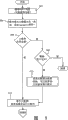
图5是一般表示用于处理RSS数据以允许小配件处理来自RSS源的RSS内容的示例步骤的流程图。5 is a flow diagram generally representing example steps for processing RSS data to allow a gadget to process RSS content from an RSS feed.
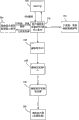
图6是一般表示一旦能够处理来自RSS源的RSS内容即由小配件执行的示例步骤的流程图。6 is a flow diagram generally representing example steps performed by a gadget once capable of processing RSS content from an RSS feed.
详细描述A detailed description
示例性操作环境Exemplary Operating Environment
图1示出了可在其上实现本发明的合适的计算系统环境100的示例。计算系统环境100仅为合适的计算环境的一个示例,并不旨在对本发明的使用范围或功能提出任何限制。也不应该把计算环境100解释为对示例性操作环境100中示出的任一组件或其组合有任何依赖性或要求。Figure 1 illustrates an example of a suitable
本发明可用于各种其它通用或专用计算系统环境或配置。适用于本发明的公知的计算系统、环境和/或配置的示例包括,但不限于:个人计算机、服务器计算机、手持式或膝上型设备、图形输入板设备、多处理器系统、基于微处理器的系统、机顶盒、可编程消费者电子产品、网络PC、小型机、大型机、包括上述系统或设备中的任一种的分布式计算机环境等。The invention is applicable to various other general purpose or special purpose computing system environments or configurations. Examples of well-known computing systems, environments, and/or configurations suitable for the present invention include, but are not limited to: personal computers, server computers, handheld or laptop devices, tablet devices, multiprocessor systems, microprocessor-based systems, set-top boxes, programmable consumer electronics, network PCs, minicomputers, mainframes, distributed computing environments including any of the foregoing systems or devices, and the like.
本发明可在诸如程序模块等由计算机执行的计算机可执行指令的通用上下文中描述。一般而言,程序模块包括执行特定的任务或实现特定的抽象数据类型的例程、程序、对象、组件、数据结构等等。本发明也可以在其中任务由通过通信网络链接的远程处理设备执行的分布式计算环境中实现。在分布式计算环境中,程序模块可以位于包括存储器存储设备在内的本地和/或远程计算机存储介质中。The invention may be described in the general context of computer-executable instructions, such as program modules, being executed by a computer. Generally, program modules include routines, programs, objects, components, data structures, etc. that perform particular tasks or implement particular abstract data types. The invention can also be practiced in distributed computing environments where tasks are performed by remote processing devices that are linked through a communications network. In a distributed computing environment, program modules may be located in both local and/or remote computer storage media including memory storage devices.
参考图1,用于实现本发明的示例性系统包括计算机110形式的通用计算设备。计算机110的组件可以包括但不限于:处理单元120、系统存储器130和将包括系统存储器在内的各种系统组件耦合至处理单元120的系统总线121。系统总线121可以是若干类型总线结构中的任一种,包括存储器总线或存储器控制器、外围总线以及使用各类总线体系结构中的任一种的局部总线。作为示例而非局限,这类体系结构包括工业标准体系结构(ISA)总线、微通道体系结构(MCA)总线、增强型ISA(EISA)总线、视频电子技术标准协会(VESA)局部总线、以及外围部件互连(PCI)总线,也称为小背板(Mezzanine)总线。Referring to FIG. 1 , an exemplary system for implementing the present invention includes a general-purpose computing device in the form of a
计算机110通常包括各种计算机可读介质。计算机可读介质可以是能由计算机110访问的任何可用介质,而且包含易失性和非易失性介质以及可移动、不可移动介质。作为示例,而非限制,计算机可读介质可以包括计算机存储介质和通信介质。计算机存储介质包括易失性和非易失性、可移动和不可移动介质,它们以用于存储诸如计算机可读指令、数据结构、程序模块或其它数据这样的信息的任何方法或技术来实现。计算机存储介质包括,但不限于,RAM、ROM、EEPROM、闪存或其它存储器技术、CD-ROM、数字多功能盘(DVD)或其它光盘存储、磁带盒、磁带、磁盘存储或其它磁性存储设备、或能用于存储所需信息且可以由计算机100访问的任何其它介质。通信介质通常以诸如载波或其它传输机制等已调制数据信号来体现计算机可读指令、数据结构、程序模块或其它数据,且包含任何信息传递介质。术语“已调制数据信号”指的是这样一种信号,其一个或多个特征以在信号中编码信息的方式被设定或更改。作为示例,而非限制,通信介质包括有线介质,诸如有线网络或直接线连接,以及无线介质,诸如声学、RF、红外线和其它无线介质。以上的任何组合也应包括在计算机可读介质的范围之内。
系统存储器130包括易失性和/或非易失性存储器形式的计算机存储介质,如只读存储器(ROM)131和随机存取存储器(RAM)132。基本输入/输出系统133(BIOS)包含有助于诸如启动时在计算机110中元件之间传递信息的基本例程,它通常被存储在ROM 131中。RAM 132通常包含处理单元120可以立即访问和/或目前正在操作的数据和/或程序模块。作为示例而非局限,图1示出了操作系统134、应用程序135、其它程序模块136和程序数据137。
计算机110也可以包括其它可移动/不可移动、易失性/非易失性的计算机存储介质。仅作为示例,图1示出了从不可移动、非易失性磁介质中读取或向其写入的硬盘驱动器141,从可移动、非易失性磁盘152中读取或向其写入的磁盘驱动器151,以及从诸如CD ROM或其它光学介质等可移动、非易失性光盘156中读取或向其写入的光盘驱动器155。可以在示例性操作环境中使用的其它可移动/不可移动、易失性/非易失性计算机存储介质包括,但不限于,盒式磁带、闪存卡、数字多功能盘、数字录像带、固态RAM、固态ROM等。硬盘驱动器141通常由不可移动存储器接口,诸如接口140连接至系统总线121,磁盘驱动器151和光盘驱动器155通常由可移动存储器接口,诸如接口150连接至系统总线121。
以上描述并在图1中示出的驱动器及其相关联的计算机存储介质为计算机110提供了对计算机可读指令、数据结构、程序模块和其它数据的存储。例如在图1中,硬盘驱动器141被示为存储操作系统144、应用程序145、其它程序模块146和程序数据147。注意,这些组件可以与操作系统134、应用程序135、其它程序模块136和程序数据137相同或不同。操作系统144、应用程序145、其它程序模块146和程序数据147在这里被标注了不同的标号是为了说明至少它们是不同的副本。用户可通过诸如图形输入板或者电子数字化仪164、话筒163、键盘162和定点设备161(通常指的是鼠标、跟踪球或触摸垫)的输入设备向计算机110输入命令和信息。图1中未示出的其它输入设备可以包括操纵杆、游戏手柄、圆盘式卫星天线、扫描仪等。这些和其它输入设备通常由耦合至系统总线的用户输入接口160连接至处理单元120,但也可以由其它接口或总线结构,诸如并行端口、游戏端口或通用串行总线(USB)连接。监视器191或其它类型的显示设备也经由诸如视频接口190等接口连接到系统总线121。监视器191也可以与触摸屏面板等集成。注意到监视器和/或触摸屏面板可以在物理上耦合至其中包括计算设备110的外壳,诸如在图形输入板型个人计算机中。此外,诸如计算设备110的计算机也可以包括其它外围输出设备,诸如扬声器195和打印机196,它们可以通过输出外围接口194等连接。The drives and their associated computer storage media, described above and illustrated in FIG. 1 , provide storage of computer readable instructions, data structures, program modules and other data for
计算机110可使用至一个或多个远程计算机,诸如远程计算机180的逻辑连接在网络化环境中操作。远程计算机180可以是个人计算机、服务器、路由器、网络PC、对等设备或其它常见网络节点,且通常包括以上相对于计算机110描述的许多或所有元件,尽管在图1中只示出存储器存储设备181。图1中所示的逻辑连接包括局域网(LAN)171和广域网(WAN)173,但也可以包括其它网络。这样的联网环境在办公室、企业范围计算机网络、内联网和因特网中是常见的。
当在LAN联网环境中使用时,计算机110通过网络接口或适配器170连接至LAN 171。当在WAN联网环境中使用时,计算机110通常包括调制解调器172或用于通过诸如因特网等WAN 173建立通信的其它装置。调制解调器172可以是内置或外置的,它可以通过用户输入接口160或其它合适的机制连接至系统总线121。在网络化环境中,相对于计算机110所描述的程序模块或其部分可以存储在远程存储器存储设备中。作为示例而非局限,图1示出远程应用程序185驻留在存储器设备181上。可以理解所示的网络连接是示例性的,也可以使用在计算机之间建立通信链路的其他手段。When used in a LAN networking environment, the
辅助显示子系统199可经由用户接口160连接以允许诸如程序内容、系统状态和事件通知的数据被提供给用户,即使计算机系统的主要部分处于低功率状态中。辅助显示子系统199可连接至调制解调器172和/或网络接口170以允许在主处理单元120处于低功率状态中时在这些系统之间进行通信。
分布式内容的辅助显示小配件Secondary display widget for distributed content
此处所述的技术的各个方面针对获取要在耦合至主机计算机系统的辅助显示设备上显示的内容并对其进行处理。一般,此处的大部分描述是针对其中内容从使用RSS(真正简单的整合)技术的远程数据源获得的特定示例,其中RSS技术一般指的是使用一个或多个基于XML的文件格式的web整合/内容分发。RSS一般由新闻网站和web日志(博客)使用以分发其内容,但是也可用于其他用途,包括推销、隐错报告或涉及周期性更新或发布的任何其他活动。Various aspects of the techniques described herein are directed to acquiring and processing content for display on a secondary display device coupled to a host computer system. In general, much of the description here is directed to specific examples where content is obtained from remote sources using RSS (Really Simple Syndication) technology, which generally refers to web content using one or more XML-based file formats. Integration/Content Distribution. RSS is commonly used by news sites and web logs (blogs) to distribute their content, but can be used for other purposes as well, including promotions, bug reports, or any other activity involving periodic updates or publications.
RSS技术允许因特网用户向网站,通常是频繁改变内容的网站订阅(通常没有成本)RSS订阅源。一般,每一这样的站点按需提供数据以分发,其中数据包括内容以及某些元数据,通常包括对其他内容的链接。该数据作为XML文件被递送给订户,该数据在此处被称为RSS数据或RSS订阅源,但在其他上下文中或者可被称为web订阅源、RSS流或RSS频道(channel)。RSS数据可包括附连的多媒体文件。RSS technology allows Internet users to subscribe (usually at no cost) to an RSS feed to a website, usually a website whose content changes frequently. Typically, each such site provides data for distribution on demand, where the data includes content as well as some metadata, often including links to other content. This data is delivered to the subscriber as an XML file, which is referred to herein as RSS data or RSS feed, but may alternatively be referred to as a web feed, RSS stream or RSS channel in other contexts. RSS data may include attached multimedia files.
然而,如可以理解,此处所述的技术不限于任何特定的数据源和/或数据格式,或甚至RSS技术,并且是可用于本地以及远程数据。而且,此处所述的技术不限于任何特定类型的辅助设备,而是包括常规上不被认为是“计算机系统”耦合设备的设备,诸如电视机、收音机、录音机/录像机、电话、单独的计算机、移动通信设备、带有致动器的第二显示屏、手表、墙壁(例如,厨房)显示器、显示屏、数码相框、钟、无线电、媒体播放器、嵌入在消费者电子设备的主显示器内或使用该主显示器的设备、汽车、运输或其他车辆单元、键盘或主计算机系统的其他输入设备、寻呼机、个人数字助理等。因此,本发明不限于此处所述的示例、结构或功能;相反,此处所述的任何示例、结构或功能不是限定性的,且本发明大体上可用于以各种方式向计算和内容处理提供好处和优点。However, as can be appreciated, the techniques described herein are not limited to any particular data source and/or data format, or even RSS technology, and are applicable to local as well as remote data. Furthermore, the technology described here is not limited to any particular type of auxiliary equipment, but includes equipment not conventionally considered "computer system" coupled equipment, such as televisions, radios, audio/video recorders, telephones, stand-alone computer , mobile communication device, secondary display with actuator, watch, wall (e.g., kitchen) display, display screen, digital photo frame, clock, radio, media player, embedded in the primary display of a consumer electronics device, or Devices using the primary display, automotive, transportation or other vehicle units, keyboards or other input devices of the primary computer system, pagers, personal digital assistants, etc. Accordingly, the present invention is not limited to the examples, structures, or functions described herein; rather, any examples, structures, or functions described herein are not limiting, and the present invention in general can be used to contribute to computing and content in various ways. Processing offers benefits and advantages.
转向图2,示出了包括各种组件的示例框图,主机计算机系统210(诸如基于图1中的个人计算机110的系统)诸如经由因特网214从RSS源212接收数据。注意,数据也还可经由某种其他手段获取,诸如经由LAN或其他WAN连接,或甚至本地数据源,诸如下载至文件/高速缓存/缓冲器。Turning to FIG. 2 , an example block diagram including various components is shown, a host computer system 210 (such as a system based on
如下所述,来自RSS源212的数据在RSS小配件216处接收。一般,小配件216包括运行在主机计算机系统上的向辅助显示平台注册以向一个或多个辅助显示设备发送数据的程序代码;可从控制面板启用或禁用小配件。Data from
小配件216处理接收到的数据供辅助设备220进行内容消费(一般为显示)。也如下所述,该处理包括处理伴随RSS订阅源的元数据222。至此,RSS小配件216包括元数据处理器机制230或以其他方式与其相关联。如RSS/辅助转换器232所表示,处理也可包括将RSS内容224转换成辅助显示设备220(例如,图1的辅助显示子系统199的一部分)可处理的格式。一个这样的格式被称为简单内容格式(SCF),它包括辅助显示设备应能够显示的基本数据格式,并包括用于传输菜单、图片或通知数据的格式化。
为便于内容接收,RSS数据的源212在元数据222中提供关于内容224的信息。更具体地,代替需要主机计算机系统上处理其内容的专用小配件,RSS小配件216上的元数据处理器230可处理来自各个源的数据,并基于元数据区分数据。结果,该技术允许内容提供者将要辅助显示的内容向广泛的、潜在无限的受众整合发布,而无需每一接收方设备上的专用软件。To facilitate content reception, feed 212 of RSS data provides information about
更具体地,作为数据分发/管理的特例,代替仅递送内容,内容提供者可使用RSS来分发辅助显示专用数据和创建新的小配件。例如,当用户向RSS订阅源订阅该特殊辅助显示数据有效载荷时,RSS小配件216可利用该数据创建新的、单独的辅助显示小配件,诸如图2的“小配件A”240。一旦创建了新的小配件240之后,RSS小配件担当管理新近创建的“虚拟”小配件并管理来自订阅的RSS订阅源的设备数据的“主控”小配件(本质上,RSS小配件执行数据管理,而给出单独的小配件的外观)。注意,尽管在图2中未明确示出,但小配件A或者可接收RSS内容和/或将所接收的RSS内容转换成辅助设备兼容格式,诸如简单内容格式。小配件216因此管理、定制来自源的RSS递送内容并将其分发给(或通过)用户的主机计算机系统以及用户的辅助显示设备。More specifically, as a special case of data distribution/management, instead of delivering content only, content providers can use RSS to distribute auxiliary display-specific data and create new widgets. For example, when a user subscribes to the RSS feed for this special auxiliary display data payload,
在一个示例实现中,RSS数据首次从诸如源212的站点下载时,对应于元数据222的信息被写入主机系统的注册表234(例如,假定用户和/或策略允许这样的动作)。注意,在注册表234中已经有其相应信息的任何元数据不需要被重写到后续订阅源;相反,注册表234中的现有信息可用于确定关于相关联的RSS内容224的辅助设备显示如何处理该内容。之后,可向辅助显示设备220提供某种形式的内容224(例如,经由所创建的小配件240)。结果,从用户的角度,发现以及安装新的小配件与订阅RSS订阅源一样简单。In one example implementation, when RSS data is first downloaded from a site such as
为完整性,图2示出了可用于辅助显示平台的其他小配件,包括“小配件B”241;注意,小配件B 241分别用于补充程序242和/或相关API 243。小配件B 241使用补充API 243通过API 246来与辅助设备220的驱动器248通信。For completeness, Figure 2 shows other widgets available for the secondary display platform, including "Widget B" 241; note that
也为了完整性,图2示出给定系统210可配备有一个或多个驱动器249和辅助设备250。尽管其他驱动器249和辅助设备250经由虚线框示出以指示它们是可任选的,但应注意到辅助设备220也是可任选的,因为用户可仅具有例如一个其他辅助设备250以及第三方驱动器249。由辅助设备220和/或虚线框250所表示的一个这样的设备的示例包括增强显示器,一般包括运行SPOT(智能个人对象技术)固件和增强呈现代码的辅助显示设备,本质上是运行任何其他定制固件但能够担当辅助显示器的辅助显示设备的基本显示器,例如手机,以及单(或二、三等)行显示器,包括能够显示非常有限的数目(例如,文本的一行或两行)且基本上不包含图像支持的辅助显示器。其他类型的显示器包括附连显示器/边缘显示器/盖上(lid-top)显示器,一般指的是物理上位于笔记本个人计算机等的主体上例如位于盖子上方一类的辅助显示设备;包括不是物理上位于主机计算机上且通过有线或无线网络协议与主机计算机通信的辅助显示器的远程显示器;以及“虚拟”辅助显示器,一般包括在计算机系统的主显示器的一些区域内展示辅助内容的显示器。因此,尽管图2中所表示的辅助设备220和259被示为外部的,且耦合至主机计算机系统210(可能选择性耦合),但可以理解这样的设备可以或可以不在物理上附连主机计算机系统210,或以其他方式与主机计算机系统210可分离。Also for completeness, FIG. 2 shows that a given
注意到,大多数RSS内容是HTML格式的文本,然而RSS 2.0允许经由<enclosure(附件)>标签嵌入其他数据,其中<enclosure>包括<item(项目)>的可任选的子元素。RSS附件类型由标准MIME类型定义。例如,辅助显示平台的一个实现支持使用增强显示器上的简单内容格式,例如jpg、gif以及bmp格式的图像。对更丰富的媒体场景,可启用其他媒体,例如对音频启用mpeg/wma,对视频启用wmv/avi/mpeg。Note that most RSS content is HTML-formatted text, however RSS 2.0 allows embedding of additional data via the <enclosure (attachment)> tag, where <enclosure> includes optional child elements of <item (item)>. RSS attachment types are defined by standard MIME types. For example, one implementation of the auxiliary display platform supports the use of simple content formats on the enhanced display, such as images in jpg, gif, and bmp formats. For richer media scenarios, other media can be enabled, such as mpeg/wma for audio and wmv/avi/mpeg for video.
在RSS相关标记中,<enclosure>具有多个属性,诸如指定附件位于何处的URL、指定其大小(例如,按字节)的长度(length)以及指定其类型,如标准MIME类型的类型(type)。URL可以是http URL,例如:In an RSS-related tag, <enclosure> has several attributes, such as a URL specifying where the attachment is located, a length specifying its size (e.g., in bytes), and specifying its type, such as a standard MIME type ( type). The URL can be an http URL, for example:
<enclosure<enclosure
url=“http://www.scripting.com/mp3s/weatherReportSuite.mp3”url="http://www.scripting.com/mp3s/weatherReportSuite.mp3"
length=″12216320″type=″audio/mpeg″/>length="12216320"type="audio/mpeg"/>
RSS小配件可请求RSS平台在附件属于已识别类型时下载附件。一旦附件被下载之后,小配件直接从RSS平台获取所附的文件。或者,RSS小配件可通过使用附件标记中的URL属性自己来下载附件。The RSS widget may request the RSS platform to download the attachment if the attachment is of a recognized type. Once the attachment is downloaded, the widget fetches the attached file directly from the RSS platform. Alternatively, the RSS widget can download the attachment itself by using the URL attribute in the attachment tag.
因为对RSS有效载荷的类型没有限制,内容提供者和软件厂商能够在web上向用户的辅助显示设备分发基本上任何类型的数据,包括诸如股票报价和音乐的各种内容。也可递送丰富的媒体,使得诸如自动显示来自用户订阅的博客的图片的无线数码相框或自动下载用户最喜欢的播客和新闻的媒体播放器等场景或其他场景可能。Because there is no restriction on the type of RSS payload, content providers and software vendors can distribute essentially any type of data over the web to users' secondary display devices, including a variety of content such as stock quotes and music. Rich media can also be delivered, enabling scenarios such as a wireless digital photo frame that automatically displays pictures from blogs the user subscribes to, or a media player that automatically downloads the user's favorite podcasts and news, or others.
其他示例场景针对但不限于:博客/RSS消费(阅读)、博客/RSS创建(写博客)、数码相框、播客、安装使用RSS的新的小配件、以及工具栏(sidebar)集成。例如,考虑在上下班时收听音频播放器的一个用户。除了听音乐之外,他可使用其音频播放器或其他媒体设备在对接计算机(docked)时下载播客、照片和RSS订阅源。他可在上下班时消费这些内容。该设备自动挑选他经由RSS平台订阅源列表订阅的正确的订阅源,例如他可订阅来自其朋友的子集的照片和/或可能订阅从移动电话拍摄的较短的视频剪辑,且RSS小配件在设备与计算设备对接时将自动同步该内容。Other example scenarios are directed to, but are not limited to: blog/RSS consumption (reading), blog/RSS creation (blogging), digital photo frames, podcasts, installing new gadgets that use RSS, and sidebar integration. For example, consider a user who listens to an audio player while commuting. In addition to listening to music, he can use his audio player or other media device to download podcasts, photos, and RSS feeds while the computer is docked. He can consume the content while commuting. The device automatically picks the correct feed that he subscribes to via the RSS platform feed list, e.g. he may subscribe to photos from a subset of his friends and/or possibly to a shorter video clip taken from a mobile phone, and the RSS gadget This content will be automatically synced when the device is docked with the computing device.
对于写日志,移动设备(例如智能电话)可具有用于阅读以及用于拇指键盘(thumbpad)输入的小面板。以上消费示例使用,但此外,用户还可例如通过拍照、写到博客和/或经由用户的博客机制对内容记录博客来创建内容。使用RSS附件,用户可创建直接分发给某一组的照片订阅源以及伴随/说明文本。对不具有无线能力的设备,博客内容可被高速缓存用于当与计算设备对接时与RSS引擎同步。For journaling, a mobile device such as a smartphone may have a small panel for reading as well as for thumbpad entry. The consumption example above uses, but in addition, users can also create content, eg, by taking pictures, blogging, and/or blogging the content via the user's blogging mechanism. Using RSS attachments, users can create photo feeds and accompanying/explanatory text for direct distribution to a group. For devices without wireless capabilities, blog content may be cached for synchronization with the RSS engine when docked with the computing device.
数码相框也接收其订阅的内容。例如,辅助显示数码相框可被无线连接至个人计算机,并加载经由RSS订阅源挑选照片的自动安装的RSS小配件,计算机将照片推送给相框。相框可自动显示最新的照片,并周期性地循环以使其保持新鲜。The digital photo frame also receives content from its subscription. For example, an auxiliary display digital photo frame can be wirelessly connected to a personal computer and loaded with an automatically installed RSS widget that picks photos via an RSS feed, and the computer pushes the photos to the frame. The photo frame automatically displays the latest photos and cycles through them periodically to keep them fresh.
播客是可经由RSS播客订阅源促进的另一场景。为此,用户可将播客配置成对设备同步,例如使用来自辅助显示器的控制面板小程序的辅助小配件属性页。当用户订阅订阅源时,辅助小配件从RSS订阅源剥取所封装的播客。每当设备与计算设备对接时,小配件将播客同步到该设备上供稍后收听。Podcasting is another scenario that can be facilitated via RSS podcast feeds. To do this, the user can configure the podcast to sync to the device, for example using the secondary gadget properties page from the secondary display's control panel applet. When a user subscribes to a feed, the auxiliary gadget strips the packaged podcast from the RSS feed. Whenever the device is docked with the computing device, the gadget syncs the podcast to the device for later listening.
如此处所使用的,可使用RSS安装新的小配件。例如,以下参考图4所述,诸如zzzmovies.com的站点可供应RSS电影信息订阅源。当用户订阅该订阅源时,辅助RSS小配件216检测到zzzmovies.com分发允许辅助显示器显示来自该订阅源的电影信息,包括排片表、出票情况以及评论的特殊电影信息小配件。代替要求用户单独下载并安装这样的小配件,RSS小配件216(或另一实体,诸如控制面板小程序)自动安装新的电影信息小配件,通常遵循提示和/或其他策略检查。RSS小配件216将电影小配件配置成仅在所支持的设备上起作用,例如电影小配件将不会显示在单行键盘辅助显示器上,但将显示在手机屏幕上。As used herein, new widgets may be installed using RSS. For example, as described below with reference to FIG. 4, a site such as zzzmovies.com may offer an RSS movie information feed. When a user subscribes to the feed, the
以此方式,RSS小配件216使得用户能够使用辅助显示平台在便携式设备上消费(和创建)各种媒体格式的内容,包括音频(例如,播客)、照片、文本(例如,博客)等。结果,用户能够经由其辅助显示设备浏览所订阅的订阅源、收听播客、查看照片/视频以及执行类似的任务。注意到,这可用消费/创建内容的单机RSS设备或通过使用诸如音频播放器的现有便携式设备消费多媒体内容来完成。In this way, the
转向更具体的示例实现,如图3中一般地表示,RSS平台350向RSS小配件(用于辅助显示器)216提供RSS数据。在一个具体示例实现中,分发媒介(例如,诸如基于Internet Explorer的浏览器的浏览器)执行设置操作,该操作注册RSS订阅源平台使得应用程序或用户无需这样做。RSS订阅源平台也可被实现为位于动态链接库中的一个或多个Win32 COM API,例如msfeeds.dll。Turning to a more specific example implementation, as generally represented in FIG. 3 ,
RSS订阅源可被安排成一组文件夹和文件夹内的订阅源,诸如存储浏览器计算机收藏夹的安排。注意到文件夹和订阅源次序一般不在系统订阅源列表中维护,在一个示例实现(如浏览器收藏夹和站点)中,操作系统/浏览器组件以及RSS资源管理器程序共享一组注册表项来存储文件夹和订阅源在文件夹内的次序。RSS小配件216读取文件夹和订阅源次序的这些注册表项;且系统订阅源列表中用于存储订阅次序的示例注册表项为HKEY_CURRENT_USER\Software\Microsoft\Windows\CurrentVersion\Explorer\MenuOrder\Feeds。RSS feeds can be arranged into a set of folders and feeds within folders, such as an arrangement that stores browser computer favorites. Note that folder and feed order is generally not maintained in system feed lists, in one example implementation (such as browser favorites and sites), operating system/browser components and the RSS Explorer program share a set of registry keys to store the order of folders and feeds within the folder. The
注意,用户可具有多个辅助设备,因此可能期望特定的订阅源被映射到特定的设备。例如,由于给定设备的限制,该设备可支持的订阅源可能仅是用户全部订阅的订阅源的子集,例如某些能够使用简单内容格式的设备可能具有当试图呈现RSS订阅源时将产生不良用户体验的形式因素,且用户应能够为这样的设备关闭订阅源。此外,为可用性原因,用户可能不想要在单个设备上消费所有订阅源,因为用户可能具有数百个订阅源。而且对于特定媒体类型,诸如照片,用户可仅选择消费来自特定源的订阅源。Note that a user may have multiple secondary devices and thus may desire certain feeds to be mapped to specific devices. For example, due to the limitations of a given device, the feeds that the device can support may only be a subset of the feeds to which the user is fully subscribed, for example some devices capable of using simple content formats may have an error when attempting to render an RSS feed. form factor for poor user experience, and users should be able to turn off feeds for such devices. Also, for usability reasons, a user may not want to consume all feeds on a single device, since a user may have hundreds of feeds. Also for certain media types, such as photos, the user may choose to only consume feeds from certain sources.
为了使得用户能够将特定订阅源与特定辅助设备相关联,如图3中所示,可创建订阅源-对-设备(订阅源:设备)表352或类似的数据结构。为了创建订阅源-对-设备结构352,诸如经由辅助显示器的控制面板小程序354的属性页,在一个实现中,平台包括新的属性,例如AUX_CAPABILITY_DEVICE_NAME(辅助能力设备名),以对每一设备的能力定义。除了DEVICE_NAME(设备名)以外,可定义以下设备能力:To enable a user to associate a particular feed with a particular auxiliary device, as shown in FIG. 3 , a feed-to-device (feed:device) table 352 or similar data structure may be created. To create a feed-to-
RSS小配件216可使用ISideShowCapabilitiesCollection(附带显示能力集合)接口来枚举用户系统上当前连接的辅助设备的子集。当小配件查询每一设备的属性时,小配件然后可获取设备的昵称(从以上DEVICE_NAME),并例如在控制面板小程序354的用户界面中呈现允许用户将特定订阅源与特定设备相关联的表等。
例如:For example:

一般而言,小配件将进行以下步骤:In general, a widget will go through the following steps:
1.令来自IAuxiliaryDisplayContent(辅助显示器内容)::DifferentiateContent(不同内容)的BOOL*out_pfDifferentiateContent为真1. Let BOOL * out_pfDifferentiateContent from IAuxiliaryDisplayContent(auxiliary display content)::DifferentiateContent(different content) be true
2.当其调用ISideShowContentManager(附带显示内容管理器)::Add()(添加)以添加新内容,平台将为每一设备回调来自ISideShowContent(附带显示内容)接口的的单独的GetContent()(取内容)。2. When it calls ISideShowContentManager (attached display content manager)::Add() (add) to add new content, the platform will call back a separate GetContent() (taken from the ISideShowContent (attached display content) interface) for each device content).
3.然后对于每一GetContent()调用,小配件可使用IAuxiliaryDisplayCapabilities(辅助设备能力)指针以查询每一设备的昵称。将设备名与内部存储的订阅源-对-设备映射组合,仅返回基于特定设备的订阅源。3. Then for each GetContent() call, the gadget can use the IAuxiliaryDisplayCapabilities pointer to query each device's nickname. Combines a device name with an internally stored feed-to-device mapping to return only feeds based on a specific device.
RSS小配件216可使ISideShowContent::GetContent()回调适度失败,以仅返回基于设备的特定订阅源。注意到,这是回调,因为小配件调用ISideShowContentManager::Add,而内容管理器在其ISideShowContent接口上回调小配件。The
一旦,以某种方式形成关联,例如,默认经由控制面板小程序的用户界面修改,RSS小配件216存储该订阅源-对-设备的结构(例如,图)352,使得小配件稍后能够访问存储352以确定要向哪一设备推送哪一订阅源。例如,一个用户可能想要在音乐播放器设备上看/听所有音乐相关订阅源,但想要在手机上看到紧急工作订阅源。注意,RSS小配件216(或由此创建的虚拟小配件)可为每一设备定制简单内容格式内容以考虑不同的订阅源。因为用户可在任何时间从辅助显示器的控制面板小程序354更新每一关联,RSS小配件216也相应地更新其存储的结构352。Once, associated in some way, for example, by default via the user interface modification of the Control Panel applet, the
RSS小配件216可默认地被安装为辅助显示清单的一部分。当没有附连任何辅助显示设备时,小配件可被禁用,无需在辅助显示器的控制面板小程序354中示出。在该示例实现中,RSS小配件216无需向RSS平台添加任何UI,因为配置可通过辅助显示器控制面板小程序354的用户界面得到处理。The
在一个示例实现中,为了写入辅助显示小配件的所需注册表信息,可采用以下轮廓结构:In an example implementation, to write the required registry information for a secondary display widget, the following outline structure can be used:
a.RSSa.RSS
i.FriendlyName(昵称)=“

ii.OnlineOnly(仅在线)=DWORD:0x0ii.OnlineOnly (online only) = DWORD: 0x0
iii.CacheAlgorithm(高速缓存算法)=DWORD:0x0iii. CacheAlgorithm (cache algorithm) = DWORD: 0x0
iv.Icon(图标)=表示RSS小配件的图标iv.Icon (icon) = icon representing the RSS widget
v.Endpoints(端点):例如简单内容格式端点或可任选RSS端点v.Endpoints (endpoints): such as simple content format endpoints or optional RSS endpoints
如上所述,RSS小配件216也向辅助平台注册(例如,用于与API/组件246、356和358通信),尽管注意到小配件216无需被安装在不具有辅助显示器的主机计算机系统上或不具有支持辅助显示器的操作系统的主机计算机系统上。RSS小配件216可被默认安装,且可由设备制造商或其他实体定制。As noted above,
注意到,首次找到能使用RSS的设备时,RSS小配件216可例如经由辅助显示器的控制面板小程序354显示对话等以关于在辅助设备上使用RSS以及如何与RSS小配件216交互对用户进行训练。还注意到,对于小配件的行为,小配件可被配置成如果满足准则,例如RSS平台启用并正在运行、它仅在适当的SKU(操作系统的库存单元)上运行以及能够支持RSS的一个或多个辅助显示设备当前安装在主机计算机上,则一旦用户登录即启动。在一个实现中,RSS小配件216在不满足这些准则中的每一个时将不被启用。Note that when an RSS-capable device is first found, the
一旦被启用,RSS小配件216一般默认地在后台中运行,通常RSS平台是持续运行的;如果RSS、辅助平台因任何原因不存在,则RSS小配件216将自行禁用。可使RSS小配件216察觉到网络连通性,例如使得当没有辅助设备连接时,小配件可挂起数据传送。Once enabled, the
对于基本平台、小配件和设备交互,可采用以下轮廓结构(尽管可以理解,不必按照所呈现的次序):For basic platform, gadget, and device interactions, the following outline structure can be used (although understandably not necessarily in the order presented):
1.利用操作系统的RSS平台1. Use the RSS platform of the operating system
a.加载RSS平台(例如DLL)a. Load the RSS platform (eg DLL)
2.向所支持的辅助设备分发用户所订阅的RSS2. Distribute the RSS subscribed by the user to the supported auxiliary devices
a.从RSS订阅源API获取系统订阅源列表(所订阅的订阅源)a. Obtain the system feed list (subscribed feed) from the RSS feed API
b.注册以下通知(RSS通知是递归的,因此订阅根文件夹将获得某种改变)b. Register for the following notifications (RSS notifications are recursive, so subscribing to the root folder will get some sort of change)
i.IFeedFolder.SubscriptionNotifications(添加/删除/改变新订阅源等)i.IFeedFolder.SubscriptionNotifications (add/delete/change new feeds, etc.)
ii.IFeedFolder.FeedNotifications(添加新项目)ii.IFeedFolder.FeedNotifications (add new items)
c.针对改变监视订阅源列表c. Monitor feed list for changes
i.高速缓存最后与设备同步的订阅源的状态,使得当设备回到在线时知道如何更新设备上的订阅源状态i. Cache the state of the feed that was last synced with the device so that when the device comes back online it knows how to update the feed state on the device
ii.用订阅源状态改变更新辅助显示器的控制面板小程序属性页。ii. Update the control panel applet property page for the secondary display with the feed status change.
d.默认地,小配件可将所有订阅源分发给所有有RSS能力的设备d. By default, the widget can distribute all feeds to all RSS capable devices
i.然而,用户具有配置特定RSS订阅源以分发给特定辅助设备,即决定给定订阅源应前往哪一或哪些设备的选择。i. However, the user has the option of configuring a particular RSS feed for distribution to a particular assistive device, ie deciding which device or devices a given feed should go to.
ii.基于来自辅助显示器的控制面板小程序属性的用户改变存储并更新订阅源对设备的映射。ii. Store and update the feed to device mapping based on user changes from the control panel applet properties of the secondary display.
iii.该映射基于按-用户进行维护,使得用户与一组设备相关联。iii. The mapping is maintained on a per-user basis, so that users are associated with a set of devices.
e.令RSS同步引擎自动下载附件e. Let the RSS synchronization engine automatically download attachments
(IFeed.DownloadEnclosuresAutomatically)(IFeed. Download Enclosures Automatically)
3.启用辅助设备来呈现用户经由RSS平台订阅的RSS订阅源3. Enable assistive devices to present RSS feeds subscribed to by the user via the RSS platform
a.将RSS内容代码转换成简单内容格式a. Convert RSS content code into simple content format
i.输入:RSS数据i. Input: RSS data
ii.输出:简单内容格式数据ii. Output: simple content format data
b.适度忽略例如由于设备限制而不能由特定辅助设备呈现的格式和内容。例如,这可当RSS订阅源包含不能被呈现的特殊格式HTML(表等)而发生。b. Moderately ignore formats and content that cannot be rendered by a particular assistive device, eg due to device limitations. For example, this can happen when an RSS feed contains specially formatted HTML (tables, etc.) that cannot be rendered.
c.媒体附件c. Media Attachment
i.从RSS平台获取特定RSS附件(例如,照片)并用辅助设备可处理的格式重新封装二进制数据i. Fetch specific RSS attachments (e.g., photos) from the RSS platform and repackage the binary data in a format that the assistive device can process
ii.以简单内容格式相应地标记需要设备上特殊处理的特定媒体附件(照片、视频等)ii. Mark specific media attachments (photos, videos, etc.) that require special handling on the device accordingly in a simple content format
iii.将数据(例如,二进制数据)发送给设备iii. Send data (eg, binary data) to the device
d.基于辅助设备能力,小配件确定特定的订阅源是否应被传递给设备。例如,如果设备是数码相框且订阅了特定的博客,则小配件将仅呈现嵌入的照片而不呈现相关联的文本或其他媒体。d. Based on the assisting device capabilities, the gadget determines whether a particular feed should be delivered to the device. For example, if the device is a digital photo frame and is subscribed to a particular blog, the gadget will only render the embedded photo and not the associated text or other media.
4.多用户4. Multi-user
a.当前活动的用户的订阅源仅被同步到与该用户相关联的设备。这防止某些状况,诸如第一用户向第二用户的设备(例如,音频播放器)发送订阅源,从而因为第一用户登录而擦去了第二用户存储的订阅源。a. The currently active user's feed is only synced to devices associated with that user. This prevents certain situations, such as a first user sending a feed to a second user's device (eg, an audio player), thereby wiping the second user's stored feed because the first user logged in.
b.快速用户切换b. Fast User Switching
i.仅当设备与所有登录的用户相关联时应用,例如膝上型计算机。i. Applies only if the device is associated with all logged in users, eg laptop.
ii.来自老用户的数据从设备上移除,而活动用户的数据被同步到设备。ii. The data from the old user is removed from the device, while the active user's data is synced to the device.
iii.在以上音频播放器场景中,音频播放器仅应与第二设备相关联,借此当第一用户登录时,小配件识别该设备不是第一用户的设备,且将不会擦去音频播放器的数据。iii. In the audio player scenario above, the audio player should only be associated with the second device, whereby when the first user logs in, the gadget recognizes that the device is not the first user's device and will not wipe the audio Player data.
iv.辅助设备交互iv. Assistive Device Interaction
c.导航——运行用户导航并浏览订阅源。c. Navigation - Run user navigation and browse feeds.
i.保存与浏览器组件中所示相同的文件夹和订阅源次序以维护一致的用户体验i. Preserve the same order of folders and feeds as shown in the browser component to maintain a consistent user experience
ii.显示订阅源文件夹ii. Show feed folder
1.用户可导航进出文件夹1. Users can navigate in and out of folders
iii.显示文件夹内的订阅源标题iii. Display feed titles within folders
1.如果可能,使用来自订阅源的图标。1. If possible, use icons from feeds.
2.用新的更新标记订阅源2. Mark the feed with new updates
3.在最后的括号里显示订阅源的未读项目数目3. Display the number of unread items in the feed in the final brackets
iv.显示订阅源中的项目iv. Display items in the feed
d.在选择订阅源之后d. After selecting a feed
i.文本i. Text
1.浏览视图1. Browse view
a.示出项目以及相关联的<title(标题)>以及<description(描述)>的第一行a. The first line showing the item and associated <title (title)> and <description (description)>
b.提供用于示出所有项目或仅未读项目的上下文菜单选项。b. Provide a context menu option to show all items or only unread items.
c.默认:仅显示未读项目c. Default: only show unread items
d.当选择特定订阅源项目时,打开项目d. When a specific feed item is selected, open the item
2.详细视图2. Detailed view
a.详细显示项目内容。a. Display item content in detail.
b.提供用于导航文本的控件。b. Provide controls for navigating the text.
ii.如果项目具有附件:ii. If the item has attachments:
1.使用MIME标签确定媒体类型1. Use MIME tags to determine the media type
2.浏览视图2. Browse view
a.用适当图标指定带有媒体附件的项目a. Designate items with media attachments with appropriate icons
3.详细视图——确定呈现附件的适当格式3. Detail view - determine the appropriate format for rendering attachments
a.图像a. Image
i.显示适当的元数据——字幕等i. Display appropriate metadata - subtitles, etc.
ii.缩放图像以在尺度、分辨率和色深度方面适合设备细节ii. Scale images to fit device details in terms of scale, resolution and color depth
iii.提供用于下一/前一图像的导航控件iii. Provide navigation controls for next/previous image
b.音频b.Audio
i.用音频图标显示项目i. Display items with audio icons
ii.显示适当的元数据——艺术家、长度等。ii. Display appropriate metadata - artist, length, etc.
iii.提供播放音频的控件(需要与固件集iii. Provide controls for playing audio (needs to be integrated with firmware
成)——快进/倒带/暂停/播放into) - fast forward/rewind/pause/play
iv.提供导航控件——下一/前一项目iv. Provide navigation controls - next/previous item
c.视频c. Video
i.用视频图标显示项目i. Show items with video icons
ii.显示适当的元数据——制作者等ii. Show appropriate metadata - creator etc.
iii.提供播放视频的控件(需要与固件集成)——快进/倒带/暂停/播放iii. Provide controls for playing video (requires integration with firmware) - fast forward/rewind/pause/play
iv.提供导航控件——下一/前一项目iv. Provide navigation controls - next/previous item
e.一旦订阅源被打开,即更新UI中的已读/未读状态。e. Once the feed is opened, update the read/unread status in the UI.
5.处理来自设备的事件5. Handle events from the device
a.内容遗失a. Loss of content
i.小配件向该平台查询设备遗失的内容i. Gadgets query the platform for the missing content of the device
ii.如果从平台删除了订阅源或项目,则小配件在设备上相应地移除所删除的内容ii. If a feed or item is deleted from the platform, the widget removes the deleted content accordingly on the device
b.设备添加b. Device addition
i.确定该设备是否已与当前用户相关联。i. Determine if the device is already associated with the current user.
1.如果否,则向用户查询他们是否想在该设备上启用RSS1. If no, query the user if they want to enable RSS on that device
ii.用经改变的数据(如果有)更新设备ii. Update the device with changed data (if any)
c.设备移除c. Device removal
i.不做任何事i. do nothing
为了允许如回放播客、音乐和视频的场景,辅助设备驱动器框架358可与嵌入的设备直接接口以利用其硬件和固件。对辅助设备与本机设备集成(例如,播客场景),辅助设备驱动器可将内容直接写到设备存储器,并访问提供回放控制的固件功能。To allow scenarios such as playback of podcasts, music, and video, the auxiliary
从源提供者角度,辅助显示平台和RSS小配件允许软件厂商或内容发布者利用RSS来对用户分发和安装新的小配件。而且,它也增加了附带显示小配件的使用场景,如内容提供者和软件厂商现在除了从个人计算机本地提供以外,可从web将内容提供给附带显示设备。这可包括指定并注册新的MIME类型,包括用于简单内容格式的MIME类型(例如,内容类型:文本/x-简单_内容格式)以及用于辅助安装数据的MIME类型(例如,内容类型:应用程序/小配件)。From a source provider perspective, the Auxiliary Display Platform and RSS widgets allow software vendors or content publishers to utilize RSS to distribute and install new widgets to users. Moreover, it also increases the usage scenarios of attached display gadgets, as content providers and software vendors can now provide content from the web to attached display devices in addition to providing locally from personal computers. This may include specifying and registering new MIME types, including MIME types for simple content formats (e.g., content-type:text/x-simple_content-format) and MIME types for auxiliary installation data (e.g., content-type: app/gadget).
为方便于RSS实体可分发新的小配件的方式,即经由RSS订阅源,实体仅需发布附有小配件安装元数据的RSS订阅源。例如,小配件附件可包含新的小配件的标题、图标、所支持的端点等。之后,RSS同步引擎(例如,RSS平台350的一部分)自动下载简单内容格式和/或小配件附件。To facilitate the manner in which an RSS entity may distribute new widgets, ie, via an RSS feed, the entity need only publish the RSS feed with widget installation metadata attached. For example, a widget attachment may contain the new widget's title, icon, supported endpoints, etc. Thereafter, the RSS sync engine (eg, part of the RSS platform 350 ) automatically downloads the Simple Content Format and/or widget attachments.
从构建和分发新的使用RSS的辅助小配件的角度,考虑为诸如拥有站点zzzmovies.com的公司工作的软件开发员。为了发布允许用户基于每一用户的位置看见实时电影信息的“电影”小配件,开发员可使用附件将特殊数据(例如,关于电影小配件的元数据和简单内容格式的实时信息)嵌入在zzzmovies.com的RSS订阅源中。当被接收时,RSS小配件解析该简单内容格式数据,并在用户首次订阅该订阅源时安装电影小配件。From the perspective of building and distributing new auxiliary gadgets that use RSS, consider a software developer working for a company such as owns the site zzzmovies.com. To publish a "Movies" widget that allows users to see real-time movie information based on each user's location, developers can use attachments to embed special data (e.g., metadata about movie widgets and real-time information in a simple content format) in the zzzmovies .com RSS feed. When received, the RSS widget parses the Simple Content Format data and installs the Movie widget when the user first subscribes to the feed.
图4表示一个这样的说明性示例,例如其中诸如基于手机的辅助显示设备460的辅助设备呈现来自站点zzzmovies.com即经由其web服务器462获取的电影列表。在此示例中,考虑用户已经在手机460上经由RSS小配件216阅读了来自各个网站(服务器)464的各个RSS订阅源(X、Y、Z)。这种之前已订阅订阅源X、Y和Z的状态,在图4中一般由标有带圈数字一(1)的箭头表示。FIG. 4 shows one such illustrative example, in which an auxiliary device such as a mobile phone-based auxiliary display device 460 presents a list of movies from the site zzzmovies.com, ie via its web server 462, for example. In this example, consider that a user has read various RSS feeds (X, Y, Z) from various websites (servers) 464 on cell phone 460 via
在该示例中,之后某时,诸如当浏览zzzmovies.com的网站时,用户订阅包含来自zzzmovies.com服务器462的zzz电影小配件附件470的新的订阅源W。在这样的订阅请求之后,通知RSS小配件216(例如,经由RSS平台350),且该小配件看见<gadget(小配件)>附件。一般,这在图4中由标有带圈数字二(2)的箭头表示。作为响应,RSS小配件216将安装zzz电影小配件470(标有带圈数字三(3)的箭头)。注意,可能需要某些策略和/或用户批准以允许安装。In this example, at some later time, such as while browsing the zzzmovies.com website, the user subscribes to a new feed W containing zzzmovies widget add-ons 470 from the zzzmovies.com server 462 . After such a subscription request, the
在安装之后,zzz电影小配件470可被加载并运行,且将使用RSS平台350订阅其自己的订阅源W,并在此刻之后可独立于RSS小配件216操作,如在图4中一般由标有带圈数字四(4)的箭头表示。经由订阅源W,zzz电影小配件470可通过附件接收简单内容格式的原始内容,但如上所述,或者也可包括将RSS订阅源内容转换成设备可理解的格式(诸如针对设备能力的最佳匹配订阅源内容的内容)的转换码。After installation, the zzzmovie widget 470 can be loaded and running, and will subscribe to its own feed W using the
一种替换的实现可使RSS小配件216订阅W订阅源,并管理zzz电影小配件的数据。在此实现中,RSS小配件216有效地运行zzz电影小配件。An alternate implementation could have the
注意到,一旦安装,就无需每次安装zzz电影小配件470,相反每当在RSS订阅源中检测到相同的元数据就可使用其在注册表中已经具有相应信息的元数据中的安装数据来加载并运行(即,实例化)小配件的实例。例如,如果小配件216识别出之前已将元数据处理成注册表中的安装数据,则安装数据可从注册表中读回(或当前元数据可被转换成等效的安装数据)以启用(例如,加载和运行)相应小配件的实例以处理内容。Note that once installed, there is no need to install the zzz movie gadget 470 each time, instead whenever the same metadata is detected in the RSS feed it can use the installation data in the metadata which already has the corresponding information in the registry to load and run (ie, instantiate) an instance of the widget. For example, if
如可容易理解地,尽管RSS小配件把处理RSS内容替代为为该目的而启用另一小配件是可行的,但图4中所例示的模型因多个原因而有优势,包括对新小配件470的管理是从RSS小配件216去耦,即使它们均使用RSS作为数据递送机制。该模型防止在两个地方重复显示订阅源W,例如一次在手机的RSS菜单中,一次在其自己的电影菜单中,并具有其他好处。新小配件470也可处理其自己的与主机服务器的数据交互,借此RSS小配件216无需具有逻辑、转换码等来处理从W订阅源接收的附加(非小配件相关)附件。注意到,如果RSS小配件216因任何原因而停止运行,电影小配件470也将停止。As can be readily understood, while it is feasible for an RSS widget to replace processing RSS content with enabling another widget for that purpose, the model illustrated in FIG. 4 is advantageous for a number of reasons, including Management of 470 is decoupled from
图5示出可由RSS小配件216采用的示例逻辑,其中当用户首次订阅订阅源并接收包含适当元数据例如<gadget>附件的订阅源时(如经由步骤504和506评估)(步骤502),向用户给出安装用于该订阅源内容的小配件的选项。例如,步骤508表示正在评估的策略和/或用户同意,例如RSS小配件216的用户界面可向用户提示以指示该订阅源具有可用于该设备的某个[X]小配件,并询问用户是否想启用它。如果否,则该过程结束。注意到在步骤506,如果小配件已被安装,例如这不是用户首次订阅RSS订阅源,或者用户以某种其他方式安装了该小配件,则该过程前进至步骤512以使用已经安装的小配件。5 illustrates example logic that may be employed by the
如果用户/策略允许启用小配件,例如在步骤508用户同意,则在步骤510,RSS小配件继而安装新的小配件。在一个实现中,这可包括在<gadget>附件中写入基于元数据的必需的注册表信息,打开辅助显示器的控制面板小程序并提示用户将小配件分配给适当的设备,并将该特定的订阅源与新近安装的小配件相关联。这确保适当格式的后续附件(例如,简单内容格式的附件)仅被递送给该小配件。可向辅助平台注册新的小配件。在安装完成之后,过程继续至步骤512。If the user/policy allows enabling the widget, eg, the user agrees at
在步骤512,RSS小配件216加载并运行所安装的小配件。注意到,尽管小配件216自己可处理订阅源内容,在一个实现中,RSS小配件216不订阅该订阅源,不管理该订阅源,相反令新近加载并运行的小配件接收订阅源内容。除其他原因以外,这还有助于避免用户混淆,例如,这里该订阅源在用户设备RSS菜单上示出,同时在设备上显示单独的小配件。此外,所加载的小配件将处理其自己与其主机web服务器的交互、数据请求等,当它独立于RSS小配件216(该小配件216处理来自可能众多数据源的RSS订阅源)时是有利的。At
如在图6中一般表示,经由图5加载和运行的(之前或新近安装的)小配件具有从RSS平台获取其特定订阅源(步骤618)以及处理与主机web服务器的数据交互(步骤624和628)的责任。与辅助平台的通信一般是在步骤620执行辅助设备理解格式所需的任何内容格式转换之后,将从RSS数据提取的任何内容(例如,简单内容格式附件中)发送给RSS平台(步骤622)。As generally represented in FIG. 6, a (previously or newly installed) widget loaded and running via FIG. 628) responsibility. Communication with the secondary platform is typically by sending any content extracted from the RSS data (e.g., in simple content format attachments) to the RSS platform (step 622) after
以下信息针对某些示例的用户界面概念,使用页面来向用户演示信息,其中示例RSS字段通过将其封装在<brackets(括号)>中来示出:The following information uses pages to present information to users for some example user interface concepts, where example RSS fields are shown by enclosing them in <brackets (brackets)>:
尽管本发明易于作出各种修改和替换构造,其某些说明性实施例在附图中示出并在上面被详细地描述。然而应当了解,这不旨在将本发明限于所公开的特定形式,而是相反地,旨在覆盖落入本发明的精神和范围之内的所有修改、替换构造和等效方案。While the invention is susceptible to various modifications and alternative constructions, certain illustrative embodiments thereof are shown in the drawings and described above in detail. It should be understood, however, that there is no intention to limit the invention to the particular forms disclosed, but on the contrary, the intention is to cover all modifications, alternative constructions, and equivalents falling within the spirit and scope of the invention.
Claims (20)
Applications Claiming Priority (3)
| Application Number | Priority Date | Filing Date | Title |
|---|---|---|---|
| US11/367,997 | 2006-03-03 | ||
| US11/367,997 US20070226734A1 (en) | 2006-03-03 | 2006-03-03 | Auxiliary display gadget for distributed content |
| PCT/US2007/002093 WO2007100429A1 (en) | 2006-03-03 | 2007-01-23 | Auxiliary display gadget for distributed content |
Publications (2)
| Publication Number | Publication Date |
|---|---|
| CN101395572A true CN101395572A (en) | 2009-03-25 |
| CN101395572B CN101395572B (en) | 2013-05-01 |
Family
ID=38459368
Family Applications (1)
| Application Number | Title | Priority Date | Filing Date |
|---|---|---|---|
| CN2007800074874A Expired - Fee Related CN101395572B (en) | 2006-03-03 | 2007-01-23 | Secondary display widgets for distributed content |
Country Status (17)
| Country | Link |
|---|---|
| US (1) | US20070226734A1 (en) |
| EP (1) | EP1997002A4 (en) |
| JP (1) | JP2009528647A (en) |
| KR (1) | KR20080107397A (en) |
| CN (1) | CN101395572B (en) |
| AU (1) | AU2007221434B2 (en) |
| BR (1) | BRPI0708398A2 (en) |
| CA (1) | CA2642938A1 (en) |
| IL (1) | IL193301A0 (en) |
| MX (1) | MX2008011060A (en) |
| MY (1) | MY150206A (en) |
| NO (1) | NO20083693L (en) |
| RU (1) | RU2433452C2 (en) |
| SG (1) | SG170056A1 (en) |
| TW (1) | TW200802089A (en) |
| WO (1) | WO2007100429A1 (en) |
| ZA (1) | ZA200806928B (en) |
Cited By (1)
| Publication number | Priority date | Publication date | Assignee | Title |
|---|---|---|---|---|
| CN111770182A (en) * | 2020-06-30 | 2020-10-13 | 北京百度网讯科技有限公司 | Data push method and device |
Families Citing this family (40)
| Publication number | Priority date | Publication date | Assignee | Title |
|---|---|---|---|---|
| US8424041B2 (en) | 2005-09-07 | 2013-04-16 | Sony Corporation | Method and system for downloading content to a content downloader |
| WO2007119275A1 (en) * | 2006-03-20 | 2007-10-25 | Brother Kogyo Kabushiki Kaisha | Display device and storage medium with display program stored therein |
| US7783990B2 (en) * | 2006-05-05 | 2010-08-24 | Microsoft Corporation | Association of display elements |
| US20070288985A1 (en) * | 2006-06-13 | 2007-12-13 | Candelore Brant L | Method and system for uploading content to a target device |
| US20070299850A1 (en) * | 2006-06-23 | 2007-12-27 | Ziqiang Qian | Voice/Text Memo Synchronized Digital Photo Readers/Frames and Data Accessing Methods |
| JP5141118B2 (en) * | 2006-08-21 | 2013-02-13 | 株式会社リコー | Metadata customization method |
| US7904418B2 (en) * | 2006-11-14 | 2011-03-08 | Microsoft Corporation | On-demand incremental update of data structures using edit list |
| US9417758B2 (en) * | 2006-11-21 | 2016-08-16 | Daniel E. Tsai | AD-HOC web content player |
| US20080256514A1 (en) * | 2007-04-10 | 2008-10-16 | Microsoft Corporation | Side-by-side application manifests for single-purpose applications |
| US9336325B2 (en) | 2007-05-02 | 2016-05-10 | Htc Corporation | Automatic download of contact-related web data feeds |
| US8316308B2 (en) * | 2007-06-08 | 2012-11-20 | Google Inc. | Adaptive user interface for multi-source systems |
| US20090172140A1 (en) * | 2007-12-27 | 2009-07-02 | Richard John Pilkington | Network device |
| TW200928772A (en) * | 2007-12-27 | 2009-07-01 | Wistron Neweb Corp | Method and apparatus of multimedia data sharing for a multimedia processing device |
| US8365202B2 (en) * | 2008-02-04 | 2013-01-29 | Microsoft Corporation | Framework for computing device with auxiliary display |
| US9448814B2 (en) * | 2008-02-19 | 2016-09-20 | Google Inc. | Bridge system for auxiliary display devices |
| US8032918B2 (en) | 2008-04-01 | 2011-10-04 | Microsoft Corporation | Application gadgets |
| US8504611B2 (en) * | 2008-05-30 | 2013-08-06 | Centurylink Intellectual Property Llc | System and method for digital picture frame syndication |
| US20100058333A1 (en) * | 2008-06-11 | 2010-03-04 | Harold Lee Peterson | Method, system and computer-readable medium for personalized gadget configuration |
| US20100011314A1 (en) * | 2008-07-09 | 2010-01-14 | Harold Lee Peterson | System, method and computer-readable medium for providing a sidebar functionality as an aspect of a gadget |
| US9141696B2 (en) * | 2008-08-07 | 2015-09-22 | Brother Kogyo Kabushiki Kaisha | Communication device |
| JP4702439B2 (en) * | 2008-11-27 | 2011-06-15 | ブラザー工業株式会社 | Content display system |
| US8386415B2 (en) * | 2008-12-01 | 2013-02-26 | At&T Mobility Ii Llc | Portable wireless enabled digital media frame |
| US8316091B2 (en) * | 2008-12-01 | 2012-11-20 | At&T Mobility Ii Llc | Content management for wireless digital media frames |
| US8510333B2 (en) * | 2008-12-31 | 2013-08-13 | Verizon Patent And Licensing Inc. | Methods, systems, and apparatus for developing widgets |
| US8384564B2 (en) * | 2009-03-06 | 2013-02-26 | Navteq B.V. | Method and system for adding gadgets to a traffic report |
| US9026641B2 (en) * | 2009-05-20 | 2015-05-05 | Genieo Innovation Ltd. | System and method for management of information streams delivered for use by a user |
| US8589793B2 (en) | 2009-06-04 | 2013-11-19 | Hti Ip, L.L.C. | Removable modular universal telematics services engine for an audio-visual control unit in a vehicle |
| KR101498078B1 (en) * | 2009-09-02 | 2015-03-03 | 엘지전자 주식회사 | Mobile terminal and digital photo frame and method for controlling the same |
| US8726147B1 (en) * | 2010-03-12 | 2014-05-13 | Symantec Corporation | Systems and methods for restoring web parts in content management systems |
| US8457118B2 (en) | 2010-05-17 | 2013-06-04 | Google Inc. | Decentralized system and method for voice and video sessions |
| JP2011248768A (en) * | 2010-05-28 | 2011-12-08 | Sony Corp | Information processing apparatus, information processing system, and program |
| US20120089687A1 (en) * | 2010-10-11 | 2012-04-12 | Eyal Katz | Online messaging system and methods of using thereof |
| US9268367B2 (en) | 2010-10-13 | 2016-02-23 | Microsoft Technology Licensing, Llc | Use of low-power display on device |
| US9760894B2 (en) * | 2011-04-29 | 2017-09-12 | Blackberry Limited | Providing syndicated content associated with a link in received data |
| JP5183770B2 (en) * | 2011-05-20 | 2013-04-17 | キヤノン株式会社 | Document management program and information processing apparatus |
| US9424439B2 (en) | 2011-09-12 | 2016-08-23 | Microsoft Technology Licensing, Llc | Secure data synchronization |
| US10194239B2 (en) * | 2012-11-06 | 2019-01-29 | Nokia Technologies Oy | Multi-resolution audio signals |
| US10033087B2 (en) * | 2013-01-23 | 2018-07-24 | Dell Products L.P. | Articulating information handling system housing wireless network antennae supporting beamforming |
| JP5484645B1 (en) * | 2013-07-08 | 2014-05-07 | 楽天株式会社 | Server, terminal, service method, and program |
| CN109769127A (en) * | 2019-01-25 | 2019-05-17 | 北京字节跳动网络技术有限公司 | Audio video synchronization dissemination method, device, electronic equipment and readable storage medium storing program for executing |
Family Cites Families (30)
| Publication number | Priority date | Publication date | Assignee | Title |
|---|---|---|---|---|
| US5862325A (en) * | 1996-02-29 | 1999-01-19 | Intermind Corporation | Computer-based communication system and method using metadata defining a control structure |
| JPH09325883A (en) * | 1996-06-06 | 1997-12-16 | Canon Inc | Information processing apparatus and method, information processing system and control method thereof |
| FI103546B (en) * | 1996-09-16 | 1999-07-15 | Nokia Telecommunications Oy | Data service in a mobile telephone network |
| US6216152B1 (en) * | 1997-10-27 | 2001-04-10 | Sun Microsystems, Inc. | Method and apparatus for providing plug in media decoders |
| US6128621A (en) * | 1997-10-31 | 2000-10-03 | Oracle Corporation | Apparatus and method for pickling data |
| US6151624A (en) * | 1998-02-03 | 2000-11-21 | Realnames Corporation | Navigating network resources based on metadata |
| US6715126B1 (en) * | 1998-09-16 | 2004-03-30 | International Business Machines Corporation | Efficient streaming of synchronized web content from multiple sources |
| US6857124B1 (en) * | 1999-01-11 | 2005-02-15 | Eolas Technologies, Inc. | Method and system for hypermedia browser API simulation to enable use of browser plug-ins and applets as embedded widgets in script-language-based interactive programs |
| US6643652B2 (en) * | 2000-01-14 | 2003-11-04 | Saba Software, Inc. | Method and apparatus for managing data exchange among systems in a network |
| JP2005044351A (en) * | 2000-03-23 | 2005-02-17 | Fujitsu Ltd | Status display control device, electronic device, and storage medium |
| TWI266106B (en) * | 2002-08-09 | 2006-11-11 | Sanyo Electric Co | Display device with a plurality of display panels |
| EP1559086A1 (en) * | 2002-10-24 | 2005-08-03 | Immediad ApS | System for presenting and controlling information on a display device |
| US7487460B2 (en) * | 2003-03-21 | 2009-02-03 | Microsoft Corporation | Interface for presenting data representations in a screen-area inset |
| JP2005064770A (en) * | 2003-08-11 | 2005-03-10 | Ricoh Co Ltd | Information processing apparatus, authentication apparatus, external apparatus, certification information acquisition method, authentication method, function provision method, certification information acquisition program, authentication program, function provision program, and recording medium |
| US7911409B1 (en) * | 2003-10-07 | 2011-03-22 | Adobe Systems Incorporated | Independent views generated for multiple display devices by a software application |
| US7239877B2 (en) * | 2003-10-07 | 2007-07-03 | Accenture Global Services Gmbh | Mobile provisioning tool system |
| US7669177B2 (en) * | 2003-10-24 | 2010-02-23 | Microsoft Corporation | System and method for preference application installation and execution |
| US7668939B2 (en) * | 2003-12-19 | 2010-02-23 | Microsoft Corporation | Routing of resource information in a network |
| CN101228521B (en) * | 2004-03-15 | 2013-02-13 | 雅虎公司 | Systems and methods for subscribing user portal pages to syndicated feeds |
| US20050210514A1 (en) * | 2004-03-18 | 2005-09-22 | Kittlaus Dag A | System and method for passive viewing of media content and supplemental interaction capabilities |
| US7577771B2 (en) * | 2004-05-03 | 2009-08-18 | Microsoft Corporation | Caching data for offline display and navigation of auxiliary information |
| JP2006040259A (en) * | 2004-06-25 | 2006-02-09 | Fuji Photo Film Co Ltd | Communications terminal, server, playback control method and program |
| JP2006059032A (en) * | 2004-08-18 | 2006-03-02 | Business Online:Kk | Merchandise information providing device, method and program, and recording medium with the program recorded thereon |
| WO2006059493A1 (en) * | 2004-11-30 | 2006-06-08 | Nec Corporation | Information processing apparatus, device access control method, and device access control program |
| US7894535B2 (en) * | 2005-08-23 | 2011-02-22 | Sony Ericsson Mobile Communications Ab | Systems and methods for distributing and/or playing multicasted video signals in multiple display formats |
| US20070047719A1 (en) * | 2005-09-01 | 2007-03-01 | Vishal Dhawan | Voice application network platform |
| US7512569B2 (en) * | 2005-09-28 | 2009-03-31 | Microsoft Corporation | User defined components for content syndication |
| US7617190B2 (en) * | 2005-11-29 | 2009-11-10 | Microsoft Corporation | Data feeds for management systems |
| US7779427B2 (en) * | 2006-01-18 | 2010-08-17 | Microsoft Corporation | Automated application configuration using device-provided data |
| US8832574B2 (en) * | 2009-06-30 | 2014-09-09 | Nokia Corporation | Apparatus and associated methods |
-
2006
- 2006-03-03 US US11/367,997 patent/US20070226734A1/en not_active Abandoned
-
2007
- 2007-01-23 JP JP2008558266A patent/JP2009528647A/en active Pending
- 2007-01-23 SG SG201101485-9A patent/SG170056A1/en unknown
- 2007-01-23 BR BRPI0708398-0A patent/BRPI0708398A2/en not_active IP Right Cessation
- 2007-01-23 KR KR1020087021158A patent/KR20080107397A/en not_active Ceased
- 2007-01-23 CA CA002642938A patent/CA2642938A1/en not_active Abandoned
- 2007-01-23 AU AU2007221434A patent/AU2007221434B2/en not_active Ceased
- 2007-01-23 WO PCT/US2007/002093 patent/WO2007100429A1/en not_active Ceased
- 2007-01-23 MY MYPI20083019A patent/MY150206A/en unknown
- 2007-01-23 MX MX2008011060A patent/MX2008011060A/en not_active Application Discontinuation
- 2007-01-23 ZA ZA200806928A patent/ZA200806928B/en unknown
- 2007-01-23 RU RU2008135708/08A patent/RU2433452C2/en not_active IP Right Cessation
- 2007-01-23 EP EP07717022A patent/EP1997002A4/en not_active Withdrawn
- 2007-01-23 CN CN2007800074874A patent/CN101395572B/en not_active Expired - Fee Related
- 2007-01-24 TW TW096102699A patent/TW200802089A/en unknown
-
2008
- 2008-08-07 IL IL193301A patent/IL193301A0/en unknown
- 2008-08-27 NO NO20083693A patent/NO20083693L/en not_active Application Discontinuation
Cited By (2)
| Publication number | Priority date | Publication date | Assignee | Title |
|---|---|---|---|---|
| CN111770182A (en) * | 2020-06-30 | 2020-10-13 | 北京百度网讯科技有限公司 | Data push method and device |
| CN111770182B (en) * | 2020-06-30 | 2022-05-31 | 北京百度网讯科技有限公司 | Data pushing method and device |
Also Published As
| Publication number | Publication date |
|---|---|
| RU2008135708A (en) | 2010-03-10 |
| ZA200806928B (en) | 2009-10-28 |
| JP2009528647A (en) | 2009-08-06 |
| CA2642938A1 (en) | 2007-09-07 |
| SG170056A1 (en) | 2011-04-29 |
| RU2433452C2 (en) | 2011-11-10 |
| TW200802089A (en) | 2008-01-01 |
| AU2007221434A1 (en) | 2007-09-07 |
| EP1997002A1 (en) | 2008-12-03 |
| CN101395572B (en) | 2013-05-01 |
| MY150206A (en) | 2013-12-13 |
| MX2008011060A (en) | 2008-09-05 |
| WO2007100429A1 (en) | 2007-09-07 |
| AU2007221434B2 (en) | 2011-07-21 |
| NO20083693L (en) | 2008-10-03 |
| EP1997002A4 (en) | 2009-10-21 |
| KR20080107397A (en) | 2008-12-10 |
| US20070226734A1 (en) | 2007-09-27 |
| BRPI0708398A2 (en) | 2011-05-31 |
| IL193301A0 (en) | 2009-05-04 |
Similar Documents
| Publication | Publication Date | Title |
|---|---|---|
| AU2007221434B2 (en) | Auxiliary display gadget for distributed content | |
| US11601385B2 (en) | Conversion of text relating to media content and media extension apps | |
| US8572033B2 (en) | Computing environment configuration | |
| US9298747B2 (en) | Deployable, consistent, and extensible computing environment platform | |
| JP5075920B2 (en) | Web data usage platform | |
| EP3944641B1 (en) | Message extension app store | |
| US20140282371A1 (en) | Systems and methods for creating or updating an application using a pre-existing application | |
| CA2605120C (en) | Method and system for hosting and executing a component application | |
| US7509658B2 (en) | System and method for adaptable provisioning of generic application content | |
| US20090328025A1 (en) | Automatically managing versioning of mashup widgets | |
| US9037757B2 (en) | Device action service | |
| KR20060090168A (en) | Systems and methods comprising a secondary display platform having a set of interfaces for consistent program interaction with secondary computing devices | |
| KR20060086305A (en) | System and method for context-aware platform | |
| WO2020052337A1 (en) | Information processing method and apparatus, storage medium, and electronic device | |
| JP2008159068A (en) | Scaling and delivering distributed application | |
| US20050198336A1 (en) | Methods and apparatuses for automatic adaptation of different protocols | |
| MXPA06003109A (en) | System and method for dynamic content processing with extendable provisioning. | |
| US8381172B2 (en) | Method, apparatus, mobile terminal and computer program product for employing a form engine as a script engine |
Legal Events
| Date | Code | Title | Description |
|---|---|---|---|
| C06 | Publication | ||
| PB01 | Publication | ||
| C10 | Entry into substantive examination | ||
| SE01 | Entry into force of request for substantive examination | ||
| C14 | Grant of patent or utility model | ||
| GR01 | Patent grant | ||
| ASS | Succession or assignment of patent right |
Owner name: MICROSOFT TECHNOLOGY LICENSING LLC Free format text: FORMER OWNER: MICROSOFT CORP. Effective date: 20150428 |
|
| C41 | Transfer of patent application or patent right or utility model | ||
| TR01 | Transfer of patent right |
Effective date of registration: 20150428 Address after: Washington State Patentee after: Micro soft technique license Co., Ltd Address before: Washington State Patentee before: Microsoft Corp. |
|
| CF01 | Termination of patent right due to non-payment of annual fee |
Granted publication date: 20130501 Termination date: 20190123 |
|
| CF01 | Termination of patent right due to non-payment of annual fee |